Download PDF archive - Maximum PC
Transcript
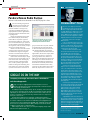
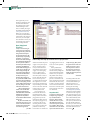
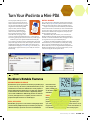
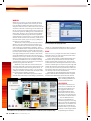
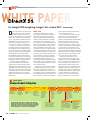
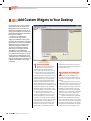
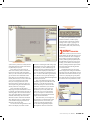
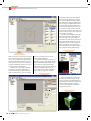
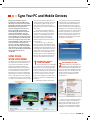
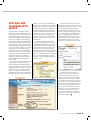
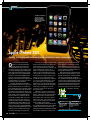
Turn Your iPod into a Mini-PDA For most people, an MP3 player serves a pretty narrow purpose: It plays music, maybe a video here or there if you’ve got a newer model, and might have a handful of applications. All in all, though, MP3 players are rarely treated as anything more than tiny, portable jukeboxes, which is a shame, because as gadgets they’ve got the potential for so much more. That’s why we’re going to show you how to install custom Rockbox firmware—to add support for new codecs, gapless playback, and even Doom on your MP3 player. Rockbox is open-source replacement firmware for MP3 players. It supports a wide range of players, including many (but not all) players from Apple, Archos, Cowon, iRiver, Olympus, SanDisk, and Toshiba. Before reading any further, check out the chart at the top of the Rockbox homepage (www.rockbox.org) to see whether your specific model is supported. If it’s not, you are sadly out of luck, for the time being. INSTALL ROCKBOX First, you’ll need to go to the Rockbox website and download the Rockbox utility (http://bit.ly/K8Eat), which includes an automatic installer tool that works with any of the supported MP3 players. Simply run the utility, and it will automatically detect that this is the first time it’s been run and ask if you want to install Rockbox on a new device. Plug your device into your computer, then select whichever drive letter has been assigned to it, and specify what model it is (image A). Click OK. The Rockbox utility will now allow you to customize your Rockbox installation. Generally, clicking Complete Installation is advisable, as it will also install the full set of extra plugins to allow you to get the most out of your hacked MP3 player. Sit tight for a bit while the installation completes, then select whichever theme you want installed on your MP3 player (image B). You’ve now got a hacked MP3 player. You can change your theme whenever you want to, using the Rockbox utility. Read the Rockbox documentation for your player to find out how you can customize it using the extensive options menu. A B OPTIONS Rockbox’s Notable Features ADVANCED MEDIA PLAYBACK Rockbox allows you to expand the functionality of your MP3 player box install includes in several core ways. For instance, with Rockbox firmware, an old a bunch of apps and iPod Photo (the one before the iPod Video) is actually capable of games, including clas- playing .mpeg video files. Many players can play music and video sics like Minesweeper in more formats and containers than are supported by default, and Sudoku. such as FLAC and Matroska. Additionally, Rockbox can add voice to menus, and supports voice recognition, to make it easier for DOOM people with impaired vision to use an MP3 player. Did we mention that you can play Doom? On a funky, old-school iPod? Sure, trying to APPS, APPS, APPS play Doom on a grayscale iPod screen is enough to make your With Rockbox, you get access to an enormous catalog of apps (most eyes commit ritual seppuku, but the novelty factor alone is sure to of them written by hobbyists) that you can load onto your player for keep you blasting demons with a click-wheel for a few minutes at added functionality or just to have some fun. The standard Rock least. Remember that nerd-cred thing? This is how you get it. www.maximumpc.com | OCT 09 | MAXIM MAXIMU XIMUM UM PC P | 33