Download PDF archive - Maximum PC

Transcript
NE TBOOK UPGR ADES
MOBLIN
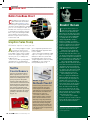
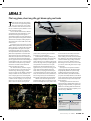
Moblin (http://moblin.org) is the new netbook operating
system originally developed by Intel and now part of the
Linux Foundation. Moblin’s main claim to fame is that it’s
designed to facilitate access to Web 2.0 sites such as Last.fm
and Twitter (with built-in controls right on the taskbar). The
OS uses a zone concept, which organizes apps in special areas based on typical uses making it easy to switch between
them quickly. During our test, it became clear that Moblin
is still in the development stage. We had lots of problems
getting the distro to work correctly—it occasionally crashed
when we started to the browser. Fortunately, crashes do not
freeze the entire system; you just see a pop-up dialog box
that asks you to send in feedback.
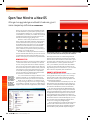
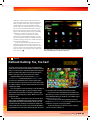
The interface is slick, but requires some adjustment for
Windows users. The toolbar drops down from the top of
the screen, and there are icons for browser, status update,
zones, applications, and IM. What is refreshing—and unusual—is that Moblin doesn’t really look like an OS, instead
it mimics the look and feel of a website. The extra features
for Twitter updates and IM are great, and there are plenty of
extra apps including calculators, schedulers, and a media
player. What Moblin lacks are full word processing apps—
and there’s no clear way to add one. (In our tests, the Moblin
library for adding apps did not let us install OpenOffice.)
As an early beta, Moblin has a raft of problems, including
a lack of USB key support (we tried about six of them) and
problems playing even basic MP3 files.
Moblin does not pretend to be a full-featured OS, but
that is also what makes it attractive to netbook owners who
crave speed and don’t mind sacrificing extra features. As
such, the customization options are few—you can change
wallpapers and themes, but Moblin lacks the depth of interface tweaks found in Windows or Ubuntu.
We’re optimistic about Moblin’s prospects, but the nascent OS needs work before we’ll be willing to permanently
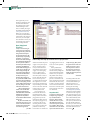
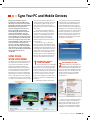
If you can maneuver your way around the KDE environment, you’ll like Slax
for its tiny footprint and speedy applications.
commit to it. Ubuntu Netbook Remix has the leg up, but we
do prefer the Moblin look and feel to the other contenders.
SLAX
Slax (www.slax.org) is a light Linux distro that’s suitable for
netbooks, but has a few weak spots that need to be ironed
out before it’s ready for prime time.
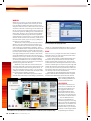
Visually, Slax looks like a traditional KDE-based Linux
distribution. For personalization, Slax includes a theme
manager and the ability to change colors, but most of the
work involved with customizing the UI falls to the end user,
who must wade through a lot of options to get the right look
and feel. We prefer the easier theme controls in Windows 7.
In many ways, the controls for personalization in Slax are a
throwback to older Linux distros; they’re just not as slick or
user-friendly as those in more modern distros.
Functionally, we were disappointed by the lack of native
support for PDF documents and Flash movie files, a sign that
the OS has fallen behind other options. However, there are
plenty of apps included with the
distro, including OpenOffice tools
and the Evolution mail client.
JOLICLOUD
Intel’s Moblin has lots of potential, but its streamlined interface is hindered by minor development bugs.
44 | MAXIM
MAXIMU
XIMUM
UM PC
P | OCT 09 | www.maximumpc.com
A final option is Jolicloud (www.
jolicloud.com), a hybrid OS from
the creator of the Netvibes.com
web aggregator. Based on the
Ubuntu Netbook Remix distro,
the OS offers some truly innovative features, but for the most part
works almost exactly like Ubuntu.
The idea behind Jolicloud
is that it is a consolidated and
streamlined gateway for accessing
open-source and web applications.
Jolicloud’s lets you install free software like Skype and Dropbox in
much the same way you would on
an iPhone or with Google Android.
Compatible apps are listed in a