1
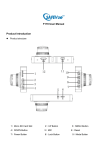
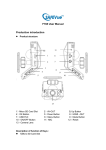
Connect external power source(Cigarette Lighter / 5v Battery) to supply
power;
13) Micro SD Card Slot
Insert and Eject SD Card (Please use Micro SD Card Class 4 and above)
Operation:
Resolution
Recommend resolution: 1080FHD 1920x1080
720P 1280x720
Loop Recording
Select the length of each video clip: 1min, 3mins, 5mins
No video gap between two video file, system will auto delete the earliest file
when SD card recorded full
EV
Exposure, Recommend to leave it default +0.0
Motion Detection
Off this setting for recording while normal driving
On this setting for Parking Recording
Audio
ON: Record audio while video recording
OFF: Record video only, no audio
Date Stamp
ON: Show date stamp on recorded video
OFF: No date stamp on recorded video
G-Sensor
Lock recording file when emergency break or car crash happened, system will
not delete this file automatically. (Note: Do not the G-sensor setting too
sensitive)
Button Sound
System button sound
Set Date/Time
Set system Date and Time(One time only, built-in battery will keep to setting)