1
IP Link® De vice Interface
Communication Sheet
lutr_13_4047_3.pke
Revision: 7/8/2010
This document provides additional assistance with wiring your Extron IP Link enabled product to your device.
Different components may require a different wiring scheme than those listed below.
For complete operating instructions, refer to the user's manual for the specific Extron IP Link enabled product or
the controlled device manufacturer supplied documentation.
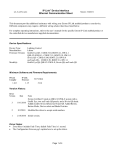
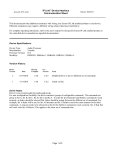
Device Specifications:
Device Type:
Manufacturer:
Firmware Version:
Model(s):
Lighting Control
Lutron
N/A
QSE-CI-NWK-E, Grafik Eye QS
Version History:
Driver
Version
Date
IP Link
Compiler
GC
Version
3
6/17/2010
1.4.0
3.0.3
Changed model name and added zones.
2
4/30/2010
1.4.0
3.0.3
Modified the driver to accept serial numbers
1
2/12/2010
1.4.0
3.0.2
Initial version.
Notes
Driver Notes:
• Zone Select includes Fade T ime; default Fade T ime is 1 second.
• Serial Digit will let the user put in the serial number of the device you will be trying to control. If the Serial ID
Number is 00AC123D
Serial Digit
Serial Digit
Serial Digit
Serial Digit
Serial Digit
Serial Digit
Serial Digit
Serial Digit
1 will be D
2 will be 3
3 will be 2
4 will be 1
5 will be C
6 will be A
7 will be 0
8 will be 0
Page 1 of 3
IP Link® De vice Interface
Communication Sheet
lutr_13_4047_3.pke
Revision: 7/8/2010
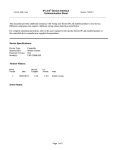
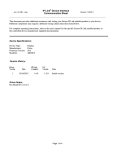
Control Commands & States:
1-59*
1-10 M in
20 Min
Select
Maste r Le vel (Ste p)**
Up
Down
Pre set Scene
1-16
Off
Se rial Digit 1
0-9
A-F
Se rial Digit 2
0-9
A-F
Se rial Digit 3
0-9
A-F
Se rial Digit 4
0-9
A-F
Se rial Digit 5
0-9
A-F
Se rial Digit 6
0-9
A-F
Se rial Digit 7
0-9
A-F
Se rial Digit 8
0-9
A-F
Zone Select
0-24
Le vel***
0-100
Fade
15 M in
Stop
Status Available:
Connection Status
Connected
Disconnected
Pre set Scene
1-16
Off
Le vel***
0-100
*This value is in seconds.
**This is used as a press and release and the stop is used for GC configuration purposes.
***These values are the light intensity control. In order to change level command, you must select zone
select and fade commands. Level Status will only show level of currently selected zone.
MLC62 Supported Commands:
Due to the complexity of the driver this driver will not include MLC 62 control.
Page 2 of 3
lutr_13_4047_3.pke
IP Link® De vice Interface
Communication Sheet
Revision: 7/8/2010
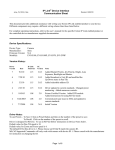
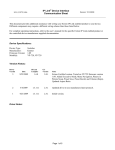
Cable and Adapter Requirements:
M/F RS-232 straight serial cable (Extron Electronics P/N 26-433-XX)
Notes for the Device:
Serial communication:
Port Type : RS-232
Baud Rate: 9600
Data Bits: 8
Parity: None
Stop Bits: 1
Flow Control: None
Pin Assignments Diagram:
Note: Captive screw connector may also be used as a serial connection.
General Notes:
Page 3 of 3