1
Location of Controls
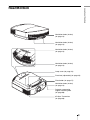
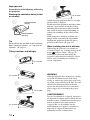
Front/Right Side
You can use the buttons on the control panel with the same names as those on the remote
control to operate the projector.
Control panel
Lens shift dials (1 page 21)
M/m/</, (arrow)/
(enter) button (1 page 45)
MENU button (1 page 45)
LAMP/COVER
indicator
(1 page 72) ON/STANDBY
indicator
(1 page 20)
INPUT button (1 page 31)
?/1 (ON/STANDBY) switch (1 page 21)
Note
Ventilation
While the ON/STANDBY indicator
holes (exhaust) lights in orange, the power saving
(1 page 14)
mode is on. (1 page 58)
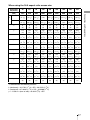
Remote control detector
Zoom lever (1 page 23)
Focus ring (1 page 23)
Ventilation holes (exhaust) (1 page 14)
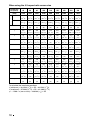
- AC IN socket
HDMI 1 connector (1 page 25)
HDMI 2 connector (1 page 25)
INPUT A connector (1 page 27)
Y PB/CB PR/CR connector (phono type) (1 page 26)
REMOTE connector
Connects to a computer,
etc. for remote control
3D SYNC connector (1 page 28)
IR IN connector
Inputs signals to control the projector
8