1
Easylo Serial Socket Interface User Manual
2.2.1
Installation
EasyCheck
Separately on the driver CD there is a setup for the utility “EasyCheck” which
can be used to perform basic tests and settings with any Gesytec LonWorks interface.
For usage of the Easylon Serial Socket Interface, there have to be made some
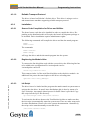
registry settings. There is a REG file, named “LPS.reg” on the Drivers & Documentation CD, which has to be imported into the registry. Afterwards the Serial
Socket Interface will be available as COM1-115200 for EasyCheck. The REG
file contains following settings:
Windows Registry Editor Version 5.00
[HKEY_LOCAL_MACHINE\SOFTWARE\LonWorks\DeviceDrivers\COM1-115200]
"device name"=" LPS/1:115200"
LPS/.../LPS_Manual-E, V1.3, May 2009
The EasyCheck utility opens the interface. It will then check and display the version of the driver. For a hardware communication test it will then send a “query
status” message to the local unit. „read memory“ command EasyCheck will
show if the device is running MIP-firmware. A correctly installed Easylon Interface card will send an appropriate response. Finally, EasyCheck will close the interface.
7/18