1
ttir <3
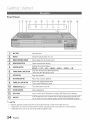
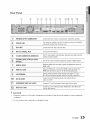
Front Panel
\
1
_}
_
DiSCTRAY
Insertdischere,
DISPLAY
Displaysthe playingstatus,time, etc,
REMOTECONTROL
SENSOR
[4"
Detectssignalsfromtheremotecontrol,
OPENICLOSE
BUTTON
Opensandclosesthe disctray,
FUNCTION
BUTTON
Switchesthe modeasfollows:
BDIDVD-, D. IN -, AUX-, ONLINE"-', NDMII --' NDMI2 --' FM
1 61
Goesbackto the previoustitle/chapter/track,
TUNING
DOWN
& SKIPBUTTON Tunesdownthe FMfrequencyband,
7'
STOP
BUTTON
Stopsdiscplayback,
8
PI.AY/PAUSE
BUTTON
Playsa discor pausesplayback,
9_
TUNING
UP& SKIPBUTTON
Goesto the nexttitle/chapter/track,
Tunesup the FMfrequencyband,
POWER
BUTTON
(_)
Turnsthe producton andoff,
111
VOLUME
CONTROL
Volumeadjustment,
1_
ASCINJACK
Usedto connect
theASCMicrophone
forsettingup MRC(MusicalRoomCalibration).
I13/
,_
USBPORT
A U% storagedevicecanbeconnected
hereandusedasstoragewhenconnected
toBDLIVE.it canalsobeusedfor softwareupgrades
andMP3/JPEG/DivX/MKV/MP4
playback.
1_}
NOTE
_ Seffwareupgradesusingthe USBPortmust be performedwith a USBmemoryflash stickonly.
_ A USBdevice consumingmore than500mA requiresa separatepower supplydevicefor normaloperation.
_ A USB HDDdevicecannot be used for BD Datastorage(BD-LIVE).
14'
English