1
Section 3 - Configuration
Maintenance
Admin
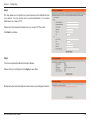
You may modify the name and administrator’s password of your camera, as well as add and manage the user accounts for accessing the
camera. You may also use this section to create the unique name and configure the OSD setting for your camera.
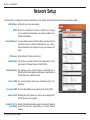
Admin Password
Setting: Set a new password for the administrator’s account.
Add User Account: Add new user account.
User Name: The user name for the new account.
Password: The password for the new account.
User List: All the existing user accounts will be displayed here.
You may delete accounts includes in the list, but please
reserve at least one as guest.
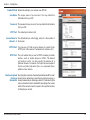
Camera Name: Create a unique name for your camera that will be added
to the file name prefix when creating a snapshot or a
video clip.
Enable OSD: Select this option to enable the On-Screen Display feature
for your camera.
Label: Enter a label for the camera.
Show Time: Select this option to enable the time-stamp display on
the video screen.
D-Link DCS-6616 User Manual
51