1
Serial Communication (SCOM) Interface
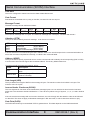
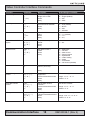
Acknowledge 60% Brightness:
0x06
0xFF
0x42
0x52
0x54
0x01
0x11
0x99
0x66
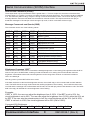
Negative Acknowledge 40% Brightness:
0x15
0xFF
0x42
0x52
0x54
0x01
0x02
0x66
0x99
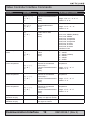
Buzzer Control “BZZ”
This command is sent to the unit to control buzzer on/off if there is a buzzer present. LEN = one data byte.
0x00
Turn the buzzer off.
0xFF
Turn the buzzer on.
If the data checksum is valid, the unit will reply to this command with an ACK attention code. The DATA field will
indicate the buzzer state. If an invalid data checksum was received and the message was not broadcast and RS-485,
the unit will reply with a NAK attention code and the current control setting.
Examples:
Command Buzzer disable:
0x07
0xFF
0x42
0x5A
0x5A
0x01
0x02
0x00
0xFF
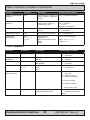
Display State “DST”
This command is sent to the unit to control the unit on/off or query the on/off state of the unit.
LEN = one data byte.
0x00
Turn the unit off
0xFF
0x3F
Turn the unit on
“?” - Query the state of the unit. The returned DATA field will indicate the state.
0x00 = Unit is off. 0xFF = Unit is on.
If the data checksum is valid, the unit will reply to this command with an ACK attention code. The DATA field will
indicate the unit sate. If an invalid data checksum was received and the message was not broadcast and RS-485, the
unit will reply with a NAK attention code and the current state.
Examples:
Query Display State:
0x07
0xFF
0x44
0x54
0x01
0x0D
0x3F
0xC0
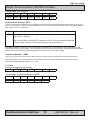
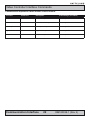
Acknowledge Display state, unit is on:
0x06
0xFF
0x44
0x53
0x54
0x01
0x0E
0xFF
0x00
Acknowledge Display state, unit is off:
0x06
0xFF
0x44
0x53
0x54
0x01
0x0E
0x00
0xFF
Communication Interface
10
IND100084-12
0x53
INB100038-1 (Rev 2)