1
Software Functions
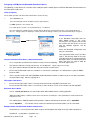
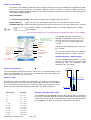
The software functions within AquaSync is broken down into 4 separate parts:
Connect Download
Logging
Config
Each is selected by
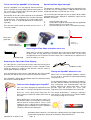
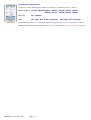
Connect -
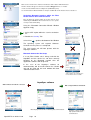
Network Status
Indicators for Fibre
optic and Bluetooth
connections.
Enables connection to a single AquaBat instrument and selection of
the COM port for blue tooth data communications.
Signal strength indicator between the AquaBAT and Header unit.
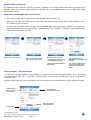
Download - Set Reference point for water level
Shows real-time water level and temperature
Download status - number records available within AquaBAT
Shows file into which data is being stored during the download
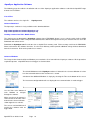
Logging -
Re-synchronise clocks, Clear AquaBAT memory and restart logging.
Config -
Logger Name, Location, Sampling Period, Alarm high level
Alarm low level, Alarm logging period.
Software Selection Tabs
Download
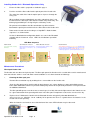
1.
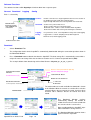
Select “Download” Tab
The configuration details for the AquaBAT is automatically downloaded during the connection operation shown in
the Download Window .
2.
Press “Download” button to obtain data from the AquaBAT. The data storage file is automatically created with a
unique file name consisting of the date and time of creation and s is Comma Separated format (CSV).
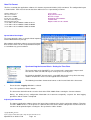
The example below shows data being archived into filename “blog2008_01_26_20_31_46.txt”
Reference Point (User Defined - Optional)
Communications Status
Indicators
Real-time Temperature (Deg C)
“Start Download” Button
Real-time Water Level (m)
Number Records Transferred
Data Download Filename
% of Records
Downloaded
Comma Separated Variable data file
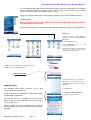
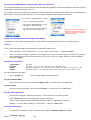
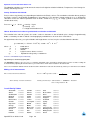
The total number of records available for download is shown
in this Window. While the records are saved to file a real-time
counter indicates the percentage of records that have been
archived. 100 % indicates that the all records have been
stored.
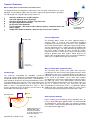
Download Tab
The
Download
Window
updates
automatically showing the number of
records that have been archived and with
the current real-time sensor value.
Data recording within the AquaBAT stops
while information is being retrieved.
The Download Windows opposite show a
typical retrieval in operation.
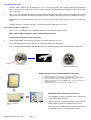
AquaBAT User Guide V1.04
Page 19