1
Tree section
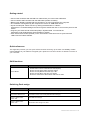
The device’s bpm display has a range from 50 to 250 bpm. Values below or above that are displayed
with the limiting values of the device, being 50 to 250. The accuracy is 0.1 bpm. In case the display is
not correct, the refresh function on the device should be activated (Tree and Fav button).
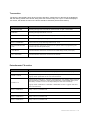
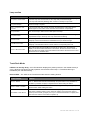
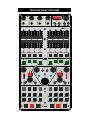
Control element
Function
Fav / Tree Encoder
Browsing through tree or favorite list. Push encoder ! open / close folder
Fav Button
Browsing through favorite list, LED is lit
Tree Button
Browsing through tree (track collection, playlists, itunes etc.), LED is lit
SHIFT + Fav Button
Link function for group switching Fader Group ! on
SHIFT + Tree Button
Link function for group switching Fader Group ! off
Select Deck Button A/B
+ C/D
Push both buttons more than one second ! System mode for programming the
external midi controlls (DIN output)
Select Deck Button C/D
+ Tree Button
Push both buttons more than one second ! Pedal assign mode (Jack input)
Tree + Fav Button
Push both buttons more than one second ! Refresh
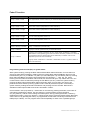
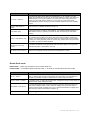
Potentiometer FX section
Control element
Function
DRY/WET knob
Adjusts the ratio between unprocessed (dry) signal and processed (wet) signal
PARAM 1-3 knob
In single mode: FX-parameter 1-3 (FX-dependent)
In group mode: parameter for the 1st, 2nd und 3rd FX
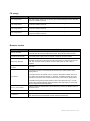
FX Button 1-4
In single mode: FX Button 1 activates / deactivates FX Unit globally (green LED is lit
when activated). FX Button 2 resets all FX parameters to their default value (short
LED flash). FX Button 3 and 4: FX-dependent (LED is lit when activated)
In group mode: FX Button 2-4 activates / deactivates FX slot 1-3 (green LED is lit
when slot activated)
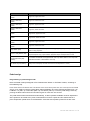
SHIFT + FX Button 1
Group 1 ! FX 1, red LED is lit
SHIFT + FX Button 2
Group 2 ! FX 2, red LED is lit
SHIFT + FX Button 3
Group 3 ! FX 3, red LED is lit
SHIFT + FX Button 4
Group 4 ! FX 4, red LED is lit
Versus user manual 7 / 13