1
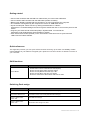
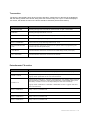
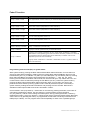
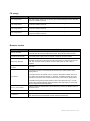
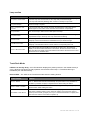
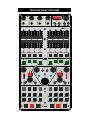
Fader FX section
Control element
Function
Group 1 Fader 1-4 left
Free (dependend on deck selection) ! recommended group for external commands
Group 1 Fader 1-4 right
Free (dependend on deck selection) ! recommended group for external commands
Group 2 Fader 1-4 left
Remix Slot volumes (dependend on deck selection)
Group 2 Fader 1-4 right
Remix Slot volumes (dependend on deck selection)
Group 3 Fader 1-4 left
FX 1 ! control Dry/Wet, Param 1-3
Group 3 Fader 1-4 right
FX 2 ! control Dry/Wet, Param 1-3
Group 4 Fader 1-4 left
FX 3 ! control Dry/Wet, Param 1-3
Group 4 Fader 1-4 right
FX 4 ! control Dry/Wet, Param 1-3
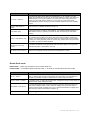
SHIFT + Group 1-4 Button
Group 1-4 selection (red LED is lit)
Group 1-4 Button
If group 2 is active (red LED is lit) ! Remix Slot mute
Group 1-4 Button
If group 3 or 4 is active (red LED is lit) ! In single mode: FX Button 1 activates /
deactivates FX Unit globally (green LED is lit when activated). FX Button 2 resets all
FX parameters to their default value (short LED flash). FX Button 3 and 4: FXdependent (LED is lit when activated)
In group mode: FX Button 2-4 activates / deactivates FX slot 1-3 (yellow LED is lit
when slot activated)
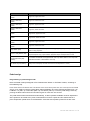
Programming external midi (Din) in system mode:
Start system mode by pushing the Deck select A/B and Deck select C/D button for more than one
second so both LEDs are blinking. Select control by holding Deck select A/B Button and move FX
Potentiometer (Pot 1-4) / FX Button 1-4 (Pbt1-4) or FX Fader (Fad 1-8) / FX Button (Fbt1-8). Pushing
Deck select C/D Button and select control mode with Tree encoder (----, note, PC, CC, CCtg).
Pushing the Tree button and select midi channel with Tree encoder (Ch1-16). Select note / PC / CC
number with the Tree encoder after pushing the Fav Button (n0-127). Leave the system mode by
pushing the Deck select A/B and Deck select C/D button again for more than one second. All
preferences will be stored by leaving system mode. Clear all preferences (extern commands) in
system mode by holding Deck select C/D Button and pressing the Tree encoder. Midi Clock is
available on DIN Output if Midi Clock send is activated in Traktor.
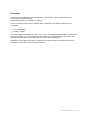
Control modes: note (only buttons) = sends note on command by pressing the button, send note off
command by releasing the button. PC (only buttons) = sends program change command
CC (only buttons) = sends control change command (value 127 by pressing the button, value 0 by
releasing the button). CCtg (only buttons) = sends control change command (toggle mode: alternately
value 0 and 127 by pressing the button). A programmed control doesn't send any commands to the
USB port (to Traktor)! You can program each control separately for each of the 4 possible groups.
Versus user manual 8 / 13