1
Introduction
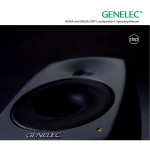
Congratulations and a thank-you for the purchase of this Genelec SAM system. All Genelec SAM systems are designed to integrate easily into the digital production environment. There are
several ways to configure and operate SAM systems for a wide
variety of high quality audio applications. The SAM monitors
also have analog inputs, making them versatile and intelligent
replacements for standard analog monitors.
GLM
NETWORK
GLM
NETWORK
GLM
NETWORK
USB
MICROPHONE
This manual addresses the setup and use of the 8240A, 8250A,
8351A and 8260A SAM monitors in stand-alone mode without
the Genelec Loudspeaker Manager GLM™ and the proprietary
Genelec monitor control network. Use with the GLM™ is described in the GLM™ System Operating Manual.
System
Genelec 8240A, 8250A, 8351A and 8260A are designed for
precise monitoring of 24 bit/192 kHz AES/EBU digital audio signal or line level analog audio signal. They are fully compatible
with Genelec Loudspeaker Manager GLM™ and the proprietary
Genelec monitor control network, and Genelec 7260A, 7270A
and 7271A SAM Subwoofers, but can also be used independently of these. The 8240A, 8250A, 8351A and 8260A feature
high SPL output, low colouration and broad bandwidth in a small
enclosure size. They are suitable for a wide variety of tasks,
such as near field monitoring, mobile vans, broadcast and TV
control rooms, multichannel sound systems and home studios.
The Minimum Diffraction Enclosure™ (MDE™), advanced Directivity Control Waveguide™ (DCW™) and Minimum Diffraction Coaxial (MDC™) technologies provide excellent frequency
balance even in difficult acoustic environments.
Amplifiers
The amplifier unit is mounted in the rear of the monitor enclosure.
The unit incorporates special circuitry for driver thermal overload
protection. Variable input sensitivity allows accurate level matching to console output section.
Setting Up the GLM™ Control Network
Although the 8240A, 8250A, 8351A and 8260A can be used
without the GLM™ software and control network, they only reach
their full potential when set up and calibrated using the GLM™
software. The setup is fast and consists of the following steps:
1.
2.
3.
4.
2
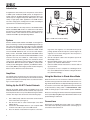
Run a CAT5 (RJ45) cable from the monitor control network
to the next monitor (see Figure 1).
Run the final cable to control network input of the GLM
Adapter device.
Connect the GLM Adapter device to your computer USB
connector. The cable is a part of the GLM User Kit.
Place the Genelec measurement microphone at the listen-
LISTENING
POSITION
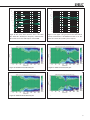
Figure 1. GLM control network cabling
5.
6.
7.
8.
ing location of the engineer, on a stand, with the microphone
pointing upwards and the microphone top at the height of the
engineers ear in normal working position. The microphone is
a part of the GLM User Kit.
Run the microphone cable to the microphone input in the
GLM Adapter device.
Download GLM software at the Genelec web site (www.
genelec.com). Install the GLM software.
Follow the GLM software instructions to measure and set
up your monitors.
If you plan to not use a computer for controlling the monitors, use the GLM software to write the setting into the monitors (“Store the Settings”).
Using the Monitors in Stand-Alone Mode
When the monitors are not connected to a Genelec monitor control network, they operate in the stand-alone mode. However, settings made with the Genelec Loudspeaker Manager software can
be saved into each monitor and applied even when the network
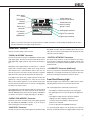
is disconnected by setting switch 1 “STORED/MANUAL CONTROL” on switch group 2 of each monitor to position “STORED.”
All issues concerning use with the network are explained in detail
in the System Operating Manual provided with the GLM™ Loudspeaker Manager software kit.
Connections
Each monitor is supplied with a mains cable, one 5 m GLM network cable and an operating manual. Before connecting up, ensure that the mains switch is off.