1
Mains power
switch
Stand-alone user
interface level control
-8
-6
-4
-2
-10
ON
OFF
1
-12
2
SWITCH
1
BASS
ROLL-OFF
BASS
TILT
12V Remote
connector
(8260A only)
TREBLE
TILT
-4 dB
160 Hz
+2 dB -4 dB
ON
OFF
dB
STORED AES/EBU CH. DRIVER MUTE SYSTEM LVL.
-10
-20
A
B
WF COAX
ON
OFF
-2 dB -4 dB -2 dB -4 dB
Mains input
connector
DESKTOP
-6 dB
-6 dB
MAINS INPUT 230 V~
50 / 60 Hz 330 W
SERIAL NUMBER
-2 dB
12 V
REMOTE
0
SWITCH
2
-30
dB
MANUAL
CTRL
ON + ON
OFF + OFF
DIGITAL IN
AES/EBU
SUM A AND B
DIGITAL THRU
AES/EBU
Stand-alone user
interface switch
groups 1 and 2
ANALOG
IN
8260A DSP TRI-AMPLIFIED
MONITORING SYSTEM
MAGNETICALLY SHIELDED
www.genelec.com
MADE IN FINLAND
292-8260T-6
GLM Control
Network
connectors
Analog input connector
Digital Thru connector
Digital input connector
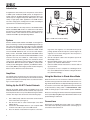
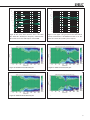
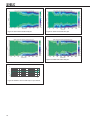
Figure 2. Connectors and controls on the back panel of a 8260A. The 8351A is similar. 8240A and 8250A share the same
layout but without the 12 V trigger voltage connector.
“MAINS INPUT” Connector
Connect the mains supply to this connector.
“DIGITAL IN AES/EBU” Connector
Use this female XLR connector for AES/EBU formatted digital
audio input signals. This input is selected automatically when a
valid digital audio signal is present, and overrides the analog input.
Depending on the digital hardware, transmission of a 192 kHz
sample rate is achieved using a double speed, single channel/
cable interface. This is called dual-wire mode. In this case one
cable per channel is used and no channel selection is required.
Dual-wire mode is automatically detected by the input stage.
If the digital source device has a volume fader that controls the
digital level, it may be advantageous to lower the level control
either on the computer interface or on the monitor’s back panel
controls, which in turn will force the use of more of the digital [bit]
resolution in the volume control.
level is +7.0 dBu RMS on models 8240A and 8250A and +22.0
dBu RMS on models 8351A and 8260A. When A/D converter
input clip occurs the front panel light turns momentarily red, indicating the overload condition.
“CONTROL NETWORK” Connectors
Use these RJ-45 sockets to connect the monitor to the proprietary Genelec Loudspeaker Manager™ (GLM™) network only.
This connector is not Ethernet LAN compatible. Do not connect
to Ethernet LAN.
“12 V REMOTE” Connector (8260A only)
You can set up remote controlled powering up and down of the
8260A with 12 V voltage connected to this connector. The minimum current needed to actuate this function is 70 mA.
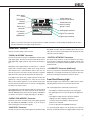
Front Panel Warning Light
Normally the light on the front panel of a SAM monitor is green,
indicating that the monitor is in normal operational mode.
The overload light (red) is activated by several events:
If the digital inputs are used, all audio outputs are referenced to 0
dBFS (digital Full Scale, the largest level that may be represented in the AES/EBU signal). These monitors produce 100 dB SPL
at 1 meter in free space for a digital input signal of –30 dB FS.
“DIGITAL THRU AES/EBU” Connector
This male XLR carries an unaltered copy of the digital signal fed
into the “DIGITAL IN AES/EBU” connector. It can be used for
daisy-chaining up to four monitors together.
“ANALOG IN” Connector
Use this connector for analog audio signals. The maximum input
• exceeding the maximum input range of the analog input
• the digital input level is less than 0.1 dB from the digital full
scale
• exceeding the output capacity of the power amplifier
(clipping in the power amplifier) and thermal
overload of the power amplifier or drivers (thermal
protection has activated)
• an error is detected in the AES/EBU audio data
If a red warning light appears, turn the analog source down! If
the levels are already modest and a digital signal is being used,
3