1
Installation
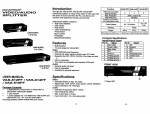
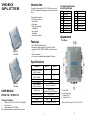
1. Turn off the PC and monitors.
2. Connect the HD-15 video extension cable between the
PC and the “video in” port of splitter.
3. Connect the HD-15 video extension cables between the
monitors and the “video out” ports of splitter.
4. Connect the power cord and turn on the splitter.
5. Turn on the PC and monitors.
Note:
§ If you install the DDC monitor for the splitter, the rest of
monitors must be the same resolution as the DDC
monitor.
§ Available monitors include the VGA, SVGA, XGA,
QXGA,UXGA, Multisync, and exclude the CGA, EGA,
Mono.
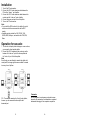
Operation for cascade:
1. The function to display identical image on more monitors,
you request to attach another splitter.
2. Connect the HD-15 male/male video extension cable
between the “video out” port of the former splitter and
the “video in” port of the latter splitter.
Note:
Even though you are allowed to cascade the splitter with
varied ports, the image might become unstable if cascade
too many tiers of splitters.
P.S.: The example cascades the 2 and 4 ports splitters;
however, you can cascade the video splitter with
demanded port.
-3-
Trademarks:
All the companies, brand names, and product names
referred to this manual are the trademarks or registered
trademarks belonging to their respective companies.
-4-