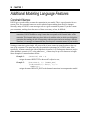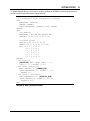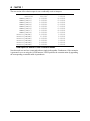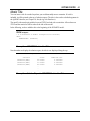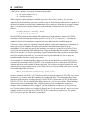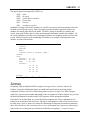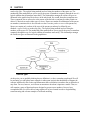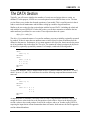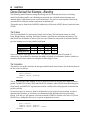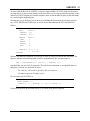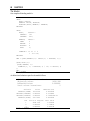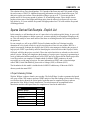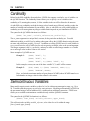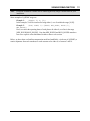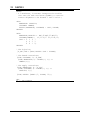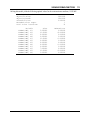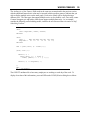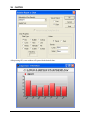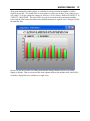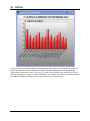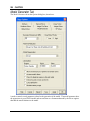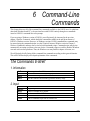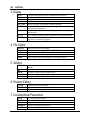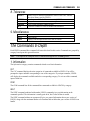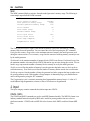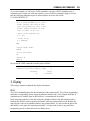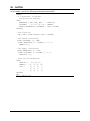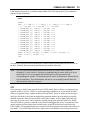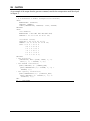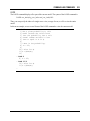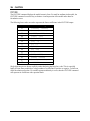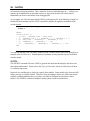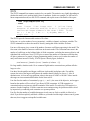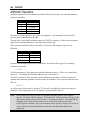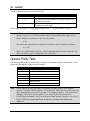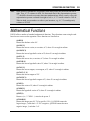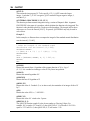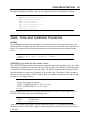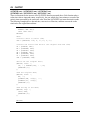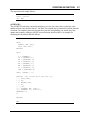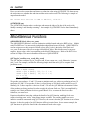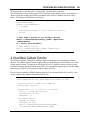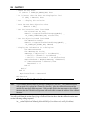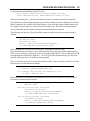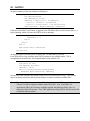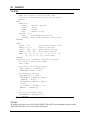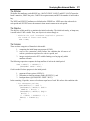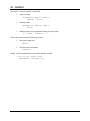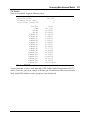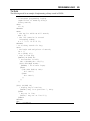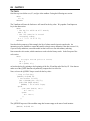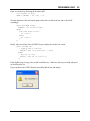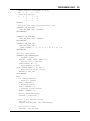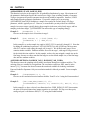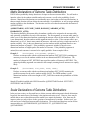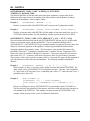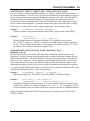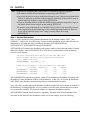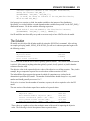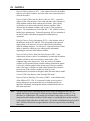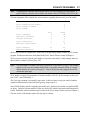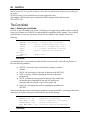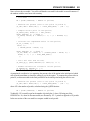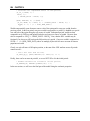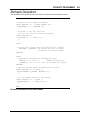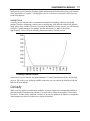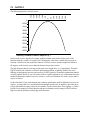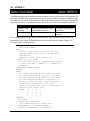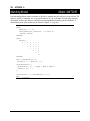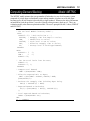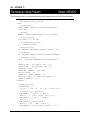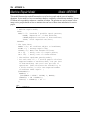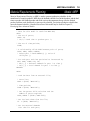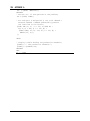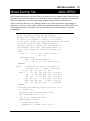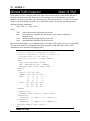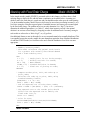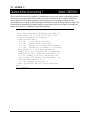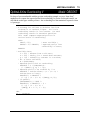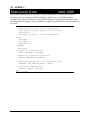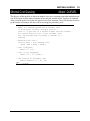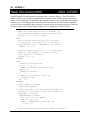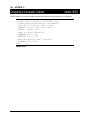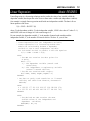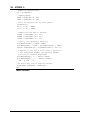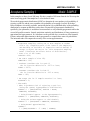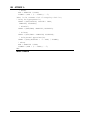
1
COPYRIGHT The LINGO software and its related documentation are copyrighted. You may not copy the LINGO software or related documentation except in the manner authorized in the related documentation or with the written permission of LINDO Systems Inc. TRADEMARKS LINGO is a trademark, and LINDO is a registered trademark, of LINDO Systems Inc. Other product and company names mentioned herein are the property of their respective owners. DISCLAIMER LINDO Systems, Inc. warrants that on the date of receipt of your payment, the disk enclosed in the disk envelope contains an accurate reproduction of the LINGO software and that the copy of the related documentation is accurately reproduced. Due to the inherent complexity of computer programs and computer models, the LINGO software may not be completely free of errors. You are advised to verify your answers before basing decisions on them. NEITHER LINDO SYSTEMS, INC. NOR ANYONE ELSE ASSOCIATED IN THE CREATION, PRODUCTION, OR DISTRIBUTION OF THE LINGO SOFTWARE MAKES ANY OTHER EXPRESSED WARRANTIES REGARDING THE DISKS OR DOCUMENTATION AND MAKES NO WARRANTIES AT ALL, EITHER EXPRESSED OR IMPLIED, REGARDING THE LINGO SOFTWARE, INCLUDING THE IMPLIED WARRANTIES OF MERCHANTABILITY, FITNESS FOR A PARTICULAR PURPOSE, OR OTHERWISE. Further, LINDO Systems, Inc. reserves the right to revise this software and related documentation and make changes to the content hereof without obligation to notify any person of such revisions or changes. Copyright © 2013 by LINDO Systems Inc. All rights reserved. Published by 1415 North Dayton Street Chicago, Illinois 60642 Technical Support: (312) 988-9421 E-mail: [email protected] WWW: http://www.lindo.com Contents Contents ................................................................................................................................................ iii Preface ................................................................................................................................................. vii New Features ........................................................................................................................................ xi for LINGO 14.0 ...................................................................................................................................... xi 1 Getting Started with LINGO ............................................................................................................ 1 What is LINGO? ............................................................................................................................... 1 Installing LINGO ............................................................................................................................... 1 Modeling from the Command-Line ................................................................................................. 22 Examining the Solution................................................................................................................... 25 Using the Modeling Language ........................................................................................................ 26 Additional Modeling Language Features ........................................................................................ 38 Indicating Convexity and Concavity ............................................................................................... 42 Maximum Problem Dimensions ...................................................................................................... 43 How to Contact LINDO Systems .................................................................................................... 44 2 Using Sets ...................................................................................................................................... 45 Why Use Sets?............................................................................................................................... 45 What Are Sets? .............................................................................................................................. 45 The Sets Section of a Model .......................................................................................................... 46 The DATA Section.......................................................................................................................... 53 Set Looping Functions.................................................................................................................... 54 Set-Based Modeling Examples ...................................................................................................... 60 Summary ........................................................................................................................................ 80 3 Using Variable Domain Functions ............................................................................................... 81 Integer Variables ............................................................................................................................ 81 Free Variables ...............................................................................................................................100 Bounded Variables ........................................................................................................................105 SOS Variables ...............................................................................................................................106 Cardinality .....................................................................................................................................110 Semicontinuous Variables .............................................................................................................110 4 Data, Init and Calc Sections ........................................................................................................115 The DATA Section of a Model .......................................................................................................115 The INIT Section of a Model..........................................................................................................119 The CALC Section of a Model .......................................................................................................120 Summary .......................................................................................................................................123 5 Windows Commands ...................................................................................................................125 Accessing Windows Commands ...................................................................................................125 iii iv 6 7 8 9 10 CONTENTS Windows Commands In Brief ........................................................................................................126 Windows Commands In Depth ......................................................................................................129 1. File Menu...................................................................................................................................129 2. Edit Menu ..................................................................................................................................147 3. LINGO Menu .............................................................................................................................160 4. Window Menu............................................................................................................................273 5. Help Menu .................................................................................................................................277 Command-Line Commands .........................................................................................................283 The Commands In Brief ................................................................................................................283 The Commands In Depth ..............................................................................................................285 LINGO’s Operators and Functions..............................................................................................379 Standard Operators .......................................................................................................................379 Mathematical Functions ................................................................................................................383 Financial Functions .......................................................................................................................386 Probability Functions .....................................................................................................................386 Variable Domain Functions ...........................................................................................................389 Set Handling Functions .................................................................................................................390 Set Looping Functions...................................................................................................................395 Interface Functions ........................................................................................................................397 Distributions...................................................................................................................................398 Report Functions ...........................................................................................................................404 Date, Time and Calendar Functions ..............................................................................................415 Miscellaneous Functions ...............................................................................................................418 Interfacing with External Files .....................................................................................................421 Cut and Paste Transfers ...............................................................................................................421 Text File Interface Functions .........................................................................................................423 LINGO Command Scripts ..............................................................................................................431 Specifying Files in the Command-line ...........................................................................................434 RunLingo .......................................................................................................................................436 Redirecting Input and Output ........................................................................................................439 Managing LINGO Files ..................................................................................................................439 Interfacing With Spreadsheets ....................................................................................................441 Importing Data from Spreadsheets................................................................................................441 Exporting Solutions to Spreadsheets ............................................................................................446 OLE Automation Links from Excel .................................................................................................454 Embedding LINGO Models in Excel ..............................................................................................458 Embedding Excel Sheets in LINGO ..............................................................................................464 Summary .......................................................................................................................................468 Interfacing with Databases ..........................................................................................................469 ODBC Data Sources .....................................................................................................................470 Importing Data from Databases with @ODBC ..............................................................................477 CONTENTS 11 12 13 14 15 v Importing Data with ODBC in a PERT Model ................................................................................479 Exporting Data with @ODBC ........................................................................................................481 Exporting Data with ODBC in a PERT Model ................................................................................484 Interfacing with Other Applications ............................................................................................489 The LINGO Dynamic Link Library..................................................................................................489 User Defined Functions .................................................................................................................533 Developing More Advanced Models ...........................................................................................539 Production Management Models ...................................................................................................540 Logistics Models ............................................................................................................................556 Financial Models ...........................................................................................................................563 Queuing Models ............................................................................................................................580 Marketing Models ..........................................................................................................................589 Programming LINGO ....................................................................................................................597 Programming Features..................................................................................................................597 Programming Example: Binary Search .........................................................................................628 Programming Example: Markowitz Efficient Frontier .....................................................................632 Programming Example: Cutting Stock...........................................................................................639 Programming Example: Accessing Excel ......................................................................................646 Summary .......................................................................................................................................652 Stochastic Programming ...........................................................................................................653 Multistage Decision Making Under Uncertainty .............................................................................653 Recourse Models ..........................................................................................................................655 Scenario Tree ................................................................................................................................657 Monte Carlo Sampling ...................................................................................................................659 Setting up SP Models ....................................................................................................................660 Language Features for SP Models ................................................................................................661 Declaring Distributions ..................................................................................................................663 Gas Buying Example .....................................................................................................................670 Stock Option Example ...................................................................................................................681 Investing Under Uncertainty Example ...........................................................................................691 Chance-Constrained Programs (CCPs) ........................................................................................698 On Mathematical Modeling ..........................................................................................................711 Solvers Used Internally by LINGO.................................................................................................711 Type of Constraints .......................................................................................................................712 Local Optima vs. Global Optima ....................................................................................................714 Smooth vs. Nonsmooth Functions.................................................................................................719 Guidelines for Nonlinear Modeling ................................................................................................720 vi CONTENTS Appendix A: Additional Examples of LINGO Modeling..................................................................723 Appendix B: Error Messages .........................................................................................................817 Appendix C: Bibliography and Suggested Reading.....................................................................867 Index ....................................................................................................................................................869 Preface LINGO is a comprehensive tool designed to make building and solving mathematical optimization models easier and more efficient. LINGO provides a completely integrated package that includes a powerful language for expressing optimization models, a full-featured environment for building and editing problems, and a set of fast built-in solvers capable of efficiently solving most classes of optimization models. LINGO's primary features include: Algebraic Modeling Language LINGO supports a powerful, set-based modeling language that allows users to express math programming models efficiently and compactly. Multiple models may be solved iteratively using LINGO's internal scripting capabilities. Convenient Data Options LINGO takes the time and hassle out of managing your data. It allows you to build models that pull information directly from databases and spreadsheets. Similarly, LINGO can output solution information right into a database or spreadsheet making it easier for you to generate reports in the application of your choice. Complete separation of model and data enhance model maintenance and scalability. Model Interactively or Create Turnkey Applications You can build and solve models within LINGO, or you can call LINGO directly from an application you have written. For developing models interactively, LINGO provides a complete modeling environment to build, solve, and analyze your models. For building turn-key solutions, LINGO comes with callable DLL and OLE interfaces that can be called from user written applications. LINGO can also be called directly from an Excel macro or database application. LINGO currently includes programming examples for C/C++, FORTRAN, Java, C#.NET, VB.NET, ASP.NET, Visual Basic, Delphi, and Excel. Extensive Documentation and Help LINGO provides all of the tools you will need to get up and running quickly. You get the LINGO Users Manual (in printed form and available via the online Help), which fully describes the commands and features of the program. Also included with Super versions and larger is a copy of Optimization Modeling with LINGO, a comprehensive modeling text discussing all major classes of linear, integer and nonlinear optimization problems. LINGO also comes with dozens of realworld based examples for you to modify and expand. Powerful Solvers and Tools LINGO is available with a comprehensive set of fast, built-in solvers for linear, nonlinear (convex & nonconvex), quadratic, quadratically constrained, and integer optimization. You never have to specify or load a separate solver, because LINGO reads your formulation and automatically selects the appropriate one. A general description of the solvers and tools available in LINGO follows: vii viii PREFACE General Nonlinear Solver LINGO provides both general nonlinear and nonlinear/integer capabilities. The nonlinear license option is required in order to use the nonlinear capabilities with LINDO API. Global Solver The global solver combines a series of range bounding (e.g., interval analysis and convex analysis) and range reduction techniques (e.g., linear programming and constraint propagation) within a branch-and-bound framework to find proven global solutions to nonconvex nonlinear programs. Traditional nonlinear solvers can get stuck at suboptimal, local solutions. This is no longer the case when using the global solver. Multistart Solver The multistart solver intelligently generates a sequence of candidate starting points in the solution space of NLP and mixed integer NLPs. A traditional NLP solver is called with each starting point to find a local optimum. For non-convex NLP models, the quality of the best solution found by the multistart solver tends to be superior to that of a single solution from a traditional nonlinear solver. A user adjustable parameter controls the maximum number of multistarts to be performed. Barrier Solver The barrier solver is an alternative way for solving linear, quadratic and conic problems. LINGO's state-of-the-art implementation of the barrier method offers great speed advantages for large-scale, sparse models. Simplex Solvers LINGO offers two advanced implementations of the primal and dual simplex methods as the primary means for solving linear programming problems. Its flexible design allows the users to fine tune each method by altering several of the algorithmic parameters. Mixed Integer Solver The mixed integer solver’s capabilities of LINGO extend to linear, quadratic, and general nonlinear integer models. It contains several advanced solution techniques such as cut generation, tree reordering to reduce tree growth dynamically, and advanced heuristic and presolve strategies. Stochastic Solver The stochastic programming solver supports decision making under uncertainty through multistage stochastic models with recourse. The user describes the uncertainty by identifying the distribution functions, either built-in or user-defined, describing each random variable. The stochastic solver will optimize the model to minimize the cost of the initial stage plus the expected cost of future recourse actions over the planning horizon. Advanced sampling modes are also available for approximating continuous distributions. LINGO's stochastic solver also supports chance-constrained models, where one or more sets of constraints are allowed to be violated according to a specified probability. PREFACE ix Model and Solution Analysis Tools LINGO includes a comprehensive set of analysis tools for debugging infeasible linear, integer and nonlinear programs, using advanced techniques to isolate the source of infeasibilities to the smallest subset of the original constraints. It also has tools to perform sensitivity analysis to determine the sensitivity of the optimal basis to changes in certain data components (e.g. objective vector and right-hand-size values). Quadratic Recognition Tools The QP recognition tool is a useful algebraic pre-processor that automatically determines if an arbitrary NLP is actually a convex, quadratic model. QP models may then be passed to the faster quadratic solver, which is available as part of the barrier solver option. When the barrier solver option is combined with the global option, LINGO will automatically recognize conic models, in addition to convex quadratic models. Linearization Tools Linearization is a comprehensive reformulation tool that automatically converts many non-smooth functions and operators (e.g., max and absolute value) to a series of linear, mathematically equivalent expressions. Many non-smooth models may be entirely linearized. This allows the linear solver to quickly find a global solution to what would have otherwise been an intractable nonlinear problem. New Features for LINGO 14.0 LINDO Systems is proud to introduce LINGO 14.0. The new features in LINGO 14.0 include the following: Multithread Support: LINGO 14.0 includes multi-cpu optimization extensions to its solvers to take advantage of computers with multicore processors. The multicore extensions are of two types: concurrent and parallel. Concurrent algorithms run two or more different serial algorithms on multiple copies of the same model, using a separate thread for each algorithm, terminating as soon as the winner thread finishes. Parallel algorithms, on the other hand, parallelize computationally intensive portions of the serial algorithm to distribute the workload across multiple threads. Solvers with multicore extensions include Barrier, Global, Integer, Linear, Multistart and Stochastic. In addition to the solvers, LINGO's model generator has also been extended for multicore support. Model generation times for large models can be reduced up to as much as 50% when compared to previous releases. Branch-and-Price Solver: A new Branch-and-Price solver with multicore support has been added for improved performance on problems with block structures. Detection of decomposition structures has also been improved in support of the Branch-and-Price solver. MIP Solver Improvements: The solution finding heuristics have been improved significantly. Simple rounding and the feasibility pump now use bound propagation to improve the current path to a new feasible MIP solution. New polishing heuristic to improve the best MIP solution using a pool of previous obtained MIP solutions and the current relaxation. This leads to better MIP solutions faster on many problems. Multithreading can lead to speed improvements from 1.5 to 3.0 times on difficult problems using 4 threads rather than 1. For easy MIP problems, e.g., < 600 seconds, multithreading may give not much speedup. xi xii PREFACE Multistart Solver Improvements: The Multistart solver has been improved significantly, achieving speed factors up to 2X compared to the previous version. The likelihood of getting the global optimum has also improved by 10-15% over a wide range of nonconvex models. Multithreading often leads to speed improvements from 2.0 to 3.0 times when using 4 threads. Speed improvements tend to improve as the model size and the number of multistarts increase. Global Solver Improvements: A parallel algorithm has been added for exploiting multicore machines. Permuted Matrix Displays: You may now choose to have a model's underlying matrix displayed in blocktriangular format, where the rows and columns may be automatically permuted to place the matrix into mostly block-triangular form. If a matrix has good block-triangular structure, then the model is likely to perform well when solved with the Branch-and-Price solver. New Chart Type for Displaying Networks: The Network Chart Type can display charts of networks. Multiple networks can be displayed on a single chart. Dynamically Add Members to Derived Sets: The @INSERT function has been added, which allows the dynamic addition of set members to derived sets. Procedure Capability: LINGO now supports callable procedures. Callable procedures are similar to Calc sections, however, unlike Calc sections, procedures may be executed multiple times. Procedures may also be used to generate points for charting routines. Beta-Binomial Distribution: The Beta-Binomial and Symmetric Stable distributions have been added to the list of supported distributions. Stochastic programming models may also specify random variables as having either a Beta-binomial or Symmetric Stable distribution. The Beta-Binomial is useful in Bayesian analysis involving the Binonial distribution, e.g., in designing sampling plans for new drug trials. The Symmetric Stable is sometimes used to model the movement of prices in financial markets. Date and Time Functions: A number of new functions have been added to convert dates to and from standard time, where standard time is defined as the number of hours since 1 Jan 2000. These functions are helpful when you need to perform date arithmetic in your models. Among other things, these functions are useful for answering PREFACE questions of the form, “What date and time will it be 23.5 days from 12:30pm tomorrow?”. Numeric Integration: The @INTEGRAL function has been added to perform numeric integration. We hope you enjoy this new release of LINGO. Many of the new features in this release are due to suggestions from our users. If there are any features you'd like to see in the next release of LINGO, please let us know. Feel free to reach us at: LINDO Systems Inc. 1415 N. Dayton St. Chicago, Illinois 60642 (312) 988-7422 [email protected] http://www.lindo.com May 2013 xiii 1 Getting Started with LINGO What is LINGO? LINGO is a simple tool for utilizing the power of linear and nonlinear optimization to formulate large problems concisely, solve them, and analyze the solution. Optimization helps you find the answer that yields the best result; attains the highest profit, output, or happiness; or achieves the lowest cost, waste, or discomfort. Often these problems involve making the most efficient use of your resources— including money, time, machinery, staff, inventory, and more. Optimization problems are often classified as linear or nonlinear, depending on whether the relationships in the problem are linear with respect to the variables. If you are a new user, it is recommended you go through the first seven chapters to familiarize yourself with LINGO. Then, you may want to see Chapter 15, On Mathematical Modeling, for more information on the difference between linear and nonlinear models and how to develop large models. It may also be helpful to view some sample models in Chapter 12, Developing More Advanced Models, or Appendix A, Additional Examples of LINGO Modeling, to see if a particular template example is similar to a problem you have. For users of previous versions of LINGO, the new features are summarized in the Preface at the beginning of the manual. Installing LINGO This section discusses how to install LINGO on the Windows platform. To install LINGO on platforms other than Windows, refer to the installation instructions included with your software. Installing the LINGO software is straightforward. To setup LINGO for Windows, place your CD in the appropriate drive and run the installation program SETUP contained in the LINGO folder. The LINGO installation program will open and guide you through the steps required to install LINGO on your hard drive. Note: If there is a previous version of LINGO installed on your machine, then you may need to uninstall it before you can install the new copy of LINGO. To uninstall the existing copy of LINGO, click on the Windows Start button, select the Settings command, select Control Panel, then double click on the Add or Remove Programs icon. You should then be able to select LINGO and have the old version removed from your system. 1 2 CHAPTER 1 Most copies of LINGO come with their licenses preinstalled. However, some versions of LINGO require you to input a license key. If your version of LINGO requires a license key, you will be presented with the following dialog box when you start LINGO: Your license key may have been included in an email sent to you when you ordered your software. The license key is a string of letters, symbols and numbers, separated into groups of four by hyphens (e.g., r82m-XCW2-dZu?-%72S-fD?S-Wp@). Carefully enter the license key into the edit field, including hyphens. License keys are case sensitive, so you must be sure to preserve the case of the individual letters when entering your key. Click the OK button and, assuming the key was entered correctly, LINGO will then start. In the future, you will be able to run LINGO directly without entering the key. Note: If you received your license key by email, then you have the option of cutting-and-pasting it into the license key dialog box. Cut the key from the email that contains it with the Ctrl+C key, then select the key field in LINGO dialog box and paste the key with the Ctrl+V key. If you don’t have a key, you can choose to run LINGO in demo mode by clicking the Demo button. In demo mode, LINGO has all the functionality of a standard version of LINGO with the one exception that the maximum problem size is restricted. Demo licenses expire after 30 days. GETTING STARTED Entering a Model in Windows Starting LINGO This section illustrates how to input and solve a small model in Windows. The text of the model’s equations is platform independent and will be identical on all platforms. However, keep in mind that the technique for entering a model is slightly different on non-Windows platforms. For instructions on entering a model on platforms other than Windows, please refer to the Modeling from the Command-Line section below. When you start LINGO for Windows, your screen should resemble the following: The outer window, labeled LINGO, is the main frame window. All other windows will be contained within this window. The top of the frame window also contains all the command menus and the command toolbar. See Chapter 5, Windows Commands, for details on the toolbar and menu commands. The lower edge of the main frame window contains a status bar that provides various pieces of information regarding LINGO's current state. Both the toolbar and the status bar can be suppressed through the use of the LINGO|Options command. The smaller child window labeled LINGO Model LINGO1 is a new, blank model window. In the next section, we will be entering a sample model directly into this window. 3 4 CHAPTER 1 Developing a LINGO Model in Windows The Problem For our sample model, we will create a small product-mix example. Let’s imagine that the CompuQuick Corporation produces two models of computers—Standard and Turbo. CompuQuick can sell every Standard unit it produces for a profit contribution of $100, and each Turbo unit for a contribution of $150. At the CompuQuick factory, the Standard computer production line can produce, at most, 100 computers per day. At the same time, the Turbo computer production line can turn out 120 computers per day. Furthermore, CompuQuick has a limited supply of daily labor. In particular, there is a total of 160 hours of labor available each day. Standard computers require 1 hour of labor, while Turbo computers are relatively more labor intense requiring 2 hours of labor. The problem for CompuQuick is to determine the mix of Standard and Turbo computers to produce each day to maximize total profit without exceeding line and labor capacity limits. In general, an optimization model will consist of the following three items: Objective Function - The objective function is a formula that expresses exactly what it is you want to optimize. In business oriented models, this will usually be a profit function you wish to maximize, or a cost function you want to minimize. Models may have, at most, one objective function. In the case of our CompuQuick example, the objective function will compute the company’s profit as a function of the output of Standards and Turbos. Variables - Variables are the quantities you have under your control. You must decide what the best values of the variables are. For this reason, variables are sometimes also called decision variables. The goal of optimization is to find the values of a model’s variables that generate the best value for the objective function, subject to any limiting conditions placed on the variables. We will have two variables in our exampleone corresponding to the number of Standards to produce and the other corresponding to the number of Turbos to produce. Constraints - Almost without exception, there will be some limit on the values the variables in a model can assume—at least one resource will be limited (e.g., time, raw materials, your department’s budget, etc.). These limits are expressed in terms of formulas that are a function of the model’s variables. These formulas are referred to as constraints because they constrain the values the variables can take. In our CompuQuick example, we will have one constraint for each production line and one constraint on the total labor used. GETTING STARTED 5 Entering the Model We will now construct the objective function for our example. We will let the variables STANDARD and TURBO denote the number of Standard and Turbo computers to produce, respectively. CompuQuick’s objective is to maximize total profit. Total profit is calculated as the sum of the profit contribution of the Standard computer ($100) multiplied by the total Standard computers produced (STANDARD) and the profit contribution of the Turbo computer ($150) multiplied by the total Turbo computers produced (TURBO). Finally, we tell LINGO we want to maximize an objective function by preceding it with “MAX =”. Therefore, our objective function is written on the first line of our model window as: MAX = 100 * STANDARD + 150 * TURBO; Note: Each mathematical expression in LINGO is terminated with a semicolon. These semicolons are required. Your model will not solve without them. For more information on the syntax of LINGO, see below. Next, we must input our constraints on line capacity and labor supply. The number of Standard and Turbo computers produced must be constrained to the production line limits of 100 and 120, respectively. Do this by entering the following two constraints just below the objective function: STANDARD <= 100; TURBO <= 120; In words, the first constraint says the number of Standard computers produced daily (STANDARD) must be less-than-or-equal-to (<=) the production line capacity of 100. Likewise, the second constraint says the number of Turbo computers produced daily (TURBO) must be less-than-or-equal-to (<=) its line capacity of 120. Note: Since most computers do not have less-than-or-equal-to keys (), LINGO has adopted the convention of using the two character symbol <= to denote . As an alternative, you may simply enter < to signify less-than-or-equal-to. In a similar manner, >= or > are used to signify greater-than-or-equal-to (). The final constraint on the amount of labor used can be expressed as: STANDARD + 2 * TURBO <= 160; Specifically, the total number of labor hours used ( STANDARD + 2 * TURBO) must be less-than-or-equal-to (<=) the amount of labor hours available of 160. 6 CHAPTER 1 After entering the above and entering comments to improve the readability of the model, your model window should look like this: General LINGO Syntax An expression may be broken up into as many lines as you want, but the expression must be terminated with a semicolon. As an example, we could have used two lines rather than just one to contain the objective function: MAX = 100 * STANDARD + 150 * TURBO; We have also entered some comments to improve the readability of our model. Comments begin with an exclamation point (!) and end with a semicolon (;). All text between an exclamation point and terminating semicolon is ignored by LINGO. Comments can occupy more than one line and can share lines with other LINGO expressions. For example: X = 1.5 * Y + Z / 2 * Y; !This is a comment; X = 1.5 * !This is a comment in the middle of a constraint; Y + Z / 2 * Y; You may have noticed we used all uppercase letters for our variable names. This is not a requirement. LINGO does not distinguish between uppercase and lowercase in variable names. Thus, the following variable names would all be considered equivalent: TURBO Turbo turbo When constructing variable names in LINGO, all names must begin with an alphabetic character (A-Z). Subsequent characters may be either alphabetic, numeric (0-9), or the underscore (_). Names may be up to 64 characters in length. A final feature you will notice is that LINGO’s editor is “syntax aware.” In other words, when it encounters LINGO keywords it displays them in blue, comments are displayed in green, and all remaining text is displayed in black. Matching parentheses are also highlighted in red when you GETTING STARTED 7 place the cursor immediately following a parenthesis. You should find this feature useful in tracking down syntax errors in your models. Solving the Model Syntax Errors Your model has now been entered and it is ready to be solved. To begin solving the model, select the Solve command from the LINGO menu, or press the Solve button ( ) on the toolbar at the top of the main frame window. LINGO will begin compiling the model. During this step, LINGO will determine whether the model conforms to all syntax requirements. If the LINGO model doesn’t pass these tests, you will be informed by an error message. In this model, for instance, if you forget to use the multiplication sign, you will get an error like the following: LINGO lets you know there is a syntax error in your model, lists the line of the model it is in, and points to the place in the line where it occurred. For more information on error codes, see Appendix B, Error Messages. Solver Status Window If there are no formulation errors during the compilation phase, LINGO will invoke the appropriate internal solver to begin searching for the optimal solution to your model. When the solver starts, it displays a solver status window on your screen resembling the following: 8 CHAPTER 1 The solver status window is useful for monitoring the progress of the solver and the dimensions of your model. The various fields are described in more detail below. The solver status window also provides you with an Interrupt Solver button. Interrupting the solver causes LINGO to halt the solver on the next iteration. In most cases, LINGO will be able to restore and report the best solution found so far. The one exception is in the case of linear programming models (i.e., linear models without integer variables). If a linear programming model is interrupted, the solution returned will be meaningless and should be ignored. This should not be a problem because linear programs generally solve quickly, thus minimizing the need to interrupt. Note: You must be careful how you interpret solutions after interrupting the solver. These solutions 1) will definitely not be optimal, 2) may not be feasible to all the constraints, and 3) are worthless if the model is a linear program. Next to the Interrupt Solver button is another button labeled Close. Hitting the Close button will close the solver status window. This window can be reopened at any time by selecting the Window|Status Window command. GETTING STARTED 9 At the bottom of the solver status window, you will find a field titled: Update Interval. LINGO will update the solver status window every n seconds, where n is the value contained in the Update Interval field. You may set this interval to any value you desire. However, setting it to 0 will result in longer solution times—LINGO will spend more time updating the solver status window than solving your model. On larger models, LINGO may not always be able to update the solver status window on a regular interval. So, don't be concerned if you sometimes must wait longer than the indicated interval. Variables Box The Variables box shows the total number of variables in the model. The Variables box also displays the number of the total variables that are nonlinear. A variable is considered to be nonlinear if it enters into any nonlinear relationship in any constraint in the model. For instance, the constraint: X + Y = 100; would be considered linear because the graph of this function would be a straight line. On the other hand, the nonlinear function: X * Y = 100; is quadratic and has a curved line as its graph. If we were to solve a model containing this particular nonlinear constraint, the nonlinear variable count would be at least 2 to represent the fact that the two variables X and Y appear nonlinearly in this constraint. As another example, consider the constraint: X * X + Y = 100; In this case, X appears nonlinearly while Y appears as a linear variable. This constraint would not cause Y to be counted as one of the nonlinear variables. See On Mathematical Modeling for more information on the difference between linear and nonlinear equations. The Variables box in the solver status window also gives you a count of the total number of integer variables in the model. In general, the more nonlinear and integer variables your model has, the more difficult it will be to solve to optimality in a reasonable amount of time. Pure linear models without integer variables will tend to solve the fastest. For more details on the use of integer variables, refer to Using Variable Domain Functions. The variable counts do not include any variables LINGO determines are fixed in value. For instance, consider the following constraints: X = 1; X + Y = 3; From the first constraint, LINGO determines X is fixed at the value of 1. Using this information in constraint 2, LINGO determines Y is fixed at a value of 2. X and Y will then be substituted out of the model and they will not contribute to the total variable count. 10 CHAPTER 1 Constraints Box The Constraints box shows the total constraints in the expanded model and the number of these constraints that are nonlinear. A constraint is considered nonlinear if one or more variables appear nonlinearly in the constraint. LINGO searches your model for fixed constraints. A constraint is considered fixed if all the variables in the constraint are fixed. Fixed constraints are substituted out of the model and do not add to the total constraint count. Nonzeroes Box The Nonzeros box shows the total nonzero coefficients in the model and the number of these that appear on nonlinear variables. In a given constraint, only a small subset of the total variables typically appears. The implied coefficient on all the non-appearing variables is zero, while the coefficients on the variables that do appear will be nonzero. Thus, you can view the total nonzero coefficient count as a tally of the total number of times variables appear in all the constraints. The nonlinear nonzero coefficient count can be viewed as the number of times variables appear nonlinearly in all the constraints. Generator Memory Used Box The Generator Memory Used box lists the amount of memory LINGO’s model generator is currently using from its memory allotment. You may change the size of the generator’s memory allotment using the LINGO|Options command. Elapsed Runtime Box The Elapsed Runtime box shows the total time used so far to generate and solve the model. This is an elapsed time figure and may be affected by the number of other applications running on your system. GETTING STARTED Solver Status Box The Solver Status box shows the current status of the solver. A description of the fields appear in the table below followed by a more in depth explanation: Field Model Class State Objective Infeasibility Iterations Description Displays the model’s classification. Possible classes are "LP", "QP", "CONE", "NLP", "MILP", "MIQP", "MICONE", "MINLP" "PILP", "PIQP", "PICONE", and "PINLP". Gives the Status of the current solution. Possible states are "Global Optimum", "Local Optimum", "Feasible", "Infeasible", "Unbounded", "Interrupted", and "Undetermined". Current value of the objective function. Amount constraints are violated by. Number of solver iterations. Model Class Field The Model Class field summarizes the properties of your model. The various classes you will encounter are listed below: Abbreviation LP Class Linear Program QP Quadratic Program CONE NLP Conic Program Nonlinear Program Description All expressions are linear and the model contains no integer restrictions on the variables. All expressions are linear or quadratic, and there are no integer restrictions. The model is a conic (secondorder cone) program and all variables are continuous. At least one of the relationships in the model is nonlinear with respect to the variables. 11 12 CHAPTER 1 MILP Mixed Integer Linear Program All expressions are linear, and a subset of the variables is restricted to integer values. MIQP Mixed Integer Quadratic Program All expressions are either linear or quadratic, and a subset of the variables has integer restrictions. Mixed Integer Conic Program The model is a conic (secondorder cone) program, and a subset of the variables is restricted to integer values. Integer Nonlinear Program At least one of the expressions in the model is nonlinear, and a subset of the variables has integer restrictions. In general, this class of model will be very difficult to solve for all but the smallest cases. PILP Pure Integer Linear Program All expressions are linear, and all variables are restricted to integer values. PIQP Pure Integer Quadratic Program All expressions are linear or quadratic, and all variables are restricted to integer values. Pure Integer Conic (SecondOrder Cone) Program The model is a conic (secondorder cone) program, and all the variables are restricted to integer values. Pure Integer Nonlinear Program At least one of the expressions in the model is nonlinear, and all variables have integer restrictions. In general, this class of model will be very difficult to solve for all but the smallest cases. MICONE MINLP PICONE PINLP Note: Certain model classes may not be available on your installation of LINGO: nonlinear models require the nonlinear option, quadratic models require the barrier option and conic models require the barrier, global and conic options. GETTING STARTED 13 State Field When LINGO begins solving your model, the initial state of the current solution will be "Undetermined". This is because the solver has not yet had a chance to generate a solution to your model. Once the solver begins iterating, the state will progress to "Infeasible". In the infeasible state, LINGO has generated tentative solutions, but none that satisfy all the constraints in the model. Assuming a feasible solution exists, the solver will then progress to the "Feasible" state. In the feasible state, LINGO has found a solution that satisfies all the constraints in your model, but the solver is not yet satisfied it has found the best solution to your model. Once the solver can no longer find better solutions to your model, it will terminate in either the "Global Optimum" or "Local Optimum" state. If your model does not have any nonlinear constraints, then any locally optimal solution will also be a global optimum. Thus, all optimized linear models will terminate in the global optimum state. If, on the other hand, your model has one or more nonlinear constraints, then any locally optimal solution may not be the best solution to your model. There may be another "peak" that is better than the current one, but the solver's local search procedure is unable to "see" the better peak. Thus, on nonlinear models, LINGO can terminate only in the local optimum state. LINGO may, in fact, have a globally optimal solution, but, given the nature of nonlinear problems, LINGO is unable to claim it as such. Given this fact, it is always preferred to formulate a model using only linear constraints whenever possible. For more details on the concept of global vs. local optimal points, refer to On Mathematical Modeling. Note: LINGO’s optional global solver may be used to find globally optimal solutions to nonlinear models. For more information on the global solver, refer to the Nonlinear Solver Tab help topic. Note: If a model terminates in the "Unbounded" state, it means LINGO can improve the objective function without bound. In real life, this would correspond to a situation where you can generate infinite profits. Because such a situation is rare, if not impossible, you have most likely omitted or misspecified some constraints in your model. Finally, the "Interrupted" state will occur when you prematurely interrupt LINGO's solver before it has found the final solution to your model. The mechanics of interrupting the solver are discussed in more detail above. Objective Field The Objective field gives the objective value for the current solution. If your model does not have an objective function, then "N/A" will appear in this field. 14 CHAPTER 1 Infeasibility Field The Infeasibility field lists the amount that all the constraints in the model are violated by. Keep in mind that this figure does not track the amount of any violations on variable bounds. Thus, it is possible for the Infeasibility field to be zero while the current solution is infeasible due to violated variable bounds. The LINGO solver may also internally scale a model such that the units of the Infeasibility field no longer correspond to the unscaled version of the model. To determine whether LINGO has found a feasible solution, you should refer to the State field discussed above. Iterations Field The Iterations field displays a count of the number of iterations completed thus far by LINGO's solver. The fundamental operation performed by LINGO's solver is called an iteration. An iteration involves finding a variable, currently at a zero value, which would be attractive to introduce into the solution at a nonzero value. This variable is then introduced into the solution at successively larger values until either a constraint is about to be driven infeasible or another variable is driven to zero. At this point, the iteration process begins anew. In general, as a model becomes larger, it will require more iterations to solve and each iteration will require more time to complete. Extended Solver Status Box The Extended Solver Status box shows status information pertaining to several of the specialized solvers in LINGO. These solvers are: BNP Solver Branch-and-Bound Solver Global Solver, and Multistart Solver. The fields in this box will be updated only when one of these three specialized solvers is running. The fields appearing in the Extended Solver Status box are: Field Solver Type Best Obj Obj Bound Steps Active Description The type of specialized solver in use, and will be either "Band-B", "Global", "Multistart", or "BNP". The objective value of the best solution found so far. The theoretical bound on the objective. The number of steps taken by the extended solver. The number of active subproblems remaining to be analyzed. GETTING STARTED 15 Solver Type Field This field displays either "BNP", "B-and-B", "Global", or "Multistart", depending on the specialized solver in use. LINGO employs a strategy called branch-and-bound to solve models with integer restrictions. Branchand-bound is a systematic method for implicitly enumerating all possible combinations of the integer variables. Refer to Hillier and Lieberman (1995) for more information on the branch-and-bound algorithm. In addition to the branch-and-bound solver, there are three other specialized solvers that may be invoked, which are: the global solver, the multistart solver, and the BNP Solver. Many nonlinear models are non-convex and/or non-smooth. For more information see the Chapter 15, On Mathematical Modeling. Nonlinear solvers that rely on local search procedures (as does LINGO’s default nonlinear solver) will tend to do poorly on these types of models. Typically, they will converge to a local, sub-optimal point that may be quite distant from the true, globally optimal point. The multistart solver and the global solver are specialized solvers that attempt to find the globally optimal solution to non-convex models. You can read more about these solvers in the Nonlinear Solver Tab section in Chapter 5. The BNP solver is a mixed integer programming solver for solving linear models with block structure. Based on the decomposition structure, the solver divides the original problem into several subproblems and solves them (almost) independently, exploiting parallel processing if multiple cores are available. You can read more about the BNP solver in the BNP Solver section in Chapter 5. Best Obj and Obj Bound Fields The Best Obj field displays the best feasible objective value found so far. Obj Bound displays the bound on the objective. This bound is a limit on how far the solver will be able to improve the objective. At some point, these two values may become very close. Given that the best objective value can never exceed the bound, the fact that these two values are close indicates that LINGO's current best solution is either the optimal solution, or very close to it. At such a point, the user may choose to interrupt the solver and go with the current best solution in the interest of saving on additional computation time. 16 CHAPTER 1 Steps Field The information displayed in the Steps field depends on the particular solver that is running. The table below explains: Solver Steps Field Interpretation BNP Number of branches in the branch-and-bound tree. Branch-andBound Number of branches in the branch-and-bound tree. Global Multistart Number of subproblem boxes generated. Number of solver restarts. Active Field This field pertains to the BNP, branch–and–bound and global solvers. It lists the number of open subproblems remaining to be evaluated. The solver must run until this valve goes to zero. The Solution Report When LINGO is done solving the CompuQuick model, there will be a new window created on your screen titled Solution Report containing the details of the solution to your model. The solution report should appear as follows: GETTING STARTED 17 This solution tells us CompuQuick should build 100 Standards and 30 Turbos each day for a total daily profit of $14,500. Refer to the Examining the Solution section below for additional details on the various fields in this report. 18 CHAPTER 1 Printing Your Work in Windows In Windows versions of LINGO, use the Print command in the File menu to print the active (frontmost) window, or click on the Print button ( ). You may print any window, including model and report windows. If you wish to print just a portion of a window, use the Cut and Paste commands in the Edit menu to put the desired text in a new window before printing. You can also access the Cut command by clicking on the Cut button ( ). Likewise, the Paste command can be accessed through the Paste button ( ( ). To create a new window, use the File|New command, or click the New button ). Saving Your Work in Windows To save your model to a disk file, use the File|Save command or press the Save button ( ) in the toolbar. Unless you specify otherwise, LINGO will automatically append a .LG4 extension to your file name. Opening a Sample Model LINGO is shipped with a directory containing many sample models. These models are drawn from a wide array of application areas. For a complete listing of these models, see Additional Examples of LINGO Modeling. The sample model directory is titled Samples and is stored directly off the main LINGO directory. GETTING STARTED 19 To open a sample model in LINGO, follow these steps: 1. Pull down the File menu and select the Open command. You should see the following dialog box: 2. Double-click on the folder titled Samples, at which point you should see: 20 CHAPTER 1 3. To read in a small transportation model, type Tran in the File Name field in the above dialog box and press the Open button. You should now have the model in an open window in LINGO as follows: For details on developing a transportation model in LINGO see The Problem in Words in Getting Started with LINGO. GETTING STARTED 21 You may now solve the model using the LINGO|Solve command or by pressing the button on the toolbar. The optimal objective value for this model is 161. When solved, you should see the following solver status window: Note the objective field has a value of 161 as expected. For an interpretation of the other fields in this window, see Solver Status Window in Getting Started with LINGO. 22 CHAPTER 1 Behind the solver status window, you will find the solution report for the model. This report contains summary information about the model as well as values for all the variables. This report’s header is reproduced below: For information on interpreting the fields in the solution report, see Sample Solution Report in Getting Started with LINGO. Modeling from the Command-Line Starting LINGO If you are running LINGO on a platform other than a Windows based PC, then you will interface with LINGO through the means of a command-line prompt. All instructions are issued to LINGO in the form of text command strings. GETTING STARTED 23 When you start a command-line version of LINGO, you will see a colon command prompt as follows: LINGO Copyright (C) LINDO Systems Inc. Licensed material, all rights reserved. Copying except as authorized in license agreement is prohibited. : The colon character (:) at the bottom of the screen is LINGO’s prompt for input. When you see the colon prompt, LINGO is expecting a command. When you see the question mark prompt, you have already initiated a command and LINGO is asking you to supply additional information related to this command such as a number or a name. If you wish to “back out” of a command you have already started, you may enter a blank line in response to the question mark prompt and LINGO will return you to the command level colon prompt. All available commands are listed in Chapter 6, Command-line Commands. Entering the Model When you enter a model in the command-line interface, you must first specify to LINGO that you are ready to begin entering the LINGO statements. This is done by entering the MODEL: command at the colon prompt. LINGO will then give you a question mark prompt and you begin entering the model line by line. As an example, we will use the CompuQuick model discussed in the previous section. After entering the CompuQuick model, your screen should resemble the following (Note that user input is in bold.): LINGO : MODEL: ? MAX = 100 * STANDARD + 150 * TURBO; ? STANDARD <= 100; ? TURBO <= 120; ? STANDARD + 2 * TURBO <= 160; ? END : The END command tells LINGO you are finished inputting the model. Once you enter the END command and return to the colon prompt, the model is in memory and ready to be solved. Solving the Model To begin solving the model, type the GO command at the colon prompt and press the enter key. LINGO will begin compiling the model. This means LINGO will determine whether the model conforms to all syntax requirements. If the LINGO model doesn’t pass these tests, you will be informed by an error message. For more information on error codes, see Appendix B, Error Messages. If there are no formulation errors during the compilation phase, LINGO will invoke the appropriate internal solver to begin searching for the optimal solution to your model. When LINGO is done solving the CompuQuick model, it will send the following solution report to your screen: 24 CHAPTER 1 : GO Global optimal solution found. Objective value: Infeasibilities: Total solver iterations: 14500.00 0.000000 0 Model Class: LP Total variables: Nonlinear variables: Integer variables: 2 0 0 Total constraints: Nonlinear constraints: 4 0 Total nonzeros: Nonlinear nonzeros: 6 0 Variable STANDARD TURBO Row 1 2 3 4 Value 100.0000 30.00000 Slack or Surplus 14500.00 0.000000 90.00000 0.000000 Reduced Cost 0.000000 0.000000 Dual Price 1.000000 25.00000 0.000000 75.00000 This solution tells us that CompuQuick should build 100 Standards and 30 Turbos each day to give them a total daily profit of $14,500. Refer to the Examining the Solution section below for additional details on the various fields in this report. Printing and Saving Your Work For command-line (non-Windows) versions of LINGO, the DIVERT file command may be used to send all LINGO reports to a file rather than to the screen. You may then route this file to a printer or load it into a word processing program for printing. For example, to create a text file for printing that contains a copy of your model and solution, issue the commands: DIVERT MYFILE LOOK ALL GO RVRT !Opens an output file called MYFILE; !Sends formulation to the file; !Sends solution to the file; !Closes down output file; GETTING STARTED 25 To save your model to disk, issue the SAVE command followed by the name of a file to store your model under. For example, the command: SAVE MYFILE.LNG saves a copy of the current model to the file titled MYFILE.LNG. The model may be retrieved for use later with the TAKE command. Please refer to Chapter 6, Command-line Commands, for more detailed information on these and other commands. Running LINGO on a Macintosh Computer At present, LINDO Systems does not offer a native Macintosh version of LINGO. However, you should have no problems running LINGO on a Mac through the use of a Windows emulator. One simple and inexpensive emulator that works well with LINGO is Crossover for Codeweavers. A copy of Crossover can be obtained at the following link: http://www.codeweavers.com/products/crossover/ Examining the Solution First, the solution report us that LINGO took 0 iterations to solve the model (the preprocessor was able to deduce the optimal solution without having to iterate). Second, the maximum profit attainable is $14,500. Third, the quantities of each computer to produce, STANDARD and TURBO, are 100 and 30, respectively. What’s interesting to note is we make less of the relatively more “profitable” Turbo computer due to its more intensive use of our limited supply of labor. The Reduced Costs, Slack or Surplus, and Dual Price columns are explained in other sections. Reduced Cost In a LINGO solution report, you’ll find a reduced cost figure for each variable. There are two valid, equivalent interpretations of a reduced cost. First, you may interpret a variable’s reduced cost as the amount that the objective coefficient of the variable would have to improve before it would become profitable to give the variable in question a positive value in the optimal solution. For example, if a variable had a reduced cost of 10, the objective coefficient of that variable would have to increase by 10 units in a maximization problem and/or decrease by 10 units in a minimization problem for the variable to become an attractive alternative to enter into the solution. A variable in the optimal solution, as in the case of STANDARD or TURBO, automatically has a reduced cost of zero. Second, the reduced cost of a variable may be interpreted as the amount of penalty you would have to pay to introduce one unit of that variable into the solution. Again, if you have a variable with a reduced cost of 10, you would have to pay a penalty of 10 units to introduce the variable into the solution. In other words, the objective value would fall by 10 units in a maximization model or increase by 10 units in a minimization model. Reduced costs are valid only over a range of values for the variable in questions. For more information on determining the valid range of a reduced cost, see the LINGO|Range command in Chapter 5, Windows Commands. 26 CHAPTER 1 Slack or Surplus The Slack or Surplus column in a LINGO solution report tells you how close you are to satisfying a constraint as an equality. This quantity, on less-than-or-equal-to () constraints, is generally referred to as slack. On greater-than-or-equal-to () constraints, this quantity is called a surplus. If a constraint is exactly satisfied as an equality, the slack or surplus value will be zero. If a constraint is violated, as in an infeasible solution, the slack or surplus value will be negative. Knowing this can help you find the violated constraints in an infeasible model—a model for which there doesn't exist a set of variable values that simultaneously satisfies all constraints. Nonbinding constraints, will have positive, nonzero values in this column. In our CompuQuick example, note that row 3 (TURBO <= 120) has a slack of 90. Because the optimal value of TURBO is 30, this row is 90 units from being satisfied as an equality. Dual Price The LINGO solution report also gives a dual price figure for each constraint. You can interpret the dual price as the amount that the objective would improve as the right-hand side, or constant term, of the constraint is increased by one unit. For example, in the CompuQuick solution, the dual price of 75 on row 4 means adding one more unit of labor would cause the objective to improve by 75, to a value of 14,575. Notice that “improve” is a relative term. In a maximization problem, improve means the objective value would increase. However, in a minimization problem, the objective value would decrease if you were to increase the right-hand side of a constraint with a positive dual price. Dual prices are sometimes called shadow prices, because they tell you how much you should be willing to pay for additional units of a resource. Based on our analysis, CompuQuick should be willing to pay up to 75 dollars for each additional unit of labor. As with reduced costs, dual prices are valid only over a range of values. Refer to the LINGO|Range command in Chapter 5, Windows Commands, for more information on determining the valid range of a dual price. Using the Modeling Language One of LINGO’s most powerful features is its mathematical modeling language. LINGO’s modeling language lets you express your problem in a natural manner that is very similar to standard mathematical notation. Rather than entering each term of each constraint explicitly, you can express a whole series of similar constraints in a single compact statement. This leads to models that are much easier to maintain and scale up. Another convenient feature of LINGO’s modeling language is the data section. The data section allows you to isolate your model’s data from the formulation. In fact, LINGO can even read data from a separate spreadsheet, database, or text file. With data independent of the model, it’s much easier to make changes, and there’s less chance of error when you do. GETTING STARTED 27 The simple CompuQuick model discussed above uses scalar variables. Each variable is explicitly listed by name (e.g., STANDARD and TURBO) and each constraint is explicitly stated (e.g., TURBO <=120). In larger models, you’ll encounter the need to work with a group of several very similar constraints and variables. Using the scalar modeling approach we have illustrated to this point, you would need to undertake the repetitive task of typing in each term of each constraint. Fortunately, LINGO’s ability to handle sets of objects allows you to perform such operations much more efficiently. The section below is an example of how to use sets to solve a shipping problem. After reviewing this example, it should become clear that coupling the power of sets with LINGO’s modeling language allows you to build large models in a fraction of the time required in a scalar oriented approach to modeling (See Chapter 2, Using Sets, for a detailed description of sets). Developing a Set-Based Transportation Model The Problem For our example, suppose that the Wireless Widget (WW) Company has six warehouses supplying eight vendors with their widgets. Each warehouse has a supply of widgets that cannot be exceeded, and each vendor has a demand for widgets that must be satisfied. WW wants to determine how many widgets to ship from each warehouse to each vendor so as to minimize the total shipping cost. This is a classic optimization problem referred to as the transportation problem. The following diagram illustrates the problem: Wireless Widget’s Shipping Network Since each warehouse can ship to each vendor, there are a total of 48 possible shipping paths, or arcs. We will need a variable for each arc to represent the amount shipped on the arc. 28 CHAPTER 1 The following data is available: Warehouse Widgets On Hand 60 1 55 2 51 3 43 4 41 5 52 6 Widget Capacity Data Vendor Widget Demand 35 1 37 2 22 3 32 4 41 5 32 6 43 7 38 8 Vendor Widget Demand V1 V2 V3 V4 6 2 6 7 Wh1 4 9 5 3 Wh2 5 2 1 9 Wh3 7 6 7 3 Wh4 2 3 9 5 Wh5 5 5 2 2 Wh6 Shipping Cost per Widget ($) V5 4 8 7 9 7 8 V6 2 5 4 2 2 1 V7 5 8 3 7 6 4 V8 9 2 3 1 5 3 The Objective Function Our first pass at formulating the model will be to construct the objective function. As mentioned, WW wants to minimize total shipping costs. We will let the VOLUME_I_J variable denote the number of widgets shipped from warehouse I to vendor J. Then, if we were to explicitly write out our objective function using scalar variables, we would have: MIN = 6 * VOLUME_1_1 + 2 * VOLUME_1_2 + 6 * VOLUME_1_3 + 7 * VOLUME_1_4 + 4 * VOLUME_1_5 + . . . 8 * VOLUME_6_5 + VOLUME_6_6 + 4 * VOLUME_6_7 + 3 * VOLUME_6_8; GETTING STARTED 29 For brevity, we included only 9 of the 48 terms in the objective. As one can see, entering such a lengthy formula would be tedious and prone to errors. Extrapolate to the more realistic case where vendors could number in the thousands, and it becomes apparent that scalar based modeling is problematic at best. If you are familiar with mathematical notation, you could express this long equation in a much more compact manner as follows: Minimize ij COSTij VOLUMEij In a similar manner, LINGO’s modeling language allows you to express the objective function in a form that is short, easy to type, and easy to understand. The equivalent LINGO statement is: MIN = @SUM(LINKS(I,J): COST(I,J) * VOLUME(I,J)); In words, this says to minimize the sum of the shipping COST per widget times the VOLUME of widgets shipped for all LINKS between the warehouses and vendors. The following table compares the mathematical notation to the LINGO syntax for our objective function: Math Notation Minimize ij COSTij VOLUMEij LINGO Syntax MIN = @SUM(LINKS(I, J): COST(I, J) * VOLUME(I,J)); The Constraints With the objective function in place, the next step is to formulate the constraints. There are two sets of constraints in this model. The first set guarantees that each vendor receives the number of widgets required. We will refer to this first set of constraints as being the demand constraints. The second set of constraints, called the capacity constraints, ensures no warehouse ships out more widgets than it has on hand. Starting with the demand constraint for Vendor 1, we need to sum up the shipments from all the warehouses to Vendor 1 and set them equal to Vendor 1’s demand of 35 widgets. Thus, if we were using scalar-based notation, we would need to construct the following: VOLUME_1_1 + VOLUME_2_1 + VOLUME_3_1 + VOLUME_4_1 + VOLUME_5_1 + VOLUME_6_1 = 35; You would then need to type seven additional demand constraints, in a similar form, to cover all eight vendors. Again, as one can see, this would be a tedious and error prone process. However, as with our objective function, we can use LINGO’s set-based modeling language to simplify our task. Using mathematical notation, all eight demand constraints can be expressed in the single statement: i VOLUMEij = DEMANDj , for all j in VENDORS 30 CHAPTER 1 The corresponding LINGO modeling statement appears as follows: @FOR(VENDORS(J): @SUM(WAREHOUSES(I): VOLUME(I, J)) = DEMAND(J)); This LINGO statement replaces all eight demand constraints. In words, this says for all VENDORS, the sum of the VOLUME shipped from each of the WAREHOUSES to that vendor must equal the corresponding DEMAND of the vendor. Notice how closely this statement resembles the mathematical notation above as the following table shows: Math Notation For all j in VENDORS i VOLUMEij = DEMANDj LINGO Syntax @FOR(VENDORS(J): @SUM(WAREHOUSES(I): VOLUME(I, J)) = DEMAND(J)); Now, we will move on to constructing the capacity constraints. In standard mathematical notation, the six capacity constraints would be expressed as: j VOLUMEij <= CAPi , for all i in WAREHOUSES The equivalent LINGO statement for all capacity constraints would be: @FOR(WAREHOUSES(I): @SUM(VENDORS(J): VOLUME(I, J))<= CAPACITY(I)); In words, this says, for each member of the set WAREHOUSES, the sum of the VOLUME shipped to each of the VENDORS from that warehouse must be less-than-or-equal-to the CAPACITY of the warehouse. Putting together everything we’ve done so far yields the following complete LINGO model: MODEL: MIN = @SUM(LINKS(I, J): COST(I, J) * VOLUME(I, J)); @FOR(VENDORS(J): @SUM(WAREHOUSES(I): VOLUME(I, J)) = DEMAND(J)); @FOR(WAREHOUSES(I): @SUM(VENDORS(J): VOLUME(I, J)) <= CAPACITY(I)); END Model: WIDGETS However, we still need to define sets of objects used in the model (vendors, warehouses and shipping arcs) as well as the data. We will do this in two additional model sections called the sets section and the data section. GETTING STARTED 31 Defining the Sets Whenever you are modeling some situation in real life, you will typically find there are one or more sets of related objects. Examples would be such things as factories, customers, vehicles, and employees. Usually, if a constraint applies to one member of a set, then it will apply equally to each other member of the set. This simple concept is at the core of the LINGO modeling language. LINGO allows you to define the sets of related objects in the sets section. The sets section begins with the keyword SETS: on a line by itself and ends with ENDSETS on a line by itself. Once your set members are defined, LINGO has a group of set looping functions (e.g., @FOR), which apply operations to all members of a set using a single statement. See Chapter 2, Using Sets for more information. In the case of our Wireless Widget model, we have constructed the following three sets: warehouses, vendors, and shipping arcs from each warehouse to customer. The three sets are defined in the model's sets section as follows: SETS: WAREHOUSES: CAPACITY; VENDORS: DEMAND; LINKS( WAREHOUSES, VENDORS): COST, VOLUME; ENDSETS The second line says that the set WAREHOUSES has an attribute called CAPACITY. The following line declares the vendor set and that it has an attribute called DEMAND. The final set, titled LINKS, represents the links in the shipping network. Each link has a COST and a VOLUME attribute associated with it. The syntax used to define this set differs from the previous two. By specifying: LINKS( WAREHOUSES, VENDORS) we are telling LINGO that the LINKS set is derived from the WAREHOUSES and VENDORS sets. In this case, LINGO generates each ordered (warehouse, vendor) pair. Each of these 48 ordered pairs becomes a member in the LINKS set. To help clarify this, we list selected members from the LINKS set in the following table. Member Index 1 2 3 … 47 48 Shipping Arc WH1V1 WH1V2 WH1V3 … WH6V7 WH6V8 A nice feature of LINGO is that it will automatically generate the members of the LINKS set-based on the members of the WAREHOUSES and VENDORS sets, thereby saving us considerable work. 32 CHAPTER 1 Inputting the Data LINGO allows the user to isolate data within the data section of the model. In our Wireless Widget example, we have the following data section: DATA: !set members; WAREHOUSES = WH1 WH2 WH3 WH4 WH5 WH6; VENDORS = V1 V2 V3 V4 V5 V6 V7 V8; !attribute values; CAPACITY = 60 55 51 43 41 52; DEMAND = 35 37 22 32 41 32 43 38; COST = 6 2 6 7 4 2 5 9 4 9 5 3 8 5 8 2 5 2 1 9 7 4 3 3 7 6 7 3 9 2 7 1 2 3 9 5 7 2 6 5 5 5 2 2 8 1 4 3; ENDDATA The data section begins with the keyword DATA: on a line by itself and ends with ENDDATA on a line by itself. Next, we input the list of warehouses and vendors. Had we preferred, we could have also used the following shorthand notation to the same end: !set members; WAREHOUSES = WH1..WH6; VENDORS = V1..V8; LINGO interprets the double-dots to mean that it should internally generate the six warehouses and eight vendors. Both the CAPACITY attribute of the set WAREHOUSES and DEMAND attribute of the set VENDORS are initialized in a straightforward manner. The COST attribute of the two-dimensional set LINKS is a little bit trickier, however. When LINGO is initializing a multidimensional array in a data section, it increments the outer index the fastest. Thus, in this particular example, COST( WH1, V1) is initialized first, followed by COST( WH1, V2) through COST (WH1, V8). Then, the next one to be initialized with be COST(WH2, V1), and so on. In this particular example, we have isolated all the model’s data within a single data section. Given that the data is the most likely feature to change from one run of a model to the next, isolating data, as we have done here, makes modifications considerably easier. Contrast this to how difficult it would be to track down and change the data in a large, scalar model where data is spread throughout all the constraints of the model. In order to facilitate data management further, LINGO has the ability to import data from external sources. More specifically, a LINGO model can import data from external text files, establish real-time OLE links to Excel, and/or create ODBC links to databases. GETTING STARTED Putting together the data section, the sets section, the objective, and the constraints, the completed model is as follows: MODEL: ! A 6 Warehouse 8 Vendor Transportation Problem; SETS: WAREHOUSES: CAPACITY; VENDORS: DEMAND; LINKS( WAREHOUSES, VENDORS): COST, VOLUME; ENDSETS ! Here is the data; DATA: !set members; WAREHOUSES = WH1 WH2 WH3 WH4 WH5 WH6; VENDORS = V1 V2 V3 V4 V5 V6 V7 V8; !attribute values; CAPACITY = 60 55 51 43 41 52; DEMAND = 35 37 22 32 41 32 43 38; COST = 6 2 6 7 4 2 5 9 4 9 5 3 8 5 8 2 5 2 1 9 7 4 3 3 7 6 7 3 9 2 7 1 2 3 9 5 7 2 6 5 5 5 2 2 8 1 4 3; ENDDATA ! The objective; MIN = @SUM( LINKS( I, J): COST( I, J) * VOLUME( I, J)); ! The demand constraints; @FOR( VENDORS( J): @SUM( WAREHOUSES( I): VOLUME( I, J)) = DEMAND( J)); ! The capacity constraints; @FOR( WAREHOUSES( I): @SUM( VENDORS( J): VOLUME( I, J)) <= CAPACITY( I)); END Model: WIDGETS Note that we have again added comments to improve the readability of the model. The model is named WIDGETS, and can be found in the SAMPLES subdirectory off the main LINGO directory. 33 34 CHAPTER 1 Solving theTransportation Model Now, let’s solve the model to determine the optimal shipping volume for each warehouse to vendor link. In LINGO for Windows, choose Solve from the LINGO menu or press the Solve button ( ). On other platforms, enter the GO command at the command-line prompt. LINGO will respond by solving the model and returning a somewhat lengthy solution report containing the values for all the variables, constraints, and data in the model. Most of this information is not of immediate interest. What we would really like to know is the amount of widgets being shipped from the warehouses to the vendors. Note: Anytime you find the amount of LINGO’s output overwhelming, you can choose Options… from the LINGO menu, select the Interface tab, and set the Output Level option to Terse. LINGO will then display only the solutions status, objective value and number of iterations in the solution window. In non-Windows versions of LINGO, enter the TERSE command before giving the GO command. Note: To obtain a report containing only the nonzero values for VOLUME, we select the Solution command from the LINGO menu. We are then presented with the following dialog box: Press down on the arrow button in the Attribute or Row Name field and select VOLUME from the list of names in the drop-down box. To suppress the printing of variables with zero value, click on the Nonzero Vars and Binding Rows Only checkbox. Once you have done this, the dialog box should resemble: GETTING STARTED 35 Now, click the OK button and you will be presented with the following report that contains the nonzero VOLUME variables: If you are running LINGO on a platform other than Windows, you can generate the same report by issuing the NONZERO VOLUME command. LINGO can also display various forms of charts depicting your solution. Suppose you would like to display a pie chart of VOLUME. You may do this by first clicking on the Chart button in the Type of Output box, which will enable the Chart Properties box, where you select a chart type of Pie: 36 CHAPTER 1 Clicking OK will cause LINGO to open a new window with the requested pie chart: GETTING STARTED Summary This section has begun to demonstrate the virtues of LINGO’s set-based modeling language. By moving to a set-based approach to modeling, you will find that your models become easier to build, easier to understand, and easier to maintain. Set-based modeling takes a little more work to become comfortable with, but the benefits should substantially outweigh the extra effort involved in the learning process. We will delve further into the concepts of set-based modeling in the following chapter, Using Sets. 37 38 CHAPTER 1 Additional Modeling Language Features Constraint Names LINGO gives you the ability to name the constraints in your model. This is a good practice for two reasons. First, the constraint names are used in solution reports making them easier to interpret. Secondly, many of LINGO’s error messages refer to a given constraint by name. If you don’t name your constraints, tracking down the source of these errors may, at best, be difficult. Note: LINGO does not require you to name your constraints. However, if you do not name your constraints, LINGO defaults to using a name that corresponds to the internal index of the constraint. This internal index may have little to do with the order in which you defined the constraint, thus making the job of interpreting solution reports and error messages difficult. Therefore, it is strongly recommended that you always use constraint names in your models. Naming a constraint is quite simple. All you need do is insert a name in square brackets at the very start of the constraint. The name must obey the standard requirements for a LINGO name. More specifically, all names must begin with an alphabetic character (A-Z). Subsequent characters may be either alphabetic, numeric (0-9), or the underscore (_). Names may be up to 64 characters in length. Some examples of constraint names follow: Example 1: [OBJECTIVE] MIN = X; assigns the name OBJECTIVE to the model’s objective row, Example 2: @FOR(LINKS(I, J): [DEMAND_ROW] @SUM(SOURCES(I): SHIP(I, J)) >= DEMAND(J)); assigns the name DEMAND_ROW to the demand constraints in a transportation model. GETTING STARTED To further illustrate the use of row names, we have updated the WIDGETS model from the previous section to include constraint names (shown in bold): MODEL: ! A 6 Warehouse 8 Vendor Transportation Problem; SETS: WAREHOUSES: CAPACITY; VENDORS: DEMAND; LINKS( WAREHOUSES, VENDORS): COST, VOLUME; ENDSETS DATA: !set members; WAREHOUSES = WH1 WH2 WH3 WH4 WH5 WH6; VENDORS = V1 V2 V3 V4 V5 V6 V7 V8; !attribute values; CAPACITY = 60 55 51 43 41 52; DEMAND = 35 37 22 32 41 32 43 38; COST = 6 2 6 7 4 2 5 9 4 9 5 3 8 5 8 2 5 2 1 9 7 4 3 3 7 6 7 3 9 2 7 1 2 3 9 5 7 2 6 5 5 5 2 2 8 1 4 3; ENDDATA ! The objective; [OBJECTIVE] MIN = @SUM( LINKS( I, J): COST( I, J) * VOLUME( I, J)); ! The demand constraints; @FOR( VENDORS( J): [DEMAND_ROW] @SUM( WAREHOUSES( I): VOLUME( I, J)) = DEMAND( J)); ! The capacity constraints; @FOR( WAREHOUSES( I): [CAPACITY_ROW] @SUM( VENDORS( J): VOLUME( I, J)) <= CAPACITY( I)); END WIDGETS with Constraint Names 39 40 CHAPTER 1 The row section of the solution report is now considerably easier to interpret: Row OBJECTIVE DEMAND_ROW(V1) DEMAND_ROW(V2) DEMAND_ROW(V3) DEMAND_ROW(V4) DEMAND_ROW(V5) DEMAND_ROW(V6) DEMAND_ROW(V7) DEMAND_ROW(V8) CAPACITY_ROW(WH1) CAPACITY_ROW(WH2) CAPACITY_ROW(WH3) CAPACITY_ROW(WH4) CAPACITY_ROW(WH5) CAPACITY_ROW(WH6) Slack or Surplus 664.0000 0.0000000 0.0000000 0.0000000 0.0000000 0.0000000 0.0000000 0.0000000 0.0000000 0.0000000 22.00000 0.0000000 0.0000000 0.0000000 0.0000000 Dual Price 1.000000 -4.000000 -5.000000 -4.000000 -3.000000 -7.000000 -3.000000 -6.000000 -2.000000 3.000000 0.000000 3.000000 1.000000 2.000000 2.000000 Row Report for WIDGETS with Constraint Names Note that each row now has a name rather than a simple index number. Furthermore, if the constraint is generated over a set using the @FOR function, LINGO qualifies the constraint name by appending the corresponding set member name in parentheses. GETTING STARTED 41 Model Title You can insert a title for a model anywhere you would normally enter a constraint. If a title is included, it will be printed at the top of solution reports. The title is also used as a default argument in the @ODBC function (see Chapter 10, Interfacing with Databases). The model’s title must begin with the keyword TITLE and end with a semicolon. All text between TITLE and the semicolon will be taken as the title of the model. In the following, we have added a title to the beginning of the WIDGETS model: MODEL: TITLE Widgets; ! A 6 Warehouse 8 Vendor Transportation Problem; SETS: WAREHOUSES: CAPACITY; . . . Excerpt from WIDGETS Model with a Title Note that when we display the solution report, the title is now displayed along the top: Model Title: Widgets Variable CAPACITY( WH1) CAPACITY( WH2) CAPACITY( WH3) CAPACITY( WH4) Value 60.00000 55.00000 51.00000 43.00000 Reduced Cost 0.0000000 0.0000000 0.0000000 0.0000000 . . . Excerpt from Solution Report to WIDGETS Model with a Title 42 CHAPTER 1 Indicating Convexity and Concavity LINGO's global solver can exploit the fact that a constraint is either convex or concave to improve performance. In many cases, the global solver can automatically identify a constraint as either convex or concave. In other cases, though, the global solver can't make this determination. If you know a constraint is convex or concave then you can flag it as such. In order to do this, replace the standard equality and inequality operators (=, <= and >=) with either: =C=, <C= and >C=. The interpretations of these operators are: Operator <C= Interpretation The constraint F(X) <= b is convex. >C= The constraint F(X) >= b is concave. =C= The function F(X) of the constraint F(X) = b is a convex function. As an example, consider the nonlinear model: MODEL: MAX= 5 * W1 - 3 + + - W1 <= 1; W1 <= 1; X1 + Y1 >= 1; [NLROW1] W1 ^ 3 * X1 - 4 * Y1 5 * W2 - 3 * X2 - 4 * Y2 5 * W3 - 3 * X3 - 4 * Y3; - X1 * Y1 <C= 0; - W2 <= 1; W2 <= 1; X2 + Y2 >= 1; [NLROW2] W2 ^ 3 - X2 * Y2 <C= 0; - W3 <= 1; W3 <= 1; X3 + Y3 >= 1; [NLROW3] W3 ^ 3 - X3 * Y3 <C= 0; Model: CONVEX The three nonlinear rows in this model: NLROW1, NLROW2 and NLROW3, are convex, and we have marked them as such using the convexity inequality operator (<C=). This will allow the global solver to exploit the convexity of these rows and solve the model almost instantly. The global solver would run considerably longer on this model if we were to remove the convexity operators, reverting back to the standard inequality operator <=. Note: If you have a constraint for which F(x) is only quasi-convex or quasi-concave, you may still apply the convexity markers to the same advantage. A convex objective, Min = F(x), can be identified by rewriting it: Min = z; z>C = F(x); GETTING STARTED 43 Maximum Problem Dimensions Some versions of LINGO limit one or more of the following model properties: total variables, integer variables, nonlinear variables, global variables, and constraints. The total variable limit is on the total number of optimizable variables in your model (i.e., variables LINGO was unable to determine as being fixed at a particular value). The integer variable limit applies to the total number of optimizable variables restricted to being integers with either the @BIN or @GIN functions. The nonlinear variable limit applies to the number of optimizable variables that appear nonlinearly in the model’s constraints. As an example, in the expression: X + Y, both X and Y appear linearly. However, in the expression: X ^ 2 + Y, X appears nonlinearly while Y appears linearly. Thus, X would count against the nonlinear variable limit. In some cases, nonlinear variables are allowed only if you have purchased the nonlinear option for your LINGO software. The global variable limit applies to the total number of nonlinear variables when using the global solver. The constraint limit refers to the number of formulas in the model that contain one or more optimizable variables. Keep in mind that a single @FOR function may generate many constraints. The maximum sized problem your LINGO can handle depends on the version you have. The current limits for the various versions are: Version Demo/Web Solver Suite Super Hyper Industrial Extended Total Variables 300 500 2,000 8,000 32,000 Unlimited Integer Variables 30 50 200 800 3,200 Unlimited Nonlinear Variables 30 50 200 800 3,200 Unlimited Global Variables 5 5 10 20 50 Unlimited Constraints 150 250 1,000 4,000 16,000 Unlimited You can also determine the limits of your version by selecting the About LINGO command from the Help menu in Windows, or by typing HELP at the command-line prompt on other platforms. If you determine you need a larger version of LINGO, upgrades are available from LINDO Systems. Please feel free to contact us for pricing and availability. Note 1: The limits of different LINGO versions are subject to change. Check our website, http://www.lindo.com, for the most current sizes. Note 2: In some versions of LINGO, the Nonlinear Variable limit will be 0 if you have not purchased the nonlinear option for your copy of LINGO. Similarly, the global variable limit will be o if the global solver option is not enabled. 44 CHAPTER 1 Note 3: LINGO has two other implicit limits not given by the table above—memory and time. Large models may require more memory to solve than is available on your system, or they may require more time to solve than one would normally be willing to wait. So, when building large models, be aware that just because your model falls within LINGO’s limits there is no guarantee it will be solvable in a reasonable amount of time on a particular machine. How to Contact LINDO Systems LINDO Systems can be reached at the following address and telephone numbers: LINDO Systems, Inc. 1415 North Dayton Street Chicago, IL 60642 Tel: Fax: 312-988-7422 312-988-9065 e-mail: [email protected] web: http://www.lindo.com For sales and product information, please contact us at: Tel: 1-800-441-2378 or 312-988-7422 e-mail: [email protected] For technical support, we prefer you send your model and questions by electronic mail to [email protected]. You may also speak to our technical support staff at 312-988-9421. Our technical support staff can help you with questions regarding the installation and operation of LINGO. If you have simple modeling questions, we can generally help get you pointed in the right direction. If you have extensive modeling questions, we can recommend third party consultants well versed in the specifics of LINGO and mathematical modeling in general, who can assist you in your modeling efforts. 2 Using Sets As we mentioned in the previous chapter, whenever you are modeling situations in real life there will typically be one or more groups of related objects. Examples of such objects might include factories, customers, vehicles, or employees. LINGO allows you to group these related objects together into sets. Once the objects in your model are grouped into sets, you can make use of set-based functions to unleash the full power of the LINGO modeling language. Having given you a brief introduction into the use of sets in Chapter 1, Getting Started with LINGO, we will now go into greater depth as to how you construct sets and initialize set attributes with data. This will then give us the ability to begin constructing some interesting and useful examples. Once you’ve read this chapter, you should have a basic understanding of how to go about applying set-based modeling techniques to your own models. Why Use Sets? Sets are the foundation of LINGO’s modeling language—the fundamental building block of the program’s most powerful capabilities. With an understanding of sets, you can write a series of similar constraints in a single statement and express long, complex formulas concisely. This allows you to express your largest models very quickly and easily. In larger models, you’ll encounter the need to express a group of several very similar calculations or constraints. Fortunately, LINGO’s ability to handle sets of information allows you to perform such operations efficiently. For example, preparing a warehouse-shipping model for 100 warehouses would be tedious if you had to write each constraint explicitly (e.g., “Warehouse 1 must ship no more than its present inventory, Warehouse 2 must ship no more than its present inventory, Warehouse 3 must ship no more than its present inventory…”, and so on). LINGO allows you to express formulas in the form easiest for you to read and understand (e.g., “Each warehouse must ship no more than its present inventory”). What Are Sets? Sets are simply groups of related objects. A set might be a list of products, trucks, or employees. Each member in the set may have one or more characteristics associated with it. We call these characteristics attributes. Attribute values can be known in advance or unknowns that LINGO solves for. For example, each product in a set of products might have a price attribute; each truck in a set of trucks might have a hauling capacity attribute; and each employee in a set of employees might have a salary attribute, as well as a birth date attribute. 45 46 CHAPTER 2 Types of Sets LINGO recognizes two kinds of sets: primitive and derived. A primitive set is a set composed only of objects that can’t be further reduced. In the Wireless Widgets example (page 27), the WAREHOUSES set, which is composed of six warehouses, is a primitive set. Likewise, the set composed of eight vendors is a primitive set. A derived set is defined using one or more other sets. In other words, a derived set derives its members from other preexisting sets. Again, using the Wireless Widgets example, the set composed of the links between the six warehouses and eight vendors (LINKS) is a derived set. It derives its members from the unique pairs of members of the WAREHOUSES and VENDORS sets. Although the LINKS set is derived solely from primitive sets, it is also possible to build derived sets from other derived sets as well. See the section below, Defining Derived Sets, for more information. The Sets Section of a Model Sets are defined in an optional section of a LINGO model called the sets section. Before you use sets in a LINGO model, you have to define them in the sets section of the model. The sets section begins with the keyword SETS: (including the colon), and ends with the keyword ENDSETS. A model may have no sets section, a single sets section, or multiple sets sections. A sets section may appear anywhere in a model. The only restriction is you must define a set and its attributes before they are referenced in the model’s constraints. Defining Primitive Sets To define a primitive set in a sets section, you specify: the name of the set, optionally, its members (objects contained in the set), and optionally, any attributes the members of the set may have. A primitive set definition has the following syntax: setname [/ member_list /] [: attribute_list]; Note: The use of square brackets indicates an item is optional. In this particular case, a primitive set’s attribute_list and member_list are both optional. The setname is a name you choose to designate the set. It should be a descriptive name that is easy to remember. The set name must conform to standard LINGO naming conventions. In other words, the name must begin with an alphabetic character, which may be followed by up to 31 alphanumeric characters or the underscore (_). LINGO does not distinguish between upper and lowercase characters in names. A member_list is a list of the members that constitute the set. If the set members are included in the set definition, they may be listed either explicitly or implicitly. If set members are not included in the set USING SETS 47 definition, then they may be defined subsequently in a data section of the model. For details on defining set members in a data section, refer to Introduction to the Data Section. When listing members explicitly, you enter a unique name for each member, optionally separated by commas. As with set names, member names must also conform to standard naming conventions. In the Wireless Widgets model, we could have used an explicit member list to define the set WAREHOUSES in the sets section as follows: WAREHOUSES / WH1 WH2 WH3 WH4 WH5 WH6/: CAPACITY; When using implicit set member lists, you do not have to list a name for each set member. Use the following syntax when using an implicit set member list: setname / member1..memberN / [: attribute_list]; where member1 is the name of the first member in the set and memberN is the name of the last member. LINGO automatically generates all the intermediate member names between member1 and memberN. While this can be a very compact and convenient method for building a primitive set, there is one catch in that only certain formats of names are accepted for the initial and terminal member names. The following table details the available options: Implicit Member List Format Example Set Members 1..n 1..5 1, 2, 3, 4, 5 stringM..stringN TRUCKS3..TRUCKS204 TRUCKS3, TRUCKS4, …, TRUCKS204 dayM..dayN MON..FRI MON, TUE, WED, THU, FRI monthM..monthN OCT..JAN OCT, NOV, DEC, JAN monthYearM..monthYearN OCT2001..JAN2002 OCT2001, NOV2001, DEC2001, JAN2002 When using the 1..n format, n may be any positive integer value, and the initial member must always be a 1. The stringM..stringN format allows you to use any string to start both the initial and terminal member names as long as the string conforms to standard LINGO naming conventions. M and N must be nonnegative and integer, such that M ≤ N. The dayM..dayN format allows you to choose the initial and terminal member names for the names of the days of the week. All names are abbreviated to three characters. Thus, the available options are: Mon, Tue, Wed, Thu, Fri, Sat, and Sun. The monthM..monthN format allows you to select from the months of the year, where all names are abbreviated to three characters. The available options are: Jan, Feb, Mar, Apr, May, Jun, Jul, Aug, Sep, Oct, Nov, and Dec. The monthYearM..monthYearN option allows you to specify a month and a four digit year. 48 CHAPTER 2 As further illustration, in the Wireless Widgets example, we could have also defined the WAREHOUSES set as: WAREHOUSES / 1..6/: CAPACITY; As an alternative, when using this 1..n form of implicit definition, you may also place the length of the set in a data section, and then reference this length in a subsequent sets section as we do here: DATA: NUMBER_OF_WH = 6; ENDDATA SETS: WAREHOUSES / 1..NUMBER_OF_WH/: CAPACITY; ENDSETS Set members may have one or more attributes specified in the attribute_list of the set definition. An attribute is simply some property each member of the set displays. For instance, in the WAREHOUSES set above, there is a single attribute titled CAPACITY, which is used to represent the shipping capacity of the WAREHOUSES. Attribute names must follow standard naming conventions and be separated by commas. For illustration, suppose our warehouses had additional attributes related to their location and the number of loading docks. These additional attributes could be added to the attribute list of the set declaration as follows: WAREHOUSES / 1..6/: CAPACITY, LOCATION, DOCKS; In addition to listing a primitive set's members in a model's sets section, primitive set members may also be listed in a model's data section. Some users may prefer this alternative approach in that a set's members are actually input data for the model. Therefore, listing set members in a model's data section, along with all other data, is a more natural approach that makes a model more readable. All the various techniques listed above for enumerating a primitive set's members are also valid in a data section. Some examples of defining primitive set members in a data section follow: SETS: WAREHOUSES: CAPACITY; ENDSETS DATA: WAREHOUSES = WH1 WH2 WH3 WH4 WH5 WH6; ENDDATA Example 1: Listing a Primitive Set in a Data Section SETS: WAREHOUSES: CAPACITY; ENDSETS DATA: NUMBER_OF_WH = 6; WAREHOUSES = 1..NUMBER_OF_WH; ENDDATA Example 2: Listing a Primitive Set in a Data Section USING SETS 49 Defining Derived Sets To define a derived set, you specify: the name of the set, its parent sets, optionally, its members, and optionally, any attributes the set members may have. A derived set definition has the following syntax: setname(parent_set_list) [ / member_list /] [: attribute_list]; The setname is a standard LINGO name you choose to name the set. The parent_set_list is a list of previously defined sets, separated by commas. Without specifying a member_list element, LINGO constructs all combinations of members from each parent set to create the members of the new derived set. As an example, consider the following sets section: SETS: PRODUCT / A B/; MACHINE / M N/; WEEK / 1..2/; ALLOWED(PRODUCT, MACHINE, WEEK); ENDSETS Sets PRODUCT, MACHINE, and WEEK are primitive sets, while ALLOWED is derived from parent sets, PRODUCT, MACHINE, and WEEK. Taking all the combinations of members from the three parent sets, we come up with the following members in the ALLOWED set: Index Member 1 (A,M,1) 2 (A,M,2) 3 (A,N,1) 4 (A,N,2) 5 (B,M,1) 6 (B,M,2) 7 (B,N,1) 8 (B,N,2) ALLOWED Set Membership The member_list is optional, and is used when you want to limit the set to being some subset of the full set of combinations derived from the parent sets. The member_list may alternatively be specified in a model’s data section (for details on this see Introduction to the Data Section in Chapter 4, Data and Init Sections). If the member_list is omitted, the derived set will consist of all combinations of the members from the parent sets. When a set does not have a member_list and, therefore, contains all possible combinations of members, it is referred to as being a dense set. When a set includes a member_list that limits it to being a subset of its dense form, we say the set is sparse. 50 CHAPTER 2 A derived set’s member_list may be constructed using either: an explicit member list, or a membership filter. When using the explicit member list method to specify a derived set’s member_list, you must explicitly list all the members you want to include in the set. Each listed member must be a member of the dense set formed from all possible combinations of the parent sets. Returning to our small example above, if we had used an explicit member list in the definition of the derived set, ALLOWED, as follows: ALLOWED(PRODUCT, MACHINE, WEEK) / A M 1, A N 2, B N 1/; then ALLOWED would not have had the full complement of eight members. Instead, ALLOWED would have consisted of the three member sparse set: (A,M,1), (A,N,2), and (B,N,1). Note that the commas in the list of set members are optional and were added only for readability purposes. If you have a large, sparse set, explicitly listing all members can become cumbersome. Fortunately, in many sparse sets, the members all satisfy some condition that differentiates them from the nonmembers. If you could just specify this condition, you could save yourself a lot of effort. This is exactly how the membership filter method works. Using the membership filter method of defining a derived set’s member_list involves specifying a logical condition that each potential set member must satisfy for inclusion in the final set. You can look at the logical condition as a filter to keep out potential members that don’t satisfy some criteria. As an example of a membership filter, suppose you have already defined a set called TRUCKS, and each truck has an attribute called CAPACITY. You would like to derive a subset from TRUCKS that contains only those trucks capable of hauling big loads. You could use an explicit member list, and explicitly enter each truck that can carry heavy loads. However, why do all that work when you could use a membership filter as follows: HEAVY_DUTY(TRUCKS)|CAPACITY(&1) #GT# 50000: We have named the set HEAVY_DUTY and have derived it from the parent set, TRUCKS. The vertical bar character (|) is used to mark the beginning of a membership filter. The membership filter allows only those trucks that have a hauling capacity (CAPACITY(&1)) greater than (#GT#) 50,000 into the HEAVY_DUTY set. The &1 symbol in the filter is known as a set index placeholder. When building a derived set that uses a membership filter, LINGO generates all the combinations of parent set members. Each combination is then “plugged” into the membership condition to see if it passes the test. The first primitive parent set’s member is plugged into &1, the second into &2, and so on. In this example, we have only one parent set (TRUCKS), so &2 would not have made sense. The symbol #GT# is a logical operator and means “greater than”. USING SETS 51 The logical operators recognized by LINGO are: #EQ# equal #NE# not equal #GE# greater-than-or-equal-to #GT# greater than #LT# less than #LE# less-than-or-equal-to In addition to listing a derived set's members in a model's sets section, derived set members may also be listed in a model's data section. Some users may prefer this alternative approach in that a set's members are actually input data for the model. Therefore, listing set members in a model's data section, along with all other data, is a more natural approach that makes a model more readable. All the various techniques listed above for enumerating a primitive set's members are also valid in a data section, with the exception of the membership filter method. An example of defining derived set members in a data section follow: SETS: PRODUCT; MACHINE; WEEK; ALLOWED( PRODUCT, MACHINE, WEEK); ENDSETS DATA: PRODUCT = P1..P3; MACHINE = M1..M3; WEEK = W1..W4; ALLOWED = P1 M1 W1 P2 M1 W3 P3 M1 W2 P3 M3 W4 ; ENDDATA Inputting a Derived Set in a Data Section Summary In summary, keep in mind that LINGO recognizes two types of sets—primitive and derived. Primitive sets are the fundamental objects in a model and can't be broken down into smaller components. Primitive sets can be defined using either an explicit or implicit list. When using an explicit list, you enter each member individually in the set member list. With an implicit list, you enter the initial and terminal set members and LINGO generates all the intermediate members. Derived sets, on the other hand, are created from other component sets. These component sets are referred to as the parents of the derived set, and may be either primitive or derived. A derived set can be either sparse or dense. Dense sets contain all combinations of the parent set members (sometimes this is also referred to as the Cartesian product or cross of the parent sets). Sparse sets contain only a subset of the cross of the parent sets, and may be defined by two methodsexplicit listing or 52 CHAPTER 2 membership filter. The explicit listing method involves listing the members of the sparse set. The membership filter method allows you to specify the sparse set members compactly through the use of a logical condition that all members must satisfy. The relationships amongst the various set types are illustrated in the graph below.Derived sets, on the other hand, are created from other component sets. These component sets are referred to as the parents of the derived set, and may be either primitive or derived. A derived set can be either sparse or dense. Dense sets contain all combinations of the parent set members (sometimes this is also referred to as the Cartesian product or cross of the parent sets). Sparse sets contain only a subset of the cross of the parent sets and may be defined by two methodsexplicit listing or membership filter. The explicit listing method involves listing the members of the sparse set. The membership filter method allows you to specify the sparse set members compactly through the use of a logical condition all members must satisfy. The relationships amongst the various set types are illustrated in the graph below: LINGO Set Types At this point, you are probably thinking that set definition is, at best, somewhat complicated. We will be presenting you with plenty more examples in subsequent sections that should help to illustrate the concepts introduced in this section, and demonstrate that set definition is nowhere near as difficult as it may seem. For now, however, we will turn our attention to how data is input into a model. Then, we will examine a group of functions that are designed to operate on set members. Once we have accomplished this, we will be able to bring together all we have learned in order to begin building some interesting and relevant examples of set-based modeling. USING SETS 53 The DATA Section Typically, you will want to initialize the members of certain sets and assign values to certain set attributes. For this purpose, LINGO uses a second optional section called the data section. The data section allows you to isolate data from the equations of your model. This is a useful practice in that it leads to easier model maintenance and facilitates scaling up a model to larger dimensions. Similar to the sets section, the data section begins with the keyword DATA: (including the colon) and ends with the keyword ENDDATA. In the data section, you can have statements to initialize the sets and/or attributes you defined in a sets section. These expressions have the syntax: object_list = value_list; The object_list contains the names of a set and/or attributes you want to initialize, optionally separated by commas. If there is more than one attribute name on in the object list, then all attributes must be defined on the same set. Furthermore, if a set name appears in the object list, then it must be the parent set of any attributes also in the object list. The value_list contains the values to assign to the objects in the object list, optionally separated by commas. For example, consider the following model: MODEL: SETS: SET1: X, Y; ENDSETS DATA: SET1 = A B C; X = 1 2 3; Y = 4 5 6; ENDDATA END We have two attributes, X and Y, defined on the set SET1. The three values of X are set to 1, 2, and 3, while Y is set to 4, 5, and 6. We could have also used the following compound data statement to the same end: MODEL: SETS: SET1: X, Y; ENDSETS DATA: SET1 X Y = A 1 4 B 2 5 C 3 6; ENDDATA END An important fact to remember is that when LINGO reads a compound data statement's value list, it assigns the first n values in the list to the first position of each of the n objects in the object list, the second n values to the second position of each of the n objects, and so on. In other words, LINGO is expecting the input data in column format rather than row format, which mirrors the flat file approach used in relational databases. 54 CHAPTER 2 This section has served to give you a brief introduction into the use of the data section. In Data and Init Sections, you will learn more about the capabilities of the data section. You will learn data does not have to actually reside in the data section as shown in examples here. In fact, your data section can have OLE links to Excel, ODBC links to databases, and connections to text based data files. Set Looping Functions We have mentioned the power of set-based modeling comes from the ability to apply an operation to all members of a set using a single statement. The functions in LINGO that allow you to do this are called set looping functions. If your models don’t make use of one or more set looping function, then you are missing out on the power of set-based modeling and, even worse, you’re probably working too hard! Set looping functions allow you to iterate through all the members of a set to perform some operation. There are currently four set looping functions in LINGO. The names of the functions and their uses are: Function @FOR @SUM @MIN @MAX @PROD Use The most powerful of the set looping functions, @FOR is used to generate constraints over members of a set. Probably the most frequently used set looping function, @SUM computes the sum of an expression over all members of a set. Computes the minimum of an expression over all members of a set. Computes the maximum of an expression over all members of a set. Computes the product of an expression over all members of a set. The syntax for a set looping function is: @function(setname [ (set_index_list) [|conditional_qualifier]] : expression_list); where @function corresponds to one of the four set looping functions listed in the table above. setname is the name of the set you want to loop over. set_index_list is optional. It is used to create a list of indices. Each index corresponds to one of the parent, primitive sets that form the set specified by setname. As LINGO loops through the members of the set setname, it will set the values of the indices in the set_index_list to correspond to the current member of the set setname. The conditional_qualifier is optional, and may be used to limit the scope of the set looping function. When LINGO is looping over each member of setname, it evaluates the conditional_qualifier. If the conditional_qualifier evaluates to true, then the @function is performed for the set member. Otherwise, it is skipped. USING SETS 55 The expression_list is a list of expressions that are to be applied to each member of the set setname. When using the @FOR function, the expression list may contain multiple expressions, separated by semicolons. These expressions will be added as constraints to the model. When using the remaining set looping functions (@SUM, @MAX, @MIN and @PROD), the expression list must contain one expression only. If the set_index_list is omitted, all attributes referenced in the expression_list must be defined on the set setname. The following examples should help to illustrate the use of set looping functions. @SUM Set Looping Function In this example, we will construct several summation expressions using the @SUM function in order to illustrate the features of set looping functions in general, and the @SUM function in particular. Consider the model: MODEL: SETS: VENDORS: DEMAND; ENDSETS DATA: VENDORS, DEMAND = ENDDATA END V1,5 V2,1 V3,3 V4,4 V5,6; Each vendor of the VENDORS set has a corresponding DEMAND. We could sum up the values of the DEMAND attribute by adding the following expression after the ENDDATA statement: TOTAL_DEMAND = @SUM(VENDORS(J): DEMAND(J)); LINGO evaluates the @SUM function by first initializing an internal accumulator to zero. LINGO then begins looping over the members in the VENDORS set. The set index variable, J, is set to the first member of VENDORS (i.e., V1) and DEMAND (V1) is then added to the accumulator. This process continues until all DEMAND values have been added to the accumulator. The value of the sum is then stored in the TOTAL_DEMAND variable. Since all the attributes in our expression list (in this case, only DEMAND appears in the expression list) are defined on the index set (VENDORS), we could have alternatively written our sum as: TOTAL_DEMAND = @SUM(VENDORS: DEMAND); In this case, we have dropped the superfluous index set list and the index on DEMAND. When an expression uses this shorthand, we say the index list is implied. Implied index lists are not allowed when attributes in the expression list have different parent sets. 56 CHAPTER 2 Next, suppose we want to sum the first three elements of the attribute DEMAND. We can use a conditional qualifier on the set index to accomplish this as follows: DEMAND_3 = @SUM(VENDORS(J)|J #LE# 3: DEMAND(J)); The #LE# symbol is called a logical operator (see p. 381 for more details). This operator compares the operand on the left (J) with the one on the right (3), and returns true if the left operand is less-than-or-equal-to the one on the right. Otherwise, it returns false. Therefore, when LINGO computes the sum this time, it plugs the set index variable, J, into the conditional qualifier J #LE# 3. If the conditional qualifier evaluates to true, DEMAND(J) will be added to the sum. The end result is LINGO sums up the first three terms in DEMAND, omitting the fourth and fifth terms, for a total sum of 9. Note: Before leaving this example, one subtle aspect to note in this last sum expression is the value that the set index J is returning. Note, we are comparing the set index variable to the quantity 3 in the conditional qualifier J #LE# 3. In order for this to be meaningful, J must represent a numeric value. Because a set index is used to loop over set members, one might imagine a set index is merely a placeholder for the current set member. In a sense, this is true, but what set indices really return is the index of the current set member in its parent primitive set. The index returned is one-based. In other words, the value 1 is returned when indexing the first set member, 2 when indexing the second, and so on. Given that set indices return a numeric value, they may be used in arithmetic expressions along with other variables in your model. @MIN and @MAX Set Looping Functions The @MIN and @MAX functions are used to find the minimum and maximum of an expression over members of a set. Again, consider the model: MODEL: SETS: VENDORS: DEMAND; ENDSETS DATA: VENDORS, DEMAND = ENDDATA END V1,5 V2,1 V3,3 V4,4 V5,6; To find the minimum and maximum DEMAND, all one need do is add the two expressions: MIN_DEMAND = @MIN( VENDORS( J): DEMAND( J)); MAX_DEMAND = @MAX( VENDORS( J): DEMAND( J)); USING SETS 57 The resulting model with the new statements in bold would then be as follows: MODEL: SETS: VENDORS: DEMAND; ENDSETS DATA: VENDORS, DEMAND = V1,5 V2,1 V3,3 V4,4 V5,6; ENDDATA MIN_DEMAND = @MIN( VENDORS( J): DEMAND( J)); MAX_DEMAND = @MAX( VENDORS( J): DEMAND( J)); END As with the @SUM example, we can use an implied index list since the attributes are defined on the index set. Using implied indexing, we can recast our expressions as: MIN_DEMAND = @MIN( VENDORS: DEMAND); MAX_DEMAND = @MAX( VENDORS: DEMAND); In either case, when we solve this model, LINGO returns the expected minimum and maximum DEMAND of: Variable MIN_DEMAND MAX_DEMAND Value 1.000000 6.000000 For illustration purposes, suppose we had just wanted to compute the minimum and maximum values of the first three elements of DEMAND. As with the @SUM example, all we need do is add the conditional qualifier J #LE# 3. We then have: MIN_DEMAND3 = @MIN( VENDORS( J) | J #LE# 3: DEMAND( J)); MAX_DEMAND3 = @MAX( VENDORS( J) | J #LE# 3: DEMAND( J)); with solution: Variable MIN_DEMAND3 MAX_DEMAND3 Value 1.000000 5.000000 @FOR Set Looping Function The @FOR function is used to generate constraints across members of a set. Whereas scalar based modeling languages require you to explicitly enter each constraint, the @FOR function allows you to enter a constraint just once, and LINGO does the work of generating an occurrence of the constraint for each set member. Thus, the @FOR statement provides the set-based modeler with a very powerful tool. To illustrate the use of @FOR, consider the following set definition: SETS: TRUCKS / MAC, PETERBILT, FORD, DODGE/: HAUL; ENDSETS 58 CHAPTER 2 Specifically, we have a primitive set of four trucks with a single HAUL attribute. If HAUL is used to denote the amount a truck hauls, then we can use the @FOR function to limit the amount hauled by each truck to 2,500 pounds with the following expression: @FOR(TRUCKS(T): HAUL(T) <= 2500); In this case, it might be instructive to view the constraints LINGO generates from our expression. You can do this by using the LINGO|Generate|Display model command under Windows, or by using the GENERATE command on other platforms. Running this command, we find LINGO generates the following four constraints: HAUL(MAC) <= 2500 HAUL(PETERBILT) <= 2500 HAUL(FORD) <= 2500 HAUL(DODGE) <= 2500 In other words, as we anticipated, LINGO generated one constraint for each truck in the set limiting it to a load of 2,500 pounds. Here is a model that uses an @FOR statement (listed in bold) to compute the reciprocal of any five numbers placed into the VALUE attribute: MODEL: SETS: NUMBERS /1..5/: VALUE, RECIPROCAL; ENDSETS DATA: VALUE = 3 4 2 7 10; ENDDATA @FOR( NUMBERS( I): RECIPROCAL( I) = 1 / VALUE( I) ); END Solving this model gives the following values for the reciprocals: Variable RECIPROCAL(1) RECIPROCAL(2) RECIPROCAL(3) RECIPROCAL(4) RECIPROCAL(5) Value 0.3333333 0.2500000 0.5000000 0.1428571 0.1000000 Since the reciprocal of zero is not defined, we could put a conditional qualifier on our @FOR statement that causes us to skip the reciprocal computation whenever a zero is encountered. The following @FOR statement accomplishes this: @FOR(NUMBERS(I)| VALUE(I) #NE# 0: RECIPROCAL(I) = 1 / VALUE(I) ); USING SETS 59 The conditional qualifier (listed in bold) tests to determine if the value is not equal (#NE#) to zero. If so, the computation proceeds. This was just a brief introduction to the use of the @FOR statement. There will be many additional examples in the sections to follow. @PROD Set Looping Function The @PROD function is used to find the product of an expression across members of a set. As an example, consider the model: MODEL: SETS: COMPONENTS: P; ENDSETS DATA: P = .95 .99 .98; ENDDATA P_FAIL = 1 - @PROD( COMPONENTS( I): P( I)); END Here we have a system of three components arranged in a series. The probability that each component functions successfully (.95, .99, and .98) is loaded into attribute P in the model’s data section. We then compute the probability that the entire system will fail, P_FAIL, by taking the product of the component probabilities and subtracting it from 1: P_FAIL = 1 - @PROD( COMPONENTS( I): P( I)); As an aside, an interesting feature to note about this model is that we never initialized the COMPONENTS set. When LINGO sees that an attribute of an undefined primitive set being initialized to n values in a data section, it automatically initializes the parent primitive set to contain the members: 1, 2, …, n. So, in this example, LINGO automatically assigned the member 1, 2 and 3 to the COMPONENTS set. Nested Set Looping Functions The simple models shown in the last section use @FOR to loop over a single set. In larger models, you’ll encounter the need to loop over a set within another set looping function. When one set looping function is used within the scope of another, we call it nesting. An example of a nested set looping function can be found in the Wireless Widgets shipping model (p.27). If you remember, WW’s vendors had a demand for widgets that had to be met. The LINGO statement that enforces this condition is: ! The demand constraints; @FOR(VENDORS(J): @SUM(WAREHOUSES(I): VOLUME(I, J)) = DEMAND(J)); 60 CHAPTER 2 Specifically, for each vendor, we sum up the shipments going from all the warehouses to that vendor and set the quantity equal to the vendor’s demand. In this case, we have nested an @SUM function within an @FOR function. @SUM, @MAX, and @MIN can be nested within any set looping function. @FOR functions, on the other hand, may only be nested within other @FOR functions. Summary This section demonstrated that set looping functions can be very powerful and can simplify the modeler's task. If you aren't making use of sets and set looping functions, you will have a considerably more difficult time building your models. Furthermore, the difficulty will grow dramatically as the sizes of your models grow. We now know how to create sets, how to initialize sets and attributes using the data section, and how to work with sets using set looping functions. At this point, we now have the ability to start constructing some meaningful example models. Set-Based Modeling Examples Recall from the earlier discussion in this chapter, there are four types of sets that can be created in LINGO. These set types are: 1. 2. 3. 4. primitive, dense derived, sparse derived - explicit list, and sparse derived - membership filter. If you would like to review the four set types, refer to the sections What are Sets? and The Sets Section of a Model at the beginning of this chapter. The remainder of this section will help develop your talents for set-based modeling by building and discussing four models, each introducing one of the set types listed above. Primitive Set Example The following staff scheduling model illustrates the use of a primitive set. In a staff scheduling model, there is demand for staffing over a time horizon. The goal is to come up with a work schedule that meets staffing demands at minimal cost. The model used in this example may be found in the SAMPLES subdirectory off the main LINGO directory under the name STAFFDEM. The Staff Scheduling Problem Suppose you run the popular Pluto Dogs hot dog stand that is open seven days a week. You hire employees to work a five-day workweek with two consecutive days off. Each employee receives the same weekly salary. Some days of the week are busier than others and, based on past experience, you know how many workers are required on a given day of the week. In particular, your forecast calls for USING SETS 61 these staffing requirements: Day Staff Req'd Mon 20 Tue 16 Wed 13 Thu 16 Fri 19 Sat 14 Sun 12 You need to determine how many employees to start on each day of the week in order to minimize the total number of employees, while still meeting or exceeding staffing requirements each day of the week. The Formulation The first question to consider when building a set-based model is, "What are the relevant sets and their attributes?". In this model, we have a single primitive set, the days of the week. If we call this set DAYS, we can begin by writing our sets section as: SETS: DAYS; ENDSETS Next, we can add a data section to initialize the set members of the DAYS set: SETS: DAYS; ENDSETS DATA: DAYS = MON TUE WED THU FRI SAT SUN; ENDDATA Alternatively, we could use LINGO’s implicit set definition capability and express this equivalently as: SETS: DAYS; ENDSETS DATA: DAYS = MON..SUN; ENDDATA We will be concerned with two attributes of the DAYS set. The first is the number of staff required on each day, and the second is the number of staff to start on each day. If we call these attributes REQUIRED and START, then we may add them to the sets section to get: SETS: DAYS: REQUIRED, START; ENDSETS After defining the sets and attributes, it is useful to determine which of the attributes are data, and which are decision variables. In this model, the REQUIRED attribute is given to us and is, therefore, data. The START attribute is something we need to determine and constitutes the decision variables. Once you've identified the data in the model, you may go ahead and initialize it. We can do this by extending the data section as follows: DATA: DAYS = MON TUE WED THU FRI SAT SUN; REQUIRED = 20 16 13 16 19 14 12; ENDDATA 62 CHAPTER 2 We are now at the point where we can begin entering the model's mathematical relations (i.e., the objective and constraints). Let's begin by writing out the mathematical notation for the objective. Our objective is to minimize the total number of employees we start during the week. Using standard mathematical notation, this objective may be expressed as: Minimize: i STARTi The equivalent LINGO statement is very similar. Substitute "MIN=" for "Minimize:" and "@SUM( DAYS( I):" for i and we have: MIN = @SUM( DAYS( I): START( I)); Now, all that is left is to come up with our constraints. There is only one set of constraints in this model. Namely, we must have enough staff on duty each day to meet or exceed staffing requirements. In words, what we want is: Staff on duty today Staff required today, for each day of the week The right-hand side of this expression, Staff required today, is easy to calculate. It is simply the quantity REQUIRED( I). The left-hand side, Staff on duty today, is a bit trickier to compute. Given that all employees are on a "five day on, two day off" schedule, the number of employees working today is: Number working today = Number starting today + Number starting 1 day ago + Number starting 2 days ago + Number starting 3 days ago + Number starting 4 days ago. In other words, to compute the number of employees working today, we sum up the number of people starting today plus those starting over the previous four days. The number of employees starting five and six days back don't count because they are on their days off. So, using mathematical notation, what one might consider doing is adding the constraint: i = j-4, j STARTi REQUIRED j , for j DAYS USING SETS 63 Translating into LINGO notation, we can write this as: @FOR( DAYS( J): @SUM( DAYS( I) | I #LE# 5: START( J - I + 1)) >= REQUIRED( J) ); In words, the LINGO statement says, for each day of the week, the sum of the employees starting over the five day period beginning four days ago and ending today must be greater-than-or-equal-to the required number of staff for the day. This sounds correct, but there is a slight problem. If we try to solve our model with this constraint we get the error message: To see why we get this error message, consider what happens on Thursday. Thursday has an index of 4 in our set DAYS. As written, the staffing constraint for Thursday will be: START( 4 - 1 + 1) + START( 4 - 2 + 1) + START( 4 - 3 + 1) + START( 4 - 4 + 1) + START( 4 - 5 + 1) >= REQUIRED( 4); Simplifying, we get: START( 4) + START( 3) + START( 2) + START( 1) + START( 0) >= REQUIRED( 4); The START( 0) term is the root of our problem. START is defined for days 1 through 7. START( 0) does not exist. An index of 0 on START is considered "out of range.” We would like to have any indices less-than-or-equal-to 0 wrap around to the end of the week. Specifically, 0 would correspond to Sunday (7), -1 to Saturday (6), and so on. LINGO has a function that does just this: @WRAP. The @WRAP function takes two argumentscall them INDEX and LIMIT. Formally speaking, @WRAP returns J such that J = INDEX - K * LIMIT, where K is an integer such that J is in the interval [1, LIMIT]. Informally speaking, @WRAP will subtract or add LIMIT to INDEX until it falls in the range 1 to LIMIT. Therefore, this is just what we need to "wrap around" an index in multiperiod planning models. 64 CHAPTER 2 Incorporating the @WRAP function, we get the corrected, final version of our staffing constraint: @FOR( DAYS( J): @SUM( DAYS( I) | I #LE# 5: START( @WRAP( J - I + 1, 7))) >= REQUIRED( J) ); The Solution Below is our staffing model in its entirety: MODEL: SETS: DAYS: REQUIRED, START; ENDSETS DATA: DAYS = MON TUE WED THU FRI SAT SUN; REQUIRED = 20 16 13 16 19 14 12; ENDDATA MIN = @SUM( DAYS( I): START( I)); @FOR( DAYS( J): @SUM( DAYS( I) | I #LE# 5: START( @WRAP( J - I + 1, 7))) >= REQUIRED( J) ); END Model: STAFFDEM USING SETS 65 Solving the model, we get the solution report: Global optimal solution found. Objective value: Infeasibilities: Total solver iterations: Variable REQUIRED( MON) REQUIRED( TUE) REQUIRED( WED) REQUIRED( THU) REQUIRED( FRI) REQUIRED( SAT) REQUIRED( SUN) START( MON) START( TUE) START( WED) START( THU) START( FRI) START( SAT) START( SUN) 22.00000 0.000000 5 Value 20.00000 16.00000 13.00000 16.00000 19.00000 14.00000 12.00000 8.000000 2.000000 0.000000 6.000000 3.000000 3.000000 0.000000 Reduced Cost 0.000000 0.000000 0.000000 0.000000 0.000000 0.000000 0.000000 0.000000 0.000000 0.000000 0.000000 0.000000 0.000000 0.3333333 Row Slack or Surplus 1 22.00000 2 0.000000 3 0.000000 4 0.000000 5 0.000000 6 0.000000 7 0.000000 8 0.000000 Solution to STAFFDEM Dual Price -1.000000 -0.3333333 0.000000 -0.3333333 0.000000 -0.3333333 -0.3333333 0.000000 The objective value of 22 means we need to hire 22 workers. We start our workers according to the schedule: Day Start Mon 8 Tue 2 Wed 0 Thu 6 Fri 3 Sat 3 Sun 0 If we look at the surpluses on our staffing requirement rows (rows 2 - 7), we see that the slack values are 0 on all of the days. This means there are no more workers than required and we just meet staffing requirements on every day. Even though this is a small model, trying to come up with a solution this efficient "by hand" would be a difficult task. 66 CHAPTER 2 Dense Derived Set Example - Blending This following model illustrates, among other things, the use of a dense derived set in a blending model. In a blending model, one is blending raw materials into a finished product that must meet minimal quality requirements on one or more dimensions. The goal is to come up with a blend of the raw materials to satisfy the quality requirements at minimal cost. This model may be found in the SAMPLES subdirectory off the main LINGO directory under the name CHESS. The Problem The Chess Snackfoods Co. markets four brands of mixed nuts. The four brands of nuts are called Pawn, Knight, Bishop, and King. Each brand contains a specified ratio of peanuts and cashews. The table below lists the number of ounces of the two nuts contained in each pound of each brand and the price the company receives per pound of each brand. Peanuts (oz.) Cashews (oz.) Selling Price ($) Pawn 15 1 2 Knight 10 6 3 Bishop 6 10 4 King 2 14 5 Chess has contracts with suppliers to receive 750 pounds of peanuts/day and 250 pounds of cashews/day. Our problem is to determine the number of pounds of each brand to produce each day to maximize total revenue without exceeding the available supply of nuts. The Formulation The primitive sets in this model are the nut types and the brands of mixed nuts. We can declare them in the sets section as follows: SETS: NUTS: SUPPLY; BRANDS: PRICE, PRODUCE; ENDSETS The NUTS set has the single attribute SUPPLY, which we will use to store the daily supply of nuts in pounds. The BRANDS set has PRICE and PRODUCE attributes, where PRICE stores the selling price of the brands, and PRODUCE represents the decision variables of how many pounds of each brand to produce each day. We need one more set, however, which is the dense derived set we have been promising. In order to input the brand formulas, we will need a two dimensional table defined on the nut types and the brands. To do this, we will generate a derived set named FORMULA from the cross of the NUTS and BRANDS sets. Adding this derived set, we get the completed sets section: SETS: NUTS: SUPPLY; BRANDS: PRICE, PRODUCE; FORMULA( NUTS, BRANDS): OUNCES; ENDSETS USING SETS 67 We have titled the derived set FORMULA. It has the single attribute OUNCES, which will be used to store the ounces of nuts used per pound of each brand. Since we have not specified the members of this derived set, LINGO assumes we want the complete, dense set that includes all pairs of nuts and brands, for a total of eight (nut,brand) pairs. Now that our sets are declared, we can move on to building the data section. We initialize our three sets, NUTS, BRANDS and FORMULA, as well as the two data attributes SUPPLY and PRICE as follows: DATA: NUTS, PEANUTS CASHEWS SUPPLY = 750 250; BRANDS, PAWN KNIGHT BISHOPP KING PRICE = 2 3 4 5; FORMULA = 15 10 6 2 1 6 10 14; ENDDATA With the sets and data established, we can begin to enter our objective function and constraints. The objective function of maximizing total revenue is straightforward. We can express this as: MAX = @SUM( BRANDS( I): PRICE( I) * PRODUCE( I)); Our model has only one class of constraints: We can't use more nuts than we are supplied with on a daily basis. In words, we would like to ensure: For each nut i, the number of pounds of nut i used must be less-than-or-equal-to the supply of nut i. We can express this in LINGO as: @FOR( NUTS( I): @SUM( BRANDS( J): OUNCES( I, J) * PRODUCE( J) / 16) <= SUPPLY( I) ); We divide the sum on the left-hand side by 16 to convert from ounces to pounds. 68 CHAPTER 2 The Solution Our completed blending model is: MODEL: SETS: NUTS: SUPPLY; BRANDS: PRICE, PRODUCE; NCROSSB( NUTS, BRANDS): FORMULA; ENDSETS DATA: NUTS, PEANUTS CASHEWS BRANDS, PAWN KNIGHT BISHOPP KING SUPPLY = 750 250; PRICE = 2 3 4 5; FORMULA = 15 10 6 2 1 6 10 14; ENDDATA MAX = @SUM( BRANDS( I): PRICE( I) * PRODUCE( I)); @FOR( NUTS( I): @SUM( BRANDS( J): FORMULA( I, J) * PRODUCE( J) / 16) <= SUPPLY( I) ); END Model: CHESS An abbreviated solution report for the model follows: Global optimal solution found. Objective value: Infeasibilities: Total solver iterations: Variable PRODUCE( PAWN) PRODUCE( KNIGHT) PRODUCE( BISHOP) PRODUCE( KING) Row 1 2 3 Solution to CHESS Value 769.2308 0.000000 0.000000 230.7692 Slack or Surplus 2692.308 0.000000 0.000000 2692.308 0.000000 2 Reduced Cost 0.0000000 0.1538461 0.7692297E-01 0.0000000 Dual Price 1.000000 1.769231 5.461538 USING SETS 69 This solution tells us Chess should produce 769.2 pounds of the Pawn mix and 230.8 pounds of King for total revenue of $2692.30. Additional interesting information can also be found in the report. The dual prices on the rows indicate Chess should be willing to pay up to $1.77 for an extra pound of peanuts and $5.46 for an extra pound of cashews. If, for marketing reasons, Chess decides it must produce at least some of the Knight and Bishop mixes, then the reduced cost figures tell us revenue will decline by 15.4 cents with the first pound of Knight produced and 7.69 cents with the first pound of Bishop produced. Sparse Derived Set Example - Explicit List In this example, we will introduce the use of a sparse derived set with an explicit listing. As you recall, when we use this technique to define a sparse set, we must explicitly list all members belonging to the set. This will usually be some small subset of the dense set resulting from the full Cartesian product of the parent sets. For our example, we will set up a PERT (Project Evaluation and Review Technique) model to determine the critical path of tasks in a project involving the roll out of a new product. PERT is a simple, but powerful, technique developed in the 1950s to assist managers in tracking the progress of large projects. PERT is particularly useful in identifying the critical activities within a project, which, if delayed, will delay the project as a whole. These time critical activities are referred to as the critical path of a project. Having such insight into the dynamics of a project goes a long way in guaranteeing it won't get sidetracked and become delayed. In fact, PERT proved so successful, the Polaris project that it was first used on was completed 18 months ahead of schedule. PERT continues to be used successfully on a wide range of projects. For more information on PERT, and a related technique called CPM (Critical Path Method), please refer to Schrage (2005) or Winston (1995). The formulation for this model is included in the SAMPLES subdirectory off the main LINGO directory under the name PERT. A Project Scheduling Problem Wireless Widgets is about to launch a new product: The Solar Widget. In order to guarantee the launch will occur on time, WW wants to perform a PERT analysis of the tasks leading up to the launch. Doing so will allow them to identify the critical path of tasks that must be completed on time in order to guarantee the Solar Widget's timely introduction. The tasks that must be accomplished before introduction and their anticipated times for completion are listed in the table below: Task Finalize Design Forecast Demand Survey Competition Set Prices Schedule Production Run Cost Out Train Salesmen Weeks 10 14 3 3 7 4 10 70 CHAPTER 2 Certain of the tasks must be completed before others can commence. These precedence relations are shown in the following graph: Forecast Demand Schedule Production Run Cost Out Survey Competition Set Prices Train Salesman Finalize Design Product Launch Precedence Relations For instance, the two arrows originating from the Forecast Demand node indicate the task must be completed before the Schedule Production Run and the Set Prices tasks may be started. Our goal is to construct a PERT model for the Solar Widget's introduction in order to identify the tasks on the critical path. The Formulation We will need a primitive set to represent the tasks of the project. We can add such a set to the model using the set definition: SETS: TASKS: TIME, ES, LS, SLACK; ENDSETS We have associated four attributes with the TASKS set. The definitions of the attributes are: TIME Time to complete the task ES Earliest possible start time for the task LS Latest possible start time for the task SLACK Difference between LS and ES for the task The TIME attribute is given to us as data. We will compute the values of the remaining three attributes. If a task has a 0 slack time, it means the task must start on time or the whole project will be delayed. The collection of tasks with 0 slack time constitute the critical path for the project. In order to compute the start times for the tasks, we will need the precedence relations. The precedence relations can be viewed as a list of ordered pairs of tasks. For instance, the fact that the DESIGN task must be completed before the FORECAST task could be represented as the ordered pair (DESIGN, FORECAST). Creating a two-dimensional derived set on the TASKS set will allow us to input the list of precedence relations. Specifically, we add the derived set definition PRED: SETS: TASKS: TIME, ES, LS, SLACK; PRED( TASKS, TASKS); ENDSETS USING SETS 71 Next, we can input the TASKS set and task times in the data section by including: DATA: TASKS, TIME = DESIGN 10 FORECAST 14 SURVEY 3 DUMMY 0 PRICE 3 SCHEDULE 7 COSTOUT 4 TRAIN 10 ; ENDDATA The set PRED is the sparse derived set with an explicit listing that we want to highlight in this example. The set is a subset derived from the cross of the TASKS set upon itself. The set is sparse because it contains only 8 out of a possible 49 members found in the complete cross of TASKS on TASKS. The set is said to be an "explicit list" set, because we will explicitly list the members we want included in the set. Explicitly listing the members of a sparse set may not be convenient in cases where there are thousands of members to select from, but it does make sense whenever set membership conditions are not well defined and the sparse set size is small relative to the dense alternative. Adding the initialization of PRED to the data set give us: DATA: TASKS, TIME = DESIGN 10 FORECAST 14 SURVEY 3 DUMMY 0 PRICE 3 SCHEDULE 7 COSTOUT 4 TRAIN 10 ; PRED = DESIGN, FORECAST, DESIGN, SURVEY, FORECAST, DUMMY FORECAST, SCHEDULE, SURVEY, PRICE, SCHEDULE, COSTOUT, PRICE, TRAIN, COSTOUT, TRAIN, DUMMY, PRICE ; ENDDATA Keep in mind that the first member of this set is the ordered pair (DESIGN, FORECAST)not just the single task DESIGN. Therefore, this set has a total of 8 members that all correspond to a directed arc in the precedence relations diagram. 72 CHAPTER 2 Now, with our sets and data established, we can turn our attention to building the formulas of the model. We have three attributes to compute: earliest start (ES), latest start (LS), and slack time (SLACK). The trick is computing ES and LS. Once we have these times, SLACK is merely the difference of the two. Lets start by coming up with a formula to compute ES. A task cannot begin until all its predecessor tasks are completed. Thus, if we find the latest finishing time of all predecessors to a task, then we have also found its earliest start time. Therefore, in words, the earliest start time for task t is equal to the maximum over all predecessors of task t of the sum of the earliest start time of the predecessor plus its completion time. The corresponding LINGO notation is: @FOR( TASKS( J)| J #GT# 1: ES( J) = @MAX( PRED( I, J): ES( I) + TIME( I)) ); Note that we skip the computation for the first task by adding the conditional qualifier J #GT# 1. We do this because the first task has no predecessors. We will give the first task an arbitrary start time as shown below. Computing LS is slightly trickier, but very similar to ES. In words, the latest time for task t to start is the minimum over all successor tasks of the sum of the successor's earliest start minus the time to perform task t. If task t starts any later than this, it will prohibit at least one successor from starting at its earliest start time. Converting into LINGO syntax gives: @FOR( TASKS( I)| I #LT# LTASK: LS( I) = @MIN( PRED( I, J): ES( J) - TIME( I)) ); Here, we omit the computation for the last task since it has no successor tasks. Computing slack time is just the difference between LS and ES, and may be written as: @FOR( TASKS( I): SLACK( I) = LS( I) - ES( I)); We can set the start time of the first task to some arbitrary value. For our purposes, we will set it to 0 with the statement: ES( 1) = 0; We have now input formulas for computing the values of all the variables with the exception of the latest start time for the last task. It turns out, if the last project were started any later than its earliest start time, the entire project would be delayed. So, by definition, the latest start time for the last project is equal to its earliest start time. We can express this in LINGO using the equation: LS( 7) = ES( 7); USING SETS 73 This would work, but it's probably not the best way to express the relation. Suppose you were to add some tasks to your model. You'd have to change the 7 in this equation to the new number of tasks was. The whole idea behind LINGO's set-based modeling language is the equations in the model should be independent of the data. Expressing the equation in this form violates data independence. Here's a better way to do it: LTASK = @SIZE( TASKS); LS( LTASK) = ES( LTASK); The @SIZE function returns the size of a set. In this case, it will return the value 7, as desired. However, if we changed the number of tasks, @SIZE would also return the new, correct value. Thus, we preserve the data independence of our model's equations. 74 CHAPTER 2 The Solution The entire PERT formulation and portions of its solution appear below. MODEL: SETS: TASKS: TIME, ES, LS, SLACK; PRED( TASKS, TASKS); ENDSETS DATA: TASKS, TIME = DESIGN 10 FORECAST 14 SURVEY 3 DUMMY 0 PRICE 3 SCHEDULE 7 COSTOUT 4 TRAIN 10 ; PRED = DESIGN, FORECAST, DESIGN, SURVEY, FORECAST, DUMMY FORECAST, SCHEDULE, SURVEY, PRICE, SCHEDULE, COSTOUT, PRICE, TRAIN, COSTOUT, TRAIN, DUMMY, PRICE ; ENDDATA @FOR( TASKS( J)| J #GT# 1: ES( J) = @MAX( PRED( I, J): ES( I) + TIME( I)) ); @FOR( TASKS( I)| I #LT# LTASK: LS( I) = @MIN( PRED( I, J): LS( J) - TIME( I)); ); @FOR( TASKS( I): SLACK( I) = LS( I) - ES( I)); ES( 1) = 0; LTASK = @SIZE( TASKS); LS( LTASK) = ES( LTASK); END Model: PERT USING SETS Feasible solution found. Total solver iterations: Variable LTASK ES( DESIGN) ES( FORECAST) ES( SURVEY) ES( PRICE) ES( SCHEDULE) ES( COSTOUT) ES( TRAIN) LS( DESIGN) LS( FORECAST) LS( SURVEY) LS( PRICE) LS( SCHEDULE) LS( COSTOUT) LS( TRAIN) SLACK( DESIGN) SLACK( FORECAST) SLACK( SURVEY) SLACK( PRICE) SLACK( SCHEDULE) SLACK( COSTOUT) SLACK( TRAIN) 75 0 Value 7.000000 0.0000000 10.00000 10.00000 24.00000 24.00000 31.00000 35.00000 0.0000000 10.00000 21.00000 32.00000 24.00000 31.00000 35.00000 0.0000000 0.0000000 11.00000 8.000000 0.0000000 0.0000000 0.0000000 Solution to PERT The interesting values are the slacks for the tasks. Both SURVEY and PRICE have slack in their start times of 11 weeks and 8 weeks, respectively. Their start times may be delayed by as much as these slack values without compromising the completion time of the entire project. The tasks DESIGN, FORECAST, SCHEDULE, COSTOUT, and TRAIN, on the other hand, have 0 slack times. These tasks constitute the critical path for the project and, if any of their start times are delayed, the entire project will be delayed. Management will want to pay close attention to these critical path projects to be sure they start on time and are completed within the allotted amount of time. Finally, the ES( TRAIN) value of 35 tells us the estimated time to the start of the roll out of the new Solar Widget will be 45 weeks _35 weeks to get to the start of training, plus 10 weeks to complete training. A Sparse Derived Set Using a Membership Filter In this example, we introduce the use of a sparse derived set with a membership filter. Using a membership filter is the third method for defining a derived set. When you define a set using this method, you specify a logical condition each member of the set must satisfy. LINGO then filters out potential set members that don't satisfy the membership condition. For our example, we will formulate a matching problem. In a matching problem, there are N objects we want to match into pairs at minimum cost. The pair (I,J) is indistinguishable from the pair (J,I). Therefore, we arbitrarily require I be less than J in the pair. Formally, we require I and J make a set of ordered pairs. In other words, we do not wish to generate redundant ordered pairs of I and J, but only those with I less than J. This requirement that I be less than J will form our membership filter. 76 CHAPTER 2 The file containing this model may be found in the SAMPLES subdirectory off the main LINGO directory under the name MATCHD. A Matching Problem Suppose you manage your company’s strategic planning department. You have a total of eight analysts in the department. Furthermore, your department is about to move into a new suite of offices. There are a total of four offices in the new suite and you need to match up your analysts into 4 pairs, so each pair can be assigned to one of the new offices. Based on past observations, you know some of the analysts work better together than they do with others. In the interest of departmental peace, you would like to come up with a pairing of analysts that results in minimal potential conflicts. To this goal, you have come up with a rating system for pairing your analysts. The scale runs from 1 to 10, with a 1 rating of a pair meaning the two get along fantastically. Whereas, a rating of 10 means all sharp objects should be removed from the pair’s office in anticipation of mayhem. The ratings appear in the following table: Analysts 1 2 3 4 5 9 3 4 2 1 1 7 3 2 4 4 3 1 4 5 6 7 Analysts’ Incompatibility Ratings 6 1 5 2 5 8 - 7 5 2 9 5 7 2 - 8 6 1 2 2 6 3 4 Since the pairing of analyst I with analyst J is indistinguishable from the pairing of J with I, we have only included the above diagonal elements in the table. Our problem is to find the pairings of analysts that minimizes the sum of the incompatibility ratings of the paired analysts. The Formulation The first set of interest in this problem is the set of analysts. This is a primitive set that can be declared simply as: SETS: ANALYSTS; ENDSETS The final set we want to construct is a set consisting of all the potential pairings. This will be a derived set that we will build by taking the cross of the ANALYST set on itself. As a first pass, we could build the dense derived set: PAIRS( ANALYSTS, ANALYST); USING SETS 77 This set, however, would include both PAIRS( I, J) and PAIRS( J, I). Since only one of these pairs is required, the second is wasteful. Furthermore, this set will include "pairs" of the same analyst of the form PAIRS( I, I). As much as each of the analysts might like an office of their own, such a solution is not feasible. The solution is to put a membership filter on our derived set requiring each pair (I,J) in the final set to obey the condition J be greater than I. We do this with the set definition: PAIRS( ANALYSTS, ANALYSTS) | &2 #GT# &1; The start of the membership filter is denoted with the vertical bar character (|). The &1 and &2 symbols in the filter are known as set index placeholders. Set index placeholders are valid only in membership filters. When LINGO constructs the PAIRS set, it generates all combinations in the cross of the ANALYSTS set on itself. Each combination is then "plugged" into the membership filter to see if it passes the test. Specifically, for each pair (I,J) in the cross of the ANALYST set on itself, I is substituted into the placeholder &1 and J into &2 and the filter is evaluated. If the filter evaluates to true, (I,J) is added to the pairs set. Viewed in tabular form, this leaves us with just the diagonal elements of the (I,J) pairing table. We will also be concerned with two attributes of the PAIRS set. First, we will need an attribute that corresponds to the incompatibility rating of the pairings. Second, we will need an attribute to indicate if analyst I is paired with analyst J. We will call these attributes RATING and MATCH. We append them to the PAIRS set definition as follows: PAIRS( ANALYSTS, ANALYSTS) | &2 #GT# &1: RATING, MATCH; The completed sets section containing both set declarations is then: SETS: ANALYSTS; PAIRS( ANALYSTS, ANALYSTS) | &2 #GT# &1: RATING, MATCH; ENDSETS Next, we initialize the ANALYSTS set and the RATING attribute to the incompatibility ratings in the data section: DATA: ANALYSTS = 1..8; RATING = 9 3 4 2 1 1 7 3 5 4 4 2 1 5 8 ENDDATA 5 2 9 5 7 2 6 1 2 2 6 3 4; We will use the convention of letting MATCH( I, J) be 1 if we pair analyst I with analyst J, otherwise 0. Given this, the MATCH attribute contains the decision variables for the model. 78 CHAPTER 2 Our objective is to minimize the sum of the incompatibility ratings of all the final pairings. This is just the inner product on the RATING and MATCH attributes and is written as: MIN = @SUM( PAIRS( I, J): RATING( I, J) * MATCH( I, J)); There is just one class of constraints in the model. In words, it is: For each analyst, ensure that the analyst is paired with exactly one other analyst. Putting the constraint into LINGO syntax, we get: @FOR( ANALYSTS( I): @SUM( PAIRS( J, K) | J #EQ# I #OR# K #EQ# I: MATCH( J, K)) = 1 ); The feature of interest in this constraint is the conditional qualifier (J #EQ# I #OR# K #EQ# I) on the @SUM function. For each analyst I, we sum up all the MATCH variables that contain I and set them equal to 1. In so doing, we guarantee analyst I will be paired up with exactly one other analyst. The conditional qualifier guarantees we only sum up the MATCH variables that include I in its pairing. One other feature is required in this model. We are letting MATCH( I, J) be 1 if we are pairing I with J. Otherwise, it will be 0. Unless specified otherwise, LINGO variables can assume any value from 0 to infinity. Because we want MATCH to be restricted to being only 0 or 1, we need to apply the @BIN variable domain function to the MATCH attribute. Variable domain functions are used to restrict the values a variable can assume. Unlike constraints, variable domain functions do not add equations to a model. The @BIN function restricts a variable to being binary (i.e., 0 or 1). When you have a model that contains binary variables, it is said to be an integer programming (IP) model. IP models are much more difficult to solve than models that contain only continuous variables. Carelessly formulated large IPs (with several hundred integer variables or more) can literally take forever to solve! Thus, you should limit the use of binary variables whenever possible. To apply @BIN to all the variables in the MATCH attribute, add the @FOR expression: @FOR( PAIRS( I, J): @BIN( MATCH( I, J))); The Solution The entire formulation for our matching example and parts of its solution appear below. USING SETS MODEL: SETS: ANALYSTS; PAIRS( ANALYSTS, ANALYSTS) | &2 #GT# &1: RATING, MATCH; ENDSETS DATA: ANALYSTS = 1..8; RATING = 9 3 4 2 1 1 7 3 5 4 4 2 1 5 8 5 2 9 5 7 2 6 1 2 2 6 3 4; ENDDATA MIN = @SUM( PAIRS( I, J): RATING( I, J) * MATCH( I, J)); @FOR( ANALYSTS( I): @SUM( PAIRS( J, K) | J #EQ# I #OR# K #EQ# I: MATCH( J, K)) = 1 ); @FOR( PAIRS( I, J): @BIN( MATCH( I, J))); END Model: MATCHD 79 80 CHAPTER 2 Global optimal solution found. Objective value: Extended solver steps: Total solver iterations: Variable MATCH( 1, 2) MATCH( 1, 3) MATCH( 1, 4) MATCH( 1, 5) MATCH( 1, 6) MATCH( 1, 7) MATCH( 1, 8) MATCH( 2, 3) MATCH( 2, 4) MATCH( 2, 5) MATCH( 2, 6) MATCH( 2, 7) MATCH( 2, 8) MATCH( 3, 4) MATCH( 3, 5) MATCH( 3, 6) MATCH( 3, 7) MATCH( 3, 8) MATCH( 4, 5) MATCH( 4, 6) MATCH( 4, 7) MATCH( 4, 8) MATCH( 5, 6) MATCH( 5, 7) MATCH( 5, 8) MATCH( 6, 7) MATCH( 6, 8) MATCH( 7, 8) Value 0.0000000 0.0000000 0.0000000 0.0000000 1.000000 0.0000000 0.0000000 0.0000000 0.0000000 0.0000000 0.0000000 1.000000 0.0000000 0.0000000 0.0000000 0.0000000 0.0000000 1.000000 1.000000 0.0000000 0.0000000 0.0000000 0.0000000 0.0000000 0.0000000 0.0000000 0.0000000 0.0000000 6.000000 0 0 Reduced Cost 9.000000 3.000000 4.000000 2.000000 1.000000 5.000000 6.000000 1.000000 7.000000 3.000000 5.000000 2.000000 1.000000 4.000000 4.000000 2.000000 9.000000 2.000000 1.000000 5.000000 5.000000 2.000000 8.000000 7.000000 6.000000 2.000000 3.000000 4.000000 Solution to MATCHD From the objective value, we know the total sum of the incompatibility ratings for the optimal pairings is 6. Scanning the Value column for 1s, we find the optimal pairings: (1,6), (2,7), (3,8), and (4,5). Summary In this chapter, we’ve discussed the concept of sets, how to declare sets, and demonstrated the power and flexibility of set-based modeling. You should now have a foundation of knowledge in the definition and use of both primitive and derived sets. The next chapter will discuss the use of variable domain functions, which were briefly introduced in this chapter when we used @BIN in the previous matching model. 3 Using Variable Domain Functions Unless specified otherwise, variables in a LINGO model default to being non-negative and continuous. More specifically, variables can assume any real value from zero to positive infinity. In many cases, this default domain for a variable may be inappropriate. For instance, you may want a variable to assume negative values, or you might want a variable restricted to purely integer values. LINGO provides seven variable domain functions, which allow you to override the default domain of a variable. The names of these functions and a brief description of their usage are: @GIN @BIN @FREE @BND @SOS @CARD @SEMIC @PRIORITY restricts a variable to being an integer value, makes a variable binary (i.e., 0 or 1), allows a variable to assume any real value, positive or negative, limits a variable to fall within a finite range, defines a set of binary variables and places restrictions on their collective values, defines a set of binary variables and places an upper limit on their sum, and restricts variables to being either zero or grater than a specified constant. used to assign branching priorities to variables. In the remainder of this section, we'll investigate the mechanics of using these functions, and present a number of examples illustrating their usage. Integer Variables LINGO gives the user the ability to define two types of integer variablesgeneral and binary. A general integer variable is required to be a whole number. A binary integer variable is further required to be either zero or one. Any model containing one or more integer variables is referred to as an integer programming (IP) model. In many modeling projects, you will be faced with Yes/No types of decisions. Some examples would include Produce/Don’t Produce, Open Plant/Close Plant, Supply Customer I from Plant J/Don’t Supply Customer I from Plant J, and Incur a Fixed Cost/Don’t Incur a Fixed Cost. Binary variables are the standard method used for modeling these Yes/No decisions. 81 82 CHAPTER 3 General integer variables are useful where rounding of fractional solutions is problematic. For instance, suppose you have a model that dictates producing 5,121,787.5 blue crayons in your crayon factory. Whether you round the solution to 5,121,787 or 5,121,788 is inconsequential. On the other hand, suppose your planning model for NASA determines the optimal number of space stations to deploy is 1.5. Because building 0.5 space stations is impossible, you must very carefully consider how to round the results. When whole numbers are required and rounding can make a significant difference, general integer variables are appropriate. LINGO does not simply round or truncate values to come up with an integer answer. Rounding of a solution will typically lead to either infeasible or suboptimal solutions. To illustrate this point, consider the small model: MAX = X; X + Y = 25.5; X <= Y; By examining this model, one can deduce the optimal solution is X=Y=12.75. Now, suppose we want an optimal solution with X being integer. Simply rounding X to 13 would make the model infeasible, because there would be no value for Y that would satisfy both the constraints. Clearly, the optimal solution is X=12 and Y=13.5. Unfortunately, “eyeballing” the optimal solution on larger models with many integer variables is virtually impossible. To solve these problems, LINGO performs a complex algorithm called branch-and-bound that implicitly enumerates all combinations of the integer variables to determine the best feasible answer to an IP model. Because of the extra computation time required by this algorithm, formulating your problem to avoid the use of integer variables is advised whenever possible. Even so, although computation times may grow dramatically when you add integer variables, it often makes sense to ask LINGO for integer solutions when fractional values are of little or no use. General Integer Variables By default, LINGO assumes all variables in a model are continuous. In many applications, fractional values may be undesirable. You won’t be able to hire two-thirds of a person, or sell half an automobile. In these instances, you will want to make use of the general integer variable domain function, @GIN. The syntax of the @GIN function is: @GIN(variable_name); VARIABLE DOMAIN FUNCTIONS 83 where variable_name is the name of the variable you wish to make general integer. The @GIN function may be used in a model anywhere you would normally enter a constraint. The @GIN function can be embedded in an @FOR statement to allow you to easily set all, or selected, variables of an attribute to be general integers. Some examples of @GIN are: Example 1: @GIN(X); makes the scalar variable X general integer, Example 2: @GIN(PRODUCE(5)); makes the variable PRODUCE(5) general integer, Example 3: @FOR(DAYS(I): @GIN(START(I))); makes all the variables of the START attribute general integer. General Integer Example - CompuQuick Product-Mix To illustrate the use of @GIN in a full model, we will consider a variation on the CompuQuick Corporation model in Chapter 1, Getting Started with LINGO. CompuQuick has successfully rebalanced the Standard computer’s assembly line. In so doing, they are now able to build an additional 3 Standard computers on the line each day, for a daily total of 103 computers. As a result, the constraint on the Standard’s assembly line will now be: STANDARD <= 103; Incorporating this constraint into the original CompuQuick model, we have: ! Here is the total profit objective function; MAX = 100 * STANDARD + 150 * TURBO; ! Constraints on the production line capacity; STANDARD <= 103; TURBO <= 120; ! Our labor supply is limited; STANDARD + 2 * TURBO <= 160; 84 CHAPTER 3 Solving this modified model, we get the solution: Global optimal solution found. Objective value: Infeasibilities: Total solver iterations: 14575.00 0.000000 0 Model Class: LP Total variables: Nonlinear variables: Integer variables: 2 0 0 Total constraints: Nonlinear constraints: 4 0 Total nonzeros: Nonlinear nonzeros: 6 0 Variable STANDARD TURBO Row 1 2 3 4 Value 103.0000 28.50000 Slack or Surplus 14575.00 0.000000 91.50000 0.000000 Reduced Cost 0.000000 0.000000 Dual Price 1.000000 25.00000 0.000000 75.00000 Note the new optimal number of Turbo computers, 28.5, is no longer an integer quantity. CompuQuick must produce whole numbers of computers each day. To guarantee this, we add @GIN statements to make both the STANDARD and TURBO variables general integer. The revised model follows: ! Here is the total profit objective function; MAX = 100 * STANDARD + 150 * TURBO; ! Constraints on the production line capacity; STANDARD <= 103; TURBO <= 120; ! Our labor supply is limited; STANDARD + 2 * TURBO <= 160; ! Integer values only; @GIN(STANDARD); @GIN(TURBO); VARIABLE DOMAIN FUNCTIONS 85 Solving the modified model results in the integer solution we were hoping for: Global optimal solution found. Objective value: Objective bound: Infeasibilities: Extended solver steps: Total solver iterations: 14550.00 14550.00 0.000000 0 0 Model Class: PILP Total variables: Nonlinear variables: Integer variables: 2 0 2 Total constraints: Nonlinear constraints: 4 0 Total nonzeros: Nonlinear nonzeros: 6 0 Variable STANDARD TURBO Row 1 2 3 4 Value 102.0000 29.00000 Slack or Surplus 14550.00 1.000000 91.00000 0.000000 Reduced Cost -100.0000 -150.0000 Dual Price 1.000000 0.000000 0.000000 0.000000 Note that we now have a two new solution statistics: Extended solver steps and Objective bound. For models with integer variables, such as this one, the extended solver steps statistic is a tally of the number of times integer variables had to be forced to an integer value during the branch-and-bound solution procedure. In general, this value is not of much practical use to the normal user, other than to give you a notion of how hard LINGO is working at finding an integer solution. If the number of steps gets quite large, LINGO is having a hard time finding good integer solutions to your model. In this case, given that the model is quite small, LINGO's preprocessor was able to find the optimal solution without having to resort to the branch-and-bound solver. The objective bound statistic gives us a bound on the best possible solution for the model. In other words, there is no feasible solution to the model with an objective value better than the objective bound statistic. Here we see that the bound and the objective value are both equal, which is further evidence that we have a globally optimal solution. On larger models that take a while to run, you may decide to interrupt LINGO before a global solution is found. In this case, the objective bound and the objective value will probably not agree. In this case, the bound will let you know how far you are from the true optimal solution. You may also find it useful to interrupt the solver once the bound and objective value get close to one another, with the idea being that any further potential gains in the best objective aren't worth the additional solve time. 86 CHAPTER 3 Also of interest is the Model Class, which has changed from LP (Linear Program) to PILP (Pure Integer Linear Program). General Integer Example - Staff-Scheduling Recalling the staff-scheduling example in Chapter 2, Using Sets, for the Pluto hot dog stand, you will remember the solution told us how many employees to start on any given day of the week. You may also remember the optimal solution had us starting whole numbers of employees on every day even though we weren’t using integer variables. It turns out this was just a happy coincidence. Let’s return to the staffing model to demonstrate this. In the original staffing model, we required the following number of people on duty for the seven days of the week: 20, 16, 13, 16, 19, 14, and 12. Let’s change the second day requirement from 16 to 12 and the third day’s requirement from 13 to 18. Incorporating this change into the model, we have: MODEL: SETS: DAYS: REQUIRED, START; ENDSETS DATA: DAYS = MON TUE WED THU FRI SAT SUN; REQUIRED = 20 12 18 16 19 14 12; ENDDATA MIN = @SUM( DAYS( I): START( I)); @FOR( DAYS( J): @SUM( DAYS( I) | I #LE# 5: START( @WRAP( J - I + 1, 7))) >= REQUIRED( J) ); END After making this modest change and re-solving, we no longer have a pure integer solution. In fact, all the START variables are now fractional as the following, abbreviated solution report shows: Global optimal solution found. Objective value: Total solver iterations: Variable START( MON) START( TUE) START( WED) START( THU) START( FRI) START( SAT) START( SUN) Value 9.666667 2.000000 1.666667 5.666667 0.000000 4.666667 0.000000 23.66667 0 Reduced Cost 0.000000 0.000000 0.000000 0.000000 0.000000 0.000000 0.333333 VARIABLE DOMAIN FUNCTIONS 87 In this particular model, we can always round the solution up and remain feasible. (In most models, we won’t tend to be as lucky. Rounding the continuous solution in one direction or the other can lead to an infeasible solution.) There may be some extra staff on some of the days, but, by rounding up, we will never have a day without enough staff. Rounding the continuous solution up gives an objective of 10+2+2+6+5=25 employees. Now, let’s apply integer programming to the revised staffing model. First, we will need to use the @GIN function to make the START variables general integers. We could do this by adding the following to our model: @GIN( @GIN( @GIN( @GIN( @GIN( @GIN( @GIN( START( START( START( START( START( START( START( MON)); TUE)); WED)); THU)); FRI)); SAT)); SUN)); However, an easier approach would be to embed the @GIN function in an @FOR function, so we can apply @GIN to each member of START using the single statement: @FOR( DAYS( I): @GIN( START( I))); This new statement says, for each day of the week, make the variable corresponding to the number of people to start on that day a general integer variable. After inserting this @FOR statement at the end of our model and reoptimizing, we get the pure integer solution: Global optimal solution found. Objective value: Extended solver steps: Total solver iterations: Variable START( MON) START( TUE) START( WED) START( THU) START( FRI) START( SAT) START( SUN) Value 10.00000 2.000000 1.000000 6.000000 0.000000 5.000000 0.000000 24.00000 0 6 Reduced Cost 1.000000 1.000000 1.000000 1.000000 1.000000 1.000000 1.000000 Note that the objective of 24 beats the objective of 25 obtained by rounding. Thus, had we gone with the rounded solution, we would have hired one more employee than required. 88 CHAPTER 3 Binary Integer Variables A binary integer variable—also called a 0/1 variable—is a special case of an integer variable that is required to be either zero or one. It’s often used as a switch to model Yes/No decisions. The syntax of the @BIN function is: @BIN( variable_name); where variable_name is the name of the variable you wish to make binary. The @BIN function may be used in a model anywhere you would normally enter a constraint. The @BIN function can be embedded in an @FOR statement to allow you to easily set all, or selected, variables of an attribute to be binary integers. Some examples of @BIN are: Example 1: @BIN( X); makes the scalar variable, X, a binary integer, Example 2: @BIN( INCLUDE( 4)); makes the variable INCLUDE( 4) binary, Example 3: @FOR( ITEMS: @BIN( INCLUDE)); makes all variables in the INCLUDE attribute binary. Binary Integer Example - The Knapsack Problem The knapsack model is a classic problem that uses binary variables. In this problem, you have a group of items you want to pack into your knapsack. Unfortunately, the capacity of the knapsack is limited such that it is impossible to include all items. Each item has a certain value, or utility, associated with including it in the knapsack. The problem is to find the subset of items to include in the knapsack that maximizes the total value of the load without exceeding the capacity of the knapsack. Of course, the knapsack euphemism shouldn’t lead one to underestimate the importance of this class of problem. The “knapsack” problem can be applied to many situations. Some examples are vehicle loading, capital budgeting, and strategic planning. VARIABLE DOMAIN FUNCTIONS 89 The Problem As an example, suppose you are planning a picnic. You’ve constructed a list of items you would like to carry with you on the picnic. Each item has a weight associated with it and your knapsack is limited to carrying no more than 15 pounds. You have also come up with a 1 to 10 rating for each item, which indicates how strongly you want to include the particular item in the knapsack for the picnic. This information is listed below: Item Ant Repellent Beer Blanket Bratwurst Brownies Frisbee Salad Watermelon Weight 1 3 4 3 3 1 5 10 Rating 2 9 3 8 10 6 4 10 The Formulation We have only one set in this model—the set of items we are considering carrying in the knapsack. This is a primitive set, and we can define it in the sets section: SETS: ITEMS: INCLUDE, WEIGHT, RATING; ENDSETS We have associated the three attributes INCLUDE, WEIGHT, and RATING with the set. INCLUDE will be the binary variables used to indicate if an item is to be included in the knapsack. WEIGHT is used to store the weight of each item, and RATING is used to store each item's rating. Next, we will need to construct a data section to input the set members of set ITEMS and their associated weights and ratings. Here is a data section that accomplishes the task: DATA: ITEMS ANT_REPEL BEER BLANKET BRATWURST BROWNIES FRISBEE SALAD WATERMELON WEIGHT RATING = 1 2 3 9 4 3 3 8 3 10 1 6 5 4 10 10; KNAPSACK_CAPACITY = 15; ENDDATA Note that we have also included the knapsack’s capacity in the data section. This is a good practice in that it isolates data from the constraints of the model. 90 CHAPTER 3 Given that all the sets and data have been defined, we can turn to building our objective function. We want to maximize the sum of the ratings of the items included in our knapsack. Note that INCLUDE(I) will be 1 if item I is included. Otherwise, it will be 0. Therefore, if we take the inner product of INCLUDE with the RATING attribute, we will get the overall rating of a combination of included items. Putting this into LINGO syntax, we have: MAX = @SUM( ITEMS: RATING * INCLUDE); Note that we did not specify a set index variable in the @SUM function. Since all the attributes in the function (RATING and INCLUDE) are defined on the index set (ITEMS), we can drop the set index variable and use implicit indexing. Our next step is to input our constraints. There is only one constraint in this model. Specifically, we must not exceed the capacity of the knapsack. In a similar manner as the objective, we compute the weight of a given combination of items by taking the inner product of the INCLUDE attribute with the WEIGHT attribute. This sum must be less-than-or-equal-to the capacity of the knapsack. In LINGO syntax, we express this as: @SUM(ITEMS: WEIGHT * INCLUDE) <= KNAPSACK_CAPACITY; Finally, we must make the INCLUDE variable binary. We could do this by adding: @BIN( @BIN( @BIN( @BIN( @BIN( @BIN( @BIN( @BIN( INCLUDE( INCLUDE( INCLUDE( INCLUDE( INCLUDE( INCLUDE( INCLUDE( INCLUDE( @INDEX( @INDEX( @INDEX( @INDEX( @INDEX( @INDEX( @INDEX( @INDEX( ANT_REPEL))); BEER))); BLANKET))); BRATWURST))); BROWNIES))); FRISBEE))); SALAD))); WATERMELON))); (Note that the @INDEX function simply returns the index of a primitive set member in its set. ) However, a more efficient and data independent way of doing this would be to embed an @BIN function in an @FOR function as follows: @FOR( ITEMS: @BIN( INCLUDE)); VARIABLE DOMAIN FUNCTIONS 91 The Solution The entire model for our knapsack example and excerpts from its solution are listed below. The model formulation file may be found in your SAMPLES subdirectory off the main LINGO directory under the name KNAPSACK: MODEL: SETS: ITEMS: INCLUDE, WEIGHT, RATING; ENDSETS DATA: ITEMS ANT_REPEL BEER BLANKET BRATWURST BROWNIES FRISBEE SALAD WATERMELON WEIGHT RATING = 1 2 3 9 4 3 3 8 3 10 1 6 5 4 10 10; KNAPSACK_CAPACITY = 15; ENDDATA MAX = @SUM( ITEMS: RATING * INCLUDE); @SUM( ITEMS: WEIGHT * INCLUDE) <= KNAPSACK_CAPACITY; @FOR( ITEMS: @BIN( INCLUDE)); END Model: KNAPSACK 92 CHAPTER 3 Global optimal solution found. Objective value: Objective bound: Infeasibilities: Extended solver steps: Total solver iterations: Variable INCLUDE( ANT_REPEL) INCLUDE( BEER) INCLUDE( BLANKET) INCLUDE( BRATWURST) INCLUDE( BROWNIES) INCLUDE( FRISBEE) INCLUDE( SALAD) INCLUDE( WATERMELON) 38.00000 38.00000 0.000000 0 0 Value 1.000000 1.000000 1.000000 1.000000 1.000000 1.000000 0.000000 0.000000 Reduced Cost -2.000000 -9.000000 -3.000000 -8.000000 -10.00000 -6.000000 -4.000000 -10.00000 Solution to KNAPSACK Your knapsack is fully packed at 15 pounds, and we take along everything, but the salad and watermelon. Your lunch of beer, bratwurst and brownies may not be very healthy, but at least you will be happy! An Extension - Modeling a Logical Or Condition Binary variables are very useful for modeling logical conditions. For instance, suppose your physician reviews your picnic plans and, fearing for your health, insists you must take either the salad or the watermelon along on your picnic. You could add this condition to your model by simply appending the constraint: INCLUDE( @INDEX( SALAD)) + INCLUDE( @INDEX( WATERMELON)) >= 1; In order to satisfy this constraint, either the salad, the watermelon, or both must be included in the knapsack. Unfortunately, constraints of this form are not good practice in that they are not data independent. Suppose your list of picnic items changes. You may need to modify this new constraint to reflect those changes. A well formulated model should require no changes to the constraints as a result of changes to the data. The following model demonstrates a data independent way of incorporating your physician’s request (additions to the original model are listed in bold): VARIABLE DOMAIN FUNCTIONS 93 MODEL: SETS: ITEMS: INCLUDE, WEIGHT, RATING; MUST_EAT_ONE( ITEMS); ENDSETS DATA: ITEMS ANT_REPEL BEER BLANKET BRATWURST BROWNIES FRISBEE SALAD WATERMELON WEIGHT RATING = 1 2 3 9 4 3 3 8 3 10 1 6 5 4 10 10; MUST_EAT_ONE = SALAD WATERMELON; KNAPSACK_CAPACITY = 15; ENDDATA MAX = @SUM( ITEMS: RATING * INCLUDE); @SUM( ITEMS: WEIGHT * INCLUDE) <= KNAPSACK_CAPACITY; @FOR( ITEMS: @BIN( INCLUDE)); @SUM( MUST_EAT_ONE( I): INCLUDE( I)) >= 1; END We have derived a set called MUST_EAT_ONE from the original picnic items, and used an explicit list to include the items we must carry as members. Then, at the end of the model, we added a constraint that forces at least one of the “must eat” items into the solution. 94 CHAPTER 3 For those interested, the solution to the modified model is: Global optimal solution found. Objective value: Objective bound: Infeasibilities: Extended solver steps: Total solver iterations: Variable INCLUDE( ANT_REPEL) INCLUDE( BEER) INCLUDE( BLANKET) INCLUDE( BRATWURST) INCLUDE( BROWNIES) INCLUDE( FRISBEE) INCLUDE( SALAD) INCLUDE( WATERMELON) 37.00000 37.00000 0.000000 0 0 Value 0.000000 1.000000 0.000000 1.000000 1.000000 1.000000 1.000000 0.000000 Reduced Cost -2.000000 -9.000000 -3.000000 -8.000000 -10.00000 -6.000000 -4.000000 -10.00000 In short, we drop the ant repellent and blanket, and replace them with the salad. Binary Integer Example – Product-Mix with Fixed Costs In many situations, it is not unusual for a particular activity to incur a fixed cost. Examples where one might incur a fixed cost include opening a plant, producing a product, paying a commission on an order to buy stock, or retooling an assembly line. In this next example, we will put together a product-mix model much like the CompuQuick example from Chapter 1, Getting Started with LINGO. In this case, however, there is a fixed setup charge associated with the production of an item. In other words, whenever we produce any amount of a product, we incur a fixed charge independent of the output level of the product. The Problem You’re the manager of an airplane plant and you want to determine the best product-mix of your six models to produce. The six models currently under production are the Rocket, Meteor, Streak, Comet, Jet, and Biplane. Each plane has a known profit contribution. There is also a fixed cost associated with the production of any plane in a period. The profit and fixed costs are given in the following table: Plane Rocket Meteor Streak Comet Jet Biplane Profit 30 45 24 26 24 30 Setup 35 20 60 70 75 30 VARIABLE DOMAIN FUNCTIONS 95 Each plane is produced using six raw materials—steel, copper, plastic, rubber, glass, and paint. The units of these raw materials required by the planes as well as the total availability of the raw materials are: Steel Copper Plastic Rubber Glass Paint Rocket 1 4 0 2 2 1 Meteor 4 5 3 0 4 4 Streak 0 3 8 1 2 1 Comet 4 0 0 2 2 4 Jet 2 1 1 1 2 3 Biplane 1 0 0 5 4 4 Available 800 1160 1780 1050 1360 1240 The problem is to determine the final mix of products that maximizes net profit (gross profit - setup costs) without exceeding the availability of any raw material. Your brand new Meteor model has the highest profit per unit of anything you’ve ever manufactured and the lowest setup cost. Maybe you should build nothing but Meteors? Then again, maybe not. The Formulation As you might guess, we will need two primitive sets in this model—one to represent the airplane models and one to represent the raw materials. We can construct these sets as follows: PLANES: PROFIT, SETUP, QUANTITY, BUILD; RESOURCES: AVAILABLE; We added the following four attributes to the PLANES set: PROFIT SETUP QUANTITY BUILD stores profit contribution for the plane, stores setup cost to begin producing the plane, a variable for quantity of planes to produce, and a binary variable, 1 if we produce the plane, else 0. The AVAILABLE attribute on the RESOURCES set will be used to store the availability of each resource. We will also need to derive a dense set by taking the cross of the RESOURCES set with the PLANES set. We need this set in order to define a USAGE attribute to store the resource usage of each plane. We will call this derived set RXP, which, after inclusion into the sets section, gives us: SETS: PLANES: PROFIT, SETUP, QUANTITY, BUILD; RESOURCES: AVAILABLE; RXP( RESOURCES, PLANES): USAGE; ENDSETS 96 CHAPTER 3 In our data section, we will initialize the set members: PLANES and RESOURCES, along with the data attributes: PROFIT, SETUP, AVAILABLE, and USAGE. Here is the data section we will use: DATA: PLANES PROFIT SETUP = ROCKET 30 35 METEOR 45 20 STREAK 24 60 COMET 26 70 JET 24 75 BIPLANE 30 30; RESOURCES AVAILABLE = STEEL,800 COPPER,1160 PLASTIC,1780 RUBBER,1050 GLASS,1360 PAINT,1240; USAGE = 1 4 0 4 2 0 4 5 3 0 1 0 0 3 8 0 1 0 2 0 1 2 1 5 2 4 2 2 2 4 1 4 1 4 3 4; ENDDATA With the sets and data sections complete, we can now turn our attention to the objective function. For our objective, we want to maximize total net profit. Specifically, this is computed as the sum of profit times quantity produced of each plane, minus its setup cost multiplied by the BUILD binary variable. In LINGO syntax, we express the objective as: MAX = @SUM( PLANES: PROFIT * QUANTITY - SETUP * BUILD); Since all attributes are defined on the index set, we can drop the set index variable and use implicit indexing. For our first set of constraints, we want to be sure raw material supplies are not exceeded. In words, what we want is: For each resource i, the sum over each plane j of the quantity of plane j built multiplied by the resource usage of resource i by plane j must be less-than-or-equal-to the availability of resource i. VARIABLE DOMAIN FUNCTIONS 97 Given the vagaries of the English language, it's highly likely one would find the equivalent LINGO notation more concise and easier to understand: @FOR( RESOURCES( I): @SUM( PLANES( J): USAGE( I, J) * QUANTITY( J)) <= AVAILABLE( I) ); Our next set of constraints is not quite as intuitive. We are using the binary variable BUILD to represent if a plane is being built, so we can incorporate a fixed cost for the plane in the objective function. What we need is some constraint mechanism to force BUILD( I) to be 1 when we produce a nonzero quantity of plane I. The following constraint will do just that: @FOR( PLANES: QUANTITY <= 400 * BUILD; @BIN( BUILD) ); Given that BUILD is 0/1, as soon as QUANTITY goes nonzero the only feasible solution is for BUILD to go to 1. Constraints of this form used to force a binary variable to an appropriate value are sometimes referred to as forcing constraints. The coefficient of 400 in our forcing constraints was chosen because we know from scanning our data that no more than 400 of any plane can be built. Can you verify this? Coefficients used in this manner are sometimes called BigM coefficients. For solver efficiency reasons, it's best to try to keep BigM values as small as reasonably possible. Because the BigM coefficient of 400 is dependent upon the model's data, it is actually bad modeling practice to embed the coefficient in the model's constraints as we have done here. As we have discussed, it is best to try to keep the constraints of your model independent of the data to facilitate model maintenance. A more data independent formulation would actually involve calculations to come up with a good BigM value. Can you think of how you might add such a feature to this model? A reasonable question at this point would be: "We have the machinery to force BUILD to 1 when we build a plane. What forces BUILD to zero when we don't build a plane?" The fact that BUILD appears in the objective with a negative coefficient (we multiply it by SETUP and then subtract it from the objective) guarantees this. If a plane was not being built and the corresponding BUILD variable was 1, we could get a better solution by simply setting BUILD to 0. Since the goal is to maximize the objective, BUILD will always be driven to 0 when a plane is not built. One final feature of our forcing constraints to note is that we have piggybacked the @BIN function call onto the @FOR statement for the forcing constraints. As you recall from the discussion of set looping functions in Using Sets, an @FOR function may contain multiple expressions as long as they are separated by a semicolon. We have capitalized on this feature by including the @BIN expression as well. As a final feature, we can make the QUANTITY variables general integers with the expression: @FOR( PLANES: @GIN( QUANTITY)); 98 CHAPTER 3 The Solution The formulation in its entirety and a selected portion of the solution appear below. The formulation file may be found in file PRODMIX. MODEL: SETS: PLANES: PROFIT, SETUP, QUANTITY, BUILD; RESOURCES: AVAILABLE; RXP( RESOURCES, PLANES): USAGE; ENDSETS DATA: PLANES PROFIT SETUP = ROCKET 30 35 METEOR 45 20 STREAK 24 60 COMET 26 70 JET 24 75 BIPLANE 30 30; RESOURCES AVAILABLE = STEEL,800 COPPER,1160 PLASTIC,1780 RUBBER,1050 GLASS,1360 PAINT,1240; USAGE = 1 4 0 4 2 0 4 5 3 0 1 0 0 3 8 0 1 0 2 0 1 2 1 5 2 4 2 2 2 4 1 4 1 4 3 4; ENDDATA MAX = @SUM( PLANES: PROFIT * QUANTITY - SETUP * BUILD); @FOR( RESOURCES( I): @SUM( PLANES( J): USAGE( I, J) * QUANTITY( J)) <= AVAILABLE( I); ); @FOR( PLANES: QUANTITY <= 400 * BUILD; @BIN( BUILD); ); @FOR( PLANES: @GIN( QUANTITY)); END Model: PRODMIX VARIABLE DOMAIN FUNCTIONS Global optimal solution found. Objective value: Objective bound: Infeasibilities: Extended solver steps: Total solver iterations: Variable QUANTITY( ROCKET) QUANTITY( METEOR) QUANTITY( STREAK) QUANTITY( COMET) QUANTITY( JET) QUANTITY( BIPLANE) BUILD( ROCKET) BUILD( METEOR) BUILD( STREAK) BUILD( COMET) BUILD( JET) BUILD( BIPLANE) Value 96.00000 0.000000 195.0000 0.000000 191.0000 94.00000 1.000000 0.000000 1.000000 0.000000 1.000000 1.000000 99 14764.00 14764.00 0.000000 7 296 Reduced Cost -30.00000 -45.00000 -24.00000 -26.00000 -24.00000 -30.00000 35.00000 20.00000 60.00000 70.00000 75.00000 30.00000 Solution to PRODMIX Surprisingly, we see from the solution that we build none of the "profitable" Meteors. Can you determine why this is so? On the other hand, the Rocket, Streak, Jet and Biplane are produced, and, as we anticipated, the BUILD variable for each of these planes has been correctly set to 1. Dual Values and IP In Chapter 1, Getting Started with LINGO, we introduced the concept of dual values. The dual values of a solution are the reduced costs of the variables and dual prices on the constraints. We also discussed the useful information that can be obtained from dual values. Unfortunately, in IP models the interpretation of the dual values breaks down. Due to the discreet nature of IP models, the dual values in the solution to an IP model are of no practical use to the average user. Given this, the dual values should be ignored when your model contains integer variables created through the use of @BIN or @GIN. Variable Priorities The time required for branch-and-bound algorithm to converge is highly dependent on the order in which the solver branches on the integer variables. Some integer variables impact the solution more than others. An example would be a plant location model, where we are deciding a) which plants to open, and b) which customers to assign to which plants. Clearly, the decision of opening a plant influences the solution considerably more than the decision of which plant to assign a given customer to. In general, performance will improve if the solver branches on the more critical integer variables first, while branching on the less critical variables later. LINGO provides the @PRIORITY function for controlling the branching priority of the variables. The syntax of the @PRIORITY function is: @PRIORITY( variable_name, relative_priority); 100 CHAPTER 3 where variable_name is the name of the variable and relative_priority is a non-negative integer representing the relative priority of the variable. The @PRIORITY function may be used in a model anywhere you would normally enter a constraint. The @PRIORITY function can be embedded in an @FOR statement to allow you to easily set the priority of all, or selected, variables of an attribute. If a variable is not assigned a priority, it is assumed to have the lowest priority level of 0. Some examples of @PRIORITY are: Example 1: @PRIORITY( X, 100); assigns variable X a priority of 100, Example 2: @PRIORITY( PRODUCE( 5), 10); assigns variable PRODUCE( 5) a priority of 10, Example 3: @FOR( DAYS( I): @PRIORITY( START( I), 30)); assigns all the variables of the START a priority of 30. Summary You should now be familiar with the use of the variable domain functions @BIN and @GIN, and how they are used to introduce integer variables into a model. This section has shown how integer variables bring a whole new dimension of power to the mathematical modeler. Given that we have only briefly delved into the topic of modeling with integer variables, the user that would like to become more familiar with the many practical applications of integer programming and their formulations can refer to Schrage (2006), or Winston (1995). Free Variables By default, a LINGO variable has a lower bound of zero and an upper bound of infinity. @FREE removes the lower bound of zero and lets a variable take negative values, rendering it unconstrained in sign, or free. The syntax is: @FREE( variable_name); where variable_name is the name of the variable you wish to make free. The @FREE function may be used in a model anywhere you would normally enter a constraint. The @FREE function can be embedded in an @FOR statement to allow you to easily make all, or selected, variables of an attribute to be free. Some examples of @FREE are: Example 1: @FREE( X); makes the scalar variable, X, free, Example 2: @FREE( QUANTITY( 4)); makes the variable QUANTITY( 4) free, Example 3: @FOR( ITEMS: @FREE( QUANTITY)); makes all variables in the QUANTITY attribute free. VARIABLE DOMAIN FUNCTIONS 101 FREE Variable Example - Forecasting You are the inventory controller for the successful new Shack4Shades retail chain. Your business specializes exclusively in the retailing of sunglasses to the lover of the outdoors. You need to come up with a model to forecast sales of sunglasses in the coming quarter in order to build up inventory levels. You have created the following chart of your sales for the last eight quarters: Looking at this chart, you theorize that sales are growing according to a linear trend line, but with rather sizable seasonal variations. Sales pick up in the summer months when people head to the beaches and again in winter when they head for the ski slopes. Given this, you have come up with the following theoretical function to forecast sales as a function of time: Predicted_Sales(t) = Seasonal_Factor(t) * (Base + Trend * t) where, Predicted_Sales(t) Seasonal_Factor(t) Base Trend represents predicted sales for quarter t, is one of four multipliers (one for each quarter of the year) to account for seasonal variations, is the y-intercept of the hypothesized linear function, and is the slope of the linear function. You would like to come up with a LINGO model to estimate the six parameters of your function (i.e., the four seasonal factors, the trend line base, and the trend line slope). To do this, you will let LINGO choose values for the parameters that minimize the sum of the squared differences between predicted and observed sales for the historical data. 102 CHAPTER 3 The Formulation We will need two primitive sets in our model. The first set will have eight members to represent the quarters that we have historical data for. The second set will have four members corresponding to the four quarters of the year. This second set is used for defining the four seasonal factors. Here is our sets section that incorporates these two sets: SETS: PERIODS: OBSERVED, PREDICT, ERROR; QUARTERS: SEASFAC; ENDSETS The three attributes on the PERIODS set—OBSERVED, PREDICT, and ERROR—correspond to the observed sales values, predicted sales values, and the prediction error. The prediction error is simply predicted sales minus observed sales. The SEASFAC attribute on the SEASONS set corresponds to the seasonal sales factors and will be computed by LINGO. We will also need to add a data section to initialize the set members and the OBSERVED attribute with the historical sales data. We can do this with the following: DATA: PERIODS = P1..P8; QUARTERS = Q1..Q4; OBSERVED = 10 14 12 19 14 21 19 26; ENDDATA Next, we must add a formula to compute the error terms. As mentioned, the error term in a period is the difference between the observed and predicted sales. We can express this in LINGO as: @FOR( PERIODS: ERROR = PREDICT - OBSERVED); Our objective is to minimize the sum of the squared error terms, which may be written as: MIN = @SUM( PERIODS: ERROR ^ 2); We choose to use squared error terms as a measure to minimize because we want to weight large errors relatively more heavily. Another option might be to minimize the sum of the absolute values of the errors, which would weight large and small errors proportionally the same. In order to compute the error terms, we will also need to compute predicted sales. Using our theoretical formula, we compute predicted sales as follows: @FOR( PERIODS( P): PREDICT( P) = SEASFAC( @WRAP( P, 4)) * ( BASE + P * TREND)); The @WRAP function is used here to allow us to apply the four seasonal factors over a time horizon exceeding four periods. Had we simply used the index P, instead of @WRAP(P, 4), we would have generated a subscript out of range error. For a more in depth explanation of the use of the @WRAP function, please see the staff-scheduling example on page 60. For esthetic reasons, we would like the seasonal factors to average out to a value of one. We can do this by adding the constraint: @SUM( QUARTERS: SEASFAC) = 4; VARIABLE DOMAIN FUNCTIONS 103 Finally, it is possible for the error terms to be negative as well as positive. Given that variables in LINGO default to a lower bound of zero, we will need to use the @FREE function to allow the error terms to go negative. By embedding the @FREE function in an @FOR loop, we can apply @FREE to all the ERROR variables in the statement: @FOR( PERIODS: @FREE( ERROR)); The Solution The entire formulation and excerpts from the solution appear below. MODEL: SETS: PERIODS: OBSERVED, PREDICT, ERROR; QUARTERS: SEASFAC; ENDSETS DATA: PERIODS = P1..P8; QUARTERS = Q1..Q4; OBSERVED = 10 14 12 19 14 21 19 26; ENDDATA MIN = @SUM( PERIODS: ERROR ^ 2); @FOR( PERIODS: ERROR = PREDICT - OBSERVED); @FOR( PERIODS( P): PREDICT( P) = SEASFAC( @WRAP( P, 4)) * ( BASE + P * TREND)); @SUM( QUARTERS: SEASFAC) = 4; @FOR( PERIODS: @FREE( ERROR); @BND( -1000, ERROR, 1000)); END Model: SHADES 104 CHAPTER 3 Local optimal solution found. Objective value: Total solver iterations: Variable BASE TREND OBSERVED( P1) OBSERVED( P2) OBSERVED( P3) OBSERVED( P4) OBSERVED( P5) OBSERVED( P6) OBSERVED( P7) OBSERVED( P8) PREDICT( P1) PREDICT( P2) PREDICT( P3) PREDICT( P4) PREDICT( P5) PREDICT( P6) PREDICT( P7) PREDICT( P8) ERROR( P1) ERROR( P2) ERROR( P3) ERROR( P4) ERROR( P5) ERROR( P6) ERROR( P7) ERROR( P8) SEASFAC( Q1) SEASFAC( Q2) SEASFAC( Q3) SEASFAC( Q4) 1.822561 32 Value 9.718878 1.553017 10.00000 14.00000 12.00000 19.00000 14.00000 21.00000 19.00000 26.00000 9.311820 14.10136 12.85213 18.80620 14.44367 20.93171 18.40496 26.13943 -0.6881796 0.1013638 0.8521268 -0.1938024 0.4436688 -0.6828722E-01 -0.5950374 0.1394325 0.8261096 1.099529 0.8938789 1.180482 Solution to SHADES The solution is: TREND, 1.55; BASE, 9.72. The four seasonal factors are .826, 1.01, .894, and 1.18. The spring quarter seasonal factor is .826. In other words, spring sales are 82.6% of the average. The trend of 1.55 means, after the effects of season are taken into account, sales are increasing at an average rate of 1,550 sunglasses per quarter. As one would expect, a good portion of the error terms are negative, so it was crucial to use the @FREE function to remove the default lower bound of zero on ERROR. VARIABLE DOMAIN FUNCTIONS 105 Our computed function offers a very good fit to the historical data as the following graph illustrates: Using this function, we can compute the forecast for sales for the upcoming quarter (quarter 1). Doing so gives: Predicted_Sales(9) = Seasonal_Factor(1) * (Base + Trend * 9) = 0.826 * (9.72 + 1.55 * 9) = 19.55 Given this, inventory levels should be brought to a level sufficient to support an anticipated sales level of around 19,550 pairs of sunglasses. Bounded Variables Whereas @FREE sets the upper and lower bounds of the specified variable to plus and minus infinity (effectively removing any bounds on the variable), the @BND function lets you set specific upper and lower bounds on a variable. In other words, @BND limits a variable’s range within some specified interval. The syntax for @BND is: @BND(lower_bound, variable_name, upper_bound); where variable_name is the variable to be bounded below by the quantity lower_bound and bounded above by the quantity upper_bound. Both lower_bound and upper_bound must be either numeric values or variables whose values have been set in a data section or calc section. @BND may be used wherever you would normally enter a constraint in a model—including inside an @FOR looping function. In mathematical terms, LINGO interprets this @BND function as: lower_bound variable_name upper_bound 106 CHAPTER 3 It is certainly possible to add constraints in lieu of the @BND function, but, from the standpoint of the optimizer, @BND is an extremely efficient way of representing simple bounds on variables. Specifying variable bounds using @BND rather than explicitly adding constraints can noticeably speed up the solution times for larger models. Furthermore, @BND does not count against the limit on the total number of constraints LINGO imposes on some versions. So, in general, it is a good idea to use @BND in place of constraints whenever possible. Some examples of @BND are: Example 1: @BND( -1, X, 1); constrains the variable X to lie in the interval [-1,1], Example 2: @BND( 100, QUANTITY( 4), 200); constrains the variable QUANTITY( 4) to fall within 100 to 200, Example 3: @FOR( ITEMS: @BND( 10, Q, 20)); sets the bounds on all variables in the Q attribute to 10 and 20, Example 4: @FOR( ITEMS: @BND( QL, Q, QU)); sets the bounds on all variables in the Q attribute to QL and QU (QL and QU must have been previously set to some values in a data section). SOS Variables LINGO supports SOS (Special Ordered Sets) variables of Type 1, 2 and 3 via the @SOS1, @SOS2 and @SOS3 functions, respectively. The properties of the three SOS types are: SOS Type Property SOS1 At most, only one variable belonging to an SOS1 set will be greater than 0. SOS2 At most, only two variables in an SOS2 set can be different from 0. If two variables are nonzero, then the variables will be adjacent to one another. SOS2 sets are particularly useful for implementing piecewise-linear functions in models. SOS3 Exactly one variable from a given SOS3 set will be equal to 1. All remaining variables will be equal to 0. Note: Any variables added to an SOS set will count against the integer variable limit imposed in limited versions of LINGO. The syntax for the @SOS declarations is as follows: @SOS{1|2|3}( 'set_name', variable_reference); The set_name argument is a unique label, or name, for the particular set of SOS variables. You add additional variables to an SOS set by making subsequent calls to the @SOS function using the same set name. VARIABLE DOMAIN FUNCTIONS 107 Some examples of SOS sets are: Example 1: @SOS3( 'SUM_TO_1', X); @SOS3( 'SUM_TO_1', Y); @SOS3( 'SUM_TO_1', Z); In this example, an SOS Type 3 set forces either X, Y or Z to be equal to 1. The remaining variables will be equal to 0. Example 2: @FOR( CUST( J): @FOR( PLANTS( I): @SOS1( 'SNGSRC_' + CUST( J), SHIP( I, J)))); Here, multiple SOS Type 1 sets force each customer to receive shipments from only one plant. There is one SOS1 set created for each customer, each bearing the name SNGSRC_customer_name. An example of using Type 2 sets follows in the next section. Piecewise Linear Example - Type SOS2 Set As we mentioned above, SOS2 sets are particularly useful for implementing piecewise-linear functions. Many cost curves exhibit the piecewise-linear property. For example, suppose we want to model the following cost function, where cost is a piecewise-linear function of volume, X: 60 50 40 30 20 10 0 0 5 10 15 20 25 Piecewise-Linear Function Example The breakpoints of the curve lie at the following points: (0,22), (5,10), (12,41) and (20,49). 108 CHAPTER 3 The following sample model, SOSPIECE.LG4, uses a Type 2 SOS set to model this piecewise-linear function using what is referred to as the lambda method: MODEL: ! Demonstrates the lambda method for representing arbitrary, piecewise-linear curves using an SOS2 set; ! See "Optimization Modeling with Lingo", Section 11.2.7; SETS: ! 4 breakpoints in this example; B /1..4/: W, U, V; ENDSETS DATA: ! total cost at the breakpoints; V = 22 10 41 49; ! the breakpoints; U = 0 5 12 20; ENDDATA ! set x to any value in interval--the cost variable will automatically be set to the correct total cost; X = 8.5; ! calculate total cost; COST = @SUM( B( i): V( i) * W( i)); ! force the weights (w); X = @SUM( B( I): U( I) * W( i)); !weights must sum to 1; @SUM( B( I): W( I)) = 1; ! the weights are SOS2: at most two adjacent weights can be nonzero; @FOR( B( I): @SOS2( 'SOS2_SET', W( I))); END Model: SOSPIECE We defined an attribute, W, whose members act as weights, placing us on an particular segment of the curve. For example, if W(2)=W(3)=0.5, then we are exactly halfway between the second and third breakpoints : (5,10) and (12,41), i.e., at point (8.5,25.5). In the case where we lie exactly on a breakpoint, then only one of the W(i) will be nonzero and equal to 1. VARIABLE DOMAIN FUNCTIONS 109 For this strategy to work correctly, only two, at most, of the W(i) may be nonzero, and they must be adjacent. As you recall, this is the definition of an SOS2 set, which we create at the end of the model with the expression: ! the weights are SOS2: at most two adjacent weights can be nonzero; @FOR( B( I): @SOS2( 'SOS2_SET', W( I))); In particular, each weight W(i) is a member of the Type SOS2 set titled SOS2_SET. For this particular example, we have chosen to pick an x-value and then let LINGO compute the corresponding y-value, or cost. Running, the model, as predicted, we see that for an X value of 8.5, total cost is 25.5: Variable X COST W( 1) W( 2) W( 3) W( 4) Value 8.500000 25.50000 0.000000 0.5000000 0.5000000 0.000000 Solution to SOSPIECE In addition to allowing the solver to work more efficiently, SOS sets also help to reduce the number of variables and constraints in your model. In this particular example, had we not had the SOS2 capability, we would have needed to add an additional 0/1 attribute, Z, and the following expressions to the model: ! Here's ! Can be w( 1) <= @for( b( w( i) ); @sum( b( @for( b( Note: what we eliminated by using @sos2: on only one line segment at a time; z( 1); w( @size( b)) <= z( @size( b)); i) | i #gt# 1 #and# i #lt# @size( b): <= z( i) + z( i + 1) i): z( i)) = 1; i): @bin( z( i))); It may seem that piecewise linearity could be implemented in a more straightforward manner through the use of nested @IF functions. Certainly, the @IF approach would be more natural than the lambda method presented here. However, @IF functions would add discontinuous nonlinearities to this model. This is something to try and avoid, in that such functions are notoriously difficult to solve to global optimality. In the approach used above, we have maintained linearity, which allows LINGO to use its faster, linear solvers, and converge to a globally optimal solution. 110 CHAPTER 3 Cardinality Related to the SOS capability discussed above, LINGO also supports cardinality sets of variables via the @CARD function. The cardinality feature allows you to specify a set of variables with a cardinality of N, meaning that, at most, N of the variables in the set will be allowed to be nonzero. As with SOS sets, cardinality sets help the integer solver branch more efficiently, and they reduce the number of variables and constraints in your models. Also, as with SOS sets, each variable added to a cardinality set will count against any integer variable limits imposed on your installation of LINGO. The syntax for the @CARD declarations is as follows: @CARD( 'set_name', variable_reference|set_cardinality); The set_name argument is a unique label, or name, for the particular cardinality set. You add additional variables to an SOS set by making subsequent calls to the @CARD function using the same set name with a different variable_reference. In addition to calling @CARD once for each variable in a set, you will need to call @CARD once for each set passing an integer value as the second argument. This integer argument is the set_cardinality, and may be either an actual integer number or a variable set to an integer value in either a data or calc section. Some examples of @CARD sets are: Example 1: @CARD( 'PICK2', 2); @CARD( 'PICK2', X); @CARD( 'PICK2', Y); @CARD( 'PICK2', Z); In this example, at most, two out of the three variable X, Y, and Z will be nonzero. Example 2: @FOR( PLANT( I): @CARD( 'OPENLIM', OPEN( I))); @CARD( 'OPENLIM', NCARD); Here, we limit the maximum number of open plants to NCARD, where NCARD must be set beforehand to an integer value in either a data or calc section. Semicontinuous Variables Many models require certain variables to either be 0 or lie within some nonnegative range, e.g., 10 to 20. Variables with this property are said to be semicontinuous. Modeling semicontinuity in LINGO in the past meant having to add an additional 0/1 variable and two additional constraints. LINGO now allows you to establish semicontinuous variables directly with the @SEMIC statement. The syntax for the @SEMIC declarations is as follows: @SEMIC( lower_bound, variable_reference, upper_bound); This will restrict the variable, variable_reference, to be either 0 or to lie within the range [lower_bound, upper_bound]. VARIABLE DOMAIN FUNCTIONS Note: 111 Each semi-continuous variable will be counted against any integer variable limit for your installation. Some examples of @SEMIC usage are: Example 1: @SEMIC( 10, X, 20); In this example, X will be restricted to being either 0, or to lie within the range [10,20]. Example 2: @FOR( PLANT( I): @SEMIC( MIN_HOURS, HOURS( I), MAX_HOURS)); Here, we restrict the operating hours of each plant to be either 0, or to line in the range [MIN_HOURS,MAX_HOURS]. Note that MIN_HOURS and MAX_HOURS must have been set to explicit values beforehand in either a data or calc section. Below, we have taken our familiar transportation model and modified it, via the use of @SEMIC, to restrict shipments from each warehouse to each customer to be either 0, or between 3 and 10. 112 CHAPTER 3 MODEL: ! A 3 Warehouse, 4 Customer Transportation Problem that uses the semi-continuous (@SEMIC) to restrict nonzero shipments to be between 3 and 10 units.; SETS: WAREHOUSE: CAPACITY; CUSTOMER: DEMAND; ROUTES( WAREHOUSE, CUSTOMER) : COST, VOLUME; ENDSETS DATA: WAREHOUSE,CAPACITY = WH1,30 WH2,25 WH3,21; CUSTOMER,DEMAND = C1,15 C2,17 C3,22 C4,12; COST = 6 2 6 7 4 9 5 3 8 8 1 5; ENDDATA ! The objective; [R_OBJ] MIN = @SUM( ROUTES: COST * VOLUME); ! The demand constraints; @FOR( CUSTOMER( J): [R_DEM] @SUM( WAREHOUSE( I): VOLUME( I, J)) >= DEMAND( J)); ! The supply constraints; @FOR( WAREHOUSE( I): [R_SUP] @SUM( CUSTOMER( J): VOLUME( I, J)) <= CAPACITY( I)); @FOR( ROUTES: @SEMIC( 3, VOLUME, 10)); END Model: TRANSEMIC VARIABLE DOMAIN FUNCTIONS Solving this model yields the following optimal values for the semicontinuous attribute, VOLUME: Global optimal solution found. Objective value: Objective bound: Infeasibilities: Extended solver steps: Total solver iterations: VOLUME( VOLUME( VOLUME( VOLUME( VOLUME( VOLUME( VOLUME( VOLUME( VOLUME( VOLUME( VOLUME( VOLUME( Variable WH1, C1) WH1, C2) WH1, C3) WH1, C4) WH2, C1) WH2, C2) WH2, C3) WH2, C4) WH3, C1) WH3, C2) WH3, C3) WH3, C4) Value 5.000000 10.00000 6.000000 0.000000 10.00000 0.000000 6.000000 9.000000 0.000000 7.000000 10.00000 3.000000 264.0000 264.0000 0.000000 1 32 Reduced Cost 0.000000 -6.000000 0.000000 2.000000 -1.000000 2.000000 0.000000 -1.000000 2.000000 0.000000 -5.000000 0.000000 113 4 Data, Init and Calc Sections Typically, when dealing with a model’s data, you need to assign set members to sets and give values to some set attributes before LINGO can solve your model. For this purpose, LINGO gives the user three optional sections, the data section for inputting set members and data values, the init section for setting the starting values for decision variables, and the calc section for performing computations on raw input data. The DATA Section of a Model The DATA section allows you to isolate data from the rest of your model. This is a useful practice in that it facilitates model maintenance and scaling of a model’s dimensions. Basic Syntax The data section begins with the keyword DATA: (including the colon) and ends with the keyword ENDDATA. In the data section, you can have statements to initialize set members and/or the attributes of the sets you instantiated in a previous sets section. These expressions have the syntax: object_list = value_list; The object_list contains the names of the attributes and/or a set whose members you want to initialize, optionally separated by commas. There can be no more than one set name in object_list, while there may be any number of attributes. If there is more than one attribute name in object_list, then the attributes must be defined on the same set. If there is a set name in object_list, then all attributes in object_list must be defined on this set. The value_list contains the values you want to assign to the members of object_list, optionally separated by commas. As an example, consider the following model: SETS: SET1 /A, B, C/: X, Y; ENDSETS DATA: X = 1, 2, 3; Y = 4, 5, 6; ENDDATA 115 116 CHAPTER 4 We have two attributes, X and Y, defined on the SET1 set. The three values of X are set to 1, 2, and 3, while Y is set to 4, 5, and 6. We could have also used the following compound data statement to the same end: SETS: SET1 /A, B, C/: X, Y; ENDSETS DATA: X, Y = 1, 4, 2, 5, 3, 6; ENDDATA Looking at this example, you might imagine X would be assigned the values 1, 4, and 2 because they are first in the values list, rather than the true values of 1, 2, and 3. When LINGO reads a data statement's value list, it assigns the first n values to the first position of each of the n attributes in the attribute list, the second n values to the second position of each of the n attributes, and so on. In other words, LINGO is expecting the input data in column form rather than row form. As mentioned, we can also initialize the set members in the data section. Modifying our sample model to use this approach by moving the set members from the sets section to the data section, we get: SETS: SET1: X, Y; ENDSETS DATA: SET1, X, Y = A 1 4 B 2 5 C 3 6; ENDDATA This final method is, perhaps, the most elegant in that all model data—attribute values and set members—are isolated within the data section. Parameters You are not limited to putting attributes and sets on the left-hand side of data statements. You may also initialize scalar variables in the data section. When a scalar variable's value is fixed in a data section, we refer to it as a parameter. As an example, suppose your model uses an interest rate of 8.5% as a parameter. You could input the interest rate as a parameter in the data section as follows: DATA: INTEREST_RATE = .085; ENDDATA DATA, INIT AND CALC SECTIONS 117 As with set attributes, you can initialize multiple parameters in a single statement. Suppose you also add the inflation rate to your model. You could initialize both the interest rate and inflation rate in the same data statement as follows: DATA: INTEREST_RATE, INFLATION_RATE = .085, .03; ENDDATA What If Analysis In some cases, you may not be sure what values to input for the data in your model. For example, suppose your model uses the inflation rate as a parameter. You may be uncertain as to the exact rate of inflation in the future, but you know it will most likely fall within a range of 2 to 6 percent. What you would like to do is run your model for various values of the inflation rate within this range to see how sensitive the model's results are to inflation. We refer to this as what if analysis, and LINGO has a feature to facilitate this. To set up a parameter for what if analysis, input a question mark (?) as its value in place of a number as in the following example: DATA: INFLATION_RATE = ?; ENDDATA LINGO will prompt you for a value for the INFLATION_RATE parameter each time you solve the model. Under Windows, you will receive a dialog box resembling: Simply input the desired value for the inflation rate and then press the OK button. LINGO will then set INFLATION_RATE to the value you input and proceed with solving the model. On platforms other than Windows, LINGO will write a prompt to your screen asking you to input a value for INFLATION_RATE. Type in the value and then press the Enter key. In addition to parameters, you can perform what if analysis on individual members of attributes by initializing them to question marks in the data section, as well. For an example of a model that uses what if analysis to compute the value of a home mortgage, see the Home Mortgage Calculation model in Appendix A, Additional Examples of LINGO Modeling. 118 CHAPTER 4 Initializing an Attribute to a Single Value Suppose you want to initialize all the elements of an attribute to a single value. You can do this by entering a single value on the right-hand side of the data statement. LINGO will initialize all the elements of the attribute to this value. To perform what if analysis on the attribute, initialize it to a single question mark and LINGO will prompt you for the values of all the members of the attribute each time the model is solved. As an example, consider the following excerpt from a model: SETS: DAYS / MO, TU, WE, TH, FR, SA, SU/: NEEDS; ENDSETS DATA: NEEDS = 20; ENDDATA LINGO will initialize all the members of the NEEDS attribute to the value 20. If there are multiple attributes on the left-hand side of the data statement, you will need one value on the right-hand side for each attribute on the left. For instance, let's extend the previous example, so we have an additional attribute called COST: SETS: DAYS / MO, TU, WE, TH, FR, SA, SU/: NEEDS, COST; ENDSETS DATA: NEEDS, COST = 20, 100; ENDDATA All seven members of NEEDS will be initialized to 20 and all seven members of COST to 100. Omitting Values in a Data Section You can omit values in a data statement to indicate that you don’t want to fix the values of particular members. For instance, suppose you have a manufacturing company and you need to do some capacity planning for the next 5 years. Furthermore, suppose it takes some time to boost capacity. As such, it would be impossible to increase capacity over the next two years. In such a case, you might do something like the following: SETS: YEARS /1..5/: CAPACITY; ENDSETS DATA: CAPACITY = 34, 34, , , ; ENDDATA DATA, INIT AND CALC SECTIONS 119 We have set CAPACITY for the first two years to 34, but have omitted values for the last three years. LINGO will assume, therefore, that it is free to determine the values for CAPACITY in the last three years. Note: You must use commas when omitting values. If you do not use the commas, LINGO will think you did not enter the correct number of values for the attribute, which will trigger an error message. The INIT Section of a Model The INIT section is another optional section offered by LINGO. In the init section, you enter initialization statements that look much like the data statements found in the data section. The values you input in the init section are used as starting points by LINGO’s solver. Unlike the variables that are initialized in the data section, the solver is free to alter the values of variables initialized in the init section. Note: Starting points specified in an INIT section are only of use in nonlinear or integer models. Starting points currently offer no help in purely linear models. If you are not sure whether your model is linear or nonlinear, you can check the count of nonlinear constraints in the solver status window. If there are any nonlinear constraints, then your model is nonlinear. For more information on the nature of nonlinear models and how good starting points can be of assistance, please see Chapter 15, On Mathematical Modeling. Note: As an example, in a set defining a group of stocks, you may have a known price of each stock, but the amount to buy or sell of each stock is unknown. You would typically initialize the price attribute in the data section. If approximate values of the buy and sell attributes are known, you can tell LINGO this information by entering it in the init section. LINGO then uses the values specified as a starting point in its search for the optimal solution. If your starting point is relatively close to an optimal solution, you may save on the solution time required to run your model. An init section begins with the keyword INIT: and ends with the keyword ENDINIT. The syntax rules for init statements in the init section are identical to the rules for data section statements. You can have multiple attributes on the left-hand side of a statement, you can initialize an entire attribute to a single value, you can omit values in an attribute, and you can use the question mark to have LINGO prompt you for an initialization value whenever you solve the model. As an example of how a good starting point may help to reduce solution times, consider the small model: Y <= @LOG(X); X^2 + Y^2 <=1; 120 CHAPTER 4 The function @LOG(X) returns the natural logarithm of X. This model has only one feasible point of (X,Y) = (1,0). If we solve this model without an init section, we get the solution: Feasible solution found at step: Variable Y X 12 Value 0.5721349E-03 1.000419 Note that it required 12 iterations to solve. Now, let’s add an init section to initialize X and Y to a point close to the solution, so we have: INIT: X = .999; Y = .002; ENDINIT Y <= @LOG(X); X^2 + Y^2 <=1; Solving this modified model, we get the solution: Feasible solution found at step: Variable X Y 3 Value 0.9999995 0.0000000 Note that our solution required only 3 iterations compared to the 12 iterations required without the init section. The CALC Section of a Model In many instances, your model’s raw input data will need additional massaging to get it into the proper form. As an example, suppose your raw data consists of daily observations of a number of securities’ closing prices. Furthermore, let’s suppose that your model ultimately requires the covariance matrix for the securities to be computed from the raw closing price data. You could certainly compute the covariance matrix as part of the constraint section in your model. However, entering simple computations as constraints will make your model artificially large. Another option, although inconvenient, would be to compute the covariance matrix outside of LINGO and pass it to LINGO as external data. Actually, what you would really like is a section in LINGO to perform data manipulation in such a way that it doesn’t increase the size of the final optimization model passed through to the solver engine. This is the function of the calc section. A CALC section begins with the keyword CALC: and ends with the keyword ENDCALC. You may input any expression in a calc section that you would in the constraint section of a model. However, each expression must be in the form of an assignment statement. In an assignment statement, a single variable appears on the left-hand side of an expression, followed by an equality sign, followed by an arbitrary mathematical expression on the right-hand side. Furthermore, the right-hand side expression may only contain references to variables that are set as part of the model’s input data (i.e., set in a previous data section or calc expression.) DATA, INIT AND CALC SECTIONS 121 As an example, here’s a model with a calc section that computes the average of three variables: MODEL: DATA: X, Y, Z = 1, 2, 3; ENDDATA CALC: AVG = ( X + Y + Z) / 3; ENDCALC END Example of a valid calc section Now, suppose we did not know the value of Y beforehand. The following model with Y dropped from the data section would trigger an error in LINGO. The error occurs because the value of Y is an unknown, which violates the requirement that all right-hand side variables in a calc expression must have already had their values established in a previous data or calc section: MODEL: DATA: X, Z = 1, 3; ENDDATA CALC: AVG = ( X + Y + Z) / 3; ENDCALC END Example of an invalid calc section You may perform running calculations in a calc section, which means that you may break complex calc expressions down into a series of smaller expressions. Here we break the computation from above into two steps: MODEL: DATA: X, Y, Z = 1, 2, 3; ENDDATA CALC: AVG = X + Y + Z; AVG = AVG / 3; ENDCALC END Example of a running calc expression 122 CHAPTER 4 There is no limit to the number of times that a variable may appear on the left-hand side of a calc expression. However, the final calc expression for the variable will determine its value in the final solution report. Calc expressions are computed sequentially in the order in which they appear in the model. So, if one calc expression feeds its value into a subsequent expression, then it must appear before its dependent expression. For example, the following calc section is valid: CALC: X = 1; Y = X + 1; ENDCALC while this variation is not valid: CALC: Y = X + 1; X = 1; ENDCALC In the second example, Y depends on X, but X is not defined until after Y. Of course, Set looping functions may also be used in calc expressions. For example, consider the following portfolio optimization model. In this model, we take the annual returns for three stocks and in a calc section compute the following three pieces of information for the stocks: average return, the covariance matrix, and the correlation matrix. This information is then used in a standard Markowitz model to determine an optimal portfolio that meets a desired level of return while minimizing overall risk. MODEL: SETS: STOCKS: AVG_RET, WEIGHT; DAYS; SXD( DAYS, STOCKS): RETURN; SXS( STOCKS, STOCKS): COVR, CORR; ENDSETS DATA: DAYS TARGET STOCKS RETURN = 1..12; = .15; = ATT GMC = 0.300 0.225 0.103 0.290 0.216 0.216 -0.046 -0.272 -0.071 0.144 0.056 0.107 0.038 0.321 0.089 0.305 0.090 0.195 0.083 0.390 0.035 -0.072 USX; 0.149 0.260 0.419 -0.078 0.169 -0.035 0.133 0.732 0.021 0.131 0.006 DATA, INIT AND CALC SECTIONS 0.176 0.715 123 0.908; ENDDATA CALC: !Average annual return for each stock; @FOR( STOCKS( S): AVG_RET( S) = ( @SUM( SXD( D, S): RETURN( D, S)) / @SIZE( DAYS)) ); !Covariance matrix; @FOR( SXS( S1, S2): COVR( S1, S2) = @SUM( DAYS( D):( RETURN( D, S1) - AVG_RET( S1)) * ( RETURN( D, S2) - AVG_RET( S2))) / @SIZE( DAYS) ); !Although not required, compute the correlation matrix; @FOR( SXS( S1, S2): CORR( S1, S2) = COVR( S1, S2) / ( COVR( S1, S1) * COVR( S2, S2))^.5; ); ENDCALC !Minimize the risk of the portfolio (i.e., its variance); [R_OBJ] MIN = @SUM( SXS( S1, S2): WEIGHT( S1) * WEIGHT( S2) * COVR( S1, S2)); !Must be fully invested; [R_BUDGET] @SUM( STOCKS: WEIGHT) = 1; !Must exceed target return; [R_TARGET] @SUM( STOCKS: AVG_RET * WEIGHT) >= TARGET; END Model: MARKOW Summary You should now be comfortable with adding basic data, init and calc sections to your models. Keep in mind that initialization performed in a data section fixes a variable's value. Initialization done in an init section is used only as a temporary starting point, which may be of benefit in finding solutions to nonlinear models. Initialization in a calc section holds until another calc expression redefining a variable’s value is encountered. The benefit of placing computations in a calc section as opposed to placing them in the general constraint section is that calc expressions are treated as side computations and aren’t fed into the main solver, thereby improving execution times. We have only touched on some of the basic features of data and init sections in this chapter. In subsequent sections, you will see how to add hooks in your data and init sections to external files, spreadsheets, and databases. 5 Windows Commands In this chapter, we will discuss the pull down menu commands available in the Windows version of LINGO. The following chapter, Command-line Commands, deals with the commands available through LINGO’s command-line interface. If you’re not using a Windows version of LINGO, then you will be primarily interested in the following chapter. If you are using a Windows version of LINGO, then you will be primarily interested in this chapter. Windows users will also be interested in the command-line interface if they plan to build command scripts to automate LINGO. Accessing Windows Commands Under Windows, commands may be accessed by either selecting them from a pull down menu, pressing the command’s button in the toolbar, or, if applicable, entering the command’s keyboard equivalent (also referred to as its accelerator key). Menus LINGO groups commands under the following five menus: File Edit LINGO Window Help The File menu contains commands that primarily deal with handling input and output. The Edit menu contains commands for editing the document in the current window. The LINGO menu contains commands to solve a model and generate solution reports. The Window menu has commands that deal with the mechanics of handling multiple windows. The Help menu provides access to LINGO’s help facility. The Toolbar By default, the toolbar runs along the top of the screen and is illustrated in the following picture: LINGO’s toolbar “floats”. Thus, you can reposition it by dragging it to any part of the screen. You can also choose to suppress the toolbar by clearing the Toolbar button on the Interface tab of the LINGO|Options dialog box. Each button on the toolbar corresponds to a menu command. Not all menu commands have a toolbar button, but, in general, the most frequently used commands have an equivalent button. 125 126 CHAPTER 5 LINGO displays “tool tips” for each button. When you position the mouse over a button, a short description of what the button does appears in a pop up window and in the status bar at the bottom of the screen. Here is a list of the buttons and their equivalent commands: File|New Edit|Match Parenthesis File|Open LINGO|Solve File|Save LINGO|Solution File|Print LINGO|Options Edit|Undo LINGO|Picture Edit|Redo Window|Send To Back Edit|Cut Window|Close All Edit|Copy Window|Tile Edit|Paste Help|Topics Edit|Find Help|Pointer Edit|Go To Line Accelerator Keys Along with accessing commands via the menus and toolbar, most commands may also be accessed by a single, unique keystroke known as an accelerator. The equivalent accelerator key is listed alongside each command in the menus. Windows Commands In Brief In this section, we give a brief listing of the commands available in the Windows version of LINGO. The commands are categorized into the five main menus: File Edit LINGO Window Help The next section in this chapter contains an in-depth description of the commands. WINDOWS COMMANDS 1. File Menu Commands: New Open Save Save As Close Print Print Setup Print Preview Log Output Take Commands Export File License Database User Info Exit Opens a new model window. Opens an existing model previously saved to disk. Saves the contents of the current window to disk. Saves the contents of the current window to a new name. Closes the current window. Prints the contents of the current window. Configures your printer. Displays the contents of the current window as it would appear if printed. Opens a log file for logging output to the command window. Runs a command script contained in a file. Exports a model in MPS or MPI file format. Prompts you for a new license password to upgrade your system. Prompts you for a user id and password for database access via the @ODBC() function. Exits LINGO. 2. Edit Menu Commands: Undo Redo Cut Copy Paste Paste Special Select All Find Find Next Replace Go To Line Match Parenthesis Paste Function Select Font Insert New Object Links Object Properties Undoes the last change. Redoes the last undo command. Cuts the current selection from the document. Copies the current selection to the clipboard. Pastes the contents of the clipboard into the document. Pastes the contents of the clipboard into the document, allowing choice as to how the object is pasted. Selects the entire contents of the current window. Searches the document for the occurrence of a specified text string. Repeats the find operation for the last string specified. Replaces a specified text string with a new string. Moves the cursor to a specified line number. Finds the parenthesis that closes a selected parenthesis. Pastes a template of a selected LINGO @function. Specifies a font for a selected block of text. Embeds an OLE (Object Linking and Embedding) object into the document. Controls the links to external objects in your document. Specifies the properties of a selected, embedded object. 127 128 CHAPTER 5 3. LINGO Menu Commands: Solves the model in the current window. Generates a solution report window for the current model. Generates a range analysis report for the current window. Sets system options. Generates the algebraic representation for the current model. Displays a graphical picture of a model in matrix form. Tracks down formulation errors in infeasible and unbounded linear programs. Displays a brief report regarding the technical detail of a model. Generates a formulation report for the current window. Solve Solution Range Options Generate Picture Debug Model Statistics Look 4. Window Menu Commands: Command Window Status Window Send to Back Close All Tile Cascade Arrange Icons Opens a command window for command-line operation of LINGO. Opens the solver's status window. Sends the current window behind all other open windows. Closes all open windows. Arranges all open windows into a tile pattern. Arranges all open windows into a cascading pattern. Aligns all iconized windows at the bottom of the main frame window. 5. Help Menu Commands: Help Topics Register AutoUpdate About LINGO Accesses LINGO's Help facility. Registers your version of LINGO online. Checks to see if an updated copy of LINGO is available for download on the LINDO Systems Web site. Displays the version and size of your copy of LINGO, along with information on how to contact LINDO Systems. WINDOWS COMMANDS 129 Windows Commands In Depth In the remainder of this chapter, we will document all the commands specific to the Windows version of LINGO. The commands are categorized into the five main menus described in the Windows Commands In Brief section above. 1. File Menu LINGO's File menu is pictured below. This menu contains commands that generally pertain to the movement of files in and out of LINGO. 130 CHAPTER 5 File|New F2 The New command opens a new, blank window. When you select the New command, you will be presented with the following dialog box: You may then select the type of file you want to create. The file must be one of the four types: 1. LINGO Model (*.lg4) The LG4 format was established with release 4.0 of LINGO. LG4 is the primary file format used by LINGO to store models under Windows. This format supports multiple fonts, custom formatting, and OLE (Object Linking and Embedding). LG4 files are saved to disk using a proprietary binary format. Therefore, these files can’t be read directly into other applications or transported to platforms other than the PC. Use the LNG format (discussed next) to port a file to other applications or platforms. 2. LINGO Model (Text Only) (*.lng) The LNG format is a portable format for storing your models. It was the standard file format used by LINGO in releases prior to 4.0 and remains in use on all platforms other than Windows. LNG files are saved to disk as ASCII text and may be read into any application or word processor that supports text files. LNG files may also be ported to platforms besides the PC. LNG files do not support multiple fonts, custom formatting, or OLE. 3. LINGO Data (*.ldt) LDT files are data files typically imported into LINGO models using the @FILE function. @FILE can only read text files. Given this, all LDT files are stored as ASCII text. LDT files do not support multiple fonts, custom formatting, or OLE. 4. LINGO Command Script (*.ltf) LTF files are LINGO command scripts. These are ASCII text files containing a series of LINGO commands that can be executed with the File|Take Commands command. For more information on commands that can be used in a LINGO script, refer to the following chapter, Command-line Commands. LTF files do not support multiple fonts, custom formatting, or OLE. WINDOWS COMMANDS 5. 131 LINDO Model (*.ltx) LTX files are model files that use the LINDO syntax. Longtime LINDO users may prefer LINDO syntax over LINGO syntax. LINDO syntax is convenient for quickly entering small to medium sized linear programs. As long as a file has an extension of .ltx, LINGO will assume that the model is written using LINDO syntax. Readers interested in the details of LINDO syntax may contact LINDO Systems to obtain a LINDO user’s manual. When you simply press either the New toolbar button or the F2 key, LINGO assumes you want a model file. Thus, LINGO does not display the file type dialog box and immediately opens a model file of type LG4. If you have used the LINGO|Options command to change the default model file format from LG4 to LNG, LINGO will automatically open a model of type LNG when you press either the New button or the F2 key. You may begin entering text directly into a new model window or paste in text from other applications using the Windows clipboard and the Edit|Paste command in LINGO. File|Open... Ctrl+O The Open command reads a saved file from disk and places it in a LINGO Window. The file can be a LINGO model file (*.LG4), or any other file. If the file is not in LG4 format, it must be in ASCII text format. After issuing the Open command, you will be presented with a dialog box resembling the following: 132 CHAPTER 5 You can enter a file name in the File name edit box, or select a file name from the list of existing files by double-clicking on a file. Press the Open button to open the file, the Cancel button to exit without opening a file, or the Help button for assistance. You may select a different file type from the Files of type list box causing LINGO to list only the files of that type. Once you have read in a LINGO model file (a LG4 or LNG file), you may use the LINGO|Solve command to solve the model. In addition to its native LG4 and LNG file formats, LINGO supports the following three additional file formats : MPS ¾ The MPS file format is an industry standard format developed by IBM, which is useful for passing linear and quadratic models from one solver or platform to another. MPI ¾ The MPI format was developed by LINDO Systems as a portable format for representing arbitrary math programming models. LP ¾ The LP file format is another industry standard file format, as is MPS, for storing linear and quadratic model. However, with LP format equations are stored using standard algebraic format, making LP files much easier to read and interpret than MPS files. At present, LINGO only supports linear models when reading LP format files. If the file to be opened has an extension of .MPS, .MPI or .LP, then LINGO will invoke, respectively, its MPS, MPI or LP reader to parse the file. When importing a non-native file, LINGO reads the file from disk, converts it to an equivalent LINGO model, and places the model into a new model window. More details follow immediately below. LINGO can also write MPS and MPI format files (but not LP files); this is discussed in the File|Export File section below. Importing MPS, MPI or LP Files When LINGO reads an MPS, MPI or LP file, it converts the formulation to an equivalent LINGO model. As an example, consider the following, simple model: ObjRow) Maximize 20X + 30Y Subject To: Row1) X < 50 Row2) Y < 60 Row3) X + 2Y < 120 The MPS file for this model is: NAME OBJSENSE MAX ROWS N OBJROW L ROW1 L ROW2 L ROW3 COLUMNS X X X Y Y SAMPLE ROW3 OBJROW ROW1 OBJROW ROW2 1.0000000 20.0000000 1.0000000 30.0000000 1.0000000 WINDOWS COMMANDS Y ROW3 2.0000000 ROW1 ROW2 ROW3 50.0000000 60.0000000 120.0000000 RHS RHS RHS RHS ENDATA The MPI version of the model is: BEGINMODEL SAMPL ! Number of Objective Functions: ! Number of Constraints : ! Number of Variables : VARIABLES ! Name Lower Bound Upper Bound Type X 0 1e+030 C Y 0 1e+030 C OBJECTIVES OBJROW MAXIMIZE EP_USRCOD -101 EP_PUSH_NUM 20 EP_PUSH_VAR X EP_MULTIPLY EP_PUSH_NUM 30 EP_PUSH_VAR Y EP_MULTIPLY EP_PLUS CONSTRAINTS ROW1 L EP_USRCOD -101 EP_PUSH_VAR X EP_PUSH_NUM 50 EP_MINUS ROW2 L EP_USRCOD -101 EP_PUSH_VAR Y EP_PUSH_NUM 60 EP_MINUS ROW3 L EP_USRCOD -101 EP_PUSH_VAR X EP_PUSH_NUM 2 EP_PUSH_VAR Y EP_MULTIPLY EP_PLUS EP_PUSH_NUM 120 EP_MINUS ENDMODEL And, the LP format version of the model is: 1 3 2 Initial Point 1.23457 1.23457 133 134 CHAPTER 5 \ LP format example Maximize objrow: 20x + 30y Subject To row1: x <= 50 row2: y <= 60 row3: x + 2y <= 120 End One thing to notice at this point is that MPS and MPI formats are not very compact methods for storing a model they are designed for portability, as opposed to efficiency. Using the File|Open command to read either of these three versions of the model into LINGO, we are presented with the following window containing an equivalent LINGO model: Note how the model is automatically converted from MPS, MPI or LP format to native LINGO format. Should you wish to save the file again using either MPS or MPI format rather than LINGO format, you must use the File|Export File|MPS Format… command. Note: The MPS, MPI and LP file formats are intended primarily for exporting (importing) models to (from) other applications or platforms. These file formats are purely scalar in nature—all set-based information is lost upon saving a LINGO model in either MPS or MPI format (LINGO does not currently write LP format files). Thus, when saving copies of a model on your own machine, you should always use the File|Save command in order to save models in a native LINGO format (LG4 or LNG) in order to preserve your model in its entirety. When it comes to acceptable constraint and variable names, the MPS, MPI and LP formats are less restrictive than LINGO. To compensate for this fact, LINGO attempts to patch names when reading a file, so that all the incoming names are compatible with its syntax. LINGO does this by substituting an underscore for any character in a name that is not admissible. In most cases, this will work out OK. However, there is a chance for name collisions where two or more names get mapped into one. For instance, the variable names X.1 and X%1 would both get mapped into the single LINGO name X_1. Of course, situations such as this entirely alter the structure of the model, rendering it incorrect. However, you will be warned whenever LINGO has to patch a name with the following error message: WINDOWS COMMANDS 135 This message displays the number of variable and row names that were patched to get them to conform to LINGO syntax. If name collisions are a problem, then LINGO has an option that will ensure that all names remain unique. This option involves using RC format for names encountered during MPS I/O. RC format involves renaming each row (constraint) in a model to be Rn, where n is the row’s index. Similarly, each column (variable) is renamed to Cn. In addition, LINGO renames the objective row to be ROBJ. To switch to RC format for MPS names, run the LINGO|Optionscommand, select the General Solver tab, then click the checkbox titled Use R/C format names for MPS I/O, as illustrated here: As an example, we will once again import the same MPS format model as above. However, this time we will use RC naming conventions. Here is the model as it appears after importing it into LINGO: Notice how the variable names now use RC format, guaranteeing that name collisions will not occur. Another potential conflict is that MPS and MPI allow variable names to be duplicated as constraint names and vice versa. LINGO does not allow for this. When you go to solve the model, you will receive either error message 28 (Invalid use of a row name), or error message 37 (Name already in use). Once again, you can switch to using RC name format to avoid this conflict. As a final note, LINGO only supports free format MPS files, and does not support fixed format MPS files. Therefore, variable and row names may not contain embedded blanks. 136 CHAPTER 5 File|Save Ctrl+S The Save command saves the contents of the active window to disk using the existing file name for the window. If the window has not been saved before, you will be prompted to provide a name for the file. File|Save As... F5 The Save As command allows you to save the contents of the active window under a new file name. When issuing the Save As command, you will be presented with a dialog box that resembles the following: You can enter a new file name in the File name edit box, or select a file name from the list of existing files by double-clicking on it. If you do not specify a file extension, LINGO will append the extension of the default model format to the name. If you want to prevent LINGO from appending an extension to the name, place the file name in double quotes. Press the Save button to save the model, the Cancel button to exit without saving, or the Help button for assistance. You may select a different file type from the Save as type list box. If your model has special fonts or embedded objects, you must save it using the LG4 file format to preserve them. The LG4 format is a special binary format readable only by LINGO. If you wish to create a text copy of your model, then use the LNG file format. For further discussion of the available file formats under LINGO, refer to the New command above. WINDOWS COMMANDS 137 File|Close F6 Use the Close command to close the active (front most) window. If the window has been modified without being saved, you’ll be asked whether you want to save the changes. File|Print... F7 Use the Print command to send the contents of the active window to your printer. First, LINGO will display the Print dialog box: Select the printer to route the output to from the Name list box. Modify the printer’s properties by pressing the Properties button. Select a range of pages to print in the Print range group box. If you need multiple copies, input the number desired in the Number of copies field and specify if you want the copies collated (assuming your printer is capable of collating). Finally, press the OK button to begin printing. Press the Cancel button to exit without printing. 138 CHAPTER 5 File|Print Setup... F8 Use the Print Setup command to configure your printer. You should see a dialog box that resembles the following: Select the target printer from the Name list box. Press the Properties button to set additional printer properties. Select the type of paper and tray from the Paper group box. In the Orientation group box, select whether you want portrait or landscape output. Press the Cancel button to exit without changing the printer configuration. Press the OK button to save changes and exit the Print Setup command. WINDOWS COMMANDS File|Print Preview 139 Shift+F8 Use the Print Preview command to display each page of the active window as it will appear when printed. After issuing the Print Preview command, the contents of the active window will be placed in a Preview window as follows: The Print button sends the file to the printer. The Next Page button brings the next page into the viewer. The Prev Page button brings the previous page into the viewer. The One Page button puts the viewer into single page mode, while the Two Page button puts the viewer into double page mode. The Zoom In button is used to have the viewer zoom in on a region of the document. The Zoom Out button undoes the effect of a Zoom In. Press the Close button to close the print viewer and return to the normal command mode of LINGO. If you would like to change some of the printer specifications, such as landscape output, use the Print Setup command (described above) before issuing the Print Preview command. 140 CHAPTER 5 File|Log Output... F9 Normally, when you are using LINGO for Windows, it is operating in a menu driven mode, where you choose commands from the pull down menus and reports are displayed in individual windows. LINGO can also operate in command mode, where text commands or command script files drive the application and all output is routed to a window known as the command window. All input and output passes through the command window when LINGO is in command mode. You can open a command window at anytime by issuing the Window|Command Window command. In general, you will only be interested in running LINGO in command mode if you are planning to embed LINGO in a larger application. If you do use LINGO in command mode, you will find that the command window can only hold a limited amount of output. Should you need to keep a disk-based copy of all that transpires in the command window, you will need to use the Log Output command. The Log Output command opens a standard Windows file dialog box from which you can name the log file. You can echo the output to the command window as well as the file by checking the Echo to screen checkbox. If you would like to append output to the end of an existing file, check the Append output checkbox. When you have selected a file for logging output, a check mark will appear in the File menu before the Log Output command. To turn off Log Output, select the command again and the check mark will disappear. File|Take Commands... F11 The Take Commands command is used to submit a LINGO command script file for processing. For more information on LINGO’s script language, refer to the following chapter, Command-line Commands. As an example, we will build a small script file that contains a small product-mix model and process it using Take Commands. To build a script file, issue the File|New command. LINGO will present you with the following dialog box: Select item 4, LINGO Command Script, and press the OK button. LINGO will open a blank script file. WINDOWS COMMANDS Now, enter the following into the script file: This is a command script that inputs a small product-mix model, solves it, and puts the solution in a text file. Save the command script to a file titled MyScript.ltf using the File|Save As command. To run the script, issue the File|Take Commands command. You should see the following: 141 142 CHAPTER 5 Double-click on the icon for MyScript.ltf to begin processing the command script. LINGO’s command window will now appear, and you should be able to watch LINGO’s progress at processing the script by watching commands and output as they are logged in the command window. When LINGO finishes the command script, the command window will resemble the following: WINDOWS COMMANDS 143 Also of interest is the solution file, SOLU.LGR, created as part of our command script. If you open this file, you should find the following solution to the model: Variable X Y Row 1 2 3 4 Value 50.00000 35.00000 Slack or Surplus 2050.000 0.000000 25.00000 0.000000 Reduced Cost 0.000000 0.000000 Dual Price 1.000000 5.000000 0.000000 15.00000 The output that was routed to the command window can be routed to a file using the Log Output command described above. File|Export File The File|Export File command allows you to either export MPS or MPI format files. The MPS file format is an industry standard format developed by IBM, and is useful for passing models from one solver or platform to another. MPI file format was developed by LINDO Systems as a way to store all math programs, from linear models to, in particular, nonlinear models Exporting MPS Files The File|Export File|MPS format command generates the underlying algebraic formulation for the current model and then writes it to a selected disk file in MPS format. MPS format is a common format for representing linear programming models. MPS files can be ported to any solver that reads MPS files—this includes most commercial linear programming packages. As an example of exporting an MPS file, consider the model: 144 CHAPTER 5 After issuing the File|Export File|MPS format command and opening the file containing the MPS model, we will find: NAME NO_TITLE ***************************************************** * NOTICE: Generated by the MPS export utility for * a maximization type problem. * * The objective coefficients have flipped signs. * Interpret the objective value from the solution of * this model accordingly. ***************************************************** ROWS N 1 L 2 L 3 L 4 COLUMNS X 1 -20 X 2 1 X 4 1 Y 1 -30 Y 3 1 Y 4 2 RHS RHS1 2 50 RHS1 3 60 RHS1 4 120 BOUNDS ENDATA Note 1: A model must be linear or quadratic to successfully export it in MPS format. Note 2: The MPS file format is intended primarily for exporting models to other applications or platforms. The MPS format is purely scalar in nature—all set-based information is lost upon converting a LINGO model to MPS format. Thus, when saving copies of a model on your own machine, you should always use the File|Save command in order to preserve your model in its entirety. Note 3: When exporting a stochastic program to MPS format, LINGO will write a total of three SMPS format files, consisting of the core model, its stochastic declarations and its time structure. WINDOWS COMMANDS 145 Exporting MPI Files MPI file format was developed by LINDO Systems as a way to store all math programs, from linear models to, in particular, nonlinear models. As with MPS files, the MPI format is scalar-based. Thus, you will lose any sets in your model when saving it in this format. Most users will not have a need for MPI formatted files. However, LINDO API users can load these files directly and may find this feature useful. Note 4: When exporting a stochastic program to MPI format, LINGO will write a total of four SMPI format files, consisting of the core model, its stochastic declarations and its time structure. File|License Some versions of LINGO require the user to input a license key. Also, if you upgrade your copy of LINGO, then you will need to enter a new password. The File|License command prompts you for a new license key. When you run the File|License command, you will be presented with the dialog box: Carefully enter the key into the edit field, including hyphens, making sure that each character is correct. Click the OK button and, assuming the password was entered correctly, LINGO will display the Help|About LINGO dialog box listing the features in the upgraded license. Verify that these features correspond to the license you intended to install. 146 CHAPTER 5 Note: If you were emailed your license key, then you have the option of cutting-and-pasting it into the dialog box. Cut the cut the key from the email that contains it. Then, press Ctrl+V to paste it into the LINGO File|License dialog box. File|Database User Info LINGO allows models to link directly with databases through use of the @ODBC() function. Many times, the database you link your model to will require a user id and/or password. To avoid having to enter your user id and password each time your model is run, you can input them once at the start of your session using this command. When you run the File|Database User Info command, you will be presented with the following dialog box: Enter any user id and/or password into the appropriate fields. For security reasons, LINGO does not store this information from one session to the next. So, you will need to run this command at the start of each session. If security is not a concern, and you would like to store your database user information, then you can create an AUTOLG.DAT file containing a DBUID command and a DBPWD command. Commands in the AUTOLG.DAT file are executed automatically each time LINGO starts. Thus, DBUID and DBPWD commands contained in an AUTOLG.DAT file will restore your database user information at the start of each LINGO run. For more information on the use of AUTOLG.DAT files, refer to LINGO Command Scripts section in Chapter 8, Interfacing with External Files. File|Exit F10 Use the Exit command to quit LINGO. If any unsaved files are open, you will be prompted to save them before LINGO shuts down. WINDOWS COMMANDS 147 2. Edit Menu LINGO’s Edit menu, pictured at left, contains commands that generally pertain to editing and modifying the text within a window. Each command contained in the Edit menu is discussed below. Edit|Undo Ctrl+Z Use the Undo Command to undo the last modification made to the contents of a Window. Undo can undo all operations except drag-and-drop. LINGO stores a limited amount of undo operations, so you won’t be able to depend on LINGO to undo extensive changes. Edit|Redo Ctrl+Y This command will redo the last undo operation. LINGO stores a limited amount of redo operations, so you won’t be able to depend on LINGO to redo extensive changes. 148 CHAPTER 5 Edit|Cut Ctrl+X Use the Cut command to clear the selected block of text and place it on the clipboard for pasting. To select a block of text for cutting, place the cursor immediately before the block and press down on the left mouse button. Now, drag the mouse until the cursor appears immediately after the block of text. The text block should now be displayed in reverse video. Now, issue the Cut command to remove the selected text from the document, placing it in the Windows clipboard. Edit|Copy Ctrl+C Use the Copy command to copy the selected text to the clipboard for pasting. To select a block of text for copying, place the cursor immediately before the block and press down on the left mouse button. Now, drag the mouse until the cursor appears immediately after the block of text. The text block should now be displayed in reverse video. Now, issue the Copy command to place a copy of the selected text in the Windows clipboard. The Copy command is a convenient way to transfer small amounts of data from LINGO to other applications. Edit|Paste Ctrl+V Use the Paste command to replace the current selection in the active window with the contents of the Windows clipboard. The Paste command is a convenient way to import small amounts of data from other applications into your LINGO models. WINDOWS COMMANDS 149 Edit|Paste Special... Use the Paste Special command to insert the contents from the Windows clipboard into the active window at the cursor insertion point. This command can do much more than insert just plain text as done by the standard Paste command. Paste Special can be used to insert other objects and links to other objects. This is particularly useful for adding links to supporting data for your model. By inserting a link to your data sources, it is much easier to find and view them. As an example, suppose we have the following transportation model: ! A 3 Warehouse, 4 Customer Transportation Problem; SETS: WAREHOUSE / WH1, WH2, WH3/: CAPACITY; CUSTOMER / C1, C2, C3, C4/: DEMAND; ROUTES(WAREHOUSE, CUSTOMER): COST, VOLUME; ENDSETS ! The objective; MIN = @SUM(ROUTES: COST * VOLUME); ! The demand constraints; @FOR(CUSTOMER(J): @SUM(WAREHOUSE(I): VOLUME(I, J)) >= DEMAND(J)); ! The supply constraints; @FOR(WAREHOUSE(I): [SUP] @SUM(CUSTOMER(J): VOLUME(I, J)) <= CAPACITY(I)); ! Here are the parameters; DATA: CAPACITY = @OLE('D:\LNG\TRANLINKS.XLS'); DEMAND = @OLE('D:\LNG\TRANLINKS.XLS'); COST = @OLE('D:\LNG\TRANLINKS.XLS'); @OLE('D:\LNG\TRANLINKS.XLS') = VOLUME; ENDDATA As we can see from the data section, we are importing data from the Excel file TRANLINKS.XLS and writing the solution back out to the same file. 150 CHAPTER 5 A nice feature would be to insert a link to the spreadsheet into our model file. This way, we could view the data and the solution without having to start Excel and load the spreadsheet. To do this, open Excel and load the spreadsheet as we have done here: For complete information on importing data from Excel, see Chapter 9, Interfacing with Spreadsheets. WINDOWS COMMANDS Now, select the range B2:F21 in the spreadsheet. Next, from Excel’s Edit menu, choose the Copy command. Now, click on LINGO, place the cursor right before the data section, and give the Edit|Paste Special command. Click on the Paste Link button in the dialog box, so you see the following: 151 152 CHAPTER 5 Finally, click the OK button, and you should be able to see the spreadsheet contents in the LINGO model: This link will be saved as part of your LINGO file. Therefore, whenever you open the model, the spreadsheet will be visible. Note that whenever you reopen the LINGO model, you may want to open the link, so the contents are updated automatically. You can do this by selecting the spreadsheet in the LINGO model, giving the Edit|Links command, and pressing the Open Links button in the dialog box. As a final note, LINGO's compiler ignores all embedded links and objects. Thus, you are free to insert links and objects wherever you choose in a model. WINDOWS COMMANDS 153 Edit|Select All Use the Select All command to select the entire contents of the active window. This is useful when you want to copy the entire contents of the window elsewhere, or if you want to delete the contents of the window. Edit|Find... Ctrl+F Use the Find command to search for a desired string of text in the active window. When you issue the Find command, you should see the following dialog box: Enter the text you wish to search for in the Find what box. Check the Match whole word only box to have LINGO find only whole words of text (i.e., don’t search for occurrences of the text embedded in other words). Check the Match case box to have LINGO search only for instances of the text with the same capitalization. Click the Find Next button to find the next instance of the text. Edit|Find Next Ctrl+N Use the Find Next command to find the next instance of the text most recently searched for using the Find command in the active window. Edit|Replace Ctrl+H Use the Replace command to replace one string of text with another in the active window. When you issue the Replace command, you will see the following dialog box: 154 CHAPTER 5 Enter the name of the text you want to replace in the Find what box. Enter the text you want to replace the old text with in the Replace with box. Clicking the Find Next button will cause LINGO to find the next occurrence of the old text. Clicking the Replace button will cause the next occurrence of the old text to be replaced by the new text. The Replace All button will replace all occurrences of the old text with the new text throughout the entire document. Check the Match whole word only box to have LINGO replace only whole words of the text (i.e., don’t replace occurrences of the text embedded in other words). Check the Match case box to have LINGO replace only instances of the text with the same capitalization. Edit|Go To Line... Ctrl+T Use the Go To Line command to jump to a selected line in the active window. When you issue the Go To Line command, you will see the following dialog box: Enter a line number in the Go to line number box. Then, press the OK button and LINGO will jump to the desired line number. Press the Top button to go to the top of the document, or the Bottom button to go to the bottom. Edit|Match Parenthesis Ctrl+P Select a parenthesis in a document. Then, use the Match Parenthesis command to find the closing parenthesis for the selected parenthesis. This command is useful when using nested statements such as: @FOR(FXA(I, J): JP(I, J) = MPF(I) * CAGF(I, J); JP(I, J) = MPA(J) * CFGA(I, J)); where it may be difficult to find the close of a given parenthesis. If no parenthesis is selected prior to issuing the Match Parenthesis command, LINGO will select the parenthesis nearest to the current cursor position. WINDOWS COMMANDS 155 In addition to this command, there is one other way to find matching parentheses. LINGO will highlight matching parentheses in red when the Match Paren option is enabled under the LINGO|Options command. By placing the cursor immediately after one of the parentheses of interest, you will notice that the color of the parenthesis changes from black to red. LINGO will simultaneously display the matching parenthesis in red. These parentheses will remain displayed in red until you move the cursor to another position, at which point they will be returned to a black color. Edit|Paste Function Use the Paste Function command to paste any of LINGO’s built-in functions at the current insertion point. Choose the category of the LINGO function you want to paste from the secondary menu, and then select the function from the cascading menu. In the following illustration, we have chosen the External Files category from the secondary menu: On the right are all the functions that deal with external files. By selecting one of these functions, LINGO will paste a template for the selected function into your document, with a suggestive placeholder for each argument. You should then replace the argument placeholders with actual arguments that are relevant to your model. Edit|Select Font Use the Select Font command to select a new font, size, style, color, or effect in which to display the selected text. You may find it easier to read models and solution reports if you select a mono-spaced font such as Courier. Custom fonts are preserved only when saving in the LG4 file format. (Refer to the File|New command above for a description of LINGO’s various file types.) Note: You cannot change the display color of text if syntax coloring is enabled. If you need to use specific display colors in your document, you will need to disable syntax coloring. 156 CHAPTER 5 Edit|Insert New Object Use the Insert New Object command to insert an object or a link to an object into your model. As with the Edit|Paste Special command, this command is helpful in that it allows you to insert links to your model’s data sources. Unlike the Paste Special command, which links to portions of an external object, the Insert New Object command can add a link to an entire object. As an example, suppose you have the following staff-scheduling model: From the model’s data section, we see that we are using the @ODBC function to retrieve the values for the NEED attribute from the STAFFING ODBC data source. We are also using the @ODBC function to send the optimal values for the START attribute back to the same data source. Because this data source is an integral part of our model, it would be nice to place a link to it in our model, so we can retrieve it easily each time we want to refer to it. We can do this with the Edit|Insert New Object command as follows: 1. Position the cursor in the model where you would like the icon for the link to appear (Note, the LINGO parser ignores links to external objects, so you can insert the link anywhere you like). WINDOWS COMMANDS 2. Issue the Edit|Insert New Object command. You should see the following dialog box: 3. Select the Create from File radio button. 4. Type in the name of the database file containing your data. 5. Click the Display As Icon button, so the box now resembles: 157 158 CHAPTER 5 6. Finally, click on the OK button, and an icon representing the linked database will appear in your LINGO model as pictured below: Now, whenever you want to edit or view the supporting database, all you need do is double-click on the icon. In this case, Microsoft Access will start and load the staffing database, so you will see the following on the screen: As a final note, keep in mind linked objects are preserved only when a model is saved in LG4 format (see the File|New command above for details on the LG4 file format). For complete information on exchanging data and solution values with data sources, see Chapter 10, Interfacing with Databases. WINDOWS COMMANDS 159 Edit|Links Use the Links command to modify the properties of the links to external objects in a LINGO document. The dialog box appears as follows: Select the Automatic radio button to have LINGO automatically update the object when the source file is changed. The Manual radio button allows you to update the object only when you select the Update Now button. The Open Source button is used to open the connection to an automatic link. Once the link has been opened, any changes to the source document will be reflected in the view of the object in your LINGO model. The Change Source button is used to attach the link to a different source file. Finally, the Break Link button is used to break the connection to the external object. Edit|Object Properties Alt+Enter Select a linked or embedded object in your model by single-clicking it, and then you can use the Object Properties command to modify the properties of the object. Properties you will be able to modify include: 1. 2. 3. 4. 5. 6. display of the object, the object’s source, type of update (automatic or manual), opening a link to the object, updating the object, and breaking the link to the object. 160 CHAPTER 5 3. LINGO Menu The LINGO menu, pictured at left, contains commands that generally pertain to solving a model and generating reports. This menu also contains the Options command for customizing LINGO’s configuration. LINGO|Solve Ctrl+U Use the Solve command to have LINGO solve the model in the active window. The Solve command is available only for model windows—report, script, and data windows cannot be solved. When you solve a model, LINGO first examines the model’s syntax to determine if it is valid. If LINGO finds a mistake in the syntax, you will be presented with a dialog box similar to the following: In the Error Text box, LINGO prints the line number where the syntax error occurred, the text of the line, and points to where LINGO determines that the error occurred. In most cases, LINGO is good at pointing to where the error occurred. Sometimes, however, the error may not be located exactly where LINGO is pointing. Be sure to examine neighboring lines for possible flaws as well. In this particular example, the syntax error occurred in line 2, where we forgot to insert the multiplication signs (*) between the two coefficients and variable names. WINDOWS COMMANDS 161 When you issue the Solve command (assuming your model has no further syntax errors), LINGO will post the solver status window. This window contains information about the composition of your model and keeps you posted as to the progress of the solver. The solver status window resembles the following: For more information on the various fields in the solver status window, refer to Chapter 1, Getting Started with LINGO. 162 CHAPTER 5 Once the solver has completed processing your model, it will create a new window containing the Solution Report for your model. You can scroll through this window to examine its contents, save it to a text file, or queue it to your printer. The following is a sample solution report window: LINGO|Solution Ctrl+O Use the Solution command to generate a solution report for the active window. After selecting the model window that you want to generate a solution for, issue the LINGO|Solution command and you will be presented with this dialog box: WINDOWS COMMANDS 163 By clicking on the appropriate radio button on the Type of Output box, the solution report may be viewed in either text or chart format. If you select Text, LINGO will create a new window containing the solution in text format. If you select Chart, LINGO will create a new window containing the solution in one of several different graphical formats. Current supported chart formats are: bar, bubble, contour, curve, histogram, line, pie, radar, scatter and surface. 164 CHAPTER 5 Note: LINGO maintains only one solution in memory. This is the solution to the last window you issued the LINGO|Solve command for. If you try to issue the Solution command for a window that LINGO does not currently have a solution, you will receive an error message. Thus, if you plan to work with two or more models that take a long time to solve, be sure to save copies of your solutions. This will allow you to refer to them later without having to re-solve your models. Text Solution Reports In the Attribute(s) or Row Name(s) list box, select an attribute or row name for which you would like a report. If you do not select a name in this box, LINGO will generate a full solution report that includes all attributes and rows. You may also specify multiple objects in this box, in which case, each object will be included in the report. Both the multi-character (*) and single character (%) wildcards are supported in the Attribute(s) or Row Name(s) field. For example, inputting "X*" would cause all variables and rows beginning with the letter X to be displayed, while "X%1" will display all variables and rows with three-character names that begin with letter X and end with the digit 1. In the Header Text box, enter whatever text (e.g., "Values for X") you would like to appear at the head of the report. Check the Nonzeros Vars and Binding Rows Only box to see a report that contains only the variables with a nonzero value and constraints that are binding. When you click OK, LINGO creates a new solution window containing the solution report. You can use Cut and Paste commands to move the contents of the report to other applications. You may also use the File|Save command to save the report to a text file. Charting Solutions If you choose to have the solution displayed as a chart, the box titled Chart Properties will be undimmed, which allows you to select options influencing the display of the chart. In the Chart Type box, you have the option of selecting a bar, bubble, contour, curve, histogram, line, netarc, netnode, pie, radar, scatter or surface chart. One easy way to familiarize yourself with the various chart types is to open and run the sample model CHARTS.LG4, which displays a sample of each of the chart types. If you've selected a histogram chart, then you will also have the option of specifying the number of bins in the histogram in the Histo Bins box. If the number of bins is set to 0, then LINGO will select a reasonable number of bins for the given data set. In the Values box, you can select to graph either primal or dual values. WINDOWS COMMANDS 165 The Attribute(s) or Row Name(s) field works in the same way as mentioned in the previous section, with the additional feature that a colon may be inserted in between object names to indicate that you wish to display multiple series on the same graph. Each series of data will be displayed using a different color. The chart types that support multiple series are: bar, bubble, curve, line, radar, scatter. Contour, histogram, pie and surface charts do not support multiple data series. As an example, consider the following staff scheduling model, similar to the one discussed above in section A Staff Scheduling Problem: MODEL: SETS: DAYS: REQUIRED, START, ONDUTY; ENDSETS DATA: DAYS = MON TUE WED THU FRI SAT SUN; REQUIRED = 20 16 13 16 19 14 12; ENDDATA MIN = @SUM( DAYS( I): START( I)); @FOR( DAYS( J): ONDUTY( J) = @SUM( DAYS( I) | I #LE# 5: START( @WRAP( J - I + 1, 7))); ONDUTY( J) >= REQUIRED( J) ); END Model: STAFFDEM2 The ONDUTY attribute tells us how many employees are working on each day of the week. To display a bar chart of this information, you would fill out the LINGO|Solution dialog box as below: 166 CHAPTER 5 After pressing OK, a new window will open with the desired chart: WINDOWS COMMANDS 167 Along with charting the number on duty, it would also be useful to include the number of staffers required on each day. This would allow us in one glance to quickly see the days (if any) where we are over staffed. To do this, change the contents of Attribute(s) or Row Name(s) field from "ONDUTY" to "ONDUTY : REQUIRED". This tells LINGO we want to view both on duty and required staffing levels, with the colon inserted to indicate they should be displayed as separate series. Doing this yields the multi-bar chart: Here we see that we just meet our staffing needs Monday through Saturday and are over staffed slightly on Sunday. Had we not inserted the colon separator between the attribute fields, then LINGO would have displayed the two attributes as a single series: 168 CHAPTER 5 The Bounds box gives you the option of placing bounds on the values to be included in the graph. If a number is entered in the Lower bound field, LINGO will only display points in the graph that are greater-than-or-equal-to the value. Conversely, if a value is placed in the Upper bound field, LINGO will only graph points less-than-or-equal-to the bound. For example, if we display a bar chart showing the number of employees starting each day of the week we'd see the following: WINDOWS COMMANDS Notice there are several "holes" in the chart due to no one starting on Tuesday, Wednesday and Sunday. Entering a lower bound of .1 in the Bounds box removes the holes in our chart: 169 170 CHAPTER 5 For charts with one-dimensional data (bar, histogram, line, pie and radar), the bounds will be applied to all data points in the first data series. If a point is eliminated in the first series, then the corresponding points in any additional series will also be eliminated, regardless of whether or not they lie within the specified bounds. Charts with two-dimensional data points (curve and scatter) and three-dimensional data (bubble, contour and surface) will have the bound applied only to the x-axis data. If the x-axis value lies outside the bounds, then the entire point will be eliminated from the chart. Of these higher dimension charts, only curve scatter and bubble allow for multiple series. In this case, the bounds will be applied to the x-axis value of each series, as opposed to just the first. Note: Bounds are not currently applied to the two network chart types ¾ netarc and netnode. Next in the Chart Properties box are options for controlling how the axes and legends are labeled. In both cases, the choices are: Default - LINGO tries to make intelligent choices in choosing an appropriate labeling scheme. None - No labels are displayed. Set - Use one of the model's sets for labeling. Multiple sets may be specified, if needed, to supply sufficient labels. User Specified - Labels are entered explicitly into the Set(s) or User Name(s) field, with individual labels being separated with colons. WINDOWS COMMANDS 171 The final option in the Chart Properties box is the Use 3D and Shading checkbox. This option is on by default and will result in more modern looking charts that utilize shading and 3-dimensional effects. Disable this option to display simpler, 2-dimensional charts that may display better on certain printers. Higher Dimension Charts In addition to the standard charts with one-dimensional data, LINGO offers 2-dimensional curve network and scatter charts, as well as 3-dimensional bubble, contour and surface charts. When a chart requires more than one dimension of data, you can supply the data in either of two ways. The first method is to supply one attribute for each dimension. So, for example, a 3-dimensional surface chart might be specified using the three attributes XVALS, YVALS and ZVALS. The first attribute always stores the x-axis data, the second stores the y-axis and, if needed, the third attribute stores the z-axis values. The second option is to provide a data series in an m x n table/attribute, where m is the number of data points and n is the dimension of the chart type. As an example, suppose we have the following model that generates points of the surface X * SIN( Y) + Y * SIN( X): MODEL: SETS: POINTS /1..21/; POINTS2( POINTS, POINTS): X, Y, Z; ENDSETS CALC: XS = @FLOOR( -(@SIZE( YS = XS; @FOR( POINTS2( I, J): X( I, J) = XS + I Y( I, J) = YS + J Z( I, J) = X( I, J) Y( I, J ) * @SIN( ); ENDCALC END Model: CHARTSURF POINTS) / 2) + .5); 1; 1; * @SIN( Y( I, J)) + X( I, J)); 172 CHAPTER 5 A surface chart requires 3-dimensional data, which, in this case, is contained in the X, Y and Z attributes. To request a surface chart after solving the model, we fill out the LINGO|Solution dialog box as follows: Note that we've listed each of the three attributes in the Attribute(s) or Row Name(s) field. Given that this is a 3-dimensional graph, the three attributes will be used to create a single chart. Clicking on OK then gives us the chart: WINDOWS COMMANDS 173 174 CHAPTER 5 Below we list the dimensions of each of the various chart types and whether or not they allow for multiple data series: Chart Type Dimension Supports Multiple Series Bar 1 Yes Histogram 1 No Line 1 Yes Pie 1 No Radar 1 Yes Curve 2 Yes Netarc 2 Yes Netnode 2 Yes Scatter 2 Yes Bubble 3 Yes Contour 3 No Surface 3 No Network Charts Network charts are specified slightly differently from other charts. Although network charts are technically 2-dimensional charts, they require 4 attributes of data. LINGO supports two different formats for specifying network charts -- netarc and netnode. In netarc format, each arc is specified by two (X,Y) pairs, indicating the two end points of the arc. Whereas in netnode format, each node in the network is specified with one (X,Y) pair, and each arc between the nodes is specified by pair of arc indices from the arcs set. An example of both formats follows: WINDOWS COMMANDS 175 MODEL: ! Illustrates the two formats for network charts: NETARC and NETNODE; SETS: ARCS /1..6/: X1, Y1, X2, Y2; NODES /1..4/: NODEX, NODEY; NODESINNET /1..6/: N1, N2; ENDSETS DATA: !Use NETARC format -- one arc for each (X1,Y1) <-> (X2,Y2) pair of coordinates; X1, Y1, X2, Y2 = 10, 10, 20, 10, 20, 10, 20, 40, 20, 40, 10, 40, 10, 40, 10, 10, 10, 40, 20, 10, 20, 40, 10, 10; !Use NETNODE format; !List locations of all the nodes; NODEX, NODEY = 10, 10, 20, 10, 20, 40, 10, 40; !And list the indices of the nodes that have arc between them; N1, N2 = 1, 2, 2, 3, 3, 4, 4, 1, 4, 2, 1, 3; ENDDATA END Model: CHARTNET The CHARTNET model above uses both network chart formats for specifying a rectangular network of four nodes with each node pair being joined by an arc. After solving the model, you can display the network using netarc format by running the LINGO|Solution command and filling out the dialog box using the netarc attributes (X1, Y1, X2 and Y2) and clicking on the "Netarc" radio button as follows: 176 CHAPTER 5 To display the network using netnode format, you would fill out the dialog box as below, using the netnode attributes (NODEX, NODEY, N1 and N2) along with checking off the "Netnode" radio button: In both cases, you should then generate a network chart resembling: WINDOWS COMMANDS LINGO|Range 177 Ctrl+R Use the Range command to generate a range report for the model in the active window. A range report shows over what ranges you can: 1) change a coefficient in the objective without causing any of the optimal values of the decision variables to change, or 2) change a row's constant term (also referred to as the right-hand side coefficient) without causing any of the optimal values of the dual prices or reduced costs to change. Note: The solver computes range values when you solve a model. Range computations must be enabled in order for the solver to compute range values. Range computations are not enabled by default. To enable range computations, run the LINGO|Options command, select the General Solver Tab, and, in the Dual Computations list box, choose the Prices and Ranges option. Range computations can take a fair amount of computation time, so, if speed is a concern, you don’t want to enable range computations unnecessarily. 178 CHAPTER 5 Note: The example model below, when solved, yields the range report that follows. [OBJECTIVE] [ALIM] [CLIM] [JOINT] MAX = 20 * A + 30 * C; A <= 60; C <= 50; A + 2 * C <= 120; Here is the range report: Ranges in which the basis is unchanged: Variable A C Row ALIM CLIM JOINT Objective Coefficient Ranges Current Allowable Allowable Coefficient Increase Decrease 20.00000 INFINITY 5.000000 30.00000 10.00000 30.00000 Righthand Side Ranges Current Allowable Allowable RHS Increase Decrease 60.00000 60.00000 40.00000 50.00000 INFINITY 20.00000 120.0000 40.00000 60.00000 The first section of the report is titled Objective Coefficient Ranges. In the first column, titled Variable, all the optimizable variables are listed by name. The next column, titled Current Coefficient, lists the current coefficient of the variable in the objective row. The next column, Allowable Increase, tells us the amount that we could increase the objective coefficient without changing the optimal values for the variables. The final column, Allowable Decrease, lists the amount that the objective coefficient of the variable could decrease before the optimal values of the variables would change. Information on the allowable increases and decreases on objective coefficients can be useful when you need answers to questions like, "How much more (less) profitable must this activity be before we should be willing to do more (less) of it?". Referring to the Objective Coefficient Ranges report for our example, we can say, as long as the objective coefficient of A is greater-than-or-equal-to 15, the optimal values of the variables will not change. The same may be said for the objective coefficient of variable C, as long as it falls within the range of [0,40]. Note: Ranges are valid only if you are planning to alter a single objective or right-hand side coefficient. The range information provided by LINGO cannot be applied in situations where one is simultaneously varying two or more coefficients. Furthermore, ranges are only lower bounds on the amount of change required in a coefficient to actually force a change in the optimal solution. You can change a coefficient by any amount up to the amount that is indicated in the range report without causing a change in the optimal solution. Whether the optimal solution will actually change if you exceed the allowable limit is not certain. WINDOWS COMMANDS 179 The second section of the range report is titled Right-hand Side Ranges. The first column, Row, lists the names of all the optimizable rows, or constraints, in the model. The second column, Current RHS, gives the constant term, or right-hand side value, for the row. The next two columns, Allowable Increase and Allowable Decrease, tell us how far we can either increase or decrease the right-hand side coefficient of the row without causing a change in the optimal values of the dual prices or reduced costs. If you recall, the dual prices on rows are, effectively, shadow prices that tell us at what price we should be willing to buy (or sell) our resources for. The dual prices do not, however, tell us what quantity we should be willing to buy (or sell) at the dual price. This information is obtained from the allowable increases and decreases on the right-hand side coefficients for the row. So, for our example, the dual prices and reduced costs will remain constant as long as the right-hand side of row ALIM falls within the range [20,120], the right-hand side of CLIM is greater-than-or-equal-to 30, and the right-hand side of JOINT is in [60,160]. Note: We preceded all the constraints in our model with a name enclosed in square brackets. This is an important practice if you wish to generate range reports. If you do not name your constraints, LINGO assigns them a name that corresponds to the internal index of the constraint. This internal index will not always correspond to the order of the constraint in the text of the original model. So, to make the Right-hand Side Ranges section of range reports meaningful, be sure to name all your constraints. (See the section Constraint Names for details on assigning constraint names.) Note: If a variable is nonlinear in the objective, its value in the Current Coefficient column will be displayed as NONLINEAR. Similarly, if a row is nonlinear, the value in the Current RHS column will be displayed as NONLINEAR. Coefficients that can be increased or decreased indefinitely will display a range of INFINITY. Fixed variables are substituted out of a model and will not appear in a range report. Rows that contain only fixed variables are also substituted out of models and will also not appear in range reports. As an example, suppose we changed the following inequality in our sample model from: [ALIM] A <= 60; to the equality: [ALIM] A = 60; LINGO can now solve directly for the value of A. The variable A is considered fixed, as is the row ALIM (since it contains no optimizable variables.) Given this, the variable A will no longer appear in the Objective Coefficient Ranges section of the range report and the row ALIM will not appear in the Right-hand Side Ranges section. We can verify this by examining the updated range report: Ranges in which the basis is unchanged: Variable C Objective Coefficient Ranges Current Allowable Allowable Coefficient Increase Decrease 30.00000 INFINITY 30.00000 180 CHAPTER 5 Row CLIM JOINT Righthand Side Ranges Current Allowable Allowable RHS Increase Decrease 50.00000 INFINITY 20.00000 60.00000 40.00000 60.00000 Note: LINGO maintains the range report for only one model in memory. This is the report for the window that you last issued the LINGO|Solve command for. If you try to issue the Range command for a window that LINGO does not currently have range information for, you will receive an error message. If you plan to work with two or more models that take a long time to solve, be sure to save copies of your range reports to disk, so you can refer to them later without having to re-solve your models. Note: The barrier crossover option must be enabled if you plan to do range analysis. Range computations cannot be performed if the final solution is not a basic solution. WINDOWS COMMANDS LINGO|Options 181 Ctrl+I Use the LINGO|Options command to change a number of parameters that affect LINGO's user interface, as well as the way LINGO solves your model. When issuing the Options command, you will be presented with the following dialog box: Set these parameters to your personal preference and press the Apply button to set them for the extent of the current LINGO session. The currently selected settings are also applied when you click the OK button, with the one difference being that the OK button closes the dialog box. If you would like the current parameter settings to be maintained for use in subsequent LINGO sessions, click the Save button. The original default settings can be restored at any time by clicking the Default button. 182 CHAPTER 5 There are nine tabs in the Options dialog box: Interface General Solver Linear Solver Nonlinear Solver Integer Pre-Solver Integer Solver Global Solver Model Generator SP Solver The first time you run the Options command during a session, the Interface tab will be selected. The Interface and General Solver tabs contain options of interest to most users. The remaining tabs (Linear Solver, Nonlinear Solver, Integer Pre-Solver, Integer Solver, Global Solver and SP Solver) contain advanced options that tend to be of interest primarily to the expert user. Follow the links above for more details on the options available under each tab. Note: LINGO uses the LINDO API as its solver engine. The LINDO API has a wealth of advanced parameter settings to control its various solvers. Most of the more relevant parameters may be set through the LINGO|Options command. However, some of the more advanced parameters must be set using the APISET command. WINDOWS COMMANDS 183 Interface Tab The Interface tab on the Options dialog box (shown above) can be used to control the appearance of LINGO, LINGO’s output, and the default file format. General Box The General box on the Interface tab: allows you to set the following general options: Errors In Dialogs, Status Bar, Fill Out Ranges and Tables, Status Window, Splash Screen, Toolbar, and Output Level. Errors In Dialogs If the Errors In Dialogs box is checked, LINGO will display error messages issued by the solver in a modal dialog box. This dialog box must be cleared before LINGO proceeds with any other operation. In some instances, you may have LINGO embedded in other applications, where it may not be desirable, or possible, to have users clearing error dialogs. By unchecking this option, LINGO will route the solver's error messages to the command window, where they will be displayed, and no user intervention will be required to clear the messages. The default is for solver errors to be displayed in dialog boxes. Note: This option allows you to route only those error messages generated by LINGO's solver to the report window. Error messages displayed by LINGO's interactive front-end will always be posted in dialog boxes. 184 CHAPTER 5 Status Bar If the Status Bar box is checked, LINGO displays a status bar along the bottom of the main frame window. Among other things, the status bar displays the time of day, location of the cursor, menu tips, and the current status of the program. To remove the status bar from the screen, clear the Status Bar checkbox. The default is for LINGO to display the status bar. Fill Out ODBC Ranges LINGO can export a model’s solution to Excel and/or databases. When exporting to Excel, LINGO sends solutions to user defined ranges in a workbook. Solutions exported to a database are sent to tables within the database. In either case, the target range or table may contain more space for values than you are actually exporting. In other words, there may be cells at the end of ranges or records at the end of tables that will not be receiving exported values from LINGO. The Fill Out Ranges option determines how these extra cells and records are treated. When the Fill Out Ranges option is enabled, LINGO overwrites the extra values with null entries. Conversely, when the option is not enabled, LINGO leaves any extra values untouched. The Fill Out Ranges option is disabled by default. WINDOWS COMMANDS 185 Status Window If the Status Window box is checked, LINGO displays a solver status window whenever you issue the LINGO|Solve command. This window resembles the following: The solver status window is useful for monitoring the progress of the solver and the dimensions of your model. It is updated every n seconds, where n is the value in the Update interval field in the lower right corner of the window. For a detailed description of the various fields in the solver status window, see the section Solver Status Window in Chapter 1, Getting Started with LINGO. The default is for the solver status window to be displayed. Splash Screen If the Splash Screen box is checked, LINGO will display its splash screen each time it starts up. The splash screen lists the release number of LINGO and the software's copyright notice. If you disable this option, LINGO will not display the splash screen. The default is for the splash screen to be displayed. 186 CHAPTER 5 Output Level You can use the Output Level setting to control the amount of output LINGO generates. There are four settings available: Verbose—Causes LINGO to display the maximum amount of output, including full solution reports. Terse—Less output than Verbose, with full solution reports suppressed. This is a good output level if you tend to solve large models. LINGO also suppresses Export Summary Reports generated when exporting data to spreadsheets or databases. Errors Only—All output is suppressed, with the exception of error messages. Nothing—LINGO suppresses all output. This level may be useful when taking advantage of the programming capabilities in LINGO, in which case, you will add statements to your model to generate all required output. The default is for LINGO to be in verbose mode. Toolbar If the Toolbar box is checked, LINGO displays its command toolbar containing buttons, which act as shortcuts to various commands contained in the LINGO menu. For definitions of the buttons on the toolbar, please see the section The Toolbar at the beginning of this chapter. If the Toolbar checkbox is unchecked, LINGO does not display its toolbar. The default is for LINGO to display its toolbar. Solution Display Box The Solution Display box on the Interface tab: allows you to set the following options: Show as 0, and, Precision. Show as 0 On occasion, due to round-off error, some of the values returned by LINGO’s solver will be very small (less than 1e9.) In reality, the true values of these variables are either zero or so small as to be of no consequence. These tiny values can be distracting when interpreting a solution report. The Show as 0 parameter can be used to suppress small solution values. Any solution value less-than-or-equal-to Show as 0 will be reported as being zero. The default value for Show as 0 is 1e-9. WINDOWS COMMANDS 187 Precision LINGO defaults to displaying seven significant digits for values in standard solution reports. In some cases, you may desire more or less than seven digits of precision, in which case, you will need to adjust the Precision parameter. For example, suppose we have a very simple model consisting of the single expression: X = 1/3; The default solution report for this model using seven digits of precision would contain: Variable X Row 1 Value 0.3333333 Slack or Surplus 0.000000 Increasing the Precision parameter to 16 and resolving yields the following solution report with 16 significant digits: Variable X Row 1 Value 0.3333333333333333 Slack or Surplus 0.000000000000000 The default value for Precision is seven significant digits. File Format Box The File Format box on the Interface tab: is used to select the default file format that LINGO uses to save models to disk. There are three different formats to choose from: LG4, LNG, or LTX. The LG4 format is a binary format readable only by LINGO. This format enables you to have custom formatting, fonts in your models, and to use LINGO as an OLE server and container. Files saved in the LG4 format are readable only by Windows versions of LINGO. The LNG format is a text-based format. Thus, models saved in the LNG format can be read into other applications. LNG format models are transferable to other platforms running LINGO. Models saved in LNG format cannot contain custom formatting or embedded objects. LTX files are model files that use the LINDO syntax. Longtime LINDO users may prefer LINDO syntax over LINGO syntax. LINDO syntax is convenient for quickly entering small to medium sized 188 CHAPTER 5 linear programs. As long as a file has an extension of .ltx, LINGO will assume that the model is written using LINDO syntax. Readers interested in the details of LINDO syntax may contact LINDO Systems to obtain a LINDO user’s manual. The default file format is LG4. Syntax Coloring Box The Syntax Coloring box on the Interface tab: is used to control the syntax coloring capability in LINGO’s editor. LINGO’s editor is “syntax aware.” In other words, when it encounters LINGO keywords, it displays them in blue. Comments are displayed in green, and all remaining text is displayed in black. Matching parentheses are also highlighted in red when you place the cursor immediately following a parenthesis. The controls available in this box are: Line Limit, Delay, and Paren Match. Line Limit Syntax coloring can take a long time if you have very large files. The Line Limit field sets the maximum acceptable file size for syntax coloring. Files with line counts exceeding this parameter will not be syntax colored. Setting this parameter to 0 will disable the syntax coloring feature. The default line limit is 1000 lines. Delay The Delay field sets the number of seconds LINGO waits after the last keystroke was typed before re-coloring modified text. Users on slower machines may want to set this higher to avoid having syntax coloring interfere with typing. Users on faster machines may want to decrease this value, so text is re-colored quickly. The default is 0 seconds. Paren Match If the Paren Match box is checked, LINGO will highlight matching parentheses in red when you place the cursor immediately following a parenthesis. In other words, by placing the cursor immediately after one of the parentheses of interest, you will notice that the color of the parenthesis changes from black to red. LINGO will simultaneously display the matching parenthesis in red. These parentheses will remain displayed in red until you move the cursor to another position, at which point they will be returned to a black color. The default is for parenthesis matching to be enabled. WINDOWS COMMANDS 189 Command Window Box The Command Window box on the Interface tab: is used to customize the configuration of LINGO’s command window. LINGO’s command window can be opened by using the Window|Command Window command. This gives the user a command-line interface to LINGO. This interface is identical to ones used by LINGO on platforms other than Windows. The command window is also useful for testing LINGO command scripts. For more information on the commands available under LINGO’s command-line interface, refer to Chapter 6, Command-line Commands. Send Reports to Command Window If the Send Reports to Command Windowbox is checked, LINGO will send any reports it generates to the command window rather than to individual report windows. This is useful if you’d like to have two or more LINGO generated reports contained in a single window. The default is to not send reports to the command window. Echo Input When you run a LINGO command script with File|Take Commands, the commands LINGO processes are normally not displayed. If the Echo Input box is checked, processed commands will be displayed in the command window. This can be a useful feature when you are trying to develop and debug a LINGO command script. The default is to not echo input. Line Count Limits The Line Count Limits box on the Interface tab: is used to control the total number of output lines that can be stored in the command window. 190 CHAPTER 5 When LINGO sends output to the command window, it places it at the bottom of the window. All previous output is scrolled up to make way for the new output. The Maximum field sets the maximum number of output lines allowed in the command window. When LINGO hits this limit, it starts removing lines from the top of the command window until there are n lines left, where n is the value of the Minimum field. In general, output to the command window will become slower as the maximum and minimum line counts are increased, or the difference between the maximum and minimum is decreased. If you have a long session you need to save, you can use the File|Log Output command to log all command window output to disk. The default value for Line Count Limits is 800 lines maximum and 400 lines minimum. Page Size Limits The Page Size Limits box on the Interface tab: is used to control the page length and width of the command window. If you would like LINGO to pause after a certain number of lines have been written to the command window, you can do so by setting the Length field in the Page Size Limits box. When LINGO hits this limit, it will display the following button on your screen: LINGO will wait until you press the More button to display any subsequent output in the command window. The default is None, meaning no page length limit is imposed. When LINGO generates reports, it limits output lines to a certain width. In some reports, lines will be wrapped, so they fall within the line limit. In other reports, lines may be truncated. Because LINGO concatenates variable names in performing set operations, a variable name such as SHIPMENTS(WAREHOUSE1, CUSTOMER2) may result. This could be truncated in a solution report if too narrow an output width is used. You can control this line width limit through the Width field of the Page Size Limits box. You may set it anywhere between 64 and 200, with the default being 85. WINDOWS COMMANDS General Solver Tab The General Solver tab on the Options dialog box, shown here: can be used to control several general parameters related to the functioning of LINGO’s solver. 191 192 CHAPTER 5 Multithreading Box The Multithreading box on the General Solver tab: gives you control over LINGO's use of multithreading. With multithreading, LINGO's model generator and its solvers can utilize multiple processors to improve performance. The Threads option controls the maximum number of threads, or processors, to utilize at any given time. Interesting settings for the thread count are: Max Available — LINGO determines the number of processors on the system and sets the thread limit to this number. 1 — Only one processor will be used, causing LINGO to run in single-threaded mode. N — Here, N is some positive integer greater than 1 and less-than-or-equal-to 32, in which case, LINGO will set the maximum number of threads to N. LINGO defaults to running in single-threaded mode with a thread limit of 1. The second option in the Multithreading box is Mode, which controls the multithreading mode that LINGO operates in. LINGO offers multicore extensions to its model generator and solvers. The multicore extensions are of two types: concurrent and parallel. Concurrent algorithms run two or more different serial algorithms on multiple copies of the same model, using a separate thread for each algorithm, terminating as soon as the winner thread finishes. These “different algorithms” may in fact be the same algorithm type, but using different strategies and/or parameters. Parallel algorithms, on the other hand, parallelize computationally intensive portions of the serial algorithm to distribute the workload across multiple threads. WINDOWS COMMANDS 193 The following multicore extensions are currently available in LINGO: LINGO Component Model Class Concurrent Option Linear Programs Parallel Option Yes Barrier Solver BNP Solver Mixed Integer Programs Yes No Global Solver Nonlinear Programs Yes No Integer Solver Mixed Integer Programs Yes Yes Linear Solver Linear Programs No Yes Model Generator All Yes No Multistart Solver Nonlinear Programs Yes No Stochastic Solver Stochastic Programs Yes No No The available settings for the Mode, or multithreading mode, parameter are as follows: Solver Decides — The best available multithreading strategy, either parallel or concurrent, will be selected for each step of the solution process. Off in Solver — Multithreading will be disabled in the solvers, but allowed in the model generator if the number of threads is greater than 1. Prefer Parallel — If a parallel option is available for a particular solution step, then it will be selected, otherwise, a concurrent option will be selected when available. Parallel Only - If a parallel option is available for a particular solution step, then it will be selected, otherwise, the step will be executed in single-thread mode. Prefer Concurrent - If a concurrent option is available for a particular solution step, then it will be selected, otherwise, a parallel option will be selected when available. Concurrent Only - If a concurrent option is available for a particular solution step, then it will be selected, otherwise, the step will be executed in single-thread mode. Note: If the maximum thread count parameter, Threads, is set to 1, then the multithreading mode setting will be ignored, and LINGO will execute in single-threaded mode. Note: Setting the maximum thread count parameter, Threads, to N does not guarantee than N cores will be fully utilized throughout the entire solve. There may be serial sections inside parallel code that get executed from time to time, causing only one core to be utilized. Concurrent algorithms may also have fewer than N different serial algorithms to launch, meaning fewer than N cores will be occupied. 194 CHAPTER 5 Debugger Box The Debugger box on the General Solver tab: gives you control over the output level and the solver used as part of the model debugging command, LINGO|Debug. The debugger is very useful in tracking down problems in models that are either infeasible or unbounded . The Output Level option controls how much output the model debugger generates. Possible output levels range from 1 (minimum output) to 15 (maximum output). In general, you will want to generate as much output as possible. The only reason to restrict the amount of output would be to speed debugging times on large models. The default setting for the debugger output level is 15. The Cold Start Solver and Warm Start Solver options control the solver used on linear models for cold starts (starting without an existing basis in memory) and warm starts (restarting from an existing basis) during the debugging process. In either case, the available options are Solver Decides — LINGO selects the solver it believes is the most appropriate, Primal — the primal simplex solver will be used, Dual — the dual simplex solver will be used, and Barrier — the barrier solver will be used (requires a barrier solver license). With some models, you may find that choosing a particular solver improves overall performance of the debugger. LINGO defaults to Solver Decides for both the cold and warm debug solver. WINDOWS COMMANDS 195 Runtime Limits Box The Runtime Limits box on the General Solver tab: is used to control the length of time the solver spends on your model. The first field, Iterations, allows you to place an upper limit on the number of iterations the solver will perform. An iteration is the fundamental operation performed by the solver. At the risk of oversimplification, it is a process that involves forcing a variable, currently 0, to become nonzero until some other variable is driven to zero, improving the objective as we go. In general, larger models will take longer to perform an iteration and nonlinear models will take longer than linear models. The default iteration limit is None, meaning no limit is imposed on the iteration count. The second field in the Runtime Limits box, Time (sec), is a limit on the amount of elapsed time the solver is allowed when optimizing a model. The default time limit is None, meaning no limit is imposed on the length of time the solver can run. If the solver hits either of these limits, it returns to normal command mode. If the model contains integer variables, LINGO will restore the best solution found so far. You may need to be patient, however, because the solver may have to perform a fair amount of work to reinstall the current best solution after it hits a runtime limit. Note: When the solver is interrupted, the only time it will return a valid solution is when an incumbent solution exists, as indicated by a Best Objective value in the Extended Solver Status box of LINGO's solver status window. Interrupting a model without and incumbent solution will result in an undefined solution. Models that can be interrupted include any model with integer variables, or nonlinear models solved with either the global or multistart solvers. 196 CHAPTER 5 Dual Computations Box The Dual Computations box on the General Solver tab: is used to control the level of dual computations performed by the solver. The choices for this option are: None, Prices, Prices and Ranges, and Prices Opt Only. When the None option is selected, LINGO does not compute any dual and range information. This option yields the fastest solution times, but is suitable only if you don’t require any dual information. In fact, the LINGO|Range command will not execute when dual computations are turned off. When the Prices option is selected, LINGO computes dual values, but not the ranges on the duals. When Prices & Ranges is selected, LINGO computes both dual prices and ranges When the Prices, Opt Only option is selected, LINGO computes dual values on the optimizable rows only—fixed rows simply receive a dual value of 0. Ranges are also not computed under this option. This can be a useful option if LINGO is spending a lot of time in the “Computing Duals…” phase of the solution process. This phase is devoted to the computation of dual values on the fixed rows. LINGO defaults to the Prices option (computing all the dual prices but not ranges.) Note: If solution times are a concern, you should avoid unnecessarily enabling range computations. @SOLVE Time Limit Box The @SOLVE Time Limits box on the General Solver tab: is used to set time limits on the runtime of @SOLVE commands, which is a command available in calc sections for solving sub-models. The time limit, if specified, will be applied to each individual @SOLVE command encountered in calc sections. WINDOWS COMMANDS 197 When the None option is selected for the Time field, LINGO does not impose a time limit. Any nonnegative value will be treated as a runtime limit, in seconds, for each @SOLVE command. If the time limit is hit, the @SOLVE command will be interrupted, and the best solution found, up to that point, will be returned. LINGO defaults to the no time limit on @SOLVE commands and will not kill scripting when interrupts occur Scaling Warning Threshold The Scaling Warning Threshold parameter on the General Solver tab: controls when LINGO displays its scaling warning message: When LINGO generates a model, it keeps track of the largest and smallest coefficient values in the model. LINGO then computes the ratio of the largest to smallest coefficient, and if the absolute value of this ratio exceeds the setting for Scaling Warning Threshold, LINGO will display the above error message. The scaling warning is to reminder that, due to finite precision, round-off error in arithmetic calculations can result when the largest-to-smallest coefficient ratio becomes too large. Not all models will necessarily experience round-off problems when the scaling warning is issued, however, it is something you should be on the lookout for. The recommended technique for eliminating the scaling warning is to rescale the model so as to reduce the extreme coefficient ratio. Many times, just scaling units of measure (e.g., dollars to millions of 198 CHAPTER 5 dollars) is enough the bring a model's scaling into line. If this is not possible, or your model is performing well in light of the poor scaling, you may choose to increase the Scaling Warning Threshold in order to suppress the warning message. The default value for the Scaling Warning Threshold is 1.e12. Variables Assumed Non-Negative When enabled, the Variables Assumed Non-Negative checkbox on the General Solver tab: tells LINGO to place a default lower bound of 0 on all variables. In other words, unless otherwise specified, variables will not be allowed to go negative. Should you want a variable to take on a negative value, you may always override the default lower bound of 0 using the @BND() function. If this option is disabled, then LINGO’s default assumption is that variables are unconstrained and may take on any value, positive or negative. Unconstrained variables are also referred to as be being free Use RC Format Names The Use R/C Format names for MPS I/O checkbox on the General Solver tab: tells LINGO to convert all variable and row names to RC notation when performing MPS file format Input/Output. RC format involves renaming each row (constraint) in a model to be Rn, where n is the row’s index. Similarly, each column (variable) is renamed to Cn. In addition, LINGO renames the objective row to be ROBJ. Refer to the Importing MPS Files section under the File|Open command earlier in this chapter for a discussion of RC notation and why this option is useful. By default, LINGO disables the use of RC format names. Favor Reproducibility Over Performance The Favor reproducibility over performance checkbox on the General Solver tab: allows you to indicate if your preference is for reproducible solutions across multiple runs, or if your preference is for faster average runtimes. WINDOWS COMMANDS 199 A number of solver steps have been found to perform better when using elapsed time as a measure of work performed. The problem with this approach is that the actual amount of work that gets performed over a fixed time interval will vary slightly across runs depending on the machine's load factor. Many models have alternate optimal solutions, with equal objectives but different variable values. LINGO is indifferent as to which solution is selected; it just wants to find a feasible solution with the best objective value, regardless of the variables values. The end result of this variability in work performed is that a different solution path may be selected from one run to the next, in which case, you may end up with a different alternate optimum from a previous run. On the other hand, enabling the Favor reproducibility over performance option causes LINGO to use fixed measures of work (such as iteration counts), allowing solutions to be reproducible across runs when using the same machine. By default, LINGO disables the Favor reproducibility over performance option. However, if reproducibility of results is important for your application, then you should enable this option. 200 CHAPTER 5 Model Generator Tab The Model Generator tab on the Options dialog box, shown here: is used to control several parameters related to the generation of the model. The model generator takes the expressions in your LINGO model and converts them to a format understood by the solver engines that find the actual solutions to the model. WINDOWS COMMANDS 201 Generator Memory Limit Box The Generator Memory Limit box on the Model Generator tab: is used to control the amount of memory set aside to use as workspace for generating a model. Large models may run out of generator memory when you attempt to solve them. In this case, you will receive the error message "The model generator ran out of memory.” To avoid this error, increase the amount of memory in the Generator Memory Limit field. You will then need to click the Save button and restart LINGO. Since LINGO sets aside this memory when it starts, changes in LINGO's generator memory limit are not established until you restart the program. To determine exactly how much generator memory LINGO was able to successfully allocate, run the Help|About LINGO command. The About LINGO dialog box displays the amount of generator memory allocated at startup. The memory allocated to LINGO’s generator will not be available to the various solver engines contained in LINGO. Thus, you should not allocate overly excessive amounts of memory to the generator. If you set LINGO's generator memory limit to None, LINGO will allocate all available memory when it starts up. This is not a recommended practice. The default size for the workspace is 32Mb. Note: By setting LINGO's generator memory limit abnormally high, both LINGO and Windows will resort to swapping virtual memory to and from the hard drive, which can slow down your machine dramatically and result in poor performance. In general, set the memory allocation to a level high enough to comfortably handle your largest models, but not too much higher than that. You can view the amount of memory used in the allotted workspace at any time by opening the solver status window and examining the Generator Memory Used field. Unary Minus Priority The Unary Minus Priority box on the Model Generator tab: is used to set the priority of the unary minus operator. The two available options are High and Low. 202 CHAPTER 5 There are two theories as to the priority that should be assigned to the unary minus (i.e., negation) operator in mathematical expressions. On the one hand, there is the Excel practice that the unary minus operator should have the highest priority, in which case, the expression -3^2 would evaluate to +9. On the other hand, there is the mathematicians’ preference for assigning a lower priority to unary minus than is assigned to exponentiation, in which case, -3^2 evaluates to -9. Note that regardless which relative priority is used, one can force the desired result through the use of parenthesis. LINGO defaults to the Excel approach of setting a higher priority (High) on negation than on exponentiation. Fixed Var Reduction The Fixed Var Reduction box on the Model Generator tab: is used to control the degree to which fixed variables are substituted out of the ultimate math program passed to the solver engines. For example, consider the model: MAX= 20*X + 30*Y + 12*Z; X = 2*Y; X + Y + Z <= 110; Y = 30; If we run the LINGO|Generate command, we see that LINGO is able to reduce this model down to the equivalent, but smaller model: MAX= 12 * Z + 2100; Z <= 20; From the third constraint of the original model, it is obvious that Y is fixed at the value 30. Plugging this value for Y into the first constraint, we can conclude that X has a value of 60. Substituting these two fixed variables out of the original formulation yields the reduced formulation above. In most cases, substituting out fixed variables yields a smaller, more manageable model. In some cases, however, you may wish to avoid this substitution. An instance in which you might want to avoid substitution would be when equations have more than one root. When multiple roots are present, reduction may select a suboptimal root for a particular equation. On the other hand, the global and multistart solvers are adept at handling equations containing multiple roots. Thus, when using these solvers one may wish to forgo fixed variable reduction. The available options are: None, Always, Always, but linear only with global and multi, and Linear rows only. WINDOWS COMMANDS 203 Selecting None disables all fixed variable reduction. Selecting Always enables reduction. When Always, but linear only with global and multi is selected, LINGO always enables reduction except when either the global or multistart solvers are selected, in which case it will only perform reduction on rows where the key variable appears linearly. The Linear rows only option always limits reduction to rows in which the key variable is linear. Note: You should be careful when turning off fixed variable reduction. If the model generator is unable to substitute out fixed variables, you may end up turning a linear model into a more difficult nonlinear model. LINGO defaults to selecting Always, but linear only with global and multi for fixed variable reduction. Model Regeneration Box The Model Regeneration box on the Model Generator tab: is used to control the frequency with which LINGO regenerates a model. Commands that will trigger the model generator are LINGO|Solve, LINGO|Generate, LINGO|Model Statistics, LINGO|Picture, LINGO|Debug, and File|Export File. The choices available under this option are: Only when text changes - LINGO regenerates a model only when a change has been made to the model’s text since the last generation took place. When text changes or with external references – LINGO regenerates whenever a change is made to the model text or when the model contains references to external data sources (e.g., text files, databases, or spreadsheets). Always - (default) LINGO always regenerates the model each time information regarding the generated model is needed. LINGO defaults to always regenerating the model. 204 CHAPTER 5 Linearization The Linearization box on the Model Generator tab: controls the linearization option in LINGO. Many nonlinear operations can be replaced by linear operations that are mathematically equivalent. The ultimate goal is to replace all the nonlinear operations in a model with equivalent linear ones, thereby allowing use of the faster and more robust linear solvers. We refer to this process as linearization. For more information on linearization, please refer to the section On Mathematical Modeling. Degree determines the extent to which LINGO will attempt to linearize models. The available options are: Solver Decides, None, Math only, Math and Logic. Under the None option, no linearization occurs. With the Math Only option, LINGO linearizes the mathematical functions: @ABS(), @FLOOR(), @IF(), @MAX(), @MIN(), @SIGN(). @SMAX(), and @SMIN() along with any products of binary and continuous variables. The Math and Logic option is equivalent to the Math option plus LINGO will linearize all logical operators (#LT#, #LE#, #EQ#, #GT#, #GE#, and #NE#). Under the Solver Decides option, LINGO will do maximum linearization if the number of variables is less-than-or-equal-to 12, otherwise, LINGO will not perform any linearization. LINGO defaults to the Solver Decides setting. The Delta Coefficient is a tolerance indicating how closely you want the additional constraints added as part of linearization to be satisfied. Most models won’t require any changes to this parameter. However, some numerically challenging formulations may benefit from increasing Delta slightly. LINGO defaults to a Delta of 1.e-6. When LINGO linearizes a model, it will add forcing constraints to the mathematical program generated to optimize your model. These forcing constraints are of the form: f( x) = M • y where M is the BigM Coefficient and y is a 0/1 variable. The idea is that if some activity in the variables is occurring, then the forcing constraint will drive y to take on the value of 1. Given this, if we set the BigM value to be too small, we may end up with an infeasible model. Therefore, the astute reader might conclude that it would be smart to make BigM quite large, thereby minimizing the chance of an infeasible model. Unfortunately, setting BigM to a large number can lead to numerical stability problems in the solver resulting in infeasible or sub-optimal solutions. So, getting a good value for the BigM Coefficient may take some experimentation. WINDOWS COMMANDS 205 As an example of linearization, consider the following model: MODEL: SETS: projects: baths, sqft, beds, cost, est; ENDSETS DATA: projects, p1 p2 p3 p4 p5 p6 p7 ; ENDDATA beds, 5 2 1 4 4 3 3 baths, 4 1 1 3 2 1 2 sqft, 6200 820 710 4300 3800 2200 3400 cost = 559608 151826 125943 420801 374751 251674 332426 MIN = @MAX( projects: @abs( cost - est)); @FOR( projects: est = a0 + a1 * beds + a2 * baths + a3 * sqft ); END Model: COSTING This model estimates the cost of home construction jobs based on historical data on the number of bedrooms, bathrooms, and square footage. The objective minimizes the maximum error over the sample project set. Both the @MAX() and @ABS() functions in the objective are non-smooth nonlinear functions, and, as a result, can present problems for LINGO’s default, local search NLP solver. Running the model under the default settings with linearization disabled, we get the following result: Local optimal solution found at step: Objective value: Variable A0 A1 A2 A3 Value 37441.55 27234.51 23416.53 47.77956 91 3997.347 Reduced Cost 0.000000 0.000000 0.000000 0.000000 Enabling linearization and re-optimizing yields the substantially better solution: Global optimal solution found at step: Objective value: Variable A0 A1 A2 A3 Value 46814.64 22824.18 16717.33 53.74674 186 1426.660 Reduced Cost 0.000000 0.000000 0.000000 0.000000 206 CHAPTER 5 Note that the maximum error has been reduced from 3,997 to 1,426! Linearization will substantially increase the size of your model. The sample model above, in unlinearized form, has a mere 8 rows and 11 continuous variables. On the other hand, the linearized version has 51 rows, 33 continuous variables, and 14 binary variables! Although linearization will cause your model to grow in size, you will tend to get much better solution results if the model can be converted entirely to an equivalent linear form. Note: Linearization will be of most use when a nonlinear model can be 100% linearized. If LINGO can only linearize a portion of your model, then you may actually end up with a more difficult nonlinear model. The linearization option is set to Solver Decides by default. Allow Unrestricted Use of Primitive Set Member Names Check Box The Allow unrestricted use of primitive set member names checkbox on the Model Generator tab: allows for backward compatibility with models created in earlier releases of LINGO. In many instances, you will need to get the index of a primitive set member within its set. Prior to release 4 of LINGO, you could do this by using the primitive set member’s name directly in the model’s equations. This can create problems when you are importing set members from an external source. In this case, you will not necessarily know the names of the set members beforehand. When one of the imported primitive set members happens to have the same name as a variable in your model, unintended results can occur. More specifically, LINGO will not treat such a variable as optimizable. In fact, it would treat it as if it were a constant equal to the value of the index of the primitive set member! In short, different primitive set names can potentially lead to different results. Therefore, starting with release 4.0 of LINGO, models such as the following were no longer permitted: MODEL: SETS: DAYS /MO TU WE TH FR SA SU/; ENDSETS INDEX_OF_FRIDAY = FR; END If you want the index of FR in the DAYS set, you should now use the @INDEX function: INDEX_OF_FRIDAY = @INDEX(DAYS, FR); By default, LINGO disables the use of primitive set member names. Assume Model Is Linear The Assume model is linear checkbox on the Model Generator tab: WINDOWS COMMANDS 207 This option can be used for minimizing memory usage on models that are entirely linear. When this option is in effect, the model generator can take steps to dramatically reduce overall memory consumption without sacrificing performance. In fact, if all your models are linear, we recommend that you enable this option permanently as the default for your installation. The one restriction is that the model must prove to be entirely linear. If a single nonlinearity is detected, you will receive an error message stating that the model is nonlinear and model generation will cease. At which point, you should clear this option and attempt to solve the model again. By default, the Assume model is linear option is disabled. Check for Duplicate Names The Check for duplicate names in data and model checkbox on the General Solver tab: allows you to test your LINGO models from older releases for instances where primitive set members appear in the model’s equations. The next time you run a model, LINGO will issue an error message if duplicate names appear as set members and as variables in the model. Earlier releases of LINGO allowed you to use primitive set names in the equations of a model. Primitive set names in a model’s equations returned the index of the set member. Starting with release 4.0, LINGO required you to use the @INDEX function (see the Chapter 7, LINGO's Operators and Functions) to get the index of a primitive set member. By default, this option is disabled. Enforce Bounds in CALC and DATA The Enforce Bounds In CALC and DATA checkbox on the General Solver tab: causes LINGO to check the values of any variables input in calc and data sections against their bounds. Normally, variable bounds apply only to optimizable variables that appear in the model's constraints and not to variables fixed to constant values in calc and data sections. If you would also like LINGO to check variables fixed in calc and data sections against their bounds, then you will need to enable this option. By default, this option is disabled. Loop Optimization The Loop optimization checkbox on the General Solver tab: 208 CHAPTER 5 is used to either enable or disable LINGO's loop optimization step. Loop optimization reformulates expressions containing set looping functions in order to make them more efficient, while maintaining mathematical equivalency. The end goal of loop optimization is to minimize the number of passes through the inner loop of any nested loops in an expression. As an example, consider the following transportation model fragment, that just contains constraints for satisfying customer demand: MODEL: ! A transportation problem fragment; SETS: WAREHOUSE /1..50/ : CAPACITY; CUSTOMER /1..5000/ : DEMAND; ROUTES( WAREHOUSE, CUSTOMER) : COST, VOLUME; ENDSETS ! The demand constraints; @FOR( CUSTOMER( J): @SUM( ROUTES( I, J): VOLUME( I, J)) >= DEMAND( J) ); END Transportation Model Fragment with Inefficient Constraints In the demand constraints expression there are two loops an outer @FOR() over the CUSTOMER set and an inner @SUM() over the ROUTES set. As written, the inner loop must be executed 5000*50*5000=1.25 billion times. Note that a valid reformulation of these demand constraints would be: ! The demand constraints; @FOR( CUSTOMER( J): @SUM( WAREHOUSE( I): VOLUME( I, J)) >= DEMAND( J) ); With the expression rewritten in this manner, the inner loop will now only be executed 50*5000 times, reducing the total number of passes by a factor of 5000. LINGO's loop optimizer seeks out such inefficient loops and, invisible to the user, rewrites them before the model gets passed to the generator. Of course, the end result of such reformulations are faster generation times. In fact, the speedup from reformulation can be quite dramatic in many cases. In this particular example, the reformulated version ran over 400 times faster in the model generator. Note that in some cases, particularly with models that primarily contain sparse sets, loop optimization may actually increase runtimes. So, you should compare runtimes with, and without, the feature being enabled. By default, the Loop optimization feature is disabled. WINDOWS COMMANDS 209 Minimize Memory Usage The Minimize memory usage checkbox on the General Solver tab: may be used to guide LINGO’s memory usage. Enabling Minimize memory usage causes LINGO to opt for less memory usage when solving a model. The downside is that opting for less memory may result in longer runtimes. LINGO defaults to disabling Minimize memory usage. 210 CHAPTER 5 Linear Solver Tab The Linear Solver tab on the Options dialog box, pictured here: can be used to control several options, discussed below, for tailoring the operation of LINGO’s linear solver. The linear solver is used on linear models and on mixed integer linear models as part of the branch-and-bound process. WINDOWS COMMANDS 211 Method Box The Method box on the Linear Solver tab: is used to control the algorithm LINGO’s linear solver employs. The current choices are: Solver Decides - LINGO selects the algorithm it determines is most appropriate. Primal Simplex - LINGO uses a primal simplex algorithm. Dual Simplex - LINGO uses a dual simplex algorithm. Barrier - LINGO uses a barrier algorithm (i.e., interior point). The simplex algorithm moves around the exterior of the feasible region to the optimal solution, while the interior point algorithm, Barrier, moves through the interior of the feasible region. In general, it is difficult to say which algorithm will be fastest for a particular model. A rough guideline is Primal Simplex tends to do better on sparse models with fewer rows than columns. Dual Simplex does well on sparse models with fewer columns than rows. Barrier works best on densely structured models or very large models. The barrier solver is available only as an additional option to the LINGO package. Furthermore, if the model has any integer variables, the barrier solver will be used for solving the LP at the initial root node of the branch-and-bound tree, but may or may not be used on subsequent nodes. From a performance point-of-view, the barrier solver’s impact will be reduced on integer models. LINGO defaults to the Solver Decides option. Model Reduction Box The Model Reduction box on the Linear Solver tab: is used to control the amount of model reduction performed by LINGO’s linear solver. Your options are: Off - Disables reduction, On - Reduction is used on all models, and Solver Decides - LINGO decides whether or not to use reduction. When this option is enabled, LINGO attempts to identify and remove extraneous variables and constraints from the formulation before solving. In certain cases, this can greatly reduce the size of the final model to be solved. Sometimes, however, reduction merely adds to solution times without trimming back much on the size of the model. LINGO defaults to the Solver Decides option. 212 CHAPTER 5 Feasibility Tolerance Boxes The Initial Linear Feasibility Tol. and the Final Linear Feasibility Tol. boxes on the Linear Solver tab: are used to control the feasibility tolerances for the linear solver. These tolerances are related to how closely constraints must be satisfied in linear models. In general, if your models are well formulated, you should not have to modify these tolerances. However, access to these tolerances is provided for the expert user. Due to the finite precision available for floating point operations on digital computers, LINGO can’t always satisfy each constraint exactly. Given this, LINGO uses these two tolerances as limits on the amount of violation allowed on a constraint while still considering it “satisfied”. These two tolerances are referred to as the Initial Linear Feasibility Tolerance (ILFT) and the Final Linear Feasibility Tolerance (FLFT). The default values for these tolerances are, respectively, .000003 and .0000001. The ILFT is used when the solver begins iterating. In the early stages of the solution process, having the solver less concerned with accuracy issues can boost performance. When LINGO thinks it has an optimal solution, it switches to the more restrictive FLFT. At this stage in the solution process, you want a relatively high degree of accuracy. Thus, the FLFT should be smaller than the ILFT. One instance where these tolerances can be of use is when LINGO returns a solution that is almost feasible. You can verify this by checking the values in the Slack or Surplus column in the model’s solution report. If there are only a few rows with small negative values in this column, then you have a solution that is close to being feasible. Loosening (i.e., increasing) the ILFT and FLFT may help you get a feasible solution. This is particularly true in a model where scaling is poor (i.e., very large and very small coefficients are used in the same model), and the units of measurement on some constraints are such that minor violations are insignificant. For instance, suppose you have a budget constraint measured in millions of dollars. In this case, a violation of a few pennies would be of no consequence. Short of the preferred method of rescaling your model, loosening the feasibility tolerances may be the most expedient way around a problem of this nature. Pricing Strategies Box The Pricing Strategies box on the Linear Solver tab: is used to control the pricing strategy used by LINGO’s simplex solvers. Pricing determines the relative attractiveness of the variables during the simplex algorithm. WINDOWS COMMANDS 213 For the Primal Solver, you have the following choices: Solver Decides - LINGO selects the pricing method it believes is the most appropriate. Partial - LINGO prices out a small subset of variables at each iteration and intermittently prices out all the variables to determine a new subset of interesting variables. Devex - Devex prices out all columns at each iteration using a steepest-edge approximation (see below). Partial pricing tends to yield faster iterations. Devex, while slower, results in fewer overall iteration and can be helpful when models are degenerate. Thus, it is difficult to determine what method is superior beforehand. For the Dual Solver, you have these options: Solver Decides - LINGO selects the pricing method it believes is the most appropriate. Dantzig - The dual simplex solver will tend to select variables that offer the highest absolute rate of improvement to the objective regardless of how far other variables may have to move per unit of movement in the newly introduced variable. Steepest Edge - The dual solver spends a little more time selecting variables by looking at the total improvement in the objective when adjusting a particular variable. Devex - Devex prices out all columns at each iteration using a steepest-edge approximation. Approximate Devex - An simplified implementation of true Devex pricing. Dantzig pricing generally yields faster iterations, however, the other variables in the model may quickly hit a bound resulting in little gain to the objective. With the steepest-edge option, each iteration will tend to lead to larger gains in the objective resulting in fewer overall iterations, however, each iteration will tend to take more compute time due to increased time spent in pricing. The Devex options approximate true steepest-edge pricing. Multi-Core Box The Multi-Core box on the Linear Solver tab: may be used to perform parallel solves of linear programs on multiple cores. One of four different linear solvers is chosen for each core. LINGO will take the solution from the solver that finishes first and then interrupt the remaining solver threads. The idea behind this approach is that different linear solvers will have relatively better or worse performance on different classes of models. However, it may be difficult to predict beforehand the solver that is most likely to outperform. So, by enabling multi-core solves, we guarantee that we will 214 CHAPTER 5 always get top performance, even without knowledge beforehand of which solver is likely to run the fastest. Note: The multi-core feature requires that your machine have at least one core free for each solver you wish to run. Using this feature with an inadequate number of cores will tend to decrease overall performance. For the Cores to Use parameter, you have the following choices: Off, 2, 3, or 4. When the default Off option is selected, the multi-core feature is disabled, and LINGO will run only one solver on linear programs, namely the one specified as part of the Solver Method option detailed above. When either option 2, 3, or 4 is selected, LINGO will run linear solvers in the requested number of cores. When selecting two or more cores, you will have the option to specify which of the linear solvers to use in each of the running cores as part of the Core1 - Core4 list boxes. The available linear solvers are: Primal1 Dual Barrier Primal2 - Primal simplex algorithm 1 - Dual simplex algorithm - Barrier/Interior point solver (available as a option) - Primal simplex algorithm 2, installed as part of the Barrier option As an example, the settings of the Multi-Core box below are requesting to run LP solvers in two cores, with core 1 running the dual simplex solver and core 2 running the barrier solver: While LINGO is solving linear programs it normally displays solver statistics in the Solver Status Window. This will also be true with muti-core solves. However, LINGO reports the statistics from only one of the solvers, specifically, the solver selected to run in Core 1. Once optimization is complete, LINGO will populate the Solver Status Window with statistics from the solver that finished first. Finally, as part of the solution report, LINGO will display a line indicating the solver that finished first. In the solution report excerpt below, we see that the dual simplex solver was the first to completion: First returning solver: DUAL SIMPLEX Global optimal solution found. Objective value: Infeasibilities: Total solver iterations: 1272282. 0.9313226E-09 34862 WINDOWS COMMANDS 215 Linear Optimality Tolerance Box The Linear Optimality Tolerance box on the Linear Solver tab: allows you to control the setting for the linear optimality tolerance. This tolerance is used to determine whether a reduced cost on a variable is significantly different from zero. You may wish to loosen this tolerance (make it larger) on poorly scaled and/or large models to improve performance. The default setting for the Linear Optimality Tolerance is 1.e-7. Basis Refactor Frequency Box The Basis Refactor Frequency box on the Linear Solver tab: allows you to control the how frequently the linear solver refactors the basis matrix. The options are either Solver Decides or some positive integer quantity. If an integer value, N, is selected, then the linear solver will refactor every N iterations. Numerically tough and/or poorly scaled models may benefit from more frequent refactoring. However, refactoring too frequently will cause the solver to slow down. The default setting for the Basis Refactor Frequency is Solver Decides, which will typically result in refactoring about once every 100 iterations. Barrier Crossover The Barrier Crossover box on the Linear Solver tab: is used to control whether or not the barrier solver performs a crossover operation. Unlike simplex algorithms, the barrier solver does not automatically find basic (cornerpoint) solutions. Very roughly speaking, basic solutions have the nice mathematical property that exactly m variables will have nonzero values, where m is the number of constraints. The crossover procedure takes the barrier’s non-basic solution, and, through the use of a simplex solver, converts the non-basic solution to a basic one. If the basic solution property is not important for your models, then you may wish to disable crossovers to improve performance when using the barrier solver. Note: Barrier crossover must be enabled if you plan to do range analysis. Range computations cannot be performed if the final solution is not a basic solution. 216 CHAPTER 5 The default is to perform crossovers. Matrix Decomposition The Matrix Decomposition box on the Linear Solver tab: allows you to enable the matrix decomposition feature. Many large-scale linear and mixed integer problems have constraint matrices that are totally decomposable into a series of block structures. If total decomposition is possible, LINGO will solve the independent problems sequentially and report a solution for the original model, resulting in dramatic speed improvements. LINGO defaults to not using matrix decomposition. Scale Model Checkbox The Scale Model box on the Linear Solver tab: allows you to enable to matrix scaling option. This option rescales the coefficients in the model’s matrix, so the ratio of the largest to smallest coefficients is reduced. This reduces the chances of round-off error, which leads to greater numerical stability and accuracy in the linear solver. LINGO defaults to using scaling. WINDOWS COMMANDS Nonlinear Solver Tab The Nonlinear Solver tab on the Options dialog box, pictured here: controls several options that affect the operation of LINGO’s solver on nonlinear models. 217 218 CHAPTER 5 Initial Nonlinear Feasibility Tolerance Final Nonlinear Feasibility Tolerance The Initial Nonl Feasibility Tol and the Final Nonl Feasibility Tol boxes on the Nonlinear Solver tab: are used to control the feasibility tolerances for the nonlinear solver in the same manner that the Initial Linear and Final Linear Feasibility Tolerance are used by the linear solver. For information on how and why these tolerances are useful, refer to the Feasibility Tolerances section in the Linear Solver Tab section immediately above. Default values for these tolerances are, respectively, .001 and .000001. Nonlinear Optimality Tolerance The Nonlinear Optimality Tol box on the Nonlinear Solver tab: is used to control the adjustments to variables as described below. While solving a model, the nonlinear solver is constantly computing a gradient. The gradient gives the rate of improvement of the objective function for small changes in the variables. If the gradient’s rate of improvement computation for a given variable is less-than-or-equal-to the Nonlinear Optimality Tolerance, further adjustments to the variable’s value are not considered to be beneficial. Decreasing this tolerance towards a limit of 0 will tend to make the solver run longer and may lead to better solutions in poorly formulated or poorly scaled models. The default value for the Nonlinear Optimality Tolerance is .0000001. Slow Progress Iteration Limit The Slow Progress Iteration Limit (SPIL) box on the Nonlinear Solver tab: is used to terminate the solution process if little or no progress is being made in the objective value. Specifically, if the objective function’s value has not improved significantly in n iterations, where n is the value of SPIL, the nonlinear solver will terminate the solution process. Increasing this tolerance’s value will tend to force the solver to run longer and may be useful in models with relatively “flat” objective functions around the optimal solution. The default value for SPIL is 5 iterations. WINDOWS COMMANDS 219 This option is available on the off chance that the older version of the nonlinear solver, Ver 1.0, should perform better on a particular model. LINGO defaults to Solver Decides for the nonlinear solver version. Derivative Computation The Derivatives box on the Nonlinear Solver tab: The First Order option determines how the nonlinear solver computes first order derivatives. There are two general methods available: numerical or analytical derivatives. Analytical derivatives are computed directly by symbolically analyzing the arithmetic operations in a constraint. Numerical derivatives are computed using finite differences. There are two types of numerical derivatives available using either central differences or forward differences. There are also two types of analytical derivatives available: backward analytical and forward analytical. Finally, a Solver Decides option is also available. LINGO defaults to the Solver Decides setting for the First Order option, which presently involves LINGO using backward analytical derivatives. However, one of the other choices may be more appropriate for certain classes on nonlinear models. We suggest you try the various derivative options to see which works best for your particular models. The Use Second Order option determines if the nonlinear solver will use second order derivatives. If used, second order derivatives will always be computed analytically. Computing second order derivatives will take more time, but the additional information they provide may lead to faster runtimes and/or more accurate solutions. LINGO defaults to not using second order derivatives. 220 CHAPTER 5 Strategies Box The Strategies box on the Nonlinear Solver tab: allows you to set the following options: Crash Initial Solution, Quadratic Recognition, Selective Constraint Eval, SLP Directions, SLP Solver, and Steepest Edge. Crash Initial Solution If the Crash Initial Solution box is checked, LINGO’s nonlinear solver will invoke a heuristic for generating a “good” starting point when you solve a model. If this initial point is relatively good, subsequent solver iterations should be reduced along with overall runtimes. LINGO defaults to not crashing an initial solution. Quadratic Recognition If the Quadratic Recognition box is checked, LINGO will use algebraic preprocessing to determine if an arbitrary nonlinear model is actually a quadratic programming (QP) model. If a model is found to be a QP model and convex, then it can be passed to the faster quadratic solver. Note that the QP solver is not included with the standard, basic version of LINGO, but comes as part of the Barrier option. LINGO defaults to using quadratic recognition. Selective Constraint Evaluation If the Selective Constraint Eval box is checked, LINGO’s nonlinear solver will only evaluate constraints on an as needed basis. Thus, not every constraint will be evaluated during each iteration. This generally leads to faster solution times, but can also lead to problems in models that have functions that are undefined in certain regions. WINDOWS COMMANDS 221 LINGO may not evaluate a constraint for many iterations only to find that it has moved into a region where the constraint is no longer defined. In this case, there may not be a valid point for the solver to retreat to, and the solution process terminates with an error. Turning off selective constraint evaluation eliminates these errors. LINGO defaults to not using Selective Constraint Eval. SLP Directions If the SLP Directions box is checked, LINGO’s nonlinear solver will use successive linear programming to compute new search directions. This technique uses a linear approximation in search computations in order to speed iteration times. In general, however, the number of total iterations will tend to rise when SLP Directions are used. LINGO defaults to not using SLP Directions. SLP Solver If the SLP Solver box is checked, LINGO uses a successive linear programming (SLP) algorithm for its nonlinear solver. This technique uses a linear approximation of the true nonlinear model within successive, small regions. This then allows the use of the fast linear solver for optimizing each linear subregion. In general, the SLP solver will not be well suited for highly nonlinear models. However, it may offer better performance than the standard nonlinear solver when a model has few nonlinear variables, such that the model is "mostly linear". LINGO defaults to not enabling the SLP Solver option. Steepest Edge If the Steepest Edge box is checked, LINGO’s nonlinear solver will use the steepest-edge strategy when selecting variables to iterate on. When LINGO is not in steepest-edge mode, the nonlinear solver will tend to select variables that offer the highest absolute rate of improvement to the objective, regardless of how far other variables may have to move per unit of movement in the newly introduced variable. The problem with this strategy is that other variables may quickly hit a bound, resulting in little gain to the objective. With the steepest-edge option, the nonlinear solver spends a little more time in selecting variables by looking at the rate that the objective will improve relative to movements in the other nonzero variables. Thus, on average, each iteration will lead to larger gains in the objective. In general, the steepest-edge option will result in fewer iterations. However, each iteration will take longer. LINGO defaults to not using the Steepest Edge option. 222 CHAPTER 5 Integer Pre-Solver Tab The Integer Pre-Solver tab on the Options dialog box, pictured here: can be used to control several options for tailoring the operation of LINGO’s integer programming pre-solver. The integer pre-solver does a great deal of model reformulation, so that the final formulation passed to the branch-and-bound solver may be solved as fast as possible. The reformulated model is always mathematically equivalent to the original formulation, but it is structured in such a way that it is best suited for solution by the branch-and-bound integer programming algorithm. WINDOWS COMMANDS 223 The integer pre-solver operates only with linear integer models (i.e., models that make use of the @BIN and @GIN functions to restrict one or more variables to integer values). Integer pre-solver option settings have no effect on nonlinear integer models. Heuristics The Heuristics box on the Integer Pre-Solver tab: controls the level of integer programming heuristics used by the integer solver. These heuristics use the continuous solution at each node in the branch-and-bound tree to attempt to quickly find a good integer solution. The Cutoff Criterion is used to control the criterion for terminating heuristics. Choices here are Solver Decides, Time, and Iterations. Under the Time setting, LINGO terminates heuristics after a certain amount of elapsed time. The Iterations option terminates heuristics after a certain number of iterations. In general, the Time setting results in the fastest performance. However, due to shifting computational loads on a machine, solution paths may change under the Time setting from one solve to the next, potentially resulting in non-reproducible solutions. If reproducibility of a runs is a concern, then the Iterations option should be selected. Under the Solver Decides setting, LINGO chooses the most appropriate strategy. The Min Seconds field specifies the minimum amount of time to spend on heuristics at each node. The default settings are 3 for Level, Solver Decides for Cutoff Criterion, and 0 for Min Seconds. 224 CHAPTER 5 Constraint Cuts Box The tolerances contained in the Constraint Cuts box on the Integer Pre-Solver tab: can be used to control the solver’s cut generation phase on linear models. LINGO’s integer programming pre-solver performs extensive evaluation of your model in order to add constraint cuts. Constraint cuts are used to “cut” away sections of the feasible region of the continuous model (i.e., the model with integer restrictions dropped) that are not contained in the feasible region to the integer model. On most integer models, this will accomplish two things. First, solutions to the continuous problem will tend to be more naturally integer. Thus, the branch-and-bound solver will have to branch on fewer variables. Secondly, the bounds derived from intermediate solutions will tend to be tighter, allowing the solver to “fathom” (i.e., drop from consideration) branches higher in the branch-and-bound tree. These improvements should dramatically speed solution times on most integer models. Note: Cuts are not applied to nonlinear models. Thus, modifying any of the tolerances in the Constraint Cuts box will have no bearing on nonlinear models. Application In the Application drop-down box of the Constraint Cuts box: you can control the nodes in the solution tree where the branch-and-bound solver adds cuts. WINDOWS COMMANDS 225 If you pull down the selection list, you will find three options: Root Only, All Nodes, and Solver Decides. Under the Root Only option, the solver appends cuts only at the first node, or root node, in the solution tree. With the All Nodes option, cuts are appended at each node of the tree. The Solver Decides option causes the solver to dynamically decide when it is best to append cuts at a node. The default is to let the solver decide when to append cuts. In general, this will offer superior performance. There may be instances, however, where one of the other two options prevails. Relative Limit In the Relative Limit field of the Constraint Cuts box: you can control the number of constraint cuts that are generated by the integer pre-solver. Most integer programming models benefit from the addition of some constraint cuts. However, at some point additional cuts take more time to generate than they save in solution time. For this reason, LINGO imposes a relative limit on the number of constraint cuts. The default limit is set to .75 times the number of true constraints in the original formulation. This relative limit may be overridden by changing it in the Relative Limit field. Max Passes In the Max Passes box of the Constraint Cuts box: you can control the number of iterative passes the integer pre-solver makes through a model to determine appropriate constraint cuts to append to the formulation. In general, the benefits of each successive pass decline. At some point, additional passes will only add to the total solution time. Thus, LINGO imposes a limit on the maximum number of passes. The default limit is 100 passes at the root node of the branch-and-bound tree, and 2 passes at all subsequent nodes. You can override these limits by changing the values in the Root and Tree fields. 226 CHAPTER 5 Types The Types box of the Constraint Cuts box: is used to enable or disable the different strategies LINGO uses for generating constraint cuts. LINGO uses twelve different strategies for generating constraint cuts. The default is for all cut generation strategies to be enabled with the exception of Objective cuts. It is beyond the scope of this manual to go into the details of the various strategies. Interested readers may refer to any good text on integer programming techniques. In particular, see Nemhauser and Wolsey (1988). Probing Level The Probing Level option on the Integer Pre-Solver tab can be used on mixed integer linear programs to perform an operation known as probing. Probing involves taking a close look at the integer variables in a model and deducing tighter variable bounds and right-hand side values. In many cases, probing can tighten an integer model sufficiently to speed overall solution times. In other cases, however, probing may not be able to do much tightening, and the overall solution time will increase due to the extra time spent probing. Pulling down the selection list for the Probing Level field: you will see that you can choose one of eight different probing levels. A probing level of 1 means probing is disabled, while levels 2 through 7 indicate successively higher degrees of probing. The default setting for this option, Solver Decides, leaves the decision up to LINGO to select the probing level. WINDOWS COMMANDS 227 Integer Solver Tab The Integer Solver tab on the Options dialog box, pictured here: can be used to control several tolerances for tailoring the operation of LINGO’s branch-and-bound solver used on integer models (i.e., models making use of the @BIN and @GIN functions to restrict one or more variables to integer values). 228 CHAPTER 5 Branching Box The Branching box on the Integer Solver tab: contains the following two options for controlling the branching strategy used by LINGO’s branchand-bound solver: Direction, and Priority. Direction LINGO uses a branch-and-bound solution procedure when solving integer programming models. One of the fundamental operations involved in the branch-and-bound algorithm is branching on variables. Branching involves forcing an integer variable that is currently fractional to either the next greatest or the next lowest integer value. As an example, suppose there is a general integer variable that currently has a value of 5.6. If LINGO were to branch on this variable, it would have to choose whether to set the variable first to 6 or 5. The Direction field controls how LINGO makes this branching decision. If you pull down the drop-down box for the Direction option, you’ll find the following: The default, Both, involves LINGO making an intelligent guess as to whether it should branch up or down first on each individual variable. If Up is selected, LINGO will always branch up first. If Down is selected, LINGO will always branch down first. In most cases, the Both option will result in the best performance. Priority When branching on variables, the branch-and-bound procedure can give priority to branching on the binary variables first, or it can make an intelligent guess as to the next best variable to branch on, regardless of whether it is binary or general. The Priority field controls how LINGO makes this branching decision. If you pull down the drop-down box for Priority, you’ll find the following: WINDOWS COMMANDS 229 Select Binary to have LINGO give branching priority to the binary variables. Select LINGO Decides to have LINGO select the next integer variable for branching based on an intelligent guess, regardless of whether it is binary or general. The default is LINGO Decides, which should generally give the best results. Integrality Box Due to the potential for round-off error on digital computers, it is not always possible for LINGO to find exact integer values for the integer variables. The Integrality box on the Integer Solver tab: contains the following three options for controlling the amount of deviation from integrality that will be tolerated: Absolute Integrality, Relative Integrality, and BigM Threshhold. Absolute Integrality The Absolute Integrality tolerance is used by LINGO as a test for integrality in integer programming models. Due to round-off errors, the “integer” variables in a solution may not have values that are precisely integer. The absolute integrality tolerance specifies the absolute amount of violation from integrality that is acceptable. Specifically, if X is an "integer" variable and I is the closest integer to X, then X would be accepted as being integer valued if: | X – I | <= Absolute Integrality Tolerance. The default value for the absolute integrality tolerance is .000001. Although one might be tempted to set this tolerance to 0, this may result in feasible models being reported as infeasible. Relative Integrality The Relative Integrality tolerance is used by LINGO as a test for integrality in integer programming models. Due to round-off errors, the “integer” variables in a solution may not have values that are precisely integer. The relative integrality tolerance specifies the relative amount of violation from integrality that is acceptable. Specifically, if I is the closest integer value to X, X will be considered an integer if: | X – I | <= Relative Integrality Tolerance. |X| The default value for the relative integrality tolerance is .000008. Although one might be tempted to set this tolerance to 0, this may result in feasible models being reported as infeasible. BigM Threshold Many integer programming models have constraints of the form: 230 CHAPTER 5 f(x) ≤ M * z where f(x) is some function of the decision variables, M is a large constant term, and z is a binary variable. These types of constraints are called forcing constraints and are used to force the binary variable, z, to 1 when f(x) is nonzero. In many instances, the binary variable is multiplied by a fixed cost term in the objective; a fixed cost that is incurred when a particular activity, represented by f(x), occurs. The large constant term, M, Is frequently referred to as being a BigM coefficient. Setting BigM too small can lead to infeasible or suboptimal models. Therefore, the BigM value will typically have to be rather large in order to exceed the largest activity level of f(x). When BigM is large, the solver may discover that by setting z slightly positive (within normal integrality tolerances), it can increase f(x) to a significant level and thereby improve the objective. Although such solutions are technically feasible to tolerances, they are invalid in that the activity is occurring without incurring its associated fixed cost. The BigM threshold is designed to avoid this problem by allowing LINGO to identify the binary variables that are being set by forcing constraints. Any binary variable with a coefficient larger than the BigM threshold will be subject to a much tighter integrality tolerance. The default value for the BigM Threshold is 1.e8. LP Solver Box In a mixed linear integer programming model, LINGO’s branch-and-bound solver solves a linear programming model at each node of the solution tree. LINGO has a choice of using the primal simplex, dual simplex, or barrier solver (assuming the barrier option was purchased with your license) for handling these linear programs. The LP Solver box on the Integer Solver tab: contains the following two options for controlling this choice of linear program solver: Warm Start, and Cold Start Warm Start The Warm Start option controls the linear solver that is used by the branch-and-bound solver at each node of the solution tree when a previous solution is present to use as a “warm start”. The cold start option, discussed below, determines the solver to use when a previous solution does not exist. If you pull down the drop-down box for Warm Start, you’ll find the following: WINDOWS COMMANDS 231 The available options are: LINGO Decides – LINGO chooses the most appropriate solver. Barrier – LINGO uses the barrier method, assuming you have purchased a license for the barrier solver. Otherwise, the dual solver will be used. Primal – LINGO uses the primal solver exclusively. Dual – LINGO uses the dual solver exclusively. In general, LINGO Decides will yield the best results. The barrier solver can’t make use of a pre-existing solution, so Barrier usually won’t give good results. In general, Dual will be faster than Primal for reoptimization in branch-and-bound. Cold Start The Cold Start option controls the linear solver that is used by the branch-and-bound solver at each node of the solution tree when a previous solution is not present to use as a “warm start”. The Warm Start option, discussed above, determines the solver to use when a previous solution does exist. If you pull down the drop-down box for Cold Start, you’ll find the following: The available options are: LINGO Decides – LINGO chooses the most appropriate solver at each node. Barrier – LINGO uses the barrier method, assuming you have purchased a license for the barrier solver. Otherwise, the dual solver will be used. Primal – LINGO uses the primal solver exclusively. Dual – LINGO uses the dual solver exclusively. In general, LINGO Decides will yield the best results. However, experimentation with the other options may be fruitful. 232 CHAPTER 5 Optimality Box The Optimality Box on the Integer Solver tab: is used to control three tolerances: Absolute, Relative, and Time to Relative. These tolerances control how close you want the solver to come to the optimal solution. Ideally, we’d always want the solver to find the best solution to a model. Unfortunately, integer programming problems are very complex, and the extra computation required to seek out the absolute best solution can be prohibitive. On large integer models, the alternative of getting a solution within a few percentage points of the true optimum after several minutes of runtime, as opposed to the true optimum after several days, makes the use of these tolerances quite attractive. Absolute The Absolute Optimality tolerance is a positive value r, indicating to the branch-and-bound solver that it should only search for integer solutions with objective values at least r units better than the best integer solution found so far. In many integer programming models, there are huge numbers of branches with roughly equivalent potential. This tolerance helps keep the branch-and-bound solver from being distracted by branches that can’t offer a solution significantly better than the incumbent solution. In general, you shouldn’t have to set this tolerance. Occasionally, particularly on poorly formulated models, you might need to increase this tolerance slightly to improve performance. In most cases, you should experiment with the relative optimality tolerance, discussed below, rather than the absolute optimality tolerance in order to improve performance. The default value for the absolute optimality tolerance is 8e-8. Relative The Relative Optimality tolerance is a value r, ranging from 0 to 1, indicating to the branch-and-bound solver that it should only search for integer solutions with objective values at least 100*r% better than the best integer solution found so far. The end results of modifying the search procedure in this way are twofold. First, on the positive side, solution times can be improved tremendously. Second, on the negative side, the final solution obtained by LINGO may not be the true optimal solution. You will, however, be guaranteed the solution is within 100*r% of the true optimum. Typical values for the relative optimality tolerance would be in the range .01 to .05. In other words, you would be happy to get a solution within 1% to 5% of the true optimal value. On large integer models, the alternative of getting a solution within a few percentage points of the true optimum after several minutes of runtime, as opposed to the true optimum after several days, makes the use of an optimality tolerance quite attractive. WINDOWS COMMANDS Note: 233 Generally speaking, the relative optimality tolerance is the tolerance that will most likely improve runtimes on integer models. You should be sure to set this tolerance whenever near optimal solutions are acceptable. Do keep in mind that when you set this option, LINGO may not return the true global optimum. However, you will be guaranteed the solution is within 100*r% of the true optimum. The default for the relative optimality tolerance is 5e-8. Time to Relative If an integer programming model is relatively easy to solve, then we would like to have the solver press on to the true optimal solution without immediately resorting to a relative optimality tolerance, discussed above. On the other hand, if, after running for a while, it becomes apparent that the optimal solution won’t be immediately forthcoming, then you might want the solver to switch to using a relative optimality tolerance. The Time to Relative tolerance can be used in this manner. This tolerance is the number of seconds before the branch-and-bound solver begins using the relative optimality tolerance. For the first n seconds, where n is the value of the time to relative tolerance, the branch-and-bound solver will not use the relative optimality tolerance and will attempt to find the true optimal solution to the model. Thereafter, the solver will use the relative optimality tolerance in its search. The default value for the time to relative tolerance is 100 seconds. Tolerances Box The Tolerances box on the Integer Solver tab: contains three miscellaneous tolerances for controlling the branching strategy used by the branch-and-bound solver on integer programming models. The three tolerances are Hurdle, Node Selection, and Strong Branch. Hurdle If you know the objective value of a solution to a model, you can enter it as the Hurdle tolerance. This value is used in the branch-and-bound solver to narrow the search for the optimum. More specifically, LINGO will only search for integer solutions in which the objective is better than the hurdle value. This comes into play when LINGO is searching for an initial integer solution. LINGO can ignore branches in the search tree with objective values worse than the hurdle value, because a better solution exists (i.e., the solution whose objective value equals the hurdle tolerance) on some alternate branch. Depending on the problem, a good hurdle value can greatly reduce solution time. Once LINGO finds an initial integer solution, however, the hurdle tolerance no longer has an effect. At this point, the Relative Optimality tolerance comes into play. 234 CHAPTER 5 Note: Be sure when entering a hurdle value that a solution exists that is at least as good or better than your hurdle. If such a solution does not exist, LINGO will not be able to find a feasible solution to the model. The default hurdle value is None. In other words, the solver does not use a hurdle value. Node Selection The branch-and-bound solver has a great deal of freedom in deciding how to span the branch-and-bound solution tree. The Node Selection option allows you to control the order in which the solver selects branch nodes in the tree. If you examine the pull down list for Node Selection, you will see the following: The four choices function as follows: LINGO Decides – This is the default option. LINGO makes an educated guess as to the best node to branch on next. Depth First – LINGO spans the branch-and-bound tree using a depth first strategy. Worst Bound – LINGO picks the node with the worst bound. Best Bound – LINGO picks the node with the best bound. In general, LINGO Decides will offer the best results. Experimentation with the other three choices may be beneficial with some classes of models. Strong Branch The Strong Branch field uses a more intensive branching strategy during the first n levels of the branch-and-bound tree, where n is the value in Strong Branch. During these initial levels, LINGO picks a subset of the fractional variables as branching candidates. LINGO then performs a tentative branch on each variable in the subset, selecting as the final candidate the variable that offers the greatest improvement in the bound on the objective. Although strong branching is useful in tightening the bound quickly, it does take additional computation time. Therefore, you may want to try different settings to determine what works best for your model. The default strong branch setting is 10 levels. WINDOWS COMMANDS 235 K-Best Solutions Box The K-Best Solutions box on the Integer Solver tab: is used to set the number of solutions desired as part of the K-Best solutions feature of LINGO's mixed integer solver. Whenever this value is greater than 1, say K, LINGO will will return up to K unique solutions to the model. These solutions will have the property that they are the next best solutions available in terms of their objective values. Less than K solutions may be returned if a sufficient number of feasible solutions do not exist. An example of the K-Best feature follows. K-Best Solutions Example In order to illustrate the K-Best feature, we will be using a variant of the knapsack model discussed above in the Binary Integer Variables section. You may want to refer back to the earlier discussion if you are not familiar with the knapsack model. 236 CHAPTER 5 Here's our model: MODEL: SETS: ITEMS: INCLUDE, WEIGHT, RATING; MYFAVORITES( ITEMS); ENDSETS DATA: KNAPSACK_CAPACITY = 15; ITEMS WEIGHT BRATS 3 BROWNIES 3 BEER 3 ANT_REPEL 7 BLANKET 4 FRISBEE 1 SALAD 5 WATERMELON 7 RATING = 1 1 1 1 6 6 10 9; MYFAVORITES = BRATS BROWNIES BEER; ENDDATA MAX = @SUM( ITEMS: RATING * INCLUDE); @SUM( ITEMS: WEIGHT * INCLUDE) <= KNAPSACK_CAPACITY; @FOR( ITEMS: @BIN( INCLUDE)); NUMFAVE = @SUM( MYFAVORITES: INCLUDE); END Model: KBEST In this example, we are packing a picnic basket for a picnic we will be taking with a friend. Our friend's ratings of the candidate picnic items is given in the data section above. It turns out that our friend is health conscious and does not care much for bratwurst, brownies nor beer. This is unfortunate, because these happen to be our favorite items, which we indicate with a new subset of ITEMS called MYFAVORITES. WINDOWS COMMANDS 237 If we solve the model as is, thus solely maximizing our friend's preferences, we get the following solution: Global optimal solution found. Objective value: 25.00000 Variable NUMFAVE INCLUDE( BRATS) INCLUDE( BROWNIES) INCLUDE( BEER) INCLUDE( ANT_REPEL) INCLUDE( BLANKET) INCLUDE( FRISBEE) INCLUDE( SALAD) INCLUDE( WATERMELON) Value 0.000000 0.000000 0.000000 0.000000 0.000000 0.000000 1.000000 1.000000 1.000000 As indicated by the NUMFAVE variable, none of our favorite items are included in the optimal basket. Now, we like our friend a lot, and we want him to be happy. However, we are wondering if there isn't another combination of items that our friend might like almost as much that includes at least one of our favorite items. To investigate this question, we set the Desired Number parameter of the K-Best Solutions box on the LINGO|Options Integer Solver tab to 4: This means that we would like LINGO to generate the 4 best solutions to the model. We then click OK and then run the LINGO|Solve command. At which point, the integer solver sees that the K-Best feature is being requested, and it automatically generates the 4 best solutions to the model. At which point, we are presented with the following dialog box: 238 CHAPTER 5 In the Candidate Solutions window we see that the solver was able to find 4 feasible next-best solutions to the model. The solutions are ranked in order by their objective values. There is also a column labeled Tradeoff, which lists the value in each solution of a designated tradeoff variable. Any scalar variable in a model can be selected as the tradeoff variable. In this example, there is only one scalar variable, NUMFAVE, so it is automatically selected as the tradeoff variable. The idea behind the tradeoff variable is that it allows you to weigh the tradeoffs in a model's objective value with a secondary goal. In this case, our secondary goal is the number of our favorite items in the picnic basket. In particular, we see that there are three solutions with slightly worse objective values (23 vs. 25) that include one of our favorite items. For example, if we selected solution 2 and pressed the View button, we'd see the following solution containing one of our favorite items, bratwurst: Objective value: Variable KNAPSACK_CAPACITY NUMFAVE INCLUDE( BRATS) INCLUDE( BROWNIES) INCLUDE( BEER) INCLUDE( ANT_REPEL) INCLUDE( BLANKET) INCLUDE( FRISBEE) INCLUDE( SALAD) INCLUDE( WATERMELON) 23.00000 Value 15.00000 1.000000 1.000000 0.000000 0.000000 0.000000 1.000000 1.000000 1.000000 0.000000 WINDOWS COMMANDS 239 The following buttons are available along the bottom edge of the K-Best dialog box: Help Cancel View Select Displays online help regarding the K-Best feature. Cancels out of K-Best mode, closing the dialog box. Displays any solutions selected in the Candidate Solutions box. Allow you to select one of the candidate solutions as the final solution to the model. These buttons allow you to examine selected solutions returned by the K-Best solver. Once you find a solution you believe to be the best, you can select it as the final solution. Once a final solution is selected, all subsequent solution reports will be based on that particular solution. BNP Solver The BNP Solver box on the Integer Solver tab: contains two parameters - Blocks and Heuristic - for controlling the branch-and-price (BNP) solver. The BNP solver is a mixed integer programming solver for solving models with block structures like the following: Minimize: c(k) * x(k) Subject To: A(k) * x(k) = d x(k) in X(k), for all k (linking constraints) (decomposition structure) where d, c(k) and x(k) are vectors and A(k) is a matrix with appropriate dimensions. x(k) contains decision variables and X(k) denotes a linear feasible domain for x(k). The BNP solver is a hybrid of branch-and-bound, column generation, and Lagrangean relaxation methods. It can help to find either the optimal solution or a better lower bound (the Lagrangean bound) for a minimization problem. Based on the decomposition structure, the solver divides the original problem into several subproblems, or blocks, and solves them (almost) independently, exploiting parallel processing if multiple cores are available. BNP may perform better than the default MIP solver if: a) the number of linking constraints is small, b) the number of blocks is large and they are of approximately the same size, and c) the number of available processors (or cores) is large, e.g., 4 or more. Also, there may be some models for which BNP finds a good solution and good bound more quickly than the default MIP algorithm, although it may take longer to prove optimality. 240 CHAPTER 5 The Blocks option for the BNP solver controls the number of subproblems, or blocks, that the model will be partitioned into. Possible setting for the Blocks parameter are: Row Names - Row names are constructed in such a way as to specify each row's block (an example is given below). Off - This will disable the BNP solver, in which case, the standard MIP solver will be used to solve all mixed integer linear programs. Specified - The user explicitly specifies each row's block using the @BLOCKROW function. N - A positive integer, greater-than-or-equal-to 2, indicating the number of independent blocks to try and partition the model into via one of the graph partitioning algorithms provided by LINGO. The actual heuristic used is chosen with the Heuristic parameter. The default setting for Blocks is Off, i.e., the BNP solver will not be used on integer programming models. The Block Heuristic parameter controls the heuristic used to partition the model into blocks. You may currently select from two graph partitioning algorithms named simply GP1 and GP2, with the default setting being GP1. As an example, consider the following model: MIN = x1 + x2 [c1] x1 + x2 constraint; [c2] x1 + x2 [c3] x2 [c4] [c5] @bin( x1); @bin( @bin( x4); @bin( + x3 + x4 + x5 + x6; + x3 + x4 + x5 + x6 >=3; + x3 x4 + x5 + x6 x4 + x6 x2); @bin( x3); x5); @bin( x6); <=1; <=1; <=2; <=1; !linking !block !block !block !block 1; 1; 2; 2; The above model has six variables and five constraints. Constraint 1 will be the only linking constraint, with linking constraints referred to as being in block 0. Constraints 2 and 3 constitute the first independent subproblem, or block 1. Constraints 4 and 5 form block 2. Thus, for this particular model, you would want to set the Blocks parameter to be 2, corresponding to the two independent subproblem blocks. For the partitioning heuristic, you may choose either GP1 or GP2. When we solve this model, note that the beginning of the solution report returned by LINGO contains the following information: Global optimal solution found. Objective value: 3.000000 Objective bound: 3.000000 Infeasibilities: 0.000000 Extended solver steps: 0 Total solver iterations: 14 Number of branch-and-price blocks: 2 The interesting feature to note is the line: Number of branch-and-price blocks: 2 WINDOWS COMMANDS 241 indicating that LINGO partitioned the model in to two independent blocks and invoked the BNP solver. Note: Note that in some cases the number of blocks listed in the solution report may be less than the number of blocks requested. This occurs when the partitioning heuristic is unable to find a partition with the full number of desired blocks. Note: The BNP solver can run the independent subproblems on separate threads to improve performance. So, if your machine has multiple cores, be sure to set the thread limit to at least the number of blocks. Refer to the Threads parameter on the General Solver Tab, discussed above. For this particular small example with its two independent blocks, you'd want to set the thread limit to at least 2. The graph partitioning algorithms provided by LINGO can generally determine good partitioning schemes, however, for larger models, they may not be able to determine an optimal partitioning. In this case, you may prefer to explicitly specify a model's block structure. LINGO provides two ways to do this by either a) specifying the block structure as part of a model's row names, or b) specifying the block structure using the @BLOCKROW function. Examples of both follow. To specify a row's block using its row name, you should begin the row name with the string "BNP_N", where N is the row's block number. The block number should be some non-negative integer, with a value of 0 indicating that the row belongs to the set of linking constraints. For example, using the model above, we could have specified the block structure in the row names as follows: MIN = x1 + x2 + x3 + x4 + x5 + x6; !linking constraint [bnp_0_c1] x1 + x2 + x3 + x4 + x5 + x6 >=3; [bnp_1_c2] x1 + x2 <=1; !block [bnp_1_c3] x2 + x3 <=1; !block [bnp_2_c4] x4 + x5 + x6 <=2; !block [bnp_2_c5] x4 + x6 <=1; !block @bin( x1); @bin( x2); @bin( x3); @bin( x4); @bin( x5); @bin( x6); 1; 1; 2; 2; You will also need to select the Row Names option for the Blocks parameter. When specifying block structure in row names, the Heuristic parameter is not relevant and will be grayed out. Alternatively, you could use the @BLOCKROW( BLOCK_NUMBER, ROW_NAME) function to specify block structure. Again, using our same sample model, we would enter: 242 CHAPTER 5 MIN = x1 + x2 + x3 + x4 + x5 + x6; [c1] x1 + x2 + x3 + x4 + x5 + x6 >=3; [c2] x1 + x2 <=1; [c3] x2 + x3 <=1; [c4] x4 + x5 + x6 <=2; [c5] x4 + x6 <=1; @bin( x1); @bin( x2); @bin( x3); @bin( x4); @bin( x5); @bin( x6); @blockrow( 0, c1); @blockrow( 1, c2); @blockrow( 1, c3); @blockrow( 2, c4); @blockrow( 2, c5); !linking constraint; !block 1; !block 1; !block 2; !block 2; In this case, you will need to select the Specified option for the Blocks parameter. When specifying block structure via @BLOCKROW, the Heuristic parameter is not relevant and will be grayed out. WINDOWS COMMANDS Global Solver Tab The Global Solver tab on the Options dialog box, pictured here: can be used to control the operation of LINGO’s global solver capabilities. Please keep in mind that the global solver toolkit is an add-on option to LINGO. You must specifically purchase the global solver option as part of your LINGO license in order to make use of its capabilities. 243 244 CHAPTER 5 LINGO exploits the convex nature of linear models to find globally optimal solutions. However, we aren’t as fortunate with nonlinear models. LINGO’s default NLP solver uses a local search procedure. This can lead to LINGO stopping at locally optimal points when a model is non-convex and perhaps missing a global point lying elsewhere. You may refer to Chapter 15, On Mathematical Modeling, for more information on how and why this can happen. The global solver toolkit contains features designed to sift through the local points in search of the globally optimal point. The two primary features in LINGO’s global toolkit are a global solver and a multistart solver. The global solver uses range bounding and reduction techniques within a branch-and-bound framework to convert a non-convex model into a series of smaller, convex models. This divide-and-conquer strategy ultimately results in convergence to the guaranteed globally optimal point. The multistart solver, on the other hand, uses a heuristic approach of restarting the NLP solver several times from different initial points. It is not uncommon for a different starting point to lead to a different local solution point. Thus, if we restart from enough unique points, saving the best local solution as we go, we stand a much better chance of finding the true global solution. Use Global Solver If the Use Global Solver box is checked, LINGO will invoke the global solver when you solve a nonlinear model. Many nonlinear models are non-convex and/or non-smooth (for more information see Chapter 15, On Mathematical Modeling.) Nonlinear solvers that rely on local search procedures (as does LINGO’s default nonlinear solver) will tend to do poorly on these types of models. Typically, they will converge to a local, sub-optimal point that may be quite distant from the true, global optimal point. Global solvers overcome this weakness through methods of range bounding (e.g., interval analysis and convex analysis) and range reduction techniques (e.g., linear programming and constraint propagation) within a branch-and-bound framework to find global solutions to non-convex models. The following example illustrates the usefulness of the global solver. Consider the simple, yet highly nonlinear, model: MODEL: MIN = X * @COS( 3.1416 * X); @BND( 0, X, 6); END The graph of the objective function is as follows: WINDOWS COMMANDS The objective function has three local minimal points over the feasible range. These points are summarized in the following table: Point 1 X 1.09 Objective -1.05 2 3.03 -3.02 3 5.02 -5.01 Clearly, the third local point is also the globally best point, and we would like the NLP solver to converge to this point. Below is the solution LINGO produces if the default nonlinear solver is invoked: Local optimal solution found at step: Objective value: Variable X Row 1 Value 1.090405 Slack or Surplus -1.046719 11 -1.046719 Reduced Cost 0.1181082E-07 Dual Price -1.000000 245 246 CHAPTER 5 Unfortunately, as you can see, we converged to the least preferable of the local minimums. However, after enabling the global solver by checking the Use Global Solver box, we do obtain the global solution: Global optimal solution found at step: Objective value: Variable X Row 1 Note: Value 5.020143 Slack or Surplus -5.010083 35 -5.010083 Reduced Cost -0.7076917E-08 Dual Price -1.000000 There is one drawback to using the global solver; it runs considerably slower than the default nonlinear solver. Therefore, the preferred option is to always try and write smooth, convex nonlinear models. By doing this, the faster, default local solver can be successfully invoked. Keep in mind that the global solver supports most, but not all, of the functions available in the LINGO language. The following is a list of the nonlinear functions not currently supported by the global solver: All probability distributions — cumulative, inverse and pdf, with the exception of the normal distribution, which is fully supported @PFS() — Poisson finite source @PPL() — Poisson linear loss @USER( )— User supplied function Note: The global solver will not operate on models containing one or more unsupported nonlinear operations that reference optimizable quantities; the default NLP solver will be called in this case. Note: The global solver can run on multiple cores to improve performance. So, if your machine has multiple cores, be sure to set the thread limit to something higher than 1, with the ideal setting being N, where N is the number of available cores on your machine. Refer to the Threads parameter on the General Solver Tab, discussed above, for more information on setting the thread limit. The global solver is disabled by default. WINDOWS COMMANDS 247 Variable Upper Bound Box The Variable Upper Bound box: sets the default variable bounds while the global solver is running. If this parameter is set to d, then variables will not be permitted to assume values outside the range of [-d, d]. Setting this parameter as tightly as possible in the Value Field restricts the global solver from straying into uninteresting regions and will reduce run times. The default value for the Value Field is 1.e10. The Application list box has three options available: None, All and Selected. Selecting None removes the variable bounds entirely, and is not recommended. The All setting applies the bound to all variables. Finally, the Selected setting causes the global solver to apply the bound after an initial solver pass to find the first local solution. The bound will only be applied to a variable if it does not cutoff the initial local solution. LINGO defaults to the Selected setting. Tolerances Box The Tolerances box: contains two tolerances used by the global solver: Optimality and Delta. The Optimality tolerance specifies by how much a new solution must beat the objective value of the incumbent solution in order to become the new incumbent. The default value for Optimality 1.e-6. The Delta tolerance specifies how closely the additional constraints, added as part of the global solver’s convexification process, must be satisfied. The default value for Delta is 1.e-7. Strategies Box The Strategies box: allows you to control three strategies used by the global solver: Branching, Box Selection and Reformulation. 248 CHAPTER 5 The Branching strategy consists of six options to use when branching on a variable for the first time: Absolute Width, Local Width, Global Width, Global Distance, Absolute Violation, and Relative Violation. The default setting for Branching is Relative Violation. The Box Selection option specifies the strategy to use for choosing between all active nodes in the global solver’s branch-and-bound tree. The choices are: Depth First and Worst Bound, with the default being Worst Bound. The Reformulation option sets the degree of algebraic reformulation performed by the global solver. Algebraic reformulation is critical for construction of tight, convex sub-regions to enclose the nonlinear and nonconvex functions. The available settings are None, Low, Medium and High, with High being the default. Multistart Solver LINGO exploits the convex nature of linear models to find globally optimal solutions. However, we aren’t as fortunate with nonlinear models. With NLP models, LINGO’s default NLP solver uses a local search procedure. This can lead to LINGO stopping at locally optimal points, perhaps missing a global point lying elsewhere. You may refer to On Mathematical Modeling for more information on how and why this can happen. A strategy that has proven successful in overcoming this problem is to restart the NLP solver several times from different initial points. It is not uncommon for a different starting point to lead to a different local solution point. Thus, if we restart from enough unique points, saving the best local solution as we go, then we stand a much better chance of finding the true global solution. We refer to this solution strategy as multistart. The Multistart Solver Attempts box on the Global Solver tab: is used to set the number of times the multistart solver restarts the standard NLP solver in its attempt to find successively better local solutions. Each new starting point is intelligently generated to maximize the chances of finding a new local point. The default option, Solver Decides, entails restarting 5 times on small NLPs and disabling multistart on larger models. Setting multistart to 1 causes the NLP solver to be invoked only once, effectively disabling multistart. Setting multistart to any value greater than 1 will cause the NLP solver to restart that number of times on all NLPs. In general, we have found that setting the number of multistarts to around 5 tends to be adequate for most models. Highly nonlinear models may require a larger setting. WINDOWS COMMANDS Note: Keep in mind that multistart will dramatically increase runtimes, particularly if a large number of restarts is selected. Thus, one should avoid using multistart unnecessarily on convex models that will converge to a global point in a single pass without any additional prodding. The following example illustrates the usefulness of multistart. Consider the simple, yet highly nonlinear, model: MODEL: END MIN = X * @COS( 3.1416 * X); @BND( 0, X, 6); 249 250 CHAPTER 5 The graph of the objective function is as follows: The objective function has three local minimal points over the feasible range. These points are summarized in the following table: Point 1 X 1.09 Objective -1.05 2 3.03 -3.02 3 5.02 -5.01 Clearly, the third local point is also the globally best point, and we would like the NLP solver to converge to this point. Below is the solution you will get from LINGO if the multistart option is disabled: Local optimal solution found at step: Objective value: Variable X Row 1 Value 1.090405 Slack or Surplus -1.046719 11 -1.046719 Reduced Cost 0.1181082E-07 Dual Price -1.000000 WINDOWS COMMANDS 251 Unfortunately, as you can see, we converged to the least preferable of the local minimums. However, after setting the number of multistarts to five and re-solving, we do obtain the global solution: Local optimal solution found at step: Objective value: Variable X Row 1 Value 5.020143 Slack or Surplus -5.010083 39 -5.010083 Reduced Cost -0.7076917E-08 Dual Price -1.000000 Note: Unlike the global solver, the multistart solver can only claim its solution to be locally optimal. This is because there may always be a better solution out there that the multistart solver may, or may not, be able to find with additional runs. The global solver, on the other hand, can claim global optimality by having partitioned the original model into a series of smaller, convex models. Note: The multistart solver can run on multiple cores to improve performance. So, if your machine has multiple cores, be sure to set the thread limit to something higher than 1, with the ideal setting being N, where N is the number of available cores on your machine. Refer to the Threads parameter on the General Solver Tab, discussed above, for more information on setting the thread limit. 252 CHAPTER 5 SP Solver Tab The SP Solver tab on the Options dialog box: is used to control the operation of LINGO's SP (Stochastic Programming) solver. For more information on SP, refer to Chapter 14, Stochastic Programming. Please keep in mind that the SP solver is an add-on option to LINGO. You must specifically purchase the SP solver option as part of your LINGO license in order to make use of its capabilities. WINDOWS COMMANDS 253 Default Sample Size/Stage The Default Sample Size/Stage parameter on the SP Solver tab: is used to control the default sample size for random variables in stochastic programming (SP) whose outcomes are determined via sampling. In many SP models, LINGO will generate a set of sample values for the some or all of the random variables. This is particularly true when you have one or more continuous random variables, which have an infinite number of possible outcomes. In such a case, sampling is the only viable alternative. One way to specify the desired sample size for each stage is via the @SPSAMPSIZE function used directly in the model's text. If, on the other hand, all or most stages should have the same sample size, then you can use the Default Sample Size/Stage parameter to control the default sample size. Any stage which has not had its sample size specified with @SPSAMPSIZE will default to a sample size equal to the Default Sample Size/Stage parameter. Note: In general, we prefer larger sample sizes to smaller ones in order to reduce sampling error. However, SP models can become quite large if sample sizes aren't kept reasonably small. This is particularly true for multiperiod models. For example, suppose we have a model with just one random variable and ten periods/stages. If the default sample size is set to 3, then there will be 3^10=59,049 possible scenarios. With this many scenarios, it would only take a handful of decision variables to end up with an underlying deterministic equivalent model approaching one million variables. The Default Sample Size/Stage parameter defaults to a value of 2. Random Generator Seed The Random Generator Seed parameter on the SP Solver tab: is used to establish the seed for the random number generator used in generating samples for random variables in stochastic programming (SP) models. In many SP models, LINGO will generate a set of sample values for the random variables. This is particularly true when you have one or more continuous random variables, which leads to an infinite number of possible outcomes. In such a case, sampling is the only viable alternative. The Random Generator Seed parameter defaults to a value of 1031. Note: The seed parameter has no effect when running demo versions of LINGO. Demo versions always use the default seed value, regardless of this parameter's setting. 254 CHAPTER 5 Sample Continuous Only The Sample Continuous Only option on the SP Solver tab: is used to control whether LINGO samples continuous distributions only for the random variables in stochastic programs, or if it samples both continuous and discrete random variables. Obviously, continuous random variables must be subject to sampling, given the infinite number of possible outcomes. On the other hand, we have a choice when it comes to discretely distributed random variables. If this option is enabled, then LINGO will generate one outcome for each density point in the discrete distribution of the random variable. These outcomes will be weighted by their corresponding probabilities. Note: If there are many density points in the distributions for the discrete random variables, the deterministic equivalent generated to solve the SP may become exceedingly large, in which case, disabling this option may be required. Once this option is disabled, discrete random variables will be sampled in the same way as the continuous random variables. The Sample Continuous Only option defaults to being on. SP Solver Method The SP Solver Method option: on the SP Solver Tab is used to select the solution method for a stochastic programming (SP) model. Presently, the available choices are: Solver Decides LINGO decides the most appropriate method for solving the SP model. Deterministic Equivalent LINGO generates and directly solves the deterministic equivalent (DE) of the SP model. Nested Benders The DE for realistic SP models can get to be quite large, in that the core model is replicated once for every scenario. Fortunately, the DE displays strong blockangular structure, which makes it adaptable to decomposition techniques, such as nested Bender decomposition (NBD). Note that the model must be entirely linear to use NBD. The default setting for the SP Solver Method option is Solver Decides. WINDOWS COMMANDS 255 Max Scenarios Limit The Max Scenarios Limit parameter on the SP Solver tab: is used to establish a limit on the maximum number of scenarios in a stochastic programming (SP) model before forcing automatic sampling of the random variables. The Max Scenarios Limit defaults to a value of 40,000. SP Big M Coefficient The Big M Coefficient parameter on the SP Solver tab: is used by the SP solver in constructing forcing constraints that may be required in the deterministic models generated by the solver. Forcing constraints are generally added to force binary variables to 1 when some activity occurs. For example, suppose x is a continuous variable and z is a binary variable. A forcing constraint that would drive z to 1 whenever x is positive would be: xM*z where M is some large number. M in this case is the Big M coefficient. There are two things to note about M. First, if M is too small, a forcing constraint can become infeasible, making the entire model infeasible. In general, M should be at least as large as the largest possible value for x so as not to introduce an infeasibility. However, from an algorithmic point of view, M should not be too large. If M is unrealistically large, it will be tougher for the integer solver to converge, plus it also introduces the potential round off error. The default setting for M should be sufficient for most models. However, if your SP model is infeasible for no known reason, you may want to try increasing M. On the other hand, if your SP is running slow, you may want to try reducing M. The Big M Coefficient defaults to a value of 100,000,000. 256 CHAPTER 5 Calculate All Expected Value Statistics The Calculate All Expected Value Statistics option on the SP Solver tab: controls whether LINGO displays information regarding the expected values for a number of statistics when solving stochastic programming (SP) models. To illustrate, when solving the SPGAS.LG4 model when this option is enabled, you will see the following expected values at the top of the solution report: Expected value of: Objective (EV): Wait-and-see model's objective (WS): Perfect information (EVPI = |EV - WS|): Policy based on mean outcome (EM): Modeling uncertainty (EVMU = |EM - EV|): 1400.000 1326.667 73.33333 1479.444 79.44444 These values are a guide as to how the stochastic nature of the model is impacting the objective value. The following is a brief description of these expected values: Expected Value of Objective (EV) - is the expected value for the model's objective over all the scenarios, and is the same as the reported objective value for the model. Expected Value of Wait-and-See Model's Objective (WS) - reports the expected value of the objective if we could wait and see the outcomes of all the random variables before making our decisions. Such a policy would allow us to always make the best decision regardless of the outcomes for the random variables, and, of course, is not possible in practice. For a minimization, it's true that WS <= EV, with the converse holding for a maximization. Technically speaking, WS is a relaxation of the true SP model, obtained by dropping the nonanticipativity constraints. Expected Value of Perfect Information (EVPI) - is the absolute value of the difference between EV and WS. This corresponds to the expected improvement to the objective were we to obtain perfect information about the random outcomes. As such, this is a expected measure of how much we should be willing to pay to obtain perfect information regarding the outcomes of the random variables. Expected Value of Policy Based On Mean Outcome (EM) - is the expected true objective value if we (mistakenly) assume that all random variables will always take on exactly their mean values. EM is computed using a two-step process. First, the values of all random variables are fixed at their means, and the resulting deterministic model is solved to yield the optimal values for the stage 0 decision variables. Next, a) the stage 0 variables are fixed at their optimal values from the previous step, b) the random variables are freed up, c) the WINDOWS COMMANDS 257 nonanticipativity constraints are dropped, and d) this wait-and-see model is solved. EM is the objective value from this WS model. Expected Value of Modeling Uncertainty (EVMU) - is the absolute value of the difference EV - EM. It is a measure of what we can expect to gain by taking into account uncertainty in our modeling analysis, as opposed to mistakenly assuming that random variables always take on their mean outcomes. Note: The above approach for computing EM and EVMU makes unambiguous sense only for models with a stage 0 and a stage 1. If there are later random variables in stages 2, 3, etc., then there are complications. For example, for decisions in later stages, we have seen the outcomes from the random variables in earlier stages, so considering these random variables to take on their mean value does not make sense. For models with additional stages beyond 0 and 1, EVMU will merely be an approximation of the true expected value of modeling uncertainty. Note: Computing these expected value statistics can be very time consuming for large models. If speed is an issue, you may wish to disable this feature on the LINGO|Options|SP Solver tab. The Calculate All Expected Value Statistics option is enabled by default. LINGO|Generate... Ctrl+G Once you remove all the syntax errors from your LINGO model, there is still one very important step required: model verification. LINGO’s set-based modeling capabilities are very powerful, and they allow you to generate large, complex models quickly and easily. However, when you first develop a model you will need to verify that the model being generated matches up to the model you actually intended to generate. Many set-based models can be quite complex, and it is highly likely that logic errors may creep into one or more expressions, thereby causing your generated model to be flawed. The LINGO|Generate command is very useful for debugging such errors. It expands all of the model's compact set-based expressions and then writes out the full scalarbased equivalent of the LINGO model. The expanded model report explicitly lists all the generated constraints and variables in your model. You will find that the Generate report can be an invaluable tool in tracking down errors. When selecting the Generate command, you will be presented with a pop-up menu prompting you for one of the following options: Display model, Don’t display model, Display nonlinear rows, Dual model, Explicit Deteq, and Scenario. 258 CHAPTER 5 Display Model If you choose the Display model option of the LINGO|Generate command, LINGO will place a copy of the generated model in a new window, which you may scroll through to examine, print, or save to disk. As an example of the output from the Generate command, consider the transportation model developed in Chapter 1: MODEL: ! A 6 Warehouse 8 Vendor Transportation Problem; SETS: WAREHOUSES: CAPACITY; VENDORS: DEMAND; LINKS( WAREHOUSES, VENDORS): COST, VOLUME; ENDSETS DATA: !set members; WAREHOUSES = WH1 WH2 WH3 WH4 WH5 WH6; VENDORS = V1 V2 V3 V4 V5 V6 V7 V8; !attribute values; CAPACITY = 60 55 51 43 41 52; DEMAND = 35 37 22 32 41 32 43 38; COST = 6 2 6 7 4 2 5 9 4 9 5 3 8 5 8 2 5 2 1 9 7 4 3 3 7 6 7 3 9 2 7 1 2 3 9 5 7 2 6 5 5 5 2 2 8 1 4 3; ENDDATA ! The objective; [OBJECTIVE] MIN = @SUM( LINKS( I, J): COST( I, J) * VOLUME( I, J)); ! The demand constraints; @FOR( VENDORS( J): [DEMAND_ROW] @SUM( WAREHOUSES( I): VOLUME( I, J)) = DEMAND( J)); ! The capacity constraints; @FOR( WAREHOUSES( I): [CAPACITY_ROW] @SUM( VENDORS( J): VOLUME( I, J)) <= CAPACITY( I)); END Model: WIDGETS WINDOWS COMMANDS 259 The objective will generate one expression, there should be one demand constraint generated for each of the eight vendors and one supply constraint generated for each of the six warehouses, for a grand total of 15 rows in the expanded model. Running the generate command to verify this reveals the following report: MODEL: [OBJECTIVE] MIN= 6 * VOLUME_WH1_V1 + 2 * VOLUME_WH1_V2 + 6 * VOLUME_WH1_V3 + 7 * VOLUME_WH1_V4 + 4 * VOLUME_WH1_V5 + 2 * VOLUME_WH1_V6 + 5 * VOLUME_WH1_V7 + 9 * VOLUME_WH1_V8 + 4 * VOLUME_WH2_V1 + 9 * VOLUME_WH2_V2 + 5 * VOLUME_WH2_V3 + 3 * VOLUME_WH2_V4 + 8 * VOLUME_WH2_V5 + 5 * VOLUME_WH2_V6 + 8 * VOLUME_WH2_V7 + 2 * VOLUME_WH2_V8 + 5 * VOLUME_WH3_V1 + 2 * VOLUME_WH3_V2 + VOLUME_WH3_V3 + 9 * VOLUME_WH3_V4 + 7 * VOLUME_WH3_V5 + 4 * VOLUME_WH3_V6 + 3 * VOLUME_WH3_V7 + 3 * VOLUME_WH3_V8 + 7 * VOLUME_WH4_V1 + 6 * VOLUME_WH4_V2 + 7 * VOLUME_WH4_V3 + 3 * VOLUME_WH4_V4 + 9 * VOLUME_WH4_V5 + 2 * VOLUME_WH4_V6 + 7 * VOLUME_WH4_V7 + VOLUME_WH4_V8 + 2 * VOLUME_WH5_V1 + 3 * VOLUME_WH5_V2 + 9 * VOLUME_WH5_V3 + 5 * VOLUME_WH5_V4 + 7 * VOLUME_WH5_V5 + 2 * VOLUME_WH5_V6 + 6 * VOLUME_WH5_V7 + 5 * VOLUME_WH5_V8 + 5 * VOLUME_WH6_V1 + 5 * VOLUME_WH6_V2 + 2 * VOLUME_WH6_V3 + 2 * VOLUME_WH6_V4 + 8 * VOLUME_WH6_V5 + VOLUME_WH6_V6 + 4 * VOLUME_WH6_V7 + 3 * VOLUME_WH6_V8 ; [DEMAND_ROW_V1] VOLUME_WH1_V1 + VOLUME_WH2_V1 + VOLUME_WH3_V1 + VOLUME_WH4_V1 + VOLUME_WH5_V1 + VOLUME_WH6_V1 = 35 ; [DEMAND_ROW_V2] VOLUME_WH1_V2 + VOLUME_WH2_V2 + VOLUME_WH3_V2 + VOLUME_WH4_V2 + VOLUME_WH5_V2 + VOLUME_WH6_V2 = 37 ; [DEMAND_ROW_V3] VOLUME_WH1_V3 + VOLUME_WH2_V3 + VOLUME_WH3_V3 + VOLUME_WH4_V3 + VOLUME_WH5_V3 + VOLUME_WH6_V3 = 22 ; [DEMAND_ROW_V4] VOLUME_WH1_V4 + VOLUME_WH2_V4 + VOLUME_WH3_V4 + VOLUME_WH4_V4 + VOLUME_WH5_V4 + VOLUME_WH6_V4 = 32 ; [DEMAND_ROW_V5] VOLUME_WH1_V5 + VOLUME_WH2_V5 + VOLUME_WH3_V5 + VOLUME_WH4_V5 + VOLUME_WH5_V5 + VOLUME_WH6_V5 = 41 ; [DEMAND_ROW_V6] VOLUME_WH1_V6 + VOLUME_WH2_V6 + VOLUME_WH3_V6 + VOLUME_WH4_V6 + VOLUME_WH5_V6 + VOLUME_WH6_V6 = 32 ; [DEMAND_ROW_V7] VOLUME_WH1_V7 + VOLUME_WH2_V7 + VOLUME_WH3_V7 + VOLUME_WH4_V7 + VOLUME_WH5_V7 + VOLUME_WH6_V7 = 43 ; [DEMAND_ROW_V8] VOLUME_WH1_V8 + VOLUME_WH2_V8 + VOLUME_WH3_V8 + VOLUME_WH4_V8 + VOLUME_WH5_V8 + VOLUME_WH6_V8 = 38 ; [CAPACITY_ROW_WH1] VOLUME_WH1_V1 + VOLUME_WH1_V2 + VOLUME_WH1_V3 + VOLUME_WH1_V4 + VOLUME_WH1_V5 + VOLUME_WH1_V6 + VOLUME_WH1_V7 + VOLUME_WH1_V8 <= 60 ; [CAPACITY_ROW_WH2] VOLUME_WH2_V1 + VOLUME_WH2_V2 + VOLUME_WH2_V3 + VOLUME_WH2_V4 + VOLUME_WH2_V5 + 260 CHAPTER 5 VOLUME_WH2_V6 + VOLUME_WH2_V7 + VOLUME_WH2_V8 <= [CAPACITY_ROW_WH3] VOLUME_WH3_V1 + VOLUME_WH3_V2 VOLUME_WH3_V3 + VOLUME_WH3_V4 + VOLUME_WH3_V5 + VOLUME_WH3_V6 + VOLUME_WH3_V7 + VOLUME_WH3_V8 <= [CAPACITY_ROW_WH4] VOLUME_WH4_V1 + VOLUME_WH4_V2 VOLUME_WH4_V3 + VOLUME_WH4_V4 + VOLUME_WH4_V5 + VOLUME_WH4_V6 + VOLUME_WH4_V7 + VOLUME_WH4_V8 <= [CAPACITY_ROW_WH5] VOLUME_WH5_V1 + VOLUME_WH5_V2 VOLUME_WH5_V3 + VOLUME_WH5_V4 + VOLUME_WH5_V5 + VOLUME_WH5_V6 + VOLUME_WH5_V7 + VOLUME_WH5_V8 <= [CAPACITY_ROW_WH6] VOLUME_WH6_V1 + VOLUME_WH6_V2 VOLUME_WH6_V3 + VOLUME_WH6_V4 + VOLUME_WH6_V5 + VOLUME_WH6_V6 + VOLUME_WH6_V7 + VOLUME_WH6_V8 <= END 55 ; + 51 ; + 43 ; + 41 ; + 52 ; Model: Generated Model Report for WIDGETS As expected, there are 15 rows in the generated model: [OBJECTIVE], [DEMAND_ROW_V1] through [DEMAND_ROW_V8], and [CAPACITY_ROW_WH1] through [CAPACITY_ROW_WH6]. As a side note, it’s interesting to compare the generated model to the original, set-based model. The generated model is the expanded version of the model, and has all sets and vector variables removed, resulting in a fully scalar model. The scalar-based, generated model is mathematically equivalent to the original vector-based model. However, we think most would agree that the set-based model is much easier to comprehend, thereby illustrating one of the primary benefits of modern algebraic languages over more traditional, scalar-based languages. In addition to verifying that the correct number of rows is being generated, you should also examine each of the rows to determine that the correct variables are appearing in each row along with their correct coefficients. Note: The reports generated by the LINGO|Generate command are valid LINGO models. You may load Generate reports into a model window and solve them as you would any other LINGO model. One thing to keep in mind when examining generated model reports is that the LINGO model generator performs fixed variable reduction. This means that any variables that are fixed in value are substituted out of the generated model. For example, consider the simple model: MODEL: MAX = 200 * WS + 300 * NC; WS = 60; NC <= 40; WS + 2 * NC <= 120; END WINDOWS COMMANDS 261 If we generate this model we get the following, reduced model: MODEL: MAX= 300 * NC + 12000 ; NC <= 40 ; 2 * NC <= 60 ; END At first glance, it seems as if both the first constraint and the variable WS are missing from the generated model. Note that by the first constraint in the original model (WS = 60), WS is fixed at a value of 60. The LINGO model generator exploits this fact to reduce the size of the generated model by substituting WS out of the formulation. The final solution report will still contain the values for all the fixed variables, however, the fixed variables will not appear in the generated model report. If you would like to suppress fixed variable reduction so that all variables appear in your generated model, you may do so via the Fixed Var Reduction option. Don't Display Model If you choose the Don’t display model option, LINGO will generate the model without displaying it, but will store the generated model for later use by the appropriate solver. This is a useful command for verifying that your model contains no errors, while not actually having to pass it to the solver to be optimized. Display Nonlinear Rows If you choose the Display Nonlinear Rows option of the Generate command, then LINGO will generate the model and then display only those rows that contain nonlinearities. Please refer to the Types of Constraints section for a discussion of linear vs. nonlinear expressions. In general, one would prefer to always have purely linear models. Linear models solve faster and will always converge to a global solution. Therefore, when developing a model, you will be interested in carefully evaluating nonlinearities to see if they can either be eliminated or rewritten in a linear fashion. The Display Nonlinear Rows is helpful in tracking down a model's nonlinearities. Dual Model The third option of the LINGO|Generate command, Dual Model, displays the dual formulation of the current model. Every linear programming model has a corresponding, mirror-image formulation called the dual. If the original model has M constraints and N variables, then its dual will have N constraints and M variables. Some interesting properties of the dual are that any feasible solution to the dual model provides a bound on the objective to the original, primal model, while the optimal solution to the dual has the same objective value as the optimal solution to the primal problem. It's also true that the dual of the dual model is, once again, the original primal model. You may wish to refer to any good linear programming text for a further discussion of duality theory. 262 CHAPTER 5 If you run the LINGO|Generate|Dual Model command on the Widgets model shown above, you will receive the following formulation: MODEL: [ [ [ [ [ [ [ [ [ [ [ [ [ [ [ [ [ [ [ [ [ [ [ [ [ [ [ [ [ [ [ [ [ [ [ [ [ [ [ [ [ [ MAX = 35 * DEMAND_ROW_V1 + 37 * DEMAND_ROW_V2 + 22 * DEMAND_ROW_V3 + 32 * DEMAND_ROW_V4 + 41 * DEMAND_ROW_V5 + 32 * DEMAND_ROW_V6 + 43 * DEMAND_ROW_V7 + 38 * DEMAND_ROW_V8 + 60 * CAPACITY_ROW_WH1 + 55 * CAPACITY_ROW_WH2 + 51 * CAPACITY_ROW_WH3 + 43 * CAPACITY_ROW_WH4 + 41 * CAPACITY_ROW_WH5 + 52 * CAPACITY_ROW_WH6; VOLUME_WH1_V1] DEMAND_ROW_V1 + CAPACITY_ROW_WH1 <= 6; VOLUME_WH1_V2] DEMAND_ROW_V2 + CAPACITY_ROW_WH1 <= 2; VOLUME_WH1_V3] DEMAND_ROW_V3 + CAPACITY_ROW_WH1 <= 6; VOLUME_WH1_V4] DEMAND_ROW_V4 + CAPACITY_ROW_WH1 <= 7; VOLUME_WH1_V5] DEMAND_ROW_V5 + CAPACITY_ROW_WH1 <= 4; VOLUME_WH1_V6] DEMAND_ROW_V6 + CAPACITY_ROW_WH1 <= 2; VOLUME_WH1_V7] DEMAND_ROW_V7 + CAPACITY_ROW_WH1 <= 5; VOLUME_WH1_V8] DEMAND_ROW_V8 + CAPACITY_ROW_WH1 <= 9; VOLUME_WH2_V1] DEMAND_ROW_V1 + CAPACITY_ROW_WH2 <= 4; VOLUME_WH2_V2] DEMAND_ROW_V2 + CAPACITY_ROW_WH2 <= 9; VOLUME_WH2_V3] DEMAND_ROW_V3 + CAPACITY_ROW_WH2 <= 5; VOLUME_WH2_V4] DEMAND_ROW_V4 + CAPACITY_ROW_WH2 <= 3; VOLUME_WH2_V5] DEMAND_ROW_V5 + CAPACITY_ROW_WH2 <= 8; VOLUME_WH2_V6] DEMAND_ROW_V6 + CAPACITY_ROW_WH2 <= 5; VOLUME_WH2_V7] DEMAND_ROW_V7 + CAPACITY_ROW_WH2 <= 8; VOLUME_WH2_V8] DEMAND_ROW_V8 + CAPACITY_ROW_WH2 <= 2; VOLUME_WH3_V1] DEMAND_ROW_V1 + CAPACITY_ROW_WH3 <= 5; VOLUME_WH3_V2] DEMAND_ROW_V2 + CAPACITY_ROW_WH3 <= 2; VOLUME_WH3_V3] DEMAND_ROW_V3 + CAPACITY_ROW_WH3 <= 1; VOLUME_WH3_V4] DEMAND_ROW_V4 + CAPACITY_ROW_WH3 <= 9; VOLUME_WH3_V5] DEMAND_ROW_V5 + CAPACITY_ROW_WH3 <= 7; VOLUME_WH3_V6] DEMAND_ROW_V6 + CAPACITY_ROW_WH3 <= 4; VOLUME_WH3_V7] DEMAND_ROW_V7 + CAPACITY_ROW_WH3 <= 3; VOLUME_WH3_V8] DEMAND_ROW_V8 + CAPACITY_ROW_WH3 <= 3; VOLUME_WH4_V1] DEMAND_ROW_V1 + CAPACITY_ROW_WH4 <= 7; VOLUME_WH4_V2] DEMAND_ROW_V2 + CAPACITY_ROW_WH4 <= 6; VOLUME_WH4_V3] DEMAND_ROW_V3 + CAPACITY_ROW_WH4 <= 7; VOLUME_WH4_V4] DEMAND_ROW_V4 + CAPACITY_ROW_WH4 <= 3; VOLUME_WH4_V5] DEMAND_ROW_V5 + CAPACITY_ROW_WH4 <= 9; VOLUME_WH4_V6] DEMAND_ROW_V6 + CAPACITY_ROW_WH4 <= 2; VOLUME_WH4_V7] DEMAND_ROW_V7 + CAPACITY_ROW_WH4 <= 7; VOLUME_WH4_V8] DEMAND_ROW_V8 + CAPACITY_ROW_WH4 <= 1; VOLUME_WH5_V1] DEMAND_ROW_V1 + CAPACITY_ROW_WH5 <= 2; VOLUME_WH5_V2] DEMAND_ROW_V2 + CAPACITY_ROW_WH5 <= 3; VOLUME_WH5_V3] DEMAND_ROW_V3 + CAPACITY_ROW_WH5 <= 9; VOLUME_WH5_V4] DEMAND_ROW_V4 + CAPACITY_ROW_WH5 <= 5; VOLUME_WH5_V5] DEMAND_ROW_V5 + CAPACITY_ROW_WH5 <= 7; VOLUME_WH5_V6] DEMAND_ROW_V6 + CAPACITY_ROW_WH5 <= 2; VOLUME_WH5_V7] DEMAND_ROW_V7 + CAPACITY_ROW_WH5 <= 6; VOLUME_WH5_V8] DEMAND_ROW_V8 + CAPACITY_ROW_WH5 <= 5; VOLUME_WH6_V1] DEMAND_ROW_V1 + CAPACITY_ROW_WH6 <= 5; VOLUME_WH6_V2] DEMAND_ROW_V2 + CAPACITY_ROW_WH6 <= 5; WINDOWS COMMANDS [ VOLUME_WH6_V3] DEMAND_ROW_V3 + CAPACITY_ROW_WH6 [ VOLUME_WH6_V4] DEMAND_ROW_V4 + CAPACITY_ROW_WH6 [ VOLUME_WH6_V5] DEMAND_ROW_V5 + CAPACITY_ROW_WH6 [ VOLUME_WH6_V6] DEMAND_ROW_V6 + CAPACITY_ROW_WH6 [ VOLUME_WH6_V7] DEMAND_ROW_V7 + CAPACITY_ROW_WH6 [ VOLUME_WH6_V8] DEMAND_ROW_V8 + CAPACITY_ROW_WH6 @FREE( DEMAND_ROW_V1); @FREE( DEMAND_ROW_V2); @FREE( DEMAND_ROW_V3); @FREE( DEMAND_ROW_V4); @FREE( DEMAND_ROW_V5); @FREE( DEMAND_ROW_V6); @FREE( DEMAND_ROW_V7); @FREE( DEMAND_ROW_V8); @BND( -0.1E+31, CAPACITY_ROW_WH1, 0); @BND( -0.1E+31, CAPACITY_ROW_WH2, 0); @BND( -0.1E+31, CAPACITY_ROW_WH3, 0); @BND( -0.1E+31, CAPACITY_ROW_WH4, 0); @BND( -0.1E+31, CAPACITY_ROW_WH5, 0); @BND( -0.1E+31, CAPACITY_ROW_WH6, 0); END <= <= <= <= <= <= 263 2; 2; 8; 1; 4; 3; Dual Formulation: WIDGETS You will notice that in the dual formulation the variables from the primal model become the rows of the dual. Similarly, the rows in the primal become the variables in the dual. Note: The row names from the primal problem will become the variable names in the dual formulation. For this reason, it is strongly recommended that you name all the rows in the primal model. If a row is unnamed, then a default name will be generated for the corresponding dual variable. The default name will consist of an underscore followed by the row's internal index. These default names will not be very meaningful, and will make the dual formulation difficult to interpret. Explicit Deteq The fourth option of the LINGO|Generate command, Explicit Deteq, displays the explicit deterministic equivalent (DE) for the current model, assuming the current model is a stochastic program (SP). Viewing the DE can be very helpful in determining if you have properly set up the SP components of your model. You can refer to Chapter 14, Stochastic Programming, for more information on SP. When LINGO solves an SP model, it is really solving the deterministic equivalent of the original SP. The DE contains one instance of the original core model for each scenario, where the random variables in each instance are replaced by their sampled values for the particular scenario. These core instances are tied together by a probabilistically weighted objective of all the objectives form the individual scenarios, plus a set of nonanticipativity constraints. The nonanticipativity constraints enforce the condition that all scenarios with the same history must implement the same decisions, otherwise, the DE would have the ability to anticipate future events. 264 CHAPTER 5 As an example, if you were to load the SP gas buying sample model, SPGAS1.LG4, into LINGO and run the LINGO|Generate|Explicit Deteq command, you will receive the following report, containing the model's DE: MODEL: TITLE _DETEQ; [ _1] MIN = 0.3333333333333333 * PURCHASE_COST_SC1 + 0.3333333333333333 * HOLD_COST_SC1 + 0.3333333333333333 * PURCHASE_COST_SC2 + 0.3333333333333333 * HOLD_COST_SC2 + 0.3333333333333333 * PURCHASE_COST_SC3 + 0.3333333333333333 * HOLD_COST_SC3; [ _2_SC01] PURCHASE_COST_SC1 - 5 * PURCHASE_1_SC1 - 5 * PURCHASE_2_SC1 = 0; [ _3_SC01] HOLD_COST_SC1 - INVENTORY_1_SC1 INVENTORY_2_SC1 = 0; [ _4_SC01] INVENTORY_1_SC1 - PURCHASE_1_SC1 = - 100; [ _5_SC01] - INVENTORY_1_SC1 + INVENTORY_2_SC1 PURCHASE_2_SC1 = - 100; [ _2_SC02] PURCHASE_COST_SC2 - 5 * PURCHASE_1_SC2 - 6 * PURCHASE_2_SC2 = 0; [ _3_SC02] HOLD_COST_SC2 - INVENTORY_1_SC2 INVENTORY_2_SC2 = 0; [ _4_SC02] INVENTORY_1_SC2 - PURCHASE_1_SC2 = - 100; [ _5_SC02] - INVENTORY_1_SC2 + INVENTORY_2_SC2 PURCHASE_2_SC2 = - 150; [ _2_SC03] PURCHASE_COST_SC3 - 5 * PURCHASE_1_SC3 - 7.5 * PURCHASE_2_SC3 = 0; [ _3_SC03] HOLD_COST_SC3 - INVENTORY_1_SC3 INVENTORY_2_SC3 = 0; [ _4_SC03] INVENTORY_1_SC3 - PURCHASE_1_SC3 = - 100; [ _5_SC03] - INVENTORY_1_SC3 + INVENTORY_2_SC3 PURCHASE_2_SC3 = - 180; [ _NAC01] INVENTORY_1_SC1 - INVENTORY_1_SC2 = 0; [ _NAC02] PURCHASE_1_SC1 - PURCHASE_1_SC2 = 0; [ _NAC03] INVENTORY_1_SC1 - INVENTORY_1_SC3 = 0; [ _NAC04] PURCHASE_1_SC1 - PURCHASE_1_SC3 = 0; END Deterministic Equivalent: SPGAS1 The first row of the DE is the probabilistically weighted objective over the three scenarios (Normal, Cold and Very Cold). Note that in the original core model, we had a variable called PURCHASE_COST, which was used to compute the cost of the gas purchases. In the DE we now have three PURCHASE_COST variables, or one for each of the three scenarios. LINGO appends the strings _SC1, _SC2 or _SC3 to PUCHASE_COST so as to indicate the appropriate scenario. Each of the constraints from the core model are also replicated across each of the scenarios with the appropriate scenario tag appended to each row's name. Finally, at the bottom of the model, there are four constraints beginning with the string: _NAC, which are the nonanticipativity constraints. It's worthwhile pointing out that this report on the DE for SPGAS1 is a valid LINGO model. In fact, you can copy this report into a new model window and solve it directly, in which case, you will get the optimal solution to the original SP model. WINDOWS COMMANDS 265 Scenario As mentioned in the previous section, the ability to generate the deterministic equivalent (DE) of a stochastic programming (SP) model can be very useful when initially formulating and debugging an SP model. The only problem is that the DE can become quite unwieldy for all but the simplest SPs. For example, if the core model has 500 variables and there are 1,000 scenarios, then the DE will have 500,000 variables. Tracking down problems in such a large model can be difficult. Fortunately, in most cases when an SP is either infeasible or unbounded, LINGO will report the index of the first scenario that is causing the problem. With such information, we can focus our attention on the isolated scenario that's causing the problem. This is where the Scenario command comes in it allows us to generate the formulation for an individual scenario, as opposed to the entire DE, which should substantially cut down on the burden of our debugging task. As an example, we will work again with the SPGAS.LG4 gas buying model. After loading the model and issuing the LINGO|Generate|Scenario command, we are prompted for the index of the scenario we wish to view: For our purposes, suppose we are interested in viewing scenario 2, in which case, we enter a 2 in the edit box and then press the OK button. LINGO the displays the following report: MODEL: TITLE Scenario 2; [ _1] MIN = PURCHASE_COST + HOLD_COST; [ _2] PURCHASE_COST - 5 * PURCHASE_1 - 6 * PURCHASE_2 = 0; [ _3] HOLD_COST - INVENTORY_1 - INVENTORY_2 = 0; [ _4] INVENTORY_1 - PURCHASE_1 = - 100; [ _5] - INVENTORY_1 + INVENTORY_2 - PURCHASE_2 = - 150; END You will note that this is the core model, with the period 2 random variable DEMAND replaced by its sampled value of 150 in row 5. Nonanticipativity constraints are not generated as part of individual scenario models. 266 CHAPTER 5 LINGO|Picture Ctrl+K The LINGO|Picture command displays a model in matrix form. Viewing the model in matrix form can be helpful in a couple of instances. First and perhaps most importantly, is the use of nonzero pictures in debugging formulations. Most models have strong repetitive structure. Incorrectly entered sections of the model will stand out in a model’s matrix picture. Secondly, a nonzero picture can be helpful when you are attempting to identify special structure in your model. As an example, if your model displays strong block angular structure, then algorithms that decompose the model into smaller fragments might prove fruitful. As an example, we loaded the DNRISK.LG4 model from LINGO’s sample model set. Issuing the Picture command, we see the following: Positive coefficients are represented with blue tiles, negatives with red, and variables that appear in a row nonlinearly show up as black tiles. You can zoom in on a selected range in the matrix for closer viewing. To do this, place the cursor on the upper left corner of the range you wish to view, press and hold down the left mouse button. Next, drag the mouse to the lower right-hand corner of the desired range. Now, release the left mouse button and LINGO will zoom in on the selected range. As an example, here is a view of the matrix after zooming in on a 4x4 range: WINDOWS COMMANDS 267 Note, we have zoomed in far enough to be able see the actual coefficient values, row names, and variable names. Scroll bars have also appeared to allow scrolling through the matrix. The matrix picture window supports a number of additional interactive features. To access these features, place the cursor over the matrix picture, and press and hold the right mouse button. This will bring up the following menu: 268 CHAPTER 5 A brief description of these features follows: Unpermuted - Displays the matrix in its original form Lower Triangular - Displays the matrix picture to lower triangular, or almost lower triangular form Block Triangular - GP1 - The matrix is displayed in block triangular form using LINGO'S GP1 graph partitioning heuristic Block Triangular - GP2 - The matrix is displayed in block triangular form using LINGO'S GP1 graph partitioning heuristic Block Triangular - Row Names - The matrix is displayed using a block structure specified by the user as part of the row names Block Triangular - User Specified - The matrix is displayed using a block structure specified by the user via the @BLKROW function Zoom In - Zooms the view in centered around the current cursor position Zoom Out - Zooms the view out centered around the current cursor position View All - Zooms all the way out to give a full view of the matrix Row Names - Toggles the display of row names on and off Var Names - Toggles the display of variable names on and off Scroll Bars - Toggles scroll bars on and off Print - Prints the matrix picture Close - Closes the matrix picture window The Lower Triangular option is an interesting feature. The rows and columns are automatically permuted to place the matrix into mostly lower-triangular form. If a matrix is mostly lower triangular, then, in general, the model should prove relatively easier to solve. This is opposed to a model that contains a high degree of simultaneity that can't be permuted into lower triangular form. Refer to the BNP Solver section above for more information on the various Block Triangular options (GP1, GP2, Row Names and User Specified). LINGO|Debug In the ideal world, all models would return an optimal solution. Unfortunately, this is not the case. Sooner or later, you are bound to run across either an infeasible or unbounded model. This is particularly true in the development phase of a project when the model will tend to suffer from typographical errors. Tracking down an error in a large model can prove to be a daunting task. The Debug command is useful in narrowing the search for problems in both infeasible and unbounded linear programs. A small portion of the original model is isolated as the source of the problem. This allows you to focus your attention on a subsection of the model in search of formulation or data entry errors. The Debug command identifies two types of sets: sufficient and necessary. Removing any sufficient set object from the model is sufficient to fix the entire model. Not all models will have a sufficient set. In which case, they will have a necessary set with the property that removing any object from this set fixes the remaining objects within that set. WINDOWS COMMANDS 269 As an example, suppose you have an infeasible model. If the complete model would be feasible except for a bug in a single row, that row will be listed as part of the sufficient set. If the model has a necessary set, then, as long as all of them are present, the model will remain infeasible. The following example illustrates. The coefficient .55 in row 4 should have been 5.5: When we attempt to solve this formulation, we get the following error: 270 CHAPTER 5 Next, if we run the LINGO|Debug command, we are presented with the following report: The Debug command has correctly identified that the erroneous ROW4, when eliminated, is sufficient to make the entire model feasible. Debug operates in a similar manner for unbounded models. In the following example, we introduced an error by placing a minus sign instead of a plus sign in front of variable Z3 in ROW3. A look at ROW3 reveals that Z3 can be increased indefinitely, leading to an unbounded objective. The resulting model is unbounded and, when issuing the LINGO|Solve command, we receive the unbounded error message: WINDOWS COMMANDS 271 Issuing the Debug command, we receive the following breakdown: The Debug command has successfully determined that bounding Z3 is sufficient to bound the entire model. Typically, the Debug command helps to substantially reduce the search effort. The first version of this feature was implemented in response to a user who had an infeasible model. The user had spent a day searching for a bug in a model with 400 constraints. The debug feature quickly found a necessary set with 55 constraints, as well as one sufficient set constraint. The user immediately noticed that the right-hand side of the sufficient set constraint was incorrect. Note: Prior to release 10.0 of LINGO, the debugger was only capable of processing linear models. Starting with release 10.0, all classes of models (LP, QP, IP and NLP) may now be debugged. LINGO|Model Statistics The Model Statistics command lists summary statistics for your model. The statistics vary slightly depending on whether the model you’re working with is linear or nonlinear. In the following example, we open the linear transportation model, TRAN.LG4, issue the Model Statistics command, and then discuss some of the details of the report. Here is the output generated by Model Statistics for TRAN.LG4: The statistics report consists of five lines. In line one, the number of rows (constraints), variables (columns), and integer variables are shown. The report also specifies when the model is linear by stating that all variables are linear. 272 CHAPTER 5 Line two of the report gives a count of the number of nonzero coefficients appearing in the model. The first count is the number of nonzero coefficients in the entire model. The Constraint nonz count is the number of coefficients on the left-hand sides of all the constraints, excluding the nonzero objective and right-hand side coefficients. Next, is a count of the number of constraint coefficients that are plus or minus one. In general, a linear programming model is easier to solve when the number of percentage of +/- 1 coefficient increases. Finally, LINGO reports a Density figure, which is defined as: (total nonzeros) / [(number of rows) * (number of columns + 1)]. For large models, densities under .01 are common. High densities can mean that a problem will take longer to solve. Line three lists the smallest and largest coefficients in the model in absolute value. For stability reasons, the ratio of the largest coefficient to the smallest should, ideally, be close to 1. Also, in absolute terms, it is best to keep coefficient values in the range of 0.0001 to 100,000. Values outside this range can cause numerical difficulties for the solver. Line four lists the number of constraints by type (<, =, and >), the sense of the objective, and an upper bound on the number of Generalized Upper Bound (GUB) constraints. A GUB constraint is a constraint that does not intersect with the remainder of the model. Given this, the GUB statistic is a measure of model simplicity. If all the constraints were nonintersecting, the problem could be solved by inspection by considering each constraint as a separate problem. Line five lists the number of variables that appear in only one row. Such a variable is effectively a slack. If you did not explicitly add slack variables to your model and the single column count is greater than zero, then it suggests a misspelled variable name. The following report was generated by the Model Statistics command for the nonlinear model, DNRISK.LG4: The statistics report for nonlinear models drops information about the range of coefficient values, the number of +/- 1 coefficient, and the GUB upper bound. A count of the number of nonlinear variables and rows is added in line two. The nonlinear rows count includes the objective, while the nonlinear constraint count does not. WINDOWS COMMANDS LINGO|Look... 273 Ctrl+L Use the Look command to generate a report containing your model’s formulation. The Look command’s dialog box, pictured below, lets you choose All or Selected rows for viewing from the Rows to View: When you choose Selected rows, the Beginning Row and Ending Row text boxes are available for entry in the Selected Rows box. You must enter the indices of the range of rows you wish displayed. LINGO will display the requested lines with line numbers in a new window. 4. Window Menu The Window menu, pictured at left, contains commands that generally pertain to managing open windows. 274 CHAPTER 5 Window|Command Window Ctrl+1 In addition to the pull down menu commands, LINGO’s features can also be accessed through a command language. For more details on the command language, refer to the following chapter, Command-line Commands. A script file that contains LINGO commands may be run using the File|Take Commands command. Alternatively, you can interactively enter script commands into LINGO’s command window. The Window|Command Window command opens LINGO’s command window. The following window should appear on your screen: WINDOWS COMMANDS 275 You may enter any valid LINGO script commands to the colon prompt in the upper left corner of the window. In the following example, we enter a small model with the MODEL command, display the formulation with the LOOK ALL command, and then solve it using the GO command (user input is shown in bold type): In general, you will probably prefer to use the pull down menus and toolbar when using LINGO interactively. The command window interface is primarily provided for users wishing to interactively test command scripts. 276 CHAPTER 5 Window|Status Window Ctrl+2 When you invoke LINGO’s Solve command, a status window is displayed on your screen that resembles the following: This window allows you to monitor the progress of the solver. You can close the status window at any time. If you close the status window, it may be reopened with the Window|Status Window command. If you would like to prevent LINGO from opening a status window, see the LINGO|Options command above. For more information on the interpretation and use of the status window, see page 7. Window|Send To Back Ctrl+B The Window|Send To Back command sends the active window behind all others on the screen. This command is useful when switching between a model and a solution window. Window|Close All Ctrl+3 The Window|Close All command closes all open windows. If you made a change to a model window without saving it, you will be prompted to save the model before it is closed. WINDOWS COMMANDS Window|Tile 277 Ctrl+4 The Window|Tile command arranges all the open windows in a tiled pattern. Each window is resized, so all windows appear on the screen and are of roughly the same size. When you issue the Window|Tile command, you will see the dialog box: You have the choice of tiling the windows horizontally or vertically. If you tile Horizontally (or Vertically), LINGO will maximize the horizontal (or vertical) dimension of each window. If there are more than three open windows, LINGO will tile the windows, but the choice of horizontal or vertical will no longer make a difference. Window|Cascade Ctrl+5 The Window|Cascade command arranges all open windows in a cascade pattern starting in the upper left corner of the mainframe window. The currently active window remains on top. Window|Arrange Icons Ctrl+6 If you have minimized any open windows, so they appear as icons on the screen, you can issue the Window|Arrange Icons command to line all the icons up in the lower left-hand corner of the frame window. 5. Help Menu The Help menu, pictured at left, contains commands that generally pertain to LINGO’s Help system, copyright notice, and version specific information. 278 CHAPTER 5 Help|Help Topics A portion of the dialog box displayed by the Help Topics command is displayed below: Select the Contents tab to display a table of contents for the Help system. You can select any of the topics that are of interest by double clicking on them. Select the Index tab to display an index of topics for the Help system. Select an item for viewing by double clicking on it. Go to the Find tab to search the Help system for a particular item. WINDOWS COMMANDS 279 Help|Register Use the Help|Register command to register your version of LINGO online. You will need a connection to the Internet open for this command to work. When you issue the Register command, you will be presented with the following dialog box: 280 CHAPTER 5 Enter your personal information and select the Register button. Your information will be sent directly to LINDO Systems via the Internet. Once your registration is complete, the following dialog box will appear on your screen: Select the OK button to be returned to the main LINGO environment. LINDO Systems is constantly working to make our products faster and easier to use. Registering your software with LINDO ensures that you will be kept up-to-date on the latest enhancements and other product news. You can also register through the mail or by fax using the registration card included with your software package. Help|AutoUpdate Turn the Help|AutoUpdate command on to have LINGO automatically check every time you start the LINGO software whether there is a more recent version of LINGO available for download on the LINDO Systems website. You will need a connection to the internet open for this command to work. When you issue the AutoUpdate command or start a version of LINGO with AutoUpdate enabled, LINGO will search the Internet to see if an updated version of the LINGO software is available for download. If you currently have the most recent version, then you will be returned to the main LINGO environment. If you have an outdated version of the software, you will be presented with the following dialog box: at which point, you may wish to go to the LINDO Systems Web site, www.lindo.com, to download the latest build of the software. If you want to disable the AutoUpdate feature, then select the Disable AutoUpdate button from the AutoUpdate dialog box. The AutoUpdate feature is disabled by default. WINDOWS COMMANDS 281 Help|About LINGO When you issue the About LINGO command, you will be presented with a dialog box resembling the following: The first box lists size and release information of your copy of LINGO. 282 CHAPTER 5 The second box tells you where you can get in touch with LINDO Systems. The third box, titled Limits for this Installation, lists various capacity limits of your version and the current number of bytes allocated to LINGO's model generator. The maximum sized problem your LINGO software can handle depends on the version you have. The current limits for the various versions are: Version Demo/Web Total Variables 300 Integer Nonlinear Global Variables Variables Variables 30 30 5 Constraints 150 500 50 50 5 250 Super 2,000 200 200 10 1,000 Hyper 8,000 800 800 20 4,000 Industrial 32,000 3,200 3,200 50 16,000 Extended Unlimited Unlimited Unlimited Unlimited Unlimited Solver Suite For more information on the definitions of these limits see section Maximum Problem Dimensions. In addition to the maximum problem limits, this box also lists the amount of memory allocated to LINGO’s model generator. You can adjust the size of generator memory allocation on the General Solver tab of the LINGO|Options dialog box. The fourth box titled License Expiration lists the date at which your license expires. If your license does not have an expiration date, this field will display Perpetual. The box labeled License Usage lists whether your license is for commercial or educational use. Educational licenses are restricted to use by faculty, staff, and students of educational institutions for instructional or research purposes. Commercial licenses are not restricted to any particular use. The box titled Licenses lists the number of users licensed to use your copy of LINGO. The API Version box lists the version number of the LINDO API in use by your copy of LINGO. The LINDO API is the library of solver tools used by LINGO to optimize your models. The License Location box displays the location of the license file in effect for the current LINGO session, while the Config Location box gives the location of LINGO's configuration file. The configuration file is where LINGO stores non-default option settings, which are controlled by the LINGO|Options command. The final box, Additional License Information, contains information relevant to your particular license. In most cases, your LINGO serial number can be found in this field. Scrolling through this field, you will also find information as to the optional features included with your license (e.g., the barrier, conic, nonlinear, global and stochastic solvers.) Help|Pointer Press this button to switch the cursor into Help mode. Once the cursor is in Help mode, you can select a menu command or a toolbar button and LINGO will display help information on the selected item. 6 Command-Line Commands This chapter discusses all of the command-line commands available to the LINGO user. On platforms other than Windows based PC’s, the user interfaces with LINGO entirely through text commands issued to LINGO’s command-line colon prompt. If you are using a Windows version of LINGO, you will primarily be interested in the previous chapter, Windows Commands, which details the commands available in the pull down menus of LINGO’s Windows version. However, in Windows versions, LINGO command-line commands may be entered using the command window (see the Window|Command Window section in Chapter 5, Windows Commands) and may also be used to build command scripts. Command scripts may be run automatically at startup or whenever the user desires. Command scripts are useful to both the Windows user and users on other platforms. Thus, the Windows user may find this chapter of interest, too. We will begin by briefly listing all the command-line commands according to their general function. This will be followed up by an in-depth explanation of the commands. The Commands In Brief 1. Information CAT COM HELP MEM lists categories of available commands lists available commands by category provides brief help on commands provides statistics about model generator memory usage 2. Input FRMPS MODEL RLPF RMPI RMPS TAKE retrieves a model in free MPS format begins input of a new model retrieves a model in LP format retrieves a model in MPI format retrieves a model in fixed MPS format runs a command script from an external file 283 284 CHAPTER 6 3. Display DUAL GEN HIDE LOOK PICTURE SCENE SHOWNL STATS XDETEQ generates and displays the dual formulation for the model generates the algebraic formulation for the model password protects the current model displays the current model displays a picture of the model’s nonzero structure generates the algebraic formulation for a specified scenario of a larger stochastic program generates the entire model, but only displays rows containing nonlinearities gives summary statistics about the properties of a generated model generates the algebraic formulation for a explicit deterministic equivalent of a stochastic program 4. File Output DIVERT RVRT SAVE SMPI SMPS opens a file for receiving output closes a file previously opened with DIVERT saves the current model to disk exports a model in MPI format sends a copy of the current model to a file in MPS format 5. Solution DEBUG GO NONZ RANGE SOLU tracks down formulation errors in infeasible and unbounded models solves the current model generates a nonzeros only solution report generates a range analysis report generates a solution report 6. Problem Editing ALTER DELETE EXTEND edits the contents of the model deletes a selected row from the model adds rows to the end of the current model 7. Conversational Parameters PAGE PAUSE TERSE VERBOSE WIDTH sets the page/screen length pauses for keyboard input output level switches to verbose output mode sets terminal display and input width COMMAND-LINE COMMANDS 285 8. Tolerances APISET DBPWD DBUID FREEZE SET allows access to advanced parameters in the LINDO API, which is the solver library used by LINGO sets the password for database access via @ODBC sets your user id for database access via @ODBC saves current tolerance settings to disk overrides a number of LINGO defaults and tolerances 9. Miscellaneous ! QUIT TIME inserts a comment exits LINGO displays current elapsed time since start of session The Commands In Depth Each LINGO command-line command is discussed in detail in this section. Commands are grouped by category based upon their general function. Note: User input in the examples below is indicated through the use of bold typeface. 1. Information The Information category contains commands related to on-line information. CAT The CAT command displays the nine categories of commands available in LINGO. You will be prompted to input a number corresponding to one of the categories. If you input a number, LINGO will display the commands available under the corresponding category. To exit out of the command, input a blank line. COM The COM command lists all the command-line commands available in LINGO by category. HELP The HELP command combined with another LINGO command gives you information on the command specified. The information is usually quite brief, but is often all that is needed. The HELP command without an argument will give you general information about your version of LINGO, along with the maximum number of constraints and variables that your version of LINGO can handle. 286 CHAPTER 6 MEM The MEM command displays statistics about the model generator's memory usage. The following is some sample output from the MEM command: : MEM Total generator memory Peak generator memory usage Current generator memory usage Total handles Peak handle usage Current handle usage Total bytes moved Total blocks moved Total heap compacts Fragmentation ratio 5242880 12048 1312 96 9 5 1552 6 0 0.002 : The Total generator memory figure is the amount of memory LINGO has allocated for a working memory heap for model generation. You can control the size of the heap using the SET command. Peak generator memory usage refers to the maximum amount of memory the model generator used during the current session. Current memory usage lists the amount of working memory currently in use by the model generator. Total handles is the maximum number of memory blocks LINGO can allocate. Peak handle usage lists the maximum number of memory blocks LINGO allocated at any one time during this session. Current handle usage represents the number of memory blocks currently in use by the model generator. Total bytes moved lists the number of memory bytes the generator has had to move so far in order to reallocate memory. Total blocks moved lists the number of memory blocks moved due to reallocation. Total heap compacts lists the number of times the generator has had to compact the heap to make room for growing memory needs. If the number of heap compacts is abnormally large, you should allocate more working memory using the SET command. The Fragmentation ratio is a statistic measuring how fragmented the memory heap is. A value of 1 would indicate high fragmentation, whereas a value of 0 indicates no fragmentation 2. Input The Input category contains commands that initiate input into LINGO FRMPS / RMPS The FRMPS and RMPS commands are used to read MPS formatted models. The MPS file format is an industry standard format developed by IBM, and is useful for passing models from one solver or platform to another. FRMPS reads an MPS file in free format, while RMPS reads fixed format MPS files. COMMAND-LINE COMMANDS 287 When LINGO reads an MPS file, it converts the formulation to an equivalent LINGO model. As an example, consider the following, simple model: ObjRow) Maximize 20X + 30Y Subject To: Row1) X < 50 Row2) Y < 60 Row3) X + 2Y < 120 An equivalent MPS file for this model is: NAME OBJSENSE MAX ROWS N OBJROW L ROW1 L ROW2 L ROW3 COLUMNS X X X Y Y Y RHS RHS RHS RHS ENDATA SAMPLE ROW3 OBJROW ROW1 OBJROW ROW2 ROW3 ROW1 ROW2 ROW3 1.0000000 20.0000000 1.0000000 30.0000000 1.0000000 2.0000000 50.0000000 60.0000000 120.0000000 As an aside, one thing to notice about the MPS representation is that it is not a very compact method for storing a model. In the following session, we read this MPS file into LINGO and then display the model with the LOOK command. Note how the model is automatically converted from MPS format to LINGO format: : rmps c:\sample.mps : look all 1] 2] 3] 4] 5] TITLE SAMPLE; [ OBJROW] MAX = 20 * X + 30 * Y; [ ROW1] X <= 50; [ ROW2] Y <= 60; [ ROW3] X + 2 * Y <= 120; : Should you wish to save the file again using MPS format rather than LINGO format, you may use the SMPS command. When it comes to acceptable constraint and variable names, MPS format is less restrictive than LINGO. MPS allows for embedded blanks and other additional characters in names. To compensate for this fact, LINGO attempts to patch names when reading an MPS file so that all the incoming names 288 CHAPTER 6 are compatible with its syntax. LINGO does this by substituting an underscore for any character in a name that is not admissible. In most cases, this will work out OK. However, there is a chance for name collisions where two or more names get mapped into one. For instance, the variable names X.1 and X%1 would both get mapped into the single LINGO name X_1. Of course, situations such as this entirely alter the structure of the model rendering it incorrect. You will be warned whenever LINGO has to patch a name with the following error message: [Error Code: 179] The model translator had to patch names to make them compatible: var names patched: 1 row names patched: 0 Name collisions may have occurred. This message displays the number of variable and row names that were patched to get them to conform to LINGO syntax. If name collisions are a problem, then LINGO has an option that will ensure that all names remain unique. This option involves using RC format for names encountered during MPS I/O. RC format involves renaming each row (constraint) in a model to be Rn, where n is the row’s index. Similarly, each column (variable) is renamed to Cn. In addition, LINGO renames the objective row to be ROBJ. To switch to RC format for MPS names, you will need to use the SET command as follows: : SET RCMPSN 1 This will cause LINGO to use RC naming conventions for all MPS reads and saves. To cancel the use of RC names, type: : SET RCMPSN 0 As an example, we will once again read the same MPS format model we read above, but this time we will switch to RC naming conventions. : set rcmpsn 1 Parameter RCMPSN Old Value 0 New Value 1 : rmps c:\sample.mps : look all 1] 2] 3] 4] 5] TITLE SAMPLE; [ ROBJ] MAX = 20 * C1 + 30 * C2; [ R1] C1 <= 50; [ R2] C2 <= 60; [ R3] C1 + 2 * C2 <= 120; Notice how the variable names now use RC format, guaranteeing that name collisions will not occur. Another potential conflict is that MPS allows variable names to be duplicated as constraint names, and vice versa. LINGO does not allow for this. When you go to solve the model, you will either receive error message 28 (Invalid use of a row name), or error message 37 (Name already in use). However, once again, you can switch to using RC format for names to avoid this conflict. COMMAND-LINE COMMANDS 289 MODEL Use the MODEL command to begin inputting a new model into LINGO. LINGO prompts for each new line of the model with a question mark. When you are through entering the model, enter END on a single line by itself. LINGO will then return to normal command mode (indicated by the colon prompt). In the following example, we enter a small model with the MODEL command, display it with the LOOK command, and then solve it with the GO command: : MODEL ? ? ? ? ? !How many years does it take to double an investment growing 10% per year?; 1.1 ^ YEARS = 2; END : LOOK ALL 1]!How many years does it take 2]to double an investment growing 3]10% per year?; 4]1.1 ^ YEARS = 2; : GO Feasible solution found at step: Variable YEARS Row 1 0 Value 7.272541 Slack or Surplus 0.000000 : RMPI The RMPI command is used to read MPI (Math Programmming Interface) formatted models. The MPI file format was developed by LINDO Systems as a portable format for storing arbitrary math programming models. When LINGO reads an MPI file, it converts the formulation to an equivalent LINGO model. As an example, consider the following, simple model: ObjRow) Maximize 20X + 30Y Subject To: Row1) X < 50 Row2) Y < 60 Row3) X + 2Y < 120 290 CHAPTER 6 The equivalent MPI file for this model is: BEGINMODEL SAMPLE ! Number of Objective Functions: ! Number of Constraints : ! Number of Variables : VARIABLES ! Name Lower Bound Upper Bound Type X 0 1e+030 C Y 0 1e+030 C OBJECTIVES OBJROW MAXIMIZE EP_USRCOD -101 EP_PUSH_NUM 20 EP_PUSH_VAR X EP_MULTIPLY EP_PUSH_NUM 30 EP_PUSH_VAR Y EP_MULTIPLY EP_PLUS CONSTRAINTS ROW1 L EP_USRCOD -101 EP_PUSH_VAR X EP_PUSH_NUM 50 EP_MINUS ROW2 L EP_USRCOD -101 EP_PUSH_VAR Y EP_PUSH_NUM 60 EP_MINUS ROW3 L EP_USRCOD -101 EP_PUSH_VAR X EP_PUSH_NUM 2 EP_PUSH_VAR Y EP_MULTIPLY EP_PLUS EP_PUSH_NUM 120 EP_MINUS ENDMODEL 1 3 2 Initial Point 1.23457 1.23457 As an aside, one thing to notice about the MPI representation is that it is not a very compact method for storing a modelMPI is designed for portability, as opposed to efficiency. COMMAND-LINE COMMANDS 291 In the following session, we read this MPI file into LINGO and then display the model with the LOOK command. Note how the model is automatically converted from MPI format to native LINGO format : : rmpi c:\sample.mpi : look all 1] 2] 3] 4] 5] TITLE SAMPLE; [OBJROW] MAX = 20 * X + 30 * Y; [ROW1] X <= 50; [ROW2] Y <= 60; [ROW3] X + 2 * Y <= 120; : Should you wish to save the file again using MPI format rather than LINGO format, you may use the SMPI command. Note: The MPI file format is intended primarily for exporting models to other applications or platforms. The MPI format is purely scalar in nature—all set-based information is lost upon converting a LINGO model to MPI format. Thus, when saving copies of a model on your own machine, you should always use the SAVE command in order to save models in native LINGO format in order to preserve your model in its entirety. When it comes to acceptable constraint and variable names, MPI format is less restrictive than LINGO. MPI allows for embedded blanks and other additional characters in names. To compensate for this fact, LINGO attempts to patch names when reading an MPI file so that all the incoming names are compatible with its syntax. LINGO does this by substituting an underscore for any character in a name that is not admissible. In most cases, this will work out OK. However, there is a chance for name collisions where two or more names get mapped into one. For instance, the variable names X.1 and X%1 would both get mapped into the single LINGO name X_1. Of course, situations such as this entirely alter the structure of the model rendering it incorrect. You will be warned whenever LINGO has to patch a name with the following error message: [Error Code: 179] The model translator had to patch names to make them compatible: var names patched: 1 row names patched: 0 Name collisions may have occurred. This message displays the number of variable and row names that were patched to get them to conform to LINGO syntax. If name collisions are a problem, then LINGO has an option that will ensure that all names remain unique. This option involves using RC format for names when translating non-native file formats. RC format involves renaming each row (constraint) in a model to be Rn, where n is the row’s index. Similarly, each column (variable) is renamed to Cn. In addition, LINGO renames the objective row to be ROBJ. To switch to RC format for MPS names mode, you will need to use the SET command as follows: : SET RCMPSN 1 292 CHAPTER 6 This will cause LINGO to use RC naming conventions for all MPI reads and saves. To cancel the use of RC names, type: : SET RCMPSN 0 As an example, we will once again read the same MPI format model we read above, but this time we will switch to RC naming conventions. : set rcmpsn 1 Parameter RCMPSN Old Value 0 New Value 1 : rmpi c:\sample.mpi : look all 1] 2] 3] 4] 5] TITLE SAMPLE; [ROBJ] MAX = 20 * C1 + 30 * C2; [R1] C1 <= 50; [R2] C2 <= 60; [R3] C1 + 2 * C2 <= 120; Notice how the variable names now use RC format, guaranteeing that name collisions will not occur. Another potential conflict is that MPI allows variable names to be duplicated as constraint names, and vice versa. LINGO does not allow for this. When you go to solve the model, you will either receive error message 28 (Invalid use of a row name), or error message 37 (Name already in use). However, once again, you can switch to using RC format for names to avoid this conflict. RLPF Command The RLPF command is used to read LP formatted models. The LP file format is an industry standard, and is useful for passing models from one solver or platform to another. When LINGO reads an LP format file, it converts the formulation to an equivalent LINGO model. As an example, consider the following, simple model: ObjRow) Maximize 20X + 30Y Subject To: Row1) X < 50 Row2) Y < 60 Row3) X + 2Y < 120 An equivalent LP format file for this model is: \ LP format example Maximize objrow: 20x + 30y Subject To row1: x <= 50 row2: y <= 60 row3: x + 2y <= 120 End In the following session, we read this LP file into LINGO and then display the model with the LOOK command. Note how the model is automatically converted from LP format to LINGO format: COMMAND-LINE COMMANDS 293 : rlpf c:\sample.lp : look all MODEL: MAX= 20 * X + 30 * Y; [ROW1] X <= 50; [ROW2] Y <= 60; [ROW3] X + 2 * Y <= 120; END : Note: Unlike with MPS and MPI formats, LINGO does not currently support exporting/saving files in LP format. When it comes to acceptable constraint and variable names, LP format is less restrictive than LINGO. To compensate for this fact, LINGO attempts to patch names when reading an LP file so that all the incoming names are compatible with its syntax. LINGO does this by substituting an underscore for any character in a name that is not admissible. In most cases, this will work out OK. However, there is a chance for name collisions where two or more names get mapped into one. For instance, the variable names X.1 and X%1 would both get mapped into the single LINGO name X_1. Of course, situations such as this entirely alter the structure of the model rendering it incorrect. You will be warned whenever LINGO has to patch a name with the following error message: [Error Code: 179] The model translator had to patch names to make them compatible: var names patched: 1 row names patched: 0 Name collisions may have occurred. This message displays the number of variable and row names that were patched to get them to conform to LINGO syntax. If name collisions are a problem, then LINGO has an option that will ensure that all names remain unique. This option involves using RC format for names when translating non-native file formats. RC format involves renaming each row (constraint) in a model to be Rn, where n is the row’s index. Similarly, each column (variable) is renamed to Cn. In addition, LINGO renames the objective row to be ROBJ. To switch to the RC format for MPS names mode, you will need to use the SET command as follows: : SET RCMPSN 1 This will cause LINGO to use RC naming conventions for all names in an LP format file. To cancel the use of RC names, type: : SET RCMPSN 0 As an example, we will once again read the same LP format format model we read above, but this time we will switch to RC naming conventions. : set rcmpsn 1 Parameter Old Value New Value 294 CHAPTER 6 RCMPSN 0 1 : rmps c:\sample.lp : look all 1] 2] 3] 4] 5] TITLE SAMPLE; [ ROBJ] MAX = 20 * C1 + 30 * C2; [ R1] C1 <= 50; [ R2] C2 <= 60; [ R3] C1 + 2 * C2 <= 120; Notice how the variable names now use RC format, guaranteeing that name collisions will not occur. Another potential conflict is that LP format allows variable names to be duplicated as constraint names, and vice versa. LINGO does not allow for this. When you go to solve the model, you will either receive error message 28 (Invalid use of a row name), or error message 37 (Name already in use). However, once again, you can switch to using RC format for names to avoid this conflict. TAKE The TAKE command is used to 1) read models saved to disk using the SAVE command, and 2) execute command scripts contained in external files. The syntax for the TAKE command is: TAKE [filename] If you omit a filename, LINGO will prompt you for one. As an example, suppose you used the SAVE command to save a model to the file C:\LINGOMOD\MYMODEL.LNG. You can read it back into LINGO by giving the command: : TAKE C:\LINGOMOD\MYMODEL.LNG COMMAND-LINE COMMANDS 295 As a second example, we will use the TAKE command to execute a LINGO command script. A command script is simply a text file that contains a series of LINGO commands. Suppose we have built the following command script in an editor and have saved it in the text file D:\LNG\MYSCRIPT.LTF: MODEL: !For a given probability P, this model returns the value X such that the probability that a unit normal random variable is less than or equal to X is P; ! Here is the probability; P = .95; ! Solve for X; P = @PSN(X); END !Terse output mode; TERSE !Solve the model; GO !Report X; SOLU X We can use the TAKE command to run the script as follows: : TAKE D:\LNG\MYSCRIPT.LTF Feasible solution found at step: Variable X 0 Value 1.644854 : 3. Display This category contains commands that display information. DUAL The DUAL command displays the dual formulation of the current model. Every linear programming model has a corresponding, mirror-image formulation called the dual. If the original model has M constraints and N variables, then its dual will have N constraints and M variables. Some interesting properties of the dual are that any feasible solution to the dual model provides a bound on the objective to the original, primal model, while the optimal solution to the dual has the same objective value as the optimal solution to the primal problem. It's also true that the dual of the dual model is, once again, the original primal model. You may wish to refer to any good linear programming text for a further discussion of duality theory. 296 CHAPTER 6 As an example, consider the following small transportation model: MODEL: ! A 3 Warehouse, 4 Customer Transportation Problem; SETS: WAREHOUSE / WH1, WH2, WH3/ : CAPACITY; CUSTOMER / C1, C2, C3, C4/ : DEMAND; ROUTES( WAREHOUSE, CUSTOMER) : COST, VOLUME; ENDSETS ! The objective; [OBJ] MIN = @SUM( ROUTES: COST * VOLUME); ! The demand constraints; @FOR( CUSTOMER( J): [DEM] @SUM( WAREHOUSE( I): VOLUME( I, J)) >= DEMAND( J)); ! The supply constraints; @FOR( WAREHOUSE( I): [SUP] @SUM( CUSTOMER( J): VOLUME( I, J)) <= CAPACITY( I)); ! Here are the parameters; DATA: CAPACITY = 30, 25, 21 ; DEMAND = 15, 17, 22, 12; COST = 6, 2, 6, 7, 4, 9, 5, 3, 8, 8, 1, 5; ENDDATA END Model: TRAN.LNG COMMAND-LINE COMMANDS 297 If the sample session below, we load the sample model TRAN.LNG and use the DUAL command to generate its dual formulation: : take \lingo\samples\tran.lng : dual MODEL: MAX = 15 * DEM_C1 + 17 * DEM_C2 + 22 * DEM_C3 + 12 * DEM_C4 + 30 * SUP_WH1 + 25 * SUP_WH2 + 21 * SUP_WH3; [ VOLUME_WH1_C1] DEM_C1 + SUP_WH1 <= 6; [ VOLUME_WH1_C2] DEM_C2 + SUP_WH1 <= 2; [ VOLUME_WH1_C3] DEM_C3 + SUP_WH1 <= 6; [ VOLUME_WH1_C4] DEM_C4 + SUP_WH1 <= 7; [ VOLUME_WH2_C1] DEM_C1 + SUP_WH2 <= 4; [ VOLUME_WH2_C2] DEM_C2 + SUP_WH2 <= 9; [ VOLUME_WH2_C3] DEM_C3 + SUP_WH2 <= 5; [ VOLUME_WH2_C4] DEM_C4 + SUP_WH2 <= 3; [ VOLUME_WH3_C1] DEM_C1 + SUP_WH3 <= 8; [ VOLUME_WH3_C2] DEM_C2 + SUP_WH3 <= 8; [ VOLUME_WH3_C3] DEM_C3 + SUP_WH3 <= 1; [ VOLUME_WH3_C4] DEM_C4 + SUP_WH3 <= 5; @BND( -0.1E+31, SUP_WH1, 0); @BND( -0.1E+31, SUP_WH2, 0); @BND( -0.1E+31, SUP_WH3, 0); END : You will notice that in the dual formulation the variables from the primal model become the rows of the dual. Similarly, the rows in the primal become the variables in the dual. Note: The row names from the primal problem will become the variable names in the dual formulation. For this reason, it is strongly recommended that you name all the rows in the primal model. If a row is unnamed, then a default name will be generated for the corresponding dual variable. The default name will consist of an underscore followed by the row's internal index. These default names will not be very meaningful, and will make the dual formulation difficult to interpret. GEN Once you remove all the syntax errors from your LINGO model, there is still one very important step required: model verification. LINGO’s set-based modeling capabilities are very powerful, and they allow you to generate large, complex models quickly and easily. However, when you first develop a model you will need to verify that the model being generated matches up to the model you actually intended to generate. Many set-based models can be quite complex, and it is highly likely that logic errors may creep into one or more expressions, thereby causing your generated model to be flawed. The GEN (short for generate) command is very useful for debugging such errors. It expands all of the model's compact set-based expressions and then writes out the full scalar-based equivalent of the LINGO model. The expanded model report explicitly lists all the generated constraints and variables in your model. You will find that the Generate report can be an invaluable tool in tracking down errors. 298 CHAPTER 6 As an example of the output from the generate command, consider the transportation model developed in Chapter 1: MODEL: ! A 6 Warehouse 8 Vendor Transportation Problem; SETS: WAREHOUSES: CAPACITY; VENDORS: DEMAND; LINKS( WAREHOUSES, VENDORS): COST, VOLUME; ENDSETS DATA: !set members; WAREHOUSES = WH1 WH2 WH3 WH4 WH5 WH6; VENDORS = V1 V2 V3 V4 V5 V6 V7 V8; !attribute values; CAPACITY = 60 55 51 43 41 52; DEMAND = 35 37 22 32 41 32 43 38; COST = 6 2 6 7 4 2 5 9 4 9 5 3 8 5 8 2 5 2 1 9 7 4 3 3 7 6 7 3 9 2 7 1 2 3 9 5 7 2 6 5 5 5 2 2 8 1 4 3; ENDDATA ! The objective; [OBJECTIVE] MIN = @SUM( LINKS( I, J): COST( I, J) * VOLUME( I, J)); ! The demand constraints; @FOR( VENDORS( J): [DEMAND_ROW] @SUM( WAREHOUSES( I): VOLUME( I, J)) = DEMAND( J)); ! The capacity constraints; @FOR( WAREHOUSES( I): [CAPACITY_ROW] @SUM( VENDORS( J): VOLUME( I, J)) <= CAPACITY( I)); END Model: WIDGETS COMMAND-LINE COMMANDS 299 The objective will generate one expression; there should be one demand constraint generated for each of the eight vendors and one supply constraint generated for each of the six warehouses, for a grand total of 15 rows in the expanded model. Running the generate command to verify this reveals the following report: MODEL: [OBJECTIVE] MIN= 6 * VOLUME_WH1_V1 + 2 * VOLUME_WH1_V2 + 6 * VOLUME_WH1_V3 + 7 * VOLUME_WH1_V4 + 4 * VOLUME_WH1_V5 + 2 * VOLUME_WH1_V6 + 5 * VOLUME_WH1_V7 + 9 * VOLUME_WH1_V8 + 4 * VOLUME_WH2_V1 + 9 * VOLUME_WH2_V2 + 5 * VOLUME_WH2_V3 + 3 * VOLUME_WH2_V4 + 8 * VOLUME_WH2_V5 + 5 * VOLUME_WH2_V6 + 8 * VOLUME_WH2_V7 + 2 * VOLUME_WH2_V8 + 5 * VOLUME_WH3_V1 + 2 * VOLUME_WH3_V2 + VOLUME_WH3_V3 + 9 * VOLUME_WH3_V4 + 7 * VOLUME_WH3_V5 + 4 * VOLUME_WH3_V6 + 3 * VOLUME_WH3_V7 + 3 * VOLUME_WH3_V8 + 7 * VOLUME_WH4_V1 + 6 * VOLUME_WH4_V2 + 7 * VOLUME_WH4_V3 + 3 * VOLUME_WH4_V4 + 9 * VOLUME_WH4_V5 + 2 * VOLUME_WH4_V6 + 7 * VOLUME_WH4_V7 + VOLUME_WH4_V8 + 2 * VOLUME_WH5_V1 + 3 * VOLUME_WH5_V2 + 9 * VOLUME_WH5_V3 + 5 * VOLUME_WH5_V4 + 7 * VOLUME_WH5_V5 + 2 * VOLUME_WH5_V6 + 6 * VOLUME_WH5_V7 + 5 * VOLUME_WH5_V8 + 5 * VOLUME_WH6_V1 + 5 * VOLUME_WH6_V2 + 2 * VOLUME_WH6_V3 + 2 * VOLUME_WH6_V4 + 8 * VOLUME_WH6_V5 + VOLUME_WH6_V6 + 4 * VOLUME_WH6_V7 + 3 * VOLUME_WH6_V8 ; [DEMAND_ROW_V1] VOLUME_WH1_V1 + VOLUME_WH2_V1 + VOLUME_WH3_V1 + VOLUME_WH4_V1 + VOLUME_WH5_V1 + VOLUME_WH6_V1 = 35 ; [DEMAND_ROW_V2] VOLUME_WH1_V2 + VOLUME_WH2_V2 + VOLUME_WH3_V2 + VOLUME_WH4_V2 + VOLUME_WH5_V2 + VOLUME_WH6_V2 = 37 ; [DEMAND_ROW_V3] VOLUME_WH1_V3 + VOLUME_WH2_V3 + VOLUME_WH3_V3 + VOLUME_WH4_V3 + VOLUME_WH5_V3 + VOLUME_WH6_V3 = 22 ; [DEMAND_ROW_V4] VOLUME_WH1_V4 + VOLUME_WH2_V4 + VOLUME_WH3_V4 + VOLUME_WH4_V4 + VOLUME_WH5_V4 + VOLUME_WH6_V4 = 32 ; [DEMAND_ROW_V5] VOLUME_WH1_V5 + VOLUME_WH2_V5 + VOLUME_WH3_V5 + VOLUME_WH4_V5 + VOLUME_WH5_V5 + VOLUME_WH6_V5 = 41 ; [DEMAND_ROW_V6] VOLUME_WH1_V6 + VOLUME_WH2_V6 + VOLUME_WH3_V6 + VOLUME_WH4_V6 + VOLUME_WH5_V6 + VOLUME_WH6_V6 = 32 ; [DEMAND_ROW_V7] VOLUME_WH1_V7 + VOLUME_WH2_V7 + VOLUME_WH3_V7 + VOLUME_WH4_V7 + VOLUME_WH5_V7 + VOLUME_WH6_V7 = 43 ; [DEMAND_ROW_V8] VOLUME_WH1_V8 + VOLUME_WH2_V8 + VOLUME_WH3_V8 + VOLUME_WH4_V8 + VOLUME_WH5_V8 + VOLUME_WH6_V8 = 38 ; [CAPACITY_ROW_WH1] VOLUME_WH1_V1 + VOLUME_WH1_V2 + VOLUME_WH1_V3 + VOLUME_WH1_V4 + VOLUME_WH1_V5 + VOLUME_WH1_V6 + VOLUME_WH1_V7 + VOLUME_WH1_V8 <= 60 ; [CAPACITY_ROW_WH2] VOLUME_WH2_V1 + VOLUME_WH2_V2 + VOLUME_WH2_V3 + VOLUME_WH2_V4 + VOLUME_WH2_V5 + 300 CHAPTER 6 VOLUME_WH2_V6 + VOLUME_WH2_V7 + VOLUME_WH2_V8 <= [CAPACITY_ROW_WH3] VOLUME_WH3_V1 + VOLUME_WH3_V2 VOLUME_WH3_V3 + VOLUME_WH3_V4 + VOLUME_WH3_V5 + VOLUME_WH3_V6 + VOLUME_WH3_V7 + VOLUME_WH3_V8 <= [CAPACITY_ROW_WH4] VOLUME_WH4_V1 + VOLUME_WH4_V2 VOLUME_WH4_V3 + VOLUME_WH4_V4 + VOLUME_WH4_V5 + VOLUME_WH4_V6 + VOLUME_WH4_V7 + VOLUME_WH4_V8 <= [CAPACITY_ROW_WH5] VOLUME_WH5_V1 + VOLUME_WH5_V2 VOLUME_WH5_V3 + VOLUME_WH5_V4 + VOLUME_WH5_V5 + VOLUME_WH5_V6 + VOLUME_WH5_V7 + VOLUME_WH5_V8 <= [CAPACITY_ROW_WH6] VOLUME_WH6_V1 + VOLUME_WH6_V2 VOLUME_WH6_V3 + VOLUME_WH6_V4 + VOLUME_WH6_V5 + VOLUME_WH6_V6 + VOLUME_WH6_V7 + VOLUME_WH6_V8 <= END 55 ; + 51 ; + 43 ; + 41 ; + 52 ; Model: WIDGETS As expected, there are 15 rows in the generated model: [OBJECTIVE], [DEMAND_ROW_V1] through [DEMAND_ROW_V8], and [CAPACITY_ROW_WH1] through [CAPACITY_ROW_WH6]. As a side note, it’s interesting to compare the generated model to the original, set-based model. We think most would agree that the set-based model is much easier to comprehend, thereby illustrating one of the primary benefits of modern algebraic languages over more traditional, scalar-based languages. In addition to verifying that the correct number of rows is being generated, you should also examine each of the rows to determine that the correct variables are appearing in each row along with their correct coefficients. Note: The reports generated by the GEN command are valid LINGO models. You may load Generate reports into LINGO and solve them as you would any other model. One thing to keep in mind when examining generated model reports is that the LINGO model generator performs fixed variable reduction. This means that any variables that are fixed in value are substituted out of the generated model. For example, consider the simple model: MODEL: MAX = 200 * WS + 300 * NC; WS = 60; NC <= 40; WS + 2 * NC <= 120; END If we generate this model we get the following, reduced model: MODEL: MAX= 300 * NC + 12000 ; NC <= 40 ; 2 * NC <= 60 ; END At first glance, it seems as if both the first constraint and the variable WS are missing from the generated model. Note that by the first constraint in the original model ( WS = 60), WS is fixed at a COMMAND-LINE COMMANDS 301 value of 60. The LINGO model generator exploits this fact to reduce the size of the generated model by substituting WS out of the formulation. The final solution report will still contain the values for all the fixed variables; however, the fixed variables will not appear in the generated model report. If you would like to suppress fixed variable reduction so that all variables appear in your generated model, you may do so via the Fixed Var Reduction option. Note: To capture the results of the GEN command in a file, use the DIVERT command to open an output file before issuing the GEN command. HIDE The HIDE command hides the text of a model from viewing by the user. This may be useful if you are trying to protect proprietary ideas contained in your model. When you enter the HIDE command, you’ll be prompted for a password. You may enter any password with up to eight characters. LINGO will prompt you for this password once more for verification. LINGO is sensitive to the case of the alphabetic characters in the password. Once a model is hidden, commands allowing the user to view the model text (GEN, GENL, LOOK, SMPS) are disabled. All other commands, however, will function as normal with the exception of ALTER. If a model is hidden, ALTER will perform modifications, but they will not be echoed to the screen. When a hidden model is saved to disk, its text will be encrypted. This prevents the user from viewing the model from outside of LINGO as well. You will want to distribute the encrypted version of the model to those using your application. However, you should always keep an unhidden version of the model at your site for safekeeping in the event you forget the password. A hidden model may be returned to the normal unhidden state by once again issuing the HIDE command with the correct password. 302 CHAPTER 6 A sample session illustrating the use of the HIDE command follows: : TAKE TRAN.LNG !Read in a model : LOOK 4 6 !Display some rows 4] SUPPLY / WH1, WH2, WH3/ : CAP; 5] DEST / C1, C2, C3, C4/ : DEM; 6] LINKS(SUPPLY, DEST) : COST, VOL; : HIDE !Now hide the model Password? TIGER Please reenter password to verify: TIGER Model is now hidden. : ! Model is hidden so LOOK will fail : LOOK ALL [Error Code: 111] Command not available when model is hidden. : ! We can still solve it though : TERSE : GO Global optimal solution found at step: Objective value: 6 161.0000 : !And get a solution report : NONZ VOL Variable VOL(WH1, C1) VOL(WH1, C2) VOL(WH1, C3) VOL(WH2, C1) VOL(WH2, C4) VOL(WH3, C3) Value 2.000000 17.00000 1.000000 13.00000 12.00000 21.00000 Reduced Cost 0.000000 0.000000 0.000000 0.000000 0.000000 0.000000 : !Now, unhide the model : HIDE Password? TIGER Model is no longer hidden. : !Once again, we can view the model : LOOK 4 6 4] SUPPLY / WH1, WH2, WH3/ : CAP; 5] DEST / C1, C2, C3, C4/ : DEM; 6] LINKS(SUPPLY, DEST) : COST, VOL; : COMMAND-LINE COMMANDS 303 LOOK The LOOK command displays all or part of the current model. The syntax of the LOOK command is: LOOK row_index|beg_row_index end_row_index|ALL Thus, you can specify the index of a single row to view, a range of rows, or ALL to view the entire model. In this next example, we use several forms of the LOOK command to view the current model: : LOOK ALL 1]!For a given probability P, this 2] model returns the value X such 3] that the probability that a unit 4] normal random variable is less 5] than or equal to X is P; 6] 7]! Here is the probability; 8] P = .95; 9] 10]! Solve for X; 11]P = @PSN(X); 12] : LOOK 8 8] P = .95; : LOOK 10 11 10]! Solve for X; 11]P = @PSN(X); : 304 CHAPTER 6 PICTURE The PICTURE command displays the model in matrix form. For small to medium sized models, the PICTURE command is a useful way to obtain a visual impression of the model and to hunt for formulation errors. The following letter codes are used to represent the linear coefficients in the PICTURE output: Letter Code Z Y X W V U T A B C D E F G Coefficient Range (.000000, .000001) (.000001, .00001) (.00001, .0001) (.0001, .001) (.001, .01) (.01, .1) (.1, 1 ) (1, 10) (10, 100) (100, 1000) (1000, 10000) (10000, 100000) (100000, 1000000) > 1000000 Single digit integers are shown explicitly rather than being displayed as a code. This is especially handy, because many models have a large number of coefficients of positive or negative 1, which can affect the solution procedure. If a variable appears nonlinearly in a row, then the PICTURE command will represent its coefficient with a question mark. COMMAND-LINE COMMANDS 305 In this example, we read in a copy of the small transportation model supplied with LINGO and use the PICTURE command to view the logical structure of the model: : take \lingo\samples\tran.lng : pic V O L U M E ( W H 1 , C 1 ) OBJ: DEM(C1): DEM(C2): DEM(C3): DEM(C4): SUP(WH1): SUP(WH2): SUP(WH3): V O L U M E ( W H 1 , C 2 ) V O L U M E ( W H 1 , C 3 ) V O L U M E ( W H 1 , C 4 ) V O L U M E ( W H 2 , C 1 ) V O L U M E ( W H 2 , C 2 ) 6 2 6 7 4 9 1 ' 1 ' 1' ' '1 ' 1 ' ' 1 1 1'1 1 ' ' ' 1 1 ' ' V O L U M E ( W H 2 , C 3 ) V O L U M E ( W H 2 , C 4 ) V O L U M E ( W H 3 , C 1 ) V O L U M E ( W H 3 , C 2 ) V O L U M E ( W H 3 , C 3 ) V O L U M E ( W H 3 , C 4 ) 5 3 8 8 1 5 ' 1 ' ' ' 1 ' 1 ' 1 ' 1 ' 1 ' ' ' ' 1 1 ' ' 1 1 1 1 MIN > B > B > B > B < B < B < B In this model, all the right-hand side values are in the range [12, 30]. Thus, they are all represented using the letter B. Row names are displayed running down the left-hand side of the matrix, while variable names are displayed along the top. The sense of the objective row and each of the constraints are shown. Spaces stand in for zero coefficients, and single quote marks are inserted to give a grid-like background. Note: The PICTURE command is best used on small models. The amount of output generated for large models can be cumbersome. For larger models, the LINGO|Picture command in Windows versions of LINGO can compress the matrix picture of large models into a single screen for easier viewing. SCENE The ability to generate the deterministic equivalent (DE) of a stochastic programming (SP) model via the XDETEQ command can be very useful when initially formulating and debugging an SP model. The only problem is that the DE can become quite unwieldy for all but the simplest SPs. For example, if the core model has 500 variables and there are 1,000 scenarios, then the DE will have 500,000 variables. Tracking down problems in such a large model can be difficult. Fortunately, in most cases when an SP is either infeasible or unbounded, LINGO will report the index of the first scenario that is causing the problem. With such information, we can focus our attention on the model for the isolated 306 CHAPTER 6 scenario that's causing the problem. This is where the Scenario command comes in it allows us to generate the formulation for an individual scenario, as opposed to the entire DE, which should substantially cut down on the burden of our debugging task. As an example, we will work again with the SPGAS gas buying model. In the following example, we load the SP model and then use the SCENE command to generate the algebraic formulation of the second scenario: : take \lingo\samples\spgas.lng : scene 2 MODEL: TITLE Scenario 2; [ _1] MIN = PURCHASE_COST + HOLD_COST; [ _2] PURCHASE_COST - 5 * PURCHASE_1 - 6 * PURCHASE_2 = 0; [ _3] HOLD_COST - INVENTORY_1 - INVENTORY_2 = 0; [ _4] INVENTORY_1 - PURCHASE_1 = - 100; [ _5] - INVENTORY_1 + INVENTORY_2 - PURCHASE_2 = - 150; END : You will note that this is the core model, with the period 2 random variable DEMAND replaced by its sampled value of 150 in row 5. Nonanticipativity constraints are not generated as part of individual scenario models. SHOWNL The SHOWNL command will cause LINGO to generate the model and then display only those rows that contain nonlinearities. Please refer to the Types of Constraints section for a discussion of linear vs. nonlinear expressions. In general, one would prefer to always have purely linear models. Linear models solve faster and will always converge to a global solution. Therefore, when developing a model, you will be interested in carefully evaluating nonlinearities to see if they can either be eliminated or rewritten in a linear fashion. The SHOWNL command is helpful in tracking down a model's nonlinearities. COMMAND-LINE COMMANDS 307 STATS The STATS command lists summary statistics for your model. The statistics vary slightly depending on whether the model you’re working with is linear or nonlinear. In this next example, we will read in a linear transportation model, run the STATS command, and explain some of the details of the report. : take \lingo\samples\tran.lng : stats Rows= 8 Vars= 12 No. integer vars= 0 (all are linear) Nonzeros= 43 Constraint nonz= 24( 24 are +- 1) Density=0.413 Smallest and largest elements in abs value= 1.00000 30.0000 No. < : 3 No. =: 0 No. > : 4, Obj=MIN, GUBs <= 4 Single cols= 0 The STATS report for linear models consists of five lines. In line one, we see the number of rows (constraints), variables (columns), and integer variables. The STATS command lets us know the model is linear by stating that all the variables are linear. Line two of the report gives a count of the number of nonzero coefficients appearing in the model. The first count is the number of nonzero coefficients in the entire model. The Constraint nonz count is the number of coefficients on the left-hand sides of all the constraints, excluding the nonzero objective and right-hand side coefficients. Next, STATS gives a count of the number of constraint coefficients that are plus or minus one. In general, a linear programming model is easier to solve when the number of unity coefficients increases. Finally, STATS reports a Density figure, defined as: (total nonzeros) / [(number of rows) * (number of columns + 1)]. For large models, densities under .01 are common. High densities can mean that a problem will take longer to solve. Line three lists the smallest and largest coefficients in the model in absolute value. For stability reasons, the ratio of the largest coefficient to the smallest should, ideally, be close to 1. Also, in absolute terms, it is best to keep coefficient values in the range of 0.0001 to 100,000. Values outside this range can cause numerical difficulties for the linear solver. Line four lists the number of constraints by type (<, =, and >), the sense of the objective, and an upper bound on the number of Generalized Upper Bound (GUB) constraints. A GUB constraint is a constraint that does not intersect with the remainder of the model. Given this, the GUB statistic is a measure of model simplicity. If all the constraints were nonintersecting, the problem could be solved by inspection by considering each constraint as a separate problem. Line five lists the number of variables that appear in only one row. Such a variable is effectively a slack. If you did not explicitly add slack variables to your model and the single column count is greater than zero, then it suggests a misspelled variable name. 308 CHAPTER 6 In the next example, we read a nonlinear model, DNRISK.LG4, into LINGO and review it’s model statistics. : take c:\lingo\samples\dnrisk.lng : stats Rows= 17 Vars= 17 No. integer vars= 0 Nonlinear rows= 1 Nonlinear vars= 7 Nonlinear constraints= Nonzeros= 68 Constraint nonz= 52 Density=0.222 No. < : 0 No. =: 8 No. > : 8, Obj=MIN Single cols= 0 0 The nonlinear STATS report drops information about the range of coefficient values, the number of +/-1 coefficients, and the GUB upper bound. A count of the number of nonlinear rows and variables is added in line two. The nonlinear rows count includes the objective, while the nonlinear constraint count does not. XDETEQ The XDETEQ command displays the explicit deterministic equivalent (DE) for the current model, assuming the current model is a stochastic program (SP). Viewing the DE can be very helpful in determining if you have properly set up the SP components of your model. You can refer to Chapter 14, Stochastic Programming, for more information on SP. When LINGO solves an SP model, it is really solving the deterministic equivalent of the original SP. The DE contains one instance of the original core model for each scenario, where the random variables in each instance are replaced by their sampled values for the particular scenario. These core instances are tied together by a probabilistically weighted objective of all the objectives form the individual scenarios, plus a set of nonanticipativity constraints. The nonanticipativity constraints enforce the condition that all scenarios with the same history must implement the same decisions, otherwise, the DE would have the ability to anticipate future events. As an example below, we load the SP gas buying sample model, SPGAS, and run the XDETEQ command: COMMAND-LINE COMMANDS 309 : take \lingo\samples\spgas.lng : xdeteq MODEL: TITLE _DETEQ; [ _1] MIN = 0.3333333333333333 * PURCHASE_COST_SC1 + 0.3333333333333333 * HOLD_COST_SC1 + 0.3333333333333333 * PURCHASE_COST_SC2 + 0.3333333333333333 * HOLD_COST_SC2 + 0.3333333333333333 * PURCHASE_COST_SC3 + 0.3333333333333333 * HOLD_COST_SC3; [ _2_SC01] PURCHASE_COST_SC1 - 5 * PURCHASE_1_SC1 - 5 * PURCHASE_2_SC1 = 0; [ _3_SC01] HOLD_COST_SC1 - INVENTORY_1_SC1 INVENTORY_2_SC1 = 0; [ _4_SC01] INVENTORY_1_SC1 - PURCHASE_1_SC1 = - 100; [ _5_SC01] - INVENTORY_1_SC1 + INVENTORY_2_SC1 PURCHASE_2_SC1 = - 100; [ _2_SC02] PURCHASE_COST_SC2 - 5 * PURCHASE_1_SC2 - 6 * PURCHASE_2_SC2 = 0; [ _3_SC02] HOLD_COST_SC2 - INVENTORY_1_SC2 INVENTORY_2_SC2 = 0; [ _4_SC02] INVENTORY_1_SC2 - PURCHASE_1_SC2 = - 100; [ _5_SC02] - INVENTORY_1_SC2 + INVENTORY_2_SC2 PURCHASE_2_SC2 = - 150; [ _2_SC03] PURCHASE_COST_SC3 - 5 * PURCHASE_1_SC3 - 7.5 * PURCHASE_2_SC3 = 0; [ _3_SC03] HOLD_COST_SC3 - INVENTORY_1_SC3 INVENTORY_2_SC3 = 0; [ _4_SC03] INVENTORY_1_SC3 - PURCHASE_1_SC3 = - 100; [ _5_SC03] - INVENTORY_1_SC3 + INVENTORY_2_SC3 PURCHASE_2_SC3 = - 180; [ _NAC01] INVENTORY_1_SC1 - INVENTORY_1_SC2 = 0; [ _NAC02] PURCHASE_1_SC1 - PURCHASE_1_SC2 = 0; [ _NAC03] INVENTORY_1_SC1 - INVENTORY_1_SC3 = 0; [ _NAC04] PURCHASE_1_SC1 - PURCHASE_1_SC3 = 0; END : The first row of the DE is the probabilistically weighted objective over the three scenarios (Normal, Cold and Very Cold). Note that in the original core model, we had a variable called PURCHASE_COST, which was used to compute the cost of the gas purchases. In the DE we now have three PURCHASE_COST variables, or one for each of the three scenarios. LINGO appends the strings _SC1, _SC2 or _SC3 to PUCHASE_COST so as to indicate the appropriate scenario. Each of the constraints from the core model are also replicated across each of the scenarios with the appropriate scenario tag appended to each row's name. Finally, at the bottom of the model, there are four constraints beginning with the string: _NAC, which are the nonanticipativity constraints. 310 CHAPTER 6 It's worthwhile pointing out that this report on DE for SPGAS is a valid LINGO model, too. In fact, you can copy this report from into a new model file and solve it directly, in which case, you will get the optimal solution to the original SP model. 4. File Output The File Output category contains commands that output model and session information to a file. DIVERT The DIVERT command opens a file and causes LINGO to route all subsequent reports (e.g., SOLUTION, RANGE, and LOOK commands) from the screen to the file. This command captures the reports in text format in the file you specify. Since the files created by the DIVERT command are in text format, they may be read into other programs, such as word processors and spreadsheets, or they may be queued to your printer. The syntax for the DIVERT command is: DIVERT filename where filename is the name of the file you wish to create. The RVRT command reverses a DIVERT command by closing the DIVERT file and then rerouting output back to the screen. In the following example, we create a small model with the MODEL command, solve it with the GO command, and then use the DIVERT command to create a file containing the formulation and solution: : : ? ? ? ? ? : : : !Enter a small model MODEL MAX = 20*X + 30*Y; X <= 50; Y <= 60; X + 2*Y <= 120; END !Solve the model TERSE GO Global optimal solution found at step: Objective value: : : : : : : : 1 2050.000 !Create a DIVERT file with !the formulation & solution DIVERT MYFILE.TXT !Opens the file LOOK ALL !Sends model to file SOLU !Sends solution to file RVRT !Closes DIVERT file COMMAND-LINE COMMANDS 311 Opening the DIVERT file created in this example, we find the following file with the formulation and solution: 1]MAX = 20*X + 30*Y; 2]X <= 50; 3]Y <= 60; 4]X + 2*Y <= 120; Variable X Y Row 1 2 3 4 Value 50.00000 35.00000 Slack or Surplus 2050.000 0.000000 25.00000 0.000000 Reduced Cost 0.000000 0.000000 Dual Price 1.000000 5.000000 0.000000 15.00000 Note 1: Keep in mind that, when a DIVERT command is in effect, you will see little or no output on your screen. This is because the majority of output is being routed to the DIVERT file rather than to the screen. Note 2: Also, be sure you choose a DIVERT filename different from your model filename. If not, you will overwrite your model file and will be unable to retrieve it! RVRT The RVRT command closes an output file opened with the DIVERT command. For an example of its use, see the DIVERT command immediately above. SAVE The SAVE command saves the current model to a file. The syntax is: SAVE filename where filename is the name of the file to save your model in. LINGO saves the model in text format. You can read the model back into LINGO with the TAKE command. We recommend you use an extension of .LNG on your model files, so you can readily identify them. You may want to use your own text editor to modify your model. If you do, be sure to save the LINGO model in text (ASCII) format. Use the TAKE command to reopen the model in LINGO when you are through editing it. 312 CHAPTER 6 In the following example, we input a small model and save it in the file titled MYMODEL.LNG: : : ? ? ? ? ? : : : !Enter a small model MODEL MAX = 20*X + 30*Y; X <= 50; Y <= 60; X + 2*Y <= 120; END !Save model to a file SAVE MYMODEL.LNG If you open the model file, MYMODEL.LNG, in a text editor, you should see the following: MODEL: 1]MAX = 20*X + 30*Y; 2]X <= 50; 3]Y <= 60; 4]X + 2*Y <= 120; END SMPI The SMPI command saves your model in a special format called Mathematical Programming Interface (MPI). MPI is a special format developed by LINDO Systems for representing all classes of mathematical programs linear, integer, and nonlinear. This format is not intended for permanent storage of your models. LINDO API users may be interested in this format for exporting models to the LINDO API. Note 1: At present, LINGO does not read MPI format files. Thus, it is important that you do not use this format for permanent storage. Use the SAVE command, discussed above, to permanently save your files for later retrieval. Note 2: When exporting a stochastic program to MPI format, LINGO will write a total of four SMPI format files, consisting of the core model, its stochastic declarations and its time structure. SMPS The SMPS command generates the underlying algebraic formulation for the current model and then writes it to a disk file in MPS format. MPS format is a common format for representing linear programming models. MPS files can be ported to any solver that reads MPS files—this includes most commercial linear programming packages. The syntax for the SMPS command is: SMPS filename where filename is the name of the file you wish to save the MPS representation of the model under. COMMAND-LINE COMMANDS 313 In the following example, we input a small model and then save it in an MPS file: : : ? ? ? ? ? : : : !Enter a small model MODEL MAX = 20*X + 30*Y; X <= 50; Y <= 60; X + 2*Y <= 120; END !Save model to an MPS file SMPS MYMODEL.MPS If you open the MPS file created in a text editor, you should find: NAME LINGO GENERATED MPS FILE(MAX) ROWS N 1 L 2 L 3 L 4 COLUMNS Y 1 30.0000000 Y 3 1.0000000 Y 4 2.0000000 X 1 20.0000000 X 2 1.0000000 X 4 1.0000000 RHS RHS 2 50.0000000 RHS 3 60.0000000 RHS 4 120.0000000 ENDATA Note 1: Your model must be entirely linear to be able to successfully export it using SMPS. If a model is nonlinear, the MPS file will contain question marks in place of numbers for coefficients of nonlinear variables. Note 2: SMPS truncates all variable names to 8 characters. For instance, the two distinct LINGO names SHIP(WH1, C1) and SHIP(WH1, C2) would both be truncated to the single 8 character name SHIPWH1C under SMPS . Either choose names to avoid collisions of truncated names or enable the RCMPSN option for converting names to RC format when doing MPS I/O. LINGO will print an error message if potential collisions exist. Note 3: The MPS file format is intended primarily for exporting models to other applications or platforms. The MPS format is purely scalar in nature—all set-based information is lost upon converting a LINGO model to MPS format. Thus, when saving copies of a model on your own machine, you should always use the SAVE command instead of the SMPS command. 314 CHAPTER 6 Note 4: When exporting a stochastic program to MPS format, LINGO will write a total of three SMPS format files, consisting of the core model, its stochastic declarations and its time structure. 5. Solution The Solution category contains commands for viewing a model’s solution. DEBUG In the ideal world, all models would return an optimal solution. Unfortunately, this is not the case. Sooner or later, you are bound to run across either an infeasible or unbounded model. This is particularly true in the development phase of a project when the model will tend to suffer from typographical errors. Tracking down an error in a large model can prove to be a daunting task. The DEBUG command is useful in narrowing the search for problems in both infeasible and unbounded linear programs. A small portion of the original model is isolated as the source of the problem. This allows you to focus your attention on a subsection of the model in search of formulation or data entry errors. The DEBUG command identifies two types of sets: sufficient and necessary. Removing any sufficient set object from the model is sufficient to fix the entire model. Not all models will have a sufficient set. In which case, they will have a necessary set with the property that removing any object from this set fixes the remaining objects within that set. As an example, suppose you have an infeasible model. If the complete model would be feasible except for a bug in a single row, that row will be listed as part of the sufficient set. If the model has a necessary set, then, as long as all of them are present, the model will remain infeasible. COMMAND-LINE COMMANDS 315 The following example illustrates. The coefficient .55 in ROW4 should have been 5.5: : look all MODEL: 1][ROW1] 2][ROW2] 3][ROW3] 4][ROW4] END Max = 3*X + 7*Y; X + 2*Y <= 3; 2*X + Y <= 2; 0.55*X + Y >=4; When we attempt to solve this formulation, we get the following error: : go [Error Code: 81] No feasible solution found. Variable X Y Row ROW1 ROW2 ROW3 ROW4 Value 50.00000 -23.50000 Slack or Surplus 0.000000 0.000000 -74.50000 0.000000 Reduced Cost 0.000000 0.000000 Dual Price -1.000000 8.500000 0.000000 -10.00000 Next, if we run the DEBUG command, we are presented with the following report: : debug Sufficient Rows: ROW4] .55 X + Y >= Necessary Rows: ROW2] X + 2 Y <= 4 3 Necessary Variable Bounds: Y >= 0 The DEBUG command has correctly identified that the erroneous ROW4, when eliminated, is sufficient to make the entire model feasible. The debug feature operates in a similar manner for unbounded models. In the following example, we introduced an error by placing a minus sign instead of a plus sign in front of variable Z3 in ROW3. A look at ROW3 reveals that Z3 can be increased indefinitely, leading to an unbounded objective. 316 CHAPTER 6 : look all MODEL: 1][ROW1] 2] 3][ROW2] 4][ROW3] 5][ROW4] END Max = 12*X1 + 13*X2 + 22*Y1 + 23*Z1 + 28*Z2 + X3 + Y3 + Z3; X1 + X2 + X3 <= 400; Y1 + Y2 + Y3 - Z3 <= 500; Z1 + Z2 <= 500; The resulting model is unbounded and, when issuing the LINGO|Solve command, we receive the unbounded error message: : go [Error Code: 82] Unbounded solution. Issuing the DEBUG command, we receive the following breakdown: : debug Sufficient Variables: Z3 Necessary Variables: Y1 The DEBUG command has successfully determined that bounding Z3 is sufficient to bound the entire model. Typically, the DEBUG command helps to substantially reduce the search effort. The first version of this feature was implemented in response to a user who had an infeasible model. The user had spent a day searching for a bug in a model with 400 constraints. The debug feature quickly found a necessary set with 55 constraints, as well as one sufficient set constraint. The user immediately noticed that the right-hand side of the sufficient set constraint was incorrect. GO The GO command compiles and then solves the current model. When LINGO compiles the model, it produces an internally executable version of the model and then runs it to produce the solution. When LINGO finishes solving the model, it displays a full solution report on your screen. To suppress the full solution report, issue the TERSE command before the GO command. COMMAND-LINE COMMANDS 317 To capture the solution report generated by the GO command in a file, use the DIVERT command before the GO command. To set various parameters pertaining to the operation of LINGO’s solver, see the SET command later in this chapter. NONZ The NONZ, or NONZEROS, command displays an abbreviated version of the solution for the current model. NONZ is identical to the SOLUTION command with the exception that NONZ displays information only about nonzero variables and binding rows (i.e., the slack or surplus is 0). The syntax of the NONZ command is: NONZ ['header_text'] [var_or_row_names] For a standard NONZ solution report, omit the two optional arguments and enter the NONZ command by itself. LINGO will print primal and dual values for all nonzero variables and binding rows. LINGO will label all the columns in the report. The first optional field, header_text, will be displayed as a title header in the solution report. If the header_text argument is included, LINGO prints primal values only, omitting all labels in the report. The second optional field, var_or_row_names, is a variable and/or row name list that, if included, will limit the report to the given variables or rows. The standard wild card characters (* and %) are supported in the variable and row names. As an example, in the following session, we load the Chess Snackfoods example from the Using Sets section and then generate several solution reports using NONZ: 318 CHAPTER 6 : TAKE CHESS.LNG : TERSE : GO Global optimal solution found at step: Objective value: 0 2692.308 : !Generate a standard NONZ report : NONZ Variable SUPPLY( PEANUTS) SUPPLY( CASHEWS) PRICE( PAWN) PRICE( KNIGHT) PRICE( BISHOP) PRICE( KING) PRODUCE( PAWN) PRODUCE( KING) FORMULA( PEANUTS, PAWN) FORMULA( PEANUTS, KNIGHT) FORMULA( PEANUTS, BISHOP) FORMULA( PEANUTS, KING) FORMULA( CASHEWS, PAWN) FORMULA( CASHEWS, KNIGHT) FORMULA( CASHEWS, BISHOP) FORMULA( CASHEWS, KING) Row 1 2 3 Value 750.0000 250.0000 2.000000 3.000000 4.000000 5.000000 769.2308 230.7692 15.00000 10.00000 6.000000 2.000000 1.000000 6.000000 10.00000 14.00000 Reduced Cost 0.000000 0.000000 0.000000 0.000000 0.000000 0.000000 0.000000 0.000000 0.000000 0.000000 0.000000 0.000000 0.000000 0.000000 0.000000 0.000000 Slack or Surplus 2692.308 0.000000 0.000000 Dual Price 1.000000 1.769231 5.461538 : !Generate a NONZ report for PRODUCE : NONZ PRODUCE Variable PRODUCE( PAWN) PRODUCE( KING) Value 769.2308 230.7692 Reduced Cost 0.000000 0.000000 : !Now add a header and use a wildcard in the name : NONZ 'NONZERO PRODUCTION VALUES:' PROD* NONZERO PRODUCTION VALUES: 769.2308 230.7692 If you would like to capture the solution report in a file, use the DIVERT command before the NONZ command. For more information on the interpretation of the various fields in the NONZEROS report, see Getting Started with LINGO. COMMAND-LINE COMMANDS Note: 319 If the solution report is scrolling off the screen, you can use the PAGEcommand to set the page length to n lines, so LINGO will pause every time n lines are printed and wait until you are ready to proceed with the next page. RANGE Use the RANGE command to generate a range report for the model in the active window. A range report shows over what ranges you can: 1) change a coefficient in the objective without causing any of the optimal values of the decision variables to change, or 2) change a row’s constant term (also referred to as the right-hand side coefficient) without causing any of the optimal values of the dual prices or reduced costs to change. Note: The solver computes range values when you solve a model. Range computations must be enabled in order for the solver to compute range values. Range computations are not enabled by default, so you will need to switch them on with the command: SET DUALCO 2 Range computations can take a fair amount of computation time. If speed is a concern, you don’t want to enable range computations unnecessarily. The example model below, when solved, yields the range report that follows: [OBJECTIVE] [ALIM] [CLIM] [JOINT] MAX = 20 * A + 30 * C; A <= 60; C <= 50; A + 2 * C <= 120; Here is the range report: Ranges in which the basis is unchanged: Variable A C Row ALIM CLIM JOINT Objective Coefficient Ranges Current Allowable Allowable Coefficient Increase Decrease 20.00000 INFINITY 5.000000 30.00000 10.00000 30.00000 Right-hand side Ranges Current Allowable Allowable RHS Increase Decrease 60.00000 60.00000 40.00000 50.00000 INFINITY 20.00000 120.0000 40.00000 60.00000 320 CHAPTER 6 The first section of the report is titled Objective Coefficient Ranges. In the first column, Variable, all the optimizable variables are listed by name. The next column, Current Coefficient, lists the current coefficient of the variable in the objective row. The third column, Allowable Increase, tells us the amount that we could increase the objective coefficient without changing the optimal values for the variables. The final column, Allowable Decrease, lists the amount that the objective coefficient of the variable could decrease before the optimal values of the variables would change. Information on the allowable increases and decreases on objective coefficients can be useful when you need answers to questions like, “How much more (less) profitable must this activity be before we should be willing to do more (less) of it?” Referring to the Objective Coefficient Ranges report for our example, we can say, as long as the objective coefficient of A is greater-than-or-equal-to 15, the optimal values of the variables will not change. The same may be said for the objective coefficient of variable C, as long as it falls within the range of [0-40]. Note: Ranges are valid only if you are planning to alter a single objective or right-hand side coefficient. The range information provided by LINGO cannot be applied in situations where one is simultaneously varying two or more coefficients. Furthermore, ranges are only lower bounds on the amount of change required in a coefficient to actually force a change in the optimal solution. You can change a coefficient by any amount up to the amount that is indicated in the range report without causing a change in the optimal solution. Whether the optimal solution will actually change if you exceed the allowable limit is not certain. The second section of the range report is titled Right-hand side Ranges. The first column, Row, lists the names of all the optimizable rows, or constraints, in the model. The second column, Current RHS, gives the constant term, or right-hand side value, for the row. The next two columns, Allowable Increase and Allowable Decrease, tell us how far we can either increase or decrease the right-hand side coefficient of the row without causing a change in the optimal values of the dual prices or reduced costs. If you recall, the dual prices on rows are, effectively, shadow prices, which tell us at what price we should be willing to buy (or sell) our resources for. The dual prices do not, however, tell us what quantity we should be willing to buy (or sell) at the dual price. This information is obtained from the allowable increases and decreases on the right-hand side coefficients for the row. So, for our example, the dual prices and reduced costs will remain constant as long as the right-hand side of row ALIM falls within the range [20-120], the right-hand side of CLIM is greater-than-or-equal-to 30, and the right-hand side of JOINT is in [60-160]. Note: We preceded all the rows in our model with a name enclosed in square brackets. This is an important practice if you wish to generate range reports. If you do not name your rows, LINGO assigns them a name that corresponds to the internal index of the row. This internal index will not always correspond to the order of the row in the text of the original model. To make the Right-hand side Ranges section of range reports meaningful, be sure to name all your rows. For details on assigning names to rows, see page 38. If a variable is nonlinear in the objective, its value in the Current Coefficient column will be displayed as NONLINEAR. Similarly, if a row is nonlinear, the value in the Current RHS column will be displayed as NONLINEAR. Coefficients that can be increased or decreased indefinitely will display a range of INFINITY. COMMAND-LINE COMMANDS 321 Fixed variables are substituted out of a model and will not appear in a range report. Rows that contain only fixed variables are also substituted out of models and will not appear in range reports. As an example, suppose we changed the following inequality in our sample model from: [ALIM] A <= 60; to the equality: [ALIM] A = 60; LINGO can now solve directly for the value of A. The variable A is considered fixed; as is the row ALIM (since it contains no optimizable variables). Given this, the variable A will no longer appear in the Objective Coefficient Ranges section of the range report, and the row ALIM will not appear in the Right-hand Side Ranges section. We can verify this by examining the updated range report: Ranges in which the basis is unchanged: Variable C Row CLIM JOINT Objective Coefficient Ranges Current Allowable Allowable Coefficient Increase Decrease 30.00000 INFINITY 30.00000 Right-hand Side Ranges Current Allowable Allowable RHS Increase Decrease 50.00000 INFINITY 20.00000 60.00000 40.00000 60.00000 As a final note, if the range report is scrolling off the screen, you can use the PAGE n command to set the page length to n lines, so LINGO will pause every time n lines are printed and wait until you are ready to proceed with the next page. In addition, if you would like to capture the solution report in a file, use the DIVERT command before the SOLU command. SOLU The SOLU, or SOLUTION, command displays a solution report for the current model. The syntax of the SOLU command is: SOLU ['header_text'] [ var_or_row_names] For a standard solution report, omit the two optional arguments and enter the SOLU command by itself. LINGO will print primal and dual values for all the variables and rows in the model. LINGO will label all the columns in the report. The first optional field, header_text, will be displayed as a title header in the solution report. If the header_text argument is included, LINGO prints primal values only, omitting all labels in the report. The second optional field, var_or_row_names, is a variable and/or row name list that, if included, will limit the report to the given variable or row name. The standard wild card characters (* and %) are supported in the variable and row names. As an example, in the following session, we load the Chess Snackfoods example from the Using Sets section and then generate several solution reports using SOLU: 322 CHAPTER 6 : TAKE CHESS.LNG : TERSE : GO Global optimal solution found at step: 0 Objective value: 2692.308 : !Generate a standard SOLU report : SOLU Variable SUPPLY( PEANUTS) SUPPLY( CASHEWS) PRICE( PAWN) PRICE( KNIGHT) PRICE( BISHOP) PRICE( KING) PRODUCE( PAWN) PRODUCE( KNIGHT) PRODUCE( BISHOP) PRODUCE( KING) FORMULA( PEANUTS, PAWN) FORMULA( PEANUTS, KNIGHT) FORMULA( PEANUTS, BISHOP) FORMULA( PEANUTS, KING) FORMULA( CASHEWS, PAWN) FORMULA( CASHEWS, KNIGHT) FORMULA( CASHEWS, BISHOP) FORMULA( CASHEWS, KING) Row 1 2 3 Value 750.0000 250.0000 2.000000 3.000000 4.000000 5.000000 769.2308 0.000000 0.000000 230.7692 15.00000 10.00000 6.000000 2.000000 1.000000 6.000000 10.00000 14.00000 Slack or Surplus 2692.308 0.000000 0.000000 Reduced Cost 0.0000000 0.0000000 0.0000000 0.0000000 0.0000000 0.0000000 0.0000000 0.1538461 0.7692297E-01 0.0000000 0.0000000 0.0000000 0.0000000 0.0000000 0.0000000 0.0000000 0.0000000 0.0000000 Dual Price 1.000000 1.769231 5.461538 : !Generate a SOLU report for PRODUCE : SOLU PRODUCE Variable PRODUCE( PAWN) PRODUCE( KNIGHT) PRODUCE( BISHOP) PRODUCE( KING) Value 769.2308 0.000000 0.000000 230.7692 : !Now add a header and use a wildcard : SOLU 'PRODUCTION QUANTITIES' PROD* PRODUCTION QUANTITIES 769.2308 0.000000 0.000000 230.7692 Reduced Cost 0.0000000 0.1538461 0.7692297E-01 0.0000000 COMMAND-LINE COMMANDS 323 If you would like to capture the solution report in a file, use the DIVERT command before the SOLU command. For more information on the interpretation of the various fields in the solution report, see Getting Started with LINGO. If the solution report is scrolling off the screen, you can use the PAGE command to set the page length to n lines, so LINGO will pause every time n lines are printed and wait until you are ready to proceed with the next page. 6. Problem Editing The Problem Editing category contains commands used in editing and modifying models. ALTER The ALTER command is used to edit the current model. The syntax of ALTER is: ALTER [line_number|line_range|ALL] 'old_string'new_string' where, line_number line_range ALL old_string new_string is the index of a single line to edit, is a range of lines to edit, means edit all the lines in the model, is the old string to search for and replace, and is the string to replace all occurrences of old_string with in the specified line range. 324 CHAPTER 6 In the following sample session, we read in a small knapsack model and perform two ALTER commands to modify the model: : TAKE ALTER.LNG : LOOK ALL 1]SETS: 2] THINGS /1..4/: VALUE, WEIGHT, X; 3]ENDSETS 4]DATA: 5] VALUE = 8 6 4 3; 6] WEIGHT = 66 44 35 24; 7]ENDDATA 8] MAX = @SUM(THINGS: VALUE * X); 9] @SUM(THINGS: WEIGHT * X) >= 100; 10] @FOR(THINGS: @BIN(X)); : !Change the direction of the constraint : ALTER 9 '>='<=' 9] @SUM(THINGS: WEIGHT * X) <= 100; : !Change 'THINGS' to 'ITEMS' in ALL rows : ALTER ALL 'THINGS'ITEMS' 2] ITEMS /1..4/: VALUE, WEIGHT, X; 8] MAX = @SUM(ITEMS: VALUE * X); 9] @SUM(ITEMS: WEIGHT * X) <= 100; 10] @FOR(ITEMS: @BIN(X)); : LOOK ALL 1]SETS: 2] ITEMS /1..4/: VALUE, WEIGHT, X; 3]ENDSETS 4]DATA: 5] VALUE = 8 6 4 3; 6] WEIGHT = 66 44 35 24; 7]ENDDATA 8] MAX = @SUM(ITEMS: VALUE * X); 9] @SUM(ITEMS: WEIGHT * X) <= 100; 10] @FOR(ITEMS: @BIN(X)); : Note: In addition to the single quote character ('), LINGO also allows the use of the double quote character (") for delimiting the text fields of the ALTER command. COMMAND-LINE COMMANDS 325 DELETE The DELETE command is used to delete one or more lines of text from the current model. The syntax of DELETE is: DELETE [line_number|line_range|ALL] where, line_number line_range ALL is the index of a single line to delete, is a range of lines to delete, and means delete the entire model. Some examples of the DELETE command follow: Example 1: DELETE 3 deletes line 3 of the model, Example 2: DEL 2 10 deletes lines 2 through 10 of the model, and Example 3: DEL ALL deletes the entire model. EXTEND The EXTEND command allows you to append lines to the current model. It puts LINGO in model input mode just after the last line of the current model. When you use the EXTEND command, you’ll see LINGO’s question mark prompt. Start entering your new lines of model text. When you’re done, enter END at the prompt. In the following sample session, we use the EXTEND command to append an additional constraint to a small model: : LOOK ALL 1]MAX 20*X + 30*Y; 2]X <= 50; 3]Y <= 60; 4]X + 2*Y <=120; : ! Use EXTEND to add another line : EXTEND ? X >= 30; ? END : LOOK ALL 1]MAX 20*X + 30*Y; 2]X <= 50; 3]Y <= 60; 4]X + 2*Y <=120; 5]X >= 30; : 326 CHAPTER 6 7. Conversational Parameters The Conversational Parameters category contains commands that control how information is displayed. PAGE The PAGE command sets the length of the page or screen size in lines. The syntax for PAGE is: PAGE n where n is the desired number of lines per page of output. For instance, PAGE 25 will cause the display to pause after 25 lines and await a carriage return before displaying the next 25 lines. The PAGE command is convenient when you wish to page through long reports and not have them scroll off the top of the screen. When 0 is entered as the argument to PAGE, paging is turned off entirely. LINGO will no longer stop output to wait for a carriage return. Entering PAGE 0 at the top of any command script is helpful in that you generally want command scripts to run uninterrupted. The PAGE command is equivalent to the SET LENPAG command and is maintained for backward compatibility PAUSE The PAUSE command causes screen display to pause until a carriage return is typed. If you enter text on the same line as the PAUSE command, the text will be displayed. The PAUSE command is useful in command scripts for conveying information to the user. TERSE The TERSE command causes LINGO to suppress the automatic display of a solution report after a model is solved with the GO command. When TERSE is enabled, you will need to use the NONZ or SOLU commands to view the solution. When LINGO is in terse output mode, export summary reports are also suppressed. Export summary reports are normally generated each time you export solutions to spreadsheets or databases. Once you enter the TERSE command, LINGO stays in terse output mode until you enter the VERBOSE command (see below). The TERSE command is equivalent to the SET TERSEO 1 command and is maintained for backward compatibility. VERBOSE The VERBOSE command undoes the effects of the TERSE command, and places LINGO in verbose output mode. Verbose output mode is the default mode. It results in the automatic display of solution reports after solving a model. Verbose output mode also results in the automatic display of export summary reports whenever export operations are performed to spreadsheets and databases. COMMAND-LINE COMMANDS 327 The VERBOSE command is equivalent to the SET TERSEO 0 command and is maintained for backward compatibility. WIDTH Use the WIDTH command to set the terminal width for input and output. The syntax of the WIDTH command is: WIDTH n where n is the desired terminal width. You may set the width between 64 and 200. The default is 76. When LINGO generates reports, it limits output lines to the terminal width length. In some reports, lines will be wrapped, so they fall within the line limit. In other reports, lines may be truncated. Since LINGO concatenates variable names in performing set operations, a variable name, such as SHIPMENTS(WAREHOUSE1, CUSTOMER2), may result, which may be truncated in a solution report if too narrow a terminal width is used. The WIDTH command is equivalent to the SET LINLEN command and is maintained for backward compatibility. 8. Tolerances The Tolerances category contains commands for setting system parameters in LINGO. APISET The APISET command gives you access to all the parameters in the LINDO API, which is the solver library used by LINGO. LINGO allows access to most of the important solver parameters through the SET command and, under Windows, via the LINGO|Options command. However, some of the more advanced parameters may only be accessed through the APISET command. The syntax for this command is: APISET param_id {int|double} param_value where param_id is the parameter’s index and param_value is the value you wish to set the parameter to. You will also need to indicate if the parameter is an integer or double precision quantity. Some examples of the APISET command follow: Example 1: APISET 341 INT 10000 sets the MIP branch limit (LS_IPARAM_MIP_BRANCH_LIMIT=341) to 10000, Example 2: HELP APISET will cause LINGO to display all current APISET settings, and Example 3: APISET DEFAULT removes all custom LINDO API settings, returning to the defaults. You will need to refer to the LINDO API documentation for a list of available parameters and their indices. The LINDO API documentation is available at no charge as part of the LINDO API download on the LINDO Systems Web site. The LINGO installation also comes with a macro definition file, Lindo.h, which contains all the parameter indices for the LINDO API. 328 CHAPTER 6 Parameter values set with the APISET command are not stored from one LINGO session to the next. Give the HELP APISET command for a listing of parameters that are currently active. To remove all APISET parameter settings type the command: APISET DEFAULT. If there are some LINDO API parameters you wish to permanently set, you may place a series of APISET commands in an AUTOLG.DAT script file that automatically gets run at the start of each LINGO session. DBPWD The DBPWD command is used to input a password for accessing databases via the @ODBC() function. Any password input with this command will not be permanently stored. Therefore, at the start of each session, you will need to reenter your database password. The syntax for the command is: DBPWD my_password See the DBUID command below for entering any user id required by your database. DBUID The DBUID command is used to input a user id for accessing databases via the @ODBC() function. Any user id input with this command will not be permanently stored. Therefore, at the start of each session, you will need to reenter your database user id. The syntax for the command is: DBUID my_user_id See the DBPWD command above for entering any password required with your user id. FREEZE The FREEZE command saves your current configuration to LINGO’s configuration file, so it may be automatically restored the next time LINGO starts. Any non-default features of the current configuration are saved to the LINGO.CNF file in LINGO’s main directory. The LINGO.CNF configuration file is a text file, and the curious user may examine it by simply opening it in a text editor. All parameters controlled by the SET command, see below, are stored by the FREEZE command. Note: Be careful when saving a non-default configuration. The saved configuration will automatically be restored next time you start LINGO. Settings of certain parameters will affect the way models are solved, potentially leading to misleading results when used on a different set of models. To restore the default configuration, use the following command sequence: : SET DEFAULT : FREEZE COMMAND-LINE COMMANDS 329 SET The SET command allows you to override LINGO’s default tolerances and settings. All user configurable options in LINGO are available through the SET command. The syntax for the SET command is: SET parameter_name|parameter_index [parameter_value] where, parameter_name parameter_index parameter_value is the name of the parameter to set, is the index of the parameter to set, and is the new value for the parameter that, if omitted, will cause LINGO to display the current value for the specified parameter. Use the FREEZE command, see above, to save any tolerances modified with the SET command to the configuration file, so they will be automatically restored the next time LINGO starts. You may also enter SET DEFAULT to return all parameters to their default values. Some examples of the SET command follow: Example 1: SET MXMEMB 128 FREEZE sets the generator memory limit to 128MB and saves parameter settings to the configuration file, Example 2: SET 5 1.E-7 sets the relative integrality tolerance (RELINT) to 1.e-7, Example 3: SET DEFAULT restores all parameters to their default values, and Example 4: HELP SET causes LINGO to display all parameter settings. The parameters accessible through the SET command are: No. 1 2 3 4 5 6 7 8 Name ILFTOL FLFTOL INFTOL FNFTOL RELINT NOPTOL ITRSLW DERCMP Default 0.3e-5 0.1e-6 0.1e-2 0.1e-5 0.8e-5 0.1e-6 5 0 9 10 11 ITRLIM TIMLIM OBJCTS 0 0 0 Description Initial linear feasibility tolerance Final linear feasibility tolerance Initial nonlinear feasibility tolerance Final nonlinear feasibility tolerance Relative integrality tolerance NLP optimality tolerance Iteration limit for slow progress Derivatives (0:LINGO chooses, 1:backward analytical, 2:forward analytical, 3:central differences, 4:forward differences) Iteration limit (0:no limit) Solver time limit in seconds (0:no limit) Objective cuts (1:yes, 0:no) 330 CHAPTER 6 12 MXMEMB 32 13 14 15 16 17 18 19 20 21 22 23 24 25 26 CUTAPP ABSINT HEURIS HURDLE IPTOLA IPTOLR TIM2RL NODESL LENPAG LINLEN TERSEO STAWIN SPLASH OROUTE 2 .000001 3 0 0 .1e-4 100 0 0 85 0 1 1 0 27 28 29 30 31 32 33 34 WNLINE WNTRIM STABAR FILFMT TOOLBR CHKDUP ECHOIN ERRDLG 800 400 1 1 1 0 0 1 35 36 USEPNM NSTEEP 0 0 37 NCRASH 0 38 NSLPDR 0 39 SELCON 0 40 PRBLVL 0 41 SOLVEL 0 42 43 44 REDUCE SCALEM PRIMPR 2 1 0 45 DUALPR 0 Memory limit in megabytes for LINGO’s model generator (N/A on some machines) Cuts application (0:root, 1:all, 2:solver chooses) Absolute integrality tolerance IP heuristics (0:none, 100:advanced) Use an IP hurdle value (1:yes, 0:no) IP absolute optimality tolerance IP relative optimality tolerance Seconds before switching to IP relative optimality tolerance 0:LINGO decides, 1:depth first, 2:worst bound, 3:best bound Terminal page length limit (0:none) Terminal page width (0:none) Output level (0:verbose, 1:terse, 2:errors only, 3:no output) Post status window (1:yes, 0:no, Windows only) Display splash screen (1:yes, 0:no, Windows only) Route output to command window (1:yes, 0:no, Windows only) Max command window lines (Windows only) Min command window lines (Windows only) Display status bar (1:yes, 0:no, Windows only) File format (0:lng, 1:lg4, 2:ltx, Windows only) Display toolbar (1:yes, 0:no, Windows only) Check for duplicate model names in data (1:yes, 0:no) Echo command input to terminal (1:yes, 0:no) Route error messages to a dialog box (1:yes, 0:no, Windows only) Allow for unrestricted use of primitive set names (1:yes, 0:no) Use steepest edge variable selection in nonlinear solver (1:yes, 0:no) Run crash procedure to get an initial starting point in nonlinear models (1:yes, 0:no) Compute search directions in nonlinear solver using successive linear programming (1:yes, 0:no) Use selective constraint evaluation in nonlinear solver (1:yes, 0:no) Specify probing level on MILPs (0:LINGO chooses, 1:none, 7:high) Specify linear solver (0:LINGO chooses, 1:primal, 2:dual, 3:barrier) Perform model reduction (2:LINGO chooses, 1:yes, 0:no) Scale the model (1:yes, 0:no) Select primal pricing method (0:LINGO chooses, 1:partial, 2:devex) Select dual pricing method (0:LINGO chooses, 1:Dantzig, COMMAND-LINE COMMANDS 46 DUALCO 1 47 48 RCMPSN MREGEN 0 2 49 50 51 52 53 54 55 56 57 58 59 60 61 62 63 64 65 66 67 68 69 70 71 72 73 74 75 76 77 78 79 80 81 82 83 84 85 BRANDR BRANPR CUTOFF STRONG REOPTB REOPTX MAXCTP RCTLIM GUBCTS FLWCTS LFTCTS PLOCTS DISCTS KNPCTS LATCTS GOMCTS COFCTS GCDCTS SCLRLM SCLRDL PRNCLR MULTIS USEQPR GLOBAL LNRISE LNBIGM LNDLTA BASCTS MAXCTR HUMNTM DECOMP GLBOPT GLBDLT GLBVBD GLBUBD GLBBRN GLBBXS 0 0 .1e-8 10 0 0 100 .75 1 1 1 1 1 1 1 1 1 1 1,000 0 1 0 0 0 0 100,000 .1e-5 1 2 0 0 .1e-4 .1e-6 .1e+11 2 5 1 331 2:steepest edge) Specify dual computations (0:none, 1:prices only, 2:prices and ranges, 3:prices only on optimizable rows) Use RC format names for MPS I/O (1:yes, 0:no) Select model regeneration (0:only on modifications to model, 1:same as 0 plus whenever model has external references, 2:always) Select branch direction (0:both, 1:up, 2:down) Select branch priority (0:LINGO decides, 1:binary) Cutoff solution values smaller than this Specify strong branch level IP warm start LP (0:LINGO, 1: primal, 2:dual, 3:barrier) IP cold start LP (0:LINGO, 1: primal, 2:dual, 3:barrier) Max top cuts passes Relative cuts limit GUB cuts (1:yes, 0:no) Flow cuts (1:yes, 0:no) Lift cuts (1:yes, 0:no) Plant location cuts (1:yes, 0:no) Disaggregation cuts (1:yes, 0:no) Knapsack cover cuts (1:yes, 0:no) Lattice cuts (1:yes, 0:no) Gomory cuts (1:yes, 0:no) Coefficient reduction cuts (1:yes, 0:no) Greatest common divisor cuts (1:yes, 0:no) Syntax coloring line limit (Windows only) Syntax coloring delay in seconds (Windows only) Matching parenthesis coloring (1:yes, 0:no, Windows only) NLP multistart attempts (0:LINGO, n:number of attempts) Use quadratic recognition (1:yes, 0:no) Use global solver on NLPs (1:yes, 0:no) Linearization (0:LINGO, 1:none, 2:low, 3:high) Linearization BigM coefficient Linearization Delta coefficient Basis cuts (1:yes, 0:no) Max tree cuts passes Minimum heuristic time limit (seconds) Matrix decomposition (1:yes, 0:no) Global solver optimality tolerance Global solver delta tolerance Global solver variable bound limit Global solver bound use (0:no, 1:all, 2:some) Global solver branch selection (see below) Global solver box selection (0:depth first, 1:worst bound) 332 CHAPTER 6 86 87 GLBREF SUBOUT 3 2 88 89 NLPVER DBGCLD N/A 0 90 DBGWRM 0 91 92 LCRASH BCROSS 0 1 93 94 95 96 97 LOWMEM FILOUT DBGLVL UNARYM LINEAR 0 0 15 1 0 98 99 100 101 102 103 104 105 106 107 108 109 110 111 112 113 LOPTOL SECORD NONNEF BIGMVL KILLSC TATSLV KBESTS LCORES LCORE1 LCORE2 LCORE3 LCORE4 SCALEW REFRAQ SPSMSZ SPSCON .1e-6 0 1 1.e8 0 0 1 1 1 2 3 4 1.e12 0 2 1 114 115 SPSEED SPMTHD 1,031 0 116 117 SPXVAL SPMAXS 1 40,000 118 119 120 PRECIS LOOPOP HEUCUT 7 0 0 Global solver reformulation level (0:none, 3:high) Fixed variable reduction (0:none, 1:max, 2:not when using global or multistart solvers, 3:linear variables only) No longer supported Debugging cold start solver (0:LINGO, 1:primal, 2:dual, 3:barrier) Debug warm start solver (0:LINGO, 1:primal, 2:dual, 3:barrier) Use aggressive crashing for NLPs (0:no, 1:yes) Perform a basis crossover on LPs when using barrier solver (0:no, 1:yes) Opt for less memory usage (0:no, 1:yes) Fill out workbook output ranges (0:no, 1:yes) Debugger output level (1:low, 15:high) Unary minus priority (0:low, 1:high) Assume model is linear to reduce memory consumption(0:no, 1:yes) Linear optimality tolerance Use second order derivatives for NLPs (0:no, 1:yes) Variables default to being non-negative (0:no, 1:yes) BigM coefficient threshold value Kill scripts on interrupts (0:no, 1:yes) @SOLVE time limit in seconds Number of K-Best MIP solutions to generate Number of concurrent LP solvers to run LP Solver in Core 1 (1:prm1,2:dual,3:barrier,4:prim2) LP Solver in Core 2 LP Solver in Core 3 LP Solver in Core 4 Scaling warning threshold Basis refactor frequency (0:LINGO chooses, iteration count) Default SP sample size per stage Apply SP sampling to continuous random variables only (0:no, 1:yes) SP sampling random number seed SP solution method (0:LINGO chooses, 1:deterministic equivalent, 2:nested Benders, 3:augmented Lagrangian) Calculate all SP expected value statistics (0:no, 1:yes) Max scenarios allowed in an SP before auto sampling takes effect Precision in digits for standard solution reports Perform loop optimization during model compiles (0:no, 1:yes) Heuristics cutoff criterion (0:LINGO chooses, 1:time, 2:iterations) COMMAND-LINE COMMANDS 121 NUMBIN 0 122 123 124 125 SPBIGM NSLPSV FORCEB NTHRDS 1.E8 0 0 1 126 MTMODE 0 127 BNPBLK 2 128 129 BNPHEU REPROD 1 0 333 The NUMBIN parameter determines the number of bins used in histogram charts. Set this parameter to 0 to have LINGO automatically determine a sensible bin count. The default setting for NUMBIN is 0. Stochastic solver Big M coefficient. Use SLP solver for nonlinear models (0:no, 1:yes) Enforce variable bounds in calc and data sections (0:no, 1:yes) Max number of executions threads (0:use all cores, 1:singlethreaded, N>1:use up to N threads Multithreading mode (0:LINGO chooses, 1:prefer parallel, 2:parallel exclusively, 3:prefer concurrent, 4:concurrent exclusively) Branch-and-price (BNP) blocks (0:use row names, 1:user specified, 2:off, >2:max number of blocks) BNP block-finding heuristic (1:GP1, 2:GP2) Favor reproducibility over speed (0:no, 1:yes) 1. ILFTOL and 2. FLFTOL Due to the finite precision available for floating point operations on digital computers, LINGO can’t always satisfy each constraint exactly. Given this, LINGO uses these two tolerances as limits on the amount of violation allowed on a constraint while still considering it “satisfied”. These two tolerances are referred to as the initial linear feasibility tolerance (ILFTOL) and the final linear feasibility tolerance (FLFTOL). The default values for these tolerances are, respectively, 0.000003 and 0.0000001. ILFTOL is used when the solver first begins iterating. ILFTOL should be greater than FLFTOL. In the early stages of the solution process, being less concerned with accuracy can boost the performance of the solver. When LINGO thinks it has an optimal solution, it switches to the more restrictive FLFTOL. At this stage in the solution process, one wants a relatively high degree of accuracy. Thus, FLFTOL should be smaller than ILFTOL. One instance where these tolerances can be of use is when LINGO returns a solution that is almost, but not quite, feasible. You can verify this by checking the values in the Slack or Surplus column in the model’s solution report. If there are only a few rows with small, negative values in this column, then you have a solution that is close to being feasible. Loosening (i.e., increasing the values of) ILFTOL and FLFTOL may help you get a feasible solution. This is particularly true in a model where scaling is poor (i.e., very large and very small coefficients are used in the same model), and the units of measurement on some constraints are such that minor violations are insignificant. For instance, suppose you have a budget constraint measured in millions of dollars. In this case, a violation of a few pennies would be of no consequence. Short of the preferred method of rescaling your model, loosening the feasibility tolerances may be the most expedient way around a problem of this nature. 334 CHAPTER 6 3. INFTOL and 4. FNFTOL The initial nonlinear feasibility tolerance (INFTOL) and the final nonlinear feasibility tolerance (FNFTOL) are both used by the nonlinear solver in the same manner the initial linear and final linear feasibility tolerances are used by the linear solver. For information on how and why these tolerances are useful, refer to the section immediately above. Default values for these tolerances are, respectively, 0.001 and 0.000001. 5. RELINT RELINT, the relative integrality tolerance, is used by LINGO as a test for integrality in integer programming models. Due to round-off errors, the “integer” variables in a solution may not have values that are precisely integral. The relative integrality tolerance specifies the relative amount of violation from integrality that is acceptable. Specifically, if I is the closest integer value to X, X will be considered an integer if: |X - I| <= Relative Integrality Tolerance. |X| The default value for the relative integrality tolerance is .000008. Although one might be tempted to set this tolerance to 0, doing so may result in feasible models being reported as infeasible. 6. NOPTOL While solving a model, the nonlinear solver is constantly computing a gradient. The gradient gives the rate of improvement of the objective function for small changes in the variables. If the gradient's rate of improvement computation for a given variable is less-than-or-equal-to NOPTOL, the nonlinear optimality tolerance, further adjustments to the variable's value are not considered to be beneficial. The default value for the nonlinear optimality tolerance is .0000001. Decreasing this tolerance towards a limit of 0 will tend to make the solver run longer and may lead to better solutions to poorly formulated or poorly scaled models. 7. ITRSLW LINGO’s nonlinear solver uses the ITRSLW, slow progress iteration limit, as a means of terminating the solution process if little or no progress is being made in the objective value. Specifically, if the objective function’s value has not improved significantly in n iterations, where n is the value of ITRSLW, the nonlinear solver will terminate the solution process. Increasing this tolerance’s value will tend to force the solver to run longer and may be useful in models that have relatively “flat” objective functions around the optimal solution. The default value for ITRSLW is 5 iterations. Refer to the description of ITRLIM below for a definition of iterations. 8. DERCMP Use this parameter to set the style of derivative computation. Set DERCMP to 0 (Solver Decides) to allow LINGO to select the method, 1 for backward analytical derivatives, 2 for forward analytical derivatives, 3 for numerical derivatives using central differences, and 4 for numerical derivatives using forward differences. LINGO defaults to the Solver Decides setting, which presently involves using backward analytical derivatives. However, we suggest you try the various derivative options to see which works best for your particular models. COMMAND-LINE COMMANDS 335 9. ITRLIM Use this tolerance to place an upper limit on the number of iterations the solver will perform. An iteration is the fundamental operation performed by the solver. At the risk of oversimplification, it is a process that involves forcing a variable, currently at a zero value, to become nonzero until some other variable is driven to zero, improving the objective as we go. In general, larger models will take longer to perform an iteration, and nonlinear models will take longer than linear models. The default iteration limit is 0, meaning no limit is imposed on the iteration count. If the solver hits this limit, it returns to normal command mode. If the model contains integer variables, LINGO will restore the best integer solution found so far. You may need to be patient, however, because the solver may have to perform a fair amount of work to reinstall the current best solution after it hits a runtime limit. Note: Some caution is required when interrupting the solver. There must be an incumbent solution available if you hope to interrupt the solver and have it return a valid solution. You can always tell if an incumbent solution is available by examining the Best Obj field in the Extended Solver Status box of the solver status window. If this field is blank, then an incumbent solution does not exist, and the solution returned after an interrupt will be invalid. If, on the other hand, this field contains a numeric value, then you should be able to interrupt and return to a valid, if not globally optimal, solution. 10. TIMLIM Use this tolerance to place a limit on the number of seconds the solver runs. If the solver hits this limit, it will stop and return with the best solution found so far. The default limit is 0, meaning no time limit is imposed on the solver. If the solver hits this limit, it returns to normal command mode. If the model contains integer variables, LINGO will restore the best integer solution found so far. You may need to be patient, however, because the solver may have to perform a fair amount of work to reinstall the current best solution after it hits a runtime limit. Note: Some caution is required when interrupting the solver. There must be an incumbent solution available if you hope to interrupt the solver and have it return a valid solution. You can always tell if an incumbent solution is available by examining the Best Obj field in the Extended Solver Status box of the solver status window. If this field is blank, then an incumbent solution does not exist, and the solution returned after an interrupt will be invalid. If, on the other hand, this field contains a numeric value, then you should be able to interrupt and return to a valid, if not globally optimal, solution. 11. OBJCTS LINGO generates twelve different types of constraint cuts when solving mixed integer linear programs. Using the options listed below, these various classes of cuts can be enabled by setting their parameter value to 1, or disabled by setting their parameter value to 0. 336 CHAPTER 6 The available cut classes are as follows: Index 11 57 58 59 60 61 62 63 64 65 66 76 Parameter Name OBJCTS GUBCTS FLWCTS LFTCTS PLOCTS DISCTS KNPCTS LATCTS GOMCTS COFCTS GCDCTS BASCTS Cut Type Objective cuts GUB Flow Lift Plant location Disaggregation Knapsack cover Lattice Gomory Coefficient reduction Greatest common divisor Basis cuts By default, all cut classes are enabled with the exception of objective cuts (OBJCTS). Occasionally, on some poorly formulated models, disabling one or more of the cut forms can help in finding feasible solutions. Cuts are not generated for nonlinear integer models. Thus, these options will not affect performance on nonlinear models. 12. MXMEMB Use this parameter to set an upper limit on the amount of memory, in megabytes, that LINGO allocates as workspace for its model generator. When LINGO starts up, it sets aside a fixed amount of memory to use as a generator workspace. The default workspace size is 32Mb. You can determine the size of the current workspace and the amount of memory allotted in this workspace by issuing the MEM command. Large models may run out of generator memory when attempting to solve them. In this case, you will receive the error message, “The model generator ran out of memory.” To avoid this error, increase the value of MXMEMB and issue the FREEZE command to preserve the change. You must then restart LINGO. Note: Changes in LINGO’s generator memory limit are not established until you restart the program. The model generator is distinct from the actual solver engines. Memory allocated to the generator will not be available to the solver engines. Thus, you shouldn’t allocate any more memory to the generator than is required. If you set MXMEMB to 0, LINGO will allocate all available memory when it starts up. This is not a recommended practice. COMMAND-LINE COMMANDS Note: 337 Setting LINGO’s generator memory limit abnormally high can result in poor performance of LINGO and the operating system. By setting aside excessive amounts of memory for the model generator, both LINGO and the operating system may have to resort to swapping of virtual memory to and from the hard drive. Accessing the hard drive for memory swaps can slow down your machine dramatically. 13. CUTAPP Use this parameter to control the nodes in the solution tree where the branch-and-bound solver adds constraint cuts in linear integer models. You have the following three options: CUTAPP Setting 0 1 2 Cuts Application at ... Root only All nodes Solver decides Under the Root Only option, the solver appends cuts only at the first node, or root node, in the solution tree. With the All Nodes option, cuts are appended at each node of the tree. Under the Solver Decides option, the solver dynamically decides when it is best to append cuts at a node. The default is to let the solver decide when to append cuts. In general, this will offer superior performance. There may be instances, however, where one of the other two options prevails. 14. ABSINT Use this parameter to specify an absolute integrality tolerance. This tolerance is used by LINGO as a test for integrality in integer programming models. Due to round-off errors, the "integer" variables in a solution may not have values that are precisely integer. The absolute integrality tolerance specifies the absolute amount of violation from integrality that is acceptable. Specifically, if X is an "integer" variable and I is the closest integer to X, then X would be accepted as being integer valued if: |X - I| <= Absolute Integrality Tolerance. The default value for the absolute integrality tolerance is .000001. Although one might be tempted to set this tolerance to 0, this may result in feasible models being reported as infeasible. 15. HEURIS Use this parameter to control the level of integer programming heuristics used by the integer solver. These heuristics use the continuous solution at each node in the branch-and-bound tree to attempt to quickly find a good integer solution. If an integer solution better than the incumbent is found, then it is used to fix or tighten global and local variable bounds. Heuristics are only applied to linear models. Requesting heuristics on nonlinear models will result in no benefits. HEURIS may be set anywhere from 0 (none) to 100 (highest level), with 3 being the default. 16. HURDLE If you know the objective value of a solution to a model, you can enter it as a hurdle tolerance. This value is used in the branch-and-bound solver to narrow the search for the optimum. More specifically, LINGO will only search for integer solutions where the objective is better than the hurdle value. This comes into play when LINGO is searching for an initial integer solution. LINGO can ignore branches in the search tree with objective values worse than the hurdle value, because a better solution exists 338 CHAPTER 6 (i.e., the hurdle) on some alternate branch. Depending on the problem, a good hurdle value can greatly reduce solution time. Once LINGO finds an initial integer solution, however, the Hurdle tolerance no longer has an effect. Note: Be sure when entering a hurdle value that a solution exists that is at least as good or better than your hurdle. If such a solution does not exist, LINGO will not be able to find a feasible solution to the model. The default hurdle value is None. In other words, a hurdle value is not used by the solver. To clear an existing hurdle value, type SET HURDLE NONE. 17. IPTOLA Use this parameter to specify the absolute optimality tolerance. This tolerance is a positive value r, indicating to the branch-and-bound solver that it should only search for integer solutions with objective values at least r units better than the best integer solution found so far. In many integer programming models, there are huge numbers of branches with roughly equivalent potential. This tolerance can help to keep the branch-and-bound solver from being distracted by branches that can’t offer a solution significantly better than the incumbent solution. In general, you shouldn’t have to set this tolerance. Occasionally, particularly on poorly formulated models, you might need to increase this tolerance slightly from zero to improve performance. In most cases, you should experiment with the relative optimality tolerance rather than the absolute optimality tolerance in order to improve performance. The default value for the absolute optimality tolerance is 0. 18. IPTOLR Use this parameter to specify the relative optimality tolerance. This tolerance is a value r, ranging from 0 to 1, indicating to the branch-and-bound solver that it should only search for integer solutions with objective values at least 100*r% better than the best integer solution found so far. The end results of modifying the search procedure in this way are twofold. First, on the positive side, solution times can be improved tremendously. Second, on the negative side, the final solution obtained by LINGO may not be the true optimal solution. You will, however, be guaranteed the solution is within 100*r% of the true optimum. Typical values for the relative optimality tolerance would be in the range .01 to .05. In other words, you would be happy to get a solution within 1% to 5% of the true optimal value. On larger integer models, the alternative of getting a solution within a few percentage points of the true optimum after several minutes of runtime, as opposed to the true optimum after several days, makes the use of an optimality tolerance quite attractive. Note: Generally speaking, the relative integrality tolerance is the tolerance that will most likely improve runtimes on integer models. You should be sure to set this tolerance whenever possible. The default for the relative optimality tolerance is 1e-5. COMMAND-LINE COMMANDS 339 19. TIM2RL If an integer programming model is relatively easy to solve, then we would like to have the solver press on to the true optimal solution without immediately resorting to a relative optimality tolerance (discussed above). On the other hand, if, after running for a while, it becomes apparent that the optimal solution won’t be immediately forthcoming, then you might want the solver to switch to using a relative optimality tolerance. TIM2RL, the time to relative tolerance, can be used in this manner. This tolerance is the number of seconds before the branch-and-bound solver begins using the relative optimality tolerance. For the first n seconds, where n is the value of the time to relative tolerance, the branch-and-bound solver will not use the relative optimality tolerance and will attempt to find the true optimal solution to the model. Thereafter, the solver will use the relative optimality tolerance in its search. The default value for the time to relative tolerance is 100 seconds. 20. NODESL The branch-and-bound solver has a great deal of freedom in deciding how to span the branch-and-bound solution tree. NODESL, the node selection option, allows you to control the order in which the solver selects branch nodes in the tree. The four choices available for NODESL are as follows: NODESL Setting 0 1 2 3 Branch Selection LINGO Decides –This is the default option. LINGO makes an educated guess as to the best node to branch on. Depth First – LINGO spans the branch-and-bound tree using a depth first strategy. Worst Bound – LINGO picks the node with the worst bound. Best Bound – LINGO picks the node with the best bound. In general, LINGO Decides will offer the best results. Experimentation with the other options may be beneficial with some classes of models. 21. LENPAG The LENPAG parameter sets the length of the page or screen size in lines. For instance, setting LENPAG to 25 will cause the display to pause after 25 lines and await a carriage return before displaying the next 25 lines. This is convenient when you wish to page through long reports and not have them scroll off the top of the screen. When LENPAG is set to 0, paging is turned off entirely. LINGO will no longer stop output to wait for a carriage return. Entering SET LENPAGE 0 at the top of any command script is helpful in that you generally want command scripts to run uninterrupted. 22. LINLEN When LINGO generates reports, it limits output lines to a certain width. In some reports, lines will be wrapped so that they fall within the line length limit. In other reports, lines may be truncated. Since LINGO concatenates variable names in performing set operations, a variable name such as SHIPMENTS( WAREHOUSE1, CUSTOMER2) may result, which may be truncated in a solution report if too narrow an output width is used. You can control this line width limit through the LINLEN parameter. You may set it anywhere between 64 and 200, with the default being 85. 340 CHAPTER 6 23. TERSEO You can use the TERSEO parameter to control the amount of output LINGO generates. There are four settings available: TERSEO 1 2 3 4 Description Verbose—Causes LINGO to display the maximum amount of output, including full solution reports. Terse—Less output than Verbose, with full solution reports suppressed. This is a good output level if you tend to solve large models. LINGO also suppresses Export Summary Reports generated when exporting data to spreadsheets or databases. Errors Only—All output is suppressed, with the exception of error messages Nothing—LINGO suppresses all output. This level may be useful when taking advantage of the programming capabilities in LINGO, in which case, you will add statements to your model to generate all required output. The default setting for TERSEO is 1, or verbose mode. COMMAND-LINE COMMANDS 341 24. STAWIN (Windows Only) If the STAWIN parameter is set to 1, LINGO displays a solver status window whenever you issue the GO command. This window resembles the following: The solver status window is useful for monitoring the progress of the solver and the dimensions of your model. It is updated every n seconds, where n is the value in the Update interval field in the lower right corner of the window. LINGO defaults to displaying the solver status window. This option applies only to Windows versions of LINGO. For a detailed description of the various fields in the solver status window, see Chapter 1, Getting Started with LINGO. 25. SPLASH (Windows Only) If the SPLASH parameter is set to 1, LINGO will display its splash screen each time it starts up. The splash screen lists the release number of LINGO and the software’s copyright notice. Setting SPLASH to 0 disables the splash screen. The default is for the splash screen to be displayed. This option applies only to Windows versions of LINGO. 342 CHAPTER 6 26. OROUTE (Windows Only) Set this parameter to 1 to send reports generated by LINGO to the command window, or 0 to send them to individual report windows. Since you can log all output to the command window in a log file, routing reports to the command window can be a useful way of logging all reports to disk. This may also be a desirable option when you are using LINGO as part of an automated system where you need LINGO to run without user input. The default is for LINGO to display reports in individual windows. This option is available only on Windows versions of LINGO. 27. WNLINE (Windows Only) and 28. WNTRIM (Windows Only) When LINGO sends output to the command window, it places new lines at the bottom of the window. All previous output is scrolled up to make way for the new output. The total number of output lines that can be stored in the command window is limited. When LINGO hits this limit, it begins deleting lines from the top of the command window. You can control this feature by setting the WNLINE and WNTRIM parameters. The WNLINE parameter sets the maximum number of lines allowed in the command window. When LINGO removes lines from the top of the command window, it stops once there are n lines left in the command window, where n is the value of the WNTRIM parameter. In general, output to the command window will become slower as you increase the maximum and minimum line counts. The default values for WNLINE and WNTRIM are, respectively, 800 and 400. Minimum values are 200 and 100, while there are no upper limits. These options are relevant only to Windows versions of LINGO. 29. STABAR (Windows Only) If the STABAR parameter is set to 1, LINGO for Windows displays a status bar along the bottom of the main frame window. Among other things, the status bar displays the time of day, location of the cursor, menu tips, and the current status of the program. To remove the status bar from the screen, set STABAR to 0. The default is for LINGO to display the status bar. This option applies only to Windows versions of LINGO. 30. FILFMT (Windows Only) Use FILFMT to set the default file format LINGO uses when opening a new document. The options are: FILFMT File Type Description 0 LNG LINGO text 1 LG4 LINGO binary 2 LTX LINDO text The LG4 format is the default file format for Windows versions of LINGO. This is a binary format that is readable only by LINGO. This format enables you to have custom formatting and fonts in your models, and allows you to use LINGO as an OLE server and container. Files written in LG4 format are useful only on Windows hardware. COMMAND-LINE COMMANDS 343 The LNG and LTX formats are text based. Given this, LNG and LTX files may be read into other applications. However, these formats don’t support custom formatting and embedded objects. In general, LNG files use LINGO syntax, while LTX files use LINDO syntax. This option applies only to Windows versions of LINGO. 31. TOOLBR (Windows Only) In Windows versions, LINGO can display a row of buttons that act as shortcuts to various commands contained in the LINGO menu. This row of buttons is known as the toolbar. Set TOOLBR to 1 to display the toolbar or 0 to remove it. The default is for LINGO to display the toolbar. This option applies only to Windows versions of LINGO. 32. CHKDUP Prior to release 4.0, LINGO allowed you to use primitive set names in the equations of a model. Primitive set names in a model’s equations returned the index of the set member. Starting with release 4.0, LINGO required you to use the @INDEX function (see Chapter 7, LINGO's Operators and Functions) to get the index of a primitive set member. If you would like to test your LINGO models from releases prior to 4.0 for instances where primitive set members appear in the model’s equations, set CHKDUP to 1. Whenever you run a model, LINGO will issue an error message if duplicate names appear as set members and as variables in the model. 33. ECHOIN When you run a LINGO command script with the TAKE command, the commands LINGO processes are normally not displayed. If you would like the commands echoed to your screen, set the ECHOIN parameter to 1. This can be a useful feature when you are trying to develop and debug a LINGO command script. 34. ERRDLG (Windows Only) Set the ERRDLG parameter to 1 and LINGO will display error messages issued by the solver in a modal dialog box. This dialog box must be cleared before LINGO proceeds with any other operation. In some instances, you may have LINGO embedded in other applications, where it may not be desirable, or possible, to have users clearing the error dialog boxes. By setting ERRDLG to 0, LINGO will route the solver’s error messages to the report window, where they will be displayed and no user intervention will be required to clear the messages. Note that this option allows you to route only those error messages generated by LINGO’s solver to the report window. Error messages displayed by LINGO’s interactive front-end (error codes 1000 and above) will always be posted in dialog boxes. The default is for solver errors to be displayed in dialog boxes. This option applies only to Windows versions of LINGO. 344 CHAPTER 6 35. USEPNM In many instances, you will need to get the index of a primitive set member within its set. Prior to release 4 of LINGO, you could do this by using the primitive set member’s name directly in the model’s equations. This can create problems when you are importing set members from an external source. In this case, you will not necessarily know the names of the set members beforehand. When one of the imported primitive set members happens to have the same name as a variable in your model, unintended results can occur. More specifically, LINGO would not treat the variable as optimizable. In fact, LINGO would treat it as if it were a constant equal to the value of the index of the primitive set member! In short, different primitive set names could potentially lead to different results. Therefore, starting with release 4.0 of LINGO, models such as the following are no longer permitted: MODEL: SETS: DAYS /MO TU WE TH FR SA SU/; ENDSETS INDEX_OF_FRIDAY = FR; END If you want the index of FR in the DAYS set, you should use the @INDEX function (see Chapter 7, LINGO's Operators and Functions): INDEX_OF_FRIDAY = @INDEX(DAYS, FR); If you are unable to update your models for some reason and you would like to allow for the direct use of primitive set names, you can enable the USEPNM parameter by setting it to 1. The default is for LINGO to disable USEPNM. 36. NSTEEP Setting the NSTEEP parameter to 1 causes LINGO’s nonlinear solver to use steepest-edge variable selection. When LINGO is not in steepest-edge mode, the nonlinear solver will tend to select variables that offer the highest absolute rate of improvement to the objective, regardless of how far other variables may have to move per unit of movement in the newly introduced variable. The problem with this strategy is that other variables may quickly hit a bound, resulting in little gain to the objective. With the steepest-edge option, the nonlinear solver spends a little more time in selecting variables by looking at what rate the objective will improve relative to movements in the other nonzero variables. Thus, on average, each iteration will lead to larger gains in the objective. In general, the steepest-edge option will result in fewer iterations. However, each iteration will take longer. LINGO defaults to not using the steepest-edge option. 37. NCRASH If you set NCRASH to 1, LINGO’s nonlinear solver will invoke a heuristic for generating a “good” starting point when you solve a model. If this initial point is relatively good, subsequent solver iterations should be reduced along with overall runtimes. LINGO defaults to not crashing an initial solution. COMMAND-LINE COMMANDS 345 38. NSLPDR If you set NSLPDR to 1, LINGO’s nonlinear solver will use successive linear programming (SLP) to compute new search directions. This technique uses a linear approximation in search computations in order to speed iteration times. In general, the number of total iterations will tend to rise when SLP directions are used, but on some models overall runtimes may improve. LINGO defaults to not using SLP directions. 39. SELCON If you set SELCON to 1, LINGO’s nonlinear solver will only evaluate constraints on an as needed basis. Thus, not every constraint will be evaluated at each iteration. This generally leads to faster solution times, but can also lead to problems in models with undefined functions in certain regions. LINGO may not evaluate a constraint for many iterations only to find that it has moved into a region where the constraint is no longer defined. In this case, there may not be a valid point for the solver to retreat to and the solution process terminates with an error. Turning off selective constraint evaluation eliminates these errors. LINGO defaults to not using selective constraint evaluation. 40. PRBLVL On a mixed-integer linear program, LINGO can perform an operation known as probing. Probing involves taking a close look at the integer variables in a model and deducing tighter variable bounds and right-hand side values. In many cases, probing can tighten an integer model sufficiently, thereby speed overall solution times. In other cases, however, probing may not be able to do much tightening and the overall solution time will increase due to the extra time spent probing. You can choose from seven successive levels of probing ranging from 1 to 7. Level 1 disables probing completely, while level 7 involves the highest degree of probing. Setting this option to 0 lets LINGO select the level of probing. LINGO defaults to 0. 41. SOLVEL This option allows you to choose the type of algorithm invoked by LINGO’s linear solver. At present, LINGO offers the following four options: SOLVEL Value 0 1 2 3 Linear Solver Algorithm LINGO chooses Primal simplex Dual simplex Barrier (only available as an option) In general, it is difficult to say what algorithm will be fastest for a particular model. A rough guideline is that primal simplex tends to do better on sparse models with fewer rows than columns; the dual does well on sparse models with fewer columns than rows; and the barrier works best on densely structured models or very large models. The barrier solver is available only as an additional option to the LINGO package. LINGO defaults to 0, LINGO chooses. 346 CHAPTER 6 42. REDUCE When this parameter is set to 1, LINGO’s linear solver tries to identify and remove extraneous variables and constraints from the formulation before solving. In certain cases, this can greatly reduce the size of the final model to be solved. Setting REDUCE to 1 enables reduction, while 0 disables it. Setting REDUCE to 2 allows LINGO to choose whether or not to enable reduction. LINGO defaults to this last option. 43. SCALEM Setting SCALEM to 1 enables the scaling option in LINGO’s linear solver. This option rescales the coefficients in the model’s matrix, causing the ratio of the largest to smallest coefficients to be reduced. By doing this, LINGO reduces the chances of round-off error, which leads to greater numerical stability and accuracy in the linear solver. LINGO defaults to using scaling. 44. PRIMPR Setting this parameter to 2 causes LINGO’s primal simplex linear solver to use devex pricing techniques. If this parameter is set to 1, the primal simplex solver will use partial pricing. If this parameter is set to 0, LINGO chooses the primal simplex pricing method. LINGO defaults to choosing the primal pricing method. 45. DUALPR If DUALPR is set to 2, LINGO’s dual simplex solver will use steepest edge pricing. If DUALPR is 1, the dual solver will use Dantzig pricing methods. If DUALPR is 0, LINGO chooses the most appropriate pricing method. In Dantzig pricing mode, the dual simplex solver will tend to select variables that offer the highest absolute rate of improvement to the objective, regardless of how far other variables may have to move per unit of movement in the newly introduced variable. The problem with this strategy is that other variables may quickly hit a bound, resulting in little gain to the objective. With the steepest-edge option, the solver spends a little more time selecting variables by looking at the total improvement in the objective by adjusting a particular variable. Thus, on average, each iteration will lead to larger gains in the objective. In general, the steepest-edge option will result in fewer iterations. However, each iteration will take longer. LINGO defaults to choosing the pricing method for the dual solver. 46. DUALCO The DUALCO parameter is used to set the level of dual computations performed by the solver. Setting DUALCO to 0 will cause LINGO to not compute dual values and ranges. This is the fastest option, but is suitable only if you don’t need this information. In fact, the RANGE command will not execute when DUALCO is 0. When DUALCO is 1, LINGO will compute dual values, but not ranges. When DUALCO is 2, LINGO computes both dual prices and ranges. Setting DUALCO to 3 causes LINGO to compute the dual values on optimizable rows only (i.e., fixed rows are excluded) and forgo range computations, LINGO defaults to a DUALCO value of 1. Note: Range computations can take some time, so, if speed is a concern, you don’t want to enable range computations unnecessarily. COMMAND-LINE COMMANDS Note: 347 The barrier crossover option must be enabled if you plan to do range analysis. Range computations cannot be performed if the final solution is not a basic solution. 47. RCMPSN Setting RCMPSN to 1 causes LINGO to convert all variable and row names to RC notation when performing MPS file format I/O. Refer to the RMPS command on page 286 for a discussion of why this option is useful. By default, LINGO disables the use of RC format names. 48. MREGEN The MREGEN parameter controls the frequency with which LINGO regenerates a model. With MREGEN set to 0, LINGO regenerates a model only when a change has been made to the model’s text since the last generation took place. When MREGEN is 1, LINGO regenerates whenever a change is made to the model text or if it contains references to external data sources (e.g., text files, databases, or spreadsheets). If MREGEN is 2, then LINGO always regenerates the model each time information regarding the generated model is needed. Commands that will trigger a model generation are GO, GEN, GENL, STATS, RMPS, FRMPS, SMPS, and PICTURE. LINGO defaults to a MREGEN value of 2. 49. BRANDR LINGO uses a branch-and-bound solution procedure when solving integer programming models. One of the fundamental operations involved in the branch-and-bound algorithm is branching on variables. Branching involves forcing an integer variable that is currently fractional to either the next greatest integer value or to the next lowest integer value. As an example, suppose there is a general integer variable that currently has a value of 5.6. If LINGO were to branch on this variable, it would have to choose whether to set the variable first to 6 or 5. The BRANDR parameter controls how LINGO makes this branching decision. There are three possible settings for BRANDR: BRANDR Value 0 1 2 Preferred Branching Direction Both up and down Up Down The default option, Both up and down, involves LINGO making an intelligent guess as to whether it should branch up or down first on each individual variable. If the Up option is selected, LINGO will always branch up to the next highest integer first. If Down is selected, LINGO will always branch down first. In most cases, the Both up and down option will result in the best performance. Occasionally, models will benefit from use of one of the other two options. 348 CHAPTER 6 50. BRANPR When branching on variables, the branch-and-bound procedure can give priority to branching on the binary variables first, or it can make an intelligent guess as to the next best variable to branch on, regardless of whether it is binary or general. There are two possible settings for BRANPR: BRANPR Value 0 1 Branching Priority LINGO decides Binary variables first Select the Binary variables first option to have LINGO give branching priority to the binary variables. Select LINGO Decides to have LINGO select the next integer variable for branching based on an intelligent guess regardless of whether it is binary or general. The default for this option is LINGO Decides, which should generally give the best results. However, on occasion, the Binary option may prevail. 51. CUTOFF On occasion, due to round-off error, some of the values returned by LINGO’s solver will be very small (less than 1e-10). In reality, the true values of these variables are either zero or so small as to be of no consequence. These tiny values can be distracting when interpreting a solution report. The CUTOFF parameter can be used to suppress small solution values. Any solution value less-than-or-equal-to CUTOFF will be reported as being zero. The default value for CUTOFF is 1e-9. 52. STRONG The strong branch option uses a more intensive branching strategy during the first n levels of the branch-and-bound tree, where n is the value of the STRONG parameter. During these initial levels, LINGO picks a subset of the fractional variables as branching candidates. LINGO then performs a tentative branch on each variable in the subset, selecting as the final candidate the variable that offers the greatest improvement in the bound on the objective. Although strong branching is useful in tightening the bound quickly, it does take additional computation time. So, you may want to try different settings to determine what works best for your model. The default setting is 10 levels. COMMAND-LINE COMMANDS 349 53. REOPTB The warm start option controls the linear solver that is used by the branch-and-bound solver at each node of the solution tree when a previous solution is present to use as a “warm start”. The cold start option, discussed below, determines the solver to use when a previous solution does not exist. There are four possible settings for REOPTB: REOPTB Value 0 1 2 3 Warm Start Solver LINGO Decides – LINGO chooses the most appropriate solver. Primal – The primal solver will be used exclusively. Dual – The dual solver will be used exclusively. Barrier – LINGO uses the barrier method, assuming you have purchased a license for the barrier solver. Otherwise, the dual solver will be used. In general, LINGO Decides will yield the best results. The barrier solver can’t make use of a pre-existing solution, so Barrier usually won’t give good results. In general, Dual will be faster than Primal for reoptimization in branch-and-bound. 54. REOPTX The cold start option controls the linear solver that is used by the branch-and-bound solver at each node of the solution tree when a previous solution is not present to use as a “warm start”. The warm start option, discussed above, determines the solver to use when a previous solution does exist. There are four possible settings for REOPTX: REOPTX Value 0 1 2 3 Warm Start Solver LINGO Decides – LINGO chooses the most appropriate solver. Primal – The primal solver will be used exclusively. Dual – The dual solver will be used exclusively. Barrier – LINGO uses the barrier method, assuming you have purchased a license for the barrier solver. Otherwise, the dual solver will be used. In general, LINGO Decides will yield the best results. However, experimentation with the other options may be fruitful. 350 CHAPTER 6 55. MAXCTP The integer pre-solver makes iterative passes through a model determining appropriate constraint cuts to append to the formulation. In general, the marginal benefits of each additional pass declines. At some point, additional passes will only add to total solution times. Thus, LINGO imposes a limit on the maximum number of passes. LINGO applies constraint cuts at both the top, or root, node of the branch-and-bound tree, and at all subsequent nodes within the tree. The MAXCTP parameter limits the maximum number of cuts at the top node, while the MAXCTR parameter sets the cut limit on all subsequent nodes in the tree. The default limit is 100 passes. 56. RCTLIM Most integer programming models benefit from the addition of some constraint cuts. However, at some point, additional cuts take more time to generate than they save in solution time. For this reason, LINGO imposes a relative limit on the number of constraint cuts that are generated. The default limit is set to .75 times the number of true constraints in the original formulation. You may override this relative limit by changing the setting of RCTLIM. Constraint Cut Types LINGO generates twelve different types of constraint cuts when solving mixed integer linear programs. Using options listed below, these various classes of cuts can be enabled by setting their parameter value to 1, or disabled by setting their parameter value to 0. The available cut classes are as follows: Index 11 57 58 59 60 61 62 63 64 65 66 76 Parameter Name OBJCTS GUBCTS FLWCTS LFTCTS PLOCTS DISCTS KNPCTS LATCTS GOMCTS COFCTS GCDCTS BASCTS Cut Type Objective cuts GUB Flow Lift Plant location Disaggregation Knapsack cover Lattice Gomory Coefficient reduction Greatest common divisor Basis cuts By default, all cut classes are enabled. Occasionally, on some poorly formulated models, disabling one or more of the cut forms can help in finding feasible solutions. Cuts are not generated for nonlinear integer models. Thus, these options will not affect performance on nonlinear models. COMMAND-LINE COMMANDS 351 67. SCLRLM (Windows Only) The LINGO editor in Windows is “syntax aware.” In other words, when it encounters LINGO keywords, it displays them in blue. Comments are displayed in green, and all remaining text is displayed in black. Syntax coloring can take a long time if you have very large files. The SCLRLM parameter sets the maximum acceptable file size for syntax coloring. Files with line counts exceeding this parameter will not be syntax colored. Setting this parameter to 0 will disable the syntax coloring feature. The default limit is 1000 lines. This option applies only to Windows versions of LINGO. 68. SCLRDL (Windows Only) The LINGO editor in Windows is “syntax aware”. In other words, when it encounters LINGO keywords it displays them in blue. Comments are displayed in green, and all remaining text is displayed in black. The SCLRDL parameter sets the number of seconds LINGO waits after the last keystroke was typed before recoloring modified text. Users on slower machines may want to set this higher to avoid having syntax coloring interfere with typing. Users on faster machines may want to decrease this value, so text is recolored more quickly. The default is 0 seconds (i.e., LINGO recolors modified text immediately). This option applies only to Windows versions of LINGO. 69. PRNCLR (Windows Only) The LINGO editor in Windows displays matching parentheses in red when you place the cursor immediately following a parenthesis. The PRNCLR parameter allows you to disable this feature. Setting PRNCLR to 0 will disable parenthesis matching, while setting it to 1 will enable it. This option applies only to Windows versions of LINGO. 70. MULTIS LINGO exploits the convex nature of linear models to find globally optimal solutions. However, we aren’t as fortunate with nonlinear models. With nonlinear programming (NLP) models, LINGO’s default NLP solver uses a local search procedure. This can lead to LINGO stopping at locally optimal points, perhaps missing a global point lying elsewhere. Refer to Chapter 15, On Mathematical Modeling, for more information on how and why this can happen. A strategy that has proven successful in overcoming this problem is to restart the NLP solver several times from different initial points. It is not uncommon for a different starting point to lead to a different local solution point. The idea is that, if we restart from enough unique points, saving the best local solution as we go, then we have a much better chance of finding the true global solution. The MULTIS parameter allows you to set the number of times you would like the NLP solver to resolve your model, starting each time from an intelligently generated, new starting point. We refer to this feature as multistart. The default value for MULTIS, 0, entails restarting 5 times on small NLPs and disabling multistart on larger models. Setting MULTIS to 1 disables multistart on all NLPs. Setting MULTIS to any value greater than 1 will cause the NLP solver to restart that number of times on all NLPs. We have found that setting MULTIS around 5 tends to be adequate for most models. Highly nonlinear models may require a larger setting. 352 CHAPTER 6 Keep in mind, however, that multistart will dramatically increase runtimes. Thus, one should avoid using it unnecessarily on convex models that will converge to a global point in a single pass without any additional prodding. The following example illustrates the usefulness of multistart. Consider the simple, yet highly nonlinear, model: MODEL: MIN = X * @COS( 3.1416 * X); @BND( 0, X, 6); END The graph of the objective function is as follows: The objective function has three local, minimal points over the feasible range. These points are summarized in the following table: Point 1 2 3 X 1.09 3.03 5.02 Objective -1.05 -3.02 -5.01 COMMAND-LINE COMMANDS 353 Clearly, the third local point is also the globally best point, and we would like the NLP solver to converge to this point. Below, we attempt this by loading the model, turning off the multistart option, and then solving: : take wavy.lng : look all MODEL: 1] MIN = X * @COS( 3.1416 * X); 2] @BND( 0, X, 6); END : set multis 1 !set solver attempts to 1 only (i.e., disable ms) Parameter MULTIS Old Value 0 New Value 1 : go Local optimal solution found at step: Objective value: Variable X Row 1 Value 1.090405 Slack or Surplus -1.046719 11 -1.046719 Reduced Cost 0.1181082E-07 Dual Price -1.000000 Unfortunately, as you can see, we converged to the least preferable of the local minimums. Below, we will do the same as in the previous run. However, this time, we will set the number of multistarts to five: : take wavy.lng : look all MODEL: 1] MIN = X * @COS( 3.1416 * X); 2] @BND( 0, X, 6); END : set multis 5 Parameter MULTIS Old Value 0 New Value 5 : go Local optimal solution found at step: Objective value: Variable X Row 1 Value 5.020143 Slack or Surplus -5.010083 39 -5.010083 Reduced Cost -0.7076917E-08 Dual Price -1.000000 The extra four restarts allowed LINGO to find the global optimal point. 354 CHAPTER 6 71. USEQPR The USEQPR parameter controls the Quadratic Recognition option. This option consists of an algebraic preprocessor that automatically determines if an arbitrary nonlinear model is actually a quadratic programming (QP) model. If a model is found to be a convex QP, then it can be passed to the faster quadratic solver. Note that the QP solver is not included with the base version of LINGO, but comes as part of the Barrier option. LINGO defaults to using quadratic recognition. You may enable this option with the command: SET USEQPR 1. 72. GLOBAL Many nonlinear models are non-convex and/or non-smooth (for more information see Chapter 15, On Mathematical Modeling). Nonlinear solvers that rely on local search procedures, as does LINGO’s default nonlinear solver, will tend to do poorly on these types of models. Typically, they will converge to a local, sub-optimal point that may be quite distant from the true, global optimal point. Global solvers overcome this weakness through methods of range bounding (e.g., interval analysis and convex analysis) and range reduction techniques (e.g., linear programming and constraint propagation) within a branch-and-bound framework to find the global solutions to non-convex models. LINGO has a global solver capability that is enabled through the GLOBAL parameter. Setting GLOBAL to 1 will enable the global solver on nonlinear models, while setting it to 0 (the default) will not. The following example illustrates the power of the global solver on a non-smooth model. Consider the following model: model: sets: projects: baths, sqft, beds, cost, est; endsets data: projects, p1 p2 p3 p4 p5 p6 p7 ; enddata beds, 5 2 1 4 4 3 3 baths, 4 1 1 3 2 1 2 sqft, 6200 820 710 4300 3800 2200 3400 cost = 559608 151826 125943 420801 374751 251674 332426 min = @max( projects: @abs( cost - est)); @for( projects: est = a0 + a1 * beds + a2 * baths + a3 * sqft ); end Model: COSTING COMMAND-LINE COMMANDS 355 This model estimates the cost of home construction jobs based on historical data on the number of bedrooms, bathrooms, and square footage. The objective minimizes the maximum error over the sample project set. Both the @MAX() and @ABS() functions in the objective are non-smooth, and, as a result, can present problems for LINGO’s default, local search NLP solver. Running the model under the default settings with the global solver disabled, we get the following result: Local optimal solution found at step: Objective value: Variable A0 A1 A2 A3 Value 37441.55 27234.51 23416.53 47.77956 91 3997.347 Reduced Cost 0.000000 0.000000 0.000000 0.000000 Enabling the global solver with the SET GLOBAL 1 command and re-optimizing yields the substantially better solution: Global optimal solution found at step: Objective value: Variable A0 A1 A2 A3 Value 46814.64 22824.18 16717.33 53.74674 186 1426.660 Reduced Cost 0.000000 0.000000 0.000000 0.000000 Note that the maximum error has been reduced from 3,997 to 1,426! This example illustrates the power of the global solver. Unfortunately, there is a drawback. You will find the global solver runs considerably slower than the default local solver, and may be swamped when trying to solve larger models. Therefore, the preferred option is to always try to create smooth, convex models, so that the faster, default local solver can successfully solve them. Keep in mind that the global solver supports most, but not all, of the functions available in the LINGO language. The following is a list of the nonlinear functions not currently supported by the global solver: Note: All probability distributions — cumulative, inverse and pdf, with the exception of the normal distribution, which is fully supported @PFS() — Poisson finite source @PPL() — Poisson linear loss @USER( )— User supplied function The global solver will not operate on models containing one or more unsupported nonlinear operations that reference optimizable quantities; the default NLP solver will be called in this case. The global solver is disabled by default. 356 CHAPTER 6 73-75. LNRISE, LNBIGM, LNDLTA The LNRISE, LNBIGM, and LNDLTA parameters control the linearization option in LINGO. Many nonlinear operations can be replaced by linear operations that are mathematically equivalent. The ultimate goal is to replace all the nonlinear operations in a model with equivalent linear ones, thereby allowing use of the faster and more robust linear solvers. We refer to this process as linearization. The LNRISE parameter determines the extent to which LINGO will attempt to linearize models. The available options are: LNRISE Setting 0 1 2 3 Linearization Level Solver Decides None Math Math and Logic Under the None option, no linearization occurs. With the Math option, LINGO linearizes the mathematical functions: @ABS(), @MAX(), @MIN(), @SMAX(), and @SMIN() along with any products of binary and continuous variables. The Math and Logicoption is equivalent to the Math option, plus LINGO will linearize all logical operators (#LT#, #LE#, #EQ#, #GT#, #GE#, and #NE#). Under the Solver Decides option, LINGO will do maximum linearization if the number of variables doesn’t exceed 12. Otherwise, LINGO will not perform any linearization. LINGO defaults to the Solver Decides setting. The LNDLTA parameter controls the Delta Coefficient, which is a tolerance indicating how closely you want the additional constraints added as part of linearization to be satisfied. Most models won’t require any changes to this parameter. However, some numerically challenging formulations may benefit from increasing Delta slightly. LINGO defaults to a Delta of 1.e-6. When LINGO linearizes a model, it adds forcing constraints to the mathematical program generated to optimize your model. These forcing constraints are of the form: f( x) ≤ M • y where M is the BigM Coefficient and y is a 0/1 variable. The idea is that, if some activity in the variables is occurring, then the forcing constraint will drive y to take on the value of 1. Given this, if we set the BigM value to be too small, we may end up with an infeasible model. Therefore, the astute reader might conclude that it would be smart to make BigM quite large, thereby minimizing the chance of an infeasible model. Unfortunately, setting BigM to a large number can lead to numerical stability problems in the solver resulting in infeasible or sub-optimal solutions. So, getting a good value for the BigM Coefficient may take some experimentation. The default value for BigM is 100,000. COMMAND-LINE COMMANDS 357 As an example of linearization, consider the following model: model: sets: projects: baths, sqft, beds, cost, est; endsets data: projects, p1 p2 p3 p4 p5 p6 p7 ; enddata beds, 5 2 1 4 4 3 3 baths, 4 1 1 3 2 1 2 sqft, 6200 820 710 4300 3800 2200 3400 cost = 559608 151826 125943 420801 374751 251674 332426 min = @max( projects: @abs( cost - est)); @for( projects: est = a0 + a1 * beds + a2 * baths + a3 * sqft ); end Model: COSTING This model estimates the cost of home construction jobs based on historical data on the number of bedrooms, bathrooms, and square footage. The objective minimizes the maximum error over the sample project set. Both the @MAX() and @ABS() functions in the objective are non-smooth nonlinear functions, and, as a result, can present problems for LINGO’s default, local search NLP solver. Running the model under the default settings with linearization disabled, we get the following result: Local optimal solution found at step: Objective value: Variable A0 A1 A2 A3 Value 37441.55 27234.51 23416.53 47.77956 91 3997.347 Reduced Cost 0.000000 0.000000 0.000000 0.000000 358 CHAPTER 6 Enabling linearization and re-optimizing yields the substantially better solution: Global optimal solution found at step: Objective value: Variable A0 A1 A2 A3 Value 46814.64 22824.18 16717.33 53.74674 186 1426.660 Reduced Cost 0.000000 0.000000 0.000000 0.000000 Note that the maximum error has been reduced from 3,997 to 1,426! Linearization will substantially increase the size of your model. The sample model above, in unlinearized form, has a mere 8 rows and 11 continuous variables. On the other hand, the linearized version has 51 rows, 33 continuous variables, and 14 binary variables! Although linearization will cause your model to grow in size, you will tend to get much better solution results if the model can be converted entirely to an equivalent linear form. Note: Linearization will be of most use when a nonlinear model can be 100% linearized. If LINGO can only linearize a portion of your model, then you may actually end up with a more difficult nonlinear model. The linearization option is set to Solver Decides by default. 76. BASCTS Please refer to the Constraint Cut Types section above for information on this parameter. 77. MAXCTR This parameter controls the number of passes the branch-and-bound solver makes at each node of the tree for cut generation. There is one exception in that MAXCTR does not control the number of passes at the root node of the tree. You must use MAXCTP, see above, to control the number of passes at the root node. The default value for MAXCTR is 2 passes. 78. HUMNTM This parameter sets the minimum amount of time spent in heuristics at each node of the branch-andbound tree. The default value for HUMNTM is 0 seconds. 79. DECOMP Many large scale linear and mixed integer problems have constraint matrices that are totally decomposable into a series of block structures. If total decomposition is possible, LINGO can solve the independent problems sequentially and report a solution for the original model, resulting in dramatic speed improvements. Setting DECOMP to 1 enables the decomposition feature. LINGO defaults to not using matrix decomposition. 80. GLBOPT The GLBOPT tolerance specifies by how much a new solution must beat the objective value of the incumbent solution in order to become the new incumbent in the global solver. The default value for GLBOPT is 1. e-5. COMMAND-LINE COMMANDS 359 81. GLBDLT The GLBDLT tolerance specifies how closely the additional constraints, added as part of the global solver’s convexification process, must be satisfied. The default value for GLBDLT is 1. e-7. 82. GLBVBD The GLBVBD tolerance sets the default variable bounds while the global solver is running. If this parameter is set to d, then variables will not be permitted to assume values outside the range of [-d, d]. Setting this parameter as tightly as possible in the Value Field restricts the global solver from straying into uninteresting regions and will reduce run times. You may also need to set the GLBUBD tolerance (see below) to control how the global solver uses the bound. The default value for GLBVBD is 1. e +10. 83. GLBUBD The GLBUBD tolerance controls how the global solver’s variable bound tolerance, GLBVBD (see above), is applied. There are three choices available: 0:None, 1:All, and 2:Selected. Selecting None removes the variable bound entirely and is not recommended. The All setting applies the bound to all variables. Finally, the Selected setting causes the global solver to apply the bound after an initial solver pass to find the first local solution. The bound will only be applied to a variable if it does not cut off the initial local solution. LINGO defaults to the Selected setting. 84. GLBBRN The GLBBRN tolerance specifies the branching direction for variables when the global solver initially branches on them. Six options are available: GLBBRN Setting 0 1 2 3 4 5 Branching Direction Absolute Width Local Width Global Width Global Distance Absolute Violation Relative Violation The default setting for branching is 5, or Relative Violation. 85. GLBBXS The GLBBXS parameter specifies the strategy to use for choosing between all active nodes in the global solver’s branch-and-bound tree. The choices are: 0:Depth First and 1:Worst Bound. The default is 1, or Worst Bound. 86. GLBREF The GLBREF option sets the degree of algebraic reformulation performed by the global solver. Algebraic reformulation is critical for construction of tight, convex sub-regions to enclose the nonlinear and nonconvex functions. The available settings are: 0:None, 1:Low, 2:Medium, and 3:High. The default is 3, or High. 360 CHAPTER 6 87. SUBOUT The SUBOUT option is used to control the degree to which fixed variables are substituted out of the ultimate math program passed to the solver engines. For example, consider the model: MAX= 20*X + 30*Y + 12*Z; X = 2*Y; X + Y + Z <= 110; Y = 30; If we run the GEN command, we see that LINGO is able to reduce this model down to the equivalent, but smaller model: MAX= 12 * Z + 2100; Z <= 20; From the third constraint of the original model it is obvious that Y is fixed at the value 30. Plugging this value for Y into the first constraint, we can conclude that X has a value of 60. Substituting these two fixed variables out of the original formulation yields the reduced formulation above. In most cases, substituting out fixed variables yields a smaller, more manageable model. In some cases, however, you may wish to avoid this substitution. An instance in which you might want to avoid substitution would be when equations have more than one root. When m multiple roots are present, reduction may select a suboptimal root for a particular equation. On the other hand, the global and multistart solvers are adept at handling equations containing multiple roots. Thus, when using these solvers one may wish to forgo fixed variable reduction. The available options are: SUBOUT Setting Reduction Degree 0 None 1 Always 2 Not with global and multistart 3 Linear only Selecting None disables all fixed variable reduction. Selecting Always enables reduction. When Not with global and multistart is selected, LINGO disables reduction whenever either the global or multistart solvers are selected, otherwise reduction is performed. With the Linear Only option, LINGO will not substitute a variable out unless it is a linear variable. Note: You should be careful when turning off fixed variable reduction. If the model generator is unable to substitute out fixed variables, you may end up turning a linear model into a more difficult nonlinear model. LINGO defaults to the Linear Only setting for fixed variable reduction. COMMAND-LINE COMMANDS 361 88. NLPVER The NLPVER option is no longer supported. 89. DBGCLD and 90. DBGWRM These two parameters give you control over the linear solver that is used by the DEBUG command for model debugging. The available choices are: DBGCLD/DBGWRM Debug Linear Solver 0 Solver Decides — LINGO selects the solver it believes is the most appropriate, 1 Primal — the primal simplex solver will be used, 2 Dual — the dual simplex solver will be used, and 3 Barrier — the barrier solver will be used (requires a barrier solver license). DBGCLD selects the solver for cold starts (starting without an existing basis in memory) and DBGWRM selects the solver for warm starts (restarting from an existing basis). LINGO defaults to Solver Decides for both the cold and warm debug solver. 91. LCRASH The LCRASH parameter controls the use of aggressive crashing techniques on nonlinear programs. Crashing is a heuristic process designed to find a good starting point for a model. The available choices are: 0 for none and 1 to perform aggressive crashing. The default setting is 0 or off. 92. BCROSS The BCROSS parameter controls whether or not the barrier solver performs a basis crossover on linear programs. Barrier solvers do not normally return basic solutions. For example, if alternate optima exist, the barrier method will return a solution that is, loosely speaking, the “average” of all alternate optima. The basis crossover process converts a non-basic barrier solver solution to a basic (i.e., corner point) solution. The available choices are: 0 for no crossover and 1 (the default) to perform a crossover. 93. LOWMEM The LOWMEM option may be used to guide LINGO’s memory usage. Enabling this option ( SET LOWMEM 1) causes LINGO to opt for less memory usage when solving a model. The downside is that opting for less memory may result in longer runtimes. LINGO defaults to disabling the LOWMEM option. 94. FILOUT LINGO can export a model’s solution to databases using the ODBC (Open DataBase Connectivity) standard. Solutions exported to a database are sent to tables within the database. The tables may contain more space for values than you are actually exporting. In other words, there may be records at 362 CHAPTER 6 the end of a table that will not be receiving exported values from LINGO. The Fill Out ODBC Tables option determines how these extra cells and records are treated. When the Fill Out Ranges and Tables option is enabled (SET FILOUT 1), LINGO overwrites the extra values with null entries. Conversely, when the option is not enabled, LINGO leaves any extra values untouched. The Fill Out ODBC Tables option is disabled by default. 95. DBGLVL The DBGLVL option gives you control over the output level of the model debugging command, DEBUG. The debugger is very useful in tracking down problems in models that are either infeasible or unbounded. Possible output levels range from 1 (minimum output) to 15 (maximum output). In general, you will want to generate as much output as possible. The only reason to restrict the amount of output would be to speed debugging times on large models. The default setting for the debugger output level is 15. 96. UNARYM The UNARYM option is used to set the priority of the unary minus operator. The two available options are High (SET UNARYM 1) are Low (SET UNARYM 0). There are two theories as to the priority that should be assigned to the unary minus (i.e., negation) operator in mathematical expressions. On the one hand, there is the Excel practice that the unary minus operator should have the highest priority, in which case, the expression 3^2 would evaluate to +9. On the other hand, there is the mathematicians’ preference for assigning a lower priority to unary minus than is assigned to exponentiation, in which case, 3^2 evaluates to 9. Note that regardless which relative priority is used, one can force the desired result through the use of parenthesis. LINGO defaults to the Excel approach of setting a higher priority (High) on negation than on exponentiation. 97. LINEAR The LINEAR option can be enabled (SET LINEAR 1) to minimize memory usage on models that are entirely linear. When this option is in effect, the model generator can take steps to dramatically reduce overall memory consumption without sacrificing performance. In fact, if all your models are linear, we recommend that you enable this option permanently as the default for your installation. The one restriction is that models must prove to be entirely linear. If a single nonlinearity is detected, you will receive an error message stating that the model is nonlinear and model generation will cease. At which point, you should clear this option and attempt to solve the model again. By default, the LINEAR option is disabled. 98. LOPTOL The LOPTOL parameter allows you to control the setting for the linear optimality tolerance. This tolerance is used to determine whether a reduced cost on a variable is significantly different from zero. You may wish to loosen this tolerance (make it larger) on poorly scaled and/or large models to improve performance. The default setting for the LOPTOL parameter is 1.e-7. COMMAND-LINE COMMANDS 363 99. SECORD The SECORD option determines if the nonlinear solver will use second order derivates. If used (SET SECORD 1), second order derivatives will always be computed analytically, as opposed to using numerical differences. Computing second order derivatives will take more time, but the additional information they provide may lead to faster runtimes and/or more accurate solutions. LINGO defaults to not using second order derivatives. 100. NONNEG When enabled (SET NONNEG 1), the NONNEG option tells LINGO to place a default lower bound of 0 on all variables. In other words, unless otherwise specified, variables will not be allowed to go negative. Should you want a variable to take on a negative value, you may always override the default lower bound of 0 using the @BND() function. If this option is disabled, then LINGO’s default assumption is that variables are unconstrained and may take on any value, positive or negative. Unconstrained variables are also referred to as be being free. By default, LINGO enables the non-negative option, thereby setting a default lower bound of 0 on all variables. 101. BIGMVL Many integer programming models have constraints of the form: f(x) ≤ M * z where f(x) is some function of the decision variables, M is a large constant term, and z is a binary variable. These types of constraints are called forcing constraints and are used to force the binary variable, z, to 1 when f(x) is nonzero. In many instances, the binary variable is multiplied by a fixed cost term in the objective; a fixed cost that is incurred when a particular activity, represented by f(x), occurs. The large constant tem, M, Is frequently referred to as being a BigM coefficient. Setting BigM too small can lead to infeasible or suboptimal models. Therefore, the BigM value will typically have to be rather large in order to exceed the largest activity level of f(x). When BigM is large, the solver may discover that by setting z slightly positive (within normal integrality tolerances), it can increase f(x) to a significant level and thereby improve the objective. Although such solutions are technically feasible to tolerances, they are invalid in that the activity is occurring without incurring its associated fixed cost. The BIGMVL parameter, or BigM threshold, is designed to avoid this problem by allowing LINGO to identify the binary variables that are being set by forcing constraints. Any binary variable with a coefficient larger than the BigM threshold will be subject to a much tighter integrality tolerance. The default value for the BigM Threshold is 1.e8. 102. KILLSC LINGO allows the input of scripts in the calc section. These scripts are useful for running multiple models, where the outputs of one model feed into subsequent models as input. Models are solved in calc sections with the @SOLVE command. Time limits can be placed on @SOLVE's via the TATSLV parameter (see below). If a time limit is hit while @SOLVE is running, LINGO will interrupt the solve and either continue executing the script with the next command, or terminate all processing. When the KILLSC option is set to 0 (default), processing continues with the next statement. Setting KILLSC to 1 364 CHAPTER 6 causes LINGO to terminate all processing whenever the @SOLVE time limit is hit, and LINGO will subsequently return to command-prompt level. 103. TATSLV LINGO allows the input of scripts in the calc section. These scripts are useful for running multiple models, where the outputs of one model feed into subsequent models as input. Models are solved in calc sections with the @SOLVE command. Time limits can be placed on @SOLVE's via the TATSLV parameter. If a time limit is hit while @SOLVE is running, LINGO will interrupt the solver and either continue executing the script with the next command, or terminate all processing based on the setting for the KILLSC parameter (see above). LINGO defaults to placing no time limit on @SOLVE commands. 104. KBESTS The KBESTS parameter is used to set the number of solutions desired as part of the K-Best solutions feature of LINGO's mixed integer solver. Whenever this value is greater than 1, say K, LINGO will return up to K unique solutions to the model. These solutions will have the property that they are the next best solutions available in terms of their objective values. Less than K solutions may be returned if a sufficient number of feasible solutions do not exist. Please refer to section K-Best Solutions Example for an example of the use of the K-Best feature. The default value for this parameter is 1, meaning that LINGO will find only one solution to integer models, i.e, the K-Best feature is disabled by default. 105. LCORES The LCORES parameter may be used to perform parallel solves of linear programs on multiple-cored machines. One of four different linear solvers is chosen for each core. Assignment of solvers to cores is controlled by the LCORE1 - LCORE4 parameters (see below). LINGO will take the solution from the solver that finishes first and then interrupt the remaining solver threads. The idea behind this approach is that different linear solvers will have relatively better or worse performance on different classes of models. However, it may be difficult to predict beforehand the solver that is most likely to outperform. So, by enabling multi-core solves, you guarantee that you will always get top performance, even without knowledge beforehand of which solver is likely to run the fastest. Note: The multi-core feature requires that your machine have at least one core free for each solver you wish to run. Using this feature with an inadequate number of cores will tend to decrease overall performance. For the LCORES parameter, you have the following choices: 1, 2, 3, or 4. When the default 1 option is selected, the multi-core feature is disabled, and LINGO will run only one solver on linear programs, namely the one specified as part of the SOLVEL option detailed above. When either option 2, 3, or 4 is selected, LINGO will run linear solvers in the requested number of cores. The choice of the actual solvers used is controlled by the LCORE1 - LCORE4 parameters (see below). 106-109. LCORE1 - LCORE4 The LCORE1, LCORE2, LCORE3 and LCORE4 parameters are used in conjunction with the LCORES parameter to perform parallel solves of linear programs on multiple-cored machines. One of four different linear solvers is chosen for each core, with assignments controlled by the LCORE1 - LCORE4 parameters. LINGO will take the solution from the solver that finishes first and then interrupt the remaining solver threads. COMMAND-LINE COMMANDS 365 The LCORES parameter gives the number of parallel solves that are to be performed on linear programs, while LCORE1 - LCORE4 control the selection of the actual LP solver to use in each core. Parameters LCORE1 - LCORE4 are meaningful only when LCORES is greater than 1. In addition, if LCORES=<n>, then only the parameters LCORE1 - LCORE<n> are meaningful. When the default 1 option is selected for LCORES, the multi-core feature is disabled, and LINGO will run only one solver on linear programs, namely the one specified as part of the SOLVEL option detailed above. When either option 2, 3, or 4 is selected for LCORES, LINGO will run linear solvers in the requested number of cores. The choice of the actual solvers used is controlled by the LCORE1 - LCORE4 parameters. The idea behind this approach is that different linear solvers will have relatively better or worse performance on different classes of models. However, it may be difficult to predict beforehand the solver that is most likely to outperform. So, by enabling multi-core solves, you guarantee that you will always get top performance, even without knowledge beforehand of which solver is likely to run the fastest. Note: The multi-core feature requires that your machine have at least one core free for each solver you wish to run. Using this feature with an inadequate number of cores will tend to decrease overall performance. For each of the LCORE1-4 parameters, you have the following choices: LCORE(i) Setting LP Solver Used in Core i 1 Primal1 — Primal simplex algorithm 1 2 Dual — Dual simplex algorithm 3 Barrier — Barrier/Interior point solver (available as a option) 4 Primal2 — Primal simplex algorithm 2, installed as part of the Barrier option 366 CHAPTER 6 As an example, the following session runs an LP model in two cores (LCORES=2), with the barrier solver in core 1 (LCORE1=3) and the dual simplex solver in core2 (LCORE2=2): : set lcores 2 !run in 2 cores Parameter LCORES Old Value 1 : set lcore1 3 Parameter LCORE1 : set lcore2 2 New Value 2 !barrier in core 1 Old Value 1 New Value 3 !dual simplex in core 2 Parameter LCORE2 Old Value 2 : take lp.lng : set terseo 1 !load the model !minimal output Parameter TERSEO Old Value 0 : go !solve the model First returning solver: BARRIER Global optimal solution found. Objective value: Infeasibilities: Total solver iterations: New Value 2 New Value 1 1272282. 0.000000 27 : Once optimization is complete, LINGO will display a line indicating the solver that finished first. In the solution report excerpt above, we see that the barrier solver was the first to completion. 110. SCALEW After LINGO generates a model, it checks all the nonzero coefficients in the model and computes the ratio of the largest to smallest coefficients. This ratio is an indicator of how well the model is scaled. When the ratio gets to be too high, scaling is considered to be poor, and numerical difficulties may result during the solution phase. If the scaling ratio exceeds the value of the SCALEW parameter, LINGO will display error message 205. The default value for SCALEW is 1e12. Instead of simply increasing the SCALEW setting to eliminate error 205, we strongly suggest that you attempt to rescale the units of your model so as to reduce the largest-to-smallest coefficient ratio. COMMAND-LINE COMMANDS 367 111. REFRAQ The REFRAQ parameter allows you to control how frequently the linear solver refactors the basis matrix. The options are either to set REFRAQ to 0, thereby letting LINGO determine the frequency, or to set REFRAQ to some positive integer quantity. If an integer value, N, is selected, then the linear solver will refactor every N iterations. Numerically tough and/or poorly scaled models may benefit from more frequent refactoring. However, refactoring too frequently will cause the solver to slow down. The default setting for the REFRAQ is 0, which will typically result in refactoring about once every 100 iterations. 112. SPSMSZ The SPSMSZ parameter is used to control the default sample size for random variables in stochastic programming (SP) whose outcomes are determined via sampling. In many SP models, LINGO will generate a set of sample values for the some or all of the random variables. This is particularly true when you have one or more continuous random variables, which have an infinite number of possible outcomes. In such a case, sampling is the only viable alternative. One way to specify the desired sample size for each stage is via the @SPSAMPSIZE function used directly in the model's text. If, on the other hand, all or most stages should have the same sample size, then you can use the SPSMSZ parameter to control the default sample size. Any stage which has not had its sample size specified with @SPSAMPSIZE will default to a sample size equal to the SPSMSZ parameter. Note: In general, we prefer larger sample sizes to smaller ones in order to reduce sampling error. However, SP models can become quite large if sample sizes aren't kept reasonably small. This is particularly true for multiperiod models. For example, suppose we have a model with just one random variable and ten periods/stages. If the default sample size is set to 3, then there will be 3^10=59,049 possible scenarios. With this many scenarios, it would only take a handful of decision variables to end up with an underlying deterministic equivalent model approaching one million variables. The SPSMSZ parameter defaults to a value of 2. 113. SPSCON The SPSCON parameter is used to control whether LINGO samples continuous distributions only for the random variables in stochastic programs, or if it samples both continuous and discrete random variables. Obviously, continuous random variables must be subject to sampling, given the infinite number of possible outcomes. On the other hand, we have a choice when it comes to discretely distributed random variables. If this option is enabled, then LINGO will generate one outcome for each density point in the discrete distribution of the random variable. These outcomes will be weighted by their corresponding probabilities. 368 CHAPTER 6 Note: If there are many density points in the distributions for the discrete random variables, the deterministic equivalent generated to solve the SP may become exceedingly large, in which case, disabling this option may be required. Once this option is disabled, discrete random variables will be sampled in the same way as the continuous random variables. The SPSCON option defaults to being on. 114. SPSEED The SPSEED parameter is used to establish the seed for the random number generator used in generating samples for random variables in stochastic programming (SP) models. In many SP models, LINGO will generate a set of sample values for the random variables. This is particularly true when you have one or more continuous random variables, which leads to an infinite number of possible outcomes. In such a case, sampling is the only viable alternative. The SPSEED parameter defaults to a value of 1031. Note: The seed parameter has no effect when running demo versions of LINGO. Demo versions always use the default seed value, regardless of this parameter's setting. 115. SPMTHD The SPMTHD, or SP Solver Method, option is used to select the solution method for a stochastic programming (SP) model. Presently, the available choices are: SPMTHD Setting SP Solver Method 0 Solver Decides — LINGO decides the most appropriate method for solving the SP model 1 Deterministic Equivalent — LINGO generates and directly solves the deterministic equivalent (DE) of the SP model 2 Nested Benders Decomposition — The DE for realistic SP models can get to be quite large, in that the core model is replicated once for every scenario. Fortunately, the DE displays strong block-angular structure, which makes it adaptable to decomposition techniques, such as nested Bender decomposition (NBD). Note that the model must be entirely linear to successfully use the NBD option. The default setting for the SP Solver Method option is 0, or Solver Decides. 116. SPXVAL The SPXVAL, or Calculate All Expected Value Statistics, option controls whether LINGO displays information regarding the expected values for a number of statistics when solving stochastic programming (SP) models. To illustrate, when solving the SPGAS.LG4 model when this option is enabled, you will see the following expected values at the top of the solution report: COMMAND-LINE COMMANDS Expected value of: Objective (EV): 1400.000 Wait-and-see model's objective (WS): 1326.667 Perfect information (EVPI = |EV - WS|): 73.33333 Policy based on mean outcome (EM): 1479.444 Modeling uncertainty (EVMU = |EM - EV|): 79.44444 These values are a guide as to how the stochastic nature of the model is impacting the objective value. The following is a brief description of these expected values: Expected Value of Objective (EV) - is the expected value for the model's objective over all the scenarios, and is the same as the reported objective value for the model. Expected Value of Wait-and-See Model's Objective (WS) - reports the expected value of the objective if we could wait and see the outcomes of all the random variables before making our decisions. Such a policy would allow us to always make the best decision regardless of the outcomes for the random variables, and, of course, is not possible in practice. For a minimization, it's true that WS <= EV, with the converse holding for a maximization. Technically speaking, WS is a relaxation of the true SP model, obtained by dropping the nonanticipativity constraints. Expected Value of Perfect Information (EVPI) - is the absolute value of the difference between EV and WS. This corresponds to the expected improvement to the objective were we to obtain perfect information about the random outcomes. As such, this is a expected measure of how much we should be willing to pay to obtain perfect information regarding the outcomes of the random variables. Expected Value of Policy Based On Mean Outcome (EM) - is the expected true objective value if we (mistakenly) assume that all random variables will always take on exactly their mean values. EM is computed using a two-step process. First, the values of all random variables are fixed at their means, and the resulting deterministic model is solved to yield the optimal values for the stage 0 decision variables. Next, a) the stage 0 variables are fixed at their optimal values from the previous step, b) the random variables are freed up, c) the nonanticipativity constraints are dropped, and d) this wait-and-see model is solved. EM is the objective value from this WS model. Expected Value of Modeling Uncertainty (EVMU) - is the absolute value of the difference EV - EM. It is a measure of what we can expect to gain by taking into account uncertainty in our modeling analysis, as opposed to mistakenly assuming that random variables always take on their mean outcomes. 369 370 CHAPTER 6 Note: The above approach for computing EM and EVMU makes unambiguous sense only for models with a stage 0 and a stage 1. If there are later random variables in stages 2, 3, etc., then there are complications. For example, for decisions in later stages, we have seen the outcomes from the random variables in earlier stages, so considering these random variables to take on their mean value does not make sense. For models with additional stages beyond 0 and 1, EVMU will merely be an approximation of the true expected value of modeling uncertainty. Note: Computing these expected value statistics can be very time consuming for large models. If speed is an issue, you may wish to disable this feature on the LINGO|Options|SP Solver tab. The SPXVAL option is enabled by default. 117. SPMAXS The SPMAXS, or Max Scenarios Limit, parameter is used to establish a limit on the maximum number of scenarios in a stochastic programming (SP) model before forcing automatic sampling of the random variables. The SPMAXS parameter defaults to a value of 40,000 scenarios. 118. PRECIS LINGO defaults to displaying seven significant digits for values in standard solution reports. In some cases, you may desire more or less than seven digits of precision, in which case, you will need to adjust the PRECIS parameter. For example, suppose we have a very simple model consisting of the single expression: X = 1/3; The default solution report for this model using seven digits of precision would contain: Variable X Row 1 Value 0.3333333 Slack or Surplus 0.000000 Increasing the Precision parameter to 16 and resolving yields the following solution report with 16 significant digits: Variable X Row 1 Value 0.3333333333333333 Slack or Surplus 0.000000000000000 The default value for the PRECIS parameter is seven significant digits. COMMAND-LINE COMMANDS 371 119. LOOPOP The LOOPOP, or Loop optimization, parameter is used to either enable or disable LINGO's loop optimization step. Loop optimization reformulates expressions containing set looping functions in order to make them more efficient, while maintaining mathematical equivalency. The end goal of loop optimization is to minimize the number of passes through the inner loop of any nested loops in an expression. As an example, consider the following transportation model fragment, that just contains constraints for satisfying customer demand: MODEL: ! A transportation problem fragment; SETS: WAREHOUSE /1..50/ : CAPACITY; CUSTOMER /1..5000/ : DEMAND; ROUTES( WAREHOUSE, CUSTOMER) : COST, VOLUME; ENDSETS ! The demand constraints; @FOR( CUSTOMER( J): @SUM( ROUTES( I, J): VOLUME( I, J)) >= DEMAND( J) ); END Transportation Model Fragment with Inefficient Constraints In the demand constraints expression there are two loops an outer @FOR() over the CUSTOMER set and an inner @SUM() over the ROUTES set. As written, the inner loop must be executed 50*50*5000=1.25 million times. Note that a valid reformulation of these demand constraints would be: ! The demand constraints; @FOR( CUSTOMER( J): @SUM( WAREHOUSE( I): VOLUME( I, J)) >= DEMAND( J) ); With the expression rewritten in this manner, the inner loop will now only be executed 50*5000 times, for a 98% reduction in total passes. LINGO's loop optimizer seeks out such inefficient loops and, invisible to the user, rewrites them before the model gets passed to the generator. Of course, the end result of such reformulations are faster generation times. In fact, the speedup from reformulation can be quite dramatic in many cases. In this particular example, the reformulated version ran over 400 times faster in the model generator. LINGO defaults to disabling the LOOPOP feature. 372 CHAPTER 6 120. HEUCUT The HEUCUT, or heuristics cutoff criterion, option controls the criterion for terminating integer programming heuristics. The possible settings for HEUCUT are: HEUCUT Value Cutoff Criterion 0 LINGO decides 1 Time 2 Iterations Under the Time setting, LINGO terminates heuristics after a certain amount of elapsed time. The Iterations option terminates heuristics after a certain number of iterations. In general, the Time setting results in the fastest performance. However, due to shifting computational loads on a machine, solution paths may change under the Time setting from one solve to the next, potentially resulting in non-reproducible solutions. If reproducibility of a runs is a concern, then the Iterations option should be selected. Under the Solver Decides setting, LINGO chooses the most appropriate strategy. The default setting for HEUCUT is 1, Solver Decides. 121. NUMBIN - Number of Histogram Bins The NUMBIN parameter determines the number of bins used in histogram charts. Set this parameter to 0 to have LINGO automatically determine a sensible bin count. The default setting for NUMBIN is 0. 122. SPBIGM - SP Big M Coefficient The SPBIGM parameter is used by the Stochastic Programming (SP) solver in constructing forcing constraints that may be required in the deterministic models generated by the solver. Forcing constraints are generally added to force binary variables to 1 when some activity occurs. For example, suppose x is a continuous variable and z is a binary variable. A forcing constraint that would drive z to 1 whenever x is positive would be: xM*z where M is some large number. M in this case is the SPBIGM parameter. There are two things to note about M. First, if M is too small, a forcing constraint can become infeasible, making the entire model infeasible. In general, M should be at least as large as the largest possible value for x so as not to introduce an infeasibility. However, from an algorithmic point of view, M should not be too large. If M is unrealistically large, it will be tougher for the integer solver to converge, plus it also introduces the potential round off error. The default setting for M should be sufficient for most models. However, if your SP model is infeasible for no known reason, you may want to try increasing M. On the other hand, if your SP is running slow, you may want to try reducing M. The SPBIGM parameter defaults to a value of 1.e8. COMMAND-LINE COMMANDS 373 123. NSLPSV - SLP Solver If the NSLPSV parameter is enabled, LINGO uses a successive linear programming (SLP) algorithm for its nonlinear solver. This technique uses a linear approximation of the true nonlinear model within successive, small regions. This then allows the use of the fast linear solver for optimizing each linear subregion. In general, the SLP solver will not be well suited for highly nonlinear models. However, it may offer better performance than the standard nonlinear solver when a model has few nonlinear variables, such that the model is "mostly linear". LINGO defaults to not enabling the SLP Solver option. 124. FORCEB - Enforce Bounds in CALC and DATA If the Enforce Bounds In CALC and DATA option is enabled, it causes LINGO to check the values of any variables input in calc and data sections against their bounds. Normally, variable bounds apply only to optimizable variables that appear in the model's constraints and not to variables fixed to constant values in calc and data sections. If you would also like LINGO to check variables fixed in calc and data sections against their bounds, then you will need to enable this option. By default, this option is disabled. 125. NTHRDS - Number of Execution Threads The NTHRDS option controls the maximum number of threads, or processors, to utilize at any given time. Interesting settings for the thread count are: 0 — LINGO determines the number of processors on the system and sets the thread limit to this number. 1 — Only one processor will be used, causing LINGO to run in single-threaded mode. N — Here, N is some positive integer greater than 1 and less-than-or-equal-to 32, in which case, LINGO will set the maximum number of threads to N. LINGO defaults to running in single-threaded mode with a thread limit of 1. By default, this option is disabled. Note: Setting the maximum thread count parameter, NTHRDS, to N does not guarantee than N cores will be fully utilized throughout the entire solve. There may be serial sections inside parallel code that get executed from time to time, causing only one core to be utilized. Concurrent algorithms may also have fewer than N different serial algorithms to launch, meaning fewer than N cores will be occupied. 374 CHAPTER 6 126. MTMODE - Multithread Mode The MTMODE parameter controls the multithreading mode that LINGO operates in. LINGO offers multicore extensions to its model generator and solvers. The multicore extensions are of two types: concurrent and parallel. Concurrent algorithms run two or more different serial algorithms on multiple copies of the same model, using a separate thread for each algorithm, terminating as soon as the winner thread finishes. These “different algorithms” may in fact be the same algorithm type, but using different strategies and/or parameters. Parallel algorithms, on the other hand, parallelize computationally intensive portions of the serial algorithm to distribute the workload across multiple threads. The following multicore extensions are currently available in LINGO: LINGO Component Model Class Barrier Solver BNP Solver Global Solver Integer Solver Linear Solver Model Generator Multistart Solver Stochastic Solver Linear Programs Mixed Integer Programs Nonlinear Programs Mixed Integer Programs Linear Programs All Nonlinear Programs Stochastic Programs Parallel Option Yes Yes Yes Yes No Yes Yes Yes Concurrent Option No No No Yes Yes No No No The available settings for the Mode, or multithreading mode, parameter are as follows: Note: -1 — Solver Decides — The best available multithreading strategy, either parallel or concurrent, will be selected for each step of the solution process. 0 — Off in Solver — Multithreading will be disabled in the solvers, but allowed in the model generator if the number of threads is greater than 1. 1 — Prefer Parallel — If a parallel option is available for a particular solution step, then it will be selected, otherwise, a concurrent option will be selected when available. 2 — Parallel Only - If a parallel option is available for a particular solution step, then it will be selected, otherwise, the step will be executed in single-thread mode. 3 — Prefer Concurrent - If a concurrent option is available for a particular solution step, then it will be selected, otherwise, a parallel option will be selected when available. 4 — Concurrent Only - If a concurrent option is available for a particular solution step, then it will be selected, otherwise, the step will be executed in single-thread mode. If the maximum thread count parameter, NTHRDS, is set to 1, then the multithreading mode setting will be ignored, and LINGO will execute in single-threaded mode. COMMAND-LINE COMMANDS Note: 375 Setting the maximum thread count parameter, NTHRDS, to N does not guarantee than N cores will be fully utilized throughout the entire solve. There may be serial sections inside parallel code that get executed from time to time, causing only one core to be utilized. Concurrent algorithms may also have fewer than N different serial algorithms to launch, meaning fewer than N cores will be occupied. 127. BNPBLK - BNP Block Determination The BNPBLK parameter controls how the the branch-and-price (BNP) solver determines the block structure of the model. The BNP solver is a mixed integer programming solver for solving models with block structures like the following: Minimize: c(k) * x(k) Subject To: A(k) * x(k) = d x(k) in X(k), for all k (linking constraints) (decomposition structure) where d, c(k) and x(k) are vectors and A(k) is a matrix with appropriate dimensions. x(k) contains decision variables and X(k) denotes a linear feasible domain for x(k). The BNP solver is a hybrid of branch-and-bound, column generation, and Lagrangean relaxation methods. It can help to find either the optimal solution or a better lower bound (the Lagrangean bound) for a minimization problem. Based on the decomposition structure, the solver divides the original problem into several subproblems, or blocks, and solves them (almost) independently, exploiting parallel processing if multiple cores are available. BNP may perform better than the default MIP solver if: a) the number of linking constraints is small, b) the number of blocks is large and they are of approximately the same size, and c) the number of available processors (or cores) is large, e.g., 4 or more. Also, there may be some models for which BNP finds a good solution and good bound more quickly than the default MIP algorithm, although it may take longer to prove optimality. The Blocks option for the BNP solver controls the number of subproblems, or blocks, that the model will be partitioned into. Possible setting for the Blocks parameter are: -1 - Row Names - Row names are constructed in such a way as to specify each row's block (an example is given below). 0 - Off - This will disable the BNP solver, in which case, the standard MIP solver will be used to solve all mixed integer linear programs. 1 - Specified - The user explicitly specifies each row's block using the @BLOCKROW function. N - A positive integer, greater-than-or-equal-to 2, indicating the number of independent blocks to try and partition the model into via one of the graph partitioning algorithms provided by LINGO. The actual heuristic used is chosen with the Heuristic parameter. The default setting for Blocks is 0, or Off, i.e., the BNP solver will not be used on integer programming models. 376 CHAPTER 6 Note: The BNP solver can run the independent subproblems on separate threads to improve performance. So, if your machine has multiple cores, be sure to set the thread limit to allow for multithreading. Refer to the NTHRDS parameter above. For more information on block determination, the BNP solver and the BNPBLK parameter, refer to the section BNP Solver in Chapter 5. 128. BNPHEU - BNP Block Finding Heuristic The Block Heuristic parameter controls the heuristic used to partition the model into blocks. You may currently select from two graph partitioning algorithms named simply GP1 and GP2; simple set BNPHEU to 1 for GP1 and 2 for GP2. For more information on block finding heuristics, the BNP solver and the BNPHEU parameter, refer to the section BNP Solver in Chapter 5. The default setting for BNPHEU is 1, i.e., the GP1 graph partitioning algorithm. 129. REPROD - Favor Reproducibility The REPROD parameter allows you to indicate if your preference is for reproducible solutions across multiple runs, or if your preference is for faster average runtimes. A number of solver steps have been found to perform better when using elapsed time as a measure of work performed. The problem with this approach is that the actual amount of work that gets performed over a fixed time interval will vary slightly across runs depending on the machine's load factor. Many models have alternate optimal solutions, with equal objectives but different variable values. LINGO is indifferent as to which solution is selected; it just wants to find a feasible solution with the best objective value, regardless of the variables values. The end result of this variability in work performed is that a different solution path may be selected from one run to the next, in which case, you may end up with a different alternate optimum from a previous run. On the other hand, enabling the Favor reproducibility over performance option causes LINGO to use fixed measures of work (such as iteration counts), allowing solutions to be reproducible across runs when using the same machine. By default, LINGO disables the Favor reproducibility over performance option. However, if reproducibility of results is important for your application, then you should enable this option. COMMAND-LINE COMMANDS 377 9. Miscellaneous The Miscellaneous category contains various LINGO commands that don’t fall into one of the other eight command categories. ! Place an exclamation mark in a command and LINGO ignores the remainder of the line following the exclamation mark. QUIT Issue the QUIT command to close the LINGO application. Be sure to save any changes made to your model before quitting. TIME Displays the current elapsed time since the start of the current LINGO session as illustrated in the following example: : TIME Cumulative HR:MIN:SEC = : 2:22:39.54 7 LINGO’s Operators and Functions LINGO provides the mathematical modeler with a number of functions and operators. For our purposes, we have broken them down into the following categories: Standard Operators - Arithmetic, logical, and relational operators such as +, -, =, and <=. Mathematical - Trigonometric and general mathematical functions. Financial - Common financial functions used to determine present values. Probability - Functions used to determine a wide range of probability and statistical answers. Poisson and Erlang queuing functions are among those provided. Variable Domain - Functions used to define the range of values (domain) a variable can take on (e.g., lower and upper bounds or integer restrictions). Set Handling - Functions useful for manipulating sets. Set Looping - Looping functions used to perform an operation over a set (e.g., to compute the sum, maximum, or minimum of a set of numbers). Interface - Functions used to create links to external data sources. Distributions - Probability distributions, including cumulative, inverse and pdf functions. Miscellaneous - Miscellaneous functions are listed under this heading. Select a link above for an in-depth description of the operators and functions available in LINGO. Standard Operators LINGO has three types of standard operators: 1. 2. 3. Arithmetic, Logical, and Relational. 379 380 CHAPTER 7 Arithmetic Operators Arithmetic operators work with numeric operands. LINGO has five binary (two-operand) arithmetic operators, shown here: Operator ^ * / + - Interpretation Exponentiation Multiplication Division Addition Subtraction Since these are binary operators, they require two arguments—one immediately to the left of the operator and one immediately to the right. The only unary (one-operand) arithmetic operator in LINGO is negation (-). In this case, the operator applies to the operand immediately to the right of the negation sign. These operators should be familiar to all readers. The priority of the operators is given in the following: Priority Level Highest Lowest Operator(s) - (negation) ^ */ +- Operators with the highest priority are evaluated first, in order from left to right. As an example, consider the expression: 4+6/2 The division operator (/) has higher priority than the addition operator (+). Thus, it is evaluated first, leaving: 4 + 3. Evaluating the remaining addition gives a final result of 7. The order of evaluation of the operators can be controlled with parentheses. LINGO evaluates the equation in the innermost parentheses first and works out from there. If we recast the expression from above as: (4 + 6) / 2 we will now get a final result of 5, instead of 7. The 4 and 6 are added first because they appear in parentheses. The resulting sum of 10 is divided by 2, giving the final result of 5. Note: LINGO follows the Excel convention of assigning the highest priority to the negation operator. Given this, LINGO evaluates -3^2 as positive 9. Some users may prefer to give the unary minus operator a lower priority so that -3^2 evaluates to minus 9. You can do this by setting the Unary Minus Priority option to Low via the Model Generator tab of the LINGO|Options command. Once you set the unary minus operator’s priority is set to low its priority will be lower than multiplication and division, but higher than addition and subtraction. OPERATORS AND FUNCTIONS 381 Logical Operators Logical operators were used in Chapter 2, Using Sets, when we introduced set looping functions. In LINGO, logical operators are primarily used in conditional expressions on set looping functions to control which members of a set are to be included or excluded in the function. They also play a role in building set membership conditions. Logical operators return either TRUE or FALSE as a result. LINGO uses the value 1 to represent TRUE, and the value 0 to represent FALSE. LINGO considers an argument to be FALSE if, and only if, it is equal to 0. Thus, for example, arguments of 1, 7, -1, and .1234 would all be considered TRUE. LINGO has nine logical operators, which are all binary with the single exception of the #NOT# operator, which is unary. LINGO’s logical operators and their return values are listed below: Logical Operator #NOT# #EQ# #NE# #GT# #GE# #LT# #LE# #AND# #OR# Return Value TRUE if the operand immediately to the right is FALSE, else FALSE. TRUE if both operands are equal, else FALSE. TRUE if both operands are not equal, else FALSE. TRUE if the left operand is strictly greater than the right operand, else FALSE. TRUE if the left operand is greater-than-or-equal-to the right operand, else FALSE. TRUE if the left operand is strictly less than the right operand, else FALSE. TRUE if the left operand is less-than-or-equal-to the right operand, else FALSE. TRUE only if both arguments are TRUE, else FALSE. FALSE only if both its arguments are FALSE, else TRUE. The priority ranking of the logical operators is: Priority Level Highest Lowest Operator(s) #NOT# #EQ# #NE# #GT# #GE# #LT# #LE# #AND# #OR# Relational Operators In LINGO, relational operators are used in a model to specify whether the left-hand side of an expression should be equal to, less-than-or-equal-to, or greater-than-or-equal-to the right-hand side. Relational operators are used to form the constraints of a model. Relational operators are distinct from the logical operators #EQ#, #LE#, and #GE#, in that they tell LINGO the optimal solution of the model must satisfy the direction of the relational operator. Logical operators, on the other hand, merely report whether or not a condition is satisfied. Relational operators have the lowest priority of all the operators. 382 CHAPTER 7 The three relational operators are described below: Relational Operator = <= >= Interpretation The expression to the left must equal the one on the right. The expression to the left must be less-than-or-equal-to the expression on the right The expression to the left must be greater-than-or-equal-to the expression on the right LINGO will also accept “<” for less-than-or-equal-to, and “>” for greater-than-or-equal-to. Note: LINGO does not directly support strictly less than and strictly greater than relational operators. In general, it would be unusual to find a good formulation that requires such a feature. However, if you want A to be strictly less than B: A < B, then convert this expression to an equivalent less-than-or-equal-to expression as follows: A + e B, where e is a small constant term whose value is dependent upon how much A must be “less than” B in order for you to consider them to be “not equal”. Operator Priority Table The following table combines all three types of operatorsarithmetic, logical, and relationalinto a single table showing their relative priority rankings. Priority Level Highest Lowest Note: Operator(s) #NOT# -(negation) ^ * / + #EQ# #NE# #GT# #GE# #LT# #LE# #AND# #OR# <= = >= LINGO follows the Excel convention of assigning the highest priority to the negation operator. Given this, LINGO evaluates -3^2 as positive 9. Some users may prefer to give the unary minus operator a lower priority so that -3^2 evaluates to minus 9. You can do this by setting the Unary Minus Priority option to Low via the Model Generator tab of the LINGO|Options command. Once you set the unary minus operator’s priority is set to low its priority will be lower than multiplication and division, but higher than addition and subtraction. OPERATORS AND FUNCTIONS Note: In the absence of parentheses, all operators of the same priority are processed from left to right. Thus, 4^3^2 evaluates to 4096. Be forewarned that for the exponentiation operator, "^", this differs from the convention that some mathematicians follow, namely, to have the exponentiation operator evaluated from right to left, i.e., 4^3^2 would evaluate to 262144. When in doubt, use parentheses to enforce your intentions, e.g., 4^(3^2) unambiguously evaluates to 262144. Mathematical Functions LINGO offers a number of standard, mathematical functions. These functions return a single result based on one or more scalar arguments. These functions are listed below: @ABS(X) Returns the absolute value of X. @ACOS( X) Returns the inverse cosine, or arccosine, of X, where X is an angle in radians. @ACOSH( X) Returns the inverse hyperbolic cosine of X, where X is an angle in radians. @ASIN( X) Returns the inverse sine, or arcsine, of X, where X is an angle in radians. @ASINH( X) Returns the inverse hyperbolic sine of X, where X is an angle in radians. @ATAN( X) Returns the inverse tangent, or arctangent, of X, where X is an angle in radians. @ATAN2( Y, X) Returns the inverse tangent of Y/X. @ATANH( X) Returns the inverse hyperbolic tangent of X, where X is an angle in radians. @COS(X) Returns the cosine of X, where X is an angle in radians. @COSH( X) Returns the hyperbolic cosine of X, where X is an angle in radians. @EXP(X) Returns e (i.e., 2.718281 ...) raised to the power X. @FLOOR(X) Returns the integer part of X. To be specific, if X 0, @FLOOR returns the largest integer, I, such that I X. If X is negative, @FLOOR returns the most negative integer, I, such that I X. 383 384 CHAPTER 7 @INT( X) This returns the integer part of X. To be specific, if X ≥ 0, @INT returns the largest integer, I, such that I ≤ X. If X is negative, @INT returns the largest negative integer, I, such that X ≥ I. @INTEGRAL( PROCEDURE, X, XL, XU, Y) This function performs numeric integration using a variant of Simpson's Rule. Argument PROCEDURE is the name of a procedure which calculates the function to be integrated. The function's value should be placed in Y in the specified procedure. The integral will be taken with respect to X over the interval [XL,XU]. At present, @INTEGRAL may only be used in calc sections. Example 1: In this example, we illustrate how to compute the integral of the standard normal distribution over the interval [-5,1.645]. MODEL: ! Takes the integral of the standard normal distribution over the interval [-5,1.645]; PROCEDURE NORMAL: Y = @EXP( -X * X / 2) / (( 2 * @PI()) ^ 0.5); ENDPROCEDURE CALC: PROB = @INTEGRAL( NORMAL, X, -5, 1.645, Y); ENDCALC END @LGM(X) Returns the natural (base e) logarithm of the gamma function of X (i.e., log of (X - 1)!). It is extended to noninteger values of X by linear interpolation. @LOG(X) Returns the natural logarithm of X. @LOG10(X) Returns the base-10 logarithm of X. @MOD( X,Y) Returns the value of X modulo Y, or, in other words, the remainder of an integer divide of X by Y. @PI() Returns the value of PI, i.e., 3.14159265.... @POW( X,Y) Returns the value of X raised to the Y power. @ROUND( X, N) The @ROUND function rounds X to the closest number to X having N digits. For example, if X is equal to 2.576 and N is 2, then @ROUND( X, N) will return 2.58. If X is equal to -2.576 and N is 2, then @ROUND( X, N) will return --2.58. OPERATORS AND FUNCTIONS @ROUNDDOWN( X, N) The @ROUNDDOWN function rounds X down (towards 0) to the closest number to X having N digits. For example, if X is equal to 2.576 and N is 2, then @ROUNDDOWN( X, N) will return 2.57. If X is equal to -2.576 and N is 2, then @ROUNDUP( X, N) will return -2.57. @ROUNDUP( X, N) The @ROUNDUP function rounds X up (away from 0) to the closest number to X having N digits. For example, if X is equal to 2.576 and N is 2, then @ROUNDUP( X, N) will return 2.58. If X is equal to -2.576 and N is 2, then @ROUNDUP( X, N) will return -2.58. @SIGN(X) Returns -1 if X < 0, 0 if X = 0 and +1 if X > 0. @SIN(X) Returns the sine of X, where X is the angle in radians. @SINH( X) Returns the hyperbolic sine of X, where X is an angle in radians. @SMAX (X1, X2, ..., XN) Returns the maximum value of X1, X2, ..., and XN. @SMIN(X1, X2, ..., XN) Returns the minimum value of X1, X2, ..., and XN. @SQR( X) Returns the value of X squared. @SQRT( X) Returns the square root of X. @TAN(X) Returns the tangent of X, where X is the angle in radians. @TANH( X) Returns the hyperbolic tangent of X, where X is an angle in radians. 385 386 CHAPTER 7 Financial Functions LINGO currently offers two financial functions. One computes the present value of an annuity. The other returns the present value of a lump sum. @FPA(I, N) This returns the present value of an annuity. That is, a stream of $1 payments per period at an interest rate of I for N periods starting one period from now. I is not a percentage, but a fraction representing the interest rate (e.g., you would use .1 to represent 10%). To get the present value of an annuity stream of $X payments, multiply the result by X. @FPL(I, N) This returns the present value of a lump sum of $1 N periods from now if the interest rate is I per period. I is not a percentage, but a fraction representing the interest rate (e.g., you would use .1 to represent 10%). To get the present value of a lump sum of $X, multiply the result by X. Probability Functions LINGO has a number of probability related functions. There are examples that make use of most of these functions in Chapter 12, Developing More Advanced Models, and in Appendix A, Additional Examples of LINGO Modeling. @NORMINV( P, MU, SIGMA) This is the inverse of the normal cumulative distribution. Given a probability, P, the mean of the of the normal distribution, MU, and its standard deviation, SIGMA, this function returns the value Z such that the probability of a normally distributed random variable being less-than-or-equal to Z is P. This function is being replaced by the @PNORMINV function, documented below in the Distributions section. @NORMSINV( P) This is the inverse of the standard normal cumulative distribution. Given a probability, P, this function returns the value Z such that the probability of a normally distributed random variable with a mean of 0 and a standard deviation of 1 being less-than-or-equal to Z is P. @PBN(P, N, X) This is the cumulative binomial probability. It returns the probability that a sample of N items, from a universe with a fraction of P of those items defective, has X or less defective items. It is extended to noninteger values of X and N by linear interpolation. This function is being replaced by the @PBINOCDF function, documented below in the Distributions section. @PCX(N, X) This is the cumulative distribution function for the Chi-squared distribution with N degrees of freedom. It returns the probability that an observation from this distribution is less-than-or-equal-to X. This function is being replaced by the @PCHISCDF function, documented below in the Distributions section. OPERATORS AND FUNCTIONS 387 @PEB(A, X) This is Erlang’s busy probability for a service system with X servers and an arriving load of A, with infinite queue allowed. The result of @PEB can be interpreted as either the fraction of time all servers are busy or the fraction of customers that must wait in the queue. It is extended to noninteger values of X by linear interpolation. The arriving load, A, is the expected number of customers arriving per unit of time multiplied by the expected time to process one customer. @PEL(A, X) This is Erlang’s loss probability for a service system with X servers and an arriving load of A, no queue allowed. The result of @PEL can be interpreted as either the fraction of time all servers are busy or the fraction of customers lost due to all servers being busy when they arrive. It is extended to noninteger values of X by linear interpolation. The arriving load, A, is the expected number of customers arriving per unit of time multiplied by the expected time to process one customer. @PFD(N, D, X) This is the cumulative distribution function for the F distribution with N degrees of freedom in the numerator and D degrees of freedom in the denominator. It returns the probability that an observation from this distribution is less-than-or-equal-to X. This function is being replaced by the @PFDSTCDF function, documented below in the Distributions section. @PFS(A, X, C) This returns the expected number of customers waiting for or under repair in a finite source Poisson service system with X servers in parallel, C customers, and a limiting load A. It is extended to noninteger values of X and C by linear interpolation. A, the limiting load, is the number of customers multiplied by the mean service time divided by the mean repair time. @PHG(POP, G, N, X) This is the cumulative hypergeometric probability. It returns the probability that X or fewer items in the sample are good, given a sample without replacement of N items from a population of size POP where G items in the population are good. It is extended to noninteger values of POP, G, N, and X by linear interpolation. This function is being replaced by the @PHYPGCDF function, documented below in the Distributions section. @PPL(A, X) This is the linear loss function for the Poisson distribution. It returns the expected value of MAX(0, Z-X), where Z is a Poisson random variable with mean value A. @PPS(A, X) This is the cumulative Poisson probability distribution. It returns the probability that a Poisson random variable, with mean value A, is less-than-or-equal-to X. It is extended to noninteger values of X by linear interpolation. This function is being replaced by the @PPOISCDF function, documented below in the Distributions section. @PSL(X) This is the unit normal linear loss function. It returns the expected value of MAX(0, Z-X), where Z is a standard normal random variable. In inventory modeling, @PSL(X) is the expected amount that demand exceeds a level X, if demand has a standard normal distribution. 388 CHAPTER 7 @PSN(X) This is the cumulative standard normal probability distribution. A standard normal random variable has mean 0.0 and standard deviation 1.0 (the bell curve, centered on the origin). The value returned by @PSN is the area under the curve to the left of the point on the ordinate indicated by X. This function is being replaced by the @PNORMCDF function, documented below in the Distributions section. @PTD(N, X) This is the cumulative distribution function for the t distribution with N degrees of freedom. It returns the probability that an observation from this distribution is less-than-or-equal-to X. This function is being replaced by the @PSTUTCDF function, documented below in the Distributions section. @QRAND(SEED) The @QRAND function produces a sequence of “quasi-random” uniform numbers in the interval (0, 1). @QRAND is only permitted in a data section. It will fill an entire attribute with quasi-random numbers. Generally, you will be filling two-dimensional tables with, say, m rows and n variables. m represents the number of scenarios, or experiments, you want to run. n represents the number of random variables you need for each scenario or experiment. Within a row, the numbers are independently distributed. Among rows, the numbers are “super uniformly” distributed. That is, the numbers are more uniformly distributed than you would expect by chance. These numbers are generated by a form of “stratified sampling”. For example, suppose m = 4 and n = 2. Even though the numbers are random, you will find that there will be exactly one row in which both numbers are in the interval (0, .5), exactly one row in which both numbers are in (.5, 1), and two rows in which one number is less than .5 and the other is greater than .5. Using @QRAND allows you to get much more accurate results for a given number of random numbers in a Monte Carlo model. If you want 8 ordinary random numbers, then use @QRAND(1,8) rather than @QRAND(4,2). An example of @QRAND follows: MODEL: DATA: M = 4; N = 2; SEED = 1234567; ENDDATA SETS: ROWS /1..M/; COLS /1..N/; TABLE( ROWS, COLS): X; ENDSETS DATA: X = @QRAND( SEED); ENDDATA END Example of @QRAND function If you don’t specify a seed value for @QRAND, then LINGO will use the system clock to construct a seed value. OPERATORS AND FUNCTIONS 389 @RAND(SEED) This returns a pseudo-random number between 0 and 1, depending deterministically on SEED. Variable Domain Functions The default assumption for a variable is that it is continuous with a lower bound of 0. Variable domain functions place additional restrictions on the values that variables can assume. The functions and their effects are as follows: @BIN( variable) Restricts variable to being a binary (0/1) integer value. @BND( lower_bound, variable, upper_bound) Limits variable to being greater-than-or-equal-to lower_bound and less-than-or-equal-to upper_bound. @CARD( 'card_set_name', variable|N) Use @CARD to restrict a a set of variables to have a cardinality of N. See section Cardinality for more information. @FREE( variable) Removes the default lower bound of zero on variable, allowing it to take any positive or negative value. @GIN( variable) Restricts variable to integer values (e.g., 0,1,2, ...). @PRIORITY( variable, priority) Sets the branching priority for integer variable variable to the value priority. Variables with higher priorities will tend to be branched on sooner than variables with lower priorities. @SEMIC( lower_bound, variable, upper_bound,) Restricts variable to being either 0 o in the range of [lower_bound, upperbound]. Refer to section Semicontinuous Variables for more information. @SOS{1|2|3}( 'sos_set_name', variable) Use the @SOS1, @SOS2 and @SOS3 functions to set up special ordered sets of variables. Refer to section SOS Variables for more information. You may use the @FOR function to apply variable domain functions to all the elements of an attribute. Variable domain functions are discussed in detail in Using Variable Domain Functions. 390 CHAPTER 7 Set Handling Functions LINGO offers several functions that assist with handling sets. The @IN function determines if a set element is contained in a set. The @INDEX function returns the index of a set element within its set, while @INSERT allows you to dynamically add set members to derived set. The @SIZE function returns the number of elements in a set. Finally, the @WRAP function is useful for "wrapping" set indices from one end of a time horizon to another in multiperiod planning models. These are described in more detail below. @IN( set_name, primitive_1_index [, primitive_2_index ...]) This returns TRUE if the set member referenced by the primitive set member index tuple (primitive_1_index, primitive_2_index, ...) is contained in the set_name set. As the following example shows, the @IN operator is useful for generating complements of subsets in set membership conditions. Example 1: For example, to derive a set of open plants based on a subset of closed plants, your sets section might resemble the following: SETS: PLANTS / SEATTLE, DENVER, CHICAGO, ATLANTA/:; CLOSED( PLANTS) /DENVER/:; OPEN( PLANTS) | #NOT# @IN( CLOSED, &1):; ENDSETS The OPEN set is derived from the PLANTS set. We use a membership condition containing the @IN function to allow only those plants not contained in the CLOSED set to be in the OPEN set. Example 2: In this example, we illustrate how to determine if the set element (B, Y) belongs to the derived S3 set. In this case, (B, Y) is indeed a member of S3, so X will be set to 1. Note that, in order to get the index of the primitive set elements B and Y, we made use of the @INDEX function, which is discussed next. SETS: S1 / A B C/:; S2 / X Y Z/:; S3( S1, S2) / A,X A,Z B,Y C,X/:; ENDSETS X = @IN( S3, @INDEX( S1, B), @INDEX( S2, Y)); OPERATORS AND FUNCTIONS 391 @INDEX( set_name, set_member) This returns the index of a set member set_member in the set set_name. If the specified set member does not belong to the set @INDEX will return 0. Unlike @IN, which requires you to specify the indices for the set elements, @INDEX allows you to refer to set member names directly. Example 1: In this example, we illustrate how to get the index of set member (R1, C3) in the derived S3 set. In this case, (R1, C3) is the third member SRXC, so NDX will be set to 3. SETS: ROWS /R1..R27/; COLS /C1..C3/; RXC( ROWS, COLS): XRNG; ENDSETS ! return the index of (r1,c3) in the rxc set; NDX = @INDEX( RXC, R1, C3); LINGO allows you to omit the set name argument if the set member belongs to a primitive set. This is to maintain compatibility with earlier releases of LINGO. As the following example illustrates, it's good practice to always specify a set name in the @INDEX function: Example 2: A model's set elements can come from external sources that the modeler may have little control over. This can potentially lead to confusion when using the @INDEX function. Consider the sets section: SETS: GIRLS /DEBBIE, SUE, ALICE/; BOYS /BOB, JOE, SUE, FRED/; ENDSETS Now, suppose you want to get the index of the boy named Sue within the BOYS set. The value of this index should be 3. Simply using @INDEX( SUE) would return 2 instead of 3, because LINGO finds SUE in the GIRLS set first. In this case, to get the desired result, you must specify the BOYS set as an argument and enter @INDEX( BOYS, SUE). Note: The set member argument to @INDEX is considered to be a text literal. The following example illustrates how this can potentially lead to unexpected results. 392 CHAPTER 7 Example 3: In the model below, we loop over the GIRLS set using a set index variable named G. Given that @INDEX considers the set member argument (G in this case) to be a text literal, each element of XINDEX will be set to 0; this is because the GIRLS set does not contain a set member called G. On the other hand, the elements of XIN will all be set to 1, because @IN treats G as a set index variable, as opposed to a text literal. SETS: GIRLS /DEBBIE, SUE, ALICE/: XINDEX, XIN; BOYS /BOB, JOE, SUE, FRED/; ENDSETS !XINDEX will be 0 because GIRLS does not contain the member 'G'; !XIN will be 1 because G is treated as a set index variable as opposed to the text literal 'G'; @FOR( GIRLS( G): XINDEX( G) = @INDEX( GIRLS, G); XIN( G) = @IN( GIRLS, G); ); @INSERT( set_name, primitive_1_index [, primitive_2_index ...]) This function may be used to dynamically add members to derived sets. Each of the primitive set members forming the new derived set member must have been included in their respective primitive sets. The following example illustrates: OPERATORS AND FUNCTIONS MODEL: SETS: PRIMITIVE; LATTICE( PRIMITIVE, PRIMITIVE); ENDSETS DATA: PRIMITIVE = 1..10; ENDDATA CALC: ! Starting at 1,1, generate the lattice of points reachable by the two integer vectors; X1 = 1; Y1 = 3; X2 = 7; Y2 = 5; @INSERT( LATTICE, 1,1); ! insert the seed; @SET( 'TERSEO', 3); !minimal output; ! Now generate all the points reachable, directly or indirectly from the seed via the two vectors within a finite region; @FOR( LATTICE( I, J) | I + I #LE# @SIZE( PRIMITIVE): I1 = I + X1; J1 = J + Y1; @IFC( #NOT# @IN( LATTICE, I1, J1): @IFC( @IN( PRIMITIVE, I1) #AND# @IN( PRIMITIVE, J1): @INSERT( LATTICE, I1, J1); ); ); I1 = I + X2; J1 = J + Y2; @IFC( #NOT# @IN( LATTICE, I1, I1): @IFC( @IN( PRIMITIVE, I1) #AND# @IN( PRIMITIVE, J1): @INSERT( LATTICE, I1, J1); ); ); ); ENDCALC DATA: !display the lattice set; @TEXT() = @TABLE( LATTICE); ENDDATA END Model: LATTICE 393 394 CHAPTER 7 In this model, we want to find all the points on a 10-by-10 grid that are reachable, either directly or indirectly, from point (1,1) using combinations of the two vectors (1,3) and (7,5). The grid is represented by the 2-dimensional set LATTICE. Initially, LATTICE is empty, but we will add members using @INSERT if we discover they are reachable from the seed (1,1). First, we place the seed into the LATTICE with the following insert statement: @INSERT( LATTICE, 1, 1); ! insert the seed; The following doubly-nested loop iterates through the entire 10x10 grid: @FOR( LATTICE( I, J) | I + I #LE# @SIZE( PRIMITIVE): @FOR( VECTORS( I2, J2): I3 = I + I2; J3 = J + J2; @IFC( #NOT# @IN( LATTICE, I3, J3): @IFC( @IN( PRIMITIVE, I3) #AND# @IN( PRIMITIVE, J3): @INSERT( LATTICE, I3, J3); ); ); ); ); Each of the two vectors are then added individually to the current point, with the resulting point tested to see if a) if it has not already been added to LATTICE, and b) if it lies within the 10x10 grid. If the new point passes both these tests, it gets added to the lattice using an @INSERT statement: @INSERT( LATTICE, I3, J3); At the end of the model we use the @TABLE output function to display the lattice we found: 1 2 3 4 5 6 7 8 9 10 1 X 2 3 4 5 6 7 8 9 10 X X X X X Here we see that, in addition to the seed, the following points are members of the lattice: (2,4), (3,7), (4,10), (8,6) and (9,9). OPERATORS AND FUNCTIONS 395 @SIZE( set_name) This returns the number of elements in the set_name set. Using the @SIZE function is preferred to explicitly listing the size of a set in a model. This serves to make your models more data independent and, therefore, easier to maintain should the size of your sets change. To view an example of the @SIZE function, refer to the PERT/CPM example in the Sparse Derived Set Example - Explicit List section of Using Sets. @WRAP( INDEX, LIMIT) This allows you to "wrap" an index around the end of a set and continue indexing at the other end of the set. That is, when the last (first) member of a set is reached in a set looping function, use of @WRAP will allow you to wrap the set index to the first (last) member of the set. This is a particularly useful function in cyclical, multiperiod planning models. Formally speaking, @WRAP returns J such that J = INDEX - K * LIMIT, where K is an integer such that J is in the interval [1,LIMIT]. Informally speaking, @WRAP will subtract or add limit to index until it falls in the range 1 to LIMIT. For an example on the use of the @WRAP function in a staff scheduling model, refer to the Primitive Set Example section in Using Sets. Set Looping Functions Set looping functions operate over an entire set and, with the exception of the @FOR function, produce a single result. The syntax for a set looping function is: @function(setname [ (set_index_list) [ | conditional_qualifier]] : expression_list); @function corresponds to one of the set looping functions listed below. setname is the name of the set you want to loop over. The set_index_list is optional, and is used to create a list of indices, which correspond to the parent primitive sets that form the set setname. As LINGO loops through the members of the set setname, it will set the values of the indices in the set_index_list to correspond to the current member of the set setname. The conditional_qualifier is optional and may be used to limit the scope of the set looping function. When LINGO is looping over each member of the set setname, it evaluates the conditional_qualifier. If the conditional_qualifier evaluates to true, then @function is performed for the set member. Otherwise, it is skipped. The expression_list is a list of expressions to be applied to each member of the set setname. When using the @FOR function, the expression_list may contain multiple expressions, separated by semicolons. These expressions will be added as constraints to the model. When using the remaining three set looping functions (@SUM, @MAX, and @MIN), the expression_list must contain one expression only. If the set_index_list is omitted, all attributes referenced in the expression_list must be defined on the set setname. 396 CHAPTER 7 The available set looping functions are listed below: @FOR (setname [ (set_index_list) [ | cond_qualifier]]: exp_list) This generates the expressions contained in exp_list for all members of the set setname. @MAX(setname [ (set_index_list) [ | cond_qualifier]]: expression) This returns the maximum value of expression taken over the set setname. @MIN(setname [ (set_index_list) [ | cond_qualifier]]: expression) This returns the minimum value of expression taken over the set setname. @PROD( setname [ ( set_index_list) [ | cond_qualifier]]: expression) This returns the product of an expression over the setname set. @SUM(setname [ (set_index_list) [ | cond_qualifier]]: expression) This returns the sum of expression over the set setname. Set looping functions are discussed in more detail in Chapter 2, Using Sets. OPERATORS AND FUNCTIONS 397 Interface Functions Interface functions allow you to link your model to external data sources such as text files, databases, spreadsheets and external applications. With the exception of @FILE, interface functions are valid only in sets and data sections, and may not be used in calc and model sections.The interface functions currently available in LINGO are listed below. @FILE ( 'filename') The @FILE function allows you to include data from external text files anywhere in your model, where filename is the name of the file to include text form. This is particularly useful for incorporating data stored in text files in your sets and data sections. When this function is encountered in a model, LINGO will continue to take text from this file until it encounters either the end-of-file or a LINGO end-of-record mark (~). For subsequent @FILE references in the same model that use the same file name, LINGO resumes taking input from the file at the point where it left off. Nesting of @FILE function calls (embedding an @FILE in a file which is itself called by @FILE) is not allowed. For more information on use of the @FILE function, refer to Interfacing with External Files. @ODBC ( ['data_source'[, 'table_name'[, 'col_1'[, 'col_2' ...]]]]) The @ODBC function is used to open ODBC links between LINGO and databases. You can use @ODBC in the sets section to retrieve set members from a database, or in the data section to import data and/or export solutions. The data_source is the name of the ODBC data source you registered with the ODBC Administrator. The table_name is the name of the table in the data_source you want to open a link to. Finally, col_i is the column in the table table_name that you wish to link to. The @ODBC function is discussed in detail in Interfacing with Databases. @OLE ( 'workbook_file'[, range_name_list]) The @OLE function is used to move data and solutions back and forth from Excel using OLE based transfers. You can use @OLE in the sets section to retrieve set members from Excel, or in the data section to import data and/or export solutions. OLE transfers are direct memory transfers and do not make use of intermediate files. When using @OLE for exports, LINGO loads Excel, tells Excel to load the desired spreadsheet, and sends ranges of data containing solution values to the sheet. You must have Excel 5, or later, to use the @OLE function. The @OLE function is valid only in data and sets sections. @OLE can export two-dimensional ranges (rectangular ranges that lie on a single worksheet in Excel), but cannot export three-dimensional ranges (ranges which traverse more than one worksheet in Excel) or discontinuous ranges. The workbook_file argument is the name of the workbook to link to. The range_name_list is the list of named ranges in the sheet to link to. For more information on use of the @OLE function, refer to Interfacing with Spreadsheets. 398 CHAPTER 7 @POINTER ( N) This function is strictly for use with the LINGO Dynamic Link Library (DLL) under Windows. @POINTER allows you to transfer data directly through shared memory locations. For more information on the use of the @POINTER function, refer to Interfacing with Other Applications. @TEXT ( [['filename'], ‘a’]) The @TEXT function is used in the data section of a model to export solutions to text files, where filename is the name of the file you want to export the solution to. If filename is omitted, the solution data will be sent to the standard output device (in most cases this corresponds to the screen). If you specify a file name and you wish to append output to the file instead of overwriting the file, include a second argument of ‘a’. For additional documentation on the @TEXT function, see Interfacing with External Files. Distributions Distribution functions are available for an extensive number of probability distributions. LINGO supports the probability density functions (PDF) for each distribution, as well as their cumulative (CDF) and inverse functions. Supported distributions are listed below: Continuous Distribution Functions Description Parameters and Domain @PBETACDF( A, B, X) Cumulative Beta A = alpha > 0 B = beta > 0 @PBETAINV( A, B, X) Inverse Beta X ∈ (0,1) A = alpha > 0 B = beta > 0 Beta PDF X ∈ [0,1] A = alpha > 0 B = beta > 0 @PBETAPDF( A, B, X) @PCACYCDF( L, C, X) Cumulative Cauchy @PCACYINV( L, S, X) Inverse Cauchy @PCACYPDF( L, S, X) Cauchy PDF @PCHISCDF( DF, X) Cumulative Chi-Square X ∈ (0,1) L = location S = scale > 0 X a real L = location S = scale > 0 X ∈ [0,1] L = location S = scale > 0 X a real DF = degrees of freedom OPERATORS AND FUNCTIONS = a positive integer @PCHISINV( DF, X) @PCHISPDF( DF, X) Inverse Chi-Square X≥ 0 DF = degrees of freedom = a positive integer Chi-Square PDF X ∈ [0,1] DF = degrees of freedom = a positive integer @PEXPOCDF( L, X) Cumulative Exponential X≥ 0 L = lambda > 0 @PEXPOINV( L, X) Inverse Exponential X≥ 0 L = lambda > 0 @PEXPOPDF( L, X) Exponential PDF X ∈ [0,1] L = lambda > 0 @PFDSTCDF( DF1, DF2, X) Cumulative F-Distribution X≥ 0 DF1,DF2 = degrees of freedom = a positive integer @PFDSTINV( DF1, DF2, X) Inverse F-Distribution X≥ 0 DF1,DF2 = degrees of freedom = a positive integer @PFDSTPDF( DF1, DF2, X) F-Distribution PDF X ∈ [0,1] DF1,DF2 = degrees of freedom = a positive integer Cumulative Gamma X≥ 0 SC = scale > 0 SH = shape > 0 Inverse Gamma X≥ 0 SC = scale > 0 SH = shape > 0 @PGAMMPDF( SC, SH, X) Gamma PDF X ∈ [0,1] SC = scale > 0 SH = shape > 0 @PGMBLCDF( L, S, X) Cumulative Gumbel @PGMBLINV( L, S, X) Inverse Gumbel @PGAMMCDF( SC, SH, X) @PGAMMINV( SC, SH, X) X≥ 0 L = location S = scale > 0 X a real L = location S = scale > 0 X ∈ [0,1] 399 400 CHAPTER 7 @PGMBLPDF( L, S, X) Gumbel PDF @PLAPLCDF( L, S, X) Cumulative Laplace @PLAPLINV( L, S, X) Inverse Laplace @PLAPLPDF( L, S, X) Laplace PDF @PLGSTCDF( L, S, X) Cumulative Logistic @PLGSTINV( L, S, X) Inverse Logistic @PLGSTPDF( L, S, X) Logistic PDF @PLOGNCDF( M, S, X) Cumulative Lognormal @PLOGNINV( M, S, X) Inverse Lognormal @PLOGNPDF( M, S, X) Lognormal PDF @PNORMCDF( M, S, X) Cumulative Normal @PNORMINV( M, S, X) Inverse Normal @PNORMPDF( M, S, X) Normal PDF @PPRTOCDF( SC, SH, X) Cumulative Pareto @PPRTOINV( SC, SH, X) Inverse Pareto L = location S = scale > 0 X a real L = location S = scale > 0 X a real L = location S = scale > 0 X ∈ [0,1] L = location S = scale > 0 X a real L = location S = scale > 0 X a real L = location S = scale > 0 X ∈ [0,1] L = location S = scale > 0 X a real M = mu S = sigma > 0 X>0 M = mu S = sigma > 0 X ∈ [0,1] M = mu S = sigma > 0 X>0 M = mu S = sigma > 0 X a real M = mu S = sigma > 0 X ∈ [0,1] M = mu S = sigma > 0 X a real SC = scale > 0 SH = shape > 0 X ≥ SC SC = scale > 0 OPERATORS AND FUNCTIONS SH = shape > 0 @PPRTOPDF( SC, SH, X) Pareto PDF X ∈ [0,1] SC = scale > 0 SH = shape > 0 X ≥ SC @PSMSTCDF( A, X) Cumulative Symmetric Stable A = alpha [0.2,2] X a real @PSMSTINV( A, X) Inverse Symmetric Stable @PSMSTPDF( A, X) Symmetric Stable PDF @PSTUTCDF( DF, X) Cumulative Student's t @PSTUTINV( DF, X) Inverse Student's t A = alpha [0.2,2] X Î [0,1] A = alpha [0.2,2] X a real DF = degrees of freedom = a positive integer X a real DF = degrees of freedom = a positive integer @PSTUTPDF( DF, X) Student's t PDF @PTRIACDF( L, U, M, X) Cumulative Triangular @PTRIAINV( L, U, M, X) Inverse Triangular X ∈ [L,U] L = lower limit U = upper limit M = mode @PTRIAPDF( L, U, M, X) Triangular PDF X ∈ [0,1] L = lower limit U = upper limit M = mode Cumulative Uniform X ∈ [L,U] L = lower limit U = upper limit Inverse Uniform X ∈ [L,U] L = lower limit U = upper limit Uniform PDF X ∈ [0,1] L = lower limit U = upper limit @PUNIFCDF( L, U, X) @PUNIFINV( L, U, X) @PUNIFPDF( L, U, X) X ∈ [0,1] DF = degrees of freedom = a positive integer X a real L = lower limit U = upper limit M = mode 401 402 CHAPTER 7 @PWEIBCDF( SC, SH, X) @PWEIBINV( SC, SH, X) @PWEIBPDF( SC, SH, X) Cumulative Weibull X ∈ [L,U] SC = scale > 0 SH = shape > 0 Inverse Weibull X≥ 0 SC = scale > 0 SH = shape > 0 Weibull PDF X ∈ [0;1] SC = scale > 0 SH = shape > 0 X≥ 0 Discrete Distribution Functions Description Parameters @PBTBNCDF( N, A, B, X) Cumulative Beta Binomial N = trials ∈ {0,1,...} A = alpha ∈ (0,+inf) B = beta ∈ (0,+inf) X ∈ [0, @PBTBNINV( N, A, B, X) Beta Binomial Inverse N = trials ∈ {0,1,...} A = alpha ∈ (0,+inf) B = beta ∈ (0,+inf) X ∈ [0,+inf) @PBTBNPDF( N, A, B, X) Beta Binomial PDF N = trials ∈ {0,1,...} A = alpha ∈ (0,+inf) B = beta ∈ (0,+inf) X ∈ [0,+inf) @PBINOCDF( N, P, X) Cumulative Binomial N = trials ∈ {0,1,...} P = probability of success ∈ [0,1] X ∈ {0,1,...,N} @PBINOINV( N, P, X) Inverse Binomial N = trials ∈ {0,1,...} P = probability of success ∈ [0,1] X ∈ [0,1] OPERATORS AND FUNCTIONS @PBINOPDF( N, P, X) Binomial PDF N = trials ∈ {0,1,...} P = probability of success ∈ [0,1] X ∈ {0,1,...,N} @PGEOMCDF( P, X) Cumulative Geometric P = probability of success ∈ (0,1] X ∈ {0,1,...} @PGEOMINV( P, X) Inverse Geometric @PGEOMPDF( P, X) Geometric PDF @PHYPGCDF( N, D, K, X) Cumulative Hypergeometric P = probability of success ∈ (0,1] X ∈ [0,1] P = probability of success∈ (0,1] X ∈ {0,1,...} N = population ∈ {0,1,...} D = number defective ∈ {0,1,...,N} K = sample size ∈ {0,1,...,N} X ∈ {max(0,D+KN),...,min(D,K)} @PHYPGINV( N, D, K, X) Inverse Hypergeometric N = population ∈ {0,1,...} D = number defective ∈ {0,1,...,N} K = sample size ∈ {0,1,...,N} X ∈ [0,1] @PHYPGPDF( N, D, K, X) Hypergeometric PDF N = population ∈ {0,1,...} D = number defective ∈ {0,1,...,N} K = sample size ∈ {0,1,...,N} X ∈ {max(0,D+KN),...,min(D,K)} @PLOGRCDF( P, X) Cumulative Logarithmic P = p-factor ∈ (0,1) X ∈ {0,1,...,N} @PLOGRINV( P, X) Inverse Logarithmic P = p-factor ∈ (0,1) 403 404 CHAPTER 7 X ∈ [0,1] @PLOGRPDF( P, X) Logarithmic PDF @PNEGBCDF( R, P, X) Cumulative Negative Binomial P = p-factor ∈ (0,1) X ∈ {0,1,...,N} R = number of failures ∈ (0,+inf) P = probability of success ∈ (0,1) X ∈ {0,1,...} @PNEGBINV( R, P, X) Inverse Negative Binomial R = number of failures ∈ (0,+inf) P = probability of success ∈ (0,1) X ∈ [0,1] @PNEGBPDF( R, P, X) Negative Binomial PDF R = number of failures ∈ (0,+inf) P = probability of success ∈ (0,1) X ∈ {0,1,...} @PPOISCDF( L, X) Cumulative Poisson L = lambda ∈ (0,+inf) X ∈ {0,1,...,N} @PPOISINV( L, X) Inverse Poisson L = lambda ∈ (0,+inf) X ∈ [0;1] @PPOISPDF( L, X) Poisson PDF L = lambda ∈ (0,+inf) X ∈ {0,1,...,N} Report Functions Report functions are used to construct reports based on a model’s results, and are valid on both calc and data sections. Combining report functions with interface functions in a data section allows you to export the reports to text files, spreadsheets, databases, or your own calling application. Note: The interested reader will find an exhaustive example of the use of report functions in the sample model TRANSOL.LG4 in the Samples subfolder. This model makes extensive use of many of the report functions to mimic the standard LINGO solution report. OPERATORS AND FUNCTIONS 405 @DUAL ( variable_or_row_name) The @DUAL function outputs the dual value of a variable or a row. For example, consider a model with the following data section: DATA: @TEXT( 'C:\RESULTS\OUTPUT.TXT') = @WRITEFOR( SET1( I): X( I), @DUAL( X( I)), @NEWLINE(1)); ENDDATA When this model is solved, the values of attribute X and their reduced costs will be written to the file C:\RESULTS\OUTPUT.TXT. Output may be routed to a file, spreadsheet, database or memory location. The exact destination will depend on the export function used on the left-hand side of the output statement. If the argument to the @DUAL function is a row name, then the dual price on the generated row will be output. @FORMAT ( value, format_descriptor) @FORMAT may be used in @WRITE and @WRITEFOR statements to format a numeric or string value for output as text, where value is the numeric or string value to be formatted, and format_descriptor is a string detailing how the number is to be formatted. The format descriptor is interpreted using C programming conventions. For instance, a format descriptor of ‘12.2f’ would cause a numeric value to be printed in a field of 12 characters with 2 digits after the decimal point. For a string values, such as a set member name, a format descriptor of '12s' would cause the string to be right justified in a field of 12 characters, while '-12s' would cause the string to be left justified in a field of 12. You can refer to a C reference manual for more details on the available formatting options. The following example uses the @FORMAT function to place a shipping quantity into a field of eight characters with no trailing decimal value: DATA: @TEXT() = @WRITE( ' From To Quantity', @NEWLINE(1)); @TEXT() = @WRITE( '--------------------------', @NEWLINE(1)); @TEXT() = @WRITEFOR( ROUTES( I, J) | X( I, J) #GT# 0: 3*' ', WAREHOUSE( I), 4*' ', CUSTOMER( J), 4*' ', @FORMAT( X( I, J), '8.0f'), @NEWLINE( 1)); ENDDATA The report will resemble the following: From To Quantity -------------------------WH1 C1 2 WH1 C2 17 WH1 C3 1 WH2 C1 13 WH2 C4 12 WH3 C3 21 406 CHAPTER 7 This next example, GRAPHPSN.LG4, graphs the standard normal function, @PSN, over the interval [ –2.4, 2.4]. The @FORMAT function is used to print the X coordinates with one trailing decimal point. ! Graphs @PSN() over a specified interval around 0; DATA: ! height of graph; H = 49; ! width of graph; W = 56; ! interval around 0; R = 2.4; ENDDATA SETS: S1 /1..H/: X, FX; ENDSETS @FOR( S1( I): ! X can be negative; @FREE( X); ! Compute x coordinate; X( I) = -R + ( I - 1)* 2 * R / ( H - 1); ! Compute y coordinate = @psn( x); FX( I) = @PSN( X( I)); ); DATA: ! Print the header; @TEXT() = @WRITE( 'Graph of @PSN() on the interval [-', R,',+',R,']:',@NEWLINE(1)); @TEXT() = @WRITE( '| 0 ',(W/2-5)*'-', ' 0.5 ',(W/2-5)*'-', '1.0 X(i)',@NEWLINE(1)); ! Loop to print the graph over; @TEXT() = @WRITEFOR( S1( I): '| ', ( W * FX( I) + 1/2) * '*', @IF( X( I) #LT# 0, '', ' '), ( W ( W * FX( I) + 1/2) + 3)*' ', @FORMAT( X(I), '.1f'),@NEWLINE(1)); !Trailer; @TEXT() = @WRITE( '| 0 ',(W/2-5)*'-', ' 0.5 ',(W/2-5)*'-', '1.0',@NEWLINE(1)); ENDDATA Model: GRAPHPSN OPERATORS AND FUNCTIONS Here is how the graph will appear when the model is solved: Graph of @PSN() on the interval [-2.4,+2.4]: | 0 ----------------------- 0.5 -----------------------1.0 | | * | * | * | * | ** | ** | ** | *** | **** | ***** | ***** | ****** | ******** | ********* | ********** | ************ | ************** | *************** | ***************** | ******************* | ********************* | ************************ | ************************** | **************************** | ****************************** | ******************************** | *********************************** | ************************************* | *************************************** | ***************************************** | ****************************************** | ******************************************** | ********************************************** | *********************************************** | ************************************************ | ************************************************** | *************************************************** | *************************************************** | **************************************************** | ***************************************************** | ****************************************************** | ****************************************************** | ****************************************************** | ******************************************************* | ******************************************************* | ******************************************************* | ******************************************************* | ******************************************************** | 0 ----------------------- 0.5 -----------------------1.0 X(i) -2.4 -2.3 -2.2 -2.1 -2.0 -1.9 -1.8 -1.7 -1.6 -1.5 -1.4 -1.3 -1.2 -1.1 -1.0 -0.9 -0.8 -0.7 -0.6 -0.5 -0.4 -0.3 -0.2 -0.1 0.0 0.1 0.2 0.3 0.4 0.5 0.6 0.7 0.8 0.9 1.0 1.1 1.2 1.3 1.4 1.5 1.6 1.7 1.8 1.9 2.0 2.1 2.2 2.3 2.4 407 408 CHAPTER 7 @ITERS () The @ITERS function returns the total number of iterations required to solve the model. @ITERS is available only in the data and calc sections, and is not allowed in the constraints of a model. For example, the following output statement writes the iteration count to the standard output device: DATA: @TEXT() = @WRITE('Iterations= ', @ITERS()); ENDDATA @NAME ( var_or_row_reference) Use @NAME to return the name of a variable or row as text. @NAME is available only in the data and calc sections, and is not allowed in the constraints of a mode. The following example prints a variable name and its value: DATA: @TEXT() = @WRITEFOR( ROUTES( I, J) | X( I, J) #GT# 0: @NAME( X), ' ', X( I, J), @NEWLINE(1)); ENDDATA The report will resemble the following: X( X( X( X( X( X( WH1, WH1, WH1, WH2, WH2, WH3, C1) C2) C3) C1) C4) C3) 2 17 1 13 12 21 @NEWLINE ( n) Use @NEWLINE to write n new lines to the output device. @NEWLINE is available only in the data and calc sections, and is not allowed in the constraints of a model. See the example immediately below in the @RANGED section. @OBJBND () @OBJBND returns the bound on the objective value. @RANGED ( variable_or_row_name) @RANGED outputs the allowable decrease on a specified variable’s objective coefficient or on a specified row’s right-hand side. @RANGED is available only in the data and calc sections, and is not allowed in the constraints of a model. For example, consider a model with the following data section: DATA: @TEXT( 'C:\RESULTS\OUTPUT.TXT') = @WRITEFOR( SET( I): X( I), @RANGED( X( I), @NEWLINE(1)); ENDDATA OPERATORS AND FUNCTIONS When this model is solved, the values of attribute X and the allowable decreases on its objective coefficients will be written to the file C:\RESULTS\OUTPUT.TXT. If @RANGED is passed a row name it will output the allowable decrease on the right-hand side value for the row. Output may be routed to a file, spreadsheet, database, or memory location. The exact destination will depend on the export function used on the left-hand side of the output statement. Range computations must be enabled in order for @RANGED to function properly. For more information on the interpretation of allowable decreases, refer to the LINGO|Range command. @RANGEU ( variable_or_row_name) @RANGEU outputs the allowable increase on a specified variable’s objective coefficient or on a specified row’s right-hand side. For example, consider a model with the following data section: DATA: @TEXT( 'C:\RESULTS\OUTPUT.TXT') = @WRITEFOR( SET( I): X, @RANGEU(X), @NEWLINE(1)); ENDDATA When this model is solved, the values of X and the allowable increases on its objective coefficients will be written to the file C:\RESULTS\OUTPUT.TXT. If @RANGEU is passed a row name it will output the allowable increase on the right-hand side value for the row. Output may be routed to a file, spreadsheet, database, or memory location. The exact destination will depend on the export function used on the left-hand side of the output statement. Range computations must be enabled in order for @RANGED to function properly. For more information on the interpretation of allowable increases, refer to the LINGO|Range command. 409 410 CHAPTER 7 @STATUS () This returns the final status of the solution process using the following codes: @STATUS() Code Interpretation 0 Global Optimum — The optimal solution has been found. 1 Infeasible — No solution exists that satisfies all constraints. 2 Unbounded — The objective can be improved without bound. 3 Undetermined — The solution process failed. 4 Feasible — A feasible solution was found that may, or may not, be the optimal solution. 5 Infeasible or Unbounded — The preprocessor determined the model is either infeasible or unbounded. If you need to narrow the result down to either infeasible or unbounded, then you will need to turn off presolving and run the model again. 6 Local Optimum — Although a better solution may exist, a locally optimal solution has been found. 7 Locally Infeasible — Although feasible solutions may exist, LINGO was not able to find one. 8 Cutoff — The objective cutoff level was achieved. 9 Numeric Error — The solver stopped due to an undefined arithmetic operation in one of the constraints. In general, if @STATUS does not return a code of 0, 4, 6 or 8, the solution is of little use and should not be trusted. The @STATUS function is available only in the data and calc sections. The @STATUS function is not allowed in the constraints of a model. OPERATORS AND FUNCTIONS For example, the following output statement uses @STATUS to print a message to let the user know if the solution is globally optimal, or not: DATA: @TEXT() = @WRITE( @IF( @STATUS() #EQ# 0, 'Global solution found', 'WARNING: Solution *not* globally optimal!'); ENDDATA For additional examples of the use of the @STATUS function, refer to Interfacing with Other Applications. @STRLEN( string) Use @STRLEN to get the length of a specified string. This can be a useful feature when formatting reports. As an example, @STRLEN( ‘123’) would return the value 3. @STRLEN is available only in the data and calc sections, and is not allowed in the constraints of a model. @TABLE( ‘attr|set’) The @TABLE function is used to display either an attribute’s values or a set’s members in tabular format. The @TABLE function is available only in the data section of a model. You can refer to either QUEENS8.LG4 or PERT.LG4 for examples of @TABLE. These models can be found in the SAMPLES folder off the main LINGO folder. For instance, QUEENS8.LG4 is a model for positioning eight queens on a chessboard so that no one queen can attack another. At the end of this model you will find the following data section: DATA: @TEXT() = ' The final chessboard:'; @TEXT() = @TABLE( X); ENDDATA Here we are using the @TABLE function to display the X attribute in the standard output window via the @TEXT interface function (see below for more on @TEXT). The X attribute is an 8-by-8 table of 0’s and 1’s indicating if a queen is positioned in a given square of the chessboard, or not. The output generated by @TABLE in this instance follows: The final chessboard: E1 E2 E3 E4 E5 E1 0 1 0 0 0 E2 0 0 0 0 1 E3 0 0 0 0 0 E4 0 0 0 1 0 E5 1 0 0 0 0 E6 0 0 0 0 0 E7 0 0 0 0 0 E8 0 0 1 0 0 E6 0 0 0 0 0 0 1 0 E7 0 0 1 0 0 0 0 0 E8 0 0 0 0 0 1 0 0 Note that all eight queens (indicated by the 1’s on the board) are safe from attack. 411 412 CHAPTER 7 In addition to displaying attributes, @TABLE can also display sets. When displaying a set, @TABLE will print the letter X in the table cell if the corresponding set member exists, otherwise it will leave the table cell blank. The PERT.LG4 sample model is a project scheduling model. A project consists of many tasks, and some tasks must be completed before others can begin. The list of all the tasks that must precede certain other tasks is called the precedence relations. At the end of PERT4.LG4 there is the following data section which uses @TABLE to display the precedence relations set, PRED: DATA: !Use @TABLE() to display the precedence relations set, PRED; @TEXT() = @TABLE( PRED); ENDDATA When we run the model, @TABLE displays the following table: DESIGN FORECAST SURVEY PRICE SCHEDULE COSTOUT TRAIN DESIGN FORECAST SURVEY PRICE X SCHEDULE COSTOUT X TRAIN X X X X X X Whenever one task must precede another, an ‘X’ appears in the particular cell of the table. So, for instance, the DESIGN task must precede the FORECAST and SURVEY tasks. If a line of a table exceeds the page width setting in Lingo, it simply gets wrapped around. So, if you want to display wide tables without line wraps, you may need to increase the page width. Note: Currently, @TABLE can only send tables to the standard solution window or to text files. In other words, it is not possible to send tables to Excel, databases or to applications calling the LINGO DLL. OPERATORS AND FUNCTIONS 413 @TABLE can also display sets and attributes of more than two dimensions. In fact, @TABLE allows you great control over how multidimensional objects get displayed. Specifically, four forms of @TABLE are supported: @TABLE( attr/set) – This is the simplest form of @TABLE. If the object is of one dimension, it will be displayed as a column. Otherwise, the first n-1 dimensions will be displayed on the vertical axis, while the n-th dimension will be displayed on the horizontal axis of the table. An example follows: @TABLE( X) @TABLE( attr/set, num_horz_indices) – In this form, a second argument, num_horz_indices, is supplied. This argument is an integer quantity equal to the number of the object’s dimensions to display along the horizontal axis. In which case, dimensions (n – num_horz_indices) to n will be displayed along the horizontal axis of the table. The following example displays dimension 2 and 3 of a 3dimensional set along the horizontal axis: @TABLE( MY_3_DIM_SET, 2) @TABLE( attr/set, prim_set1,...,prim_setn) – Here we specify the exact ordering of the object’s n dimensions. In which case, the first n-1 dimensions specified will be displayed along the vertical axis, while the last dimension specified will be displayed along the horizontal axis. Here’s an example that displays a 4-dimensional attribute with dimensions 3, 4 and 1 on the vertical, and dimension 2 on the horizontal: @TABLE( MY_4_DIM_ATTRIBUTE, 3, 4, 1, 2) @TABLE( attr/set, prim_set1,...,prim_setn, num_horz_indices) – In this final form, we again specify the ordering of all the indices, but a final integer argument is added to specify the number of dimensions to be displayed on the horizontal axis. The following example displays a 4-dimensional attribute with dimensions 3 and 4 on the vertical, and dimensions 1 and 2 on the horizontal: @TABLE( MY_4_DIM_ATTRIBUTE, 3, 4, 1, 2, 2) @WRITE(obj1[, …, objn]) Use @WRITE to output one or more objects. @WRITE is available only in the data and calc sections, and is not allowed in the constraints of a model. In a data section, output from @WRITE may be routed to a file, spreadsheet, or database. The exact destination will depend on the interface function used on the left-hand side of the output statement. @WRITE is valid only in the data sections of a model. @WRITE may also be used to display computations that are a function of variable values. As an example, the output statement below prints the ratio of the two variables X and Y: DATA: @TEXT() = @WRITE( 'The ratio of X to Y is: ', X / Y); ENDDATA 414 CHAPTER 7 @WRITEFOR( setname[ ( set_index_list) [ | cond_qualifier]]: obj1[, …, objn]) Use @WRITEFOR to output one or more objects across a set. @WRITEFOR is available only in the data and calc sections, and is not allowed in the constraints of a model @WRITEFOR operates like the other set looping functions in that you may, or may not, specify an index list and a conditional qualifier. The ability to use a conditional qualifier allows great flexibility in specifying exactly what you wish to display in your reports. @WRITEFOR may also be used to display computations that are a function of variable values. Using @WRITEFOR in conjunction with export functions in data sections allows you to route output to a file, spreadsheet, or database. The exact destination will depend on the export function used on the left-hand side of the output statement. As an example, the output statement below prints the number of units to ship, the warehouse name, and the customer name for each route with nonzero volume: DATA: @TEXT() = @WRITEFOR( ROUTES( I, J) | X( I, J) #GT# 0: 'Ship ', X( I, J), ' units from warehouse ', WAREHOUSE( I), ' to customer ', CUSTOMER( J), @NEWLINE( 1)); ENDDATA The resulting report would appear as follows: Ship Ship Ship Ship Ship Ship 2 units from warehouse WH1 to customer C1 17 units from warehouse WH1 to customer C2 1 units from warehouse WH1 to customer C3 13 units from warehouse WH2 to customer C1 12 units from warehouse WH2 to customer C4 21 units from warehouse WH3 to customer C3 Text Replication Operator (*) The text replication operator (*) may be used inside either the @WRITE or @WRITEFFOR functions to repeat a string a specified number of times. The operator should be preceded by a numeric value and then followed by a string (e.g., 3*’text’), which will cause the string to be printed n times, where n is the numeric value. In the following example, the text replication operator is used twice to produce a simple graph of onduty staff during the seven days of the week: DATA: LEAD = 3; @TEXT() = 'Staff on duty graph:'; @TEXT() = @WRITEFOR( DAY( D): LEAD*' ', DAY( D), ' ', ON_DUTY( D), ' ', ON_DUTY( D)*'+', @NEWLINE(1) ); ENDDATA OPERATORS AND FUNCTIONS 415 The graph would appear as follows, with one plus sign displayed for each staff member on duty: Staff on duty graph: MON 20 ++++++++++++++++++++ TUE 16 ++++++++++++++++ WED 12 ++++++++++++ THU 16 ++++++++++++++++ FRI 19 +++++++++++++++++++ SAT 14 ++++++++++++++ SUN 13 +++++++++++++ Date, Time and Calendar Functions @TIME() The @TIME function returns the total runtime, in seconds, required so far to generate and solve the model. @TIME is available only in the data and calc sections, and is not allowed in the constraints of a model. For example, the following output statement writes the solution time to the standard output device: CALC: @WRITE('Solve time in seconds =', @TIME()); ENDCALC @YMD2STM( year, month, day, hour, minute, second) The @YMD2STM function takes a date and time as input and returns the equivalent scalar time, where scalar time is the number of seconds since the start of the base date of 1 Jan 2000. Note that dates prior to 1 Jan 2000 will return negative scalar time values. The first five arguments must be integral values, while the number of seconds can be fractional. If the seconds value is fractional, it will be rounded to the nearest 10 microseconds (or .00001 seconds). Hours are reported using military time and can range from 0 to 23. An example follows: CALC: !Convert two dates to scalar time; STM1 = @YMD2STM( 2013, 1, 24, 13, 30, 10.5); STM2 = @YMD2STM( 1787, 9, 17, 0, 0, 0); ENDCALC Here, we compute the scalar time for the two dates and times: 1/23/2013 13:30:10.5 and 9/17/1787 00:00:00. The solution report lists the following values: Variable STM1 STM2 Value 412349410.50 -6699196800.0 There are two things to note: First, STM1 has a fractional value of .5, given that its time includes .5 fractional seconds. Second, STM2 is negative reflecting the fact that its date if prior to the base date to 1 Jan 2000. 416 CHAPTER 7 @STM2YR( stm) / @STM2MON( stm) / @STM2DAY( stm) @STM2HR( stm) / @STM2MIN( stm) / @STM2SEC( stm) These six functions are the inverses of the @STM2YR function presented above. Each function takes a scalar time value as input and returns, respectively, the year, month, day, hour, minute or second of the point in time represented by the scalar time value. Note that @STM2SEC can return fractional seconds. The following example takes a date and time, converts it to scalar time, and then converts the scalar time back to the original date and time: SETS: MONTHS /JAN..DEC/; DAYS /SUN..SAT/; ENDSETS CALC: !Convert a date to scalar time; STM = @YMD2STM( 1787, 9, 17, 12, 0, 0); !Convert the scalar time back to the original date and time; YR = @STM2YR( STM); MO = @STM2MON( STM); DA = @STM2DAY( STM); HR = @STM2HR( STM); MN = @STM2MIN( STM); SC = @STM2SEC( STM); DOW = @STM2DWK( STM); !Write out the original date; @WRITE( 'Date: ', DA, ' ', MONTHS( MO), ' ', YR, @NEWLINE( 1); ); !And the original date; @WRITE( 'Time: ', HR, ':', @FORMAT( MN, '%02g'), ':', @FORMAT( SC, '%02g'), @NEWLINE( 1); ); !And the day of the week; @WRITE( 'Day: ', DAYS( DOW), @NEWLINE( 2); ); ENDCALC OPERATORS AND FUNCTIONS 417 The output from this sample follows: Date: 17 SEP 1787 Time: 12:00:00 Day: MON @STMNOW() The @STMNOW returns the current date and time as a scalar time value, where scalar time is the number of hours since the base date of 1 Jan 2000. The returned may be fractional to indicate fractions of an hour. The returned value can be broken down into the corresponding year, month, day, hour, minute and second by calling the @STM2 inverse functions described above. An example for displaying the current date and time follows: MODEL: SETS: MONTHS /JAN..DEC/; DAYS /SUN..SAT/; ENDSETS CALC: T = @STMNOW(); YR = @STM2YR( T); MO = @STM2MON( T); DA = @STM2DAY( T); HR = @STM2HR( T); MN = @STM2MIN( T); SC = @STM2SEC( T); DWK = @STM2DWK( T); @SET( 'TERSEO', 1); @WRITE( ' The current date and time is:', ' ', DAYS( DWK), ' ', DA, ' ', MONTHS( MO), ' ', YR, ', ', HR, ':', @FORMAT( MN, '%02g'), ':', @FORMAT( SC, '%04.1f'), @NEWLINE( 2) ); ENDCALC END 418 CHAPTER 7 Here, we retrieve the current date and time as a scalar time value using @STMNOW. We then convert the scalar time to a calendar date and time and then write out the result. The following is a sample of output from the model: The current date and time is: MON 11 FEB 2013, 15:54:56.7 @STM2DWK( stm) The @STM2DWK function takes a scalar time and returns the index of its day of the week, with Sunday returning 1 and Saturday returning 7. An example of @STM2DWK can be found immediately above. Miscellaneous Functions @BLOCKROW( block_index, row_name) The @BLOCKROW function is used in conjunction with the branch-and-price (BNP) solver. Models suited for BNP have 2 or more mostly independent subproblems known as blocks. @BLOCKROW is used to assign rows to their respective blocks, where block_index is the index of the block and row_name is the name of the row to assign to block block_index. Block indices may be any nonnegative, integer value, with 0 corresponding to the block of linking rows. Refer to the BNP Solver section in Chapter 5 for more information on the use of @BLOCKROW. @IF (logical_condition, true_result, false_result) The @IF function evaluates logical_condition and, if true, returns true_result. Otherwise, it returns false_result. For example, consider the following simple model that uses @IF to compute fixed production costs: MIN = COST; COST = XCOST +YCOST; XCOST = @IF( X #GT# 0, 100, 0) + 2 * X; YCOST = @IF( Y #GT# 0, 60, 0) + 3 * Y; X + Y >= 30; Model: IFCOST We produce two products—X and Y. We want to minimize total cost, subject to producing at least 30 total units of X and Y. If we produce X, there is a fixed charge of 100 along with a variable cost of 2. Similarly, for Y, these respective values are 60 and 3. We use the @IF function to determine if either of the products are being produced in order to apply the relevant fixed cost. This is accomplished by testing to see if their production levels are greater than 0. If so, we return the fixed cost value. Otherwise, we return zero. Experienced modelers know that, without the benefit of an @IF function, modeling fixed costs requires invoking some “tricks” using binary integer variables. The resulting models are not as intuitive as models constructed using @IF. However, the caveat is that the @IF function is not a linear function. At best, the graph of an @IF function will be piecewise linear. In our current example, the @IF functions are piecewise linear with a discontinuous break at the origin. OPERATORS AND FUNCTIONS 419 It is always best to try and keep a model linear (see Chapter 15, On Mathematical Modeling). Barring this, it is best for all functions in a nonlinear model to be continuous. The @IF function violates both these conditions. Thus, models containing @IF functions may be tough to solve to global optimality. Fortunately, LINGO has two options that can help overcome the difficult nature of models containing @IF functions—linearization and global optimization. To illustrate the difficulty in solving models with discontinuous functions such as @IF, we will solve our example model with both linearization and global optimization disabled. When we do this, we get the following solution: Local optimal solution found at iteration: Objective value: 160.0000 Variable COST XCOST YCOST X Y 42 Value 160.0000 160.0000 0.000000 30.00000 0.000000 This solution involves producing only X at a total cost of 160. Given that producing only Y and not X will result in a lower total cost of 150, this is clearly a locally optimal point. In order to find the globally optimal point, we must resort to either the linearization or global optimization features in LINGO. Briefly, linearization seeks to reformulate a nonlinear model into a mathematically equivalent linear model. This is desirable for two reasons. First, linear models can always be solved to global optimality. Secondly, linear models will tend to solve much faster than equivalent nonlinear models. Unfortunately, linearization can not always transform a model into an equivalent linear state. In which case, it may be of no benefit. Fortunately, our sample model can be entirely linearized. To enable the linearization option, run the LINGO|Options command and set the Linearization Degree to High on the General Solver tab. Global optimization breaks a model down into a series of smaller, local models. Once this series of local models has been solved, a globally optimal solution can be determined. To enable global optimization, run the LINGO|Options command, select the Global Solver tab, then click on the Global Solver checkbox. Note that the global solver is an add-on option to LINGO. The global solver feature will not be enabled for some installations. Run the Help|About LINGO command to determine if your installation has the global solver capability enabled. Whether using the linearization option or the global solver, LINGO obtains the true, global solution: Global optimal solution found at iteration: Objective value: 150.0000 Variable COST XCOST YCOST X Y Value 150.0000 0.000000 150.0000 0.000000 30.00000 6 420 CHAPTER 7 Note: Starting with release 9.0, the false branch of the @IF function may contain arithmetic errors without causing the solver to trigger an error. This makes the @IF function useful in avoiding problems when the solver strays into areas where certain functions become undefined. For instance, if your model involves division by a variable, you might use @IF as follows: @IF( X #GT# 1.E-10, 1/X, 1.E10). @WARN (‘text’, logical_condition) This displays the message ‘text’ if the logical_condition is met. This feature is useful for verifying the validity of a model’s data. In the following example, if the user has entered a negative interest rate, the message “INVALID INTEREST RATE” is displayed: ! A model of a home mortgage; DATA: ! Prompt the user for the interest rate, years, and value of mortgage. We will compute the monthly payment; YRATE = ?; YEARS = ?; LUMP = ?; ENDDATA ! Number of monthly payment; MONTHS = YEARS * 12; ! Monthly interest rate; (1 + MRATE) ^ 12 = 1 + YRATE; ! Solve next line for monthly payment; LUMP = PAYMENT * @FPA(MRATE, MONTHS); ! Warn them if interest rate is negative @WARN('INVALID INTEREST RATE', YRATE #LT# 0); @USER (user_determined_arguments) The user can supply this in an external DLL or object code file. For a detailed example on the use of @USER, please see the User Defined Functions section in Chapter 11, Interfacing with Other Applications. 8 Interfacing with External Files It can be cumbersome and impractical to try to maintain your data in a LINGO model file. In most cases, your model’s data will reside externally in text files, spreadsheets, and databases. Also, a solution generated by LINGO is of little use if you can’t export it to other applications. For these reasons, LINGO has many methods to assist you in moving information in and out of the application. The primary focus of this chapter is to illustrate how to move data in and out of LINGO through the use of text based ASCII files. In Chapter 9, Interfacing with Spreadsheets, we will look at using spreadsheets. In Chapter 10, Interfacing with Databases, we will illustrate the use of databases for maintaining your model’s data. Cut and Paste Transfers Perhaps the simplest and most straightforward way to move data in and out of an application in Windows is by using cut and paste commands. Windows maintains an information buffer called the clipboard. Applications that support the cut command can move information into the clipboard. Applications that support the paste command can move information from the clipboard into their memory. Thus, cut and paste offers a simple, but effective, technique for moving small amounts of data from one application to another. Pasting in Data from Excel You should be able to paste data into LINGO from any application that supports a cut command. For illustration purposes, we will show how to paste data from an Excel worksheet into a LINGO model. Recall our staff-scheduling model from Chapter 2, Using Sets, which is reproduced here with the data for the REQUIRED attribute omitted from the data section: SETS: DAYS / MON TUE WED THU FRI SAT SUN/: REQUIRED, START; ENDSETS DATA: REQUIRED = <data omitted>; ENDDATA MIN = @SUM(DAYS(I): START(I)); @FOR(DAYS(J): @SUM(DAYS(I) | I #LE# 5: START(@WRAP(J - I + 1, 7))) >= REQUIRED(J) ); 421 422 CHAPTER 8 Suppose your staffing requirements data is maintained in an Excel worksheet resembling the following: To paste the staffing requirements data from Excel into the LINGO model above, follow these steps: 1. 2. 3. 4. 5. Select the range containing the data (C3:I3) by placing the cursor on the C3 cell, press and hold down the left mouse button, drag the mouse to cell I3, then release the mouse button. Select the Copy command from Excel’s Edit Menu. Click once on the LINGO model window. Place the LINGO cursor directly to the right of the data statement: REQUIRED =. Select the Paste command from LINGO’s Edit menu. The data should now appear in the LINGO model as follows: DATA: REQUIRED = 20 16 13 16 19 14 12; ENDDATA You may need to adjust the font of the data to your liking. You can use the Edit|Select Font command in LINGO to accomplish this. Your model now has the required data and is ready to be solved. Note that LINGO also has features that allow you to import data directly from Excel. See Chapter 9, Interfacing with Spreadsheets, for more information. Pasting Data Out to Microsoft Word Suppose you went ahead and solved the previous staffing model. LINGO will present you with a new Window containing the solution to your model. Now, suppose you would like to get a copy of the solution into MS Word for a report you are writing. You can do this by following these steps: 1. 2. 3. 4. 5. Select the solution report window in LINGO by clicking on it once. Select all the text in the window by issuing the Edit|Select All command in LINGO. Place the solution into the clipboard by selecting the Edit|Copy command in LINGO. Activate MS Word by clicking once on the window containing the report you are writing. Paste the solution from the clipboard into the report by issuing the Edit|Paste command in MS Word. INTERFACING WITH EXTERNAL FILES 423 Text File Interface Functions LINGO has several interface functions that perform input and output operations. There are interface functions for dealing with text files, spreadsheets, and databases. There is even an interface function that lets you pass data back and forth from other applications. In this chapter, we are focusing on interfacing with text files, so we will investigate the @FILE function for importing the contents of external text files and the @TEXT function for exporting solutions to text files. Including External Files with @FILE The @FILE interface function in LINGO allows you to include data from external text files anywhere in your model. This is particularly useful for incorporating data stored in text files into your sets and data sections. The syntax for the @FILE function is: @FILE(‘filename’) where filename is the name of the file to include text from. When this function is encountered in a model, LINGO will continue to take text from this file until it encounters either the end-of-file mark or a LINGO end-of-record mark (~). For subsequent @FILE references in the same model that use the same file name, LINGO resumes taking input from the file at the point where it left off. Nesting of @FILE function calls (embedding an @FILE in a file that is itself called by @FILE) is not allowed. 424 CHAPTER 8 Using @FILE in a Transportation Model As an example, we will use the Wireless Widgets transportation model developed in Chapter 1, Getting Started with LINGO. It is reproduced in its original form below: ! A 6 Warehouse 8 Vendor Transportation Problem; SETS: WAREHOUSES /WH1 WH2 WH3 WH4 WH5 WH6/: CAPACITY; VENDORS /V1 V2 V3 V4 V5 V6 V7 V8/ : DEMAND; LINKS(WAREHOUSES, VENDORS): COST, VOLUME; ENDSETS ! The objective; MIN = @SUM(LINKS(I, J): COST(I, J) * VOLUME(I, J)); ! The demand constraints; @FOR(VENDORS(J): @SUM(WAREHOUSES(I): VOLUME(I, J)) = DEMAND(J)); ! The capacity constraints; @FOR(WAREHOUSES(I): @SUM(VENDORS(J): VOLUME(I, J)) <= CAPACITY(I)); ! Here is the data; DATA: CAPACITY = 60 55 51 43 41 52; DEMAND = 35 37 22 32 41 32 43 38; COST = 6 2 6 7 4 2 5 9 4 9 5 3 8 5 8 2 5 2 1 9 7 4 3 3 7 6 7 3 9 2 7 1 2 3 9 5 7 2 6 5 5 5 2 2 8 1 4 3; ENDDATA Model: WIDGETS Note that data appears two places in the model. First, there are the lists of warehouses and vendors in the sets section. Second, there is data on capacity, demand, and shipping costs in the data section. INTERFACING WITH EXTERNAL FILES In order to completely isolate the data from our model, we would like to move it to an external text file, and modify the model so it will draw the data from the text file using the @FILE function. The following modified version of the model has all the data removed. Changes are represented in bold type: ! A 6 Warehouse 8 Vendor Transportation Problem; SETS: WAREHOUSES / @FILE('WIDGETS2.LDT')/: CAPACITY; VENDORS / @FILE('WIDGETS2.LDT')/ : DEMAND; LINKS(WAREHOUSES, VENDORS): COST, VOLUME; ENDSETS ! The objective; MIN = @SUM(LINKS(I, J): COST(I, J) * VOLUME(I, J)); ! The demand constraints; @FOR(VENDORS(J): @SUM(WAREHOUSES(I): VOLUME(I, J)) = DEMAND(J)); ! The capacity constraints; @FOR(WAREHOUSES(I): @SUM(VENDORS(J): VOLUME(I, J)) <= CAPACITY(I)); ! Here is the data; DATA: CAPACITY = @FILE('WIDGETS2.LDT'); DEMAND = @FILE('WIDGETS2.LDT'); COST = @FILE('WIDGETS2.LDT'); ENDDATA Model: WIDGETS2 425 426 CHAPTER 8 The model is now set to draw all data from the file WIDGETS2.LDT. The contents of this data file appear below: !List of warehouses; WH1 WH2 WH3 WH4 WH5 WH6 ~ !List of vendors; V1 V2 V3 V4 V5 V6 V7 V8 ~ !Warehouse capacities; 60 55 51 43 41 52 ~ !Vendor requirements; 35 37 22 32 41 32 43 38 ~ !Unit 6 2 6 4 9 5 5 2 1 7 6 7 2 3 9 5 5 2 shipping costs; 7 4 2 5 9 3 8 5 8 2 9 7 4 3 3 3 9 2 7 1 5 7 2 6 5 2 8 1 4 3 File: WIDGETS2.LDT Note: We use the convention of placing the extension of .LDT on all LINGO data files. Sections of the data file between end-of-record marks (~) are called records. If an included file has no end-of-record marks, LINGO reads the whole file as a single record. Notice that, with the exception of the end-of-record marks, the model text and data appear just as they would if they were in the model itself. Also, notice how the end-of-record marks in the include file work along with the @FILE function calls in the model. The first call to @FILE opens WIDGETS2.LDT and includes the first record. The second call includes the second record, and so on. The last record in the file does not need an end-of-record mark. When LINGO encounters an end-of-file, it includes the last record and closes the file. If you end the last record in an include file with an end-of-record mark, LINGO will not close the file until it is done solving the current model. This could cause problems if multiple data files are opened in the model—files that remain open can cause the limit on open files to be exceeded. When using the @FILE function, think of the contents of the record (except for any end-of-record mark) as replacing the text @FILE(‘filename’) in the model. This way, you can include a whole statement, part of a statement, or a whole series of statements in a record. For example, the first two records of the WIDGETS2.LDT file in the above example: !List of warehouses; WH1 WH2 WH3 WH4 WH5 WH6 ~ !List of vendors; V1 V2 V3 V4 V5 V6 V7 V8 ~ INTERFACING WITH EXTERNAL FILES 427 are included in the model in the sets section as follows: WAREHOUSES / @FILE('WIDGETS2.LDT')/: CAPACITY; VENDORS / @FILE('WIDGETS2.LDT')/ : DEMAND; The net effect of these @FILE calls is to turn the model statements into: WAREHOUSES / WH1 WH2 WH3 WH4 WH5 WH6/: CAPACITY; VENDORS / V1 V2 V3 V4 V5 V6 V7 V8/ : DEMAND; Comments in the include file are ignored. The maximum number of include files a model can simultaneously reference is 16. Writing to Files Using @TEXT The @TEXT interface function is used for exporting solutions to text files. The @TEXT function can export both set members and attribute values. The syntax of the @TEXT function is: @TEXT( ['filename', [‘a’]]) where filename is the name of the file you want to export the solution to. If filename is omitted, the solution data will be sent to the standard output device (this is typically the screen). If the second argument of ‘a’ is present, then LINGO will append output to the file, otherwise it will create a new file for subsequent output, erasing any existing file. The @TEXT function may only appear on the lefthand side of a data statement in the data section of a model. We refer to data statements that use interface functions to generate output as output operations. Output operations are only performed when the solver finishes running a model. The operations are run in the sequence that they were encountered in the model. Here are some examples of using @TEXT: Example 1: @TEXT('RESULTS.TXT') = X; Sends the value(s) for X to the file RESULTS.TXT. Any existing version of the file is overwritten Example 2: @TEXT() = DAYS, START; In this example, we are exporting the DAYS set and the START attribute. We routed the output to the screen by omitting the filename argument. Example 3: @TEXT() = @WRITEFOR( DAYS( D) | START( D) #GT# 0: DAYS( D), ' ', START( D)); In this example, we use the @WRITEFOR reporting function to loop over the members of the DAYS set. Contrary to the previous example, we only print information for those days where START( D) is greater than 0. Now, let’s turn to a more detailed example of the use of @TEXT in our staff scheduling model. 428 CHAPTER 8 Example - Using @TEXT for Staff-Scheduling Let’s once again make use of the staff scheduling model from Chapter 2, Using Sets. However, this time we will modify it to use the @TEXT function and write the solution to a file. The model follows with the critical change listed in bold type: SETS: DAYS / MON TUE WED THU FRI SAT SUN/: REQUIRED, START; ENDSETS DATA: REQUIRED = 20 16 13 16 19 14 12; @TEXT('OUT.TXT') = DAYS, START; ENDDATA MIN = @SUM(DAYS(I): START(I)); @FOR(DAYS(J): @SUM(DAYS(I) | I #LE# 5: START(@WRAP(J - I + 1, 7))) >= REQUIRED(J) ); We have added the one output operation: @TEXT('OUT.TXT') = DAYS, START; which writes the values of the DAYS set and the values of the START attribute to the file OUT.TXT. Once you solve the model, LINGO will run this output operation, the file OUT.TXT will be generated, and it will contain the members of the DAYS set and the optimal values for the START attribute: MON TUE WED THU FRI SAT SUN 8.0000000 2.0000000 0.0000000 6.0000000 3.0000000 3.0000000 0.0000000 File: OUT.TXT INTERFACING WITH EXTERNAL FILES 429 You may now import the data from OUT.TXT into other applications. For instance, if you want to import the data into MS Access, you could use the File|Get External Data|Import command in Access to read the data into a table. We defined a small table in Access called Start, and imported the data in this manner yielding the following: To import the data into an Excel sheet, you must first use the File|Open command on the OUT.TXT file to get the data into a spreadsheet by itself, as we have done here: Once the results are imported into a spreadsheet, you may cut and paste them to any other sheet you desire. Before we move on, suppose you are not interested in all the output generated by the standard LINGO solution report. Suppose, in the case of this example, all you want to see is the objective value and the values for the DAYS set and the START attribute. Here's how you can do it. First, add the additional output operation, shown here in bold, to your data section, so it looks like: DATA: @TEXT('OUT.TXT') = DAYS, START; @TEXT() = DAYS, START; ENDDATA The new output operation causes the values of DAYS and START to be sent to the screen (since we omitted a file name). Next, you will need to suppress the normal LINGO solution report. In Windows versions of LINGO, select the LINGO|Options command, click on the Interface tab in the Options 430 CHAPTER 8 dialog box, check the Terse output checkbox, then press the OK button (on platforms other than Windows, enter the TERSE command). Now, solve your model and you will be presented with the following, abbreviated report: Global optimal solution found at step: Objective value: MON TUE WED THU FRI SAT SUN 8 22.00000 8.0000000 2.0000000 0.0000000 6.0000000 3.0000000 3.0000000 0.0000000 In the example above, we simply listed the names of set DAYS and attribute START on the right-hand side of our output operation. This causes LINGO to display all values for DAYS and START. Suppose we'd like more control over what values do and do not get displayed. In particular, suppose we are only interested in viewing those days in which the value for START is nonzero. We can do this by using the @WRITEFOR report function, which allows us to provide a condition to test before printing output: DATA: @TEXT( ) = @WRITEFOR( DAYS( D) | START( D) #GT# 0: DAYS( D), @FORMAT( START( D), '6.1f')); ENDDATA Note how we now only display the days where START > 0 in our new report: Global optimal solution found at iteration: Objective value: MON TUE THU FRI SAT 15 22.00000 8.0 2.0 6.0 3.0 3.0 Another feature of this last example to note is the use of the @FORMAT function, which we used to display the nonzero start values in a field of six columns with one trailing decimal point. @WRITEFOR also allows us to form arithmetic expressions of the variable values. Here's an example that we could add to our staff model to compute the number of staff on duty each day: DATA: @TEXT( ) = @WRITE( 'Day On-Duty'); @TEXT( ) = @WRITE( 14*'-'); @TEXT( ) = @WRITEFOR( DAYS( D): DAYS(D), @FORMAT( @SUM( DAYS( D2) | D2 #LE# 5: START( @WRAP( D - D2 + 1, 7))), '11.1f')); ENDDATA INTERFACING WITH EXTERNAL FILES 431 Here's the report generated by these output operations: Day On-Duty -------------MON 20.0 TUE 16.0 WED 13.0 THU 16.0 FRI 19.0 SAT 14.0 SUN 12.0 This previous example also illustrates the use of the @WRITE function. The @WRITE function is similar to the @WRITEFOR function with the exception that it does not accept a set to loop on, and, therefore, is used to write single occurrences of text output. As with @WRITEFOR, @WRITE accepts expressions of variables. Here's an example that calculates the maximum number of employees starting on a particular day. DATA: @TEXT() = @WRITE( 'Max start = ', @MAX( DAYS: START)); ENDDATA which yields the following output: Max start = 8. LINGO Command Scripts A LINGO command script is any text file containing a series of LINGO commands. In addition to understanding the syntax of LINGO models, using command scripts requires some understanding of LINGO’s command language (covered in Chapter 6, Command-line Commands). You can think of these commands as a macro language that allows you to automate the running of frequently used commands and/or models. To run a command script in Windows versions of LINGO, use the File|Take Commands command. In other versions of LINGO, use the TAKE command. In both cases, you will be prompted for the name of a file that contains your command script. Once you have input the file name, LINGO will begin to execute the commands in this file. Execution will continue until either a QUIT command is encountered, causing LINGO to terminate, or an end-of-file is encountered, causing LINGO to return to normal input mode. 432 CHAPTER 8 A Command Script Example Once again, we will make use of the staff-scheduling model introduced on page 63 to illustrate the use of a command script. Suppose, instead of one hot dog stand, our operations have expanded and we now have three hot dog stands: Pluto Dogs, Mars Dogs, and Saturn Dogs. Our staffing requirements at the three sites are: Site Pluto Mars Saturn Mon 20 10 8 Tue 16 12 12 Wed 13 10 16 Thu 16 11 16 Fri 19 14 18 Sat 14 16 22 Sun 12 8 19 Running staffing models for all three sites is cumbersome and prone to error. We would like to automate the process by constructing a script file that runs all three staffing models automatically. To do this, we construct the following script file: ! Have LINGO echo input to the screen; SET ECHOIN 1 ! Suppresses the standard solution report; SET TERSEO 1 ! Begins input of a new model; MODEL: SETS: DAYS / MON TUE WED THU FRI SAT SUN/: REQUIRED, START; ENDSETS DATA: REQUIRED = @FILE('PLUTO.LDT'); @TEXT('PLUTO.TXT') = START; ENDDATA MIN = @SUM(DAYS(I): START(I)); @FOR(DAYS(J): @SUM(DAYS(I) | I #LE# 5: START(@WRAP(J - I + 1, 7))) >= REQUIRED(J) ); @FOR(DAYS: @GIN(START)); END ! Solve Pluto Dogs model; GO ! Alter model for Mars; ALTER ALL 'PLUTO'MARS' ! Solve Mars model; GO ! Alter model for Saturn; ALTER ALL 'MARS'SATURN' INTERFACING WITH EXTERNAL FILES 433 ! Solve Saturn model; GO ! Restore parameters; SET TERSEO 0 SET ECHOIN 0 Command Script: DOGS.LTF We use two SET commands to set two of LINGO’s parameters. First, we set ECHOIN to 1, which causes LINGO to echo all command script input to the screen. This can be useful when you are trying to debug a script file. Next, we set TERSEO to 1. This causes LINGO to go into terse output mode, which suppresses the default solution report each time we solve a model. Next, we include the MODEL: command to put LINGO into model input mode. It is important here to remember the MODEL: statement is a command. When LINGO encounters this command in a script file, it reads all subsequent text in the file as model text until it encounters the END command. This model then becomes the current model in memory. The key feature to note in our model is the data section: DATA: REQUIRED = @FILE('PLUTO.LDT'); @TEXT('PLUTO.TXT') = START; ENDDATA We use the @FILE function to include the staffing requirements from an external file and we use the @TEXT function to send the values of the START attribute to a file. After the END statement, we have a GO command to solve the model for the Pluto stand. We then include an ALTER command to change all occurrences of PLUTO with MARS. This command will change the data section to (changes in bold): DATA: REQUIRED = @FILE('MARS.LDT'); @TEXT('MARS.TXT') = START; ENDDATA Assuming we have the staffing requirements for the Mars stand in the file MARS.LDT, our model is then ready to run again. However, this time it will solve for the START values for the Mars hot dog stand. We include commands to do the same for the Saturn location as well. Finally, we have two SET commands to restore the modified parameters. You can run this command script by issuing the File|Take Commands command in Windows versions of LINGO, or you can use the TAKE command in other versions. Once the command script has been executed, you will find the three solution files: PLUTO.TXT, MARS.TXT, and SATURN.TXT. These files will contain the optimal values for the START attribute for the three locations. The AUTOLG.DAT Script File LINGO has an option that allows you to automatically execute a command script each time LINGO starts. To do this, simply name the command script AUTOLG.DAT and place it in LINGO’s working directory. Each time LINGO starts, it will automatically execute the commands in this script file. 434 CHAPTER 8 Specifying Files in the Command-line When a Windows version of LINGO starts up, it checks the command-line for the presence of the following three commands: Command -Tfilename -Ofilename -Lfilename Action at Runtime LINGO executes a File|Take Commands command on the script file filename. If an AUTOLG.DAT file is present in LINGO’s working directory, it will be queued for execution before filename. LINGO performs a File|Open command on filename, reading the file into a standard window. LINGO executes a File|Log Output command, causing all output that would normally have been sent to the command window to be routed to filename. As an example, suppose we have the following command script: ! Input a small model MODEL: MAX = 20 * X + 30 * Y; X <= 50; Y <= 60; X + 2 * Y <= 120; END ! Terse output mode SET TERSEO 1 ! Solve the model GO ! Open a file DIVERT SOLU.TXT ! Send solution to the file SOLUTION ! Close solution file RVRT ! Quit LINGO QUIT Command Script: TEST.LTF This script file inputs a small model, solves it, and then writes a solution report out to the file SOLU.TXT. Let’s suppose the script file is titled TEST.LTF. We can instruct LINGO to automatically execute this file by adding the following command to LINGO’s command-line: -tTEST.LTF. To do this under Windows, you will first need to create a shortcut icon for LINGO. Click the right mouse button on your desktop, and then select the New command followed by the Shortcut command. Press INTERFACING WITH EXTERNAL FILES 435 the Browse button and then select the LINGO application file, which is found under the name LINGO.EXE in your main LINGO directory. You should now have a LINGO shortcut icon on your desktop that looks like: To edit the command-line, you must right click on this icon and then select the Properties command. You will then see the dialog box: In the Target edit box, add the command -tTEST.LTF. If you want LINGO to run without opening up a window, you can also select the Minimized option from the Run list box. Now, click the Apply button followed by the OK button. 436 CHAPTER 8 You can now run LINGO and have it execute the script file by double clicking the shortcut icon on the desktop. Once you have done this, the solution file, SOLU.TXT, should contain: Variable X Y Row 1 2 3 4 Value 50.00000 35.00000 Slack or Surplus 2050.000 0.000000 25.00000 0.000000 Reduced Cost 0.000000 0.000000 Dual Price 1.000000 5.000000 0.000000 15.00000 File: SOLU.TXT RunLingo Windows versions of LINGO include a utility program called RunLingo. RunLingo may be used to process LINGO script files, however, RunLingo does not include the front-end graphical interface found in the interactive version of LINGO. RunLingo is invoked from the command line, where you may enter a script file name. RunLingo writes its output to the standard output device. RunLingo can prove useful in a production environment, where you want LINGO to operate quietly in the background as part of a larger planning system. The following example illustrates RunLingo being invoked from the command line to process a small transportation model contained in the script file TRAN.LTF (also included in the main LINGO folder). INTERFACING WITH EXTERNAL FILES C:\LINGO14>runlingo tran.ltf LINGO/WIN32 14.0.1.29 (29 Jan 13) LINDO API 8.0.1053.301 (Jan 30 2013 23:27:41) Copyright (C) 2011-2013 LINDO Systems Inc. Licensed material, all rights reserved. Copying except as authorized in license agreement is prohibited. License location: C:\LINGO14\lndlng14.lic Config location: C:\LINGO14\LINGO.CNF lindo Licensed for commercial use. Branch-and-bound solver enabled. Nonlinear solver enabled. Barrier solver enabled. Global solver enabled. Integer solver enabled. Stochastic solver enabled. Conic solver enabled. Default parameter values restored. Parameter ECHOIN Old Value 0 New Value 1 : MODEL: ? ! A 3 Warehouse, 4 Customer ? Transportation Problem; ? SETS: ? WAREHOUSE / WH1, WH2, WH3/ : CAPACITY; ? CUSTOMER / C1, C2, C3, C4/ : DEMAND; ? ROUTES( WAREHOUSE, CUSTOMER) : COST, VOLUME; ? ENDSETS ? ! The objective; ? [OBJ] min = @SUM( ROUTES: COST * VOLUME); ? ! The demand constraints; ? @FOR( CUSTOMER( J): [DEM] ? @SUM( WAREHOUSE( I): VOLUME( I, J)) >= ? DEMAND( J)); ? ! The supply constraints; ? @FOR( WAREHOUSE( I): [SUP] ? @SUM( CUSTOMER( J): VOLUME( I, J)) <= ? CAPACITY( I)); ? ! Here are the parameters; ? DATA: ? CAPACITY = 30, 25, 21 ; 437 438 CHAPTER 8 ? DEMAND = ? COST = ? ? ? ENDDATA ? END : set terseo 1 Parameter TERSEO 15, 17, 22, 12; 6, 2, 6, 7, 4, 9, 5, 3, 8, 8, 1, 5; Old Value 0 New Value 1 : go Compiling model ... Structural analysis, pass 1 ... Scalarizing model ... Generating nonzero matrix ... Solving... Global optimal solution found. Objective value: Infeasibilities: Total solver iterations: 161.0000 0.000000 6 : nonz volume Global optimal solution found. Objective value: Infeasibilities: Total solver iterations: 161.0000 0.000000 6 : quit C:\LINGO14> Variable Value Reduced Cost VOLUME( WH1, C1) VOLUME( WH1, C2) VOLUME( WH1, C3) 2.000000 17.00000 1.000000 0.000000 0.000000 0.000000 VOLUME( WH2, C1) VOLUME( WH2, C4) VOLUME( WH3, C3) 13.00000 12.00000 21.00000 0.000000 0.000000 0.000000 INTERFACING WITH EXTERNAL FILES 439 Redirecting Input and Output In most Unix environments, it is possible to redirect all screen output from LINGO to a text file. You can also redirect all input from the keyboard to an input file. This is accomplished by specifying the files in the command-line using the following syntax: LINGO < input_file > output_file Upon execution of this command, LINGO will take its input from input_file, and a text file will be created called output_file, which contains everything that would have appeared on the screen had LINGO been started normally. Path names may be included in the names of the input and output files. Exploiting this capability allows you to use LINGO as a “black box” in larger turnkey applications. If done properly, the user will not be aware LINGO is running in the background. As an example, we could run the script file from the previous section, TEST.LTF, generating the same solution file, SOLU.TXT, with the command: LINGO < TEST.LTF > CAPTURE.TXT The file CAPTURE.TXT is used to capture all screen output. Managing LINGO Files In order to help keep track of your files, you may want to adopt a file naming standard, at least as far as the file name extensions are concerned. Here are some suggestions for file name extensions: Extension .LG4 .LNG .LTF .LDT .LRP Description model files (Windows only) model files in text format script files included data files report files 440 CHAPTER 8 Note: If you use the default LINGO format (.LG4) for a model, the file will be saved in a special binary format. Files in this format will only be readable by Windows versions of LINGO, and will appear garbled if read into other applications. This binary format allows LINGO models to function as both Object Linking and Embedding (OLE) containers and servers, allows for embedding of objects (e.g., bitmaps), and permits custom formatting of model text. Thus, you will generally want to use the .LG4 format. Cases where you must use a text format are: 1. a model that must be transferred to another platform or application, 2. a LINGO script file, or 3. a LINGO data file to be included with @FILE. LINGO anticipates this by saving any file with an extension other than .LG4 as text. You can force LINGO to always use the .LNG text format for models by checking the .LNG box on the Interface tab of the LINGO|Options dialog box. Any special formatting of the text (e.g., bold fonts) will be lost when a model is saved in this format. Also, models saved as text may not function as OLE containers or servers. On platforms other than Windows, LINGO always saves files in text format. 9 Interfacing With Spreadsheets As we have mentioned, it can be cumbersome and impractical to try to maintain your data in a LINGO model file. This is particularly true if you have more than just a small handful of data—as is the case with most practical models. Spreadsheets are adept at handling small to moderate amounts of data. Spreadsheets are also very useful tools for manipulating and presenting the results generated by your model. For these reasons, LINGO has a number of features that allow the user to import data from spreadsheets and export solutions back out to spreadsheets. These features include real-time Object Linking and Embedding (OLE) links to Excel, OLE automation links that can be used to drive LINGO from Excel macros, and embedded OLE links that allow you to import the functionality of LINGO into Excel. At present, all of these features are supported only under Windows versions of LINGO. Importing Data from Spreadsheets LINGO provides the @OLE function for importing data from spreadsheets. This function is only available under Windows versions of LINGO. @OLE performs direct OLE transfers of data between LINGO and Excel. Using @OLE to Import Data from Excel @OLE is an interface function for moving data back and forth from Excel using OLE based transfers. OLE transfers are direct memory transfers and do not make use of intermediate files. When using @OLE, LINGO loads Excel, tells Excel to load the desired spreadsheet, and requests ranges of data from the sheet. You must have Excel 5, or later, to be able to use the @OLE function. The @OLE function may be used in the data and init sections to import data. @OLE can read both set members and set attributes—set members are expected in text format, while set attributes are expected in numeric format. Primitive sets require one cell of data for each set member (i.e., one set member per cell). You will need n cells of values to initialize each n-dimensional derived set member, where the first n cells contain the first set member, the second n cells contain the second set member, and so on. @OLE can read one or two-dimensional ranges (ranges on a single worksheet in Excel), but cannot read discontinuous ranges or three-dimensional ranges (ranges that traverse more than one worksheet in Excel). Ranges are read left-to-right, top-to-bottom. 441 442 CHAPTER 9 Importing in the Data and Init Sections with @OLE The syntax for using @OLE to import data in both the data and init sections is: object_list = @OLE([‘spreadsheet_file’] [, range_name_list]); The object_list is a list of model objects, optionally separated by commas, which are to be initialized from the spreadsheet. Object_list may contain any combination of set names, set attributes, and scalar variables. The spreadsheet_file is the name of the Excel spreadsheet file to retrieve the data from. If the name is omitted, LINGO defaults to using whatever workbook is currently open in Excel. The range_name_list is the list of named ranges in the sheet to retrieve the data from. The ranges must contain exactly one element for each member in the object_list. There are three options available in how you specify the ranges. First, you can omit the range arguments entirely. In which case, LINGO defaults to using a list of range names identical to the list of object names in object_list. Second, you can specify a single range name to retrieve all the data from. In which case, all the objects in object_list must be defined on the same set, and LINGO reads the data as if it was a table. When specifying a single range name for multiple objects, all the objects must be of the same data type. Furthermore, you can’t mix set members (text) with set attributes (numeric). Finally, you can specify one range name for each object in object_list. In which case, the objects do not have to be defined on the same set and can be of differing data types. Examples of these three methods for using @OLE follow: Example 1: COST, CAPACITY = @OLE(); In this example we specify no arguments to the @OLE() function. In which case, LINGO will supply the default arguments. Given that no workbook name was specified, LINGO will use whatever workbook is currently open and active in Excel. In addition, no range names were specified, so LINGO defaults to using the names of the model objects. Thus, COST and CAPACITY are initialized to the values found, respectively, in the ranges COST and CAPACITY in the currently open workbook in Excel. Note: If you do not specify a workbook name in @OLE() function references, LINGO defaults to using whatever workbook is currently open in Excel. Therfore, you will need to open Excel and load the relevant workbook prior to solving your model. Example 2: COST, CAPACITY = @OLE( 'SPECS.XLS', 'DATATABLE'); In this example, we are specifying a single range to initialize both COST and CAPACITY. Assuming the range DATATABLE has two columns, LINGO initializes COST to the data in column 1 and CAPACITY to the data in column 2. Note, in order for this method to work, both COST and CAPACITY must be defined on the same set. Furthermore, they must both be either sets or set attributes—mixed types aren’t allowed using this form. Example 3: COST, CAPACITY = @OLE( 'SPECS.XLS', 'COST01', 'CAP01'); In this example, we are specifying individual ranges to initialize both COST and CAPACITY. COST will be initialized with the data in the COST01 range and CAPACITY will receive the values in the CAP01 range. INTERFACING WITH SPREADSHEETS 443 As a final note, it is important to know that derived sets may be imported from either a single range or from n ranges, where n is the dimension of the derived set. Here are two examples to illustrate: Example 4: ARCS, COST = @OLE( 'TRAN.XLS', 'ARCS', 'COST'); You might find something similar to this example in a transportation model. ARCS is the set of shipping arcs and COST is an attribute for storing the cost of shipping one unit down each arc. Typically, ARCS would be a 2-dimensional derived set of from-to coordinate pairs. In this example, we've chosen to bring the list of arcs in from a single workbook range. Suppose there are 10 shipping arcs in our model, then the ARCS range would have 20 cells, with the first column of 10 cells being the ship-from points and the second column of 10 cells being the ship-to points. Since we are using the single range method to input a derived set, the two columns are adjacent and are both contained in the single range call ARCS. This is in contrast to the following example… Example 5: ARCS, COST = @OLE( 'TRAN.XLS', 'FROM', 'TO', 'COST'); …where we use two ranges to store the two-dimensional ARCS set. The first range, FROM, would contain 10 ship-from points, while the second range, TO, would contain 10 ship-to points. These two ranges may lie in different areas of the workbook and need not be adjacent. 444 CHAPTER 9 Importing in a Transportation Model with @OLE We will now make use of the Wireless Widgets transportation model introduced in Chapter 1, Getting Started with LINGO, to illustrate in more detail the use of the @OLE function. The model is reproduced below with changes listed in bold type: ! A 6 Warehouse 8 Vendor Transportation Problem; SETS: ! Import warehouses and vendors from Excel; WAREHOUSES: CAPACITY; VENDORS : DEMAND; LINKS(WAREHOUSES, VENDORS): COST, VOLUME; ENDSETS ! The objective; MIN = @SUM(LINKS(I, J): COST(I, J) * VOLUME(I, J)); ! The demand constraints; @FOR(VENDORS(J): @SUM(WAREHOUSES(I): VOLUME(I, J)) = DEMAND(J)); ! The capacity constraints; @FOR(WAREHOUSES(I): @SUM(VENDORS(J): VOLUME(I, J)) <= CAPACITY(I)); DATA: ! Import the data from Excel; WAREHOUSES, VENDORS, CAPACITY, DEMAND, COST = @OLE('\LINGO\SAMPLES\WIDGETS.XLS', 'WAREHOUSES', 'VENDORS', 'CAPACITY', 'DEMAND', 'COST'); ENDDATA Model: WIDGETS3 Instead of explicitly listing the data in the text of the model, we are now importing it entirely from the WIDGETS.XLS spreadsheet. Below is an illustration of the WIDGETS.XLS: INTERFACING WITH SPREADSHEETS 445 In addition to inputting the data into this sheet, we also had to define range names for the cost, capacity, demand, vendor name, and warehouse name regions. Specifically, we defined the following range names: Name Capacity Cost Demand Vendors Warehouses Range K5:K10 C5:J10 C11:J11 C4:J4 B5:B10 To define a range name in Excel: 1) select the range by dragging over it with the mouse with the left button down, 2) release the mouse button, 3) select the Insert|Name|Define command, 4) enter the desired name, and 5) click the OK button. We use the following instance of the @OLE function in the data section of our model to import the data from Excel: WAREHOUSES, VENDORS, CAPACITY, DEMAND, COST = @OLE('\LINGO\SAMPLES\WIDGETS.XLS', 'WAREHOUSES', 'VENDORS', 'CAPACITY', 'DEMAND', 'COST'); 446 CHAPTER 9 Note that because the model objects are all either primitive sets or set attributes, and they have the same names as their corresponding spreadsheet ranges, we could have dropped the range name arguments and used the equivalent, but shorter, version: WAREHOUSES, VENDORS, CAPACITY, DEMAND, COST = @OLE('\LINGO\SAMPLES\WIDGETS.XLS'); As an aside, note that we used a single @OLE function call to read all the data for this model. This is not a requirement, however. For clarity, you may choose to use multiple @OLE function callsperhaps one for each model object. When we solve this model, LINGO will load Excel (assuming it isn't already running), load the WIDGETS worksheet, and then pull the values for the CAPACITY, COST, and DEMAND attributes from the worksheet, along with the members of the WAREHOUSES and VENDORS sets. Excerpts from the solution appear below: Global optimal solution found. Objective value: Total solver iterations: Variable VOLUME(WH1, V2) VOLUME(WH1, V5) VOLUME(WH2, V4) VOLUME(WH2, V8) VOLUME(WH3, V2) VOLUME(WH3, V3) VOLUME(WH3, V7) VOLUME(WH4, V6) VOLUME(WH4, V8) VOLUME(WH5, V1) VOLUME(WH5, V2) VOLUME(WH6, V6) VOLUME(WH6, V7) Value 19.00000 41.00000 32.00000 1.000000 12.00000 22.00000 17.00000 6.000000 37.00000 35.00000 6.000000 26.00000 26.00000 664.0000 15 Reduced Cost 0.0000000 0.0000000 0.0000000 0.0000000 0.0000000 0.0000000 0.0000000 0.0000000 0.0000000 0.0000000 0.0000000 0.0000000 0.0000000 Exporting Solutions to Spreadsheets LINGO allows you to place interface functions in a model’s data section to automatically perform exports to Excel each time your model is solved. In this chapter, we will focus on how to place interface functions in your model to export your model’s results to Excel. In the previous section, we saw how the @OLE interface function can be used to import data from Excel. As we will demonstrate here, this function may also be used to send solutions back out to Excel. As with imports, @OLE uses OLE technology to create real time links with Excel. INTERFACING WITH SPREADSHEETS 447 Using @OLE to Export Solutions to Excel @OLE is an interface function for moving data back and forth from Excel using OLE based transfers. OLE transfers are direct memory transfers and do not make use of intermediate files. When using @OLE for exports, LINGO loads Excel, tells Excel to load the desired spreadsheet, and sends ranges of data containing solution values to the sheet. @OLE can export one and two-dimensional ranges (rectangular ranges that lie on a single spreadsheet in Excel), but cannot export discontinuous or three-dimensional ranges (ranges that traverse more than one spreadsheet in Excel). In order to export solutions with @OLE, you place calls to @OLE in the data section of your model. These @OLE export instructions are executed each time your model is solved. Syntax Form 1 The first form of syntax for using @OLE to export data is: @OLE( ['spreadsheet_file’] [, range_name_list]) = object_list; The object_list is a comma delimited list of sets, set attributes, and/or scalar variables to be exported. The 'spreadsheet_file’is the name of the workbook file to export the values to. If the name is omitted, LINGO defaults to using whatever workbook is currently open in Excel. The range_name_list is the list of named ranges in the sheet to export solution values to. The ranges must contain exactly one cell for each exported value for each object in the object_list. Primitive sets and set attributes export one value per element. Derived sets, on the other hand, export one value for each dimension of the set. Thus, a two-dimensional set exports two values per set member. As an example, consider the following model and its solution: SETS: S1: X; S2(S1, S1): Y; ENDSETS DATA: S1,X = M1,1 M2,2 M3,3; S2,Y = M1,M2,4 M3,M1,5; ENDDATA Variable X(M1) X(M2) X(M3) Y(M1, M2) Y(M3, M1) Value 1.000000 2.000000 3.000000 4.000000 5.000000 X and Y, both set attributes, export one numeric value per element. More specifically, X exports 1,2, and 3; while Y exports 4 and 5. S1, a primitive set, exports one text value per element, or the values: M1, M2, and M3. S2, on the other hand, is a two-dimensional derived set. Thus, it exports two text values per element. In this case, S2 has two members, so it exports the four values M1, M2, M3, and M1. 448 CHAPTER 9 There are three options available for how you specify the range names. First, you can explicitly specify one receiving range for each model object in object_list. Secondly, you can omit the range arguments entirely. In that case, LINGO supplies the range names with default values that are the same as the names of the model objects. Finally, you can specify a single range name to export all the solution values to. In this final case, all the variables in object_list must be defined on the same set, and LINGO exports the data in a tabular format. Examples of these three methods for using @OLE to export solutions follow: Example 1: @OLE('\XLS\DEVELOP.XLS', 'BUILD_IT', 'HOW_BIG') = BUILD, SQ_FEET; Here, an individual range for receiving each model object is specified. Thus, the values of BUILD will be placed in the range BUILD_IT and SQ_FEET in the range HOW_BIG. When specifying individual ranges, model objects are not required to be defined on the same set. Example 2: @OLE('\XLS\DEVELOP.XLS') = BUILD, SQ_FEET; In this case, we omitted the range name argument. Thus, LINGO defaults to using the model object names for the range names. So, LINGO exports BUILD and SQ_FEET to ranges of the same name in the DEVELOP.XLS Excel sheet. Example 3: @OLE('\XLS\DEVELOP.XLS', 'SOLUTION') = BUILD, SQ_FEET; Here we have specified a single range, SOLUTION, to receive both model objects. Assuming that the receiving range has two columns and our model objects are both one-dimensional, the values of BUILD will be placed in column 1 and SQ_FEET in column 2. In order for this method to work, BUILD and SQ_FEET must be defined on the same set. Note: The major difference to notice between using @OLE for exports, as opposed to imports, is the side of the statement the @OLE function appears on. When the @OLE function appears on the left of the equals sign, you are exporting. When it appears on the right, you are importing. So, always remember: @OLE( … ) = object_list; object_list = @OLE( … ); Export, and Import. Another way to remember this convention is that the left-hand side of the expression is receiving the data, while the right-hand side is the source. For those familiar with computer programming languages, this follows the convention used in assignment statements. Syntax Form 2 As with @TEXT, you may also use the @WRITEFOR function in conjunction with @OLE to give you more control over the values that are exported, which brings us to our second form of syntax for exporting to Excel: @OLE( ['spreadsheet_file’], range_name_list) = @WRITEFOR( setname [ ( set_index_list) [ | conditional_qualifier]] : output_obj_1[,…,output_obj_n]); One thing to note that differs from the previous syntax is that the range name list is now required when exporting via the @WRITEFOR function. The range name list can be a single-cell range, a single multiple-cell range, or a list of multiple-cell ranges. INTERFACING WITH SPREADSHEETS 449 In the case of a single cell range, the i-th output object will be written to the (i-1)-th column to the right of the named cell. Note that single-cell ranges act dynamically in that all values will be written to the workbook even though, of course, they lie outside the single-cell range. When all output is written, the original single-cell range will be at the upper left corner of the table of output values. In the case of a single multiple-cell range, LINGO creates a table of all the output values, where output object i forms the i-th column of the table. This table is then written to the output range. Items are written from upper-left to lower-right. In general, your output range will have one column for each output object. If not, the columns will get scrambled on output. If a list of multiple cell ranges is specified, then you must specify one range name for each output object. Each output object will be written to its output range in upper-left to lower-right direction. @WRITEFOR functions like any other set looping function in that, as a minimum, you will need to specify the set to loop over. Optionally, you may also specify an explicit set index list and a conditional qualifier. If a conditional qualifier is used, it is tested for each member of the looping set and output will not occur for any members that don't pass the test. It's this feature of being able to base output on the results of a condition that distinguish this second style of syntax. The list of output objects, of course, specifies what it is you want to output. As with the first form of syntax, the output objects may be labels, set members and variable values. However, you have additional latitude in that the output objects may now consist of complex expressions of the variable values (e.g., you could compute the ratio of two variables). This is a useful feature when you need to report statistics and quantities derived from the variable values. By placing these calculations in the data section, as opposed to the model section, you avoid adding unnecessary complications to the constraints of the model. In general, you can do everything in the second form of syntax that you can do in the first, and more. However, the first form has an advantage in that it can be very concise. Some examples follow: Example 1: @OLE( 'RESULTS.XLS', 'A1') = @WRITEFOR( DAYS( D) | START( DAYS) #GT# 0: DAYS( D), START( D)); Here, our target is the single cell A1. Starting at A1 we will write two columns. The first column will contain the names of the DAYS set for which the attribute START is nonzero. The second column will contain the START values. Assuming that there are five days that have nonzero values, then range A1:A5 will contain the names of the days and B1:B5 will contain the start values. Example 2: @OLE( 'RESULTS.XLS', 'SKED') = @WRITEFOR( DAYS( D) | START( DAYS) #GT# 0: DAYS( D), START( D)); Here, our target is the multiple-cell range SKED. Assuming SKED is a two-column range, column one will receive the DAYS set members and column 2 will receive the START values. 450 CHAPTER 9 Example 3: @OLE( 'RESULTS.XLS', 'DAYS', 'START') = @WRITEFOR( DAYS( D) | START( DAYS) #GT# 0: DAYS( D), START( D)); In this example, we specify one named range for each output object. In which case, each output object will be written to its corresponding range. Note: When exporting to workbooks, receiving ranges that are larger than the number of exported values can be filled out by either erasing the contents of the extra cells or leaving the extra cells untouched. The default is to leave the extra cells untouched. If you would like to erase the contents of the extra cells, you'll need to enable the Fill Out Ranges and Tables option. INTERFACING WITH SPREADSHEETS 451 Exporting in a Transportation Model with @OLE In a previous section of this chapter, @OLE Importing in a Transportation Model, we used the Wireless Widgets transportation model to demonstrate the use of the @OLE function for importing data from Excel. At the time, we did not use @OLE to export the solution back to the spreadsheet file. We will now extend the model in order to have it also export the solution back to the spreadsheet. The model is reproduced below with changes in the data section listed in bold type: ! A 6 Warehouse 8 Vendor Transportation Problem; SETS: ! Import warehouses and vendors from Excel; WAREHOUSES: CAPACITY; VENDORS : DEMAND; LINKS(WAREHOUSES, VENDORS): COST, VOLUME; ENDSETS ! The objective; MIN = @SUM(LINKS(I, J): COST(I, J) * VOLUME(I, J)); ! The demand constraints; @FOR(VENDORS(J): @SUM(WAREHOUSES(I): VOLUME(I, J)) = DEMAND(J)); ! The capacity constraints; @FOR(WAREHOUSES(I): @SUM(VENDORS(J): VOLUME(I, J)) <= CAPACITY(I)); DATA: ! Import the data from Excel; WAREHOUSES, VENDORS, CAPACITY, DEMAND, COST = @OLE('\LINGO\SAMPLES\WIDGETS.XLS', 'WAREHOUSES', ' VENDORS', 'CAPACITY', 'DEMAND', 'COST'); ! Export the solution back to Excel; @OLE('\LINGO\SAMPLES\WIDGETS.XLS', 'VOLUME') = VOLUME; ENDDATA Model: WIDGETS5 We now use the @OLE function to send the decision variables contained in the VOLUME attribute back to the Excel file WIDGETS.XLS with the statement: @OLE('\LINGO\SAMPLES\WIDGETS.XLS', 'VOLUME') = VOLUME; Note, since the attribute name is identical to the range name, we could have omitted the range name in the @OLE function and simply used the following: @OLE('\LINGO\SAMPLES\WIDGETS.XLS') = VOLUME; 452 CHAPTER 9 We will now need to add a range titled VOLUME for receiving the solution values in the WIDGETS spreadsheet. Here is the range as it appears after adding it to the sheet: We have also used the Insert|Name|Define command in Excel to assign the range name VOLUME to the receiving range of C16:J21. To define a range name in Excel: 1. 2. 3. 4. 5. select the range by dragging over it with the mouse with the left button down, release the mouse button, select the Insert|Name|Define command, enter the desired name (VOLUME in this case), and click the OK button. INTERFACING WITH SPREADSHEETS 453 When we solve this model, LINGO will load Excel (assuming it isn't already running), load the WIDGETS worksheet, and then pull the data for WAREHOUSES, VENDORS, CAPACITY, COST, and DEMAND from the worksheet. Once the solver has found the optimal solution, LINGO will send the values for the VOLUME attribute back to the worksheet storing them in the range of the same name and the updated range will appear as follows: Export Summary Reports Whenever you use the @OLE function to export solutions to spreadsheets, you will receive a summary of the results of the export process. This summary is called the export summary report. These reports will be found at the top of the solution report window. There will be one export summary report for each @OLE function in the model used for exporting solutions. Here is the export summary report obtained when we exported the solution of the Wireless Widgets transportation model to Excel using @OLE: Export Summary Report --------------------Transfer Method: OLE BASED Workbook: \LINGO\SAMPLES\WIDGETS.XLS Ranges Specified: 1 VOLUME Ranges Found: 1 Range Size Mismatches: 0 Values Transferred: 48 The Transfer Method field lists the type of transfer used. @OLE transfers will be listed as “OLE BASED”. 454 CHAPTER 9 The Workbook field lists the name of the workbook the export was performed on. The Ranges Specified field lists the total number of ranges specified in the export function followed by a listing of the range names. The Ranges Found figure lists the number of ranges actually found in the sheet from the total number specified. In general, the spreadsheet range should have one cell for each data value being exported. If a range has too few or too many cells, it gets counted in the Range Size Mismatches field. The Values Transferred field lists the total number of data values actually transferred into all the specified ranges. OLE Automation Links from Excel LINGO allows you to place a LINGO command script in a range in an Excel spreadsheet and then pass the script to LINGO by means of OLE Automation. This allows you to setup a client-server relationship between Excel and LINGO. To illustrate this feature, we will once again make use of the staff-scheduling model introduced in the Primitive Set Example — Staff-Scheduling section in Chapter 2, Using Sets. This illustration assumes the reader is moderately familiar with the use of Excel Visual Basic macros. If needed, you can refer to the Excel documentation for more background. INTERFACING WITH SPREADSHEETS 455 Consider the following Excel spreadsheet: Spreadsheet: STAFOLE1.XLS We have placed the staffing requirements in the range C16:I16 and assigned the name REQUIREMENTS to this range. We have also assigned the name START to the range C18:I18. LINGO will be sending the solution to the START range. We have also included two graphs in the sheet to help visualize the solution. The graph on the left shows how many employees to start on each day of the week, while the graph on the right compares the number on duty to the number required for each day. 456 CHAPTER 9 Note that our spreadsheet has a second tab at the bottom titled Model. Select this tab and you will find the following: Spreadsheet: STAFOLE1.XLS This page contains the command script we will use to solve the staffing model. For more information on command scripts, refer to page 431. In line 1, we turn on terminal echoing, so LINGO will echo the command script to the command window as it is read. Lines 2 through 21 contain the text of the model, which should be familiar by now. Note, in the data section, we are using two @OLE functions—the first to import the data from the spreadsheet and the second to export the solution back to the spreadsheet. The data is read from the range named REQUIRED, and the solution is written to the START range on the first tab of the sheet. In line 22, we use the GO command to solve the model. We have also assigned the range name MODEL to the range that contains this script (Model!A1:A23). INTERFACING WITH SPREADSHEETS 457 Given that we have our LINGO command script contained in our spreadsheet, the next question is how we pass it to LINGO to run it. This is where OLE Automation comes in. If you recall, the first tab of our sheet (the tab labeled Data) had a Solve button. We added this button to the sheet and attached the following Excel Visual Basic macro to it: Sub LINGOSolve() Dim iErr As Integer iErr = LINGO.RunScriptRange("MODEL") If (iErr > 0) Then MsgBox ("Unable to solve model") End If End Sub We use OLE Automation to call the LINGO exported method RunScriptRange, passing it the range name MODEL. This, of course, is the name of the range that contains the command script. The RunScriptRange routine calls Excel to obtain the contents of the range and begins processing the commands contained therein. Processing continues until either a QUIT command is encountered or there are no further commands remaining in the range. RunScriptRange will return a value of 0 if it was successfully able to queue the script for processing. If RunScriptRange was not successful, it will return one of the following error codes: Error Code 1 2 3 4 5 6 7 8 9 10 11 12 13 14 15 Description Invalid argument <Reserved> Unable to open log file Null script Invalid array format Invalid array dimension Invalid array bounds Unable to lock data Unable to allocate memory Unable to configure script reader LINGO is busy OLE exception Unable to initialize Excel Unable to read Excel range Unable to find Excel range We have also added the following Auto_Open macro to the sheet: Dim LINGO As Object Sub Auto_Open() Set LINGO = CreateObject("LINGO.Document.4") End Sub An Auto_Open macro is automatically executed each time a sheet is opened. We declare LINGO as an object and attach the LINGO object to the LINGO application with the CreateObject function. 458 CHAPTER 9 Now, go back to the first tab on the workbook and press the Solve button. After a brief pause, you should see the optimal solution installed, so the sheet resembles: Spreadsheet: STAFOLE1.XLS The optimal number of employees to start on each day of the week is now contained in the START range (C18:I18), and the graphs have been updated to reflect this solution. Embedding LINGO Models in Excel LINGO is capable of functioning as an OLE server. This means you can embed a LINGO model in any application that can function as an OLE container. Excel is one such application. Embedding a LINGO model into Excel is convenient in that the LINGO model is always immediately available once the spreadsheet is opened. You don’t have to worry about also starting LINGO and finding the correct LINGO model that corresponds to the spreadsheet. INTERFACING WITH SPREADSHEETS 459 To embed a LINGO document in an Excel file, select the Excel command Insert|Object. You will be presented with a list of embeddable objects available on your system. Select the LINGO Document object from this list as shown here: Click the OK button and a blank LINGO model window will be embedded within the spreadsheet. You can enter text directly into this window just as you would in LINGO, or you can paste it in from another application. When you save the Excel sheet, the embedded LINGO model will automatically be saved with it. Similarly, whenever you read the sheet back into Excel, the embedded LINGO model will be restored, as well. 460 CHAPTER 9 To illustrate this feature, we will continue with the staffing model introduced in Chapter 2, Using Sets. The spreadsheet will contain the data for the model, and it will also contain an embedded LINGO model to perform the optimization and install the solution back into the spreadsheet. This example may be found in the spreadsheet file SAMPLES\STAFOLE2.XLS. If you load this sheet into Excel, you should see the following: Spreadsheet: STAFOLE2.XLS As in the previous example, the staffing requirements are in the range C16:I16. This range has been titled REQUIRED. The range C18:I18 has been assigned the name START and will receive the solution after the model is solved. In the upper right-hand corner of the sheet, we have defined a graph to help visualize the solution. INTERFACING WITH SPREADSHEETS 461 In the upper left corner, there is a region labeled <Embedded LINGO Model>. This region contains a LINGO model that will solve the staffing model and place the solution values into the spreadsheet. If you double-click on this region, you will be able to see the model: Spreadsheet: STAFOLE2.XLS Note, when this LINGO model is active, the LINGO menus and toolbar replace the Excel menus and toolbar. Thus, when working with an embedded LINGO model in Excel, you have all the functionality of LINGO available to you. When you deselect the LINGO model, the Excel menus and toolbar will automatically become available once again. This begins to illustrate the power of embedded OLE—it allows the user to seamlessly combine the features of two or more applications together as if they were a single, integrated application. 462 CHAPTER 9 You can drag the lower right-hand corner of the LINGO model region to expose the contents of the entire model: SETS: DAYS / MON TUE WED THU FRI SAT SUN/: REQUIRED, START; ENDSETS DATA: REQUIRED = @OLE('C:\LINGO\SAMPLES\STAFOLE2.XLS'); @OLE('C:\LINGO\SAMPLES\STAFOLE2.XLS') = START; ENDDATA MIN = @SUM(DAYS: START); @FOR(DAYS(J): @SUM(DAYS(I) | I #LE# 5: START(@WRAP(J - I + 1, 7))) >= REQUIRED(J)); @FOR(DAYS: @GIN(START)); Once again, we are making use of our familiar staff-scheduling model. The main feature to note is that we are using two instances of the @OLE function. The first instance gets the staffing requirements from the spreadsheet. The second sends the solution back to the START range. INTERFACING WITH SPREADSHEETS 463 To solve the model, double-click on the region containing the LINGO model. The LINGO command menus will become visible along the top of the screen. Select the LINGO|Solve command. After LINGO finishes optimizing the model, it will return the solution to the sheet and we will have: Spreadsheet: STAFOLE2.XLS 464 CHAPTER 9 Embedding Excel Sheets in LINGO Just as you can embed a LINGO model into Excel, you can reverse the process and embed an Excel sheet in a LINGO model. To illustrate this, load the STAFFOLE model from the SAMPLES subdirectory into LINGO. Once again, this is our familiar staff-scheduling model and it appears as follows: Model: STAFFOLE INTERFACING WITH SPREADSHEETS 465 This model reads data from and writes the solution to the Excel file STAFFOLE.XLS. To make our lives easier, it would be nice to embed this spreadsheet in the LINGO model to avoid having to load it into Excel each time we need to work with our model. To do this, select the Edit|Insert New Object command in LINGO. You will be presented with the dialog box: Click on the Create from File button, enter the spreadsheet file name in the File field, click on the Link checkbox, and then press the OK button. 466 CHAPTER 9 Your LINGO model should now appear as: The data spreadsheet is now embedded at the top of the LINGO document. You can easily edit the spreadsheet by double-clicking on it. When you save the LINGO model, the link to the Excel file will be saved as well. INTERFACING WITH SPREADSHEETS 467 At this point, go ahead and optimize the model by selecting the LINGO|Solve command. When LINGO has finished solving the model, you should see the following: The optimal solution now appears in the embedded spreadsheet and the graphs of the solution have been updated. 468 CHAPTER 9 Summary We have demonstrated a number of intriguing methods for combining the modeling features of LINGO with the data management features of spreadsheets. The concise, structured nature of LINGO’s modeling language makes reading and understanding even large models relatively easy. Whereas, it can often be a challenge to discern the underlying mathematical relationships of large, spreadsheet models with formulas spread throughout numerous cells on multiple tabbed sheets. LINGO models are also easier to scale than spreadsheet models. As the dimensions of your problem change, spreadsheet models can require the insertion or deletion of rows or columns and the editing of cell formulas. Whereas, if your data is separate from the model, your LINGO formulation will generally require little or no modification. Combining the power of model expression with LINGO and the ease of data handling in spreadsheets gives the mathematical modeler the best of both worlds. 10 Interfacing with Databases Spreadsheets are good at managing small to moderate amounts of data. Once your models start dealing with large amounts of data, database management systems (DBMSs) are, unquestionably, the tool of choice. Also, in many business modeling situations, you will find most, if not all, of the data is contained in one or more databases. For these reasons, LINGO supports links to any DBMS that has an Open DataBase Connectivity (ODBC) driver (effectively all popular DBMSs). ODBC defines a standardized interface to DBMSs. Given this standardized interface, LINGO can access any database that supports ODBC. LINGO has one interface function for accessing databases. This function’s name is @ODBC. The @ODBC function is used to import data from and export data to any ODBC data source. @ODBC is currently available only in Windows versions of LINGO. 469 470 CHAPTER 10 ODBC Data Sources Windows versions of LINGO include a variation of the standard transportation model that retrieves all data from a database, and writes a solution back to the same database. This file can be found in the file SAMPLES\TRANDB.LG4. The contents of this model are displayed below: MODEL: ! A 3 Plant, 4 Customer Transportation Problem; ! Data is retrieved from an either an Access database or an Oracle database an ODBC link. You *MUST* use the ODBC Administrator to register one of the supplied databases under the name "Transportation" in order to get this model to run. Refer to Chapter 10 for more details.; TITLE Transportation; SETS: PLANTS: CAPACITY; CUSTOMERS: DEMAND; ARCS(PLANTS, CUSTOMERS): COST, VOLUME; ENDSETS ! The objective; [OBJ] MIN = @SUM(ARCS: COST * VOLUME); ! The demand constraints; @FOR(CUSTOMERS(C): @SUM(PLANTS(P): VOLUME(P, C)) >= DEMAND(C)); ! The supply constraints; @FOR(PLANTS(P): @SUM(CUSTOMERS(C): VOLUME(P, C)) <= CAPACITY(P)); DATA: ! Import the data via ODBC; PLANTS, CAPACITY = @ODBC(); CUSTOMERS, DEMAND = @ODBC(); ARCS, COST = @ODBC(); ! Export the solution via ODBC; @ODBC() = VOLUME; ENDDATA END Model: TRANDB You will note that in the data section of this model, we use the @ODBC function to establish a link to an ODBC data source to retrieve all the data and to export the final solution. The technical details of the @ODBC function are discussed below. Right now, we will focus on how you set up an ODBC data source that can be accessed by LINGO. INTERFACING WITH DATABASES 471 An ODBC data source is a database that 1) resides in a DBMS for which you have an ODBC driver, and 2) has been registered with the ODBC Administrator. Databases in an ODBC enabled DBMS do not qualify as an ODBC data source until they have been registered with the ODBC Administrator. The ODBC Administrator is a Windows Control Panel utility. Registering a database with the ODBC Administrator is a straightforward process. In the following two sections, we will illustrate the registration process for a Microsoft Access database and for an Oracle database. Creating an ODBC Data Source from an Access Database When you installed LINGO, a Microsoft Access database for the transportation model above was included as part of the installation. This file is contained in the directory SAMPLES under the name TRANDB.MDB. To register this database as an ODBC data source for our transportation model, you must start the ODBC Administrator by doing the following: 1) 2) 3) 4) double-click on the My Computer icon on your desktop, find the Control Panel icon and double-click on it, double-click on the Administrative Tools icon, and search for the Data Sources (ODBC) icon and double-click on it. You should now see the ODBC Administrator dialog box shown below: 472 CHAPTER 10 To install the TRANDB.MDB database as a data source, do the following: 1. Click the Add button in the ODBC Administrator dialog box to reveal the dialog box below: 2. We are installing an Access data source, so select the Microsoft Access Driver option and press the Finish button. 3. In the next dialog box: INTERFACING WITH DATABASES 473 assign the data source the name Transportation in the Data Source Name field. In the Description field, enter “Datasource for a LINGO transportation model”. Press the Select button and enter the name of the database “LINGO\SAMPLES\TRANDB.MDB” (this assumes LINGO has been installed in the LINGO directory—your installation may differ). The dialog box should now resemble the one below: 474 CHAPTER 10 4. Press the OK button and you should see the Transportation data source has been added to the list of ODBC data sources: 5. Click the OK button to close the ODBC Administrator. INTERFACING WITH DATABASES 475 You should now be able to start LINGO and solve the TRANDB.LG4 model. LINGO knows to go to the Transportation data source for data because the model’s title (input with the TITLE statement) is Transportation. If you solve this model, you should see the following results: Global optimal solution found at step: Objective value: Model Title: Transportation Variable Value CAPACITY(PLANT1) 30.00000 CAPACITY(PLANT2) 25.00000 CAPACITY(PLANT3) 21.00000 DEMAND(CUST1) 15.00000 DEMAND(CUST2) 17.00000 DEMAND(CUST3) 22.00000 DEMAND(CUST4) 12.00000 COST(PLANT1, CUST1) 6.000000 COST(PLANT1, CUST2) 2.000000 COST(PLANT1, CUST3) 6.000000 COST(PLANT1, CUST4) 7.000000 COST(PLANT2, CUST1) 4.000000 COST(PLANT2, CUST2) 9.000000 COST(PLANT2, CUST3) 5.000000 COST(PLANT2, CUST4) 3.000000 COST(PLANT3, CUST1) 8.000000 COST(PLANT3, CUST2) 8.000000 COST(PLANT3, CUST3) 1.000000 COST(PLANT3, CUST4) 5.000000 VOLUME(PLANT1, CUST1) 2.000000 VOLUME(PLANT1, CUST2) 17.00000 VOLUME(PLANT1, CUST3) 1.000000 VOLUME(PLANT1, CUST4) 0.0000000 VOLUME(PLANT2, CUST1) 13.00000 VOLUME(PLANT2, CUST2) 0.0000000 VOLUME(PLANT2, CUST3) 0.0000000 VOLUME(PLANT2, CUST4) 12.00000 VOLUME(PLANT3, CUST1) 0.0000000 VOLUME(PLANT3, CUST2) 0.0000000 VOLUME(PLANT3, CUST3) 21.00000 VOLUME(PLANT3, CUST4) 0.0000000 Row OBJ 2 3 4 5 6 7 8 TRANDB Solution Slack or Surplus 161.0000 0.0000000 0.0000000 0.0000000 0.0000000 10.00000 0.0000000 0.0000000 6 161.0000 Reduced Cost 0.0000000 0.0000000 0.0000000 0.0000000 0.0000000 0.0000000 0.0000000 0.0000000 0.0000000 0.0000000 0.0000000 0.0000000 0.0000000 0.0000000 0.0000000 0.0000000 0.0000000 0.0000000 0.0000000 0.0000000 0.0000000 0.0000000 2.000000 0.0000000 9.000000 1.000000 0.0000000 7.000000 11.00000 0.0000000 5.000000 Dual Price 1.000000 -6.000000 -2.000000 -6.000000 -5.000000 0.0000000 2.000000 5.000000 476 CHAPTER 10 As an interesting exercise, you may wish to redirect TRANDB.LG4 to use a second database that was provided as part of your installation. The second database is called TRANDB2.MDB and is also located in the SAMPLES directory. The main difference between the files is the dimension of data. TRANDB.MDB involves only 3 plants and 4 customers, while TRANDB2.MDB contains 50 plants and 200 customers. If you return to the ODBC Administrator and register TRANDB2. MDB under the name “Transportation2”, then you can redirect LINGO to use the new data source by changing the model title from “Transportation” to “Transportation2” in the following line in the LINGO model: TITLE Transportation2; The new model will have 10,000 variables as opposed to the 12 variables generated with the smaller data source. This ability to easily run different size data sets illustrates the usefulness of writing data independent, set-based models. Creating an ODBC Data Source from an Oracle Database LINGO installs an SQL script that can be run by the SQL Plus utility in Oracle to build a small database for the TRANDB.LG4 transportation model. The script file is named TRANDB.SQL and may be found in the SAMPLES folder off the main LINGO directory. Here is the procedure you will need to follow to set up this data source: 1. 2. 3. 4. 5. 6. 7. 8. 9. Start up the SQL Plus utility provided with Oracle by going to the Start menu in Windows, select the Run command, type “SQLPLUSW”, and then click on the OK button. Enter your Oracle User ID and password. If you have a default installation of Oracle, the User ID “sys” and the password “change_on_install” should be valid. A host name is required only if Oracle is running remotely. Run the TRANDB.SQL script by typing “@\LINGO\SAMPLES\TRANDB.SQL” to the SQL Plus system prompt. Exit SQL Plus by entering “EXIT” to the prompt. Start up the ODBC Administrator as described in the previous section. When selecting an ODBC driver, be sure to use the "Microsoft ODBC for Oracle" driver. Do not use the "Oracle ODBC Driver", because it does not provide all the necessary functionality. Assign the data source the name “Transportation”. Load TRANDB.LG4 into LINGO and solve it. Enter your Oracle User ID and password as prompted. If you would like to avoid entering your Oracle User ID and password each time LINGO accesses a database, you may set them once at the start of your session with the File|Database User Info command. For more information, see the File|Database User Info section above in Chapter 5, Windows Commands. INTERFACING WITH DATABASES 477 Creating an ODBC Data Source from an SQL Server Database LINGO installs an SQL script that can be run by the SQL Analyzer utility in SQL Server to build a small database for the TRANDB.LG4 transportation model. The script file is named TRANDB_SQL.SQL and may be found in the SAMPLES folder off the main LINGO directory. Here is the procedure you will need to follow to set up this data source: 1. Start up the SQL Analyzer utility provided with SQL Server by going to the Start menu in Windows, selecting the Programs command, selecting the Microsoft SQL Server program group, and then clicking on Query Analyzer. 2. Point the Query Analyzer to the machine running SQL Server. 3. Run the File|Open command and select the script file TRANDB_SQL.SQL from the LINGO samples folder. 4. Run the script by issuing the Query|Execute command. 5. Exit the Query Analyzer. 6. Start up the ODBC Administrator as described in the section above: Creating an ODBC Data Source from an Access Database. 7. Press the Add button to add a new ODBC data source: Select the SQL Server ODBC drive, assign the data source the name "Transportation", and select the appropriate server machine. 8. You should now be able to load TRANDB.LG4 into LINGO and solve it. Note: If you plan to use LINGO’s ODBC interface to write solutions to a table in SQL Server, then the table must contain a field that is declared as a unique identifier. Failure to do so will result in an error message claiming that the table is read-only. Importing Data from Databases with @ODBC To import a model’s data from an ODBC data source, we use the @ODBC function in the model’s data section. @ODBC allows us to import both text formatted set members and numerical set attribute values. The syntax for using @ODBC to import data inside a data section is: object_list = @ODBC([‘data_source’[, ‘table_name’ [,‘column_name_1’[, ‘column_name_2’ …]]]]); 478 CHAPTER 10 The object_list is a list, optionally separated by commas, containing model objects (i.e., attributes, sets, or variables) that are to be initialized from the ODBC data source. Object_list may contain up to one set and/or multiple set attributes. All set attributes in object_list must be defined on the same set. If object_list contains a set, then all attributes in object_list must be defined on this set. The data_source argument is the name of the ODBC data source that contains the data table. The table_name argument is the name of the data table within the data source that contains the data. Finally, the column_name arguments are the names of the data columns, or fields, in the data table table_name to retrieve the initialization data from. Set attributes and primitive sets require one column name each to retrieve their data from. Derived sets require one column name for each dimension of the set. Thus, a two-dimensional derived set would require two columns of data to initialize its members. If the data_source argument is omitted, the model's title is used in its place (see the discussion of the TITLE statement in Chapter 1, Getting Started with LINGO). If table_name is omitted, the name of any set in the object_list is used in its place. If there is no set in object_list, then the name of the set that the attributes in object_list are defined on is used. If the column_name arguments are omitted, LINGO will choose default names based on whether the corresponding object in object_list is a set attribute, a primitive set, or a derived set. When the object to be initialized is a set attribute or a primitive set, LINGO will use the name of the object as the default column name. When the object is a derived set, LINGO will generate one default column name for each dimension of the derived set, with each name being the same as the parent set that the given dimension is derived from. As an example, a two-dimensional set named LINKS derived from the two primitive sets SOURCE and DESTINATION would default to being initialized from the two columns titled SOURCE and DESTINATION. Keep in mind that LINGO expects to find set members in text format in the database, while set attributes are expected to be in numeric format. Some examples of using @ODBC to import data in a model's data section are: Example 1: SHIPPING_COST = @ODBC( 'TRANSPORTATION', 'LINKS','COST'); LINGO initializes the attribute SHIPPING_COST from the column COST contained in the data table LINKS found in the ODBC data source TRANSPORTATION. Example 2: VOLUME, WEIGHT = @ODBC( 'TRUCKS', 'CAPACITY'); The database column names are omitted, so, assuming VOLUME and WEIGHT are set attributes, LINGO defaults to using the attribute names (VOLUME and WEIGHT) as the database column names. Therefore, LINGO initializes the attributes VOLUME and WEIGHT from the columns also titled VOLUME and WEIGHT contained in the data table named CAPACITY found in the ODBC data source TRUCKS. Example 3: REQUIRED, DAYS = @ODBC(); In this example, we will assume a) we have titled the model PRODUCTION, b) REQUIRED is a derived set derived from the two primitive sets JOB and WORKSTATION ( e.g., REQUIRED( JOB, WORKSTATION)), and c) DAYS is a set attribute defined on the set REQUIRED. All arguments to the @ODBC function have been omitted, so LINGO supplies PRODUCTION as the data source name; the set name REQUIRED as the data INTERFACING WITH DATABASES 479 table name; and the three data column names JOB, WORKSTATION, and DAYS. Had we wanted to be more specific, we could have explicitly included all the arguments to the @ODBC function with the equivalent statement: REQUIRED, DAYS = @ODBC( 'PRODUCTION', 'JOB', 'WORKSTATION', 'DAYS'); Importing Data with ODBC in a PERT Model We will now modify the project scheduling model, PERT introduced in Chapter 2, Using Sets, to demonstrate the use of @ODBC to import the set names of the project's tasks from a Microsoft Access database. The modified model appears below, with changes listed in bold type: SETS: TASKS: TIME, ES, LS, SLACK; PRED(TASKS, TASKS); ENDSETS DATA: TASKS = @ODBC('PERTODBC', 'TASKS', 'TASKS'); PRED = @ODBC('PERTODBC', 'PRECEDENCE', 'BEFORE', 'AFTER'); TIME = @ODBC('PERTODBC'); ENDDATA @FOR(TASKS(J)| J #GT# 1: ES(J) = @MAX(PRED(I, J): ES(I) + TIME(I)) ); @FOR(TASKS(I)| I #LT# LTASK: LS(I) = @MIN(PRED(I, J): LS(J) - TIME(I)); ); @FOR(TASKS(I): SLACK(I) = LS(I) - ES(I)); ES(1) = 0; LTASK = @SIZE(TASKS); LS(LTASK) = ES(LTASK); Model: PERTODBC 480 CHAPTER 10 With the statement: TASKS = @ODBC('PERTODBC', 'TASKS', 'TASKS'); we now fetch the members of the TASKS set from our ODBC data source, as opposed to explicitly listing them in the model. Specifically, we get the members of the TASKS set from the data column, or field, TASKS contained in the table named TASKS from the ODBC data source PERTODBC. Here is the data table as it appears in Access: Access Database: PERTODBC.MDB Next, we use the statement: PRED = @ODBC('PERTODBC', 'PRECEDENCE', 'BEFORE', 'AFTER'); to fetch the members of the PRED set from an ODBC data source, as opposed to explicitly listing them in the model. More specifically, we pull the members of the PRED set from the data columns BEFORE and AFTER contained in the table named PRECEDENCE from the ODBC data source PERTODBC. Here is the data table showing the precedence relations as it appears in Access: Access Database: PERTODBC.MDB Note that the PRECEDENCE set is a two-dimensional set. Thus, we must supply two database columns containing the set members. INTERFACING WITH DATABASES 481 In order to retrieve the values for the task times, we create the ODBC link: TIME = @ODBC('PERTODBC'); Note that we only specified the ODBC data source name—the table and column names have been omitted. In which case, LINGO supplies default values for the table and column. The object being initialized, TIME, is a set attribute. Thus, LINGO supplies its parent set name, TASKS, as the default table name. For the default column name, LINGO supplies the set attribute’s name, TIME. Had we wanted to be specific, however, we could have explicitly entered all arguments to @ODBC with: TIME = @ODBC('PERTODBC', 'TASKS', 'TIME'); Exporting Data with @ODBC As is the case with most interface functions, @ODBC can export data as well as import it. Specifically, you can use the @ODBC function in the data section of a model to export set members and attribute values to ODBC data sources. In order to export solutions with @ODBC, you place calls to @ODBC in the data section of your model. These @ODBC export instructions are executed each time your model is solved. The first form of syntax for using @ODBC to export data is: @ODBC( ['data_source'[, 'table_name'[, 'column_name_1'[,…, 'column_name_n']]]]) = object_list; Note: When importing, @ODBC appears on the right of the equality sign. When exporting, the @ODBC function appears on the left of the equals sign. The object_list is a list, optionally separated by commas, containing model objects (i.e., attributes, sets, or variables) that are to be exported to the ODBC data source. Object_list may contain up to one set and/or multiple set attributes. All set attributes in object_list must be defined on the same set. If object_list contains a set, then all attributes in object_list must be defined on this set. The data_source argument is the name of the ODBC data source containing the data table that will receive the exported values. The table_name argument is the name of the data table within the data source that will receive the data. Finally, the column_name arguments are the names of the receiving columns, or fields, in the data table table_name. Set attributes and primitive sets require one receiving column name each. Derived sets require one receiving column name for each dimension of the set. Thus, a twodimensional derived set would require two receiving columns in a data table. If the data_source argument is omitted, the model's title is used in its place (see the discussion of the TITLE statement in Chapter 1, Getting Started with LINGO). If table_name is omitted, the name of any set in the object_list is used in its place. If there is no set in object_list, then the name of the set where the attributes in object_list are defined is used. If the column_name arguments are omitted, LINGO will choose default names based on whether the corresponding object in object_list is either a set attribute, a primitive set, or a derived set. When the object to be initialized is a set attribute or a primitive set, LINGO will use the name of the object as the default column name. When the object is a derived set, LINGO will generate one default column name 482 CHAPTER 10 for each dimension of the derived set, with each name being the same as the parent set that the given dimension is derived from. As an example, a two-dimensional set named LINKS derived from the SOURCE and DESTINATION primitive sets would default to being exported to the two columns titled SOURCE and DESTINATION. Keep in mind that set members are exported as text, while set attributes are exported as double precision floating point values. Some examples of using @ODBC to export data values to an ODBC data source are: Example 1: @ODBC( 'TRANSPORTATION', 'LINKS', 'VOLUME') = VOLUME; LINGO sends the values of the VOLUME attribute to the column also titled VOLUME in the data table LINKS in the ODBC data source TRANSPORTATION. Example 2: @ODBC() = NUMBER_WORKING; All arguments to the @ODBC function have been omitted and will default to the model's title for the data source, the attributes parent set for the data table, and the attribute's name for the column name. So, assuming we have used the TITLE statement to name this model SCHEDULING, and the attribute NUMBER_WORKING is defined on the set SCHEDULES, then LINGO exports the attribute NUMBER_WORKING to the column also titled NUMBER_WORKING in the data table SCHEDULES in the ODBC data source SCHEDULING. The first form of syntax will generally be sufficient for most database export operations. However, there may be times when you need to export only portions of the attributes, or you need to export quantities computed from the attribute values. Our second form of syntax uses the @WRITEFOR reporting function to handle these more general cases: @ODBC( 'data_source', 'table_name', 'column_name_1'[,…, 'column_name_n']) = @WRITEFOR( setname [ ( set_index_list) [ | conditional_qualifier]] : output_obj_1[,…, output_obj_n]); @WRITEFOR functions like any other set looping function in that, as a minimum, you will need to specify the set to loop over. Optionally, you may also specify an explicit set index list and a conditional qualifier. If a conditional qualifier is used, it is tested for each member of the looping set and output will not occur for any members that don't pass the test. It's this feature of being able to base output on the results of a condition that distinguish this second style of syntax. The list of output objects, of course, specifies what it is you want to output. As with the first form of syntax, the output objects may be labels, set members and variable values. However, you have additional latitude in that the output objects may now consist of complex expressions of the variable values (e.g., you could compute the ratio of two variables). This is a useful feature when you need to report statistics and quantities derived from the variable values. By placing these calculations in the data section, as opposed to the model section, you avoid adding unnecessary complications to the constraints of the model. In general, you can do everything in the second form of syntax that you can do in the first, and more. However, the first form has an advantage in that it can be very concise. INTERFACING WITH DATABASES 483 Some examples of using @WRITEFOR for ODBC exports follow: Example 1: @ODBC( 'TRANSPORTATION', 'SOLUTION', 'FROM', 'TO', 'VOLUME') = @WRITEFOR( LINKS( I, J) | VOLUME( I, J) #GT# 0: WAREHOUSE( I), CUSTOMER( J), VOLUME( I, J)); In this example, we exploit the ability to specify a conditional expression to weed zero shipments out of the export. The nonzero values of the VOLUME attribute are sent to the SOLUTION table in the TRANSPORTATION data source. The shipping warehouse set name is placed in column FROM, the receiving customer set name goes to column TO, and the shipping volume for the arc in placed in the VOLUME column. Example 2: @ODBC( 'STAFFREP', 'STATS', 'RATIO') = @WRITEFOR( DEPARTMENTS( D): ON_DUTY( D) / NEEDS( D)); Here, we make use of @WRITEFOR's ability to perform computations to compute a ratio of two variables. Specifically, the ratio of on-duty staff to staffing needs by department is placed into the column RATIO of table STATS in data source STAFFREP. Note: When exporting to data tables, receiving columns that are longer than the number of exported values can be filled out by either erasing the contents of the extra cells or leaving the extra cells untouched. The default is to leave the extra cells untouched. If you would like to erase the contents of the extra cells, you'll need to enable the Fill Out Ranges and Tables option. If this option is enabled, extra text fields will be blanked out, while extra numeric fields will be zeroed out. 484 CHAPTER 10 Exporting Data with ODBC in a PERT Model Continuing from the PERT example used in the Importing Data with ODBC in a PERT Model section above, we can add modifications to export the solution values of the earliest and latest start times (ES and LS) back out to the PERTODBC data source. We will put these into a blank table titled SOLUTION. We will also export the members of the TASKS set in order to label our table. The data column, or field, that receives the TASKS members should be formatted as text, while the columns receiving the ES and LS attributes should be declared as numeric. Here is a look at the blank table we will be exporting to: Access Database: PERTODBC.MDB INTERFACING WITH DATABASES 485 After modifying the model to export the data back to the TASKS table, we have (with the relevant changes in bold): SETS: TASKS: TIME, ES, LS, SLACK; PRED(TASKS, TASKS); ENDSETS DATA: TASKS = @ODBC('PERTODBC', 'TASKS', 'TASKS'); PRED = @ODBC('PERTODBC', 'PRECEDENCE', 'BEFORE', 'AFTER'); TIME = @ODBC('PERTODBC'); @ODBC('PERTODBC', 'SOLUTION', 'TASKS', 'EARLIEST START', 'LATEST START') = TASKS, ES, LS; ENDDATA @FOR(TASKS(J)| J #GT# 1: ES(J) = @MAX(PRED(I, J): ES(I) + TIME(I)) ); @FOR(TASKS(I)| I #LT# LTASK: LS(I) = @MIN(PRED(I, J): LS(J) - TIME(I)); ); @FOR(TASKS(I): SLACK(I) = LS(I) - ES(I)); ES(1) = 0; LTASK = @SIZE(TASKS); LS(LTASK) = ES(LTASK); Model: PERTODBC With the data statement: @ODBC('PERTODBC', 'SOLUTION', 'TASKS', 'EARLIEST START', 'LATEST START') = TASKS, ES, LS; we are sending the set TASKS to the text column TASKS, and the ES and LS attributes to the numeric columns EARLIEST START and LATEST START. The data table is called SOLUTION, while the ODBC data source name is PERTODBC. 486 CHAPTER 10 Once the model has been solved, the updated data table will resemble: Access Database: PERTODBC.MDB At the top of the solution report window, you will also notice an export summary report. There will be one report for each @ODBC statement in the model used for exporting data. This report lists details as to the operation of the @ODBC export. In the case of our PERT model, you should see the following report: Export Summary Report --------------------Transfer Method: ODBC BASED ODBC Data Source: PERTODBC Data Table Name: TASKS Columns Specified: 3 TASKS EARLIEST LATEST LINGO Column Length: 7 Database Column Length: 7 The Transfer Method will always list “ODBC BASED” when doing ODBC exports. Next, the data source and table names are listed along with the number of columns specified and the column names. The LINGO Column Length field lists the number of elements in each attribute. The Database Column Length lists the length of the receiving columns in the database. In general, the LINGO Column Length will agree with the Database Column Length. If not, LINGO must either truncate its output or it will have insufficient data to fill out the columns in the database. Export summary reports are not displayed when LINGO is in terse output mode. To place LINGO in terse output mode, click on the Terse Output checkbox on the Interface tab of the LINGO|Options dialog box. INTERFACING WITH DATABASES 487 This version of the PERT model and its supporting database are contained in the SAMPLES directory. Feel free to run the model to experiment with it if you like—you will find it under the name PERTODBC. The supporting Access database file, PERTODBC.MDB, is also in the SAMPLES subdirectory and you will need to register it with the ODBC Administrator as described above in ODBC Data Sources. Note that we exported start and finish times for all the tasks in the project. If we were dealing with a large project there could be thousands of tasks to consider. With such an abundance of tasks, we might be interested in reporting only those tasks that lie on the critical path. We'll modify our PERTODBC example one last time to accomplish this using the @WRITEFOR reporting function. For those unfamiliar with the concept of a critical path, it is the subset of tasks such that if any are delayed the entire project will be delayed. Generally, and somewhat counterintuitive to what one would expect, the set of tasks on the critical path will tend to be quite small compared to the total number of tasks in a large project. A task is considered to be on the critical path when its earliest start time is equal to its latest start time (i.e., there is no slack with respect to when the task must be started). Below, we have modified PERTODBC to export only those tasks on the critical path. MODEL: SETS: TASKS: TIME, ES, LS, SLACK; PRED( TASKS, TASKS); ENDSETS DATA: TASKS = @ODBC( 'PERTODBC', 'TASKS', 'TASKS'); PRED = @ODBC( 'PERTODBC', 'PRECEDENCE', 'BEFORE', 'AFTER'); TIME = @ODBC( 'PERTODBC'); @ODBC( 'PERTODBC', 'SOLUTION', 'TASKS', 'EARLIEST START', 'LATEST START') = @WRITEFOR( TASKS( I) | ES( I) #EQ# LS( I): TASKS( I), ES( I), LS( I)); ENDDATA @FOR( TASKS( J)| J #GT# 1: ES( J) = @MAX( PRED( I, J): ES( I) + TIME( I)) ); @FOR( TASKS( I)| I #LT# LTASK: LS( I) = @MIN( PRED( I, J): LS( J) - TIME( I)); ); @FOR( TASKS( I): SLACK( I) = LS( I) - ES( I)); ES( 1) = 0; LTASK = @SIZE( TASKS); LS( LTASK) = ES( LTASK); END 488 CHAPTER 10 We specify a conditional expression to test for the earliest start time equaling the latest start time, thereby restricting the list of exported tasks to those that lie on the critical path. Note that if you limit the number of output records there won't be enough records to completely fill our output table. We can have LINGO fill out any extra fields with blanks and zeroes by enabling the Fill Out Ranges and Tables option. Doing this, the solution table will resemble the following after solving the model: Note that that LINGO nulled out all the extra records. 11 Interfacing with Other Applications Although LINGO has a convenient, interactive interface and a large library of callable functions that make it easy to set up and solve models, there may be times when you would like to bundle LINGO's functionality into your own applications, or call functions from within your LINGO models that were written in an external programming language. LINGO makes use of the Dynamic Link Library (DLL) standard under Windows to provide you with a “hook” to access LINGO's functionality from within your own custom applications. This gives you the ability to build application specific front-ends to LINGO that allow naïve users to input data and view solutions in a simple, familiar way without having to worry about the details of LINGO modeling. Your application handles the details of driving LINGO in the background, invisible to the user. LINGO also allows you to provide custom functions in the DLL format that you can call from within any model with the @USER function. In the following section, The LINGO Dynamic Link Library, we document how to call the LINGO DLL in order to add LINGO's functionality to your own applications. Following this, in the section User Defined Functions, we will show you how to build a function in an external programming language and call it from a LINGO model with the @USER function. The LINGO Dynamic Link Library Windows versions of LINGO include a callable DLL. The ability to call a DLL is a standard feature of all Windows development environments (e.g., Visual Basic, Delphi, and Visual C++). The LINGO DLL is supplied in either 32-bit of 64-bit configurations and, thus, will run under all current releases of Windows (Win32 and Win64). The interface to the LINGO DLL is relatively simple and gives you the ability to run a LINGO command script from within your application. Given that you can access all the major features of LINGO from a command script, the LINGO DLL interface is very powerful. You will, however, need to familiarize yourself with LINGO's command language in order to build useful command scripts. For more details on the commands available in the command language, see Command-line Commands. For an example of a script file, see A Command Script Example. 489 490 CHAPTER 11 When LINGO is installed a number of examples on calling the DLL are installed, too. These examples may be found in the Programming Samples folder below the main LINGO folder. You will find examples for each of the following development environments: Visual C/C++ Visual Basic Excel FORTRAN ASP .NET C# .NET VB .NET Delphi Java In this chapter, we will walk through detailed examples on calling the LINGO DLL using both Visual C/C++ and Visual Basic. Users of other development environments will also be interested in these programming examples. Many of the ideas presented carry over to other development environments. Staff-Scheduling Example Using the LINGO DLL To illustrate interfacing with the LINGO DLL, we will again make use of the Pluto Dogs staff-scheduling example introduced on page 54. We will create examples using both the Visual C++ and Visual Basic programming languages. We will construct a dialog box that resembles the following: INTERFACING WITH OTHER APPLICATIONS 491 The user enters the staffing requirements in the cells of the Needs column and presses the Solve button. The application then extracts the staffing requirements from the dialog box, passes them along with a model to the LINGO DLL for solution, and places the results back into the dialog box for viewing. Specifically, it shows the number of employees to start on each given day in the Start column, the number of staff on duty in the On Duty column, and the total number of staff required in the Total cell. As an example, here is how the dialog box will appear after a sample run: 492 CHAPTER 11 The Model The model passed to LINGO to solve this problem is the familiar staffing model we’ve used before with some modifications, and appears below with important changes in bold: MODEL: SETS: DAYS / MON TUE WED THU FRI SAT SUN/: NEEDS, START, ONDUTY; ENDSETS [OBJECTIVE] MIN = @SUM(DAYS(I): START(I)); @FOR(DAYS(TODAY): ! Calculate number on duty; ONDUTY(TODAY) = @SUM(DAYS(D)| D #LE# 5: START(@WRAP(TODAY - D + 1, @SIZE(DAYS)))); ! Enforce staffing requirement; ONDUTY(TODAY) >= NEEDS(TODAY); @GIN(START); ); DATA: NEEDS = @POINTER(1); @POINTER(2) = START; @POINTER(3) = ONDUTY; @POINTER(4) = OBJECTIVE; @POINTER(5) = @STATUS(); ENDDATA END Model: STAFFPTR Since the LINGO script processor will read the model, it must begin with the MODEL: command and end with the END command. The script processor treats all text between the MODEL: and END keywords as model text, as opposed to script commands. We have added the ONDUTY attribute to compute the number of employees on duty each day. We compute these figures for the purpose of passing them back to the calling application, which, in turn, posts them in the dialog box in the On Duty column. We have named the objective row OBJECTIVE for the purpose of returning the objective’s value to the calling application, so it may place the value in the Total cell. The @POINTER Function The @POINTER function in data, init and calc sections acts as direct memory link between the calling application and the LINGO solver. This ability to do direct memory transfers of data in and out of LINGO is very powerful. It allows for the fast transfer of data without the hassle of building and parsing disk based files. INTERFACING WITH OTHER APPLICATIONS 493 When you call the LINGO DLL, you can pass it a list of memory pointers. @POINTER( n) refers to the n-th pointer in the passed pointer list. The @POINTER function only makes sense in a model when accessing LINGO through the DLL or OLE interfaces. If the @POINTER function appears on the right-hand side of a data statement, as in the case of the following: NEEDS = @POINTER( 1); then LINGO will initialize the objects(s) on the left-hand side of the statement from the values in memory beginning at the location referenced by the pointer on the right-hand side of the statement. On the other hand, when the @POINTER function appears on the left-hand side of a data statement, LINGO will export the values of the objects(s) on the right-hand side of the data statement to the memory location referenced by the pointer on the left-hand side of the statement. The @POINTER function reads and writes all numeric data (i.e., attribute values) using double precision floating point format. BASIC and C/C++ developers know this as the double data type, while FORTRAN developers refer to it as either REAL*8 or DOUBLE PRECISION. Set members are passed as strings of ASCII text, with each member separated by a line feed character, with the list being terminated with an null, or ASCII 0. When setting aside memory locations for @POINTER, you must be sure to allocate adequate space. LINGO assumes adequate space and/or supplied values are available at the passed memory locations. If you do not allocate sufficient space or values, you may experience memory protection faults or, even worse, erroneous results without warning. So, reviewing the model's data section: DATA: NEEDS = @POINTER( 1); @POINTER( 2) = START; @POINTER( 3) = ONDUTY; @POINTER( 4) = OBJECTIVE; @POINTER( 5) = @STATUS(); ENDDATA we see the staffing requirements attribute, NEEDS, is read from the first memory location. The START, ONDUTY, and OBJECTIVE values are written to the second, third, and fourth memory locations, respectively. Finally, the value for the @STATUS function is written to the fifth memory location. See the following section for more details on the @STATUS function. 494 CHAPTER 11 The @STATUS Function The @STATUS function returns the status of the solution process using the following codes: @STATUS Code 0 1 2 3 4 5 6 7 8 9 Interpretation Global Optimum - The optimal solution has been found, subject to current tolerance settings. Infeasible - No solution exists that satisfies all constraints. Unbounded - The objective can be improved without bound. Undetermined - The solution process failed. Feasible - A feasible solution was found that may, or may not, be the optimal solution. Infeasible or Unbounded - The preprocessor determined the model is either infeasible or unbounded. Turn off presolving and re-solve to determine which. Local Optimum - Although a better solution may exist, a locally optimal solution has been found. Locally Infeasible - Although feasible solutions may exist, LINGO was not able to find one. Cutoff - The objective cutoff level was achieved. Numeric Error - The solver stopped due to an undefined arithmetic operation in one of the constraints. In general, if @STATUS does not return a code of 0, 4, 6, or 8, the solution is of little use and should not be trusted. In fact, if @STATUS does not return 0, 4, 6, or 8, in many cases LINGO will not even export data to the @POINTER memory locations. The @POINTER function reads and writes all data using double precision floating point format. BASIC and C/C++ developers know this as the double data type, while FORTRAN developers refer to it as either REAL*8 or DOUBLE PRECISION. When setting aside memory locations for @POINTER, you must be sure to allocate adequate space. LINGO assumes adequate space and/or supplied values are available at the passed memory locations. If you do not allocate sufficient space or values, you may experience memory protection faults or, even worse, erroneous results without warning. Functions Exported by the LINGO DLL The LINGO DLL exports twelve functions.The exported functions are contained in the file Lingo14\Lingd14.Dll. The library file Lingo14\Programming Samples\Lingd14.lib may be used to import these functions into your own custom application. Below is a list of the functions exported by the LINGO DLL along with a brief description of each routine’s functionality. The definitions are written using C language conventions. Refer to the programming samples in the following sections for specific examples of the use of each of these routines using Visual C and Visual Basic. INTERFACING WITH OTHER APPLICATIONS 495 void LSclearPointersLng( pLSenvLINGO pL) This clears out the list of @POINTER() pointers to user memory transfer areas established through calls to LSsetPointerLng(). Arguments: pL Pointer to a LINGO environment created by a previous call to LScreateEnvLng(). int LScloseLogFileLng( pLSenvLINGO pL) This closes LINGO’s log file that was opened previously by a call to LSopenLogFileLng(). Arguments: pL Pointer to a LINGO environment created by a previous call to LScreateEnvLng(). Return Value: Returns 0 if no error occurred. Otherwise, one of the nonzero error codes listed below in the section LINGO DLL Error Codes is returned. pLSenvLINGO CALLTYPE LScreateEnvLng() This creates a LINGO environment object. All other LINGO DLL routines require a valid pointer to a LINGO environment object. You should free this object at the end of your application by calling LSdeleteEnvLng(). LScreateEnvLng() will search the application's startup directory and the system path for a valid LINGO license file. If you would prefer to pass LINGO the license key directly, refer to the following function, LScreateEnvLicenseLNG(). Return Value: Returns 0 if an error occurred, otherwise, a pointer to a LINGO environment object is returned. pLSenvLINGO CALLTYPE LScreateEnvLicenseLng( char* pcLicenseKey, int* pnErr) This creates a LINGO environment object. All other LINGO DLL routines require a valid pointer to a LINGO environment object. You should free this object at the end of your application by calling LSdeleteEnvLng(). LScreateEnvLicenseLng() requires that you pass the license key directly. If you would prefer to have LINGO search the application's startup directory and the system path for a valid LINGO license file, refer to the previous function, LScreateEnvLng(). 496 CHAPTER 11 Arguments: pcLicenseKey pnError Pointer to a text string containing a LINGO license key. The license key may be found at the bottom of your LINGO license file, typically stored in the main LINGO directory under the file name LNDLNG??.LIC, where ?? is LINGO's version number. The license key is delimited in the license file by a greater-than (>) character. Pointer to an integer that returns 0 if no problem or an error code listed in section LINGO DLL Error Codes. Return Value: Returns 0 if an error occurred, otherwise, a pointer to a LINGO environment object is returned. int LSdeleteEnvLng( pLSenvLINGO pL) This deletes a LINGO environment object previously created through a call to LScreateEnvLng(), which frees up the system memory allocated to the LINGO object. Arguments: pL Pointer to a LINGO environment created by a previous call to LScreateEnvLng(). Return Value: Returns 0 if no error occurred. Otherwise, one of the nonzero error codes listed below in the section LINGO DLL Error Codes is returned. int LSexecuteScriptLng( pLSenvLINGO pL, char* pcScript) This routine is the main workhorse of the LINGO DLL that processes LINGO command scripts. The script may be contained entirely in memory, or it may contain one or more TAKE commands to load scripts from disk. Arguments: pL pcScript Pointer to a LINGO environment created by a previous call to LScreateEnvLng(). Pointer to a character string containing a LINGO command script. Each line must be terminated with a linefeed character (ASCII 10), and the entire script must be terminated with a NULL (ASCII 0). Return Value: Returns 0 if no error occurred. Otherwise, one of the nonzero error codes listed below in the section LINGO DLL Error Codes is returned. INTERFACING WITH OTHER APPLICATIONS 497 int LSgetCallbackInfoLng( pLSenvLINGO pL, int nObject, void* pResult) You may establish a function in your application that the LINGO solver calls back to at regular intervals to keep you abreast of its progress. We refer to this type of routine as being a callback function and you may refer to section Callback Functions for more information. Your callback function may then call LINGO through LSgetCallbackInfoLng() to request specific information from the solver while it is processing a model. Arguments: pL Pointer to a LINGO environment created by a previous call to LScreateEnvLng(). nObject Index 0 Index of the information item you’re seeking. Current possibilities are: Name LS_IINFO_VARIABLES_LNG Type Int 1 LS_IINFO_VARIABLES_INTEGER_LNG Int 2 LS_IINFO_VARIABLES_NONLINEAR_LNG Int 3 LS_IINFO_CONSTRAINTS_LNG Int 4 LS_IINFO_CONSTRAINTS_NONLINEAR_LNG Int 5 LS_IINFO_NONZEROS_LNG Int 6 LS_IINFO_NONZEROS_NONLINEAR_LNG Int 7 LS_IINFO_ITERATIONS_LNG Int 8 LS_IINFO_BRANCHES_LNG Int 9 LS_DINFO_SUMINF_LNG Double 10 11 LS_DINFO_OBJECTIVE_LNG LS_DINFO_MIP_BOUND_LNG Double Double 12 LS_DINFO_MIP_BEST_OBJECTIVE_LNG Double pResult Information Item Total number of variables Number of integer variables Number of nonlinear variables Total number of constraints Number of nonlinear constraints Total nonzero matrix elements Number of nonlinear nonzero matrix elements Number of iterations Number of branches (IPs only) Sum of infeasibilities Objective value Objective bound (IPs only) Best objective value found so far (IPs only) Pointer to where you want LINGO to store the results of your query. LINGO will place the result at this address. You must 498 CHAPTER 11 allocate four bytes of memory for ints and eight bytes of memory for doubles beforehand. Return Value: Returns 0 if no error occurred. Otherwise, one of the nonzero error codes listed below in the section LINGO DLL Error Codes is returned. int LSgetCallbackVarPrimalLng( pLSenvLINGO pL, char* pcVarName, double* pdPrimals) You may establish a function in your application that the LINGO solver calls back to at regular intervals to keep you abreast of its progress. We refer to this type of routine as being a callback function, and you may refer to section Callback Functions for more information. Your callback function may then call LINGO through LSgetCallbackVarPrimal() to request the current values for attributes and/or scalar variables. This will allow you to keep your users posted on the values of the model's variables in the current best solution found so far. This routine will only return values successfully when solving integer models, or when solving models with the global solver. Arguments: pL Pointer to a LINGO environment created by a previous call to LScreateEnvLng(). pcVarName Pointer to a character string containing the name of the scalar variable or attribute. The name must be terminated with either a blank or a NULL (ASCII 0). pdPrimals Points to where LINGO should write the variable value(s). You must ensure that enough space is available for the full set of values to avoid memory protection faults. Return Value: Returns 0 if no error occurred. Otherwise, one of the nonzero error codes listed in section LINGO DLL Error Codes is returned. int LSopenLogFileLng( pLSenvLINGO pL, char *pcLogFile) This creates a file for LINGO to write a log to while processing your script. In general, you should always try to create a log file (at least in the early stages of your project) to assist with debugging. If an error is occurring and you are not exactly sure why, then it is always a good idea to refer to the log file for a clue. Arguments: pL pcLogFile Pointer to a LINGO environment created by a previous call to LScreateEnvLng(). Pointer to a character string containing the pathname for your log file. Return Value: Returns 0 if no error occurred. Otherwise, one of the nonzero error codes listed below in the section LINGO DLL Error Codes is returned. INTERFACING WITH OTHER APPLICATIONS 499 int LSsetCallbackErrorLng( pLSenvLINGO pL, lngCBFuncError_t pcbf, void* pUserData) Use this routine to specify a callback function that LINGO will call whenever an error is encountered. This allows your application to keep close watch on any unusual conditions that might arise while processing your script. Arguments: pL Pointer to a LINGO environment created by a previous call to LScreateEnvLng(). pcbf Pointer to your callback routine. pUserData This is a user specified pointer. You may use it to point to any data you might need to reference from your callback function. LINGO merely passes the value of this pointer through to your callback function. You may set this pointer to NULL if it is not required. Return Value: Returns 0 if no error occurred. Otherwise, one of the nonzero error codes listed below in the section LINGO DLL Error Codes is returned. The callback function you supply must use the standard call convention and must have the following interface: int MyErrCallback( pLSenvLINGO pL, void* pUserData, int nErrorCode, char* pcErrorText); Your computer will most likely crash if you don’t follow this interface specification exactly. The LINGO error code is reported through the nErrorCode argument, along with the error text in pcErrorText. You should set aside at least 200 bytes for the error text. The list of LINGO error codes can be found in Appendix B, Error Messages. int LSsetCallbackSolverLng( pLSenvLINGO pL, lngCBFuncError_t pcbf, void* pUserData) Use this routine to specify a callback function that LINGO will call at frequent intervals when solving a model. Arguments: pL Pointer to a LINGO environment created by a previous call to LScreateEnvLng(). pcbf Pointer to your callback routine. pUserData This is a user specified pointer. You may use it to point to any data you might need to reference from your callback function. LINGO merely passes the value of this pointer through to your callback function. You may set this pointer to NULL if it is not required. Return Value: Returns 0 if no error occurred. Otherwise, one of the nonzero error codes listed below in the section LINGO DLL Error Codes is returned. 500 CHAPTER 11 The callback function you supply must use the standard call convention and must have the following interface: int MySolverCallback( pLSenvLINGO pL, int nReserved, void* pUserData); Your computer will most likely crash if you don’t follow this interface specification exactly. The nReserved argument is reserved for future use and may be ignored. int CALLTYPE LSsetPointerLng( pLSenvLINGO pL, double* pdPointer, int* pnPointersNow) Call this routine one or more times to pass a list of memory pointers to LINGO. These pointers are used by LINGO’s @POINTER() function for moving data into and solutions out of the solver. In other words, this allows you to have direct memory links with LINGO for fast and convenient data transfer. Arguments: pL Pointer to a LINGO environment created by a previous call to LScreateEnvLng(). pdPointer Pointer to a memory transfer location to be used by an instance of @POINTER(). pnPointersNow This is a pointer to an integer variable in which LINGO returns the current number of entries in the @POINTER() pointer list. Thus, on the first call to LSsetPointersLng(), this argument will return a value of 1. The pointer list may be cleared at any time by a call to LSclearPointersLng(). Return Value: Returns 0 if no error occurred. Otherwise, one of the nonzero error codes listed below in the section LINGO DLL Error Codes is returned. INTERFACING WITH OTHER APPLICATIONS 501 LINGO DLL Error Codes Most of the LINGO DLL functions return an error code. Below is a list of all possible codes: Value 0 1 Name LSERR_NO_ERROR_LNG LSERR_OUT_OF_MEMORY_LNG 2 3 LSERR_UNABLE_TO_OPEN_LOG_FILE_LNG LSERR_INVALID_NULL_POINTER_LNG 4 LSERR_INVALID_INPUT_LNG 5 LSERR_INFO_NOT_AVAILABLE_LNG 6 LSERR_UNABLE_TO_COMPLETE_TASK_LNG 7 LSERR_INVALID_LICENSE_KEY_LNG 8 LSERR_INVALID_VARIABLE_NAME_LNG 1000 LSERR_JNI_CALLBACK_NOT_FOUND_LNG Descriptions No error. Out of dynamic system memory. Unable to open the log file. A NULL pointer was passed to a routine that was expecting a non-NULL pointer. An input argument contained invalid input. A request was made for information that is not currently available. Unable to successfully complete the specified task. The license key passed to LScreateEnvLicenceLng() was invalid. A variable name passed to LSgetCallbackVarPrimal() was invalid. A valid callback function was not found in the calling Java application. Supporting DLLs The main LINGO DLL requires many additional component DLLs. All the required DLLs are installed as part of the normal LINGO installation in the main LINGO folder. If you need a specific list of all the supporting DLLs required by the LINGO DLL, then you can open Lingd14.Dll in the Dependency Walker utility available at no charge from the following website: http://www.dependencywalker.com. The Dependency Walker program is a useful tool that lists all the required DLLs for an application, their current location on your system, and flags any DLLs that are not currently available. Staff Scheduling Using the LINGO DLL and Visual C++ In this section, we will illustrate the use of Microsoft Visual C/C++ to build an application that interfaces with the LINGO DLL to solve the staff-scheduling problem presented above. This section assumes the reader is well versed in the use of Visual C++. Visual Basic users may want to jump ahead to the Visual Basic Example section. 502 CHAPTER 11 If you would rather skip the details involved in constructing this project and would prefer to experiment with the completed application, it can be found under the path \LINGO14\Programming Samples\VC++\STAFF1\STAFF.EXE. Building the Application in C++ We will be working from a code base generated using Visual C++’s AppWizard facility. The generated code is for a dialog based application. In other words, the interface to the application will consist of a single dialog box. This dialog box will be modified, so it resembles the one illustrated above with fields for staffing requirements, daily employee starts, and so on. The source code for this project may be found in the Programming Samples\STAFF1 subdirectory or you can create your own project using Visual C/C++ 6.0 as follows: 1. 2. 3. 4. 5. 6. Start Visual C++ and issue the File|New command. Select the Projects tab, give the project a name, select MFC AppWizard(Exe) as the type of application, and click the OK button. Click the dialog based radio button and then the Next button. Clear the About box button, check the OLE Automation button, check the OLE Controls button, and press the Next button. OLE support is required for some of the features in the LINGO DLL. Click the Next button again. Click the Finish button. INTERFACING WITH OTHER APPLICATIONS After completing these steps, the following summary of the project should be shown: Click the OK button, and AppWizard will generate the skeleton code base. 503 504 CHAPTER 11 Use the resource editor to modify the application’s dialog box, so it resembles the following: Next, use the ClassWizard in Visual C++ to associate member variables with each of the fields in the dialog box. From the View menu, select the ClassWizard command and then select the Member Variables tab. At this point, the LINGO DLL import library must be added to the project in order to make the LINGO DLL available to the code. Do this by running the Project|Add to Project|Files command and select the file \LINGO14\Programming Samples\LINGD14.LIB for addition to the project. INTERFACING WITH OTHER APPLICATIONS 505 After doing that, add the definitions of the LINGO DLL routines to the project. Simply include the Lingd14.h header file at the top of the dialog class header file as follows (code changes listed in bold): // staffDlg.h : header file // #include "lingd14.h" #if !defined(AFX_STAFFDLG_H__74D746B7_CA4D_11D6_AC89_00010240D2AE__INCLUD ED_) #define AFX_STAFFDLG_H__74D746B7_CA4D_11D6_AC89_00010240D2AE__INCLUDED_ #if _MSC_VER > 1000 #pragma once #endif // _MSC_VER > 1000 ///////////////////////////////////////////////////////////////////// //////// // CStaffDlg dialog . . . All the groundwork has now been laid down and we’re ready to begin writing the actual code to call LINGO to solve the staffing model. Go to the Resource View of the project, open the dialog box resource, and then double click on the Solve button. You will be prompted to create a handler function for the button, which should be named OnSolve. Now, edit the stub version of OnSolve, so it contains the following code: void CStaffDlg::OnSolve() { int nError, nPointersNow; CString csScript, cs; double dNeeds[7], dStart[7], dOnDuty[7], dStatus, dTotal; // Get user's staffing requirements from our dialog box UpdateData(); // Load staffing requirements into the LINGO transfer array. // LINGO uses double precision for all values. dNeeds[ 0] = (double) m_nNeedsMon; dNeeds[ 1] = (double) m_nNeedsTue; dNeeds[ 2] = (double) m_nNeedsWed; dNeeds[ 3] = (double) m_nNeedsThu; dNeeds[ 4] = (double) m_nNeedsFri; dNeeds[ 5] = (double) m_nNeedsSat; dNeeds[ 6] = (double) m_nNeedsSun; 506 CHAPTER 11 // create the LINGO environment object pLSenvLINGO pLINGO; pLINGO = LScreateEnvLng(); if ( !pLINGO) { AfxMessageBox("Unable to create LINGO Environment"); return; } // Open LINGO's log file nError = LSopenLogFileLng( pLINGO, "LINGO.log"); if ( nError) goto ErrorExit; // Pass memory transfer pointers to LINGO // @POINTER(1) nError = LSsetPointerLng( pLINGO, dNeeds, &nPointersNow); if ( nError) goto ErrorExit; // @POINTER(2) nError = LSsetPointerLng( pLINGO, dStart, &nPointersNow); if ( nError) goto ErrorExit; // @POINTER(3) nError = LSsetPointerLng( pLINGO, dOnDuty, &nPointersNow); if ( nError) goto ErrorExit; // @POINTER(4) nError = LSsetPointerLng( pLINGO, &dTotal, &nPointersNow); if ( nError) goto ErrorExit; // @POINTER(5) nError = LSsetPointerLng( pLINGO, &dStatus, &nPointersNow); if ( nError) goto ErrorExit; // Here is the script we want LINGO to run csScript = "SET ECHOIN 1\n"; csScript = csScript + "TAKE \\LINGO14\\SAMPLES\\STAFFPTR.LNG\n"; csScript = csScript + "GO\n"; csScript = csScript + "QUIT\n"; // Run the script dStatus = -1.e0; nError = LSexecuteScriptLng( pLINGO, (LPCTSTR) csScript); // Close the log file LScloseLogFileLng( pLINGO); // Any problems? if ( nError || dStatus) { INTERFACING WITH OTHER APPLICATIONS 507 // Had a problem AfxMessageBox("Unable to solve!"); } else { // Everything went ok ... load results into the dialog box m_csStartMon.Format( "%d", (int) dStart[0]); m_csStartTue.Format( "%d", (int) dStart[1]); m_csStartWed.Format( "%d", (int) dStart[2]); m_csStartThu.Format( "%d", (int) dStart[3]); m_csStartFri.Format( "%d", (int) dStart[4]); m_csStartSat.Format( "%d", (int) dStart[5]); m_csStartSun.Format( "%d", (int) dStart[6]); m_csOnDutyMon.Format( m_csOnDutyTue.Format( m_csOnDutyWed.Format( m_csOnDutyThu.Format( m_csOnDutyFri.Format( m_csOnDutySat.Format( m_csOnDutySun.Format( "%d", "%d", "%d", "%d", "%d", "%d", "%d", (int) (int) (int) (int) (int) (int) (int) dOnDuty[0]); dOnDuty[1]); dOnDuty[2]); dOnDuty[3]); dOnDuty[4]); dOnDuty[5]); dOnDuty[6]); m_csCost.Format( "%g", dTotal); UpdateData( FALSE); } goto Exit; ErrorExit: cs.Format( "LINGO Errorcode: %d", nError); AfxMessageBox( cs); return; Exit: LSdeleteEnvLng( pLINGO); } The first section of OnSolve is straightforward and deals with extracting the user’s staffing requirements from the dialog box. Note that the data is stored in a double precision array rather than as integers. This is because these values will be passed to LINGO, which only passes values in double precision format. Our first call to LINGO creates the LINGO environment object with the following code: // create the LINGO environment object pLSenvLINGO pLINGO; pLINGO = LScreateEnvLng(); if ( !pLINGO) { AfxMessageBox("Unable to create LINGO Environment"); return; } 508 CHAPTER 11 The pLSenvLINGO data type is defined in the LINGO header file, lingd14.h. Then, a log file for LINGO is established with the following call: // Open LINGO's log file nError = LSopenLogFileLng( pLINGO, "LINGO.log"); if ( nError) goto ErrorExit; As mentioned above, opening a log file for LINGO is good practice, at least when you’re debugging the application. If something should go wrong, the log file will generally contain a helpful clue. Our next step is to pass LINGO the physical addresses it will use to resolve the @POINTER() function references used in the data section of the model (refer to the Staff Scheduling Example Using the LINGO DLL section above for more details). This is done as follows: // Pass memory transfer pointers to LINGO // @POINTER(1) nError = LSsetPointerLng( pLINGO, dNeeds, &nPointersNow); if ( nError) goto ErrorExit; // @POINTER(2) nError = LSsetPointerLng( pLINGO, dStart, &nPointersNow); if ( nError) goto ErrorExit; // @POINTER(3) nError = LSsetPointerLng( pLINGO, dOnDuty, &nPointersNow); if ( nError) goto ErrorExit; // @POINTER(4) nError = LSsetPointerLng( pLINGO, &dTotal, &nPointersNow); if ( nError) goto ErrorExit; // @POINTER(5) nError = LSsetPointerLng( pLINGO, &dStatus, &nPointersNow); if ( nError) goto ErrorExit; In summary, when LINGO is called to solve the model, the staffing needs are passed to LINGO in the dNeeds array via the @POINTER( 1) reference. Solution information is passed from LINGO back to the application in the dStart, dOnDuty, dTotal, and dStatus structures via @POINTER() references 2 through 5, respectively. If any of this is unfamiliar, review The @POINTER() Function section under the Staff Scheduling Example Using the LINGO DLL section above. Next, the following code is used to build the command script: // Here is the script we want LINGO to run csScript = "SET ECHOIN 1\n"; csScript = csScript + "TAKE \\LINGO14\\SAMPLES\\STAFFPTR.LNG\n"; csScript = csScript + "GO\n"; csScript = csScript + "QUIT\n"; INTERFACING WITH OTHER APPLICATIONS 509 The script consists of four commands, which are each terminated with a new line character (ASCII 10). The end of the script is terminated with a NULL character (ASCII 0). These commands and their functions are: Command SET ECHOIN 1 TAKE GO QUIT Function Causes LINGO to echo input to the log file. This is a useful feature while building and debugging an application. Loads the model from a disk file. The TAKE command may be used to load model files, as in this example. It may also be used to run nested command scripts contained in files. Calls the solver to optimize the model. Closes down LINGO’s script processor and returns control to the calling application. For more information on scripting commands, refer to Chapter 6, Command-line Commands. At this point, the script is ready to be passed off to LINGO for processing with the following call: // Run the script dStatus = -1.e0; nError = LSexecuteScriptLng( pLINGO, (LPCTSTR) csScript); Note that dStatus is initialized to –1. LINGO returns the model status through memory transfer location number 5 (i.e., @POINTER( 5)) to the dStatus variable. LINGO will only return a status value if it was able to solve the model. If an unexpected error were to occur, LINGO might not ever reach the solution phase. In that case, dStatus would never be set. Initializing dStatus to a negative value tests for this situation. Given that LINGO returns only non-negative status codes, a negative status code would indicate a problem. This method of error trapping is effective, but not particularly elegant. Another method that involves specifying an error callback routine is demonstrated below. Now, LINGO’s log file may be closed down by calling LScloseLogFileLng(): // Close the log file LScloseLogFileLng( pLINGO); Next, the following code tests to see if LINGO was able to find an optimal solution: // Any problems? if ( nError || dStatus) // Had a problem AfxMessageBox("Unable to solve!"); } else { Note that the code returned in nError pertains only to the mechanical execution of the script processor. It has nothing to do with the status of the model’s solution, which is returned in dStatus via the use of the @POINTER() and @STATUS() functions (see the Staff Scheduling Example Using the LINGO DLL section above). A model may actually be infeasible or unbounded, and the error code returned by LSexecuteScript() will give no indication. Thus, it is important to add a mechanism to return a solution’s status to the calling application, as done here with the @STATUS() -> @POINTER(5) -> 510 CHAPTER 11 dStatus link. The end result in the sample code is that “Unable to solve” is printed if either error condition occurs. A more user-friendly application would offer more specific information regarding the error condition. As a final step, in order to avoid memory leaks in your application, remember to free up LINGO’s environment when through: Exit: LSdeleteEnvLng( pLINGO); If everything has been entered correctly, you should now be able to build and run the project. Visual Basic Staff Scheduling Using the LINGO DLL In this section, we will illustrate the use of Microsoft Visual Basic to build an application that interfaces with the LINGO DLL to solve the staff-scheduling problem presented above. This section assumes the reader is well versed in the use of Visual Basic. If you would rather skip the details involved in constructing this project and would prefer to experiment with the completed appliction, it can be found under the path \LINGO14\Programming Samples\VBasic\STAFFVB.EXE. Building the Application You can build the project as follows: 1. 2. 3. Start Visual Basic and then issue the File|NewProject command. Select Standard Exe and click the OK button. Use the resource editor to format the project’s form until it resembles the following: INTERFACING WITH OTHER APPLICATIONS 511 Now, add handler code for the two buttons in the form. The Exit button is easy. All the Exit button does when the user clicks it is exit the application. So, double click on the Exit button and enter the following code: Private Sub Exit_Click() End End Sub A little more work will be required to setup the Solve button. When the Solve button is pressed, the application will retrieve the staffing requirements from the form, pass them along with the model to the LINGO script processor (LGVBSCRIPT) to solve the model, retrieve the solution, and post the solution in the form. First, we must declare the external LINGO functions. Do this by adding the \LINGO14\Programming Samples\LINGD14.BAS module to the project using the Project|Add Module command in VB. This module contains the definitions of all the exported function in the LINGO DLL, and makes them available to our project. Now, add the handler code for the Solve button. Go to the form, double click on the Solve button, and enter the following code: Private Sub Solve_Click() ' ' ' ' Calls the LINGO DLL to solve the staffing model in STAFFPTR.LNG. Staffing requirements are taken from the dialog box. ' Get the staffing needs from the dialog box Dim dNeeds(7) As Double For i = 1 To 7 dNeeds(i) = Needs(i - 1).Text Next i ' Create the LINGO environment object Dim pLINGO As Long pLINGO = LScreateEnvLng() If pLINGO = 0 Then MsgBox ("Unable to create LINGO Environment.") GoTo FinalExit End If ' Open LINGO's log file Dim nError As Long nError = LSopenLogFileLng(pLINGO, "LINGO.log") If nError <> 0 Then GoTo ErrorExit ' Pass memory transfer pointers to LINGO Dim dStart(7) As Double, dOnDuty(7) As Double Dim dTotal As Double, dStatus As Double 512 CHAPTER 11 ' @POINTER(1) nError = LSsetPointerLng(pLINGO, dNeeds(1), nPointersNow) If nError <> 0 Then GoTo ErrorExit ' @POINTER(2) nError = LSsetPointerLng(pLINGO, dStart(1), nPointersNow) If nError <> 0 Then GoTo ErrorExit ' @POINTER(3) nError = LSsetPointerLng(pLINGO, dOnDuty(1), nPointersNow) If nError <> 0 Then GoTo ErrorExit ' @POINTER(4) nError = LSsetPointerLng(pLINGO, dTotal, nPointersNow) If nError <> 0 Then GoTo ErrorExit ' @POINTER(5) nError = LSsetPointerLng(pLINGO, dStatus, nPointersNow) If nError <> 0 Then GoTo ErrorExit ' Build LINGO's command script (commands ' are terminated with an ASCII 10 Dim cScript As String ' Causes LINGO to echo input cScript = "SET ECHOIN 1" & Chr(10) ' Read in the model file cScript = cScript & _ "TAKE \LINGO14\SAMPLES\STAFFPTR.LNG" & Chr(10) ' Solve the model cScript = cScript & "GO" & Chr(10) ' Quit LINGO DLL cScript = cScript & "QUIT" & Chr(10) ' Mark end of script with a null byte cScript = cScript & Chr(0) ' Run the script dStatus = -1# nError = LSexecuteScriptLng(pLINGO, cScript) ' Close the log file LScloseLogFileLng (pLINGO) ' Problems? If nError > 0 Or dStatus <> 0 Then MsgBox ("Unable to solve!") GoTo ErrorExit End If INTERFACING WITH OTHER APPLICATIONS 513 ' Place Start values in dialog box For i = 1 To 7 Start(i - 1).Caption = dStart(i) Next i ' Place On Duty values in dialog box For i = 1 To 7 OnDuty(i - 1).Caption = dOnDuty(i) Next i ' Put Total staffing in dialog box Total.Caption = dTotal LSdeleteEnvLng (pLINGO) GoTo FinalExit: ErrorExit: MsgBox ("LINGO Error Code: " & nError&) LSdeleteEnvLng (pLINGO) FinalExit: End Sub The first section of the Solve_Click procedure is straightforward and deals with extracting the user’s staffing requirements from the dialog box. Note that the data is stored in a double precision array, rather than as integers. This is because these values will be passed to LINGO, which only passes numeric values in double precision format. The first call to LINGO creates the LINGO environment object with the following code: ' Create the LINGO environment object Dim pLINGO As Long pLINGO = LScreateEnvLng() If pLINGO = 0 Then MsgBox ("Unable to create LINGO Environment.") GoTo FinalExit End If Next, a log file for LINGO is established with the call: ' Open LINGO's log file Dim nError As Long nError = LSopenLogFileLng(pLINGO, "LINGO.log") If nError <> 0 Then GoTo ErrorExit As mentioned above, opening a log file for LINGO is good practice, at least when you’re debugging the application. If something should go wrong, the log file will generally contain a helpful clue. 514 CHAPTER 11 The next step is to pass LINGO the physical addresses it will use to resolve the @POINTER() function references used in the data section of the model (refer to the Staff Scheduling Example Using the LINGO DLL section above for more details). This is done as follows: ' Pass memory transfer pointers to LINGO Dim dStart(7) As Double, dOnDuty(7) As Double Dim dTotal As Double, dStatus As Double ' @POINTER(1) nError = LSsetPointerLng(pLINGO, dNeeds(1), nPointersNow) If nError <> 0 Then GoTo ErrorExit ' @POINTER(2) nError = LSsetPointerLng(pLINGO, dStart(1), nPointersNow) If nError <> 0 Then GoTo ErrorExit ' @POINTER(3) nError = LSsetPointerLng(pLINGO, dOnDuty(1), nPointersNow) If nError <> 0 Then GoTo ErrorExit ' @POINTER(4) nError = LSsetPointerLng(pLINGO, dTotal, nPointersNow) If nError <> 0 Then GoTo ErrorExit ' @POINTER(5) nError = LSsetPointerLng(pLINGO, dStatus, nPointersNow) If nError <> 0 Then GoTo ErrorExit In summary, when LINGO is called to solve the model, the staffing needs are passed to LINGO in the dNeeds array via the @POINTER( 1) reference. Solution information is passed from LINGO back to the application in the dStart, dOnDuty, dTotal, and dStatus structures via @POINTER() references 2 through 5, respectively. If any of this is unfamiliar, review The @POINTER() Function section under the Staff Scheduling Example Using the LINGO DLL section above. Next, the following code is used to build the command script: ' Build LINGO's command script (commands ' are terminated with an ASCII 10 Dim cScript As String ' Causes LINGO to echo input cScript = "SET ECHOIN 1" & Chr(10) ' Read in the model file cScript = cScript & _ "TAKE \LINGO14\SAMPLES\STAFFPTR.LNG" & Chr(10) ' Solve the model cScript = cScript & "GO" & Chr(10) ' Quit LINGO DLL cScript = cScript & "QUIT" & Chr(10) ' Mark end of script with a null byte cScript = cScript & Chr(0) INTERFACING WITH OTHER APPLICATIONS 515 The script consists of four commands, which are each terminated with a new line character (ASCII 10). The end of the script is terminated with a NULL character (ASCII 0). These commands and their functions are: Command SET ECHOIN 1 TAKE GO QUIT Function Causes LINGO to echo input to the log file. This is a useful feature while building and debugging an application. Loads the model from a disk file. The TAKE command may be used to load model files, as in this example. It may also be used to run nested command scripts contained in files. Calls the solver to optimize the model. Closes down LINGO’s script processor and returns control to the calling application. At this point, the script is ready to be passed off to LINGO for processing with the following call: ' Run the script dStatus = -1# nError = LSexecuteScriptLng(pLINGO, cScript) Note that dStatus is initialized to –1. LINGO returns the model status through memory transfer location number 5 (i.e., @POINTER( 5)) to the dStatus variable. LINGO will only return a status value, if it was able to solve the model. If an unexpected error were to occur, LINGO might not ever reach the solution phase. In that case, dStatus would never be set. Initializing dStatus to a negative value tests for this situation. Given that LINGO returns only non-negative status codes, a negative status code would indicate a problem. This method of error trapping is effective, but not particularly elegant. Another method that involves specifying an error callback routine is demonstrated below. Now, LINGO’s log file may be closed down by calling LScloseLogFileLng(): ' Close the log file LScloseLogFileLng (pLINGO) Next, the following code tests to see if LINGO was able to find an optimal solution: ' Problems? If nError > 0 Or dStatus <> 0 Then MsgBox ("Unable to solve!") GoTo ErrorExit End If Note that the code returned in nError pertains only to the mechanical execution of the script processor. It has nothing to do with the status of the model’s solution, which is returned in dStatus via the use of the @POINTER() and @STATUS() functions (see the Staff Scheduling Example Using the LINGO DLL section above). A model may actually be infeasible or unbounded, and the error code returned by LSexecuteScriptLng()will give no indication. Thus, it is important to add a mechanism to return a solution’s status to the calling application, as done here with the @STATUS() -> @POINTER(5) -> dStatus link. The end result in the sample code is that “Unable to solve” is printed if either error condition occurs. A more user-friendly application would offer more specific information regarding the error condition. 516 CHAPTER 11 As a final step, in order to avoid a memory leak in the application, remember to free up LINGO’s environment when through: LSdeleteEnvLng (pLINGO) GoTo FinalExit: If everything has been entered correctly, you should now be able to run the project. Passing Set Members with @POINTER In the previous examples, when using the @POINTER function, we only passed attribute values back and forth. You may also pass set members using @POINTER, with the primary difference being that the set members are passed as ASCII text, as opposed to double precision numeric values. In addition, each set member is separated by a line feed (ASCII 10), with the end of the list of set members denoted with a null (ASCII 0) character. In order to illustrate passing set members via @POINTER, we will modify the knapsack problem discussed above in section Binary Integer Example - The Knapsack Problem. You will recall that the data in a knapsack problem consists of the list of potential items to include in the knapsack, their weight, their utility/value, and the knapsack's capacity. We will pass all this data to LINGO via the @POINTER function, including the set of potential items. After solving the model, we will create a new set, derived from the original set of items, which contains only those items that are included in the optimal solution. Finally, we will use the @POINTER function to pass the optimal set of items back to our calling program so that we can display them for the user. We will develop this example using the C programming language, however, the concepts should carry over in a straightforward manner to all other development environments. The code for this example may be found in the Programming Samples\VC++\Knapsack folder off the main LINGO directory. INTERFACING WITH OTHER APPLICATIONS The Model Here is a copy of the knapsack model our application will load into LINGO: MODEL: SETS: ITEMS: INCLUDE, WEIGHT, RATING; ENDSETS DATA: ITEMS = @POINTER( 1); WEIGHT = @POINTER( 2); RATING = @POINTER( 3); KNAPSACK_CAPACITY = @POINTER( 4); ENDDATA SUBMODEL SACK: MAX = @SUM( ITEMS: RATING * INCLUDE); @SUM( ITEMS: WEIGHT * INCLUDE) <= KNAPSACK_CAPACITY; @FOR( ITEMS: @BIN( INCLUDE)); ENDSUBMODEL CALC: !keep output to a minimum; @SET( 'TERSEO', 1); !solve the model; @SOLVE( SACK); !fix the INCLUDE attribute to it's optimal value; @FOR( ITEMS( I): INCLUDE( I) = INCLUDE( I)); ENDCALC SETS: !construct a set of the optimal items; ITEMSUSED( ITEMS) | INCLUDE( &1) #GT# .5:; ENDSETS DATA: !send optimal items set back to caller; @POINTER( 5) = ITEMSUSED; !along with the solver status; @POINTER( 6) = @STATUS(); ENDDATA END Model: SACK 517 518 CHAPTER 11 Note: Some of the model features in this example take advantage of the scripting capability in LINGO models. Scripting in models is discussed in more detail in Chapter 13, Programming LINGO. In the model's sets section: SETS: ITEMS: INCLUDE, WEIGHT, RATING; ENDSETS We define the ITEMS set, which will store the set of potential items for the knapsack. Each item has the following attributes: INCLUDE a binary variable indicating whether or not the item is to be included in the optimal knapsack. WEIGHT the item's weight RATING the items utility, or value. In the data section, we ask LINGO to import all the data for the model via the @POINTER function: DATA: ITEMS = @POINTER( 1); WEIGHT = @POINTER( 2); RATING = @POINTER( 3); KNAPSACK_CAPACITY = @POINTER( 4); ENDDATA Note that in addition to strictly numeric values, we are also importing the set ITEMS. This set will be passed from our calling application as an ASCII string. Next, we have the actual knapsack model. We partition the model as a submodel within our main model (the concept of submodels is discussed further in Chapter 13): SUBMODEL SACK: MAX = @SUM( ITEMS: RATING * INCLUDE); @SUM( ITEMS: WEIGHT * INCLUDE) <= KNAPSACK_CAPACITY; @FOR( ITEMS: @BIN( INCLUDE)); ENDSUBMODEL This submodel contains three expressions. First, there's the objective that maximizes total utility of the selected items. Second, there is a constraint that forces total weight to not exceed capacity. Finally, via the @BIN function, we force the INCLUDE attribute members to be either 0 or 1, given that fractional solution do not make sense for this model. INTERFACING WITH OTHER APPLICATIONS 519 The next section is a calc section where we perform three steps: CALC: !keep output to a minimum; @SET( 'TERSEO', 1); !solve the model; @SOLVE( SACK); !fix the INCLUDE attribute to it's optimal value; @FOR( ITEMS( I): INCLUDE( I) = INCLUDE( I)); ENDCALC The first step sets the TERSEO function to minimize output from LINGO. Next, we use the @SOLVE function to solve the knapsack submodel. Finally,. we loop over the ITEMS set, fixing the INCLUDE attribute members to their optimal values in the SACK submodel. The reason we need to fix their values is that we will need them in the following sets section where we use a set membership condition to generate the optimal set of items in the knapsack (set membership conditions will reject variables that aren't fixed in value). Next, we derive the set ITEMSUSED from the original set of all potential items, however, we only include those items that have a nonzero value in the optimal solution: SETS: !construct a set of the optimal items; ITEMSUSED( ITEMS) | INCLUDE( &1) #GT# .5:; ENDSETS As our last step, we construct a data section to send the set of optimal items back to the calling program via @POINTER: DATA: !send optimal items set back to caller; @POINTER( 5) = ITEMSUSED; !along with the solver status; @POINTER( 6) = @STATUS(); ENDDATA 520 CHAPTER 11 The Code Here is a copy of the C code we will use to drive our application: #include <stdlib.h> #include <string.h> #include "..\..\lingd14.h" /* Solves a simple knapsack problem, passing all data to Lingo and retrieving the optimal set of knapsack items for display */ void main() { // input data for model: // potential items in knapsack char pcItems[256] = "ANT_REPEL \n BEER \n BLANKET \n" "BRATWURST \n BROWNIES \n FRISBEE \n SALAD \n" "WATERMELON"; // and their weights double pdItemWeight[8] = { 1, 3, 4, 3, 3, 1, 5,10}; // and their rankings double pdItemRank[8] = { 2, 9, 3, 8,10, 6, 4,10}; // knapsack size double dSackSize = 15; // other declarations int i, nPointersNow, nError; double dStatus=-1.0; char pcScript[256]; char pcItemsSolution[256]; // create the LINGO environment object pLSenvLINGO pLINGO; pLINGO = LScreateEnvLng(); if ( !pLINGO) { printf( "Can''t create LINGO environment!\n"); goto FinalExit; } // Open LINGO's log file nError = LSopenLogFileLng( pLINGO, "LINGO.log"); if ( nError) goto ErrorExit; INTERFACING WITH OTHER APPLICATIONS // Pass memory transfer pointers to LINGO // @POINTER(1) - Items set nError = LSsetPointerLng( pLINGO, (void*) pcItems, &nPointersNow); if ( nError) goto ErrorExit; // @POINTER(2) - Item weights nError = LSsetPointerLng( pLINGO, (void*) pdItemWeight, &nPointersNow); if ( nError) goto ErrorExit; // @POINTER(3) - Item ranks nError = LSsetPointerLng( pLINGO, (void*) pdItemRank, &nPointersNow); if ( nError) goto ErrorExit; // @POINTER(4) - Sack size nError = LSsetPointerLng( pLINGO, (void*) &dSackSize, &nPointersNow); if ( nError) goto ErrorExit; // @POINTER(5) - Output region for optimal items set nError = LSsetPointerLng( pLINGO, (void*) pcItemsSolution, &nPointersNow); if ( nError) goto ErrorExit; // @POINTER(6) - Variable to receive solution status nError = LSsetPointerLng( pLINGO, &dStatus, &nPointersNow); if ( nError) goto ErrorExit; // Here is the script we want LINGO to run: // Load the model, solve the model, exit. strcpy( pcScript, "TAKE SACK.LNG \n GO \n QUIT \n"); // Run the script nError = LSexecuteScriptLng( pLINGO, pcScript); if ( nError) goto ErrorExit; // display solution status printf("\nSolution status (should be 0): %d\n", (int) dStatus); // display items in optimal sack printf("\nItems in optimal sack:\n%s\n", pcItemsSolution); // Close the log file LScloseLogFileLng( pLINGO); // All done 521 522 CHAPTER 11 goto NormalExit; ErrorExit: printf("LINGO Error Code: %d\n", nError); NormalExit: LSdeleteEnvLng( pLINGO); FinalExit: ; } SACK.C There are a couple of interesting features to note in this code pertaining to the passing of set members. First off, there is the declaration of the original set members: // potential items in knapsack char pcItems[256] = "ANT_REPEL \n BEER \n BLANKET \n" "BRATWURST \n BROWNIES \n FRISBEE \n SALAD \n" "WATERMELON"; The set members are merely listed as one long string, separated by line feeds (\n). We also added blank spaces for readability, which LINGO strips out when it parses the names. Note, that since we are working in C, there is an implicit null byte at the end of this string due to the use of double quotes. This terminating null is important, because it lets LINGO know where the end of the list occurs. We pass a pointer to the set to LINGO with the following call to LSsetPointerLng // @POINTER(1) - Items set nError = LSsetPointerLng( pLINGO, (void*) pcItems, &nPointersNow); if ( nError) goto ErrorExit; We pass a pointer to the set to LINGO with the following call to LSsetPointerLng. For receiving the optimal set of items back from LINGO we set aside the following text array: char pcItemsSolution[256]; We let LINGO know to store the solution set in this array with the following call to LSLsetPointerLng: // @POINTER(5) - Output region for optimal items set nError = LSsetPointerLng( pLINGO, (void*) pcItemsSolution, &nPointersNow); Recall that this statement in the code pairs with the following statement in the model to establish the link for receiving the optimal set of items: !send optimal items set back to caller; @POINTER( 5) = ITEMSUSED; INTERFACING WITH OTHER APPLICATIONS 523 If you have Visual C/C++ 6.0 installed on your machine, you should be able to build the application by going to the \LINGO\Programming Samples\VC++\Knapsack folder and issuing the NMAKE command. Alternatively, you may simply go to the folder and run the sack.exe executable. After running the application, you should see the following: Solution status (should be 0): 0 Items in optimal sack: ANT_REPEL BEER BLANKET BRATWURST BROWNIES FRISBEE From the solution we see that all items except the salad and watermelon are included in the optimal solution. Callback Functions In many instances, solving a model can be a lengthy operation. Given this, it may be useful to provide some device to keep the user posted as to the progress of the optimization. The standard interactive version of LINGO displays a status window showing the iteration count, objective value, and various other model statistics each time the solver is invoked. In addition, the user has the ability to interrupt the solver by clicking on a button in the status window. You can provide similar functionality to users through the LINGO DLL by supplying LINGO with a callback function—so named because the code calls the LINGO solver, and the LINGO solver then calls back to the supplied callback routine. In the next section, the calling sequences used in establishing a callback function are discussed. After that, there are sample callback routines to the Visual C++ and Visual Basic staff scheduling examples illustrated above. Specifying a Callback Function To specify a callback function, the LINGO exported routine LSsetCallbackSolverLng() needs to be called before calling LINGO’s script processor. The callback function will be called frequently by the LINGO solver. You will recall from above the calling sequence for LSsetCallbackSolverLng: int LSsetCallbackSolverLng( pLSenvLINGO pL, lngCBFuncError_t pcbf, void* pUserData) Arguments: pL pcbf Pointer to a LINGO environment created by a previous call to LScreateEnvLng(). Pointer to your callback routine. pUserData This is a user specified pointer. You may use it to point to any data you might need to reference from your callback function. LINGO merely passes the value of this pointer through to your callback function. You may set this pointer to NULL if it is not required. 524 CHAPTER 11 Return Value: Returns 0 if no error occurred. Otherwise, it returns one of the nonzero error codes listed below in the section LINGO DLL Error Codes. The callback function must use the standard call convention and must have the following interface: int MySolverCallback( pLSenvLINGO pL, int nReserved, void* pUserData); Your computer will most likely crash if this interface specification is not followed exactly. The nReserved argument is reserved for future use and may be ignored. Once the callback function has control, information regarding the solver’s status can be retrieved from LINGO using the LSgetCallbackInfoLng()function. See the section Functions Exported by the LINGO DLL above for more information on the LSgetCallbackInfoLng() interface. A Visual C++ Callback Function We will now extend the Visual C++ staffing example presented above by introducing a callback function. The callback function in this example will post a small dialog box each time the solver finds a better integer solution. The dialog box will display the solver’s iteration count, the objective value for the new solution, the bound on the objective, and also include a button to allow the user to interrupt the solver if they desire. You can find the complete project for this sample in the directory LINGO14\Programming Samples\VC++\STAFF2. The first step is to design the dialog box that we will post whenever a new integer solution is found. Here is a look at the dialog box for this example: The box has three edit fields for the iterations, objective, and bound. There are two buttons—one to interrupt the solver and the other to clear the dialog box. INTERFACING WITH OTHER APPLICATIONS 525 The next step is to use the ClassWizard to attach a handler class to the new dialog box. This class was named CNewIPDlg. When a class has been attached to the dialog box, then the ClassWizard must be used to assign member variables to handle the Iterations, Objective, and Bound edit fields. Once this is done, the header file for the dialog box will resemble: // NewIPDlg.h : header file // //////////////////////////////////////////////////////////////// // CNewIPDlg dialog class CNewIPDlg : public CDialog { // Construction public: CNewIPDlg(CWnd* pParent = NULL); // standard constructor // Dialog Data //{{AFX_DATA(CNewIPDlg) enum { IDD = IDD_NEW_IP_SOLUTION }; CString m_csBound; CString m_csIteration; CString m_csObjective; //}}AFX_DATA // Overrides // ClassWizard generated virtual function overrides //{{AFX_VIRTUAL(CNewIPDlg) protected: virtual void DoDataExchange(CDataExchange* pDX); //}}AFX_VIRTUAL // Implementation protected: // Generated message map functions //{{AFX_MSG(CNewIPDlg) // NOTE: the ClassWizard will add member functions here //}}AFX_MSG DECLARE_MESSAGE_MAP() }; Callback Dialog Header File (NewIPDlg.h) 526 CHAPTER 11 Here is the code to handle events from the new dialog box: // NewIPDlg.h : header file // ///////////////////////////////////////////////////////////////// // CNewIPDlg dialog class CNewIPDlg : public CDialog { // Construction public: CNewIPDlg(CWnd* pParent = NULL); // standard constructor // Dialog Data //{{AFX_DATA(CNewIPDlg) enum { IDD = IDD_NEW_IP_SOLUTION }; CString m_csBound; CString m_csIteration; CString m_csObjective; //}}AFX_DATA // Overrides // ClassWizard generated virtual function overrides //{{AFX_VIRTUAL(CNewIPDlg) protected: virtual void DoDataExchange(CDataExchange* pDX); //}}AFX_VIRTUAL // Implementation protected: // Generated message map functions //{{AFX_MSG(CNewIPDlg) // NOTE: the ClassWizard will add member functions here //}}AFX_MSG DECLARE_MESSAGE_MAP() }; Callback Dialog Handler (NewIPDlg.cpp) The code in these two files was entirely generated by the ClassWizard, requiring no actual user input. INTERFACING WITH OTHER APPLICATIONS 527 Next, the code for the callback function must be added. Here is a copy of the global routine that was added for this purpose: int __stdcall MyCallback( void* pModel, int nReserved, void* pUserData) { // Callback function called by the LINGO solver // // return value: >= 0 if solver is to continue, else < 0 to interrupt // Get current best IP int nErr; double dBestIP; nErr = LSgetCallbackInfoLng( pModel, LS_DINFO_MIP_BEST_OBJECTIVE_LNG, &dBestIP); if ( nErr) return( 0); // Get best IP value published in dialog box double* pdBestIPShown = (double*) pUserData; // Is current better than incumbent? if ( dBestIP < *pdBestIPShown) { // Yes ... save its value *pdBestIPShown = dBestIP; // Get iteration count from LINGO int nIterations; LSgetCallbackInfoLng( pModel, LS_IINFO_ITERATIONS_LNG, &nIterations); // Get bound on solution double dBound; LSgetCallbackInfoLng( pModel, LS_DINFO_MIP_BOUND_LNG, &dBound); // Create a dialog to show the current solution value CNewIPDlg dlgNewIP; // Initialize the fields of the dialog dlgNewIP.m_csIteration.Format( "%d", nIterations); dlgNewIP.m_csObjective.Format( "%d", (int) dBestIP); dlgNewIP.m_csBound.Format( "%d", (int) dBound); // Post the dialog and check for a user interrupt if ( dlgNewIP.DoModal() == IDCANCEL) return( -1); } return( 0); } Callback Routine 528 CHAPTER 11 Of course, this routine has the same interface that was described in the previous section: int __stdcall MySolverCallback( pLSenvLINGO pL, int nReserved, void* pUserData) The following code uses the LSgetCallbackInfo routine to get the value of the current best integer solution: // Get current best IP int nErr; double dBestIP; nErr = LSgetCallbackInfoLng( pModel, LS_DINFO_MIP_BEST_OBJECTIVE_LNG, &dBestIP); if ( nErr) return( 0); The constant, LS_DINFO_MIP_BEST_OBJECTIVE, is defined in the LINGD11.H header file. We then get the value for the best integer solution that we have currently posted in the dialog box with the statement: // Get best IP value published in dialog box double* pdBestIPShown = (double*)pUserData; Note that this statement references the user data pointer, pUserData. This pointer is passed to LINGO when the callback function is established, and it is useful as a means of accessing the data from within the callback function. In this particular case, a single variable is being pointing to. If needed, the pointer could reference a large data structure containing whatever data desired. Next, test to see if the latest integer solution is better than the incumbent solution with the statement: // Is current better than incumbent? if ( dBestIP < *pdBestIPShown) If the new solution is better, then we get additional information from LINGO on the iteration count and solution bound. Also, an instance of the callback dialog box to display the latest information in is created with the line: // Create a dialog to show the current solution value CNewIPDlg dlgNewIP; The new data is then loaded into the fields of the dialog box: // Initialize the fields of the dialog dlgNewIP.m_csIteration.Format( "%d", nIterations); dlgNewIP.m_csObjective.Format( "%d", (int) dBestIP); dlgNewIP.m_csBound.Format( "%d", (int) dBound); As the final step in this callback routine, we display the dialog box, and if the user hits the interrupt button we return a –1, indicating that the solver should stop and return with the best answer found so far: // Post the dialog and check for a user interrupt if ( dlgNewIP.DoModal() == IDCANCEL) return( -1); INTERFACING WITH OTHER APPLICATIONS 529 At this point, there is one more piece of code to add. We must make a call to the LSsetCallbackSolverLng() routine to pass LINGO a pointer to our callback routine. A good place to do this is right after creating the LINGO environment in the OnSolve() handler code for our Solve button. The changes are listed below in bold type: // create the LINGO environment object pLSenvLINGO pLINGO; pLINGO = LScreateEnvLng(); if ( !pLINGO) { } AfxMessageBox("Unable to create LINGO Environment"); return; // Pass LINGO a pointer to our callback function nError = LSsetCallbackSolverLng( pLINGO, &MyCallback, &dBestIPShown); if ( nError) goto ErrorExit; // Open LINGO's log file nError = LSopenLogFileLng( pLINGO, "LINGO.log"); if ( nError) goto ErrorExit; A Visual Basic Callback Function We will now extend the Visual Basic staffing example presented above by introducing a callback function. The callback function in this example will post a small dialog box each time the solver finds a better integer solution. The dialog box will display the solver’s iteration count, the objective value for the new solution, and the bound on the objective. You can find the complete project for this sample in the directory LINGO14\Programming Samples\VBasic\STAFF2. First, we need to construct a callback function and place it in a separate Module file (.bas file) . Here are the contents of the callback function file Module1.bas: Public Function MySolverCallback(ByVal pModel As Long, _ ByVal nReserved As Long, ByRef dBestIP As Double) As Long ' Callback function called by the LINGO DLL ' during model solution. ' ' Return value: >= 0 if solver is to continue, ' else < 0 to interrupt the solver Dim nReturnVal As Long nReturnVal = 0 ' Get current best IP Dim dObj As Double Dim nError As Long nError = LSgetCallbackInfoDoubleLng(pModel, _ LS_DINFO_MIP_BEST_OBJECTIVE_LNG, dObj) 530 CHAPTER 11 ' Check for any error If (nError = LSERR_NO_ERROR_LNG) Then ' Is it better than the best one displayed so far? If (dObj < dBestIP) Then ' Yes ... display this solution ' Save the new best objective value dBestIP = dObj ' Get the iteration count from LINGO Dim nIterations As Long nResult = LSgetCallbackInfoLongLng(pModel, _ LS_IINFO_ITERATIONS_LNG, nIterations) ' Get the objective bound from LINGO Dim dBound As Double nResult = LSgetCallbackInfoDoubleLng(pModel, _ LS_DINFO_MIP_BOUND_LNG, dBound) ' Display the information in a dialog box Dim nButtonPressed Dim cMessage As String cMessage = "Objective:" + Str(dBestIP) _ + Chr(10) + "Bound:" + Str(dBound) _ + Chr(10) + "Iterations:" + Str(nIterations) nButtonPressed = MsgBox(cMessage, vbOKCancel) If (nButtonPressed = vbCancel) Then nReturnVal = -1 End If End If End If MySolverCallback = nReturnVal End Function VB Callback Module (Module1.bas) Note: A VB callback function must be placed in a Module file (.bas file) . The callback function will not work if it is placed in a Forms file (.frm file). Also, the callback function and the module file must have different names. If the module file has the same name as the callback function, then the VB AddressOf operator will not be able to return the address of the callback function. You will recall from the section Specifying a Callback Function above that the callback routine must use the following calling sequence: int __stdcall MySolverCallback( pLSenvLINGO pL, int nReserved, void* pUserData) INTERFACING WITH OTHER APPLICATIONS 531 An equivalent function definition using VB code is: Public Function MySolverCallback(ByVal pModel As Long, _ ByVal nReserved As Long, ByRef dBestIP As Double) As Long VB uses the standard call (__stdcall) convention by default, so we need not specify this explicitly. We will make use of the user data pointer to pass the value of the best objective displayed so far in the dBestIP argument. This variable will hold the objective value of the best integer solution found so far. We compare each new objective value to the best one found so far. If the latest is an improvement over the incumbent, then we display a dialog box summarizing the new solution. The following code uses the LSgetCallbackInfo routine to get the value of the current best integer solution: ' Get current best IP Dim dObj As Double Dim nError As Long nError = LSgetCallbackInfoDoubleLng(pModel, _ LS_DINFO_MIP_BEST_OBJECTIVE_LNG, dObj) In the VB header file for LINGO (LINGD14.BAS), we created two aliases for the LSgetCallbackInfoLng() function: LSgetCallbackInfoDoubleLng() and LSgetCallbackInfoLongLng(). These were for retrieving, respectively, double and long data from LINGO. This is required due to VB not supporting the void data type found in C. We use LSgetCallbackInfoDoubleLng() to retrieve the objective value given that it is a double precision quantity. Next, we check for any errors in retrieving the objective value. If none occurred, we check to see if the latest objective is better than the incumbent: ' Check for any error If (nError = LSERR_NO_ERROR_LNG) Then ' Is it better than the best one displayed so far? If (dObj < dBestIP) Then If the new objective is better than the incumbent, then we save the new objective value, and retrieve the iteration count and objective bound: ' Save the new best objective value dBestIP = dObj ' Get the iteration count from LINGO Dim nIterations As Long nResult = LSgetCallbackInfoLongLng(pModel, _ LS_IINFO_ITERATIONS_LNG, nIterations) ' Get the objective bound from LINGO Dim dBound As Double nResult = LSgetCallbackInfoDoubleLng(pModel, _ LS_DINFO_MIP_BOUND_LNG, dBound) 532 CHAPTER 11 We post a summary of the new solution in a dialog box: ' Display the information in a dialog box Dim nButtonPressed Dim cMessage As String cMessage = "Objective:" + Str(dBestIP) _ + Chr(10) + "Bound:" + Str(dBound) _ + Chr(10) + "Iterations:" + Str(nIterations) nButtonPressed = MsgBox(cMessage, vbOKCancel) If the user pressed the Cancel button, as opposed to the OK button, then we set the return value to –1 before returning, which will cause the LINGO solver to interrupt: If (nButtonPressed = vbCancel) Then nReturnVal = -1 End If End If End If MySolverCallback = nReturnVal End Function At this point, there is one more piece of code to add. We must make a call to the LssetCallbackSolverLng() routine to pass LINGO a pointer to our callback routine. This is accomplished at the start of the Solve button handler routine with the call: ' Pass LINGO a pointer to the callback routine Dim nError As Long Dim dBestObj As Double dBestObj = 1E+30 nError = LSsetCallbackSolverLng(pLINGO, _ AddressOf MySolverCallback, dBestObj) Note the use of the VB AddressOf operator in the call to LSsetCallbackSolverLng(). This operator may be used only in function calls to pass the address of routines contained in module files. Note: The AddressOf operator was added to VB starting with release 5.0. Thus, earlier releases of VB won’t be able to exploit the callback feature in LINGO. Also, Visual Basic for Applications (VBA), the VB macro capability supplied with Microsoft Office, does not support the AddressOf operator. Thus, VBA applications calling LINGO will also not be able to establish callback routines. INTERFACING WITH OTHER APPLICATIONS 533 Summary The LINGO DLL has a very simple structure. You need only acquaint yourself with a handful of functions in order to access the DLL and add the power of the LINGO solver to your applications. We’ve given brief examples on calling the DLL from Visual Basic and Visual C++. Additional examples are provided in the Programming Samples. Application developers working in other environments should be able to access the LINGO DLL in a fashion similar to the examples given here. Finally, keep in mind that any application you build that makes use of the LINGO DLL is protected under the LINGO License Agreement. Thus, you may not distribute such applications without explicit permission from LINDO Systems. If you would like to make arrangements for distributing your application, please feel free to contact LINDO Systems regarding available runtime licensing arrangements. User Defined Functions The @USER function allows the use of custom functions of your own design in LINGO. In Windows versions of LINGO, you provide a Dynamic Link Library (DLL) that contains your @USER function. Most programming languages that support Windows should allow you to build a DLL. For platforms other than Windows, you provide LINGO with a compiled C or FORTRAN subroutine containing your @USER function. From the perspective of a LINGO modeler, an @USER function is a function that can take any number of arguments, but must take at least one. It returns a result calculated by the user-written routine. From the perspective of the programmer writing the custom function, an @USER function takes only two input arguments and returns a single result. The two input arguments consist of: 1. 2. an integer specifying the number of arguments encountered in the @USER reference in the LINGO model, and a vector containing the values of the arguments in the order in which they were encountered in the @USER reference in double precision format (i.e., an 8 byte floating point format). In other words, although to the LINGO modeler an @USER function can appear to take any number of arguments, to the programmer implementing the @USER function, only two input arguments are passed. It is possible to use multiple functions with @USER by writing and compiling each function as a separate subroutine and taking an argument to @USER as the index number of the subroutine that you want to branch to. 534 CHAPTER 11 Installing @USER Under Windows When LINGO for Windows starts up, it searches for the DLL file called MYUSER.DLL. LINGO searches for this file in your startup directory. The startup directory is the directory where you installed the LINGO program. If LINGO finds MYUSER.DLL, it loads the DLL into memory and calls the exported MYUSER routine every time a model references an @USER function. On platforms other than Windows, you must link a compiled FORTRAN or C subroutine with the LINGO libraries in order to provide a customized @USER function. Refer to the README file for your version of LINGO for technical information on how to link your custom routines with LINGO. In the following section, we illustrate the details of building such a DLL using Microsoft Visual C++. Visual C++ Example In this section, we will use Microsoft Visual C/C++ to create a 32-bit DLL that contains an @USER function to perform the square root function. This is very easy to do if we make use of the AppWizard in Visual C++ to build the base code for the DLL. Or, you will find the code for this example in the USER\VC++ subdirectory off of your main LINGO directory. To build the base code, start the Visual C++ Developer Studio and do the following: 1. 2. 3. 4. Issue the File|New command. You should now see a New dialog box. Select the Project Workspace options and then click OK. You will now see a New Project Workspace dialog box. Give the project the name sqroot. In the Type box, select the MFC AppWizard (dll) option. Click on the Create button. A new MFC AppWizard dialog box should appear. Simply click on the Finish button. INTERFACING WITH OTHER APPLICATIONS 5. You should now see a New Project Information box containing a summary of the options selected for your project that resembles: Click the OK button to finish creating the base code for our DLL. 535 536 CHAPTER 11 Now, edit the SQROOT.CPP file and add the modifications listed below in bold: // sqroot.cpp : Defines the initialization // routines for the DLL. // #include "stdafx.h" #include "sqroot.h" #ifdef _DEBUG #define new DEBUG_NEW #undef THIS_FILE static char THIS_FILE[] = __FILE__; #endif ///////////////////////////////////////////////////// // CSqrootApp BEGIN_MESSAGE_MAP(CSqrootApp, CWinApp) //{{AFX_MSG_MAP(CSqrootApp) //NOTE-the ClassWizard will add and // remove mapping macros here. // DO NOT EDIT what you see in these // blocks of generated code! //}}AFX_MSG_MAP END_MESSAGE_MAP() CSqrootApp::CSqrootApp() { // The constructor // Remove next line for a "quiet" version // of MyUser.DLL AfxMessageBox("@USER DLL installed"); } CSqrootApp theApp; #include <math.h> extern "C" __declspec(dllexport) void MyUser(int* pnNumberOfArgs, double* pdArgs, double* dResult) { // This is an @USER routine callable by LINGO. // this particular case we simply take the // square root of the first argument. *dResult = sqrt(*pdArgs); } File: SQROOT.CPP In INTERFACING WITH OTHER APPLICATIONS 537 You should now be able to build the DLL. When Visual C++ completes the build, copy the SQROOT.DLL file to LINGO’s startup directory (the one where LINGO14.EXE or LINGO64-14.EXE is located) and rename SQROOT.DLL to be MYUSER.DLL. Now, start LINGO and you should see the following dialog box confirming the DLL was successfully loaded: Input a small model to compute the square root of 9 and solve it to get the following results: If you don’t have a copy of Visual C++, you may experiment with this @USER routine by copying the DLL supplied with LINGO into your LINGO startup directory. You can find the SQROOT.DLL file in the USER\VC++ subdirectory off the main LINGO directory. 12 Developing More Advanced Models In this chapter, we will walk through the development of models in a handful of different application areas. The goal here is twofold. On the one hand, walking through a number of different models should help hone your skills at building LINGO models. Secondly, by applying LINGO to an array of different application areas, we hope to illustrate the potential benefits of mathematical modeling in almost any business situation. Below is a list of the application areas we will be touching upon in this chapter: Production Management Logistics Finance Queuing Marketing The reader interested in additional examples of LINGO modeling should refer to Optimization Modeling with LINGO, by Linus Schrage, published by LINDO Systems. This book contains an exhaustive set of modeling examples from a wide array of application areas. In many cases, you should be able to find a model that will suit your needs with only modest modifications. Interested readers may also refer to Appendix A, Additional Examples of LINGO Modeling, to find additional samples of LINGO models. 539 540 CHAPTER 12 Production Management Models Blending Model Model Name: Blend Background In blending problems, two or more raw materials are to be blended into one or more finished goods satisfying one or more quality requirements on the finished goods. Blending problems are of interest in a number of different fields. Some examples include determining an optimal blend for animal feed, finding the least costly mix of ores that produce an alloy with specified characteristics, or deciding on the most efficient combination of advertising media purchases to reach target audience percentages. The Problem in Words As a production manager at a fuel processing plant, you would like to maximize profit from blending the raw materials butane, catalytic reformate, and naphtha into the two finished products Regular and Premium. These final products must satisfy quality requirements on octane, vapor pressure, and volatility. Each raw material has a known limited availability and cost per unit. You know the minimum required for each finished good, the maximum you will be able to sell, and the profit contribution per unit. The Model MODEL: TITLE BLEND; SETS: !Each raw material has an availability and cost/unit; RAWMAT/ BUTANE, CATREF, NAPHTHA/: AVAIL, COST; !Each finished good has a min required, max sellable, selling price, and batch size to be determined; FINGOOD/ REGULAR, PREMIUM/: MINREQ, MAXSELL, PRICE, BATCH; !Here is the set of quality measures; QUALMES/ OCTANE, VAPOR, VOLATILITY/; !For each combo of raw material and quality measure there is a quality level; RXQ(RAWMAT, QUALMES): QLEVEL; !For each combination of quality measure and finished good there are upper and lower limits on quality, and a slack on upper quality to be determined; QXF(QUALMES, FINGOOD): QUP, QLOW, QSLACK; Developing More Advanced Models !For each combination of raw material and finished good there is an amount of raw material used to be solved for; RXF(RAWMAT, FINGOOD): USED; ENDSETS DATA: !Raw material availability; AVAIL = 1000, 4000, 5000; !Raw material costs; COST = 7.3, 18.2, 12.5; !Quality parameters of raw materials; QLEVEL = 120, 60, 105, 100, 2.6, 3, 74, 4.1, 12; !Limits on finished goods; MINREQ = 4000, 2000; MAXSELL = 8000, 6000; !Finished goods prices; PRICE = 18.4, 22; !Upper and lower limits on quality for each finished good; QUP = 110, 110, 11, 11, 25, 25; QLOW = 90, 95, 8, 8, 17, 17; ENDDATA !Subject to raw material availability; @FOR(RAWMAT(R): [RMLIM] @SUM(FINGOOD(F): USED(R, F)) <= AVAIL(R); ); @FOR(FINGOOD(F): !Batch size computation; [BATCOMP] BATCH(F) = @SUM(RAWMAT(R): USED(R, F)); !Batch size limits; @BND(MINREQ, BATCH, MAXSELL); !Quality restrictions for each quality measure; @FOR(QUALMES(Q): 541 542 CHAPTER 12 [QRESUP] @SUM(RAWMAT(R): QLEVEL(R, Q) * USED(R, F)) + QSLACK(Q, F) = QUP(Q, F) * BATCH(F); [QRESDN] QSLACK(Q, F) <= (QUP(Q, F) - QLOW(Q, F)) * BATCH(F); ); ); ! We want to maximize the profit contribution; [OBJECTIVE] MAX = @SUM(FINGOOD: PRICE * BATCH) @SUM(RAWMAT(R): COST(R) * @SUM(FINGOOD(F): USED(R, F))); END Model: BLEND The Sets We have three primitive sets in this model raw materials (RAWMAT), finished goods (FINGOOD), and quality measures (QUALMES). From these three primitive sets, we create three derived sets. The first derived set, RXQ, is a dense derived set and is a cross on the raw materials set and the quality measures set. We need this derived set in order to define an attribute to hold the quality values for the raw materials. The second derived set, QXF, is a cross on the quality measures and the finished goods. We need this set because we will be concerned with the levels of the quality measures in the finished goods. The final derived set, RXF, is a cross on the raw materials and finished goods. We need this set because we need to compute the amount of raw material used in each finished good. The Variables The primary variable that drives this model is the amount of each raw material used in each finished good (USED). We have also added two other variables for computation purposes. First, there is the BATCH variable, which is used to compute the batch size of each finished good. There is also the QSLACK variable, which computes the slack on the upper quality limit for each finished good and each quality measure. The Objective The objective in this model is to maximize the total profit contribution. This is computed using the following expression: [OBJECTIVE] MAX = @SUM(FINGOOD: PRICE * BATCH) @SUM(RAWMAT(R): COST(R) * @SUM(FINGOOD(F): USED(R, F))); Developing More Advanced Models 543 Total profit, of course, is total revenue minus total expenses. Total revenue is the sum over the finished goods of the price of each finished good multiplied by the batch size of each finished good, or, in LINGO syntax: @SUM(FINGOOD: PRICE * BATCH) Total expenses are computed by taking the sum over the raw materials of the price of the raw material multiplied by the amount of each raw material used. This is computed with the expression: @SUM(RAWMAT(R): COST(R) * @SUM(FINGOOD(F): USED(R, F)) The Constraints There are four sets of constraints in this model. Two of them are merely computational. This first computational set of constraints computes the batch size of each finished good with the following expression: !Batch size computation; [BATCOMP] BATCH(F) = @SUM(RAWMAT(R): USED(R, F)); In words, the batch size of finished good F is the sum of all the raw materials used in the production of the finished good. The second set of computational constraints computes the slack on the upper quality limit for each finished good and each quality measure as follows: [QRESUP] @SUM(RAWMAT(R): QLEVEL(R, Q) * USED(R, F)) + QSLACK(Q, F) = QUP(Q, F) * BATCH(F); In words, the actual quality level plus the slack on the upper quality level is equal to the upper quality level. The first true constraint is on the finished products’ batch sizes, which must fall within minimum and maximum levels. We use the @BND function to set this up as follows: !Batch size limits; @BND(MINREQ, BATCH, MAXSELL); Note that we could have entered explicit constraints for the batch size limits, but the @BND function is more efficient at handling simple bounds on variables. The final constraint forces the quality level of each finished good for each quality measure to fall within specifications. We do this with the following: [QRESDN] QSLACK(Q, F) <= (QUP(Q, F) - QLOW(Q, F)) * BATCH(F); In words, the slack must be less than the difference between the upper limit and the lower limit. If this were not true, quality would be beneath the lower limit. The fact that the slack variable cannot be negative guarantees we won’t exceed the quality limit. 544 CHAPTER 12 The Solution Rounding all solution values to the nearest whole integer, total profit is $44,905 with batch sizes of 4,000 Regular and 4,095 Premium. The following matrix shows the recommended quantities of each raw material to use in the Regular and Premium blends: Raw Material Butane Catalytic Reformate Naphtha Regular 534 1,516 1,950 Premium 466 2,484 1,146 Developing More Advanced Models Material Requirements Planning 545 Model: MRP Background Material Requirements Planning, or MRP, is used to generate production schedules for the manufacture of complex products. MRP uses the demand schedule for a finished product, the lead times to produce the finished product, and all the various subcomponents that go into the finished product to work backwards and develop a detailed just-in-time production schedule that meets the demand schedule. MRP’s main focus is finding a feasible just-in-time production schedule to meet demand. MRP does not, however, attempt to optimize the production schedule to minimize total production costs. In many cases, the problems solved by MRP are so complex optimization would be prohibitive. The Problem in Words Suppose you are a manufacturer of human powered vehicles. You have a given schedule of demands for finished products over time. You need to know when and how many of each component, subcomponent, etc. is needed to meet demand. Your final products are as follows: 1. 2. 3. Unicycles, made from a seat and a wheel, Bicycles, made from a seat, two wheels, and a chain, Tandems (bicycles built for two), made from two seats, two wheels, and two chains. Each product is assembled from a set of components. Each component in turn may be assembled from other subcomponents. For simplicity and generality, we will refer to all products, components, and subcomponents as parts. The subcomponents are as follows: 1. 2. 3. 4. 5. 6. Seats, Wheels, made from a hub and 36 spokes, Chains, made from 84 links, Hubs, Spokes, and Links. It takes a certain amount of time, called the lead-time, to produce each batch of parts. The component parts for each part must be on hand when you begin production of a part. The sales department has estimated demand for two months (eight weeks) in the future. According to their findings, there will be a demand for 10 unicycles in week eight, and 20 bicycles and 20 tandems in week nine. 546 CHAPTER 12 The Model MODEL: ! Data for this model is read from MRP.LDT; SETS: ! The set of parts; PART: LT; ! LT(i) = Lead time to produce part i; ! The set of time periods; TIME; ! A relationship called USES between pairs of parts; USES( PART, PART): NEEDS; ! Parent part i needs NEEDS(i, j) units of child part j; ! For each part and time period we're interested in; PXT( PART, TIME): ED, TD; ! ED(i, j) = External demand for part i at time j; ! TD(i, j) = Total demand for part i at time j; ENDSETS DATA: ! Load the data from an external file; ! Parts list; PART = @FILE( 'MRP.LDT'); ! Time periods; TIME = @FILE( 'MRP.LDT'); ! Get the parent child relations and the number of parts required; USES, NEEDS = @FILE( 'MRP.LDT'); ! Get the lead times from the file; LT = @FILE( 'MRP.LDT'); ! Get the external demands over time for each part; ED = @FILE( 'MRP.LDT'); ENDDATA ! Set NP = no. of time periods in the problem; NP = @SIZE( TIME); ! For each part P and period T, the total demand = Developing More Advanced Models external demand + demand generated by parents one lead time in the future; @FOR( PXT( P, T) | T + LT( P) #LE# NP : TD( P, T) = ED( P, T + LT( P)) + @SUM( USES( P2, P): TD( P2, T + LT( P)) * NEEDS( P2, P)); ); DATA: ! Display a table showing the production schedule; @TEXT() = ' The production schedule:'; @TEXT() = @TABLE( TD); ENDDATA END Model: MRP The Data An interesting feature of this model is all of the data is imported from an external text file using the @FILE function (for more information on @FILE, see Chapter 8, Interfacing with External Files). More specifically, @FILE reads all the data from a single file, MRP.LDT, that is pictured below: ! Parts list; U, B, T, S, W, C, H, P, L~ ! ! ! ! ! ! ! ! ! ! Unicycles; Bicycles; Tandems; Seats; Wheels; Chains; Hubs; sPokes; Links; The set of periods; 1..9 ~ ! The parent-child use relationships (i.e., Unicycles use Seats, etc.) The number of child parts required in each parent- child relationship, respectively (i.e, Unicycles use 1 Seat, Wheels use 36 sPokes, etc.); U S 1, U W 1, B S 1, B W 2, B C 1, T S 2, T W 2, T C 2, W H 1, W P 36, C L 84~ ! The lead times for each part; 1, 2, 1, 1, 3, 1, 1, 2, 2~ 547 548 CHAPTER 12 ! The external demands or master schedule; ! Time period; ! 1 2 3 4 5 6 7 8 9; ! U; 0, 0, 0, 0, 0, 0, 0,10, 0, ! B; 0, 0, 0, 0, 0, 0, 0, 0,20, ! T; 0, 0, 0, 0, 0, 0, 0, 0,20, ! S; 0, 0, 0, 0, 0, 0, 0, 0, 0, ! W; 0, 0, 0, 0, 0, 0, 0, 0, 0, ! C; 0, 0, 0, 0, 0, 0, 0, 0, 0, ! H; 0, 0, 0, 0, 0, 0, 0, 0, 0, ! P; 0, 0, 0, 0, 0, 0, 0, 0, 0, ! L; 0, 0, 0, 0, 0, 0, 0, 0, 0 File: MRP.LDT You will recall the tilde (~) is LINGO’s end-of-record mark. Whenever a tilde is encountered in a data file, LINGO stops reading input from the data file and begins reading where it left off in the model file. The Sets We have two primitive sets in this modelthe component parts (PARTS) and the time periods (TIME). From these two primitive sets, we create two derived sets. The first derived set, USES, is a sparse set derived from the cross of the PARTS set on itself. We use this set to construct a data table, or input-output matrix (NEEDS), containing the parts usage data, which tells us how many of each of the other parts are required to produce a given part. The set is sparse because not all parts are required in the production of certain other parts (e.g., chains are not required to produce a spoke). The other derived set, PXT, is a dense set formed from the cross on the parts and time periods sets. We need this set because we will be concerned with the demand for each part in each period and the amount of each part to begin producing in each period. The Variables The only unknown in this model is the total demand (TD) attribute, where TD(p, t) is the total demand for product p in period t. Total demand stems from two sources—external demand (ED) from customers and internal demand for production requirements. We compute TD by incorporating the part’s lead time. Thus, when TD is nonzero in a period, production must begin in that period. The Formulas The key computation in this model is: ! For each part P and period T, the total demand = external demand + demand generated by parents one lead time in the future; @FOR(PXT(P, T) | T + LT(P) #LE# NP: TD(P, T) = ED(P, T + LT(P)) + @SUM(USES(P2, P): TD(P2, T + LT(P)) * NEEDS(P2, P)); ); Developing More Advanced Models 549 For each part in each time period, the amount of that part we must begin producing in the period is the amount we will need one lead time away to satisfy 1) external demand, and 2) internal production requirements. The subexpression that gives external demand is simply: ED(P, T + LT(P)) The remainder of the expression: @SUM(USES(P2, P): TD(P2, T + LT(P)) * NEEDS(P2, P)); sums up the amount of the part needed for internal production of all other parts one lead time away. Note, we place a logical condition on the outer @FOR loop in this calculation (shown here in bold): @FOR(PXT(P, T) | T + LT(P) #LE# NP: Without this condition, the calculation would extend beyond the final period in the TIME set. The Solution Solving the model, we get the following nonzero values for TD: Variable TD(U, 7) TD(B, 7) TD(T, 8) TD(S, 6) TD(S, 7) TD(W, 4) TD(W, 5) TD(C, 6) TD(C, 7) TD(H, 3) TD(H, 4) TD(P, 2) TD(P, 3) TD(L, 4) TD(L, 5) Solution: MRP Value 10.00000 20.00000 20.00000 30.00000 40.00000 50.00000 40.00000 20.00000 40.00000 50.00000 40.00000 1800.000 1440.000 1680.000 3360.000 550 CHAPTER 12 Putting this solution in tabular form, we get the following production schedule: 2 3 Unicycles Bicycles Tandems Seats Wheels Chains 50 Hubs 1,800 1,440 Spokes Links MRP Production Schedule 4 5 6 7 10 20 30 40 20 40 8 20 50 40 40 1,680 3,360 Note the use of the @TABLE output function in the data section at the end of the model that displays the TD attribute in table form similar to the table above: The production schedule: U B T S W C H P L 1 2 3 4 0 0 0 0 0 0 0 0 0 0 0 0 0 0 0 0 0 0 0 50 0 0 0 0 0 0 50 40 0 1800 1440 0 0 0 0 1680 5 0 0 0 0 40 0 0 0 3360 6 0 0 0 30 0 20 0 0 0 7 10 20 0 40 0 40 0 0 0 8 0 0 20 0 0 0 0 0 0 9 0 0 0 0 0 0 0 0 0 Developing More Advanced Models Assembly Line Balancing 551 Model: ASLBAL Background In the assembly line balancing problem, tasks are assigned to workstations on an assembly line, so the line’s cycle time is minimized. An assembly line consists of a series of workstations, which each perform one or more specialized tasks in the manufacture of a final product. The cycle time is the maximum time it takes any workstation to complete its assigned tasks. The goal in balancing an assembly line is to assign tasks to stations, so equal amounts of work are performed at each station. Improperly balanced assembly lines will experience bottlenecksworkstations with less work are forced to wait on preceding stations that have more work assigned. The problem is complicated further by precedence relations amongst the tasks, where some tasks must be completed before others may begin (e.g., when building a computer, installing the disk drives must precede putting on the outer casing). The assignment of tasks to workstations must obey the precedence relations. The Problem in Words For our example, we have eleven tasks (A through K) to assign to four stations (1 through 4). The task precedence diagram looks like this: F A B C G J K H D E I The times to complete the various tasks are given in the table below: Task: Minutes: A 45 B 11 C 9 D 50 E 15 F 12 G 12 H 12 I 12 J 8 K 9 We need to find an assignment of tasks to workstations that minimize the assembly line's cycle time. 552 CHAPTER 12 The Model MODEL: ! Assembly line balancing model; !This model involves assigning tasks to stations in an assembly line so bottlenecks are avoided. Ideally, each station would be assigned an equal amount of work.; SETS: ! The set of tasks to be assigned are A through K, and each task has a time to complete, T; TASK/ A B C D E F G H I J K/: T; ! Some predecessor,successor pairings must be observed(e.g. A must be done before B, B before C, etc.); PRED(TASK, TASK)/ A,B B,C C,F C,G F,J G,J J,K D,E E,H E,I H,J I,J /; ! There are 4 workstations; STATION/1..4/; TXS(TASK, STATION): X; ! X is the attribute from the derived set TXS that represents the assignment. X(I,K) = 1 if task I is assigned to station K; ENDSETS DATA: ! Data taken from Chase and Aquilano, POM; ! There is an estimated time required for each task: A B C D E F G H I J K; T = 45 11 9 50 15 12 12 12 12 8 9; ENDDATA ! The model; ! *Warning* may be slow for more than 15 tasks; ! For each task, there must be one assigned station; @FOR(TASK(I): @SUM(STATION(K): X(I, K)) = 1); ! Precedence constraints; ! For each precedence pair, the predecessor task I cannot be assigned to a later station than its successor task J; @FOR(PRED(I, J): @SUM(STATION(K): K * X(J, K) - K * X(I, K)) >= 0); Developing More Advanced Models 553 ! For each station, the total time for the assigned tasks must less than the maximum cycle time, CYCTIME; @FOR(STATION(K): @SUM(TXS(I, K): T(I) * X(I, K)) <= CYCTIME); ! Minimize the maximum cycle time; MIN = CYCTIME; ! The X(I,J) assignment variables are binary integers; @FOR(TXS: @BIN(X)); END Model: ASLBAL The Sets We have two primitive sets in this modelthe tasks (TASK) and the workstations (STATION). From these two primitive sets, we create two derived sets. The first derived set, PRED, is a sparse derived set and is based on a cross of the TASK set on itself. The members of this set are the precedence relations amongst the tasks. For instance, the first member of this set is the pair (A,B), indicating task A must precede task B. The other derived set, TXS, is a dense derived set formed by taking the cross of the task set on the workstation set. We need this set because we will be determining what tasks get assigned to what workstations. The Variables The decision variables in this model are the members of the X attribute that is defined in the TXS set. X(t, s) is a binary variable that is 1 if task t is assigned to station s, otherwise 0. The X attribute is forced to being binary in the expression: ! The X(I,J) assignment variables are binary integers; @FOR(TXS: @BIN(X)); We also introduce the scalar variable, CYCTIME, to represent the entire assembly line’s cycle time, which is computed by taking the maximum cycle time over the workstations. The Objective The objective in this model is simply to minimize total cycle time for the line and is given as: ! Minimize the maximum cycle time; MIN = CYCTIME; 554 CHAPTER 12 The Constraints We have the following three types of constraints in this model: 1. 2. 3. each task must be assigned to one station, precedence relations must be observed amongst the tasks, and the line cycle time variable, CYCTIME, must be greater-than-or-equal-to the actual cycle time. The following expression sums up the assignment variable for each task, and sets the sum to equal 1: ! For each task, there must be one assigned station; @FOR(TASK(I): @SUM(STATION(K): X(I, K)) = 1); This forces each task to be assigned to a single station. We use the following expression to enforce the precedence relationships amongst the tasks: ! Precedence constraints; ! For each precedence pair, the predecessor task I cannot be assigned to a later station than its successor task J; @FOR(PRED(I, J): @SUM(STATION(K): K * X(J, K) - K * X(I, K)) >= 0); Suppose task I is a predecessor to task J. If I were incorrectly assigned to a workstation later than J, the sum of the terms K * X(I, K) would exceed the sum of the terms K * X(J, K) and the constraint would be violated. Thus, this constraint effectively enforces the predecessor relations. We restrain the cycle time using the following constraints: ! For each station, the total time for the assigned tasks must be less than the maximum cycle time, CYCTIME; @FOR(STATION(K): @SUM(TXS(I, K): T(I) * X(I, K)) <= CYCTIME); The quantity: @SUM(TXS(I, K): T(I) * X(I, K)) in this constraint computes the cycle time for station K. We use the @FOR statement to make the CYCTIME variable greater-than-or-equal-to the cycle times for all the workstations. If we couple this with the fact that we are minimizing CYCTIME in the objective, CYCTIME will be “squeezed” into exactly equaling the maximum of the cycle times for the workstations. By “squeezing” CYCTIME to the correct value, we avoid using the @MAX function. Had the @MAX function been used, LINGO would have had to resort to its nonlinear solver to handle the piecewise linear @MAX. Avoiding nonlinear models whenever possible is a critical modeling practice. Developing More Advanced Models The Solution Solving the model, we get the following nonzero values for the assignment X variable: Variable X(A, 2) X(B, 3) X(C, 4) X(D, 1) X(E, 3) X(F, 4) X(G, 4) X(H, 3) X(I, 3) X(J, 4) X(K, 4) Value 1.000000 1.000000 1.000000 1.000000 1.000000 1.000000 1.000000 1.000000 1.000000 1.000000 1.000000 Solution: ASLBAL Summarizing this solution, we have: Workstation 1 2 3 4 Assigned Tasks D A B, E, H, I C, F, G, J, K Cycle Time 50 45 50 50 The cycle time for the entire line is 50 minutesthe maximum of the cycle times across all the workstations. We have a well-balanced line in that only workstation 2 has slack time totaling 5 minutes. 555 556 CHAPTER 12 Logistics Models Capacitated Plant Location Model: CAPLOC Background The capacitated plant location model is a generalization of the transportation model we introduced in Chapter 1, Getting Started with LINGO. The capacitated plant location problem allows greater latitude of decision making in that the points of origin (plant locations) are variable. Manufacturers and wholesale businesses are likely to encounter problems of this sort in matching existing customer demand to product availability and minimizing transportation costs. The Problem in Words Your firm has a choice of three locations to operate a manufacturing facility in. Four customers exist with a known demand for your product. Each potential plant location has an associated monthly operating cost, and shipping routes to the demand cities have varying costs. In addition, each potential plant will have a shipping capacity that must not be exceeded. You need to determine what plant(s) to open and how much of a product to send from each open plant to each customer to minimize total shipping costs and fixed plant operating costs. The Model MODEL: ! Capacitated Plant Location Problem; SETS: PLANTS: FCOST, CAP, OPEN; CUSTOMERS: DEM; ARCS( PLANTS, CUSTOMERS) : COST, VOL; ENDSETS DATA: ! The plant, their fixed costs and capacity; PLANTS, FCOST, CAP = P1 91 39 P2 70 35 P3 24 31; ! Customers and their demands; CUSTOMERS, DEM = C1 15 C2 17 C3 22 C4 12; ! The plant to cust cost/unit shipment matrix; COST = 6 2 6 7 4 9 5 3 8 8 1 5; Developing More Advanced Models 557 ENDDATA ! The objective; [TTL_COST] MIN = @SUM( ARCS: COST * VOL) + @SUM( PLANTS: FCOST * OPEN); ! The demand constraints; @FOR( CUSTOMERS( J): [DEMAND] @SUM( PLANTS( I): VOL( I, J)) >= DEM( J) ); ! The supply constraints; @FOR( PLANTS( I): [SUPPLY] @SUM( CUSTOMERS( J): VOL( I, J)) <= CAP( I) * OPEN( I) ); ! Make OPEN binary(0/1); @FOR( PLANTS: @BIN( OPEN)); END Model: CAPLOC The Sets We have two primitive sets in this modelthe plants (PLANTS) and the customers (CUSTOMERS). From these two primitive sets, we create a dense derived set, ARCS, which is the cross of the plants and customers sets. We use this set to represent the shipping arcs between the plants and customers. The Variables There are two sets of decision variables in this model. The VOL attribute, defined on the ARCS set, represents the shipment volume from the plants to the customers along each arc. The OPEN attribute, defined on the PLANTS set, is used to represent the plants that are open. Specifically, OPEN(p) is 1 if plant p is opened, else it is 0. The members of the OPEN attribute are set to being binary using the expression: ! Make OPEN binary(0/1); @FOR(PLANTS: @BIN(OPEN)); The Objective The objective in this model is to minimize total costs, which is the sum of the shipping costs and fixed plant costs. This is computed using the following expression: ! The objective; [TTL_COST] MIN = @SUM(ARCS: COST * VOL) + @SUM(PLANTS: FCOST * OPEN); 558 CHAPTER 12 The shipping cost component of the objective is computed with: @SUM(ARCS: COST * VOL) while the fixed plant costs component is given by: @SUM(PLANTS: FCOST * OPEN) The Constraints There are two sets of constraints in the model: 1. 2. each customer must be sent enough product to satisfy demand, and each plant can’t supply more than its capacity. The following expression guarantees each customer receives the quantity of product demanded: ! The demand constraints; @FOR(CUSTOMERS(J): [DEMAND] @SUM(PLANTS(I): VOL(I, J)) >= DEM(J) ); For each customer, we sum the amount being shipped to that customer and set it to be greater-than-or-equal-to the customer’s demand. To limit shipments from a plant to the plant’s capacity, we use: ! The supply constraints; @FOR(PLANTS(I): [SUPPLY] @SUM(CUSTOMERS(J): VOL(I, J)) <= CAP(I) * OPEN(I) ); For each plant, we sum up the amount being shipped from the plant and set this quantity to be less-than-or-equal-to the plant’s capacity multiplied by the plant’s 0/1 OPEN indicator. Note that, in order for the plant to be able to ship any quantity of product, the OPEN binary variable will be forced to 1 by these constraints. Developing More Advanced Models 559 The Solution Solving the model, we get the following solution: Global optimal solution found. Objective value: Extended solver steps: Total solver iterations: Variable OPEN(P1) OPEN(P3) VOL(P1, C1) VOL(P1, C2) VOL(P1, C4) VOL(P3, C3) VOL(P3, C4) 327.0000 4 25 Value 1.000000 1.000000 15.00000 17.00000 3.000000 22.00000 9.000000 Total costs are minimized at 327 by opening plants 1 and 3. From plant 1, we ship 15, 17, and 3 units respectively to customers 1, 2, and 4. From plant 3, we ship 22 units to customer 3, and 9 units to customer 4. 560 CHAPTER 12 Shortest Route Problem Model: DYNAMB Background In the shortest route problem, we want to find the shortest distance from point A to point B in a network. We will use an approach called dynamic programming (DP) to solve this problem. Dynamic programming involves breaking a large, difficult problem up into a series of smaller, more manageable problems. By solving the series of smaller problems, we are able to construct the solution to the initial large problem. Typically, the most difficult aspect of DP is not the mathematics involved in solving the smaller subproblems, but coming up with a scheme, or recursion, for decomposing the problem. To find the distance of the shortest path through the network, we will use the following DP recursion: F(i) = min [ D(i, j) + F(j)] j where F(i) is the minimal travel distance from point i to the final destination point, and D(i, j) is the distance from point i to point j. In words, the minimal distance from node i to the terminal node is the minimum over all points reachable along a single arc from i of the sum of the distance from i to the adjoining node plus the minimal distance from the adjoining node to the terminal node. The Problem in Words Suppose we have the following network of cities: 2 5 8 1 3 6 10 9 4 7 Links are assumed to be one-way. The distances between the cities are given to us. We want to determine the shortest distance between cities 1 and 10. Developing More Advanced Models The Model SETS: ! Dynamic programming illustration (see Anderson, Sweeney & Williams, An Intro to Mgt Science, 6th Ed.). We have a network of 10 cities. We want to find the length of the shortest route from city 1 to city 10.; ! Here is our primitive set of ten cities, where F(i) represents the shortest path distance from city i to the last city; CITIES /1..10/: F; ! The derived set ROADS lists the roads that exist between the cities (note: not all city pairs are directly linked by a road, and roads are assumed to be one way.); ROADS(CITIES, CITIES)/ 1,2 1,3 1,4 2,5 2,6 2,7 3,5 3,6 3,7 4,5 4,6 5,8 5,9 6,8 6,9 7,8 7,9 8,10 9,10/: D; ! D(i, j) is the distance from city i to j; ENDSETS DATA: ! Here are the distances that correspond to the above links; D = 1 5 2 13 12 11 6 10 4 12 14 3 9 6 5 8 10 5 2; ENDDATA ! If you are already in City 10, then the cost to travel to City 10 is 0; F(@SIZE(CITIES)) = 0; ! The following is the classic dynamic programming recursion. In words, the shortest distance from City i to City 10 is the minimum over all cities j reachable from i of the sum of the distance from i to j plus the minimal 561 562 CHAPTER 12 distance from j to City 10; @FOR(CITIES(i)| i #LT# @SIZE(CITIES): F(i) = @MIN(ROADS(i, j): D(i, j) + F(j)) ); Model: DYNAMB The Sets We have the single primitive set, CITIES, which corresponds to the cities in the network. From this primitive set, we form a single derived set, ROADS, to represent the links between the cities. We specify the members of this set. Thus, ROADS is a sparse derived set. The Variables The F attribute defined on the CITIES set is used to store the distance from each city to the destination city. The Formulas The recursion, discussed above, is entered in LINGO with the following statement: @FOR(CITIES(i)| i #LT# @SIZE(CITIES): F(i) = @MIN(ROADS(i, j): D(i, j) + F(j)) ); The Solution Solving the model, we get the following values for F: Variable F(1) F(2) F(3) F(4) F(5) F(6) F(7) F(8) F(9) F(10) Value 19.00000 19.00000 14.00000 20.00000 8.000000 7.000000 12.00000 5.000000 2.000000 0.000000 F(1), the shortest distance from city 1 to city 10, gives us the distance of the shortest path of 19. For the curious reader, this distance corresponds to the path 135810. Refer to model DYNAMB2.LG4 to see how to extend this model to compute the actual path as well as its distance. Developing More Advanced Models Financial Models Markowitz Portfolio Selection 563 Model: GENPRT Background In the March, 1952 issue of Journal of Finance, Harry M. Markowitz published an article titled Portfolio Selection. In the article, he demonstrates how to reduce the risk of asset portfolios by selecting assets whose values aren’t highly correlated. At the same time, he laid down some basic principles for establishing an advantageous relationship between risk and return. This has come to be known as diversification of assets. In other words, don’t put all your eggs in one basket. A key to understanding the Markowitz model is to be comfortable with the statistic known as the variance of a portfolio. Mathematically, the variance of a portfolio is: ij Xi Xj i,j where, Xi i,j is the fraction of the portfolio invested in asset i, for ij: the covariance of asset i with asset j, and for i=j: the variance of asset i. Variance is a measure of the expected fluctuation in return—the higher the variance, the riskier the investment. The covariance is a measure of the correlation of return fluctuations of one stock with the fluctuations of another. High covariance indicates an increase in one stock’s return is likely to correspond to an increase in the other. A covariance close to zero means the return rates are relatively independent. A negative covariance means that an increase in one stock’s return is likely to correspond to a decrease in the other. The Markowitz model seeks to minimize a portfolio’s variance, while meeting a desired level of overall expected return. The Problem in Words You’re considering investing in three stocks. From historical data, you have calculated an expected return, the variance of the return rate, and the covariance of the return between the different stocks. You want to reduce variability, or risk, by spreading your investment wisely amongst the three stocks. You have a target growth rate of 12%. As an additional safety feature, you decide to invest no more than 75% in any single asset. What percentages of your funds should you invest in the three stocks to achieve this target and minimize the risk of the portfolio? 564 CHAPTER 12 The Model ! GENPRT: Generic Markowitz portfolio; SETS: ASSET/1..3/: RATE, UB, X; COVMAT(ASSET, ASSET): V; ENDSETS DATA: ! The data; ! Expected growth rate of each asset; RATE = 1.3 1.2 1.08; ! Upper bound on investment in each; UB = .75 .75 .75; ! Covariance matrix; V = 3 1 -.5 1 2 -.4 -.5 -.4 1; ! Desired growth rate of portfolio; GROWTH = 1.12; ENDDATA ! The model; ! Min the variance; [VAR] MIN = @SUM(COVMAT(I, J): V(I, J) * X(I) * X(J)); ! Must be fully invested; [FULL] @SUM(ASSET: X) = 1; ! Upper bounds on each; @FOR(ASSET: @BND(0, X, UB)); ! Desired value or return after 1 period; [RET] @SUM(ASSET: RATE * X) >= GROWTH; Model: GENPRT The Sets We define a single primitive set, ASSETS, corresponding to the three stocks in the model. From the ASSETS set, we derive the dense set named COVMAT, which is the cross of the ASSETS set on itself. We use the COVMAT set for defining the covariance matrix. The Attributes We define four attributes in this model. The RATE, UB and V attributes are for storing data. RATE stores the expected return for each asset, UB stores the upper bound on the fraction of the asset allowed in the portfolio, and V stores the covariance matrix. (Note the covariance matrix is symmetric and larger portfolio models would benefit from storing just half of the matrix, rather than the entire matrix as we have done here for simplicity reasons.) Developing More Advanced Models 565 The final attribute, X, constitutes the decision variables for the model. Specifically, X(i) is the fraction of the portfolio devoted to asset i. The Objective The objective in this model is to minimize the portfolio’s risk. As we mentioned above, we use the portfolio’s variance as a measure of risk in the following expression: ! Min the variance; [VAR] MIN = @SUM(COVMAT(I, J): V(I, J) * X(I) * X(J)); The Constraints There are three forms of constraints in the model: 1. 2. 3. we must be fully invested, we can’t invest too much in any one asset, and expected return should meet, or exceed, our threshold level of 12%. The following expression enforces the 100% investment requirement: ! Must be fully invested; [FULL] @SUM(ASSET: X) = 1; In words, the sum of all the weights of all the assets in the portfolio must equal 1. Without this constraint, LINGO will tend to under invest in order to get a lower variance. You can confirm this by dropping the constraint and running the model. To keep the solution from investing too much in any one asset, we use the @BND function: ! Upper bounds on each; @FOR(ASSET: @BND(0, X, UB)); As you recall, the @BND function is the most efficient method for placing simple bounds on variables. We constrain the portfolio’s expected return to be greater-than-or-equal-to our target with the expression: ! Desired value or return after 1 period; [RET] @SUM(ASSET: RATE * X) >= GROWTH; The left-hand side of this expression is the expected rate of return, and is the sum of the fractions invested in each asset weighted by each asset’s return. 566 CHAPTER 12 The Solution Solving the model, we get the following solution: Local optimal solution found. Objective value: Total solver iterations: Variable X(1) X(2) X(3) Row VAR FULL RET 0.4173749 13 Value 0.1548631 0.2502361 0.5949008 Slack or Surplus 0.4173749 0.0000000 0.2409821E-01 Solution: GENPRT Total variance is minimized at .4174 when we put 15.5% in asset 1, 25% in asset 2, and 59.5% in asset 3. Developing More Advanced Models Scenario Portfolio Selection 567 Model: PRTSCEN Background Scenarios are outcomes of events with an influence on the return of a portfolio. Examples might include an increase in interest rates, war in the Middle East, etc. In the scenario-based approach to portfolio selection, the modeler comes up with a set of scenarios, each with a certain probability of occurring during the period of interest. Given this set of scenarios and their probabilities, the goal is to select a portfolio that minimizes risk, while meeting a target return level. In the Markowitz portfolio model, presented above, we used a portfolio’s variance as a measure of risk. As one might imagine, variance is not the only possible measure of risk. Variance is a measure of the fluctuation of return above and below its average. As a statistic, variance weights a scenario that returns 20% above average the same as a scenario that returns 20% below average. If you’re like most investors, you’re probably more worried about the risk that return will be below average. In our scenario-based model, we will expand our options by including two new measures of risk that focus on returns below the target level—downside risk and semi-variance risk. Both semi-variance and downside risk only consider the option that returns will be below the target. Downside risk is a measure of the expected difference between the target and returns below the target, while semi-variance is a measure of the squared expected difference between the target and returns below the target. Therefore, semi-variance puts a relatively higher weight on larger shortfalls. The Problem in Words Again, you are considering investing in three stocks (ATT, GM, and USX). You have determined there are 12 equally likely scenarios in the forthcoming period. You have come up with predicted rates of return for the stocks under the twelve scenarios. You have a target growth rate of 15% for your portfolio. Your goal is to construct optimal portfolios that minimize expected risk while meeting the expected level of return using three different risk measures—variance, downside, and semi-variance. The Model ! Scenario portfolio model; SETS: SCENE/1..12/: PRB, R, DVU, DVL; STOCKS/ ATT, GMT, USX/: X; SXI(SCENE, STOCKS): VE; ENDSETS DATA: TARGET = 1.15; ! Data based on original Markowitz example; VE = 1.300 1.225 1.149 1.103 1.290 1.260 1.216 1.216 1.419 0.954 0.728 0.922 0.929 1.144 1.169 1.056 1.107 0.965 568 CHAPTER 12 1.038 1.321 1.133 1.089 1.305 1.732 1.090 1.195 1.021 1.083 1.390 1.131 1.035 0.928 1.006 1.176 1.715 1.908; ! All scenarios happen to be equally likely; PRB= .08333; ENDDATA ! Compute expected value of ending position; AVG = @SUM(SCENE: PRB * R); ! Target ending value; AVG >= TARGET; @FOR(SCENE(S): ! Compute value under each scenario; R(S) = @SUM(STOCKS(J): VE(S, J) * X(J)); ! Measure deviations from average; DVU(S) - DVL(S) = R(S) - AVG ); ! Budget; @SUM(STOCKS: X) = 1; ! Our three measures of risk; [VARI] VAR = @SUM(SCENE: PRB * (DVU+DVL)^2); [SEMI] SEMIVAR = @SUM(SCENE: PRB * (DVL) ^2); [DOWN] DNRISK = @SUM(SCENE: PRB * DVL); ! Set objective to VAR, SEMIVAR, or DNRISK; [OBJ] MIN = VAR; Model: PRTSCEN The Sets We define two primitive setsSCENE and STOCKS. The SCENE set corresponds to the set of 12 scenarios, while STOCKS is the set of three candidate stocks. We form a single dense derived set, STXSC, which is the cross of these two sets. We need the STXSC set in order to establish the table of returns for each stock under each scenario. The Attributes We define four attributes on the scenarios setPRB, R, DVU, and DVL. PRB stores the probabilities of the scenarios. R is the expected rate of return under each scenario for a given allocation amongst the stocks. DVU is the deviation above average return for each scenario for a given stock allocation. Finally, DVL is the deviation below average return for each scenario for a given stock allocation. The X attribute is defined on the stocks set. X denotes the fraction of the portfolio allocated to each stock. The members of X must be determined and constitute the decision variables of the model. Developing More Advanced Models 569 Finally, on the SXI set, we define the VE attribute, which stores the table containing the returns of each stock under each scenario. The Objective Once again, the objective in this model is to minimize the portfolio’s risk. The default version of the objective minimizes variance as follows: ! Set objective to VAR, SEMIVAR, or DNRISK; [OBJ] MIN = VAR; To solve using the other two measures of risk, simply change the name of the variable from VAR to either SEMIVAR or DNRISK. The Formulas There are six categories of formulas in this model: 1. 2. 3. 4. 5. 6. computing the expected rate of return (AVG), constraining the expected rate of return to exceed our target, computing the expected rate of return under each scenario (R), computing deviations from average return for each scenario (DVU and DVL), constraining the portfolio to be fully invested, and computing the three measures of risk (VAR, SEMIVAR, and DNRISK). The following expression computes the expected rate of return for the entire portfolio: ! Compute expected value of ending position; AVG = @SUM(SCENE: PRB * R); We do this by taking the sum of the expected returns for each scenario (R) weighted by the probabilities of the scenarios (PRB). We constrain expected return to be greater-than-or-equal-to our target using the constraint: ! Target ending value; AVG >= TARGET; The expected return under scenario S is computed using: R(S) = @SUM(STOCKS(J): VE(S, J) * X(J)); This is just the sum of the return of each stock under the scenario weighted by the fraction of the portfolio in each stock. 570 CHAPTER 12 The deviations from average return for the scenarios are computed with: DVU(S) - DVL(S) = R(S) - AVG If the expected return from the scenario is greater than the average, DVU will be positive. If the expected return is less than average, DVL will be positive. Given the fact that DVL and DVU impact the objective, there will never be an optimal solution where both DVL and DVU are greater than 0. If both are greater than 0, then a better solution can always be obtained by driving one of the two to zero. By setting things up this way, we have partitioned the deviations into two parts. DVU represents deviations above the average, which only the variance measure is concerned with. On the other hand, DVL represents deviations below average, which both the downside risk and semi-variance measures are computed from. The following constraint forces us to be fully invested and should be familiar from the discussion of the Markowitz model: ! Budget; @SUM(STOCKS: X) = 1; We compute our three measures of risk using: ! Our three measures of risk; [VARI] VAR = @SUM(SCENE: PRB * (DVU + DVL)^2); [SEMI] SEMIVAR = @SUM(SCENE: PRB * (DVL) ^2); [DOWN] DNRISK = @SUM(SCENE: PRB * DVL); These are simply the sum of a measure of deviation across the scenarios weighted by the probabilities of the scenarios. The variance measure takes the square of both the above and below average deviations. The semi-variance measure squares just the below average deviation. While, the downside risk measure uses the below average deviations without squaring. The Solution If we solve the model using the three risk measures in the objective, we get the following three solutions: ATT GMT USX Variance .530 .357 .113 Semi-variance .575 .039 .386 Downside Risk .511 .489 .000 The fraction of the portfolio devoted to ATT is fairly consistent. However, the fractions of GMT and USX can vary significantly when the risk measure changes. Developing More Advanced Models Options Pricing 571 Model: OPTION Background A call option is a financial instrument that gives the holder the right to buy one share of a stock at a given price (the exercise price) on or before some specified expiration date. A frequent question is, “How much should one be willing to pay for such an option?” We can easily come up with some broad bounds on what we would be willing to pay. Suppose the stock price is $105 and we have a chance to buy an option with an exercise price of $100. We should certainly be willing to pay up to $5 for the option, because, as a minimum, we could buy the stock for $100 and immediately sell it for $105, realizing a profit of $5. Thus, when the stock price exceeds the exercise price, we should be willing to pay at least the difference in the two prices. When the exercise price exceeds the stock price, buying at the exercise price and selling at the market price would not be an intelligent option. In this instance, we should be willing to “pay” at least $0. In any case, the most we would ever be willing to pay for an option is the current price of the underlying stock. Suppose the option price was more than the stock price. Then, we could get the same expected return at a lower price by buying the stock. The following graph illustrates these bounds on an option’s value as a function of the price of the underlying stock: Option Value P Exercise Price Stock Price Unfortunately, these bounds are not very tight. In reality, the option value function will resemble the curve P in the graph. The exact shape of this curve is influenced by three additional factors. These are, 1) the time to expiration, 2) the volatility, or variance, in the price movements of the stock, and 3) the interest rate. The underlying formula for curve P eluded researchers for many years until Fischer Black and Myron Scholes derived it in 1973. A Nobel Prize was subsequently awarded for their work in 1997. 572 CHAPTER 12 The Problem in Words You believe that the stock of National Semiconductor (symbol: NSM) is about to go up. To capitalize on this belief, you would like to purchase call options on NSM. Checking the quotes on NSM options with your online brokerage service, you find that NSM call options are trading at 6 5/8 per share. These call options have an exercise price of $40, and expire in 133 days from today. The current price of NSM shares is 40 3/4. Are the options trading at a fair price? The Model ! Computing the value of an option using the Black & Scholes formula (see "The Pricing of Options and Corporate Liabilities", Journal of Political Economy, May-June, 1973); SETS: ! We have 27 weeks of prices P(t), LOGP(t) is log of prices; WEEK/1..27/: P, LOGP; ENDSETS DATA: ! Weekly prices of National Semiconductor; P = 26.375, 27.125, 28.875, 29.625, 32.250, 35.000, 36.000, 38.625, 38.250, 40.250, 36.250, 41.500, 38.250, 41.125, 42.250, 41.500, 39.250, 37.500, 37.750, 42.000, 44.000, 49.750, 42.750, 42.000, 38.625, 41.000, 40.750; ! The current share price; S = 40.75; ! Time until expiration of the option, expressed in years; T = .3644; ! The exercise price at expiration; K = 40; ! The yearly interest rate; I = .163; ENDDATA SETS: ! We will have one less week of differences; WEEK1(WEEK)| &1 #LT# @SIZE(WEEK): LDIF; ENDSETS ! Take log of each week's price; @FOR(WEEK: LOGP = @LOG(P)); ! and the differences in the logs; @FOR(WEEK1(J): LDIF(J) = LOGP(J + 1) - LOGP(J)); Developing More Advanced Models 573 ! Compute the mean of the differences; MEAN = @SUM(WEEK1: LDIF)/ @SIZE(WEEK1); ! and the variance; WVAR = @SUM(WEEK1: (LDIF - MEAN)^2)/ (@SIZE(WEEK1) - 1); ! Get the yearly variance and standard deviation; YVAR = 52 * WVAR; YSD = YVAR^.5; ! The Black & Scholes option pricing formula; Z = ((I + YVAR/2) * T + @LOG(S/ K))/(YSD * T^.5); ! where VALUE is the expected value of the option; VALUE = S *@PSN(Z) - K *@EXP(- I * T) * @PSN(Z - YSD *T^.5); ! LDIF may take on negative values; @FOR(WEEK1: @FREE(LDIF)); ! The price quoted in the Wall Street Journal for this option when there were 133 days left was $6.625; Model: OPTION The Sets and Attributes In this model, there is a single primitive set, WEEK, which corresponds to the 27 weeks of price data. We define the two attributes P and LOGP on this set. P stores the raw price data on NSM, while LOGP stores the logarithm of the prices. The Formulas It is beyond the scope of this document to get into the theoretical details behind the Black & Scholes pricing model. The interested reader should refer to Black and Scholes (1973) for the details. However, we will briefly discuss some of the mechanics of the key formulas involved in the model. In our model, we compute the option’s value in two key steps. First, we compute Z as follows: Z = ((I + YVAR/2) * T + @LOG(S/ K))/(YSD * T^.5); where, I YVAR T S K YSD = the yearly interest rate, = variance of the stock’s price, = time until expiration in years, = current share price, = exercise price, and = standard deviation on stock’s price. 574 CHAPTER 12 We then use the value of Z in the following formula to determine the expected value of the option: VALUE = S *@PSN(Z)-K *@EXP(- I * T) * @PSN(Z-YSD *T^.5); where, @PSN(Z) = returns the cumulative standard normal probability, and @EXP(X) = returns ex. The Solution Solving the model, LINGO comes up with a value of $6.58 for the call option―not too far from the quoted price of $6.63. Developing More Advanced Models Bond Portfolio Optimization 575 Model: PBOND Background In certain situations, a business or individual may be faced with financial obligations over a future number of periods. In order to defease (i.e., eliminate) this future debt, the debtor can determine a minimal cost mix of current assets (e.g., cash and bonds) that can be used to cover the future stream of payments. This problem is sometimes referred to as the cash flow matching problem or the debt defeasance problem. The Problem in Words You are the head of your state’s lottery office. Lottery prizes are not paid out immediately, but are parceled out over a 15 year period. You know exactly how much your office needs to pay out in prizes over the next 15 years. You would like to set aside enough money from lottery receipts to invest in secure government bonds to meet this future stream of payments. All remaining lottery receipts will be turned over to the state’s treasurer to help fund the education system. You would like to turn over as many of the receipts as possible to the treasurer, so your plan is to purchase a minimal cost mix of bonds that just meets your future cash needs. Here is the amount of cash you will need (in millions) to make future prize payments: Year Needs 0 $10 1 $11 2 $12 3 $14 4 $15 5 $17 6 $19 7 $20 8 $22 9 $24 10 $26 11 $29 12 $31 There are two bonds currently being offered that you feel are of sufficient quality to guarantee the future stream of prize payments. These bonds are listed below: Bond A B Years to Maturity 6 13 Price ($M) .98 .965 Coupon ($M) .06 .065 If funds are not invested in bonds, they can be placed into short-term money market funds. You conservatively estimate that short-term rates will be about 4% over the 15 year time horizon. How many of each bond should you buy, and how much additional cash should you allocate to money market funds to minimize your total outlay while still being able to meet all the future prize payments? 576 CHAPTER 12 The Model ! Bond portfolio/cash matching problem. Given cash needs in a series of future periods, what collection of bonds should we buy to meet these needs?; SETS: BOND/A B/ : MATAT, ! Maturity period; PRICE, ! Price; CAMNT, ! Coupon; BUY; ! Amount to buy; PERIOD/1..15/: NEED, !Cash needed each period; SINVEST; !Short term investment each period; ENDSETS DATA: STRTE = .04; !Short term interest rate; MATAT = 6, 13; !Years to maturity; PRICE = .980, .965; !Bond purchase prices; CAMNT = .060, .065; !Bond coupon amounts; NEED = 10, 11, 12, 14, 15, 17, 19, 20, 22, 24, 26, 29, 31, 33, 36; ! Cash needs; ENDDATA !Minimize total investment required to generate the stream of future cash needs; MIN = LUMP; ! First period is slightly special; LUMP = NEED(1) + SINVEST(1) + @SUM(BOND: PRICE * BUY); ! For subsequent periods; @FOR(PERIOD(I)| I #GT# 1: @SUM(BOND(J)| MATAT(J) #GE# I: CAMNT(J) * BUY(J)) + @SUM(BOND(J)| MATAT(J) #EQ# I: BUY(J)) + (1 + STRTE) * SINVEST(I - 1) = NEED(I) + SINVEST(I); ); ! Can only buy integer bonds; @FOR(BOND(J): @GIN(BUY(J))); Model: PBOND The Sets We define two primitive setsBOND and PERIOD. The BOND set corresponds to the two bonds, while PERIOD is the set of 15 years in the time horizon. Developing More Advanced Models 577 The Attributes We define four attributes on the BONDS setMATAT, PRICE, CAMNT, and BUY. MATAT stores the bonds’ maturities, PRICE the price, CAMNT the coupon amount, and BUY the number of each bond to buy. The NEED and SINVEST attributes are defined on the PERIOD set. NEED stores the cash needs in each period and SINVEST stores the amount in short-term investments in each period. The Objective The objective of this model is to minimize the initial cash outlay. The initial cash outlay, or lump sum, is stored in the LUMP variable. Thus, our objective is written simply as: ! Minimize the total investment required to generate the stream of future cash needs; MIN = LUMP; The Formulas There are three categories of formulas in this model: 1. 2. 3. computing the initial lump sum payment (LUMP), sources=uses constraints, which enforce the condition that all sources of cash in a period must equal uses for cash in a period, and integer restrictions on the BUY variable limiting us to buying only whole numbers of bonds. The following expression computes the lump outflow of cash in the initial period: LUMP = NEED(1) + SINVEST(1) + @SUM(BOND: PRICE * BUY); Cash is needed for three purposes in the initial period: 1. 2. 3. payment of lottery prizes (NEED(1)), allocations to short-term money funds (SINVEST(1)), and bond purchases (@SUM(BOND: PRICE * BUY)). In the remaining 14 periods, sources of cash must equal uses of cash. We enforce this condition with: ! For subsequent periods; @FOR(PERIOD(I)| I #GT# 1: @SUM(BOND(J)| MATAT(J) #GE# I: CAMNT(J) * BUY(J)) + @SUM(BOND(J)| MATAT(J) #EQ# I: BUY(J)) + (1 + STRTE) * SINVEST(I - 1) = NEED(I) + SINVEST(I); ); 578 CHAPTER 12 The sources of cash in a period are threefold: 1. coupon receipts: @SUM(BOND(J)| MATAT(J) #GE# I: CAMNT(J) * BUY(J)) 2. maturing bonds: @SUM(BOND(J)| MATAT(J) #EQ# I: BUY(J)) 3. maturing short-term investments from the previous period: (1 + STRTE) * SINVEST(I - 1) These sources must equal the following two uses: 1. lottery prize payments: NEED(I) 2. new short-term investments: SINVEST(I) Finally, to force bond purchases to be whole numbers, we add: ! Can only buy integer bonds; @FOR(BOND(J): @GIN(BUY(J))); Developing More Advanced Models The Solution If we solve the model, we get the following values: Global optimal solution found. Objective value: Extended solver steps: Total solver iterations: Variable LUMP BUY(A) BUY(B) SINVEST(1) SINVEST(2) SINVEST(3) SINVEST(4) SINVEST(5) SINVEST(6) SINVEST(7) SINVEST(8) SINVEST(9) SINVEST(10) SINVEST(11) SINVEST(12) SINVEST(13) SINVEST(14) SINVEST(15) 195.7265 4 27 Value 195.7265 96.00000 90.00000 4.796526 5.598387 5.432322 3.259615 0.000000 90.61000 81.08440 70.17778 56.83489 40.95828 22.44661 0.1944784 65.05226 34.65435 0.4052172E-01 Solution: PBOND You have been able to cover a total future debt of $319 million with a lump payment of $195.73 million. To do this, you buy 96 A bonds, 90 B bonds, put $4.8 million into short-term investment funds, and hold $10 million in cash to pay prizes in the initial period. 579 580 CHAPTER 12 Queuing Models Erlang Queuing Models Model: EZQUEUE Background The telephone, communications, and computer industries have long used queuing models to estimate the performance of a service system in the face of random demand. The two most frequently used models are the Erlang loss and Erlang waiting models. In both cases, customers arrive randomly at a number of identical servers. In the Erlang loss model, there is no queue, so any customer finding all servers busy is lost. In the Erlang waiting model, there is an infinite queue space, so any customer finding all servers busy waits until a server is free. In either case, the major measure of performance is the fraction of customers that find all servers busy. To compute a system’s performance, we must know the load placed on the system per unit of time and the number of servers. The load is a unitless measure of the amount of work arriving per unit of time. For example, if 20 customers arrive each hour and each requires ½ hour of work, then the arriving load is 10 (20 customers per hour multiplied by ½ hour per customer). The most crucial probabilistic assumption in both cases is the number of arrivals per unit of time is Poisson distributed with a constant mean. The held case (with a queue) further requires that service times be exponentially distributed. If the arriving load is denoted AL and the number of servers by NS, then the expected fraction finding all servers busy is given in the loss case by @PEL(AL, NS) and in the held case by @PEB(AL, NS). The Problem in Words You manage the customer service department of your business. Calls arrive at the rate of 25 customers per hour. Each call requires an average of 6 minutes to process. How many service representatives would be required for no more than 5% of customers to receive a busy signal? The Model ! Arrival rate of customers/ hour; AR = 25; ! Service time per customer in minutes; STM = 6; ! Service time per customer in hours; STH = STM/ 60; ! Fraction customers finding all servers busy; FB = .05; ! The PEL function finds number of servers needed, NS; FB = @PEL(AR * STH, NS); Model: EZQUEUE Developing More Advanced Models 581 The Solution Feasible solution found at step: Variable AR STM STH FB NS 0 Value 25.00000 6.000000 0.1000000 0.5000000E-01 5.475485 Because we cannot have fractional servers, we need at least six servers to meet our requirement that no more than 5% of customers find all servers busy. Suppose you install a sufficient number of incoming lines, so customers finding all servers busy can wait. Further, you will still use six servers. You want to find the following: the fraction of customers finding all servers busy, the average waiting time for customers who wait, the average overall waiting time, and the average number waiting. The following variation on the previous model computes these four statistics: ! Arrival rate of customers/ hour; AR = 25; ! Service time per customer in minutes; STM = 6; ! Service time per customer in hours; STH = STM/ 60; ! The number of servers; NS = 6; ! The PEL function finds number of servers needed, NS; FB = @PEB(AR * STH, NS); ! The conditional wait time for those who wait; WAITC = 1 / (NS / STH - AR); ! The unconditional wait time; WAITU = FB * WAITC; ! The average number waiting; NWAIT = AR * WAITU; 582 CHAPTER 12 Note how we now use the @PEB function, rather than @PEL, to account for the presence of a queue to hold callers finding all lines busy. The solution to the modified model is: Variable AR STM STH NS FB WAITC WAITU NWAIT Value 25.00000 6.000000 0.1000000 6.000000 0.4744481E-01 0.2857143E-01 0.1355566E-02 0.3388915E-01 Remember the unit of time is an hour, so the expected waiting time for those who wait is .2857 * 60 = 1.7 minutes. Developing More Advanced Models Machine Repairman Models 583 Model: EZMREPAR Background Another queuing model illustrates service demand from a finite population of users. The underlying assumption is, if a significant fraction of these users are already waiting for service, then the arrival rate of further service demands decreases until more of the users are serviced and returned to the calling community. Models of this class are referred to as Machine Repairman models because the calling population can be viewed as a set of machines where individual machines occasionally break down and need repair. The @PFS ((Poisson Finite Source) function computes the expected number of customers either in repair or waiting for repair, given the number of customers, number of repairmen, and the limiting load of the queue. The following model illustrates the use of the @PFS function to model a computer timesharing system. Each incoming port can be thought of as a customer. Usually, the number of incoming ports is limited. Thus, the finite source assumption is appropriate. The Problem in Words You manage the accounting department in your company. You are contemplating installing a new server to handle the growing computing needs of your department. However, you have your doubts as to whether or not the system proposed by the computing services department will be adequate to meet your current and future needs. Your department has 32 employees who will make continuous use of the server throughout the day. You do some research and determine the mean time between server requests is 40 seconds per user. On average, it will take the proposed server 2 seconds to process a user request. Will the proposed server provide the horsepower needed by your department? 584 CHAPTER 12 The Model ! Model of a computer timesharing system; ! The mean think time for each user (more generally, Mean Time Between Failures in a repair system); MTBF = 40; ! The mean time to process each compute request (more generally, Mean Time To Repair in seconds); MTTR = 2; ! The number of users; NUSER = 32; ! The number of servers/repairmen; NREPR = 1; ! The mean number of users waiting or in service (more generally, the mean number of machines down); NDOWN = @PFS(MTTR * NUSER/ MTBF, NREPR, NUSER); ! The overall request for service rate (more generally, overall failure rate), FR, must satisfy; FR = (NUSER - NDOWN)/ MTBF; ! The mean time waiting for or in service (more generally, the mean time down), MTD, must satisfy; NDOWN = FR * MTD; Model: EZMREPAR The Solution Variable MTBF MTTR NUSER NREPR NDOWN FR MTD Value 40.00000 2.000000 32.00000 1.000000 12.06761 0.4983098 24.21707 Solution: EZMREPAR This would probably be considered a heavily loaded systemon average, about 12 users are waiting for a response from the server. Each request for processing requires an expected elapsed time of over 24 seconds, even though the average request is for only two seconds of processing. As a group, users request service at the rate of almost one request every 2 seconds. Developing More Advanced Models Steady State Queuing Model 585 Model: QUEUEM Background A useful approach for tackling general queuing models is to use the Rate In = Rate Out Principle (RIRO) to derive a set of steady state equations for a queuing system. RIRO assumes a system can reach a state of equilibrium. In equilibrium, the tendency to move out of a certain state must equal the tendency to move towards that state. Given the steady state equations derived from this assumption, we can solve for the probability that a system is in a given state at any particular moment. The following example assumes a system with multiple servers and “customers” that arrive in batches. The Problem in Words You operate a motor rebuilding business that services auto repair shops throughout a several state area. Motors arrive on trucks in batches of up to four motors per truck. On average, trucks arrive 1.5 times a day. The probabilities that a truck contains 1, 2, 3 or 4 motors are, respectively, .1, .2, .3 and .4. You presently have five workstations that can each rebuild two motors per day. You would like to introduce a priority service that, in exchange for a higher fee, guarantees your customers a one day turnaround. To do this effectively, at least one workstation must be free 90 percent of the time in order to begin immediate repair of any incoming priority job. Are your current facilities adequate for this level of service? The Model ! Model of a queue with arrivals in batches. In this particular example, arrivals may show up in batches of 1, 2, 3, or 4 units; SETS: ! Look at enough states so P(i) for large i is effectively zero, where P(i) is the steady state probability of i-1 customers in the system; STATE/ 1..41/: P; ! Potential batch sizes are 1, 2, 3 or 4 , customers and A(i) = the probability that an arriving batch contains i customers; BSIZE/ 1..4/: A; ENDSETS DATA: ! Batch size distribution; A = .1, .2, .3, .4; ! Number of batches arriving per day; LMDA = 1.5; ! Number of servers; S = 5; 586 CHAPTER 12 ! Number of customers a server can process per day; MU = 2; ENDDATA ! LAST = number of STATES; LAST = @SIZE(STATE); ! Balance equations for states where the number of customers in the system is less than or equal to the number of servers; @FOR(STATE(N)| N #LE# S: P(N) * ((N - 1)* MU + LMDA) = P(N + 1) * MU * N + LMDA * @SUM(BSIZE(I)| I #LT# N: A(I) * P(N - I)) ); ! Balance equations for states where number in system is greater than the number of servers, but less than the limit; @FOR(STATE(N)| N #GT# S #AND# N #LT# LAST: P(N) * (S * MU + LMDA) = P(N + 1) * MU * S + LMDA * @SUM(BSIZE(I)| I #LT# N: A(I) * P(N - I)) ); ! Probabilities must sum to 1; @SUM(STATE: P) = 1; Model: QUEUEM The Formulas The model computes the probabilities P(i), i = 1 to 41, where P(i) is the probability there are i - 1 motors in the system for repair. We have chosen to stop at 41 because the probability the system would have more than 40 machines waiting for repair is effectively 0. In order to solve for the 41 unknown P(i), we will need 41 equations. One of these equations comes from the fact that the probabilities must all sum to 1: ! Probabilities must sum to 1; @SUM(STATE: P) = 1; Developing More Advanced Models 587 The remaining 40 equations are derived from the steady state assumptions that the rate of movement into any state must equal the rate out. We partition these balance equations into two types. In the first case, there are the states where the number of motors in the system is less-than-or-equal-to the number of servers. The balance equations in this case are: @FOR(STATE(N)| N #LE# S: P(N) * ((N - 1)* MU + LMDA) = P(N + 1) * MU * N + LMDA * @SUM(BSIZE(I)| I #LT# N: A(I) * P(N - I)) ); For each state where the number of motors in the system is less-than-or-equal-to the number of servers, we set the rate of flow out of the state: P(N) * ((N - 1)* MU + LMDA) equal to the rate of flow into the state: P(N + 1) * MU * N + LMDA * @SUM(BSIZE(I)| I #LT# N: A(I) * P(N - I)) The rate of flow out is the rate of flow to states with more motors, LMDA, plus the rate of flow to lesser states, (N - 1) * MU, multiplied by the probability of being in the state, P(N). The rate of flow in is the rate of flow in from higher states, P(N + 1) * MU * N, plus the expected rate of flow in from lower states, LMDA * @SUM(BSIZE(I)| I #LT# N: A(I) * P(N - I)). We generate equivalent balance equations for the higher states where the number of motors exceeds the number of servers with the following: @FOR(STATE(N)| N #GT# S #AND# N #LT# LAST: P(N) * (S * MU + LMDA) = P(N + 1) * MU * S + LMDA * @SUM(BSIZE(I)| I #LT# N: A(I) * P(N - I)) ); 588 CHAPTER 12 The Solution An excerpt from the full solution report showing the first 10 values of P is listed below: Variable LMDA S MU LAST P(1) P(2) P(3) P(4) P(5) P(6) P(7) P(8) P(9) P(10) Value 1.500000 5.000000 2.000000 41.00000 0.2450015 0.1837511 0.1515947 0.1221179 0.9097116E-01 0.5707410E-01 0.4276028E-01 0.3099809E-01 0.2187340E-01 0.1538003E-01 The probability at least one workstation is free is the probability that four or fewer motors are in the system, in other words, the sum of the first five P(i). In this case, it works out that at least one workstation will be free only about 70% of the time. Experimenting with the model by increasing the number of servers reveals you will need at least seven workstations to provide the level of service required by the new priority plan. Developing More Advanced Models Marketing Models Markov Chain Model 589 Model: MARKOV Background A standard approach used in modeling random variables over time is the Markov chain approach. Refer to an operations research or probability text for complete details. The basic idea is to think of the system as being in one of a discrete number of states at each point in time. The behavior of the system is described by a transition probability matrix that gives the probability the system will move to a specified other state from some given state. Some example situations are: System Consumer brand switching Inventory System States Brand of product most recently purchased by consumer Amount of inventory on hand Cause of Transition Consumer changes mind, advertising Orders for new material, demands An interesting problem is to determine the long-term, steady state probabilities of the system. If we assume the system can reach equilibrium, then it must be true the probability of leaving a particular state must equal the probability of arriving in that state. You will recall this is the Rate In = Rate Out Principle (RIRO) we used above in building the multi-server queuing model, QUEUEM. If we let: i = the steady state probability of being in state i, and pij = the transition probability of moving from state i to j, then, by our RIRO assumption, for each state i: ji pj pji = i (1 - pjj) Rewriting the above, we get: i = j j pji This gives us n equations to solve for the n unknown steady state probabilities. Unfortunately, it turns out this system is not of full rank. Thus, there is not a unique solution. To guarantee a valid set of probabilities, we must make use of one final condition—the sum of the probabilities must be 1. 590 CHAPTER 12 The Problem in Words Your company is about to introduce a new detergent and you’re interested in whether it will clean up in the market. It will be competing against three other existing brands. As a result of a small test market and interviews with consumers familiar with all four detergents, we have derived the following purchase transition matrix: Previous Purchase: A B C D Next Purchase: A B C .75 .1 .05 .4 .2 .1 .1 .2 .4 .2 .2 .3 D .1 .3 .3 .3 Our new detergent is brand A in this matrix. The interpretation of the matrix is, for example, if someone most recently purchased brand A, then with probability .75 his next purchase of this product will also be brand A. Similarly, someone who most recently purchased brand B will next purchase brand D with probability .3. An associate of yours who looked at this matrix said, “Aha, we should expect to get 75% of the market in the long run with brand A.” Do you think your associate is correct? The Model ! Markov chain model; SETS: ! There are four states in our model and over time the model will arrive at a steady state equilibrium. SPROB(J) = steady state probability; STATE/ A B C D/: SPROB; ! For each state, there's a probability of moving to each other state. TPROB(I, J) = transition probability; SXS(STATE, STATE): TPROB; ENDSETS DATA: ! The transition probabilities. These are probabilities of moving from one state to the next in each time period. Our model has four states, for each time period there's a probability of moving to each of the four states. The sum of probabilities across each of the rows is 1, since the system either moves to a new state or remains in the current one.; TPROB = .75 .1 .05 .1 .4 .2 .1 .3 .1 .2 .4 .3 .2 .2 .3 .3; ENDDATA Developing More Advanced Models ! ! 591 Steady state equations; Only need N equations, so drop last; @FOR(STATE(J)| J #LT# @SIZE(STATE): SPROB(J) = @SUM(SXS(I, J): SPROB(I) * TPROB(I, J)) ); ! The steady state probabilities must sum to 1; @SUM(STATE: SPROB) = 1; ! Check the input data, warn the user if the sum of probabilities in a row does not equal 1.; @FOR(STATE(I): @WARN('Probabilities in a row must sum to 1.', @ABS(1 - @SUM(SXS(I, K): TPROB(I, K))) #GT# .000001); ); Model: MARKOV The Sets The primitive STATE set represents the four states of purchasing detergents A, B, C, and D. We build one derived set, SXS that is the cross of the STATE set on itself. The SXS set is used to establish the state transition matrix. The Attributes We have two attributes. The first, SPROB, is defined on the STATES set and is used to store the steady state probabilities of the system. We will be solving for the values of the SPROB attribute. The second attribute, TPROB, is defined on the two-dimensional SXS set and is used to store the values of the state transition matrix. The Formulas First off, to ensure data integrity, we use the @WARN function to verify the probabilities in each row of the state transition matrix sum to 1 using: ! Check the input data, warn the user if the sum of probabilities in a row does not equal 1.; @FOR(STATE(I): @WARN('Probabilities in a row must sum to 1.', @ABS(1 - @SUM(SXS(I, K): TPROB(I, K))) #GT# .000001); Due to the potential for roundoff error, we allow for a modest transgression by using a tolerance factor of .000001. If the probabilities in a row sum up to more than 1.000001 or less than .999999, the user will receive a warning. Next, the steady state probabilities must be exhaustive. We guarantee this by setting their sum to 1 with: ! The steady state probabilities must sum to 1; @SUM(STATE: SPROB) = 1; 592 CHAPTER 12 Finally, in addition to this last equation, we need an additional n-1 equations to solve for the n steady state probabilities. We get these equations from the RIRO derivation above using: ! ! Steady state equations; Only need N equations, so drop last; @FOR(STATE(J)| J #LT# @SIZE(STATE): SPROB(J) = @SUM(SXS(I, J): SPROB(I) * TPROB(I, J)) ); The Solution The solution is: Variable SPROB(A) SPROB(B) SPROB(C) SPROB(D) Value 0.4750000 0.1525000 0.1675000 0.2050000 Solution: MARKOV So, we see the long run share of our new brand A will only amount to about 47.5% of the market, which is considerably less than the conjectured share of 75%. Developing More Advanced Models Conjoint Analysis 593 Model: CONJNT Background When designing a product, it is useful to know how much customers value various attributes of that product. This allows us to design the product most preferred by consumers within a limited budget. For instance, if we determine consumers place a very high value on a long product warranty, then we might be more successful in offering a long warranty with fewer color options. The basic idea behind conjoint analysis is, while it may be difficult to get consumers to accurately reveal their relative utilities for product attributes, it’s easy to get them to state whether they prefer one product configuration to another. Given these rank preferences, you can use conjoint analysis to work backwards and determine the implied utility functions for the product attributes. The Problem in Words Your company is about to introduce a new vacuum cleaner. You have conducted customer surveys and you determined the relative preferences for the following warranty/price product configurations (9 being the most preferred): 2 Years 1 Year None $129 7 3 1 $99 8 4 2 $79 9 6 5 In order to derive an optimal product configuration, you need to know the utility functions for warranty length and price implied by the preferences in the table above. The Model ! Conjoint analysis model to decide how much weight to give to the two product attributes of warranty length and price; SETS: ! The three possible warranty lengths; WARRANTY /LONG, MEDIUM, SHORT/ : WWT; ! where WWT(i) = utility assigned to warranty i; ! The three possible price levels (high, medium, low); PRICE /HIGH, MEDIUM, LOW/ : PWT; ! where PWT(j) = utility assigned to price j; ! We have a customer preference ranking for each combination; WP(WARRANTY, PRICE) : RANK; ENDSETS DATA: ! Here is the customer preference rankings running from a least preferred score of 1 to the most 594 CHAPTER 12 preferred of 9. Note that long warranty and low price are most preferred with a score of 9, while short warranty and high price are least preferred with a score of 1; RANK = 7 8 9 3 4 6 1 2 5; ENDDATA SETS: ! The next set generates all unique pairs of product configurations such that the second configuration is preferred to the first; WPWP(WP, WP) | RANK(&1, &2) #LT# RANK(&3, &4): ERROR; ! The attribute ERROR computes the error of our estimated preference from the preferences given us by the customer; ENDSETS ! For every pair of rankings, compute the amount by which our computed ranking violates the true ranking. Our computed ranking for the (i,j) combination is given by the sum WWT(i) + PWT(j). (NOTE: This makes the bold assumption that utilities are additive!); @FOR(WPWP(i, j, k, l): ERROR(i, j, k, l) >= 1 + (WWT(i) + PWT(j)) - (WWT(k) + PWT(l)) ); ! The 1 is required on the right-hand-side of the above equation to force ERROR to be nonzero in the case where our weighting scheme incorrectly predicts that the combination (i,j) is equally preferred to the (k,l) combination. Since variables in LINGO have a default lower bound of 0, ERROR will be driven to zero when we correctly predict (k,l) is preferred to (i,j). Next, we minimize the sum of all errors in order to make our computed utilities as accurate as possible; MIN = @SUM(WPWP: ERROR); Model: CONJNT The Sets We have two primitive sets in the model: WARRANTY is the set of warranty lengths and PRICE is the set of prices. We form the derived set WP by taking the cross of WARRANTY and PRICE in order to create an attribute to store the preferences for each (WARRANTY, PRICE) pair. Developing More Advanced Models 595 The interesting set in this model is the sparse derived set WPWP: ! The next set generates all unique pairs of product configurations such that the second configuration is preferred to the first; WPWP(WP, WP) | RANK(&1, &2) #LT# RANK(&3, &4): ERROR; This set is derived from the cross of WP on itself. Each member of this set contains two product configurations. Furthermore, we use a membership condition to limit the set to combinations of product configurations where the first configuration is preferred to the second configuration. We need this set because our model will be testing its proposed utility functions against all unique pairings of configurations. Note that this set grows on the order of n2, where n is the number of product configurations. Thus, it will tend to get big for large numbers of product configurations. The Attributes The model defines four attributes: WWT, PWT, RANK and ERROR. WWT and PWT are used to store the utilities of the warranty and price configurations, respectively. The model will solve for values of WWT and PWT that minimize total prediction error. These values will then give us the implied utility functions for the two product attributes. RANK is used to store the customer preference rankings. Finally, ERROR stores the error in predicting the preference of one configuration over another given the implied utility values contained in WWT and PWT. The Objective The objective is quite simplewe want to minimize the total prediction error over all the unique product configurations: MIN = @SUM(WPWP: ERROR); The Constraints The model has just one class of constraints that computes the error term in predicting the preferences over each product configuration: @FOR(WPWP(i, j, k, l): ERROR(i, j, k, l) >= 1 + (WWT(i) + PWT(j)) (WWT(k) + PWT(l)) ); We need to add a 1 to the right-hand side of the constraint to account for the case where we predict that configuration (i,j) is equally preferred to (k,l). Because of the way that we defined the WPWP set, (i,j) will always be preferred to (k,l). Thus, it would be an error to predict they are equally preferred. Note, also, because the lower bound on ERROR is 0 and we are also minimizing ERROR, ERROR(i,j,k,l) will be driven to 0 when the model correctly predicts that (i,j) is preferred to (k,l). 596 CHAPTER 12 The Solution Portions of the solution are reproduced below: Global optimal solution found at step: Objective value: Variable WWT(LONG) WWT(MEDIUM) WWT(SHORT) PWT(HIGH) PWT(MEDIUM) PWT(LOW) 35 0.000000 Value 7.000000 2.000000 0.000000 0.000000 1.000000 4.000000 Solution: CONJNT Short, medium and long warranties rate utilities of 0, 2, and 7, while high, medium and low prices rate utilities of 0, 1, and 4. Note that, given the objective value of zero, this utility weighting scheme exactly predicts preferences for each pair of product configurations. 13 Programming LINGO Up to this point, we have primarily been concerned with self-contained models, which are solved once and don’t receive input from, nor pass output to, other models. However, in many modeling situations, there may be requirements for one, or more, models to be run in a sequence. Furthermore, the outputs of one model may be required as inputs to a subsequent model. Such a series of models will typically be run in a loop until some termination criterion is met. LINGO provides a number of programming control structures to automate processing in situations where one has multiple, dependent models that one must run in a sequence. In the section immediately following, we will provide a brief introduction to the programming features available in LINGO. We will then illustrate the use of these features in several models. Programming Features The programming capabilities in LINGO fall into seven categories: Model control Flow of control Model generation Output statements Setting parameters Stochastic Programming Utility functions Model Control In this category we have two types of statements. First are the SUBMODEL and ENDSUBMODEL statements used to identify submodels, which are separate models contained within larger models. We also have the @SOLVE statement for use in solving submodels. SUBMODEL and ENDSUBMODEL: These two statements are used to bracket a submodel within a larger, composite model. The SUBMODEL statement must be followed immediately by a unique name that follows the normal LINGO naming conventions. The name must then be followed by a colon. You must also place a ENDSUBMODEL statement immediately after the last statement of your submodel. Submodels may only exist in the model section and are not allowed in data, init and calc sections. 597 598 CHAPTER 13 As an example, the following illustrates a submodel for solving a knapsack type model: SUBMODEL Pattern_Gen: [R_OBJ] MAX = @SUM( FG(i): PRICE(i)* Y(i)); [R_WIDTH] @SUM( FG(i): WIDTH(i)*Y(i)) <= RMWIDTH; @FOR( FG(i): @GIN(Y(i))); ENDSUBMODEL In this example, the submodel is titled Pattern_Gen and contains one objective, R_OBJ, one constraint, R_WIDTH, and one @FOR loop to force the Y variables to be general integers via the @GIN function. @DEBUG( [SUBMODEL_NAME[, …, SUBMODEL_NAME_N]]) Infeasible or unbounded submodels may be debugged in a calc section with the use of the @DEBUG statement. Refer to the LINGO|Debug command for more information of model debugging. If your model contains submodels, you can choose to debug a particular submodel by specifying its name as an argument to @DEBUG. If desired, you may also specify more than one submodel name, in which case, LINGO will simultaneously debug all the specified models as one combined model. If a submodel name is omitted, LINGO will solve all model statements occurring before the @DEBUG statement and not lying within a submodel section. It is the user’s responsibility to make sure the submodels together make sense, e.g., at most one submodel in an @DEBUG invocation can have an objective function. In the following example, we solve a small submodel and then invoke the debugger if the solution is found to be non-optimal: MODEL: SUBMODEL M: MIN = X + Y; X>4; Y<3; Y>X; ENDSUBMODEL CALC: @SOLVE( M); @IFC( @STATUS() #NE# 0: @DEBUG( M)); ENDCALC END Note: Submodels must be defined in the model prior to any references to them via the @DEBUG statement. PROGRAMMING LINGO 599 @SOLVE( [SUBMODEL_NAME[, …, SUBMODEL_NAME_N]]) Submodels may be solved in a calc section with the use of the @SOLVE statement. If your model contains submodels, you can choose to solve a particular submodel by specifying its name as an argument to @SOLVE. If desired, you may also specify more than one submodel name, in which case, LINGO will simultaneously solve all the specified models as one combined model. If a submodel name is omitted, LINGO will solve all model statements occurring before the @SOLVE statement and not lying within a submodel section. It is the user’s responsibility to make sure the submodels together make sense, e.g., at most one submodel in an @SOLVE can have an objective function. As an example, to solve the submodel Pattern_Gen listed immediately above, you would add the following statement to a calc section: @SOLVE( Pattern_Gen); Note: Submodels must be defined in the model prior to any references to them via the @SOLVE statement. Charting LINGO has a number of features to generate charts of your data. Chart types currently included are Bar, Bubble, Contour, Curve, Histogram, Line, Network (node based and arc based), Pie, Radar, Scatter and Surface. A description of the functions for each of the various chart types follows. @CHARTBAR( 'TITLE', 'X-AXIS LABEL', 'Y-AXIS LABEL', 'LEGEND1', ATTRIBUTE1[, ..., 'LEGENDN', ATTRIBUTEN]); @CHARTBAR will generate a bar chart of one or more attributes. The bar chart will be displayed in a new window. @CHARTBAR argument descriptions follow: TITLE - This is the title to display at the top of the chart. The title must be in quotes. X-AXIS LABEL - The x-axis label in quotes. Y-AXIS LABEL - The y-axis label in quotes. LEGENDi - The legend to be used to label attribute i in quotes. ATTRIBUTEi - This is the attribute to chart. At least one attribute argument must appear. If multiple attributes appear, the bars will be grouped together. As an example, consider the following model, CHARTSTAFF, which is a modified version of the staff scheduling example presented in section Primitive Set Example in Chapter 2, Using Sets: 600 CHAPTER 13 MODEL: SETS: DAYS: REQUIRED, START, ONDUTY; ENDSETS DATA: DAYS = MON TUE WED THU FRI SAT SUN; REQUIRED = 23 16 13 16 19 14 12; ENDDATA SUBMODEL MODSTAFF: MIN = @SUM( DAYS( I): START( I)); @FOR( DAYS( J): ONDUTY( J) = @SUM( DAYS( I) | I #LE# 5: START( @WRAP( J - I + 1, 7))); ONDUTY( J) >= REQUIRED( J) ); ENDSUBMODEL CALC: ! Solve the staffing model; @SOLVE( MODSTAFF); ! Bar chart of required vs. actual staffing; @CHARTBAR( 'Staffing Example', !Chart title; 'Day', !X-Axis label; 'Employees', !Y-Axis label; 'Employees Required', !Legend 1; REQUIRED, !Attribute 1; 'Employees On Duty', !Legend 2; ONDUTY !Attribute 2; ); ENDCALC END Model: CHARTSTAFF Here, we've added a reference to @CHARTBAR to generate a bar chart of staffing requirements vs. staff on duty for each day of the week. Here's is the bar chart that is generated: PROGRAMMING LINGO 601 Note that since we specified more than one attribute, the bars for the two attributes for each day of the week are grouped together. LINGO also automatically labeled each bar using the attributes' parent set DAYS. From the chart it's easy to see that staffing requirements are just met on days Monday through Saturday, while on Sunday we have slightly more staffing than is actually required. All arguments to charting function are optional, with the exception of the attribute values. In many cases, if an argument is omitted, LINGO will provide a reasonable default. For example, if the title is omitted as we have done here: 602 CHAPTER 13 ! Bar chart of required vs. actual staffing; @CHARTBAR( , !Chart title will default to file name; 'Day', !X-Axis label; 'Employees', !Y-Axis label; 'Employees Required', !Legend 1; REQUIRED, !Attribute 1; 'Employees On Duty', !Legend 2; ONDUTY !Attribute 2; ); Then LINGO will use the model's file name instead. Note that you must still include the comma separator when omitting an argument. The complete list of charting functions supported is given in the table below. You may also be interested in running the CHARTS.LG4 sample model, which generates examples of all the chart types. Chart Type Syntax Notes Bar @CHARTBAR( 'Title', 'X-Axis Label', 'Y-Axis Label', 'Legend1', Attribute1[, ..., 'Legendn', Attributen]); Multiple attributes will result in bars being grouped. Bubble @CHARTBUBBLE( 'Title', 'X-Axis Label', 'Y-Axis Label', 'Legend1', X1, Y1, Size1,[, ..., 'Legendn', Xn, Yn, Sizen]); Each series of bubbles is represented as a triplet of (xlocation, y-location, bubble size). Contour @CHARTCONTOUR( 'Title', 'X-Axis Label', 'Y-Axis Label', 'Legend', X, Y, Z); You can thinks of a contour chart as a 3-dimensional surface chart compressed into two dimensions. Only one series is allowed and it is represented by a grid (x,y,z) coordinates. Curve @CHARTCURVE( 'Title', 'X-Axis Label', 'Y-Axis Label', 'Legend1', X1, Y1[, ..., 'Legendn, Xn, Yn]); Curves are good for representing two-dimensional (x,y) plots, e.g., y=sin(x) . Multiples curves may be drawn in a single chart, with each curve represented as a series of (x,y) coordinates. See the sample model CHARTDISTRO for an example of a curve chart. PROGRAMMING LINGO 603 Histogram @CHARTHISTO( 'Title', 'X-Axis Label', 'Y-Axis', 'Legend', Bins, X); If the bin count, Bins, is omitted, LINGO will automatically compute a number of bins that results in a resonably distributed histogram. Only one histogram may be displayed per chart. Line @CHARTLINE( 'Title', 'X-Axis Label', 'Y-Axis Label', Multiple lines can be displayed 'Legend1', X1[, ..., 'Legendn', Xn]); on a single chart, with each being drawn in a different color. Netarc @CHARTNETARC( 'Title', 'X-Axis', 'Y-Axis', 'Legend1', X1, Y1, X2, Y2[, ..., 'Legendn', X1n, Y1n, X2n, Y2n]); Netnode @CHARTNETNODE( 'Title', 'X-Axis Label', 'Y-Axis' Netnode charts are network Label, 'Legend1', X1, Y1, I1, J1[, ..., 'Legendn', Xn, Yn, charts, where the network is In, Jn]); represented by a two lists of 2tuples, (x,y) and (i,j), where the (x,y) are the coordinates of each node in the network and the (i,j) give the indices of two nodes from the (x,y) list that exist as an arc in the network. Multiple networks may be displayed on a single chart. Pie @CHARTPIE( 'Title', 'Legend', X); Only one attribute may be displayed in a pie chart. Radar @CHARTRADAR( 'Title', 'Legend1', X1[, ..., 'Legendn', Xn]); Multiple attributes can be displayed, with each being in a different color. Scatter @CHARTSCATTER( 'Title', 'X-Axis Label', 'Y-Axis Label', 'Legend1', X1, Y1[, ..., 'Legendn', Xn, Yn]); Each scatter plot is represented by a list of (x,y) coordinates Netarc charts are network charts, where the network is represented by a list of 4-tuples, (x1,y1,x2,y2), where (x1,y1)-i is one end point of arc i and (x2,y2)-i is the other end point of arc i. Multiple networks may be displayed on a single chart. 604 CHAPTER 13 giving the location of each point in the scatter. Multiple scatter plots can be displayed in a single chart, with each being in a different color. Surface @CHARTSURFACE( 'Title', 'X-Axis Label', 'Y-Axis Label', 'Z-Axis Label', 'Legend', X, Y, Z); Each surface plot is represented by a list of (x,y,z) coordinates, each containing the location of a points on the surface. A sufficient number of points should be included to avoid excessive interpolation between points. Only one surface may be drawn on a chart. See the sample model CHARTSURF below for an example of a surface chart. As another example, we will show how to create a surface chart by supplying a grid of (x,y,z) points lying on the surface: z = x * sin( y) + y * sin( x) using the following model, CHARTSURF: PROGRAMMING LINGO 605 MODEL: ! Creates a surface chart of z = x * sin( y) + y * sin( x); SETS: !Set up a 21x21 grid of (X,Y,Z) points on the surface; SURF1 /1..21/; SURF2( SURF1, SURF1): X, Y, Z; ENDSETS CALC: !First point; XS = @FLOOR( - (@SIZE( SURF1) / 2) + .5); YS = XS; !Generate remaining points and compute z; @FOR( SURF2( I, J): X( I, J) = XS + I - 1; Y( I, J) = YS + J - 1; Z( I, J) = X( I, J) * @SIN( Y( I, J)) + Y( I, J ) * @SIN( X( I, J)); ); !Create the chart; @CHARTSURFACE( 'z = x * sin( y) + y * sin( x)', !Title; 'X', 'Y', 'Z', !Axis labels; '(X,Y,Z)', !Legend; X, Y, Z !Points on the surface; ); ENDCALC END Model: CHARTSURF First off, the CHARTSURF creates a 21x21 grid of points on the (X,Y) plane centered around (0,0) and computes Z for each of these points: 606 CHAPTER 13 !First point; XS = @FLOOR( - (@SIZE( SURF1) / 2) + .5); YS = XS; !Generate remaining points and compute z; @FOR( SURF2( I, J): X( I, J) = XS + I - 1; Y( I, J) = YS + J - 1; Z( I, J) = X( I, J) * @SIN( Y( I, J)) + Y( I, J ) * @SIN( X( I, J)); ); We then use the @CHARTSURFACE function to create the surface chart: !Create the chart; @CHARTSURFACE( 'z = x * sin( y) + y * sin( x)', !Title; 'X', 'Y', 'Z', !Axis labels; '(X,Y,Z)', !Legend; X, Y, Z !Points on the surface; ); The resulting chart will appear as follows: PROGRAMMING LINGO 607 Simplified Chart Function Formats All the chart functions above support a simplified format where all the arguments, with the exception of the data attributes, are omitted. For instance, in the bar chart example above, we could have simply used the following: ! Bar chart of required vs. actual staffing; @CHARTBAR( REQUIRED, ONDUTY); In which case, the resulting chart would be: 608 CHAPTER 13 Note the following differences between the charts created using the simplified chart format and the example above where we specified all the arguments: The chart title is now the file name. The legends are simply the names of the attributes. The X and Y axis labels have been omitted. The simplified syntax for each of the charting functions appears below: Chart Type Simplified Syntax Bar @CHARTBAR( Attribute1[, ..., Attributen]); Bubble @CHARTBUBBLE( X1, Y1, Size1,[, ..., Xn, Yn, Sizen]); Contour @CHARTCONTOUR( X, Y, Z); Curve @CHARTCURVE( X1, Y1[, ..., Xn, Yn]); PROGRAMMING LINGO Histogram @CHARTHISTO( X); Line @CHARTLINE( X1[, ..., Xn]); Netarc @CHARTNETARC( X1, Y1, X2, Y2[, ..., X1n, Y1n, X2n, Y2n]); Netnode @CHARTNETNODE( X1, Y1, I1, J1[, ..., Xn, Yn, In, Jn]); Pie @CHARTPIE( X); Radar @CHARTRADAR( X1[, ..., Xn]); Scatter @CHARTSCATTER( X1, Y1[, ..., Xn, Yn]); Surface @CHARTSURFACE( X, Y, Z); 609 Using Procedures to Specify Chart Points For curve, surface and contour charts you may use a procedure to specify the function to be plotted. LINGO will automatically call this procedure to generate function points for the chart, thereby allowing you to skip the step of explicitly generating the points. The syntax for these procedure based charting functions is as follows: Chart Type Simplified Syntax Contour @CHARTPCONTOUR( 'Title', 'X-Axis Label', 'Y-Axis Label', 'Z-Axis Label', PROCEDURE, X, XL, XU, Y, YL, YU, 'Legend', Z); Curve @CHARTPCURVE( 'Title', 'X-Axis Label', 'Y-Axis Label', PROCEDURE, X, XL, XU, 'Legend1', Y1[, ...,'LegendN', YN]); Surface @CHARTPSURFACE( 'Title', 'X-Axis Label', 'Y-Axis Label', 'Z-Axis Label', PROCEDURE, X, XL, XU, Y, YL, YU, 'Legend', Z); In the case of the two-dimensional curve chart, the PROCEDURE argument is the name of the procedure containing the formula for the curve, X is the independent variables, XL and XU its upper and lower bounds and Y1 is the dependent variable that gets assigned the function's value. The threedimensional contour and surface charts have two independent variables (X and Y) and the dependent variable Z. As an example, the model below uses the @CHARTPSURFACE function to generate the same surface chart presented above: 610 CHAPTER 13 MODEL: ! Creates surface chart of z = x * sin( y) + y * sin( x); ! Function points are provided by the WAVE procedure; PROCEDURE WAVE: Z = X * @SIN( Y) + Y * @SIN( X); ENDPROCEDURE CALC: B = 10; @CHARTPSURFACE( 'z = x * sin( y) + y * sin( x)', !Title; 'X','Y','Z', !Axis labels; WAVE, !Procedure name; X, -B, B, !Independent var 1 and its bounds; Y, -B, B, !Independent var 2 and its bounds; 'Z', !Legend; Z !Dependent var/function value; ); ENDCALC END Model: CHARTPSURF Note: Charting capabilities are only available in the interactive version of LINGO for Windows. If you are using the LINGO API and need a charting capability, then you should investigate third-party solutions or use charting tools available in your development environment. Flow of Control In a calc section, model statements are normally executed sequentially. Flow of control statements can be used to alter the execution order of statements. In effect, this gives you a programming, or scripting, capability within the LINGO environment. @IFC and @ELSE These statements provide you with conditional IF/THEN/ELSE branching capabilities. The syntax is as follows: @IFC( <conditional-exp>: statement_1[; …; statement_n;] [@ELSE statement_1[; …; statement_n;]] ); with the @ELSE block of statements being optional in case a pure if statement is desired. Note: Be aware of the use of the letter ‘C’ in @IFC. This is to distinguish the flow of control if statement (@IFC) from the arithmetic if (@IF).Miscellaneous_Functions PROGRAMMING LINGO 611 To illustrate, the following sample code uses if/then/else blocks as part of a binary search for a key value in an array: @IFC( KEY #EQ# X( INEW): LOC = INEW; @ELSE @IF( KEY #LT# X( INEW): IE = INEW; @ELSE IB = INEW; ); ); @FOR You’ve encountered the @FOR set looping statement previously as a way to generate constraints in the model section. @FOR is also allowed in the calc section to perform looping. The main difference is that @FOR does not generate constraints when used in the calc section. Instead, it immediately executes any assignment statements contained within its scope. The following example shows a @FOR loop extracted from a portfolio model. The loop is used to solve the portfolio model for a number of different levels of desired return. For each level of return, the model minimizes variance, and the variance is stored for later use. @FOR( POINTS( I): ); ! Compute new return level; RET_LIM = RET_MIN + (I-1)*INTERVAL; ! Re-solve the model; @SOLVE(); ! Store the return value; YRET( I) = RET_LIM; ! Store the variance too; XSTD( I) = VARIANCE^0.5; @WHILE The @WHILE statement is used for looping over a group of statements until some termination criterion is met. The syntax is as follows: @WHILE( <conditional-exp>: statement_1[; …; statement_n;]); As long as the conditional expression is true, the @WHILE function will keep looping over its block of statements. 612 CHAPTER 13 As an example, the following code uses an @WHILE loop to search for a key value in an array as part of a binary search procedure: @WHILE( KEY #NE# X( LOC): INEW = @FLOOR( ( IE + IB) / 2); @IFC ( KEY #EQ# X( INEW): LOC = INEW; @ELSE @IF ( KEY #LT# X( INEW): IE = INEW - 1; @ELSE IB = INEW + 1; ); ); ); In this case, the loop executes until the current value selected from the array, X(LOC), is equal to the key value, KEY. @BREAK The @BREAK statement is used to break out of the current loop. Execution resumes at the first statement immediately following the end of the current loop. The @BREAK statement is valid only within @FOR and @WHILE loops in calc sections and does not take any arguments. As an example, we extend the @WHILE loop in the binary search example above to include an @BREAK statement that will be executed when the key value can’t be found: PROGRAMMING LINGO 613 @WHILE( KEY #NE# X( LOC): !exit loop if key can’t be found; @IFC( IE – IB #LE# 1: @PAUSE( 'Unable to find key!!!'); @BREAK; ); INEW = @FLOOR( ( IE + IB) / 2); @IFC ( KEY #EQ# X( INEW): LOC = INEW; @ELSE @IF ( KEY #LT# X( INEW): IE = INEW - 1; @ELSE IB = INEW + 1; ); ); ); @STOP( [‘MESSAGE’]) The @STOP statement terminates execution of the current model. The @STOP statement is valid only within calc sections and takes on optional text argument. When an @STOP is executed, LINGO will display error message 258: [Error Code: 258] Model execution halted. STOP statement encountered. If a text argument is included in the @STOP, then it will also be displayed as part of this error message. As an example, we extend the @WHILE loop in the binary search example above to include an @STOP statement that will be executed when the key value can’t be found: @WHILE( KEY #NE# X( LOC): ); !exit if key can’t be found; @IFC( IE –IB #LE# 1: @STOP( 'Unable to find key!!!'); ); INEW = @FLOOR( ( IE + IB) / 2); @IFC ( KEY #EQ# X( INEW): LOC = INEW; @ELSE @IF ( KEY #LT# X( INEW): IE = INEW; @ELSE IB = INEW; ); ); 614 CHAPTER 13 Model Generation The commands in this category are related to the model generator, i.e., the component in LINGO that translates your model’s statements into a format compatible with the solver. @GEN( [SUBMODEL_NAME[, … SUBMODEL_NAME_N]]) The @GEN statement generates a model and displays the generated equations. @GEN converts the model into the appropriate format for the solver engine; however, it does not actually call the solver. You will primarily use @GEN for debugging your models. @GEN produces a report showing all the equations in the expanded model. This report is identical to the report created by the LINGO|Generate command. By default, the report will be sent to the terminal output window. You may use the @DIVERT statement to route the report to a file. The @GEN statement accepts an optional argument of one or more submodel names. If a submodel is specified, LINGO will only generate the model contained within the specified submodel section. If multiple submodel names are specified, LINGO will combine them all into a single, larger model. If submodel names are omitted entirely, then LINGO will generate only those model statements occurring before the @GEN statement and not contained in any submodels. As an example, below is a small staffing model that uses the @GEN statement in a calc section: MODEL: SETS: DAY / MON, TUE, WED, THU, FRI, SAT, SUN/ : NEED, START, COST; ENDSETS ! Minimize total staffing costs; [OBJ] MIN = @SUM( DAY( TODAY) : START( TODAY) * COST( TODAY)); ! Subject to meeting daily needs; @FOR( DAY( TODAY): [CONS] @SUM( DAY( COUNT)| COUNT #LE# 5: START( @WRAP(TODAY - COUNT+1, @SIZE( DAY)))) >= NEED( TODAY)); DATA: NEED = 18 15 12 16 19 14 12; COST = 400; ENDDATA CALC: @GEN(); ENDCALC END PROGRAMMING LINGO 615 Running this sample model yields the following generated model report: MODEL: [OBJ] MIN= 400 * START_MON + 400 * 400 * START_WED + 400 * START_THU 400 * START_SAT + 400 * START_SUN [CONS_MON] START_MON + START_THU + START_SAT + START_SUN >= 18 ; [CONS_TUE] START_MON + START_TUE + START_SAT + START_SUN >= 15 ; [CONS_WED] START_MON + START_TUE + START_SAT + START_SUN >= 12 ; [CONS_THU] START_MON + START_TUE + START_THU + START_SUN >= 16 ; [CONS_FRI] START_MON + START_TUE + START_THU + START_FRI >= 19 ; [CONS_SAT] START_TUE + START_WED + START_FRI + START_SAT >= 14 ; [CONS_SUN] START_WED + START_THU + START_SAT + START_SUN >= 12 ; END START_TUE + + 400 * START_FRI + ; START_FRI + START_FRI + START_WED + START_WED + START_WED + START_THU + START_FRI + @GENDUAL( [SUBMODEL_NAME[, …, SUBMODEL_NAME_N]]) The @GENDUAL statement generates the dual formulation of a linear programming model and displays the generated equations. Every linear programming model has a corresponding, mirror-image formulation called the dual. If the original model has M constraints and N variables, then its dual will have N constraints and M variables. Some interesting properties of the dual are that any feasible solution to the dual model provides a bound on the objective to the original, primal model, while the optimal solution to the dual has the same objective value as the optimal solution to the primal problem. It's also true that the dual of the dual model is, once again, the original primal model. You may wish to refer to any good linear programming text for a further discussion of duality theory. For instance, replacing the @GEN statement with an @GENDUAL statement in the staffing model above, we’d have the following calc section: CALC: @GENDUAL(); ENDCALC Running this sample model yields the following generated model report showing the original model's dual formulation: 616 CHAPTER 13 MODEL: MAX = 18 * CONS_MON + 15 * CONS_TUE + 12 * CONS_WED + 16 * CONS_THU + 19 * CONS_FRI + 14 * CONS_SAT + 12 * CONS_SUN; [ START_MON] CONS_MON + CONS_TUE + CONS_WED + CONS_THU + CONS_FRI <= 400; [ START_TUE] CONS_TUE + CONS_WED + CONS_THU + CONS_FRI + CONS_SAT <= 400; [ START_WED] CONS_WED + CONS_THU + CONS_FRI + CONS_SAT + CONS_SUN <= 400; [ START_THU] CONS_MON + CONS_THU + CONS_FRI + CONS_SAT + CONS_SUN <= 400; [ START_FRI] CONS_MON + CONS_TUE + CONS_FRI + CONS_SAT + CONS_SUN <= 400; [ START_SAT] CONS_MON + CONS_TUE + CONS_WED + CONS_SAT + CONS_SUN <= 400; [ START_SUN] CONS_MON + CONS_TUE + CONS_WED + CONS_THU + CONS_SUN <= 400; END Note that the dual is the transpose of the original linear program, with variables becoming the new row names and row names becoming the new variable names. @PIC( [SUBMODEL_NAME[, …, SUBMODEL_NAME_N]]) The @PIC statement works much like @GEN, with the exception that it displays a matrix picture rather than the generated equations. For instance, replacing the @GEN statement with an @PIC statement in the staffing model above, we’d have the following calc section: CALC: @PIC(); ENDCALC PROGRAMMING LINGO 617 Running the modified model will generate the following matrix picture: OBJ: CONS(MON): CONS(TUE): CONS(WED): CONS(THU): CONS(FRI): CONS(SAT): CONS(SUN): S T A R T ( M O N ) S T A R T ( T U E ) S T A R T ( W E D ) S T A R T ( T H U ) C 1 1 1 1 1 ' ' C C C 1 1' ' 1 1 ' 1 1 1 1'1 1 1 1 1 1 1 S T A R T ( F R I ) S T A R T ( S A T ) S T A R T ( S U N ) C C 1 1 1'1 1 C 1 1 1 1 1' ' 1 1 ' 1 1 1 MIN > B > B > B > B > B > B > B Refer to the PICTURE command for a discussion on how to interpret matrix picture reports. @SMPI( ‘FILE_NAME’[, SUBMODEL_NAME[, …, SUBMODEL_NAME_N]]) The @SMPI statement generates the model and then writes it to a specified file in MPI format. MPI is a special format developed by LINDO Systems for representing all classes of mathematical programs: linear, integer, and nonlinear. This format is not intended for permanent storage of your models. LINDO API users may be interested in this format for exporting models to the LINDO API. The @SMPI statement also accepts an optional argument of one or more submodel names. If a single submodel is specified, LINGO will only generate and save the model contained within the specified submodel section. If multiple submodel names are specified, LINGO will group them all together as one larger, combined model before writing the MPI file. If no submodel name is specified, then only the model statements occurring before the @GEN statement and not contained in any submodels will be used in generating the MPI file. As an example, we could write the staffing example listed above to an MPI file by modifying the calc section to be: CALC: @SMPI( ’MYMPIFILE.MPI’); ENDCALC @SMPS( ‘FILE_NAME’[, SUBMODEL_NAME[, …, SUBMODEL_NAME_N]]) The @SMPS statement generates the model and then writes it to a specified file in MPS format file. The MPS file format is an industry standard format developed by IBM, and is useful for passing models from one solver or platform to another. LINDO API users may be interested in this format for exporting models to the LINDO API. 618 CHAPTER 13 The @SMPS statement also accepts an optional argument of one or more submodel names. If a single submodel is specified, LINGO will only generate and save the model contained within the specified submodel section. If multiple submodel names are specified, LINGO will group them all together as one larger, combined model before writing the MPS file. If no submodel name is specified, then only the model statements occurring before the @GEN statement and not contained in any submodels will be used in generating the MPI file. As an example, we could write the staffing example listed above to an MPS file by modifying the calc section to be: CALC: @SMPS( ’MYMPSFILE.MPS'); ENDCALC Note 1: A model must be linear or quadratic to successfully export it in MPS format. Note 2: When exporting an MPS file, LINGO truncates all variable names to 8 characters. For instance, the two distinct LINGO names SHIP( WH1, C1) and SHIP( WH1, C2) would both be truncated to the single 8 character name SHIPWH1C under MPS. Either choose names to avoid collisions of truncated names, or enable the option for converting names to RC format when doing MPS I/O. LINGO will display an error message if potential collisions exist. Note 3: The MPS file format is intended primarily for exporting models to other applications or platforms. The MPS format is purely scalar in nature—all set-based information is lost upon converting a LINGO model to MPS format. Thus, when saving copies of a model on your own machine, you should always use the File|Save command in order to preserve your model in its entirety. @STATS( [SUBMODEL_NAME[, …, SUBMODEL_NAME_N]]) The @STATS statement works much like @GEN, with the exception that it displays a report containing summary statistics about the size of the generated model. Please refer to the LINGO|Model Statistics command for more information on the fields of a STATS report. @RELEASE( VARIABLE_NAME) When a variable is assigned a value in a calc section, that variable is marked by LINGO as being permanently fixed at the value, i.e., subsequent optimization via @SOLVE will not affect the variable’s value. The @RELEASE statement is used to release such a fixed variable so that it may once again become optimizable. PROGRAMMING LINGO 619 The following calc section, developed for the staff scheduling model presented above, will help to illustrate the use of @RELEASE: CALC: @SOLVE(); @FOR( DAY( D): ! Force starts to 0 for today; START( D) = 0; @SOLVE(); OBJ0( D) = OBJ; ! Allow START( D) to be optimizable again; @RELEASE( START( D)); ); @FOR( DAY( D): @WRITE( DAY( D), 10*' ', OBJ0( D), @NEWLINE( 1)); ); ENDCALC This calc section loops through each day of the week and does the following: 1. 2. 3. 4. Sets the number of employees starting on the day to zero: START( D) = 0 Solves for the low-cost staffing pattern given that the current day will have no starting employees: @SOLVE() Stores the objective for a later report: OBJ0( D) = OBJ Releases the number of employee starts for the current day so that it can be optimized in the next solve: RELEASE( DAY( D)) The last part of the calc section writes the following report summarizing the results: MON TUE WED THU FRI SAT SUN 9800 9000 8600 9600 9200 8800 8600 Output Statements The features in this section are for displaying output. In addition to the output functions discussed here, all the reporting functions discussed in Chapter 7, Report Functions, for data and init sections are also available for use in calc section scripts. The one exception is that the @TABLE function is only available for use in data sections. @SOLU( [0|1[, MODEL_OBJECT[, 'REPORT_HEADER']]]) The @SOLU statement mimics the functionality of the SOLU command-line command. If all arguments are omitted, then @SOLU will display the default, LINGO solution report. All reports are sent to the screen unless an @DIVERT (see below) command is in effect, routing output to a text file. 620 CHAPTER 13 If the first argument to @SOLU is 0, then only nonzero variables and binding rows will be displayed. If the first argument is 1, then all information will be displayed. If you wish to narrow the scope of the solution report, then the optional MODEL_OBJECT argument can be either an attribute or row name. In which case, the report will be restricted to the specified object. The optional third argument, 'REPORT_HEADER', is used when you wish to place a header string on the report. You can refer to the LOOPOLE model in the Samples folder for an example of a model that uses the @SOLU command @WRITE( ‘TEXT1’|VALUE1[, …, ‘TEXTN’|VALUEN]) The @WRITE statement is the primary tool you’ll use for displaying output in calc sections. @WRITE can display both text and variable values. Text strings are delimited with single or double-quotes. All output will be directed to the screen unless @DIVERT (discussed below) is used to route output to a file. @WRITE is useful for both debugging your calc section code and for generating custom reports. As an example, the following product mix model uses @WRITE statements in a calc section to construct a custom report: MODEL: [PROFIT] MAX = 200 * WS + 300 * NC; [CHASSIS1] WS <= 60; [CHASSIS2] NC <= 40; [DRIVES] WS + 2 * NC <= 120; CALC: @SOLVE(); @WRITE( 'Total profit = ', PROFIT, @NEWLINE( 1)); @WRITE( 'Production:', @NEWLINE( 1)); @WRITE( ' WS = ', WS, @NEWLINE( 1), ' NC = ', NC, @NEWLINE( 1), 'Total units = ', WS + NC, @NEWLINE( 2) ); @WRITE( 'Dual analysis:', @NEWLINE( 1), ' Chassis1: ', @DUAL( CHASSIS1), @NEWLINE( 1), ' Chassis2: ', @DUAL( CHASSIS2), @NEWLINE( 1), ' Drives: ', @DUAL( DRIVES), @NEWLINE( 1) ); ENDCALC END PROGRAMMING LINGO 621 Running this model will yield the following report: Total profit = 21000 Production: WS = 60 NC = 30 Total units = 90 Dual analysis: Chassis1: 50 Chassis2: 0 Drives: 150 Note that in addition to the @WRITE statement, we also made use of both the @NEWLINE report function to produce line feeds and the @DUAL report function to return the dual values, or shadow prices, on the constraints. Additional information on these and other report functions may be found in section Report Functions of Chapter 7. @PAUSE( ‘TEXT1’|VALUE1[, …, ‘TEXTN’|VALUEN]) The @PAUSE statement has the same syntax as the @WRITE statement, however, @PAUSE causes LINGO to pause execution and wait for a user response. For example, under Windows, the following reference to @PAUSE: CALC: @PAUSE( 'An example of @PAUSE running on Windows.'); ENDCALC will cause the following dialog box to be displayed: The user has the option of pressing either the Resume button to continue normal processing, or the Interrupt button to immediately terminate execution of the model. On platforms other than Windows, the output will be routed to the terminal and LINGO will wait for the user to press the Enter key. 622 CHAPTER 13 @DIVERT( [‘FILE_NAME’]) By default, output generated by the @WRITE statement will be sent to the screen. However, you may wish to capture this output in a file. @DIVERT allows you to do this. As an example, we modified the product mix example from above to route its custom report to file MYREPORT.TXT as follows: CALC: @SOLVE(); @DIVERT( 'MYREPORT.TXT'); @WRITE( 'Total profit = ', PROFIT, @NEWLINE( 1)); @WRITE( 'Production:', @NEWLINE( 1)); @WRITE( ' WS = ', WS, @NEWLINE( 1), ' NC = ', NC, @NEWLINE( 1), 'Total units = ', WS + NC, @NEWLINE( 2) ); @WRITE( 'Dual analysis:', @NEWLINE( 1), ' Chassis1: ', @DUAL( CHASSIS1), @NEWLINE( 1), ' Chassis2: ', @DUAL( CHASSIS2), @NEWLINE( 1), ' Drives: ', @DUAL( DRIVES), @NEWLINE( 1) ); @DIVERT(); ENDCALC Note the two occurrences of @DIVERT. In the first instance, we specify the file we want to open, and subsequent @WRITE output is diverted to that file. The second reference to @DIVERT closes the file and reverts output back to the terminal device. @DIVERT also accepts an optional second argument of the letter ‘A’. If this argument is present, LINGO will append output to the end of the file if it already exists. If the argument is omitted, LINGO will overwrite the file if it already exists Note: @DIVERT statements can be nested so that multiple levels of output files may be simultaneously in use. PROGRAMMING LINGO 623 Setting Parameters LINGO has many optional settings that can be controlled with the LINGO|Options command. At times, you may find it necessary to alter these parameters dynamically in your model’s calc sections. For this reason, LINGO provides the @SET statement, which gives you access to the entire set of system parameters. There is also and additional function, @APISET, for setting more obscure parameters in the LINDO API (LINGO’s solver library) that aren’t available through the standard LINGO options set. @SET( ‘PARAM_NAME’, PARAMETER_VALUE) To change a parameter’s setting, @SET requires that you pass it a parameter name as a text string, along with the parameter’s new value. For example, to set the integer solver’s relative optimality tolerance to .05 we’d use: @SET( ’IPTOLR’, .05); A list of all the parameter names can be found in Chapter 6’s discussion of the SET command-line command. A parameter may be returned to its default value by omitting the parameter_value argument. For instance, @SET( ’IPTOLR’); would return the IPTOLR parameter to its default value. Use: @SET( ’DEFAULT ’); to return all parameters to their default settings: Note: Parameters whose values have been changed with @SET in a calc section will be restored to their original settings once the model run is completed. @APISET( PARAM_INDEX, ‘INT|DOUBLE’, PARAMETER_VALUE) LINGO uses the LINDO API solver library as its underlying solver engine. The LINDO API has a wealth of parameters that may be set by the user. Many of these parameters would be of use only in rare instances. Given this, LINGO does not provide direct access to all possible LINDO API parameters. However, if you need access to certain API parameters that aren’t in the standard LINGO set, you may do so with the @APISET command. To change a parameter’s setting, @APISET requires that you pass it a parameter index, a text string of either ‘INT’ or “DOUBLE’ indicating if the parameter is an integer or double precision quantity, along with the parameter’s new value. You can refer to the LINDO API documentation (available on LINDO Systems’ Web site) for a list of available parameters. A list of parameters and their indices is also in the lindo.h file included as part of your LINGO installation. As an example, the LINDO API adds cuts in the branch-and-bound tree every 10 nodes. If you would like to add cuts more frequently, say every 5 nodes, then you could do so with the: 624 CHAPTER 13 @APISET( 318, ‘INT’, 5); You may also force all API parameters back to their default values with: @APISET( ‘DEFAULT’); Note: Parameters whose values have been changed with @APISET will be restored to their original settings once the model run is completed. Procedures PROCEDURE and ENDPROCEDURE: LINGO allows for blocks of code known as procedures. These blocks can be called from anywhere in a calc section by simply referring to the procedure's name. Procedures can be useful for portions of calc sections that must be executed multiple times. The PROCEDURE and ENDPROCEDURE statements are used to bracket a procedure's code. The PROCEDURE statement must be followed immediately by a unique name that follows the normal naming conventions. The name must then be followed by a colon. You must also place an ENDPROCEDURE statement immediately after the last statement of your procedure. Procedures form their own model section that must lie outside data, init and calc sections. Unlike a calc section, procedures are not automatically executed when solving a model. Instead, you must reference the procedure's name in a calc section to execute its code. As an example, the following procedure was extracted from the sample model, PROCEDURE.LG4: PROCEDURE PRINT_REPORT: @WRITE( ' Start: '); @WRITEFOR( DAY: @FORMAT( START, '6.0f')); @WRITE( @FORMAT( @SUM( DAY: COST*START), '8.0f')); @WRITE( @NEWLINE( 1)); @WRITE( ' On Duty: '); @WRITEFOR( DAY: @FORMAT( NEED + EXCESS, '6.0f')); @WRITE( @NEWLINE( 1)); @WRITE( ' Required: '); @WRITEFOR( DAY: @FORMAT( NEED, '6.0f')); @WRITE( @NEWLINE( 1)); @WRITE( ' Excess: '); @WRITEFOR( DAY: @FORMAT( EXCESS, '6.0f')); @WRITE( @NEWLINE( 2)); ENDPROCEDURE This procedure prints a small report for a staffing model. The procedure is called several times from the model's main calc section to print solution reports for several permutations of the original model. Here is a code fragment from the models calc section that illustrates calling the procedure: @WRITE( 'Solution 1 - min cost:', @NEWLINE( 1)); PRINT_REPORT; PROGRAMMING LINGO 625 The first line prints a header file for the report, while the second line generates the actual report by calling the PRINT_REPORT procedure above. A sample of one of the reports follows: MON TUE TOTAL Solution 1 - min cost: Start: 5 4 4600 On Duty: 19 17 Required: 19 17 Excess: 0 0 WED THU FRI SAT SUN 0 6 2 2 4 15 15 0 19 19 0 17 17 0 14 14 0 14 12 2 You may wish to open PROCECURE.LG4 in LINGO to experiment with the use of procedure calls. Stochastic Programming LINGO 12.0 introduced a stochastic programming solver (SP) for multistage stochastic programs with recourse. Details may be found in Chapter 14, Stochastic Programming. Some additional programming features were also added for use with SP models. These additional programming features are discussed delow. @SPLOADSCENE( SCENARIO_INDEX) This function loads the solution for scenario index SCENARIO_INDEX. The solution for this scenario then becomes the current/active solution. As an example, the following would load the solution for scenario 1: @SPLOADSCENE( 1); Suppose you have an SP model with an objective row call PROFIT_ROW. The following code will compute the expected/average profit over each scenario: I = 1; EXP_PROFIT = 0; @WHILE ( I #LE# @SPNUMSCENE()): @SPLOADSCENE( I); EXP_PROFIT = EXP_PROFIT + PROFIT_ROW; I = I + 1; ); EXP_PROFIT = EXP_PROFIT / @SPNUMSCENE(); @WRITE( 'Expected Profit = ', EXP_PROFIT); @SPNUMSCENE() Use @SPNUMSCENE to retrieve the total number of scenarios in the model. You can refer to the code example immediately above for an example of using @SPNUMSCENE() to compute the expected/average profit over each scenario in an SP model. @SPPRBSCENE( SCENARIO_INDEX) Use @SPPRBSCENE to retrieve the probability of a specified scenario index, SCENARIO_INDEX. In the following example, we loop to display the probabilities for each scenario in the model: 626 CHAPTER 13 CALC: ! Solve the SP; @SOLVE(); ! Loop to display scenario probabilities; I = 1; @WHILE( I #LE# @SPNUMSCENE(): @WRITE( ' Scenario: ', I, ' Probability: ', @SPPRBSCENE( I), @NEWLINE( 1)); I = I + 1; ); ENDCALC The output from the loop is: Scenario: 1 Probability: 0.1666666666666667 Scenario: 2 Probability: 0.3333333333333333 Scenario: 3 Probability: 0.5 Utility Functions RANKING_OF_ATTRIBUTE = @RANK( ATTRIBUTE_TO_BE_RANKED) The @RANK function ranks the values of an attribute in ascending order. This can be a useful function when you need to sort the members of an attribute. @RANK is available for use only in calc sections. As an example, consider the following small model: model: sets: s1: x, rankx; endsets data: x = 3.2 -1.1 5.7; enddata calc: rankx = @rank( x); endcalc end The @RANK function will place the following values into the RANKX attribute: 2, 1, 3, indicating that X( 1) is the second from smallest value, X( 2) is the smallest, and X( 3) is the largest. PROGRAMMING LINGO The following is another illustration of the use of @RANK. Here, we generate a list of random numbers and then sort them through the use of @RANK: model: ! Generates 40,000 random numbers, ranks them with @RANK(), and then moves them into sorted order.; sets: s1 /1..40000/: xrand, xrank, xsort; endsets calc: @set( 'terseo', 2); seed = .5; t0 = @time(); @for( s1( i): xrand( i) = @rand( seed); seed = xrand( i); ); t1 = @time(); xrank = @rank( xrand); t2 = @time(); @for( s1( i): xsort( xrank( i)) = xrand( i); ); t3 = @time(); @write( ' Time to generate: ', @format( t1 - t0, '8.2g'), @newline( 1), ' Time to rank: ', @format( t2 - t1, '8.2g'), @newline( 1), ' Time to move: ', @format( t3 - t2, '8.2g'), @newline( 2) ); endcalc end Model: SORTRAND The following code generates the random numbers through the use of the @RAND function: 627 628 CHAPTER 13 @for( s1( i): xrand( i) = @rand( seed); seed = xrand( i); ); Then, we rank the random values via @RANK with: xrank = @rank( xrand); The random values are then moved into sorted order with the loop: @for( s1( i): xsort( xrank( i)) = xrand( i); ); Finally, we display the time these three operations used with the @WRITE statement: @write( ' Time to generate: ', @format( t1 - t0, '8.2g'), @newline( 1), ' Time to rank: ', @format( t2 - t1, '8.2g'), @newline( 1), ' Time to move: ', @format( t3 - t2, '8.2g'), @newline( 2) ); Running the model in LINGO will yield a report similar to the following: Time to generate: Time to rank: Time to move: 0.07 0.01 0.05 Programming Example: Binary Search In this section we will illustrate some of LINGO’s programming features by developing a model to perform a binary search. Binary searches are an efficient way to look up a key in a sorted list. In the worst case, a binary search should perform no more than log2( n) comparisons to determine if a key is on a sorted list, where n is the number of items on the list. The basic idea behind a binary search is that you bracket the key in the list. You then iterate by reducing the size of the bracket by a factor of 2 each pass. This process continues until you either find the key, or conclude that the key is not on the list when the bracket size becomes 0. Note: A binary search is not typically something you would do in LINGO, and we use it here merely as an example of a simple algorithm for illustrative purposes. PROGRAMMING LINGO The Model The following model is an example of implementing a binary search in LINGO: MODEL: ! Illustrates programming looping capabilities of LINGO by doing a binary search; SETS: S1: X; ENDSETS DATA: ! The key for which we will search; KEY = 16; ! The list (must be in sorted increasing order); X = 2 7 8 11 16 20 22 32; ENDDATA ! Do a binary search for key; CALC: ! Set begin and end points of search; IB = 1; IE = @SIZE( S1); ! Loop to find key; @WHILE( IB #LE# IE: ! Cut bracket in half; LOC = @FLOOR((IB + IE)/2); @IFC( KEY #EQ# X(LOC): @BREAK; ! Do no more loops; @ELSE @IFC( KEY #LT# X( LOC): IE = LOC-1; @ELSE IB = LOC+1; ); ); ); @IFC( IB #LE# IE) ! Display key's location; @PAUSE( 'Key is at position: ', LOC); @ELSE ! Key not in list; @STOP( ' Key not on list!!!'); @ENDIF ENDCALC END Model: LOOPBINS 629 630 CHAPTER 13 The Details Our first step is to define a set, S1, and give it the attribute X using the following sets section: SETS: S1: X; ENDSETS The X attribute will store the list that we will search for the key value. We populate X and input our key in the data section: DATA: ! The key for which we will search; KEY = 16; ! The list (must be in sorted increasing order); X = 2 7 8 11 16 20 22 32; ENDDATA Note that for the purposes of this example, the list of values must be input in sorted order. An interesting exercise would be to extend this model so that it tests to determine if the data is sorted. Or, if you are really ambitious, extend the model so that it will sort a list with arbitrary ordering. Next comes the calc section, which contains our code to do the binary search. In the first part of the calc section: CALC: ! Set begin and end points of search; IB = 1; IE = @SIZE( S1); we bracket the key by pointing to the beginning of the list, IB, and the end of the list, IE. Note that we make use of the @SIZE function to dynamically compute the size of the list. Next, we have the @WHILE loop to search for the key value: ! Loop to find key; @WHILE( IB #LE# IE: ! Cut bracket in half; LOC = @FLOOR((IB + IE)/2); @IFC( KEY #EQ# X(LOC)) @BREAK; ! Do no more loops; @ELSE @IFC( KEY #LT# X( LOC): IE = LOC-1; @ELSE IB = LOC+1; ); ); ); The @WHILE loop tests if the candidate range has become empty at the start of each iteration: @WHILE( IB #LE# IE: PROGRAMMING LINGO 631 If not, we continue by dissecting the bracket in half: !cut bracket in half; INEW = @FLOOR( ( IE + IB) / 2); We then determine if the new bracket point resides above or below the key and set IB and IE accordingly: @IFC( KEY #EQ# X(LOC): @BREAK; ! Do no more loops; @ELSE @IFC( KEY #LT# X( LOC): IE = LOC-1; @ELSE IB = LOC+1; ); ); Finally, when we fall out of the @WHILE loop we display the result of our search: @IFC( IB #LE# IE: ! Display key's location; @PAUSE( 'Key is at position: ', LOC); @ELSE ! Key not in list; @STOP( ' Key not on list!!!'); ); If the eligible range is empty, then we did not find the key. Otherwise, the key was found and report its location on the list. If you run this model, LINGO should successfully find the key and display: 632 CHAPTER 13 Programming Example: Markowitz Efficient Frontier In the March 1952 issue of Journal of Finance, Harry M. Markowitz published an article titled Portfolio Selection. In the article, he demonstrates how to reduce the risk of asset portfolios by selecting assets whose values aren't highly correlated. The concepts behind the Markowitz portfolio model were discussed in detail in the previous chapter in section Markowitz Portfolio Selection Model. The basic idea is that, given a desired level of expected return, one should select a basket of assets that minimizes risk (i.e., variance in return). Any other basket of assets would be inefficient in that it entails taking on extra risk without extra compensation. The Markowitz model allows you to evaluate tradeoffs between risk and return. By running the model for a series of different levels of return, you can see how portfolio risk must increase as desired return increases. The return/risk tradeoff may be graphed, and this graph is known as the efficient frontier. If we place risk on the vertical axis and return on the horizontal, then portfolios to the left of the efficient frontier are inefficient. This is because portfolios exist with the same amount of return but less risk. Conversely, all (return,risk) pairs that lie to the right of the curve cannot be achieved given the current available asset pool. Finally, all portfolios with (return,risk) combinations that lie on the curve are efficient—no portfolio can be found with the same level of return and lower risk. We will now demonstrate how you can use the programming capabilities in LINGO to generate points along the efficient frontier by repeatedly solving the Markowitz model for a series of portfolio return values. The Model Here’s the model we will use to generate points along the efficient frontier: MODEL: ! Solves the generic Markowitz portfolio model in a loop to generate the points on the efficient frontier; SETS: ASSET: RATE, UB, X; COVMAT( ASSET, ASSET): V; POINTS: XRET, YVAR; ENDSETS DATA: ! Number of points on the efficient frontier graph; NPOINTS = 10; POINTS = 1..NPOINTS; ! The stocks; ASSET = GOOGLE, YAHOO, CISCO; ! Expected growth rate of each asset; RATE = 1.3 1.2 1.08; PROGRAMMING LINGO ! Upper bound on investment in each; UB = .75 .75 .75; ! Covariance matrix; V = 3 1 -.5 1 2 -.4 -.5 -.4 1; ENDDATA ! Below are the three objectives we'll use; SUBMODEL SUB_RET_MAX: [OBJ_RET_MAX] MAX = RETURN; ENDSUBMODEL SUBMODEL SUB_RET_MIN: [OBJ_RET_MIN] MIN = RETURN; ENDSUBMODEL SUBMODEL SUB_MIN_VAR: [OBJ_MIN_VAR] MIN = @SUM( COVMAT( I, J): V( I, J) * X( I) * X( J)); ENDSUBMODEL !and the constraints; SUBMODEL SUB_CONSTRAINTS: ! Compute return; RETURN = @SUM( ASSET: RATE * X); ! Must be fully invested; @SUM( ASSET: X) = 1; ! Upper bounds on each; @FOR( ASSET: @BND( 0, X, UB)); ! Must achieve target return; RETURN >= RET_LIM; ENDSUBMODEL CALC: ! Set some parameters; ! Reset all params; @SET( 'DEFAULT'); ! Minimize output; @SET( 'TERSEO', 1); ! Suppress status window; @SET( 'STAWIN', 0); ! Capture unwanted output; @DIVERT( 'LINGO.LOG'); ! Solve to get maximum return; RET_LIM = 0; @SOLVE( SUB_RET_MAX, SUB_CONSTRAINTS); ! Save maximum return; RET_MAX = OBJ_RET_MAX; 633 634 CHAPTER 13 ! Solve to get minimum return; @SOLVE( SUB_RET_MIN, SUB_CONSTRAINTS); ! Save minimum return; RET_MIN = OBJ_RET_MIN; ! Interval between return points; INTERVAL = ( RET_MAX - RET_MIN) / ( NPOINTS-1); ! Loop over range of possible returns minimizing variance; RET_LIM = RET_MIN; @FOR( POINTS( I): @SOLVE( SUB_MIN_VAR, SUB_CONSTRAINTS); XRET( I) = RET_LIM; YVAR( I) = OBJ_MIN_VAR; RET_LIM = RET_LIM + INTERVAL; ); ! Close log file; @DIVERT(); ! Display the results; @WRITE( ' Return Variance', @NEWLINE( 1)); @FOR( POINTS: @WRITE( @FORMAT( XRET, '#12.6G'), @FORMAT( YVAR, '#12.6G'), @NEWLINE( 1)) ); ENDCALC END Model: LOOPPORT The Details First consider the sets section: SETS: ASSET: RATE, UB, X; COVMAT( ASSET, ASSET): V; POINTS: XRET, YVAR; ENDSETS It defines three sets: ASSET, COVMAT and POINTS. The ASSET set will contain the set of assets available for investment. Each asset has an expected rate of return (RETURN), an upper bound on the amount of the asset we’ll allow in the portfolio (UB), and the fraction of the portfolio devoted to the asset (X). Note that the fraction of the portfolio devoted to each asset, X, constitutes our decision variables. The COVMAT set is a cross of the ASSET set on itself. We create this set for the attribute V, which will store the covariance matrix for all the assets. PROGRAMMING LINGO 635 The POINTS set is used to represent the points on the efficient frontier that we will be generating. For each point, we will determine its x-coordinate, XRET, and its y-coordinate, YVAR. Note that the xcoordinate will represent risk, while the y-coordinate will represent return. What we intend to do is to solve a portfolio model once for each member of the POINTS set to get a new point on the efficient frontier. These points will be stored in XRET and YVAR. Once the loop is completed, the list of points in XRET and YVAR will give us a glimpse of what the efficient frontier looks like. Next we have the data section: DATA: ! Number of points on the efficient frontier graph; NPOINTS = 10; POINTS = 1..NPOINTS; ! The stocks; ASSET = GOOGLE, YAHOO, CISCO; ! Expected growth rate of each asset; RATE = 1.3 1.2 1.08; ! Upper bound on investment in each; UB = .75 .75 .75; ! Covariance matrix; V = 3 1 -.5 1 2 -.4 -.5 -.4 1; ENDDATA In this data section we are setting the number of points that we will generate along the efficient frontier (NPOINTS) to 10. Once we have the number of points established, we dynamically create the POINTS set. Next, we input the set of assets, their expected rate of return, their upper bounds, and their covariance matrix. The next section of the model: ! Below are the three objectives we'll use; SUBMODEL SUB_RET_MAX: [OBJ_RET_MAX] MAX = RETURN; ENDSUBMODEL SUBMODEL SUB_RET_MIN: [OBJ_RET_MIN] MIN = RETURN; ENDSUBMODEL SUBMODEL SUB_MIN_VAR: [OBJ_MIN_VAR] MIN = @SUM( COVMAT( I, J): V( I, J) * X( I) * X( J)); ENDSUBMODEL 636 CHAPTER 13 makes use of the SUBMODEL and ENDSUBMODEL statements to establish three different objectives. The first two objectives respectively maximize and minimize portfolio return, which are used later on in the model to determine that maximum and minimum possible returns that can be generated with out basket of available stocks. The third objective, SUB_MIN_VAR, minimizes portfolio risk as measured by its variance. Following the three submodels containing our various objectives, we have another submodel that contains our three constraints: !and the constraints; SUBMODEL SUB_CONSTRAINTS: ! Compute return; RETURN = @SUM( ASSET: RATE * X); ! Must be fully invested; @SUM( ASSET: X) = 1; ! Upper bounds on each; @FOR( ASSET: @BND( 0, X, UB)); ! Must achieve target return; RETURN >= RET_LIM; ENDSUBMODEL The first constraint of our constraint section computes portfolio return. The second constraint says that we must invest 100 percent of our capital. The third constraint puts an upper bound on the percentage of the portfolio invested in each asset. Finally, the fourth constraint forces total portfolio return to achieve some desired level. The next section, the calc section, is of primary interest. It contains the logic to solve the model multiple times to generate and store the points on the efficient frontier. First, we make use of @SET to set some parameter values: ! Set some parameters; ! Reset all params to their defaults; @SET( 'DEFAULT'); ! Minimize output; @SET( 'TERSEO', 1); ! Suppress status window; @SET( 'STAWIN', 0); The first call to @SET restores all parameters to their default values, the second call minimizes the level of LINGO’s output to improve performance, while the third call suppresses the status window that would normally pop up when solving a model. We suppress the status window so it does not obscure the custom report we are creating at the end of the run. Next, we use @DIVERT to route LINGO’s output to a log file: ! Capture spurious output; @DIVERT( 'LINGO.LOG'); We do this to capture the output LINGO would normally generate while it’s solving the various portfolio models. We capture this output so it doesn’t distract from the custom report we will display at the end of the run. PROGRAMMING LINGO 637 Our next task is to find out the possible range of portfolio returns. We want this information so that we don’t try to run our model for returns lying outside this range, which would result in an infeasible model. This requires two runs: one where we maximize return and one where we minimize return. Here is the code that performs the runs: ! Solve to get maximum return; RET_LIM = 0; @SOLVE( SUB_RET_MAX, SUB_CONSTRAINTS); ! Save maximum return; RET_MAX = OBJ_RET_MAX; ! Solve to get minimum return; @SOLVE( SUB_RET_MIN, SUB_CONSTRAINTS); ! Save minimum return; RET_MIN = OBJ_RET_MIN; This is our first example of the the @SOLVE command. @SOLVE takes one or more submodel names as arguments. It then combines the submodels into a single model and solves them. In this case, we first solve submodel SUB_RET_MAX along with submodel SUB_CONSTRAINTS to get the maximum return possible subject to our constraint set. We then do a similar solve to find the minimal return subject to the constraints. Other items of interest are that we zero out RET_LIM, given that the constraint on return is temporarily not required, and we store the two extreme objective values in RET_MAX and RET_MIN for later use. Our end goal is to solve the model for 10 values of portfolio return, with these values being equally spaced from RET_MIN to RET_MAX. The next step in the model computes the distance, or interval, between these points: ! Interval between return points; INTERVAL = ( RET_MAX - RET_MIN) / ( NPOINTS-1); Our next code segment is an @FOR loop that loops over each of the 10 return values and minimizes portfolio variance subject to attaining the desired level of return: ! Loop over range of possible returns minimizing variance; RET_LIM = RET_MIN; @FOR( POINTS( I): @SOLVE( SUB_MIN_VAR, SUB_CONSTRAINTS); XRET( I) = RET_LIM; YVAR( I) = OBJ_MIN_VAR; RET_LIM = RET_LIM + INTERVAL; ); We start by setting the desired level of return to RET_MIN and then increment this level of return each pass through the loop by the interval amount. Note that the solve command now uses the submodel containing the objective that minimizes return, SUB_MIN_VAR. Also, after each solve command, we store the coordinates of the point on the efficient frontier in XRET and YRET. 638 CHAPTER 13 Our next section of code creates a custom report: ! Close log file; @DIVERT(); ! Display the results; @WRITE( ' Return Variance', @NEWLINE( 1)); @FOR( POINTS: @WRITE( @FORMAT( XRET, '#12.6G'), @FORMAT( YVAR, '#12.6G'), @NEWLINE( 1)) ); Once again, we make use of @DIVERT, but this time we do not pass an argument. This results in output once again going to the report window, which will allow us to view our report on screen. After restoring terminal output with @DIVERT, we use the @WRITE command inside an @FOR loop to write out the 10 points on the efficient frontier. If you run the model, you should see the following report: Return 1.11000 1.12833 1.14667 1.16500 1.18333 1.20167 1.22000 1.23833 1.25667 1.27500 Variance 0.417375 0.417375 0.418054 0.462381 0.575957 0.758782 1.01086 1.33218 1.72275 2.18750 PROGRAMMING LINGO 639 In summary, returns range from 11% to a high of 27.5%, with portfolio variance ranging from .417 to 2.18. One final note, if you load this model from your Lingo samples folder you will find additional Lingo code at the end devoted to graphing the frontier. We will not go into the details of that code at this point; however, the generated graph is pictured below: Risk ^ 2.2 | * | | | | | * | | | | * | | | | * | | | * | | * 0.40 | * * * * ---------------------------------------------------------> 1.1 1.3 Model: LOOPPORT – Graph of Efficient Frontier Programming Example: Cutting Stock An optimization problem in the paper, steel, and wood industries is the cutting-stock problem. The main feature of this problem is that finished goods of varying lengths are cut from larger raw material pieces of varying lengths. The goal is to cut the raw materials using an efficient set of patterns to minimize the total amount of raw materials required, while meeting demand for all finished products. Examples would include sheet metal and paper manufacturers that take larger rolls of product and cut them into smaller rolls for sale to customers. As an example, suppose you are a steel fabricator that takes 45 foot steel beams and cuts them into 14, 12 and 7 foot beams for sale to construction firms. Cutting one 45 foot beam into one 14 foot piece, two 12 foot pieces and one 7 foot piece would be very efficient in that it would exactly use up the 45 foot raw material piece with no trim waste. On the other hand, a pattern of one 14 foot piece, one 12 foot piece and two seven foot pieces would not be as efficient due to a 5 foot piece of trim waste. 640 CHAPTER 13 A brute force method for attacking the cutting-stock problem would be to generate all possible efficient patterns and run an optimization model to determine how may copies of each pattern to run to satisfy demand at minimal cost. The drawback here is that the number of patterns grows exponentially as the number of different finished good lengths increase. For all but the smallest problems, brute force pattern generation will yield large, intractable models. Gilmore and Gomory published a paper in 1961 titled A Linear Programming Approach to the Cutting-Stock Problem. In this paper they outline a two-stage, iterative approach for solving cuttingstock problems that dramatically reduced the number of patterns one must generate to get good solutions. The basic idea involves solving a master problem containing a limited number of patterns. The dual prices on the finished goods are then passed to a small knapsack subproblem that selects a new cutting pattern that maximizes the sum of the dual values of all the finished goods contained in the pattern subject to not exceeding the length of the raw material. This pattern is then appended to the previous master problem, which is then re-solved. This iterative process continues until no further beneficial patterns can be generated by the knapsack subproblem. In which case, we have the optimal solution to the original, linear cutting-stock problem. The remarkable feature of this algorithm is that it typically takes relatively few passes to reach the optimal solution, thereby making it possible to solve very large cutting-stock models in an extremely reasonable amount of time. This approach of iteratively appending new columns to models is also referred to as column generation. The Model For our example, we will be cutting 45 foot wide rolls of paper into smaller rolls of widths: 34, 24, 15, 10 and 18. We use Lingo’s programming capability to iteratively solve the master and subproblem until no further beneficial cutting patterns remain to be appended to the master problem. MODEL: ! Uses Lingo’s programming capability to do on-the-fly column generation for a cutting-stock problem; SETS: PATTERN: COST, X; FG: WIDTH, DEM, PRICE, Y, YIELD; FXP( FG, PATTERN): NBR; ENDSETS DATA: PATTERN = 1..20; ! Allow up to 20 patterns; RMWIDTH = 45; ! Raw material width; FG = F34 F24 F15 F10 F18;!Finished goods...; WIDTH= 34 24 15 10 18;!their widths...; DEM = 350 100 800 1001 377;!and demands; BIGM = 999; ENDDATA SUBMODEL MASTER_PROB: [MSTROBJ] MIN= @SUM( PATTERN( J)| J #LE# NPATS: COST( J)*X( J)); @FOR( FG( I): PROGRAMMING LINGO [R_DEM] @SUM( PATTERN( J)| J #LE# NPATS: NBR( I, J) * X( J)) >= DEM( I); ); ENDSUBMODEL SUBMODEL INTEGER_REQ: @FOR( PATTERN: @GIN( X)); ENDSUBMODEL SUBMODEL PATTERN_GEN: [SUBOBJ] MAX = @SUM( FG( I): PRICE( I)* Y( I)); @SUM( FG( I): WIDTH( I)*Y( I)) <= RMWIDTH; @FOR( FG( I): @GIN(Y( I))); ENDSUBMODEL CALC: ! Send unwanted output to log file; @DIVERT( 'LINGO.LOG'); ! Set parameters; @SET( 'DEFAULT'); @SET( 'TERSEO', 1); @SET( 'STAWIN', 0); ! Max number of patterns we'll allow; MXPATS = @SIZE( PATTERN); ! Make first pattern an expensive super pattern; COST( 1) = BIGM; @FOR( FG( I): NBR( I, 1) = 1); ! Loop as long as the reduced cost is attractive and there is space; NPATS = 1; RC = -BIGM; ! Clearly attractive initially; @WHILE( RC #LT# 0 #AND# NPATS #LT# MXPATS: ! Solve for current best pattern runs; @SOLVE( MASTER_PROB); ! Copy dual prices to PATTERN_GEN submodel; @FOR( FG( I): PRICE( I) = -@DUAL( R_DEM( I))); ! Generate the current most attractive pattern; @SOLVE( PATTERN_GEN); ! Marginal value of current best pattern; RC = 1 - SUBOBJ; ! Add the pattern to the Master; NPATS = NPATS + 1; @FOR( FG( I): NBR( I, NPATS) = Y( I)); COST( NPATS) = 1; ); 641 642 CHAPTER 13 ! Finally solve Master as an IP; @SOLVE( MASTER_PROB, INTEGER_REQ); ! Redirect output back to terminal; @DIVERT(); ENDCALC END Model: LOOPCUT The Details First, we have the sets section: SETS: PATTERN: COST, X; FG: WIDTH, DEM, PRICE, Y, YIELD; FXP( FG, PATTERN): NBR; ENDSETS The PATTERN set is used to represent the cutting patterns we will be generating. Each pattern has a cost, which, with one exception (discussed below), will be 1, i.e., each pattern uses 1 raw material piece. We also assigned an attribute called X to the patterns set. X( p) will be used to store the number of times each pattern p is to be cut and is one of the decision variables. The FG set is used to represent the set of finished goods. As input, each finished good has a width and customer demand. The PRICE attribute will be used to store the dual prices on the finished goods. These prices will be updated each time we solve the master problem. Y will be an integer, decision variable that we will use in the knapsack subproblem to represent the number of pieces of each finished good to use in the next generated pattern. YIELD will be used to store the number of pieces of each finished good that gets produced. The derived set, FXP, is derived on the finished goods and patterns sets. The attribute NBR( i, j) will store the number of finished goods I contained in pattern j. Next, we have the data section DATA: PATTERN = 1..20; ! Allow up to 20 patterns; RMWIDTH = 45; ! Raw material width; FG = F34 F24 F15 F10 F18;!Finished goods...; WIDTH= 34 24 15 10 18;!their widths...; DEM = 350 100 800 1001 377;!and demands; BIGM = 999; ENDDATA We initialize the pattern set to have 20 members. This will only allow for generation of up to 20 patterns; however, this should be more that adequate for this small example. After inputting the raw material width of 45, we input the set of five finished goods and their widths. After that, we input the demands for the finished goods. Finally, we input a parameter called BIGM, the purpose of which is discussed below. PROGRAMMING LINGO 643 Next, we have our first submodel: SUBMODEL MASTER_PROB: [MSTROBJ] MIN= @SUM( PATTERN( J)| J #LE# NPATS: COST( J)*X( J)); @FOR( FG( I): [R_DEM] @SUM( PATTERN( J)| J #LE# NPATS: NBR( I, J) * X( J)) >= DEM( I); ); ENDSUBMODEL This is the master problem we’ve been mentioning. The objective states that we wish to minimize the total cost of all the patterns used. The constraint says that we must meet, or exceed, demand for all the finished goods. The next submodel: SUBMODEL INTEGER_REQ: @FOR( PATTERN: @GIN( X)); ENDSUBMODEL will be used in conjunction with the master problem to force the variables to take on integer values. Given that it’s not possible to cut a fractional number of a particular pattern, for our final solution we need the X variables to be integer valued. Our final submodel: SUBMODEL PATTERN_GEN: [SUBOBJ] MAX = @SUM( FG( I): PRICE( I)* Y( I)); @SUM( FG( I): WIDTH( I)*Y( I)) <= RMWIDTH; @FOR( FG( I): @GIN(Y( I))); ENDSUBMODEL is the pattern-generation subproblem we’ve mentioned. This is a knapsack problem that finds the best pattern that can be cut given the dual prices on the finished goods. Recall that we get the dual prices on the finished goods from the demand constraints in the master problem. We then enter the calc section, which contains the programming logic to coordinate the iterative algorithm we’ve chosen. As with the previous Markowitz model, the start of the calc section is devoted to diverting output to a file and setting of parameters. You may refer to the previous Markowitz model for a discussion of why these steps are being performed. One of the features of this model most likely to change in the future would be the maximum number of patterns to generate. It’s probably not wise to assume that this number will always be fixed at 20 patterns. For this reason, we use the @SIZE function to get the current number of allowed patterns: ! Max number of patterns we'll allow; MXPATS = @SIZE( PATTERN); Next, we construct what we refer to as a “super pattern”: 644 CHAPTER 13 ! Make first pattern an expensive super pattern; COST( 1) = BIGM; @FOR( FG( I): NBR( I, 1) = 1); The supper pattern is a device to jumpstart our algorithm by guaranteeing that the model will be feasible from the start. We need the model to always be feasible in order to obtain a valid set of dual prices to feed into the pattern generation submodel. The super pattern is an artificial pattern that can create one piece of each finished good. In real life, such a pattern would not be possible because we can’t physically fit one of each finished good on a single raw material piece. Given that the super pattern is not physically possible, we assign it a high cost, BIGM, so it will not be used in the final solution Recall that NBR( i, j) represents the number of finished good i in pattern j. So, for our super pattern, we use a for loop over all the finished goods i, setting NBR( i, 1) to 1 for each of the finished goods. The second index of NBR is set at 1 given that the super pattern is the first pattern generated. Next, the main loop that will alternate between solving the master and subproblem until an optimal solution is found: ! Loop as long as the reduced cost is attractive and there is space; NPATS = 1; RC = -BIGM; ! Clearly attractive initially; @WHILE( RC #LT# 0 #AND# NPATS #LT# MXPATS: ! Solve for current best pattern runs; @SOLVE( MASTER_PROB); ! Copy dual prices to PATTERN_GEN submodel; @FOR( FG( I): PRICE( I) = -@DUAL( R_DEM( I))); ! Generate the current most attractive pattern; @SOLVE( PATTERN_GEN); ! Marginal value of current best pattern; RC = 1 - SUBOBJ; ! Add the pattern to the Master; NPATS = NPATS + 1; @FOR( FG( I): NBR( I, NPATS) = Y( I)); COST( NPATS) = 1; ); First, we set the pattern count, NPATS, to 1 for the one pattern already generated, i.e., the super pattern. We will increment NPATS each time we generate a new pattern in our main loop. Next, is the main @WHILE loop, which will execute until its condition evaluates false. We test two things in the condition. First, we see if the marginal impact of the current pattern, RC, is negative and will, therefore, reduce the current cost. If the current pattern will reduce our cost, then this implies that we should continue looping and generating patterns, because subsequent patterns may also be helpful. Once the marginal benefit of the current best pattern goes to zero, generating subsequent patterns will be of no benefit; if the current best pattern can’t help, subsequent patterns of less value will also be of no help. In which case, we should exit our loop. PROGRAMMING LINGO 645 The second condition on the loop tests to see if we’ve generated the maximum allowed number of patterns that we’ve allocated space for. If so, we must exit the loop. Once in the loop, our first step is to invoke the @SOLVE command to solve the master problem. We then use an @FOR loop to pass the dual values on the finished goods to the pattern generation subproblem. We then solve the pattern generation subproblem and compute RC, the marginal rate of decrease in the main objective using the new pattern. Finally, at the end of the loop we append the new generated pattern to the master program for the next pass through the loop. Once we can no longer find a cutting pattern that will further reduce our costs, we exit the loop and solve the master problem one last time: ! Finally solve Master as an IP; @SOLVE( MASTER_PROB, INTEGER_REQ); The one difference is that we now include the integer restrictions on the pattern usage array, X. As mentioned, cutting fractional quantities of a pattern is not physically possible, so we want our final solution to be integral. The version of this model in the samples folder has an additional calc section to prepare a tabular report on the cutting patterns and their usage. We will not go into the details of this table-generating code in this discussion. However, if you run the model, you should receive the following report: Total raws used: 985 Total feet yield: Total feet used: 43121 44325 Percent waste: 2.7% Pattern: FG Demand Yield 1 2 3 4 5 6 7 8 9 ===================================================== F34 350 350 1 . . . 1 . . . . F24 100 100 1 . . . . 1 . . 1 F15 800 801 1 . 3 . . . 1 1 . F10 1001 1002 1 4 . . 1 2 1 3 . F18 377 377 1 . . 2 . . 1 . 1 ===================================================== Usage: 0 0 133 0 350 0 277 125 100 A total of 985 raw materials were used, with only 2.7% of the raw material input lost to trim waste. Note that only 9 patterns were needed to solve the model. Also note that Pattern 1, the super pattern, is not used in the final solution as per our design. 646 CHAPTER 13 Programming Example: Accessing Excel In this example, we will solve the familiar staff scheduling model once again. However, to make things interesting, we will solve several, independent models in a loop. Furthermore, the data for our models will be contained in a single Excel workbook, with each tab in the workbook storing data for an individual instance of the model. Solutions for each site will also be returned to their respective tabs in the Excel workbook. Suppose we have three hot dog stands: Pluto Dogs, Saturn Dogs and Mars Dogs. Each site has daily staffing needs that vary throughout the week. We hire employees to work 5 continuous days in a row, followed by two days off. As an example, an employee starting on Tuesday would be on duty Tuesday through Saturday and off Sunday and Monday, while someone starting on Friday would work Friday through Tuesday and be off Wednesday and Thursday. We need to know how many employees to start on each day of the week at each site so as to minimize to total number of staff hired. PROGRAMMING LINGO 647 The data for this model may be found in the DOGS.XLS workbook contained in the Samples folder off the main LINGO folder. If you open this workbook, you'll see there are three tabsPluto, Saturn and Mars. Each tab contains the data for its particular site. The tab for the Pluto site appears below: DOGS.XLS 648 CHAPTER 13 Here we see that the Pluto site requires 10 people on Mondays, 12 on Tuesdays, and so on. The staffing needs are also represented in the bar graph on the tab. Similar tabs for the remaining two sites are also included in the workbook. The Model Here's our model loops over the three sites/tabs, solving each individual staffing model: MODEL: ! Uses a loop to solve three staff scheduling models, retrieving the data from and writing the solution to an Excel workbook; SETS: SITES / PLUTO, MARS, SATURN/; DAYS / MON TUE WED THU FRI SAT SUN/: NEEDS, START, ONDUTY; ENDSETS SUBMODEL STAFF: [OBJROW] MIN = @SUM( DAYS: START); @FOR( DAYS( D): ONDUTY( D) = @SUM( DAYS( D2) | D2 #LE# 5: START( @WRAP( D - D2 + 1, @SIZE( DAYS)))); ONDUTY( D) >= NEEDS( D); ); @FOR( DAYS: @GIN( START)); ENDSUBMODEL CALC: @SET( 'TERSEO', 2); @FOR( SITES( S): NEEDS = @OLE( '\LINGO12\SAMPLES\DOGS.XLS', SITES( S)+'NEEDS'); @SOLVE( STAFF); @SOLU( 0, ONDUTY, ' On Duty Report: ' + SITES( S)); @OLE( , SITES( S)+'START', SITES( S)+'ONDUTY', SITES( S)+'TOTAL') = START, ONDUTY, OBJROW; ); ENDCALC END Model: LOOPOLE This model may also be found in the Samples folder of the main LINGO folder. PROGRAMMING LINGO Note: 649 Versions of this example staffing model that interface with an Access database or that interface with text files are also available. Please see models LOOPODBC and LOOPTEXT. The Details In the model's sets section: SETS: SITES / PLUTO, MARS, SATURN/; DAYS / MON TUE WED THU FRI SAT SUN/: NEEDS, START, ONDUTY; ENDSETS we declare two sets. The first set is our set of three sites followed by a set containing the days of the week. The days of the week set has three associated attributes: NEEDS, START, and ONDUTY, representing the staffing needs, the number of workers to start on each day of the week, and the total number of workers on duty each day. Next, we declare a submodel that contains the staffing model that will be applied to each of the three sites: SUBMODEL STAFF: [OBJROW] MIN = @SUM( DAYS: START); @FOR( DAYS( D): ONDUTY( D) = @SUM( DAYS( D2) | D2 #LE# 5: START( @WRAP( D - D2 + 1, @SIZE( DAYS)))); ONDUTY( D) >= NEEDS( D); ); @FOR( DAYS: @GIN( START)); ENDSUBMODEL The objective function minimizes the total number of employees hired at the site. This is then followed by an @FOR loop over the days of the week that a) computes the number of employees on duty each day, and b) requires the number on duty to equal, or exceed, the number required on each day. We also require the number starting on each day to be an integer value using the @GIN statement. 650 CHAPTER 13 The following calc section: CALC: @SET( 'TERSEO', 2); @FOR( SITES( S): NEEDS = @OLE( '\LINGO12\SAMPLES\DOGS.XLS', SITES( S)+'NEEDS'); @SOLVE( STAFF); @SOLU( 0, ONDUTY, ' On Duty Report: ' + SITES( S)); @OLE( , SITES( S)+'START', SITES( S)+'ONDUTY', SITES( S)+'TOTAL') = START, ONDUTY, OBJROW; ); ENDCALC starts off by restricting the amount of LINGO's output by setting the TERSEO parameter to 2, which essentially eliminates all of LINGO"s output. Next, we construct an @FOR loop that loops over the three sites, allowing us to solve the submodel STAFF for each site. The first statement in the loop is an @OLE statement that reads the staffing requirements from the appropriate tab of the workbook and places the requirements into the NEEDS attribute. If you look at the workbook closely, you'll see that there are three ranges named "SaturnNeeds", "PlutoNeeds" and "MarsNeeds" that contain the staffing requirements for each of the respective sites. We are building each of these range names via the SITES(S)+'NEEDS' argument in the @OLE function call. Once the staffing requirements are loaded, we invoke the @SOLVE command to solve the staffing model for the current site. The @SOLU command prints out a small solution report to the screen showing the number of workers on duty each day for each of the sites. At the bottom of the calc section, the last @OLE call sends the solution back to the workbook. Note that for each site there are three ranges titled "<site_name>START", "<Isite_name>ONDUTY" and "<site_name>TOTAL", where we return the daily number of workers to start, the number on duty each day, and the total number of employees required for the entire week. Note also that the workbook name was omitted in the call. When the workbook name is omitted, LINGO simply uses the current workbook in Excel. Given that we specified the workbook name in the original call to @OLE, it should now be the current workbook, thereby allowing us to omit its name in the fi