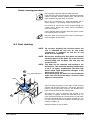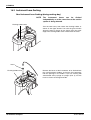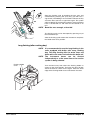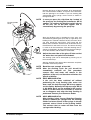
1
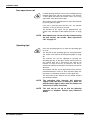
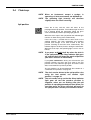
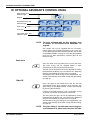
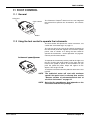
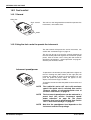
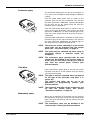
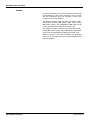
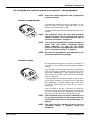
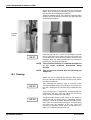
Planmeca Compact
USER'S MANUAL
Publication part number 10005969
Version 25
Published 2006-01
En
i
TABLE OF CONTENTS
1
2
3
4
5
6
7
8
INTRODUCTION .................................................................................................................................... 1
SYMBOLS .............................................................................................................................................. 2
PREVENTIVE MAINTENANCE ................................................................................................................ 2
PLANMECA COMPACTi DENTAL UNIT ................................................................................................ 3
4.1
Main parts .................................................................................................................................... 3
4.2
Bowl ............................................................................................................................................. 5
4.3 Monitor ......................................................................................................................................... 6
SWITCHING THE UNIT ON AND OFF ..................................................................................................... 7
INSTRUMENT SYSTEM ............................................................................................................................ 8
6.1
Over-the-Patient (OP) delivery arm ............................................................................................. 8
6.2
Side delivery arm ......................................................................................................................... 8
6.3
Cart .............................................................................................................................................. 9
6.4
Hanging tube (HT) instrument console handles .......................................................................... 9
6.5
Instrument console .................................................................................................................... 10
6.6
Quick connector hoses .............................................................................................................. 12
6.7
Setting up the instruments ......................................................................................................... 13
6.8 Instrument logic ......................................................................................................................... 14
PATIENT CHAIR ................................................................................................................................... 15
7.1
Automatic legrest ....................................................................................................................... 15
7.2
Trendelenbourg position ............................................................................................................ 16
7.3
Adjusting manual headrest ........................................................................................................ 16
7.3.1
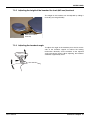
Adjusting the height of the headrest for 539 mm backrest ............................................ 16
7.3.2
Adjusting the height of the headrest for short (469 mm) backrest ................................. 17
7.3.3
Adjusting the headrest angle ......................................................................................... 17
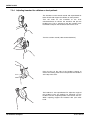
7.3.4 Adjusting headrest for children or short patients ........................................................... 18
MOTORIZED HEADREST ....................................................................................................................... 19
8.1
Manual operation ....................................................................................................................... 19
8.1.1
9
10
11
Using joystick on headrest to drive headrest ................................................................. 19
8.1.2 Using chair foot control to drive headrest ...................................................................... 20
CONTROL PANEL ................................................................................................................................ 22
9.1
Display ....................................................................................................................................... 23
9.2
Instrument keys ......................................................................................................................... 23
9.3
Unit keys .................................................................................................................................... 25
9.4 Chair keys .................................................................................................................................. 27
OPTIONAL ASSISTANT’S CONTROL PANEL ........................................................................................ 30
FOOT CONTROL ................................................................................................................................. 31
11.1 General ...................................................................................................................................... 31
11.2 Using the foot control to operate the instruments ...................................................................... 31
11.3 Using the foot control to operate the instruments - vertical operation ....................................... 33
11.4 Using the foot control to operate the unit ................................................................................... 34
12
11.5 Using the foot control to operate the chair ................................................................................. 35
SUCTION SYSTEM ................................................................................................................................ 38
12.1 Suction arms .............................................................................................................................. 38
12.2 Suction tube holders .................................................................................................................. 41
13
12.3 Suction handpieces ................................................................................................................... 42
PROGRAMMING ................................................................................................................................ 43
13.1 Automatic chair positions ........................................................................................................... 43
User’s Manual
TOC - 1
TABLE OF CONTENTS
13.2 Instrument settings .................................................................................................................... 44
13.3 Duration of the bowl rinsing and glass filling .............................................................................. 46
13.4 Intensity of the operating light .................................................................................................... 48
14
13.5 Duration of door open/nurse call ................................................................................................ 48
OPTIONAL PLUS PACKAGE ................................................................................................................ 49
14.1 Dentist’s and assistant’s control panels ..................................................................................... 49
14.1.1 Display ........................................................................................................................... 50
14.1.2 Instrument keys ............................................................................................................. 50
14.1.3 Unit keys ........................................................................................................................ 53
14.1.4 Chair keys ...................................................................................................................... 55
14.2 Foot control ................................................................................................................................ 58
14.2.1 General .......................................................................................................................... 58
14.2.2 Using the foot control to operate the instruments .......................................................... 58
14.2.3 Using the foot control to operate the instruments - vertical operation ........................... 61
14.2.4 Using the foot control to operate the unit ....................................................................... 62
14.2.5 Using the foot control to operate the chair ..................................................................... 63
14.3 Programming ............................................................................................................................. 66
14.3.1 Automatic chair positions ............................................................................................... 66
14.3.2 Instrument settings ........................................................................................................ 67
15
14.3.3 Timer settings ................................................................................................................ 68
UNIT ADJUSTMENTS ............................................................................................................................ 69
16
15.1 Adjusting the glass fill and bowl rinse flow rates ........................................................................ 69
CLEANING .......................................................................................................................................... 70
16.1 Suction system .......................................................................................................................... 70
16.2 Bowl cleaning ............................................................................................................................. 71
16.3 Instrument hose flushing ............................................................................................................ 72
16.4 Instrument flushing holder ......................................................................................................... 75
16.5 Suction handpieces ................................................................................................................... 75
16.6 Instrument arms, HT instrument holders and instrument hoses ................................................ 76
16.7 Instruments ................................................................................................................................ 76
16.8 Patient chair upholstery ............................................................................................................. 77
16.9 Unit surfaces .............................................................................................................................. 77
16.10 Foot control ................................................................................................................................ 77
17
16.11 Monitor ....................................................................................................................................... 77
MAINTENANCE ................................................................................................................................... 78
17.1 Units with wet suction system .................................................................................................... 79
17.2 Units with the Planmeca MICROVAC separating tank .............................................................. 80
17.3 Units with CS1 Combi-Sepamatic separator ............................................................................. 81
17.4 Units with an amalgam separator .............................................................................................. 82
17.5 Units with Dürr VSA separator/suction system .......................................................................... 85
17.6 Oil collector cup ......................................................................................................................... 86
18
17.7 Oil collector knob ....................................................................................................................... 86
USING THE WATERLINE CLEANING SYSTEM ....................................................................................... 87
18.1 Introduction ................................................................................................................................ 87
18.2 Flushing ..................................................................................................................................... 90
18.3 Maintenance .............................................................................................................................. 91
TOC - 2
User’s Manual
TABLE OF CONTENTS
19
20
DISPOSAL OF THE UNIT ....................................................................................................................... 92
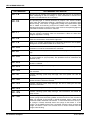
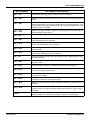
HELP & ERROR MESSAGES .................................................................................................................. 93
20.1 Help messages .......................................................................................................................... 93
21
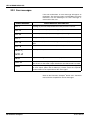
20.2 Error messages ......................................................................................................................... 96
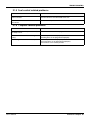
TROUBLESHOOTING ........................................................................................................................... 97
21.1 Instrument related problems ...................................................................................................... 97
21.2 Suction system related problems ............................................................................................... 98
21.3 Chair’s operation related problems ............................................................................................ 98
21.4 Operating light related problems ................................................................................................ 98
21.5 Foot control related problems .................................................................................................... 99
22
21.6 Cuspidor related problems ......................................................................................................... 99
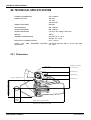
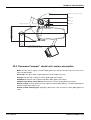
TECHNICAL SPECIFICATIONS .......................................................................................................... 100
22.1 Dimensions .............................................................................................................................. 100
22.2 Planmeca Compacti dental unit’s water consumption ............................................................. 101
User’s Manual
TOC - 3
TABLE OF CONTENTS
TOC - 4
User’s Manual
INTRODUCTION
1
INTRODUCTION
Planmeca Compacti unit is an electrically controlled
dental device that consists of patient chair, cuspidor,
delivery arm, dental instruments and operating light.
Planmeca Compacti unit is meant to be used for dental
treatment by dental care professionals.
This manual describes how to use the Planmeca
Compacti dental unit. Please read this manual carefully
before using the unit.
NOTE
The use of Planmeca Compacti dental unit is
allowed only under the supervision of the dental
care professional.
NOTE
This manual is valid for software revision 3.00 or
later.
NOTE
For units equipped with the Plus package, refer
to section 14 “OPTIONAL PLUS PACKAGE” on
page 49. All the Plus package functions are
described in section 14.
CAUTION
Switch off the unit when using an electrosurgical
knife.
Planmeca Compacti dental unit fulfills the requirements of
Directive 93/42/EEC.
All key illustrations indicate that the key should be
pressed or, where indicated, pressed and held down.
Pressing a key will either switch a function on or off,
depending on the original setting, or change the value.
c. 6.5
The display values shown in this manual are only
examples and should not be interpreted as recommended
values unless otherwise stated.
The manufacturer, assembler and importer are responsible for the safety, reliability and performance of the unit only if:
- installation, calibration, modification and repairs are carried out by qualified and authorized personnel
- electrical installations are carried out according to the appropriate requirements such as IEC364
- equipment is used according to the operating instructions
Planmeca pursues a policy of continual product development. Although
every effort is made to produce up-to-date product documentation this
publication should not be regarded as an infallible guide to current specifications. We reserve the right to make changes without prior notice.
COPYRIGHT PLANMECA 2006-01
PUBLICATION PART NUMBER 10005969 Revision 25
User’s Manual
Planmeca Compacti 1
SYMBOLS
2
SYMBOLS
Type B equipment (Standard IEC 878).
Alternating current (Standard IEC 417).
Attention, consult accompanying documents (Standard
IEC 878).
IPX1
Protected against dripping water (Standard IEC 529).
Separate collection for electrical and electronic equipment
according to Directive 2002/96/EC (WEEE).
3
PREVENTIVE MAINTENANCE
To guarantee the unit’s proper operation, the unit must be
checked and serviced once a year by a qualified
PLANMECA service technician.
2 Planmeca Compacti
User’s Manual
PLANMECA COMPACTi DENTAL UNIT
PLANMECA COMPACTi
4
4.1
DENTAL UNIT
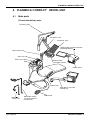
Main parts
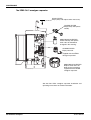
OP and side delivery arms
Operating light
OP delivery arm
Instrument arms
Hanging tube instrument console
with integrated tray
light
Ergo suction arm
SM
E
Glass fill tube
Bowl rinse tube
Balanced arm
instrument console
Bowl
Control panel
Patient chair
Side delivery arm with
rotating tray
Adjustable
suction arm
User’s Manual
Adjustable suction
arm with assistant’s
control panel
Foot control
Planmeca Compacti 3
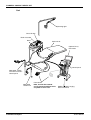
PLANMECA COMPACTi DENTAL UNIT
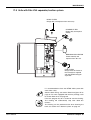
Cart
Operating light
Glass fill tube
Bowl rinse tube
Bowl
Patient chair
Optional X-ray
film viewer
Pro sty
C
O
M
P
A
C
le
T
888
8
C
A
S
B
D
Control panel
Adjustable suction
arm with assistant’s
control panel
Foot control
Adjustable
suction arm
4 Planmeca Compacti
Note, that the foot control
can be connected either to the
cuspidor or to the cart.
Mobile cart with hanging
tube instruments
User’s Manual
PLANMECA COMPACTi DENTAL UNIT
4.2
Bowl
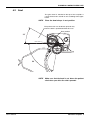
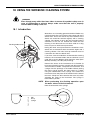
The glass bowl is attached to the top of the cuspidor. It
can be rotated 110° around its axis according to the figure
below.
NOTE
Place the bowl always in rest position.
The patient chair can be driven upwards only
when the bowl is positioned within this area.
Rest position
30˚
80˚
NOTE
User’s Manual
Make sure that the bowl is not above the patient
chair when you drive the chair upwards.
Planmeca Compacti 5
PLANMECA COMPACTi DENTAL UNIT
4.3
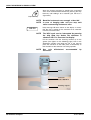
Monitor
Clean the monitor according to the instructions in chapter
16.11 “Monitor” on page 77.
NOTE
Never spray water on the monitor or the PC.
See the user’s manual of the monitor for more
information.
CAUTION
6 Planmeca Compacti
Do not allow the patient to grab the monitor
handle when getting seated or getting up from
the patient chair (see above).
User’s Manual
SWITCHING THE UNIT ON AND OFF
5
SWITCHING THE UNIT ON AND OFF
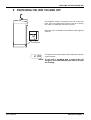
The ON/OFF switch is located on the rear of the unit
base. Press the switch once to turn the unit on. Pressing
the switch a second time will turn the unit off.
When the unit is switched on the ON/OFF switch light will
come on.
On/off switch
2. 00
NOTE
User’s Manual
The display of the control panel shows briefly the software
version number.
If your unit is equipped with a water heater, fill
the glass once after switching the unit on to start
the heating.
Planmeca Compacti 7
INSTRUMENT SYSTEM
6
6.1
INSTRUMENT SYSTEM
Over-the-Patient (OP) delivery arm
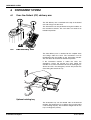
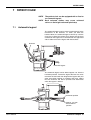
The OP delivery arm is attached to the top of the dental
unit and swings over the chair.
The instruments can be positioned using the handles on
the instrument console. The arm does not need to be
locked into position.
88
88
C
A
S
D
B
EM
S
light
6.2
Side delivery arm
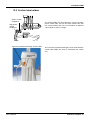
The side delivery arm is attached to the cuspidor base
and swings under the chair. The instruments can be
positioned using the handle on the instrument console.
The arm does not need to be locked into position.
If the instrument console is under the chair, the
emergency sensor will prevent the chair hitting the
console. In case the instrument console or rotating tray is
above the chair, the emergency sensor will prevent the
chair hitting the console or tray.
Optional rotating tray
The instrument tray can be rotated 180° to the desired
position. The rotating tray is an option, you can also select
a non-rotating top tray. The maximum weight limit on the
tray is 2 kilograms (4,4 lbs).
8 Planmeca Compacti
User’s Manual
INSTRUMENT SYSTEM
6.3
Cart
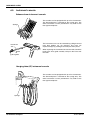
Compact cart lever 060897
The height of the cart instrument console can be adjusted.
Lift the lever below the console, adjust the height and
release the lever. When adjusting, support the console
with your other hand.
Optional rotating tray
When transporting the mobile cart equipped with rotating
tray the tray must be positioned over the cart and the
mobile cart in its lowest position. The maximum weight
limit on the tray is 2 kilograms (4,4 lbs).
6.4
Hanging tube (HT) instrument console handles
Compact cart rem handle 060897
The HT instrument console can be positioned using the
handles on the both sides of the instrument console. The
handles can be removed for disinfection/autoclaving by
loosening the screw below the console with 4mm Allen
key and pulling the handle out from the console.
User’s Manual
Planmeca Compacti 9
INSTRUMENT SYSTEM
6.5
Instrument console
Balanced arm instrument console
The console can be equipped with up to five instruments.
The left-hand place is reserved for the syringe only. The
other instruments can be positioned in any order to the
four right-hand places.
Syringe
88
88
C
A
S
D
B
EM
S
light
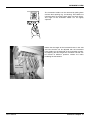
The instrument arms can be removed by pulling them out
from their holders e.g. for cleaning. The arms are
replaced simply by pushing them firmly into their places.
Instrument
arm
When replacing the instrument hose to the roller, bend the
hook of the hose guide carefully and pass the hose over
the roller.
Roller
Hose guide
Comp HT Table 120397
Hanging tube (HT) instrument console
The console can be equipped with up to five instruments.
The left-hand place is reserved for the syringe only. The
other instruments can be positioned in any order to the
four right-hand places.
8888
C
A
S
B
D
Syringe
10 Planmeca Compacti
User’s Manual
INSTRUMENT SYSTEM
8 8 8 8
C
A
S
B
Comp HT Instr.holder240297
D
The instrument holders can be removed by pulling them
out from their openings e.g. for cleaning. The holders are
replaced simply by pushing them firmly into their places.
The angle of the instrument holder can be slightly
adjusted.
Notice that the length of the instrument hoses in the side
and cart console can be adjusted with the instrument
hose holders on the backside of the instrument console.
By adjusting the tube length the instrument console can
be moved to different positions without the tubes
hindering the movements.
Instrument
hose holder
User’s Manual
Planmeca Compacti 11
INSTRUMENT SYSTEM
6.6
Quick connector hoses
Arm console
The instruments are equipped with quick connector hoses
to be connected to the instrument console. The hose is
attached to its place by turning the connector locker
clockwise, and removed by turning the connector
counterclockwise. Make sure that the flat part of the
connector is upwards when attaching the connector to the
console.
Instrument hose
Quick connector
Hanging tube console
Switch the unit off before opening the quick connectors.
When disconnecting the syringe, empty the water and air
from the hose before opening the connector.
The instrument location can be changed simply by
removing the instrument with its hose and reconnecting it
to the new place. The old instrument settings will remain
the same despite the new location of the instrument hose.
Comp. HT Inst.t.QC 170297
The instrument selection can also be interchanged. The
settings of the eight last used instruments are stored in
the memory, and are recalled when the instrument is
reconnected.
12 Planmeca Compacti
NOTE
Make sure that the hoses are properly connected
to the console to avoid any leakage.
NOTE
Always make sure that the instrument hose is
correct to the used instrument. The control
system identifies the instrument hose, not the
instrument. The control system does not
recognize
the
instrument
change,
e.g.
replacement of a turbine with an air motor.
NOTE
The instrument sealings must be correct and
unbroken, and the instrument must be attached
properly to the hose connector. The leakage
between the instrument and connector causes
leakage air to drift into the hose lining.
NOTE
A scaler requires additional electronics and the
scaler type can not be changed without
changing electronics.
CAUTION
Do not use the Scaler instrument on patient
having a cardiac pacemaker. The scaler can
cause disturbance on the pacemaker’s function.
CAUTION
The curing lights using halogen lamps can cause
disturbance on the pacemaker’s function.
User’s Manual
INSTRUMENT SYSTEM
6.7
Setting up the instruments
You can set each instrument so that the following
functions will, where applicable, either be on or off when
the instrument is removed from its holder:
- instrument spray
- automatic chip blow
- fibre optic light
- reverse rotation (micromotor only)
- quick start (air driven instruments only)
- instrument speed/power reduction (Plus package only)
The type or magnitude of the following functions can be
programmed:
- instrument spray
- automatic chip blow
- fibre optic light
- curing time of the polymerization light
- instrument speed/power reduction (Plus package only)
Instrument spray
The instrument spray can be set to be on or off when the
instrument is lifted from its holder, see section 9.2
“Instrument keys” on page 23.
The type of spray can be programmed, see section 13.2
“Instrument settings” on page 44.
NOTE
On units equipped with the Plus package, the
instrument spray type can be selected to be
water&air, air or no spray. See section 14
“OPTIONAL PLUS PACKAGE” on page 49.
Automatic chip blow
The automatic chip blow can be set to be on or off when
the instrument is lifted from its holder, see section 9.2
“Instrument keys” on page 23.
The type of automatic chip blow can be programmed, see
section 13.2 “Instrument settings” on page 44.
Fibre optic light
The fibre optic light can be programmed so that it will
either be on or off when an instrument is lifted from its
holder. The intensity of fibre optic light can also be
programmed. See section 13.2 “Instrument settings” on
page 44.
The fibre optic light can be on only in one instrument at a
time, e.g. the fibre optic light of syringe will switch off, if
the light of the active instrument is switched on.
Reverse rotation of the micromotor
The direction of the micromotor rotation can be reversed,
see section 9.2 “Instrument keys” on page 23.
User’s Manual
Planmeca Compacti 13
INSTRUMENT SYSTEM
Quick start of the air driven instruments
The turbine and air motor can be set to start with
maximum speed, see section 9.2 “Instrument keys” on
page 23.
Instrument speed/power reduction (Plus package only)
The instrument speed/power reduction can be set to be
on or off when the instrument is lifted from its holder, see
section 14.1.2 “Instrument keys” on page 50. The power
reduction level can be programmed, see section 14.3.2
“Instrument settings” on page 67.
NOTE
6.8
The instrument speed/power reduction does not
affect the air driven instruments for which quick
start has been selected.
Instrument logic
Especially in four hand operation it is important to enable
smooth cleaning and exchange of instruments between
the dentist and the assistant. Planmeca Compacti unit
contains an instrument logic with the principles described
below. The active instrument can be operated with the
foot control and its settings are shown on the control
panel and they can be changed.
1. The instrument last removed from its holder is
activated by the foot control (a short push to the
right/left is enough).
2. After activating one instrument the others can be
removed from their holders without changing the
active instrument.
3. Only after the active instrument has been returned
to the holder an other instrument can be activated
by removing it from the holder and activating it by
the foot control as above. Other instruments can
be out from their holders, but they can not be
activated.
4. The memory operation of the logic settings makes
it possible to store parameters and settings for up
to eight instruments. Changing the place of the
instrument on the console does not change the
parameters and settings of that instrument.
5. The instrument logic does not control the syringe
which can be used at any time.
NOTE
14 Planmeca Compacti
If you use similar instruments at the same time,
keep them in their own places. The memory
operation does not recognize the parameters
and settings of the similar instruments if their
places are changed.
User’s Manual
PATIENT CHAIR
7
7.1
PATIENT CHAIR
NOTE
The patient chair can be equipped with a fixed or
an automatic legrest.
NOTE
Dark coloured clothes may cause coloured
stains on the bright coloured upholstery.
Automatic legrest
The automatic legrest can be moved synchronously to the
movements of the backrest, i.e. when you drive the
backrest down, the automatic legrest is driven up. Use the
chair keys to drive the patient chair. Notice that the lever
underneath the legrest has to be locked on the right-hand
side in order to move the legrest with the backrest.
Backrest
8 8 8 8
C
A
S
B
D
Lever
Automatic legrest
The automatic legrest can be locked approx. 18° from the
horizontal position. To lock the legrest the lever has to be
moved to the left-hand side. Support the legrest with your
other hand when locking or unlocking the lever. Notice
that the backrest will move upwards and downwards
when the legrest is locked.
8 8 8 8
C
A
S
B
D
Horizontal position
Lever
Approx. 18° from
the horizontal
position
User’s Manual
Planmeca Compacti 15
PATIENT CHAIR
7.2
Trendelenbourg position
If required the patient chair can be inclined from the
horizontal position to the Trendelenbourg position. In
Trendelenbourg position the legrest is in the horizontal
position and the backrest is driven -4° from the horizontal
position.
To drive the patient chair to the Trendelenbourg position
first drive the chair to horizontal position, lock the legrest
manually as in this chapter described and press once
more the chair key A to drive the backrest to -4° position.
8 8 8 8
C
A
S
B
D
-4˚
Lever
Horizontal position
7.3
Adjusting manual headrest
7.3.1 Adjusting the height of the headrest for 539 mm backrest
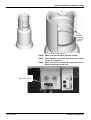
To adjust the height of the headrest turn the knob on the
backside of the chair counterclockwise to release the
headrest. Manually set the headrest to the required height
and retighten the headrest knob.
16 Planmeca Compacti
User’s Manual
PATIENT CHAIR
7.3.2 Adjusting the height of the headrest for short (469 mm) backrest
The height of this headrest can be adjusted by sliding it
manually (see image beside).
Slide the headrest
manually
7.3.3 Adjusting the headrest angle
To adjust the angle of the headrest press the bar on the
side of the headrest support to release the locking
mechanism. Manually set the headrest to the required
angle and release the bar. When adjusting, the headrest
should be supported by hand.
User’s Manual
Planmeca Compacti 17
PATIENT CHAIR
7.3.4 Adjusting headrest for children or short patients
The headrest can be turned around and repositioned for
better head head support for children or short patients.
Turn the knob on the backside of the chair
counterclockwise to release the headrest and pull the
headrest out. Turn it around so that the cushion faces
backwards and push the headrest back into the chair.
Turn the cushion around (180° counterclockwise).
Press the bar on the side of the headrest support to
release the locking mechanism and position the headrest
at the top of the chair.
The headrest is now repositioned. To adjust the angle of
the headrest press the locking bar. Manually set the
headrest into the required position and release the bar.
When adjusting support the headrest with your other
hand.
18 Planmeca Compacti
User’s Manual
MOTORIZED HEADREST
8
MOTORIZED HEADREST
NOTE
8.1
The motorized headrest is only available for the
short (469 mm) backrest.
Manual operation
Press the joystick for approximately two (2) seconds to
change the headrest mode from normal mode to tilt mode.
Press the joystick briefly to change back to the normal
mode.
8.1.1 Using joystick on headrest to drive headrest
Normal mode
The text “PCI” will be shown on the unit display when the
headrest operation is in normal mode.
PCI
NOTE
CHAI
The text “CHAI” will be shown briefly on the
display when you have returned from tilt mode to
the normal mode.
Headrest up
Joystick
Push the joystick towards the backrest to drive the
headrest towards the backrest.
Lengthen
Shorten
Push the joystick down to drive the headrest downwards
in accordance with the movement of the anatomical tilt.
Pushing the joystick up will drive the headrest upwards in
accordance with the movement of the anatomical tilt.
Headrest down
X
User’s Manual
X
Push the joystick away from the backrest to drive the
headrest away from the backrest.
NOTE
If the motorized headrest is not in the anatomical
tilt line, the headrest will be driven to this line
before the anatomic tilt is adjusted. Therefore,
the headrest may first move away from the
direction it is driven to.
CAUTION
Do not leave your fingers under the headrest or
between the headrest and backrest when driving
the headrest.
Planmeca Compacti 19
MOTORIZED HEADREST
Tilt mode
The text “tILt” will be shown on the unit display when the
headrest is in tilt mode.
tILt
Push the joystick towards the backrest to tilt the headrest
down, i.e. patient’s jaw lowers. Pushing the joystick away
from the backrest will tilt the headrest up and patient’s jaw
will raise.
Headrest up
Tilt up
Tilt down
Push the joystick down to drive the headrest down and
push the joystick up to drive the headrest upwards.
Headrest down
Press the joystick briefly to get back to the normal mode.
CAUTION
Do not leave your fingers under the headrest or
between the headrest and backrest when driving
the headrest.
8.1.2 Using chair foot control to drive headrest
The text “PCI” will be shown on the unit display when the
headrest operation is in normal mode.
PCI
CHAI
The text “CHAI” will be shown briefly on the display when
you have returned from tilt mode to the normal mode.
CAUTION
Headrest mode
selection button
C
B
D
Chair foot
control
A
S
20 Planmeca Compacti
Do not leave your fingers under the headrest or
between the headrest and backrest when driving
the headrest.
The foot control is normally used for driving the backrest
and seat. You can move and operate the headrest with
the foot control by pressing the headrest mode selection
button on the foot control.
User’s Manual
MOTORIZED HEADREST
Normal mode
Press the headrest mode selection button on the foot
control briefly to activate the normal adjustment mode.
When the unit is in normal headrest adjustment mode the
text “HEAd” will be shown on the unit display.
HEAd
Push and hold the chair foot control to the direction A to
lengthen and to the direction B to shorten the headrest.
D
A
C
B
D
You can also drive the anatomical movement down (C) or
up (D) by pushing and holding the chair foot control.
S
A
Press the button briefly to get back to the chair movement
mode. The text “CHAI” appears briefly on the display.
C
B
Tilt mode
You can tilt the headrest with the foot control by pressing
the button on the foot control for more than two
seconds.
When the unit is in tilt adjustment mode the text “tILt” will
be shown on the unit display.
tILt
Push and hold the chair foot control to tilt the headrest
forwards (A) to lower patient’s jaw or backwards (B) to
raise patient’s jaw.
B
D
C
B
D
You can also move the headrest down (C) or up (D).
A
S
A
C
Press the button briefly to get back to the chair movement
mode. The text “CHAI” appears briefly on the display.
User’s Manual
Planmeca Compacti 21
CONTROL PANEL
9
CONTROL PANEL
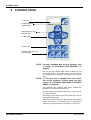
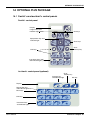
7.1 Display
Program key and
indicator light
C
Spit position key and
indicator light
A
S
7.4 Chair keys
B
D
7.3 Unit keys
7.2 Instrument keys and
indicator lights
NOTE
For units equipped with the Plus package, refer
to section 14 “OPTIONAL PLUS PACKAGE” on
page 49.
The unit has one control panel, which is located on the
instrument console. The control panel is used to control
and program the instruments, the dental unit, and the
chair.
NOTE
In case your unit is equipped with the suction
arm on the assistant’s control panel, see also
section 10 “OPTIONAL ASSISTANT’S CONTROL
PANEL” on page 30.
The instrument key indicator light shows whether the
function is on for the instrument in use.
The spit position key indicator light shows when the chair
is in the spit position.
The program key indicator light shows when the unit is in
the programming mode.
The control panel functions are described on the following
pages, see sections 9.2 “Instrument keys” on page 23, 9.3
“Unit keys” on page 25 and 9.4 “Chair keys” on page 27.
22 Planmeca Compacti
User’s Manual
CONTROL PANEL
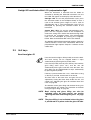
9.1
Display
Speed/power
P 80
40
Curing time
9.2
In normal operation the speed or power of the active
instrument is shown on the display (percentage of the
maximum value). If the polymerization light is the active
instrument, the display shows the current curing time.
c. 7. 0
In the programming mode the setting to be changed is
shown on the display, see section 13 “PROGRAMMING”
on page 43.
HE.02
In case of malfunction an error code or a help message is
shown on the display, see section 20 “HELP & ERROR
MESSAGES” on page 93.
Instrument keys
The instrument keys are used to operate and program the
settings of the active instrument. The indicator light of the
key indicates whether the function is selected to the active
instrument.
When the instrument is removed from its holder, the
instrument key indicator lights display the current
operation status of the instrument.
Instrument spray
Press the instrument spray key to switch the instrument
cooling spray on or off. When the indicator light comes on
the spray is on and the spray of water, air or both of them
are flowing when operating the instrument.
The type of spray can be programmed. See section 13.2
“Instrument settings” on page 44.
User’s Manual
NOTE
The instrument spray can also be switched on or
off using the foot control, see section
“Instrument spray” on page 32.
NOTE
The spray must be switched off when using an
instrument handpiece without a waterline inside
the handpiece.
Planmeca Compacti 23
CONTROL PANEL
Reverse rotation of micromotor/Quick start of air driven instrument
In normal operation the micromotor rotates in a clockwise
direction. To reverse the direction of rotation press this
key. Reversing is possible only when the micromotor is
not operated. When the indicator light is on it indicates
that the micromotor rotates in the reverse direction.
Press the reverse rotation key to select the quick start of
the turbine or the air motor. Quick start selection is
possible only when the instrument is not operated, but is
active. The indicator light is on when the quick start is
selected and the turbine/air motor will start with maximum
speed.
NOTE
The unit can be set up so that reversing the
rotation of micromotor is done with the foot
control as follows. To operate the micromotor
normally push the pedal to the left. To reverse
the direction of rotation push the pedal to the
right. The reverse rotation of micromotor key
does not function when this mode is selected.
The selection of this mode must be done by a
service technician, contact your Planmeca
dealer.
Automatic chip blow
Press the chip blow key to switch the automatic chip blow
on or off. When the indicator light comes on the automatic
chip blow is on and two short blows of water, air or both
will occur after the instrument is stopped.
The type of chip blow can be programmed, see section
13.2 “Instrument settings” on page 44.
NOTE
The manual chip blow can be temporarily
activated using the foot control, see section
“Chip blow” on page 32.
Scalers
By using a momentary spray for the scaler more water will
run temporarily as long as the momentary spray is used.
Use the momentary spray for example if small spray
water flows do not run properly.
The Satelec Newtron scaler has four operations modes:
conservative dentistry (Co, power range 1-10), scaling
(SC, power range 1-10), endondontics (En, power range
1-10) and periondontics (PA, power range 1-10).
The Satelec SP 4055 scaler has three operation modes:
scaling (SC, power range 1-10), endondontics (En, power
range 1-10) and periondontics (PA, power range 4-10).
When the scaler is the active instrument, the operation
mode can be changed with the chip blow key, or by
pressing and holding down the foot control pedal.
24 Planmeca Compacti
User’s Manual
CONTROL PANEL
Starlight LED and Satelec Mini L.E.D. polymerization light
When the instrument is removed from the holder or
activated by bending the balanced instrument arm, the
text “LED” will appear on the display of the dental unit.
Starlight LED: To start the polymerization cycle, press
the activation button of the handpiece briefly to start a
cycle of 10 seconds (press longer to start a cycle of
approximately 20 s). The polymerization cycle can be
interrupted by pressing the activation button of the
instrument.
Satelec Mini L.E.D.: To start the polymerization cycle,
press first the navigation button on the handpiece to
choose the curing menu. Select the desired curing mode
by pressing the navigation button. The polymerization
cycle can be interrupted by pressing the navigation
button. Refer to the Satelec Mini L.E.D. User Manual.
The Starlight LED polymerization light requires Compact i
software version 2.75.4 or later. The Satelec Mini L.E.D.
polymerization light requires Compact i software version
2.80 or later.
9.3
Unit keys
Bowl rinse/glass fill
Press the bowl rinse/glass fill key briefly to rinse the bowl.
The bowl rinsing can be stopped before it stops
automatically by pressing the key briefly twice.
Press the key briefly twice or press the key once until the
glass filling starts (0.5-1 sec.) and the unit will
automatically fill the glass and then rinse the bowl. The
glass filling can be stopped before it stops automatically
by pressing the key briefly.
If the key is pressed more than 1 sec., water flows as long
as the key is pressed, and the bowl is not rinsed.
The flow rates of the bowl rinse and glass fill can be
adjusted by turning the black knob inside the unit, see
section 15.1 “Adjusting the glass fill and bowl rinse flow
rates” on page 69.
The duration of the glass filling and the bowl rinsing can
be programmed, see section 13.3 “Duration of the bowl
rinsing and glass filling” on page 46.
User’s Manual
NOTE
Bowl rinsing and glass filling can also be
activated using the foot control, see section
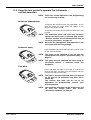
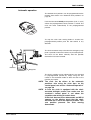
“Rinsing the bowl and filling the glass” on page
34.
NOTE
The glass filling is not activated unless the glass
is positioned in its place under the glass fill tube.
Planmeca Compacti 25
CONTROL PANEL
Door open/nurse call
If a door opening device or nurse call is installed pressing
the door open/nurse call key will activate it. You will hear
a short signal tone when the function starts, and a long
signal tone, when the function stops.
The function can be stopped before it stops automatically
by pressing the key again.
If the key is pressed more than 0.5 sec., the function
continues as long as the key is pressed.
The duration of the signal can be programmed, see
section 13.5 “Duration of door open/nurse call” on page
48.
NOTE
Door open/nurse call can also be activated using
the foot control, see section “Door open/nurse
call” on page 34.
Operating light
Press the operating light key to switch the operating light
on or off.
The intensity of the operating light can be programmed,
see section 13.4 “Intensity of the operating light” on page
48.
The intensity can also be adjusted by pressing the
operating light key or the light’s on/off switch more than
one second. After this 1 second time the intensity will
increase as long as the key is pressed. If the key is
released and then pressed again, the intensity will start to
decrease.
The intensity will also start to decrease/increase after the
maximum/minimum value has been reached. When the
limit value is reached you will hear a short signal tone.
The limit values of the intensity can be altered. Contact
your Planmeca dealer.
26 Planmeca Compacti
NOTE
The operating light intensity will decrease
slightly when the chair is moving or when the
polymerization light is taken from the holder and
returned to it within 2 seconds.
NOTE
The unit can be set up so that the dimming
operation is disabled. Contact your Planmeca
dealer.
User’s Manual
CONTROL PANEL
9.4
Chair keys
NOTE
When an instrument, except a syringe, is
operating, all chair movements are blocked up.
NOTE
The operating light intensity will decrease
slightly when the chair is moving.
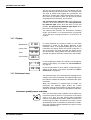
Spit position
S
Press the S key and the chair will move to the
preprogrammed spit position. The indicator light on the S
key is flashing during the movement. Filling the glass
starts automatically and the operating light goes off.
When the chair stops in the spit position the indicator light
remains on. Bowl rinsing starts automatically.
Press the S key a second time to return back to the
working position. The chair remembers this previous
position even though it has been moved in the spit
position. Flushing of the bowl starts automatically. The
indicator light on the S key flashes during the movement.
When the chair stops, the operating light is on if it was on
initially.
NOTE
If you press and hold the S key when the chair is
in the spit position, the S key indicator light goes
off, and the chair will forget the previous position
(the return function is inactivated).
If you press and hold the S key you will enter the spit
position normally, but when the chair stops in the spit
position the S key indicator light goes off and the chair
does not remember its previous position.
The spit position can be programmed. See section 13.1
“Automatic chair positions” on page 43.
User’s Manual
NOTE
The chair can be driven to the spit position also
using the foot control, see section “Spit
position” on page 35.
NOTE
The unit can be set up so that the S key indicator
light goes off and the previous position is
forgotten, when you are driving from the spit
position to a preprogrammed position. When you
next time press the S key, the chair will move to
the spit position. Contact your Planmeca dealer.
Planmeca Compacti 27
CONTROL PANEL
Manual operation
CAUTION
When driving the chair near the upper limit,
make sure that the console arm does not hit the
patient.
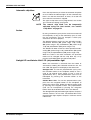
A
Press and hold the A key to drive the backrest down.
When it reaches the position required release the key.
8 8 8 8
C
A
S
B
D
NOTE
B
8 8 8 8
C
A
S
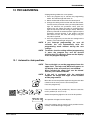
B
D
C
In case your chair is equipped with an optional
automatic legrest, the legrest position is
adjusted simultaneously with the backrest
position.
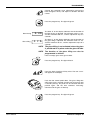
Press and hold the B key to drive the backrest up. When
it reaches the position required release the key.
Press and hold the C key to drive the chair up. When it
reaches the position required release the key.
8 8 8 8
C
A
S
B
D
NOTE
NOTE
Press and hold the D key to drive the chair down. When it
reaches the position required release the key.
D
NOTE
8 8 8 8
C
A
S
B
D
NOTE
NOTE
28 Planmeca Compacti
Make sure that the bowl is not above the patient
chair when driving the chair upwards.
In case the chair is equipped with the chairmounted left/right suction arm make sure that
the assistant’s control panel does not hit the
cuspidor when driving the chair up.
In case your chair is equipped with an optional
automatic legrest, the lowest possible position
of the seat depends for safety reasons on the
legrest position.
The chair can be driven also using the foot
control, see section “Manual operation” on page
35.
In case the chair is equipped with the chairmounted left/right suction arm make sure the
assistant’s control panel is not above the
cuspidor when driving the chair down. If the
chair does not move downwards and HE 03
appears on the display check that the chairmounted arm is not in the upmost position. This
arm position prevents the chair moving
downwards.
User’s Manual
CONTROL PANEL
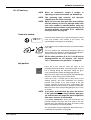
Automatic operation
The desired chair positions can be programmed into the
memory. See section 13.1 “Automatic chair positions” on
page 43.
Press briefly the required chair position key. The chair will
move automatically to the preprogrammed position.
C
A
D
B
The operating light is programmed to switch on or off in
preprogrammed positions. See section 13.1 “Automatic
chair positions” on page 43. The light goes off when the
chair begins to move to a position where the light has
been programmed to be off, but goes on only after the
chair has reached the programmed position, where the
light has been programmed to be on.
Press any of the chair positioning keys or push the unit or
chair foot control pedal in any direction to stop the chair
moving.
The chair movement stops also when the emergency stop
plate is pushed or when the backrest is pressed upwards.
The chair can be driven normally after the possible
obstruction has been removed.
8 8 8 8
C
A
S
B
D
Stop plate
Backrest
User’s Manual
NOTE
The chair can be driven to the automatic
positions also using the foot control, see section
“Automatic operation” on page 37.
NOTE
In case the chair is equipped with the chairmounted left/right suction arm make sure the
assistant’s control panel is not above the
cuspidor when driving the chair down.
If the chair does not move downwards and HE 03
appears on the display check that the chairmounted arm is not in the upmost position. This
arm position prevents the chair moving
downwards.
Planmeca Compacti 29
OPTIONAL ASSISTANT’S CONTROL PANEL
10 OPTIONAL ASSISTANT’S CONTROL PANEL
Program key and
indicator light
Display
A
Spit position key and
indicator light
B
C
D
S
Chair keys
Unit keys
Instrument keys and
indicator lights
NOTE
For units equipped with the Plus package, refer
to section 14 “OPTIONAL PLUS PACKAGE” on
page 49.
The suction arm can be supplied with the assistant’s
control panel, that functions principally in the same way
as the control panel in the instrument console, see section
9 “CONTROL PANEL” on page 22. Only the glass fill/bowl
rinse key has been replaced by separate glass fill and
bowl rinse keys.
Bowl rinse
Press the bowl rinse key briefly once to rinse the bowl.
The bowl rinsing can be stopped before it stops
automatically by pressing the key briefly twice.
The flow rate of the bowl rinse can be adjusted by turning
the black knob inside the unit, see section 15.1 “Adjusting
the glass fill and bowl rinse flow rates” on page 69.
The duration of the bowl rinsing can be programmed, see
section 13.3 “Duration of the bowl rinsing and glass filling”
on page 46.
Glass fill
Press the glass fill key briefly once and the unit will
automatically fill the glass and then rinse the bowl. The
glass filling can be stopped before it stops automatically
by pressing the key briefly.
If the key is pressed more than 1 sec., water flows as long
as the key is pressed, and the bowl is not rinsed.
The flow rate of the glass fill can be adjusted by turning
the black knob inside the unit, see section 15.1 “Adjusting
the glass fill and bowl rinse flow rates” on page 69.
The duration of the glass filling can be programmed, see
section 13.3 “Duration of the bowl rinsing and glass filling”
on page 46.
NOTE
30 Planmeca Compacti
The glass filling is not activated unless the glass
is positioned in its place under the glass fill tube.
User’s Manual
FOOT CONTROL
11 FOOT CONTROL
11.1 General
Lifting bar
Chair control
The Planmeca Compacti dental unit has one integrated
foot control that operates the instruments, unit and the
chair.
Pedal
11.2 Using the foot control to operate the instruments
The foot control will operate the active instrument, see
section 6.8 “Instrument logic” on page 14.
The unit can be set up so that the vertical movement of
the foot control pedal will regulate the instrument speed/
power, refer to section 11.3 “Using the foot control to
operate the instruments - vertical operation” on page 33.
Contact your Planmeca dealer.
Instrument speed/power
To operate the instrument push the pedal to the right or to
the left. Pushing the pedal further to the right (left) will
increase the speed or power of the instrument. As you
push the pedal the power output will appear on the
display. The range is 5-100.
To stop the instrument allow the pedal to return to the rest
position.
User’s Manual
NOTE
The turbine/air motor will start with maximum
speed if the quick start is selected. See section
“Reverse rotation of micromotor/Quick start of
air driven instrument” on page 24.
NOTE
Note that the speed/power level depends on the
instrument and the Plus package.
Planmeca Compacti 31
FOOT CONTROL
Instrument spray
Push the pedal briefly down to select the spray to be on or
off for the active instrument. You will hear a long signal
tone when the spray is switched on and a short signal
tone when the spray is switched off.
NOTE
The spray can be switched on and off from the
control panel. See section “Instrument spray” on
page 23.
NOTE
The spray must be switched off when using an
instrument without a waterline inside the
handpiece.
NOTE
The instrument spray operated with the foot
control can be disabled in the service mode, in
which case you can switch the spray on and off
only from the control panel. Contact your
Planmeca dealer.
Chip blow
Press and hold the pedal down to activate the manual
chip blow. The flow of air will continue until you remove
your foot from the pedal.
NOTE
NOTE
The type of manual chip blow does not depend
on the type of the automatic chip blow, but is
always dry. The manual chip blow can be set to
be dependent on programming, contact your
Planmeca dealer.
The automatic chip blow can be switched on and
off from the control panel. See section
“Automatic chip blow” on page 24.
Momentary spray
When you are operating an instrument, you can activate
the momentary spray by pressing the foot control pedal
down. The spray will continue until you remove your foot
from the pedal.
NOTE
The momentary spray can be disabled in the
service mode, contact your Planmeca dealer.
Scalers
By using a momentary spray for the scaler more water will
run temporarily as long as the momentary spray is used.
Use the momentary spray for example if small spray
water flows do not run properly.
The Satelec Newtron scaler has four operations modes:
conservative dentistry (Co, power range 1-10), scaling
(SC, power range 1-10), endondontics (En, power range
1-10) and periondontics (PA, power range 1-10).
The Satelec SP 4055 scaler has three operation modes:
scaling (SC, power range 1-10), endondontics (En, power
range 1-10) and periondontics (PA, power range 4-10).
When the scaler is the active instrument, the operation
mode can be changed by pressing and holding down the
foot control pedal.
32 Planmeca Compacti
User’s Manual
FOOT CONTROL
11.3 Using the foot control to operate the instruments vertical operation
NOTE
Other foot control operations and programming
are functioning normally.
Instrument speed/power
To operate the instrument push the pedal down. As you
push the pedal the power output will appear on the
display. The range is 5-100.
To stop the instrument allow the pedal to return to the rest
position.
NOTE
The turbine/air motor will start with maximum
speed if the quick start is selected. See section
“Reverse rotation of micromotor/Quick start of
air driven instrument” on page 24.
NOTE
Note that the speed/power level depends on the
instrument and the Plus package.
Instrument spray
Push the pedal to the left to select the spray to be on or off
for the active instrument.
NOTE
The spray can be switched on and off from the
control panel. See section “Instrument spray” on
page 23.
NOTE
The spray must be switched off when using an
instrument without a waterline inside the
handpiece.
Chip blow
Press and hold the pedal to the right to activate the
manual chip blow. The flow of air will continue until you
remove your foot from the pedal.
User’s Manual
NOTE
The type of manual chip blow does not depend
on the type of the automatic chip blow, but is
always dry.
The manual chip blow can be set to be
dependent on programming, contact your
Planmeca dealer.
NOTE
The automatic chip blow can be switched on and
off from the control panel. See section
“Automatic chip blow” on page 24.
Planmeca Compacti 33
FOOT CONTROL
11.4 Using the foot control to operate the unit
The foot control will only operate the unit when all the
instruments are in their holders.
Rinsing the bowl and filling the glass
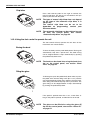
Stop
Start
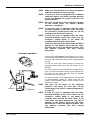
To rinse the bowl push the pedal briefly down. Rinsing will
automatically stop after a preset time. The bowl rinsing
can be stopped before it stops automatically by pushing
the pedal briefly down twice.
2
To fill the glass push the pedal briefly down twice or press
the pedal once until the filling starts (0.5-1 sec.) and the
unit will automatically fill the glass and then rinse the bowl.
Glass filling will automatically stop after a preset time. The
glass filling can be stopped before it stops automatically
by pushing the pedal briefly down.
2
If the pedal is pushed more than 1 sec., water flows as
long as the pedal is pushed, and the bowl is not rinsed.
NOTE
The bowl can be rinsed and the glass can be
filled also using the bowl rinse/glass fill key on
the control panel, see section “Bowl rinse/glass
fill” on page 25.
NOTE
The glass filling is not activated unless the glass
is positioned in its place under the glass fill tube.
Door open/nurse call
If a nurse call or door opening device is installed push the
pedal more than halfway left to activate it. If the pedal is
pushed more than 0.5 sec., the function continues as long
as the pedal is pushed.
NOTE
34 Planmeca Compacti
This function can also be activated using the
door open/nurse call key on the control panel,
see section “Door open/nurse call” on page 26.
User’s Manual
FOOT CONTROL
11.5 Using the foot control to operate the chair
NOTE
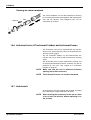
All chair movements are blocked when an
instrument, excluding syringe, is operating.
NOTE
The operating light intensity will decrease
slightly when the chair is moving.
Spit position
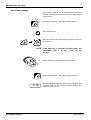
To drive the chair to the spit position push the pedal to the
rightmost position and then down.
To return back to the working position push the pedal
again to the rightmost position and down.
For more information about the spit position see section
“Spit position” on page 27.
NOTE
The chair can also be driven to the spit position
using the spit position key on the control panel,
see section “Spit position” on page 27.
CAUTION
When driving the chair near the upper limit,
make sure that the console arm does not press
the patient.
NOTE
In case your chair is equipped with an optional
automatic legrest, the legrest position is
adjusted simultaneously with the backrest
position.
Manual operation
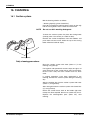
To adjust the position of the chair push and hold the
chair foot control in the direction indicated on the foot
control to drive the chair in the direction required. When
the chair reaches the right position release the foot
control. The foot control will only operate one movement
at a time.
8 8 8 8
C
A
S
B
D
A
User’s Manual
Planmeca Compacti 35
FOOT CONTROL
B
8 8 8 8
C
A
S
B
D
C
8 8 8 8
C
A
S
B
D
8 8 8 8
C
A
S
B
D
D
36 Planmeca Compacti
NOTE
Make sure that the bowl is not above the patient
chair when driving the chair upwards.
NOTE
In case your chair is equipped with an optional
automatic legrest, the lowest possible position
of the seat depends for safety reasons on the
legrest position.
NOTE
The chair can be driven also using the chair keys
on the control panel, see section “Manual
operation” on page 28.
NOTE
In case the chair is equipped with the chairmounted left/right suction arm make sure that
the assistant’s control panel does not hit the
cuspidor when driving the chair up.
NOTE
In case the chair is equipped with the chairmounted left/right suction arm make sure the
assistant’s control panel is not above the
cuspidor when driving the chair down.
If the chair does not move downwards and HE 03
appears on the display check that the chairmounted arm is not in the upmost position. This
arm position prevents the chair moving
downwards.
User’s Manual
FOOT CONTROL
Automatic operation
The desired chair positions can be programmed into the
memory. See section 13.1 “Automatic chair positions” on
page 43.
C
A
Push the foot control briefly to the position (A, B, C, or D)
where the preprogrammed chair position is stored. The
chair will move automatically to the preprogrammed
position.
B
D
To stop the chair from moving before it reaches the
preprogrammed position push the foot control in any
direction.
The chair movement stops also when the emergency stop
plate is pushed or when the backrest is pressed upwards.
The chair can be driven normally after the possible
obstruction has been removed.
8 8 8 8
C
A
S
B
D
Backrest
Stop plate
The chair’s position can be adjusted when it has reached
its preprogrammed position by simply using the foot
control in non-automatic mode to drive the chair to the
position you require.
User’s Manual
NOTE
The chair can be driven to the automatic
positions also using the chair keys on the
control panel, see section “Automatic operation”
on page 29.
NOTE
In case the chair is equipped with the chairmounted left/right suction arm make sure the
assistant’s control panel is not above the
cuspidor when driving the chair down.
If the chair does not move downwards and HE 03
appears on the display check that the chairmounted arm is not in the upmost position. This
arm position prevents the chair moving
downwards.
Planmeca Compacti 37
SUCTION SYSTEM
12 SUCTION SYSTEM
12.1 Suction arms
Ergo suction arm
The ergo suction arm is attached to the left side of
instrument console.
88
88
C
A
S
D
B
EM
S
light
Adjustable suction arm
The adjustable suction arm is attached to the side of the
unit.
Adjustable suction arm with assistant’s control panel
s
T
C
A
M
ro
Suctionarm.eps
S
C
O
P
P
ty
le
The adjustable suction arm with assistant’s control panel
is attached to the side of the unit.
38 Planmeca Compacti
User’s Manual
SUCTION SYSTEM
Left/right suction arm
B
C
D
The left-right suction arm is attached to the corner of the
unit.
A
88
88
S
Chair-mounted left/right suction arm
arm_angle.eps
The chair-mounted left/right suction arm is mounted to the
underside of the patient chair.
User’s Manual
Planmeca Compacti 39
SUCTION SYSTEM
NOTE
In case the chair is equipped with the chairmounted left/right suction arm make sure that
the assistant’s control panel does not hit the
cuspidor when driving the chair up. See picture
below.
Cuspidor
Assistant’s control
panel
NOTE
40 Planmeca Compacti
In case the chair is equipped with the chairmounted left/right suction arm make sure the
assistant’s control panel is not above the
cuspidor when driving the chair down.
If the chair does not move downwards and HE 03
appears on the display check that the chairmounted arm is not in the upmost position. This
arm position prevents the chair moving
downwards.
User’s Manual
SUCTION SYSTEM
12.2 Suction tube holders
Saliva suction
handpiece
The suction holder has three openings, one for the highpower suction tube, one for the saliva suction tube and
one spare position that can be used either for optional
saliva ejector or nurse’s syringe.
8 8 8 8
C
High-power
suction
handpiece
A
S
B
D
Assistant’s polymerization light and its holder
The assistant’s polymerization light can be attached to the
suction tube holder arm which is attached to the suction
arm.
Suction tube
holders
User’s Manual
Planmeca Compacti 41
SUCTION SYSTEM
12.3 Suction handpieces
When a suction handpiece is lifted from its holder the
suction will automatically start. When both handpieces are
returned the suction will stop.
Suction handpiece - high-power
When you remove the suction handpiece from its holder
the weight of the suction tube will cause the end of the
handpiece to “tilt” slightly. This action opens the
handpiece valve allowing the suction to start.
Tilted handpiece
The suction can be temporarily stopped by “straightening”
the suction handpiece with your thumb and forefinger.
Straight handpiece
If you temporarily put the suction handpiece down during
dental treatment the suction will automatically stop as the
force of the suction will straighten the handpiece.
Saliva suction handpiece
Open
If you are using the saliva suction handpiece the suction
can be controlled by sliding the adjuster up or down.
Adjuster
cattani.eps
Close
42 Planmeca Compacti
User’s Manual
PROGRAMMING
13 PROGRAMMING
All programming follows the same pattern:
1. Press the program key to activate the programming
mode. The indicator light will come on.
2. Select the desired function from the control panel.
3. Change the setting of the function with the foot control.
To increase the parameter value, push the pedal to the
right. To decrease the parameter value, push the
pedal to the left. When the pedal is pushed halfway
(right or left) the parameter changes slowly. When the
pedal is pushed to its extreme position (right or left) the
parameter changes quickly. If the pedal is pushed
more than 0.4 sec., the value will change as long as
the pedal is pushed.
4. Press the program key to store the new setting into the
memory. The indicator light will go out.
NOTE
NOTE
If you interrupt programming for over 90
seconds, the unit automatically exits the
programming mode without storing the new
settings.
To check a function setting without programming
it, press the program key and the desired
function key. The setting is shown on the display.
Press the program key again.
13.1 Automatic chair positions
NOTE
NOTE
The seat height can not be programmed near the
upper limit. The help code HE.08 will appear on
the display if the seat position is not allowed.
When needed, the upper limit can be altered.
Contact your Planmeca dealer.
If the unit is equipped with the motorized
headrest the height and angle of the headrest
will be programmed.
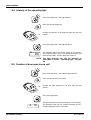
Move the chair to the position required using the chair foot
control or the chair keys on the unit control panel.
Press the program key.
A
S
Press the desired chair position key where to store the
chair’s position (S, A, B, C or D).
C
B
D
PoS.A
Switch the operating light to be on or off in this position.
The position will appear on the display.
Press the program key to store the chair position into the
memory. The indicator light will go out.
User’s Manual
Planmeca Compacti 43
PROGRAMMING
13.2 Instrument settings
Remove the instrument that you wish to program from its
holder. After identifying the instrument it can be held out
from or returned to its holder. If returned you have 3 sec.
to enter the programming mode (the instrument settings
are shown on the display).
NOTE
The air/water flow of the syringe can not be
changed.
NOTE
You may program all functions
instrument at the same time.
NOTE
If
the
instrument
is
operated
during
programming, the changes in settings are seen
immediately.
for
one
Instrument spray
Press the program key. The indicator light will be lit.
Press the instrument spray key.
+++
Change the flow rate with the foot control.
+
___
_
Air
SA .4 0
Water
SH.50
Change the parameter (air/water) to be adjusted by
pressing the instrument spray key or by pushing the foot
control pedal briefly down. The flow of both air and water
can be adjusted. The text ‘SA’ on the display indicates
that the spray air is adjusted, and the text ‘SH’ indicates
that the spray water is adjusted. The minimum value of
both parameters is 0 (no flow) and maximum 100 (marked
as ‘F’).
Adjust the flow rate with the foot control.
Press the program key.
NOTE
Sterile water
St
44 Planmeca Compacti
If the dental unit is equipped with the Planmeca
Sterile water system or Steripump, the sterile
water function is selected in this mode. The text
‘St’ indicates that sterilized water is fed to the
selected instrument. The indicator light of the
instrument spray key is flashing when the spray
is on. Refer to the user’s manual of the Sterile
water system.
User’s Manual
PROGRAMMING
Chip blow
Press the program key to activate the programming
mode. The indicator light will be lit.
Press the automatic chip blow key.
+++
Change the flow rate with the foot control.
+
___
_
Air
C A . 40
Water
CH. 60
Change the parameter (air/water) to be adjusted by
pressing the automatic chip blow key or by pushing the
foot control pedal briefly down. The flow of both air and
water can be adjusted. The text ‘CA’ on the display
indicates that the chip air is adjusted, and the text ‘CH’
indicates that the chip water is adjusted. The minimum
value of both parameters is 0 (no flow) and the maximum
100 (marked as ‘F’).
Adjust the flow rate with the foot control.
Press the program key. The indicator light will go out.
NOTE
User’s Manual
The type of manual chip blow does not depend
on the type of the automatic chip blow, but is
always dry.
The manual chip blow can be set to be
dependent on programming, contact your
Planmeca dealer.
Planmeca Compacti 45
PROGRAMMING
Fibre optic light
Press the program key. The indicator light will be lit.
Press the reverse rotation key.
+++
Change the light intensity with the foot control.
+
___
_
Press the program key to store the values into the
memory. The indicator light will go out.
L. 90
The fibre optic light intensity or the text ‘L. oFF’ will appear
on the display. The minimum value is 70% of the
maximum intensity and the maximum 100%, and the
adjustment step is 2. The light can be programmed to be
off: after reaching the minimum value the light is switched
off, indicated by ‘L.oFF’ on the display.
13.3 Duration of the bowl rinsing and glass filling
Press the program key. The light will be lit.
Press the bowl rinse/glass fill key.
Optional Plus package: Press the bowl rinse key for bowl
rinse time adjustment and the glass fill key for glass fill
time adjustment.
+++
Change the duration with the foot control.
+
___
46 Planmeca Compacti
_
User’s Manual
PROGRAMMING
Change the parameter to be adjusted by pressing the
bowl rinse/glass fill key and adjust its duration with foot
control.
Press the program key. The light will go out.
Bowl rinsing
Glass filling
b 40
The letter ‘b’ on the display indicates that the duration of
the bowl rinsing is adjusted. The minimum value is 5 sec.
and the maximum 240 sec., and the adjustment step is 5
seconds.
C 7. 5
The letter ‘c’ on the display indicates that the duration of
the glass filling is adjusted. The minimum value is 2 sec.
and the maximum 10 sec., and the adjustment step is 0.5
seconds.
NOTE
The glass filling is not activated unless the glass
is positioned in its place under the glass fill tube.
NOTE
The duration of the glass filling can also be
programmed as follows:
Place an empty glass to the glass holder.
Press the program key. The light will be lit.
Press the bowl rinse/glass fill key twice. The text ‘c.nn.n’
will appear on the display.
Push the foot control pedal down. The glass filling time
will first be set to 2 seconds and will start to increase after
2 seconds pushing. The pedal can be released and then
pushed again, and the time continues increasing.
Continue until the glass is filled up.
Press the program key. The light will go out.
User’s Manual
Planmeca Compacti 47
PROGRAMMING
13.4 Intensity of the operating light
Press the program key. The light will be lit.
Press the operating light key.
+++
Change the intensity of the operating light with the foot
control.
+
___
_
Press the program key. The light will go out.
o
80
NOTE
The operating light intensity will appear on the display.
The minimum value is 70% of the maximum intensity and
the maximum 100%, and the adjustment step is 2.
The light intensity can also be adjusted as
described in section “Operating light” on page
26.
13.5 Duration of door open/nurse call
Press the program key. The indicator light will be lit.
Press the door open/nurse call key.
+++
Change the door open/nurse call time with the foot
control.
+
___
_
Press the program key.
d. 10
48 Planmeca Compacti
The door open/nurse call time will appear on the display.
The minimum value is 0 sec. and the maximum 25 sec.,
and the adjustment step is 1 seconds.
User’s Manual
OPTIONAL PLUS PACKAGE
14 OPTIONAL PLUS PACKAGE
14.1 Dentist’s and assistant’s control panels
Dentist’s control panel
Display
Program key and
indicator light
Unit keys
Spit position key and
indicator light
Chair keys
B
Chair
memory key
Unit keys
Instrument keys (3-6)
and indicator lights (4-6)
Assistant’s control panel (optional)
Chair
memory key
Program key
and indicator light
Unit key
Display
Spit position key
and indicator light
Chair keys
Unit keys
Instrument keys
and indicator lights
User’s Manual
Planmeca Compacti 49
OPTIONAL PLUS PACKAGE
The unit has one control panel for the dentist and one
optional control panel for the assistant. The control panels
are used to control and program the instruments, the
dental unit, and the chair. Both control panels function in
the same way and either of them can be used to control
and program the instruments, unit and chair.
The instrument key indicator light shows whether the
function is on for the instrument in use. The spit position
key indicator light shows when the chair is in the spit
position. The program key indicator light shows when
the unit is in the programming mode.
The control panel functions are described in following
pages, see sections 14.1.2 “Instrument keys” on page 50,
14.1.3 “Unit keys” on page 53 and 14.1.4 “Chair keys” on
page 55.
14.1.1 Display
Speed/power
P 80
Curing time
Timer
40
0 . 10
User number
dEn .1
In normal operation the speed or power of the active
instrument is shown on the display (percents of the
maximum value). If the polymerization light is the active
instrument, the display shows the current curing time. If
one of the timers has been activated, the display shows
the relevant time setting. When the chair memory key is
pressed, the display shows the current chair user number.
c. 7.0
In the programming mode the setting to be changed is
shown on the display, see section 13 “PROGRAMMING”
on page 43.
HE.02
In case of malfunction an error code or a help message is
shown on the display, see section 20 “HELP & ERROR
MESSAGES” on page 93.
14.1.2 Instrument keys
The instrument keys are used to operate and program the
settings of the active instrument. The indicator light of the
key indicates whether the function is selected to the active
instrument.
When the instrument is removed from its holder, the
instrument key indicator lights display the current
operation status of the instrument, or the current status is
shown on the display (instrument speed/power reduction).
Instrument speed/ power reduction
Press the instrument power reduction key to reduce the
instrument speed or power to a preset level. If the preset
value is e.g. 50%, the foot control pedal movement
controls the speed/power between 5-50% instead of the
normal range of 5-100%. The preset max. value is shown
on the display when an instrument is lifted from its holder.
Press the instrument power reduction key again to switch
the power reduction off.
50 Planmeca Compacti
User’s Manual
OPTIONAL PLUS PACKAGE
The low speed function can be selected in case you need
to reduce the starting speed/power level. Contact your
Planmeca dealer to enable/disable the low speed function
of the unit.
NOTE
NOTE
NOTE
The instrument speed/ power reduction level can
be programmed. See section 14.3.2 “Instrument
settings” on page 67.
The instrument speed/power reduction does not
affect the air driven instruments for which quick
start has been selected.
Note that the speed/power level depends on the
instrument and the Plus package.
Instrument spray
The instrument cooling spray setting can be selected to
be water&air, air or no spray.
Press the instrument spray key once to switch on the
water&air spray. You will hear two short signal tones.
Additionally, a green indicator light will show the water&air
spray is switched on.
Press the instrument spray key a second time to switch
the air spray on. You will hear one short signal tone.
Additionally, an amber indicator light will show the air
spray is switched on.
Press the instrument spray key a third time to switch off
the instrument cooling spray. You will hear one long
signal tone. Additionally, the indicator light will go out.
The spray flow rate can be programmed. See section 13.2
“Instrument settings” on page 44.
NOTE
NOTE
NOTE
The instrument spray can also be switched on or
off and the spray type can be changed using the
foot control, see section “Instrument spray” on
page 59.
If the spray has been programmed to be air,
pressing the instrument spray key will not switch
the water&air spray on.
The spray must be switched off when using an
instrument without a waterline inside the
handpiece.
Reverse rotation of micromotor/Quick start of air driven instrument
In normal operation the micromotor rotates in a clockwise
direction. To reverse the direction of rotation press this
key. Reversing is possible only when the micromotor is
not operated, but is active. When the indicator light is on it
indicates that the micromotor rotates in the reverse
direction.
Press the reverse rotation key to select the quick start of
the turbine or air motor. Quick start selection is possible
only when the instrument is not operated. The indicator
light is on when the quick start is selected and the turbine/
air motor will start with maximum speed.
NOTE
User’s Manual
The instrument speed/power reduction does not
affect the air driven instruments for which quick
start has been selected.
Planmeca Compacti 51
OPTIONAL PLUS PACKAGE
Automatic chip blow
Press the chip blow key to switch the automatic chip blow
on or off. When the indicator light is on the automatic chip
blow is on and two short blows of water, air or both will
occur after the instrument is stopped.
The type of chip blow can be programmed, see section
13.2 “Instrument settings” on page 44.
NOTE
The manual chip blow can be temporarily
activated using the foot control, see section
“Chip blow” on page 59.
Scalers
By using a momentary spray for the scaler more water will
run temporarily as long as the momentary spray is used.
Use the momentary spray for example if small spray
water flows do not run properly.
The Satelec Newtron scaler has four operations modes:
conservative dentistry (Co, power range 1-10), scaling
(SC, power range 1-10), endondontics (En, power range
1-10) and periondontics (PA, power range 1-10).
The Satelec SP 4055 scaler has three operation modes:
scaling (SC, power range 1-10), endondontics (En, power
range 1-10) and periondontics (PA, power range 4-10).
When the scaler is the active instrument, the operation
mode can be changed with the chip blow key, or by
pressing and holding down the foot control pedal.
Starlight LED and Satelec Mini L.E.D. polymerization light
When the instrument is removed from the holder or
activated by bending the balanced instrument arm, the
text “LED” will appear on the display of the dental unit.
Starlight LED: To start the polymerization cycle, press
the activation button of the handpiece briefly to start a
cycle of 10 seconds (press longer to start a cycle of
approximately 20 s). The polymerization cycle can be
interrupted by pressing the activation button of the
instrument.
Satelec Mini L.E.D.: To start the polymerization cycle,
press first the navigation button on the handpiece to
choose the curing menu. Select the desired curing mode
by pressing the navigation button. The polymerization
cycle can be interrupted by pressing the navigation
button. Refer to the Satelec Mini L.E.D. User Manual.
The Starlight LED polymerization light requires Compact i
software version 2.75.4 or later. The Satelec Mini L.E.D.
polymerization light requires Compact i software version
2.80 or later.
52 Planmeca Compacti
User’s Manual
OPTIONAL PLUS PACKAGE
14.1.3 Unit keys
Bowl rinse
Press the bowl rinse key briefly once to rinse the bowl.
The bowl rinsing can be stopped before it stops
automatically by pressing the key briefly.
The flow rate of the bowl rinse can be adjusted by turning
the black knob inside the unit, see section 15.1 “Adjusting
the glass fill and bowl rinse flow rates” on page 69.
The duration of the bowl rinsing can be programmed, see
section 13.3 “Duration of the bowl rinsing and glass filling”
on page 46.
NOTE
Bowl rinsing can also be activated using the foot
control, see “Rinsing the bowl” on page 62.
Glass fill
Press the glass fill key briefly once and the unit will
automatically fill the glass and then rinse the bowl. The
glass filling can be stopped before it stops automatically
by pressing the key briefly.
If the key is pressed more than 1 sec., water flows as long
as the key is pressed, and the bowl is not rinsed.
The flow rate of the glass fill can be adjusted by turning
the black knob inside the unit, see section 15.1 “Adjusting
the glass fill and bowl rinse flow rates” on page 69.
The duration of the glass filling can be programmed, see
section 13.3 “Duration of the bowl rinsing and glass filling”
on page 46.
NOTE
NOTE
Glass filling can also be activated using the foot
control, see “Filling the glass” on page 62.
The glass filling is not activated unless the glass
is positioned in its place under the glass fill tube.
Timer
The timer memory contains six preprogrammed time
settings which apply to both control panels.
To activate a timer, first press the timer key. This
operation alone does not activate any of the timer
functions. It only “shifts” the number keys 1-6 into timer
control mode (rather like a keyboard SHIFT key, which is
used to switch from lower case to capitals).
Then press the number key for the timer you wish to use.
The duration of the timer will appear on the display. The
selected time is displayed for five seconds, but the
countdown begins immediately. If you press an other
timer key during this five second period, the new time
replaces the previous selection. After five seconds the
display changes to show the remaining part of the
countdown. When the timer reaches zero you will hear
two signal tones. Stop the function by pressing the timer
again.
The preset timers can be reprogrammed, see section
14.3.3 “Timer settings” on page 68.
NOTE
User’s Manual
The use of the keys of one control panel for timer
functions has no effect on the functions of the
other control panel.
Planmeca Compacti 53
OPTIONAL PLUS PACKAGE
Operating light
Press the operating light key to switch the operating light
on or off.
The intensity of the operating light can be programmed,
see section 13.4 “Intensity of the operating light” on page
48.
The intensity can also be adjusted by pressing the
operating light key or the light’s on/off switch more than
one second. After this 1 second time the intensity will
increase as long as the key is pressed. If the key is
released and then pressed again, the intensity will start to
decrease.
The intensity will also start to decrease/increase after the
maximum/minimum value has been reached. When the
limiting value is reached you will hear a short signal tone.
The limiting values of the intensity can be altered. Contact
your Planmeca dealer.
NOTE
The operating light intensity will decrease
slightly when the chair is moving or when the
polymerization light is taken from the holder and
returned to it within 2 seconds.
NOTE
The unit can be set up so that the dimming
operation is disabled. Contact your Planmeca
dealer.
Door open/nurse call
If a door opening device or nurse call is installed pressing
the door open/nurse call key will activate it. You will hear
a short signal tone when the function starts, and a long
signal tone, when the functions stops.
The function can be stopped before it stops automatically
by pressing the key again.
If the key is pressed more than 0.5 sec., the function
continues as long as the key is pressed.
The duration of the signal can be programmed, see
section 13.5 “Duration of door open/nurse call” on page
48.
NOTE
54 Planmeca Compacti
Door open/nurse call can also be activated using
the foot control, see section “Door open/nurse
call” on page 63.
User’s Manual
OPTIONAL PLUS PACKAGE
14.1.4 Chair keys
NOTE
When an instrument, except a syringe, is
operating, all chair movements are blocked up.
NOTE
The operating light intensity will decrease
slightly when the chair is moving.
NOTE
Up to six users can store their own chair settings
into the memory of the Plus package. Make sure
your user number is selected before using the
automatic chair positions or programming any of
the chair settings, see section 14.3.1 “Automatic
chair positions” on page 66.
Chair user number
dEn.1
Press the chair memory key to check/ change the current
chair user number. The number of the active, last
selected dentist will appear on the display.
To change the user number then press one of the number
keys (1-6).
The user number will automatically disappear from the
display within two seconds. It will disappear immediately if
you press the chair memory key a second time.
NOTE
All five chair positions (S, A, B, C and D) can be
preprogrammed for six dentists. See section
14.3.1 “Automatic chair positions” on page 66.
Spit position
S
Press the S key and the chair will move to the
preprogrammed spit position. The indicator light on the S
key is flashing during the movement. Filling the glass
starts automatically and the operating light goes off.
When the chair stops in the spit position the indicator light
remains on. Bowl rinsing starts automatically.
Press the S key a second time to return back to the
working position. The chair remembers this previous
position even though it has been moved in the spit
position. Flushing of the bowl starts automatically. The
indicator light on the S key flashes during the movement.
When the chair stops, the operating light goes on, if it was
on initially.
NOTE
If you press and hold the S key when the chair is
in the spit position, the S key indicator light goes
off, and the chair will forget the previous position
(the return function is inactivated).
If you press and hold the S key you will enter the spit
position normally, but when the chair stops in the spit
position the S key indicator light goes off and the chair
does not remember its previous position.
The spit position can be programmed. See section 14.3.1
“Automatic chair positions” on page 66.
User’s Manual
Planmeca Compacti 55
OPTIONAL PLUS PACKAGE
NOTE
The chair can be driven to the spit position also
using the foot control, see section “Spit
position” on page 63.
NOTE
The unit can be set up so that the S key indicator
light goes off and the previous position is
forgotten when you drive from the spit position
to a preprogrammed position. When you next
time press the S key, the chair will move to the
spit position. Contact your Planmeca dealer.
CAUTION
When driving the chair near the upper limit,
make sure that the console arm does not press
the patient.
Manual operation
Press and hold the A key to drive the backrest down.
When it reaches the position required release the key.
A
8 8 8 8
C
A
S
B
D
NOTE
B
8 8 8 8
C
A
In case your chair is equipped with an optional
automatic legrest, the legrest position is
adjusted simultaneously with the backrest
position.
Press and hold the B key to drive the backrest up. When
it reaches the position required release the key.
S
B
D
Press and hold the C key to drive the chair up. When it
reaches the position required release the key.
C
8 8 8 8
C
A
S
B
NOTE
In case the chair is equipped with the chairmounted left/right suction arm make sure that
the assistant’s control panel does not hit the
cuspidor when driving the chair up.
NOTE
Make sure that the bowl is not above the patient
chair when driving the chair upwards.
D
56 Planmeca Compacti
User’s Manual
OPTIONAL PLUS PACKAGE
Press and hold the D key to drive the chair down. When it
reaches the position required release the key.
8 8 8 8
D
C
A
S
B
D
NOTE
In case your chair is equipped with an optional
automatic legrest, the lowest possible position
of the seat depends for safety reasons on the
legrest position.
NOTE
In case the chair is equipped with the chairmounted left/right suction arm make sure the
assistant’s control panel is not above the
cuspidor when driving the unit down.
If the chair does not move downwards and HE 03
appears on the display check that the chairmounted arm is not in the upmost position. This
arm position prevents the chair moving
downwards.
NOTE
The chair can be driven also using the foot
control, see “Manual operation” on page 64.
Automatic operation
A
Press the chair position key where the required position
for the selected user is stored (S, A, B, C or D). The chair
will automatically move to the preprogrammed position.
C
S
D
B
The operating light is programmed to switch on or off in
preprogrammed positions. See section 14.3.1 “Automatic
chair positions” on page 66. The light goes off when the
chair begins to move to a position where the light has
been programmed to be off, but goes on only after the
chair has reached the programmed position, where the
light has been programmed to be on. Press any of the
chair positioning keys or push the unit or chair foot control
pedal in any direction to stop the chair moving.
8 8 8 8
C
A
S
B
D
The chair movement stops also when the emergency stop
plate is pushed or when the backrest is pressed upwards.
The chair can be driven normally after the possible
obstruction has been removed.
Stop plate
Backrest
User’s Manual
NOTE
The chair can be driven to the preprogrammed
positions also using the foot control, see section
“Automatic operation” on page 65.
NOTE
In case the chair is equipped with the chairmounted left/right suction arm make sure the
assistant’s control panel is not above the
cuspidor when driving the chair down.
If the chair does not move downwards and HE 03
appears on the display check that the chairmounted arm is not in the upmost position. This
arm position prevents the chair moving
downwards.
Planmeca Compacti 57
OPTIONAL PLUS PACKAGE
14.2 Foot control
14.2.1 General
Lifting bar
Chair control
The unit has one integrated foot control that operates the
instruments, unit and the chair.
Pedal
14.2.2 Using the foot control to operate the instruments
The foot control will operate the active instrument, see
section 6.8 “Instrument logic” on page 14.
The unit can be set up so that the vertical movement of
the foot control pedal will regulate the instrument speed/
power, refer to section 14.2.3 “Using the foot control to
operate the instruments - vertical operation” on page 61.
Contact your Planmeca dealer.
Instrument speed/power
To operate the instrument push the pedal to the right or to
the left. Pushing the pedal further to the right (left) will
increase the speed or power of the instrument. As you
push the pedal the power output will appear on the
display. The normal range is 5-100%.
To stop the instrument allow the pedal to return to the rest
position.
58 Planmeca Compacti
NOTE
The turbine/air motor will start with maximum
speed if the quick start is selected. See section
“Reverse rotation of micromotor/Quick start of
air driven instrument” on page 51.
NOTE
The instrument speed/power can be reduced to a
preset level. See section “Instrument speed/
power reduction” on page 50. The power
reduction level can be programmed. See section
14.3.2 “Instrument settings” on page 67.
NOTE
Note that the speed/power level depends on the
instrument and the Plus package.
User’s Manual
OPTIONAL PLUS PACKAGE
Instrument spray
The instrument cooling spray can be set to water&air, air
or no spray. Use the pedal to rotate through the different
settings.
Push the pedal briefly down once to switch on the
water&air spray for the active instrument. You will hear
two short signal tones. Additionally, a green indicator light
on the spray key on the control panel will show the
water&air spray is switched on.
Push the pedal briefly down again to switch on the air
spray for the active instrument. You will hear one short
signal tone. Additionally, an amber indicator light on the
spray key on the control panel will show the air spray is
switched on.
Push the pedal briefly down a third time to switch off the
instrument spray for the active instrument. You will hear
one long signal tone. Additionally, the indicator light on
the spray key on the control panel will go out.
NOTE
NOTE
NOTE
The spray can also be switched on or off and the
spray type can be changed from the control
panel. See “Instrument spray” on page 51.
The spray must be switched off when using an
instrument without a waterline inside the
handpiece.
The instrument spray operated with the foot
control can be disabled in the service mode, in
which case you can switch the spray on and off
only from the control panel. Contact your
Planmeca dealer.
Chip blow
Press and hold the pedal down to activate the manual
chip blow. The flow of air will continue until you remove
your foot from the pedal.
NOTE
NOTE
The type of manual chip blow does not depend
on the type of the automatic chip blow; it is
always dry.
The manual chip blow can be set to be
dependent on programming, contact your
Planmeca dealer.
The automatic chip blow can be switched on and
off from the control panel. See section
“Automatic chip blow” on page 52.
Momentary spray
When you are operating an instrument, you can activate
the momentary spray by pressing the foot control pedal
down. The spray will continue until you remove your foot
from the pedal.
NOTE
User’s Manual
The momentary spray can be disabled in the
service mode, contact your Planmeca dealer.
Planmeca Compacti 59
OPTIONAL PLUS PACKAGE
Scalers
By using a momentary spray for the scaler more water will
run temporarily as long as the momentary spray is used.
Use the momentary spray for example if small spray
water flows do not run properly.
The Satelec Newtron scaler has four operations modes:
conservative dentistry (Co, power range 1-10), scaling
(SC, power range 1-10), endondontics (En, power range
1-10) and periondontics (PA, power range 1-10).
The Satelec SP 4055 scaler has three operation modes:
scaling (SC, power range 1-10), endondontics (En, power
range 1-10) and periondontics (PA, power range 4-10).
When the scaler is the active instrument, the operation
mode can be changed by pressing and holding down the
foot control pedal.
60 Planmeca Compacti
User’s Manual
OPTIONAL PLUS PACKAGE
14.2.3 Using the foot control to operate the instruments - vertical operation
NOTE
Other foot control operations and programming
function normally.
Instrument speed/power
To operate the instrument push the pedal down. As you
push the pedal the power output will appear on the
display. The normal range is 5-100.
To stop the instrument allow the pedal to return to the rest
position.
NOTE
The turbine/air motor will start with maximum
speed if the quick start is selected. See section
“Reverse rotation of micromotor/Quick start of
air driven instrument” on page 51.
NOTE
The instrument speed/power can be reduced to a
preset level. See section “Instrument speed/
power reduction” on page 50. The power
reduction level can be programmed. See section
14.3.2 “Instrument settings” on page 67.
NOTE
Note that the speed/power level depends on the
instrument and the Plus package.
Instrument spray
The instrument cooling spray can be set to water&air, air
or no spray. Use the pedal to rotate through the different
settings.
Push the pedal to the left once to switch on the water&air
spray for the active instrument. You will hear two short
signal tones. Additionally, a green indicator light on the
spray key on the control panel will show the water&air
spray is switched on.
Push the pedal to the left again to switch on the air spray
for the active instrument. You will hear one short signal
tone. Additionally, an amber indicator light on the spray
key on the control panel will show the air spray is
switched on.
Push the pedal to the left a third time to switch the
instrument cooling spray off for the active instrument. You
will hear one long signal tone. Additionally, the indicator
light on the spray key on the control panel will go out.
User’s Manual
NOTE
The instrument spray can also be switched on or
off and the spray type can be changed from the
control panel. See section “Instrument spray” on
page 51.
NOTE
The spray must be switched off when using an
instrument without a waterline inside the
handpiece.
Planmeca Compacti 61
OPTIONAL PLUS PACKAGE
Chip blow
Press and hold the pedal to the right to activate the
manual chip blow. The flow of air will continue until you
remove your foot from the pedal.
NOTE
The type of manual chip blow does not depend
on the type of the automatic chip blow; it is
always dry.
The manual chip blow can be set to be
dependent on programming, contact your
Planmeca dealer.
NOTE
The automatic chip blow can be switched on and
off from the control panel. See section
“Automatic chip blow” on page 52.
14.2.4 Using the foot control to operate the unit
The foot control will only operate the unit when all the
instruments are in their holders.
Rinsing the bowl
To rinse the bowl push the pedal briefly down. Rinsing will
automatically stop after a preset time. The bowl rinsing
can be stopped before it stops automatically by pushing
the pedal briefly down twice.
NOTE
The bowl can be rinsed also using the bowl rinse
key on the control panel, see section “Bowl
rinse” on page 53.
Filling the glass
To fill the glass push the pedal briefly down twice or press
the pedal once until the filling starts (0.5-1 sec.) and the
unit will automatically fill the glass and then rinse the bowl.
Glass filling will automatically stop after a preset time. The
glass filling can be stopped before it stops automatically
by pushing the pedal briefly down.
2
If the pedal is pushed more than 1 sec., water flows as
long as the pedal is pushed, and the bowl is not rinsed.
NOTE
62 Planmeca Compacti
The glass can be filled also using the glass fill
key on the control panel, see section “Glass fill”
on page 53.
User’s Manual
OPTIONAL PLUS PACKAGE
Door open/nurse call
If a nurse call or door opening device is installed push the
pedal more than halfway left to activate it. If the pedal is
pushed more than 0.5 sec., the function continues as long
as the pedal is pushed.
NOTE
This function can also be activated using the
door open/nurse call key on the control panel,
see section “Door open/nurse call” on page 54.
14.2.5 Using the foot control to operate the chair
NOTE
When an instrument, except a syringe, is
operated, all chair movements are blocked.
NOTE
The operating light intensity will decrease
slightly when the chair is moving.
NOTE
Up to six users can store their own chair settings
into the memory of the Plus package. Make sure
your user number is selected before using the
automatic chair positions or programming any of
the chair settings, see section 14.3.1 “Automatic
chair positions” on page 66.
Chair user number
dEn.1
Press the chair memory key to check/ change the current
chair user number. The number of the active, last
selected dentist will appear on the display.
To change the user number then press one of the number
keys (1-6).
The user number will automatically disappear from the
display within two seconds. It will disappear immediately if
you press the chair memory key a second time.
NOTE
All five chair positions (S, A, B, C and D) can be
preprogrammed for six dentists. See section
14.3.1 “Automatic chair positions” on page 66.
Spit position
To drive the chair to the preprogrammed spit position
push the pedal to the rightmost position and then down.
To return back to the working position push the pedal
again to the rightmost position and down.
For more information about the spit position see section
“Spit position” on page 55.
NOTE
User’s Manual
The chair can also be driven to the spit position
using the spit position key on the control panel,
see section “Spit position” on page 55.
Planmeca Compacti 63
OPTIONAL PLUS PACKAGE
Manual operation
CAUTION
When driving the chair near the upper limit,
make sure that the console arm does not press
the patient.
NOTE
In case your chair is equipped with an optional
automatic legrest, the legrest position is
adjusted simultaneously with the backrest
position.
To adjust the position of the chair push and hold the
chair foot control in the direction indicated on the foot
control to drive the chair in the direction required. When
the chair reaches the right position release the foot
control. The foot control will only operate one movement
at a time.
8 8 8 8
C
A
S
B
D
A
B
8 8 8 8
C
A
S
B
D
C
8 8 8 8
C
A
S
B
D
8 8 8 8
C
A
S
B
D
D
64 Planmeca Compacti
User’s Manual
OPTIONAL PLUS PACKAGE
NOTE
NOTE
NOTE
NOTE
NOTE
Make sure that the bowl is not above the patient
chair when driving the chair upwards.
In case your chair is equipped with an optional
automatic legrest, the lowest possible position
of the seat depends for safety reasons on the
legrest position.
The chair can be driven also using the chair keys
on the control panel, see section “Manual
operation” on page 56.
In case the chair is equipped with the chairmounted left/right suction arm make sure that
the assistant’s control panel does not hit the
cuspidor when driving the chair up.
In case the chair is equipped with the chairmounted left/right suction arm make sure the
assistant’s control panel is not above the
cuspidor when driving the chair down.
If the chair does not move downwards and HE 03
appears on the display check that the chairmounted arm is not in the upmost position. This
arm position prevents the chair moving
downwards.
B
Push the foot control briefly to the position (A, B, C or D)
where the required position for the selected user is stored.
The chair will automatically move to the preprogrammed
position.
D
A
C
Automatic operation
To stop the chair from moving before it reaches the
preprogrammed position push the foot control in any
direction.
The chair movement stops also when the emergency stop
plate is pushed or when the backrest is pressed upwards.
The chair can be driven normally after the possible
obstruction has been removed.
8 8 8 8
C
A
S
B
D
The chair’s position can be adjusted when it has reached
its preprogrammed position by simply using the foot
control in non-automatic mode to drive the chair to the
position you require.
NOTE
Backrest
Stop plate
NOTE
User’s Manual
The chair can be driven to the automatic
positions also using the chair keys on the
control panel, see section “Automatic operation”
on page 57.
In case the chair is equipped with the chairmounted left/right suction arm make sure the
assistant’s control panel is not above the
cuspidor when driving the chair down. If the
chair does not move downwards and HE 03
appears on the display check that the chairmounted arm is not in the upmost position. This
arm position prevents the chair moving
downwards.
Planmeca Compacti 65
OPTIONAL PLUS PACKAGE
14.3 Programming
NOTE
For programming of other than Plus package
functions, refer to section 13 “PROGRAMMING”
on page 43.
14.3.1 Automatic chair positions
NOTE
Up to six users can store their own chair settings
into the memory of the Plus package. Make sure
your user number is
selected before
programming any of the chair settings.
NOTE
All five chair positions (S, A, B, C or D) can be
preprogrammed for six dentists.
dEn.1
Press the chair memory key to check/ change the current
chair user number. The number of the active, last
selected dentist will appear on the display.
To change the user number then press one of the number
keys (1-6).
The user number will automatically disappear from the
display within two seconds. It will disappear immediately if
you press the chair memory key a second time.
Move the chair to the position required using the chair foot
control or the chair keys on the unit control panel.
NOTE
The seat height cannot be programmed near the
upper limit. The help code HE.08 will appear on
the display if the seat position is not allowed.
When needed, the upper limit can be altered.
Contact your Planmeca dealer.
Press the program key. The indicator light will be lit.
C
A
Press the desired chair position key where to store the
chair’s current position (S, A, B, C or D).
Switch the operating light to be on or off in this position.
S
B
D
PoS.A
The position will appear on the display.
Press the program key to store the chair position into the
memory. The indicator light will go out.
66 Planmeca Compacti
User’s Manual
OPTIONAL PLUS PACKAGE
14.3.2 Instrument settings
Remove the instrument that you wish to program from its
holder. After identifying the instrument it can be held out
from or returned to its holder. If returned you have 3 sec.
to enter the programming mode (the instrument settings
are shown on the display).
NOTE
You may program all functions
instrument at the same time.
for
one
NOTE
If
the
instrument
is
operated
during
programming, the changes in settings are seen
immediately.
Instrument speed/power reduction
Press the program key. The indicator light will be lit.
Press the instrument power reduction key.
+++
Change the instrument speed/power with the foot control.
+
___
_
Press the program key. The indicator light will go out.
Speed/power
P 50
The instrument speed/power will appear on the display.
The minimum speed/power level is 5 or 10% (depending
on the instrument and the Plus Package) and the
maximum is 95%. The adjustment step is 5.
If the preset value is e.g. 50%, the foot control pedal
movement controls the speed/power between 5-50%
instead of the normal range of 5-100%.
NOTE
User’s Manual
The instrument speed/power reduction does not
affect the air driven instruments for which quick
start has been selected.
Planmeca Compacti 67
OPTIONAL PLUS PACKAGE
14.3.3 Timer settings
Up to six time settings can be programmed in the timer
memory. The preprogrammed time settings apply to both
control panels.
Press the program key. The indicator light will be lit.
Press the timer key.
Press the number key (1-6) where you want to store the
time setting.
NOTE
+++
If the timer key is pressed and held down, the
adjustment step is 60 sec. (“1.00” on the
display).
Set the duration of the timer with the foot control.
+
___
_
Press the program key. The indicator light will go out.
0 . 10
68 Planmeca Compacti
The duration of the timer will appear on the display. The
minimum value is 5 sec. and the maximum 20 min. The
adjustment step is 5 sec.
User’s Manual
UNIT ADJUSTMENTS
15 UNIT ADJUSTMENTS
15.1 Adjusting the glass fill and bowl rinse flow rates
The flow rates of the bowl flush and glass fill can be
adjusted with the two black knobs located inside the
dental unit.
Glass fill
NOTE
User’s Manual
+
+
_
BOWL RINSE
_
GLASS FILL
Bowl rinse
Check also the duration of glass fill when
adjusting the flow rate of the glass filling. See
section 13.3 “Duration of the bowl rinsing and
glass filling” on page 46.
Planmeca Compacti 69
CLEANING
16 CLEANING
16.1 Suction system
Mix the cleaning solution as follows:
- Washing liquid (e.g. Dürr Orotol Plus)
Pour 20 ml Orotol Plus liquid (using the mark on the top)
into the rinsing bottle. Add 1 l water and shake well.
NOTE
Do not use dish washing detergents.
To clean the suction system first place the rinsing bottle
(Orocup) onto a flat surface (to a table or floor).
Remove the suction handpieces from their holders and
push them onto the inserts inside the cap of the rinsing
bottle. Allow the bottle to empty.
Rinsing bottle
Daily cleaning procedures
Rinse the suction system with water (about 1 l) in the
morning using Orucup.
For hygienic and operational reasons empty one glass of
water with each of the suction hoses after each patient.
Do this even if only the saliva suction hose has been
used.
If surgical operations have been performed in the
morning, disinfect the suction system during the working
day.
After the working day rinse the suction system with water
(about 1 l) using Orocup.
After rinsing disinfect the suction system with Orotol Plus
(1 l) using Orocup.
Return the suction hoses back to the holder right after
Orocup has been emptied. Do not use suction only for air.
Replace the exchangeable parts (filters etc.) next
morning.
70 Planmeca Compacti
User’s Manual
CLEANING
Weekly cleaning procedures
Dürr amalgam separator and Dürr VSA separator:
Open the bowl valve by pressing the programming button
(about 5 seconds) until the suction starts. The valve will
close automatically after about 15 seconds.
Mix 2 l of 2% Orotol Plus (2 x 20 ml concentrate and 2 l
water) and pour 1 l of cleaning solution into the bowl.
Use Orocup to run the rest of the solution through the
suction hoses. Return the suction hoses immediately
back to the holders.
Let the solution affect overnight. Rinse the suction system
next morning with 2 l of water.
Rinse the bowl next morning with water by pressing the
bowl rinse/glass fill key briefly.
16.2 Bowl cleaning
NOTE
Do not pour anything into the bowl unless the
unit is switched on and has air and water
(compressor is switched on and the air and
water lines are opened).
NOTE
Do not pour anything else than water and special
cleaning agent into the bowl. The water must be
poured slowly into the bowl. The flow may not
exceed 5 l/min.
NOTE
The bowl can be removed and washed in the
dishwasher. The maximum washing temperature
is 65°C. At higher temperatures the bowl may
break. Avoid rapid temperature changes in the
dishwasher and in use.
When positioning the bowl into the dishwasher
make sure that the bowl does not touch other
objects in the machine.
Bowl filter parts
1
Bowl
3
Clean the bowl by pouring a few drops of the cleaning
solution into the bowl and using a soft brush. Rinse the
bowl by pressing the bowl rinse key. The outside of the
bowl can be wiped clean with a damp cloth.
4
2
The bowl can also be removed and washed in the
dishwasher if required. Remove the bowl filter parts (1),
push the bowl fastening clip carefully down (2) and rotate
the bowl counterclockwise and slightly upwards (3). You
can now remove the bowl by pulling it horizontally away
from the cuspidor. (4)
Replace the bowl in reverse order.
User’s Manual
Planmeca Compacti 71
CLEANING
16.3 Instrument hose flushing
Short instrument hose flushing (during working day)
NOTE
The instrument hoses can be flushed
independently or at the same time as the suction
system is being cleaned.
Flushing holder cover
Turn the bowl away from above the flushing holder as
shown on the figure beside. Turn also the glass fill tube
above the bowl as shown on the figure. Press the outer
edge of the flushing holder cover and remove the cover.
Insert
Flushing holder cover
72 Planmeca Compacti
Remove the hoses of the instruments to be flushed from
the arms/instrument holders and place the instruments
into the openings in the holder. If you are flushing PM
autoclavable 3-way syringe or syringes (max. 2), use the
insert as shown on the figure beside.
User’s Manual
CLEANING
Start the flushing cycle by bending the free arms and
simultaneously pressing the spray key (you will hear a
signal tone) and holding it for 3 seconds. Release the key
and arms when you hear a signal tone again. The system
will first identify the instruments and then each instrument
hose is flushed with air and water for 30 seconds in its
turn.
90°
NOTE
Bend the arms enough, at least 90°.
The flushing cycle can be interrupted by pressing any of
the instrument keys.
After the flushing cycle remove the instruments and place
the holder cover to its position.
Long flushing (after working day)
Flushing holder
cover
User’s Manual
NOTE
It is recommended to use the long flushing in the
units equipped with boiler after every working
day. The long flushing fills the water lines and
boiler with cool water and switches the boiler off.
NOTE
The instrument hoses can be flushed
independently or at the same time as the suction
system is being cleaned.
Turn the bowl away from above the flushing holder as
shown on the figure beside. Turn also the glass fill tube
above the bowl as shown on the figure. Press the outer
edge of the flushing holder cover and remove the cover.
Planmeca Compacti 73
CLEANING
Remove the hoses of the instruments to be flushed from
the arms/instrument holders and place the instruments
into the openings in the holder. If you are flushing PM
autoclavable 3-way syringe, use the insert as shown on
the figure beside.
NOTE
Flushing holder
cover
In case you press the chip blow key instead of
the spray key for flushing the instruments, HE 30
appears. To continue the flushing switch off and
on the unit. HE 35 will then appear and is
removed only by pressing the spray key.
Start the flushing cycle by bending the free arms and
simultaneously pressing the spray key (a signal tone) and
holding it for 6 seconds. Release the key and arms when
you have heard two signal tones. The system will first
identify the instruments and then each instrument hose is
flushed with air and water in its turn. The time of flushing
is same to all the instruments. The total flushing time is
shown on the display. At the same time the glass filling is
on for 30 seconds, and the boiler is flushed too.
NOTE
90°
Adjust the water flow of the glass fill tube so that
the water does not splash into the bowl.
The flushing cycle can be interrupted by pressing any of
the instrument keys.
After the flushing cycle remove the instruments and place
the holder cover to its position.
74 Planmeca Compacti
NOTE
Bend the arms enough, at least 90°.
NOTE
After the flushing cycle the unit should be
immediately switched off. This procedure
ensures that cool water will remain in the
pipelines of the unit, and therefore minimizes the
growth of biofilm.
NOTE
HELP MESSAGE HE 99
If the unit has been switched off without
performing the long flushing after water has
been used, the help message HE 99 may appear
on the display. Normally the help message HE 99
is dis-abled, but it can be enabled in the service
mode: it can be shown as a reminder, or it can be
set to disappear only after the long flushing is
performed. Contact your Planmeca dealer.
NOTE
HELP MESSAGE HE 36
After flushing (short, long or Waterline Cleaning
System): Remove the syringe from the flushing
holder and return it back. If the syringe is already
removed, return it back to the flushing holder.
This ensures that no water will flow from the
syringes after flushing.
User’s Manual
CLEANING
16.4 Instrument flushing holder
Instrument flushing
holder
The instrument flushing holder can be lifted away from its
position. It can be autoclaved up to 135°C.
Note that the flushing holder cover can not be autoclaved.
Remove the cover before autoclaving the instrument
flushing holder.
16.5 Suction handpieces
Cleaning the high power handpiece
Suction tube
Unscrew the handpiece from the suction tube for
cleaning. The handpiece can be autoclaved up to 135°C.
Handpiece
If necessary the handpiece can be completely
disassembled for more thorough cleaning. Pull the two
halves of the handpiece apart, remove the valve core and
the suction filter from the handpiece.
Valve core
Suction filter
User’s Manual
Planmeca Compacti 75
CLEANING
Cleaning the saliva handpiece
Core
cattani assy.eps
Adjuster
The saliva handpiece can be disassembled for cleaning
by unscrewing the end of the handpiece and removing the
core and the adjuster. The handpiece parts can be
autoclaved up to 135°C.
16.6 Instrument arms, HT instrument holders and instrument hoses
The instrument arms can be removed from the console.
They can be autoclaved up to 135°C or cleaned with nonabrasive cleaning agent.
The HT instrument holders can be removed from the
console and can be cleaned with non-abrasive cleaning
agent.
The instrument hoses can be removed for cleaning and
for covering with protective sleeves, and they can also be
replaced by the user. See section 6.5 “Instrument
console” on page 10.
NOTE
Make sure that the unit is switched off before
opening the quick connectors.
NOTE
The instrument hoses can not be autoclaved.
16.7 Instruments
All instruments must be cleaned and serviced according
to the information supplied with the instrument.
NOTE
76 Planmeca Compacti
After cleaning the instrument let the oil run from
it for at least 10 minutes before replacing it on
the console.
User’s Manual
CLEANING
16.8 Patient chair upholstery
A mild soap and warm water solution can be used to wipe
off stains and spills. Air dry or dry quickly with warm
setting of a hair dryer.
Disinfecting
We recommend Dürr System Hygiene FD 312 or a similar
product for disinfecting the upholstery.
16.9 Unit surfaces
All exposed surfaces should be periodically wiped clean
with non-abrasive cleaning agent designed for use with
dental units.
NOTE
To avoid damage, the splashed cleaning solution
must be wiped immediately from the surfaces of
the dental unit.
Disinfecting the surfaces
Stronger agents can be used for disinfecting the surfaces
of the unit. We recommend Dürr System Hygiene FD 322
or a similar disinfecting solution.
NOTE
Do not use spray disinfection solution for
suction arms.
16.10 Foot control
The foot control surfaces should be periodically wiped
clean with non-abrasive cleaning agent designed for use
with dental units.
16.11 Monitor
Wipe the monitor with a slightly damp cloth moistened
with a mild soap and warm water solution.
NOTE
User’s Manual
The cloth should not be dripping wet, just damp.
Planmeca Compacti 77
MAINTENANCE
17 MAINTENANCE
78 Planmeca Compacti
CAUTION
When servicing the unit, always switch the unit
off.
CAUTION
Note that the mains voltage is always present at
the mains terminal under the Main control PCB
cover, even if the unit is switched off from its
own mains switch.
User’s Manual
MAINTENANCE
17.1 Units with wet suction system
BOWL FILTER
Empty daily and replace when necessary.
COARSE FILTER
Empty daily and replace weekly.
AMALGAM COLLECTOR
Check monthly and
replace when 70% full.
DEPOSIT CUP
Check monthly and
replace when 70% full.
User’s Manual
Planmeca Compacti 79
MAINTENANCE
17.2 Units with the Planmeca MICROVAC separating tank
BOWL FILTER
Empty daily and replace when necessary.
COARSE FILTER
Empty daily and replace weekly.
AMALGAM COLLECTOR
Check monthly and
replace when 70% full.
DEPOSIT CUP
Check monthly and
replace when 70% full.
It is recommended to flush the suction hoses and the
Microvac separating tank with plenty of water after every
patient until the safety switch turns the suction motor off.
80 Planmeca Compacti
User’s Manual
MAINTENANCE
17.3 Units with CS1 Combi-Sepamatic separator
COARSE FILTER
Empty daily and
replace weekly
AMALGAM
COLLECTOR
Check monthly and replace
when 70% full.
COARSE FILTER
Replace when 70% full. Refer to
instructions supplied with the DÛRR
separator
User’s Manual
Planmeca Compacti 81
MAINTENANCE
17.4 Units with an amalgam separator
For full information on how to use the amalgam separator
refer to the instructions supplied with the separator.
HE.01
When the amalgam container is 95% full the help code
HE.01 will appear on the display. You can continue to
work until the end of the day but you must empty the
amalgam container as soon as it is convenient.
HE.02
When the amalgam container is 100% full the help code
HE.02 will appear on the display and you will hear a signal
tone as long as the suction handpiece is removed from
the holder. The separator unit stops working. The
amalgam container must be replaced to make the
separator unit operative.
The METASYS amalgam separator
BOWL FILTER
Empty daily and replace when necessary.
COARSE FILTER
Empty daily and replace weekly.
AMALGAM COLLECTOR
Check monthly and
replace when 70% full.
FINE FILTER
Empty weekly
AMALGAM COLLECTOR
Replace when 95% full. Refer to the instructions
supplied with the METASYS amalgam separator.
82 Planmeca Compacti
User’s Manual
MAINTENANCE
The DÜRR amalgam separator
BOWL FILTER
Empty daily and replace when necessary.
COARSE FILTER
Empty daily and replace
weekly.
AMALGAM COLLECTOR
Check monthly and replace
when 70% full.
FINE FILTER
Empty when full.
Refer to the instructions
supplied with the DÜRR
amalgam separator.
AMALGAM COLLECTOR
Replace when 70% full.
Refer to the instructions
supplied with the DÜRR
amalgam separator.
It is recommended to flush the DÜRR amalgam separator
with water twice a day.
Start the bowl rinsing, see section “Bowl rinse/glass fill” on
page 25. For units equipped with the Plus package, refer
to section “Bowl rinse” on page 53.
Press the program key for 4 seconds to start the flushing.
The flushing will automatically stop after about 0.5
minutes.
The flushing can be performed also when cleaning the
bowl, see section 16.1 “Suction system” on page 70.
NOTE
User’s Manual
To improve the cleaning effect lift one of the
suction handpieces from its holder to start the
suction motor.
Planmeca Compacti 83
MAINTENANCE
The DÜRR CAS1 amalgam separator
BOWL FILTER
Empty daily and replace when necessary.
COARSE FILTER
Empty daily and replace
weekly.
AMALGAM COLLECTOR
Check monthly and replace
when 70% full. Should be
changed in the morning.
COARSE FILTER
Empty when full.
+
supplied with the DÜRR
amalgam separator.
Durr Cas1 filters2.eps
AMALGAM COLLECTOR
Replace when 95% full.
Refer to the instructions
supplied with the DÜRR
amalgam separator.
See the Dürr CAS1 amalgam separator installation and
operating instructions for further information.
84 Planmeca Compacti
User’s Manual
MAINTENANCE
17.5 Units with Dürr VSA separator/suction system
BOWL FILTER
Empty daily and replace when necessary.
COARSE FILTER
Empty daily and replace
weekly.
AMALGAM COLLECTOR
Check monthly and
replace when 70% full.
FINE FILTER
Empty when full. Refer to
the instructions supplied
with the DÜRR amalgam
separator.
It is recommended to flush the DÜRR VSA system with
water twice a day.
Start the bowl rinsing, see section “Bowl rinse/glass fill” on
page 25. For units equipped with the Plus package, refer
to section “Bowl rinse” on page 53.
Press the program key for 1 second to start the flushing.
The flushing will automatically stop after about 0.5
minutes.
The flushing can be performed also when cleaning the
bowl, see section 16.1 “Suction system” on page 70.
User’s Manual
Planmeca Compacti 85
MAINTENANCE
17.6 Oil collector cup
Pull the oil cup from underside of the instrument console
and empty and clean monthly.
Compact cart oil cup 220897
17.7 Oil collector knob
86 Planmeca Compacti
Empty the oil collector monthly by unscrewing the knob
underside of the instrument console.
User’s Manual
USING THE WATERLINE CLEANING SYSTEM
18 USING THE WATERLINE CLEANING SYSTEM
WARNING
Even though every effort has been taken to ensure the patient safety even in
case of malfunction or misuse always make sure that the unit is properly
flushed before taking it into use.
18.1 Introduction
Waterlines are a breeding ground for biofilm. Biofilm may
contain bacteria that are harmful to the patient and to the
dental team. That is the reason why the waterlines of the
dental unit should be cleaned regularly with a cleaning
solution. The solution is left in the unit overnight and the
waterlines of the unit are flushed with water the next
morning. If the dental unit has not been used for a long
time, carry out an initial start-up treatment.
Flushing holder cover
During the initial start-up treatment the waterlines of the
dental unit are treated for three consecutive nights with a
cleaning solution. The initial start-up treatment must be
carried out also with new dental units.
If you have several installations of PM waterline cleaning
interface, the instrument holder and the container can be
used with up to four different units during the week (from
Monday to Friday, on Friday only flushing).
Remove the hoses of the instruments to be flushed (at
least one instrument and one syringe) from the instrument
arms/instrument holders and place the instruments and
syringes into the openings in the holder. Before placing
the 6-way syringe remove the metal cover of it. When
using the autoclavable 3-way syringe, first remove the
instrument cover and place the instrument into the hole of
the insert. Finally turn the instrument the same way when
attaching the cover to the instrument. The syringe is
locked into its position.
NOTE
When performing the flushing operation open
the water valves of the instruments.
clean_wu10.eps
Note the orientation of the syringe.
User’s Manual
PM
6-way
syringe
Planmeca Compacti 87
USING THE WATERLINE CLEANING SYSTEM
Start the cleaning program by bending the instrument
arms to be flushed and simultaneously pressing the chip
blow key and holding it for 6 seconds (you will hear a
signal tone).
Chip blow key
NOTE
Bend the instrument arms enough, at least 90°.
NOTE
In case of hanging tube unit you may omit
actions concerning instrument arms.
Help message HE 30 is shown on the display. It means
that the unit is waiting for the container to be attached.
Free the instrument arms.
HE 30
NOTE
The WCS cycle can be interrupted by pressing
the chip blow key before the container is
attached. HE 37 is shown on the display.
Fill the container with the cleaning solution up to the
groove (see figures on the following page). Pour in the
disinfection solution and attach the lid. If you need to
place the container on the table place it horizontally so
that the holes of the container are facing upwards.
NOTE
Use only
Planmeca.
disinfectant
recommended
by
L
Lid
Collar
Container
Code 10004615
Standing support
88 Planmeca Compacti
User’s Manual
USING THE WATERLINE CLEANING SYSTEM
Fill the
container
up to the
groove
Turn off the unit main water tap.
NOTE
Make sure that the tap is properly closed.
NOTE
The container can not be attached to the unit if
the tap is not closed.
NOTE
Make sure that the container is properly closed
before attaching it to the unit.
Main water tap off
User’s Manual
Planmeca Compacti 89
USING THE WATERLINE CLEANING SYSTEM
Attach the container to the unit. Do not press the release
button when inserting the container since this prevents
the container from locking into its position.
Automatic feeding begins. The automatic waterline filling
program fills the instrument waterlines, the glass filler line
and the bowl waterlines.
Release
button
Help message HE 31 is shown on the display (you will
hear a signal tone). This means that the unit’s power can
now be turned off. Let the cleaning solution stay in the unit
overnight. After the waiting period you may proceed to
chapter 18.2 “Flushing” on page 90.
HE 31
NOTE
The container pressure is released through one
of the spray air-driven instruments being
flushed.
NOTE
The unit must be flushed after the cleaning and
before use.
18.2 Flushing
Switch the unit on. Remove the container, open the lid,
rinse the container and fill it with hot clean water. Attach
the lid to the container.
HE 30
After removing the container (after 5 seconds) a help
message HE 30 is shown on the display. This means that
the unit is waiting for the container to be attached to the
unit.
A pre-rinsing cycle is automatically started through the
instruments and glass filler line. When the pre-rinsing
cycle is ready you will hear a signal tone.
HE 32
90 Planmeca Compacti
A help message HE 32 is now shown on the display. It
means that the pre-rinsing cycle is completed and the
container should be removed. Remove possible excess
water from the container by opening the lid and pouring
the water from the container to the sink. Close the
container by attaching the lid. Place the container on a
table or in a cabinet to wait for next use.
User’s Manual
USING THE WATERLINE CLEANING SYSTEM
A help message HE 33 is shown on the display meaning
that the unit is waiting for the main water to be turned on.
A long rinsing cycle (2 x 120 seconds with bowl and 5 x
120 without bowl) of the instrument waterlines and the
glass filler line is automatically started after opening the
tap. After each 120 seconds you will hear a signal tone.
HE 33
Main water tap on
After the long rinsing cycle the unit is ready for normal
use.
NOTE
NOTE
NOTE
NOTE
NOTE
NOTE
NOTE
The long rinsing cycle can be interrupted by
pressing the instrument spray key. HE 35 will
appear on the display.
The water must flow properly through the glass
filler line, otherwise the unit will not be flushed.
Make sure that the glass filler line is not totally
closed. The flow through the glass filler line is
recommended to be approximately 1 dl/5 sec.
The main water tap must be turned off when the
dental care unit is not in use.
The normal flushing of the unit (without
cleaning) should be carried out after each
patient.
The unit waterlines should be cleaned once a
week.
The waterline cleaning system accepts only PM
6-way and PM autoclavable 3-way syringes.
If the disinfection container is connected to the
unit before starting the program, a help message
HE 35 is shown on the display. This means that
the instruments are locked for safety reasons.
The lock can be released by flushing the unit
(normal flushing).
NOTE
It is recommended to keep record of the usage of
the waterline cleaning system.
NOTE
Do not let the Waterline cleaning system run over
the weekend or if you do, remove the container.
18.3 Maintenance
Change the Waterline cleaning solution container two
times a year.
User’s Manual
Planmeca Compacti 91
DISPOSAL OF THE UNIT
19 DISPOSAL OF THE UNIT
In order to reduce the environmental load over the
product’s entire lifecycle, PLANMECA’s products are
designed to be as safe as possible to manufacture, use
and dispose of.
Parts which can be recycled should always be taken to
the appropriate processing centres, after hazardous
waste has been removed. Disposal of obsolete units is
the responsibility of the waste possessor.
All parts and components containing hazardous materials
must be disposed of in accordance with waste legislation
and instructions issued by the environmental authorities.
The risks involved and the necessary precautions must be
taken into account when handling waste products.
Disposal of Planmeca Compacti Dental Unit
X = action, (X) = action in cases where processing is available
Main materials
for disposal
Part
Waste
disposal
site
Recyclable
material
Hazardous
waste
(separate
collection)
Frame and covers
- metal
Aluminium,
X
galvanized steel
X
- plastic
PVC,
X
X
PUR,
other plastics
X
- rubber
X
- glass
X
- porcelain
X
Motor
(X)
Component boards
(X)
Cables,
transformers
Copper,
X
steel
X
Amalgam
separator(*
- filters
X
- collectors
X
Packing
Other parts
Wood,
X
cardboard,
X
paper
X
X
*) Refer to the instructions supplied by the manufacturer.
92 Planmeca Compacti
User’s Manual
HELP & ERROR MESSAGES
20 HELP & ERROR MESSAGES
20.1 Help messages
The following is a list of the help messages. These
messages appear on the display if you are using the unit
or instrument incorrectly, or if the function is not allowed
for some reason. The help message disappears
automatically when the situation is corrected, e.g. the
pressed key is released.
NOTE
HELP MESSAGE
In case the unit is not equipped with the
Waterline Cleaning System, the WCS related help
messages can be disabled. Contact your
Planmeca dealer.
HELP MESSAGE EXPLANATION
HE.01
Amalgam container is 95% full (only Metasys or Dürr). Pressing the program
key enables the use of the container until the end of the working day or until
HE 02 appears.
HE.02
Amalgam container is 100% full (only Metasys or Dürr). Empty the container
before using the suction system again.
HE.03
The chair cannot be driven down because the emergency switch is activated.
The chair can be driven normally after the possible obstruction has been
removed. Or the optional chair-mounted left/right suction arm is in the upmost
position which prevents the chair being driven downwards. Move the left/right
suction arm downwards.
HE.04
The left-hand instrument place allows only a syringe. Place the instrument to
one of the four right-hand places.
HE.05
This instrument place does not accept a syringe, it must be placed to the lefthand place.
HE.06
HE.07
The patient chair cannot be driven when an instrument is in use.
HE.08
The seat height can not be programmed this high in automatic positions.
Lower the seat.
HE.09
HE.10
HE.12
This scaler cannot be used with the installed scaler electronics.
HE.13
The instrument cannot run because of a security violation. Please return the
foot control pedal once to the middle position to start the instrument.
Instrument does not start if the foot control pedal is already pushed to the
right or left when the instrument is taken out from the holder.
HE.14
This instrument is not recognized by the unit’s control system (new type of
instrument).
User’s Manual
The patient chair up/down movement is inhibited when the cuspidor door is
open. Only the manual backrest movement is allowed.
Please wait while setting up the instruments.
Internal error reporting is disabled. The error reporting can be disabled for
demonstration of the unit in situations, where air/water pressure is not
available.
Planmeca Compacti 93
HELP & ERROR MESSAGES
HELP MESSAGE
HELP MESSAGE EXPLANATION
HE.15
This key has no function at this moment. Please pick first up an instrument
before attempting to alter its settings; or if the instrument is selected, this
function is not allowed with this instrument.
HE.16
The operating light is currently dimmed on purpose. This feature enables
easier work with composite materials, minimizing the risk of operating light
induced curing. This feature is triggered by picking the polymerization light
from its holder and returning it back to the holder within 2 seconds. The
operating light returns to normal at the same instance the operating light key
is touched or another instrument is selected.
HE.17
There is no syringe connected to the instrument console, but the air flows out
from the syringe’s connector when an instrument is driven or when Dürr
amalgam separator is running.
HE.18
There is no instrument hose connected to this instrument place (this arm).
Check that all the hoses are led to the right arms.
HE.19
There is no syringe connected to the connector located on the cuspidor,
although the service mode number 84 is set to 1 or 2.
HE.20
The connector located on the cuspidor allows only a syringe, other
instruments can not be connected to this connector.
HE.21
The flow of both the spray air and spray water are programmed to zero (no
flow).
HE.22
The main air/water valve operation is selected to be on (n=1) or off (n=0) in
the service mode 12 (air)/13 (water). The operation must be selected to be
automatic (n=A).
HE.23
The automatic/manual chip blow can not be used when the sterile water
function is selected.
HE.24
HE.30
The selected setting can not be programmed.
HE.31
Waterline cleaning system help message: The unit’s power can now be
turned off.
HE.32
Waterline cleaning system help message: The pre-rinsing cycle is completed
and the container should be removed.
HE.33
Waterline cleaning system help message: The unit is waiting for the main
water to be turned on.
HE.34
HE.35
Waterline cleaning system help message: No instruments selected.
HE. 36
After flushing (short, long or Waterline Cleaning System): Remove the
console syringe from the flushing holder and return it back to the instrument
holder. HT console: If the syringe is already removed, return it back to the
instrument holder. Balanced arm console: 1. If the balanced arm is bent (i.e.
the syringe is already removed) return the syringe to the holder. 2. If the
syringe is in the holder but the hose is removed, attach the hose, remove the
syringe and return it back. This ensures that no water will flow from the
syringes after flushing.
94 Planmeca Compacti
Waterline cleaning system help message: The unit is waiting for the container
to be attached.
Waterline cleaning system help message: The instruments are locked for
safety reasons.
User’s Manual
HELP & ERROR MESSAGES
HELP MESSAGE
HELP MESSAGE EXPLANATION
HE. 37
HE. 38
The Waterline Cleaning System cycle has been interrupted.
HE. 39
Waterline cleaning system help message: Make sure that the syringe is
properly positioned in the flushing holder before the WCS procedure. The
help message will disappear after bending the syringe instrument arm and
returning it back to its holder.
HE. 50
No glass in the glass holder. The glass sensor does not recognise the glass
when pressing the glass fill key.
HE. 51
HE. 52
The bowl is above the patient chair when driving the chair up.
HE. 53
The patient chair can not be driven downwards because the emergency
switch of the side delivery arm is released.
HE. 54
Remove the glass from the glass holder and make sure the glass fill tube is
above the bowl.
HE. 60
Water Management System: Container almost empty in domestic water
supply mode. Stop using water for a moment.
HE. 61
Water Management System: Container almost empty in Bottled Water mode.
Fill up the container.
HE. 62
Water Management System: The Bottle switch is turned off. Switch on the
Container switch.
HE. 63
HE. 64
Water Management System: Cuspidor door is open. Close the door.
HE. 65
Water Management System: Fill the container with water (water must reach
the upper sensor level).
HE. 66
Water Management System: Wait 8 hours for the long WCS rinsing cycle
procedure or switch the unit off for the night.
HE. 80
Headrest safety procedure (length movement blocked or closing gap has
obstacles.
HE.99
The unit has been switched off without performing the long rinsing after water
has been used. The help message will disappear after the long rinsing is
performed.
door
Cuspidor door open. The syringes and the container pump are not working
properly and the chair cannot move vertically. Close the cuspidor door.
User’s Manual
Waterline cleaning system help message: Low water pressure during the final
rinsing.
The patient chair can not be driven upwards because the emergency switch
of the side delivery arm is released.
Water Management System: Fill the container with cleaning solution (solution
must reach the upper sensor level).
Planmeca Compacti 95
HELP & ERROR MESSAGES
20.2 Error messages
If the unit malfunctions an error message will appear on
the display. The error messages are intended to assist the
technician, but the following list of error messages is
useful also to the user.
ERROR MESSAGE
ERROR MESSAGE EXPLANATION
E3.1
E3.4
E3.5
E 11. 1
E 11. 2
Incoming air pressure compared to the water pressure is too low.
E 11. 3
E20.1,
Either of the +24V electronics fuses (F9 or F10) is blown on the MCB.
Internal air pressure (after pressure regulator) is too low.
lnternal air pressure (after pressure regulator) is too high.
OP-light fuse (F5) and/or Water heater fuse (F7) is blown on the MCB.
Separator fuse (F6) and/or the Syringe heater fuse (F8) is blown on the
MCB.
Control panel key stuck.
E20.2
E23
E51.2
Polymerization light bulb is blown or not properly attached to the socket.
E59
The separator is reporting a functional error. The separator is signalling
the error output (either Dürr or Metasys). Please check the separator
documentation for the explanation of this error signal.
Foot control is not responding. The foot control cable is disconnected
from the unit, or the cable is open circuited, or the foot control has failed.
Refer to the Planmeca Compacti dental unit’s Technical
manual for the complete list of error messages.
96 Planmeca Compacti
User’s Manual
TROUBLESHOOTING
21 TROUBLESHOOTING
In case of malfunction check first, if there is an error code
or a help message on the display. In case of a help
message is shown, refer to the section 20.1 “Help
messages” on page 93, and in case of an error code refer
to 20.2 “Error messages” on page 96.
NOTE
If you can not find the reason for the problem, or
if the corrective action does not help, call the
service technician.
21.1 Instrument related problems
When the selected instrument does not operate properly,
check that the arm is firmly in its place and functioning
properly. Check also that the quick connector is properly
connected.
Problem
Possible reason
Selected instrument does not start
Foot control chair knob is not centered
No spray water/air from instrument
Spray water is turned off from the instrument
Spray is selected off from the control panel
Spray water/air flow is programmed off or too low
Instrument water channel blocked (dirt particles)
Water supply accidentally turned off
Turbine seems to be weak
Turbine bearings not OK
Burr worn out
Compressor air pressure wrong
Fibre light in selected instrument does not Fibre light is programmed off
work
Bulb is blown
Electrical coupling between the bulb and hose defective
Air motor seems to be weak
Motor’s own control not set to full speed
Hose is not intended for air motors
Compressor air pressure wrong
Chip air is weak or water is included
The O-rings in the instrument in bad condition
Quick connector rubber gasket is defective
Condensation water in the air supply line
Water leaks from quick connector junction
Quick connector gasket is defective
Water drops from instrument tip when the Quick connector gasket is defective
instrument is in holder
The O-rings in the instrument in bad condition
Water drops from inside the instrument The O-rings in the instrument in bad condition
table when using an instrument
The oil collector is not emptied
Oil drops from inside the instrument table
User’s Manual
The oil collector is not emptied
The instruments are not allowed to drain excess oil before
connecting them to unit
Planmeca Compacti 97
TROUBLESHOOTING
21.2 Suction system related problems
Problem
Possible reason
There is no suction from any tube
The suction motor is not running
The suction system filter is not in its position
Suction is weak
The suction system filter is dirty
The selected suction tube has collapsed internally
The suction tube nozzle is blocked by a foreign particle
Suction cuts off occasionally
The external suction motor does not run continuously
Suction does not stop
The suction tube is not put back to the respective holder
21.3 Chair’s operation related problems
Problem
Possible reason
Chair does not move even if commanded The backrest is already in the extreme position
The seat is already in the extreme position
Chair moves by itself
The instrument arm is not inserted firmly, and you try to use an
instrument. Instead the chair moves to the cuspidor position.
Foot control is accidentally activated
The foot control chair knob is not in the centre position
The chair control key is stuck
21.4 Operating light related problems
Problem
Possible reason
Light does not turn on
The bulb is blown
The bulb socket is in bad condition
The push button does nor work properly
Light is dim
The light intensity is programmed too low
The reflector surface is damaged or scratched
The bulb is defective
Light flickers occasionally
Disturbances in mains voltage
The bulb socket is damaged
Light can not be dimmed by holding the The dimming feature is programmed off
control button down
98 Planmeca Compacti
User’s Manual
TROUBLESHOOTING
21.5 Foot control related problems
Problem
Possible reason
The selected instrument does not start All the instrument arms are not pushed firmly in their slots
when activated
The foot control is not connected to the unit
The chair cannot be controlled with the The foot control pedal is not in the middle position
foot control
21.6 Cuspidor related problems
Problem
Possible reason
The glass fill tube drops occasionally a This is normal if the unit is equipped with the water heater.
few drops water.
The amount of water filled to the glass is The flow speed is not set properly
wrong.
The filling timer is not programmed properly
The rinsing of the bowl is not acceptable.
User’s Manual
The flow speed is not set properly
The rinsing timer is not programmed properly
The nozzle is not in correct position.
Planmeca Compacti 99
TECHNICAL SPECIFICATIONS
22 TECHNICAL SPECIFICATIONS
POWER CONSUMPTION
max. 1200 VA
MAINS VOLTAGE
100 VAC
115 VAC
220-240 VAC
MAINS FREQUENCY
50/60 Hz
AIR PRESSURE
550 - 900 kPa
WATER PRESSURE
300 - 900 kPa
WATER HARDNESS
£ 8°dH (1°dH = 20mg Ca/3l water)
WEIGHT
130 kg
AMBIENT TEMPERATURE
Operating 15°C - 35°C
Storage -5°C - 50°C
ELECTRICAL CLASSIFICATION
Class I, type B
CHAIR LIFTOPERATION
AND
BACKREST
MOTORS’ Intermittent operation, ED 8%, 25 sec "ON", 300
sec. "OFF"
22.1 Dimensions
850mm (33.5") (swing
of service door)
645mm (25.4")
30˚
510mm (20.1")
375mm (14.8")
680mm (26.8") (Backrest 664)
640mm (25.2") (Backrest 584)
(swing of cuspidor) 110˚
0
max.
390mm
(15.4")
1620mm (63.8") (fixed seat 610)
1520mm (60") (automatic seat 510)
1470mm (57.9") (automatic seat 460)
100 Planmeca Compacti
User’s Manual
TECHNICAL SPECIFICATIONS
850mm (33.5") (swing of service door)
645mm (25.4")
30˚
510mm (20.1")
80
375mm (14.8")
680mm (26.8") (Backrest 664)
640mm (25.2") (Backrest 584)
(swing of cuspidor) 110˚
0
max.
390mm
(15.4")
1620mm (63.8") (fixed seat 610)
1520mm (60") (automatic seat 510)
1470mm (57.9") (automatic seat 460)
22.2 Planmeca Compacti dental unit’s water consumption
Bowl: The flow rate is approx. 2.5 liters (0.66 gallons) per minute. The flow rate can be set to run
from 2 to 240 seconds.
Glass filler: The glass filling is adjusted for the size of the glass you use.
Syringe: The flow rate is approx. 0.1 liters (0.03 gallons) per minute.
Handpieces: The flow rate is approx. 0.05 liters (0.01 gallons) per minute.
Optional water driven saliva ejector: The flow rate is 4 liters (1.06 gallons) per minute.
Suction system: A small amount of water, approx. 0.2 liters (0.05 gallons), is used to help keep the
suction system clean when in use.
Suction system cleaning cycle: Cleaning is done once a day and uses 2.5 liters (0.66 gallons) of
water.
User’s Manual
Planmeca Compacti 101
www.planmeca.com
PLANMECA OY Asentajankatu 6, 00880 Helsinki, Finland, tel. +358 20 7795 500
fax +358 20 7795 555, e-mail: [email protected], www.planmeca.com