1
HALL 8000 系 列
霍尔效应测试仪器
上海沃埃得有限公司
上 海 市 共 和 新 路 2449 号 泛 欧 现 代 大 厦 819 室 邮 编 :200072
电 话 :(021)51806194*807 Mobile:13918893919 奚 雪 峰
Http://www.worldwide-china.com
3. Measurement
3.1 Measurement preparation
1. Hardware preparation
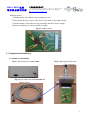
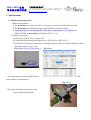
1) The HALL8800 was connected to PC (or Laptop) by express card and connection cable.
2) The HALL8800 was connected to Hall sample holder by connection cable.
2) Turn on the power of HALL8800 first, then turn on and open PC (or Laptop), the
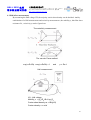
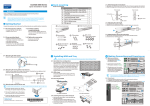
PWR and LINK on HALL8800 shows light on (Fig. 3.1 (a)).
2. Software preparation
1) Put Keypro USB on PC (or Laptop) first.
2) Execute the Hall Sensor Measurement.exe in EXE_4070 (or EXE_4071).
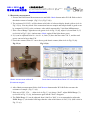
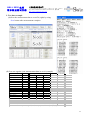
3) Fill sample ID, Thickness, Dimensions, and input magnetic induction filed B (default : 6800G)
filed and click OK. (Fig.3.1 (b))
Fig. 3.1.(a) PWR and LINK light on
Fig.3.1 (b)
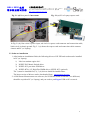
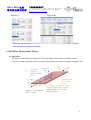
3. Put the sample board with sample into the
sample holder (with connector).
Hall
Fig. 3.1 (c)
The sample should be faced to the yellow
mark on Hall sample holder.
6