1
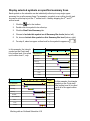
Milestones Professional 2004
User Manual
Copyright
©Copyright KIDASA Software, Inc. 2004. All rights reserved. No part of this publication may be
reproduced, transmitted, transcribed, stored in a retrieval system, or translated into any
language in any form without the written permission of KIDASA Software Inc.
Trademarks
Milestones Professional® and Milestones Simplicity® are registered trademarks of KIDASA
®
Software, Inc. Milestones, Etc. is a trademark of KIDASA Software, Inc. Microsoft and
®
Windows are registered trademarks of Microsoft Corporation. MS Project is a trademark of
Microsoft Corporation. LaserJet®, DeskJet®, and DesignJet® are registered trademarks of
®
®
®
®
Hewlett-Packard. Word for Windows, Microsoft Project, Microsoft Excel, Microsoft Office,
®
®
®
NetMeeting , Microsoft PowerPoint, and Microsoft Access are registered trademarks of
Microsoft Corporation. Planview® is a registered trademark of Planview, Inc.
1st Printing
April 2004
Printed in the USA.
KIDASA Software, Inc.
1114 Lost Creek Blvd.
Suite 300
Austin, Texas 78746
(512) 328-0168
(512) 328-0247 (FAX)
E-Mail: [email protected]
Web site: http://www.kidasa.com
ISBN 0-9623182-0-5
ii
Table of Contents
GETTING HELP………………………………………………….…...….xiv
CHAPTER 1: INTRODUCTION ....................................................... 1-1
Easy yet Powerful Scheduling ............................................................. 1-1
Click-and-drag to build schedules ................................................................. 1-1
Make changes in seconds ............................................................................. 1-2
Organize your schedule with outlining........................................................... 1-2
Switch between detailed and summary views ............................................... 1-3
Work Breakdown Structure (WBS) and other task numbering ...................... 1-3
Easily show progress..................................................................................... 1-4
Dependencies................................................................................................ 1-4
SmartColumns ............................................................................................... 1-5
Baseline scheduling....................................................................................... 1-6
Symbol constraints ........................................................................................ 1-7
Holidays ......................................................................................................... 1-7
Powerful Publishing, Presentation and Distribution.......................... 1-8
Include schedules in other documents .......................................................... 1-8
Publish a complete hierarchy of schedules ................................................... 1-9
Publish a summary schedule with drill-down............................................... 1-10
Free Milestones Viewer ............................................................................... 1-10
Presentation view ........................................................................................ 1-11
Manage Multiple Projects with Ease.................................................. 1-12
Master schedules......................................................................................... 1-12
Symbol links between and within schedules ............................................... 1-13
Hyperlinks: Attach files and web pages to symbols and tasks .................... 1-14
Sorting tasks ................................................................................................ 1-15
Filtering tasks............................................................................................... 1-16
Find and replace text ................................................................................... 1-17
Bookmark task lines..................................................................................... 1-17
Display Numbers and Project Status................................................. 1-18
Calculation/Indicator SmartColumns ........................................................... 1-18
Earned value reporting ................................................................................ 1-19
Stoplight SmartColumns .............................................................................. 1-19
Values SmartColumns ................................................................................. 1-20
Percent complete pies and Fill-to-status ..................................................... 1-21
DataGraphs and ValueSets......................................................................... 1-21
iii
ValueSet SmartColumn ............................................................................... 1-22
Resource allocation for effort-driven tasks .................................................. 1-22
Create Presentation Schedules from MS Project Files.................... 1-23
Select from built-in report formats ............................................................... 1-23
Create your own report formats................................................................... 1-26
Refresh your presentation schedule with MS Project changes................... 1-26
MPX, CSV and TXT files ............................................................................. 1-26
Work with your other Applications .................................................... 1-26
Many file formats supported ........................................................................ 1-26
Turn a spreadsheet into a Milestones schedule.......................................... 1-27
OLE Automation .......................................................................................... 1-28
Extensive Text Entry and Graphics Options..................................... 1-29
Symbol text .................................................................................................. 1-29
Symbol notes............................................................................................... 1-29
Freeform text ............................................................................................... 1-29
Column text ................................................................................................. 1-29
Substitutable text strings ............................................................................. 1-29
Link other text documents ........................................................................... 1-29
Click and type .............................................................................................. 1-30
Spell checking ............................................................................................. 1-30
Graphics ...................................................................................................... 1-30
Symbol date prefix and suffix ...................................................................... 1-30
Flexible Symbology............................................................................. 1-31
Toolboxes .................................................................................................... 1-31
Sidebar ........................................................................................................ 1-32
Symbol types ............................................................................................... 1-32
Wide assortment of symbols ....................................................................... 1-32
User-defined symbols.................................................................................. 1-33
Multiple independent milestones ................................................................. 1-34
Variety of connector shapes ........................................................................ 1-34
Three-level symbol and connector positioning ............................................ 1-35
Flexible Formatting ............................................................................. 1-36
Physical sizing ............................................................................................. 1-36
Many time-scale options.............................................................................. 1-37
Templates for instant formatting.................................................................. 1-38
Full international support ............................................................................. 1-39
ISO week numbering ................................................................................... 1-39
Custom page numbering ............................................................................. 1-39
Gradient fill patterns .................................................................................... 1-39
Weekend and holiday shading .................................................................... 1-40
iv
Curtains ....................................................................................................... 1-40
Color themes ............................................................................................... 1-41
Outline level shading ................................................................................... 1-41
More custom shading .................................................................................. 1-42
Change view formats .......................................................................... 1-43
Expand or contract the time period viewed ................................................. 1-43
Duration View and Percent Complete View................................................. 1-44
Gantt roll-up views ....................................................................................... 1-45
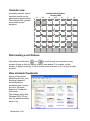
Calendar view .............................................................................................. 1-46
Date heading scroll buttons ......................................................................... 1-46
View schedule thumbnails ........................................................................... 1-46
CHAPTER 2: THE BASICS ............................................................. 2-1
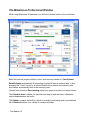
The Milestones Professional Window ................................................. 2-2
Sidebar ................................................................................................... 2-3
Sidebar options.............................................................................................. 2-3
Toolboxes .............................................................................................. 2-4
Combo Toolbox ............................................................................................. 2-4
Standard Toolbox .......................................................................................... 2-5
Toolbox “tools” ..................................................................................... 2-6
Menus ..................................................................................................... 2-7
Hide or restore selected menu items............................................................. 2-7
Restore all menu items .................................................................................. 2-7
Select a hidden menu item ............................................................................ 2-7
Add Symbols and Connectors using the Toolboxes ......................... 2-8
Which toolbox should you use?..................................................................... 2-8
Add a symbol/connector/symbol combination using the Combo Toolbox..... 2-8
Add a single symbol....................................................................................... 2-9
Add a horizontal connector and symbol to an existing symbol...................... 2-9
Add a horizontal connector between two existing symbols ......................... 2-10
Vertical Connectors ............................................................................ 2-10
To add a vertical connector using the Combo or Standard Toolbox ........... 2-10
To add multiple vertical connectors at once ................................................ 2-11
Move an Existing Symbol on your Schedule .................................... 2-11
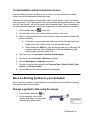
Change a symbol’s date using the mouse................................................... 2-11
Add a symbol or change the symbol’s date with a date SmartColumn ....... 2-12
Other methods to change a symbol’s date .................................................. 2-12
Add Text to your Schedule ................................................................. 2-13
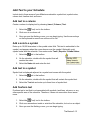
Add text to a column .................................................................................... 2-13
v
Add a note to a symbol................................................................................ 2-13
Add text to a symbol .................................................................................... 2-13
Add freeform text ......................................................................................... 2-13
Add a SmartColumn which displays symbol text or notes .......................... 2-14
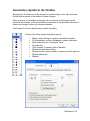
Customize a Symbol in the Toolbox.................................................. 2-15
Customize a Horizontal Connector in the Toolbox .......................... 2-16
Customize a Vertical Connector in the Toolbox............................... 2-17
Columns, Column Headings and Task Lines (Rows)....................... 2-18
To enter text in a task line’s column cell...................................................... 2-18
To move between column cells ................................................................... 2-18
Add or edit a column or SmartColumn ........................................................ 2-19
Bookmark task lines .................................................................................... 2-20
Change the column heading properties ...................................................... 2-22
Change the column properties .................................................................... 2-22
Set the Project Start and End Dates .................................................. 2-23
Current Date and Current Date Line .................................................. 2-23
Display the current date and current date line............................................. 2-23
Status Line ........................................................................................... 2-24
Display and format the status line ............................................................... 2-24
Status line and current date line example ................................................... 2-25
The Date Headings .............................................................................. 2-26
Add Graphics to the Schedule ........................................................... 2-27
Toolbar Shortcuts................................................................................ 2-28
Keyboard Shortcuts ............................................................................ 2-29
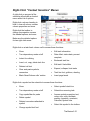
Right-Click “Context Sensitive” Menus ............................................ 2-31
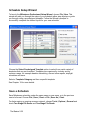
Schedule Setup Wizard....................................................................... 2-32
Save a Schedule .................................................................................. 2-32
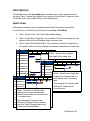
View Options........................................................................................ 2-33
Gantt views.................................................................................................. 2-33
Continuous view .......................................................................................... 2-34
Full Screen view .......................................................................................... 2-34
Presentation view mode .............................................................................. 2-34
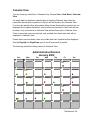
Calendar View ............................................................................................. 2-35
Views by time period ................................................................................... 2-36
Duration View .............................................................................................. 2-37
Percent Complete view................................................................................ 2-38
CHAPTER 3: CUSTOMIZING THE TOOLBOX AND SIDEBAR......3-1
vi
Sidebar ................................................................................................... 3-1
To display the sidebard.................................................................................. 3-1
To remove the sidebar................................................................................... 3-1
To add and remove selected sidebar icons................................................... 3-1
Combo and Standard Toolboxes ......................................................... 3-2
Set Toolbox Size and Type ................................................................... 3-3
Toolbox: Free-floating or Anchored in the Sidebar ........................... 3-4
To display a free-floating toolbox................................................................... 3-4
To display the toolbox within the sidebar....................................................... 3-4
Set Drawing Tools Defaults .................................................................. 3-5
Box drawing tool ............................................................................................ 3-5
Line drawing tool............................................................................................ 3-5
Circle drawing tool ......................................................................................... 3-5
Set Symbol Defaults.............................................................................. 3-6
Choose symbol shape, type, letter mark and user-defined symbols............. 3-6
Choose symbol color, pattern, marking, after status color, shadow.............. 3-7
Choose positioning for symbol text, date, marking letter, symbol ................. 3-8
Choose default symbol text ......................................................................... 3-10
Override Settings of Symbols Placed on the Schedule................... 3-11
Override a symbol’s color, date/text placement, size and more.................. 3-11
Override symbol text color and styles, line-by-line ...................................... 3-11
Hide all symbol date and text displays ........................................................ 3-11
Symbol date prefix and suffix ...................................................................... 3-12
Set Horizontal Connector Defaults .................................................... 3-13
Change connector shape, pattern, colors, fade effect, and shadow ........... 3-13
Override a connector’s default fill color ....................................................... 3-14
“Always on top” connectors ......................................................................... 3-14
Set Vertical Connector Defaults......................................................... 3-15
CHAPTER 4: WORKING WITH AN OUTLINED SCHEDULE ......... 4-1
Outlining Tools and Formatting ........................................................... 4-2
Outlining tools ................................................................................................ 4-2
Set the indentation amount for column text ................................................... 4-2
Outline your Tasks ................................................................................ 4-3
Outline tasks as you enter them .................................................................... 4-3
Outline existing tasks..................................................................................... 4-3
Outline Level SmartColumn ................................................................. 4-4
To add an Outline Level SmartColumn ......................................................... 4-4
vii
WBS SmartColumn................................................................................ 4-4
Standard WBS outlining ................................................................................ 4-4
Alphanumeric WBS outlining ......................................................................... 4-5
Summary Line Display .......................................................................... 4-6
Summary bar display options and default formatting .................................... 4-6
Override summary bar symbols, connectors and fill colors........................... 4-7
Display column values on summary lines ..................................................... 4-8
Display column duration values on summary lines ....................................... 4-9
Display lower-level symbols / connectors on summary lines ........................ 4-9
Display selected symbols on specified summary lines ............................... 4-10
Summary Line Roll-up ........................................................................ 4-11
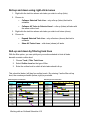
Roll-up and down using Collapse/Expand Indicators.................................. 4-11
Roll-up and down using right-click menus................................................... 4-12
Roll-up and down by filtering task lines ....................................................... 4-12
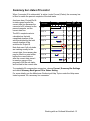
Summary bar status fill control.......................................................... 4-13
CHAPTER 5: DEPENDENCIES AND VERTICAL CONNECTORS .5-1
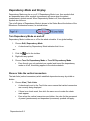
Dependency Mode and Display............................................................ 5-2
Turn Dependency Mode on and off............................................................... 5-2
Show or hide the vertical connectors ............................................................ 5-2
Symbol Dependencies and Movement ................................................ 5-3
Move dependent symbols based on duration................................................ 5-4
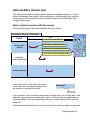
Add and Edit a Vertical Link ................................................................. 5-5
Add a vertical connector with the mouse....................................................... 5-5
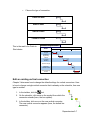
Add vertical connectors between symbols on multiple task lines.................. 5-6
Edit an existing vertical connection ............................................................... 5-7
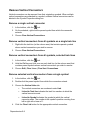
Remove Vertical Connectors................................................................ 5-8
Remove a single vertical connector .............................................................. 5-8
Remove vertical connectors from all symbols on a single task line .............. 5-8
Remove vertical connectors from all symbols, selected task lines ............... 5-8
Remove selected vertical connectors from a single symbol ......................... 5-8
CHAPTER 6: FORMATTING AND LAYOUT ...................................6-1
Page Layout ........................................................................................... 6-1
Change the chart size and margins............................................................... 6-1
Scaling the chart size to the current paper size ............................................ 6-1
Change the number of columns and rows..................................................... 6-2
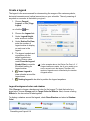
Create a legend ............................................................................................. 6-4
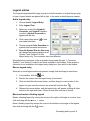
Legend entries............................................................................................... 6-5
viii
Columns ................................................................................................. 6-6
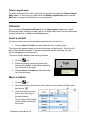
Insert a column .............................................................................................. 6-6
Move a column .............................................................................................. 6-6
Delete a column............................................................................................. 6-7
Right-click to edit column............................................................................... 6-7
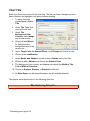
Chart Title............................................................................................... 6-8
Date Headings ....................................................................................... 6-9
Format the Date Headings............................................................................. 6-9
Date heading Start number ......................................................................... 6-10
Date heading Frequency number ................................................................ 6-10
Custom date heading................................................................................... 6-11
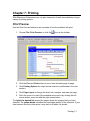
CHAPTER 7: PRINTING.................................................................. 7-1
Print Preview.......................................................................................... 7-1
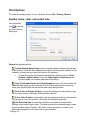
Print Options.......................................................................................... 7-2
Symbol notes, color, and output size............................................................. 7-2
Print by date range ........................................................................................ 7-3
Exclude columns when printing ..................................................................... 7-4
Default printer ................................................................................................ 7-4
CHAPTER 8: MASTER SCHEDULES............................................. 8-1
Master Schedule Example .................................................................... 8-1
Format the Master Schedule and Sub-schedules .............................. 8-3
Create a Master Schedule..................................................................... 8-4
Update the Master Schedule ................................................................ 8-5
Tips and considerations regarding master schedules ...................... 8-6
General information ....................................................................................... 8-6
A shared format for the master schedule and sub-schedules ....................... 8-6
More resources.............................................................................................. 8-6
CHAPTER 9: SYMBOL LINKING.................................................... 9-1
Symbol Linking Example ...................................................................... 9-1
Link Symbols between Separate Schedules....................................... 9-2
Name the target symbol................................................................................. 9-2
Link a symbol to the named target symbol .................................................... 9-3
Update Linked Symbols........................................................................ 9-4
Link Symbols within the Same Schedule............................................ 9-5
Name the target symbol................................................................................. 9-6
ix
Link a symbol to the named target symbol.................................................... 9-6
View a Report of Symbol Names and Links........................................ 9-7
Symbol to Symbol Links Report .................................................................... 9-7
Symbol Names Report .................................................................................. 9-8
Symbol Linking versus Master Scheduling ........................................ 9-8
CHAPTER 10: HYPERLINKS ........................................................10-1
Add a Hyperlink to a Symbol.............................................................. 10-2
Activate a Hyperlink from a Symbol .................................................. 10-3
Add a Hyperlink to a Task Line .......................................................... 10-4
Activate a Hyperlink from a Task Line............................................... 10-5
Activate a Hyperlink while in Calendar View .................................... 10-5
Remove a Hyperlink from a Symbol .................................................. 10-5
Remove a Hyperlink from a Task Line............................................... 10-6
Hyperlinks as Column Text or Freeform Text................................... 10-6
Symbol Hyperlinks Report.................................................................. 10-6
CHAPTER 11: WORKING WITH OTHER APPLICATIONS ..........11-1
Create Presentation-Ready Reports from MS Project ..................... 11-2
Project-to-Milestones Wizard....................................................................... 11-2
Refresh your presentation schedules.......................................................... 11-3
Create a Milestones Schedule from a Spreadsheet ......................... 11-4
Create a Milestones Schedule from CSV and TXT Files .................. 11-6
Export as MPX or XML ........................................................................ 11-7
XML Export.................................................................................................. 11-7
Other Export and Import Formats...................................................... 11-7
Paste Text and Numbers into Single Columns or Cells................... 11-8
Copy and paste text into column cells......................................................... 11-8
Copy and paste text into column cells below existing text .......................... 11-9
Copy and paste text into a single column cell ............................................. 11-9
Copy and paste numbers into a ValueSet................................................. 11-10
Copy and paste column text and numbers into other columns ................. 11-10
Paste Text and Values into Multiple Columns and Rows .............. 11-11
Link and Embed Schedules in other Applications ......................... 11-12
Embed a schedule in another document................................................... 11-13
Link a schedule into another document..................................................... 11-13
Is linking or embedding the best approach?.............................................. 11-14
x
Paste a Picture of the Schedule into another Application............. 11-14
Automation ........................................................................................ 11-15
CHAPTER 12: CUSTOM FORMATTING FOR PRESENTATION . 12-1
Charts and Templates ......................................................................... 12-2
Format a blank schedule with a selected template ..................................... 12-3
Format an existing schedule with a selected template................................ 12-4
Setup Wizard templates............................................................................... 12-5
Create and save a template ........................................................................ 12-6
Patterns and Gradient Fills................................................................. 12-6
Patterns ....................................................................................................... 12-6
Gradient fills................................................................................................. 12-7
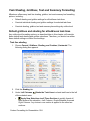
Task Shading, Gridlines, Text and Summary Formatting................ 12-8
Default gridlines and shading for all/odd/even task lines ............................ 12-8
Gridlines and shading for selected task lines ............................................ 12-10
Outline level settings for gridlines, shading, text, and summary bars ....... 12-10
Column and Column Heading Shading and Text ........................... 12-13
Column text and shading ........................................................................... 12-13
Column text color override for individual column cell ................................ 12-14
Column heading text and shading ............................................................. 12-14
Vertical Gridlines ............................................................................... 12-15
Vertical Shading—Curtains .............................................................. 12-15
Add, edit or delete curtains ........................................................................ 12-15
Shift curtains .............................................................................................. 12-17
Curtains example....................................................................................... 12-18
Color Themes .................................................................................... 12-19
Create a color theme ................................................................................. 12-19
Delete a color theme.................................................................................. 12-19
Apply a color theme ................................................................................... 12-20
CHAPTER 13: DISTRIBUTE AND PRESENT SCHEDULES........ 13-1
Publishing for the Internet/Intranet.................................................... 13-2
Graphics Output/Bitmap Options for internet publishing ............................. 13-3
Create a graphic only of each schedule page ............................................. 13-3
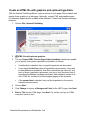
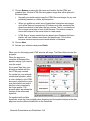
Create an HTML file with graphics and optional hyperlinks ........................ 13-4
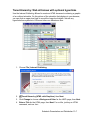
Tiered Hierarchy: Web drill-down with optional hyperlinks.......................... 13-7
Free Milestones Viewer....................................................................... 13-9
Presentation Mode ............................................................................ 13-10
xi
Present a single schedule ......................................................................... 13-10
Present many schedules ........................................................................... 13-11
Presentation Mode controls....................................................................... 13-11
Full Screen Mode............................................................................... 13-12
NetMeeting Collaboration ................................................................. 13-12
CHAPTER 14: TRACK AND GRAPH VALUES.............................14-1
ValueSets ............................................................................................. 14-3
Type 1 ValueSet: Keyed-in global values.................................................... 14-4
Type 2 ValueSet: Sum of values keyed into task lines ............................... 14-6
Type 3 ValueSet: Allocate column values across timeline.......................... 14-8
Type 4 ValueSet: Use values from symbols.............................................. 14-10
Type 5 ValueSet: Total of other ValueSets ............................................... 14-12
ValueSet Graphic Properties ............................................................ 14-14
DataGraphs ........................................................................................ 14-16
ValueSet SmartColumn..................................................................... 14-18
CHAPTER 15: SMARTCOLUMNS AND INDICATORS ................15-1
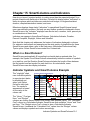
What is a SmartColumn? .................................................................... 15-1
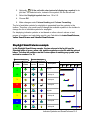
Indicator Symbols and SmartColumns Example.............................. 15-1
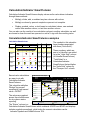
Stoplight SmartColumn ...................................................................... 15-2
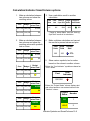
Create a Stoplight SmartColumn................................................................. 15-2
Stoplight SmartColumn example................................................................. 15-3
Calculation/Indicator SmartColumn .................................................. 15-4
Calculation/Indicator SmartColumn examples ............................................ 15-4
Calculation/Indicator SmartColumn options ................................................ 15-5
Create a Calculation/Indictor SmartColumn ................................................ 15-6
Values SmartColumns ........................................................................ 15-9
Values SmartColumn example .................................................................... 15-9
Create a Values SmartColumn with optional indicators ............................ 15-10
Enter values in the Values SmartColumn.................................................. 15-13
Summary Level Value Roll-up .......................................................... 15-13
Currency and Numbers Format........................................................ 15-14
Change the number format and number grouping options ....................... 15-14
Change the number of decimal places displayed in a column .................. 15-14
Display the currency symbol with a column's values ................................ 15-15
Change the currency symbol and other currency formats ........................ 15-15
Percent Complete SmartColumns ................................................... 15-16
xii
Percent Complete SmartColumn example ................................................ 15-16
Create a Percent Complete SmartColumn ................................................ 15-17
Duration SmartColumn ..................................................................... 15-18
Create a Duration SmartColumn ............................................................... 15-18
Graphical Indicators for duration SmartColumns ...................................... 15-19
Factors which impact duration computation .............................................. 15-20
Resource Allocation Percent SmartColumn ................................... 15-21
Create a Resource Allocation Percent SmartColumn ............................... 15-21
Enter a Resource Allocation Percent......................................................... 15-21
Resource Allocation Percent example....................................................... 15-22
Symbol Count SmartColumns.......................................................... 15-22
More SmartColumns ......................................................................... 15-22
APPENDIX A: INSTALLATION AND ACTIVATION .......................A-1
APPENDIX B: QUICK REFERENCE TABLES ...............................B-1
APPENDIX C: SUPPORT AND MORE INFORMATION .................C-1
INDEX ..................................................................................... INDEX-1
xiii
Getting Help
There are several help functions available to assist you in learning and using
Milestones Professional.
Help Reference Information
Milestones Professional offers extensive reference information in an easy-to-use
manner. The Milestones Professional Help Topics contains more detail than this
manual.
To access the reference information, choose Help | Milestones Professional Help
Topics. Browse the Contents, or search for keywords under the Index and Search
tabs. Help is well organized and extensive, giving you precise answers and
instructions.
Help while in a dialog box
If you are in a dialog box and need help, you can click on the question mark in the
upper right-hand corner of the box. After clicking on the question mark, click on the
section of the dialog box in question. A brief explanation for that function appears.
Selected dialog boxes have Help buttons for quick access to relevant Help topics.
Tooltips
Position your mouse pointer over a tool on the toolbar and a tooltip will appear! A
tooltip is a brief explanation of what that tool does without having to actually perform
the function. Choose Tools | Options | General to customize the appearance of the
tooltips display.
Movies
An easy and fun way to learn about Milestones Professional is to view the movies
provided on the Milestones Professional CD. You can follow step-by-step instructions
that take you through the basics and more. The movies can be watched directly from
the CD or loaded onto your PC. (The movies can also be downloaded from KIDASA’s
web site: http://www.kidasa.com).
Or, choose Help | Online Movies to go to our movies page on our website.
Automation Help
Choose Help | Automation Help for everything you need to know for programming
your own interface to Milestones.
Online Support
Choose Help | KIDASA Online Support for a list of useful links to our website,
including the main support page, sample schedules, our online Q&A database, the
latest news, and more.
xiv
Chapter 1: Introduction
Easy yet Powerful Scheduling
Milestones Professional makes planning, organizing, communicating and tracking
your projects fast and easy. Designed for anyone who spends time scheduling or
managing projects, Milestones Professional makes fast work of your scheduling
efforts.
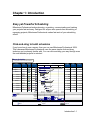
Click-and-drag to build schedules
If you know how to use a mouse, then you can use Milestones Professional 2004.
That’s because Milestones Professional uses the same simple click-and-drag
technique you’re already familiar with. You can click-and-drag your way through even
the most detailed projects in minutes!
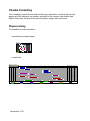
Master Schedule
Compilation of Team Schedules
Project/
Team Names
Project
Contacts
Funding Percent
Status Complete
2002
January
All Projects
Joe
46%
1/14
Project 1
Joe
49%
1/14
Jack
72%
1/14
ABC
Architects
Falkner
Constr
Dean
Mitchell
89%
1/14
Suzy
37%
1/20
Task 1
A to Z
Designs
80%
1/20
Task 2
ABC
20%
Task 3
Billy
32%
Task 4
Falkner
39%
Team 1
Task 1
Task 2
Task 3
Team 2
February
March
Budget
Amount
April
4/19
3/8
2/20
2/1
Costs
to Date
Remaining
Funds
$20,450
$14,200
$6,250
$9,700
$5,900
$3,800
$1,350
$1,150
$200
$500
$500
$0
$800
$600
$200
1/30
56%
1/23
2/9
2/1
69%
2/5
2/20
$50
$50
$0
$8,350
$4,750
$3,600
$1,500
$400
$1,100
$2,800
$1,200
$1,600
$550
$650
($100)
$3,500
$2,500
$1,000
2/15
3/8
2/3
1/31
1/31
3/6
2/6
2/6
2/24
2/11
2/9
3/8
2/19
Budget
Actual
Budget
Actual
$2,154
$1,128
$7,004
$4,380
$8,609
$5,741
$2,683
$2,951
$10,000
$5,000
$0
Under Budget
On Budget
Over Budget
Status
Project 1
Project 2
Introduction 1-1
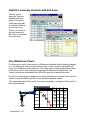
Make changes in seconds
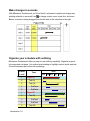
With Milestones Professional, you’ll find that it’s a breeze to update and change any
existing schedule in seconds! Use
to change a date, move a task line, and more.
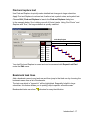
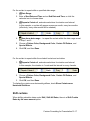
Below, a column is being dragged from the left side of the schedule to the right.
Organize your schedule with outlining
Milestones Professional offers an easy-to-use outlining capability. Organize projects
into steps and sub-steps. Use outline level shading to highlight various levels and text.
Override summary bar colors and symbology.
Outline
Level
1
Task
Jan Feb Mar Apr May Jun
Project A
2
Task A1
2
Task A2
3
SubTask
3
SubTask
1
2
Project B
Task B1
3
SubTask
3
SubTask
2
Introduction 1-2
2005
Task B2
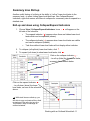
Switch between detailed and summary views
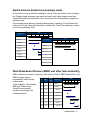
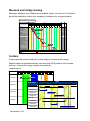
A click of the mouse is all that's needed to "roll-up" lower level tasks into a summary
bar. Display single summary bars based on lower level dates; display lower level
symbols and bars at the summary level; and select individual symbols to appear on
summary lines.
The example below shows a schedule that has been “rolled-up” to the Phase level
(outline level 2) by hiding all levels below. Additionally, Task A2’s milestone is rolledup to the top summary level.
2004
Description
Jan
Feb
Mar
Apr
May
Jun
Project A
2004
Description
Phase A
Jan
Task A1
Feb
Mar
Apr
May
Jun
Project A
Task A2
Phase A
Task A3
Phase B
Phase B
Task B1
Task B2
Work Breakdown Structure (WBS) and other task numbering
WBS numbering is used in conjunction with outlining. With a WBS SmartColumn, the
WBS numbers appear
2004
Outline
automatically based on the
#
WBS
Description
Level
Jan Feb Mar Apr May Jun
outline levels.
In this example, Task Number,
WBS and Outline Level
SmartColumns display
numbers according to the
outlined activities.
1
1
1
Project A
2
1.1
2
3
1.1.1
3
Task A1
4
1.1.2
3
Task A2
5
1.1.3
3
Task A3
6
1.2
2
7
1.2.1
3
Task B1
8
1.2.2
3
Task B2
Phase A
Phase B
Introduction 1-3
Easily show progress
Fill connectors and symbols to show activity progress. Choose a color for the progress
fill up to the status date, and a different color after the status date.
Individual tasks can be adjusted to reflect whether they are on schedule, behind
schedule, or ahead of schedule.
2005
Task
Aug
Sep
Oct
Nov
Dec
Ahead of schedule
Web Site
Control the after-status fill colors
Database
Behind schedule
Upgrades
Dependencies
Easily create dependency relationships (predecessor/successor) between tasks. In
the following example, Production cannot start until Setup is complete.
With dependency mode turned on, if the Setup end date is delayed, then the
dependent task Production will shift by the same amount of time.
Tie the two steps together with a variety of connectors, just a few of which are shown
here:
Setup
Production
Introduction 1-4
Up to 5 upward or downward "links" can be established from any symbol. This allows
a manufacturing cycle schedule in which several processes are linked, as shown
below.
With dependency mode turned on, when the start or end point for the “Primary” bar is
moved, all the other bars will move by the same amount of time.
Machine Cycle Schedule
PROCESS
0
100
200
300
400
500
600
700
800
900
1000
R 398
529
634
V 354
193
388
J 35
237
529
Primary
45
135
P 647
567
670
P 3646
783
G 987
932
1005
SmartColumns
Any column on your schedule can be set to a SmartColumn. SmartColumns
automatically display information contained in your schedule or entered into the
column, as well as make calculations, display stoplights and more.
y
y
y
y
y
y
y
y
y
y
y
Start Date
End Date
Percent Complete
Duration
Task Number
Outline Level
WBS Number
Status Date
Used Duration
Remaining Duration
Time Ahead/Behind
y
y
y
y
y
y
y
y
y
y
Baseline Start Date
Baseline End Date
Baseline Duration
ValueSet
Values
Symbol Count
Calculation/Indicator
Resource Allocation Percent
Symbol Text
Stoplight
Introduction 1-5
The schedule below has an End Date SmartColumn ("Delivery Date"), a Values
SmartColumn which displays stoplights for ahead/behind schedule, and a Percent
Complete SmartColumn for progress values and pies:
Contract Status Report
Projects
Delivery
Date
All Projects
2004
Jan
Feb
Mar
Apr May
E D
A
Jun
Jul
Aug
Sep
Oct
E
Nov
Dec
Ahead / Percent
Behind Complete
B
12/15
28%
BC
P1
Project A
A
P2 A P3
D C
P4
7/7
56%
A
P1
Project B
P2
P3
P4 B
10/26
13%
B
P1
Project C
P2
P3
P4
12/15
26%
C
C
D
P1
Project D
P2
P3
P4
12/1
22%
D
E
P1
Project E
P2
P3
P4
E
8/23
32%
Baseline
Behind Schedule
Ahead of Schedule
Delivery
Project Summary
Phase End Milestone
Phase
Start
On Schedule
Baseline scheduling
Baseline scheduling shows how the original schedule compares to the actual
schedule. Quickly choose baseline symbology using the Baseline Setup Wizard. Then
show, hide, highlight or lock-down the baseline information.
Baseline Scheduling
Baseline
Start
Actual
Start
Design
1/8
Manufacture
Assemble
Task
Baseline
End
Actual
End
1/7
1/28
1/24
1/30
1/25
2/20
2/17
2/21
2/18
3/17
3/12
Baseline
Introduction 1-6
2005
Jan
Feb
Mar
Actual
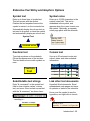
Symbol constraints
Any symbol can have a constraint which limits the symbol’s movement or triggers a
user-defined condition, such as displaying a reminder note or launching a hyperlink.
When the symbol is moved such that it does not conform to a date constraint that you
have set, the symbol will be overlaid with a large exclamation point like the one shown
below:
Choose from one of the following constraint types:
y
y
y
y
y
Must be on this date
No later than
No earlier than
Lock to this date
Reminder: Display notes on this date - when you open your schedule on or after
the constraint date, notes you previously typed to remind yourself of something
will appear.
y Action: Launch first Hyperlink on this date. This constraint type could, for
example, be used to start your e-mail program.
Holidays
You can make any day a holiday with the Milestones Professional Holiday Calendar.
You also have the option to shade your company’s holidays to show non-working
days in a project. Holidays can be pulled from either a global holiday file or from a list
embedded in the schedule.
Introduction 1-7
Powerful Publishing, Presentation and Distribution
Milestones Professional offers many ways for you to distribute and present your
schedules.
y Print your schedule to a variety of devices. Any printer that your operating
environment supports can be used with Milestones Professional.
y Easily publish any single schedule for the Internet or company Intranet.
y Publish a complete hierarchy of schedules for Internet/Intranet use. The HTML
pages generated come complete with images of your schedules and "hot spots"
for hyperlinks to other schedules so that your customers can use their browser to
view your published schedules and other hyperlinked documents.
y Include your schedules in other documents, such as PowerPoint presentations,
Word documents, Excel spreadsheets, and other Windows documents.
y Milestones Professional's free schedule Viewer lets others view schedules you email to them or save on your company's server.
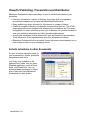
Include schedules in other documents
It's easy to include schedule pages in
your presentations, reports, proposals,
spreadsheets and more.
Just "copy" your schedule to the
clipboard and "paste" into any other
Windows application, such as Word,
Excel, and PowerPoint. You can
distribute these documents to others
even if they don't have Milestones
Professional on their system.
Introduction 1-8
Publish a complete hierarchy of schedules
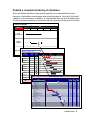
When schedules are linked using symbol hyperlinks, you can publish the entire
sequence of schedules as web pages and schedule graphics. Using this "drill-down"
capability, your customers, co-workers, or management can use an Internet browser
to view a complete hierarchy of schedules that you generated at the push of a button.
Top Level Report
2002
PROJECT
August
September
October
November December
RPV
Development
Shuttle
Rockets
Strike SystemShuttle Design and Construction
Master Schedule for Teams
Project/
Team Names
Team 1
Project
Contacts
Funding
Status
2002
October
Bailey
10/12
Project A
Thomson
10/12
Project B
Gibson
Team 2
November
December
11/11
10/24
10/23
11/11
11/14
McLeod
10/27
Project A
Jones
10/27
Project B
Browning
Project C
Bacall
12/7
11/20
11/16
Team 3
11/9
11/27
11/12
11/22
Bogie
11/14
Project A
Hunter
11/14
Project B
Meadows
Project C
Elder
12/7
12/22
12/4
11/24
Approved
11/19
12/19
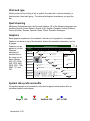
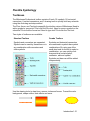
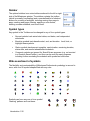
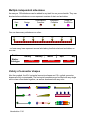
11/25
Shuttle Rocket Design
12/3
Page 1 of 1
Jan
Name
Pending
Design
Determine best 5 potential architects
Interview architects
Architect 1
Architect 2
Architect 3
Architect 4
Architect 5
Select architect
Prepare 1st draft plan
Review draft
Revise draft
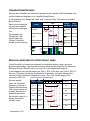
Receive final plan
Design telecommunications plan
Obtain construction permit
Pre-Renovation
Call moving services for quotes
Hire movers
Pack rooms
Remove boxes to storage
Renovation
Construction
Strip walls
Remove existing wall
Frame new walls
Construction Inspection
Install new switches and outlets
5Terminated
12 19 26
12/22
Feb
2
9
16
8/16/01
Mar
Status
23
2
9
16
1/2
1/9
3/ 3
3/13
3/13
Apr
23
30
6
$ Budget $ Actual
Indicator
13
$28,275
$2,000
$5,875
$333
$242
$300
$3,000
$2,000
$400
$3,000
$3,000
$3,000
$4,000
$5,000
$2,000
$9,300
$300
$3,000
$3,000
$3,000
$4,900
$4,900
$300
$300
$2,000
$2,000
$300
$80,248
$3,000
$4,748
$424
$124
$200
$1,000
$3,000
$10,000
$4,000
$3,000
$3,000
$45,000
$5,500
$2,000
$12,000
$3,000
$3,000
$3,000
$3,000
$14,233
$14,233
$200
$1,000
$3,000
$10,000
$33
Introduction 1-9
Publish a summary schedule with drill-down
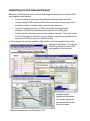
Use the "tiered
hierarchy" Internet
Publishing Wizard
option to create an
initial web page with
all activities rolled-up
to summary level.
Click on an activity in
the web browser to
drill-down to its details,
as shown here:
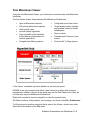
Free Milestones Viewer
For those who need to view and print a Milestones schedule without making changes
to it, the Milestones Viewer is the perfect solution. A free Viewer is distributed with
every copy of Milestones Professional. The viewer can be freely distributed to others
who have a need to view schedules produced with Milestones Professional. The
Viewer can also be downloaded from KIDASA's web site at www.kidasa.com.
E-mail your schedule as an attachment or keep schedules in a shared folder. Use the
Viewer to open the Milestones file to see the latest schedule update.
The viewer has many of the useful View menus available, including the Filter option. It
also allows printing.
Contract Task Plan Status Report
Project/
Task
2002
Jan
Mar
Apr
Percent
Complete
Budget
Spending Indicator
Research
100%
$3,000
$6,000
Development
52%
$12,000
$12,000
Manufacturing
28%
$15,000
$10,000
Testing
0%
$10,000
$8,000
Delivery
0%
$5,000
$0
Over Budget
Introduction 1-10
Feb
On Budget
Under Budget
Presentation view
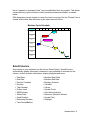
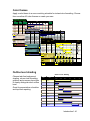
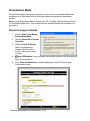
If you need to present a schedule or a set of schedules, you may want to try
Milestones Professional’s presentation view mode. If you have a list of schedules you
want to present, set them up in a master schedule list before presenting. Presentation
view supports both full screen viewing as well as a view with limited controls visible,
as shown below:
It also supports multi-monitor mode in situations where multiple monitors are being
used and you want to have the presentation view cover all the monitors.
Introduction 1-11
Manage Multiple Projects with Ease
Master schedules
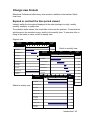
Merge two or more sub-schedules into a single master schedule to get a top-level
view of multiple projects. Simply update the master schedule to see the latest subschedule information. The sub-schedules can be on your computer, on a network
server, or on someone else's computer.
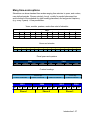
In this example, three Milestones schedules for Project A, Project B, and Project C are
each maintained by different managers....
Project A
Project /
Task
Proj Mngr /
Foreman
Project A
Task A1
Task A2
Task A3
Thomson
Boyd
Gibson
Terry
2005
Jun
Jul
Aug
Status
Date
7/17
7/1
Project B 7/17
Project / 7/17Proj Mngr /
Task
Foreman
Project /
Task
Project B
Task B1
Task B2
Proj Mngr / Task B3
Foreman
Jun
Project C
Task C1
Task C2
Task C3
Task C4
Jones
McLeod
Elder
Wagenman
Bailey
Project C
Thomson
Mitchell
Gibson
2005 Terry
Jul
Aug
2005
Jun
Jul
Aug
Status
Date
6/22
6/5
6/29
7/2
Status
Date
7/8
7/10
6/28
6/26
7/10
Master Schedule
...The manager overseeing
the progress of all three
projects sets up a master
schedule which merges the
three files into a single file.
When he needs to see the
latest status on all three
projects, he simply updates
the master schedule with
the latest data from Projects
A, B and C.
Introduction 1-12
Project /
Task
Proj Mngr /
Foreman
Project A
Task A1
Task A2
Task A3
Project B
Task B1
Task B2
Task B3
Project C
Task C1
Task C2
Task C3
Thomson
Boyd
Gibson
Terry
Thomson
Mitchell
Gibson
Terry
Jones
McLeod
Elder
Wagenman
2005
Jun
Jul
Aug
Status
Date
7/7
6/21
7/7
7/7
6/22
6/5
6/29
7/2
7/8
7/10
6/28
6/26
Symbol links between and within schedules
Another way to manage multiple projects is through symbol linking. Symbol linking lets
you base the date of a symbol on a different symbol in another schedule or the same
schedule. That is, if the date of the control symbol changes, the date of the dependent
symbol will change accordingly.
Let's say you are the person in charge of maintaining a "master" milestone schedule
at your company. You frequently have to contact people in other departments to see if
they are on schedule with the tasks they have been charged with. All you need from
them is one date, say the date for a hardware deliverable. (Not the same as the
“master scheduling system.”)
Using Symbol Links, you can link a symbol on your milestone schedule to a “named”
symbol on one of your coworker’s schedules. Then, when you open your schedule,
you'll have updated schedule information.
Symbol linking example
In this example, the schedule named Main Schedule is used to keep track of four
projects. Main Schedule’s first task line, Web Site, is linked to another schedule. The
start date for Web Site is linked to the first symbol in the schedule named Web Site
Project. The end date on the Web Site task line is linked to the last symbol in the
schedule named Web Site Project. When Main Schedule is opened, the start and end
dates for the Web Site task line will be updated to reflect the dates in the most
recently saved Web Site Project schedule.
Main Schedule
TASK
Aug
Sep
Oct
Nov
Dec
Web Site
Database
Upgrades
Web Site Project
TASK
Software
Aug
Sep
Oct
Nov
Dec
Task 1
Task 2
Task 3
Task 4
Introduction 1-13
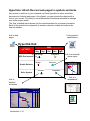
Hyperlinks: Attach files and web pages to symbols and tasks
Any symbol or task line on your schedule can have hyperlinks to other schedules,
documents or Internet web pages. Once linked, you can activate the objects with a
click of your mouse. This lets you use a Milestones Professional schedule to manage
your entire project world!
The “hub” schedule below shows only the milestone dates for a company’s projects.
Each of the symbols has a hyperlink to another schedule, related document or an
Internet address.
Link to web
pages
Link to product
specifications
Hyperlink Hub
2002
PROJECT
Aug
Sep
HW Design
Oct
Nov
Dec
Integration
RPV Development
Link to a schedule
status report
Phase 1 Status Report
Design
Construct
Shuttle Rockets
Project
Stage
2001
January
February
Phase 1
March
Start
Date
1/3
Launch
End
Date
Phase 2
Contract awarded
1/3
Phase 1 Review
Project meetings
Research
1/8
3/1
1/9
1/26
1/9
1/12
1/19
1/19
1/26
1/26
Unit A
Taskforce A
Unit B
Taskforce B
Unit C
Taskforce C
Software
Softw are
Integration
Development
1/29
2/9
Manufacturing
2/12
2/23
Testing
2/26
3/12
Delivery
3/17
3/17
1.0
Strike System
Final
Link to a
spreadsheet
Link to
detailed
schedules
Shuttle Rocket Design
Page 1 of 1
8/16/01
Jan
Name
5
Design
Determine best 5 potential architects
Interview architects
Architect 1
Architect 2
Architect 3
Architect 4
Architect 5
Select architect
Prepare 1st draft plan
Review draft
Revise draft
Receive final plan
Design telecommunications plan
Obtain construction permit
Pre-Renovation
Call moving services for quotes
Hire movers
Pack rooms
Remove boxes to storage
Renovation
Construction
Strip walls
Remove existing wall
Frame new walls
Construction Inspection
Install new switches and outlets
2.0
12
19
Feb
26
2
9
16
Mar
23
2
9
16
1/2
1/9
Introduction 1-14
3/3
3/13
3/13
Apr
23
30
6
$ Budget $ Actual
13
$28,275
$2,000
$5,875
$333
$242
$300
$3,000
$2,000
$400
$3,000
$3,000
$3,000
$4,000
$5,000
$2,000
$9,300
$300
$3,000
$3,000
$3,000
$4,900
$4,900
$300
$300
$2,000
$2,000
$300
$80,248
$3,000
$4,748
$424
$124
$200
$1,000
$3,000
$10,000
$4,000
$3,000
$3,000
$45,000
$5,500
$2,000
$12,000
$3,000
$3,000
$3,000
$3,000
$14,233
$14,233
$200
$1,000
$3,000
$10,000
$33
Indicator
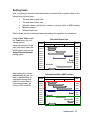
Sorting tasks
Sort, or rearrange, schedule task lines based on column data or symbol dates on the
schedule using these keys:
•
The start date of each task
•
The end date of each task
•
Selected column (sort by text, numbers, currency, date, or WBS number)
•
Multiple columns
•
Selected task lines
Save multiple column or selected tasks sort settings for repetitive sort conditions.
Choose Sort Tasks under
the Tools menu for your
sorting options.
Using the schedule to the
right, you would select the
WHO column and use the
Using Selected Column
sorting option.
After sorting this column
alphabetically by text, it’s
easy to see that Mike is
overloaded during April,
while Sue could take on
more assignments—as
shown in this schedule.
Schedule Before Sort
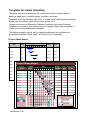
2001
WHAT
March
April
WHO
May
Task 1
Mike
Task 2
Sue
Task 3
Tom
Task 4
Mike
Task 5
Tom
Task 6
Mike
Task 7
Sue
Task 8
Tom
Task 9
Sue
Task 10
Mike
Task 11
Tom
Schedule Sorted by WHO column
2001
WHAT
March
April
WHO
May
Task 1
Mike
Task 4
Mike
Task 6
Mike
Task 10
Mike
Task 2
Sue
Task 7
Sue
Task 9
Sue
Task 3
Tom
Task 5
Tom
Task 8
Tom
Task 11
Tom
Introduction 1-15
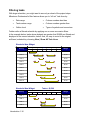
Filtering tasks
With large schedules, you might want to see only a subset of the project steps.
Milestones Professional’s filter feature allows you to “sift out” task lines by:
•
Date range
•
Column numbers less than
•
Task number range
•
Column numbers greater than
•
Outline level
•
Types of symbols and connectors
Further refine a filtered schedule by applying one or more successive filters.
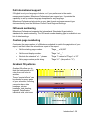
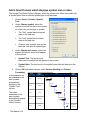
In the example below, tasks whose budgets are greater that $2,500 are filtered and
displayed in the second schedule, below. And, it’s easy to revert to the original,
unfiltered, schedule by choosing View | Show All Task Lines.
Wonderful New Widget
2001
Activity
Jan
Feb
Mar
Apr
Budget
May
Jun
Jul
Task 1
$10,000
Task 2
$1,000
Task 3
$1,200
Task 4
$3,000
Task 5
$4,000
Task 6
$2,200
Task 7
$2,190
Task 8
$1,200
Task 9
$2,600
Task 10
$1,000
Wonderful New Widget
Tasks > $2,500
2001
Activity
Jan
Feb
Mar
Apr
Budget
May
Jun
Jul
Task 1
$10,000
Task 4
$3,000
Task 5
$4,000
Task 9
$2,600
Introduction 1-16
Find and replace text
Use Find and Replace to quickly make detailed text changes to large schedules.
Apply Find and Replace to column text, freeform text, symbol notes, and symbol text.
Choose Edit | Find and Replace to launch the Find and Replace dialog box.
In the example below, Sue is taking over all of Kevin’s tasks. Using Find “Kevin” and
Replace with “Sue,” the large schedule is quickly modified.
1000 Step Project
2002
Task
January
Step 1
Cari
Step 2
Kevin
Step 3
Betty
Step 4
Kevin
Step 5
John
Step 6
Cari
Step 7
Don
Step 8
Kevin
February
Your last Find and Replace is saved and can be accessed with Repeat Last Find
under the Edit menu.
Bookmark task lines
Add a bookmark name to any task row and then jump to that task row by choosing the
bookmark name from a list of bookmarks.
The task row which is "jumped to" will be highlighted. Especially helpful in large
schedules, this feature allows you to quickly jump to specific schedule areas.
Bookmarked tasks can show
indicators for easy identification.
Introduction 1-17
Display Numbers and Project Status
Milestones Professional allows you to track and graph numbers, make calculations
between columns, and display status stoplights for at-a-glance reporting.
Calculation/Indicator SmartColumns
A Calculation/Indicator SmartColumn can display calculation results; symbols, text or
colors based on those results; symbols, text, or colors based on another column's
values; or a combination of these choices, as well as convert calculation results to
percentages with matching percent complete pies.
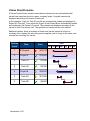
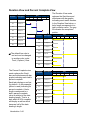
In the following example, “Budget minus Cost” is a Calculation/Indicator column. This
SmartColumn subtracts the “Cost” column values from the “Budget” column values
and then displays the calculated results.
The second function of this column is to display indicator symbols based on userdefined conditions. The green stoplight symbol appears when a cell’s value is greater
than 0 (costs are under budget); the yellow appears when the cell’s value is equal to 0
(costs are on budget); and the red appears when the value is less than 0 (costs are
over budget).
Contract Task Plan Status Report
Project/
Task
2002
Jan
Feb
Cost
Mar
Project Totals
R&D
$27,750 $28,000
$250
$16,250 $17,000
$750
$5,000
Team 1
Team 2
Testing
Over Budget
Introduction 1-18
Budget
minus Cost
Budget
Apr
On Budget
$5,000
$0
$11,250 $12,000
$750
$11,500 $11,000
($500)
Under Budget
Earned value reporting
Produce earned value reports of BCWP, ACWP, cost, BCWS and other EVMS fields
using user-entered values, calculated values, imported values from MS Project, or a
combination of these options. Include graphs of these values for at-a-glance analysis.
Earned Value Report
2003
Project /
Task
October
ACWP BCWP
November
December
Project ABC
$4,000 $2,235
$3,137
$3,550
$200
$300
$300
$350
$400
$400
Task 1
$3,000
Task 2
Task 3
$2,000
Task 4
Total
Budget
Task 5
$175
$250
$250
$710
$1,000
$1,300
$500
$682
$725
$100
$175
$225
$200
$329
$350
$1,000
Task 6
Task 7
$0
BCWP
Budget
ACWP
Stoplight SmartColumns
The Stoplight SmartColumn offers two easy-to-use methods for displaying stoplight
symbols, text and colors based on user-entered numbers 1 to 4, or 1 to 10.
In this Stoplight SmartColumn sampler, the two columns to the far left use the
Standard option of green, yellow, red, and blue symbols or color-fills with the optional
letters. The other two columns use the Custom option of matching any symbol, color
and text to numbers 1 to 10.
Standard Stoplights
Custom Stoplights
Fill Color
+ Letter
Symbol
+ Letter
Custom
1 to 10
Custom
1 to 10
G
G
ON
TARGET
G
G
ON
TARGET
Y
Y
R
R
ALERT
G
G
ON
TARGET
Y
Y
Activity 1B
B
B
Activity 2B
G
G
2004
Description
Jan
Feb
Mar
Apr
May Jun
Project A
Activity 1A
Activity 2A
ON
TARGET
Activity 3A
Project B
Activity 3B
Introduction 1-19
Values SmartColumns
A Values SmartColumn contains user-entered values and can automatically total
values from lower task levels to upper, summary levels. A symbol can also be
displayed according to the value in each cell.
In this example, Costs for Task A1 and A2 are automatically totaled and displayed in
Project A’s Cost cell. Cost values for Project A and Project B are automatically totaled
and displayed in All Project’s Cost cell. The symbols are displayed according to the
values in each Cost column cell. The symbols and conditions are user-defined.
Additional options: show an average of lower level values instead of a total on
summary lines; display the value as percent complete; add a % sign to the value; and
override the summary line values.
Outline
Level
Task
Cost
2005
Jan Feb Mar Apr May Jun Jul
1
All Projects
$43,100
2
Project A
$13,500
3
Task A1
$7,500
3
Task A2
$6,000
2
Project B
$29,600
3
Task B1
$21,000
3
Task B2
$8,600
Introduction 1-20
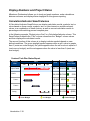
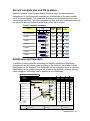
Percent complete pies and Fill-to-status
Percent Complete SmartColumns display the percentage, an optional percent
complete pie, or just the percent complete pie, as measured by the status symbol
(here, the arrow symbol). The completed milestones and completed portion of the
connector bar are filled. The to-be-completed symbols and to-be-completed portion of
the connector bars are filled with white or any color that is chosen.
Percent Complete and Status
2005
Projects
Jan
Feb
Mar
Status
Date
Apr
ALL PROJECTS
Ahead/
Behind
%
Comp.
3/23
28d
71%
Project 1
3/25
6d
88%
Project 2
3/22
3d
78%
Project 3
3/16
-2d
47%
Project 4
3/25
7d
74%
Project 5
3/26
8d
76%
Project 6
3/26
7d
66%
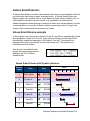
DataGraphs and ValueSets
In addition to having powerful scheduling and tracking capabilities, Milestones
Professional can also display graphs relating to the schedule. Up to three of these
DataGraphs can be displayed; one DataGraph can be overlaid on top of a schedule.
DataGraphs can be positioned below, on, or above the schedule. As many as eight
value categories (ValueSets) can be graphed in one DataGraph.
6-Month Earned Value Report
Project/
Phases
FY04
Jul
Aug
Sep
Oct
Q3
Nov
ACWP
Dec
BCWP
Budget
Status
Q4
Project 1
Research
$3,000
$1,185
$1,751
$2,975
$2,500
$200
$300
$300
$400
$400
$400
$175
$250
$250
$200
$598
$725
$210
$204
$400
$0
$0
$350
$0
$0
$550
Budget
Design
$2,000
Procurement
BCWP
$1,500
Production
$1,000
Testing
ACWP
Review
$500
Delivery
$0
BCWP
Budget
ACWP
Contracts review: 10-15-04
Sign Off: _________________
Earned Value greater than Cost
Cost greater than Earned Value
Cost = Earned Value
Completed Task
Status Date
Incomplete Task
Introduction 1-21
ValueSet SmartColumn
Not only can ValueSets be totaled and graphed by time period in the DataGraph, they
can be totaled and displayed in a ValueSet SmartColumn.
In this schedule, the “Budget per Task” and “Costs per Task” columns are ValueSet
SmartColumns.
Each column totals the
values from a specific
ValueSet for each task
row.
For example, the
“Budget per Task”
column totals the
“Budget” ValueSet
entries for each activity.
2005
TASKS
Jan
Design
$1,000
$800
Test
Feb
Mar
$800
$900
$900
$900
$1,200
$1,100
Manufacture
Budget
Costs
Apr
$800
$900
$900
$700
Budget
per Task
Costs
per Task
$1,800
$1,700
$2,100
$2,000
$1,700
$1,600
$1,800
$900
$0
Resource allocation for effort-driven tasks
Control the effort of a resource assigned to a particular task by using a resource
allocation percentage. The resource allocation value can be entered in the Resource
Allocation Percent SmartColumn or in any cell on the appropriate task line.
In this example, Amy will be working on Task 1, 50% of the time, and Task 2, 50% of
the time. This does not change the durations of the tasks, yet better indicates the
resource’s effort needed to complete the tasks. Thus, the overall usage of this
Resource Allocation for Duration Values
resource is 100% for
2001
this time period.
Project /
PM /
% of Resource Allocated
Task
Here, the “Allocated
Duration” column is a
Duration SmartColumn.
This column can be set
to apply the resource
allocation percent to
the duration value or to
display the normal
duration value.
Introduction 1-22
Project A
Employee Jan Feb Mar Apr May Jun Jul
Bobby
Allocation
Duration
100%
135d
Task 1
Amy
70d
50%
35d
Task 2
Amy
70d
50%
35d
Task 3
Katie
100%
66d
Task 4
Johnny
100%
80d
66d
80d
Create Presentation Schedules from MS Project Files
Create Milestones Professional presentation schedules by importing Microsoft Project
files when both Milestones Professional and MS Project are installed.
Select from built-in report formats
Milestones Professional offers a direct interface to Microsoft Project, which makes it
easy to generate chart formats beyond the standard formats offered by Project.
Select from built-in report formats or create your own presentation schedule format.
The import wizard does all the work!
Phase 1 Status Report
Project
Stage
2001
Start
Date
End
Date
1/3
1/3
1/8
3/1
1/9
1/26
1/9
1/12
1/19
1/19
1/26
1/26
Development
1/29
2/9
Manufacturing
2/12
2/23
Testing
2/26
3/12
Delivery
3/17
3/17
January
February
Phase 1
March
Phase 2
Contract awarded
Launch
Phase 1 Review
Project meetings
Research
Unit A
Taskforce A
Unit B
Taskforce B
Unit C
Taskforce C
1.0
2.0
Final
Introduction 1-23
Choose from more than 35 built-in reports:
Milestone Charts
Finish Milestones
Page 1 of 3
11/2/01
'98
Name
PROJECT MANAGEMENT
'99
'00
'01
PROJECT MANAGEMENT
PLANNING
PLANNING
SYSTEM ENGINEERING
SYSTEM ENGINEERING
REQUIREMENTS
REQUIREMENTS
ANALYSIS
ANALYSIS
INTEGRATION
INTEGRATION
MISSION OPERATIONS
MISSION OPERATIONS
SYSTEM TEST PLANNING
SYSTEM TEST PLANNING
System Engineering Complete
System Engineering Complete
SPACECRAFT ENGINEERING
SPACECRAFT ENGINEERING
COMMAND AND CONTROL
•
Finish dates with summaries
•
Milestone dates
•
Progress status
•
Cost status
•
Current plan
•
Current + baseline plan
•
Progress and cost status
•
Critical tasks
•
Resource to-do lists
•
Overallocations
•
Single-resource to-do lists
•
Resources + cost and status
COMMAND AND CONTROL
ATTITUDE CONTROL
ATTITUDE CONTROL
POWER
POWER
THERMAL
THERMAL
ORBIT ADJUST PROPULSION
ORBIT ADJUST PROPULSION
TANK
TANK
VALVES
VALVES
THRUSTER
THRUSTER
DESIGN
DESIGN
FABRICATE
FABRICATE
ASSEMBLE
ASSEMBLE
TEST
TEST
Critical
Finish
Summary
Gantt Charts
Gantt Chart for Presentation
WBS Duration
'02
Name
'03
'04
%
complete
'05
1 2 3 4 1 2 3 4 1 2 3 4 1 2 3
1
173 days PROJECT
75%
Cost
$95,368
Remainin Resource
Cost
Initials
$25,822
75%
1.1
2
173 days
PLANNING
364 days SYSTEM
75%
$95,368
$25,822
24%
$213,648
$161,844
41%
$74,288
$43,629
J,B,H
41%
2.1
138 days
REQUIREMENTS
J,B,H
0%
2.2
50 days
ANALYSIS
2.3
54 days
INTEGRATION
2.4
37 days
MISSION
2.5
69 days
SYSTEM TEST
50 days
System Engineering
0%
$26,800
$26,800
J,B,H
28%
$28,944
$20,984
J,B,H
18%
$19,832
$16,294
J,B,H
19%
$36,984
$29,909
J,B,H
28%
18%
19%
10%
2.6
3
898 days SPACECRAFT
10%
$26,800
$24,227
24%
$658,048
$506,451
33%
$300,000
$211,560
J,B,H
33%
3.1
500 days
COMMAND AND
J,B,H
0%
3.2
132 days
ATTITUDE
0%
$70,752
$70,752
J,B,H
11%
$48,240
$42,934
J,B,H
22%
$93,800
$73,164
J,B,H
11%
3.3
90 days
3.4
175 days
POWER
22%
THERMAL
3.5
1 day
3.6
20 days
TANK
3.7
30 days
VALVES
3.8
35 days
ORBIT ADJUST
THRUSTER
33%
$536
11%
$10,720
$9,541
J,B,H
22%
$16,080
$12,542
J,B,H
33%
$18,760
$12,569
$359
J,B,H
J,B,H
44%
$10,720
$6,003
J,B,H
55%
$21,440
$9,648
J,B,H
12%
$10,720
$9,434
J,B,H
14%
$10,720
$9,219
J,B,H
11%
22%
33%
44%
3.9
20 days
DESIGN
3.10
40 days
FABRICATE
3.11
20 days
ASSEMBLE
55%
12%
14%
3.12
20 days
TEST
Summary
Current Plan
Baseline
Critical
Slack
Resource Charts
Resource Chart
Page 1 of 7
Cost
'98
Work
'99
1900s
Summary
John
$12,960.00
$12,480.00
$3,840.00
$4,320.00
$2,880.00
$5,760.00
$0.00
$48,000.00
$12,672.00
$8,640.00
$16,800.00
$96.00
$1,920.00
$2,880.00
$3,360.00
$1,920.00
$3,840.00
$1,920.00
$1,920.00
$8,160.00
1080.00
1040.00
320.00
360.00
240.00
480.00
0.00
4000.00
1056.00
720.00
1400.00
8.00
160.00
240.00
280.00
160.00
320.00
160.00
160.00
680.00
PLANNING
REQUIREMENTS
ANALYSIS
INTEGRATION
MISSION OPERATIONS
SYSTEM TEST PLANNING
System Engineering Complete
COMMAND AND CONTROL
ATTITUDE CONTROL
POWER
THERMAL
ORBIT ADJUST PROPULSION
TANK
VALVES
THRUSTER
DESIGN
FABRICATE
ASSEMBLE
TEST
CONTAINMENT SYSTEM
Work
9225
7380
5535
3690
1845
0
Cost
206050
164840
123630
82420
41210
0
Planned
Summary
Introduction 1-24
'00
'01
Summary Charts
Presentation Timeline of Finish Dates
'03
PHASES
Q2
Q3
'04
Q4
Q1
Q2
'05
Q3
Q4
Q1
Q2
Task 1-3
Task 1-2
Task 1-5
Phase 1
Task 1-1 New Text
Task 1-4
Phase 2
•
Finish date roll-up summary
•
Current and baseline status
•
Progress and cost status
•
Cost status with graph
•
Finish date variance
•
Budget and work remaining
•
Budget and cost
•
Percent complete graph
•
A variety of reports with graphs
including BCWP, ACWP, BCWS,
costs, SPI, CPI, SV, CV and more
Task 3-3
Task 3-1
Phase 3
Task 3-2
Task 3-4
Task 4-1
Phase 4
Task 4-2
Performance Charts
PERFORMANCE CHART
3/5/04
Project
Start
Finish
Baseline
Finish
'98
Variance
1
PROJECT
Q1
Q2
Q3
'99
Q4
Q1
1
Q2
'00
Q3
Q4
Q1
Q2
Q3
'01
Q4
%
Comp.
Q1 Q2
1/2
2/1
7/9
46%
PLANNING new text
1/2
2/1
4/1
46%
SYSTEM ENGINEERING
10
9
7/10
4/6
9/9
24%
REQUIREMENTS
7/10
5/25
1/7
41%
ANALYSIS new text
5/25
8/3
3/4
0%
3/5
9/27
5/6
28%
INTEGRATION
5/7
11/9
6/17
SYSTEM TEST
6/18
1/26
9/9
System Engineering
MISSION
9/23
4/6
9/9
18%
19%
9%
2
SPACECRAFT
12
1/2
6/12
6/12
24%
1/2
12/2
12/2
33%
12/3
6/5
6/5
0%
6/6
10/9
10/9
11%
10/10
6/11
6/11
22%
6/12
6/12
6/12
33%
1/2
1/29
1/29
11%
VALVES
1/30
3/12
3/12
22%
THRUSTER
3/13
4/30
4/30
33%
COMMAND AND
ATTITUDE CONTROL
POWER
THERMAL
ORBIT ADJUST
TANK
DESIGN
5/1
5/28
5/28
44%
FABRICATE
5/29
7/23
7/23
55%
ASSEMBLE
7/24
8/20
8/20
TEST
8/21
9/17
9/17
12%
14%
Summary
Current Plan
Baseline Plan
Critical Task
Ahead of Schedule
Behind Schedule
On Schedule
Slack
Earned Value Charts
EARNED VALUE REPORT
Proje ct
PROJECT MANAGEMENT
PLANNING
Curre nt Base line
'98
'99
'00
'01
Finish
Finish 4 1 2 3 4 1 2 3 4 1 2 3 4 1 2 3
09/01/98
07/09/98
BCWS
$72,360
BCWP
$54,270
ACWP
$69,546
09/01/98
08/01/98
$72,360
$54,270
$69,546
SYSTEM ENGINEERING
12/01/99
09/09/99
$163,480
$44,535
$51,804
REQUIREMENTS
01/19/99
01/07/99
$69,680
$28,882
$30,659
ANALYSIS
03/30/99
03/04/99
$21,440
$0
$0
INTEGRATION
05/25/99
05/06/99
$24,120
$6,633
$7,960
MISSION OPERATIONS
07/06/99
06/17/99
$16,080
$2,868
$3,538
$7,075
SYSTEM TEST PLANNING
09/22/99
09/09/99
$32,160
$6,152
System Engineering
Complete
12/01/99
09/09/99
$0
$0
$2,573
SPACECRAFT ENGINEERING
06/12/01
06/12/01
$626,048
$151,597
$151,597
COMMAND AND CONTROL
12/02/99
12/02/99
$268,000
$88,440
$88,440
ATTITUDE CONTROL
06/05/00
06/05/00
$70,752
$0
$0
BCWS
BCWP
ACWP
$2,200,000
$1,100,000
$0
SPI
CPI
1.00
0.00
Current
Baseline
Introduction 1-25
Create your own report formats
If the built-in report formats don’t meet your needs, create your own presentation
schedule format. Your custom format becomes part of the import wizard under the
name you give it.
Refresh your presentation schedule with MS Project changes
Refresh (update) the Milestones schedule's symbol dates, symbol text, column
values, percent complete, as well as add new tasks and highlight obsolete milestones,
based on the latest information in the MS Project file that was used to create the
Milestones Professional schedule.
MPX, CSV and TXT files
If Microsoft Project is not installed, then Milestones can open MPX, CSV, and TXT
files created from MS Project.
Milestones Professional schedules can be exported to the MPX, CSV and TXT
formats and then opened in Microsoft Project and other applications.
⎯⎯⎯⎯⎯⎯⎯⎯⎯⎯⎯⎯⎯⎯⎯⎯⎯⎯⎯−⎯⎯⎯⎯⎯⎯⎯⎯⎯⎯⎯⎯
Work with your other Applications
Beyond the direct interface to Microsoft Project, Milestones Professional interacts with
other applications in several ways.
You can copy and paste a Milestones Professional schedule into another application
such as Word, Excel, and PowerPoint. The schedule can be a picture or an
embedded or linked object. You can also “map” (copy and paste) information from
another application, such as an Excel spreadsheet, into Milestones.
For programmers, Milestones Professional supports a complete Automation interface
for using Visual Basic, C++ and other programming languages to interchange data
programmatically with Microsoft applications such as Access, Excel, Project, and
more. The programming that makes use of this automation feature is user-created.
Finally, your company may have existing schedule information in databases,
spreadsheets or in other project management files. Milestones Professional can read
information from other sources once the information has been written to a comma
delimited file.
Many file formats supported
In addition to built-in interfaces for Microsoft Project, Milestones Professional offers a
custom import capability. With the custom import feature, you can bring in information
from other sources such as CSV and TXT files.
Introduction 1-26
Turn a spreadsheet into a Milestones schedule
Getting schedule information into Milestones Professional from just about any other
Windows software package is easy. Simply copy information from another application
to the Windows clipboard, and then paste into Milestones Professional.
For example, you might have a spreadsheet like the Microsoft Excel spreadsheet
shown here.
The spreadsheet shows task names, start dates, end dates, and outline hierarchy.
This information can be highlighted, copied to the clipboard, and pasted into your
Milestones Professional schedule.
The result is an instant schedule!
Import from Excel Then Format
Page 1 of 1
3/9/04
2003
Projects
Start
End
PROJECT A
1/10
5/4
Task A1
1/10
4/3
Task A1-1
1/10
1/31
Task A1-2
2/2
3/1
Task A1-3
3/3
4/2
Task A1-4
3/4
4/3
1/10
5/4
Task A2-1
1/10
1/31
Task A2-2
2/2
3/1
Task A2-3
4/3
5/4
PROJECT B
5/4
12/4
Task B1
5/4
6/4
Task B2
6/4
6/4
Task B3
6/4
8/4
Task B3-1
6/4
6/30
Task B3-2
7/2
7/2
Task B3-3
7/3
8/2
Task B3-4
8/4
8/4
9/1
12/4
Task B4-1
9/1
9/30
Task B4-2
10/2
11/1
Task B4-3
11/3
12/4
Dec
Task A2
Task B4
Jan
Feb
Mar
Apr
May
Jun
Jul
Aug
Sep
Oct
Nov
Dec
Introduction 1-27
OLE Automation
Using OLE Automation, a programmer within your company can build automated
systems that include scheduling. Sample programs which demonstrate the use of this
powerful capability are available on the www.kidasa.com web site. These sample
programs show how Milestones Professional can be linked to Microsoft Access,
Visual Basic, and C++ applications.
For example, schedule data that is stored in a central repository (such as Access,
Artemis, Project, Oracle, SQL, Excel, Word, and more) can be extracted in order to
populate a Milestones Professional schedule for presentation purposes. Schedule
automation insures the integrity of the database and the accuracy of the presentation
schedule.
Automation Tag fields appear with symbols, free-form text, column headings, column
cells and other schedule components. These fields can be used by Automation
programs as a way of uniquely identifying and modifying specific schedule elements.
These fields can be set and queried by Automation programs.
Introduction 1-28
Extensive Text Entry and Graphics Options
Symbol text
Symbol notes
Enter up to three lines of symbol text.
This text moves with the symbol.
Position the text anywhere around the
symbol or center it on the connector bar.
Enter up to 10,000 characters in the
symbol notes field. This text is
embedded in the symbol, and
appears when the cursor hovers over
the symbol. Optionally, a separate
notes page prints with the schedule.
Automatically display the column text as
text next to a symbol; or have the symbol
text automatically display as column text.
Symbol Text
centered on bar
Freeform text
Column text
Type text anywhere on the schedule.
Format the appearance of the text box.
This text does not move with symbols or
rows.
Use up to 20 columns to enter text,
values, dates, and other schedule
information.
Project/
Team Names
Freeform
Text
All Projects
Project 1
Team 1
Project Funding Percent
Contact Status Complete
Kevin
46%
Joe
49%
Jack
72%
Substitutable text strings
Link other text documents
Enter “& commands” in the symbol text
field to show duration values, column
text, and more. Even include normal text
with the “& command,” as shown here…
Hyperlink Word documents, Excel
spreadsheets, web pages and more,
to symbols or tasks on the schedule.
Hover over the symbol to see the
hyperlinks, and right-click to launch.
…resulting in…
Duration is 16 days
Monday 8/20/01
Hyperlink: C:\Current Cost Figures.doc
Introduction 1-29
Click and type
Quickly enter text by clicking a cell, a symbol, the chart title, a column heading, or
free-form text, then start typing. The relevant dialog box launches as you type the
text.
Spell checking
Milestones Professional has a built-in spell checker. All of the following languages are
installed: English (United States), English (UK), English (Canada), French (Quebec),
French (France), German, Spanish, Italian, Dutch, Swedish, Norwegian.
Graphics
Paste graphics anywhere in the schedule. Include up to 5 graphics in a template.
Graphics can show on top of the schedule, behind the schedule information, and on
all pages.
Graphics can be
pasted in (via the
Windows
clipboard) or
inserted from a
file using one of
these formats:
JPG, JP2, PNG,
DXF, EPS, IMG,
WPG, PCX, TGA,
WMF, TIF, and
GIF.
World-Wide Airways Corp
Maintenance Planning Forecast
2002
Aircraft
Jan
Fe b
M ar
Apr
C Check/Paint
K202TZ-B737-2A5
1/22
(202)
2/21
4/7
M ay
Jun
(208)
3/23
2/22
Aug
7/30
C&Q Check
K208TZ-B737-2A5
Jul
C Check
Pheonix
6/3
Se p
Oct
Nov
Rem #1 Eng s/n 72908
Install Eng s/n 72910
11/17
(202)
12/8
#2 Eng s/n 78478
Install #2 78489
C Check
K221MA-B737-4D2
3/24
(221)
4/18
K235MA-B737-31Z
4/19
(235)
5/13
K204TZ-B727-34F
5/14
K212TZ-B727-34F
K325LP-B737-3N7
2/8
2/8
#3 Eng s/n 74869
Rework (TX)
7/8
#3 Eng C-12 s/n 78748
Emergency
(204)
6/18
Engine Overhaul
C Check AZ
6/19
#2 Eng C-5 s/n 79568
Return throttle box
(212)
7/20
7/20
(325)
8/19
10/25
#2 Eng C-15
s/n 758458
C Check AZ
K345MA-B737-4D2
8/19
K213TZ-B727-34F
2/28
(345)
9/21
#3 Eng C-12 s/n 78748
9/21
K203TZ-B737-2A5
6/24
(213)
10/16
#3 Eng C-10 s/n 78756
10/17
(203)
11/16
Symbol date prefix and suffix
For symbols placed on the schedule, enter text to appear before and/or after an
individual symbol's date display.
Stage 1: 1/29
Introduction 1-30
Dec
TBD
SoftDate 3/24
4/27 or TBD
Flexible Symbology
Toolboxes
The Milestones Professional toolbox contains 3 tools, 32 symbols, 16 horizontal
connectors, 8 vertical connectors, and 3 drawing tools to quickly build any schedule
using the click-drag-and-drop method.
The Plus, Arrow, and Text tools exemplify the intuitive nature of Milestones: Need to
add a symbol or connector? First click the Plus tool. Need to move a symbol on the
schedule? First click the Arrow tool. Need to type text? First click the Text tool.
Two styles of toolboxes are available:
Standard Toolbox
Combo Toolbox
Symbols and connectors are separated.
Symbols can be used by themselves or in
any combination with connectors and
other symbols.
Symbols and horizontal connectors
are combined in symbol+bar+symbol
combinations. By using one of the
small plus tools on the left to select a
combination, you can quickly clickdrag-and-drop a start symbol,
connector, and end symbol.
Symbols and bars can still be added
independently.
Use the drawing tools to draw lines, arrows, circles and boxes. Format the color
background, shape outline, fade effects and more.
Introduction 1-31
Sidebar
The optional sidebar is an extra toolbar anchored to the left or right
side of the Milestones window. The sidebar contains the toolbox
(which is normally free-floating) and a user-defined list of shortcut
buttons for a variety of activities, including moving from page to
page, creating web pages, filtering, applying a color theme,
creating a master schedule, and much more.
Symbol types
Any symbol in the Toolbox can be changed to any of four symbol types:
•
Normal symbols track actual start dates, end dates, and independent
milestones.
•
Baseline symbols track baseline start, end, and duration. Lock, hide, or
highlight these symbols.
•
Status symbols track percent complete, used duration, remaining duration,
status date, and amount ahead/behind schedule.
•
Comment symbols are ignored for SmartColumn purposes (e.g. not counted
in a Duration SmartColumn), and thus can be used for many purposes,
including further annotating the schedule with symbol text and notes.
Wide assortment of symbols
The flexibility and customizability of Milestones Professional symbology is second to
none, with over 95 symbol shapes filled with any color.
Symbols can have any one of nine symbol
"marking” patterns such as these:
Introduction 1-32
Symbols can have a small, medium or large
shadow of any color.
More formatting choices:
•
Outline pattern
•
Outline color
•
Fill pattern
•
“After status date” color
•
Marking letters
•
Custom size override
•
Default text
User-defined symbols
Not enough symbol shapes?
Milestones Professional has a built-in
Symbol Maker that lets you design
simple or multi-part shapes.
If that's not enough, you can insert any bitmap symbol. Custom symbols can be
embedded in the schedule, making distribution of the schedule easier.
Rocket
Big rig
Missile
Cowboy boot
Airplane
Shamrock
Launch
Football helmet
Space shuttle
Helicopter
Pencil
Oil rig
Hazard
Arrow steps
Bulldozer
N-S-E-W
Truck
Tractor
Introduction 1-33
Multiple independent milestones
As many as 128 milestones can be added to any task line on your schedule. They can
be stand-alone milestones or can represent a series of start and end dates.
Start
Development
Complete
Design
Integration
Complete
Ready for
Production
12/1
You can have many milestones on a bar...
7/1
7/2
7/3
7/4
7/5
7/6
7/7
...or have many bars represent several sub-tasks, plus their start and end dates, on
one row.
Tasks
Starter
Prototype
January
February
Design
March
Develop
April
May
Test
Variety of connector shapes
Like the symbols, the 40+ horizontal connector shapes and 15+ vertical connector
shapes are fully customizable. The horizontal connectors can be filled with any single
color or two colors faded together, as well as shadowed with any color.
Introduction 1-34
Three-level symbol and connector positioning
Symbols can be positioned at an upper, middle, or lower level on one task line. The
connectors automatically follow the positioning of the symbols.
In the example below, an otherwise dense and cluttered schedule is distinct and clear
with three symbol positions and a variety of symbol date and text positions.
2001
Tasks
Jan Feb Mar Apr May Jun Jul Aug Sep Oct Nov Dec
Task A
4/18
8/4
Task B
2/7
6/2
6/1
Task C
9/6
3/28
2/12
12/1
10/4
7/31
6/17
Further customize connectors with the “Always on top” setting which controls which
connector appears on the surface, as shown below:
Introduction 1-35
Flexible Formatting
You completely control the size and format of your schedules, including the physical
page size of the schedule, the number and width of the columns, the number and
height of the rows, the size of the optional legend, margin sizes and more.
Physical sizing
It is possible to create schedules…
…as small as a postage stamp…
Academic Scheduler
Hours
8-9
8-9
Days
MWF
MWF
Class
7
ENG 101
8:00
ENG 101
8:00
9-10
MWF
ENG 101
1-2
MWF
ENG 101
8
9
10
11
12
2:00
ENG 101
1:00
Eng 101
1:00
8-9:30
TTh
BIO 202
MWF
3-4
MWF
MWF
4-5
1-2
MWF
ARCH 101
ARCH 101
Module 7
10:00
11:00
3:00
8:00
4:00
9:00
10:00
11:30
3:00
4:30
4:00
CALC 404
TTh
MWF
DEPARTMENTS
2:30
9:30
BIO 202
CALC 302
CALC 404
9-10:30
8:00
BIO 504
CALC 302
TTh
TTh
Building
5
A
2:00
TTh
8-9
4
B
1:00
MWF
10-11
3
10:00
1-2
3-4:30
2
9:00
1-2:30
10-11:30
1
9:00
9:00
9:00
5:00
1:00
2:00
101
Instructor
Designation
Fleming
Dept Chair
103
Newton
101
Heinzelman
Asst Prof
104
Fleming
Grad Asst
Professor
B
302
Elder
Professor
A
303
Boyd
Asst Prof
C
101
Bailey
C
101
C
105
A
103
Bailey
Asst Prof
Professor
Butler
Professor
Wagenman
Grad Asst
A
101
McLeod
Grad Asst
B
102
Wagenman
Professor
McLeod
Dept Chair
D
10:30
Room
B
A
305
D
305
D
102
Jones
Professor
Fleming
Dept Chair
Language
Arts
Science
Mathematics
Architecture
Module 5
Module 6
Module 8
Module 9
Module 10
Module 11
Module 12
Module 13
…or wall size!
Academic Scheduler
Hours
Room
Instructor
Designation
8-9
MWF
ENG 101
8:00
9:00
A
101
Fleming
Dept Chair
8-9
MWF
ENG 101
8:00
9:00
B
103
Newton
9-10
MWF
ENG 101
B
101
Heinzelman
Asst Prof
1-2
MWF
ENG 101
1:00
2:00
A
104
Fleming
Grad Asst
1-2
MWF
ENG 101
1:00
2:00
B
302
Elder
Professor
1-2:30
Days
TTh
Class
8
9
10
9:00
11
12
TTh
BIO 202
10-11
MWF
BIO 202
3-4
MWF
8-9
MWF
CALC 302
10-11:30
TTh
CALC 302
1
2
1:00
8:00
3-4:30
TTh
CALC 404
4-5
MWF
CALC 404
TTh
ARCH 101
MWF
ARCH 101
4
5
10:00
11:00
3:00
8:00
4:00
9:00
10:00
11:30
3:00
4:30
4:00
9:00
DEPARTMENTS
Module 7
Introduction 1-36
5:00
10:30
1:00
Building
A
2:30
9:30
BIO 504
9-10:30
3
10:00
Eng 101
8-9:30
1-2
7
2:00
303
Boyd
Professor
Asst Prof
C
101
Bailey
Asst Prof
C
101
Bailey
Professor
C
105
Butler
Professor
A
103
Wagenman
Grad Asst
A
101
McLeod
Grad Asst
B
102
Wagenman
Professor
D
305
McLeod
Dept Chair
D
305
Jones
Professor
D
102
Fleming
Dept Chair
Language
Arts
Science
Mathematics
Architecture
Module 5
Module 6
Module 8
Module 9
Module 10
Module 11
Module 12
Module 13
Many time-scale options
Schedules can show standard time scales ranging from minutes to years, and custom,
user-defined periods. Choose minutely, hourly, or daily for symbol placement; top
and/or bottom of the schedule for date heading placement; and any period frequency
(e.g. every 5 years). A few possibilities:
Years, months, quarters, weeks from start of schedule
2002
Jan
Feb
Mar
Apr
May
Q1
1
Jun
Jul
Aug
Q2
2
3
4
Sep
Oct
Nov
Q3
5
6
7
Dec
Q4
8
9
10
11
12
Hours and minutes
8AM
0
1
2
3
4
5
6
7
8
9
10
11
12
13
14
15
Fiscal years and quarters
FY02
First
Second
FY03
Third
Fourth
First
Second
Third
Fourth
Custom headings
Peliozoic Age
7 million - 6 million BC
2003
Q1
Q2
Q3
Phase 1
Jurassic Age
6 million - 5 million BC
5 million - 4 million BC
2004
Q4
Q1
Q2
Q3
4 million-3 million BC
2005
Q4
Phase 2
Q1
Q2
Q3
2006
Q4
Q1
Phase 3
Introduction 1-37
Q2
Templates for instant formatting
Templates save time by preserving the customized toolbox, columns, column
headings, page layout, indicator symbol conditions, and more.
Templates retain the formatting (the "look" of a chart) while charts preserve schedule
details (task line entries, dates, column value entries, etc.).
Choose from dozens of Milestones’ Standard Templates, and create Personal
Templates to be used by your whole division or company. Begin with a template or
overlay an existing schedule with a template.
The working schedule (below, left) is instantly transformed into a professional
presentation schedule (below, right)—all with the use of a template.
Project Status Report
Page 1 of 1
TASK
2002
Status
J
looking
good
Project A
over
budget
Project B
under
budget
Project C
under
budget
Project D
Project G
Project H
M
A
2/2
M
3/2
Project J
B udget
J
A
S
4/2
Costs
N
12000.00
4000.00
11000.00
11500.00
15000.00
2000.00
10000.00
7000.00
7000.00
6000.00
6000.00
6000.00
7/7
5/9 6/13
6/6
9/13
Project
Status Report
on budget
Project
over
budget by
Name
$500
O
4/29
Funding
Status
5/24
Project A
10/13
Budget
2002
J6/13
F
M8/8A
2/2
on budget
Project B
Project I
J
4/28
under
budget
Project E
Project F
F
M
J
5500.00
J
A
4/28
3/2
7/16
6000.00
Amount
O
N
4/28/6
$4,000
$11,000
10000.00
12000.00
11999.00
$8,000
$11,500
($500)
$15,000
$2,000
$13,000
7000.00$10,000
$7,000
$3,000
$7,000
$6,000
$1,000
$6,000
$6,000
$0
$5,500
$6,000
($500)
$10,000
$10,000
$0
$12,000
$11,999
$1
$8,000
$7,000
$1,000
7/7
9/24
Costs Remaining
to Date
Funds
$12,000
10000.00
10/29
4/29
close to
Project on
C budget
S
11/4
under
8/295/9
Project budget
D
Project E
8000.00
6/13
6/6
Project F
9/13
5/24
Project G
10/13
6/13
8/8
10/29
Project H
7/16
Project I
8/6
9/24
11/4
Project J
Budget
8/29
$100,000
Costs to date
$75,000
Remaining Funds
$50,000
$25,000
$0
Introduction 1-38
Under Budget
No funds remain
Over Budget
Update Due
Proposal Due
Final Report
Full international support
If English is not your language of choice, or if your preference is the metric
measurement system, Milestones Professional can support you. It provides the
capability to set up custom language templates for any language.
Milestones Professional also picks up your date format and measurement type
choices directly from the Windows Control Panel Regional Settings.
ISO week numbering
Milestones Professional supports the International Standards Organization's
standards for week numbering. The ISO week number heading type is available in our
list of date headings.
Custom page numbering
Customize the page number of a Milestones schedule to match the pagination of your
report, and then insert the schedule as a part of the report.
•
Set the starting page number.
"Page __ of 6,000"
•
Set the end display number.
"Page 1 of __"
•
Exclude the standard “of…” phrase.
"Page 1" instead of "Page 1 of 10"
•
Set a page number prefix string.
"Page 3-1" (the prefix is "3-")
Gradient fill patterns
Gradient fills allow you to
fade the background or fill
color from one color to
another.
These “special effects” can
be chosen for many parts
of your schedule, including
connector bars, date
headings, column
headings, task shading,
legends, DataGraphs,
individual cells, and more.
FADE TO RIGHT
FADE TO BOTTOM
FADE TO TOP
FADE TO CENTER
FADE TO LEFT
FADE TO CENTER (H)
Introduction 1-39
Weekend and holiday shading
Saturdays, Sundays, and holidays can be shaded, each in its own color. Customize
the holiday calendar to match your company’s calendar or for a single schedule.
Valley Commercial Construction
Smith Interior Remodel
2002
4745 Palm Ave. • Fullert
Job No.: 980045.05 • C
February
28
4
11
18
March
25
4
11
Start Finish
April
18
25
1
8
15
22
Soft Demo
Sawcut
HVAC-Rough
Wall Saw & Demo
Structural
Skylights
Overhead Doors
Inspection-Structural
Structural Concrete-Pour
Service/Repair Elevator
Structural Steel-Install
T-bar Grid Repair
Inspection-Walls
Inspection-Drywall Screw
Mud & Tape
Spiveco Equip Move-In
Ceiling Tile
Inspection-Ceiling
Paint
Carpet
Inspection-Elec, Mech
Inspection-Building Final
1/31
2/4
2/7
2/8
2/11
2/11
2/16
2/17
2/18
2/18
2/22
2/28
3/1
3/5
3/5
3/15
3/22
3/22
4/2
4/4
4/11
4/15
Normal Task
Critical Task
2/8
2/8
3/7
2/14
2/15
3/1
2/20
2/17
2/22
2/22
3/1
3/8
3/1
3/5
3/12
3/15
4/2
3/22
4/10
4/11
4/11
4/15
Critical Milestone
Curtains
Curtains provide vertical shading for a date range or for several date ranges.
Repeat curtains at specified intervals, use more than 25 fill patterns, hide curtains,
and more. Choose from many marbled color patterns.
Software Roll-out
TASK
July
August
September
30 7 14 21 28 4 11 18 25 1
October
November
December
8 15 22 29 6 13 20 27 3 10 17 24 1
8 15 22
Web Site
2004
Description
Jan
Database
Project A
Activity 1A
Upgrades
Activity 2A
Activity 3A
Project B
Software
Activity 1B
Activity 2B
Activity 3B
Introduction 1-40
Feb
Mar
Apr
May
Jun
Color themes
Apply a color theme to a new or existing schedule for instant color formatting. Choose
from more than 40 color themes or create your own.
."Camouflage" Color Theme
Cost
to Date
Budget
All Projects
$2,550
$2,450
1/14
Project A
$1,800
$1,750
1/14
Task A1
$800
$750
1/14
Task A2
$1,000
$1,000
$750
$700
Task
Project B
Task B1
$250
Task B2
$500
2001
Jan
Cumulative costs
Cumulative budget
Apr
May
Jun
91%
100%
2/19
82%
3/18
3/19
Cost3/19
to Date
Task
$400
All Projects
Project A
$784
$588
Task
$392
$196
$0
Task
Cumulative costs
Cumulative budget
$514
$482
$643
$625
$1,800
$1,157
$1,107
$750
B1
$250
$500
Summary
Feb
4/16
$763
$787
1/14
$259
$259
$1,750
1/14
$750
1/14
$267
$214
84%
91%
100%
82%
$2,550
"Purdue"
Color Theme
$2,450
3/19
Task
3/19
$514
$643
Status
$482Project
$625
A
$2,550
$763
$259
$787$1,800 $259
80%
6/12
Cost 4/14
Budget
to Date
Jan
4/16
All Projects
Cost to date
Budget
Percent
Complete
Jul
6/12
3/18
$2,447
$2,367
$300
$400
Jun
3/18
2/19
$2,179
$2,153
$700
Cost to date
Budget
$103
$83
May
2/10
$1,000
$1,920
$1,894
37%
Apr
100%
Mar
6/12
$2,450
$1,000
$514
$482
2001
Jan
$800
A2
80%
6/12
4/14
Budget
$2,550
A1
Project B
$2,548
$1,911
Task
$1,274
$637
$0
84%
2/10
"Country Home" Color Theme
$300
Percent
Complete
Jul
6/12
Task B2
Task
Mar
3/18
Cost to date
Budget
Cost to date
Budget
Feb
Feb
6/12
1/14
$2,450
$267
$214
$1,750
2001
37%
Mar
100%
Apr
May
Jun
Jul
Percent
Complete
84%
6/12
$103
1/14 $83
91%
3/18
$700
$350
$0
Cumulative costs
Cumulative budget
Cumulative costs
Cumulative budget
$514
$482
Task A1
$800
Task A2
$1,000
$1,920
$2,179
$1,894 $750$2,153
$1,157
$1,107
Project
B
$750
1/14
$1,000
$2,447
$2,367
$700
100%
2/10
2/19
82%
3/18
$2,550
$2,450
3/19
6/12
80%
6/12
100%
$2,000
$1,000
Task B1
$250
$0
Task B2
$500
Task
$300
3/19
$400
4/16
Cost to date
Budget
Summary
Cost to date
Budget
37%
4/14
$514
Status
$482
$643
$625
$763
$787
$259
$259
$267
$214
$103
$83
$514
$482
$1,157
$1,107
$1,920
$1,894
$2,179
$2,153
$2,447
$2,367
$2,550
$2,450
$700
$350
$0
Cumulative costs
Cumulative budget
Cumulative costs
Cumulative budget
$2,000
$1,000
$0
Task
Summary
Status
Outline level shading
Choose task line background
shading, column text formatting,
gridlines and summary bar styles
to clearly distinguish each outline
level.
Great for presentation schedules
and top-level reporting.
Outline Level Shading
Outline
Level
1
January
Task A1
2
Task A2
3
SubTask A2-1
3
SubTask A2-2
2
3
3
2
February
March
April
May
Project A
2
1
2001
Task
Project B
Task B1
SubTask B1-1
SubTask B1-2
Task B2
Introduction 1-41
June
More custom shading
Customize the background colors in a variety of areas:
•
Outline levels
•
Schedule title
•
Odd or even task lines
•
Date headings
•
Selected task lines
•
Legend
•
Individual cell backgrounds
•
DataGraphs
•
Columns
•
Drawn boxes
•
Column headings
•
Free-form and symbol text
•
Fill-to-status
•
Bars in DataGraphs
In addition, choose a color and a “target” color to create shading with two colors that
fade into each other.
In this example:
9
The “Critical Tasks” cells have a purple background.
9
The unfinished milestones have a red fill while the completed milestones have
a purple fill.
9
The connector fill after the yellow status symbol is purple.
9
The title background fades from teal to purple.
Customize shading and "target" colors
Project /
Tasks
2001
Jan
Feb
Mar
Apr
May
Jun
All Projects
Project A
Task A1
Critical Task A2
Project B
Task B1
Task B2
Project C
Critical Task C1
Task C2
Task
Introduction 1-42
Summary
Status
Jul
Change view formats
Milestones Professional offers many view modes in addition to the standard Gantt
chart view.
Expand or contract the time period viewed
Instantly switch the time period displayed in the date headings to a daily, weekly,
monthly, quarterly, or yearly view.
The schedule below shows John’s activities for the next ten quarters. To see what his
activities are in the months to come, switch to the monthly view. To see what John is
doing in the weeks to come, switch to weekly view.
Original view
Resource
To-Do List
2003
1
2
2004
3
4
5
2005
6
7
8
9
10
JOHN
Scheduled
Work
20912 h
PLANNING
1736 h
Resource
To-Do List
REQUIREMENTS
ANALYSIS
JOHN
2003
1104 h
Switch to monthly view
2004
2005
J A S ON D J FMAM J J A S OND J FMAM J J A
Scheduled
Work
400 h
20912 h
INTEGRATION
PLANNING
432 h
1736 h
MISSION OPS
REQUIREMENTS
296 h
1104 h
SYS TEST
PLANNING
ANALYSIS
552 h
400 h
SYS ENG
INTEGRATION
400 h
432 h
CMND CNTRL
MISSION OPS
3816 h
296 h
ATTITUDE
CONTROL
SYS TEST
1056 h
PLANNING
Resource
Jul'03 Aug'03 Sep'03 Oct'03 Nov'03 Dec'03 Scheduled
To-Do List SYS ENG
Work
29 6 13 20 27 3 10 17 24 31 7 14 21 28 5 12 19 26 2 9 16 23 30 7 14 21 28
JOHN
Switch to weekly view
400 h
20912 h
CMND CNTRL
PLANNING
552 h
ATTITUDE
CONTROL
REQUIREMENTS
3816 h
1736 h
1104 h
ANALYSIS
400 h
INTEGRATION
432 h
MISSION OPS
296 h
SYS TEST
PLANNING
552 h
SYS ENG
400 h
CMND CNTRL
3816 h
ATTITUDE
CONTROL
1056 h
Introduction 1-43
1056 h
Duration View and Percent Complete View
Duration
2004
Description
Jan
109d
33d
Activity 1A
34d
Activity 2A
42d
Activity 3A
134d
Feb
Mar
Apr
May
Jun
Project A
The Duration View mode
replaces the Gantt bars and
milestones with bar graphs
indicating each task's duration.
In the Duration View below, a
bar's length corresponds to a
task's duration value. The gray
fill indicates the completed
portion.
Project B
Duration
56d
Activity 1B
30d
Activity 2B
48d
Activity 3B
Jan
109d
" The default bar color is
red and can be changed
to another color under
Tools | Options | View.
The Percent Complete view
mode replaces the Gantt
bars and milestones with bar
graphs indicating each task's
percent complete.
Each task displays a red bar
(by default—in this example,
yellow is used) indicating its
percent complete. A bar's
length corresponds to a
task's percent complete
value in relation to the date
heading length. That is, a
task which is 50% complete
will display a red bar which
traverses half of the date
heading's length.
Introduction 1-44
2004
Description
Project A
Activity 1A
33d
34d
Activity 2A
34d
42d
Activity 3A
42d
Project B
Activity 1B
56d
30d
Activity 2B
30d
48d
Activity 3B
48d
57%
Mar
Jan
Project A
57%
Activity 1A
100%
85%
Activity 2A
85%
0%
Activity 3A
0%
Project B
May
Jun
Apr
May
Jun
2004
Description
100%
42%
Feb
Apr
134d
56d
Percent
Complete
Mar
109d
33d
134d
Feb
42%
100%
Activity 1B
100%
0%
Activity 2B
0%
0%
Activity 3B
0%
Gantt roll-up views
Switch between three different Gantt chart views, including the normal Gantt view, a
roll-up of single task bars, and a roll-up of lower level symbols and bars.
Outline
Level
1
2004
Description
Jan
Feb
Mar
Apr
May
Jun
Project A
2
Activity 1A
2
A ctivity 2A
3
2A-1
3
2A-2
3
2A-3
2
Activity 3A
1
Gantt – Normal View
displays the default Gantt
chart view.
Gantt – Rolled-Up to Single
Bar displays one summary
bar for each outline level 1
summary task.
Project B
2
Outline
Level
Activity 1B
Jan
2
Activity 2B
1
Project A
2
Activity 3B
1
Project B
Outline
Level
Jan
Project A
1
Project B
Feb
Mar
Apr
May
Jun
2004
Description
1
2004
Description
Feb
Mar
Apr
May
Jun
Gantt – Rolled-Up to
Multiple Bars displays
lower-level task bars and
milestones as rolled-up to
outline level 1 summary
tasks.
Introduction 1-45
Calendar view
A monthly calendar view of
important events can be
generated for any schedule.
The schedule title, symbols,
and symbol text are
displayed.
Administrative Division
January 2002
Sun
Mon
Tue
Wed
Thu
Fri
Sat
30
31
1
2
3
4
Resource
review
5
6
Staff
meeting
7
Research
review
8
9
Design review
10
11
12
Board
meeting
13
14
Dept meeting
15
16
Dept meeting
17
Staff meeting
18
19
Monthly report
review
20
21
22
Design review
23
24
25
Resource
review
26
27
Dept meeting
28
Design review
29
Monthly report
30
Staff meeting
31
1
2
3
4
5
6
7
8
9
Date heading scroll buttons
Use toolbar scroll buttons
and
to scroll through your schedule by any
number of days so that you have a “sliding” time window. For example, set the
number of "days to scroll by" to 30 to scroll a month at a time; or to 7 to scroll a week
at a time.
View schedule thumbnails
Instead of the generic
Milestones file icon, view
thumbnail images of
saved Milestones
schedules when viewing
file lists in Windows
Explorer’s Thumbnails
View mode.
This features works with
Windows 2000, XP and
later. By default this save
option is on.
Introduction 1-46
Chapter 2: The Basics
The best way to learn to use Milestones Professional is to go through each of the
Tutorials available from the Help menu. These tutorials are designed to get you up
and running very quickly.
Before taking the tutorials, you may want to review this chapter, as it contains
valuable information concerning the basic layout of the screen, basic terminology, and
some of the basic operations of the program.
More extensive and interactive documentation on these topics can be found in the
Milestones Professional Help Topics under the Help menu.
In this chapter you will learn about the following functions:
9
9
9
9
9
9
9
9
9
9
9
9
9
9
9
9
9
9
9
9
9
9
The Milestones Professional Window Layout
Combo Toolbox – add symbols and connectors in one step, and separately
Standard Toolbox – add symbols and connectors separately
Sidebar – contains the toolbox and extra shortcut buttons
Toolbar shortcut buttons
Add symbols
Add horizontal connectors (bars)
Add vertical connectors
Change the date of a symbol (move a symbol)
Change a symbol’s type in the toolbox
Change a horizontal connector type in the toolbox
Change a vertical connector type in the toolbox
Columns, column headings and task rows
Enter column text
Date headings
Schedule date range
Add graphics
Symbol notes and symbol text
View mode options
Keyboard shortcuts
Right-click menus
Schedule Setup Wizard
The Basics 2-1
The Milestones Professional Window
While using Milestones Professional, you will see a screen similar to the one below:
Enter text such as project activities, notes, and resource names in a Text Column.
SmartColumns automatically fill according to schedule data or entered data. In this
example, the “Costs” column is a Values SmartColumn whose user-entered, tasklevel values automatically total at the summary level.
Choose from dozens of Date heading styles from years to minutes to custom entries.
The Schedule Area is where you can click-and-drag to add task bars, milestones,
vertical dependencies and more.
The Sidebar contains the toolbox (which is normally free-floating) and a user-defined
list of Shortcut buttons for a variety of common activities.
The Basics 2-2
The Toolbox provides the tools you need to build your schedule, including symbols,
connectors, and Plus, Arrow and Text button controls.
The Status Bar provides useful feedback to you while you work with your schedule.
The Toolbar is used to easily activate frequently used options, much like the Sidebar
shortcut buttons.
The schedule Title can be used to provide your project title or other useful information
about your schedule.
The Legend contains user-entered definitions for task bars and symbols.
ValueSets are categories of values, such as budget, cost, and manhours. Those
values can be graphed in the DataGraph area.
Sidebar
The optional sidebar is an extra toolbar anchored to the left or right side
of the Milestones window. The sidebar contains the toolbox (which is
normally free-floating) and a user-defined list of shortcut buttons for a
variety of activities including moving from page to page, creating web
pages, filtering, applying a color theme, creating a master schedule, and
much more.
Sidebar options
Under the Tools menu, choose Customize | Sidebar Options to make
changes to the sidebar. Changes to the Sidebar Options apply to all
schedules.
Choose to show the sidebar on the left or right, or hide the sidebar (in
which case the toolbox becomes free-floating). You must close and
restart Milestones for these changes to take effect.
Choose to Remove shortcut buttons from the list of Current Sidebar
icons, and Add buttons from the list of Available Sidebar icons.
If you cannot see all sidebar shortcut icons that you have selected, note
that the number of visible sidebar icons is determined by the toolbox
size, screen resolution, and Milestones window size. The fewer rows of
symbols and connectors in the toolbox, the more sidebar shortcut icons
are visible. A screen resolution of 1280x1024 will show more sidebar
shortcut icons than a screen resolution of 800x600, for example. A
maximized Milestones window will display more sidebar shortcut icons
than a minimized window.
The Basics 2-3
Toolboxes
Milestones Professional offers two types of customizable toolboxes. Both types
contain the same schedule building-blocks for creating Gantt bars, milestones, task
dependencies and more. Toolbox settings are unique to each schedule.
To display the toolbox within the sidebar, right-click the toolbox and choose Sidebar
Options. Choose to show the sidebar on the left or right side of the schedule;
otherwise, the toolbox will be free-floating or hidden.
Combo Toolbox
With the Combo Toolbox, it’s easy to add task bars in one step—simply click a small
Plus, then click-and-drag in the schedule area to add a symbol, horizontal bar, and
symbol in one continuous mouse action. Or, add symbols and connectors separately.
About the Combo Toolbox:
Plus, Arrow
and Text tools
Drawing
tools
•
Double-click a symbol or
connector in the toolbox to
change its shape, color, and
other properties.
•
Each of your schedules can
have a different toolbox,
customized with different
symbols and connectors.
•
A Combo Toolbox can have up
to 16 rows of
symbol/connector/symbol
combinations (32 symbols and
16 connectors), and 8 vertical
connectors.
•
Right-click the toolbox and
choose Toolbox Properties to
change its size.
•
You can set-up a default
toolbox that will appear every
time you create a new
schedule. Do this by saving a
“template” called Default.mtp.
•
Hide the toolbox by clicking
Toolbox on the View menu.
Symbols
and
horizontal
connectors
Vertical
Connectors
The Basics 2-4
Standard Toolbox
The Standard Toolbox makes it easy to add symbols and connectors in separate
steps.
About the Standard Toolbox:
Plus, Arrow
and Text tools
Drawing
tools
•
Double-click a symbol or
connector in the toolbox to
change its shape, color, and
other properties.
•
Each of your schedules can
have a different toolbox,
customized with different
symbols and connectors.
•
A Standard Toolbox can have up
to 32 symbols, 16 horizontal
connectors, and 8 vertical
connectors.
•
Right-click the toolbox and
choose Toolbox Properties to
change its size.
•
You can set up a default toolbox
that will appear every time you
create a new schedule. Do this
by saving a “template” called
Default.mtp.
•
Hide the toolbox by clicking
Toolbox on the View menu.
Symbols
Horizontal
Connectors
Vertical
Connectors
The Basics 2-5
Toolbox “tools”
On the first two lines of the toolbox, you will find six button or "tools." These are
described in the following table:
Tool
Plus Tool
Arrow Tool
Use this tool to:
Add symbols; connect symbols; add horizontal
connector bars and vertical connector lines.
Change the date of a symbol, move graphics or
freeform text, or select an object.
Add or edit text.
Text Tool
Line Tool
Draw lines and arrows on your chart. (Not
recommended for drawing connectors or
dependencies between symbols.)
Draw squares and rectangles on your chart.
Box Tool
Draw circles and ellipses on your chart.
Circle Tool
The
(Plus) tool, the
(Arrow) tool, and the
(Text) tool are the three main tools
you will use for your scheduling activities. The Plus tool is usually the tool needed to
add items to your schedule. The Arrow tool is used to move existing objects. The Text
tool is for adding text to any object or schedule area which supports a text entry.
The Basics 2-6
Menus
The items in the drop-down menus listed across the top of the Milestones screen can
be customized. Non-critical selections under each menu can be removed or restored.
This is a great way to remove never-used menu items, resulting in shorter menu lists.
As an indicator that some menu items are hidden, a chevron
bottom of the menu list.
will appear at the
Not all menu items can be hidden.
Further, the appearance of the menu drop-down lists can be customized for optimal
viewing in the various Windows editions, including XP. Find these settings under
Tools | Options | General.
Hide or restore selected menu items
1. Choose Tools | Customize | Modify Menus.
2. To hide a menu item, choose a menu selection under Visible menus and
then choose <<Hide.
3. To restore a menu item, choose a menu selection under Hidden menus and
then choose Restore>>.
Restore all menu items
All hidden menu items can be restored to the default setting of displaying all menu
items. To do so, choose Tools | Customize | Restore Menus.
Select a hidden menu item
1. Click the chevron at the bottom of the menu list.
2. Choosing the chevron allows access to the hidden menu items, yet does not
restore them to the permanent menu list. That is, the next time this menu tree
is selected, the chevron will appear again.
Some Milestones functions and menu items can be disabled as set by the Group
Policy. See the Milestones Professional Help Topics under the Help menu for more
information. Index keywords: “Group Policy Administrative Template.”
The Basics 2-7
Add Symbols and Connectors using the Toolboxes
Horizontal connector bars show the time span of a task for an activity in your project.
A symbol must be on each end of the horizontal connector bar. Symbols can also be
added individually, independent of a connector bar.
Which toolbox should you use?
Using the Combo Toolbox, you can add a symbol+connector+symbol combination, in
one click-drag-and-drop movement of the mouse.
Using the Standard Toolbox, you must first add a symbol, and then add the connector
and another symbol to that first symbol.
Both toolboxes allow you to add single symbols; a symbol and connector to an
existing symbol; and a connector between two existing symbols.
Add a symbol/connector/symbol combination using the
Combo Toolbox
1. In the toolbox, click once on the small plus next to the
symbol/connector/symbol combination you want to add. (All clicks are with
the left mouse button.)
When you click in the toolbox, notice that the selection is sunken and highlighted.
2. Move the cursor to a task line in the schedule area under the date heading.
Notice that the date is displayed next to the “crosshairs” cursor:
3. Next, click and hold the mouse at the start date, drag to the right, and
release at the task's end date. Here, the end date is displayed next to the
cursor, as well as the duration.
The Basics 2-8
Add a single symbol using the Combo or Standard Toolbox
1. In the toolbox, click once on the big
you want to add.
Combo
Plus tool, then once on the symbol
Standard
When you click in the toolbox, notice that the selection is sunken and highlighted.
2. Move the cursor to a task line in the schedule area. Notice that the cursor is
a “crosshairs” cursor.
3. Next, click and hold the mouse, drag to the right or left, then release at the
date you want. The date is displayed next to the cursor as you drag, looking
for the correct date.
Add a horizontal connector and symbol to an existing symbol
on the schedule using the Combo or Standard Toolbox
Use this method when you already have a starting symbol on the schedule and want
to add an ending symbol with a connecting bar between start and end.
1. Click once on the
tool in the toolbox.
2. In the toolbox, click once on the symbol that you want to add.
3. In the toolbox, click once on the connector that you want to add.
When you click in the toolbox, notice that the selection is sunken and highlighted.
4. On the schedule, position your cursor directly on top of the start symbol. Click
(and hold the mouse button) on the start symbol and drag to the right.
Release the mouse button on the end date.
The Basics 2-9
Add a horizontal connector between two existing symbols
using the Combo or Standard Toolbox
1. In the toolbox, click once on the
tool.
2. On the schedule, click once on the first (leftmost) symbol you want to connect.
3. In the toolbox, click once on the horizontal connector you want to add.
4. On the schedule, click once on the second symbol—the two symbols will then
be connected.
Vertical Connectors
Vertical connectors are used to show a relationship or predecessor/successor link
between schedule activities. The toolbox provides up to eight vertical connectors for
use on the schedule.
" Change the shape, line pattern, color, and other properties
by double-clicking on a vertical connector in the toolbox.
Choose from more than 15 connector shapes.
Up to five vertical connections can originate from a single
symbol on the schedule.
To add a vertical connector using the Combo or Standard
Toolbox
1. In the toolbox, click once on the
clicks.
(Plus) tool. All clicks are single, left mouse
2. On the schedule, click once on the symbol where the vertical connection will
originate.
3. In the toolbox, click once on the vertical connector you want to add.
4. On the schedule, click once on the symbol (on a different task row) where the
vertical connection will end. The two symbols will then be connected.
The Basics 2-10
To add multiple vertical connectors at once
Instead of adding vertical connectors one at a time, you can quickly add multiple
vertical connectors between selected task rows.
Choose from finish symbol to start symbol, start to finish, finish to finish, and start to
start connections. The “finish symbol” will be the symbol with the latest date on a task
row; the “start symbol” will be the symbol with the earliest date. Thus, this method is
not recommended when task rows have multiple start-to-finish task bars or symbols.
1. In the toolbox, click the
(Arrow) tool.
2. In the toolbox, click once on the vertical connector to be used.
3. Select a range of task lines or non-contiguous task lines whose symbols will
connect vertically.
a. To select a range of task lines, click once on the first task line of the
range (click in the column area—not the schedule area).
b. While holding the Shift key, click on the last task line in the range. All
selected task lines will be highlighted. (Hold the Control key while
selecting non-contiguous task lines.)
4. From the menu, choose Insert | Vertical Connection(s).
5. Choose to connect Normal or Baseline symbols.
6. Choose Downward or Upward connections.
7. Choose to connect the symbols from Finish to Start, Start to Finish, Start
to Start, or Finish to Finish.
8. Choose OK, and the vertical connectors will appear.
Move an Existing Symbol on your Schedule
Once a symbol is placed on the schedule, several methods are available for moving
(changing the date of) the symbol.
Change a symbol’s date using the mouse
1. In the toolbox, select the
tool.
2. On the schedule, click on the
symbol and drag it to a new date.
Release the mouse button.
The Basics 2-11
Add a symbol or change the symbol’s date with a date
SmartColumn
If your schedule has a date SmartColumn, manually type a date or use the date
selection calendar to enter a new date or change an existing date in the column cell.
A new date (where none existed before) results in a symbol appearing on the
schedule. Changing a date moves the existing start or end symbol. When using this
method, dependent symbols will not move.
Insert a date SmartColumn by selecting Insert | Column and
choose from Start Date, End Date, Baseline Start, and
Baseline End.
Display calendar icons in date SmartColumns by double-clicking
any column heading, selecting the Column Type
(SmartColumn) Settings tab, and checking Show calendar
icons.
Other methods to change a symbol’s date
1. Select the
tool from the toolbox.
2. Double-click on the symbol you wish to change.
3. Key a new date or select the calendar icon in the Symbol Properties dialog.
-or1. Click
.
2. Single-click on the symbol.
3. Choose Ctrl+E on the keyboard.
4. Key a new date in the dialog box that appears.
-or1. Click
.
2. Single-click on the symbol.
3. Hold Shift while using the left and right arrow keys on the keyboard.
The Basics 2-12
Add Text to your Schedule
Include text in these areas of your Milestones schedule: symbol text, symbol notes,
column text, freeform text, and more.
Add text to a column
Create a column to display text by choosing Insert | Column | Text.
1. Select the
(Text) tool in the toolbox.
2. Click once in a column cell.
3. Once you see the flashing cursor, you can begin typing. Use the arrow keys
on the keyboard to move from column cell to cell.
Add a note to a symbol
Enter up to 10,000 characters in the symbol notes field. This text is embedded in the
symbol, and appears when the cursor hovers over the symbol. Optionally, print
symbol notes with the schedule. View notes under Tools | Reports | Symbol Notes.
1. Select the
tool in the toolbox.
2. On the schedule, double-click the symbol that will
contain the notes.
3. Select the Notes tab and enter the text.
Add text to a symbol
Symbol text is displayed adjacent to a symbol and moves with the symbol.
1. Select the
tool in the toolbox.
2. On the schedule, double-click the symbol that will contain the symbol text.
3. Select the Text tab and enter up to three lines of symbol text.
Add freeform text
Freeform text is text that is not associated with symbols, task lines, columns, or any
other specific area of the schedule. Therefore, it does not move when those areas
move.
1. Select the
(Text) tool in the toolbox.
2. Click once somewhere inside or outside of the schedule, but not on an object.
3. Once you see the flashing cursor, you can begin typing.
The Basics 2-13
Add a SmartColumn which displays symbol text or notes
The Symbol Text SmartColumn displays, within the column cell, either the symbol text
or symbol notes from a selected symbol type on all task rows.
1. Choose Insert | Column | Symbol
Text.
2. Under Choose symbol, select the
symbol source as the first or last symbol
on a task row and the type of symbol.
•
The "first" symbol has the earliest
date on the task row.
•
The "last" symbol has the latest
date on the task row.
•
Choose “(any symbol)” type on the
task row, or a specific symbol type.
3. Under Choose text source, select the
symbol field whose text should appear
in the column.
•
Symbol Text: The text from all
three lines of symbol text will appear in the column.
•
Symbol Note: The text found in the symbol notes field will display in the
column.
4. Choose OK and make changes under Column Heading and Column
Formatting.
Phase
In this example, the
text attached to the
start symbols
automatically
displays in the
“Symbol Text”
column.
The notes
embedded in the
start symbols
automatically display
in the “Symbol
Notes” column.
Symbol
Text
2004
Jan
Feb
Mar
Apr
May
Jun
Research
Phase 1
Research
Phase 2
Design
Phase 3
Test
Phase 4
Manufacture
Phase 5
Deliver
Lead: D. Elder
Design
PM: S. Butler
Test
Review on
4/1/2004
Manufacture
On schedule
Deliver
The Basics 2-14
Symbol
Notes
6/12 Status
Meeting
Customize a Symbol in the Toolbox
Any symbol in the toolbox can be changed to another shape, color, size and more.
Double-click a symbol in the toolbox to make changes.
When a symbol in the toolbox is changed, all occurrences of that symbol on the
schedule also change. Individual overrides for symbols on the schedule will revert to
these new changes, unless you choose otherwise.
See Chapter 3 for more details about symbol formatting.
Choose from these symbol formatting options:
•
•
•
•
•
•
•
•
•
Shape, letter marking on symbol, user-defined symbol
Fill color/pattern, outline color/pattern, symbol mark/color
After-status color for “incomplete” tasks
Override size
Type: Normal, Comment, Status, Baseline
Symbol text and date position
Symbol position: upper, middle, or lower part of the task line
Default symbol text
Shadow
The Basics 2-15
Customize a Horizontal Connector in the Toolbox
Any horizontal connector in the toolbox can be changed to another shape, color,
pattern and more. Double-click a horizontal connector in the toolbox to make changes.
When a connector in the toolbox is changed, all occurrences of that connector on the
schedule also change.
See Chapter 3 for more details about horizontal connector formatting.
Choose from these connector formatting options:
•
•
•
•
•
•
•
The Basics 2-16
Shape (type)
Fill pattern and color
Line pattern and color
After-status color for “incomplete” tasks
Fading from a fill color to a target color
Shadow
Arrow size, where applicable
Customize a Vertical Connector in the Toolbox
Any vertical connector in the toolbox can be changed to another shape, color, line
pattern and more. Double-click a vertical connector in the toolbox to make changes.
When a connector in the toolbox is changed, all occurrences of that connector on the
schedule also change.
See Chapter 3 for more details about vertical connector formatting.
Choose from these connector formatting options:
•
•
•
•
•
•
Shape
Line color
Line pattern
Arrow size, where applicable
Rounded connector corners
Set size relative to symbol size
The Basics 2-17
Columns, Column Headings and Task Lines (Rows)
Display as many as ten columns on the left side of the schedule and ten columns on
the right side of the schedule. Columns can easily be inserted, deleted, moved or
resized.
The column heading contains many formatting controls, including the column and
column heading formats, SmartColumn settings, and more.
Display 2 to 300 task lines or task rows per schedule page. Row heights can be
adjusted individually.
See Chapters 6 and 12
for complete coverage of
formatting columns and
rows.
Page 1 of 1
Task
Start
2004
End
Jan
Feb
Mar
Duration
Apr
May
Jun
To enter text in a task line’s column cell
1. Select the
tool in the toolbox.
2. Click within one of the cells in the column area and begin typing.
To move between column cells
Press the arrow keys Å Æ È Ç on your keyboard to move between columns and
cells.
The Basics 2-18
Add or edit a column or SmartColumn
Schedule columns are used to display text or specialized information (SmartColumn).
SmartColumns automatically fill according to schedule data or entered data. For
example, the Duration SmartColumn calculates the length of time between the first
symbol and last symbol for each task line.
A Text column displays user-enter text, such as project activities, notes, resource
names, and more.
To add a column, choose Insert | Column and choose Text, MS Project Column, or
any of these SmartColumns:
9
9
9
9
9
9
9
9
Start Date
End Date
Percent Complete
Duration
Task Number
Outline Level
WBS Number
Status Date
9
9
9
9
9
9
9
Used Duration
Remaining Duration
Time Ahead/Behind
Baseline Start
Baseline End
Baseline Duration
ValueSet
9
9
9
9
9
9
Values
Symbol Count
Calculation/Indicator
Resource Allocation
Percent
Symbol Text
Stoplight
To change an existing column to another column type, double-click the column
heading, choose the Column Type (SmartColumn) Settings tab and change the
SmartColumn Definition.
To edit an existing SmartColumn’s properties, double-click the column heading,
choose the Column Type (SmartColumn) Settings tab and press the Additional
SmartColumn Properties button (if available).
See Chapter 15 for more information about selected SmartColumns.
See Milestones Professional Help Topics under the Help menu for more information
about the MS Project Column option. Index keyword: “MS Project Column.”
The Basics 2-19
Bookmark task lines
Add a bookmark name to any task row and then jump to that task row by choosing the
bookmark name from a list of bookmarks. The task row which is "jumped to" will be
highlighted. Especially helpful in large schedules, this feature allows the user to
quickly jump to specific schedule areas.
Bookmark a task line
1. In the toolbox, click the arrow tool
.
2. Click once on the task line to be bookmarked.
3. Click the bookmark icon
•
on the toolbar.
You may also right-click the task line and choose Bookmarks.
4. Select Create a new Bookmark.
5. Key a Name: Enter a bookmark name or use the default entry. The text in the
column closest to the schedule area on the left will display as the default
bookmark text.
•
The length of the bookmark name is limited to 29 characters.
•
The Current Task Line number indicates the row location of the selected
task. Numbering is 1-based and begins with the top-most task line and
includes any hidden tasks.
6. Click Create a Bookmark Now to bookmark the task line and exit the dialog
box.
Jump to a bookmarked task line
1. Click the bookmark icon
•
on the toolbar.
You may also right-click any task line and choose Bookmarks.
2. Select Jump to a Bookmark or Delete a Bookmark.
3. Under Select Bookmark, choose from the list of bookmark names.
•
The Task line of Bookmark number indicates the row location of the
selected task. Numbering is 1-based and begins with the top-most task
line and includes any hidden tasks.
4. Click Jump to a Bookmark Now. The schedule jumps to the page containing
the bookmarked task line, and the bookmarked task will be highlighted.
The Basics 2-20
Delete one or more bookmarks
1. Click the bookmark icon
•
on the toolbar.
You may also right-click any task line and choose Bookmarks.
2. Select Jump to a Bookmark or Delete a Bookmark.
3. Under Select Bookmark, choose a bookmark name to be deleted.
•
The Task line of Bookmark number indicates the row location of the
selected task. Numbering is 1-based and begins with the top-most task
line and includes any hidden tasks.
4. Delete Selected Bookmark Now: The selected bookmark will be removed
from the list.
5. Delete all Bookmarks Now: All bookmarks will be removed from the list. If
you have five or more bookmarks a warning message appears reminding you
that this operation cannot be undone.
6. Choose OK / Leave to exit the dialog box.
Display Bookmark icons
Show Bookmark indicator to display an icon on bookmarked task lines
.
EARNED VALUE REPORT
Project
'97
4
'98
1
2
'99
3
4
1
2
'00
3
4
1
2
3
4
TEST SUPPORT
GSC DESIGN
POST RETRIEVAL
REFURBISHMENT
DATA REDUCTION
Assurance and Testing
Complete
LAUNCH SYSTEM
INTEGRATION
The Basics 2-21
1
Change the column heading properties
Double-click (or right-click and select Properties) on the column heading section (the
upper cell of the column). The Column Properties dialog box will appear.
1. Under the Column Heading tab, enter up to 2 lines for the column name.
2. Set the column heading text alignment and text highlights.
3. In the Heading Colors section, click Change to choose a background
shading Color and optional Target Color.
4. Choose a Special Effects setting to fade from the column heading Color to
Target Color.
5. Select a Font Size for the column heading text.
6.
Apply these formatting changes… to format all column headings like
this one. Only formatting options with an * will be applied to the other
columns.
Change the column properties
Column properties options control the column’s background color, text font size,
currency display, decimals, outlining indentation amount and more.
1. Double-click the column heading.
2. Click the Column Formatting tab.
3. For Back Color, click Change to choose a background shading color for the
column.
4. Next to Target Color, click Change to choose a color that the Back Color will
fade into.
5. Choose Effects for the fade setting (fades from Back Color to Target Color).
6. Choose column text alignment, highlighting, and size.
7. If the column will contain numbers, choose to display the column numbers as
currency and set the number of decimals to display.
8. For outlining purposes, enter a value in inches to indent the column text.
The Basics 2-22
Set the Project Start and End Dates
The project start and end dates control the visible date range that appears in the
Milestones window.
However, you can still add symbols and connectors outside of this range by scrolling
forward and backwards with the Shift+PgUp and Shift+PgDown keys or the left
and right
scrolling icons on the toolbar.
1. Choose Format | Dates | Schedule Details, or click the
icon.
2. Under Starting Date, enter a date next to Entire Schedule.
•
Click the
for a date selection calendar.
3. Under Ending Date, enter a date.
Current Date and Current Date Line
The current date, as set by your computer's clock or an override date, can be
displayed above the upper right corner of the schedule (by default).
The current date line is drawn vertically across the schedule area at the appropriate
date heading location.
Display the current date and current date line
1. Choose Format | Dates | Current Date.
2.
Display Date to show the current date.
3.
Display Date Line to show the date line.
4. Under Date Line Properties, choose the line type, thickness, and color.
5. Optionally, choose the Extend Date Line into DataGraph Area option.
The Basics 2-23
Status Line
Show at-a-glance ahead/behind status with the status line. The status line extends
vertically along the current date line. The status line bulges to the left or right
according to each task row's status date. Thus, the status line is a visual indicator of
ahead/behind status.
This feature requires a check next to either Format | Dates | Symbols - Fill to Status
Date or Connectors - Fill to Status Date.
The Symbols - Fill to Status Date and Connectors - Fill to Status Date features cause
symbols and bars to be filled with a selected color up to the status date. Another color
appears as the fill color after the status date. The color settings are made in the
toolbox for each symbol and connector.
Display and format the status line
1. Choose Format | Dates | Current Date.
2.
Display Status Line.
3. Under Status Line Properties, choose a color and line thickness.
The height of the horizontal portion of the status line is equal to the symbol height.
Display Status Line 3 Time Symbol Height to increase the height of the status
line by three symbol sizes. This can result in the status line appearing in adjacent task
rows, in which case this option is not recommended. This feature is best used in
schedules with few task rows per page.
If the status date for every row is the same as the current date, then the status line
and current date line will appear along the same vertical line (on top of each other).
The Basics 2-24
Status line and current date line example
Each activity in the schedule below is either on, behind or ahead of schedule. The
current date line is the default status driver, while the status symbols (arrows symbols
in this schedule) override the current date as the status driver.
For “Project 3” the status line extends to the left of the current date line, indicating that
it is behind schedule.
For “Project 1” the status line extends to the right of the current date line, indicating
that it is ahead of schedule.
For “Project 4” the status line is in line with the current date line, indicating that it is on
schedule.
Percent Complete and Status
Current Date
3/18/05
2005
Projects
Jan
Feb
Mar
Apr
ALL PROJECTS
Status
Date
Ahead/
Behind
%
Comp.
3/21
14d
68%
3/25
6d
88%
3/22
3d
78%
Project 3
3/16
-2d
47%
Project 4
3/18
0d
61%
Project 5
3/26
8d
76%
Project 6
3/18
Status Line
Project 1
Current Date Line
Project 2
Overriding Status Symbols
0d Line55%
Status
Current Date Line
Overriding Status Symbols
The Basics 2-25
The Date Headings
Display up to four date heading levels with formats ranging from minutes to years to
custom entries.
1. To change the date heading display, choose Format | Dates | Headings, or
double-click the existing date heading or select the toolbar icon
.
2. For each level, choose from more than 35 Heading Types (yearly, monthly,
etc.).
3. Align each heading’s text.
4. Choose a Start number for the heading.
5. Choose a Frequency for the heading.
•
For example, in a yearly heading of a project whose start date is
1/1/2002, with a frequency of 2, the yearly heading would be 2002, 2004,
2006,…
6. Under Back Color, choose Press to change, and then choose a
background color.
7. Choose to display the date headings at the top and/or bottom of the
schedule.
See Chapter 6 for a comprehensive treatment of date headings, including custom
headings.
The Basics 2-26
Add Graphics to the Schedule
You can paste graphics anywhere on your schedule.
1. Copy the image (e.g. by right-clicking on an image and choosing “copy”).
2. In Milestones, choose Edit | Paste Picture.
.
3. The Paste Picture cursor appears:
4. Move the cursor to the appropriate location, and then click to paste the image.
-or1. Choose Insert | Picture.
2. Browse to the graphics file, select it, and choose Open.
.
3. The Paste Picture cursor appears:
4. Move the cursor to the appropriate location, and then click to paste the image.
World-Wide Airways Corp
Maintenance Planning Forecast
2002
Aircraft
Jan
Fe b
M ar
Apr
C Check/Paint
K202TZ-B737-2A5
1/22
(202)
2/21
4/7
M ay
Jun
7/30
C&Q Check
K208TZ-B737-2A5
2/22
Jul
C Check
Pheonix
(208)
3/23
6/3
Aug
Se p
Oct
Nov
Rem #1 Eng s/n 72908
Install Eng s/n 72910
11/17
Dec
(202)
12/8
#2 Eng s/n 78478
Install #2 78489
C Check
K221MA-B737-4D2
3/24
(221)
4/18
K235MA-B737-31Z
4/19
(235)
5/13
K204TZ-B727-34F
5/14
K212TZ-B727-34F
K325LP-B737-3N7
2/8
2/8
#3 Eng s/n 74869
Rework (TX)
7/8
#3 Eng C-12 s/n 78748
Emergency
(204)
6/18
Engine Overhaul
C Check AZ
6/19
#2 Eng C-5 s/n 79568
Return throttle box
(212)
7/20
7/20
(325)
8/19
10/25
#2 Eng C-15
s/n 758458
C Check AZ
K345MA-B737-4D2
8/19
K213TZ-B727-34F
2/28
(345)
9/21
#3 Eng C-12 s/n 78748
9/21
K203TZ-B737-2A5
6/24
(213)
10/16
#3 Eng C-10 s/n 78756
10/17
(203)
11/16
To resize the graphic, click once on it, hold down the Shift key, click-and-hold on a
corner of the graphic, and drag to make it larger or smaller. (The Shift key keeps it in
proportion.)
The Basics 2-27
Toolbar Shortcuts
Like the sidebar, the toolbar displays shortcut buttons for quick access to perform
basic tasks without pulling down a menu. Here is a sampling of your toolbar options:
Start a new schedule
Page layout
Open an existing schedule
Date headings
Save schedule
Schedule details
Print
Outdent
Printer setup
Indent
Print preview
Symbol maker
Set printing options
Enter values for a task line
Spell check
OLE drag and drop
Bookmark a task line
Scroll date headings to the left
Scroll date headings to the right
•
To customize your toolbar, right click in any empty space on the bar and choose
Customize Toolbar, or choose Tools | Customize | Toolbar. You can set up
your toolbar with only the icons that you use the most. You can also specify that
you want to use larger icons.
•
You can choose to show or hide the toolbar. To hide the toolbar, right-click on a
section of the toolbar that does not have a tool and choose Hide Toolbar. Once
hidden, choose Toolbar on the View menu to bring the toolbar back into view.
•
You also have the option to make your toolbar moveable by “undocking” it. To do
this, double-click on the toolbar in any section that does not have a tool, or rightclick and choose Undock Toolbar. Click-and-drag the toolbar to the desired
position.
•
To “dock” the toolbar again, just double-click on the toolbar, or right-click on a
section that does not have a tool and choose Dock Toolbar, or drag the toolbar
back to the menu bar and drop it.
The Basics 2-28
Keyboard Shortcuts
Keyboard shortcuts are useful when editing a schedule. The following is an
abbreviated list of function and key combination shortcuts.
For complete shortcut documentation, consult the Milestones Professional Help
Topics available under the Help menu. Index keyword: “shortcuts.”
Pressing this key…
Causes this action…
Escape key
Halts current activity when possible.
Tab (or Shift + Tab)
Indents (or outdents) one outline level if the Use
Tab key for Outlining option is selected – See
Tools | Options | Edit menu.
F1
Starts Help. If in dialog box, displays context help
for selected control.
F8
Continuous View (toggle).
F9
Redraws the current schedule.
F11
Switches between Fit in Window view and current
Zoom setting.
F12
Toggles through the first six tools in the toolbox.
Alt+F12
Select horizontal connector in toolbox
Alt+Shift+Right Arrow
Indents (promotes) a task by one outline level.
Alt+Shift+Left Arrow
Outdents (demotes) a task by one outline level.
Ctrl+F12
Select next vertical connector in toolbox
Ctrl+Spacebar
Select next column
Ctrl+W
Change vertical connector coming from selected
symbol to type currently selected in toolbox
Alt+Spacebar
Select next task line
Ctrl+Alt+Spacebar
Select next column heading
Ctrl+Shift+Spacebar
Select next Date heading
Shift+F10
Display right-click menu for selected item
Shift F12
Select next symbol in toolbox. If an entire row in
the Combo toolbox is highlighted, then Shift+F12
highlights the next row.
The Basics 2-29
Pressing this key…
Causes this action…
Shift+Right Arrow
When a symbol is selected, changes date forward
by one minute, hour, day or week (depending
upon the setting in Tools | Options | General
menu.)
Shift+Left Arrow
When a symbol is selected, changes date back by
one minute, hour, day or week (depending upon
the setting in Tools | Options | General menu.)
Page Down
Moves to the next page on your schedule
Page Up
Moves to the previous page
Ctrl+Home
Moves to the first page
Ctrl+E
Edits currently selected item
Ctrl+F
View Full-screen toggle
Ctrl+End
Moves to the last page
Ctrl+L
Select next left cell (if a task line or cell is currently
selected)
Ctrl+M
Change selected symbol to type currently
selected in toolbox
Ctrl+N
Start new schedule
Ctrl+O
Open file
Ctrl+R
Select next right cell (if a task line or cell is
currently selected)
Ctrl+U
Change selected connector to type currently
selected in toolbox
Ctrl+Alt+G
Switch to Calendar View
Ctrl+Alt+S
Start Symbol Maker Program
Ctrl+Z
Undo
The Basics 2-30
Right-Click “Context Sensitive” Menus
A right-click on any part of the
schedule will activate a shortcut
menu with a list of options.
Right-click a column heading to
hide it, show all column, access
column properties and more.
Right-click the toolbox to
change its properties, access
the sidebar options, and more.
Below are the detailed options
for two right-click areas:
Right-click on a task line’s column cell to access these functions:
•
Zoom
•
Edit task information
•
Turn dependency mode on/off
•
•
Indent for outlining
Date offset, status date, percent
complete
•
Insert, cut, copy, delete task line
•
Bookmark task line
•
Deleted cell text
•
Edit task’s ValueSets
•
Clear and paste symbols,
connectors
•
Expand, collapse, hide tasks
•
Task line font, gridlines, shading
•
Insert page break
•
Blank SmartColumn cells’ entries
Right-click a symbol on the schedule to access these functions:
•
Zoom
•
Select symbol’s task line
•
Turn dependency mode on/off
•
Schedule a recurring task
•
Copy symbol/bar for paste
•
•
Delete symbol
•
Deleted connectors attached to
symbol
Access symbol properties: text,
notes, size, color, text/date
position, hyperlink, constraint,
ValueSet, symbol links
•
Select this symbol in the toolbox
•
Change symbol text font
The Basics 2-31
Schedule Setup Wizard
To launch the Milestones Professional Setup Wizard, choose File | New. This
wizard will walk you through the setup of your schedule either step-by-step or guide
you through using a pre-designed template. Follow the Wizard’s prompts to
successfully complete the desired layout for your new schedule.
Choose the Select Predesigned Template option to select from a wide variety of
templates that are pre-formatted. Templates are organized by industry and by
common usage, for example baseline scheduling, earned value reports, stoplight
schedules and more.
Select a Template Category and then a specific template.
See Chapter 12 for more details.
Save a Schedule
Save Milestones schedules under the same name, a new name, or in the previous
version's format. Choose File | Save | Chart or File | Save As | Chart.
For faster saving or opening across a network, choose Tools | Options | General and
check Two Stage File Saves and Two Stage File Reads.
The Basics 2-32
View Options
On the View menu, the View Mode option enables you to select additional views,
including Gantt – Normal (the default view), summary Gantt views, Continuous view,
Full Screen view, Presentation Mode, and Calendar view.
Gantt views
A Milestones schedule can be toggled between three Gantt chart view modes.
To switch from one Gantt view to another choose View | View Mode.
1. Gantt - Normal View: This is the default Gantt display.
2. Gantt - Rolled-Up to Single Bar: The schedule is rolled-up (collapsed) to the
highest outline level and displays single summary bars.
3. Gantt - Rolled-Up to Multiple Bars: The schedule is rolled-up (collapsed) to
the highest outline level and displays all sub-tasks' milestones and task bars.
Outline
Level
1
Jan
Activity 1A
2
Activity 2A
3
2A-1
3
Mar
Apr
May
Jun
Gantt – Normal View displays
the default Gantt chart view.
Outline
Level
2004
Description
Jan
Feb
Mar
Apr
May
Jun
2A-2
3
2A-3
2
Activity 3A
1
Project A
1
Project B
Project B
2
Outline
Level
Feb
Project A
2
1
2004
Description
Activity 1B
2004
2 Description
Activity 2B
Jan
1
2
Project A
1
Project B
Feb
Mar
Apr
May
Activity 3B
Jun
Gantt – Rolled-Up to Single Bar
displays one summary bar for
each outline level 1 summary
task.
This changes the Summary Bar
Settings to "Always Draw"
summary bars.
Gantt – Rolled-Up to Multiple Bars
displays lower-level task bars and
milestones as rolled-up to outline level
1 summary tasks.
This changes the Summary Bar
Settings to "Always Draw" summary
bars and “Split Summary Bars using
Lower Level Symbols/Bars.”
The Basics 2-33
Continuous view
Continuous view allows you to scroll through the list of tasks (vertically) and scroll the
timescale forwards and backwards (horizontally). In Continuous view, the columns are
locked-down, while scroll buttons allow for moving the timescale and task rows in
view.
Choose View | View Mode | Continuous or press F8 to toggle Continuous view
mode.
Use the PageUp and PageDown keys to scroll a specified number of task rows, from
1 to 40, as set under Tools | Options | Edit. Enter a value next to Lines to Scroll for
PgUp/PgDn in Continuous View.
Full Screen view
Full Screen mode displays your schedule at the largest size possible for your monitor,
by eliminating the toolbar, status bar and menus. The sidebar and/or toolbox are
available if needed, but can be hidden.
Choose View | View Mode | Full Screen or press Ctrl+F to toggle the Full Screen
view.
To exit Full Screen view, press Ctrl+F or the Esc key.
Presentation view mode
Use the Presentation view mode to present one or a series of separate Milestones
schedules as a "slide show" with a full screen option and schedule manipulation
controls.
Before using Presentation Mode, change your File | Printing Options setting to Scale
to Fit Selected Paper Size. This ensures that the schedule pages will be scaled to fit
the screen.
Choose View | View Mode | Presentation Mode to display the Presentation view.
Use the left and right mouse buttons to zoom in and zoom out, respectively. Use the
arrows keys to pan around the schedule.
Press the Esc key to exit Presentation view mode.
See Chapter 13 for more details.
The Basics 2-34
Calendar View
You can show any schedule in Calendar View. Choose View | View Mode | Calendar
View.
If a single task line has been selected prior to entering Calendar View, then the
connectors as well as the symbols on the line will be shown in the Calendar View.
If no lines are selected then all symbols will be shown (horizontal connectors are not
displayed due to space limitations). Any free-form text entered in Gantt view will not
be shown. Any text entered in Calendar View will be shown just in Calendar View.
If two or more task rows are selected, only symbols from those task rows will be
displayed in Calendar View.
If some task rows are hidden, then only visible task rows’ symbols will be displayed.
Use the PageUp and PageDown keys to scroll from month to month.
The following schedule is being viewed in Calendar View:
Administrative Division
January 2002
Sun
Mon
Tue
Wed
Thu
Fri
Sat
30
31
1
2
3
4
Resource
review
5
6
Staff meeting
7
Research
review
8
9
Design review
10
11
12
Board meeting
13
14
Dept meeting
15
16
Dept meeting
17
Staff meeting
18
19
Monthly report
review
20
21
22
Design review
23
24
25
Resource
review
26
27
Dept meeting
28
Design review
29
Montly report
30
Staff meeting
31
1
2
3
4
5
6
7
8
9
The Basics 2-35
Views by time period
Instantly switch the time period displayed in the date headings to a daily, weekly,
monthly, quarterly, or yearly view.
For example, expand the viewable schedule area to a
large time-frame (Yearly View) or contract to a small-timeframe (Daily View).
Simply right-click the date heading and select a view,
including your original view.
The schedule's start date remains the same when
switching between views, while the number of days, weeks, months, quarters or years
displayed is based on font size and the amount of horizontal space available to
display the selected time periods.
If the schedule is saved and closed before choosing Switch back to Original View,
then the Original View time period cannot be recovered.
Original View
Resource
To-Do List
2003
1
2
2004
3
4
5
2005
6
7
8
9
10
JOHN
20912 h
PLANNING
Resource
To-Do List
REQUIREMENTS
JOHN
ANALYSIS
PLANNING
INTEGRATION
REQUIREMENTS
MISSION OPS
ANALYSIS
SYS TEST
PLANNING
SYS ENG
CMND CNTRL
ATTITUDE
CONTROL
JOHN
PLANNING
ANALYSIS
The Basics 2-36
1736 h
2003
Switch to monthly view
2004
2005
J A1104
S O Nh D J F M A M J J A S O N D J F M A M J J A
MISSION OPS
SYS TEST
PLANNING
CMND CNTRL
Scheduled
Work
20912 h
400 h
1736 h
432 h
1104 h
296 h
400 h
552 h
Resource INTEGRATION
Jul'03 Aug'03 Sep'03 Oct'03 Nov'03 Dec'03 Scheduled
400 h
To-Do List
Work
29 6 13 20 27 3 10 17 24 31 7 14 21 28 5 12 19 26 2 9 16 23 30 7 14 21 28
SYS ENG
REQUIREMENTS
Switch–to
weekly view
Gantt
Rolled-Up
to M
Scheduled
Work
3816 h
20912 h
1056 h
1736 h
1104 h
400 h
ATTITUDE
INTEGRATION CONTROL
432 h
MISSION OPS
296 h
SYS TEST
PLANNING
552 h
SYS ENG
400 h
CMND CNTRL
3816 h
ATTITUDE
CONTROL
1056 h
432 h
296 h
552 h
400 h
3816 h
1056 h
Duration View
The Duration View mode replaces the Gantt bars and milestones with bar graphs
indicating each task's duration.
A bar's length corresponds to a task's duration value. The gray fill indicates the
completed portion. The longest duration uses the full width of the schedule area.
The duration bars do not represent start and stop dates.
To display the Duration View, choose View | View Mode | Duration View.
The duration values and duration bars are based on the Duration Display Settings
under the Format menu.
Duration
2004
Description
Jan
109d
Mar
Apr
May
Jun
Gantt View
Project A
33d
Activity 1A
34d
Activity 2A
42d
Activity 3A
134d
Feb
Project B
56d
Activity 1B
30d
Activity 2B
48d
Activity 3B
Duration
2004
Description
Jan
109d
Project A
Feb
Mar
Apr
May
109d
Duration View
" The default bar color is
red and can be
changed to another
color under Tools |
Options | View.
33d
Activity 1A
33d
34d
Activity 2A
34d
42d
Activity 3A
42d
134d
Project B
134d
56d
Activity 1B
56d
30d
Activity 2B
30d
48d
Activity 3B
48d
The Basics 2-37
Jun
Percent Complete view
The Percent Complete view mode replaces the Gantt bars and milestones with bar
graphs indicating each task's percent complete.
Each task displays a red bar indicating its percent complete. A bar's length
corresponds to a task's percent complete value in relation to the date heading length.
That is, a task which is 50% complete will display a red bar which traverses half of the
date heading's length.
The percent complete bars do not represent start and stop dates.
The summary percent complete red bar ignores any overriding status symbol placed
on the summary line.
To display the Percent Complete view, choose View | View Mode | Percent
Complete.
Percent
Complete
57%
Jan
Feb
Mar
Apr
May
Gantt View
Jun
Project A
100%
Activity 1A
85%
Activity 2A
0%
Activity 3A
42%
2004
Description
Project B
100%
Activity 1B
0%
Activity 2B
0%
Activity 3B
Percent
Complete
57%
Percent Complete
view
red and can be
changed to another
color under Tools |
Options | View.
The Basics 2-38
Jan
Project A
57%
100%
Activity 1A
100%
85%
Activity 2A
85%
0%
Activity 3A
0%
42%
" The default bar color is
2004
Description
Project B
42%
100%
Activity 1B
100%
0%
Activity 2B
0%
0%
Activity 3B
0%
Feb
Mar
Apr
May
Jun
Chapter 3: Customizing the Toolbox and Sidebar
The toolbox contains the building blocks of your schedule: symbols, horizontal
connectors, and vertical connectors, as well as the tools used in building your
schedule. Any of these symbols and connectors can be changed to a different shape,
color, pattern, and more.
All of the toolbox settings are unique to the current schedule. Thus, if you make a
toolbox change in one schedule, it does not affect any of your other schedules.
If the sidebar option is selected, the toolbox automatically appears within the sidebar.
Sidebar
The optional sidebar is an extra toolbar
anchored to the left or right side of the
Milestones window. The sidebar
contains the toolbox (which is normally
free-floating) and a user-defined list of
shortcut buttons for a variety of
activities.
Changes made in the Sidebar Options
dialog box apply to all schedules.
To display the sidebar:
1. Choose Tools | Customize | Sidebar Options.
2. Select either Show Sidebar on left or Show Sidebar on right.
3. You must close and restart Milestones for these changes to take effect.
To remove the sidebar
1. Choose Tools | Customize | Sidebar Options.
2. Select Do not show Sidebar.
3. You must close and restart Milestones for these changes to take effect.
To add and remove selected sidebar icons:
1. Choose Tools | Customize | Sidebar Options.
2. Add sidebar icons: Select from the list of Available Sidebar icons and then
click Add>>.
3. Remove sidebar icons: Select from the list of Current Sidebar icons and
then click <<Remove.
Customizing the Toolbox 3-1
Combo and Standard Toolboxes
There are two versions of the toolbox. The Standard Toolbox groups the symbols and
connectors separately, while the Combo Toolbox combines two symbols and one
horizontal connector on each row for symbol/connector/symbol combinations. The
Plus, Arrow, and Text Tools; vertical connectors, and drawing tool sections are the
same:
Standard
Toolbox
Combo
Toolbox
Add, move, and text tools. Click to select.
Drawing Tools. Click to select.
Double-click to change default settings.
Symbols
Click to select.
Double-click to change.
Combined symbols and
horizontal connector rows.
Click small plus to select
entire row to insert a bar.
Click once on a symbol or
connector to select (like the
Standard Toolbox).
Double-click on any symbol
or connector to change it.
Horizontal
connectors
Click to select.
Double-click to change.
Vertical connectors
Click to select.
Double-click to change.
Customizing the Toolbox 3-2
Set Toolbox Size and Type
Since the toolbox can take up a significant amount of screen space, you can
customize it to remove rows of tools, symbols, and connectors that you do not need
for the schedule you are working on.
1. Right-click the toolbox and choose Toolbox Properties.
2. Choose Use Standard Toolbox or Use Combo Toolbox.
3. For the Standard Toolbox, select the number of symbols and horizontal
connectors that should display. For the Combo Toolbox, select the number of
symbol/connector/symbol rows that should display.
4. The Combo Toolbox offers the option of activating the Arrow Tool when this
schedule is opened. This prevents accidentally adding symbols and
connectors.
5. Extra Highlighting provides a black outline for selected items in the toolbox.
6. Show Light Blue…provides a blue background for selected items in the
toolbox.
7. Choose to show or hide the drawing tools.
8. Choose to display 0, 1, or 2 rows of Vertical Connectors.
Customizing the Toolbox 3-3
Toolbox: Free-floating or Anchored in the Sidebar
Choose to display the toolbox as free-floating or choose to display the sidebar, in
which case the toolbox is automatically displayed within the sidebar. You cannot
display the sidebar without the toolbox within it. You cannot display a free-floating
toolbox and a sidebar.
To display a free-floating toolbox:
1. Choose Tools | Customize | Sidebar Options.
2. Select Do not show Sidebar.
3. You must close and restart Milestones for these changes to take effect.
To display the toolbox within the sidebar:
1. Choose Tools | Customize | Sidebar Options.
2. Select either Show Sidebar on left or Show Sidebar on right.
3. You must close and restart Milestones for these changes to take effect.
Customizing the Toolbox 3-4
Set Drawing Tools Defaults
The default settings for lines, boxes, and circles that you add to a schedule are black
for color and lightweight for line type. You can alter these default values by doubleclicking on the Line, Box, or Circle tool in the toolbox.
Box drawing tool
Change the Border Color, Border
Pattern, Background Color, Target
Color, and fading Special Effects. The
Special Effects setting will fade the
Background Color into the Target Color.
Line drawing tool
Change the Line Color, Line Pattern,
and Line Ends (to create an arrow).
Circle drawing tool
Change the Border Color, Border
Pattern, and Background Color.
To add any of these shapes, click once
on the tool, then click-and-drag in the
schedule area to draw.
You can customize the attributes of any line, box, or circle that is already on your
schedule by double-clicking directly on the object. When you do, a similar dialog box
appears that lets you change the setting of just that object.
Customizing the Toolbox 3-5
Set Symbol Defaults
To change the attributes of a symbol in the toolbox, double-click on the symbol in the
toolbox. Any changes to the symbol in the toolbox will affect occurrences of that
symbol on the schedule. That is, when the new changes replace the old, all
occurrences of the old symbol type on the schedule are replaced by the new settings.
Choose symbol shape, type, letter mark and user-defined symbols
To set a symbol’s defaults:
1. Double-click a symbol in
the toolbox.
2. Click the Symbol Shape
tab.
3. Click a drop-down arrow
to view the options.
The Sample Symbol changes
to match your selections, as
you make them.
•
Choose from more than 95 Standard Shapes.
•
Letter Marking: Enter one letter or number to appear with the symbol. Select
Symbol Shape #28 or #33 to show just the letter marking as the symbol.
•
Choose from one of four symbol types:
•
o
Normal: This is the default symbol type, used for most situations.
Used in start date, end date, duration, and other SmartColumns.
o
Comment: This symbol type is ignored for SmartColumn purposes.
Use this symbol type for additional symbol text or symbol notes.
o
Status: This symbol type is used for controlling percent complete.
o
Baseline: This symbol type is used for baseline SmartColumn
calculations.
If you have created your own symbol, and that symbol is in the Symbols
folder, select it under User-Defined Shapes. Optionally, choose to embed it
in the schedule.
Customizing the Toolbox 3-6
Choose symbol color, pattern, marking, after status color, shadow
To set a symbol’s defaults:
1. Double-click a symbol in
the toolbox.
2. Click the
Color/Pattern/Size/
Shadow tab.
3. Click a drop-down menu
to view the options.
The Sample Symbol changes
to match your selections, as
you make them.
•
Choose the Line Pattern and Outline Color that encompasses the symbol.
•
Choose a Fill Pattern and Fill Color that fills the inside of the symbol.
•
Choose a symbol Marking pattern and Mark Color, such as \ or \\ through
the symbol; a box or circle enclosing the symbol, and more.
•
The After Status Color is the
fill color of the symbol after (to
the right of) the status date.
The status date is controlled
by a status symbol or current
date line.
" To activate the “fill to status”
feature, choose Format | Dates |
Symbols Fill to Status Date.
2002
Task
Aug
Sep
Oct
Nov
Dec
Ahead of schedule
Web Site
Control the after-status fill colors
Database
Behind schedule
•
Choose a Shadow color and
size.
•
Set an Override Size for this
symbol only. This override will apply to all symbols of this type that already
exist on the schedule (optionally) and all future symbols of this type that are
placed on the schedule. Note that connectors continue to be displayed at the
size that is based upon the symbol size for the entire schedule.
Upgrades
Customizing the Toolbox 3-7
Choose positioning for symbol text, date, marking letter, symbol
Set the position of the symbol date, symbol text, marking letter, and symbol itself, as
well as the symbol text background colors, and the text and date background degree
of transparency.
To set a symbol’s defaults:
1. Double-click a symbol in
the toolbox.
2. Click the Text and Date
Properties tab.
3. Click a drop-down menu
to view the options.
The Sample Symbol changes
to match your selections, as
you make them.
•
Set the Date Placement as Above, Middle, Below (vertical positioning); and
Left, Center, Right (horizontal positioning). Or, Hide the date.
•
Set the Text Placement as Above, Middle, Below (vertical positioning); and
Left, Center, Right (horizontal positioning). Or, Hide the text.
•
To add a Text Background color, check Fill area around text and click
Change under Fill Color to choose a color.
•
o
Choose a Target Color and Special Effects for fading from the Fill
Color into the Target Color.
o
Choose Draw Border to frame the background.
o
Choose Draw Shadow for a gray text box shadow.
For Date Background and Text Background:
o
Opaque causes a solid background to appear under the text to keep
underlying lines from going through the text.
o
Transparent causes the text to not obscure any underlying graphics.
o
Default is usually the same as Opaque, depending upon your current
printer and display.
Customizing the Toolbox 3-8
•
For Symbol Position, choose Upper, Middle, or Lower as the vertical
placement within a task line.
•
For Marking Letter, choose Upper, Middle, or Lower as the vertical
placement within the symbol.
Symbol Positioning Example
This schedule has three task lines. Within each task line, the symbols are positioned
vertically as upper, lower, and middle.
The connectors follow the
positioning of the symbols to
which they are attached.
Change a symbol’s position
2001
Tasks
Jan Feb Mar Apr May Jun Jul Aug Sep Oct Nov Dec
Task A
1. Click once on the
symbol on the
schedule.
2. Hold the Shift key.
4/18
8/4
Task B
2/7
3. Press the up arrow
key or down arrow
key to shift the symbol
position.
6/2
6/1
Task C
9/6
3/28
2/12
12/1
10/4
7/31
6/17
" If you change the settings for a symbol in the toolbox and that symbol already
exists on the schedule, all the affected symbols are checked to see if they have
individual settings that differ from the new default settings. If so, you are given
the opportunity to keep the individual override settings.
Customizing the Toolbox 3-9
Choose default symbol text
Assign up to three lines of text to each symbol in the toolbox. When a symbol with
Default Text is added to the schedule, both the symbol and text appear.
The text is based on user-entered text or text from a selected column.
To set a symbol’s defaults:
1. Double-click a symbol in
the toolbox.
2. Click the Default Text tab.
3. Click a drop-down menu
to view column names.
" Enter up to 58 characters
for each default text line.
Text attached to any symbol already on the schedule will not be affected by changes
to the Default Text. That is, changes to the Default Text only affect symbols that
subsequently get added, not those already on the schedule.
•
For user-entered text, under Line, enter the text to appear when this symbol
is added to the schedule.
•
For a column's text to
appear as the default text,
under Insert Text from
Column below, select an
existing column from the
drop-down list, then press
Insert.
•
Repeat by assigning userentered text and/or columnbased text for up to three
lines of symbol text.
Customizing the Toolbox 3-10
Phase
2004
Name
Jan
Phase 1
Research
Phase 2
Design
Phase 3
Production
Feb
Mar
%
Apr
May
Jun
Research
Finish
100%
100%
Design
Finish
52%
52%
Production
Finish
0%
0%
Override Settings of Symbols Placed on the Schedule
Symbol settings can be overridden on a symbol-by-symbol basis once a symbol is
placed on the schedule.
Override a symbol’s color, date/text placement, size and more
Override the symbol fill color, date and text placement, transparent or opaque
background setting, symbol size, symbol’s vertical position within the task line, and
symbol text color.
1. Click the
tool.
2. Double-click the symbol on the schedule.
3. Under the Text tab, change the date and text placement, transparent or
opaque background setting.
4. Under the Size/Color/Summary tab, change the symbol fill color, symbol
size, symbol position within the task line, and symbol text color.
Override symbol text color and styles, line-by-line
Each symbol can have three rows of symbol text. Each of those text rows can be
individually formatted, as an override to the default symbol text settings.
1. Click the
tool.
2. Double-click the symbol on the schedule.
3. Click the Text Overrides button for a symbol Text Line.
4. Set color and text attributes, including bold, italic, and underline.
5. Repeat as needed for other symbol text entries.
Hide all symbol date and text displays
To hide date and text display for all symbols on the schedule, choose View | Override
Symbol Date and Text Display.
Under Dates, choose to Hide all symbol dates on the schedule.
Under Text, choose to Hide all symbol text on the schedule.
This setting overrides toolbox settings and individual settings for each symbol on the
schedule.
Revert to the toolbox and individual symbol settings by selecting Use Toolbox and
individual symbol date/text settings.
Customizing the Toolbox 3-11
Symbol date prefix and suffix
Once a symbol has been placed on the schedule, you can enter any text to appear
before and/or after that symbol's date display.
1. Click the
button in the toolbox.
2. On the schedule, double-click a symbol.
3. Next to Date Prefix, enter up to 10 characters (lower case) to appear before
the symbol date.
4. Next to Date Suffix, enter up to 10 characters (lower case) to appear after the
symbol date.
•
Enter a backslash (\) after the entry to hide the date display, e.g. TBD\
•
Add a blank space after the prefix text or before the suffix text to provide
separation between the text and the date display.
Stage 1: 1/29
TBD
Customizing the Toolbox 3-12
SoftDate 3/24
4/27 or TBD
Set Horizontal Connector Defaults
To change the attributes of a horizontal connector in the toolbox, double-click on the
connector in the toolbox. Any changes to the connector in the toolbox will affect
occurrences of that connector on the schedule.
To set a connector’s defaults:
1. Double-click a connector in
the toolbox.
2. Click a drop-down menu
to view the options.
The Sample Connector
changes to match your
selections, as you make them.
Change connector shape, pattern, colors, fade effect, and shadow
•
Choose from more than 35 Connector Types.
•
Choose from more that 50 Fill Patterns.
o
Marbled connector fill patterns are full-colored bitmaps which will
ignore any Fill Color settings. These connector fill patterns increase
the size of printer files and metafiles, especially on high-resolution
printers. Thus, printing time may be increased.
•
Choose a Fill Color that fills the inside of the connector.
•
Choose the Line Pattern and Line Color that encompasses the connector.
•
Choose an Arrowhead Size if the connector is a line with an arrow ending.
•
Choose a Shadow Settings color and size.
•
The After Status Fill Color is the fill color of the connector after (to the right
of) the status date. The status date is controlled
by a status symbol or current date line.
" To activate the “fill to status” feature, choose Format | Dates | Connectors Fill to
Status.
Customizing the Toolbox 3-13
•
Choose a Type of Effect to fade from the Fill Color to the Target Color (to
the left of the status line) and from the After Status Fill Color to the After
Status Target Color (to the right of the status line).
Override a connector’s default fill color
The connector fill color can be overridden on a connector-by-connector basis once a
connector is placed on the schedule.
1. Click the
tool.
2. On the schedule, double-click the left-most symbol to which the connector is
attached.
3. Under the Size/Color/Summary tab, find the Override Connector Color
section.
4. For 1st Connector, choose a color from the drop-down list
5. For 2nd Connector, choose a color from the drop-down list
.
.
Below, the top connector is the 1st connector, since it was added first.
“Always on top” connectors
This feature controls which connector appears “on top,” when two connectors overlap.
Before
To change, for example, the longer, thinner connector to be “on top”:
1. Click the
tool.
2. On the schedule, double-click the left-most symbol to which the connector is
attached.
3. Click the Size/Color/Summary tab.
4.
Horizontal connectors from this symbol are on top of other
connectors.
After
Customizing the Toolbox 3-14
Set Vertical Connector Defaults
To change the attributes of a vertical connector in the toolbox, double-click on the
connector in the toolbox. Any changes to the vertical connector in the toolbox will
affect occurrences of that connector on the schedule.
To set a connector’s defaults:
1. Double-click a vertical connector in the
toolbox.
2. Click the drop-down menu
the options.
to view
The Sample Connector changes to
match your selections, as you make them.
•
Choose a vertical connector Color.
•
Choose a dotted, dashed, thin, or thick Line Pattern.
•
Choose from more than 15 vertical connector Shapes.
•
Choose an Arrowhead Size if the connector has an arrow ending.
o
•
Optionally, check Adjust (arrowhead size) for chart symbol size to
scale the arrowheads based on the chart's symbol size setting.
Without this checked, arrowheads may look too large on charts where
the symbol size is less than one.
Rounded Corners is a global setting that affects all other vertical connectors
in the toolbox.
Customizing the Toolbox 3-15
Chapter 4: Working with an Outlined Schedule
Outlining is useful for organizing your schedule at different levels. Usually you want to
outline your schedule to enough levels so that the actual task level has a clear,
definable item of work that can be identified, budgeted, assigned, and tracked.
Enter task dates at the sub-task level and the summary bars will automatically appear.
Once your schedule is outlined, use the roll-up feature to present different levels of
schedule complexity to your various audiences.
Further, costs, budgets and other numerical values associated with lower-level tasks
can automatically roll-up (sum) to each upper outline level.
An example of an outlined schedule with column value roll-up is shown below:
WBS
Outline
Level
2004
Description
Jan
Feb
Mar
Apr
Budget
May
Jun
1
1
Project ABC
$34,500
1.A
2
Research
$13,000
1.A.1
3
1.A.1.1
4
Activity A1
$5,000
1.A.1.2
4
Activity A2
$8,000
1.B
2
Development
$21,500
1.B.1
3
Phase B1
$10,000
1.B.2
3
Phase B2
$11,500
Phase A
$13,000
This example is outlined to four levels. The “Description” column uses the outline level
indent feature. The “Outline Level” and “WBS” columns are SmartColumns which
automatically fill according to the indented text in “Description” column. The “Budget”
values are user-entered at the lowest outline level—then those values are
automatically summed on each summary row.
Working with an Outlined Schedule 4-1
Outlining Tools and Formatting
To create an outlined schedule, at least one of your columns should display indented
text in order to see which tasks are outlined to which levels—as in the “Description”
column on the previous page.
Outlining tools
A. The Tab key on your keyboard can be used to indent tasks for outlining
purposes. This feature can be turned on and off as follows:
1. Choose Tools | Options | Edit.
2.
Use Tab key for Outlining.
Now, by selecting a task line and then pressing Tab, the outline level
increases by 1 (e.g. from level 2 to 3). By pressing Shift+Tab, the outline level
decreases by one (e.g. from level 3 to 2).
B. The
(outdent) and
(indent) shortcut icons are another quick way to
indent tasks for outlining. If these are not in your toolbar, right-click the toolbar
to customize it.
C. Yet another way to indent for outlining is using Alt+Shift+Left Arrow key for
outdenting and Alt+Shift+Right Arrow key for indenting.
Set the indentation amount for column text
1. Double-click the column heading whose column text will indent based on
outline level.
2. Click the Column Formatting tab.
3. Under Indenting for Outlining, enter an amount in inches, such as .25 or
.30.
" This is the amount of space that each
successive outline level will be indented for this
column.
For example, outline level 2 will be indented .25
inches from the cell’s left margin, level 3 will be
indented .50 inches from the left, and so on.
Working with an Outlined Schedule 4-2
Outline your Tasks
You can outline existing tasks or outline tasks as you enter the task names.
Outline tasks as you enter them
1. Click the
tool in the toolbox.
2. Click once in the first cell below the column
heading, and type an Outline Level 1 task
name.
3. Click the ↓ key on your keyboard to go to the
next cell in the column.
4. Press the Tab key (or click the
icon), and
type the Outline Level 2 task name.
5. Click the ↓ key on your keyboard to go to the
next cell in the column (cursor is displayed).
6. Use Tab or
, and enter the next task name.
Outline existing tasks
If the task names are already entered, you can outline those existing tasks.
1. Click the
tool in the toolbox.
2. Hold the Ctrl key on your keyboard.
3. In the task column, click once on all tasks that should be indented (below left).
4. Click the
button. The selected tasks indent one outline level (below right).
Working with an Outlined Schedule 4-3
Outline Level SmartColumn
This column is a great tool to keep track of each task line’s outline level, yet it is not
necessary in order to outline. As each task line is indented/outdented, the Outline
Level SmartColumn’s numbers changes automatically.
To add an Outline Level SmartColumn:
1. Choose Insert | Column | Outline Level.
2. To edit the column’s properties (such as column title), double-click the new
column’s heading.
As you indent/outdent your schedule tasks, the outline level value changes
automatically. Likewise, when you enter a value in the Outline Level SmartColumn,
the tasks indent/outdent accordingly.
WBS SmartColumn
Standard WBS outlining
Another type of SmartColumn that can display the current outline level of a task is the
WBS (Work Breakdown Structure) number. A WBS number combines the task
number and outline level in one number. Task 1 would have WBS number “1” and
Sub-task 1 of Task 1 would have WBS number “1.1” and so on.
Here is the Project ABC schedule again—with both Outline Level and WBS
SmartColumns:
WBS
Outline
Level
2004
Description
Jan
Feb
Mar
Apr
Budget
May
Jun
1
1
Project ABC
$34,500
1.A
2
Research
$13,000
1.A.1
3
1.A.1.1
4
Activity A1
$5,000
1.A.1.2
4
Activity A2
$8,000
1.B
2
Development
$21,500
1.B.1
3
Phase B1
$10,000
1.B.2
3
Phase B2
$11,500
Phase A
Working with an Outlined Schedule 4-4
$13,000
In this example, the WBS
scheme uses letters and
numbers.
Activities with outline level
number 1 correspond to the
WBS numbers 1, 2, 3,…; or A,
B, C,….
The tasks with Outline Level
number 2 correspond to the
WBS numbers 1.1, 1.2, 1.3;
and 2.1, 2.2, 2.3; or 1.A, 1.B,
1.C and 2.A, 2.B, 2.C.
Alphanumeric WBS outlining
Again, the WBS hierarchy can contain letters, as well as numbers. For example, a
task with a WBS of 1.1.1 can be formatted to read 1.a.1, or A.1.1, or a.a.A, among
other possibilities.
In the dialog that appears when you define a WBS SmartColumn, check any level that
should use letters instead of numbers.
In this example…
WBS level 1 will display a number.
WBS level 2 will display a letter.
WBS level 3 will display a number.
WBS level 4 will display a capital
letter.
WBS levels 5-20 will display
numbers.
The schedule below uses these
settings as applied to a schedule
with four levels of outlining.
Swimming Pool Construction
2002
PROJECTS
Feb
Mar
Apr
May
OUTLINE
LEVEL
WBS
NUMBER
1
1
Excavate
2
1.a
Task 1
3
1.a.1
Task 2
3
1.a.2
Plumbing
2
1.b
Masonry
2
1.c
301 Sunspot
455 Tombstone
1
2
Excavate
2
2.a
Plumbing
2
2.b
Masonry
2
2.c
Scaffold
3
2.c.1
Brick & Mortar
3
2.c.2
4
2.c.2.A
Set
Form
4
2.c.2.B
Finish
4
2.c.2.C
Working with an Outlined Schedule 4-5
Summary Line Display
Optionally, Summary Bars automatically appear on all upper task levels, as either a
single bar summarizing the lower-level tasks’ dates or as a roll-up of all lower level
task bars and single symbols (milestones).
Summary lines also can summarize lower level column data such as hours worked,
duration, budget, costs, and more.
Symbols and connectors on summary lines move automatically when symbols on
lower level task lines move. They are drawn automatically based on the dates in the
lower level tasks. Therefore, summary line symbols cannot be selected or moved.
Summary bar display options and default formatting
1. Choose Format | Summary Bar Settings.
2. Choose When to Draw the summary bars:
•
Never show summary symbols and bars.
•
Only When Rolled Up to display summary bars when lower-level tasks
are collapsed to the summary line.
•
Always display the summary bars.
3. Under For Normal Summary Bar Symbols and Bars, select a start symbol,
end symbol, and connector for the default summary line display. The available
choices match those in your toolbox.
Baseline can be displayed separately from normal symbols on the summary line.
1. Choose Format | Baseline Setup.
2. Follow the Baseline
Wizard to create
baseline symbology
for the sub-task lines
and summary lines.
" To hide the baseline
summary bars and symbols
(while displaying normal
summary bars), choose View |
Baseline | Hide Baseline
Summary Bars.
Project/
Task
2005
Baseline
Finish
Actual
Finish
4/23
4/23
Task A1
2/27
2/9
Task A2
3/30
3/17
Task A3
4/23
4/23
7/19
7/13
Task B1
4/15
4/13
Task B2
6/2
6/11
Task B3
7/19
7/13
Jan
Feb
Mar
Apr
May
Jun
Jul
Project A
Project B
Actual Dates
Working with an Outlined Schedule 4-6
Baseline Dates
Override summary bar symbols, connectors and fill colors
Override the default summary bar formatting for both normal and baseline summary
display by outline level or for individual summary rows.
Outline level summary bars override
Customize the summary bar settings for any of the 20 outline levels. These settings
will override the schedule default settings.
Change the summary bar's start symbol, horizontal connector and end symbol for
each outline level. Set for both normal symbology and baseline symbology.
1. Choose Format | Set Outline Level Properties.
2. Select the Outline Level for your summary bar settings.
3. Under the Summary Bars tab, choose a Start Symbol, Connector and End
Symbol for normal summary bars and baseline summary bars.
4. If Automatically Apply Outline level properties while editing schedule is
not checked, then the summary bar override will be ignored.
You may continue formatting with the task line background shading, column text, and
gridline settings for this outline level. See Chapter 12 for more information about
formatting task rows by outline level.
Override a selected summary task's connector color
This setting overrides the summary connector's fill color for the selected summary
task line. Set the normal and baseline connector colors separately.
1. Double-click any column cell on the summary line.
2. Choose the Task/Row Settings and Info tab.
3. Next to Summary Bar Color Override, select a color for the connector bar.
4. Next to Baseline Summary Bar Color Override, select a color for the
connector bar.
Working with an Outlined Schedule 4-7
Example: Override summary bar symbols, connectors and fill colors
This schedule (below, left) has default symbols and connectors for baseline and
normal summary bars, as shown in the legend.
Lev.
1
Project/
Task
2005
Jan
Feb
Mar
Apr
May
Jun
Jul
Baseline
Finish
Actual
Finish
4/23
4/23
Project A
2
Task A1
2/27
2/9
2
Task A2
4/23
4/23
3
1
Project B
Further, the “Task A2” activity has
a summary bar fill color override.
Project/
4/23
Task
2005
Baseline
Finish
Actual
Finish
7/19
7/13
1
Project
A
4/23
4/23
4/23
Lev.
Task A2-1
Below, Summary Bar Overrides
have been set for all outline level 1
activities.
Jan
Feb
Mar
Apr
May
Jun
Jul
2
Task B1
4/15
2
4/13
Task
A1
2/27
2/9
2
Task B2
6/2
2
6/11
Task
A2
4/23
4/23
2
Task B3
7/19
3
4/23
4/23
7/19
7/13
Actual Dates
Baseline Dates
1
7/13
Task A2-1
Project B
2
Task B1
4/15
4/13
2
Task B2
6/2
6/11
2
Task B3
7/19
7/13
Actual Dates
Baseline Dates
Display column values on summary lines
Lower-level values in a Values SmartColumn, ValueSet SmartColumn and
Calculation/Indicator SmartColumn can be automatically summed and displayed on
summary task levels. Summary bars must be drawn for the values to appear.
1. Choose Format | Summary Bar Settings.
2.
Compute Rolled-Up Values for Value/Calc SmartColumns.
3. Choose either Only When Rolled Up or Always for when
to draw the summary lines.
•
One of these two must be selected for values to rollup.
As shown to the right, values from Outline Level 2 are summed
and displayed on Outline Level 1.
" Values SmartColumns have the option of displaying an average of
lower level values instead of a sum, or any overriding, user-entered value.
Working with an Outlined Schedule 4-8
COSTS
OUTLINE
LEVEL
$1,950
1
$450
2
$700
2
$425
2
$375
2
Display column duration values on summary lines
Duration can be displayed in calendar time or as a total of lower-level duration values.
The default duration is shown below, left, as a total of the lower-level durations.
Calendar duration is shown below, right, as the duration of the summary bar.
1
PROJECTS
2
M T W T F S S M T W T F S S
Total
Duration
PROJECTS
1
2
M T W T F S S M T W T F S S
Calendar
Duration
301 Sunspot
16d
301 Sunspot
13d
Excavate
4d
Excavate
4d
Plumbing
4d
Plumbing
4d
Masonry
4d
Masonry
4d
Tile
4d
Tile
4d
1. Choose Format | Summary Bar Settings.
2. Choose either Only When Rolled Up or Always for when to draw the
summary lines.
•
One of these two must be selected for duration values to roll-up.
3. For a summary duration value in calendar time,
in Calendar Time.
Show Summary Duration
Display lower-level symbols / connectors on summary lines
By default, the summary line displays a single start symbol, end symbol and
connector. Optionally, you can display “duplicates” of all sub-task’s symbols and
connectors, on the summary line.
1. Choose Format | Summary Bar Settings.
2.
Split Summary Bars using Lower Level Symbols/Bars.
" In the Summary Bar
Settings dialog box, you can
“turn-off” the symbol date
display for summary line
symbols, by checking Hide
Dates on Roll-Up Symbols.
PROJECTS
1
2
M T W T F S S M T W T F S S
Total
Duration
301 Sunspot
13d
Excavate
3d
Plumbing
3d
Masonry
3d
Tile
4d
Working with an Outlined Schedule 4-9
Display selected symbols on specified summary lines
Each symbol on the schedule can be individually rolled-up to any single upper
summary line or all summary lines. For example, a symbol on an outline level 4 task
line can be rolled-up to just the 1st outline level – thereby skipping the 2nd and 3rd
outline levels.
1. Click the
tool in the toolbox.
2. Double-click the symbol to be rolled-up.
3. Click the Size/Color/Summary tab.
4. Choose to Include this symbol on all Summary Bar levels (below, left).
5. Or, choose Include this symbol on this Summary Bar level (below, right).
6. For step 5, select an upper outline level for the symbol to appear on
In this example, the triangle
symbol on the Finish task
line (outline level 4) is rolled
up to outline level 1, only.
2002
PROJECTS
Feb
Feb
Mar
Apr
May
OUTLINE
LEVEL
1
455 Tombstone
Excavate
2
Plumbing
2
Masonry
2
Scaffold
3
Brick & Mortar
3
Set
4
Form
4
Finish
4
2002
PROJECTS
Mar
.
Apr
455 Tombstone
May
OUTLINE
LEVEL
1
Excavate
2
Plumbing
2
Masonry
2
Scaffold
3
Brick & Mortar
3
Set
4
Form
4
Finish
4
Working with an Outlined Schedule 4-10
In this example, the triangle
symbol on the Finish task
line (outline level 4) is rolled
up to all of its upper outline
levels.
Summary Line Roll-up
Another useful feature of outlining is the ability to “roll-up” lower level tasks to the
summary level—in effect, hiding lower-level task lines. Use Collapse/Expand
Indicators, right-click menus, and filters to collapse for a summary view or expand to a
detailed view.
Roll-up and down using Collapse/Expand Indicators
1. Choose View | Collapse/Expand Indicators. Icons
left side of the schedule.
will appear on the
•
The expand indicator ( ) appears when there are hidden lower level
tasks which can be expanded (shown).
•
The collapse indicator ( ) appears when lower level tasks are visible
and can be collapsed (hidden).
•
Task lines without lower level tasks will not display either indicator.
2. To collapse (roll-up/hide) lower level tasks, click
.
3. To expand (roll-down) to show lower level tasks, click
.
Click on the collapse indicator
…
…to roll-up (hide) the lower-level tasks,
as seen in the schedule below.
Click on the expand indicator
…
…to roll-down (show) the lowerlevel tasks, as seen in the schedule
above.
" While task lines are rolled-up, you
are able to copy and paste all the rolledup tasks as if they were just one line.
This makes it easy to rearrange an
outlined schedule.
Working with an Outlined Schedule 4-11
Roll-up and down using right-click menus
1. Right-click the task line whose sub-tasks you wish to roll-up (hide).
2. Choose to:
•
Collapse Selected Task Line – only rolls-up (hides) that task’s
subtasks.
•
Collapse All Tasks to Selected Level – rolls-up (hides) all tasks with
the same outline level.
3. Right-click the task line whose sub-tasks you wish to roll-down (show).
4. Choose to:
•
Expand Selected Task Line – only rolls-down (shows) that task’s
subtasks.
•
Show All Tasks Lines – rolls-down (shows) all tasks.
Roll-up and down by filtering task lines
With the filter option, you can quickly set your entire schedule to hide all tasks
beneath a certain outline level.
1. Choose Tools | Filter Task Lines.
2. Select Outline Level as the type of filter.
3. Enter the outline level to which all sub-tasks should roll-up.
This schedule (below, left) has four outline levels. By entering 2 as the filter roll-up
level, the summary schedule (below, right) is produced.
Swimming Pool Construction
February
301 Sunspot
Excavate
Swimming Pool Construction
2002
PROJECTS
March
April
May
OUTLINE
LEVEL
1
2002
PROJECTS
February
301 Sunspot
March
April
May
OUTLINE
LEVEL
1
2
Excavate
2
Task 1
3
Plumbing
2
Task 2
3
Masonry
Plumbing
2
Masonry
455 Tombstone
2
1
2
Excavate
2
1
Plumbing
2
Excavate
2
Masonry
2
Plumbing
2
Masonry
2
455 Tombstone
Scaffold
3
Brick & Mortar
3
Set
4
Form
4
Finish
4
Working with an Outlined Schedule 4-12
Summary bar status fill control
When "connector fill to status date" is active (under Format | Dates), the summary bar
is filled to match the percent complete of the sub-tasks.
As shown here, Project B's fillto-status goes beyond the
current date line because the
connector's fill is based on the
percent compete, not the
current date line.
The 85% complete value is
calculated as the total
completed duration of the
activities divided by the total
overall duration of the
activities for Project B.
Note that even if all sub-tasks
are tracking exactly to the
current date, the summary bar
may be filled to a point either
before the current date or
after the current date since it
is merely a gauge of the
progress of all the sub-tasks,
and not tied to the current date.
2004
Duration
Used
Dur.
%
Comp.
109d
109d
100%
Activity 1A
33d
33d
100%
Activity 2A
34d
34d
100%
Activity 3A
42d
42d
100%
200d
169d
85%
Activity 1B
104d
104d
100%
Activity 2B
30d
30d
100%
Activity 3B
66d
35d
53%
Description
Jan Feb Mar Apr May Jun
Project A
Project B
To completely fill summary bar connectors, choose Format | Summary Bar Settings
and check Summary Bars Ignore Fill to Status Setting.
For more details, see the Milestones Professional Help Topics under the Help menu
Index keywords “fill a summary line connector.”
Working with an Outlined Schedule 4-13
Chapter 5: Dependencies and Vertical Connectors
Milestones Professional’s dependency (predecessor/successor; parent/child)
capabilities enable you to link task dates so that when one date changes, the dates
that are dependent upon that date also change.
Within any one schedule, symbols on different task rows are linked using vertical
connectors, as shown in the example below. Any of 15+ vertical connector shapes
can be used. Any symbol can have up to 5 vertical connectors (task links) extending
from it.
Hardware Design Schedule
2002
TASK
February
March
April
Requirements
Analysis
Preliminary
Engineering Design
Computer Modeling
Starter Prototype
Analysis by Software
Team
Hardware Design
Review
Chapter 9 addresses symbol linking and symbol date dependencies between files.
Dependencies 5-1
Dependency Mode and Display
Dependency Mode may be on or off. If Dependency Mode is on, then symbols that
are dependent upon other symbols (successors) will move when the parent
(predecessor) symbol moves. When Dependency Mode is off, then dependent
symbols do not move.
The on/off status of Dependency Mode is shown in the Status Bar at the bottom of the
Milestones Professional screen, as circled below:
Turn Dependency Mode on and off
Dependency Mode is either on or off for the whole schedule. It is a global setting.
1. Choose Edit | Dependency Mode.
•
A check mark by Dependency Mode indicates that it is on.
- or -
1. Click the
tool in the toolbox.
2. Right-click any symbol.
3. Choose Turn On Dependency Mode or Turn Off Dependency Mode.
•
Even though you only selected one symbol and turned the dependency
mode on or off, this setting applies to the whole schedule.
Show or hide the vertical connectors
The task links (vertical connectors) which establish dependencies may by visible or
hidden.
1. Choose View | Task Links.
•
A check mark next to the Task Links menu means that vertical connectors
are currently being displayed.
•
If there is no check mark, then click the menu once to make the check
mark appear.
•
Even when the vertical connectors are hidden, the rules for the movement
of parent (predecessor) and dependent (successor) symbols still apply.
Dependencies 5-2
Symbol Dependencies and Movement
When Dependency Mode is on, a symbol is dependent (successor) if it comes after
(to the right of) the parent symbol (predecessor) on the same line, or if a vertical
connection runs from the parent symbol to the dependent symbol on another task line.
Vertical connections can go both up and down, so dependent symbols can actually be
on task lines above the parent symbol.
In the example on the first page of this chapter (shown below, in excerpt), a vertical
connector with a “from-to” arrowhead is used to easily see the direction of the
dependencies.
If the February 8th symbol is moved to the right, the
triangle symbol will move an equal amount. The 2/3
symbol will not move because it is to the left of the
2/8 symbol.
Thus, the 2/8 symbol is the parent symbol, and the
2/15 symbol is dependent on its movement. The
vertically connected symbols are also dependent
symbols.
Here, the 2/8 symbol is moved 10 days to the right,
as shown in the tooltip box that appears as the
symbol is moved.
All symbols connected to the parent symbol and to
the right of the parent symbol on the same task line
are dependent and should move an equal amount.
All dependent symbols have shifted 10 working days,
matching the movement of the parent symbol. The
2/3 symbol remained in place because it is to the left
of the parent symbol.
If Dependency Mode is on, then dependent symbols will always shift if the parent
symbol is moved with the mouse.
If you double-click on a symbol and change the date, you will be prompted to allow/not
allow dependent symbols to shift.
If you change a start or end date in a SmartColumn, dependent symbols will NOT
shift.
If a symbol move would cause a locked baseline symbol to move or a symbol with a
“Lock to Date” constraint, then the symbol move is not allowed and a warning
message is displayed.
Dependencies 5-3
Move dependent symbols based on duration
By default, when moving a symbol (predecessor), that symbol's dependent symbols
(successors) may be moved to a date outside the workday time period or to a nonworking day.
By checking Always move dependent symbols based upon duration as found
under Tools | Options | Edit, the dependent tasks will move the amount of working
time the parent symbol was moved. This prevents tasks from being pushed into nonworking times and ensures duration values remain constant for the dependent tasks.
Note that if a parent symbol is shifted within a block of non-working time (e.g. from a
non-working Saturday to a non-working Sunday), then the dependent symbols will not
shift since the parent's date change had a net zero effect on duration.
In summary, to force dependent symbols to move to the next workday time period and
thus maintain the integrity of the duration values, check Always move dependent
symbols based upon duration.
Example:
In this example, the task begins on Monday
and ends on Friday. The weekends are
shaded and are non-working days.
With
Always move dependent symbols based
upon duration, moving the start date forward by
one day would result in the end date moving
ahead one day, to the next working day, as shown
to the left. The duration would remain as five days.
With
Always move dependent symbols
based upon duration, moving the start date
forward by one day would result in the end date
moving ahead one day, to the next day
regardless of working/non-working days, as
shown to the right. The duration would change
to four days if weekends are non-working days.
Dependencies 5-4
Add and Edit a Vertical Link
There are two methods for adding vertical connections between symbols: (1) Add a
vertical link between two symbols (which should be on different task lines) using the
mouse; and (2) add vertical connections between symbols on selected task lines
using the Insert menu.
Add a vertical connector with the mouse
Follow the directions in the schedule below using your mouse:
Hardware Design Schedule
2002
TASKS
February
Requirements
Analysis
March
1. Click
Apriltool.
once on the Plus
2. Click once on parent symbol.
3. Click once on a vertical connector.
4. Click once on the dependent symbol.
Preliminary
Engineering Design
Computer Modeling
If this exact order is used, then the chosen
vertical connector will appear between the
two symbols, as shown to the right:
If you continue to add connectors after these four steps, then you can skip step 1 and
begin the next connection procedure with step 2. If other actions are performed (e.g.
moving a symbol), then you should begin with step 1 when adding another vertical
connector.
If this process does not work, you may need to load the correct or latest mouse driver.
Dependencies 5-5
Add vertical connectors between symbols on multiple task lines
This method is best when each of your task lines contains one start symbol and/or
one end symbol. You can connect either baseline symbols or normal symbols.
1. In the toolbox, click once on
to add.
and once on the vertical connector you wish
2. Hold the Ctrl key on the keyboard, and then click on each of the task lines
whose symbols will be vertically connected (click in the column area of the
task line).
The chosen task lines
(here, lines 1, 2, 4,
and 6) will highlight in
black, as shown to
the right:
Hold the Shift key if
you need to select a
range of task lines.
3. Choose Insert | Vertical Connection(s).
•
Choose to Connect Normal symbols or Connect Baseline
symbols.
•
Choose to make Upward or Downward connections between
symbols.
Dependencies 5-6
•
Choose the type of connection:
Finish to Start
Start to Start
Start to Finish
Finish to Finish
This is the result of a Finish to
Start choice:
Hardware Design Schedule
2002
TASKS
February
March
April
Requirements
Analysis
Preliminary
Engineering
Design
Computer
Modeling
Starter Prototype
Analysis by
Software Team
Hardware Design
Review
Edit an existing vertical connection
Chapter 3 discusses how to change the default settings for vertical connectors. Here
is how to change a single vertical connector that is already on the schedule, from one
type to another.
1. In the toolbox, click the
tool.
2. On the schedule, click once on the symbol from which the
connector extends (here, the box symbol).
3. In the toolbox, click once on the new vertical connector.
The new vertical connector appears (here, the dotted line
connector).
Dependencies 5-7
Remove Vertical Connectors
Vertical connectors can be removed from their originating symbols. When multiple
vertical connections are attached to a symbol, selected vertical connectors can be
deleted in the Symbol Properties dialog box.
Remove a single vertical connector
1. In the toolbox, click the
tool.
2. On the schedule, right-click the parent symbol from which the connector
extends.
3. Choose Clear Vertical Connections.
Remove vertical connectors from all symbols on a single task line
1. Right-click the task line (in the column area) that contains parent symbols
whose vertical connections you wish to remove.
2. Choose Clear Vertical Connections.
Remove vertical connectors from all symbols, selected task lines
1. In the toolbox, click the
tool.
2. Hold the Ctrl key and click once on each task line (in the column area) that
contains parent symbols whose vertical connections you wish to remove.
3. Choose Edit | Clear Lines | Clear Vert. Connections.
Remove selected vertical connectors from a single symbol
1. In the toolbox, click the
tool.
2. Double-click the parent symbol from which the connectors extend.
3. Choose the Vertical Links tab.
•
The vertical connectors are numbered under Link.
•
Linked to Task line indicates the task line number at which the
vertical connector ends.
•
Linked to Symbol indicates the symbol at which the vertical
connector ends. The number is the symbol's position counting from
left to right with a base of 1.
4. Click the Clear Link button for the appropriate vertical connection.
Dependencies 5-8
Chapter 6: Formatting and Layout
Milestones Professional offers the most complete and flexible layout of any project
management package available. You have complete control over page size, lines per
page, individual row height, and all other layout aspects of your schedule.
Page Layout
The Page Layout dialog box, shown below, is where you specify your overall chart
size, page margins, column widths, task rows per page, and legend settings.
Change the chart size and margins
1. Choose File | Page Layout.
-or- click the
icon.
2. Choose the Chart Size and
Margins tab.
3. Under Chart Size, enter a
horizontal and vertical value
in inches.
4. Under Page Margins, enter
a value in inches for the Left,
Right, Top and Bottom
margin areas.
5. Under Printer Orientation,
choose Landscape or
Portrait.
Scaling the chart size to the current paper size
Create stamp-size to wall-size schedules. The maximum horizontal and vertical chart
size is approximately 300 inches, or 25 feet. When the schedule prints, Milestones
Professional will either scale each page of your schedule to fit within the Current
Paper Size, or it will allow each page to span as many sheets of paper as needed,
depending upon the printing options you select. To avoid the need for scaling, it is
best to make sure that your Chart Size exactly matches the Current Paper Size.
The measurements in the Page Layout dialog box are shown in U.S. inches. If your
regional settings are set to use metric, then the measurements will be shown in
centimeters.
The yellow border surrounding the sample chart in the preview screen shows the
unusable area of the paper where the printer cannot print, as reported by your current
Formatting and Layout 6-1
printer. You should keep the margins large enough so that no part of the sample goes
into the yellow area.
Change the number of columns and rows
Milestones Professional allows for up to 20 columns—10 on each side of the
schedule. Columns may contain text, dates, values, and symbols. Display 2 to 300
rows per page.
1. Choose File | Page Layout.
-or- click the
icon.
2. Choose the Columns and
Rows tab.
3. Under Left Text Column
Widths, enter a value in
inches in order to create a
column on the left side of the
schedule.
4. Under Right Text Column
Widths, enter a value in
inches in order to create a
column on the right side of
the schedule.
"
5. A
under a column number
means that column will be
hidden.
The number and size of columns directly affects
the amount of space available in the schedule area
6.
under the date headings. By increasing the
horizontal chart size, you gain more horizontal space
for columns and for the schedule area.
Under Rows/Page, enter the
number of rows (task lines)
that should appear on each
page.
Rows per page and row height
If you override the height of one or more individual rows, then the actual number of
rows on that page may be more or less than the rows per page value under Page
Layout. That is, if a row height is decreased, then the rows per page may increase; if
the height is increased, the rows per page may decrease.
The default row height is based upon the available space for rows divided by the
number of rows per page. If you check Reset all rows to default height, then any
row heights that you modified will be reset to the default value. The number of rows
per page will also be restored.
Formatting and Layout 6-2
Column numbering
Columns are numbered from 1 to 10 on the left side of the schedule, and from 11 to
20 on the right side of the schedule, as shown in the column numbering graphic under
the Columns and Rows tab.
Column 10 is closest to the schedule area on the left side of the schedule; column 11
is closest to the schedule area on the right side of the schedule.
For example, if only one column is on the left side of the schedule, it would be column
number 10.
The column heading text and type of column appear as a tooltip when the cursor
hovers over each column.
Hide and unhide columns
If you check the box to hide a column, then the width will be remembered and
restored if you later unhide the column. Columns of zero width are automatically not
displayed; however, zero width columns must always be on the outer edges. For
example, if column 10 is marked as 0.0 width and column 9 is marked as 1.0 width,
after you press OK, the 1.0 will be moved to column 10.
It is best to use the hide check boxes if you need to hide a column that has data in it,
instead of entering a 0.0 width value to essentially “hide” a column. Unhidden columns
marked as 0.0 width will eventually have their data blanked out.
Formatting and Layout 6-3
Create a legend
The legend is the area reserved for documenting the usages of the various symbols,
horizontal connectors and vertical connectors on your schedule. The only meaning of
a symbol or connector is that which you give it.
1. Choose Format |
Legend, or File | Page
Layout.
-or- click the
icon.
2. Choose the Legend tab.
3. Under Legend Height,
enter a value in inches.
4. Under Entries Per Row,
enter the number of
legend entries to display
on each row in the
legend.
5. The legend symbols and
connectors use the
default symbol size
setting. Enter a value
under Override Legend
Symbol Size to override
the default setting for
legend entries.
6.
7.
Frame Legend to
draw a border around the
legend area.
"
In the example above, the Entries Per Row is 5. If
6 legend entries are made, the 6th entry would go on
a new, second row in the legend. Therefore, the
number of legend rows is controlled by the number
of legend entries.
Floating Legend to be able to position the legend anywhere.
Legend background color and shadow
Click Change to choose a background color for the legend. To fade that color to a
target color, choose Change next to Target Color for Effects. Next, choose a fading
Effects for the two colors to fade together.
To display a shadow around the legend, check Draw Shadow and select a Shadow
Color.
Formatting and Layout 6-4
Legend entries
The Legend height should be large enough to hold the number of entries that you plan
to have. Legend entries are placed left to right, in the order in which they are created.
Add a legend entry
1. Choose Insert | Legend Entry.
2. Enter Legend Text.
3. Select any or all of the Symbol 1,
Connector, and Symbol 2 options;
or select a Vertical Connector to
appear with the text.
4. Click a drop-down arrow
and make selections.
to view
5. Choose optional Color Overrides for
symbols and horizontal connectors.
6. Override Symbol Size for this entry
will change the legend display size of
Symbol 1 and Symbol 2 for this
legend entry only. The connector size is not affected.
All symbols and connectors in the drop-down boxes under Symbol 1, Connector,
Symbol 2, and Vertical Connector are those available in the toolbox. If the symbol or
connector is not available in the legend entry dialog box, then add it to the toolbox.
Move a legend entry
Once two or more legend entries are present, simply click-and-drag to move them.
1. In the toolbox, click the
tool.
2. Position the cursor over the legend entry to be moved.
3. Click and hold the left-mouse button, and then drag to a new location in the
legend. As you move the mouse, the cursor will look like this:
4. Release the mouse button, and the legend entry will appear, shifting all other
entries to the right and down, if there is more than one row of entries.
Move and resize a floating legend
Resize a floating legend by moving the cursor to the right or left edge or a corner, then
click-and-drag with the
or
cursor.
Move a floating legend by moving the cursor to the bottom or top edge of the legend,
then click-and-drag with the
cursor.
Formatting and Layout 6-5
Delete a legend entry
To delete a Legend entry, either right-click on the entry and select the Delete Legend
Entry option, or click once on it and select the Delete Legend Entry option from the
Edit menu (or press the Delete key on your keyboard).
Columns
You can use the Columns and Rows tab in the Page Layout dialog box to insert
columns by simply changing a width from 0.0 to some other value, but the easiest way
to insert columns is to simply use the Insert menu.
Insert a column
To insert a column next to the schedule area (then you can move it):
1. Choose Insert | Column and select from the list of column types.
The column will appear closest to the schedule area, on the left side. When the left
side of the schedule contains 10 columns (maximum number allowed), the new
column will appear on the right side.
To insert a column between two existing columns:
1. Click the
tool.
2. Select an existing column by clicking the
mouse at the bottom of the column heading
cell, as shown to the right.
3. Choose Insert | Column and select from the
list of column types.
Move a column
1. Click the
tool.
2. Move the cursor to the top edge of the column to be moved, until the cursor
becomes a
.
3. Click and hold the mouse
button, and then drag to
the new location.
As you drag, a faint outline
of the column moves with
the cursor.
Formatting and Layout 6-6
4. An insert point
will appear, showing you where the column will appear
when you release the mouse button.
When you move a column to the far left or far right edge, you may need to grab the
column near the column’s left or right edge to allow room for the column to clear the
edge of the chart.
Remember that the total width of all the columns together takes away from the area
reserved for the schedule. If your column widths must be so wide that there is no
room left over for the schedule, then you need to consider changing your chart width.
Delete a column
1. Click the
tool.
2. Select the column by left-clicking the mouse at
the bottom of the column heading cell, as
shown to the right.
3. Choose Edit | Delete Selected Column, or
press the Delete key on your keyboard.
-or1. Click the
tool.
2. Move the mouse to the bottom of the column
heading cell, as shown to the right.
3. Right-click and choose Delete Column.
Right-click to edit column
When the cursor turns to an arrow
for
selection of a column and you right-click, the
menu display offers many editing choices.
Choose Clear Column Text to delete text in
the column cells without deleting the column.
Color themes do not override a column’s cellby-cell settings. To reset all individual overrides
made to column cell text color and size back to
the schedule defaults, choose Reset all Row
and Cell Font/Color Overrides for all
Columns.
Choose Reset Column Font and Font Color to Default to revert to default column
text font, color and size settings in the selected column.
Formatting and Layout 6-7
Chart Title
Enter up to three lines of text for the chart title. The title can have a background color,
frame, shadow, text highlights, and special effects shading.
1. To add a chart title,
choose Insert | Chart
Title.
2. Under Title Text, click
once and enter text.
3. Under Title
Background Color
Override, click Change
and choose a color.
4. Choose a fade Effects
for fading from the
background color to the
target color.
5. Under Target Color for Special Effects, click Change and choose a color.
6. Choose a text Justification.
7. Under Border and Shadow, choose to draw a Border around the title.
8. Choose to add a Shadow and choose the Shadow Color.
9. The background color, border, and shadow can extend the Width of Title
Text or Width of Schedule.
10. Choose to Engrave, Emboss, or Shadow the title text.
11. An Extra Space can be inserted between the title and the schedule.
The options above would result in the following chart title:
Manufacturing Schedule
Formatting and Layout 6-8
Date Headings
You can have up to 4 levels of Date Headings on your schedule, shown above the
schedule area, below the schedule area, or both. The Date Headings are used as a
reference point for the symbols and bars on your schedule.
You should select headings that are appropriate for the time span of your schedule
and the amount of horizontal space over your schedule area. For example, daily
headings would not be appropriate for an 8.5” by 11” schedule, since it would be
difficult to squeeze 365 daily divisions into the amount of space available.
Format the Date Headings
To bring up the Date Headings dialog box for formatting the date headings:
icon; or double-click the date heading; or right1. On the toolbar, click the
click the date heading and choose Properties.
The following dialog box appears:
and
2. For any of the four available headings, click the drop-down arrow
choose a Heading Type. Choose from 35 standard date heading styles
ranging from years to minutes and 4 user-created custom headings.
3. Under Back Color, click the Press to change button and choose a
background color and optional Effects Target Color and Special Effects for
fading from the background color to target color.
4. Choose Align Month Start With Week Starting Day in order to line up the
month headings with the week headings.
Formatting and Layout 6-9
Date heading Start number
If the Heading Type is a series of non-repeating numbers, then you can choose a
Start number.
For example, the heading Monthly 1, 2, 3,…12, 1 cycles from 1 to 12, then begins
again at 1. A Start number would be ignored with this Heading Type.
The heading Monthly 1, 2, 3,…12, 13 begins with 1 and does not start over; therefore,
you can use a Start number. This is the setting for such a date heading:
This is the result of this date heading in a one-year schedule:
For a countdown heading, enter a negative Start number, such as –12 instead of 3:
Date heading Frequency number
Any of the standard heading types can have the Frequency altered. For example, for
a schedule that covers fifty years, you might want to set the frequency to 10, so that
on a yearly heading, only every 10th year is displayed, such as 2000, 2010, 2020, etc.
This is the setting for such a date heading:
Below is the result of this date heading format. In this example, the schedule dates
are from 1/1/2000 to 12/31/2059. The 2000 heading spans from 1/1/2000 to
12/31/2009; the 2010 heading spans from 1/1/2010 to 12/31/2019; and so on.
Formatting and Layout 6-10
Custom date heading
There are also 4 custom heading settings, known as Custom Types. You set the date
and time of each date heading division, and the text for the division.
To edit the custom headings, click the
icon (or double-click the schedule’s date
heading), and then click the Create or Edit Custom Headings button.
Here is an example of a custom
heading with user-entered text
“Phase 1,” “Phase 2” and “Phase
3.”
An end date is entered to
designate the end of each date
division and the beginning of the
next division.
The schedule’s start date
determines when the first division
begins.
In this example, the
date heading is set to
show two standard
headings, plus this
custom heading.
The result is show
below.
2003
Q1
Q2
Q3
Phase 1
2004
Q4
Q1
Q2
2005
Q3
Q4
Q1
Q2
Q3
Phase 2
2006
Q4
Q1
Q2
Phase 3
Choose Sort to arrange the custom heading entries in date order.
Click on a line entry number and choose Insert Entry to insert a blank entry line.
Click on a line entry number and choose Delete Entry to delete the text and date.
Recommended: Choose Custom Heading Data is Embedded in Schedule to allow
the custom heading to stay with the schedule in cases where you might send the
schedule to a colleague.
Formatting and Layout 6-11
Chapter 7: Printing
With Milestones Professional you can print stamp-size to wall-size schedules using a
variety of printing options.
Print Preview
Use the Print Preview feature to see a sample of how the schedule will print.
1. Choose File | Print Preview; or click the
icon on the toolbar.
2. Click the Prev and Next buttons to move from schedule page to page.
3. Click Printing Options for output format selections (addressed in the next
section).
4. Click Page Layout to change the chart size, margins, and rows per page.
5. Point the cursor to a part of the schedule and zoom-in by clicking the left
mouse button; zoom-out with the right mouse button.
The light blue dashed line around the edges shows the margins that you have
selected. The yellow border identifies the unprintable portion of the schedule. If your
chart extends into this yellow area, it may be cut off when it is printed.
Printing 7-1
Print Options
To format the printing output of your schedule, choose File | Printing Options.
Symbol notes, color, and output size
Use the toolbar
icon
to access
the Print Options
dialog box.
General tab printing options:
Include Symbol Notes Page to print a separate page containing the Symbol
Notes entries. These will be numbered according to the numbered symbols on the
schedule, so that you can match the notes to the symbols.
•
To print the symbol notes without printing the schedule, choose Tools |
Reports | Symbol Notes. Press the Copy Report to Clipboard button
and then paste into another application for printing.
Only Print Symbol Notes for Printed Symbols to print only notes within the
specified date range (as set under the Print by Date Range tab); thus ignoring
notes from symbols that are outside the date range being printed.
Print Colors in Shades of Gray to cause the software to use shades of gray
on non-color printers. Generally, this should be selected.
Force Color Output to ensure that color commands are sent to color printers.
It is ignored on non-color printers. Generally, this should be selected.
Use Specified Size to retain the schedule’s horizontal and vertical size
settings as set under Page Layout. This setting allows the schedule page to span
across multiple sheets of paper. This option is also important to choose if you
have placed graphics or free-form text on your schedule.
Printing 7-2
Scale to Fit Selected Paper Size to force the size of the schedule to scale
down or up to the size of the printing paper.
Use Custom Scaling Specified to increase or decrease the horizontal and
vertical scale of the schedule. For example, change the Horizontal factor to .5 to
reduce the schedule size horizontally by 50%. The default scaling factor of 1 is for
100%. Note that if you use custom scaling, you cannot make a schedule page
span across multiple sheets of paper. Only the Use Specified Size option allows
that.
Preview Selected Lines Only is only visible if you call up the Print Options dialog
while in Print Preview. It has the same effect as the Selection option under File |
Print.
Print by date range
Choose to print the entire schedule date range (as set under Format | Dates |
Schedule Details) or only a specific date range portion of the schedule. Further, you
can specify a time period for each printed page as well as hide the columns after the
first printed page.
The options selected
in this dialog box
would cause 2
months to be printed
per page from
January 2003
through June 2003,
for a total of 3
pages.
No column text will
appear after the first
page.
Print Entire Date Range to print the schedule from start date to end date as
set under Format | Dates | Schedule Details.
Print Date Range Below Only to specify the start and end date range to be
printed. Enter a Start Date and End Date, or click the calendar icons to
choose each date.
Print Using the Time Periods Below to select a time period to be printed on
each page.
Printing 7-3
Exclude columns when printing
Under the Exclude Columns tab, check each column that should be hidden while
printing. Column heading text appears next to column numbers. In this example, all
but the “Project Activities” column is hidden for printing purposes:
Default printer
The Default Printer tab is useful if you normally use a different printer for Milestones
than the printer you have set as the default on your computer. If you check Use this
printer as the default, then each time Milestones starts, it pre-selects this printer as
the current Milestones printer.
Printing 7-4
Printing 7-5
Chapter 8: Master Schedules
A Milestones Professional master schedule is a compilation of separate Milestones
schedules (sub-schedules). Usually, the sub-schedules are each maintained by
different people or departments, each responsible for one or more projects. Thus, the
master schedule gives a summary view of all projects or all parts of a single project.
Changes to data in the sub-schedules appear in the master schedule. Any changes to
the master schedule will not appear in the sub-schedules.
Master Schedule Example
Review this general master schedule scenario, and then continue to the more detailed
instructions for formatting, creating and updating a master schedule.
Assume that we have three sub-schedules, Project A, Project B and Project C; which
need to be reviewed and presented at a high level.
Project A
Project /
Task
Proj Mngr /
Foreman
Project A
Task A1
Task A2
Task A3
Thomson
Boyd
Gibson
Terry
2005
Jun
Jul
Project C
Project /
Task
Project C
Task C1
Task C2
Task C3
Task C4
To combine these
sub-schedules into
a master schedule,
first create a blank
Milestones file with the same
formatting as the sub-schedules.
This blank schedule (the master
schedule) will fill with the data
from the sub-schedules.
Aug
Status
Date
7/17Project B
7/1 Project /
Task
7/17
Proj Mngr /
Foreman
2005
Jun
Jul
Aug
Thomson
7/17 Project B
Task B1
Mitchell
Proj Mngr /
Task B22005 Gibson Status
Foreman
Task
Terry Date
Jun B3Jul
Aug
Jones
7/8
McLeod
7/10
Elder
6/28
Wagenman
6/26
Bailey
7/10
Project /
Task
Proj Mngr /
Foreman
6/22
6/5
6/29
7/2
2005
Jun
Status
Date
Jul
Aug
Status
Date
To create a master schedule that
has the same format as the subschedules, choose File | Save
As | Personal Template while in
one of the sub-schedules.
Master Schedules 8-1
Next, click the new file icon
on the toolbar, then choose File | Open | Personal
Template, and choose the template you just created. This file will be the master
schedule.
Add the sub-schedules to the list of source schedules which will populate the master
schedule.
After updating the master schedule by choosing File | Update | Master Schedule, the
following schedule would result:
Master Schedule
Project /
Task
Proj Mngr /
Foreman
Project A
Task A1
Task A2
Task A3
Project B
Task B1
Task B2
Task B3
Project C
Task C1
Task C2
Task C3
Task C4
Thomson
Boyd
Gibson
Terry
Thomson
Mitchell
Gibson
Terry
Jones
McLeod
Elder
Wagenman
Bailey
2005
Jun
Jul
Aug
Status
Date
7/7
6/21
7/7
7/7
6/22
6/5
6/29
7/2
7/8
7/10
6/28
6/26
7/10
When a master schedule is updated, any graphics, titles, or free-form text originally in
the master schedule, will remain. Note also that only the task lines are read from
the sub-schedules, not titles, graphics, formatting information, or free-form text. In
this example, the shading for outline level 1 is set in the master schedule—the
shading is not “brought in” from the sub-schedules.
For more detailed information and guidance on creating master schedules, refer to the
Milestones Professional Help Topics under the Help menu, Index keywords “master
schedule.”
Master Schedules 8-2
Format the Master Schedule and Sub-schedules
Before you merge sub-schedules into a master schedule, all sub-schedules and the
master schedule should have basically the same format.
•
All columns should be the same type and in the same location. That is, if
the master schedule has one column with text on the left side of the schedule,
then all sub-schedules should also have such a column in the same position.
•
The symbols and connectors should be the same or similar, and in the
same positions in the toolbox. When the sub-schedules are merged into
the master schedule, the master schedule’s symbology is used.
•
The date range should be the same, as set under Format | Dates |
Schedule Details. If the date range in the master schedule is Jan-Dec 2001
and a sub-schedule’s date range is Jan-Dec 2002, then the information will
still be merged into the master schedule; yet you will have to scroll to see the
symbols and connectors.
Project A Status Report
Austin Division
TASK
Project A
Task A1
2001
Proj Mngr/
Foreman
May
Jones
5/16
McLeod
5/16
June
July
August
Project A and Project B…
Status
Date
6/28
8/7
6/7
6/12
Project B Status Report
Dallas Division
6/22
Task A2
Elder Task
Task A3
Project B
Harrison
Task A4
Task B1
Bailey
Proj
6/4Mngr/
Foreman
Thomson
6/3
2001
7/1
May
6/20
June
5/237/2
August
8/12
6/20
5/23
7/9
Status
Date
6/18
Master Schedule for Projects A and B
6/10
Boyd
6/22
July
6/18
8/7
Divi sion Headquarters 6/10
6/7
Proj Mngr/
Task
Foreman
6/23
Task B2
Gibson
Task B3
Terry
Task B4
Wagenman
6/11
2001
May
June
July
August
Status
Date
6/23
8/7
6/26
6/3
8/11
6/26
8/12
6/26
6/26
6/17
…feed into the master schedule,
which looks like a “blank slate” until
populated by the sub-schedules.
The formatting in the master schedule (rows per page, symbol size, text size, chart
size, shading, etc.) is applied to all symbols and text that are merged into it.
How can you make formatting all of these schedules an easy task? Use a template
when creating your schedules; or create a template and apply it to all existing
schedules.
See Chapter 12 for more information about templates.
Master Schedules 8-3
Create a Master Schedule
The master schedule references one or dozens of sub-schedules which will merge
together into the master schedule.
1. Open the Milestones schedule that will be the master schedule.
2. Choose File | Master Schedule. The following dialog box appears:
" Sub-schedules will fill the
master schedule in the order
shown in the Master Scheduling
Properties dialog box.
" When deleting a subschedule from the list in the
Master Scheduling Properties
dialog box, the schedule itself is
not being deleted.
3.
Treat the Current Schedule as the Master Schedule.
4.
Insert Page Breaks Between Sub-Schedules: Sub-schedules will be
separated by page breaks in the master schedule.
5.
Insert Hyperlinks in each task line to the source Sub-Schedule: Every
task line will have a task line hyperlink shortcut to the source sub-schedule
from which that task originated.
6.
Automatically Update when Master Schedule is Opened: Each time
this master schedule is opened, the latest sub-schedules automatically
populate the master schedule.
•
Otherwise, the master schedule has to be updated through File |
Update | Master Schedule.
•
It’s important that all of the sub-schedules be available when this
update is done or they will be left out of the update.
7. Click the Add Schedule button to launch the Windows browser. Locate and
select the sub-schedule to be added to the master schedule. Click Open to
add it to the master schedule list.
8. Repeat Step 7 to add additional sub-schedules.
Master Schedules 8-4
9. Use the Move Up and Move Down buttons to change the order of the
schedules.
10. Use the Change button to replace a selected file from the sub-schedule list
with another Milestones schedule.
11. Use the Delete button to remove a selected file from the sub-schedule list.
12. Click OK when you are finished adding sub-schedules.
Update the Master Schedule
After adding the sub-schedules to the master schedule, the master schedule is not
automatically populated with the sub-schedules’ data. The master schedule is either
updated when opened, as described in the previous section, or the update is “forced”
by choosing File | Update | Master Schedule.
The Master Schedule Update Results dialog box appears:
"
Keep in mind that
once a master
schedule is built, any
changes made to tasks
in the master schedule
are NOT also made to
the sub-schedules.
All sub-schedules which were selected to merge into the master schedule are listed,
along with the path to each schedule.
•
If the master schedule found and merged the sub-schedule, then the
message is Updated Successfully.
•
If the master schedule did not merge the sub-schedule, then the message
is Update Failed.
Failed updates are usually the result of renamed, moved, or deleted sub-schedules.
Sub-schedules can be located on other computers and referred to by a UNC path,
such as \\server2\schedules\master1.ml8. If the “server2” machine was not available
when the update was done, then the update for “master1.ml8” would fail and its task
lines would be left out of the master schedule.
Master Schedules 8-5
Tips and considerations regarding master schedules
General information
The typical use of a master schedule is to see the progress of selected projects in a
single Milestones Professional file.
Generally, all sub-schedules should have the same format, especially column types
and locations. Create a template or blank chart to meet this need.
If changes are made to a master schedule, those changes are not retained when it is
updated with the latest sub-schedule data.
All sub-schedules should follow an agreed-upon hierarchy when displaying various
levels of detail. Even agreeing on the names of the various project stages is a good
idea. For example, in all sub-schedules, level 1 could be the project name; level 2 as
the phase level (e.g. "Research," "Development," "Production," "Testing," "Delivery");
level 3 as the task level (e.g. under "Testing" phase..."Beta Product 1," "Beta 2," "Beta
3").
If the master schedule is to contain a single summary row for all merged projects, then
all sub-schedules need to begin at outline level 2. This allows for an outline level 1
roll-up summary of all projects in the master schedule.
Sub-schedules should be saved in a static location, such as a network folder, to
ensure the master schedule has access to the latest sub-schedules' data. As always,
be sure to frequently back-up these files.
A shared format for the master schedule and sub-schedules
By creating a schedule template or blank chart, and using it for all sub-schedules and
the master schedule, the format is consistent and ensures that sub-schedules will
merge successfully into the master schedule. Distribute a copy of the template or
blank chart to each person entering project data into his sub-schedule.
Why is a common format so important? If one sub-schedule contains columns of
duration values, percents complete, and end dates; and another sub-schedule
contains columns of baseline dates and task names; then the master schedule will not
know which columns to display. Thus, all schedules should have columns of the same
format and placement.
After each person populates his sub-schedule, it's recommended that the schedule is
saved to a shared network folder and that the name of the sub-schedule is passed
along to the keeper of the master schedule.
More resources
For more detailed information, examples and guidance on creating master schedules,
refer to the Milestones Professional Help Topics under the Help menu, Index
keywords “master schedule.”
Master Schedules 8-6
Chapter 9: Symbol Linking
With symbol linking, a symbol's date in one schedule can be based on a symbol's
date in another schedule or the same schedule.
Symbol linking involves a few steps, including naming the target symbol, establishing
the link from the outgoing symbol to the target symbol, and updating the linked
symbols.
A target symbol controls the date of a symbol whose outgoing link points to the target
symbol. The symbol with the outgoing link will find the named target symbol, acquire
the date of the target symbol, and use that date to move the symbol to the same date.
Symbol Linking Example
In the example below, there are two schedules. The “Project Status Overview”
schedule is used by top-level management to track status, dollars, and percent
complete, across multiple projects. The “Project 1 Detailed Report” schedule is used
by mid-management to track the details of the project, including task assignments,
task flow, and task durations.
In the Project Status Overview schedule, the start date on the Project 1 task line is
linked to the first start date in the Project 1 Detailed Report schedule. Likewise, the
arrow status symbol in the Overview schedule is linked to the arrow status symbol in
the Detailed schedule. Finally, the end dates are linked, as shown below.
Project Status Overview
Percent
Complete
2002
Project
Jan
Feb
Cost
Mar
Budget
71%
Project 1
$55,000
$50,000
84%
Outgoing link
symbols
Project 2
$75,000
$75,000
46%
Project 3
$30,000
$65,000
17%
Project 4
23%
Project 5
Over Budget
Status
Variance
Apr
Project 1 Detailed Report
When the “target”
symbols move in the
Detailed schedule, the
“outgoing link” symbols in
the Overview schedule
move to the same date.
Assigned
To
Tasks
DEPT. ABC
SUMMARY
Joe
Task 1
Mary
Task 2
Suzy
Task 3
Rachel
Task 4
6d
Ross
Task 5
7d
Joey
Task 6
6d
Richard
Task 7
4d
Betty
Task 8
5d
Anne
Task 9
3d
On Budget
Completed Task
Status
2002
$8,000 $100,000
January
Duration
February
55d
$10,000
$48,000
Target
Under Budget symbols
To be completed
Completed Task
5d
5d
6d
To be completed
Symbol Linking 9-1
Link Symbols between Separate Schedules
Linking symbols which are on two separate schedules involves setting up two things:
1. The symbol to be used as the “target” of the link must be given a unique
name, so that it can be found when the “outgoing link” symbol needs to check
the target symbol’s date to update its own date.
2. The symbol with the outgoing link must reference the target symbol using the
full path (UNC path or Drive path) and schedule filename along with the target
symbol name.
Name the target symbol
The date of this target symbol will drive the date of any symbol whose outgoing link
points to this target symbol.
1. Click the arrow tool
in the toolbox.
2. In the schedule that will control the dates of symbols in another schedule,
double-click the appropriate symbol.
•
In the example on the previous page, this would be the “Task 1” start date
in the “Detailed Report” schedule.
3. Click the Symbol Links tab, as shown below:
4. Under Name for Incoming Links, enter a Symbol Name.
5.
Highlight symbols with names or outgoing links: Attaches an icon
to all symbols involved in symbol linking, as follows:
attaches to symbols
with an outgoing link;
attaches to symbols with a target name;
attaches
to symbols with both an outgoing link and a target name.
Symbol Linking 9-2
6. Click OK.
7. Repeat this process to name other target symbols, and then Save the
schedule
.
Link a symbol to the named target symbol
When a target symbol's date changes, the symbol linked to the target symbol will also
change to that date.
1. Click the arrow tool
in the toolbox.
2. In the appropriate schedule, double-click the symbol whose outgoing link
should point to a target symbol.
•
In the example on page 9-1, this would be the “Project 1” task line’s start
date in the “Overview” schedule.
3. Click the Symbol Links tab, as shown below:
4. Under the Outgoing Link section, choose the Browse button.
5. Locate the schedule that contains the target symbol, click on the file name,
and click Open.
6. To the right of Symbol Name, all available target symbol names for that
schedule will be listed.
•
If the target symbol names do not appear, then click the Refresh List
button. If they still do not appear, you may not have saved the schedule
that contains the target symbols.
7. Choose the appropriate Symbol Name (the target symbol’s name) from the
list.
Symbol Linking 9-3
8.
Also update this symbol's text from target symbol's text: The symbol
text displayed by the outgoing symbol will automatically display the symbol
text used by the target symbol. When changes are made to the target
symbol's text, the outgoing symbol's text is updated.
9.
Update Symbol Links when Schedule is Opened: All symbols with
outgoing links in the newly opened schedule will look for the target symbols
and update symbol dates accordingly.
10.
Highlight symbols with names or outgoing links: Attaches an icon
to all symbols involved in symbol linking, as follows:
attaches to symbols
with an outgoing link;
attaches to symbols with a target name;
attaches
to symbols with both an outgoing link and a target name.
11.
Do Not Update Dependent Symbols: If a symbol with an outgoing link
has dependent tasks, normally those tasks will move when their parent
symbol is updated with the target symbol's date. Check this option to prevent
any dependent symbols from moving to new dates.
12. Choose Clear Link to break the link between this symbol and the File Name
and Symbol Name that is displayed.
13. Click OK. (See the next section for how to update linked symbols.)
14. Repeat this process to link other symbols to target symbols.
Update Linked Symbols
1. Open the schedule containing the symbols with outgoing links.
•
If Update Symbol Links when Schedule is Opened was checked for
this schedule, then all symbols with outgoing links in the newly opened
schedule will look for the target symbols and update symbol dates
accordingly.
2. If no update occurred, choose File | Update | Linked Symbols.
A dialog box reports the successful
and failed updates:
The name of each target symbol that
was searched for is listed along with
the schedule name and location. The
bracketed message reports if the
[Update Failed| or [Updated
Successfully].
If any of the updates failed, the
schedule containing the target
symbols may no longer exist, the computer containing the schedule may not be
available, or the target symbol’s name may have changed or may have been deleted.
Symbol Linking 9-4
Link Symbols within the Same Schedule
The use of symbol links within the same schedule involves setting up two things:
1. The symbol to be used as the “target” of the link must be given a unique
name, so that it can be found when the “outgoing link” symbol needs to check
the target symbol’s date to update its own date.
2. The symbol with the outgoing link must reference the target symbol.
Project Status Report
Assigned
To
Tasks
DEPT. ABC
SUMMARY
Joe
Task 1
Mary
Task 2
Suzy
Task 3
6d
Rachel
Task 4
6d
Ross
Task 5
2002
January
Joey
Task 6
Richard
Task 7
Status
Duration
February
48d
Symbol with
outgoing link
5d
5d
7d
Target
symbol
6d
8d
Completed Task
To be completed
In this example, the diamond symbol controls the date of the arrow symbol on the
summary line. Thus, the arrow symbol has an outgoing link to the diamond symbol
which is a named target symbol. When the diamond symbol (target) moves, the arrow
symbol (with outgoing link) will move accordingly.
Symbol Linking 9-5
Name the target symbol
1. Click the arrow tool
in the toolbox.
2. Double-click the symbol that will control the date of another symbol. In the
example on page 9-5, it would be the diamond symbol.
3. Click the Symbol Links tab,
as shown here:
4. Under Name for Incoming
Links, enter a Symbol
Name.
5. Click OK.
6. Repeat this process to name
other target symbols in this
schedule.
7. Save the schedule
.
Link a symbol to the named target symbol
1. Click the arrow tool
in the toolbox.
2. Double-click the symbol whose outgoing link should point to a target symbol.
In the example on page 9-5, this would be the arrow symbol.
3. Click the Symbol Links tab,
as shown here:
4. Under the Outgoing Link
section, choose This file.
5. To the right of Symbol
Name, all available target
symbol names for this
schedule will be listed.
•
If the target symbol
name(s) do not appear,
then click the Refresh
List button.
6. Choose the appropriate
Symbol Name (the target
symbol’s name) from the list.
Symbol Linking 9-6
7.
Also update this symbol's text from target symbol's text: The symbol
text displayed by the outgoing symbol will automatically display the symbol
text used by the target symbol. When changes are made to the target
symbol's text, the outgoing symbol's text is updated.
8.
Update Symbol Links when Schedule is Opened: All symbols with
outgoing links in the newly opened schedule will look for the target symbols
and update symbol dates accordingly.
9.
Highlight symbols with names or outgoing links: Attaches an icon
to all symbols involved in symbol linking, as follows:
attaches to symbols
with an outgoing link;
attaches to symbols with a target name;
attaches
to symbols with both an outgoing link and a target name.
10.
Do Not Update Dependent Symbols: If a symbol with an outgoing link
has dependent tasks, normally those tasks will move when their parent
symbol is updated with the target symbol's date. Check this option to prevent
any dependent symbols from moving to new dates.
11. Choose Clear Link to break the link between this symbol and the File Name
and Symbol Name that is displayed.
12. Click OK. (The symbols with outgoing links will not update until you choose to
do so.)
13. Repeat this process to link other symbols to target symbols.
14. To update the linked symbols, choose File | Update | Linked Symbols.
•
Refer to the Update Linked Symbols section in this chapter for more
details.
View a Report of Symbol Names and Links
Generate reports on data embedded in symbols, including symbol notes, hyperlinks,
symbol target names and links between symbols (i.e. symbol linking).
Generate a report by selecting Tools | Reports and choose a report.
Each report can be copied to the clipboard for pasting into another program for
printing.
Symbol to Symbol Links Report
The Symbol to Symbol Links Report displays data for each symbol which has an
outgoing link to another symbol, including the task row on which the symbol appears,
the symbol's ordinal placement from left to right along the task row, the symbol's date,
the name of the symbol to which it is linking, and the full path to the file containing the
named symbol.
Symbol Linking 9-7
Symbol Names Report
The Symbol Names Report displays data for each symbol which has a target name,
including the task row on which the symbol appears, the symbol's ordinal placement
from left to right along the task row, the symbol's date, and the symbol's link target
name as found under the Symbol Links tab.
Symbol Linking versus Master Scheduling
Schedules with symbol links are another way to maintain a type of “master schedule,”
but without the task lines being replaced each time an update is done (as is true in the
Master Schedule feature). When symbols are updated via symbol links, only the dates
are updated, nothing else (unless the symbol text option is chosen). However, in using
a symbol linking method to update a top-level schedule, there is no way of knowing
about new or deleted sub-tasks. Thus, the method you use depends upon your own
needs and methods of operation.
For more information and examples, refer to the Milestones Professional Help Topics
under the Help menu, Index keywords “symbol linking.”
Symbol Linking 9-8
Chapter 10: Hyperlinks
Any symbol or task line on your schedule can have hyperlink shortcuts to other
Milestones schedules, documents or Web pages. Launch a hyperlink to open the
linked file or URL.
With this feature, you can use a Milestones schedule as the project hub with quick
links to all project related information—a great way to cross-reference or to drill-down
for more detail on any project activity.
6-Month Earned Value Report
Project/
Tasks
FY02
July
August
September
ACWP
October
November
$3,000.00
Project 1
Research
$2,500.00
Design
Budget
BCWP
Status
December
$1,285.00 $1,568.73
$300.00
$300.00
$400.00
$400.00
$175.00
$250.00
$200.00
$414.29
$210.00
$204.44
$0.00
$0.00
$0.00
$0.00
$2,000.00
Procurement
BCWP
$1,500.00
Production
ACWP
$1,000.00
Testing
Review
$500.00
Delivery
$0.00
BCWP
Budget
ACWP
Earned Value
greate than Cost
Cost greater than
Earned Value
Cost/Earned Value
are equal
Completed Task
Incomplete Task
Status
Using the Internet Publishing Wizard, a schedule with symbol hyperlinks is
automatically transformed into a graphic with “hotspot” links from symbols to the
schedules, documents, and web pages that are hyperlinked to the symbols. That
graphic is included in an HTML document, ready for uploading to your Internet or
Intranet site.
See Chapter 13 for how to create linked web pages from symbol hyperlinks.
Hyperlinks 10-1
Add a Hyperlink to a Symbol
Dozens of hyperlinks can be attached to any symbol on the schedule.
1. Click the arrow tool
in the toolbox.
2. Double-click the symbol to which you will attach the hyperlink.
3. Click the Hyperlinks tab, as shown here:
To add a file as a hyperlink (such as a Milestones file, a Word document, etc.):
4. Click the Add File button.
5. In the Link Document dialog box, locate and select the file to hyperlink.
•
You may need to change the Files of type to All Files(*.*).
6. Click Open to add the file as a hyperlink.
To add a URL as a hyperlink (such as an Internet or Intranet site):
7. Click the Add URL button
to see the following dialog
box:
8. Enter the complete address
to the site, and then click
OK.
Hyperlinks 10-2
9. View your hyperlinks by clicking the drop arrow to the left of Add File.
10.
Highlight Symbols With Hyperlinks to add an arrow
icon to all symbols that contain hyperlinks, as shown here:
11.
Include Hyperlink References When Creating HTML Files to include a
numbered list of hyperlink URLs in the HTML document, when using the
Internet Publishing Wizard. This setting will be overridden if you
check/uncheck Include Symbol Hyperlinks in HTML File during the Internet
Publishing Wizard process.
12. After adding all hyperlinks, click OK.
Activate a Hyperlink from a Symbol
When you activate (or launch) a hyperlinked file or URL, the selected file or URL will
open in the appropriate program.
1. Click the arrow tool
toolbox.
in the
2. Hover over the symbol to see the
available hyperlinks, as shown
here:
Wednesday 2/6/02
Hyperlink: C:\schedules\AugustReport.ml7
Hyperlink: http://www.kidasa.com
Hyperlink: C:\financial\ProjectABudget.xls
3. Right-click the symbol that
contains the hyperlink, and view
the list of hyperlinks at the bottom
of the right-click menu.
4. Move your cursor to the list of
hyperlinks and click once on the
one you wish to activate.
5. The hyperlink will open in the
appropriate application (e.g.
Word, Internet Explorer,
Milestones, etc.).
"
You can increase the length of time that the
Tooltip displays when hovering over a symbol.
Choose Tools | Options | General.
Under Normal Tooltip Display, choose a
different length of time.
Hyperlinks 10-3
Add a Hyperlink to a Task Line
Dozens of hyperlinks can be attached to any task line on the schedule.
1. Click the arrow tool
in the toolbox.
2. Double-click any column cell on the appropriate task line.
3. Choose the Task/Row Settings and Info tab.
To add a file as a hyperlink (such as a Milestones file, a Word document, etc.):
4. Click the Add File button.
5. In the Link Document dialog box, locate and select the file to hyperlink.
•
You may need to change the Files of type to All Files(*.*).
6. Click Open to add the file as a hyperlink.
To add a URL as a hyperlink (such as an Internet or Intranet site):
7. Click the Add URL button
to see the following dialog
box:
8. Enter the complete address
to the site, and then click
OK.
9. View your hyperlinks by clicking the drop arrow to the left of Hyperlinks.
10.
Show Hyperlink icons to add an arrow icon to all task
lines that contain hyperlinks, as shown here. The icon
appears in the column cell on the left side of the schedule,
closest to the schedule area.
11. After adding all hyperlinks, click OK.
To remove a hyperlink, select the hyperlink you want to remove in the drop-down list
of existing hyperlinks. Press the Break Link button.
Hyperlinks 10-4
Activate a Hyperlink from a Task Line
When you activate (or launch) a hyperlinked file or URL, the selected file or URL will
open in the appropriate program.
1. Right-click a task line that has a hyperlink.
2. Choose Hyperlink and select from the list of hyperlinked files and URLs.
-or1. Click the hyperlink icon
associated with the task line.
•
If this icon is not visible, then use the method described above.
•
See the previous page for how to show hyperlink icons.
2. In the Select Hyperlink to Launch dialog box, choose the file or URL from
the list and then OK.
•
The right-most column on the left side of the schedule must not be
hidden in order to successfully select this icon.
3. The hyperlink will open in the appropriate application (e.g. Word, Internet
Explorer, Milestones, etc.).
Activate a Hyperlink while in Calendar View
Hyperlinks attached to symbols while in the Gantt View are carried over to the
Calendar View. Note that symbols on summary rows will not display symbol
hyperlinks in the Calendar View. Only symbol hyperlinks attached to symbols at the
lowest outline level will appear in the Calendar View.
1. Move the cursor to the arrow next to the calendar day.
2. Click the arrow to launch the list of hyperlinks for that day; or right-click and
choose Hyperlinks.
3. Choose the hyperlink and then OK.
Remove a Hyperlink from a Symbol
Delete one or all hyperlinks attached to a symbol or task line on the schedule.
1. Click the arrow tool
in the toolbox.
2. Double-click the symbol which has the hyperlink(s).
3. Click the Hyperlinks tab.
4. Click the drop-down arrow to view all available hyperlinks, and select the link
to be deleted.
5. Click the Break Link button and then OK.
Hyperlinks 10-5
Remove a Hyperlink from a Task Line
Delete one or all hyperlinks attached to a symbol or task line on the schedule.
1. Click the arrow tool
in the toolbox.
2. Double-click any column cell on the appropriate task line.
3. Choose the Task/Row Settings and Info tab.
4. Click the drop-down arrow to view all available hyperlinks, and select the link
to be deleted.
5. Click the Break Link button and then OK.
Hyperlinks as Column Text or Freeform Text
A hyperlink can be added as a column cell text entry or as a freeform text entry. The
link can be to a URL or document.
1. Click the text tool
in the toolbox.
2. Click once in the column cell that will contain the hyperlink (or anywhere in or
outside the schedule for freeform text).
3. Type the URL (e.g. http://www.kidasa.com) or document link (e.g.
C:\Financial\ProjectXBudget.xls).
4. To launch the hyperlink, click once on the URL or document path and name,
and then double-click on it to highlight it.
5. The URL should now be highlighted. Choose Tools | Launch Highlighted
URL or document.
Symbol Hyperlinks Report
Generate reports on data embedded in symbols, including symbol notes, hyperlinks,
symbol target names and links between symbols (i.e. symbol linking).
Generate a report by selecting Tools | Reports.
Each report can be copied to the clipboard for pasting into another program for
printing.
The Symbol Hyperlinks Report displays data for each symbol which has a hyperlink,
including the task row on which the symbol appears, the symbol's ordinal placement
from left to right along the task row, the symbol's date and the full path to the
hyperlinked file.
Hyperlinks 10-6
Chapter 11: Working with other Applications
Milestones Professional can read information from other sources including MS Project
MPX, MPP, and MPD files; comma delimited files; Excel and other spreadsheet data
copied to the clipboard; ODBC data sources and more.
You can copy and paste a Milestones Professional schedule into another application
such as Word, Excel, and PowerPoint. The schedule can be a picture or an
embedded or linked object. You can also “map” (copy and paste) information from
another application, such as an Excel spreadsheet, into Milestones.
For those who also have MS Project 98, 2000, 2002, or 2003 installed, use
Milestones’ import wizard for creating presentation-ready reports from MPP and MPD
files. Milestones Professional can also import MPX, CSV and TXT files created from
MS Project.
For moving data from Milestones to other applications, Milestones schedules can be
exported to MPX, CSV, and XML formats.
For programmers, Milestones Professional also supports OLE Automation for creating
a custom interface between Milestones and any OLE compliant application. Using
Visual Basic, C++ or other programming languages, it’s easy to interchange data
programmatically with other applications and databases. The programming that
makes use of this automation feature is created by the user.
Working with other Applications 11-1
Create Presentation-Ready Reports from MS Project
Milestones Professional offers a direct interface to Microsoft Project, which makes it
easy to generate chart formats beyond the standard formats offered by Project.
Project-to-Milestones Wizard
Use the Project-to-Milestones Wizard to choose from more than 35 built-in report
formats for creating presentation-ready schedules from MS Project files, when MS
Project is installed.
1. Choose File | Open | MS Project MPP File.
•
If you are opening an MS Project Server file, choose File | Open | MS
Project Server. It's best to first log-on to MS Project Server before
importing.
2. Select the MPP file and click Open.
3. Follow the MS Project Wizard to create a Milestones schedule that meets
your needs.
Once in Milestones, you can further customize your schedule.
See pages 1-24 and 1-25 for selected examples.
For complete documentation of the Microsoft Project interface, choose Milestones /
MS Project Interface Help from the Help menu in Milestones.
Working with other Applications 11-2
Refresh your presentation schedules
Once you have imported your Microsoft Project schedules into Milestones, you can
later “refresh” the Milestones presentation schedule when dates, text, column values,
percent complete and more change in Microsoft Project.
In the example below, the “Phase 1” MS Project schedule was imported into
Milestones Professional. For presentation purposes, the title, date heading, columns,
symbols, symbol text, and shading were customized in Milestones Professional.
Tasks and milestones that reside on several lines in Project were moved to one line in
Professional.
If the dates for Update 3 or Taskforce B change, then the user can “refresh” the dates
in the Milestones schedule. No need to re-import and reformat. New tasks in Project
are added to the bottom of the Milestones Professional schedule.
Phase 1 Status Report
Project
Stage
2001
Start
Date
End
Date
1/3
1/3
1/8
3/1
1/9
1/26
1/9
1/12
1/19
1/19
1/26
1/26
1/29
2/9
2/12
2/23
Testing
2/26
3/12
Delivery
3/17
3/17
January
February
Phase 1
March
Phase 2
Contract awarded
Launch
Phase 1 Review
Project meetings
Research
Unit A
Taskforce A
Unit B
Taskforce B
Unit C
Taskforce C
Development
Manufacturing
1.0
2.0
Final
For complete documentation of the Milestones Professional refresh option, choose
Milestones / MS Project Interface Help from the Help menu in Milestones.
Working with other Applications 11-3
Create a Milestones Schedule from a Spreadsheet
Milestones’ Custom Import feature is designed to make it easy to bring in data from
any application that can copy data to the Windows Clipboard or to a comma delimited
ASCII file.
For example, if you select cells in an Excel spreadsheet and copy them to the
Clipboard, you can then map (paste) them into Milestones Professional.
1. Open both Milestones Professional and the spreadsheet application.
2. In Milestones, create columns to accept the data from the spreadsheet. This
is not required, though strongly suggested.
•
For the spreadsheet below, you would create (in Milestones) one text
column for the “Name” text, one for the “Resource” text and a Percent
Complete SmartColumn for the percent values. (choose Insert | Column
and choose a column type).
•
The start and ends dates are not mapped to columns; they are plotted in
the schedule area.
•
Set your Milestones date range to accommodate the dates in the
spreadsheet (Format | Dates | Schedule Details).
3. In the spreadsheet, highlight and copy the cells to be pasted into Milestones.
•
Each record is expected to be on a line by itself and have the same field
layout. Date fields must be formatted as mm/dd/yy (or m/dd/yy or
m/dd/yyyy). When using a different separator, choose the format with two
digits for each, e.g. dd.mm.yy.
4. In Milestones, choose File | Import Data | Custom Import from Clipboard.
5. In the Import: Custom Format dialog box, select an existing filter and
choose Retrieve Settings. Or, create a new import filter using the Create a
new filter instructions which follow. Then continue with Step 6 below.
6.
Append Imported Data if the data on the clipboard should appear below
existing data in the Milestones schedule. Otherwise, existing data will be
overwritten.
7. Click Continue Import Using Current Filter to import using the selected
filter's column mapping.
Working with other Applications 11-4
Create a new filter in the Import: Custom Format dialog box
Designate where data should be
placed in Milestones by clicking
once on a field on the left
(clipboard data) and then once
on a field on the right
(Milestones columns/fields).
This mapping of fields will then
be saved as a “filter.”
1. Click Clear Settings to
clear any mapping lines.
2. Under Fields from line 1
of input file, click once on
a field to import; under
Field Usage in Schedule,
click on a Milestones
column or field where that
data should appear.
•
A connecting line will appear, showing, for example, that the information
from Field 1 will be pasted into Column_10_Left.
•
Double-click a field on the right to remove a mapping line.
•
Field 1 is the left-most column in the spreadsheet. Field 2 is the second
column, and so on.
•
Milestones columns are numbered 1 to 10 on the left side of the schedule,
with column 10 being closest to the timeline area. For example, if your
schedule only has three columns on the left, then they are numbered 8, 9
and 10 from left to right.
•
Milestones columns are numbered 11 to 20 on the right side of the
schedule, with column 11 being closest to the timeline area.
•
Do not map dates to columns. Map start dates from start-to-finish task
bars to Task_1_Start_Date and their finish dates to Task_1_End_Date.
Map the milestone dates to Milestone_Date_1.
•
For mapping multiple start and end dates per task line (per record), map
the first set of dates to Task_1_Start_Date and Task_1_End_Date; map
the next set of dates to Task_2_Start_Date and Task_2_End_Date, and
so on.
•
Map multiple milestone dates to Milestone_Date_1,…
Milestone_Date_4.
3. Continue mapping fields.
4. Under Current Filter Name, enter a name for these mapping settings.
Working with other Applications 11-5
5. Click Save Settings. These settings can now be retrieved during subsequent
uses of Custom Import.
6. Click Continue Import Using Current Filter to populate the Milestones
schedule with the spreadsheet information.
If, after importing, the task bars and milestones do not appear, the date heading may
be out of alignment with the task dates. Simply adjust the schedule's visible date
range under Format | Dates | Schedule Details. If that does not help, then confirm that
the imported dates were formatted correctly and mapped correctly, as noted above.
Chart Title
%
Comp.
Task
100%
Research
100%
Develop
50%
Test
0%
Manufacture
2004
Jan Feb Mar Apr May Jun
Jul
Resource
Aug Sep Oct Nov Dec
A. Jones
B. Goodman
C. Smith
D. Thomas
Create a Milestones Schedule from CSV and TXT Files
You can use this same Custom Import procedure to read TXT and CSV files (ASCII
files with fields separated by commas) into Milestones.
1. Choose File | Import Data | Custom Import.
2. Select the CSV file, or change the Files of Type to TXT and select a TXT file.
3. Follow the mapping procedure in the previous section.
Working with other Applications 11-6
Export as MPX or XML
For export options, choose File | Export Data and select an option.
You can export a Milestones Professional schedule in the MPX (Microsoft Project
Exchange) format. Simply map the columns in Milestones to selected fields, save
those preferences as an MPX file, then open that file in another application which
reads MPX files, such as Microsoft Project, Primavera SureTrak, Pert Chart Expert
and more. The same basic method applies to XML exporting.
For complete documentation of the Milestones Professional export options, choose
Milestones Professional Help Topics from the Help menu in Milestones. Index
keyword: “export.”
XML Export
A Milestones schedule can be exported as an XML file. First, choose which
Milestones columns should be exported, then save that data as an XML file.
Choose which Milestones columns to export to XML:
1. Under the File menu choose Export Data | XML | XML Column Mapping.
2. On the XML Export Preferences dialog box, choose <NAME> next to the
column heading for the project activities.
•
This is the only required field to export. Other critical data is exported by
default (e.g. start and duration values for each activity).
3. Choose other fields next to any other Milestones columns you wish to export.
Export the selected data to an XML file:
1. Under the File menu choose Export Data | XML | Export Schedule to XML
File.
2. Enter a File name and Save.
Other Export and Import Formats
Milestones Professional continues to support all the proprietary CSV based import
and export formats. The primary proprietary format is the “Expanded 20 Column”
format. This format gives you complete access, via a CSV file, to most task line and
symbol properties.
When Milestones is started from a command line or by another application, it is
possible to pass it a CSV file, and other information needed, via the command line.
This is an alternate method of controlling Milestones via another application. For
example, you could have an Access application create a CSV file in a format that
Milestones can read, then start Milestones and have it automatically read and format
the file for display.
Working with other Applications 11-7
Paste Text and Numbers into Single Columns or Cells
Instead of copying multiple columns of information from another application and using
Custom Import to map those columns to Milestones (see the beginning of this
chapter), you can copy and paste single columns or cells of data into Milestones
columns.
Copy and paste text into column cells
If you have a column of cells or a single cell in
another application, such as Excel, you can easily
paste that data into any Milestones schedule
column.
1. In the other application, highlight and copy
the column of text, as shown to the right.
2. In Milestones, select the column that will
receive the text, as shown below.
3. Choose Edit | Paste Column Text.
The results are shown to the right.
Any text already existing in the column will be overwritten with the pasted text.
Working with other Applications 11-8
Copy and paste text into column cells below existing text
If you have a column of cells or a single cell in
another application, such as Excel, you can easily
paste that data into any Milestones schedule
column.
1. In the other application, highlight and copy
the column of text, as shown to the right.
2. In Milestones, click the
toolbox.
tool in the
3. Click once in the cell below the existing
text—pause—then click again to highlight
just that cell, as shown below.
4. Choose Edit | Paste Text into Cells.
The results are shown to the right.
Copy and paste text into a single column cell
You can also paste copied cells into a single column cell in Milestones.
1. In the other application, highlight and copy
the column of text (or single text entry).
2. In Milestones, click the text tool
toolbox.
in the
3. Click once in the cell in which the text should
appear.
4. Choose Edit | Paste Text.
The results are shown to the right.
Any text already existing in the column will NOT be
over-written with the pasted text.
Working with other Applications 11-9
Copy and paste numbers into a ValueSet
You can paste numbers from the clipboard into a Type
1 or Type 2 ValueSet.
See Chapter 14 to set up these ValueSets.
1. In the other application, highlight and copy the
column of values, as shown to the right.
2. In the Type 1 or Type 2 ValueSet’s Edit
Values dialog box, click the Import Values
from Clipboard button, as shown below:
The ability to copy the
numbers to and from the
clipboard can be a great
time-saver and reduces
errors.
Copy and paste column text and numbers into other columns
You can copy an entire Milestones column to the clipboard by first selecting the entire
column and then selecting the Edit | Copy Column Text.
Once your column of text is on the clipboard, you can paste it into a spreadsheet,
another Milestones column, or any program that allows columns to be pasted in from
the clipboard.
Working with other Applications 11-10
Paste Text and Values into Multiple Columns and Rows
As described earlier in this chapter, the Custom Import feature uses “column
mapping” to populate the Milestones schedule. Here, you can paste cells from a
spreadsheet directly into the Milestones column cells, across many rows.
1. In the other application, highlight and copy the cells, as shown below.
2. In a Milestones schedule that is prepared to accept this specific data (i.e. the
columns match the information in the spreadsheet), click the
toolbox.
tool in the
3. Click once in the cell that will “anchor” the pasted information—pause—then
click again to highlight just that cell, as shown below. This cell is where the
pasting of information will begin.
In this example, the Excel spreadsheet has 4 cells horizontally and 5 cells vertically.
These cells will paste into Milestones using that same pattern—4 cells across and 5
rows down.
Working with other Applications 11-11
4. In Milestones, choose Edit | Paste Text into Cells.
The results for this example are below:
You can also paste cells below existing column cells in Milestones.
Link and Embed Schedules in other Applications
Because Milestones Professional is an Object Linking and Embedding server, it is
possible to paste entire schedules
into other OLE compliant
applications, such as the MS
Office applications.
Once embedded or linked, you can
launch the schedule from that
application, by double-clicking the
schedule.
Choose Allow In-Place
Activation to edit the schedule
from within the application in which
the schedule resides. This settings
is under Tools | Options |
General.
This feature is not compatible with
the sidebar.
Working with other Applications 11-12
Embed a schedule in another document
An embedded schedule becomes a part of the document in which it is embedded. The
embedded schedule is not linked to the original source schedule—meaning a change
in the source schedule does not equate to a change in the embedded schedule.
1. In Milestones, choose Edit | Copy Schedule to Clipboard (OLE).
2. In your other Windows document (Word, Excel, or any other OLE application),
click Edit | Paste Special. The document’s Paste Special dialog box
appears.
3. Choose
click OK.
Paste and Milestones Professional Schedule Object and then
4. Close the Milestones schedule used in Step 1, and then double-click on the
embedded schedule.
•
If you had Allow In-Place Activation checked, then the schedule can be
edited within the document. Otherwise, the schedule opens in Milestones.
•
If you make changes to the embedded schedule, then those changes will
be retained in the embedded schedule (not the source file) when the
schedule is closed.
Link a schedule into another document
When a Milestones schedule is inserted into a document as a “linked object,” a
connection is maintained between the source schedule and the inserted schedule—
meaning a change in the source schedule equates to a change in the schedule that
was inserted in the document.
1. In your Windows document (Word, Excel, or any other OLE application), click
Insert | Object.
2. Under the Create New tab, scroll down the Object type list, and choose
Milestones Professional Schedule.
3. Under the Create from File tab, click the Browse button.
4. Locate the schedule, click once on it, and then click the Insert button.
5.
Link to file and then OK. [Go to Step 9.]
-or6. In Milestones, choose Edit | Copy Schedule to Clipboard (OLE).
7. In your other Windows document (Word, Excel, or any other OLE application),
click Edit | Paste Special. The document’s Paste Special dialog box
appears.
Working with other Applications 11-13
8. Choose
Paste Link and Milestones Professional Schedule Object and
then click OK.
9. Double-click on the linked schedule.
•
The schedule will open within Milestones—unless you have Allow InPlace Activation checked, under Tools | Options | General, then the
schedule can be edited within the document.
•
Changes to the source schedule will appear in the linked schedule.
Is linking or embedding the best approach?
Use linking if you want to automatically update the linked schedule in the destination
document when the schedule is updated. Linking is the best approach if you need to
maintain the schedule separately from the document you are including it in.
Remember, however, that if you move a document containing links to other objects
from your computer to another computer, you will need to re-link any linked
documents.
Embedding is a better choice if you want to keep your document portable.
If different pages of the schedule need to be displayed in another document, then use
neither linking nor embedding—instead paste each schedule page as a picture, as
described in the following section.
Paste a Picture of the Schedule into another Application
When you only need a static image of the schedule, generate a metafile (enhanced
picture) of the schedule and paste it into another application.
Compared to linking/embedding, metafiles take up less space in the other
application’s file, since just the picture is pasted and not the entire Milestones file.
Further, linking and embedding do not support including different Milestones schedule
pages in the other application.
1. Open Milestones and the application in which the metafiles will be pasted.
2. In Milestones, choose Edit | Copy Metafile to Clipboard.
3. Click OK when the Metafile is on the Clipboard message appears.
4. In the other application (Word, Excel, etc.), choose Edit | Paste Special.
5. Choose Picture (Enhanced Metafile), and then OK.
6. Resize the schedule graphic by clicking and dragging the image’s corners and
edges.
7. Repeat for other schedule pages in Milestones.
Working with other Applications 11-14
Automation
The automation interface, built into Milestones Professional, lets you use programs
written in Visual Basic, or any other language that supports automation, to
interchange data programmatically between Milestones Professional and other
automation capable applications, such as Microsoft Project, Access, Excel, and more.
The automation-based MS Project feature was done using Visual Basic. The use of
automation-based interfaces enables the interface to be much more dynamic and
flexible than a file-based interface such as CSV or MPX.
For example, the following Visual Basic program would start Milestones, add some
symbols, save the schedule, and then exit:
Public Sub Example1()
Set objMilestones = CreateObject("Milestones")
With objMilestones
'Start Milestones
.Activate
'Set Schedule start and end dates
.SetStartDate "3/1/2005"
.SetEndDate "6/30/2005"
'Add task 1 (single milestone)
.PutCell 1, 1, "Task 1"
.AddSymbol 1, "4/14/2005", 2
'Add task 2 (by adding two symbols)
.PutCell 2, 1, "Task 2"
'first symbol is connected to second on this task
.AddSymbol 2, "4/20/2005", 2, 1, 2
.AddSymbol 2, "6/15/2005"
'Add task 3
.PutCell 3, 1, "Task 3"
.AddTaskUsingDuration 3, "4/15/05", 1, 1, 0, 2, 15, "Days"
nFileHandleVariant = 0
nFileHandleVariant = .Save
nFileHandleInt = nFileHandleVariant
If (nFileHandleInt = 0) Then
MsgBox "File Save Failed"
End If
.Refresh
End With
Exit Sub
End Sub
Complete documentation of all the methods and properties supported by this
interface, as well as program examples, are given in the Automation Help option of
the Milestones Professional Help menu.
Working with other Applications 11-15
Chapter 12: Custom Formatting for Presentation
One of the key strengths of Milestones Professional is its excellent customization and
presentation capability. Virtually every aspect of your schedule, from background
colors, shading patterns, special fading effects, symbol and bar colors, to chart size
can be customized.
Apply features such as templates, expand/collapse, color themes, and more to quickly
change the look and the view of the schedule.
In a single Milestones schedule, you can track the details of multiple projects, then
present a high-level, presentation-ready view for company executives.
In the schedules below, both the expanded and summary view are displayed:
Contract Review
Earned Value Report
%
Budget
Complete Status
Project /
Phase
2006
January
Budget
February
ACWP
BCWP
March
$15,000.00
$15,675
$8,520
$9,157
$1,350
$900
$1,009
$1,250
$300
$916
Project 3
$1,775
$1,850
$726
71.1%
Project 4
$1,350
$895
$960
52.5%
Project 5
$2,100
$1,000
$1,084
40.6%
Project 6
$1,575
$750
$609
71.1%
Project 7
$950
$725
$686
52.5%
Project 8
$1,300
$500
$688
60.0%
Project 9
$1,775
$150
60.8%
ALL PROJECTS
89.1%
Project 1
81.1%
Project 2
41.0%
$12,000.00
Easily switch
from the
summary
level…
$9,000.00
71.1%
52.5%
Project 10
Project 11
BCWP
Budget
ACWP
$6,000.00
Contract Review
Earned Value Report
%
Budget
Complete Status
60.8%
89.1%
100.0%
100.0%
77.3%
$3,000.00
Project /
Phase
ALL PROJECTS
$1,105
2006
$950
$950
February
January
$686
Budget
ACWP
BCWP
March
$15,000.00
$688
$15,675
$8,520
$9,157
$1,350
$900
$1,009
$300
$200
$300
Test
$400
$350
$400
Production
$400
$350
$309
$250
$0
$0
$1,250
$300
$916
$725
$200
$725
$225
$100
$191
$300
$0
$0
$0
$0
$0
$1,775
$1,850
$726
Project 1
Program Review
Summary R&D
$0.00
$1,300
$500
Status
Phase
$12,000.00
$9,000.00
0.0%
81.1%
Project 2
100.0%
R&D
85.0%
…to the
detailed view.
Delivery
$6,000.00
Test
0.0%
Production
0.0%
Delivery
41.0%
BCWP
Budget
ACWP
$3,000.00
Project 3
$0.00
Program Review
Summary
Status
Phase
Custom Formatting for Presentation 12-1
Charts and Templates
Templates retain the formatting (the "look" of a chart) while charts preserve schedule
details (such as task names, dates, value entries, etc.) and the schedule format.
You can overlay a blank schedule (a chart) with a template and then fill-in the
schedule data, or overlay an existing chart with a template.
Standard Templates come with the software and can be applied at any time, even
while using the Milestones Professional Setup Wizard (under the menu File | New) for
generating a new schedule.
Personal Templates are user-created, saved, and then applied to charts.
When saving a file as a Personal Template or Standard Template, these elements of
the schedule are saved with the template:
•
•
The schedule layout - chart size,
margins, column widths, legend
height, lines per page
Background color, frame and
shadow
•
Calendar icons in date
SmartColumns
•
Chart title text format and
background format (but not the
chart title text)
•
Default text styles
•
Dependency mode setting
•
Embedded graphics
•
Gridline settings
•
Legend entries and legend format
•
Month and weekday name
overrides
•
Multi-Column Sort names which
were saved
•
Column headings and
SmartColumn settings
•
•
Override Symbol Date and Text
Display options
Column Text Containing filters
which were saved
•
Page number display
•
Current date line and text display
•
•
Status line display toggle and
properties
DataGraph and ValueSet
formatting
•
Symbol date format
•
Date headings and all timescale
settings
•
•
Toolbox settings, including the
size of the toolbox, and the
symbols and connectors used
Date sensitivity options
•
Default symbol size
•
View modes: Gantt, Calendar,
Duration, Percent Complete
Custom Formatting for Presentation 12-2
When saving a file as a Personal Template or Standard Template, these elements of
the schedule are NOT saved with the template:
•
Bars and lines in the DataGraph
•
Number and currency formats
•
Bookmarks
•
Schedule title
•
Freeform text
•
•
Graphics files that are not
embedded
Sidebar and toolbar shortcut
button list (this is a global setting
applied to all schedules)
•
Hidden menu items (this is a
global setting applied to all
schedules)
•
Symbols and connectors on the
schedule
•
Task names on the schedule and
any text entered into columns
•
Values in the ValueSets
•
Lines, circles or boxes drawn
with the drawing tools
Format a blank schedule with a selected template
Click
to open a blank schedule. Choose File | Open | Personal Template or
Standard Template. Double-click on the file name of the template you want to open
(an .MTP file).
Page 1 of 1
TASK
Start
2002
End
Jan Fe b M ar Apr M ay Jun
New, blank schedule
Duration
Jul
Aug Se p Oct Nov
New schedule after
template application
Project
Name
Budge t
Funding
Status
2002
Jan
Feb
Mar
Apr
May
Jun
Jul
Aug
Budget Costs Remaining
Amount to Date
Funds
$0
$0
$0
$0
$0
$0
$0
$0
$0
$0
$0
$0
$0
$0
$0
$0
$0
$0
$0
$0
$0
$0
$0
$0
$0
$0
$0
$0
$0
$0
$0
$0
$0
$0
$0
$0
$10,000
Costs to date
$7,500
Remaining Funds
$5,000
$2,500
Under Budget
No funds remain
Over Budget
Proposal Due
Update Due
Final Report
$0
Custom Formatting for Presentation 12-3
Format an existing schedule with a selected template
Open an existing schedule. Then open a template that instantly formats the schedule!
The columns in the existing schedule should match the column arrangement and
column types in the template, as shown in the example below. Exception: The
template can have extra columns positioned at the far right or left, as shown by the
“Remaining Funds” column in the template below.
The template’s symbols replace those of the original schedule, according to their
positions in the toolbox.
Project Status Report
Page 1 of 1
TASK
2002
Status
J
looking
good
Project A
F
3/2
Project
Name
under
Project E
on budget
Project G
over
budget by
$500
Budget
J
A
S
12000.00
4000.00
11000.00
11500.00
15000.00
2000.00
10000.00
2002
7000.00
7/7
Funding5/9 6/13
Status Jan
Feb
Mar
6/6
Apr
7000.00
Jul
6000.00
6000.00
$0
$0
$0
$0
$0
$0
$0
$0
$0
$0
$0
$0
$0
$0
$0
$0
$0
$0
$0
Budget Costs Remaining
$0
8000.00 to 7000.00
Amount
Date
Funds
$0
$0
$0
$0
$0
$0
$0
$0
$0
$0
$0
$0
$0
$0
12000.00
Project A
J
F
M
A
Project B
J
J
$10,000
Project E
Costs to date
O
N
$12,000
$11,000
$15,000
7/7
5/9
Budge t
S
4/29
4/2
Project D
A
4/28
3/2
Project C
M
8/29
6/13
6/6
9/13
$7,500
Project F
5/24
Re maining Funds
11999.00
9/24
11/4
2002
10000.00
10/29
8/6
2/2
6000.00
8/8
on budget
Funding
6000.00
Budget Costs Remaining
Amount to Date
Funds
$0
10000.00
under
Status
budget
Aug
$0
5500.00
6/13
close to Report
Project Status
Project
Name
Jun
10/13
7/16
Project J
May
9/13
on budget
Project I
Existing chart
Costs
N
Template
5/24
Project H
O
4/29
budget
Project F
J
4/2
under
budget
Project D
M
4/28
under
budget
Project C
A
2/2
over
budget
Project B
M
10/13
$4,000
$8,000
$11,500
$2,000
($500)
$13,000
$10,000
$7,000
$3,000
$7,000
$6,000
$1,000
$6,000
$6,000
$0
$5,000
Project G
6/13
8/8
$2,500
Project H
$5,500
$6,000
($500)
$10,000
$10,000
$0
$12,000
$11,999
$1
$8,000
$7,000
$1,000
10/29
7/16
Under Budget
No funds remain
Over Budget
Proposal Due
Update Due
Final Report
$0
Project I
8/6
9/24
11/4
Project J
Budget
8/29
$100,000
Costs to date
$75,000
Remaining Funds
$50,000
$25,000
$0
Custom Formatting for Presentation 12-4
Under Budget
No funds remain
Over Budget
Update Due
Proposal Due
Final Report
Chart after
template is
applied
To format an existing schedule (chart) with a template:
1. Open your schedule if it is not already open.
2. Choose File | Open | Personal Template or Standard Template.
3. Locate the template (MTP file) that you want.
4. Click on the file name, and then click Open.
Setup Wizard templates
When starting a new schedule using the Milestones Setup Wizard, choose from
dozens of ready-to-go schedule templates.
1. Choose File | New.
2.
Select Predesigned Template
3. Under Template Category, choose a category—each has its own set of
templates.
4. Under Templates in current template folder, select a template.
5. Choose Next, then enter a schedule title.
6. Choose Next, then select a schedule start date.
7. Click Finish.
Most templates have basic instructions on how to use the schedule.
Templates are categorized by industry and common usage. Here is a sampling of
those categories—
•
Baseline Schedules
•
Aerospace & Defense
•
Basic Gantt
•
Architecture & Construction
•
Budget Tracking
•
Business & Finance
•
Earned Value
•
Education & Training
•
Events Tracking
•
Engineering
•
Project Presentations
•
Government
•
Resources
•
Manufacturing & Production
•
Stoplights
•
Sales & Marketing
•
Track Status
•
Technology
Custom Formatting for Presentation 12-5
Create and save a template
Open a blank schedule and format it—see the beginning of this section for schedule
areas whose format is retained by a template.
Or, open an existing schedule that is already formatted to your liking.
1. Chose File | Save As | Personal Template.
2. Enter a template name in the field labeled File Name.
3. If you wish to use this template as the default, name the template
default.mtp.
4. Click Save.
If the template was saved as default.mtp, when you click the New File icon
new default template will appear.
, the
Patterns and Gradient Fills
Patterns
In addition to the many symbol and connector shapes, you can also fill the symbols
and connectors with a wide variety of colors and patterns.
This sample shows some of the patterns for horizontal connectors and curtains:
Marbled fill patterns are fullcolored bitmaps which will
ignore any color fill settings.
Use of marbled fill patterns
increases the size of printer
files and metafiles, especially
on high-resolution printers.
Thus, printing time may be
increased.
Custom Formatting for Presentation 12-6
Gradient fills
Gradient fills allow you to fade the background or fill color from one color to a “target”
color, in many directions (to top, bottom, center, and more). These “special effects”
can be chosen for many parts of your schedule, including connector bars, date
headings, column headings, task shading, legends, DataGraphs, individual cells, and
more, as shown below:
Customize shading and "target" colors
Project /
Tasks
2001
Jan
Feb
Mar
Apr
May
Jun
Jul
All Projects
Project A
Task A1
Critical Task A2
Project B
Task B1
Task B2
Project C
Critical Task C1
Task C2
Task
Summary
Status
Custom Formatting for Presentation 12-7
Task Shading, Gridlines, Text and Summary Formatting
Milestones offers many task line shading, gridline, text and summary bar formatting
options, including:
•
Default shading and gridline settings for all/odd/even task lines
•
Override individual shading and gridline settings for selected task lines
•
Override shading, gridline, text and summary bar settings by outline level
Default gridlines and shading for all/odd/even task lines
Any outline level formatting options, as described later in this chapter, will override
these default task shading and gridline selections. Therefore, you should use either
these default settings or outline level settings.
Task line shading
1. Choose Format | Gridlines, Shading, and Curtains | Horizontal. The
following dialog box appears:
2. Click the Shading tab.
3. Under Left Columns,
of the schedule area.
•
Shade the Task Lines to shade task lines to the left
Apply New Selections to all Three Sections to quickly format all
three areas of the schedule—Left Columns, Graph/Schedule Area and
Right Columns. Any choice in one section is applied to the other two
sections.
Custom Formatting for Presentation 12-8
4. Under Shade Color, click the Change button and select a background color.
5. Under Effects Target Color, click the Change button and select a target
color that the color choice in Step 4 will fade into.
6. To implement the target color, choose a Special Effects fading option.
7. Under Alternating Pattern, choose to shade only Odd Lines or Even Lines.
Horizontal gridlines between task lines
8. Click the Gridlines tab.
9. Under Left Columns,
•
Show Gridlines to display gridlines between tasks.
Apply New Selections to all Three Sections to quickly format all
three areas of the schedule—Left Columns, Graph/Schedule Area and
Right Columns. Any choice in one section is applied to the other two
sections.
10. Under Line Type, choose a gridline pattern.
11. Under Line Color, click the Change button and choose a gridline color.
12. Click OK to apply the selections.
If you
Reset Gridline and Shades back to Schedule Defaults, then all settings
will be cleared.
Custom Formatting for Presentation 12-9
Gridlines and shading for selected task lines
You can set the gridlines and shading options for specific task lines. Regarding the
gridlines, the settings will apply to the gridline at the bottom of the selected task row.
1. Click the arrow tool
in the toolbox.
2. While holding the Ctrl key, click once on the appropriate task lines (click in
the column area). Use the Shift key to select a range of task lines.
3. Choose Format | Gridline/Shade for Selected Task.
•
A message may appear that requires you to turn-off Automatically Apply
Outline Level… before you can set gridline and shading options for
selected tasks. To have the software do this for you, click Yes.
4. Make gridline and shading selections as described in the previous section.
Apply only to visible tasks: Check this option if there are hidden task lines, as found
in a filtered or rolled-up schedule. When using the Shift key to select contiguous task
rows for formatting, non-visible task rows will also be formatted unless this option is
checked.
Outline level settings for gridlines, shading, text, and
summary bars
Each outline level can have its own task line background shading, gridlines, text and
summary bar formatting. Your settings can be automatically applied as you outline
each task line and add new task lines. These settings override any default settings
and individual task line settings.
1. Choose Format | Set Outline Level Properties.
•
Apply New Grid/Shade Selections to all Three Sections to
quickly format all three areas of the schedule—Left Columns,
Graph/Schedule Area and Right Columns. Any choice in one section
is applied to the other two sections.
•
Automatically Apply Outline level properties while editing
schedule to have these settings automatically appear as you work
with your schedule.
•
Remove Overrides for this level: Clears all gridlines, shading, text
and summary bar settings for the selected outline level.
•
Remove Overrides for all levels: Clears all gridlines, shading, text,
and summary bar settings for all outline levels.
, choose the Outline Level that you will
2. From the drop-down menu
be formatting. After making selections for this outline level, choose another
outline level.
Custom Formatting for Presentation 12-10
Gridlines tab:
1. Under Left Columns, click
once on Show Gridlines
to turn-off the default
settings.
2. Click again to
Show
Gridlines, or leave as
to hide gridlines.
3. Choose a Line Type.
4. Under Line Color, click
Change and choose a
color.
5. Repeat for
Graph/Schedule Area
and Right Columns.
Gridline settings apply to the task line’s lower
gridline border.
Shading tab:
1. Under Left Columns, click
once on Shade the Task
Lines to turn-off the
default settings.
2. Click again to
Shade
the Task lines, or leave
as .
3. Under Shade Color, click
Change and choose a
color.
4. Under Effects Target
Color, click Change and
choose a color that the
Shade Color will fade into.
5. Under Special Effects,
choose a fade setting for
the two colors.
6. Repeat for
Graph/Schedule Area
and Right Columns.
Custom Formatting for Presentation 12-11
Text tab:
1. Choose a Text Color for
the text in the columns (not
the schedule area).
2. Under Bold/Italic and
Underline, click once on
Bold, Italic, and/or
Underline to turn-off the
default settings.
3. Click again on any of these
to
Bold, Italic, and/or
Underline, or leave as .
Note that if Bold is
or ,
then Italics must have the
same setting or be set to
Using schedule default. For
example, you cannot set Bold
to
and Italics to
.
4. Choose a Text Size.
Summary Bars tab:
1. Under Summary Bar
Overrides, choose a
summary bar Start
Symbol, Connector and
End Symbol for this
outline level.
2. Set baseline summary
symbology under Baseline
Summary Bar Overrides.
This does not change the
selected symbols to
Baseline in the toolbox.
3. Click Clear the symbol
and connector overrides
for this level to clear only
the settings under the
Summary Bar tab.
The outline level summary bar settings override
the default summary bar settings (Format |
Summary Bar Settings and Baseline Setup).
Custom Formatting for Presentation 12-12
Column and Column Heading Shading and Text
Set the shading and text properties for the columns and column headings.
Each time a subsequent column heading is accessed, Milestones will display the most
recent column heading tab used.
Column text and shading
Change the default setting for text and values displayed in all columns (not column
heading text) under Format | Default Text Styles | Column Text.
Here is how to override the default column text setting for an individual column:
1. Double-click the column heading whose column properties you wish to
change.
2. Click the Column
Formatting tab.
3. Under Column
Background Color…,
choose Effects for color
fading from the Back
Color to the Target Color.
4. For both Back Color and
Target Color, click the
Change button and
choose a color.
5. Make selections for Text
Alignment, Hilighting
and Size to override the
defaults.
6. Under Indenting for Outlining, enter a value in inches to indent the text by
outline level.
7. Under &Command Display and Value Columns, choose the number of
Decimals that will display for numbers in a SmartColumn.
8.
Display Value as Currency to add a currency sign to values in the
column.
•
The currency symbol is controlled under Format | International |
Currency Format. See Chapter 14 for more about displaying numbers.
Custom Formatting for Presentation 12-13
Column text color override for individual column cell
Text in column cells can be
formatted for a specified color, on a
line-by-line basis, for the first five
lines in the cell.
1. Click the arrow tool
the toolbox.
in
Project
Information
Aerospace Project
Phase 3
Team ABC
PM: T. McLeod
January
February
1/13
2/15
2. Double-click a column cell.
3. Choose Press to set Line by Line Text Color Overrides.
4. For each of the first five lines of text in the column cell, choose an override
color.
5. Choose OK and OK to return to the schedule.
Column heading text and shading
1. Double-click the column heading whose properties you wish to change.
2. Click the Column Heading tab.
3. Enter up to two lines of
text.
4. Make selections for
Heading Alignment, Text
Highlights, and Bold,
Underline, and/or Italic for
the heading text.
5. Under Heading Colors,
click Change next to Color
and choose a color.
6. Next to Target Color,
choose Change and select
a color.
7. If you choose a Special
Effects for fading, the
Color selection fades into the Target Color.
8. Choose a Text Color.
9. Select a Size for the column heading text.
10.
(*) Apply these formatting changes to all column headings to apply all
settings marked with an (*) in this dialog box to all other column headings.
Custom Formatting for Presentation 12-14
Vertical Gridlines
Vertical gridlines are aligned along time boundaries (years, fiscal years, quarters,
months, weeks, days, hours, minutes, and custom headings) and extend from the
date heading to the bottom of the schedule.
1. Choose Format | Gridlines, Shading, and Curtains | Vertical.
2. Check the gridline boundaries to display.
3. Choose a Frequency. For example, Monthly and a Frequency of 2 display a
vertical gridline between every two months.
4. Choose a Line Type and a Line Color.
5.
Extend Vertical Gridlines… to display the gridline settings in the
DataGraph area.
Vertical Shading—Curtains
Curtains are a way of highlighting a date range with a background color or a pattern. A
single pattern can be repeated at a chosen interval. Each schedule can have multiple
curtains with varying colors and patterns.
Add, edit or delete curtains
1. Choose Format | Gridlines, Shading, and Curtains | Curtains to view the
Curtain Setup dialog box,
listing any existing
curtains.
2. Click the Add button to
add a curtain.
3. Select an existing curtain
to Edit or Delete it.
Custom Formatting for Presentation 12-15
The Curtain Add or Edit dialog box appears:
Under Curtain Date Range or
Recurring Pattern there are
several options:
Date Range allows you to
specify the time span that the
curtain covers.
Repeat a Curtain of allows
you to choose a time interval
for the curtain to appear and
reappear within a date range.
Use above date range…
allows you to apply the
Repeat a Curtain of selection
within the Date Range dates,
instead of the schedule’s start
and end dates.
For the curtain to appear across a specified date range:
1.
Date Range.
2. Enter a Start Date and Time and an End Date and Time; or click the
calendar icon to choose dates.
3. Choose a Pattern Color, Background Color, Curtain Fill Pattern, and
Special Effects.
•
Marbled fill patterns ignore the color selections and special effects. Use of
these fill patterns increases the size of printer files and metafiles.
•
If the first pattern is selected in the Curtain Fill Pattern drop-down list,
optionally choose a Special Effects fade setting. The Pattern Color will
fade to white, unless Fade to Background Color is checked, in which case
the Pattern Color fades to the Background Color.
4. Click OK, and then Done.
Custom Formatting for Presentation 12-16
For the curtain to repeat within a specified date range:
1.
Date Range.
2. Enter a Start Date and Time and an End Date and Time; or click the
calendar icon to choose dates.
3.
Repeat a Curtain of, and make selections for duration and interval.
In this example, a curtain will appear across one month, every two months
(effectively, every other month will be shaded).
4.
Use above date range… to repeat the curtain within the date range as set
in Step 1 and 2.
5. Choose a Pattern Color, Background Color, Curtain Fill Pattern, and
Special Effects.
6. Click OK, and then Done.
For the curtain to repeat within the schedule’s start and end dates:
1.
Repeat a Curtain of, and make selections for duration and interval.
In this example, the duration is 1 week and the interval is every 4 weeks.
2. Choose a Pattern Color, Background Color, Curtain Fill Pattern, and
Special Effects.
3. Click OK, and then Done.
To display the curtains over horizontal gridlines, check Show Curtains over
Horizontal Gridlines.
Shift curtains
When shifting schedule dates under Edit | Shift All Dates, there is a Shift Curtain
Dates by the same amount option.
Custom Formatting for Presentation 12-17
Curtains example
In this example, the curtain is set to display over two days, beginning every 15 days.
A Date Range is not set, so the schedule’s start date (1/1/2002) and end date
(6/30/2002) are used.
Repeat a Curtain of 2 Days Every 15 Days is used.
2002
Task
Jan
Feb
Research
Development
Manufacture
Prototype
Delivery
Custom Formatting for Presentation 12-18
Mar
Apr
May
Jun
Color Themes
Color themes set predefined background shading for most areas of the schedule -task lines, chart title, date headings, columns, column headings, schedule
background, legend, DataGraphs and toolbox symbol and connector colors.
Choose from more than 40 color themes or create your own, then apply the theme to
a new or existing schedule for instant color formatting.
Color themes do not override column cell by cell settings. To reset all individual
overrides made to column cell text color and size back to the schedule defaults, select
any column, right-click and choose Reset all Row and Cell Font/Color Overrides
for all Columns.
The Apply a Color Theme dialog will remember the last theme category used.
Not all built-in color themes carry color changes to the toolbox symbols and
connectors.
All color themes created with previous versions of Milestones will not carry toolbox
colors.
Create a color theme
Color themes which you save are listed in the Personal Themes and All Themes color
theme categories.
1. Format your schedule's background shading for task lines, chart title, date
headings, columns, column headings, legend, DataGraphs and toolbox
symbol and connector colors. You may choose to create either outline level
shading, gridline, and text formatting; or create default horizontal task line
shading and gridline formatting.
2. After your schedule has the look that you want, choose Format | Manage
Color Themes.
3. In the Manage Color Themes dialog box, enter a theme name.
4. Click Save Theme, and then click Close to exit.
Delete a color theme
1. Choose Format | Manage Color Themes.
2. Click on a name from the color theme list.
3. Click Delete Selected Theme.
4. Click Close.
Custom Formatting for Presentation 12-19
Apply a color theme
A color theme can be applied to a new or existing Milestones schedule.
1. Choose Format | Apply a Color Theme.
2. Choose a color theme category. The All Themes category lists all available
color themes.
3. Click on a color theme from the list, and see a preview of the theme as it
applies to your schedule (click Cancel to return to the original schedule).
•
Use Outline Level Shading from Theme: Applies the color theme shading
to all schedule areas and uses the outline level shading for task shading,
which overrides all other shade settings.
•
Use Default Schedule Shading from Theme: Applies the color theme
shading to all schedule areas and uses the default horizontal task line
shading for task shading (either no shading or odd/even line shading),
instead of the outline level shading.
•
Do not alter Task Line Shading: Applies the color theme shading to all
schedule areas, yet retains the schedule's current outline level shading.
•
No Task Line Shading: Applies the color theme shading for all schedule
areas, yet clears all task line shading. The schedule's background
shading is displayed.
•
Include Toolbox Colors: Applies the color theme's toolbox colors to the
existing toolbox.
4. Click Cancel to revert to the original schedule, OR click OK to accept the new
color theme.
If your schedule’s task line shading should remain intact while applying the color
theme, use these steps:
1. Choose Format | Apply a Color Theme.
Do not alter Task Line Shading to use the color theme
2. First, choose
shading for all schedule areas, yet retain the task line shading that you
previously set.
3. Click on a color theme from the list, and see the preview of the theme as it
applies to your schedule.
4. Click Cancel to revert to the original schedule, OR click OK to accept the new
color theme.
Custom Formatting for Presentation 12-20
Chapter 13: Distribute and Present Schedules
Milestones Professional schedules can be presented and distributed in a wide variety
of methods and formats:
• Quickly transform a detailed, working schedule to a top-level presentation
schedule using task roll-up (see Chapter 4) or applying a template (see Chapter
12).
• Print a wall-size schedule for viewing (see Chapter 7).
• Copy and paste a schedule to other Windows applications (see Chapter 11).
• Publish a complete hierarchy of schedules to the Internet or company Intranet.
• E-mail a Milestones schedule to a client or colleague, who can then use the
free Milestones Viewer to open and print the schedule, along with other
functionality, without allowing editing rights.
• Use Presentation Mode to professionally display your schedules in a slide-show
format.
• Full Screen mode allows you to present and modify the schedule in a working
meeting.
• Finally, using Microsoft’s NetMeeting, you can collaborate over the Internet,
and even turn-over control of the schedule to a meeting member.
Schedule Presentation and Distribution 13-1
Publishing for the Internet/Intranet
Milestones Professional’s built-in Internet Publishing Wizard gives you several HTML
and graphics output options:
•
Create a picture of each page of the Milestones Professional schedule.
•
Create a single HTML document that contains a picture of each page of the
schedule, a table of schedule data, symbol notes, and more.
•
Create a complete hierarchy of HTML documents from hyperlinked
schedules. Symbol hyperlinks become hotspots in the HTML page.
•
Create a tiered, interactive picture of the rolled-up schedule. Then click a task
on the HTML page to drill-down for more details. Includes any hyperlinks from
symbols to URLs and other non-Milestones files.
In this example, the top-level schedule “Milestones Chart” has symbol links to other
Milestones schedules. The Internet
Publishing Wizard creates HTML
and graphics of the top-level
schedule and all
hyperlinked schedules.
The symbol hyperlinks
become hotspots in the
Internet browser.
Schedule Presentation and Distribution 13-2
Graphics Output/Bitmap Options for internet publishing
Some or all of these settings are available in the Internet Publishing Wizard. When
applicable, refer to these suggestions and explanations for making optimal choices.
Create a Bitmap of each page: Generates a picture of each schedule page.
Include a Hyperlink Image Map: Creates a hotspot for each symbol that has a
hyperlink. Up to nine hotspots are supported for any one symbol.
Bitmap Format for the graphics output: JPEG is usually the best choice if the image
will be viewed with a browser. Not all browsers support BMP files. GIF is limited to
only 256 colors, so any included bitmaps or gradient fills will degrade in quality. Most
browsers support PNG (Portable Network Graphics) files; it is not limited to 256
colors; and is a good alternative to GIF. PNG files are about the same size as GIF
files.
JPEG Compression factor: A factor from 10 to 99 (or none). The lower the JPEG
Compression number you select, the smaller the file will be. However, the image
quality will degrade accordingly.
Image Scale ratio: Determines how large the resultant bitmap is. 1.0 is full size
according to the page layout size. 0.5 is 50% of the page layout size.
Graphic File Name Starter: Adds a letter which prefixes all graphics file names, e.g.
G0001.jpg.
Show Roll-up Indicators in Graphics Output: Displays an expand indicator next to
tasks that have sub-task information hidden below them. If you do not check this
feature, you can still click a task to see the sub-tasks.
Create a graphic only of each schedule page
With the Internet Publishing Wizard, create a picture (bitmap) of each page of the
schedule.
1. Choose File | Internet Publishing.
2. Choose Graphic File Only, then Next.
3. Select the Graphic Output Options (see the section above), then Next.
4. Choose Browse to find a folder for the output files, then Next.
5. Click Finish.
To save your schedule as a Metafile (.WMF or .EMF), choose File | Export Graphics |
Export Graphics Metafile, then name the file and choose Save.
Schedule Presentation and Distribution 13-3
Create an HTML file with graphics and optional hyperlinks
With the Internet Publishing Wizard, create a picture of each page of the schedule and
display those graphics in a web page. Optionally, create HTML and graphics pages
for schedules hyperlinked to symbols in that schedule. Those links become web page
hotspots.
1. Choose File | Internet Publishing.
2.
HTML file with optional graphics.
3. The two Create HTML Files for Hyperlinked schedules checkboxes enable
you to specify how symbol hyperlinks are handled, as follows:
•
If neither box is checked, then no symbol hyperlinks are processed.
•
If you check the first box, then all hyperlinks are processed. If any refer
to other Milestones schedules, then those schedules are called up, and
each of those hyperlinks is processed, and so on, until the entire tree of
hyperlinked schedules has been processed. Each schedule results in its
own HTML file, created to hold the images (pages) of the schedule.
•
If the second box is checked, then just the hyperlinks for the current
schedule are processed.
4. Choose Next.
5. Click Change to choose a Background Color for the HMTL page, then Next.
6. Enter a Title for the HTML page, then Next. For no title, just key an HTML
command, such as <br>.
Schedule Presentation and Distribution 13-4
7. See Graphics Output/Bitmap Options on page 13-3 for choosing Bitmap
Options.
•
Graphic File Name Starter is only used when you are creating an HTML
page and images for just the current schedule. Show Roll-up Indicators
option is ignored.
8. Choose Next.
9. Select from Task Table Options and then Next:
•
Exclude Symbols from the Task Table to not display symbol dates
in the Task Table portion of the HTML file. The Task Table is a table of
schedule data, with one row per task.
•
Exclude Task Table from HTML File to not display the entire Task
Table in the HTML file.
•
In the Task Table, all symbol dates for a row are shown after the column
text entries. For example, if you have Start and End Date SmartColumns,
then you would probably check exclude symbols, since they would just
repeat the dates from the SmartColumns.
10. Select Additional Options and then Next:
•
Exclude File Name to not display the name of the Milestones file in
the HTML file.
•
Exclude Start and End Date to not display the schedule start and end
date (as set under Format | Dates | Schedule Details) in the HTML file.
•
Include Symbol Hyperlinks to display a Task Table number next to
the date of a symbol with a hyperlink to the appropriate file or URL. If you
check this option, then you must also include the Task Table and Symbol
dates from the previous dialog box.
Schedule Presentation and Distribution 13-5
11. Choose Browse to select the file name and location for the HTML and
graphics files. All other HTML files and graphic image files will be placed in
the same folder.
•
Normally you would want to keep the HTML files and images for any one
publishing session in a folder by themselves.
•
When you publish an entire tree of hyperlinked schedules and images,
quite a few files can be produced. All references to files created by the
wizard are relative to the folder that you choose. That is, no referenced
file or image has a path in front of the filename. This makes it easy to
move the contents of the entire folder to a web server.
•
HTML files or images created that are based upon filenames that have
blanks, will have underscores where the blanks were. This is done
because some browsers cannot handle blanks in filenames.
12. Choose Next.
13. Review your selections and press Finish.
When you do, the imaging and HTML process will begin. The Status Bar indicates the
progress.
When the process is
complete, a Message Box
appears asking if you want to
view the output.
If you press Yes, then your
browser is started with the
first HTML page created.
If a symbol on your schedule
contained a hyperlink, which
is now a hotspot in the HTML
document, position the cursor
over that symbol and notice
that that cursor changes to
the finger-pointer. The
browser status bar shows the
location of the referenced
hyperlink.
For symbols with multiple
hyperlinks, move the cursor slightly when hovering over the symbol hotspot in the web
page and see the different linked files in the Status Bar.
Schedule Presentation and Distribution 13-6
Tiered Hierarchy: Web drill-down with optional hyperlinks
Use the Internet Publishing Wizard to create an HTML document containing a graphic
of an outlined schedule. On this picture of the schedule that displays in your browser,
you can click an upper level task to reveal the lower-level details. Include any
hyperlinks from symbols to URLs and other non-Milestones files.
1. Choose File | Internet Publishing.
2.
Tiered Hierarchy (HTML with Graphics), then Next.
3. Click Change to choose a Background Color for the HMTL page, then Next.
4. Enter a Title for the HTML page, then Next. For no title, just key an HTML
command, such as <br>.
Schedule Presentation and Distribution 13-7
5. See Graphics Output/Bitmap Options on page 13-3 for choosing Bitmap
Options.
•
Include a Hyperlink Image Map will create a hotspot for each symbol that
has a hyperlink to a URL or non-Milestones file. Hyperlinks to Milestones
schedules are not processed.
6. Choose Next.
7. Choose Browse to select the file name and location for the HTML and
graphics files. All other HTML files and graphic image files will be placed in
the same folder.
•
It is highly recommended that you create a folder in which to place these
numerous HTML and graphics files.
•
When you publish an entire tree of hyperlinked schedules and images,
quite a few files can be produced. All references to files created by the
wizard are relative to the folder that you choose. That is, no referenced
file or image has a path in front of the filename. This makes it easy to
move the contents of the entire folder to a web server.
•
HTML files or images created that are based upon filenames that have
blanks, will have underscores where the blanks were. This is done
because some browsers cannot handle blanks in filenames.
8. Choose Next.
9. Review your selections and press Finish.
The HTML files and graphics files are named for each task's WBS number. For
example, if you click on Task 3 to see Task 3's sub-tasks, the HTML file is named
3.1.HTML and the picture of the schedule is 3.1.HTML0001.jpg. The exception is the
main, rolled-up HTML page and graphic, whose names come from the ML8 file name.
For example, the Milestones Professional schedule project.ML8 would result in the
main HTML page project.HTML containing a schedule graphic project.html001.jpg.
Schedule Presentation and Distribution 13-8
Free Milestones Viewer
Using the free Milestones Viewer, your clients and co-workers can view Milestones
schedules.
The free Viewer shares these features with Milestones Professional:
•
Open a Milestones schedule.
•
Tooltip and hover time control
•
Full printing and preview options
•
•
View symbol notes.
•
Launch symbol hyperlinks.
Target shared charts, holidays,
and symbols folders for better
collaboration.
•
Copy a metafile of the schedule
to the clipboard (then paste into
another application).
•
Zoom controls
•
Calendar and Continuous view
modes
•
Complete task filtering options
•
Find and Go To Page options
In the Viewer, schedules cannot be edited, nor can they be saved.
KIDASA is the only company that offers a free Viewer to go along with its project
management software. Anyone in the world may use the free Viewer even if they do
not have any copies of Milestones Professional.
Right-click a symbol to launch a hyperlink or view the symbol notes.
Set folder locations, tooltip options, color settings, and more under File | Preferences.
To Window-over to another schedule that is open in the Viewer, choose from other
files listed at the bottom of the File menu.
Schedule Presentation and Distribution 13-9
Presentation Mode
Use the Presentation view mode to present one or a series of separate Milestones
schedules as a "slide show" with a full screen option and schedule manipulation
controls.
Before using Presentation Mode, change your File | Printing Options setting to Scale
to Fit Selected Paper Size. This ensures that the schedule pages will be scaled to fit
the screen.
Present a single schedule
1. Choose View | View Mode |
Presentation Mode.
2. Choose Present the Current
Schedule.
3. With the Use Full Screen
option, the Milestones
schedule fills the entire
screen, without any visible
controls.
4.
Use All Monitors if your computer has multiple monitors (the schedule will
span all the monitors).
5. Click Close Presentation or press the Esc key to exit Full Screen and
Presentation mode.
Schedule Presentation and Distribution 13-10
Present many schedules
To present multiple schedules, you need to first use the Master Scheduling option to
input a list of schedules. Unlike the true Master Scheduling system, the presentation
schedules’ formatting does not have to be the same.
1. Click the new schedule icon
.
2. Choose File | Master Schedule.
3.
Treat the Current Schedule as a Master Schedule.
4. Click the Add Schedule button, find the schedule, and double-click to add it.
5. Repeat Step 4 to add more schedules to your presentation list.
6. Click Move Up or Move Down to rearrange the order of schedule
presentation.
7. Click Delete to remove any schedules from the presentation list.
8. Click OK.
9. Choose View | View Mode | Presentation Mode.
10. Choose Master Schedule List contains Schedules to Present, then OK.
Presentation Mode controls
Manipulate the schedules while in Presentation Mode with these controls. On-screen
buttons are not available with the Full Screen option.
Esc or Close Presentation button: exit Presentation Mode
Left Mouse Button: zoom in
Right Mouse Button: zoom out
Left/Right/Up/Down Arrow keys: scroll to the direction indicated when zoomed in
< Prev button: view previous page
Next > button: view next page
Zoom Reset button: return the zoom to fit-in-window
|<< button: exit Presentation Mode when only presenting one schedule; return to first
schedule when presenting multiple schedules
Schedule Presentation and Distribution 13-11
Full Screen Mode
Do you have a schedule you need to present at a meeting? Do you need to make
changes to the schedule "live" during the meeting? Full Screen mode displays your
schedule at the largest size possible for your monitor, by eliminating the toolbar,
status bar and menus. The sidebar and/or toolbox are available if needed, but can be
hidden.
1. Choose View | View Mode | Full Screen, or press Ctrl+F.
2. Use the Esc key or Ctrl+F to exit full screen mode.
NetMeeting Collaboration
Microsoft’s NetMeeting is a free, easy-to-use tool that allows anyone to share a
Windows application over the Internet.
Using NetMeeting, you can present a Milestones schedule and even give control of
the application to others.
NetMeeting collaboration is so valuable because no one else needs to have a copy of
the software that is being viewed—only the host of the meeting needs a copy.
To launch a NetMeeting, choose Tools | NetMeeting Sharing/Collaboration.
NetMeeting must already be installed.
Follow NetMeeting guidelines for NetMeeting functionality.
Schedule Presentation and Distribution 13-12
Chapter 14: Track and Graph Values
Milestones Professional offers many ways to enter, display, calculate and graph
numbers such as budget, cost, earned value, manhours, and more.
Milestones offers specialized columns for entering and calculating values; ValueSets
for entering values in groups, such as "budget" or "manhours;" and three graph areas
(DataGraphs) for displaying line and bar graphs of values.
Each of the three available DataGraphs can contain up to 8 sets of values
(ValueSets).
A sample of a DataGraph with three ValueSets (“Budget,” “Costs to date” and
“Remaining Funds”) is shown below:
Budget
$3,000
Costs to date
$2,500
Remaining Funds
$2,000
$1,500
$1,000
$500
$0
You can also display values as cumulative. The same DataGraph above, with the
same ValueSets with cumulative values, is shown below:
Budget
$10,000
Costs to date
$7,500
Remaining Funds
$5,000
$2,500
$0
ValueSet SmartColumns sum and display values from specific ValueSets for each
task row, with optional indicator symbols, text or colors:
Project
Name
Project 1
Funding
Status
2001
Jan
Feb
1/27
Mar
3/13
Design
Design
Construction
May
5/12
3/3
Jun
6/18
5/3
2/13
2/22
Jul
7/25
5/2
Construction
Project 2
Apr
3/20
5/13
7/2
6/7
3/12
3/24
5/23
Aug
Budget
Amount
Costs
to Date
Remaining
Funds
$2,000
$1,400
$800
$800
$0
$1,200
$600
$600
$1,800
$1,000
$800
$600
$600
$0
$1,200
$400
$800
Track and Graph Values 14-1
$600
Generally, the overall process of entering and displaying values is as follows:
1. Create ValueSets that will contain values (e.g. “Budget”).
2. Enter values into those ValueSets (e.g. $200 for January’s budget; $450 for
February; $350 for March; and so on).
3. Create a DataGraph that displays those values (e.g. a bar graph for each of
the $200, $450 and $350 values for January, February and March,
respectively).
The DataGraph and ValueSet Wizard (under the Format | DataGraph menu) takes
you through the creation and display of these ValueSets and DataGraphs.
The instructions in the chapter by-pass the Wizard and show you how to directly
create and edit ValueSets and DataGraphs.
Grant Proposals and Project Tracking
Project
Name
Funding
Status
Project 1
2001
Jan
Feb
1/27
Mar
3/13
Design
3/3
2/13
Design
2/22
5/13
2/26
Design
4/28
3/31
Construction
Budget
Amount
Costs
to Date
Remaining
Funds
$1,400
$600
$800
$800
$0
$1,200
$600
$600
$1,800
$1,000
$800
$600
$600
$0
5/23
$1,200
$400
$800
6/15
$4,000
$1,700
$2,300
$1,000
$1,100
($100)
$3,000
$600
$2,400
7/25
7/2
6/7
4/13
5/7
Aug
$2,000
6/18
3/12
3/24
Project 3
Jul
5/2
3/20
Construction
Remaining Funds
Jun
5/3
Project 2
Costs to date
May
5/12
Construction
Budget
Apr
6/15
$10,000
$7,500
$5,000
$2,500
$0
Track and Graph Values 14-2
Under Budget
No funds remain
Over Budget
Proposal Due
Update Due
Final Report
ValueSets
ValueSets are user-defined categories (e.g. budget, man-hours, costs, etc.) that
contain numbers ($400 in sales, 52 hours, 135 purchases, etc.) associated with a time
period, such as days, weeks, months, quarters, or years. All of the ValueSets within
any one schedule must use the same time period. For example, daily and weekly
ValueSets cannot be combined in the same schedule.
Values from ValueSets can be graphed in one or more of the schedule's DataGraphs.
ValueSets are created and formatted under Format | DataGraph | Set Up ValueSets.
There are five different types of ValueSets available:
•
Type 1: Keyed-in Global Values. Enter values by time period for the
whole schedule—such as monthly budget values.
•
Type 2: Sum of Values Keyed into Task Lines. Numbers are entered
by time period for each task—such as separate monthly budget values for
Task 1, Task 2, etc. When the schedule is outlined, only the lowest outline
level tasks should receive values because entered values roll-up to upper
level tasks.
•
Type 3: Allocate Column Values Across Timeline. Values are entered
into a column. The column value for each task is spread across the task’s
duration. Optionally, values can be allocated only to the current date, or
allocated from the current date to the end of the task’s time span. Also,
the values can be allocated to the task’s baseline time span.
•
Type 4: Use Values from Symbols. Values can be attached to any
symbol. Those values are graphed according to the time period in which
each symbol resides.
•
Type 5: Total of other ValueSets. Values from selected ValueSets are
totaled and graphed, such as "Overhead Cost" ValueSet + "Labor Cost"
ValueSet = "Total Cost" ValueSet.
Any of the five different types can be used in the same schedule and placed in the
same DataGraph. The chapter sections that follow describe each type of ValueSet in
more detail.
For additional information consult the Milestones Professional Help Topics under the
Help menu. Index keyword: “ValueSet.”
Track and Graph Values 14-3
Type 1 ValueSet: Keyed-in global values
In this type of ValueSet, you
enter one set of values by time
period. These values apply to
the entire schedule.
These values are displayed in
the DataGraph as bars or lines,
and the values can be
displayed above or below the
DataGraph.
1. Choose Format |
DataGraph | Set Up
ValueSets.
•
Jan
TASK
Feb
Mar
Apr
Analy sis
Design
Modeling
Budget
Budget
$200
$300
$200
$300
$300
$150
$0
The Create or Edit ValueSets dialog box appears, revealing 9 Available
ValueSets, as shown below, left.
2. To the left of Set Alignment for ValueSets, choose a time period by which
the values will be entered, totaled and graphed.
•
In the example above, the Alignment is Monthly.
3. Click any Create/Edit button with No Named Assigned. The ValueSet
Properties dialog box appears, as shown below, right.
4. Type a value category name for ValueSet Name—here, “Budget” is entered.
5. Click Type 1: Keyed-in Global Values.
Track and Graph Values 14-4
6. Click the Display/Edit Values button to enter the values.
•
The Edit Values dialog box appears, as shown:
•
The dates in the From and To columns follow the time period Alignment
chosen in Step 2—monthly increments, in this example.
•
The first date, 1/1/04 in this example, is according to the schedule’s start
date.
7. Under Value, enter numbers for each time period.
•
Do not include any commas or symbols such as $.
8. Choose OK.
9. Choose the Graphic Properties tab and make selections as described on
page 14-14 in this chapter.
10. Choose OK to return to the Create or Edit ValueSets dialog box.
11. Repeat Steps 3 – 9 to create or edit additional ValueSets.
12. When finished, click OK to return to the schedule.
Values will not display because the DataGraph has not been created yet.
Refer to the DataGraph section of this chapter to learn how to graph these values.
Track and Graph Values 14-5
Type 2 ValueSet: Sum of values keyed into task lines
In this type of ValueSet, values
are entered by time period for
each task line.
These values are displayed in
the DataGraph as bars or lines,
and the values can be
displayed above or below the
DataGraph.
1. Choose Format |
DataGraph | Set Up
ValueSets.
•
Apr
TASK
May
Jun
Jul
Analy sis
$100
$50
Design
$90
$120
$80
$70
$40
$50
Modeling
$80
COSTS
$300
$150
$0
The Create or Edit
ValueSets dialog box appears, revealing 9 Available ValueSets, as
shown below, left.
2. To the left of Set Alignment for ValueSets, choose a time period by which
the values will be entered, totaled and graphed.
•
In the example above, the Alignment is Monthly.
3. Click any Create/Edit button with No Named Assigned. The ValueSet
Properties dialog box appears, as shown below, right.
4. Type a value category name for ValueSet Name—here, “Costs” is entered.
5. Click Type 2: Sum of Values Keyed into Task Lines.
Track and Graph Values 14-6
6. Choose the Graphic Properties tab and make selections as described on
page 14-14 in this chapter.
7. Click OK to return to the Create or Edit ValueSets dialog box.
8. Click another Create/Edit button with No Named Assigned to add another
ValueSet.
9. Click OK to return to the schedule.
Enter values for Type 2 ValueSets
When the schedule is outlined, only the lowest outline level tasks should receive
values because entered values roll-up to upper level tasks.
1. Right-click the task line in the column area and choose Edit ValueSet—in this
example, the “Analysis” task line
to begin with.
•
The Select ValueSet to Edit
dialog box appears:
2. Click the Edit button for the
ValueSet that will contain the
values. The Edit Values dialog
box appears, show below.
•
The dates in the From and To columns follow the time period Alignment
from the ValueSet—monthly increments, in this example.
•
The first date, 4/1/04 in this example, is according to the schedule’s start
date.
4. Under Value, enter numbers for each time period. Usually, values are only
entered for time periods
that the symbols and
connector bars cover—
here, April and May.
•
Do not include any
commas or symbols.
5. Click OK and OK to return
to the schedule.
6. Repeat for other task
lines.
Refer to the DataGraph section of
this chapter to learn how to graph
these values.
Track and Graph Values 14-7
Type 3 ValueSet: Allocate column values across timeline
In this type of ValueSet, values are
entered in a column.
TASK
Analysis
Those values are then spread
across each task's time span.
BUDGET
Apr
The amount for each month is
based upon the total number of days
in that month that are included in the
time span. (Notice that the value for
May is larger since it is a full month.)
Design
Modeling
BUDGET
Jun
Jul
$300
$33
For this schedule’s “Analysis” task,
the $300 is distributed evenly
between the days in April, May and
June.
May
$148
$119
$52
$120
$28
$310
$290
$200
$600
$500
$250
$0
For how to display the numbers under each task bar, as shown here, see page 14-15.
NOTE: While the following instructions refer to creating a Values SmartColumn and
then creating a Type 3 ValueSet which references that column, a Type 3 ValueSet
can reference any column containing values, such as a Calculation/Indicator
SmartColumn, a Duration SmartColumn and more.
Create a Values SmartColumn and enter values
First, you will create a Values SmartColumn that will contain these values, such as the
“Budget” column in the example above. Then, you will create the Type 3 ValueSet
which references this column and graphs this column’s values.
1. Choose Insert | Column | Values.
•
See Chapter 15 for how to display indicators in this column along with
values, as well as other Values SmartColumn settings.
2. Choose OK to view the Column Properties dialog box.
3. Choose the Column Heading tab and name the column.
4. Choose the Column Formatting tab and make decimal and currency
selections, if applicable.
5. Choose OK to return to the schedule.
6. Click the text tool
the values.
•
, click once in a cell in the new column, and then enter
When the schedule is outlined, only the lowest outline level tasks should
receive values because entered values roll-up to upper level tasks, as set
under Format | Summary Bar Settings.
7. Repeat for other column cells.
Track and Graph Values 14-8
Create a Type 3 ValueSet that will reference a column containing values
1. Choose Format | DataGraph | Set Up ValueSets.
•
The Create or Edit
ValueSets dialog box
appears, revealing 9
Available ValueSets:
2. To the left of Set Alignment
for ValueSets, choose a
time period by which the
values will be totaled and
graphed.
•
In this example, the Alignment is Monthly.
3. Click any Create/Edit button with No Named Assigned. The ValueSet
Properties dialog box appears, as shown below.
4. Type a value category name for ValueSet Name—here, “Budget” is entered.
5. Click Type 3: Allocate Column Values Across Timeline.
6. From the Select Column list, choose the appropriate column.
•
Allocate to Current Date: Values will be spread evenly from the task's
start date to the current date.
•
Allocate from Current Date: Values will be spread evenly from the current
date to the task's end date.
•
Allocate using baseline symbols: Values will be allocated to task bars with
baseline start and end symbols, instead of normal start and end symbols.
7. Choose the Graphic
Properties tab and make
selections as described on
page 14-14 in this chapter.
8. Click OK to return to the
Create or Edit ValueSets
dialog box.
9. Repeat Steps 3 – 8 to create
or edit additional ValueSets.
10. Click OK to return to the
schedule.
Refer to the DataGraph section of this
chapter to learn how to graph these
values.
Track and Graph Values 14-9
Type 4 ValueSet: Use values from symbols
In this type of ValueSet, values are
entered for each symbol and
remain attached to the symbol
when moved.
Daily Attendance Tracking
1
•
3
4
5
6
7
8
9
10 11 12 13 14
Sam
Dan
WORK
SICK
1. Choose Format |
DataGraph | Set Up
ValueSets.
2
Sue
These values are displayed in the
DataGraph as bars or lines, and the
values can be displayed above or
below the DataGraph.
This employee attendance example
has three Type 4 ValueSets.
April
PERSON
VACAT ION
15
10
5
0
The Create or Edit ValueSets dialog box appears, revealing 9 Available
ValueSets, as shown below, left.
2. To the left of Set Alignment for ValueSets, choose a time period by which
the values will be totaled and graphed.
•
In the example above, the Alignment is Weekly.
3. Click any Create/Edit button with No Named Assigned. The ValueSet
Properties dialog box appears, as shown below, right.
4. Type a value category name for ValueSet Name—here, “Work” is entered.
5. Click Type 4: Use Values from Symbols.
Track and Graph Values 14-10
•
Ignore Values after Status Date: Only the values attached to symbols
before (to the left of) the status date will be displayed and graphed.
•
Ignore Values outside Schedule Start and End Dates: Only the values
attached to symbols within the schedule start and end date range will be
displayed and graphed.
•
Note that symbol values can only be entered after the ValueSet has been
created.
6. Choose the Graphic Properties tab and make selections as described on
page 14-14 in this chapter.
7. Click OK to return to the Create or Edit ValueSets dialog box.
8. Repeat Steps 3 – 7 to create or edit additional ValueSets.
9. When finished, click OK to return to the schedule.
Add values to symbols
Next, add values to symbols on the schedule.
1. In the toolbox, click the arrow tool
.
2. On the schedule, right-click a symbol.
3. Choose Edit Symbol ValueSet.
4. Enter a Value for any or all of the ValueSets,
as shown to the right.
5. Click OK.
6. Repeat for other symbols.
Refer to the DataGraph section of this chapter to learn how to graph these values.
Here is another
example of a
Type 4
ValueSet.
Marketing Projects -- Tracking Costs
2000
Tasks
January
March
April
ALL PROJECTS SUMMARY
Collateral
Logo
Additionally,
this schedule
uses ValueSet
SmartColumns
to total symbol
values by task
line.
February
$4,000
Product Packaging
$5,000
$2,000
Brochure
$5,550
$8,000
$7,000
$3,000
$8,000
PR
Press Release Template
$1,000
Press Activities
$5,000
Creative Costs
Printing/Other Costs
Creative Costs
$12,000
Printing/Other Costs
$9,000
$3,500
$3,000
$7,000
$13,000
$11,550
$5,000
$3,000
$3,000
$7,000
$8,000
Creative
Costs
Print/Other
Costs
$29,550
$36,500
$14,550
$28,000
$4,000
$5,000
$7,550
$7,000
$3,000
$16,000
$15,000
$8,500
$1,000
$3,500
$14,000
$5,000
$8,000
$11,500
Creative
Summary
$6,000
Printing/Other
$3,000
$0
Track and Graph Values 14-11
Type 5 ValueSet: Total of other ValueSets
In this type of ValueSet, other
ValueSets are totaled.
TASK
May
Jun
Jul
Analysis
These values are displayed in the
DataGraph as bars or lines, and
the values can be displayed above
or below the DataGraph.
Design
Modeling
Cost 1
Cost 2
This example has three ValueSets.
The “Cost 1” and “Cost 2”
ValueSets are Type 1, and “Total
Costs” is a Type 5 ValueSet that
totals “Cost 1” and “Cost 2.”
Apr
Cost 1
$100
$200
$200
$150
$100
$300
$300
$300
$500
Cost 2
$250
T otal Costs
$0
1. Choose Format | DataGraph | Set Up ValueSets.
•
The Create or Edit ValueSets dialog box appears, revealing 9 Available
ValueSets, as shown below, left.
2. To the left of Set Alignment for ValueSets, choose a time period by which
the values will be totaled and graphed.
•
In the example above, the Alignment is Monthly.
3. Click any Create/Edit button with No Named Assigned. The ValueSet
Properties dialog box appears, as shown below, right. For this example, two
ValueSets already exist, so that they can be totaled.
4. Type a value category name for ValueSet Name—here, “Total Costs” is
entered.
5. Click Type 5: Total of
other ValueSets.
6. Click the Pick ValueSets
to Sum button.
Track and Graph Values 14-12
7. In the Select ValueSets to
Sum dialog box,
the
ValueSets to total.
8. Click OK.
9. Choose the Graphic
Properties tab and make
selections as described on
page 14-14 in this chapter.
10. Click OK to return to the
Create or Edit ValueSets
dialog box.
11. Click another Create/Edit
button with No Named
Assigned to add another ValueSet.
12. Click OK to return to the schedule.
Refer to the DataGraph section of this chapter to learn how to graph these values.
The ValueSets can also be displayed in separate DataGraphs, as shown below:
Project /
Tasks
2005
January
February
March
Project A
Research
Develop
Test
Manufacture
Overhead Cost
Labor Cost
Overhead Cost
Labor Cost
$700
$450
$900
$600
$1,800
$1,150
$1,500
$1,000
$500
$0
Total Costs
Total Costs
$900
$900
$1,500
$750
$0
Track and Graph Values 14-13
ValueSet Graphic Properties
ValueSet graphic display options allow you to independently format how each
ValueSet is displayed as numbers and graphs of numbers.
Each ValueSet can have different settings for line/bar graph colors and patterns;
cumulative and non-cumulative display of values and graphing of values; adding
currency symbols to values; decimal place control; summing of values and averaging
of values; and much more.
1. Choose Format | DataGraph | Set Up ValueSets.
2. Click Create/Edit for the appropriate ValueSet. The ValueSet Properties
dialog box appears.
3. Click the Graphic
Properties tab, as shown:
This tab has two sections:
the ValueSet Display
Properties and the Graph
Properties.
4. Under ValueSet Display
Properties:
•
List Numeric Values
Above Graph: Values
appear above
DataGraph.
•
Show as Cumulative:
Values appear above DataGraph as cumulative values.
•
Graph Values: Values are converted to line or bar graphs.
•
Graph as Cumulative: Cumulative values are converted to line or bar
graphs.
•
Values Represent Currency: Add currency symbol to values. Affects
ValueSet values above/below DataGraph, Y-axis values, and ValueSet
values under each task line. Y-axis currency display is controlled by the
first ValueSet’s setting for that DataGraph.
•
Number of Decimals to Display: Choose 0 - 6 decimal places when
displaying values. Affects ValueSet values above/below DataGraph, Yaxis values, and ValueSet values under each task line. Y-axis decimal
display is controlled by the first ValueSet’s setting for that DataGraph.
Track and Graph Values 14-14
•
Show Values Under Each Taskline: For Type 2, 3 and 4 ValueSets, only.
Display values on task lines and within the appropriate time periods.
Budget
$
$3,523
Actual
$
2000
2001
May
Jun
Jul
Aug
Sep
Oct
Nov
Dec
Jan
Feb
Budget $90
Actual $118
$336
$443
$347
$458
$347
$458
$336
$443
$347
$458
$336
$443
$347
$177
$347
$168
Mar
$3,000
•
Exclude Name of ValueSet in Taskline: For Type 2, 3 and 4 ValueSets,
only. Hide the name of the ValueSet which will otherwise display in the
column area, in line with its value on the task line. The example above
does not exclude ValueSet names in the task lines.
•
Suppress Values of Zero: To not display values of 0 (zero) above/below
the DataGraph or on task line ValueSet value displays.
•
Suppress Leading Values of Zero: For ValueSet numbers such as 0.35 to
appear as .35.
•
Show Average instead of Sum: Normally, ValueSet values are totalled by
time period, then displayed above the graph and graphed as summed
values. This option changes that computation to an average of values.
•
Ignore Zero values when computing average: Does not consider ValueSet
values of zero when computing average.
5. Under Graph Properties:
Note that the choice of displaying the values as lines, bars, or wide bars in the
DataGraph is made in the DataGraph Options dialog box, as discussed in the
next section.
•
Line Style: For line graphs in the DataGraph, choose a thin line, dotted
line, dashed line or thicker line.
•
Line/Bar Color: Choose a line color or bar fill color.
•
Bar Pattern: For bar graphs in the DataGraph, choose a pattern which fills
each bar. Marbled patterns are full-colored bitmaps which will ignore any
foreground or background color settings. Use of these increases the size
of printer files and metafiles, especially on high-resolution printers. Thus,
printing time may be increased.
•
Solid Bar Target Color: For the solid Bar Pattern only, choose a Target
Color for fading from the Line/Bar Color to this Target Color. For other bar
patterns, the Target Color fills the white area shown in the bar pattern
sample.
•
Solid Bar Effect: For the solid Bar Pattern only, choose a gradient fill
pattern for fading from the Line/Bar Color to this Target Color.
6. Choose OK and OK to return to the schedule.
Track and Graph Values 14-15
DataGraphs
DataGraphs display values from ValueSets as bar or line graphs. One DataGraph can
display up to 8 ValueSets.
A schedule can have up to 3 DataGraphs, none of which is allowed to take up more
than ½ of the available space. Attributes associated with the DataGraph are height,
background color with fade effects, assigned ValueSets, line or bar display, ValueSet
placement (DataGraph area or Schedule area), floating DataGraph, user-defined or
automatic Y-axis values, and more.
You can create a DataGraph before or after creating ValueSets, yet a main
component of formatting the DataGraph is choosing which ValueSets to display. Thus,
normally, ValueSets are created first.
1. Choose Format | DataGraph | DataGraph Properties. The DataGraph
Options dialog box appears, with tabs for each of the three available
DataGraphs.
2. Choose the tab for DataGraph 1, DataGraph 2, or DataGraph 3.
3. For Graph Height, enter a value in inches.
4.
Plot ValueSets and Y-Axis in Schedule Area to display the graph on the
schedule instead of below the schedule.
5. Under Data Display Format, choose to graph values as Bars, Lines, or
Wide Bars.
6. Under Background Color, click the Change button and choose a color.
Track and Graph Values 14-16
7. Choose a fade setting under Color Effects and then choose an Effects
Target Color. The Background Color will fade into the Effects Target Color.
8. Under Y-Axis, you can customize the value increments that display in the
DataGraph.
•
Leave all values at 0 for Milestones to automatically calculate high, low
and increment values based on the powers of 10 when possible, for
values up to 1,000,000,000. For graphing negative numbers, 0 may not
appear on the Y-axis when Milestones calculates the Y-axis values.
•
For a custom display of Y-Axis values, enter a High Number representing
the highest number to be displayed along the Y-axis; enter a Low
Number representing the lowest number; enter an Increment which
controls the incremental appearance of values between the high and low
numbers along the Y-axis.
9. Choose to Include Horizontal Gridlines that extend from the Y-Axis values,
across the DataGraph area, cutting through the line and bar graphs.
10. Click the Assign ValueSets to this
Graph button.
The Assign ValueSet to DataGraph
dialog box appears, as shown.
11.
the Available ValueSets that
should appear in this DataGraph.
12. Click OK.
13. Click the DataGraph 2 or DataGraph
3 tab to format and add ValueSets to
the other two available graph areas.
14. Options which apply to all
DataGraphs:
•
Extend Chart Gridlines into
DataGraph area to display
vertical gridlines in the DataGraph
as well as the schedule area.
•
Plot Values under Graphs to display numbers from ValueSets under the
DataGraph, instead of above the DataGraph.
•
Use Single Lines for DataGraph Legend Entries to display the name of
the ValueSet and the graph color for that ValueSet along a single
horizontal space.
•
Float DataGraph to undock the DataGraph from the bottom of the
schedule.
Track and Graph Values 14-17
•
Show DataGraphs on last page only to display floating DataGraphs on
only the last schedule page.
•
Extend Frame Shadow into DataGraph area to display the schedule's
shadow (if displayed) along the edge of the DataGraphs as well.
•
Center Displayed Values to align the values above or below the graph in
the center of the time period in which the values display.
15. Click OK to return to the schedule.
16. The values from the selected ValueSets should now display in the appropriate
DataGraphs.
ValueSet SmartColumn
The ValueSet SmartColumn is used to display the row total (task line total) of any
Type 2 or Type 4 ValueSet in a column cell.
Why only these two ValueSets? Type 2 values are entered in time period increments,
row-by-row; therefore, they can be totaled by row. Type 4 values are attached to
symbols that, of course, appear on task lines; therefore, those values can also be
totaled on a row-by-row basis.
These instructions assume that you have first created a Type 2 or Type 4 ValueSet as
described previously.
1. Choose Insert | Column | ValueSet.
2. Under ValueSet to Use, choose the ValueSet whose values will be totaled in
this column.
Optional Indicators:
3.
Pick indicator symbology based upon the following conditions to
display symbols, text, and/or color based on the column values.
4. Click the drop-down arrow to view 10 active/ignored indicators and their
conditions.
Track and Graph Values 14-18
•
Any of these symbols can be changed to another symbol from the
toolbox.
•
All symbols are Ignored until you create a condition for them to appear,
becoming Active.
5. Choose one of the ten symbols. The Indicator Condition Settings dialog
box opens, as shown below:
•
Choose an Indicator Symbol. They are the symbols from the toolbox.
•
OR, choose to Fill the cell with the symbol color, not the symbol itself.
•
Optionally, enter Indicator Text to appear with the symbol or color fill.
•
Choose the Symbol Color for the symbol or color fill.
6. The indicator can appear based on a value in the column cell.
•
Condition is based upon the value in a cell.
•
The indicator will appear when a cell's value is greater than the first value
and less than/equal to the second value.
•
Use neither commas nor currency signs when entering values.
7. Choose OK to return to the Pick indicator symbology based upon the
following conditions list.
8. Repeat Steps 3 - 7 to activate other indicators.
9. Choose Symbol size and symbol alignment.
10.
Display numerical value also to show the values.
Display numerical value also to only show the indicators resulting from
the column values.
Track and Graph Values 14-19
11. Choose OK to return to the Column Properties dialog box where you can
add a column heading title and format the column data for currency, decimals,
and other selections.
12. Choose OK to return to the schedule.
The example below has two Type 2 ValueSets, "Budget" and "Costs." Monthly budget
values and cost values are entered for each task. The values are totaled for each
month, then displayed and graphed below the schedule.
The "Budget per Task" and "Costs per Task" columns are ValueSet SmartColumns.
The "Budget per Task" ValueSet SmartColumn totals the "Budget" Type 2 ValueSet
values for each task row. The "Costs per Task" ValueSet SmartColumn totals the
"Costs" Type 2 ValueSet values for each task row.
Thus, ValueSet SmartColumns can total values from selected Type 2 or Type 4
ValueSets.
The "Budget per Task" column also displays indicator symbols based on the column
cell values.
2005
TASKS
Jan
Design
Test
Manufacture
Budget
Costs
Feb
Budget
Costs
$500
$400
Budget
Costs
$800 $800
$500 $1,000
Budget
Costs
Budget
Mar
$500
$200
$1,500
$1,200
$500
$400
$2,100
$1,700
$1,500
$1,200
$1,400
$700
$0
Budgets over $2,000
Track and Graph Values 14-20
Costs
Apr
Budgets under $2,000
Chapter 15: SmartColumns and Indicators
How do you know if a project activity is costing more than the expected budget? In a
project schedule with hundreds of activities, it's helpful to display status "indicators" to
show at-a-glance which activities are under/on/over budget, of long/medium/short
duration, complete/started/not started, and more.
Milestones displays these status "indicators" in specialized SmartColumns based
upon user-defined conditions. Not only can any toolbox symbol be displayed in these
SmartColumns, the "indicator" displayed can also be text, a number, color, percent pie
or combinations of these items.
Indicators can appear in these SmartColumns: Calculation/Indicator, Duration,
Percent Complete, Stoplight, Values and ValueSet.
Note that this chapter only addresses the basics of indicators displayed in columns.
For extensive instructions and examples on the wide variety of possibilities for these
SmartColumns and others, refer to the Help menu, Milestones Professional Help
Topics option. Select SmartColumns under the Contents tab.
What is a SmartColumn?
SmartColumns automatically fill according to schedule data or entered data. For
example, the Symbol Count SmartColumn automatically totals the number of symbols
on a task line, and the Duration SmartColumn calculates the length of time between
the first symbol and last symbol for each task line. As noted above, some
SmartColumns can also display indicators.
Indicator Symbols and SmartColumns Example
This "stoplight" chart
uses indicator symbols
to report project status
by displaying red,
green, and yellow
circles for each task
line. The symbol’s
appearance is based
on the value in the
column cell.
Contract Task Plan Status Report
Percent
Complete
Project/
Task
2002
Jan
Feb
Hours
Mar
Apr
68% Project Totals
Budget
Cost per Calculated
Budget
minus Cost
Hour
Cost
1090
$76
$78,075
$83,600
$5,525
250
$63
$16,250
$17,000
$750
100
$50
$5,000
$5,000
$0
150
$75
$11,250
$12,000
$750
200
$78
$15,600
$15,600
$0
300
$52
$15,600
$16,000
$400
225
$85
$19,125
$20,000
$875
115
$100
$11,500
$10,000
($1,500)
$90
$0
$5,000
$5,000
Review
100%
Research
100%
Team 1
100%
Team 2
100%
Development 1
57%
Development 2
54%
Manufacturing
53%
Testing
1/16
1/26
2/2
1/27
2/17
2/7
2/26
2/8
3/20
2/203/22
1.1 1.2 1.3
0%
Delivery
3/21
4/1
2.1 2.2
4/18
0
Over Budget
On Budget
Under Budget
The “Hours,” “Cost per
Status
Completed Task
To be completed
Hour,” and “Budget”
columns are Values SmartColumns that contain user-entered values. The “Calculated
Cost” column is a Calculation/Indicator SmartColumn that multiplies “Hours” and “Cost
per Hour.” The “Budget minus Cost” column is also a Calculation/Indicator
SmartColumn; it subtracts the “Calculated Cost” values from the “Budget” column
values and displays symbols and values accordingly.
Indicator Symbols and SmartColumns 15-1
Stoplight SmartColumn
The Stoplight SmartColumn offers two basic methods for displaying stoplight symbols,
text and colors based on user-entered numbers 1 to 4, or 1 to 10.
Standard Stoplights: Built-in stoplights appear based on user-entered numbers (1 =
green, 2 = yellow, 3 = red, 4 = blue). G, Y, R, and B can appear with the stoplights.
Optionally, display color-fills instead of the stoplights.
Custom Stoplights: Assign numbers 1 through 10 to any symbol, color and optional
text. Optionally, display color-fills instead of the stoplights.
Create a Stoplight SmartColumn
1. Choose Insert | Column | Stoplight.
For Standard Stoplights:
•
Under Standard Stoplight, choose Numbers 1-4.
•
When 1 is entered in a column cell, a green stoplight symbol will appear;
2 displays a yellow stoplight; 3 displays a red stoplight; 4 displays a blue
stoplight.
•
Include G, Y, R, B Text to display these letters with their appropriate
stoplights or color-fills. G appears with green; Y appears with yellow; R
appears with red; B appears with blue.
For Custom Stoplights:
•
Under Custom Stoplight, choose Custom. Pick your own...
•
Select any Number, 1 through 10.
•
Select a Symbol to appear when that number is entered in a column cell.
•
Select a Color for the symbol or column cell fill-color.
•
Optionally, enter Text (up to 29 characters) to appear with the symbol or
cell fill-color.
Indicator Symbols and SmartColumns 15-2
2. Optionally,
Fill the cell with color instead of displaying a symbol to do
just that. The selected color, instead of the symbol, fills the column cell.
3. Select the Stoplight symbol size from .10 to 5.0.
4. Choose OK.
5. Make changes under Column Heading and Column Formatting.
The list of available symbols for stoplights is generated from the symbols in the
toolbox. Therefore, you would need to change the available symbols in the toolbox to
change the list of available symbols for stoplights.
For displaying indicator symbols or text based on other column's values or text,
ranges of numbers, and calculation results, use Calculation/Indicator
cator SmartColumns,
Values SmartColumns and ValueSet SmartColumns.
Stoplight SmartColumn example
In this Stoplight SmartColumn sampler, the two columns to the far left use the
Standard option of green, yellow, red, and blue symbols or color-fills with the optional
letters. The other two columns use the Custom option of matching any symbol, color
and text to numbers 1 to 10.
Standard Stoplights
Custom Stoplights
Fill Color
+ Letter
Symbol
+ Letter
Custom
1 to 10
Custom
1 to 10
G
G
ON
TARGET
G
G
ON
TARGET
Y
Y
R
R
ALERT
G
G
ON
TARGET
Y
Y
Activity 1B
B
B
Activity 2B
G
G
2004
Description
Jan
Feb
Mar
Apr
May Jun
Project A
Activity 1A
Activity 2A
ON
TARGET
Activity 3A
Project B
Activity 3B
Indicator Symbols and SmartColumns 15-3
Calculation/Indicator SmartColumn
Calculation/Indicator SmartColumns display values and/or value-driven indicators
through these methods:
•
Multiply, divide, add, or subtract any two columns with values.
•
Multiply a column by percent complete or percent not complete.
•
Display symbols, colors, or text based on calculated values, user-entered
values from another column, or text from another column.
You can also use the results of one calculation column in another calculation, as well
as choose to show the result as a percent or add a % sign with the resulting value.
Calculation/Indicator SmartColumn examples
Calculation SmartColumn
January
February
March
All Items
10
15
14
22
26
33
14
$17,154
45
$35
$1,575
77
$35
$2,695
122
$62
$7,564
133
$40
$5,320
These numbers, which are
part of a ValueSet, are added
up in the “Units Sold” column
(a ValueSet SmartColumn).
42
19
25
Task 4
Earned value calculations
are easy to do with
Calculation/Indicator
SmartColumns.
“Total Sales” is a
Calculation/Indicator
SmartColumn that multiplies
the “Units Sold” column by
the “Price per Unit” column.
28
Task 3
33
$43
23
Task 2
35
377
20
Task 1
18
The symbols in this schedule
have numbers associated
with them (“Units Sold”).
Units Price
Total
Sold per Unit Sales
2001
Items
6-Month Earned Value Report
Project/
Phases
FY04
Jul
Aug
Sep
Oct
Q3
Nov
ACWP
Dec
BCWP
Budget
Status
Q4
Project 1
Research
$3,000
$1,185
$1,751
$2,975
$2,500
$200
$300
$300
$400
$400
$400
$175
$250
$250
$200
$598
$725
$210
$204
$400
$0
$0
$350
$0
$0
$550
Budget
This schedule multiplies
“Budget” by percent
complete to yield earned
value—“BCWP.”
Design
$2,000
Procurement
BCWP
$1,500
Production
$1,000
Testing
ACWP
Review
The values are graphed
across the schedule area
for at-a-glance status
reporting.
$500
Delivery
$0
BCWP
Budget
ACWP
Contracts review: 10-15-04
Sign Off: _________________
Earned Value greater than Cost
Cost greater than Earned Value
Cost = Earned Value
Completed Task
Status Date
Incomplete Task
The “Status” column is a
Calculation/Indicator SmartColumn which subtracts ACWP from BCWP and displays
indicator symbols accordingly, while hiding the numeric calculation results.
Indicator Symbols and SmartColumns 15-4
Calculation/Indicator SmartColumn options
1. Make a calculation between
two columns and show the
resulting values.
Cost
Budget
Budget
minus Cost
$27,750
$29,250
$1,500
$16,250
$16,250
$0
2. Make a calculation between
two columns and show the
resulting values with symbols,
text or colors.
Cost
Budget
Budget
minus Cost
$27,750
$29,250
$1,500
$16,250
$16,250
$0
3. Use a calculation result in another
calculation.
Units
Sold
45
$ Per Units (x) Target Target vs.
Unit $ per Unit Sales Actual Sales
$17
$725
$675
$50
“Target vs. Actual Sales” uses the “Units (x)
$ per Unit” results in its calculation.
4. Make a division calculation and convert
the results to percent values and pies.
Total
Units
Units
Sold
625
355
Percent
Sold
57%
5. Show various symbols, text or colors
based on the values in another column.
Cost
Budget
$27,750
$29,250
$16,250
$16,250
Budget
minus Cost
Below, the “Cost Indicator” symbols are based on
“Cost” values.
Cost
Indicator
Cost
$91,000
Cost
Budget
Budget
minus Cost
$27,750
$29,250
$1,500
$16,250
$16,250
$0
Cost
Budget
Budget
minus Cost
$27,750
$29,250
UNDER
$16,250
$16,250
ON
Below, the “Project Status” column displays text
and colors based on user-entered values in the
"Number” column.
Project
Status
Number
GO
1
HOLD
2
Indicator Symbols and SmartColumns 15-5
Create a Calculation/Indictor SmartColumn
These instructions assume that you have created two Values SmartColumns whose
column values can be used in a calculation.
1. Choose Insert | Column | Calculation/Indicator.
2. Under the Calculations tab,
choose
Calculation of
Two Columns,
3. Choose two columns and a
calculation operator (- + x /).
4.
Do not do calculation on
Summary Lines if you want
the values to roll-up (add up)
from lower levels to upper
levels.
5.
Show result as a
percent if you want the
resulting calculation values
multiplied by 100, with a %
sign added (.35 becomes .35
x 100 = 35%).
6.
Just add a % sign after values if you want to add % to the resulting
calculation values (35 becomes 35%).
If you just want to create a calculation column, then stop here by clicking OK.
7. Select the Graphical Indicators tab. This is where you choose which
indicators appear based on the calculated values in each column cell.
8. For Column to compare, the newly inserted column No Name Assigned
should already be selected:
9. Align the indicator symbols as a left, center, or right position in the column
cell.
10.
Display numerical value also to show the calculation results, as shown
above.
Display numerical value also to only show the indicator that results from
this calculation.
Indicator Symbols and SmartColumns 15-6
11.
Pick indicator symbology based upon the following conditions to
display symbols, text, and/or color based on the calculated values.
12. You can now choose a Symbol size.
13. Click the drop-down arrow to view 10 active/ignored indicators and their
conditions.
•
Any of these symbols can be changed to another symbol from the
toolbox.
•
All symbols are Ignored until you create a condition for them to appear,
becoming Active.
14. Choose one of the ten symbols. The Indicator Condition Settings dialog
box opens, as shown below:
•
Choose an Indicator Symbol. They are the symbols from the toolbox.
•
OR, choose to Fill the cell with the symbol color, not the symbol itself.
•
Optionally, enter Indicator Text to appear with the symbol or color fill.
•
Choose the Symbol Color for the symbol or color fill.
Indicator Symbols and SmartColumns 15-7
15. The indicator can appear based on a value in the column cell.
•
Condition is based upon the value in a cell.
•
The indicator will appear when a cell's value is greater than the first value
and less than/equal to the second value.
•
Use neither commas nor currency signs when entering values.
16. The indicator can appear based on text in another column’s cells. This would
require changing the Column to compare to a column which contains text.
•
•
Condition is based upon finding text in a cell in column.
The indicator will appear when a cell contains specific text that you enter.
17. Choose OK to return to the Pick indicator symbology based upon the
following conditions list.
18. Repeat Steps 13 - 17 to activate other indicators until you have something like
the example below.
19. Choose OK to return to the Column Properties dialog box where you can
add a column heading title and format the column data for currency, decimals,
alignment, and other selections.
In this example, three
symbols are Active
and will appear
according to the set
conditions. In effect,
the red symbol
appears with negative
values, yellow with 0,
and green with
positive values.
For extensive
instructions and
examples for Calculation/Indicator SmartColumns, press the Help button in the
Calculation Settings (Calculation/Indicator SmartColumn) dialog box.
Indicator Symbols and SmartColumns 15-8
Values SmartColumns
A Values SmartColumn contains user-entered values that can automatically total (rollup) from lower task levels to upper, summary levels. A Values SmartColumn can
display values only; symbols, text or colors based on those values; symbols, text, or
colors based on another column's values; or a combination of these options.
Additional options include showing an average of lower level values instead of a total,
on summary lines; convert the entered value to a percentage; add a % sign to the
entered value; and override the summary line values.
Values SmartColumn example
In this example, the Cost column values for Task A1 and A2 are automatically totaled
and displayed in Project A’s Cost cell. Cost values for Project A and Project B are
automatically totaled and displayed in All Project’s Cost cell. The symbols are
displayed according to the values in each Cost column cell. The symbols and
conditions are user-defined.
Here are the user-defined value
ranges that cause the symbols to
display in the "Cost" Values
SmartColumn:
Values SmartColumn with Symbol Indicators
Outline
Level
Task
Cost
2005
Jan Feb Mar Apr May Jun Jul
1
All Projects
$43,100
2
Project A
$13,500
3
Task A1
$7,500
3
Task A2
$6,000
2
Project B
$29,600
3
Task B1
$21,000
3
Task B2
$8,600
Indicator Symbols and SmartColumns 15-9
Create a Values SmartColumn with optional indicators
1. Choose Insert | Column |
Values.
2. The Indicators for Values
Column dialog box appears,
as shown. This is where you
choose which indicators
appear based on the value in
each column cell.
3. To create a Values
SmartColumn without
indicators, click OK.
4. For Column to compare, the
newly inserted column No
Name Assigned should
already be selected.
•
5.
Or, choose an existing column that contains numbers or text to display
indicators based on those values.
Display numerical value also to show the entered values, as shown
above.
Display numerical value also to only show the symbol indicator based on
the entered values (the values will be hidden).
6. Align the indicator symbols as a left, center, or right position in the column
cell.
7.
Pick indicator symbology based upon the following conditions to
display symbols, text, and/or color based on the column values.
8. You can now choose a Symbol size.
9. Click the drop-down arrow to view 10 active/ignored indicators and their
conditions.
Indicator Symbols and SmartColumns 15-10
•
Any of these symbols can be changed to another symbol from the
toolbox.
•
All symbols are Ignored until you create a condition for them to appear,
becoming Active.
10. Choose one of the ten symbols. The Indicator Condition Settings dialog
box opens, as shown below:
•
Choose an Indicator Symbol. They are the symbols from the toolbox.
•
OR, choose to Fill the cell with the symbol color, not the symbol itself.
•
Optionally, enter Indicator Text to appear with the symbol or color fill.
•
Choose the Symbol Color for the symbol or color fill.
11. The indicator can appear based on a value in the column cell.
•
Condition is based upon the value in a cell.
•
The indicator will appear when a cell's value is greater than the first value
and less than/equal to the second value.
•
Use neither commas nor currency signs when entering values.
Indicator Symbols and SmartColumns 15-11
12. The indicator can appear based on text in another column’s cells. This would
require a Column to compare reference (Step 4) which contains text.
•
•
Condition is based upon finding text in a cell in column.
The indicator will appear when a cell contains specific text that you enter.
13. Choose OK to return to the Pick indicator symbology based upon the
following conditions list.
14. Repeat Steps 9 - 13 to activate other indicators.
15. More options:
Show result as a percent if you want the values multiplied by 100, with a
% sign added (.35 becomes .35 x 100 = 35%).
When shown on Summary Bar, show average if you want the summary
row values to be an average of lower-level values instead of a sum.
Just add a % sign after value if you want to add % to the values (35
becomes 35%).
On Summary Lines show value in cell if you want to override summary
row values (which are normally sums or averages of lower-level values) with
user-entered summary row values.
16. Choose OK to return to the Column Properties dialog box where you can
add a column heading title and format the column data for currency, decimals,
alignment, and other selections.
17. Finally, exit all dialog boxes. Enter values into the column cells and see the
indicators appear accordingly.
Indicator Symbols and SmartColumns 15-12
In this example, three
symbols are Active and
will appear according to
the set conditions.
In effect, the red symbol
appears when the costs
exceed $50,000; yellow
for costs from $25,000
to $50,000; and green
for costs that remain
below $25,000.
For extensive instructions and examples for Values SmartColumns, press the Help
button in the Indicators for Values Column (Values SmartColumn) dialog box.
Enter values in the Values SmartColumn
Typically, values should be entered at the lowest outline level. Values can then be
automatically summed on the summary levels.
1. Click the text tool in the toolbox
.
2. Click once in a column cell.
3. Enter the numerical value.
4. Use the up-arrow and down-arrow keys on your keyboard to move from cell to
cell.
Summary Level Value Roll-up
Numbers in a Values SmartColumn, ValueSet SmartColumn and Calculation/Indicator
SmartColumn can be automatically summed and displayed on summary task levels.
Summary bars must be drawn for the values to appear, as instructed below.
To automatically total lower level values on summary lines:
1. Choose Format | Summary Bar Settings.
2.
Compute Rolled-Up Values for Value/Calc SmartColumns.
3.
Always Draw to have Milestones draw summary bars.
See Chapter 4 for more about outlining and summary bar controls.
Indicator Symbols and SmartColumns 15-13
Currency and Numbers Format
When a schedule is initially created and saved, the currency and number formats
(based on Regional and Language Options) are saved and carried with the schedule.
Thus, if numbers are originally set to display with a comma as the grouping symbol,
then they will continue to display as such, even if the schedule is displayed on a
system where the default separator is a period.
For example, if a Milestones user in the UK who is using pounds for currency sends a
Milestones schedule to someone in the United States who is using dollars for
currency, then the Milestones schedule will retain the pounds setting.
In another example, if a Milestones user in the UK who is using a comma as the
Decimal Symbol sends a Milestones schedule to someone in the United States who is
using a period as the Decimal Symbol, then the Milestones schedule will retain the
comma as the Decimal Symbol.
In previous Milestones versions, numbers displayed in Values SmartColumns and
ValueSet SmartColumns did not display grouping separators, such as commas. To
retain this setting found in previous versions, choose Tools | Options | Edit, and
uncheck Use current regional settings to format numbers. Unchecking this default
setting will, for example, display a number as 10000 instead of 10,000.
Number and currency settings apply to the current schedule only.
Change the number format and number grouping options
1. Choose Format | International | Number Format.
2. Select from the display settings options:
•
Leading zeros
•
Negative Number Format
•
Decimal Symbol
•
Digit grouping symbol
•
Digit grouping
Change the number of decimal places displayed in a column
1. Double-click the column heading of the column containing the values.
2. Choose the Column Formatting tab.
3. Next to Decimals select a number from 0 to 5.
Indicator Symbols and SmartColumns 15-14
Display the currency symbol with a column's values
1. Double-click the column heading of the column containing the values.
2. Choose the Column Formatting tab.
3.
Display Values as Currency.
Change the currency symbol and other currency formats
1. Choose Format | International | Currency Format.
2. Select from the display settings options:
•
Currency Symbol, enter up to four characters (e.g. $)
•
Positive Currency Format
•
Negative Currency Format
•
Decimal Symbol
•
Digit grouping symbol
•
Digit grouping
In the Currency Format dialog box, the Positive Currency Format and Negative
Currency Format options show the $ symbol in the examples, yet will use the
Currency Symbol entry when applied to the schedule.
Indicator Symbols and SmartColumns 15-15
Percent Complete SmartColumns
The Percent Complete SmartColumn displays the completed portion of each activity
as a value, based on an activity's completed duration divided by its total duration. By
default, percent complete or "progress" is based on the current date. A status symbol
added to a task row will override the current date as the status driver. Create a
Percent Complete SmartColumn to display the percent complete value, the percent
complete pie, or both.
Percent Complete SmartColumn example
By default, the current date line drives the percent complete values. In the example
below, the status symbol (here, the arrow) overrides the percent complete values to
show activities which are ahead or behind schedule.
The completed portion of each connector bar is filled with a selected color (to the left
of the status symbol or current date line). The to-be-completed portion of each
connector bar is filled with another color (to the right of the status symbol or current
date line). The percentage value is also displayed in pie format.
Percent Complete and Status
Current Date
3/18/05
2005
Projects
Jan
Feb
Mar
ALL PROJECTS
Apr
Status
Date
Ahead/
Behind
%
Comp.
3/20
14d
67%
3/25
6d
88%
3/22
3d
78%
Project 3
3/16
-2d
47%
Project 4
3/18
0d
61%
Project 5
3/26
8d
76%
Project 6
3/18
0d
55%
Project 1
Current Date Line
Project 2
Overriding Status Symbols
Indicator Symbols and SmartColumns 15-16
Create a Percent Complete SmartColumn
1. Choose Insert | Column | Percent Complete.
The Percent Complete
Settings dialog box
appears, as shown:
2.
Include Percent
Complete Symbol in
column to display the
percent complete pie.
3.
Show symbol only
to hide the percent
complete value and
display the pie, only.
4. Value and pie formatting options:
•
If the Percent Symbol is not the shape as show above, Milestones will
automatically convert a symbol to this shape.
•
Choose a Symbol Size for the percent pie.
•
Choose left, right or center alignment for the pie symbol.
•
Show Decimal Point on Duration and % Complete for detailed
percent complete values.
5. Summary Line Percent Complete options:
•
Use Earned Value method and select existing columns which contain
the BCWP Column values and Budget Column values.
•
Choose the More info button for an extended explanation and additional
schedule formatting instructions.
6. Choose OK to return to the Column Properties dialog box where you can
add a column heading title and format the column data.
For extensive instructions and examples for Percent Complete SmartColumns, press
the Help button in the Percent Complete Settings (Percent Complete SmartColumn)
dialog box.
Indicator Symbols and SmartColumns 15-17
Duration SmartColumn
A Duration SmartColumn can be used to show the amount of time worked. The
duration value can be shown in minutes, hours, days or weeks. Optionally, indicator
symbols, text and colors can appear based on the duration values.
Create a Duration SmartColumn
1. Choose Insert | Column |
Duration.
2. Choose the Duration
Settings tab.
The duration format
settings are global for all
duration SmartColumns
(e.g., Duration, Baseline
Duration, Time
Ahead/Behind, Used
Duration, Remaining
Duration).
This format can be
changed as you add any
duration SmartColumn, or under Format | Duration Display Settings.
Duration Settings options:
•
Show Duration in: Choose days, hours, minutes or weeks.
•
Customize Notation: You may change the letter notation next to the
duration values.
•
Show Hourly as HH:MM to display duration in hours and minutes as
HH:MM. For example, 47:17 as 47 hours and 17 minutes.
•
Show Decimal Point on Duration and % Complete to display
duration SmartColumn values with two decimal places and Percent
Complete SmartColumns values with one decimal place.
•
Split Duration Across Bars to count only the bars' and symbols'
duration amounts.
•
Split Duration Across Bars to count duration from the first symbol on
the task line to the last symbol on the task line, which may include nonworking “gaps” between activities.
•
Show Summary Duration in Calendar Time to display the duration
of the summary bar, not the total of lower task lines' duration values.
Indicator Symbols and SmartColumns 15-18
•
Apply Resource Allocation Percent to display the duration value as
duration [x] the resource allocation percent. For example, if the duration is
10 days and the resource allocation percent is 50%, then the displayed
value will be 5 days. Note that this option does not apply to the Remaining
Duration SmartColumn.
3. Optionally, choose Graphical Indicators to appear based on the Duration
SmartColumn values. See the next section for instructions, Step 3.
4. Choose OK to view the Column Properties dialog.
5. Make any changes under the Column Heading and Column Formatting
tabs.
Graphical Indicators for duration SmartColumns
While the Duration Settings apply to all duration SmartColumns, the Graphical
Indicator settings apply to individual duration SmartColumns (e.g., Duration, Baseline
Duration, Time Ahead/Behind, Used Duration, Remaining Duration).
To display symbols, text or colors based on duration values:
1. For the appropriate column, double-click the column heading and choose the
Column Type (SmartColumn) Settings tab.
2. Choose the Additional SmartColumn Properties button.
3. Select the Graphical Indicators tab. This is where you can choose which
indicators appear based on the duration values in each column cell.
4.
Pick the indicator symbology based upon the following conditions to
display symbols, text, and/or color based on the duration values.
5. Click the drop-down arrow to view 10 active/ignored indicators and their
conditions. All indicators are Ignored until you create a condition for them to
appear, becoming Active.
Indicator Symbols and SmartColumns 15-19
6. Choose one of the ten symbols. The Indicator Condition Settings dialog
box opens, as shown below:
7.
•
Choose an Indicator Symbol. They are the symbols from the toolbox.
•
OR, choose to Fill the cell with the symbol color, not the symbol itself.
•
Optionally, enter Indicator Text to appear with the symbol or color fill.
•
Choose the Symbol Color for the symbol or color fill.
Condition is based upon the value in a cell and enter numbers to
establish a value range.
•
The indicator will appear when a task's duration is greater than the first
value and less than/equal to the second value.
8. Choose OK, to return to the Pick the indicator symbology based upon the
following conditions list.
9. Repeat steps 5 through 8 to display other indicators.
10. Other display options:
•
•
•
Choose a Symbol size for the indicator symbols.
Display numerical value also to show the duration values.
Align the indicator symbols as a left, center, or right position in the column
cell.
11. Choose OK to return to the Column Properties dialog box where you can
add a column heading title and format the column data.
Factors which impact duration computation
•
The workday start and end times affect hourly duration values.
•
Whether or not Saturdays and Sundays are set as working days.
•
Holidays that you might have indicated.
Indicator Symbols and SmartColumns 15-20
Resource Allocation Percent SmartColumn
Control the effort of a resource assigned to a particular task by using a resource
allocation percentage. The resource allocation value can be entered in the Resource
Allocation Percent SmartColumn or in any cell on the appropriate task line.
According to the Duration SmartColumn Settings, the resource allocation percent will
or will not be applied to the Duration SmartColumn’s values.
Create a Resource Allocation Percent SmartColumn
1. Choose Insert | Column | Resource Allocation Percent.
2. Double-click the new column’s heading.
3. Under the Column Heading tab, enter a column title.
4. Choose OK.
Enter a Resource Allocation Percent
1. Click
in the toolbox.
2. Click once in the Resource Allocation Percent SmartColumn cell for the
appropriate task line.
3. Enter a value.
—or—
1. In the toolbox, click the arrow tool
.
2. Double-click a column cell on the task line whose resource needs an
allocation percent (do not choose a Duration SmartColumn cell).
3. Choose the Task/Row Settings and Info tab.
4. Enter a value, as shown:
Indicator Symbols and SmartColumns 15-21
Resource Allocation Percent example
In the example below, "% of Resource Allocation" is a Resource Allocation Percent
SmartColumn. Amy will be working on Task 1, 50% of the time, and Task 2, 50% of
the time. This does not change the durations of the tasks, yet better indicates the
resource’s effort needed to complete the tasks. Thus, the overall usage of this
resource is 100% for this
2001
Project /
PM /
% of Resource Allocated
time period.
Task
Employe
Allocation Duration
Jan Feb Mar Apr
Here, the “Allocated
Duration” column is a
Duration SmartColumn.
This SmartColumn can be
set to apply the resource
allocation percent to the
duration value or to display
the normal duration value.
Project A
Bobby
Task 1
Amy
Task 2
Amy
Task 3
Katie
Task 4
Johnny
100%
62d
40d
50%
20d
40d
50%
20d
44d
100%
44d
31d
100%
31d
Symbol Count SmartColumns
The Symbol Count
SmartColumn reports
the number of symbols
on a task line.
For example, if the
symbols on a line
represent a certain kind
of event, then the
number of events can be
easily reported in the
SmartColumn.
Location
2000
Floods
Jan
Travis County
Mar
2/12
3/6 3/18
4/6
4/25
4/7 4/24
2
4/18
Howard County
May
3
3/17
Marion County
Apr
6
1/22
Hays County
Feb
5/12
2
5/2
Santa Clara
County
3
Madison County
2
1/14 1/30 2/14
2/22 3/5
More SmartColumns
For information about ValueSet SmartColumns, see page 14-18.
For extensive instructions on other SmartColumns, choose Help | Milestones
Professional Help Topics. Under the Contents tab, choose SmartColumns.
Indicator Symbols and SmartColumns 15-22
5/24
Jun
Appendix A: Installation and Activation
Single Workstation Install
To install Milestones Professional, insert the CD into your computer, click the Install
Software button, and then click the Install Milestones Professional 2004 button.
Or, double-click the installation file which was downloaded.
At this point the software installation begins.
Welcome to the InstallShield Wizard
At any point you can stop the installation by pressing the Cancel button. All changes
made up to that point will be reversed.
Click Next to continue.
Read the license agreement carefully. Choose to accept or not accept the terms in the
license agreement.
Click Next if you accept the licensing agreement.
Installation and Activation A-1
Customer Information
Enter the User Name and the user’s Organization. If Organization does not apply to
you, enter “None.”
For Serial Number, enter the M2004- prefix, including the dash, and the seven
numbers that follow.
For example, M2004-1234567
Trial Version users who do not have a Serial Number should enter “Eval.”
For Program Key, enter the three-section string of numbers and letters, including the
dashes.
For example, 123-456789-AB1234
If you do not have a Program Key, delete everything in the Program Key slot
including blank spaces, to continue.
Do not enter blanks.
Enter a valid Email Address.
Installation and Activation A-2
Under Install this application for, most users should choose Only for me.
Under Install this application for, if you choose All Users of this computer, then all
current and future users of this computer will be given access to Milestones
Professional.
However, in order for this access to be possible, the Milestones Professional 2004.msi
file must be available to these other users the first time they log on after you complete
the installation.
If you select to install Milestones Professional for All Users of your computer, then the
first time that other users log on to this computer after the installation is complete, the
Windows Installer service will attempt to access the copy of the MSI file from which
you installed Milestones Professional in order to complete the user-specific installation
steps.
Therefore, to support this future need to access the Milestones Professional 2004.msi
file, you should make sure that you do one of the following:
1. Make a copy of the Milestones Professional 2004.msi file on your network in a
place that all users of this computer can access and then install from that
copy.
—OR—
2. Install from the copy of Milestones Professional 2004.msi on your Milestones
Professional 2004 CD and then make sure that current and future users of
this computer have access to the CD.
In an All Users installation, it is very important that Milestones be started by an
Administrator so that the Activation step can be accomplished. Any Restricted Users,
i.e. users assigned only to the Users group, would not be able to successfully Activate
Milestones since they do not have access to the section of the registry that holds the
Activation key.
All User installations should only be done on Windows XP, Windows 2000, and
Windows NT. All Users installations should not be done on Windows 95, Windows 98,
or Windows ME.
Click Next to continue.
Installation and Activation A-3
Setup Type
Click Complete to install all
program features in the
default location under
Program Files/KIDASA.
Choose Custom to select
another installation
location.
Click Next to continue.
Custom Setup
Click the Change button to
select a destination folder
for installation.
The default is usually the
preferred folder to use.
Click Next to continue.
Installation and Activation A-4
Ready to Install the Program
Click the Install button to
proceed with the
installation.
Installation and Activation A-5
Activating the software
Once Milestones is installed
and when you first start-up
Milestones, you will be
prompted to activate the
software either automatically
or manually retrieve and enter
an Activation Key.
The Activation Key will be in
this format: A1234-5678.
Automatic Activation
If your computer is connected
to the Internet, then you can
use this easy option.
1. Click Press this
button to Activate
automatically.
2. Using your Internet connection, an Activation Key is automatically retrieved
and entered into the registry. Click OK when the Activation Successful
message appears.
If you receive an error or your firewall prevents this automated action, then use the
Manual Activation procedure as described below.
Manual Activation
If your computer is connected to the Internet, then you can manually retrieve an
Activation Key from the KIDASA web site. Or, call or e-mail KIDASA Software to
request an Activation Key.
1. Click Obtain Activation Key via the Internet.
2. Your internet browser will launch, automatically go to the KIDASA web site,
and display your Activation Key.
3. Enter the Activation Key in the Activation Key slot.
4. Press Activate Now.
If this fails, call 512-328-0167 or e-mail us at [email protected].
You may choose Activate Later up to 10 times before the software is disabled.
Installation and Activation A-6
Using the Node Installation Program
If you are planning to run Milestones from a server, you first need to run the Single
Workstation Installation as described in the previous sections on the server that will be
hosting the Milestones Professional files, and then run the following Node Installation
procedure on each workstation that will be running Milestones Professional.
Note that you can also run Single Workstation installs on each of the workstations that
you have licensed if you choose and have no files on your server. If this is the case,
then run the Single Workstation installation on each of your workstations (up to the
number that you have licensed and do not run the Node Installation program).
The purpose of the Milestones network Node installation program is to enable you to
run Milestones from a network server. However, you still need to license a copy of
Milestones for each individual user that has access to the software.
In most cases, KIDASA does not recommend that you run Milestones this way
because of the increased traffic on your local network and the possibly degraded
performance that you will see.
All the Network Node Installer does is create a shortcut on a local computer to an
already installed copy of the software on a network server and create the registry
entries needed on the local computer to enable full use of the Milestones software.
In order to install, you need to either modify the MSI file using the milesmstnode.exe
program in order to set the default for the INSTALLDIR property, or use the MSIEXEC
program with a command line override for the INSTALLDIR property.
Because the MSI file that is used to do the Network Node install needs to be modified
before use, it cannot be installed directly from the CD.
Please use the following steps to create an MSI file that can be used to install a
network node of Milestones.
Installation and Activation A-7
Using milesmstnode.exe
Step 1: Run the milesmstnode.exe from the \Node\Tools and Docs\ folder on the
Milestones CD
In this program you need
to identify the Original
MSI File and the New MSI
File.
The original MSI file will
be on your CD or
wherever you copied it.
The new MSI file will be
on your server. It needs to
be in a folder that is
accessible to any
computer that needs to
run the Milestones
Network Node installer.
You can also fill out the
User Name and the other
fields if you like.
You should leave the Serial Number and Program Key fields empty since each
installation of the software requires a unique serial number.
The Installation Folder on Server box must be filled out with the network name of
the folder that holds the new MSI file. The Windows Installer verifies that this
installation target folder exists and is accessible before it will let the install begin, so it
is important that this entry is correct.
Step 2: Run the new MSI file (that you created on your server) from the
computers that need to use Milestones from your server
At this point the install runs like any other MSI installation, the end result being a new
icon on the Start/Programs menu for Milestones.
USING msiexec command line override
If you would rather not modify the MSI file, then you can override the INSTALLDIR
property or any of the other public properties via the MSIEXEC command line as
shown below:
msiexec /i "d:\node\msi\Milestones Professional 2004 Network Node.msi"
INSTALLDIR=\\zookeeper\milestones
Installation and Activation A-8
Appendix B: Quick Reference Tables
Scheduling Basics
TO ADD OR SET:
DO THIS:
Project activities or other
column text
Click the
typing.
Symbol
Click the
tool. Click once on the symbol to add,
click with the mouse in the schedule area, and
drag.
Horizontal connection between
two symbols
Click the
tool. Click once on the left-most
symbol on the schedule. Click once on the
connector type in the toolbox. Then, click once on
the right-most symbol on the schedule.
Vertical connection
Click the
tool. Click once on the "from" (top)
symbol. Click once on the vertical connector type
in the toolbox. Then, click once on the "to"
(bottom) symbol.
Many vertical connections at
once
Click the
tool. Hold the Ctrl key and click once
on each task line whose symbols will be connected
vertically.
tool. Click in a column cell and begin
Choose Insert | Vertical Connection(s).
Task line, in-between two
existing task lines
Click the
tool. Select the task line above which
you want to insert the new line. Choose Insert |
Task Line.
Current date line
Click Dates on the Format menu. Then, click
Current Date.
Date headings
Start and/or end date for the
schedule
. Or, click Dates on the Format menu.
Click
Then click Headings. Or, right-click the date
headings and then click Properties.
. Or, click Dates on the Format menu.
Click
Then click Schedule Details. Or, right-click the
date headings and then click Date Range.
Quick Reference Tables B-1
Scheduling Basics
TO ADD OR SET:
DO THIS:
To turn on date sensitivity
Click Dates on the Format menu, then on
Symbols – Fill to Status Date. Repeat for
Connectors – Fill to Status Date. This causes
bars and/or symbols to display an “afterstatus” fill color after the current date.
Progress of a task line using a status
symbol
Add a status symbol by double-clicking on
one of your toolbox symbols and clicking the
Status Symbol option. Add the symbol on
any task line to adjust the task’s progress.
Constraint date for a symbol
Click the
tool. Right-click the symbol, then
click Edit Constraint.
Set up a column for indenting
Double-click the column heading. Under the
Column Formatting tab, enter a value in
inches (0.3 for example) for Space per outline
level to indent column text.
Change the outline level of task
line(s)
Click the
tool. Select the task line you
want to indent or outdent.
To indent: click
, or press the Tab key, or
press the right arrow on the keyboard while
holding down the Alt and Shift keys.
, or press the Tab key
To outdent: click
while holding down the Shift key, or press the
left arrow on the keyboard while holding
down the Alt and Shift keys.
Roll up all tasks to a certain level
Work and display weekends
Work-week starting day
Quick Reference Tables B-2
Right-click a task that is at the level you want
to roll all tasks to. Then click Collapse All
Tasks to Selected Level.
. Or, click Dates on the Format
Click
menu. Then click Schedule Details. Click
the Weekly/Daily tab.
. Or, click Dates on the Format
Click
menu. Then click Schedule Details. Click
the Weekly/Daily tab.
Scheduling Basics
TO ADD OR SET:
DO THIS:
Color themes
Choose Format | Apply a Color Theme to
apply pre-formatted background coloring to
the schedule.
Choose Format | Manage Color Themes to
save a user-created color theme.
Date range override for single page
. Or, click Dates on the Format
Click
menu. Enter dates for Current Page Override.
Shading, gridlines, text and summary
bars by outline level
Choose Format | Set Outline Level
Properties.
Custom coloring for “after-status” fillcolors for symbols and connectors
In the toolbox, double-click the symbol or
connector.
For symbols, click the
Color/Pattern/Size/Shadow tab and then
choose an After Status Color.
For connectors, change the After Status Fill
Color.
Page number format
Click the
tool. Double-click the page
number at the top left part of the schedule.
If the page numbers are not displayed,
choose Format | Show Page Numbers.
Workday hours
. Or, click Dates on the Format
Click
menu. Then click Schedule Details. Click
the Hourly/Minute tab.
Allow Hourly Detail, and then enter the
working hours and the hours to display.
Fiscal year starting month
. Or, click Dates on the Format
Click
menu. Then click Schedule Details. Click
the Yearly/Monthly tab.
Quick Reference Tables B-3
Add Graphics, Text and Legend
TO ADD:
DO THIS:
Title
Select Chart Title on the Insert menu.
Freeform text
Click the
tool. Click in the area you want to
place the text, and begin typing.
Text to a symbol
Click the
tool. Right-click the symbol on the
schedule. Click the Edit Text option.
Symbol notes
Click the
tool. Right-click the symbol on the
schedule, then Edit Notes.
Symbol notes can be viewed by hovering over the
symbol, or choose Tools | Reports | Symbol Notes.
With the Include Symbol Notes Page printing
option, symbol notes will print on pages separate
from the printed schedule.
Current date, system date,
page number, max page
number, or filename as freeform text
tool. Click on the schedule and type:
Click the
&date for the current chart date
&sysdate for the computer date
&curpage for the current page number
&maxpage for the maximum page #
&filename for the name of the chart
&systime for the computer time
Line, box or circle
Click the
(line) tool, the
(box) tool or the
(circle) tool, and then click-and-drag on the
schedule to add a line, a box or a circle.
Legend
Click Legend from the Format menu and enter 1.0
(or more) for Legend Height.
Legend entry
Select Legend Entry from the Insert menu.
Graphic
Click Picture from the Insert menu. Or, copy the
graphic to the clipboard from another application.
Then, click Paste Picture from the Edit menu.
Note: To convert a graphic file to an embedded
graphic, right-click the graphic, then click Convert
to Embedded.
Column heading text
Quick Reference Tables B-4
Double-click a column heading.
Format the Schedule
TO ADD OR CHANGE:
Chart size
Number of task rows per page
DO THIS:
. Or, select Page Layout from the File
Click
menu. Click the Chart Size and Margins tab.
. Or, select Page Layout on the File
Click
menu. Then, click the Columns and Rows tab.
Page to a schedule
Click New Page from the Insert menu. Choose
Before Current Page or After Last Page.
Column
,
Click Column on the Insert menu. Or, click
choose the Columns and Rows tab, and then enter
the widths for up to 20 columns.
Background color or frame
options
Click Frame/Border/Background on the Format
menu.
Margins
. Or, select Page Layout on the File
Click
menu and then click the Chart Size and Margins
tab.
Column width
Click the
tool. Click-and-drag on the column
edge with your mouse. The cursor will change to
at the column edge.
Date format for symbol dates
Click Symbol Date Format on the Format menu.
Date headings
Double-click on the date headings. Or, click Dates
on the Format menu, then click Headings.
Gridlines between task rows
Click Gridlines, Shading, and Curtains on the
Format menu and choose Horizontal.
Task row shading
Click Gridlines, Shading, and Curtains on the
Format menu and choose Horizontal.
Curtains
Click Gridlines, Shading, and Curtains on the
Format menu and choose Curtains.
Holiday and weekend shading
Click Gridlines, Shading, and Curtains on the
Format menu and choose Weekend and Holiday
Shading.
Quick Reference Tables B-5
Format the Schedule
TO ADD OR CHANGE:
DO THIS:
Default symbol date and text
location for a symbol in your
toolbox
Double-click the symbol in the toolbox. Click the
Text and Date Properties tab.
Default symbol size
Click Symbol Size on the Format menu.
SmartColumns
Double-click on the column heading area. Click
the Column Type (SmartColumn) Settings tab and
choose one of the SmartColumn Definitions.
Default text styles
Click Default Text Styles on the Format menu.
A page break
Click the
tool. Right-click the task line you want
at the top of the next page, and then click Insert
Page Break.
Default symbol text
Double-click the symbol in the toolbox. Click the
Default Text tab. Enter text or choose a column
and press Insert.
Quick Reference Tables B-6
Make Changes
TO CHANGE:
DO THIS:
A legend entry
Double-click on the legend entry you want to
change.
To move a legend entry, first click the
tool.
Click on the legend entry, drag to the new location
and drop.
A single connector on your
schedule from one type to
another type that is in your
toolbox
tool. Select the left-most symbol (or in
Click the
the case of vertical connectors, select the symbol
from which it originates). Click once on the new
connector type in your toolbox.
Selected symbol(s) on your
schedule from one type to
another type that is in your
toolbox
tool. Select the symbol(s) to be
Click the
changed (hold down Shift to select more than one
symbol). Next, click once on the new symbol type
in your toolbox.
All symbols or connectors of
one type, on your schedule, to
another type
Double-click the symbol or connector in your
toolbox. Choose a new symbol type (shape).
The dates of a group of tasks
linked with vertical connectors
Click Dependency Mode on the Edit menu.
A check by Dependency Mode indicates that it is
turned on. Then, use the
tool to click-and-drag
a symbol.
All dependent symbols will move by the same
amount.
The dates of all the tasks on
your schedule
Click Shift All Dates on the Edit menu to shift all
symbol dates forward or backward by a specified
number of days.
Quick Reference Tables B-7
Make Changes
TO CHANGE:
DO THIS:
Text size of an individual
symbol or an individual task
line’s column text
Click the
tool. Select the item to be changed.
Next, click Selected Text Style/Size/Color on the
Format menu.
Individual symbol color
Click the
tool. Select the symbol on the chart
and then choose a new color from the color
selection box on the toolbar.
Height of individual task lines
Click Options on the Tools menu. Then click the
Edit tab. Make sure that Allow Task Line Height
Adjustments is .
Click the
tool. Click-and-drag the light blue line
guide (or gridline if you are using gridlines) at the
bottom of your task line and within the column
area.
The cursor will change to a
Summary bar preferences
. Release to resize.
Click Summary Bar Settings on the Format menu.
Choose how and when you want the Summary
Bars to appear. Also, choose the symbols and
connector to use for summary bars.
The date of a symbol
Click the
tool. Then click-and-drag the symbol
on the schedule.
Or, double-click on the symbol you want to change.
Enter a new date.
tool. Click once on the symbol on
Or, click the
the schedule and release the mouse button. Hold
down the Shift key and press the left or right arrow
keys.
Quick Reference Tables B-8
Delete Items
TO DELETE:
DO THIS:
Symbol(s)
Click the
tool. Select the symbol to be deleted.
Press the Delete key.
To delete several symbols at once, hold down the
Shift key while selecting the symbols. Then press
the Delete key.
Horizontal connector(s)
Click the
tool. Right-click the symbol on the left
most end of the connector. Click Clear Horizontal
Connections (Bars).
Vertical connector(s)
Click the
tool. Right-click the starting symbol for
the vertical connector. Click Clear Vertical
Connections.
Task line(s)
Click the
tool. Right-click a task line. Then click
Delete Task.
To delete several task lines, hold down the Shift
key while selecting the task lines and then press
the Delete key.
To delete several non-contiguous task lines, hold
down the Ctrl key while selecting the task lines and
then press the Delete key.
Legend entry
Click the
tool. Click once on the legend entry
you want to delete. Press the Delete key.
Column
Click the
tool. Select the column you want to
delete (move the cursor to the lower edge of the
column heading cell—the cursor changes to a
downward pointing arrow—click once to select—
the whole column highlights in black. Press the
Delete key.
Page on your schedule
Click Delete Current Page on the Edit menu.
Quick Reference Tables B-9
Customizing Milestones Professional
TO CUSTOMIZE:
DO THIS:
The starting template
Create the format you need, including
customization of your toolbox and page layout.
Click Save As on the File menu. Next, click
Personal Template. Save the schedule with the
name default.mtp. From now on every time you
click
, a blank schedule template using your
format and toolbox settings will be displayed.
The default file locations
Click Options on the Tools menu. Next, click the
Folders tab. Click the Browse button to set the
default locations.
A connector in your toolbox
Double-click on a horizontal or vertical connector in
the toolbox.
A symbol in your toolbox
Double-click on a symbol in the toolbox.
The toolbox size, other options
Right-click the toolbox and choose Toolbox
Properties. Select the number of
symbol/connector/symbol combinations, and other
options.
The sidebar
Choose Tools | Customize | Sidebar Options.
Changes to the “Show” and “Do not show” options
require you to close and restart Milestones.
The toolbar
Click Customize on the Tools menu. Then, click
Toolbar. Or, right-click a blank area of the toolbar
and then click Customize Toolbar.
Month and week day names
Click International on the Format menu. Choose
from Month Names, Weekday Names, and Page n
of n.
Quick Reference Tables B-10
Work with Other Applications
TO DO THIS:
DO THIS:
Copy a picture of the schedule
to a document
Click Copy Metafile to Clipboard on the Milestones
Professional Edit menu. In your other application,
click Paste Special. Choose Enhanced Metafile.
Embed a schedule into another
document
Click Copy Schedule to Clipboard (OLE) on the
Milestones Professional Edit menu. In your other
Windows application, click Paste Special.
Or, to embed a schedule using drag-and-drop, click
once on
.
Move the mouse over to your other application’s
window and click again.
Or, locate the schedule using Windows Explorer.
Click and drag the schedule name to the other
application’s window and release.
Copy a schedule with a
transparent background
Before copying the schedule to the clipboard, click
Frame/Border/Background on the Format menu.
Uncheck Include on Prints and Metafiles.
Export schedule pages as
graphics (JPG, PNG, BMP or
GIF files)
Click Export Graphics on the File menu. Click
Export Bitmap File.
Copy schedule information from
another application
Select and copy data from a spreadsheet,
document table, or database table to the clipboard.
In Milestones Professional choose File | Import
Data | Custom Import From Clipboard.
Import information from a file
Click Import Data on the File menu.
Quick Reference Tables B-11
Print Your Schedules
TO DO THIS:
DO THIS:
Print the schedule using the
default settings
Click
Print the schedule and choose
options
Click Printing Options on the File menu.
Print a large chart on one sheet
In the Printing Options dialog box, choose Scale to
Fit Selected Paper Size.
Print a large chart in “pieces”
In the Print Options dialog box choose Use
Specified Size.
Enlarge a small schedule to fit
on a larger paper size
In the Print Options dialog box, choose Scale to Fit
Selected Paper Size.
Scale your schedule by
horizontal and vertical scaling
factors you set
In the Print Options dialog box, choose Use
Custom Scaling Specified.
Print color schedules on a black
and white printer
In the Print Options dialog box,
Print all open schedules
Click Print All on the File menu.
Quick Reference Tables B-12
on the toolbar.
[Options are described below:]
Next, enter a scaling factor for Horizontal and
Vertical.
Print Colors in Shades of Gray.
Print Your Schedules
TO DO THIS:
DO THIS:
Set up your printer
Click
Exclude certain columns when
printing
In the Print Options dialog box, choose the Exclude
Columns tab.
or click Printer Setup on the File menu.
Check the columns to exclude from printing.
Print symbol notes on a
separate page
In the Print Options dialog box,
Include Symbol Notes Page.
Or, choose Tools | Reports | Symbol Notes. Copy
the notes to clipboard and paste into another
application for printing.
Print your schedule by time
period
For example, one page for each
month
In the Print Options dialog box, click the Print by
Date Range tab.
Print Using the Time Periods Below.
Next, choose a frequency from the left list box and
a time period from the right list box.
For example choosing 3 and months will result in 3
month printing on each page for the date range
specified.
Print a certain date range
In the Print Options dialog box, click the Print by
Date Range tab.
Click Print Date Range Below Only.
Next, specify both a start date and an end date for
the range you want to print.
Quick Reference Tables B-13
Appendix C: Support and Where to Get More Information
Help Reference Information
Milestones Professional offers extensive reference information in an easy-to-use
manner. In fact, the Milestones Professional Help Topics contains more detail than
this manual.
To access the reference information, just choose Help | Milestones Professional
Help Topics. Browse the Contents, or search for keywords under the Index and
Search tabs. Help is well organized and extensive, giving you precise answers and
instructions.
Online Support
Choose Help | KIDASA Online Support for a list of useful links to our website,
including the main support page, sample schedules, our online Q&A database, the
latest news, and more.
E-Mail Support
You can e-mail us at [email protected] with any questions or suggestions that you
may have. We try to answer e-mail questions 7 days a week.
Technical Support by Telephone
You can call us at 1-512-328-0168 between 8:30 am and 5:00 pm Central Time on
normal workdays.
There is no charge for technical support.
Web Site
Our web site is at http://www.kidasa.com. It contains a significant amount of
information: white papers, question and answer sections, movies, samples, additional
documentation, and more.
Automation Help
Choose Help | Automation Help for everything you need to know for programming
your own interface to Milestones.
Movies
Choose Help | Online Movies to go to our movies page on our website.
Support Resources C-1
Index
—A—
activation, A-6
add
columns, 6-2, 6-6
graphics, 2-27
horizontal connector, 2-10
hyperlink, 10-2
SmartColumn, 2-19
symbol, 2-9
symbol hyperlink, 10-2
symbol+connector, 2-9
symbols+connector combination, 28
task bar, 2-8
Text column, 2-19
text to column, 2-18
text, options, 2-13
vertical connectors, 2-10, 5-5
Add tool, 2-6
Administrative Template, 2-7
allow in place activation, 11-12
applications
interaction with other applications,
11-1
Arrow tool, 2-6
automation, 11-15
—B—
baseline, 1-6
summary display, 4-6
summary display, hide, 4-6
blank-out SmartColumn cells, 2-31
bookmarks, 1-17, 2-20
box tool, 2-6
browser, 13-6
buttons under the toolbox, 2-3
—C—
Calculation/Indicator SmartColumn,
15-4
create, 15-6
options, 15-5
calendar icons
display, 2-12
Calendar View, 2-35
hyperlinks, 10-5
cell
indenting, 4-3
chart size, 6-1
chart title, 6-8
charts, 12-2
circle tool, 2-6
clear column text, 6-7
collaboration, 13-1
color themes, 1-41, 12-19
apply, 12-20
create, 12-19
delete, 12-19
reset column text before applying
theme, 6-7
column area, 2-2
add text, 2-18
column heading, 2-22
formatting, 12-14
properties, 2-22
text, 12-14
column text, 1-29
add, 2-18
color overrides, 12-14
default styles, 12-13
overrides for single column, 12-13
reset font overrides, 6-7
column title, 2-22
columns, 2-18
add, 2-19, 6-6
add many, 6-2
copy and paste, 11-11
currency display, 12-13
delete, 6-7
edit, 2-19
exclude when printing, 7-4
insert, 6-6
move, 6-6
move between column cells, 2-18
Index-1
numbering, 6-3
paste text and numbers, 11-8
properties, 2-22
shading, 12-13
show/hide, 6-3
text column, 2-13
text formatting, 12-13
text, default styles, 12-13
columns and rows, 6-2
Combo Toolbox, 1-31, 2-4
customize, 3-2
compute rolled-up values, 4-8
connectors
add vertical, 5-5, 5-6
adding, 2-9
vertical, 2-10
connectors fill to status, 2-24
constraints, 1-7
Continuous View mode, 2-34
shortcut, 2-29
copy
column text, 11-10
copy metafile to clipboard, 11-14
CSV
export, 11-7
import, 1-26, 11-6
currency display in columns, 12-13
current date, 2-23
status line, 2-24
current date line, 2-23
curtains, 1-40
add, edit, delete, 12-15
example, 12-18
format, 12-15
repeat, 12-17
shift, 12-17
show over gridlines, 12-17
custom date headings, 6-11
—D—
DataGraph, 1-21, 14-16
assign ValueSets, 14-17
formatting, 14-16
DataGraph and ValueSet Wizard, 14-2
date heading scroll buttons, 1-46
date headings, 2-26, 6-9
custom headings, 6-11
Index-2
frequency number, 6-10
start number, 6-10
switch to view option, 2-36
date SmartColumns, 2-12
dates
hide all symbol dates, 3-11
project start and end, 2-23
symbols, 2-11, 2-12
decimal places, 15-14
decimal symbol, 15-14
default printer, 7-4
default symbol text, 3-10
delete
column, 6-7
vertical connector, 5-8
dependencies, 2-10, 5-1
movement rules, 5-3
show/hide, 5-2
symbol linking, 9-4
dependency mode, 5-2
digit grouping symbol, 15-14
distribute schedules, 13-1
distribution
Viewer, 13-9
drawing tools, 2-4
customize, 3-5
duration
summary line display, 4-9
Duration SmartColumn, 15-18
Duration View, 2-37
—E—
earned value scheduling, 15-4
ellipse tool, 2-6
embedding, 11-13
End Date SmartColumn, 2-12
Excel
importing, 1-27, 11-4
expand/collapse indicators, 4-11
export
CSV, 11-7
MPX, 11-7
XML, 11-7
—F—
fill patterns, 12-6
fill to status
connectors, 2-24
summary bars, 4-13
symbols, 2-24
filter, 1-16
by outline level, 4-12
options, 1-16
find and replace, 1-17
fonts
column text reset, 6-7
formatting
presentation schedules, 12-1
schedule layout, 6-1
toolbox, 3-1
free viewer, 13-9
freeform text, 1-29
add, 2-13
frequency for date heading, 6-10
Full Screen view mode, 2-34, 13-12
—G—
Gantt views, 2-33
gradient color fills, 1-39, 12-7
graphics
insert, 2-27
metafiles, 11-14
graphing values, 14-1
gridlines
by outline level, 12-10
formatting, default, 12-9
vertical, 12-15
Group Policy Administrative Template,
2-7
—H—
headings
date headings, 6-9
Help, B-1, C-1
horizontal connectors
adding, 2-8, 2-9, 2-10
after status fill color, 3-13
always-on-top, 3-14
default settings, 3-13
fill color, 3-13
formatting, 2-16
pattern, 3-13
shadow, 3-13
hyperlinks, 10-1
activate, 10-3, 10-5
clear, 10-5, 10-6
example, 10-1
in a column, 10-6
master schedule, 8-4
report of symbol hyperlinks, 10-6
symbols, 1-14, 10-2
task lines, 10-4
—I—
icons
toolbar, 2-28
import
CSV file, 11-6, 11-7
Custom, 11-4
expanded 20 column, 11-7
from Excel, 11-4
MPP file, 11-2
Project files, 11-2
single column, 11-8
include schedule in other document, 126
indenting
column text, 4-3
shortcut, 2-29
indicator symbols, 15-1
Calculation/Indicator SmartColumn,
15-5
example, 15-1
insert
column, 6-6
Installation, A-1
international
numbers format, 15-14
international support, 1-39
internet publishing, 13-2
create graphics and web pages, 134, 13-7
create graphics only, 13-3
graphics options, 13-3
tiered hierarchy, 13-7
web page with drill-down, 13-7
Index-3
—K—
keyboard
shortcuts, 2-29
—L—
landscape, 6-1
launch hyperlink, 10-3
symbol hyperlink, 10-3
task line hyperlink, 10-5
layout
page, 6-1
legend, 6-4
add legend entry, 6-5
delete legend entry, 6-6
floating, 6-5
format, 6-4
move legend entry, 6-5
line tool, 2-6
lines per page, 6-2
link steps, 2-10
link tasks vertically, 5-1
linking
hyperlinks, 10-1
OLE, 11-13
symbol linking, 9-1
symbol to files and URLs, 10-1
tasks to files and URLs, 10-1
—M—
margins, 6-1
master schedule, 8-1, 8-2
create, 8-4
delete, move, change subschedules, 8-5
example, 8-1
formatting, 8-3
tips, 8-6
update, 8-5
versus symbol linking, 9-8
menu, 2-7
disable menu items, 2-7
hide menu items, 2-7
restore menu items, 2-7
metafiles, 11-14
Microsoft Project interface, 11-2
open MPP files, 11-2
Index-4
refresh feature, 11-3
Wizard, 11-2
Milestones Viewer, 13-9
MPX
export, 11-7
MS Project Column, 2-19
—N—
negative number format, 15-14
NetMeeting, 13-12
network
faster open and save, 2-32
installation, A-7
notes
adding to symbol, 2-13
numbers format, 15-14
—O—
Object Linking and Embedding, 1-28,
11-12
OLE, 1-28, 11-12
automation, 11-15
link versus embed, 11-14
open schedule
across network, 2-32
outdenting, 4-2
outline level
shading, 1-41
shading, 12-10
summary bar overrides, 4-7
summary bars, 12-12
Outline Level SmartColumn, 4-4
outlining, 4-1
entering tasks, 4-3
indent/outdent, 4-2
tab key, 4-2
tools, 4-2
—P—
page layout, 6-1
page margins, 6-1
page numbering, 1-39
paste
column text, 6-7
graphics, 2-27
multiple column cells, 11-11
schedule as a graphic, 11-14
single column, 11-8
single column cell, 11-9
ValueSet values, 11-10
Percent Complete SmartColumn, 1-21,
15-16
create, 15-17
example, 15-16
Percent Complete view, 2-38
pictures
insert, 2-27
Plus tool, 2-6
portrait, 6-1
predecessor/successor, 2-10, 5-1
presentation schedules, 12-1
Presentation view mode, 1-11, 13-10
screen controls, 13-11
presenting the schedule, 13-1
print, 7-1
custom scaling, 7-3
date range, 7-3
exclude columns, 7-4
exclude columns after first page, 7-3
options, 7-2
scale to fit, 7-3
specified size, 7-2
symbol notes, 7-2
time periods, 7-3
print preview, 7-1
printer, 7-4
default, 7-4
programming options, 11-15
Project interface, 11-2
open MPP files, 11-2
refresh feature, 11-3
project start and end dates, 2-23
—R—
rectangle tool, 2-6
redraw screen, 2-29
refresh from MS Project, 11-3
relationship between tasks, 2-10
replace, find and, 1-17
reports
print symbol hyperlink data, 10-6
print symbol linking data, 9-7
print symbol notes, 7-2
reset all row/cell overrides, 6-7
reset column font, 6-7
Resource Allocation SmartColumn, 122, 15-21
create, 15-21
enter percentage, 15-21
example, 15-22
right-click menus, 2-31
roll-up, 4-11
column values, 4-8
row height
reset to default, 6-2
rows per page, 6-2
—S—
save schedule
across network, 2-32
schedule
new, 2-32
schedule area, 2-2
schedule title, 6-8
scroll date heading, 1-46
scroll icons, 2-23
scroll the date range, 2-23
Setup Wizard, 2-32
shading, 1-42
by outline level, 12-10
by time period, 12-15
column heading, 12-14
columns, 12-13
curtains, 12-15
task line, default, 12-8
task lines, selected, 12-10
shortcuts
keyboard, 2-29
sidebar, 3-1
toolbar, 2-28
show all task lines, 1-16
sidebar, 2-2, 2-3, 3-1
toolbox, 3-4
SmartColumns, 15-1, 15-22
add, 2-19
available SmartColumns, 2-19
blank-out cell entry, 2-31
Calculation/Indicator, 15-4
dates, 2-12
Duration, 15-18
Index-5
example, 15-1
other SmartColumn, 15-22
Outline Level, 4-4
Percent Complete, 1-21, 15-16
Resource Allocation, 1-22, 15-21
Stoplight, 15-2
summary value roll-up, 15-13
Symbol Count, 15-22
Symbol Text, 2-14
Values, 1-20, 15-9
ValueSet, 14-18
WBS Number, 4-4
sort task lines, 1-15
split summary bars, 4-9
spreadsheet
importing, 11-4
Standard Toolbox, 1-31, 2-5
customize, 3-2
start and end dates
entire schedule, 2-23
Start Date SmartColumn, 2-12
start for date heading, 6-10
status
connectors fill to status, 2-24
symbols fill to status, 2-24
status bar, 2-3
status line, 2-24
display, 2-24
example, 2-25
Stoplight SmartColumn, 15-2
stoplights, 15-1
substitutable text strings, 1-29
successor/predecessor, 2-10, 5-1
summary bar, 4-6
baseline display, 4-6
display lower level symbols and
connectors, 4-9
display options, 4-6
display options, overrides, 4-7
display selected symbols, 4-10
fill the connector, 4-13
format by outline level, 12-12
hide dates, 4-9
override settings, 4-7
summary line, 4-6
column value roll-up, 4-8
duration display, 4-9
Index-6
roll-up, 4-11
summary value roll-up, 15-13
Support, B-1, C-1
switch to view, 2-36
Symbol Count SmartColumn, 15-22
symbol dates
change, 2-11
hide all, 3-11
prefix, 3-12
suffix, 3-12
symbol hyperlinks, 10-1
activate, 10-3
add, 10-2
clear, 10-5
example, 10-1
symbol linking, 1-13, 9-1
clear link, 9-4
example, 9-1
highlight symbols, 9-4
link symbol to target symbol, 9-3
name the target symbol, 9-2
reports, 9-7
symbol text, 9-4
symbols in same schedule, 9-5
symbols on different schedules, 9-2
update linked symbols, 9-4
versus master scheduling, 9-8
symbol notes, 1-29, 2-13
add, 2-13
printing, 7-2
reports, 7-2
SmartColumn, 2-14
symbol position, 1-35, 3-9
symbol text, 1-29
add, 2-13
based on column text, 3-10
default symbol text, 3-10
hide all, 3-11
override colors, 3-11
SmartColumn, 2-14
transparent, 3-8
Symbol Text SmartColumn, 2-14
symbol types, 1-32
symbols
adding, 2-8, 2-9
changing date, 2-11, 2-12, 2-30
default settings, 3-6
default symbol text, 3-10
displayed on summary lines, 4-10
embedded, 3-6
fill color, 3-7
formatting, 2-15
indicators, 15-1
letter marking, 3-6
notes, 2-13
override default settings, 3-11
override text color, 3-11
positioning, 3-9
shape, 3-6
size override, 3-7
text, 2-13
text and date positions, 3-8
text background colors, 3-8
type, 3-6
user defined shapes, 3-6
symbols fill to status, 2-24
—T—
task line
bookmarks, 2-20
gridlines, 12-9, 12-10, 12-11
hyperlinks, 10-4
shading by outline level, 12-10
shading selected tasks, 12-10
shading, default, 12-8
tasks per page, 6-2
templates, 1-38, 2-32, 12-2
create, 12-6
format a blank schedule, 12-3, 12-5
format existing schedule, 12-4
save, 12-6
save as default, 12-6
schedule setup wizard, 12-5
what templates do not retain, 12-3
what templates retain, 12-2
text, 1-29
add, 2-13
column heading, 12-14
column text, 2-18
find and replace, 1-17
format by outline level, 12-10
hide all symbol text, 3-11
options, 1-29
Text tool, 2-6
thumbnails, 1-46
timeline date headings, 6-9
title area, 2-3
toolbar, 2-3, 2-28
customize, 2-28
dock or undock, 2-28
show or hide, 2-28
toolbox, 2-4, 3-1
Arrow tool, 2-6
box tool, 2-6
circle tool, 2-6
Combo Toolbox, 2-4, 3-2
customizing, 2-5
customizing the size, 2-5
default, 2-4, 2-5
floating, 3-4
line tool, 2-6
Plus tool, 2-6
sidebar, 2-4, 3-4
size, 2-5, 3-3
Standard Toolbox, 2-5, 3-2
Text tool, 2-6
tools, 2-6, 2-29
type, 3-3
Type 1 ValueSet, 14-4
Type 2 ValueSet, 14-6
Type 3 ValueSet, 14-8
Type 4 ValueSet, 14-10
Type 5 ValueSet, 14-12
—U—
update
master schedule, 8-5
symbol linking, 9-4
—V—
values
roll-up, 4-8
track and graph, 14-1
Values SmartColumn, 1-20, 15-9
enter values, 15-13
example, 15-9
ValueSet, 14-3
assign to DataGraph, 14-17
color and pattern display, 14-15
display in column, 14-18
Index-7
graphic properties, 14-14
paste values, 11-10
types, 14-3
ValueSet SmartColumn, 14-18
vertical connectors, 2-10, 5-1
adding, 2-10, 5-5
adding many, 5-6
change on schedule, 5-7
color, 3-15
default settings, 3-15
delete, 5-8
formatting, 2-17
line pattern, 3-15
rounded, 3-15
shape, 3-15
size, 3-15
vertical gridlines, 12-15
View Mode, 2-33
Calendar, 2-35
Continuous, 2-34
Duration View, 2-37
Full Screen, 2-34, 13-12
Gantt, 2-33
Gantt Roll-Up, 2-33
Percent Complete view, 2-38
Index-8
Presentation, 13-10
switch to view, 2-36
view options
Duration View, 2-37
Percent Complete view, 2-38
switch to view, 2-36
view modes, 2-33
Viewer, 1-10, 13-9
Visual Basic
OLE automation, 11-15
—W—
WBS Number SmartColumn, 4-4
alphanumeric display, 4-5
Wizard
Microsoft Project interface, 11-2
new schedule, 12-5
Schedule Setup, 2-32
template, 12-5
working with other applications, 11-1
—X—
XML
export, 11-7