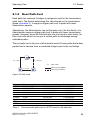
1
User Manual
Redundancy Configuration
Embedded Ethernet Switch (HiOS-2E EES)
UM RedundConfig HiOS-2E EES
Release 4.0 07/2014
Technical Support
https://hirschmann-support.belden.eu.com
The naming of copyrighted trademarks in this manual, even when not specially indicated, should
not be taken to mean that these names may be considered as free in the sense of the trademark
and tradename protection law and hence that they may be freely used by anyone.
© 2014 Hirschmann Automation and Control GmbH
Manuals and software are protected by copyright. All rights reserved. The copying, reproduction,
translation, conversion into any electronic medium or machine scannable form is not permitted,
either in whole or in part. An exception is the preparation of a backup copy of the software for
your own use. For devices with embedded software, the end-user license agreement on the
enclosed CD/DVD applies.
The performance features described here are binding only if they have been expressly agreed
when the contract was made. This document was produced by Hirschmann Automation and
Control GmbH according to the best of the company's knowledge. Hirschmann reserves the right
to change the contents of this document without prior notice. Hirschmann can give no guarantee
in respect of the correctness or accuracy of the information in this document.
Hirschmann can accept no responsibility for damages, resulting from the use of the network
components or the associated operating software. In addition, we refer to the conditions of use
specified in the license contract.
You can get the latest version of this manual on the Internet at the Hirschmann product site
(http://www.hirschmann.com).
Printed in Germany
Hirschmann Automation and Control GmbH
Stuttgarter Str. 45-51
72654 Neckartenzlingen
Germany
Tel.: +49 1805 141538
Rel. 4.0 - 07/2014 – 25.07.2014
Contents
Contents
Safety instructions
5
About this Manual
7
Key
9
1
Network Topology vs. Redundancy Protocols
11
1.1
Network topologies
1.1.1 Meshed topology
1.1.2 Ring topology
12
12
13
1.2
Redundancy Protocols
14
2
Media Redundancy Protocol (MRP)
15
2.1
Network Structure
16
2.2
Reconfiguration time
17
2.3
Advanced mode
18
2.4
Prerequisites for MRP
19
2.5
Example Configuration
20
3
Parallel Redundancy Protocol (PRP)
31
3.1
Implementation
32
3.2
LRE Functionality
33
3.3
PRP Network Structure
35
3.4
Connecting RedBoxes and DANPs to a PRP network
37
3.5
Example Configuration
38
3.6
PRP and Port Mirroring
41
4
High-availability Seamless Redundancy (HSR)
43
4.1
Implementation
44
4.2
HSR Network Structure
4.2.1 Connecting SANs to an HSR Network
4.2.2 HSR and PRP network connections
45
45
49
UM RedundConfig HiOS-2E EES
Release 4.0 07/2014
3
Contents
5
Spanning Tree
55
5.1
Basics
5.1.1 The tasks of the STP
5.1.2 Bridge parameters
5.1.3 Bridge Identifier
5.1.4 Root Path Cost
5.1.5 Port Identifier
5.1.6 Max Age and Diameter
57
57
58
58
59
60
61
5.2
Rules for Creating the Tree Structure
5.2.1 Bridge information
5.2.2 Setting up the tree structure
63
63
63
5.3
Examples
5.3.1 Example of determining the root path
5.3.2 Example of manipulating the root path
5.3.3 Example of manipulating the tree structure
66
66
68
70
5.4
The Rapid Spanning Tree Protocol
5.4.1 Port roles
5.4.2 Port states
5.4.3 Spanning Tree Priority Vector
5.4.4 Fast reconfiguration
5.4.5 STP compatibility mode
71
71
74
75
75
76
5.5
Configuring the device
77
5.6
Guards
5.6.1 Activating the BPDU Guard
5.6.2 Activating Root Guard / TCN Guard / Loop Guard
83
86
90
6
Link Aggregation
93
6.1
Methods of Operation
95
6.2
Link Aggregation Example
97
7
Link Backup
99
7.1
Fail Back Description
101
7.2
Example Configuration
102
A
Readers’ Comments
104
B
Index
107
C
Further Support
109
4
UM RedundConfig HiOS-2E EES
Release 4.0 07/2014
Safety instructions
Safety instructions
WARNING
UNCONTROLLED MACHINE ACTIONS
To avoid uncontrolled machine actions caused by data loss, configure all
the data transmission devices individually.
Before you start any machine which is controlled via data transmission, be
sure to complete the configuration of all data transmission devices.
Failure to follow these instructions can result in death, serious injury,
or equipment damage.
UM RedundConfig HiOS-2E EES
Release 4.0 07/2014
5
Safety instructions
6
UM RedundConfig HiOS-2E EES
Release 4.0 07/2014
About this Manual
About this Manual
The “GUI” reference manual contains detailed information on using the
graphical interface to operate the individual functions of the device.
The “Command Line Interface” reference manual contains detailed information on using the Command Line Interface to operate the individual functions
of the device.
The “Installation” user manual contains a device description, safety instructions, a description of the display, and the other information that you need to
install the device.
The “Basic Configuration” user manual contains the information you need to
start operating the device. It takes you step by step from the first startup operation through to the basic settings for operation in your environment.
The “Redundancy Configuration” user manual document contains the information you require to select the suitable redundancy procedure and
configure it.
The document “HiView User Manual” contains information about the GUI
application HiView. This application offers you the possibility to use the
graphical user interface without other applications such as a Web browser or
an installed Java Runtime Environment (JRE).
UM RedundConfig HiOS-2E EES
Release 4.0 07/2014
7
About this Manual
The Industrial HiVision network management software provides you with
additional options for smooth configuration and monitoring:
ActiveX control for SCADA integration
Auto-topology discovery
Browser interface
Client/server structure
Event handling
Event log
Simultaneous configuration of multiple devices
Graphical user interface with network layout
SNMP/OPC gateway
8
UM RedundConfig HiOS-2E EES
Release 4.0 07/2014
Key
Key
The designations used in this manual have the following meanings:
List
Work step
Subheading
Link
Note:
Cross-reference with link
A note emphasizes an important fact or draws your attention to a dependency.
Courier ASCII representation in the graphical user interface
Execution in the Graphical User Interface
Execution in the Command Line Interface
Symbols used:
WLAN access point
Router with firewall
Switch with firewall
Router
Switch
UM RedundConfig HiOS-2E EES
Release 4.0 07/2014
9
Key
Bridge
Hub
A random computer
Configuration Computer
Server
PLC Programmable logic
controller
I/O Robot
10
UM RedundConfig HiOS-2E EES
Release 4.0 07/2014
Network Topology vs. Redundancy
Protocols
1 Network Topology vs.
Redundancy Protocols
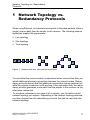
When using Ethernet, an important prerequisite is that data packets follow a
single (unique) path from the sender to the receiver. The following network
topologies support this prerequisite:
Line topology
Star topology
Tree topology
Figure 1: Network with line, star and tree topologies
To ensure that the communication is maintained when a connection fails, you
install additional physical connections between the network nodes. Redundancy protocols ensure that the additional connections remain switched off
while the original connection is still working. If the connection fails, the redundancy protocol generates a new path from the sender to the receiver via the
alternative connection.
To introduce redundancy onto layer 2 of a network, you first define which
network topology you require. Depending on the network topology selected,
you then choose from the redundancy protocols that can be used with this
network topology.
UM RedundConfig HiOS-2E EES
Release 4.0 07/2014
11
Network Topology vs. Redundancy
Protocols
1.1 Network topologies
1.1 Network topologies
1.1.1
Meshed topology
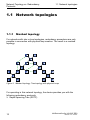
For networks with star or tree topologies, redundancy procedures are only
possible in connection with physical loop creation. The result is a meshed
topology.
Figure 2: Meshed topology: Tree topology with physical loops
For operating in this network topology, the device provides you with the
following redundancy protocols:
Rapid Spanning Tree (RSTP)
12
UM RedundConfig HiOS-2E EES
Release 4.0 07/2014
Network Topology vs. Redundancy
Protocols
1.1.2
1.1 Network topologies
Ring topology
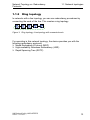
In networks with a line topology, you can use redundancy procedures by
connecting the ends of the line. This creates a ring topology.
Figure 3: Ring topology: Line topology with connected ends
For operating in this network topology, the device provides you with the
following redundancy protocols:
Media Redundancy Protocol (MRP)
High-availability Seamless Redundancy (HSR)
Rapid Spanning Tree (RSTP)
UM RedundConfig HiOS-2E EES
Release 4.0 07/2014
13
Network Topology vs. Redundancy
Protocols
1.2 Redundancy Protocols
1.2 Redundancy Protocols
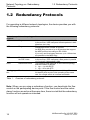
For operating in different network topologies, the device provides you with
the following redundancy protocols:
Redundancy
protocol
HSR
Network topology
Comments
Uninterrupted availability. On the path from the sender
to the receiver, HSR transports the data packets in both
directions via a ring.
MRP
Ring
The switching time can be selected and is practically
independent of the number of devices.
An MRP-Ring consits of up to 50 devices that support
the MRP protocol according to IEC 62439.
If you only use Hirschmann devices, up to 100 devices
are possible in the MRP-Ring.
PRP
Random structure of Uninterrupted availability. On the path from the sender
the PRP LANs
to the receiver, PRP transports a data packet in parallel
via 2 mutually independent LANs.
RSTP
Random structure
The switching time depends on the network topology
and the number of devices.
typ. < 1 s with RSTP
typ. < 30 s with STP
Link Aggrega- Random structure
A Link Aggregation Group is the combining of 2 or more,
tion
full-duplex point-to-point links operating at the same
rate, on a single switch to increase bandwidth.
Table 1:
Ring
Overview of redundancy protocols
Note: When you are using a redundancy function, you deactivate the flow
control on the participating device ports. If the flow control and the redundancy function are active at the same time, there is a risk that the redundancy
function will not operate as intended.
14
UM RedundConfig HiOS-2E EES
Release 4.0 07/2014
Media Redundancy Protocol (MRP)
2 Media Redundancy Protocol
(MRP)
Since May 2008, the Media Redundancy Protocol (MRP) has been a standardized solution for ring redundancy in the industrial environment.
MRP is compatible with redundant ring coupling, supports VLANs, and is
distinguished by very short reconfiguration times.
An MRP-Ring consists of up to 50 devices that support the MRP protocol
according to IEC 62439. If you only use Hirschmann devices, up to 100
devices are possible in the MRP-Ring.
UM RedundConfig HiOS-2E EES
Release 4.0 07/2014
15
Media Redundancy Protocol (MRP)
2.1 Network Structure
2.1 Network Structure
The concept of ring redundancy allows the construction of high-availability,
ring-shaped network structures.
With the help of the RM (Ring Manager) function, the two ends of a backbone
in a line structure can be closed to a redundant ring. The ring manager keeps
the redundant line open as long as the line structure is intact. If a segment
becomes inoperable, the ring manager immediately closes the redundant
line, and line structure is intact again.
Figure 4: Line structure
RM
Figure 5:
16
Redundant ring structure
RM = Ring Manager
—— main line
- - - redundant line
UM RedundConfig HiOS-2E EES
Release 4.0 07/2014
Media Redundancy Protocol (MRP)
2.2 Reconfiguration time
2.2 Reconfiguration time
If a line section fails, the ring manager changes the MRP-Ring back into a
line structure. You define the maximum time for the reconfiguration of the line
in the ring manager.
Possible values for the maximum delay time:
• 500 ms
• 200 ms
•
30 ms
•
10 ms
The delay times 30ms and 10ms are only available to you for devices with
hardware for enhanced redundancy functions.
In order to use these fast delay times, load the Fast MRP device software.
Configure the delay time to 10ms, when you use up to 20 devices in the ring,
that support this delay time. When you use more than 20 of these devices in
the ring, configure a delay time to at least 30ms.
Note: You only configure the reconfiguration time with a value less than 500
ms if all the devices in the ring support the shorter delay time.
Otherwise the devices that only support longer delay times might not be
reachable due to overloading. Loops can occur as a result.
UM RedundConfig HiOS-2E EES
Release 4.0 07/2014
17
Media Redundancy Protocol (MRP)
2.3 Advanced mode
2.3 Advanced mode
For times even shorter than the guaranteed reconfiguration times, the device
provides the advanced mode. The advanced mode speeds up the link failure
recognition when the ring participants inform the ring manager of interruptions in the ring via link-down notifications.
Hirschmann devices support link-down notifications. Therefore, you generally activate the advanced mode in the ring manager.
If you are using devices that do not support link-down notifications, the ring
manager reconfigures the line in the selected maximum reconfiguration time.
18
UM RedundConfig HiOS-2E EES
Release 4.0 07/2014
Media Redundancy Protocol (MRP)
2.4 Prerequisites for MRP
2.4 Prerequisites for MRP
Before setting up an MRP-Ring, make sure that the following conditions are
fulfilled:
All ring participants support MRP.
The ring participants are connected to each other via the ring ports. Apart
from the device’s neighbors, no other ring participants are connected to
the respective device.
All ring participants support the configuration time defined in the ring
manager.
There is exactly 1 ring manager in the ring.
If you are using VLANs, configure every ring port with the following settings:
Deactivate ingress filtering - see the Switching:VLAN:Port Switching >
VLAN > Port dialog.
Define the port VLAN ID (PVID) - see the Switching > VLAN > Port
dialog.
– PVID = 1 if the device transmits the MRP data packets untagged
(VLAN ID = 0 in Switching > L2-Redundancy > MRP dialog)
By setting the PVID = 1, the device automatically assigns the received
untagged packets to VLAN 1.
– PVID = any if the device transmits the MRP data packets in a VLAN
(VLAN ID ≥ 1 in the Switching > L2-Redundancy > MRP dialog)
Define egress rules - see Switching > VLAN > Configuration dialog.
– U (untagged) for the ring ports of VLAN 1 if the device transmits the
MRP data packets untagged (VLAN ID = 0 in the Switching > L2Redundancy > MRP dialog, the MRP ring is not assigned to a VLAN).
– T (tagged) for the ring ports of the VLAN which you assign to the MRP
ring. Select T, if the device transmits the MRP data packets in a VLAN
(VLAN ID ≥ 1 in the Switching > L2-Redundancy > MRP dialog).
You will find further information about setting the MRP VLAN ID in the figure
“Changing the VLAN ID” on page 30.
UM RedundConfig HiOS-2E EES
Release 4.0 07/2014
19
Media Redundancy Protocol (MRP)
2.5 Example Configuration
2.5 Example Configuration
A backbone network contains 3 devices in a line structure. To increase the
availability of the network, you convert the line structure to a redundant ring
structure. Devices from different manufacturers are used.All devices support
MRP. On every device you define ports 1.1 and 1.2 as ring ports.
1
1.1
2
1.2
1.1
3
1.2
1.1
1.2
RM
Figure 6: Example of MRP-Ring
RM = Ring Manager
—— main line
- - - redundant line
The following example configuration describes the configuration of the ring
manager device (1). You configure the 2 other devices (2 to 3) in the same
way, but without activating the ring manager function. This example does not
use a VLAN. You have entered 200 ms as the ring recovery time, and all the
devices support the advanced mode of the ring manager.
Set up the network to meet your demands.
Configure all ports so that the transmission speed and the duplex settings
of the lines correspond to the following table:
20
UM RedundConfig HiOS-2E EES
Release 4.0 07/2014
Media Redundancy Protocol (MRP)
Port type Bit rate
TX
Optical
Table 2:
100 Mbit/s
100 Mbit/s
Autonegotiation Port setting
(automatic
configuration)
off
on
off
on
2.5 Example Configuration
Duplex
100 Mbit/s full duplex (FDX)
100 Mbit/s full duplex (FDX)
Port settings for ring ports
Note: You configure optical ports without support for autonegotiation (automatic configuration) with 100 Mbit/s full duplex (FDX).
UM RedundConfig HiOS-2E EES
Release 4.0 07/2014
21
Media Redundancy Protocol (MRP)
2.5 Example Configuration
Note: Configure all the devices of the MRP-Ring individually. Before you
connect the redundant line, you must have completed the configuration of all
the devices of the MRP-Ring. You thus avoid loops during the configuration
phase.
You deactivate the flow control on the participating ports.
If the flow control and the redundancy function are active at the same
time, there is a risk that the redundancy function will not operate as
intended. (Default setting: flow control deactivated globally and activated
on all ports.)
Switch Spanning Tree off on all devices in the network:
Open the Switching > L2-Redundancy > Spanning Tree > Global
dialog.
Switch off the function.
In the state on delivery, Spanning Tree is switched on on the device.
Figure 7: Switching the function off
enable
configure
no spanning-tree operation
show spanning-tree global
22
Switch to the privileged EXEC mode.
Switch to the Configuration mode.
Switches Spanning Tree off.
Displays the parameters for checking.
UM RedundConfig HiOS-2E EES
Release 4.0 07/2014
Media Redundancy Protocol (MRP)
2.5 Example Configuration
Switch MRP on on all devices in the network:
Open the Switching > L2-Redundancy > MRP dialog.
Define the desired ring ports.
Figure 8: Defining the ring ports
In the Command Line Interface you first define an additional parameter, the
MRP domain ID. Configure all the ring participants with the same MRP
domain ID. The MRP domain ID is a sequence of 16 number blocks (8-bit
values).
When configuring with the graphical user interface, the device uses the
default value 255 255 255 255 255 255 255 255 255 255 255 255
255 255 255 255.
mrp domain add default-domain Creates a new MRP domain with the default
domain ID.
mrp domain modify port
Defines port 1.1 as ring port 1 (primary).
primary 1/1
mrp domain modify port
Defines port 1.2 as ring port 2 (secondary).
secondary 1/2
UM RedundConfig HiOS-2E EES
Release 4.0 07/2014
23
Media Redundancy Protocol (MRP)
2.5 Example Configuration
Activate the ring manager.
For the other devices in the ring, leave the setting as Off.
Figure 9: Activating the ring manager
mrp domain modify mode
manager
24
Defines the device as the ring manager. Do not
activate the ring manager on any other device.
UM RedundConfig HiOS-2E EES
Release 4.0 07/2014
Media Redundancy Protocol (MRP)
2.5 Example Configuration
Select the checkbox in the "Advanced Mode" field.
Figure 10: Activating the advanced mode
mrp domain modify
advanced-mode enabled
UM RedundConfig HiOS-2E EES
Release 4.0 07/2014
Activates the advanced mode.
25
Media Redundancy Protocol (MRP)
2.5 Example Configuration
In the "Ring Recovery" field, select the value 200ms.
Figure 11: Defining the time for the ring recovery
mrp domain modify
recovery-delay 200ms
Defines 200ms as the max. delay time for the
reconfiguration of the ring.
Note: If selecting 200 ms for the ring recovery does not provide the ring
stability necessary to meet the requirements of your network, you select
500 ms.
You will find further information about setting the MRP VLAN ID in the figure
“Changing the VLAN ID” on page 30.
26
UM RedundConfig HiOS-2E EES
Release 4.0 07/2014
Media Redundancy Protocol (MRP)
2.5 Example Configuration
Switch the operation of the MRP-Ring on.
Figure 12: Switching on the MRP function
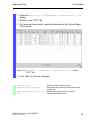
Click on “Set” to save the changes.
mrp domain modify operation
enable
Activates the MRP-Ring.
When all the ring participants are configured, close the line to the ring. To
do this, you connect the devices at the ends of the line via their ring ports.
Check the messages from the device:
show mrp
UM RedundConfig HiOS-2E EES
Release 4.0 07/2014
Displays the parameters for checking.
27
Media Redundancy Protocol (MRP)
2.5 Example Configuration
The "Operation" field shows the operating state of the ring port.
Possible values:
forwarding
Port is switched on, connection exists.
blocked
Port is blocked, connection exists.
disabled
Port is disabled.
not connected
No connection exists.
Figure 13: Messages in the "Operation" field
28
UM RedundConfig HiOS-2E EES
Release 4.0 07/2014
Media Redundancy Protocol (MRP)
2.5 Example Configuration
The "Information" field shows messages for the redundancy configuration and the possible causes of errors.
The following messages are possible if the device is operating as a ring
client or a ring manager:
Redundancy Available
The redundancy is set up. When a component of the ring is down,
the redundant line takes over its function.
Configuration error:Ring port link error
Error in the cabling of the ring ports.
The following messages are possible if the device is operating as a ring
manager:
Configuration error:Packet of other ring manager
received
Another device exists in the ring that is operating as the ring
manager.
Activate the "Ring Manager" function on exactly one device in the
ring.
Configuration error:Connection in ring is connected to
incorrect port
A line in the ring is connected with a different port instead of with a
ring port. The device only receives test data packets on 1 ring port.
Figure 14: Messages in the "Information" field
UM RedundConfig HiOS-2E EES
Release 4.0 07/2014
29
Media Redundancy Protocol (MRP)
2.5 Example Configuration
If applicable, integrate the MRP ring into a VLAN:
In the "VLAN ID" field, define the MRP VLAN ID. The MRP VLAN ID
determines in which of the configured VLANs the device transmits
the MRP packets. To set the MRP VLAN ID, first configure the
VLANs and the corresponding egress rules in the Switching >
VLAN > Configuration dialog.
See “Prerequisites for MRP” on page 19.
Figure 15: Changing the VLAN ID
If the MRP-Ring is not assigned to a VLAN (like in this example),
leave the VLAN ID as 0.
In the Switching > VLAN > Configuration dialog, define the VLAN
membership as U (untagged) for the ring ports in VLAN 1.
If the MRP-Ring is assigned to a VLAN, enter a VLAN ID >0.
In the Switching > VLAN > Configurationdialog, define the VLAN
membership as T (tagged) for the ring ports in the selected VLAN.
mrp domain modify vlan
<0..4042>
30
Assigns the VLAN ID ...
UM RedundConfig HiOS-2E EES
Release 4.0 07/2014
Parallel Redundancy Protocol (PRP)
3 Parallel Redundancy Protocol
(PRP)
Unlike ring redundancy protocols, PRP uses 2 separate LANs for uninterrupted availability. On the path from the sender to the receiver, PRP sends 2
data packets in parallel via the 2 mutually independent LANs. The receiver
processes the first data packet received and discards the second data packet
of the pair. The international standard IEC 62439-3 defines the Parallel
Redundancy Protocol (PRP).
Note: If PRP is active, it uses the interfaces 1/1 and 1/2. As seen in the
Switching > VLAN, Switching > Rate Limiter and Switching > Filter
for MAC Addresses dialogs, the PRP function replaces the interfaces 1/1 and
1/2 with the interface prp/1. Configure the VLAN membership, the rate
limiting, and the MAC filtering for the interface prp/1.
UM RedundConfig HiOS-2E EES
Release 4.0 07/2014
31
Parallel Redundancy Protocol (PRP)
3.1 Implementation
3.1 Implementation
When the upper protocol layers send a data packet, the PRP interface
creates a “twin packet” from the original packet. The PRP interface then
transmits 1 data packet of the pair to each participating LAN simultaneously.
The packets traverse different LANs and therefore have different run times.
The receiving PRP interface forwards the first packet of a pair towards the
upper protocol layers and discards the second packet. When viewed from the
application, a PRP interface functions like a standard Ethernet interface.
The PRP interface or a Redundancy Box (RedBox) injects a Redundancy
Control Trailer (RCT) into each packet. The RCT is a 48-bit identification field
and is responsible for the identification of duplicates. This field contains, LAN
identification (LAN A or B), information about the length of the payload, and
a 16-bit sequence number. The PRP interface increments the sequence
number for each packet sent. Using the unique attributes included in each
packet, such as Physical MAC source address and sequence number, the
receiving RedBox or Double Attached Node (DAN) interface identifies and
discards duplicates.
Depending on the packet size, with PRP it attains a reduced throughput of
the available bandwidth, due to the addition of the RCT trailer.
32
UM RedundConfig HiOS-2E EES
Release 4.0 07/2014
Parallel Redundancy Protocol (PRP)
3.2 LRE Functionality
3.2 LRE Functionality
Each Double Attached Node implementing PRP (DANP) has 2 LAN ports
that operate in parallel. The Link Redundancy Entity (LRE) connects the
upper protocol layers with every individual port.
DANP 1
Upper layers
Same data
link layer
interface
Network
adapters
Transceivers
hard real-time
stack
UDP
DANP 2
TCP
network layer
hard real-time
stack
LRE
port A
Tx
Rx
UDP
TCP
network layer
LRE
port B
Tx
Rx
port A
Tx
Rx
port B
Tx
Rx
LAN A
LAN B
Figure 16: PRP LRE process
The LRE has the following tasks:
Handling of duplicates
Management of redundancy
When transmitting packets from the upper protocol layers, the LRE sends
them from both ports at nearly the same time. The 2 data packets pass
through the LANs with different delays. When the device receives the first
data packet, the LRE forwards it to the upper protocol layers and discards the
second data packet received.
For the upper protocol layers, the LRE behaves like a normal port.
To identify the twin packets, the LRE attaches an RCT with a sequential
number to the packets. The LRE also periodically sends multicast PRP
supervision packets and evaluates the multicast PRP supervision packets of
the other RedBoxes and DANPs.
UM RedundConfig HiOS-2E EES
Release 4.0 07/2014
33
Parallel Redundancy Protocol (PRP)
3.2 LRE Functionality
The device allows you to view the received supervision packet entries. The
entries in the Switching > L2-Redundancy > PRP > DAN/VDAN Table are
helpful for detecting redundancy and connection problems. For example, in
an index when the "Last Seen B" timestamp resets and the "Last Seen A"
timestamp remains the same. The "Last Seen A" and "Last Seen B" timestamps steadily reseting indicate a normal condition.
Note: According to IEC 62439 the Entry Forget Time is 400 ms. The Entry
Forget Time is the time after which the device removes an entry from the
duplicate table. When the device receives the second frame of a pair after
400 ms, then the device processes the frame instead of discarding it. For this
reason, Hirschmann recommends that the number of nodes installed in your
PRP network remain under 10 nodes.
Note: If the inter-frame gap is shorter than the latency between the 2 LANs,
a frame-ordering mismatch can occur. Frame-ordering mismatch is a
phenomenon of the PRP protocol. The only solution for avoiding a frameordering mismatch is to verify that the inter-frame gap is greater than the
latency between the LANs.
34
UM RedundConfig HiOS-2E EES
Release 4.0 07/2014
Parallel Redundancy Protocol (PRP)
3.3 PRP Network Structure
3.3 PRP Network Structure
PRP uses 2 independent LANs. The topology of each of these LANs is arbitrary, and ring, star, bus and meshed topologies are possible.
The main advantage of PRP is zero recovery time with an active (transit)
LAN. When the terminal device receives no packets from one of the LANs,
the second (transit) LAN maintains the connection. As long as 1 (transit) LAN
is available, repairs and maintenance on the other (transit) LAN have no
impact on the data packet transmission.
The elementary devices of a PRP network are the RedBox (Redundancy
Box) and the DANP (Double Attached Node implementing PRP). Both
devices have 1 connection each to the (transit) LANs.
The devices in the (transit) LAN are conventional switches. The devices
transmit PRP data packets transparently, without evaluating the RCT information.
Note: The RCT trailer increases packet size. Configure the MTU size equal
to or greater than 1524 for LAN A and LAN B devices.
UM RedundConfig HiOS-2E EES
Release 4.0 07/2014
35
Parallel Redundancy Protocol (PRP)
3.3 PRP Network Structure
Terminal devices that connect directly to a device in the (transit) LAN are
SANs (Single Attached Nodes). SANs connected to a LAN have no redundancy. To use the PRP redundant network, connect the SAN to the PRP
network via a RedBox.
SAN B1 SAN B2
RedBox 1
LAN B
LAN A
PRP Network
DANP 1
Figure 17: Parallel Redundancy Protocol Network
36
UM RedundConfig HiOS-2E EES
Release 4.0 07/2014
Parallel Redundancy Protocol (PRP)
3.4 Connecting RedBoxes and
DANPs to a PRP network
3.4 Connecting RedBoxes and
DANPs to a PRP network
DANPs have 2 interfaces for the connection to the PRP network. A RedBox
is a DANP that contains additional switch ports. Use the switch ports to intagrate one or more SANs into the PRP network redundantly.
The Link Redundancy Entity (LRE) in the RedBox creates a twin packet when
sending a data packet to the PRP network. The LRE forwards 1 data packet
of the twin pair when it receives it and discards the 2nd data packet of the
twin pair.
Note: The Redbox supports up to 128 hosts. When attempt to support more
than 128 with the Redbox, then device drops packets.
VDAN 1
VDAN 2 VDAN 3
Tx
local
application
Rx
TCP/IP
SNMP
port C
Interlink
LRE
RedBox
port A
Tx
Rx
port B
Tx
Rx
Transceiver
LAN A
LAN B
Figure 18: RedBox Transition from double to single LAN
UM RedundConfig HiOS-2E EES
Release 4.0 07/2014
37
Parallel Redundancy Protocol (PRP)
3.5 Example Configuration
3.5 Example Configuration
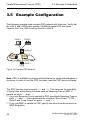
The following example uses a simple PRP network with 4 devices. Verify that
the LAN A and LAN B ports contain 100 Mbit/s optical SFP interfaces.
Connect Port A to LAN A and the Port B to LAN B.
VDAN 1
VDAN 2
RedBox 1
LAN A
LAN B
PRP Network
DANP 1
Figure 19: Example PRP Network
Note: PRP is available for devices with hardware for enhanced redundancy
functions. In order to use the PRP functions, load the PRP device software.
The PRP function reserves ports 1/1 and 1/2. This removes the possibility
of using other redundancy protocols such as Spanning Tree or MRP in
parallel on ports 1/1 and 1/2.
If you use Spanning Tree in parallel to PRP, deactivate Spanning Tree on
ports 1/1 and 1/2. Also deactivate the functions "Root Guard", "TCN
Guard" and "Loop Guard" on ports 1/1 and 1/2.
If you use MRP in parallel to PRP, specify the other free device ports as
MRP-Ring ports.
38
UM RedundConfig HiOS-2E EES
Release 4.0 07/2014
Parallel Redundancy Protocol (PRP)
3.5 Example Configuration
Perform the following steps on both the RedBox 1 and DANP 1 devices.
Open the Switching > L2-Redundancy > PRP > Configuration
dialog.
Perform the following step in the "Supervision Packet Receiver" frame:
To analyze received PRP supervision packets, activate the "Evaluate Supervision Packets" checkbox .
Perform the following steps in the "Supervision Packet Transmitter"
frame:
To transmit PRP supervision packets from this device, activate
"Active".
The device sends either its own PRP supervision packets exclusively, or sends both its own supervision packets and packets of
connected devices. To transmit packets for VDANs listed in the
Switching > L2-Redundancy > PRP > DAN/VDAN Table, activate
"Send VDAN Packets". When deactivated the device sends its own
supervision packets exclusively. After installing new PRP devices,
deactivate this function to maintain a clear overview of the PRP
supervision packets on remote devices.
To enable the ports, in the "Port A" and "Port B" frames, click On.
To enable the PRP function, in the "Operation" frame click On.
To temporarily save the changes, click "Set".
To load the configuration saved in the volatile memory, click
"Reload".
Open the Switching > L2-Redundancy > PRP > Proxy Node Table
dialog to view the terminating VDAN devices for which this device
provides PRP conversion.
To remove this list, click "Reset".
To load the list of currently connected devices, click "Reload".
Open the Switching > L2-Redundancy > PRP > Statisticsdialog
to view the quality of the traffic that traverses the device. The device
detects errors and displays them according to MIB Managed Objects
and the respective link.
To remove the entry in the statistics table, click "Reset".
To load the current statistics, click "Reload".
The device allows you to view the received supervision packet entries. The
entries, in the Switching > L2-Redundancy > PRP > DAN/VDAN Table are
helpful for detecting redundancy and connection problems. For example, in
an index when the "Last Seen B" timestamp resets and the "Last Seen A"
timestamp remains the same. The "Last Seen A" and "Last Seen A" timestamps steadily reseting indicate a normal condition.
UM RedundConfig HiOS-2E EES
Release 4.0 07/2014
39
Parallel Redundancy Protocol (PRP)
3.5 Example Configuration
Note: If you deactivate the PRP function, then deactivate either Port “A“ or
“B“ to help prevent network loops.
enable
configure
no mrp operation
no spanning-tree operation
interface 1/1
no shutdown
exit
interface 1/2
no shutdown
exit
prp instance 1 supervision
evaluate
prp instance 1 supervision
send
prp instance 1 supervision
redbox-exclusively
prp operation
show prp counters
show prp node-table
show prp proxy-node-table
40
Switch to the privileged EXEC mode.
Switch to the Configuration mode.
Disable the option.
Disable the option.
Change to the Interface Configuration mode of
port 1/1.
Enable the interface.
Switch to the Configuration mode.
Switch to the interface configuration mode for
interface 1/2.
Enable the interface.
Switch to the Configuration mode.
Enable evaluation of received supervision
packets.
Enable supervision packet transmission.
Enable sending of supervision packets for this
RedBox exclusively. Use the no form of the
command to send supervision packets for each
connected VDAN and this RedBox (if send is
enabled).
Enable the PRP function.
Show prp counters
Show node table.
Show proxy node table.
UM RedundConfig HiOS-2E EES
Release 4.0 07/2014
Parallel Redundancy Protocol (PRP)
3.6 PRP and Port Mirroring
3.6 PRP and Port Mirroring
The transceivers send traffic to the LRE, which separates the traffic. The LRE
forwards the data frames to PRP Port A and the control frames to PRP Port
B of the switch.
When you configure the PRP Port A as a source port, the device sends the
control frames to the destination port. When you configure the PRP Port B as
a source port, the device sends the data frames to the destination port.
Configure Port A and Port B in the Switching > L2-Redundancy > PRP >
Configuration dialog.
The device also restricts the PRP interface and the PRP member ports from
being destination ports.
UM RedundConfig HiOS-2E EES
Release 4.0 07/2014
41
Parallel Redundancy Protocol (PRP)
42
3.6 PRP and Port Mirroring
UM RedundConfig HiOS-2E EES
Release 4.0 07/2014
High-availability Seamless Redundancy (HSR)
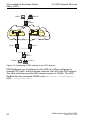
4 High-availability Seamless
Redundancy (HSR)
As with PRP, an HSR ring also offers zero recovery time. HSR is suited for
applications that demand high availability and short reaction times. For
example, protection applications for electrical station automation and controllers for synchronized drives which require constant connection.
Note: If HSR is active, it uses the interfaces 1/1 and 1/2. As seen in the
Switching > Rate Limiter and Switching > Filter for MAC Addresses
dialogs, the HSR function replaces the interfaces 1/1 and 1/2 with the interface hsr/1. Set up the VLAN membership and the rate limiting for the interface hsr/1.
UM RedundConfig HiOS-2E EES
Release 4.0 07/2014
43
High-availability Seamless Redundancy (HSR)
4.1 Implementation
4.1 Implementation
HSR Redundancy Boxes (RedBox) use 2 Ethernet ports operating in parallel
to connect to a ring. An HSR RedBox operating in this configuration is a
Doubly Attached Node implementing the HSR protocol (DANH). A standard
ethernet device connected to the HSR ring through an HSR RedBox is a
Virtual DANH (VDANH).
As with PRP, the transmitting HSR Node or HSR RedBox sends twin frames,
1 in each direction, on the ring. For identification, the HSR Node injects the
twins with an HSR tag. The HSR tag consists of a port identifier, the length
of the payload and a sequence number. In a normal operating ring, the destination HSR Node or RedBox receives both frames within a certain time skew.
An HSR node forwards the first frame to arrive and discards the second
frame when it arrives. An HSR RedBox on the other hand forwards the first
frame to the VDANHs and discards the second frame when it arrives.
The HSR Nodes and HSR RedBoxs insert an HSR tag after the source MAC
Address in the frame. The advantage to the HSR tag placement is that the
device is able to forward the frame immediately after receiving the HSR
header and performing duplicate recognition. Affectively decreasing the
delay time within the device. In contrast to PRP where the RCT contains a
PRP suffix near the end of the frame. Meaning that a PRP device receives
the entire frame before forwarding the frame out of the correct port.
HSR Nodes and HSR RedBoxes also use the LRE function as described in
the PRP chapter. As with PRP, the LRE in the HSR RedBoxes are responsible for tagging and duplicate recognition.
Limit the maximum number of nodes in an HSR ring to 10, so that a DAN or
Redbox receives these packets within a specific time frame.
Note: HSR is available for devices with hardware for enhanced redundancy
functions. In order to use the HSR functions, load the HSR device software.
44
UM RedundConfig HiOS-2E EES
Release 4.0 07/2014
High-availability Seamless Redundancy (HSR)
4.2 HSR Network Structure
4.2 HSR Network Structure
An HSR Network consists of a ring, where each HSR device performs a
specific role in the network. An HSR device for example, connects standard
ethernet devices to an HSR ring, or PRP LANs to an HSR ring.
4.2.1
Connecting SANs to an HSR Network
Standard ethernet devices, such as maintenance laptops or printers, have 1
network interface. Therefore, standard ethernet devices transmit traffic
across an HSR ring through an HSR RedBox which acts as a proxy for the
ethernet devices attached to it. The HSR RedBox interfaces transmit 1 twin
in each direction around the network.
The host HSR RedBox forwards the first unicast frame to the destination
VDANH exclusively and discards the second unicast frame when it arrives.
The HSR Nodes and RedBoxes forward multicast and broadcast traffic
around the ring and also to the connected VDANH devices. To help prevent
the traffic from endlessly looping around the ring, the node originally transmitting the traffic on the network discards the transmitted frames when
received.
UM RedundConfig HiOS-2E EES
Release 4.0 07/2014
45
High-availability Seamless Redundancy (HSR)
DANH 1
4.2 HSR Network Structure
DANH 2
HSR
RedBox 1
VDANH 1
VDANH 2
Figure 20: Connecting a VDANH to an HSR network
SAN Device Connection Example Configuration
A simple HSR network consists of 3 HSR devices as seen in the previous
figure. The following example configures a host HSR RedBox for standard
ethernet devices.
Deactivate STP on the PRP ports or globally. Also, deactivate MRP on the
PRP ports or configure MRP on ports other than the PRP ports.
Open the Switching > L2-Redundancy > MRP dialog.
To disable the MRP function, in the Operation frame "Operation""Off".
Verify that the ports in "Ring Port 1" and "Ring Port 2" frames, are
different from the ports used by HSR.
Open the Switching > L2-Redundancy > Spanning Tree > Global
dialog.
To disable the MRP function, in the Operation frame "Operation""Off".
Open the Switching > L2-Redundancy > Spanning Tree > Port
dialog.
In the "CIST" tab, deactivate the ports used for HSR in the "Stp
active" column.
In the "Guards" tab, deactivate the ports used for HSR in the "Root
Guard", "TCN Guard" and "Loop Guard" columns.
Note: If you deactivate the HSR function, then deactivate either Port “A“
or “B“ to help prevent network loops.
46
UM RedundConfig HiOS-2E EES
Release 4.0 07/2014
High-availability Seamless Redundancy (HSR)
4.2 HSR Network Structure
The device sends either its own HSR supervision packets exclusively, or
sends both its own supervision packets and packets of connected
devices. After installing new HSR devices, deactivate this function to
maintain a clear overview of the HSR supervision packets on remote
devices.
Open the Switching > L2-Redundancy > HSR > HSR > HSR >
Configuration dialog.
To analyze received HSR supervision packets, activate the "Evaluate Supervision Packets"checkbox in the "Supervision Packet
Receiver" frame.
To transmit HSR supervision packets from this device, activate
"Active"in the "Supervision Packet Transmitter" frame.
To transmit packets for VDANs listed in the Switching > L2Redundancy > HSR > DAN/VDAN Table dialog, activate "Send VDAN
Packets".
Use the following steps to configure HSR RedBox 1:
To configure the device to forward unicast traffic around the ring and
to the destination device, set the "HSR Mode" to modeu.
To configure the device as an HSR host, set t"Switching Node Type"
to hsrredboxsan.
Note: Setting "Switching Node Type" to hsrredboxsan disables the
"Redbox Identity" function.
To enable the ports, in the Port "Port A" and Port "Port B"frames,
click "On".
To disable the HSR function, in the "Operation"frame, click "On".
To save your changes in the volatile memory, click "Set".
To load the configuration saved in the volatile memory, click
"Reload".
Open the Switching > L2-Redundancy > HSR > DAN/VDAN Table
dialog to view the traffic received from the LAN. This information
helps you in detecting how the LANs are functioning.
To remove this list, click "Reset".
To update the table entries, click "Reload".
Open the Switching > L2-Redundancy > HSR > Proxy Node Table
dialog to view the terminating VDAN devices for which this device
provides HSR conversion.
To remove the entries in the proxy table, click "Reset".
UM RedundConfig HiOS-2E EES
Release 4.0 07/2014
47
High-availability Seamless Redundancy (HSR)
4.2 HSR Network Structure
To update the table entries, click "Reload".
The device detects errors and displays them according to MIB Managed
Objects and the respective link.
Open the Switching > L2-Redundancy > HSR > Statistics dialog
to view the quality of the traffic that traverses the device.
To remove the entry in the statistics table, click "Reset".
To load the current statistics, click "Reload".
Another possibility is to configure the host HSR RedBox 1 using the
following CLI commands:
enable
configure
no mrp operation
no spanning-tree operation
interface 1/1
no shutdown
exit
interface 1/2
no shutdown
exit
hsr instance 1 mode modeu
hsr instance 1 port-a
hsr instance 1 port-b
hsr instance 1 switchingnode-type hsrredboxsan
hsr instance 1 supervision
evaluate
hsr instance 1 supervision
send
hsr instance 1 supervision
redbox-exclusively
hsr operation
Switch to the privileged EXEC mode.
Switch to the Configuration mode.
Disable the option.
Disable the option.
Change to the Interface Configuration mode of
port 1/1.
Enable the interface.
Switch to the Configuration mode.
Switch to the interface configuration mode for
interface 1/2.
Enable the interface.
Switch to the Configuration mode.
The HSR host forwards unicast traffic to the
connected VDANs and around the ring.
Activate the HSR Port A.
Activate the HSR Port B.
Enable the device to process traffic destine for
LAN B of the PRP network.
Enable evaluation of received supervision
packets.
Enable supervision packet transmission.
Enable sending of supervision packets for this
RedBox exclusively. Use the no form of the
command to send supervision packets for each
connected VDAN and this RedBox. Prerequisite
is that you enable the supervision frame send
function.
Enable the HSR function.
View traffic statistics on a device using the show commands.
show hsr counters
48
Show the HSR counters.
UM RedundConfig HiOS-2E EES
Release 4.0 07/2014
High-availability Seamless Redundancy (HSR)
show hsr node-table
show hsr proxy-node-table
4.2.2
4.2 HSR Network Structure
Show node table.
Show proxy node table.
HSR and PRP network connections
When connecting PRP networks to an HSR network, the HSR device uses 2
interfaces to connect to the HSR ring. The HSR device uses a third interface
to connect to either LAN A or LAN B of the PRP network as seen in the
following figure. The HSR device transmitting the traffic across the HSR ring
identifies traffic destine for PRP networks with the appropriate tag. The HSR
devices then forward the PRP traffic through LAN A or LAN B. The PRP
device receives the traffic and processes it as described in the PRP chapter.
The HSR devices tag and identify traffic for up to 7 PRP networks connected
to 1 HSR ring.
UM RedundConfig HiOS-2E EES
Release 4.0 07/2014
49
High-availability Seamless Redundancy (HSR)
4.2 HSR Network Structure
SAN B2
SAN B1
PRP
RedBox 1
LAN B
LAN A
PRP Network 1
DANH 1
DANH 2
HSR
RedBox 1
VDANH 1
VDANH 2
Figure 21: Connecting a PRP network to an HSR network
HSR Redboxes use 2 interfaces for the HSR ring. When configured to
manage PRP traffic, a third interface connects to a LAN of the PRP network.
The other interfaces provide HSR network access for VDANs. The HSR
RedBox lists the connected VDANs in the Switching > L2-Redundancy >
HSR > Proxy Node Table.
50
UM RedundConfig HiOS-2E EES
Release 4.0 07/2014
High-availability Seamless Redundancy (HSR)
4.2 HSR Network Structure
PRP Network Connection Example Configuration
The following example configures a simple HSR network with 3 HSR
devices as shown in the previous figure. Use the HSR RedBox configured
in the previous example to connect the standard ethernet devices to the
HSR ring. HSR RedBox 1 sends 1 twin toward DANH 1 and 1 twin toward
DANH 2. When the first frame of a pair arrives, DANH 1 sends frame to
PRP network 1 LAN A and DANH 2 sends the frame to PRP network 1
LAN B.
Deactivate STP on the PRP ports or globally. Also, deactivate MRP on the
PRP ports or configure MRP on ports other than the PRP ports.
Use the HSR RedBox configured in the previous example for HSR
RedBox 1. Perform the following steps on the DANH 1 and 2.
Open the Switching > L2-Redundancy > MRP dialog.
To disable the MRP function, in the Operation frame "Operation""Off".
Verify that the ports in "Ring Port 1" and "Ring Port 2" frames, are
different from the ports used by HSR.
Open the Switching > L2-Redundancy > Spanning Tree > Global
dialog.
To disable the MRP function, in the Operation frame "Operation""Off".
Open the Switching > L2-Redundancy > Spanning Tree > Port
dialog.
In the "CIST" tab, deactivate the ports used for HSR in the "Stp
active" column.
In the "Guards" tab, deactivate the ports used for HSR in the "Root
Guard", "TCN Guard" and "Loop Guard" columns.
Note: If you deactivate the HSR function, then deactivate either Port “A“
or “B“ to help prevent network loops.
The device sends either its own HSR supervision packets exclusively, or
sends both its own supervision packets and packets of connected
devices. After installing new HSR devices, deactivate this function to
maintain a clear overview of the HSR supervision packets on remote
devices.
Open the Switching > L2-Redundancy > HSR > HSR > HSR >
Configuration dialog.
UM RedundConfig HiOS-2E EES
Release 4.0 07/2014
51
High-availability Seamless Redundancy (HSR)
4.2 HSR Network Structure
To analyze received HSR supervision packets, activate the "Evaluate Supervision Packets"checkbox in the "Supervision Packet
Receiver" frame.
To transmit HSR supervision packets from this device, activate
"Active"in the "Supervision Packet Transmitter" frame.
To transmit packets for VDANs listed in the Switching > L2Redundancy > HSR > DAN/VDAN Table dialog, activate "Send VDAN
Packets".
Use the following steps to configure DANH 1:
Open the Switching > L2-Redundancy > HSR > HSR > HSR >
Configuration dialog.
To configure the device to forward unicast traffic around the ring and
to the destination device, set the "HSR Mode" to modeu.
To configure the device to forward traffic to PRP LAN A, set the
"Switching Node Type" to hsrredboxprpa.
To configure the device to forward traffic to PRP network 1 LAN A,
set "Redbox Identity" to id1a.
To enable the ports, in the Port "Port A" and Port "Port B"frames,
click "On".
To disable the HSR function, in the "Operation"frame, click "On".
To temporarily save the changes, click "Set".
To load the configuration saved in the volatile memory, click
"Reload".
Use the following configuration for DANH 2:
Open the Switching > L2-Redundancy > HSR > HSR > HSR >
Configuration dialog.
To configure the device to forward unicast traffic around the ring and
to the destination device, set the "HSR Mode" to modeu.
To configure the device to forward traffic to PRP LAN A, set the
"Switching Node Type" to hsrredboxprpb.
To configure the device to forward traffic to PRP network 1 LAN B,
set "Redbox Identity" to id1b.
To enable the ports, in the Port "Port A" and Port "Port B"frames,
click "On".
To disable the HSR function, in the "Operation"frame, click "On".
To temporarily save the changes, click "Set".
To load the configuration saved in the volatile memory, click
"Reload".
52
UM RedundConfig HiOS-2E EES
Release 4.0 07/2014
High-availability Seamless Redundancy (HSR)
4.2 HSR Network Structure
Another possibility is to use the following CLI commands to configure the
HSR devices 1 and 2.
enable
configure
no mrp operation
no spanning-tree operation
interface 1/1
no shutdown
exit
interface 1/2
no shutdown
exit
Switch to the privileged EXEC mode.
Switch to the Configuration mode.
Disable the option.
Disable the option.
Change to the Interface Configuration mode of
port 1/1.
Enable the interface.
Switch to the Configuration mode.
Switch to the interface configuration mode for
interface 1/2.
Enable the interface.
Switch to the Configuration mode.
Use the following CLI commands to configure DANH 1 to process traffic
for PRP network 1 LAN A.
The HSR host forwards unicast traffic to the
connected VDANs and around the ring.
hsr instance 1 port-a
Activate the HSR Port A.
hsr instance 1 port-b
Activate the HSR Port B.
hsr instance 1 switchingEnable the device to process traffic destine for
node-type hsrredboxprpa
LAN A of the PRP network.
hsr instance 1 redbox-id id1a Enable the device to process traffic destine for
LAN A of the PRP network 1.
hsr instance 1 supervision
Enable evaluation of received supervision
evaluate
packets.
hsr instance 1 supervision
Enable supervision packet transmission.
send
hsr instance 1 supervision
Enable sending of supervision packets for this
redbox-exclusively
RedBox exclusively. Use the no form of the
command to send supervision packets for each
connected VDAN and this RedBox. Prerequisite
is that you enable the supervision frame send
function.
hsr operation
Enable the HSR function.
hsr instance 1 mode modeu
Use the following CLI commands to configure DANH 2 to process traffic
for PRP network 1 LAN B.
hsr instance 1 mode modeu
hsr instance 1 port-a
hsr instance 1 port-b
hsr instance 1 switchingnode-type hsrredboxprpb
UM RedundConfig HiOS-2E EES
Release 4.0 07/2014
The HSR host forwards unicast traffic to the
connected VDANs and around the ring.
Activate the HSR Port A.
Activate the HSR Port B.
Enable the device to process traffic destine for
LAN B of the PRP network.
53
High-availability Seamless Redundancy (HSR)
4.2 HSR Network Structure
hsr instance 1 redbox-id id1b Enable the device to process traffic destine for
LAN B of the PRP network 1.
hsr instance 1 supervision
Enable evaluation of received supervision
evaluate
packets.
hsr instance 1 supervision
Enable supervision packet transmission.
send
hsr instance 1 supervision
Enable sending of supervision packets for this
redbox-exclusively
RedBox exclusively. Use the no form of the
command to send supervision packets for each
connected VDAN and this RedBox. Prerequisite
is that you enable the supervision frame send
function.
hsr operation
Enable the HSR function.
View traffic statistics on a device using the show commands.
show hsr counters
show hsr node-table
show hsr proxy-node-table
54
Show the HSR counters.
Show node table.
Show proxy node table.
UM RedundConfig HiOS-2E EES
Release 4.0 07/2014
Spanning Tree
5 Spanning Tree
Note: The Spanning Tree Protocol is a protocol for MAC bridges. For this
reason, the following description uses the term bridge for Switch.
Local networks are getting bigger and bigger. This applies to both the
geographical expansion and the number of network participants. Therefore,
it is advantageous to use multiple bridges, for example:
to reduce the network load in sub-areas,
to set up redundant connections and
to overcome distance limitations.
However, using multiple bridges with multiple redundant connections
between the subnetworks can lead to loops and thus loss of communication
across of the network. In order to help avoid this, you can use Spanning Tree.
Spanning Tree enables loop-free switching through the systematic deactivation of redundant connections. Redundancy enables the systematic reactivation of individual connections as needed.
RSTP is a further development of the Spanning Tree Protocol (STP) and is
compatible with it. If a connection or a bridge becomes inoperable, the STP
required a maximum of 30 seconds to reconfigure. This is no longer acceptable in time-sensitive applications. RSTP achieves average reconfiguration
times of less than a second. When you use RSTP in a ring topology with 10
to 20 devices, you can even achieve reconfiguration times in the order of
milliseconds.
Note: RSTP reduces a layer 2 network topology with redundant paths into a
tree structure (Spanning Tree) that does not contain any more redundant
paths. One of the Switches takes over the role of the root bridge here. The
maximum number of devices permitted in an active branch (from the root
bridge to the tip of the branch) is specified by the variable Max Age for the
current root bridge. The preset value for Max Age is 20, which can be
increased up to 40.
UM RedundConfig HiOS-2E EES
Release 4.0 07/2014
55
Spanning Tree
If the device working as the root is inoperable and another device takes over
its function, the Max Age setting of the new root bridge determines the
maximum number of devices allowed in a branch.
Note: The RSTP standard dictates that all the devices within a network work
with the (Rapid) Spanning Tree Algorithm. If STP and RSTP are used at the
same time, the advantages of faster reconfiguration with RSTP are lost in the
network segments that are operated in combination.
A device that only supports RSTP works together with MSTP devices by not
assigning an MST region to itself, but rather the CST (Common Spanning
Tree).
56
UM RedundConfig HiOS-2E EES
Release 4.0 07/2014
Spanning Tree
5.1 Basics
5.1 Basics
Because RSTP is a further development of the STP, all the following
descriptions of the STP also apply to the RSTP.
5.1.1
The tasks of the STP
The Spanning Tree Algorithm reduces network topologies built with bridges
and containing ring structures due to redundant links to a tree structure. In
doing so, STP opens ring structures according to preset rules by deactivating
redundant paths. If a path is interrupted because a network component
becomes inoperable, STP reactivates the previously deactivated path again.
This allows redundant links to increase the availabiliy of communication.
STP determines a bridge that represents the STP tree structure‘s base. This
bridge is called root bridge.
Features of the STP algorithm:
automatic reconfiguration of the tree structure in the case of a bridge
becoming inoperable or the interruption of a data path
the tree structure is stabilized up to the maximum network size,
stabilization of the topology within a short time period
topology can be specified and reproduced by the administrator
transparency for the terminal devices
low network load relative to the available transmission capacity due to the
tree structure created
UM RedundConfig HiOS-2E EES
Release 4.0 07/2014
57
Spanning Tree
5.1.2
5.1 Basics
Bridge parameters
In the context of Spanning Tree, each bridge and its connections are uniquely
described by the following parameters:
Bridge Identifier
Root Path Cost for the bridge ports,
Port Identifier
5.1.3
Bridge Identifier
The Bridge Identifier consists of 8 bytes. The 2 highest-value bytes are the
priority. The default setting for the priority number is 32,768, but the
Management Administrator can change this when configuring the network.
The 6 lowest-value bytes of the bridge identifier are the bridge’s MAC
address. The MAC address allows each bridge to have unique bridge
identifiers.
The bridge with the smallest number for the bridge identifier has the highest
priority.
MSB
LSB
80
00
Priority
00
80
63
51
74
00
MAC Address
Figure 22: Bridge Identifier, Example (values in hexadecimal notation)
58
UM RedundConfig HiOS-2E EES
Release 4.0 07/2014
Spanning Tree
5.1.4
5.1 Basics
Root Path Cost
Each path that connects 2 bridges is assigned a cost for the transmission
(path cost). The Switch determines this value based on the transmission
speed (see table 3). It assigns a higher path cost to paths with lower
transmission speeds.
Alternatively, the Administrator can set the path cost. Like the Switch, the
Administrator assigns a higher path cost to paths with lower transmission
speeds. However, since the Administrator can choose this value freely, he
has a tool with which he can give a certain path an advantage among
redundant paths.
The root path cost is the sum of all individual costs of those paths that a data
packet has to traverse from a connected bridge‘s port to the root bridge.
1
PC = 200 000
PC = 200 000 000
PC
Ethernet (100 Mbit/s)
PC = 200 000
2
Path costs
3
Ethernet (10 Mbit/s)
Figure 23: Path costs
Data rate
≤100 Kbit/s
1 Mbit/s
10 Mbit/s
100 Mbit/s
1 Gbit/s
10 Gbit/s
100 Gbit/s
1 TBit/s
10 TBit/s
Table 3:
Recommended value
200,000,000a
20,000,000a
2,000,000a
200,000a
20,000
2,000
200
20
2
Recommended range
20,000,000-200,000,000
2,000,000-200,000,000
200,000-20,000,000
20,000-2,000,000
2,000-200,000
200-20,000
20-2,000
2-200
1-20
Possible range
1-200,000,000
1-200,000,000
1-200,000,000
1-200,000,000
1-200,000,000
1-200,000,000
1-200,000,000
1-200,000,000
1-200,000,000
Recommended path costs for RSTP based on the data rate.
UM RedundConfig HiOS-2E EES
Release 4.0 07/2014
59
Spanning Tree
5.1 Basics
a. Bridges that conform with IEEE 802.1D 1998 and only support 16-bit values for the path
costs should use the value 65,535 (FFFFH) for path costs when they are used in conjunction
with bridges that support 32-bit values for the path costs.
5.1.5
Port Identifier
The port identifier consists of 2 bytes. One part, the lower-value byte,
contains the physical port number. This provides a unique identifier for the
port of this bridge. The second, higher-value part is the port priority, which is
specified by the Administrator (default value: 128). It also applies here that
the port with the smallest number for the port identifier has the highest
priority.
MSB
LSB
Priority Port number
Figure 24: Port Identifier
60
UM RedundConfig HiOS-2E EES
Release 4.0 07/2014
Spanning Tree
5.1.6
5.1 Basics
Max Age and Diameter
The “Max Age” and “Diameter” values largely determine the maximum
expansion of a Spanning Tree network.
Diameter
The number of connections between the devices in the network that are
furthest removed from each other is known as the network diameter.
Diameter = 7
1
2
3
4
5
6
7
Root-Bridge
Figure 25: Definition of diameter
The network diameter that can be achieved in the network is MaxAge-1.
In the state on delivery, MaxAge=20 and the maximum diameter that can
be achieved=19. If you set the maximum value of 40 for MaxAge, the
maximum diameter that can be achieved=39.
UM RedundConfig HiOS-2E EES
Release 4.0 07/2014
61
Spanning Tree
5.1 Basics
MaxAge
Every STP-BPDU contains a “MessageAge” counter. When a bridge is
passed through, the counter increases by 1.
Before forwarding a STP-BPDU, the bridge compares the “MessageAge”
counter with the “MaxAge” value defined in the device:
If MessageAge < MaxAge, the bridge forwards the STP-BPDU to the
next bridge.
If MessageAge = MaxAge, the bridge discards the STP-BPDU.
Root-Bridge
MaxAge= 5
Message
Age= 0
Message
Age= 1
Message
Age= 2
Message
Age= 3
Message
Age= 4
Message
Age= 5
Message
Age= 5
Figure 26: Transmission of an STP-BPDU depending on MaxAge
62
UM RedundConfig HiOS-2E EES
Release 4.0 07/2014
Spanning Tree
5.2 Rules for Creating the Tree
Structure
5.2 Rules for Creating the Tree
Structure
5.2.1
Bridge information
To determine the tree structure, the bridges need more detailed information
about the other bridges located in the network.
To obtain this information, each bridge sends a BPDU (Bridge Protocol Data
Unit) to the other bridges.
The contents of a BPDU include
bridge identifier,
root path costs and
port identifier
(see IEEE 802.1D).
5.2.2
Setting up the tree structure
The bridge with the smallest number for the bridge identifier is called the
root bridge. It is (or will become) the root of the tree structure.
The structure of the tree depends on the root path costs. Spanning Tree
selects the structure so that the path costs between each individual bridge
and the root bridge become as small as possible.
UM RedundConfig HiOS-2E EES
Release 4.0 07/2014
63
Spanning Tree
5.2 Rules for Creating the Tree
Structure
If there are multiple paths with the same root path costs, the bridge further
away from the root decides which port it blocks. For this purpose, it uses
the bridge identifiers of the bridge closer to the root. The bridge blocks the
port that leads to the bridge with the numerically higher ID (a numerically
higher ID is the logically worse one). If 2 bridges have the same priority,
the bridge with the numerically larger MAC address has the numerically
higher ID, which is logically the worse one.
If multiple paths with the same root path costs lead from one bridge to the
same bridge, the bridge further away from the root uses the port identifier
of the other bridge as the last criterion (see figure 24). In the process, the
bridge blocks the port that leads to the port with the numerically higher ID
(a numerically higher ID is the logically worse one). If 2 ports have the
same priority, the port with the higher port number has the numerically
higher ID, which is logically the worse one.
64
UM RedundConfig HiOS-2E EES
Release 4.0 07/2014
Spanning Tree
5.2 Rules for Creating the Tree
Structure
Determine root path
Equal
path costs?
no
Path with lowest
path costs = root path
yes
Equal priority in
bridge identification?
no
Path with highest
priority (numerically
lower value) in bridge
identification = root path
yes
Use the bridge with
lowest MAC address
= designated bridge
Equal
port priority?
no
Path with highest
port priority (numerically
lower value) = root path
yes
Path with lowest
port number of designated
bridge = root path
Root path determined
Figure 27: Flow diagram for specifying the root path
UM RedundConfig HiOS-2E EES
Release 4.0 07/2014
65
Spanning Tree
5.3 Examples
5.3 Examples
5.3.1
Example of determining the root path
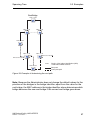
You can use the network plan (see figure 28) to follow the flow chart (see
figure 27) for determining the root path. The administrator has specified a
priority in the bridge identification for each bridge. The bridge with the
smallest numerical value for the bridge identification takes on the role of the
root bridge, in this case, bridge 1. In the example all the sub-paths have the
same path costs. The protocol blocks the path between bridge 2 and bridge
3 as a connection from bridge 3 via bridge 2 to the root bridge would result in
higher path costs.
The path from bridge 6 to the root bridge is interesting:
The path via bridge 5 and bridge 3 creates the same root path costs as
the path via bridge 4 and bridge 2.
STP selects the path using the bridge that has the lowest MAC address
in the bridge identification (bridge 4 in the illustration).
There are also 2 paths between bridge 6 and bridge 4. The port identifier
is decisive here (Port 1 < Port 3).
66
UM RedundConfig HiOS-2E EES
Release 4.0 07/2014
Spanning Tree
5.3 Examples
Root Bridge
P-BID = 16 384
1
P-BID = 32 768
P-BID = 32 768
2
3
P-BID = 32 768
7
P-BID = 32 768
Port 3
P-BID = 32 768
MAC 00:01:02:03:04:06
4
MAC 00:01:02:03:04:05
5
Port 1
P-BID
P-BID = 32 768
Priority of the bridge identifikation (BID)
= BID without MAC Address
Root path
6
Interrupted path
Figure 28: Example of determining the root path
Note: Because the Administrator does not change the default values for the
priorities of the bridges in the bridge identifier, apart from the value for the
root bridge, the MAC address in the bridge identifier alone determines which
bridge becomes the new root bridge if the current root bridge goes down.
UM RedundConfig HiOS-2E EES
Release 4.0 07/2014
67
Spanning Tree
5.3.2
5.3 Examples
Example of manipulating the root path
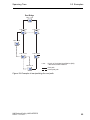
You can use the network plan (see figure 29) to follow the flow chart (see
figure 27) for determining the root path. The Administrator has performed the
following:
– Left the default value of 32,768 (8000H) for every bridge apart from bridge
1 and bridge 5, and
– assigned to bridge 1 the value 16,384 (4000H), thus making it the root
bridge.
– To bridge 5 he assigned the value 28,672 (7000H).
The protocol blocks the path between bridge 2 and bridge 3 as a connection
from bridge 3 via bridge 2 to the root bridge would mean higher path costs.
The path from bridge 6 to the root bridge is interesting:
The bridges select the path via bridge 5 because the value 28,672 for the
priority in the bridge identifier is smaller than value 32,768.
68
UM RedundConfig HiOS-2E EES
Release 4.0 07/2014
Spanning Tree
5.3 Examples
Root Bridge
P-BID = 16 384
1
P-BID = 32 768
P-BID = 32 768
3
2
P-BID = 32 768
7
P-BID = 32 768
P-BID = 28 672
4
5
P-BID
P-BID = 32 768
Priority of the bridge identifikation (BID)
= BID without MAC Address
Root path
6
Interrupted path
Figure 29: Example of manipulating the root path
UM RedundConfig HiOS-2E EES
Release 4.0 07/2014
69
Spanning Tree
5.3.3
5.3 Examples
Example of manipulating the tree structure
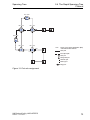
The Management Administrator soon discovers that this configuration with
bridge 1 as the root bridge (see on page 66 “Example of determining the root
path”) is invalid. On the paths from bridge 1 to bridge 2 and bridge 1 to bridge
3, the control packets which the root bridge sends to all other bridges add up.
If the Management Administrator configures bridge 2 as the root bridge, the
burden of the control packets on the subnetworks is distributed much more
evenly. The result is the configuration shown here (see figure 30). The path
costs for most of the bridges to the root bridge have decreased.
Root-Bridge
P-BID = 16 384
2
P-BID = 32 768
P-BID = 32 768
Port 2
P-BID = 32 768
4
7
3
P-BID = 32 768
1
Port 1
MAC 00:01:02:03:04:05
P-BID = 32 768
P-BID = 32 768
6
5
MAC 00:01:02:03:04:06
P-BID
Priority of the bridge identifikation (BID)
= BID without MAC Address
Root path
Interrupted path
Figure 30: Example of manipulating the tree structure
70
UM RedundConfig HiOS-2E EES
Release 4.0 07/2014
Spanning Tree
5.4 The Rapid Spanning Tree
Protocol
5.4 The Rapid Spanning Tree
Protocol
The RSTP uses the same algorithm for determining the tree structure as
STP. RSTP merely changes parameters, and adds new parameters and
mechanisms that speed up the reconfiguration if a link or bridge becomes
inoperable.
The ports play a significant role in this context.
5.4.1
Port roles
RSTP assigns each bridge port one of the following roles (see figure 31):
Root Port:
This is the port at which a bridge receives data packets with the lowest
path costs from the root bridge.
If there are multiple ports with equally low path costs, the bridge ID of the
bridge that leads to the root (designated bridge) decides which of its ports
is given the role of the root port by the bridge further away from the root.
If a bridge has multiple ports with equally low path costs to the same
bridge, the bridge uses the port ID of the bridge leading to the root (designated bridge) to decide which port it selects locally as the root port (see
figure 27).
The root bridge itself does not have a root port.
Designated port:
The bridge in a network segment that has the lowest root path costs is the
designated bridge.
If more than 1 bridge has the same root path costs, the bridge with the
smallest value bridge identifier becomes the designated bridge. The
designated port on this bridge is the port that connects a network segment
leading away from the root bridge. If a bridge is connected to a network
segment with more than one port (via a hub, for example), the bridge
gives the role of the designated port to the port with the better port ID.
UM RedundConfig HiOS-2E EES
Release 4.0 07/2014
71
Spanning Tree
5.4 The Rapid Spanning Tree
Protocol
Edge port
Every network segment with no additional RSTP bridges is connected
with exactly one designated port. In this case, this designated port is also
an edge port. The distinction of an edge port is the fact that it does not
receive any RST BPDUs (Rapid Spanning Tree Bridge Protocol Data
Units).
Alternate port
This is a blocked port that takes over the task of the root port if the
connection to the root bridge is lost. The alternate port provides a backup
connection to the root bridge.
Backup port
This is a blocked port that serves as a backup in case the connection to
the designated port of this network segment (without any RSTP bridges)
is lost
Disabled port
This is a port that does not participate in the Spanning Tree Operation,
i.e., the port is switched off or does not have any connection.
72
UM RedundConfig HiOS-2E EES
Release 4.0 07/2014
Spanning Tree
5.4 The Rapid Spanning Tree
Protocol
BID = 16 384
1
BID = 20 480
BID = 24 576
2
3
BID = 28 672
BID = 32 768
BID = 40 960
7
Port 2
4
Port 1
5
P-BID
Priority of the bridge identifikation (BID)
= BID without MAC Address
Root path
Interrupted path
Root port
Designated port
Alternate port
Backup port
Edge port
Figure 31: Port role assignment
UM RedundConfig HiOS-2E EES
Release 4.0 07/2014
73
Spanning Tree
5.4.2
5.4 The Rapid Spanning Tree
Protocol
Port states
Depending on the tree structure and the state of the selected connection
paths, the RSTP assigns the ports their states.
STP port state
DISABLED
DISABLED
BLOCKING
LISTENING
LEARNING
FORWARDING
Table 4:
Administrative
bridge port
state
Disabled
Enabled
Enabled
Enabled
Enabled
Enabled
MAC
RSTP
operational Port state
FALSE
FALSE
TRUE
TRUE
TRUE
TRUE
Active topology
(port role)
Discardinga
Discardinga
Discardingb
Discardingb
Learning
Forwarding
Excluded (disabled)
Excluded (disabled)
Excluded (alternate, backup)
Included (root, designated)
Included (root, designated)
Included (root, designated)
Relationship between port state values for STP and RSTP.
a. The dot1d-MIB displays “Disabled”
b. The dot1d-MIB displays “Blocked”
Meaning of the RSTP port states:
Disabled: Port does not belong to the active topology
Discarding: No address learning in FDB, no data traffic except for
STP BPDUs
Learning: Address learning active (FDB) and no data traffic except for
STP BPDUs
Forwarding: Address learning is active (FDB), sending and receipt of all
frame types (not only STP BPDUs)
74
UM RedundConfig HiOS-2E EES
Release 4.0 07/2014
Spanning Tree
5.4.3
5.4 The Rapid Spanning Tree
Protocol
Spanning Tree Priority Vector
To assign roles to the ports, the RSTP bridges exchange configuration information with each other. This information is known as the Spanning Tree
Priority Vector. It is part of the RSTP BPDUs and contains the following information:
Bridge identification of the root bridge
Root path costs of the sending bridge
Bridge identification of the sending bridge
Port identifiers of the ports through which the message was sent
Port identifiers of the ports through which the message was received
Based on this information, the bridges participating in RSTP are able to
determine port roles themselves and define the port states of their own ports.
5.4.4
Fast reconfiguration
Why can RSTP react faster than STP to an interruption of the root path?
Introduction of edge-ports:
During a reconfiguration, RSTP switches an edge port into the transmission mode after three seconds (default setting) and then waits for the
“Hello Time” to elapse, to be sure that no bridge sending BPDUs is
connected.
When the user ensures that a terminal device is connected at this port and
will remain connected, there are no waiting times at this port in the case
of a reconfiguration.
Introduction of alternate ports:
As the port roles are already distributed in normal operation, a bridge can
immediately switch from the root port to the alternate port after the
connection to the root bridge is lost.
Communication with neighboring bridges (point-to-point connections):
Decentralized, direct communication between neighboring bridges
enables reaction without wait periods to status changes in the spanning
tree topology.
UM RedundConfig HiOS-2E EES
Release 4.0 07/2014
75
Spanning Tree
5.4 The Rapid Spanning Tree
Protocol
Address table:
With STP, the age of the entries in the FDB determines the updating of
communication. RSTP immediately deletes the entries in those ports
affected by a reconfiguration.
Reaction to events:
Without having to adhere to any time specifications, RSTP immediately
reacts to events such as connection interruptions, connection reinstatements, etc.
Note: The downside of this fast reconfiguration is the possibility that data
packages could be duplicated and/or arrive at the recipient in the wrong order
during the reconfiguration phase of the RSTP topology. If this is unacceptable for your application, use the slower Spanning Tree Protocol or select
one of the other, faster redundancy procedures described in this manual.
5.4.5
STP compatibility mode
The STP compatibility mode allows you to operate RSTP devices in networks
with old installations. If an RSTP device detects an older STP device, it
switches on the STP compatibility mode at the relevant port.
76
UM RedundConfig HiOS-2E EES
Release 4.0 07/2014
Spanning Tree
5.5 Configuring the device
5.5 Configuring the device
RSTP configures the network topology completely independently. The
device with the lowest bridge priority automatically becomes the root bridge.
However, to define a specific network structure regardless, you specify a
device as the root bridge. In general, a device in the backbone takes on this
role.
Set up the network to meet your requirements, initially without redundant
lines.
You deactivate the flow control on the participating ports.
If the flow control and the redundancy function are active at the same
time, there is a risk that the redundancy function will not operate as
intended. (Default setting: flow control deactivated globally and activated
on all ports.)
Switch MRP off on all devices.
Switch Spanning Tree on on all devices in the network.
In the state on delivery, Spanning Tree is switched on on the device.
UM RedundConfig HiOS-2E EES
Release 4.0 07/2014
77
Spanning Tree
5.5 Configuring the device
Open the Switching > L2-Redundancy > Spanning Tree > Global
dialog.
Activate the function.
Figure 32: Switching the function on
Click "Set" to save the changes.
enable
configure
spanning-tree operation
show spanning-tree global
78
Switch to the privileged EXEC mode.
Switch to the Configuration mode.
Switches Spanning Tree on.
Displays the parameters for checking.
UM RedundConfig HiOS-2E EES
Release 4.0 07/2014
Spanning Tree
5.5 Configuring the device
Now connect the redundant lines.
Define the settings for the device that takes over the role of the root
bridge.
In the "Priority"field you enter a numerically lower value.
The bridge with the numerically lowest bridge ID has the highest
priority and becomes the root bridge of the network.
Figure 33: Defining the bridge priority
Click "Set" to save the changes.
spanning-tree mst priority 0
<0..61440
in 4096er-Schritten>
UM RedundConfig HiOS-2E EES
Release 4.0 07/2014
Defines the bridge priority of the device.
79
Spanning Tree
5.5 Configuring the device
After saving, the dialog shows the following information:
– The "Bridge is Root" checkbox is marked.
– The "Root Port" field shows the value 0.0.
– The "Root Path Cost" field shows the value 0.
Figure 34: Device is operating as root bridge
show spanning-tree global
80
Displays the parameters for checking.
UM RedundConfig HiOS-2E EES
Release 4.0 07/2014
Spanning Tree
5.5 Configuring the device
If applicable, change the values in the "Forward Delay [s]" and "Max
Age" fields.
–
The root bridge transmits the changed values to the other devices.
Figure 35: Changing Forward Delay and Max Age
Click "Set" to save the changes.
spanning-tree forward-time
<4..30>
spanning-tree max-age
<6..40>
show spanning-tree global
Specifies the delay time for the status change in
seconds.
Specifies the maximum permissible branch
length, i.e. the number of devices to the root
bridge.
Displays the parameters for checking.
Note: The parameters "Forward Delay [s]" and "Max Age" have the following
relationship:
"Forward Delay [s]" ≥ ("Max Age"/2) + 1
If you enter values in the fields that contradict this relationship, the device
replaces these values with the last valid values or with the default value.
UM RedundConfig HiOS-2E EES
Release 4.0 07/2014
81
Spanning Tree
5.5 Configuring the device
Note: If possible, do not change the value in the “Hello Time” field.
Check the following values in the other devices:
– Bridge ID (bridge priority and MAC address) of the corresponding
device and the root bridge.
– Number of the device port that leads to the root bridge.
– Path cost from the root port of the device to the root bridge.
Figure 36: Check values
show spanning-tree global
82
Displays the parameters for checking.
UM RedundConfig HiOS-2E EES
Release 4.0 07/2014
Spanning Tree
5.6 Guards
5.6 Guards
The device allows you to activate various protection functions (guards) on the
device ports.
The following protection functions help protect your network from incorrect
configurations, loops and attacks with STP-BPDUs:
BPDU Guard – for manually defined terminal device ports (edge ports)
You activate this protection function globally in the device.
Terminal device ports do not normally receive any STP-BPDUs. If an
attacker still attempts to feed in STP-BPDUs at this port, the device deactivates the device port.
Root Guard – for designated ports
You activate this protection function separately for every device port.
UM RedundConfig HiOS-2E EES
Release 4.0 07/2014
83
Spanning Tree
5.6 Guards
If a designated port receives an STP-BPDU with better path information
to the root bridge, the device discards the STP-BPDU and sets the transmission state of the port to discarding instead of root.
If there are no STP-BPDUs with better path information to the root bridge,
after 2 x Hello Time the device resets the state of the port to a value
according to the port role.
TCN Guard – for ports that receive STP-BPDUs with a Topology Change
flag
You activate this protection function separately for every device port.
Hacker
84
UM RedundConfig HiOS-2E EES
Release 4.0 07/2014
Spanning Tree
5.6 Guards
If the protection function is activated, the device ignores Topology
Change flags in received STP-BPDUs. This does not change the content
of the address table (FDB) of the device port. However, additional information in the BPDU that changes the topology is processed by the device.
Loop Guard – for root, alternate and backup ports
You activate this protection function separately for every device port.
This protection function prevents the transmission status of a port from
unintentionally being changed to forwarding if the port does not receive
any more STP-BPDUs. If this situation occurs, the device designates the
loop status of the port as inconsistent, but does not forward any data
packets.
UM RedundConfig HiOS-2E EES
Release 4.0 07/2014
85
Spanning Tree
5.6.1
5.6 Guards
Activating the BPDU Guard
Open the Switching > L2-Redundancy > Spanning Tree > Global
dialog.
Mark the "BPDU Guard" checkbox.
Figure 37: Activating the BPDU Guard
Click "Set" to save the changes.
enable
configure
spanning-tree bpdu-guard
show spanning-tree global
86
Switch to the privileged EXEC mode.
Switch to the Configuration mode.
Activates the BPDU Guard.
Displays the parameters for checking.
UM RedundConfig HiOS-2E EES
Release 4.0 07/2014
Spanning Tree
5.6 Guards
Open the Switching > L2-Redundancy > Spanning Tree > Port
dialog.
Switch to the "CIST" tab.
For terminal device ports, mark the checkbox in the "Admin Edge
Port"column.
Figure 38: Switching > L2-Redundancy > Spanning Tree > Port dialog,
"CIST" tab
Click "Set" to save the changes.
interface x/y
spanning-tree edge-port
show spanning-tree port x/y
exit
UM RedundConfig HiOS-2E EES
Release 4.0 07/2014
Switches to the interface mode.
Designates the port as a terminal device port
(edge port).
Displays the parameters for checking.
Leaves the interface mode.
87
Spanning Tree
5.6 Guards
If an edge port receives an STP-BPDU, the device behaves as follows:
The device deactivates this port.
In the Basic Settings > Port dialog, "Configuration" tab, the checkbox
in the "Port on" column is not marked for this port.
The device designates the port.
In the Switching > L2-Redundancy > Spanning Tree > Port dialog,
"Guards" tab, the device shows the value enable in the "BPDU Guard
Effect" column.
Figure 39: Switching > L2-Redundancy > Spanning Tree > Port dialog,
"Guards" tab
show spanning-tree port x/y
88
Displays the parameters of the port for checking.
The value of the "BPDU Guard Effect" parameter
is enable.
UM RedundConfig HiOS-2E EES
Release 4.0 07/2014
Spanning Tree
5.6 Guards
To reset the status of the device port to the value forwarding, you proceed
as follows:
If the device port is still receiving BPDUs:
– Remove the manual definition as an edge port.
or
– Deactivate the BPDU Guard
Activate the device port again.
UM RedundConfig HiOS-2E EES
Release 4.0 07/2014
89
Spanning Tree
5.6.2
5.6 Guards
Activating Root Guard / TCN Guard / Loop
Guard
Open the Switching > L2-Redundancy > Spanning Tree > Port
dialog.
Switch to the "Guards" tab.
For designated ports, select the checkbox in the "Root Guard"
column.
For ports that receive STP-BPDUs with a Topology Change flag,
select the checkbox in the "TCN Guard" column.
For root, alternate or backup ports, mark the checkbox in the "Loop
Guard" column.
Figure 40: Activating Guards
Note: The "Root Guard" and "Loop Guard" functions are mutually
exclusive. If you switch on the "Root Guard" function while the "Loop
Guard" function is switched on, the device switches off the "Loop
Guard" function.
Click "Set" to save the changes.
90
UM RedundConfig HiOS-2E EES
Release 4.0 07/2014
Spanning Tree
enable
configure
interface x/y
spanning-tree guard-root
spanning-tree guard-tcn
spanning-tree guard-loop
exit
show spanning-tree port x/y
UM RedundConfig HiOS-2E EES
Release 4.0 07/2014
5.6 Guards
Switch to the privileged EXEC mode.
Switch to the Configuration mode.
Switches to the interface mode.
Switches the Root Guard on at the designated
port.
Switches on the TCN Guard on the port that
receives STP-BPDUs with a Topology Change
flag.
Switches the Loop Guard on at a root, alternate or
backup port.
Leaves the interface mode.
Displays the parameters of the port for checking.
91
Spanning Tree
92
5.6 Guards
UM RedundConfig HiOS-2E EES
Release 4.0 07/2014
Link Aggregation
6 Link Aggregation
Link Aggregation using the single switch method helps you overcome 2
limitations with ethernet links, namely bandwidth, and redundancy.
The first problem that the Link Aggregation Group (LAG) function helps you
with is bandwidth limitations of individual ports. LAG allows you to combine
2 or more links in parallel, creating 1 logical link between 2 devices. The
parallel links increase the bandwidth for traffic between the 2 devices.
You typically use Link Aggregation on the network backbone. The function
provides you an inexpensive way to incrementally increase bandwidth.
Furthermore, Link Aggregation provides for redundancy with a seemless
failover. With 2 or more links configured in parallel, when a link goes down,
the other links in the group continue to forward traffic.
The default settings for a new Link Aggregation instance are as follows:
"Active" is marked
"Link Trap" is enabled
"Static Link Aggregation" is disabled
"Hashing Option" for new trunks is sourceDestMacVlan
"Min. Active Ports" is 1
UM RedundConfig HiOS-2E EES
Release 4.0 07/2014
93
Link Aggregation
Figure 41: Switching > L2-Redundancy > Link Aggregation dialog
94
UM RedundConfig HiOS-2E EES
Release 4.0 07/2014
Link Aggregation
6.1 Methods of Operation
6.1 Methods of Operation
The device operates on the Single Switch method. The Single Switch method
provides you an inexpensive way to grow your network. The single switch
method states that you need 1 device on each side of a link to provide the
physical ports. The device balances the traffic load across the group member
ports.
The device also uses the Same Link Speed method in which the group
member ports are full-duplex, point-to-point links having the same transmission rate. The first port the user adds to the group is the master port and
determines the bandwidth for the other member ports of the Link Aggregation
Group.
The device allows you to configure up to 2 Link Aggregation Groups with up
to 2 ports in each group.
Hash Algorithm
The frame distributor is responsible for receiving frames from the end
devices and transmitting them over the Link Aggregation Group. The
frame distributor implements a distribution algorithm responsible for
choosing the link used for transmitting any given frame or set of frames.
The hash option helps you achieve load balancing across the group.
The device uses the MAC address, VLAN ID, EtherType, and incoming
port associated with the packet for link selection.
UM RedundConfig HiOS-2E EES
Release 4.0 07/2014
95
Link Aggregation
6.1 Methods of Operation
Static and Dynamic Links
The device allows you to set up static and dynamic links.
Static Links - The administrator sets up and maintains the links manually. For example, when a link fails and there is a media converter
between the devices, the media converter continues forwarding traffic
on the link causing the link to fail. Another possibility is that cabling or
an undetected configuration mistake causes undesirable network
behavior. In this case, the network administrator manually changes the
link setup to restore traffic.
Dynamic Links - The device confirms that the setup on the remote
device is able to handle link aggregation and failover occurs automatically.
96
UM RedundConfig HiOS-2E EES
Release 4.0 07/2014
Link Aggregation
6.2 Link Aggregation Example
6.2 Link Aggregation Example
Connect multiple workstations using one aggregated link group between
switch 1 and 2. By aggregating multiple links, higher speeds are achievable
without a hardware upgrade.
Server 2
Port 5
Hub 4
Hub 5
Port 6
Port 7
Hub 6
Port 8
Switch 1
Switch 2
Port 5
Server 1
Port 1
Port 6
Port 2
Port 7
Hub 1
Hub 2
Port 8
Hub 3
Figure 42: Link Aggregation Switch to Switch Network
Use the following worksteps to setup switch 1 and 2 in the graphical user
interface.
Open the Switching > L2-Redundancy > Link Aggregation dialog.
To make a new entry in the table, click "Create".
In the "Create" dialog, select lag/1 from the "Lag Index" pull down
menu.
Click "OK".
To add available ports, highlight the new entry and click "Add Ports".
In the "Select Ports to add"dialog select ports 1/1, and 1/2.
Click "OK".
enable
configure
link-aggregation add lag/1
link-aggregation modify
lag/1 addport 1/1
link-aggregation modify
lag/1 addport 1/2
UM RedundConfig HiOS-2E EES
Release 4.0 07/2014
Switch to the privileged EXEC mode.
Switch to the Configuration mode.
Create a Link-Aggregation group lag/1
Adds port 1/1 to the Link Aggregation Group.
Adds port 1/2 to the Link Aggregation Group.
97
Link Aggregation
98
6.2 Link Aggregation Example
UM RedundConfig HiOS-2E EES
Release 4.0 07/2014
Link Backup
7 Link Backup
Link Backup provides a redundant link for traffic on Layer 2 devices. When
the device detects an error on the primary link, then the device transfers
traffic to the backup link. You typically use Link Backup in service-provider or
enterprise networks.
You set up the backup links in pairs, one as a primary and one as a backup.
When providing redundancy for enterprise networks for example, the device
allows you to set up more than 1 pair. The maximum number of link backup
pairs is: total number of physical ports / 2. Furthermore, the device sends an
SNMP trap when the state of a port participating in a link backup pair
changes.
When configuring link backup pairs remember the following rules:
A link pair consists of any combination of physical ports. For example,
when 1 port is a 100 Mbit port and the other is a 1000 Mbit SFP port.
A specific port is a member of 1 link backup pair at any given time.
Verify that the ports of a link backup pair are members of the same VLAN
with the same VLAN ID. When the primary port or backup port is a
member of a VLAN then, assign the second port of the pair to the same
VLAN.
The default setting for this function is inactive without any link backup pairs.
Note: Verify that the Spanning Tree Protocol is disabled on the Link Backup
ports.
UM RedundConfig HiOS-2E EES
Release 4.0 07/2014
99
Link Backup
Figure 43: "Link Backup" dialog
100
UM RedundConfig HiOS-2E EES
Release 4.0 07/2014
Link Backup
7.1 Fail Back Description
7.1 Fail Back Description
Link Backup also allows you to set up a Fail Back option. When you activate
the fail back function and the primary link returns to normal operation, the
device first blocks traffic on the backup port and then forwards traffic on the
primary port. This process helps protect the device from causing loops in the
network.
When the primary port returns to the link up and active state, the device
supports 2 modes of operation:
When you inactivate "Fail Back Active", the primary port remains in the
blocking state until the backup link fails.
When you activate "Fail Back Active", and after the "Fail Back Delay [s]"
timer expires, the primary port returns to the forwarding state and the
backup port changes to down.
In the cases listed above, the port forcing its link to forward traffic, first sends
a "flush FDB" packet to the remote device. The flush packet helps the remote
device quickly relearn the MAC addresses.
UM RedundConfig HiOS-2E EES
Release 4.0 07/2014
101
Link Backup
7.2 Example Configuration
7.2 Example Configuration
In the example network below, you connect ports 2/3 and 2/4 on switch A to
the uplink switches B and C. When you set up the ports as a Link Backup
pair, 1 of the ports forwards traffic and the other port is in the blocking mode.
The primary, port 2/3 on switch A, is the active port and is forwarding traffic
to port 1 on switch B. Port 2/4 on switch A is the backup port and is blocking
traffic.
When switch A disables port 2/3 because of a detected error, then port 2/4
on switch A starts forwarding traffic to port 2 on switch C.
When port 2/3 returns to the active state, „no shutdown“, with "Fail Back
Active" activated, and "Fail Back Delay [s]" set to 30 s. After the timer expires,
port 2/4 first blocks the traffic and then port 2/3 starts forwarding the traffic.
Switch B
Switch C
Port 1
Port 2
Port 2/3
Port 2/4
Switch A
Figure 44: "Link Backup" example network
The following tables contain examples of parameters for Switch A set up.
Open the Switching > L2-Redundancy > Link Backup dialog.
To enter a new Link Backup pair in the table, click "Create".
102
UM RedundConfig HiOS-2E EES
Release 4.0 07/2014
Link Backup
7.2 Example Configuration
In the "Create" window, from the "Primary Port" drop-down menu
select 2/3 and from the "Backup Port" drop-down menu select 2/4.
Click "OK".
In the "Description" textbox, enter Link_Backup_1 as the name for
the backup pair.
To activate the Fail Back function for the link backup pair, mark the
"Fail Back Active" checkbox.
Set the fail back timer for the link backup pair, enter 30 s in "Fail
Back Delay [s]".
To activate the the link backup pair, mark the "Active" checkbox.
To enable the Link Backup function globally, in the "Operation"
frame, mark the "On" radio button.
Switch to the privileged EXEC mode.
Switch to the Configuration mode.
Switch to the Interface 2/3 Configuration mode.
Creates a Link Backup instance where port 2/3 is
the primary port and port 2/4 is the backup port.
modify 2/4
Defines Link_Backup_1 as the name of the
Link_Backup_1
backup pair.
modify 2/4 fail- Enables the fail back timer.
enable
modify 2/4 fail- Defines the fail back delay time as 30 s.
enable
configure
interface 2/3
link-backup add 2/4
link-backup
description
link-backup
back-status
link-backup
back-time 30
link-backup modify 2/4 status
enable
exit
link-backup operation
UM RedundConfig HiOS-2E EES
Release 4.0 07/2014
Enables the Link Backup instance.
Switch to the Configuration mode.
Enables the Link Backup function globally on the
device.
103
Readers’ Comments
A Readers’ Comments
What is your opinion of this manual? We are always striving to provide as
comprehensive a description of our product as possible, as well as important
information that will ensure trouble-free operation. Your comments and
suggestions help us to further improve the quality of our documentation.
Your assessment of this manual:
Precise description
Readability
Understandability
Examples
Structure
Completeness
Graphics
Drawings
Tables
Very good
O
O
O
O
O
O
O
O
O
Good
O
O
O
O
O
O
O
O
O
Satisfactory
O
O
O
O
O
O
O
O
O
Mediocre
O
O
O
O
O
O
O
O
O
Poor
O
O
O
O
O
O
O
O
O
Did you discover any errors in this manual?
If so, on what page?
104
UM RedundConfig HiOS-2E EES
Release 4.0 07/2014
Readers’ Comments
Suggestions for improvement and additional information:
General comments:
Sender:
Company / Department:
Name / Telephone no.:
Street:
Zip code / City:
e-mail:
Date / Signature:
Dear User,
Please fill out and return this page
as a fax to the number +49 (0)7127 14-1600 or
by post to
Hirschmann Automation and Control GmbH
Department 01RD-NT
Stuttgarter Str. 45-51
72654 Neckartenzlingen
UM RedundConfig HiOS-2E EES
Release 4.0 07/2014
105
Readers’ Comments
106
UM RedundConfig HiOS-2E EES
Release 4.0 07/2014
Index
B Index
A
Advanced Mode
Alternate port
18, 20
72, 85
B
Backup port
BPDU
BPDU guard
Bridge Identifier
Bridge Protocol Data Unit
72, 85
63
83, 86
58
63
C
Compatibility (STP)
76
D
DAN
Delay time (MRP)
Designated bridge
Designated port
Diameter (Spanning Tree)
Disabled port
37
17
71
71, 83
61
72
E
Edge port
72, 83
F
FAQ
109
H
HiView
7
HSR
13, 14, 43
HSR and PRP network connections
49
HSR Netzwerk Structure
45
I
Industrial HiVision
8
L
Link Aggration
Loop guard
LRE functionality
M
MaxAge
MRP
14
85, 90
33
62
13, 14, 15, 19
N
Network load
Network structure (PRP)
UM RedundConfig HiOS-2E EES
Release 4.0 07/2014
P
Path costs
Port Identifier
Port mirroring and PRP
Port number
Port priority (Spanning Tree)
Port roles (RSTP)
Port-State
PRP
PRP example configuration
PRP network structure
PRP RedBox (Example HSR)
Protection functions (guards)
R
Rapid Spanning Tree
Reconfiguration
Reconfiguration time (MRP)
RedBox
Redundancy
Ring
Ring manager
RM function
Root Bridge
Root guard
Root Path Cost
Root path
Root port
RSTP
RST BPDU
S
SAN RedBox (HSR Example)
SAN (for HSR)
STP compatibility
STP-BPDU
Symbol
T
TCN guard
Technical Questions
Topology Change flag
Training Courses
Tree structure (Spanning Tree)
59, 63
58, 60
41
60
60
71
74
14, 31
38
35
51
83
12, 13, 14, 71
57
17
37
7, 55
16
16
16
63
83, 90
58
66, 68
71, 85
77
72, 75
46
45
76
63
9
84, 90
109
84
109
63, 70
55, 57
35
107
Index
108
UM RedundConfig HiOS-2E EES
Release 4.0 07/2014
Further Support
C Further Support
Technical Questions
For technical questions, please contact any Hirschmann dealer in your
area or Hirschmann directly.
You will find the addresses of our partners on the Internet at
http://www.hirschmann.com
Contact our support at
https://hirschmann-support.belden.eu.com
You can contact us
in the EMEA region at
Tel.: +49 (0)1805 14-1538
E-mail: [email protected]
in the America region at
Tel.: +1 (717) 217-2270
E-mail: [email protected]
in the Asia-Pacific region at
Tel.: +65 6854 9860
E-mail: [email protected]
Hirschmann Competence Center
The Hirschmann Competence Center is ahead of its competitors:
Consulting incorporates comprehensive technical advice, from system
evaluation through network planning to project planning.
Training offers you an introduction to the basics, product briefing and
user training with certification.
The current technology and product training courses can be found at
http://www.hicomcenter.com
Support ranges from the first installation through the standby service
to maintenance concepts.
UM RedundConfig HiOS-2E EES
Release 4.0 07/2014
109
Further Support
With the Hirschmann Competence Center, you have decided against
making any compromises. Our client-customized package leaves you
free to choose the service components you want to use.
Internet:
http://www.hicomcenter.com
110
UM RedundConfig HiOS-2E EES
Release 4.0 07/2014
Further Support
UM RedundConfig HiOS-2E EES
Release 4.0 07/2014
111