1
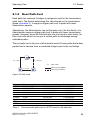
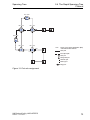
Spanning Tree 5.4 The Rapid Spanning Tree Protocol 5.4 The Rapid Spanning Tree Protocol The RSTP uses the same algorithm for determining the tree structure as STP. RSTP merely changes parameters, and adds new parameters and mechanisms that speed up the reconfiguration if a link or bridge becomes inoperable. The ports play a significant role in this context. 5.4.1 Port roles RSTP assigns each bridge port one of the following roles (see figure 31): Root Port: This is the port at which a bridge receives data packets with the lowest path costs from the root bridge. If there are multiple ports with equally low path costs, the bridge ID of the bridge that leads to the root (designated bridge) decides which of its ports is given the role of the root port by the bridge further away from the root. If a bridge has multiple ports with equally low path costs to the same bridge, the bridge uses the port ID of the bridge leading to the root (designated bridge) to decide which port it selects locally as the root port (see figure 27). The root bridge itself does not have a root port. Designated port: The bridge in a network segment that has the lowest root path costs is the designated bridge. If more than 1 bridge has the same root path costs, the bridge with the smallest value bridge identifier becomes the designated bridge. The designated port on this bridge is the port that connects a network segment leading away from the root bridge. If a bridge is connected to a network segment with more than one port (via a hub, for example), the bridge gives the role of the designated port to the port with the better port ID. UM RedundConfig HiOS-2E EES Release 4.0 07/2014 71