1
DMREX78&88GN-RQT9088-L_eng.book
3 ページ 2008年4月1日 火曜日 午後6時38分
Table of contents
21
21
21
22
22
Copying from a video cassette recorder . . . . . . . . . . . 23
Manual recording . . . . . . . . . . . . . . . . . . . . . . . . . . . . . . . . . . . . 23
DV automatic recording (DV Auto Rec) . . . . . . . . . . . . . . . . . . . 23
Advanced timer recording . . . . . . . . . . . . . . . . . . . . . . . 24
Using G-CODE system to make timer recordings
(Analogue broadcast only). . . . . . . . . . . . . . . . . . . . . . . . . . . .
Manually programming timer recordings . . . . . . . . . . . . . . . . . .
To cancel recording when recording has already begun . . . . . .
To release the unit from recording standby . . . . . . . . . . . . . . . .
Notes on timer recording . . . . . . . . . . . . . . . . . . . . . . . . . . . . . .
Check, change or delete a programme . . . . . . . . . . . . . . . . . . .
Relief Recording. . . . . . . . . . . . . . . . . . . . . . . . . . . . . . . . . . . . .
Auto Renewal Recording . . . . . . . . . . . . . . . . . . . . . . . . . . . . . .
Operations in the TV Guide system . . . . . . . . . . . . . . . . . . . . . .
24
24
25
25
25
25
26
26
27
Advanced playback . . . . . . . . . . . . . . . . . . . . . . . . . . . . 28
Operation during play . . . . . . . . . . . . . . . . . . . . . . . . . . . . . . . . . 28
Changing audio during play . . . . . . . . . . . . . . . . . . . . . . . . . . . . 28
Selecting recorded programmes (titles) to play
—Direct Navigator . . . . . . . . . . . . . . . . . . . . . . . . . . . . 29
Switching the Direct Navigator appearance . . . . . . . . . . . . . . . .
To sort the titles for easy searching . . . . . . . . . . . . . . . . . . . . . .
To play grouped titles [HDD] . . . . . . . . . . . . . . . . . . . . . . . . . . . .
To edit the group of titles [HDD]. . . . . . . . . . . . . . . . . . . . . . . . . .
29
29
29
29
Playing DivX, MP3 and still pictures . . . . . . . . . . . . . . . 30
Showing the menu screen . . . . . . . . . . . . . . . . . . . . . . . . . . . . .
Playing DivX video contents. . . . . . . . . . . . . . . . . . . . . . . . . . . .
Playing MP3 files . . . . . . . . . . . . . . . . . . . . . . . . . . . . . . . . . . . .
Playing still pictures . . . . . . . . . . . . . . . . . . . . . . . . . . . . . . . . . .
Useful functions during still picture play . . . . . . . . . . . . . . . . . . .
30
30
31
32
33
Playing music . . . . . . . . . . . . . . . . . . . . . . . . . . . . . . . . . 34
To play music CD . . . . . . . . . . . . . . . . . . . . . . . . . . . . . . . . . . . . 34
To play music recorded on HDD . . . . . . . . . . . . . . . . . . . . . . . . 34
Useful functions during music play. . . . . . . . . . . . . . . . . . . . . . . 34
Convenient functions . . . . . . . . . . . . . . . . . . . . . . . . . . . 35
FUNCTION MENU window . . . . . . . . . . . . . . . . . . . . . . . . . . . . 35
To pause the TV programme you are watching
—Pause Live TV . . . . . . . . . . . . . . . . . . . . . . . . . . . . . . . . . . . 35
Linked operations with the TV
(VIERA Link “HDAVI ControlTM”) . . . . . . . . . . . . . . . . . 36
Easy control only with VIERA remote control. . . . . . . . . . . . . . . 37
Copying still pictures . . . . . . . . . . . . . . . . . . . . . . . . . . . 50
Copying all the still pictures on the USB memory
—Copy All Pictures . . . . . . . . . . . . . . . . . . . . . . . . . . . . . . . . . 50
Copying new still pictures on the SD card
—Copy New Pictures [EX88] . . . . . . . . . . . . . . . . . . . . . . . . . . . 50
Copying using the copying list. . . . . . . . . . . . . . . . . . . . . . . . . . . 50
Quick Start
Guide
48
49
49
About the Gracenote® Database . . . . . . . . . . . . . . . . . . . . . . . . .
Copying music from a CD . . . . . . . . . . . . . . . . . . . . . . . . . . . . . .
Copying music from a USB memory . . . . . . . . . . . . . . . . . . . . . .
To update the Gracenote® Database . . . . . . . . . . . . . . . . . . . . .
52
52
52
53
Setting menus
Basic
operations
Copying music to HDD . . . . . . . . . . . . . . . . . . . . . . . . . . 52
Using on-screen menus/Status message. . . . . . . . . . . 54
HDD, disc and card management . . . . . . . . . . . . . . . . . 56
Common procedures. . . . . . . . . . . . . . . . . . . . . . . . . . . . . . . . . .
Setting the protection . . . . . . . . . . . . . . . . . . . . . . . . . . . . . . . . .
Providing a name for a disc. . . . . . . . . . . . . . . . . . . . . . . . . . . . .
Deleting all titles and playlists—Delete all titles . . . . . . . . . . . . .
Deleting all the contents—Format . . . . . . . . . . . . . . . . . . . . . . .
Selecting the background style—Top Menu. . . . . . . . . . . . . . . .
Selecting whether to show the Top Menu first
—Auto-Play Select . . . . . . . . . . . . . . . . . . . . . . . . . . . . . . . . . .
Enabling discs to be played on other equipment—Finalise . . . .
Creating Top Menu—Create Top Menu . . . . . . . . . . . . . . . . . . .
56
56
56
57
57
58
58
58
58
Changing the unit’s settings . . . . . . . . . . . . . . . . . . . . . 59
Common procedures. . . . . . . . . . . . . . . . . . . . . . . . . . . . . . . . . .
Tuning . . . . . . . . . . . . . . . . . . . . . . . . . . . . . . . . . . . . . . . . . . . . .
Disc . . . . . . . . . . . . . . . . . . . . . . . . . . . . . . . . . . . . . . . . . . . . . . .
Picture . . . . . . . . . . . . . . . . . . . . . . . . . . . . . . . . . . . . . . . . . . . . .
Sound . . . . . . . . . . . . . . . . . . . . . . . . . . . . . . . . . . . . . . . . . . . . .
Display . . . . . . . . . . . . . . . . . . . . . . . . . . . . . . . . . . . . . . . . . . . .
Connection . . . . . . . . . . . . . . . . . . . . . . . . . . . . . . . . . . . . . . . . .
Others . . . . . . . . . . . . . . . . . . . . . . . . . . . . . . . . . . . . . . . . . . . . .
59
59
61
62
62
63
64
65
Other Settings . . . . . . . . . . . . . . . . . . . . . . . . . . . . . . . . . 67
Advanced
operations
Advanced operations
Important notes for recording . . . . . . . . . . . . . . . . . . . . 20
Advanced recording . . . . . . . . . . . . . . . . . . . . . . . . . . . . 21
46
47
Editing
16
17
18
19
Copy . . . . . . . . . . . . . . . . . . . . . . . . . . . . . . . . . . . . . . . . . . . . . .
Copying using the copying list–Advanced Copy . . . . . . . . . . . . .
Copying a finalised DVD-R, DVD-R DL,
DVD-RW (DVD-Video format), +R and +R DL . . . . . . . . . . . . .
Copying SD Video from an SD card [EX88] . . . . . . . . . . . . . . . . .
Copying SD Video from a video equipment [EX88] . . . . . . . . . . .
Copying
15
Copying titles or playlists . . . . . . . . . . . . . . . . . . . . . . . 45
Television operation . . . . . . . . . . . . . . . . . . . . . . . . . . . . . . . . . . 67
Child Lock . . . . . . . . . . . . . . . . . . . . . . . . . . . . . . . . . . . . . . . . . . 67
Reference
Additional connections . . . . . . . . . . . . . . . . . . . . . . . . . 68
Connecting a television with S VIDEO terminals . . . . . . . . . . . .
Connecting a television with COMPONENT VIDEO terminals . . . . . . .
Connecting an amplifier with a digital input terminal . . . . . . . . . .
Connecting a stereo amplifier . . . . . . . . . . . . . . . . . . . . . . . . . . .
Connecting with an HDMI compatible television and receiver . . . . . . .
Connecting a television and VCR . . . . . . . . . . . . . . . . . . . . . . . .
68
68
69
69
69
70
Frequently asked questions . . . . . . . . . . . . . . . . . . . . . 72
Messages. . . . . . . . . . . . . . . . . . . . . . . . . . . . . . . . . . . . . 74
Troubleshooting guide . . . . . . . . . . . . . . . . . . . . . . . . . . 76
Specifications . . . . . . . . . . . . . . . . . . . . . . . . . . . . . . . . . 83
Glossary. . . . . . . . . . . . . . . . . . . . . . . . . . . . . . . . . . . . . . 84
Safety precautions . . . . . . . . . . . . . . . . . . . . . . . . . . . . . 86
Index. . . . . . . . . . . . . . . . . . . . . . . . . . . . . . . . . Back cover
Setting menus
Basic operations
Recording modes and approximate recording times . . . . . . . . .
When the format confirmation screen is displayed. . . . . . . . . . .
When removing a recorded disc. . . . . . . . . . . . . . . . . . . . . . . . .
Flexible Recording . . . . . . . . . . . . . . . . . . . . . . . . . . . . . . . . . . .
Playing while you are recording . . . . . . . . . . . . . . . . . . . . . . . . .
38
40
42
44
Copying
Quick Start Guide
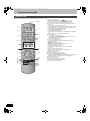
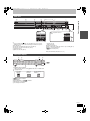
Control reference guide . . . . . . . . . . . . . . . . . . . . . . . . . . 6
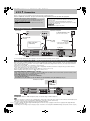
STEP 1 Connection . . . . . . . . . . . . . . . . . . . . . . . . . . . . . 8
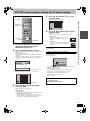
STEP 2 Channel reception settings and
TV aspect settings . . . . . . . . . . . . . . . . . . . . . . . . . . . . . 9
HDD and disc information . . . . . . . . . . . . . . . . . . . . . . . 10
USB memory and card information . . . . . . . . . . . . . . . 12
Regarding DivX files, MP3 files and still pictures (JPEG) . . . . . . . 13
Media handling (Disc/USB memory/SD card) . . . . . . . 14
Watching analogue and digital broadcasts . . . . . . . . .
Playing recorded video contents
/Playing play-only discs. . . . . . . . . . . . . . . . . . . . . . . .
Recording television programmes . . . . . . . . . . . . . . . .
Timer recording . . . . . . . . . . . . . . . . . . . . . . . . . . . . . . .
Deleting titles . . . . . . . . . . . . . . . . . . . . . . . . . . . . . . . . .
Editing titles/chapters . . . . . . . . . . . . . . . . . . . . . . . . . .
Creating, editing and playing playlists . . . . . . . . . . . . .
Editing still pictures and music. . . . . . . . . . . . . . . . . . .
Entering text . . . . . . . . . . . . . . . . . . . . . . . . . . . . . . . . . .
Reference
4
4
5
5
Getting started
Editing
Getting started
Included accessories . . . . . . . . . . . . . . . . . . . . . . . . . . . .
The remote control information . . . . . . . . . . . . . . . . . . .
HDD (Hard disk drive) handling care . . . . . . . . . . . . . . .
Unit care . . . . . . . . . . . . . . . . . . . . . . . . . . . . . . . . . . . . . .
About descriptions in these operating instructions
The illustrations in these Operating Instructions show images of
DMR-EX78 unless otherwise indicated.
[EX88] : indicates features applicable to DMR-EX88 only.
[EX78] : indicates features applicable to DMR-EX78 only.
≥Instructions/notes regarding SD cards and SD drive are
applicable to the DMR-EX88 model only.
≥Pages to be referred to are indicated as “➡ ±±”.
RQT9088
3