1
Overview of Position-based Operation (continued)
Controlling Ram
Velocity (Mode 3
Only)
Ram velocity can be handled through either open- or closed-loop control. In
open-loop control, the module directly drives the output based on the
velocity setpoint. In closed-loop control, the module attempts to match the
velocity of the ram to a velocity setpoint. In either case, you can specify a
velocity profile for ram push-out during profile execution.
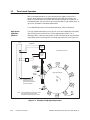
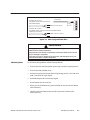
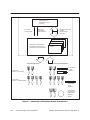
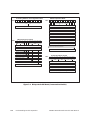
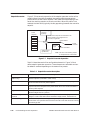
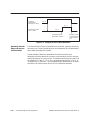
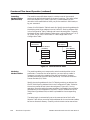
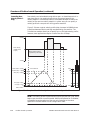
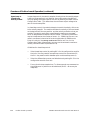
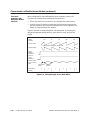
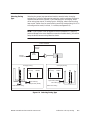
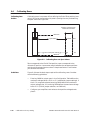
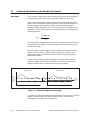
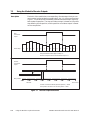
Figure 5-3 shows a typical velocity profile (shot size equal to 28000) where
transitions between velocity settings are specified by ram position. The
TurboParison module allows you to specify up to a 256-step velocity profile;
however, most applications require no more than 8 or 16 steps.
Velocity Profile (executed when profile is enabled)
+32000
95%
75%
50%
Ram Velocity
(32000=100%
output)
20%
t
Back pressure setting
(specified by hold value)
–32000
Total Stroke = 32000
Span
Accumulator fill
Shot Size (SS) = 28000
SS
85% (SS) = 23800
20% (SS) = 5600
5% (SS) = 1400
0
Zero
Ram push-out
Ram Position
t
Figure 5-3 Example of the Relationship Between Ram Velocity and Position
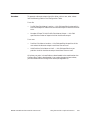
NOTE: The velocity profile is executed during the ram push-out cycle, which
begins upon transition to profile enable. When profile execution is disabled,
the module forces the setpoint of the ram axis controller to the value
specified in the hold location of the Configuration Table.
5-4
Position-based Operation
SIMATIC 505 TurboParison Module User Manual