1
0000H
0001H
001EH
001FH
0020H
0021H
003EH
003FH
0040H
0041H
005EH
005FH
0060H
0061H
007EH
007FH
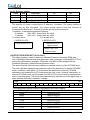
(2) Graphic home address set (D1-D2-42H)
The starting address of external display RAM for Graphic display is defined by this
command.
The graphic home address shows the left end and most upper line.
The relationship of external display RAM address and display position
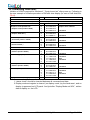
GH
GH+CL
GH+GA
CH+GA+CL
(GH+GA)+GA
GH+2GA+CL
(GH+2GA)+GA
GH+3GA+CL
~
~
GH+(n-1)GA
GH+(n-1)GA+CL
GH: Graphic Home address
GA:Graphic area number (columns)
CL: Columns are fixed by hardware, pin-programmable,this LCM can be set by
jumper”J1”,When J1 connected to “V”,CL=32,and connected to “G”,CL=40.
Default: CL=32.
(example) Graphic home address = 0000H
Graphic area = 0020H
CL=32 columns
2 lines
0000H
0001H
001EH
001FH
0020H
0021H
003EH
003FH
0040H
0041H
005EH
005FH
0060H
0061H
007EH
007FH
0080H
0081H
009EH
009FH
00A0H
00A1H
00BEH
00BFH
00C0H
00C1H
00DEH
00DFH
00E0H
00E1H
00FEH
00FFH
0100H
0101H
011EH
011FH
0120H
0121H
013EH
013FH
0140H
0141H
015EH
015FH
0160H
0161H
017EH
017FH
01A0H
01A1H
01BEH
01BFH
01C0H
01C1H
01DEH
01DFH
01E0H
01E1H
01FEH
01FFH
(3)Text area set(D1-00-41H)
The columns of display are defined by the hardware setting. This command can be
used to adjus t columns of display.
GG24064A3-02WA0_A00
Page 15 of 27