1
x
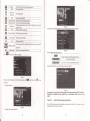
It shows volme is decreased when it
shift towed left. While volme is increase whm it is
Adjust volume.
m
EEg==
Volume
shifted towed risht.
&
Close
rrt
a
Settitrg
B
E3I
@
n
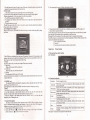
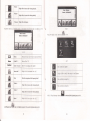
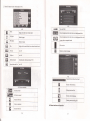
Single click to close the audio player;
the
playing mode
Open tlle play
list
t_a
EI
-*
EI
Suppon sequencial playing, loop playing, repeat playing
md rmdom playing.
Single click to disptay the play list, md choose you
Playing
AdjNt the progess by slide the progress-displayitrg btr;
progrcss
go left for backwads, go right for
Song title
Show the song title
r&ffi
EEE
Total time
n
Ei
Show the time progress
fomtrds;
1
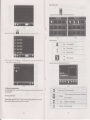
Single click to close cunetrt file
Lasl
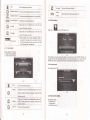
Show last page
nexl
Show nextpage
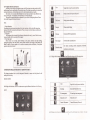
Video folder name
Video name
Iril
favorite m pichre 4-22 shows;
l lme
Close
Choose the video to enter the playing interface
as
Video folder name
Show video
nme
4-26
l
;
Show the total time for playing the song;
Homepage
4.5 Video operation lnterface
This chapter inhoduced how to use the GPS video player
E
4.5,1 Functions and features
1.
2.
Suppofr ASF, AVI,
Suppon full-screen
wlvw, 3cP,
MP4 md FLV
progress choosing and file selecrion;
plafngBeforeusingtheVideoplayer,pleasecopyyourvideofile (ASF,A\T,WMV,3Gp,Mp4andFLV)
to any foldel
ffiffi
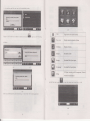
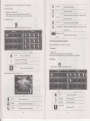
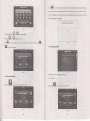
Single click the ViO"o
O.oor B
to enter the video file list
as
the picture 4-24
m
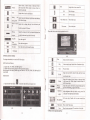
It shows stop playitrg. Single click will continue to play.
m
Next
Play next video.
l!=l
1
tI
Click to close the video listi
Play
r.=t
4,5.2 Operation
1.
Close
;:r
EE:!!!!
iE83il
N&
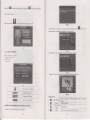
Single click and shift to video fi1e list, and then choose
File list
you favorite video.
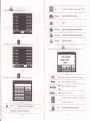
Single click volume.
Volume
It shows volume is decreased when
it shift towed left. Wlile volme is
increase whetr
it
is
shifted toward ilght.
Playmg
Brighhess
adjust
AdJust the progress by slide the prcgiess-displaying bar;
Eo Iefi for h,cfrvard( oo riohr far fnnvard<.
Adjust brighhess with stylus while movitrg towdd left
md right. Tum dght meam tum brighter
Full screen play. Double click to retum nomal play
Play interface
stafus.
EIIE
Video trame
@
Time
Show current Video
nme
Show ihe time consmed / The total time of the video
operation
t7