1
it will possibly bdng damage to you md oth6.
This user mmual oily adapts to ou GPS navigalor
Chapter
Tiyo
Storage humidity
godr{r
Amospheric
Features aod specificatiotrs
pressure
2.1 Main features
aOperatiq system: Mioosoft Windows CE 6.0;
O4.3" TFT LCD displa) with resolulion o[480*272 pixels;
tlHi-Fi stereo earpho0e md built-in Hi-Fi speaket volme adjustable:
aButtotr md touch-screen operationi
aBuilt-in sensitive GPS mtema!
iThe navigating softwde could m the SD cdd directly:
aVideo fomat supported: ASF,AVI,WMV3GP,MP4,FLVT
aPhoto fomat suppofred: BMP, JPG PNG:
O E-book fomat suppofted : TXT:
a Ml'l\ I L SB poa,
aBuilt-in rechegeable Li-battery which cm be powered by travel md
LCD display
'lbuch-screen
ChapterThree M.nu.llnstruction
ctr chtrger
MediaTek MT3351
64/128 MBytes
64 MBvtes
or
)
It I
LLD
.lanpCAG1-r7rn/\
Hrsh-accmcv. endmble touch-sffed
slot,
the
mdlmu
capactty
of SD Cad
sunnofred reaches to 8GB
Audio
A: tsullt-m hgtr lrdelrty spe*s
R. gioh fid;l;tu.tere^ F,mh^ne
GPS
Lolo sBn: <4zs
Hot start: <3s(inthe open d@)
Brttery
Built-in rechegeabte Li-battery
5.8ery
Otsplay.
n
SD / MMC
SD
u/-* -+-*.
86KPa to 106KPa
This chapter will give an introductiotr ofthe apptrent components and baic function
of-the GPS Navigator ard it witl help you to be fmilie with the boic operation quickly.
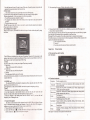
2.3 Product appearance
2.2 Specification
CPU
Ilash memory
EMS memon
30% to 90%RH
-1<"
3.1 Power supply aDd charge
Ifthis navigator is fust used, please use AV adaptor to fully chage it.
3.1.1 Power strpply
Thqe de three t,?es ofsupplying powei: battery adaptor, USB cable.
GPS wigator uses the Li-battery to supply powq whetr it is not comected with adaptor The
mark lm&q on the up right of interfrce indicate the curent electric volme.
GPS navigator uses the extemal power when it is comected with fte adaptor
GPS Davjgator uses the USB cable to supply power when the GPS comects to the PC.
( Remakl This machine adopt built-in, miliaigeable Lithim battery. At tromal conditioo (if the
back light is not so bright). the actual supply hou cm be different because ofthe different way 6itrg
the navigator. Some function (audio plafng, video plalng bright back light) will consume a lage
oower. which will reduce the usrno hour.
'(NoreI Thismachineadoptsbuiitin,unchmgeableLithimbatteryInordertoavoidfreand
bming.
please do nor poke. bmp or take it apm or rhrow ir inlo fire or warer.
3.1,2 Use the travel charger to supply power(Optional)
When the GPS navigator is first used, please Ne the AC adaptor to chage it.
I.
Comect the DC part of the adaptor with the power itrterface at rhe left side of the mit (The
power interface is sme as USB interface );
2. The orher pai comect to the power socket. it supplies power while chuging.
( RemilkI 'Red LED indrcaiei ifs being chtrgedi i,lea; wait util it is 6llichaged md don't putl
out the adaptor while chegitrg. When it is fi.rlly-chtrged, the LED will tum to Blue. Iflow battery or
Do banery- ple6e chtrge it imedialely.
3.1.2 Use the car charger to supply power
'l . Connect the DC part ofthe adaptor with the power interface;
2. The other part comect to the power socket, it supplies power while chaging.
Ulargrng DC 5V port
AC Charser
Car Chrrser
Status ol tIe LUl,
lioht
Operating SYstem
Navrganotr
I00/210V chdeer. 5V,/ l.5A
DC9.24V5VlI5A
when chagmg,
fre rd xght ls on; when
ffni<hed thP htre l;Ght i<
^n
Microsoft Windows CE 5.0
charge
SD card
video Player
ASEAVI,WMV,3GP, MP4,FLVI
Audio Player
MP3 and WMA
Photo viewer
E-Album, JPQ, GIF, BMP, PNG
EBook Viewer
TXT
Temperature
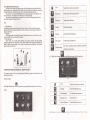
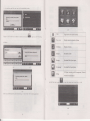
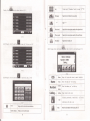
l>creen aolusrmenrj lueraur sl [\ollc.I
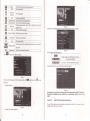
lPowr'l lBacl<liohtl ITime an.l Daipl lI anqraoel tSrs InfoI
Uperatmg lemperature : 01j to 60L
worKng numorry
45% to 80o/.RH
System setting
[rM rransmEerl
Storase
TmDoatue ,
lNoreI
Please insert the
elecficity collisiotr.
3.2 Porer on/off
-20"C to 60"C
cr
adapror after
mirg
cd
so as trot to dmnage the machine
by
Poser on/off is controlled.
3.2.1 Power on:
Pleoe check: The battery is etrough, or it is comected to extemal power souce;
ofrhe uit to boot.
one place to eothq place, please boot mrit it adapts to the
envfuoment. Big humidity fluchration will make the mahftare short circuiled.
Please press the butron on the lop
(Notel If bring the mit fom
3.2.2 Power
off
3