1
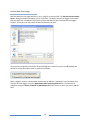
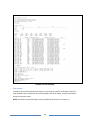
Log File View AutoPoll Log When the AutoPoll program calls loggers, it creates a text file that contains a summary of all of the calls made called the AutoPoll Log. An excerpt example of the Log is shown below: At the end of each call, a dashed line is added to the bottom of the file to separate calling sessions. - DENT Instruments AutoPoll Event Log File Connecting to logger ELITE on 04/10/14 at 10:54:31 Direct connection to logger ELITE completed Setting clock from 10:54:36 04/10/14 to 10:54:38 04/10/14 for logger ELITE Task complete for call to logger ELITE Downloading data for logger ELITE Download of data from logger ELITE completed. Appended to file ELITE-01.elog All session calls completed - 1 Calls Attempted - 0 Calls Failed ---------------------------------------Connecting to logger ELITE on 04/10/14 at 11:08:01 Direct connection to logger ELITE completed Setting clock from 11:08:07 04/10/14 to 11:08:08 04/10/14 for logger ELITE Task complete for call to logger ELITE Downloading data for logger ELITE Download of data from logger ELITE completed. Appended to file ELITE-01.elog All session calls completed - 2 Calls Attempted - 0 Calls Failed The file created shows the status of each call (and attempted call) made to the logger(s) in the Logger List and includes changes made to the logger clock if the Set Logger Clock flag has been checked in the Logger List. At the end of the session, a summary of the calls attempted and failed will be shown. If the software took three attempts to contact a logger and was successful on the third try, the summary would still show 1 Call Attempted - 0 Calls Failed. The file created is labeled autopoll.log and is automatically saved to whatever folder contains the ELOG application program (typically C:\Users\UserName\Documents\DENT\ELOG\Data). The folder where the file is saved may not be changed except by moving the ELOG application too. 108