1
Drivven, Inc.
SADI Driver System
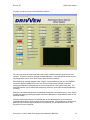
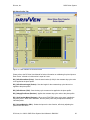
controller in order to connect to the calibration interface.
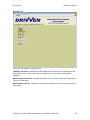
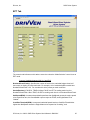
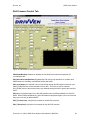
Figure 10. Calibration Interface Screen Shot
The user may press the square red stop button on the CalVIEW console to stop the host user
interface. This will not stop the cRIO-9012 target application. If the user desires to also stop the
target application, then the red “Stop Target” button should be pressed.
Other than being manually stopped (“Stop Target”) or powered down by the user, the CalVIEW
interface is always available to the user, even during normal system operation in the field.
Viewing the calibration interface does not limit the performance of the system in any way. The
CalVIEW interface may be started and stopped any number of times while the target application
is running.
When the user makes changes to the parameters through the user interface host VI, they may be
saved to the target by pressing the purple disk (Save Calibration as Target Default) button on the
CalVIEW console.
There are several other features of CalVIEW that are not discussed here, such as saving a
CalVIEW settings file for quickly starting the host user interface. Those features are discussed in
detail within the CalVIEW user manual which is installed to your Windows Start menu under
Programs->Drivven->CalVIEW.
© Drivven, Inc. 2009 • SADI Driver System User’s Manual • D00010X
21