1
Setup
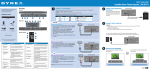
Question 1: How do I set up my soundbar using a digital connection?
Have you tried using your User Guide to help you through this process? If more help is needed, follow the
steps below.
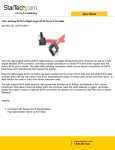
1. Connect a digital output cable (not included) to the DIGITAL OPTICAL OUTPUT jack of your
source device (i.e. TV, projector, or DVD/Blu-ray player).
2. Connect the other end to the OPTICAL IN jack on the back of your soundbar.
3.
4.
5.
6.
Connect the AC adapter to the DC IN jack on the back of the soundbar.
Plug the other end of the AC adapter into a power outlet.
Press the power button to turn on the soundbar. The power indicator turns green.
Change your source device’s audio output to “PCM” format. Refer your source device’s user
manual for additional information.
7. Turn on the sound source device connected to your soundbar and begin playback.
8. Press the Input button on the top of the soundbar or on the remote control repeatedly to select
the OPTICAL IN source. The sound plays through the soundbar.
Question 2: How do I set up my soundbar using an AUX IN connection?
Have you tried using your User Guide to help you through this process? If more help is needed, follow the
steps below.
1. If you are wall mounting your soundbar, you must use the included 3.5 mm audio cable with the
right-angled AUX IN connector.
2. Connect your 3.5mm audio cable to the AUDIO IN jack on the back of your soundbar.
3. Connect the other end to the AUDIO OUTPUT of your source device (e.g. TV, projector, or
DVD/Blu-ray player).
4.
5.
6.
7.
8.
Connect the AC adapter to the DC IN jack on the back of the soundbar.
Plug the other end of the AC adapter into a power outlet.
Press the power button to turn on the soundbar. The power indicator turns green.
Turn on the sound source device connected to your soundbar and begin playback.
Press the Input button on the top of the soundbar or on the remote control repeatedly to select
AUX IN source. The sound plays through the soundbar.
9. Press the power button again to turn off the soundbar. The standby indicator turns on.
2
V1 14-0552