1
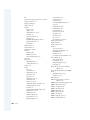
described 17
disabling lines of 103
entering 98
exiting 107
finding errors in 117
global variables for 100
jumping to another position in 108
labels in 103
maximum number of commands in 101
numbers in 102
properties 101
size of 101
specifying 81
uses for 97
viewing 101
writing 51–52
Script window 98
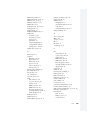
SDDS (Sony Dynamic Digital Sound) 147
segments 59
Selection Condition property 82
serial number
DVD Studio Pro software 11
QuickTime Pro software 11
Set In Point command 94
Set Out Point command 94
setSubtitleStream function 107
settings
audio capture settings 58
audio settings 132
bit stream settings 132–133
preprocessing settings 133
video capture settings 58
shortcuts 96
Show All Angles option 26, 68
16:9 aspect ratio 58, 65
Skip keys 114
slideshow editor 38–39
slideshows
audio format and 62
creating 37–39
described 17
graphics 65
multiple languages in 89
Photoshop format 65
PICT format 65
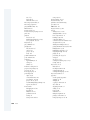
168
Index
previewing 39
selecting thumbnail images for 73
Slow-Down Background Tasks option 68
software encoders 59
software requirements 10
Sony Dynamic Digital Sound (SDDS) 147
sound. See audio
Sound control panel 134
SoundDesigner format 62
SoundDesigner II format 126, 153
sound files, encoding with A.Pack 127–133
Sound Manager 134, 135
Sound Manager driver 134
source material
gathering 12
multiple tracks 59
preparing 57–66
segmenting 59
subtitles 89
types of 12, 57
spatial mixing 138–139
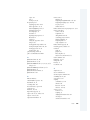
specifications
audio 153–154
DVD 141152–154
video 152
square brackets [] 102
Startup Action property 69, 80
startup actions 41, 81
STE. See Subtitle Editor
stereo playback 134, 139
stereo plus center 126
still menus
creating 26–28
creating graphics for 63
stop command 107
Stop key 24, 43, 107, 114, 115
stories
creating 43–44
described 17
Stories Folder 43
story icon 44
streams
AC-3 streams 128–129, 134–137
audio streams 59, 62, 70
getting information about 137