1
SyxthSense Ltd
Example Modbus Master
Configuration for WebBiter
Web-Browser Interface
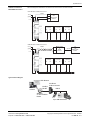
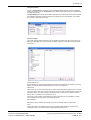
In the following example the MOD-M-BUS converter is connected to DHZ single phase electricity
meter and and MTK Modular water meter. DHZ has M-Bus primary address 1 and MTK has M-bus
primary address 4.
Web-Browser
Modbus
RS-485
Ethernet
Intranet
Modbus to
M-Bus Converter
M-BUS
WebBiter
Modbus
Master
M-Bus Primary
Address 4
M-Bus Primary
Address 1
Note: The M-bus primary addresses must be configured before connecting the meters to the
MOD-M-BUS converter. Depending on the meter model and make, the M-Bus primary address can be
set using tool such as MBCONF.
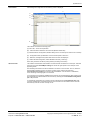
The Modbus slave addres of the converter in this example is set to 10 (WebBiter Modbus slave range
is 1-247). The M-bus communication speed on the converter is set to 2400 baud (typical value on the
M-bus meters). The WebBiter serial cable (NET-CAB485 cable) connections are as follows:-
Cable Colour
Orange-White
Orange
Function
RS485 +
RS485 -
MOD-M-BUS Converter
A
B
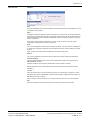
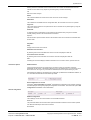
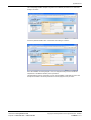
The MOD-M-BUS configuration is as follows:-
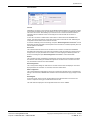
The above table describes the required settings for the DHZ and MTK meters. The dataformat
selected is 3 - 32-bit Floatingpoint Inverted value. Valueindex for both meters is 0 as the first M-bus
telegram represents the consumption figure.
The holding registers that is used to read the data for DHZ electricity meter is 501 and for the MTK
water meter is 503.
Notes: In the view of a constant development of their
products, the manufacturer reserves the right for changing
technical data and features without prior notice.
Online store: www.syxthsense.com
Enquiries: T: 0870 20 80 100 F: 0870 20 80 200
Copyright © 2008 SyxthSense Ltd. All rights reserved - 06/2008
PS SW4.06 - 10/11