1
Table of Content
1. Preparations ·········································································· 1
Unboxing your tablet ··············································································· 1
Charging the battery ················································································ 1
Getting to know your tablet········································································ 1
Front view ···················································································· 1
Rear view ····················································································· 1
mDock························································································· 1
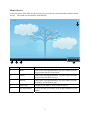
Home Screen ················································································· 3
2. Setting up Your Tablet ····························································· 4
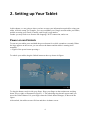
Power on and Unlock ··············································································· 4
Selecting your language ············································································ 5
Connecting to a Wi-Fi network ··································································· 6
Sign in to or create an account ···································································· 7
3. Basic Operations ····································································· 8
Button operations ··················································································· 8
Locking your tablet ·········································································· 8
Waking your tablet ·········································································· 8
Turning off your tablet ······································································ 8
Controlling the volume······································································ 9
Touchscreen operations ··········································································· 10
Tap, Drag, Scroll and other Gestures ····················································· 10
Typing ························································································ 10
Editing text ·······································································································································10
Inserting text ····································································································································10
Selecting text ····································································································································11
4. Start using your tablet ···························································· 12
What can you do from the Home screen ························································ 12
Searching ···················································································· 12
Starting an app ·············································································· 12
Using a widget ·············································································· 13
Reviewing recent apps ····································································· 13
What can you do from the Status area··························································· 13
Viewing detail information ································································ 14
Quick accessing to options ································································ 14
Personalizing your Home screen ································································· 15
Changing new wallpaper··································································· 15
Adding or removing app icons ···························································· 16
Creating app folders ········································································ 16
Placing an widget ··········································································· 17
Resizing an widget·········································································· 17
Moving and removing icons, folders, and widgets ····································· 17
5. Share files with your computer ················································· 18
Configuring your USB connection ······························································ 18
Connecting to your computer using a USB cable ·············································· 18
Copying files from or to your computer ························································ 19
More about files transferrring ···································································· 19