1
Ham Radio Deluxe
May 11, 2012
y
ar
in
im
el
Pr
Preliminary
User Guide
Version 5.21
Copyright 2012 HRD Software LLC, all rights reserved worldwide
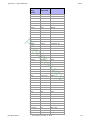
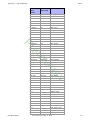
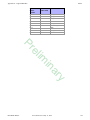
Table of Contents
Table Of Contents
Table Of Contents
i
ar
in
im
el
Pr
Chapter 1 - Introduction
1
What is Ham Radio Deluxe? - - - - - - - - - - - - - - - - - - - - - - - - - - - - - - - - - - - - - - - - - 1
Rig Control . . . . . . . . . . . . . . . . . . . . . . . . . . . . . . . . . . . . . . . . . . . . . . . . . . . . . . . . . . . 1
Logbook . . . . . . . . . . . . . . . . . . . . . . . . . . . . . . . . . . . . . . . . . . . . . . . . . . . . . . . . . . . . . . 1
Digital Master (DM-780) . . . . . . . . . . . . . . . . . . . . . . . . . . . . . . . . . . . . . . . . . . . . . . . . 1
Satellite Tracking . . . . . . . . . . . . . . . . . . . . . . . . . . . . . . . . . . . . . . . . . . . . . . . . . . . . . . . 1
Rotator . . . . . . . . . . . . . . . . . . . . . . . . . . . . . . . . . . . . . . . . . . . . . . . . . . . . . . . . . . . . . . . 1
How It All Began - - - - - - - - - - - - - - - - - - - - - - - - - - - - - - - - - - - - - - - - - - - - - - - - 1
This Guide - - - - - - - - - - - - - - - - - - - - - - - - - - - - - - - - - - - - - - - - - - - - - - - - - - - - - 1
System Requirements - - - - - - - - - - - - - - - - - - - - - - - - - - - - - - - - - - - - - - - - - - - - - - 2
Computer . . . . . . . . . . . . . . . . . . . . . . . . . . . . . . . . . . . . . . . . . . . . . . . . . . . . . . . . . . . . . 2
Supported Radios . . . . . . . . . . . . . . . . . . . . . . . . . . . . . . . . . . . . . . . . . . . . . . . . . . . . . . . 2
Internet Connection . . . . . . . . . . . . . . . . . . . . . . . . . . . . . . . . . . . . . . . . . . . . . . . . . . . . . 2
Radio Interfacing . . . . . . . . . . . . . . . . . . . . . . . . . . . . . . . . . . . . . . . . . . . . . . . . . . . . . . . 3
Public Interfaces . . . . . . . . . . . . . . . . . . . . . . . . . . . . . . . . . . . . . . . . . . . . . . . . . . . . . . . 3
Installation - - - - - - - - - - - - - - - - - - - - - - - - - - - - - - - - - - - - - - - - - - - - - - - - - - - - - 3
Introduction . . . . . . . . . . . . . . . . . . . . . . . . . . . . . . . . . . . . . . . . . . . . . . . . . . . . . . . . . . . 3
Ham Radio Deluxe . . . . . . . . . . . . . . . . . . . . . . . . . . . . . . . . . . . . . . . . . . . . . . . . . . . . . 4
First Steps - - - - - - - - - - - - - - - - - - - - - - - - - - - - - - - - - - - - - - - - - - - - - - - - - - - - - 7
Connection . . . . . . . . . . . . . . . . . . . . . . . . . . . . . . . . . . . . . . . . . . . . . . . . . . . . . . . . . . . . 7
Dem-o-matic . . . . . . . . . . . . . . . . . . . . . . . . . . . . . . . . . . . . . . . . . . . . . . . . . . . . . . . . 8
Configuration Options . . . . . . . . . . . . . . . . . . . . . . . . . . . . . . . . . . . . . . . . . . . . . . . . 8
Connecting . . . . . . . . . . . . . . . . . . . . . . . . . . . . . . . . . . . . . . . . . . . . . . . . . . . . . . . . . 9
What’s Next - - - - - - - - - - - - - - - - - - - - - - - - - - - - - - - - - - - - - - - - - - - - - - - - - - - 10
Appearance . . . . . . . . . . . . . . . . . . . . . . . . . . . . . . . . . . . . . . . . . . . . . . . . . . . . . . . . . . 10
y
Chapter 2 - Getting Started
13
Introduction - - - - - - - - - - - - - - - - - - - - - - - - - - - - - - - - - - - - - - - - - - - - - - - - - - - 13
Menus and Toolbars - - - - - - - - - - - - - - - - - - - - - - - - - - - - - - - - - - - - - - - - - - - - - - 13
Menu Bar . . . . . . . . . . . . . . . . . . . . . . . . . . . . . . . . . . . . . . . . . . . . . . . . . . . . . . . . . . . . 13
Toolbar . . . . . . . . . . . . . . . . . . . . . . . . . . . . . . . . . . . . . . . . . . . . . . . . . . . . . . . . . . . . . 14
Frequency Display - - - - - - - - - - - - - - - - - - - - - - - - - - - - - - - - - - - - - - - - - - - - - - - 16
Enhanced Display . . . . . . . . . . . . . . . . . . . . . . . . . . . . . . . . . . . . . . . . . . . . . . . . . . . . . 16
Configuration . . . . . . . . . . . . . . . . . . . . . . . . . . . . . . . . . . . . . . . . . . . . . . . . . . . . . . . . . 17
Frequency Selection . . . . . . . . . . . . . . . . . . . . . . . . . . . . . . . . . . . . . . . . . . . . . . . . . . . 17
Mouse Wheel . . . . . . . . . . . . . . . . . . . . . . . . . . . . . . . . . . . . . . . . . . . . . . . . . . . . . . 17
Up/Down . . . . . . . . . . . . . . . . . . . . . . . . . . . . . . . . . . . . . . . . . . . . . . . . . . . . . . . . . . 18
Mouse-click . . . . . . . . . . . . . . . . . . . . . . . . . . . . . . . . . . . . . . . . . . . . . . . . . . . . . . . 18
Direct Entry . . . . . . . . . . . . . . . . . . . . . . . . . . . . . . . . . . . . . . . . . . . . . . . . . . . . . . . 18
Griffin etc. . . . . . . . . . . . . . . . . . . . . . . . . . . . . . . . . . . . . . . . . . . . . . . . . . . . . . . . . . 18
Tuning Dial - - - - - - - - - - - - - - - - - - - - - - - - - - - - - - - - - - - - - - - - - - - - - - - - - - - 18
Ham Radio Deluxe
User Guide V5.21- May 11, 2012
i
Table of Contents
Fine Tuning . . . . . . . . . . . . . . . . . . . . . . . . . . . . . . . . . . . . . . . . . . . . . . . . . . . . . . . . . . 18
Main Tuning . . . . . . . . . . . . . . . . . . . . . . . . . . . . . . . . . . . . . . . . . . . . . . . . . . . . . . . . . 19
Band Selection . . . . . . . . . . . . . . . . . . . . . . . . . . . . . . . . . . . . . . . . . . . . . . . . . . . . . . . . 19
Display Scroll . . . . . . . . . . . . . . . . . . . . . . . . . . . . . . . . . . . . . . . . . . . . . . . . . . . . . . . . 19
Band Layout Selection . . . . . . . . . . . . . . . . . . . . . . . . . . . . . . . . . . . . . . . . . . . . . . . . . 19
Date & Time . . . . . . . . . . . . . . . . . . . . . . . . . . . . . . . . . . . . . . . . . . . . . . . . . . . . . . . . . 19
Buttons . . . . . . . . . . . . . . . . . . . . . . . . . . . . . . . . . . . . . . . . . . . . . . . . . . . . . . . . . . . . . . 20
Dropdowns . . . . . . . . . . . . . . . . . . . . . . . . . . . . . . . . . . . . . . . . . . . . . . . . . . . . . . . . . . 20
Sliders . . . . . . . . . . . . . . . . . . . . . . . . . . . . . . . . . . . . . . . . . . . . . . . . . . . . . . . . . . . . . . 20
y
ar
in
im
el
Pr
Chapter 3 - Configuration
21
Customize Layout - - - - - - - - - - - - - - - - - - - - - - - - - - - - - - - - - - - - - - - - - - - - - - - 21
Introduction . . . . . . . . . . . . . . . . . . . . . . . . . . . . . . . . . . . . . . . . . . . . . . . . . . . . . . . . . . 21
Schemes . . . . . . . . . . . . . . . . . . . . . . . . . . . . . . . . . . . . . . . . . . . . . . . . . . . . . . . . . . . . . 21
Layout . . . . . . . . . . . . . . . . . . . . . . . . . . . . . . . . . . . . . . . . . . . . . . . . . . . . . . . . . . . . . . 22
Clear Entry . . . . . . . . . . . . . . . . . . . . . . . . . . . . . . . . . . . . . . . . . . . . . . . . . . . . . . . . 23
Moving Entries . . . . . . . . . . . . . . . . . . . . . . . . . . . . . . . . . . . . . . . . . . . . . . . . . . . . . 23
Dropdown Button / CAT Command / Macros . . . . . . . . . . . . . . . . . . . . . . . . . . . . . 23
Hiding . . . . . . . . . . . . . . . . . . . . . . . . . . . . . . . . . . . . . . . . . . . . . . . . . . . . . . . . . . . . 24
Dropdowns . . . . . . . . . . . . . . . . . . . . . . . . . . . . . . . . . . . . . . . . . . . . . . . . . . . . . . . . 24
Unassigned . . . . . . . . . . . . . . . . . . . . . . . . . . . . . . . . . . . . . . . . . . . . . . . . . . . . . . . . 24
Styles . . . . . . . . . . . . . . . . . . . . . . . . . . . . . . . . . . . . . . . . . . . . . . . . . . . . . . . . . . . . 24
. . . . . . . . . . . . . . . . . . . . . . . . . . . . . . . . . . . . . . . . . . . . . . . . . . . . . . . . . . . . . . . . . 24
Save / Load . . . . . . . . . . . . . . . . . . . . . . . . . . . . . . . . . . . . . . . . . . . . . . . . . . . . . . . . 24
Buttons . . . . . . . . . . . . . . . . . . . . . . . . . . . . . . . . . . . . . . . . . . . . . . . . . . . . . . . . . . . . . . 25
Faceplate . . . . . . . . . . . . . . . . . . . . . . . . . . . . . . . . . . . . . . . . . . . . . . . . . . . . . . . . . . . . 26
Background . . . . . . . . . . . . . . . . . . . . . . . . . . . . . . . . . . . . . . . . . . . . . . . . . . . . . . . . 26
Status Window . . . . . . . . . . . . . . . . . . . . . . . . . . . . . . . . . . . . . . . . . . . . . . . . . . . . . 26
Clock Position . . . . . . . . . . . . . . . . . . . . . . . . . . . . . . . . . . . . . . . . . . . . . . . . . . . . . . 26
Frequency . . . . . . . . . . . . . . . . . . . . . . . . . . . . . . . . . . . . . . . . . . . . . . . . . . . . . . . . . . . 27
Dropdowns . . . . . . . . . . . . . . . . . . . . . . . . . . . . . . . . . . . . . . . . . . . . . . . . . . . . . . . . 27
Meters . . . . . . . . . . . . . . . . . . . . . . . . . . . . . . . . . . . . . . . . . . . . . . . . . . . . . . . . . . . . . . 28
Sliders: Appearance . . . . . . . . . . . . . . . . . . . . . . . . . . . . . . . . . . . . . . . . . . . . . . . . . . . . 29
Sliders: Layout . . . . . . . . . . . . . . . . . . . . . . . . . . . . . . . . . . . . . . . . . . . . . . . . . . . . . . . . 30
Tuning Dial . . . . . . . . . . . . . . . . . . . . . . . . . . . . . . . . . . . . . . . . . . . . . . . . . . . . . . . . . . 30
Program Options - - - - - - - - - - - - - - - - - - - - - - - - - - - - - - - - - - - - - - - - - - - - - - - - 31
Introduction . . . . . . . . . . . . . . . . . . . . . . . . . . . . . . . . . . . . . . . . . . . . . . . . . . . . . . . . . . 31
Keyboard Accelerators . . . . . . . . . . . . . . . . . . . . . . . . . . . . . . . . . . . . . . . . . . . . . . . . . 31
Comms . . . . . . . . . . . . . . . . . . . . . . . . . . . . . . . . . . . . . . . . . . . . . . . . . . . . . . . . . . . . . . 32
COM Port TX . . . . . . . . . . . . . . . . . . . . . . . . . . . . . . . . . . . . . . . . . . . . . . . . . . . . . . . . 33
ICOM Calibration . . . . . . . . . . . . . . . . . . . . . . . . . . . . . . . . . . . . . . . . . . . . . . . . . . . . . 33
Info: Modes . . . . . . . . . . . . . . . . . . . . . . . . . . . . . . . . . . . . . . . . . . . . . . . . . . . . . . . . . . 34
Info: CAT Support . . . . . . . . . . . . . . . . . . . . . . . . . . . . . . . . . . . . . . . . . . . . . . . . . . . . . 34
Internet . . . . . . . . . . . . . . . . . . . . . . . . . . . . . . . . . . . . . . . . . . . . . . . . . . . . . . . . . . . . . . 35
Out Of Band . . . . . . . . . . . . . . . . . . . . . . . . . . . . . . . . . . . . . . . . . . . . . . . . . . . . . . . . . 36
Mouse Wheel . . . . . . . . . . . . . . . . . . . . . . . . . . . . . . . . . . . . . . . . . . . . . . . . . . . . . . . . . 36
Ham Radio Deluxe
User Guide V5.21- May 11, 2012
ii
Table of Contents
el
Pr
Selection Window . . . . . . . . . . . . . . . . . . . . . . . . . . . . . . . . . . . . . . . . . . . . . . . . . . . . . 37
Skinning . . . . . . . . . . . . . . . . . . . . . . . . . . . . . . . . . . . . . . . . . . . . . . . . . . . . . . . . . . . . . 37
Themes . . . . . . . . . . . . . . . . . . . . . . . . . . . . . . . . . . . . . . . . . . . . . . . . . . . . . . . . . . . . . 38
Main Theme . . . . . . . . . . . . . . . . . . . . . . . . . . . . . . . . . . . . . . . . . . . . . . . . . . . . . . . 38
System Theme . . . . . . . . . . . . . . . . . . . . . . . . . . . . . . . . . . . . . . . . . . . . . . . . . . . . . 38
Main Tabs . . . . . . . . . . . . . . . . . . . . . . . . . . . . . . . . . . . . . . . . . . . . . . . . . . . . . . . . . 38
Updates . . . . . . . . . . . . . . . . . . . . . . . . . . . . . . . . . . . . . . . . . . . . . . . . . . . . . . . . . . . . . 39
Yaesu . . . . . . . . . . . . . . . . . . . . . . . . . . . . . . . . . . . . . . . . . . . . . . . . . . . . . . . . . . . . . . . 39
Band Layouts - - - - - - - - - - - - - - - - - - - - - - - - - - - - - - - - - - - - - - - - - - - - - - - - - - 39
Introduction . . . . . . . . . . . . . . . . . . . . . . . . . . . . . . . . . . . . . . . . . . . . . . . . . . . . . . . . . . 39
Manager . . . . . . . . . . . . . . . . . . . . . . . . . . . . . . . . . . . . . . . . . . . . . . . . . . . . . . . . . . . . . 40
Adding A Definition . . . . . . . . . . . . . . . . . . . . . . . . . . . . . . . . . . . . . . . . . . . . . . . . . . . 40
Copying A Definition . . . . . . . . . . . . . . . . . . . . . . . . . . . . . . . . . . . . . . . . . . . . . . . . . . 42
Selecting . . . . . . . . . . . . . . . . . . . . . . . . . . . . . . . . . . . . . . . . . . . . . . . . . . . . . . . . . . . . 42
Favorites - - - - - - - - - - - - - - - - - - - - - - - - - - - - - - - - - - - - - - - - - - - - - - - - - - - - - 43
Manager . . . . . . . . . . . . . . . . . . . . . . . . . . . . . . . . . . . . . . . . . . . . . . . . . . . . . . . . . . . . . 43
Markers . . . . . . . . . . . . . . . . . . . . . . . . . . . . . . . . . . . . . . . . . . . . . . . . . . . . . . . . . . . . . 45
y
ar
in
im
Chapter 4 - Advanced Features
46
Audio - - - - - - - - - - - - - - - - - - - - - - - - - - - - - - - - - - - - - - - - - - - - - - - - - - - - - - - 46
Introduction . . . . . . . . . . . . . . . . . . . . . . . . . . . . . . . . . . . . . . . . . . . . . . . . . . . . . . . . . . 46
Audio Grabber . . . . . . . . . . . . . . . . . . . . . . . . . . . . . . . . . . . . . . . . . . . . . . . . . . . . . . . . 46
Record . . . . . . . . . . . . . . . . . . . . . . . . . . . . . . . . . . . . . . . . . . . . . . . . . . . . . . . . . . . . 46
Folder . . . . . . . . . . . . . . . . . . . . . . . . . . . . . . . . . . . . . . . . . . . . . . . . . . . . . . . . . . . . 46
Quality . . . . . . . . . . . . . . . . . . . . . . . . . . . . . . . . . . . . . . . . . . . . . . . . . . . . . . . . . . . 47
Soundcard . . . . . . . . . . . . . . . . . . . . . . . . . . . . . . . . . . . . . . . . . . . . . . . . . . . . . . . . . 47
Tags . . . . . . . . . . . . . . . . . . . . . . . . . . . . . . . . . . . . . . . . . . . . . . . . . . . . . . . . . . . . . . 47
Audio Browser . . . . . . . . . . . . . . . . . . . . . . . . . . . . . . . . . . . . . . . . . . . . . . . . . . . . . . . . 47
MP3 Player Options . . . . . . . . . . . . . . . . . . . . . . . . . . . . . . . . . . . . . . . . . . . . . . . . . 48
Other Options . . . . . . . . . . . . . . . . . . . . . . . . . . . . . . . . . . . . . . . . . . . . . . . . . . . . . . . . 49
Auxiliary Switching - - - - - - - - - - - - - - - - - - - - - - - - - - - - - - - - - - - - - - - - - - - - - - 49
Introduction . . . . . . . . . . . . . . . . . . . . . . . . . . . . . . . . . . . . . . . . . . . . . . . . . . . . . . . . . . 49
Technology . . . . . . . . . . . . . . . . . . . . . . . . . . . . . . . . . . . . . . . . . . . . . . . . . . . . . . . . . . 49
Manager . . . . . . . . . . . . . . . . . . . . . . . . . . . . . . . . . . . . . . . . . . . . . . . . . . . . . . . . . . . . . 50
Definitions . . . . . . . . . . . . . . . . . . . . . . . . . . . . . . . . . . . . . . . . . . . . . . . . . . . . . . . . 50
Port Address . . . . . . . . . . . . . . . . . . . . . . . . . . . . . . . . . . . . . . . . . . . . . . . . . . . . . . . 50
Various . . . . . . . . . . . . . . . . . . . . . . . . . . . . . . . . . . . . . . . . . . . . . . . . . . . . . . . . . . . 51
Creating or Modifying Definitions . . . . . . . . . . . . . . . . . . . . . . . . . . . . . . . . . . . . . . 52
Monitor . . . . . . . . . . . . . . . . . . . . . . . . . . . . . . . . . . . . . . . . . . . . . . . . . . . . . . . . . . . . . 52
DDE Support - - - - - - - - - - - - - - - - - - - - - - - - - - - - - - - - - - - - - - - - - - - - - - - - - - 53
Introduction . . . . . . . . . . . . . . . . . . . . . . . . . . . . . . . . . . . . . . . . . . . . . . . . . . . . . . . . . . 53
Available Support . . . . . . . . . . . . . . . . . . . . . . . . . . . . . . . . . . . . . . . . . . . . . . . . . . . . . 53
Commands . . . . . . . . . . . . . . . . . . . . . . . . . . . . . . . . . . . . . . . . . . . . . . . . . . . . . . . . . . . 53
Add ADIF Record . . . . . . . . . . . . . . . . . . . . . . . . . . . . . . . . . . . . . . . . . . . . . . . . . . . 53
Refresh . . . . . . . . . . . . . . . . . . . . . . . . . . . . . . . . . . . . . . . . . . . . . . . . . . . . . . . . . . . 53
Set Button . . . . . . . . . . . . . . . . . . . . . . . . . . . . . . . . . . . . . . . . . . . . . . . . . . . . . . . . . 53
Ham Radio Deluxe
User Guide V5.21- May 11, 2012
iii
Table of Contents
y
ar
in
im
el
Pr
Set Dropdown . . . . . . . . . . . . . . . . . . . . . . . . . . . . . . . . . . . . . . . . . . . . . . . . . . . . . . 53
Set Frequency . . . . . . . . . . . . . . . . . . . . . . . . . . . . . . . . . . . . . . . . . . . . . . . . . . . . . . 53
Set Mode . . . . . . . . . . . . . . . . . . . . . . . . . . . . . . . . . . . . . . . . . . . . . . . . . . . . . . . . . . 54
Top Window . . . . . . . . . . . . . . . . . . . . . . . . . . . . . . . . . . . . . . . . . . . . . . . . . . . . . . . 54
K1EL WinKey - - - - - - - - - - - - - - - - - - - - - - - - - - - - - - - - - - - - - - - - - - - - - - - - - 54
Introduction . . . . . . . . . . . . . . . . . . . . . . . . . . . . . . . . . . . . . . . . . . . . . . . . . . . . . . . . . . 54
Main Window . . . . . . . . . . . . . . . . . . . . . . . . . . . . . . . . . . . . . . . . . . . . . . . . . . . . . . . . 54
Options . . . . . . . . . . . . . . . . . . . . . . . . . . . . . . . . . . . . . . . . . . . . . . . . . . . . . . . . . . . . . 55
Keyer . . . . . . . . . . . . . . . . . . . . . . . . . . . . . . . . . . . . . . . . . . . . . . . . . . . . . . . . . . . . . 55
Speeds . . . . . . . . . . . . . . . . . . . . . . . . . . . . . . . . . . . . . . . . . . . . . . . . . . . . . . . . . . . . 56
Options . . . . . . . . . . . . . . . . . . . . . . . . . . . . . . . . . . . . . . . . . . . . . . . . . . . . . . . . . . . 57
Pin Config . . . . . . . . . . . . . . . . . . . . . . . . . . . . . . . . . . . . . . . . . . . . . . . . . . . . . . . . . 58
Macros . . . . . . . . . . . . . . . . . . . . . . . . . . . . . . . . . . . . . . . . . . . . . . . . . . . . . . . . . . . 59
Logfile . . . . . . . . . . . . . . . . . . . . . . . . . . . . . . . . . . . . . . . . . . . . . . . . . . . . . . . . . . . . 59
Help . . . . . . . . . . . . . . . . . . . . . . . . . . . . . . . . . . . . . . . . . . . . . . . . . . . . . . . . . . . . . . 59
Macros - - - - - - - - - - - - - - - - - - - - - - - - - - - - - - - - - - - - - - - - - - - - - - - - - - - - - - - 60
Introduction . . . . . . . . . . . . . . . . . . . . . . . . . . . . . . . . . . . . . . . . . . . . . . . . . . . . . . . . . . 60
CAT Commands . . . . . . . . . . . . . . . . . . . . . . . . . . . . . . . . . . . . . . . . . . . . . . . . . . . . . . 60
Manager . . . . . . . . . . . . . . . . . . . . . . . . . . . . . . . . . . . . . . . . . . . . . . . . . . . . . . . . . . 60
Protocols . . . . . . . . . . . . . . . . . . . . . . . . . . . . . . . . . . . . . . . . . . . . . . . . . . . . . . . . . . 61
Input Fields . . . . . . . . . . . . . . . . . . . . . . . . . . . . . . . . . . . . . . . . . . . . . . . . . . . . . . . . . . 63
Manager . . . . . . . . . . . . . . . . . . . . . . . . . . . . . . . . . . . . . . . . . . . . . . . . . . . . . . . . . . 63
Snapshots . . . . . . . . . . . . . . . . . . . . . . . . . . . . . . . . . . . . . . . . . . . . . . . . . . . . . . . . . 65
Quick Save - - - - - - - - - - - - - - - - - - - - - - - - - - - - - - - - - - - - - - - - - - - - - - - - - - - - 65
Introduction . . . . . . . . . . . . . . . . . . . . . . . . . . . . . . . . . . . . . . . . . . . . . . . . . . . . . . . . . . 65
Add Entry . . . . . . . . . . . . . . . . . . . . . . . . . . . . . . . . . . . . . . . . . . . . . . . . . . . . . . . . . . . 65
Markers . . . . . . . . . . . . . . . . . . . . . . . . . . . . . . . . . . . . . . . . . . . . . . . . . . . . . . . . . . . . . 65
Remote Station Support - - - - - - - - - - - - - - - - - - - - - - - - - - - - - - - - - - - - - - - - - - - 66
Introduction . . . . . . . . . . . . . . . . . . . . . . . . . . . . . . . . . . . . . . . . . . . . . . . . . . . . . . . . . . 66
Requirements . . . . . . . . . . . . . . . . . . . . . . . . . . . . . . . . . . . . . . . . . . . . . . . . . . . . . . 66
Technology . . . . . . . . . . . . . . . . . . . . . . . . . . . . . . . . . . . . . . . . . . . . . . . . . . . . . . . . 66
IP Address . . . . . . . . . . . . . . . . . . . . . . . . . . . . . . . . . . . . . . . . . . . . . . . . . . . . . . . . . 66
Firewall . . . . . . . . . . . . . . . . . . . . . . . . . . . . . . . . . . . . . . . . . . . . . . . . . . . . . . . . . . . 66
Example . . . . . . . . . . . . . . . . . . . . . . . . . . . . . . . . . . . . . . . . . . . . . . . . . . . . . . . . . . . . . 67
IC-7800 . . . . . . . . . . . . . . . . . . . . . . . . . . . . . . . . . . . . . . . . . . . . . . . . . . . . . . . . . . . 67
Keyer . . . . . . . . . . . . . . . . . . . . . . . . . . . . . . . . . . . . . . . . . . . . . . . . . . . . . . . . . . . . . 67
Rotator . . . . . . . . . . . . . . . . . . . . . . . . . . . . . . . . . . . . . . . . . . . . . . . . . . . . . . . . . . . 68
Virtual Null Modem Software . . . . . . . . . . . . . . . . . . . . . . . . . . . . . . . . . . . . . . . . . . . . 68
Ham Radio Deluxe Remote Server - - - - - - - - - - - - - - - - - - - - - - - - - - - - - - - - - - - - 68
Installing . . . . . . . . . . . . . . . . . . . . . . . . . . . . . . . . . . . . . . . . . . . . . . . . . . . . . . . . . . . . 68
Firewall . . . . . . . . . . . . . . . . . . . . . . . . . . . . . . . . . . . . . . . . . . . . . . . . . . . . . . . . . . . 69
Configuring . . . . . . . . . . . . . . . . . . . . . . . . . . . . . . . . . . . . . . . . . . . . . . . . . . . . . . . . 69
Restricting TX . . . . . . . . . . . . . . . . . . . . . . . . . . . . . . . . . . . . . . . . . . . . . . . . . . . . . 70
Enable Restart . . . . . . . . . . . . . . . . . . . . . . . . . . . . . . . . . . . . . . . . . . . . . . . . . . . . . . 70
Connecting . . . . . . . . . . . . . . . . . . . . . . . . . . . . . . . . . . . . . . . . . . . . . . . . . . . . . . . . 70
Remote Connection . . . . . . . . . . . . . . . . . . . . . . . . . . . . . . . . . . . . . . . . . . . . . . . . . 72
Ham Radio Deluxe
User Guide V5.21- May 11, 2012
iv
Table of Contents
el
Pr
Problem Solving . . . . . . . . . . . . . . . . . . . . . . . . . . . . . . . . . . . . . . . . . . . . . . . . . . . . 72
Ham Radio Deluxe Serial Port Client - - - - - - - - - - - - - - - - - - - - - - - - - - - - - - - - - - 73
Starting . . . . . . . . . . . . . . . . . . . . . . . . . . . . . . . . . . . . . . . . . . . . . . . . . . . . . . . . . . . . . 73
Mappings . . . . . . . . . . . . . . . . . . . . . . . . . . . . . . . . . . . . . . . . . . . . . . . . . . . . . . . . . . . . 73
Remote Port Settings . . . . . . . . . . . . . . . . . . . . . . . . . . . . . . . . . . . . . . . . . . . . . . . . 74
Connecting . . . . . . . . . . . . . . . . . . . . . . . . . . . . . . . . . . . . . . . . . . . . . . . . . . . . . . . . . . . 74
Ham Radio Deluxe Serial Port Server - - - - - - - - - - - - - - - - - - - - - - - - - - - - - - - - - - 76
Installing . . . . . . . . . . . . . . . . . . . . . . . . . . . . . . . . . . . . . . . . . . . . . . . . . . . . . . . . . . . . 76
Firewall . . . . . . . . . . . . . . . . . . . . . . . . . . . . . . . . . . . . . . . . . . . . . . . . . . . . . . . . . . . 77
Configuring . . . . . . . . . . . . . . . . . . . . . . . . . . . . . . . . . . . . . . . . . . . . . . . . . . . . . . . . . . 77
Synchroniser - - - - - - - - - - - - - - - - - - - - - - - - - - - - - - - - - - - - - - - - - - - - - - - - - - - 78
Introduction . . . . . . . . . . . . . . . . . . . . . . . . . . . . . . . . . . . . . . . . . . . . . . . . . . . . . . . . . . 78
Starting . . . . . . . . . . . . . . . . . . . . . . . . . . . . . . . . . . . . . . . . . . . . . . . . . . . . . . . . . . . . . 78
Dual Radio Satellite Tracking . . . . . . . . . . . . . . . . . . . . . . . . . . . . . . . . . . . . . . . . . . . . 79
3rd-Party Programs - - - - - - - - - - - - - - - - - - - - - - - - - - - - - - - - - - - - - - - - - - - - - - 80
Introduction . . . . . . . . . . . . . . . . . . . . . . . . . . . . . . . . . . . . . . . . . . . . . . . . . . . . . . . . . . 80
Configuring . . . . . . . . . . . . . . . . . . . . . . . . . . . . . . . . . . . . . . . . . . . . . . . . . . . . . . . . . . 80
Testing . . . . . . . . . . . . . . . . . . . . . . . . . . . . . . . . . . . . . . . . . . . . . . . . . . . . . . . . . . . . . . 81
Command Detail . . . . . . . . . . . . . . . . . . . . . . . . . . . . . . . . . . . . . . . . . . . . . . . . . . . . . . 81
y
ar
in
im
Chapter 5 - Logbook
83
Introduction - - - - - - - - - - - - - - - - - - - - - - - - - - - - - - - - - - - - - - - - - - - - - - - - - - - 83
Database . . . . . . . . . . . . . . . . . . . . . . . . . . . . . . . . . . . . . . . . . . . . . . . . . . . . . . . . . . . . 83
Starting . . . . . . . . . . . . . . . . . . . . . . . . . . . . . . . . . . . . . . . . . . . . . . . . . . . . . . . . . . . . . 83
Small Display - - - - - - - - - - - - - - - - - - - - - - - - - - - - - - - - - - - - - - - - - - - - - - - - - - 83
Input Fields . . . . . . . . . . . . . . . . . . . . . . . . . . . . . . . . . . . . . . . . . . . . . . . . . . . . . . . . . . 84
Main Display - - - - - - - - - - - - - - - - - - - - - - - - - - - - - - - - - - - - - - - - - - - - - - - - - - 84
Options . . . . . . . . . . . . . . . . . . . . . . . . . . . . . . . . . . . . . . . . . . . . . . . . . . . . . . . . . . . . . 84
Selection fields: . . . . . . . . . . . . . . . . . . . . . . . . . . . . . . . . . . . . . . . . . . . . . . . . . . . . 85
Adding An Entry - - - - - - - - - - - - - - - - - - - - - - - - - - - - - - - - - - - - - - - - - - - - - - - - 86
Main . . . . . . . . . . . . . . . . . . . . . . . . . . . . . . . . . . . . . . . . . . . . . . . . . . . . . . . . . . . . . . . . 86
QRZ.com . . . . . . . . . . . . . . . . . . . . . . . . . . . . . . . . . . . . . . . . . . . . . . . . . . . . . . . . . . . . 87
Log . . . . . . . . . . . . . . . . . . . . . . . . . . . . . . . . . . . . . . . . . . . . . . . . . . . . . . . . . . . . . . . . . 87
Contact . . . . . . . . . . . . . . . . . . . . . . . . . . . . . . . . . . . . . . . . . . . . . . . . . . . . . . . . . . . . . . 88
Location . . . . . . . . . . . . . . . . . . . . . . . . . . . . . . . . . . . . . . . . . . . . . . . . . . . . . . . . . . . . . 88
QSL . . . . . . . . . . . . . . . . . . . . . . . . . . . . . . . . . . . . . . . . . . . . . . . . . . . . . . . . . . . . . . . . 89
eQSL . . . . . . . . . . . . . . . . . . . . . . . . . . . . . . . . . . . . . . . . . . . . . . . . . . . . . . . . . . . . . . . 89
Ant/Sat . . . . . . . . . . . . . . . . . . . . . . . . . . . . . . . . . . . . . . . . . . . . . . . . . . . . . . . . . . . . . . 89
Contest . . . . . . . . . . . . . . . . . . . . . . . . . . . . . . . . . . . . . . . . . . . . . . . . . . . . . . . . . . . . . . 90
Propagation . . . . . . . . . . . . . . . . . . . . . . . . . . . . . . . . . . . . . . . . . . . . . . . . . . . . . . . . . . 90
My Station . . . . . . . . . . . . . . . . . . . . . . . . . . . . . . . . . . . . . . . . . . . . . . . . . . . . . . . . . . . 91
Custom . . . . . . . . . . . . . . . . . . . . . . . . . . . . . . . . . . . . . . . . . . . . . . . . . . . . . . . . . . . . . . 91
Options . . . . . . . . . . . . . . . . . . . . . . . . . . . . . . . . . . . . . . . . . . . . . . . . . . . . . . . . . . . . . 92
Logbook Fields . . . . . . . . . . . . . . . . . . . . . . . . . . . . . . . . . . . . . . . . . . . . . . . . . . . . . 92
Appearance . . . . . . . . . . . . . . . . . . . . . . . . . . . . . . . . . . . . . . . . . . . . . . . . . . . . . . . . 92
Reset (Add Only) . . . . . . . . . . . . . . . . . . . . . . . . . . . . . . . . . . . . . . . . . . . . . . . . . . . 92
Ham Radio Deluxe
User Guide V5.21- May 11, 2012
v
Table of Contents
y
ar
in
im
el
Pr
Layout Size (Restart Required) . . . . . . . . . . . . . . . . . . . . . . . . . . . . . . . . . . . . . . . . 92
Reset (Add Only) . . . . . . . . . . . . . . . . . . . . . . . . . . . . . . . . . . . . . . . . . . . . . . . . . . . 92
Start / End Times (Add Only) . . . . . . . . . . . . . . . . . . . . . . . . . . . . . . . . . . . . . . . . . . 92
Behaviour (Add Only) . . . . . . . . . . . . . . . . . . . . . . . . . . . . . . . . . . . . . . . . . . . . . . . 92
Audio Grabber (Add Only) . . . . . . . . . . . . . . . . . . . . . . . . . . . . . . . . . . . . . . . . . . . . 92
QRZ (Add Only) . . . . . . . . . . . . . . . . . . . . . . . . . . . . . . . . . . . . . . . . . . . . . . . . . . . . 93
Database Configuration - - - - - - - - - - - - - - - - - - - - - - - - - - - - - - - - - - - - - - - - - - - 93
Files . . . . . . . . . . . . . . . . . . . . . . . . . . . . . . . . . . . . . . . . . . . . . . . . . . . . . . . . . . . . . . . . 93
Appearance . . . . . . . . . . . . . . . . . . . . . . . . . . . . . . . . . . . . . . . . . . . . . . . . . . . . . . . . . . 93
My Station . . . . . . . . . . . . . . . . . . . . . . . . . . . . . . . . . . . . . . . . . . . . . . . . . . . . . . . . . . . 94
Custom Fields . . . . . . . . . . . . . . . . . . . . . . . . . . . . . . . . . . . . . . . . . . . . . . . . . . . . . . . . 94
Various . . . . . . . . . . . . . . . . . . . . . . . . . . . . . . . . . . . . . . . . . . . . . . . . . . . . . . . . . . . . . 95
List – Bands . . . . . . . . . . . . . . . . . . . . . . . . . . . . . . . . . . . . . . . . . . . . . . . . . . . . . . . . . . 95
List - Countries . . . . . . . . . . . . . . . . . . . . . . . . . . . . . . . . . . . . . . . . . . . . . . . . . . . . . . . 96
List – Modes . . . . . . . . . . . . . . . . . . . . . . . . . . . . . . . . . . . . . . . . . . . . . . . . . . . . . . . . . 97
List – QRZ Cache . . . . . . . . . . . . . . . . . . . . . . . . . . . . . . . . . . . . . . . . . . . . . . . . . . . . . 97
Logfile . . . . . . . . . . . . . . . . . . . . . . . . . . . . . . . . . . . . . . . . . . . . . . . . . . . . . . . . . . . . . . 98
Analysis - - - - - - - - - - - - - - - - - - - - - - - - - - - - - - - - - - - - - - - - - - - - - - - - - - - - - - 98
Printing - - - - - - - - - - - - - - - - - - - - - - - - - - - - - - - - - - - - - - - - - - - - - - - - - - - - - - 99
Import / Export - - - - - - - - - - - - - - - - - - - - - - - - - - - - - - - - - - - - - - - - - - - - - - - - -100
Import . . . . . . . . . . . . . . . . . . . . . . . . . . . . . . . . . . . . . . . . . . . . . . . . . . . . . . . . . . . . . 100
Export to ADIF . . . . . . . . . . . . . . . . . . . . . . . . . . . . . . . . . . . . . . . . . . . . . . . . . . . . . . 101
Export to Cabrillo . . . . . . . . . . . . . . . . . . . . . . . . . . . . . . . . . . . . . . . . . . . . . . . . . . . . 102
Problems - - - - - - - - - - - - - - - - - - - - - - - - - - - - - - - - - - - - - - - - - - - - - - - - - - - - -102
Performance . . . . . . . . . . . . . . . . . . . . . . . . . . . . . . . . . . . . . . . . . . . . . . . . . . . . . . . . . 102
Errors . . . . . . . . . . . . . . . . . . . . . . . . . . . . . . . . . . . . . . . . . . . . . . . . . . . . . . . . . . . . . . 103
DX Cluster - - - - - - - - - - - - - - - - - - - - - - - - - - - - - - - - - - - - - - - - - - - - - - - - - - - -103
Introduction . . . . . . . . . . . . . . . . . . . . . . . . . . . . . . . . . . . . . . . . . . . . . . . . . . . . . . . . . 103
OH2AQ . . . . . . . . . . . . . . . . . . . . . . . . . . . . . . . . . . . . . . . . . . . . . . . . . . . . . . . . . . . . 104
Ham Radio Deluxe . . . . . . . . . . . . . . . . . . . . . . . . . . . . . . . . . . . . . . . . . . . . . . . . . . . 104
Starting . . . . . . . . . . . . . . . . . . . . . . . . . . . . . . . . . . . . . . . . . . . . . . . . . . . . . . . . . . . . 104
Configuration . . . . . . . . . . . . . . . . . . . . . . . . . . . . . . . . . . . . . . . . . . . . . . . . . . . . . . . . 105
Press to open the Configuration window. . . . . . . . . . . . . . . . . . . . . . . . . . . . . . . . 105
Cluster Source . . . . . . . . . . . . . . . . . . . . . . . . . . . . . . . . . . . . . . . . . . . . . . . . . . . . . 105
OH2AQ / Ham Radio Deluxe . . . . . . . . . . . . . . . . . . . . . . . . . . . . . . . . . . . . . . . . . 105
Custom – DX Cluster Client . . . . . . . . . . . . . . . . . . . . . . . . . . . . . . . . . . . . . . . . . . 105
Options . . . . . . . . . . . . . . . . . . . . . . . . . . . . . . . . . . . . . . . . . . . . . . . . . . . . . . . . . . 106
Chapter 6 - Digital Master 780
107
Introduction - - - - - - - - - - - - - - - - - - - - - - - - - - - - - - - - - - - - - - - - - - - - - - - - - - -107
Getting Started - - - - - - - - - - - - - - - - - - - - - - - - - - - - - - - - - - - - - - - - - - - - - - - - -107
Computer requirements . . . . . . . . . . . . . . . . . . . . . . . . . . . . . . . . . . . . . . . . . . . . . . . . 107
Lets start... . . . . . . . . . . . . . . . . . . . . . . . . . . . . . . . . . . . . . . . . . . . . . . . . . . . . . . . . . . 107
Connections . . . . . . . . . . . . . . . . . . . . . . . . . . . . . . . . . . . . . . . . . . . . . . . . . . . . . . . . . 109
Commercial solutions . . . . . . . . . . . . . . . . . . . . . . . . . . . . . . . . . . . . . . . . . . . . . . . 109
DIY solutions . . . . . . . . . . . . . . . . . . . . . . . . . . . . . . . . . . . . . . . . . . . . . . . . . . . . . 110
Ham Radio Deluxe
User Guide V5.21- May 11, 2012
vi
Table of Contents
Sound cards . . . . . . . . . . . . . . . . . . . . . . . . . . . . . . . . . . . . . . . . . . . . . . . . . . . . . . . 111
y
ar
in
im
el
Pr
Chapter 7 - Satellite Tracking
113
Introduction - - - - - - - - - - - - - - - - - - - - - - - - - - - - - - - - - - - - - - - - - - - - - - - - - - -113
Satellites - - - - - - - - - - - - - - - - - - - - - - - - - - - - - - - - - - - - - - - - - - - - - - - - - - - - -113
Observer - - - - - - - - - - - - - - - - - - - - - - - - - - - - - - - - - - - - - - - - - - - - - - - - - - - - -115
Ground Control - - - - - - - - - - - - - - - - - - - - - - - - - - - - - - - - - - - - - - - - - - - - - - - - -116
Tabs . . . . . . . . . . . . . . . . . . . . . . . . . . . . . . . . . . . . . . . . . . . . . . . . . . . . . . . . . . . . . . . 116
Plot . . . . . . . . . . . . . . . . . . . . . . . . . . . . . . . . . . . . . . . . . . . . . . . . . . . . . . . . . . . . . 116
Options . . . . . . . . . . . . . . . . . . . . . . . . . . . . . . . . . . . . . . . . . . . . . . . . . . . . . . . . . . 117
AMSAT.org . . . . . . . . . . . . . . . . . . . . . . . . . . . . . . . . . . . . . . . . . . . . . . . . . . . . . . 117
Kenwood
TS-2000 . . . . . . . . . . . . . . . . . . . . . . . . . . . . . . . . . . . . . . . . . . . . . . . . . . . . . . . . . . . . . . . . . . . 118
Cross Band . . . . . . . . . . . . . . . . . . . . . . . . . . . . . . . . . . . . . . . . . . . . . . . . . . . . . . . 118
Same Band (Split) . . . . . . . . . . . . . . . . . . . . . . . . . . . . . . . . . . . . . . . . . . . . . . . . . . 118
Yaesu . . . . . . . . . . . . . . . . . . . . . . . . . . . . . . . . . . . . . . . . . . . . . . . . . . . . . . . . . . . . . . 119
FT-847 . . . . . . . . . . . . . . . . . . . . . . . . . . . . . . . . . . . . . . . . . . . . . . . . . . . . . . . . . . 119
Other . . . . . . . . . . . . . . . . . . . . . . . . . . . . . . . . . . . . . . . . . . . . . . . . . . . . . . . . . . . . 119
ICOM . . . . . . . . . . . . . . . . . . . . . . . . . . . . . . . . . . . . . . . . . . . . . . . . . . . . . . . . . . . . . . 119
IC-910H . . . . . . . . . . . . . . . . . . . . . . . . . . . . . . . . . . . . . . . . . . . . . . . . . . . . . . . . . 119
Single VFO Radios . . . . . . . . . . . . . . . . . . . . . . . . . . . . . . . . . . . . . . . . . . . . . . . . . . . 120
Linear Transponders . . . . . . . . . . . . . . . . . . . . . . . . . . . . . . . . . . . . . . . . . . . . . . . . . . 120
Frequency Resolution . . . . . . . . . . . . . . . . . . . . . . . . . . . . . . . . . . . . . . . . . . . . . . . . . 121
Options . . . . . . . . . . . . . . . . . . . . . . . . . . . . . . . . . . . . . . . . . . . . . . . . . . . . . . . . . . . . 121
Schedule - - - - - - - - - - - - - - - - - - - - - - - - - - - - - - - - - - - - - - - - - - - - - - - - - - - - -122
Current Data - - - - - - - - - - - - - - - - - - - - - - - - - - - - - - - - - - - - - - - - - - - - - - - - - - -122
Mutual Visibility - - - - - - - - - - - - - - - - - - - - - - - - - - - - - - - - - - - - - - - - - - - - - - - -123
Visibility - - - - - - - - - - - - - - - - - - - - - - - - - - - - - - - - - - - - - - - - - - - - - - - - - - - - -124
Next Passes - - - - - - - - - - - - - - - - - - - - - - - - - - - - - - - - - - - - - - - - - - - - - - - - - - -125
Single Pass - - - - - - - - - - - - - - - - - - - - - - - - - - - - - - - - - - - - - - - - - - - - - - - - - - - -125
Plot - - - - - - - - - - - - - - - - - - - - - - - - - - - - - - - - - - - - - - - - - - - - - - - - - - - - - - - - -126
DDE - - - - - - - - - - - - - - - - - - - - - - - - - - - - - - - - - - - - - - - - - - - - - - - - - - - - - - - -126
Chapter 8 - Rotator
128
Introduction - - - - - - - - - - - - - - - - - - - - - - - - - - - - - - - - - - - - - - - - - - - - - - - - - - -128
Main Window - - - - - - - - - - - - - - - - - - - - - - - - - - - - - - - - - - - - - - - - - - - - - - - - - -128
Options - - - - - - - - - - - - - - - - - - - - - - - - - - - - - - - - - - - - - - - - - - - - - - - - - - - - - -129
Connect . . . . . . . . . . . . . . . . . . . . . . . . . . . . . . . . . . . . . . . . . . . . . . . . . . . . . . . . . . . . 129
Limits . . . . . . . . . . . . . . . . . . . . . . . . . . . . . . . . . . . . . . . . . . . . . . . . . . . . . . . . . . . . . . 130
Presets . . . . . . . . . . . . . . . . . . . . . . . . . . . . . . . . . . . . . . . . . . . . . . . . . . . . . . . . . . . . . 130
Logfile . . . . . . . . . . . . . . . . . . . . . . . . . . . . . . . . . . . . . . . . . . . . . . . . . . . . . . . . . . . . . 130
Appendix A: Command Tester
131
Introduction - - - - - - - - - - - - - - - - - - - - - - - - - - - - - - - - - - - - - - - - - - - - - - - - - - -131
Too Many Radios . . . . . . . . . . . . . . . . . . . . . . . . . . . . . . . . . . . . . . . . . . . . . . . . . . . . 131
Data Formats . . . . . . . . . . . . . . . . . . . . . . . . . . . . . . . . . . . . . . . . . . . . . . . . . . . . . . . . 131
Ham Radio Deluxe
User Guide V5.21- May 11, 2012
vii
Table of Contents
el
Pr
Command Types . . . . . . . . . . . . . . . . . . . . . . . . . . . . . . . . . . . . . . . . . . . . . . . . . . . . . 131
Starting - - - - - - - - - - - - - - - - - - - - - - - - - - - - - - - - - - - - - - - - - - - - - - - - - - - - - -131
Connect . . . . . . . . . . . . . . . . . . . . . . . . . . . . . . . . . . . . . . . . . . . . . . . . . . . . . . . . . . . . 132
General Options - - - - - - - - - - - - - - - - - - - - - - - - - - - - - - - - - - - - - - - - - - - - - - - -132
Results - - - - - - - - - - - - - - - - - - - - - - - - - - - - - - - - - - - - - - - - - - - - - - - - - - - - - - -133
Platforms - - - - - - - - - - - - - - - - - - - - - - - - - - - - - - - - - - - - - - - - - - - - - - - - - - - - -133
Elecraft . . . . . . . . . . . . . . . . . . . . . . . . . . . . . . . . . . . . . . . . . . . . . . . . . . . . . . . . . . . . 133
Fields . . . . . . . . . . . . . . . . . . . . . . . . . . . . . . . . . . . . . . . . . . . . . . . . . . . . . . . . . . . 133
Examples . . . . . . . . . . . . . . . . . . . . . . . . . . . . . . . . . . . . . . . . . . . . . . . . . . . . . . . . . 134
ICOM CI-V . . . . . . . . . . . . . . . . . . . . . . . . . . . . . . . . . . . . . . . . . . . . . . . . . . . . . . . . . 134
Fields . . . . . . . . . . . . . . . . . . . . . . . . . . . . . . . . . . . . . . . . . . . . . . . . . . . . . . . . . . . 134
Examples . . . . . . . . . . . . . . . . . . . . . . . . . . . . . . . . . . . . . . . . . . . . . . . . . . . . . . . . . 135
Mode / Filter . . . . . . . . . . . . . . . . . . . . . . . . . . . . . . . . . . . . . . . . . . . . . . . . . . . . . . 135
Other . . . . . . . . . . . . . . . . . . . . . . . . . . . . . . . . . . . . . . . . . . . . . . . . . . . . . . . . . . . . 135
Yaesu . . . . . . . . . . . . . . . . . . . . . . . . . . . . . . . . . . . . . . . . . . . . . . . . . . . . . . . . . . . . . . 136
Fields . . . . . . . . . . . . . . . . . . . . . . . . . . . . . . . . . . . . . . . . . . . . . . . . . . . . . . . . . . . 136
Examples . . . . . . . . . . . . . . . . . . . . . . . . . . . . . . . . . . . . . . . . . . . . . . . . . . . . . . . . . 137
Other Commands . . . . . . . . . . . . . . . . . . . . . . . . . . . . . . . . . . . . . . . . . . . . . . . . . . 137
Appendix B: Portmon
138
Introduction - - - - - - - - - - - - - - - - - - - - - - - - - - - - - - - - - - - - - - - - - - - - - - - - - - -138
Sample Log - - - - - - - - - - - - - - - - - - - - - - - - - - - - - - - - - - - - - - - - - - - - - - - - - - -138
im
ar
in
Appendix C: N8VB vCOM
140
Introduction - - - - - - - - - - - - - - - - - - - - - - - - - - - - - - - - - - - - - - - - - - - - - - - - - - -140
Configuration - - - - - - - - - - - - - - - - - - - - - - - - - - - - - - - - - - - - - - - - - - - - - - - - - -140
Input Files . . . . . . . . . . . . . . . . . . . . . . . . . . . . . . . . . . . . . . . . . . . . . . . . . . . . . . . . . . 140
Ports . . . . . . . . . . . . . . . . . . . . . . . . . . . . . . . . . . . . . . . . . . . . . . . . . . . . . . . . . . . . . . . 141
Installation . . . . . . . . . . . . . . . . . . . . . . . . . . . . . . . . . . . . . . . . . . . . . . . . . . . . . . . . . . 141
y
Appendix D: Remote Server
143
Technical Information - - - - - - - - - - - - - - - - - - - - - - - - - - - - - - - - - - - - - - - - - - - -143
Commands . . . . . . . . . . . . . . . . . . . . . . . . . . . . . . . . . . . . . . . . . . . . . . . . . . . . . . . . . . 143
Structures . . . . . . . . . . . . . . . . . . . . . . . . . . . . . . . . . . . . . . . . . . . . . . . . . . . . . . . . . . . 143
MSG_AUTHENTICATE . . . . . . . . . . . . . . . . . . . . . . . . . . . . . . . . . . . . . . . . . . . . 144
MSG_COM_PORT . . . . . . . . . . . . . . . . . . . . . . . . . . . . . . . . . . . . . . . . . . . . . . . . 144
MSG_GENERAL . . . . . . . . . . . . . . . . . . . . . . . . . . . . . . . . . . . . . . . . . . . . . . . . . . 144
MSG_COM_READ . . . . . . . . . . . . . . . . . . . . . . . . . . . . . . . . . . . . . . . . . . . . . . . . 145
MSG_COM_WRITE . . . . . . . . . . . . . . . . . . . . . . . . . . . . . . . . . . . . . . . . . . . . . . . 145
Appendix E: Settings
146
Overview - - - - - - - - - - - - - - - - - - - - - - - - - - - - - - - - - - - - - - - - - - - - - - - - - - - - -146
Registry - - - - - - - - - - - - - - - - - - - - - - - - - - - - - - - - - - - - - - - - - - - - - - - - - - - - - -146
Files - - - - - - - - - - - - - - - - - - - - - - - - - - - - - - - - - - - - - - - - - - - - - - - - - - - - - - - -146
Archiving - - - - - - - - - - - - - - - - - - - - - - - - - - - - - - - - - - - - - - - - - - - - - - - - - - - -147
Appendix F: Logbook Database
Ham Radio Deluxe
User Guide V5.21- May 11, 2012
148
viii
Table of Contents
Introduction - - - - - - - - - - - - - - - - - - - - - - - - - - - - - - - - - - - - - - - - - - - - - - - - - - -148
Tables - - - - - - - - - - - - - - - - - - - - - - - - - - - - - - - - - - - - - - - - - - - - - - - - - - - - - - -148
Bands . . . . . . . . . . . . . . . . . . . . . . . . . . . . . . . . . . . . . . . . . . . . . . . . . . . . . . . . . . . . . . 148
Columns . . . . . . . . . . . . . . . . . . . . . . . . . . . . . . . . . . . . . . . . . . . . . . . . . . . . . . . . . 148
Countries . . . . . . . . . . . . . . . . . . . . . . . . . . . . . . . . . . . . . . . . . . . . . . . . . . . . . . . . . . . 148
Columns . . . . . . . . . . . . . . . . . . . . . . . . . . . . . . . . . . . . . . . . . . . . . . . . . . . . . . . . . 148
Logbook . . . . . . . . . . . . . . . . . . . . . . . . . . . . . . . . . . . . . . . . . . . . . . . . . . . . . . . . . . . . 149
Columns . . . . . . . . . . . . . . . . . . . . . . . . . . . . . . . . . . . . . . . . . . . . . . . . . . . . . . . . . 149
Modes . . . . . . . . . . . . . . . . . . . . . . . . . . . . . . . . . . . . . . . . . . . . . . . . . . . . . . . . . . . . . 151
Columns . . . . . . . . . . . . . . . . . . . . . . . . . . . . . . . . . . . . . . . . . . . . . . . . . . . . . . . . . 151
QRZ . . . . . . . . . . . . . . . . . . . . . . . . . . . . . . . . . . . . . . . . . . . . . . . . . . . . . . . . . . . . . . . 151
Columns . . . . . . . . . . . . . . . . . . . . . . . . . . . . . . . . . . . . . . . . . . . . . . . . . . . . . . . . . 151
ADIF . . . . . . . . . . . . . . . . . . . . . . . . . . . . . . . . . . . . . . . . . . . . . . . . . . . . . . . . . . . . . . 151
INDEX
el
Pr
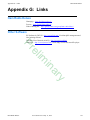
Appendix G: Links
155
Ham Radio Deluxe - - - - - - - - - - - - - - - - - - - - - - - - - - - - - - - - - - - - - - - - - - - - - -155
Other Software - - - - - - - - - - - - - - - - - - - - - - - - - - - - - - - - - - - - - - - - - - - - - - - - -155
156
y
ar
in
im
Ham Radio Deluxe
User Guide V5.21- May 11, 2012
ix
Chapter 1 - Introduction
What is Ham Radio Deluxe?
1 Introduction
What is Ham Radio Deluxe?
Ham Radio Deluxe (HRD) is an integrated suite of software products for amateur radio.
The five modules in the suite provide rig control, logging, digital communications,
satellite tracking, and rotator control.
Ham Radio Deluxe Rig Control provides rig control through a richly featured full
screen interface and other products in the Ham Radio Deluxe Suite via a direct
connection or TCP/IP remote access.
Logbook
Ham Radio Deluxe Logbook provides QSO logging, DX cluster connectivity, callsign
lookup, awards tracking (with integration to LOTW, eQSL, and Ham Radio
Deluxelog.net), and contesting. Microsoft Access and MySQL are support with strong
features for backup and recovery.
el
Pr
Rig Control
Digital Master
(DM-780)
DM-780 provides most popular sound card digital modes with direct integration to Ham
Radio Deluxe Logbook.
Satellite
Tracking
Ham Radio Deluxe Satellite Tracking provides satellite operations with rig control and
Google Earth integration.
im
Rotator
Ham Radio Deluxe Rotator provides control for 15 popular models of antenna rotators.
in
How It All Began
In early 2003 Peter PH1PH and Simon HB9DRV talked about developing a simple
program to control the soon to be released ICOM IC-703.
ar
Maybe it was the beer, maybe the desire to give something back to the radio amateur
community, however on June 6th, 2003 the first line of code was written, Ham Radio
Deluxe (Ham Radio Deluxe) was born.
y
By late 2005 the number of registered users stood at 20,006 – quite an achievement in
such a short time.
This Guide
If you are only going to read one more section then now go to Getting Started on
page 13.
Please report errors and omissions to n0zrd(at)mnyarc.org or in the Ham Radio Deluxe
forums
http://forums.hrdsoftwarellc.com. When you get there, select
Headquarters>Documentaton.
As this guide matures further it may flow differently than it currently does. Please check
the table of contents for the new evolving layout. Note that this document is still in
DRAFT mode which means that it can have lots of old or wrong information.
Ham Radio Deluxe
User Guide V5.21- May 11, 2012
1
Chapter 1 - Introduction
System Requirements
System Requirements
Computer
Ham Radio Deluxe is designed for Windows XP, Vista and Windows 7), also Internet
Explorer 6.0 (or higher) is required. Most modules will work on Windows 2000. Digital
Master 780 does not however work with Windows 2000. The policy is to support
Windows versions which are supported by Microsoft.
There are no plans for a LINUX or Macintosh native version, Ham Radio Deluxe is
known to run under Wine for LINUX and PC emulators for the Macintosh.
The suggested minimum computer specification is:
• Ham Radio Deluxe: 500MHz CPU, 1 GB RAM and 20MB of disk storage.
el
Pr
• DM780: 1GHz CPU, 1 GB but preferably 2 Gb RAM and 50MB storage
(or more if using SSTV). DM780 uses more resources than Ham Radio
Deluxe when decoding many signals simultaneously.
In addition, you will need the following free software for viewing demos and user
documentation.
• Adobe Reader 9 or newer
• Adobe Flash Version 11 or newer
If you do not have them, they can be downloaded from the Adobe website at:
http://get.adobe.com/reader/ and http://get.adobe.com/flashplayer/
im
Supported
Radios
You don‟t need a radio – Ham Radio Deluxe comes with built-in Dem-o-matic radio
support (FTDX-5000, FTDX-9000, FT-450, FT-950, FT-2000, K2, Orion, TS-480,
TS-570, TS-590 and TS-2000).
in
Ham Radio Deluxe currently supports these ‘real’ radios:
y
ar
• Elecraft: K2, K3
• FlexRadio: PowerSDR
• ICOM: IC-7000, IC-703, IC-706, IC-706MkII, IC-706MkIIG, IC-707,
IC-718, IC-7200, IC-725, IC-726, IC-728, IC-729, IC-7200, IC-735,
IC-736, IC-737, IC-738, IC-7400, IC-7410, IC-746, IC-746Pro, IC-751A,
IC-751A (Piexx), IC-756, IC-756Pro, IC-756ProII, IC-756ProIII, IC-7600,
IC-761, IC-765, IC-7700, IC-775DSP, IC-7800, IC-781, IC-821H, IC-9100,
IC-910H, IC-R10, IC-R20, IC-R7000, IC-R75, IC-R8500, IC-R9000,
IC-R9500, PCR-1000
• Kenwood: R-5000, TS-140S, TS-2000, TS-440S, TS-450S, TS-480,
TS-50S, TS-570, TS-590, TS-60S, TS-680S, TS-690S, TS-790, TS-850,
TS-870, TS-940S, TS-950, TS-B2000
• Microtelecom: Perseus
• SDR-Radio: SDR-Radio
• Ten-Tec: Argonaut, Jupiter, Omni VII(Radio), Omni VII(Remote), Orion,
RX-350
• Yaesu: FT-100, FT-1000D, FT-1000MP MkV, FT-2000, FT-450, FT-600,
FT-817, FT-840, FT-847, FT-857, FT-890, FT-897, FT-900, FT-920,
FT-950, FT-990, FTDX-5000, FTDX-9000.
Internet
Connection
Ham Radio Deluxe
Not absolutely required but really is essential to fully utilize all the features. The best
connection is a full time connection such as cable or DSL.
User Guide V5.21- May 11, 2012
2
Chapter 1 - Introduction
Radio
Interfacing
Installation
Ham Radio Deluxe is designed to be used with one of the rigs listed above. Some
modules, however, can be used without a connection to a rig. Logging will work but
will not be as automated. Satellite tracking is still fun without a rig connected. In fact,
there are only a few of the above listed rigs that “really” work fully with the satellite
module.
Some of the rigs listed above do not fully avail themselves to all the features of Ham
Radio Deluxe. A number of the rigs do not provide Tx control easily. That is the limit of
the rig, not Ham Radio Deluxe.
To do any control of a rig you will need a cable to connect your radio to your computer.
Many of these cables use the serial port. If you don’t have a serial port all is not lost –
USB serial converters are widely available. Also, there are options available that are
USB based.
One of these is HamLinkUSB from Timewave. This will allow rig control with most of
the radios listed above.
el
Pr
Note: Not all USB serial converters work well enough for Ham Radio
Deluxe. If in doubt ask for a recommendation in the Ham Radio Deluxe
support forums.
The future trend in radio control and interfacing is the USB connection. More and more
radios will only have USB ports and not Serial or Parallel ports. The USB port even pass
audio as rig control with a few of the radios.
im
For the majority of the radios listed above, you will need to have a more robust interface
if you need to send or receive audio. The audio recorder and PSK31 are two examples of
this need.
in
For more interfacing information visit the Downloads page at http://www.ham-radiodeluxe.com/ for A basic guide to CAT and Audio interfacing which contains many
designs for both CAT and audio interfaces for use with Ham Radio Deluxe.
Public
Interfaces
Timewave http://www.timewave.com
Tigertronics http://www.tigertronics.com
ZLP Electronics http://g4zlp.ham-radio.ch/
West Mountain Radio http://www.westmountainradio.com/.
y
•
•
•
•
ar
Check out the cable and interface solutions from:
Other (non-Ham Radio Deluxe) programs are supported via a DDE interface (see DDE
Support on page 53) and a serial port (see 3rd-Party Programs on page 80).
Logbooks typically use these interfaces; for example - contest-oriented logbooks.
Installation
Introduction
Ham Radio Deluxe is designed for Windows XP, Vista and Windows 7), Internet
Explorer 6.0 (or higher) is required. The policy is to support Windows versions which
are supported by Microsoft.
The Logbook uses MS Access or you can use MySQL, see Database on page 83 for
more information.
Ham Radio Deluxe
User Guide V5.21- May 11, 2012
3
Chapter 1 - Introduction
Ham Radio
Deluxe
Installation
Ham Radio Deluxe can be installed in under a minute. Special knowledge is not needed
– the kit does everything for you!
You will not need to reboot your computer, Ham Radio Deluxe does not update your
system files or change your system‟s configuration in any way.
el
Pr
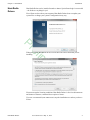
When you start the installation the first screen shows the release and build you are
installing.
y
ar
in
im
You must accept the licensing conditions. Ham Radio Deluxe is free for radio amateurs
and shortwave listeners, commercial use requires a license.
If you are a commercial (non-amateur user) stop the installation now unless you have a
license.
Ham Radio Deluxe
User Guide V5.21- May 11, 2012
4
Chapter 1 - Introduction
Installation
y
ar
in
im
el
Pr
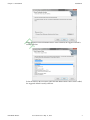
Select the folder where Ham Radio Deluxe will be installed, the suggested default is
usually sufficient.
Select the folder in the Start menu where the Ham Radio Deluxe entries will be added,
the suggested default is usually sufficient.
Ham Radio Deluxe
User Guide V5.21- May 11, 2012
5
Chapter 1 - Introduction
Installation
y
ar
in
im
el
Pr
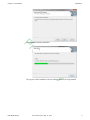
Click Install to start the installation.
The progress of the installation is shown while the software is being installed.
Ham Radio Deluxe
User Guide V5.21- May 11, 2012
6
Chapter 1 - Introduction
First Steps
el
Pr
When the software has been installed select the programs to be started, then press
Finish.
First Steps
Connection
im
Now that you have installed Ham Radio Deluxe you can try it out using a Dem-o-matic
radio. This is a reasonably accurate simulation of the real thing, designed for use during
presentations and while developing Ham Radio Deluxe when a radio is not available (on
the train, in a plane, in an airport, stuck in a hotel room in Finland etc.).
y
ar
in
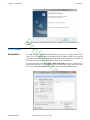
From the Start menu select Programs > Ham Radio Deluxe. Once the splash screen
has closed you see the Connect window. If you do not have the correct connection cable,
select one of the Dem-o-matic radios so that you can open Ham Radio Deluxe.
Ham Radio Deluxe
User Guide V5.21- May 11, 2012
7
Chapter 1 - Introduction
First Steps
Dem-o-matic
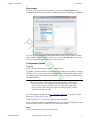
The Dem-o-matic radios do not need cables – simply select Dem-o-matic in the
Company drop down, select an option in the Radio drop down, and then press Connect.
el
Pr
im
They are ideal for demonstrating Ham Radio Deluxe when you do not have a suitable
radio available. It is also the only way that you can open Ham Radio Deluxe if you do
not have a supported radio or the correct connecting cable.
Configuration Options
in
Company
Select your radio manufacturer from the drop-down list.
ar
y
FlexRadio: you must install the vCOM virtual serial port drivers from Philip Covington
(N8VB). These are used to provide the connection between Ham Radio Deluxe and the
PowerSDR software that must be running before you try to create the connection with
Ham Radio Deluxe.
Note: It seems that vCOM will not run on Vista/Windows 7 64bit because
the 64-bit version is very insistent on having signed drivers. A signed
64 bit versions might be available for a few dollars from VSPE. You
may have better luck finding one of the new commercial/free versions
of serial driver that may work.
More information is available from http://www.flex- radio.com/, to install the vCOM
drivers see N8VB vCOM on page 140.
ICOM: disable the CI-V Transceive option for best performance.
Kenwood: make sure Packet communication mode is switched OFF (if supported). Most
Kenwood radios require CTS and RTS to be ON for flow control.
Radio
Select your radio model from the drop-down list.
Ham Radio Deluxe
User Guide V5.21- May 11, 2012
8
Chapter 1 - Introduction
First Steps
COM Port
The COM port on this computer where you have connected the radio interface cable.
Make sure that you do not have other programs using the same port, for example mobile
phones and personal organizers.
Select Auto-detect to try all available ports.
To see the COM ports on your computer select the Serial Port tab to see a display.
im
el
Pr
ar
in
Speed
The speed used for communicating with the radio, check the speed setting via the radio's
configuration menu.
Select Auto-detect to try all available speeds.
y
CI-V Address
ICOM only: the address assigned to the radio, consult the radio's handbook for the
default address. This can also be configured via the radio's configuration menu.
CTS
Enables the CTS flow control, required for Kenwood radios.
DTR
Enables the DTR line when the COM Port is opened and leaves it on, usually to provide
power for an interface cable. For Yaesu CT-62 and ICOM CT-17 interfaces this can be
left unchecked (off).
RTS
Enables the RTS line when the COM Port is opened and leaves it on, usually to provide
power for an interface cable. For Yaesu CT-62 and ICOM CT-17 interfaces this can be
left unchecked (off).
Connecting
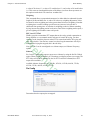
Press Start to connect to the radio. If you see the error below then the COM port is
currently held open by another program or the radio is not turned on.
Ham Radio Deluxe
User Guide V5.21- May 11, 2012
9
Chapter 1 - Introduction
What’s Next
Check that you have not started another radio control program. Other culprits are PDA
and mobile phone connections. Even if you have disconnected a device from a COM
port you must make sure that the software is no longer running.
Once connected Ham Radio Deluxe reads the radio‟s frequency to ensure that the
options you selected are correct. If you see the error below then Ham Radio Deluxe
failed to read the radio’s frequency:
el
Pr
If Ham Radio Deluxe can read the frequency the Connect window is replaced with the
main radio display – you are now using Ham Radio Deluxe!
If Ham Radio Deluxe cannot read the frequency then check:
im
Command Tester on page 131, and
Portmon on page 138.
y
•
•
ar
in
• Correct COM port is selected,
• Speed on radio is the same as the speed selected in Ham Radio Deluxe,
• Your cable – you may have a NULL modem cable when a normal serial
cable is needed,
• Cable is connected correctly to your PC (you may have more than one
COM port),
• DTR / RTS are selected if required to power an active cable such as CT-62
or a cable from third-party provider.
If you still can‟t get started refer to:
What’s Next
I t is time to play a little Ham Radio Deluxe to see what it does. Even if you can connect
to a radio, let’s start by connecting to a Kenwood TS-2000 through Dem-o-matic.
Appearance
Ham Radio Deluxe
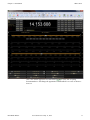
You should now have something that looks like the display below.
User Guide V5.21- May 11, 2012
10
Chapter 1 - Introduction
What’s Next
y
ar
in
im
el
Pr
This is the default appearance for Ham Radio Deluxe. For the sake of quality
documentation we will change the appearance to LCD which is a reverse of what we
now see.
Ham Radio Deluxe
User Guide V5.21- May 11, 2012
11
Chapter 1 - Introduction
What’s Next
To change the appearance:
im
el
Pr
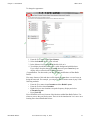
From the View menu select Color Schemes,
Select the Schemes tab if it is not selected.
In the Schemes list locate LCD and double click on it.
Your display should have changed to a white background with black text.
If you want to keep the change, press OK otherwise press Cancel and your
display will revert back to the default appearance.
Congratulations. You have made your first of many modifications of Ham Radio
Deluxe.
ar
in
1
2
3
4
y
Like many features of this and other well designed programs there a several ways on
doing the same task. For example, you can get to same customize menu by any of the
following methods.
• From the View menu select Customize and then Radio Layout.
• From the Toolbar select Customize.
• Right click over most locations except the frequency display and select
Customize Layout.
• Press [Ctrl+F8]
You will find this to be true for most of the functions within Ham Radio Deluxe. Use
whatever process that you like the most. That’s it for the introduction. Let’s move on to
learning more about Ham Radio Deluxe.
Ham Radio Deluxe
User Guide V5.21- May 11, 2012
12
Chapter 2 - Getting Started
Introduction
2 Getting Started
Introduction
The Ham Radio Deluxe program has many, many features. This section attempts to
describe the essentials you need to know to get started. Ham Radio Deluxe is designed
to be intuitive; nevertheless even the most experienced user has problems remembering
all the available options!
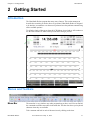
To aid in the clarity of the screen shots the LCD Scheme is used and we will continue to
use the Dem-o-matic TS-2000 so that you can follow along if you like.
y
ar
in
im
el
Pr
Menus and Toolbars
Menu Bar
The menu bar is very similar to any other program that you have used. You can find all
the commands available somewhere in the menu bar. This bar also shows you keyboard
shortcuts when they are available.
Take a moment and look in each of the menu item by clicking on the item.
Ham Radio Deluxe
User Guide V5.21- May 11, 2012
13
Chapter 2 - Getting Started
Toolbar
Menus and Toolbars
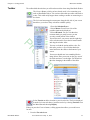
The toolbar hold the tools that you will need most often when using Ham Radio Deluxe.
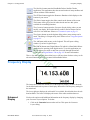
The Connect Button, which you have already used, is for connecting your
radio to Ham Radio Deluxe. You can have more than one radio connected at
a time. This could easily happen when working a satellite or connecting to a
dx cluster.
The Selection button toggles a menu pane along the left side of your screen
that allows you to have many selections available quickly.
el
Pr
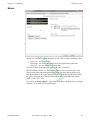
1 Press the Selection Button.
2 Select Menus. You will see a list of the
possible signal modes displayed.
3 Select Advanced. You see a list that does
not mean much yet partly because you can
see only a small portion of the window.
You need to move your cursor onto the right edge
of the selection menu. Press the left mouse button
and drag the window wider.
You now see both the option and the value. For
this radio, you have a set of sliders that do the
same function as the slides at the bottom of your
screen.
y
ar
in
im
Your screen should now low something like the
image below. Place you mouse on the grey area of
the slider and move it to the right. You should see
the value changing in the middle of the slider.
Select Favorite to add a selection to your favorites list. The list is displayed
from the Selection tool that we just discussed or by selecting Favorites from
the Menu Bar and choosing Display.
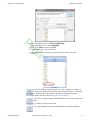
When you press the Favorite button, a dialog appears that allows you to add a new
favorite.
1 Press the Favorite button.
Ham Radio Deluxe
User Guide V5.21- May 11, 2012
14
Chapter 2 - Getting Started
Menus and Toolbars
In the field labeled Title enter [WWV 10.000 MHz]
In the field labeled Freq: enter [10.000.000]
Click on the Mode box and select AM.
Click on OK to save your new favorite.
Look at the bottom of your Favorite list and you should see your latest
creation.
y
ar
in
im
el
Pr
2
3
4
5
6
Quick Save button as the name implies is a way to rapidly save marker so
you can move between the selections with a click of the mouse. The markers
are displayed above the frequency band at the designated frequency.
We will discuss this more later. Please see Quick Save on page 65
The Full Screen button toggles Ham Radio Deluxe into an out of Full Screen
Mode.
Try clicking it and view the results.
The Logbook Button starts the Ham Radio Deluxe Logbook application.
Ham Radio Deluxe
User Guide V5.21- May 11, 2012
15
Chapter 2 - Getting Started
Frequency Display
The Satellites button starts the Ham Radio Deluxe Satellite Tracker
application. This application show the current location of many satellites and
will run without a radio attached.
The SW Data button toggles the Shortwave Database which displays at the
bottom of your screen.
The Sliders button toggles the slider controls at the bottom of the screen.
This button will be greyed out for radios that do not have this option
available for controlling functions.
The Customize button opens the Customize Display dialog where you can
modify you display. We touched briefly on this in the last chapter and we
will cover it in detail later. Please see Customize Layout on page 21.
The Options button opens the Options dialog where many settings can be
made. The dialog is a chapter all by itself. Please refer to Program Options
on page 31/
el
Pr
The Add button adds an entry to the Logbook. This will open a dialog
window if you have Logbook open.
The DM780 button starts Digital Master 780 which is a Ham Radio Deluxe
application for operating in the digital modes. To use this application you
must be able to pass audio to and from your radio through an interface.
Please refer to Digital Master 780 on page 107 for more information.
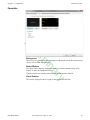
Frequency Display
y
ar
in
im
There a few other buttons in the tool bar but we will leave them for later as they are for
advanced features not used to get started in Ham Radio Deluxe.
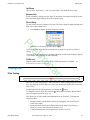
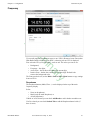
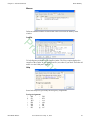
The image above shows the default view of the frequency display. We have the mode
for the main band at the top enter of the display. Below that is the frequency setting for
the main band.
The lower right area displays the sub band if it is available. Not all radios have the sub
band available. The lower left displays the meters if the radio sends that data out.
Enhanced
Display
You have the option to add additional information to the frequency display by changing
your Customize Layout Options. To do that:
1 Click on the Customize button on the tool bar. This opens the Customize
Layout dialog.
Ham Radio Deluxe
User Guide V5.21- May 11, 2012
16
Chapter 2 - Getting Started
Frequency Display
2 Select the Frequency tab.
el
Pr
im
3 In the Dropdowns area of the dialog select All.
You should see additional items displayed at the top of the sample main display.
The actual items that will be displayed depend upon the radio you have
connected. With the Kenwood TS-2000 that we are using for our examples we
have several items that will display.
y
ar
in
4 Click on OK to accept the change.
Your frequency display should now look something like this:
You can click on any of these drop downs and change their settings from a list. If that is
too much information, you can go back and select Mode.
Configuration
See Frequency on page 27.
Frequency
Selection
You can adjust or select a frequency in several different ways. The currently active digit
has a bar above and below the digit. Our example above has the active digit, which is 8,
for the main band and for the MHz “5” on the sub band. You can change the active digit
by either clicking on it or using the left or right arrow keys.
Mouse Wheel
When you rotate the mouse wheel in the frequency display the currently active digit is
incremented / decremented depending on the scroll direction.
If you rotate while the cursor is over an inactive digit then the digit is activated.
Ham Radio Deluxe
User Guide V5.21- May 11, 2012
17
Chapter 2 - Getting Started
Tuning Dial
Up/Down
The up-arrow, down-arrow, - and + keys increment / decrement the active digit.
Mouse-click
Select a digital by clicking over the digit. To increment / decrement click above /below
the center of the digit and keep the mouse button pressed.
Direct Entry
To enter values just press a numeric key (0-9). The active digital is updated and the next
digit to the right is made active.
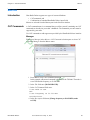
1 Press Enter to display the Enter Frequency window.
el
Pr
2 Enter the new frequency, and then press Apply.
If you check Auto-apply then the new frequency is applied every time you make a
change.
im
If you check Track this window is updated with changes made to the frequency display
– for example when you tune the radio manually.
Griffin etc.
Support for third-party devices such as the Griffin Powermate is available – see
Keyboard Accelerators on page 31.
y
ar
Fine Tuning
in
Tuning Dial
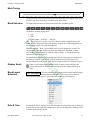
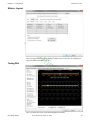
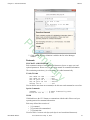
There are two fine tuning ranges – Fine I and Fine II. In the Tuning menu select Show
Fine II to show the second range. (If you are only showing the default Fine I, then the
title is Fine.)
Set the range from the Tuning menu or by clicking the
To change the mouse wheel step, click the
pane of Program Options on page 36).
button.
button (also set with the Mouse Wheel
This allows you to easily make small adjustments in the frequency. To change the
frequency either:
• Drag the marker with the mouse (and keep on dragging – the bar will scroll
to the left or right),
• Rotate the mouse wheel (press Shift to increase the mouse wheel step by a
factor of 2, press Ctrl to increase by a factor of 5),
• Click in the tuning bar or on frequency text such as 14.235.0.
Ham Radio Deluxe
User Guide V5.21- May 11, 2012
18
Chapter 2 - Getting Started
Tuning Dial
Main Tuning
The differences between a main tuning bar and a fine tuning bar is that the main tuning
bar shows the whole band range as defined by the band layout.
Band Selection
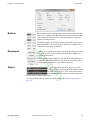
The Band Section buttons are shown between the Fine and Main layouts.
The buttons currently displayed are:
el
Pr
• ALT,
• BSP,
• Band buttons – 160m, 80, … and 10m.
ALT – only displayed if you have two VFO’s displayed (for example Kenwood TS2000), switches between the main and alternate (second) VFO. When highlighted you
are tuning the second VFO with the tuning dial.
BSP (bandspread) – when you press BSP a new layout is dynamically created. The
current band is split into multiple segments, for example the 20m band (14 MHz –
14.350 MHz) can be split into 7 segments, each of 50 kHz. To restore the previous
layout press BSP and select Off.
If there is not enough room to display all the frequency ranges defined in the
current band layout use this button to scroll the frequency ranges (bands) up or
down.
ar
in
Display Scroll
im
The band buttons select the corresponding band; the last used frequency and mode for
the band are restored. They also show which bands are currently displayed. The
displayed bands have the text in white while the hidden bands text is displayed in grey.
The current band layout is displayed below the frequency display
and able the fine tuning bar. Click here to select a different
layout from the Bands menu. If you reside in the americas, select Region 2.
Date & Time
By default the date is displayed to the left of the Band Layout and the time is displayed
in local format to the right of the Band Layout. This can be changed by clicking on each
to set the clock and time format.
y
Band Layout
Selection
Ham Radio Deluxe
User Guide V5.21- May 11, 2012
19
Chapter 2 - Getting Started
Buttons
Tuning Dial
What would a radio be without buttons? Press a button to activate the
option. If it is a button where the option state can be read from the radio
– for example the selected VFO A– the button indicates whether the
option is currently selected.
Dropdowns
el
Pr
The buttons displayed will depend upon the radio that is connected to
Ham Radio Deluxe. The layout for your radio can be changed in the
Customize Layout. More on that later.
im
When to press a drop down button a popup menu is displayed. Select
an option or press escape. If possible the drop down displays the
current selected option.
The drop down buttons displayed will depend upon the radio that is
connected to Ham Radio Deluxe. The layout for your radio can be
changed in the Customize Layout. More on that later.
in
Sliders
ar
If your radio has the option for slides, they can be
displayed either by pressing the Sliders button on the
toolbar or by clicking on View in the menu bar and
and selecting Slider controls at the bottom of the list.
Use the mouse to adjust a slider value.
y
To select the sliders that are displayed with the Sliders – see Sliders: Appearance on
page 29.
Ham Radio Deluxe
User Guide V5.21- May 11, 2012
20
Chapter 3 - Configuration
Customize Layout
3 Configuration
Customize Layout
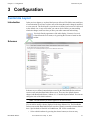
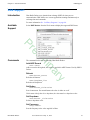
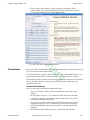
Introduction
In the previous chapter we explored the layout as delivered. We did do some small acts
of customization We will now explore most of the items that can be changed, modified,
or even removed. The final layout is up to the user to define. Just because it is delivered
as the default view, it may not be what you want or desire. Before you start making
wholesale changes, make sure that you have your radio connected and working.
Used to define the appearance of the radio display, Customize Layout is
selected from the Tools menu, or by pressing the Customize button on the
toolbar.
Schemes
y
ar
in
im
el
Pr
Schemes are pre-defined customizations created by the Ham Radio Deluxe software
creative team and other Ham Radio Deluxe users. There are four default schemes
shipped with Ham Radio Deluxe: Scheme #1 - #3 and the System Default. You can not
change the look of the default schemes.
Note: The scheme that you choose applies to all radio windows.
You can add or modify schemes displayed in the large Schemes list. The Ham Radio
Deluxe team and the Ham Radio Deluxe users have already created the schemes that are
there. Special thanks to Danielle in Northallerton, UK. for his contributions.
• Select a default scheme by pressing the scheme button (or select an entry
Ham Radio Deluxe
User Guide V5.21- May 11, 2012
21
Chapter 3 - Configuration
Customize Layout
and press Select);
• Select one of the other schemes by double-clicking on the entry in the
Schemes list.
If you have modified a layout scheme and wish to save it with a new name press Save
and you will be prompted for a Scheme name. Use Rename and Delete to organise the
available schemes.
If you need to save the file to a location different than the default location press the Save
as File button. This allows you to save your options file to any location.
If you receive a options file from someone else, you can add it to your copy of Ham
Radio Deluxe by pressing the Load from File button and navigating to the options file
location and selecting the file.
Layout
y
ar
in
im
el
Pr
The next tab is the Layout tab. This is where we can modify the screen layout for our
buttons and drop downs. This is one place where personal preference will cause you to
pull your hair out because things are not where YOU want them. Re mapping the layout
is really quite easy.
Ham Radio Deluxe is a data-driven program. For each radio there is a table of supported
commands and associated button / drop down / slider names. The layout order is moreor-less alphabetical. Don‟t be put off by the amount of information in this window –
take it slowly and read the information here.
Note: The layout definition is saved on a per-radio basis in the registry.
For your sanity only have a connection open to the radio that you plan
to modify the layout. Close any other radio connections.
Ham Radio Deluxe
User Guide V5.21- May 11, 2012
22
Chapter 3 - Configuration
Customize Layout
This small portion of the dialog allows us to do amazing things.
Clear Entry
el
Pr
If we click on a button above the area such as the VFO A button, we can clear the button
so we can use the location for some other function. This is done by clicking the Clear
button. We can also remove an entry by dragging it into the Unassigned list on the right
side of the dialog box.
Moving Entries
We can move the selected entry by simply dragging it with the mouse or by
using the four arrow-buttons.
im
Dropdown Button / CAT Command / Macros
You can create new buttons - for example, to create a USB button from the Mode
dropdown:
in
y
ar
1 Open the Customize Layout dialog and click on the Layout tab.
2 Select or create an empty button position – the selected entry will start to
blink (you can reposition this button later),
3 In the Define Button area of the dialog, press Select (above the Save and
Load buttons), This will open the Configure Button dialog.
4 In the Configure Button dialog window select Mode: LSB and enter the
text to appear on the new button.
5 Press OK.
6 The previously empty button position now has a new value – LSB!
Ham Radio Deluxe
User Guide V5.21- May 11, 2012
23
Chapter 3 - Configuration
Customize Layout
Hiding
Hide dropdowns hides the dropdown buttons to
the right of the layout window, releasing two
columns where you can assign new button
definitions.
Hide status texts hides the three top-left meters
(-1-, -2-, -3-) and the status text area underneath,
releasing two columns where you can assign
new button definitions.
Dropdowns
Select the dropdown menu, and then simply drag an
entry to an unused location in the display.
If you drag to a location that already has a definition
the current definition is removed, if a standard
button it is returned to the unassigned list.
el
Pr
Unassigned
Entries in the Unassigned list are standard buttons
that are not currently displayed. Simply drag an
entry to an unused location in the display.
Styles
im
If you drag to a location that already has a definition
the current definition is removed, if a standard
button it is returned to the Unassigned list.
in
In the Buttons tab you can define up to seven button styles,
shown here in the Button Styles group. The Buttons tab is the
next tab we will visit.
To assign a style to a button either:
ar
•Drag the style over the button, or
•Click a style to apply it to the currently selected
(blinking) button.
y
Save / Load
To distribute your layouts with other users of your radio
model use the Save and Load buttons. You can also clear the
deck and start over fresh or revert back to the default button
layout.
Ham Radio Deluxe
User Guide V5.21- May 11, 2012
24
Chapter 3 - Configuration
Customize Layout
Buttons
im
el
Pr
Within the Buttons tab you can define:
ar
in
• Seven button color combinations,
• The font, and
• The button size.
The default button size is small; this is so that users with low resolutions such as 800 x
600 still have a usable configuration. There are no rules when using the button size;
select the size which pleases you most.
y
For the technical readers the button size is tied to the font size of the radio display form
(font is Microsoft Sans Serif, size is 8, 9, 10 or 12 point).
Changing the font size simply changes the font assigned to the form.
The button size can also be changed by selecting View on the menu bar and then
selecting Layout Size. You can also [right click] on any button on your display and
select Layout Size.
Ham Radio Deluxe
User Guide V5.21- May 11, 2012
25
Chapter 3 - Configuration
Customize Layout
Faceplate
im
el
Pr
Background
These colors are applied to the background area of the display and to the transmit meters
(if any) such as PWR, SWR and ALC.
in
Status Window
ar
The status window displays information which you cannot normally change using
buttons or sliders in Ham Radio Deluxe.
Typical examples are Scanning status, Split mode and Memory channels.
y
Clock Position
The clock is displayed to the left, right or both sides of the band title.
Ham Radio Deluxe
User Guide V5.21- May 11, 2012
26
Chapter 3 - Configuration
Customize Layout
Frequency
im
el
Pr
If your radio supports simultaneous access to two VFO’s (Kenwood, some Yaesu) then
Ham Radio Deluxe will display two VFO’s, otherwise just one VFO is displayed.
First select the VFO you are updating – main or sub. The colors you can set are:
in
Background,
Frequency – the digits,
Active Posn – the bar above and below the current digit,
Inactive Posn – the bar above and below the other digit. Default is the
same as the background color.
The Font can also be set, use the Main > Sub and Sub > Main buttons to copy settings
between VFO’s.
y
ar
•
•
•
•
Dropdowns
The dropdown buttons (Mode, Filter…) can be displayed at the top of the main
frequency display.
Select:
• None (no dropdowns),
• Mode (only the mode dropdown) or
• All (all dropdowns).
If Mode or All is selected you can check Add Border to add a border around the text.
If All is selected you can check Include Title to add the Dropdown button’s title (if
there is room).
Ham Radio Deluxe
User Guide V5.21- May 11, 2012
27
Chapter 3 - Configuration
Customize Layout
Meters
im
el
Pr
The Background and Text colors should be obvious. There are three graduation colors:
in
• Bars: Low – the first bar color,
• Bars: High – the color at the position set by the High Position slider, and
• Bars: Free – the color for the free (empty) bars.
If you check Show peak reading the recent peak value is displayed.
y
ar
When Ham Radio Deluxe is in TX mode the S Meter value is replaced by the value
selected in the Main and Sub dropdowns, the value you select must be displayed by
Ham Radio Deluxe in the upper right hand corner of the display. For Kenwood radios
the value to be displayed is selected with the meter slider or the individual buttons
(SWR / Comp / ALC / dB).
If you check the Always update… option then the S Meter is updated when you change
frequency – this results in slower performance.
Ham Radio Deluxe
User Guide V5.21- May 11, 2012
28
Chapter 3 - Configuration
Customize Layout
Sliders:
Appearance
im
el
Pr
If supported by your radio, sliders are displayed at the bottom of the display. Here you
define the appearance of the sliders.
y
ar
in
These colors are optionally applied to the sliders in the Advanced selection windows
(select Advanced from the View menu).
Ham Radio Deluxe
User Guide V5.21- May 11, 2012
29
Chapter 3 - Configuration
Customize Layout
Sliders: Layout
im
el
Pr
Here you select the sliders to be displayed. Define up to six layouts, for example one
layout for SSB and another for CW
y
ar
in
Tuning Dial
Here you define the colors, fonts and band button positions.
Ham Radio Deluxe
User Guide V5.21- May 11, 2012
30
Chapter 3 - Configuration
Program Options
Program Options
Introduction
Used to define various Ham Radio Deluxe features, Program Options is selected
from the Tools menu, or by pressing the Options button. Most users will find that
they can live with the defaults that can be modified in this dialog.
Keyboard
Accelerators
im
el
Pr
in
Define accelerators for use with the Keyboard or with programmable interfaces such as
the Griffin Powermate.
y
ar
When you press Add the definition window is displayed.
Here Ctrl+Alt+W is assigned to the Tune button. Keyboard combinations are assigned
to display buttons and arrow keys.
The Ham Radio Deluxe menu has pre-assigned accelerators; these cannot be redefined.
These are listed in the Reserved window.
Ham Radio Deluxe
User Guide V5.21- May 11, 2012
31
Chapter 3 - Configuration
Program Options
Comms
el
Pr
Normally you will not have to change the default settings.
y
ar
in
im
• Read timeout – serial port timeout.
• Switch off – some radios such as the FT-817 can be powered down using a
CAT command. If this option is selected you are prompted to switch off the
radio.
• Polling – to reduce CPU load for slower systems.
• Dual VFO tracking – if selected both VFO’s are tracked on every refresh.
Only of use with Satellite Tracking ( Satellite Tracking on page 113).
• Refresh interval – the interval between consecutive refreshes of the
display.
Ham Radio Deluxe
User Guide V5.21- May 11, 2012
32
Chapter 3 - Configuration
Program Options
COM Port TX
el
Pr
Some early ICOM radios do not support switching between TX and RX using CAT
commands. The only way to enable computer controlled TX/RX this is by toggling a
COM port pin.
im
You require a special CAT cable if you select this option.
y
ar
in
ICOM
Calibration
ICOM radios return a S Meter value between 0 and 255, normally 0 is S0, 12 is S1 and
so on. As a S Meter unit is 6 dB the algorithm applied is to divide the returned value by
two to get dB, then divide dB by 6 to get S units.
Ham Radio Deluxe
User Guide V5.21- May 11, 2012
33
Chapter 3 - Configuration
Program Options
Some radios such as the IC-706 have a different logic – use the Offset and Scale values
to adjust the returned values so that the S Meter in Ham Radio Deluxe corresponds to
the S Meter on your radio.
Info: Modes
im
el
Pr
Mainly for use by the Ham Radio Deluxe programming team, all modes for each radio
are listed. For each mode the mapping to the internal Ham Radio Deluxe mode is
shown.
y
ar
in
Info: CAT
Support
Mainly for use by the Ham Radio Deluxe programming team, all commands are listed
for each radio.
Ham Radio Deluxe
User Guide V5.21- May 11, 2012
34
Chapter 3 - Configuration
Program Options
Press Radio for a list of all supported radios. To display the commands:
1 Select a radio,
2 Press Viewer.
y
ar
in
im
el
Pr
Internet
Ham Radio Deluxe is able to detect whether you have an Internet connection with
Internet GetConnectedState(). Uncheck this option if you do not want Internet access.
Ham Radio Deluxe
User Guide V5.21- May 11, 2012
35
Chapter 3 - Configuration
Program Options
Out Of Band
el
Pr
Mouse Wheel
y
ar
in
im
If you like to know where your band limits are when you are scrolling through a band
and not watching the frequency window you can enable the optional sound files played
when you tune in / out of band. You also have the ability to use a sound file of your
choosing.
You can define the tuning step when rotating the mouse wheel over the active tuning bar
here.
Ham Radio Deluxe
User Guide V5.21- May 11, 2012
36
Chapter 3 - Configuration
Program Options
Selection
Window
el
Pr
Defines options affecting the appearance and operation of the selection window.
Skinning
y
ar
in
im
• Single-click – normally the Favorites tree folders are opened / closed with
a double-click. Check this option to enable single-click operation.
• Show numeric value – the Select Windows‟s Advanced slider values are
optionally superimposed on the slider.
• Show the Options icon – historical support for the version 2 Advanced
slider look and feel.
Can someone provide some clues of what to say here please. Simon skipped
this screen.
Ham Radio Deluxe
User Guide V5.21- May 11, 2012
37
Chapter 3 - Configuration
Program Options
Themes
el
Pr
Docking panes are used for optional windows such as: Bandscope, Calendar, DX
Cluster, Logbook, Selection, Shortwave Database and WinKey.
im
Main Theme
Select whichever visual theme you want – Office 2003 is an acceptable default.
System Theme
ar
Main Tabs
in
When you select Office 2003 or Windows XP for Menus and Toolbars you can select an
optional System theme.
If you have more than one main window open – for example Radio and Logbook – then
the main tabs are a useful way of switching between windows.
y
Main tabs can be toggled On / Off by selecting from the Menu Bar View> Main Tabs.
Ham Radio Deluxe
User Guide V5.21- May 11, 2012
38
Chapter 3 - Configuration
Band Layouts
Updates
el
Pr
Select how frequently Ham Radio Deluxe reminds you to check for new updates.
Yaesu
y
ar
in
im
Special options for Yaesu radios. Due to firmware “features” in the FTDX-9000 it is
necessary to wait up to 250ms after writing a command to the radio. With any luck
Yaesu will fix this at some date in the future. (Has this been done?)
Band Layouts
Introduction
Ham Radio Deluxe
A necessary feature of a fully customizable radio program such as Ham Radio Deluxe is
the definition of custom band layouts.
User Guide V5.21- May 11, 2012
39
Chapter 3 - Configuration
Band Layouts
The IARU regions have own band plans; there is no doubt that these will change in the
future. Consider also the traditionalist who has never owned a microphone in his life
and is only interested in the CW portions of the bands – he wants his own band layouts.
Manager
To start the Manager select Manager from the Bands menu. or use CTRL+B.
im
el
Pr
Here you see the existing definitions. In the Edit menu you have the expected New,
Copy, Edit and Delete options.
in
Adding A
Definition
In this example a band layout is created for our CW enthusiast. Select New from the
Edit menu to create a new definition using the Band Layout Editor.
y
ar
Ham Radio Deluxe
User Guide V5.21- May 11, 2012
40
Chapter 3 - Configuration
Band Layouts
1
2
3
4
5
6
7
In the Title field enter CW Only.
From the Edit menu select New to define a new frequency range.
In the Band field enter [160m]
In the From field enter [01.800.000]
In the To field enter [01.830.000]
Ensure Enable is checked
Press OK
el
Pr
When you press OK the frequency range is added to the band layout. Repeat the steps
above for 80m and 40m using the values below:
• 80m, 3.5MHz to 3.55MHz, (Remember the leading zero)
• 40m, 7.0MHz to 7.05MHz.
The band layout now looks like this:
y
ar
in
im
To rearrange the order of the frequency ranges just select a range and use
the Move menu options or the Move buttons.
8 When you have finished your new layout press OK. The CW Only
definition is added to the band layouts.
9 In the Band Layouts window press OK to save the definitions and close
the window.
Ham Radio Deluxe
User Guide V5.21- May 11, 2012
41
Chapter 3 - Configuration
To copy an existing band layout:
1
2
3
4
5
6
Start the Manager,
Select the entry to be copied,
Select Copy from the Edit menu,
Enter the new title,
Change the frequency ranges are appropriate,
Press OK.
im
To select a band layout either:
in
Selecting
el
Pr
Copying A
Definition
Band Layouts
y
ar
•Open the Bands
pane in the
Selection
window (select
Display from the
Bands menu)
and select an
entry in the list,
or
•Click on the
Band Title 160m
– 10m (Region
1) in the radio
display and
select a new
layout from the
popup window.
Ham Radio Deluxe
User Guide V5.21- May 11, 2012
42
Chapter 3 - Configuration
Favorites
Favorites
Favorites was introduced in the Getting Started chapter. We will now look at the
favorites manager in detail. Favorite definitions are selected from the Favorites pane in
the Selection window.
Manager
Start the manager from the Favorites menu or the Favorites pane in the Selection
window. It is designed to be easy to use – let’s see.
The favorites manager, as the name implies, provides a means to manage your favorite
frequencies. The can be grouped in Root folders my band, mode, topic, or interest. New
Root folders are created using the New Root button. Root folders can have sub folders to
help further group your favorites. These sub folders are created using the New Folder
button. You add your favorite frequency using the Add button.
el
Pr
Root folders and their associated sub folders can be turned on and off by checking or
unchecking the box in front of the folder. If for example you do not have an antenna for
160m, you can uncheck the box in front of the folder and 160m will no longer be listed
in the Favorites pane of the Selection window. They will still be visible, however, in the
band display above the 160m band.
Root Folder
Favorite Freq.
y
ar
in
im
Sub Folder
New Root – create a new top-level (root) folder. Folders are not saved if they are empty
(no child folders or definitions). An example would be a Root Folder labeled JOTA for
Jamboree on the Air.
New Folder – create a new folder as a child of the currently selected folder. An example
would be to create a sub folder under JOTA labeled SSB or CW.
Sort Folder – sort the entries in the currently selected folder:
• By title,
• By ascending frequency, or
Ham Radio Deluxe
User Guide V5.21- May 11, 2012
43
Chapter 3 - Configuration
Favorites
• By descending frequency.
Add – add a new definition. If you have crated a new empty folder, you can not add a
favorite frequency to it. You need to add the frequency to either a higher level folder or
in a folder that has favorites in it. You can then move the new favorite to the new folder
that you created earlier.
el
Pr
To add a new favorite frequency to an existing folder:
1
2
3
4
No space
ar
in
im
with two
Click on the folder that you wish to add a favorite to.
Click on Add.
Enter a title for your favorite.
Enter the desired frequency without the decimal point.
If you are adding a frequency that starts with a single digit before the first
decimal point, place your cursor immediately adjacent to the left side of the first
digit.
y
If you are adding a frequency that starts with two digits before the first decimal
point, place your cursor a bit further to the left so there is a small space between
the cursor and the leading zero.
Note the space
For three digits place your cursor a bit more to the left.
5 Select you operating mode.
6 Click on OK and your new favorite will be saved in the selected folder.
You can also select Add from Favorites in the menu bar to add a new definition.You can
also use Cntrl+A keystroke combination to access the add function.
Del – delete the current folder or definition (depending on which you have selected).
Move – move an entry to another folder (alternatively drag entries between folders with
your mouse).
Ham Radio Deluxe
User Guide V5.21- May 11, 2012
44
Chapter 3 - Configuration
Favorites
el
Pr
1 Highlight the folder or definition.
2 Click on Move.
3 Select the new folder.
4 Click on OK.
Copy – make a copy of an existing definition.
Edit – edit the selected folder / definition.
im
Arrows – rearrange the selected folder / definition.
Load – load a new set of definitions from a file previously created using Ham Radio
Deluxe; all current definitions are discarded.
in
Merge - merge definitions from a file previously created using Ham Radio Deluxe.
Defaults – restore the default list (hard-coded into Ham Radio Deluxe).
Save – save current definitions to a file.
ar
Markers
y
To display markers in the Ham Radio Deluxe display select Show Markers from the
Favorites menu. The marker size is selected from the Marker Size option in the
Favorites menu.
The popup text is displayed as you move the mouse pointer over a marker. The text is
constructed from the favorite title and frequency.
Ham Radio Deluxe
User Guide V5.21- May 11, 2012
45
Chapter 4 - Advanced Features
Audio
4 Advanced Features
Audio
Introduction
Ham Radio Deluxe has a built-in audio grabber and audio playback. This feature
requires a connection from your radio the your sound card in your computer or an
external sound card interface.
Audio Grabber
The audio grabber stores incoming audio in MP3 files using the MP3 tags to store
information about the radio settings (or any other information you feel to be important).
An alternative to MP3 would be Windows Media format (WMA) but the programming
of WMA files is rather complex.
To display the audio grabber select Audio Grabber from the Tools menu.
Record
ar
in
im
el
Pr
By default the Audio Grabber is docked at the bottom of your Ham Radio Deluxe
Screen. By grabbing the top bar o the Audio Grabber you can undock it and make it a
separate window. To redock the wind grab the top bar of the Audio Grabber and start
moving it into your Ham Radio Deluxe window. You will see arrows at the four edges
plus four arrows in the middle of the screen. Move the Audio Grabber over the desired
arrow and it will dock in that location.
Here you have the standard recording buttons. From left to right:
y
• Record,
• Stop,
• Reset current recording,
• Restart (close current file first),
• Browse for MP3 files.
You also set a file limit – a downside of MP3 is that the tags are written at the end of the
file when it is closed, so to avoid losing information in the event of an unexpected event
it is best to use more, smaller files.
Folder
Here you select the folder where the MP3 files are stored.
Ham Radio Deluxe
User Guide V5.21- May 11, 2012
46
Chapter 4 - Advanced Features
Audio
Quality
Here you select the bandwidth and quality. Modern computers have more than enough
CPU power to support a very high quality. A bandwidth of 4.5 kHz is usually acceptable
unless you are recording a WFM broadcast.
Soundcard
el
Pr
Select the soundcard that you are recording from.
Tags
in
im
Audio Browser
ar
Here you see the values stored in the MP3 tags. To change the values just add the new
text and then press Apply.
y
Use the audio browser to playback MP3 files. To open the Audio Browser, select Audio
Browser from the Tools menu. You can also start the Audio Browser by clicking on
Browser in the Folder tab within Audio Grabber.
Ham Radio Deluxe
User Guide V5.21- May 11, 2012
47
Chapter 4 - Advanced Features
Audio
im
el
Pr
Peter PH1PH came across IrfanView – an excellent freeware utility.
in
MP3 Player Options
Folder
Select the folder to browse
Select default folder
y
ar
Player
Select MP3 player – a basic MP3 player is built into Ham Radio Deluxe, however you
can select an alternate player such as the excellent Windows Media Player. Press
Default to select the default player.
Refresh the current folder
Audio File
Select a file to play from the list at the bottom of the window.
Play currently selected file
Pause
Start again
Stop
Ham Radio Deluxe
User Guide V5.21- May 11, 2012
48
Chapter 4 - Advanced Features
Auxiliary Switching
From
Start at beginning of file
Set From at the current position
To
To end of file
Set To at the current position
Use the From and To slider positions to select the part of the file to repeated over and
over and over again. This is useful for determining exactly what the station was sending.
Other Options
The other options are:
Copy – copy the selected files to another folder.
Delete – delete the selected files.
Move – move the selected files to another folder.
Rename – rename the selected file.
Artist / Album / Title / Description – change the MP3 tags.
el
Pr
•
•
•
•
•
Auxiliary Switching
A standard PC used to come equipped with an 8-bit parallel port that can be used to
switch auxiliary equipment such as antennas, bandpass filters and power amplifiers. If
yours does not, you can obtain an online or at a well equipped computer store a parallel
port card that you can plug into your computer. This expansion card will not work on a
laptop computer.
in
im
Introduction
ar
Ham Radio Deluxe supports the parallel port via fully configurable manager and
monitor displays.
Typical uses of this option are to switch antennas, either automatically as the frequency
changes, or by selecting an option from the Parallel Port pane of the Selection window.
The parallel port sends eight bits at a time. The layout of the parallel port pins is shown
below.
y
Technology
The data pins are shown in red; D0 is pin 2, D7 is pin 9.
To indicate that a bit has a value of 1, a charge of 5 volts is sent through the correct pin.
No charge on a pin indicates a value of 0. This is a simple but highly effective way to
transmit digital information over an analog cable in real-time.
Ham Radio Deluxe
User Guide V5.21- May 11, 2012
49
Chapter 4 - Advanced Features
Manager
Auxiliary Switching
The manager window is invoked from the Tools > Parallel Port > Manager menu.
im
el
Pr
Definitions
in
Each definition consists of:
y
ar
• [X] Enabled selection – if not checked then the definition is ignored when
Ham Radio Deluxe detects a new frequency. The definition is still shown
in the selection window if this option is enabled.
• Title – a description of the antenna or component that will be switched
when the entry is selected.
• From – the lower end of the frequency range.
• To – the upper end of the frequency range.
• Port – the LPT port to be switched by the definition.
• D0-D7 – the parallel port data bit settings, each bit is either 1 (on) or
0 (off). D0 is pin 2, D7 is pin 9.
Port Address
The default port addresses for LPT1, LPT2 and LPT3 are 0378, 0278 and 03BC
respectively. If your computer has a different configuration just select the address that
corresponds to the port.
You will find the port address via the Device Manager settings display located in the
System control panel applet.
Ham Radio Deluxe
User Guide V5.21- May 11, 2012
50
Chapter 4 - Advanced Features
Auxiliary Switching
im
el
Pr
Various
ar
The options are:
in
In the Windows XP example above the base address is 0378.
y
• Auto-switch: as the frequency displayed by Ham Radio Deluxe changes a
lookup is made against the parallel port definitions and the parallel port
switched to the configuration for the first definition in the list that matches
the new frequency.
• Selection window: displays a Parallel Port pane in the main Ham Radio
Deluxe selection window. See Selection Window on page 45.
Ham Radio Deluxe
User Guide V5.21- May 11, 2012
51
Chapter 4 - Advanced Features
Auxiliary Switching
Creating or Modifying Definitions
To create a new definition:
1 Select Edit > New from the Manager menu bar.
Enter a title for the definition.
Enter the frequency range for the definition.
Choose the port if you have more than one.
Choose a pin number. Make sure you are not using one that is already
defined with another definition unless you have a need to.
6 Click on OK to save your new definition.
The steps to modify a definition are the same except that you must first highlight the
definition and then select Edit > Modify from the manager menu bar.
Monitor
im
el
Pr
2
3
4
5
The monitor window is started from the Tools > Parallel Port > Monitor menu.
y
ar
in
The monitor:
• shows the current state of the data pins for a selected parallel port,
• allows you to select a definition, and
• toggle the data pins directly.
The Definition field shows the definition that matches the current pin selection (if any).
Ham Radio Deluxe
User Guide V5.21- May 11, 2012
52
Chapter 4 - Advanced Features
DDE Support
DDE Support
Introduction
Ham Radio Deluxe uses dynamic data exchange (DDE) for inter-process
communication. DDE allows two or more applications running simultaneously to
exchange data and commands.
For more information See “3rd-Party Programs” on page 80.
Available
Support
Select DDE Monitor from the Tools menu to display the supported DDE items.
im
el
Pr
Commands
The commands below are supported by Ham Radio Deluxe.
in
Add ADIF Record
Refresh
REFR dropdown_list
Refreshes all dropdown.
y
REFR button_status
Refreshes all buttons.
ar
ADIF <data>
Adds a record to the logbook; the record is supplied in ADIF format. Used by PSK31
Deluxe.
Set Button
BUTN button_title=value
Sets a button state. For normal buttons the value is either on or off.
If title starts with @ then it’s a dropdown, the value must be a dropdown value.
Set Dropdown
DROP button _title=value
Selects a dropdown value.
Set Frequency
FREQ <hertz>
Sets the frequency to the value supplied in Hertz.
Ham Radio Deluxe
User Guide V5.21- May 11, 2012
53
Chapter 4 - Advanced Features
K1EL WinKey
Set Mode
MODE <mode>
Sets the mode to the supplied value.
Top Window
TOPW
Makes the Ham Radio Deluxe the top-most window in the Z-order, in other words
brings Ham Radio Deluxe to the front of your monitor.
K1EL WinKey
Introduction
“WinKey brings high functionality, fully featured Morse keying to logging applications.
Although designed for Windows-based software implementation, WinKey can add
value to all logging programs regardless of operating system or platform. Can also be
used as a stand-alone keyer.”
Source: http://www.k1el.com/
im
el
Pr
A lot of the description of the WinKey support is taken from the WinKey
documentation, copyright K1EL.
in
(Photos from http://www.k1el.com/)
ar
K1EL’s WinKey is an excellent computer controllable keyer solution. It supports
everything a CW enthusiast could want. Many computer programs support WinKey;
here is a description of the Ham Radio Deluxe support.
You will need a standard 9-pin serial cable (not NULL-modem).
Select K1EL WinKey from the Tools menu, the WinKey window is displayed.
y
Main Window
Here the user is sending text at 12 wpm – the speed is adjusted with the slider in the topleft. If Repeat is checked the text is retransmitted after a user- configured value between
2 to 60 seconds, in this example 5 seconds.
Text is entered using the keyboard; only the allowable CW characters can be entered.
Macros are selected by double-clicking on an entry in the macros list or by using an
accelerator key combination such as Ctrl+1.
Press F2 to start sending.
Ham Radio Deluxe
User Guide V5.21- May 11, 2012
54
Chapter 4 - Advanced Features
K1EL WinKey
Characters sent to the keyer are marked with the strike through effect. Characters sent
by the keyer to the radio are displayed at the bottom of the window.
Press F1 to mark sent text as unsent, F3 to erase the contents of the window.
Options
Press the Options button (F8) to display the Options window. As an intelligent owner of
the WinKey you will have studied the available literature, so some of the information
here should be obvious. But in case you have forgotten something…
Keyer
im
el
Pr
in
Select the type of keyer and the COM port to which the keyer is connected.
ar
When you press Connect the keyer is initialized and an echo-back test performed. The
test must succeed for the connection to stay open. This ensures that you have not
accidentally connected to another device such as a rotator, which may have a fit if
driven by the WinKey protocol!
A sample log for a successful connect:
y
Autospace
If you pause for more than one dit time between a dit or dah WinKey will interpret this
as a letter-space and will not send the next dit or dah until full letter-space time has been
met.
The normal letter-space is 3 dit spaces. WinKey has a paddle event memory so that you
can enter dits or dahs during the inter-letter space and WinKey will send them as they
were entered. With a little practice, autospace will help you to send near perfect Morse.
Ham Radio Deluxe
User Guide V5.21- May 11, 2012
55
Chapter 4 - Advanced Features
K1EL WinKey
Contest Spacing
Reduces the wordspace time by one dit. Instead of 7 dits per wordspace, contest spacing
selects six dits per wordspace.
Paddle Echoback
When enabled all characters entered on the paddles will be echoed back to the host.
From the host perspective paddle echo and serial echo are the same, in either case the
letter sent in Morse by WinKey is echoed back to the host. The echo occurs after the
letter has been completely sent.
Paddle Watchdog
The paddle watchdog counter disables the key output after 128 consecutive dits or dahs.
This is to guard against the paddles being accidentally keyed continuously.
Swap Paddles
Allows right- and left-handed operators to share the same keyer.
Speeds
y
ar
in
im
el
Pr
Serial Echoback
Echo back is a feature that is included to allow a host application to stay exactly in sync
with Morse letters sent. When this mode is enabled all data taken out of the serial buffer
is sent to the host after it has been sent in Morse. This allows the host to reconcile
differences in timing introduced by WinKey‟s internal 32-byte serial buffer. Note that
only letters, and not buffered commands with their parameters or wordspaces, are
echoed back to the host.
With Keyer minimum and Keyer maximum you set the range available in the WinKey
main window.
Similarly with Speed pot minimum and Speed pot maximum you set the range available
with the potentiometer mounted on the top of the WinKey enclosure.
Farnsworth speed is the speed at which characters are actually sent.
Ham Radio Deluxe
User Guide V5.21- May 11, 2012
56
Chapter 4 - Advanced Features
K1EL WinKey
Options
These options define the shape of the transmitted signal.
el
Pr
Ist Extension
This addresses a problem often encountered when keying older transceivers that have a
slow break-in response. Due to a slow receive to transmit changeover time, the first dit
or dah of a letter sequence can be chopped and reduced in length. Adding a fixed
amount to the first element of a sequence can compensate for this. For example, an R
would be sent with the first dit elongated but the subsequent dah-dit sent normally. The
compensation amount is transceiver dependent and is generally independent of sending
speed. Note though that this is usually only a noticeable problem at higher CW speeds
>25 WPM.
in
im
Compensation
This allows a fixed amount to be added to the length of all dits and dahs. QSK keying on
modern transceivers can cause shortening of the dit and dah elements that is especially
noticeable at high speeds. WinKey allows the length of the dit and dah elements to be
increased uniformly to compensate for this. The adjustments are made in units of onemillisecond steps. The maximum adjustment is 250 msecs.
y
ar
Key compensation is very similar to Weighting in that any adjustment added to the dits
and dahs is subtracted from the spacing so the speed is not changed. The difference
between weighting and compensation is that compensation is independent of speed, so
if 10 msec of key compensation is selected 10 msec will be always be added regardless
of speed. So be careful at high speeds and large values of key compensation, you may
end up with no inter-element space.
Switchpoint
Controls when WinKey will start looking for a new paddle press after sensing the
current one. If there is not enough delay the keyer will send unwanted dits or dahs, if
there is too much delay it bogs you down because you can't get ahead of the keyer. The
default value is one dit time (50) and is adjustable in percent of a dit time. Faster
operators report a setting somewhat less than default is more pleasing. If the paddle
sensitivity is set to zero, dit and dah paddle memory is disabled. The delay is calculated
with this formula:
DELAY_TIME = (SWITCHPOINT * DIT_TIME)/50
where SWITCHPOINT is a value between 10 and 90.
Dit: Dah Ratio
Allows WinKey to deviate from the standard 1:3 ratio of dit/dah. The formula to
determine dah/dit ratio is:
DAH/DIT = 3.(nn/50)
Ham Radio Deluxe
User Guide V5.21- May 11, 2012
57
Chapter 4 - Advanced Features
K1EL WinKey
A value of 50 selects 1:3, a value of 33 would select 1:2, and a value of 66 would select
1:4. This causes an intentional distortion of the Morse waveform. Some operators use
this option to make their CW sound less “machine like”.
Weighting
This command allows a proportional amount to be either added or subtracted from the
length of all dits and dahs sent. A value of 50 selects no weighting adjustment. Values
less than 50 reduce weighting and values greater than 50 increase weighting. Note that
weighting does not affect sending speed because any increase in keyed time is
subtracted from spacing time. A reduction in weighting results in a thinner sounding
keying; increased weighting results in a heavier sound. Since weighting tracks speed, a
given weighting will sound the same at all speeds.
el
Pr
PPT Lead / PTT Tail
WinKey provides a transmitter PTT output that can be used to switch a transmitter or
linear amplifier over to transmit mode in advance of actual CW keying. You have
control over the time delay between when PTT is asserted and when CW keying will
start, this is lead-in. You also have control over how long the transmitter will stay in
transmit after keying has stopped; this is the tail delay.
Note: PTT pin 5 can be reconfigured as a sidetone output, see Sidetone Frequency
option.
im
Sidetone
Pin 5 can be configured to output a square wave sidetone by using the Set Pin 5 Mode
option. When sidetone is enabled, pin 5 functions as a sidetone square wave output. The
PTT delays still work as described by the Set PTT Lead/Tail Command, but a PTT
output is not available.
Pin Config
y
ar
in
Available sidetone frequencies are: 3759 Hz, 1879 Hz, 1252 Hz, 940 Hz, 752 Hz,
625 Hz, 535 Hz, 469 Hz, 417 Hz, 375 Hz.
Determines how the output pins are mapped.
Ham Radio Deluxe
User Guide V5.21- May 11, 2012
58
Chapter 4 - Advanced Features
K1EL WinKey
Macros
Define an unlimited number of macros that can be selected in the WinKey main
window.
Logfile
im
el
Pr
in
To help diagnose problems use the Logfile window. The Viewer option displays the
contents of the window in your default text file (.txt) editor. If you check Trace then all
traffic over the COM port is logged.
Help
y
ar
Some basic help text; specifically the Prosign key assignments.
Prosign Assignments
"
$
'
(
)
+
-
Ham Radio Deluxe
RR
SX
WG
KN
KK
AR
DU
/
:
;
<
=
>
@
DN
KN
AA
AR
BT
SK
AC
User Guide V5.21- May 11, 2012
59
Chapter 4 - Advanced Features
Macros
Macros
Introduction
Ham Radio Deluxe supports two types of custom definitions:
• CAT commands, and
• Combinations of standard Ham Radio Deluxe input fields.
Macros are selected from the Macros pane in the Selection window.
CAT Commands
A CAT command macro is a command that you define yourself, containing one CAT
commands as describer in your radio‟s handbook. The commands you enter must be
supported by your radio.
Use CAT commands to add support not provided by the Ham Radio Deluxe interface.
Manager
Either press Manager in the Macros> CAT Commands selection pane or select CAT
Command Manager from the Macros menu.
ar
in
im
el
Pr
y
1 Press New to create a new command definition.
In this example a Kenwood command is defined for the TS-2000. The mode is
set to USB and the frequency to 50.150 MHz.
2 In the Title field enter [50.150 MHz USB].
3 In the CAT Command field enter:
# Set mode to USB.
MD2
# Set frequency to 50.150 MHz
FA00050150000
4 In the Description field enter [Change frequency to 50.150 MHz, mode
to USB].
Ham Radio Deluxe
User Guide V5.21- May 11, 2012
60
Chapter 4 - Advanced Features
Macros
el
Pr
im
5 Click on OK. The new definition is added to the list in the Manager
window.
Protocols
in
ELECRAFT AND KENWOOD
Each command consists of two alphabetical characters (lower or upper case) and
optional parameters. Please read your operating manual for command information.
TS-480, TS-2000
ar
The terminating semicolon (;) is not necessary, it is added automatically.
y
Set mode to LSB .....: MD1
Set mode to USB .....: MD2
Set AF gain to 0 ....: AG0000
Set AF gain to 100 ..: AG0100
Select VFO-B ........: FT1
You can define more than one command; to do this start each command on a new line.
Special Commands
Comment ..........: # Some interesting text.
Pause of 250 ms ..: @ 250
ICOM
ICOM radios use the CI-V format to communicate with the radio. Please read your
operating manual for command information.
Each entry defined here consists of:
• [1] command,
• [2] optional sub-command and
• [3] optional data.
You must add a - between each byte (each byte is two hexadecimal characters).
Ham Radio Deluxe
User Guide V5.21- May 11, 2012
61
Chapter 4 - Advanced Features
Macros
IC-7800
Set mode to LSB ..........: 06-00
Set mode to USB ..........: 06-01
Set AF to 0 ..............: 14-01-00
Select preamp 2 ..........: 16-02-02
MOD I/P (data off) MIC ...: 1A-05-00-31-00
MOD I/P (data off) SPDIF .: 1A-05-00-31-07
You can define more than one command; to do this start each command on a new line.
Special Commands
Comment ..........: # Some interesting text.
Pause of 250 ms ..: @ 250
TEN-TEC
In general Ten-Tec commands are two character commands followed by data and a
carriage return <cr> or <0x0d>. Do NOT add the carriage return - this is added
automatically.
el
Pr
Some data must be sent in binary format, hexadecimal is used to represent binary data.
To set Split mode on for the Argonaut the documented command is *O<0x01><0x0d>
which is entered here as *Ox01, that is *O (Split mode) + x (switch to binary) + 01
(Split On). The carriage return <0x0d> is not added. Please read your operating manual
for command information.
When you enter x the format switches to binary mode - two hexadecimal characters per
byte. Only enter x once, even if entering more than one byte of data.
im
*M2
*M1
*Ox01
*Ox00
in
Argonaut
Set mode to LSB .....:
Set mode to USB .....:
Set split mode on ...:
Set split mode off ..:
y
ar
Jupiter
Set mode to LSB .....: *M2
Set mode to USB .....: *M1
Set AF gain to 32 ...: *Ux20
Set filter to 450Hz .: *Wx1D
You can define more than one command; to do this start each command on a new line.
Special Commands
Comment ..........: # Some interesting text.
Pause of 250 ms ..: @ 250
YAESU
Starting with the FTDX-9000 Yaesu has changed the CAT protocol to one very similar
to that used by Kenwood. So if you are fortunate enough to have the FTDX-9000 please
use the Kenwood commands – See “ELECRAFT AND KENWOOD” on page 61.
Each Yaesu command consists of five bytes. The bytes are defined in the order in which
they are sent to the radio. You must add a - between each byte.
Each command consists of four bytes of data and an OpCode. The order in which P1-P4
are shown in your operating manual does not matter here - there are difference between
Yaesu radios, just remember that the bytes are defined in the order in which they are sent
to the radio. Please read your operating manual for command information.
Ham Radio Deluxe
User Guide V5.21- May 11, 2012
62
Chapter 4 - Advanced Features
Macros
FT-817
Set mode to LSB ..: 00-00-00-00-07
Set mode to USB ..: 01-00-00-00-07
Split on .........: 00-00-00-00-02
FT-1000MP
Set mode to LSB ..: 00-00-00-00-0C
Set mode to USB ..: 00-00-00-01-0C
Split on .........: 00-00-00-01-01
You can define more than one command; to do this start each command on a new line.
Special Commands
Comment ..........: # Some interesting text.
Pause of 250 ms ..: @ 250
Input Fields
Input field macros are combinations of fields on the Ham Radio Deluxe radio display.
Users of Microsoft Office will be familiar with the concept supported here.
Manager
el
Pr
Select Macros Manager from the Macros menu, and then press New to create a new
macro. This macro will switch your radio to 50.150 MHz in USB.
First we will set the mode to USB:
y
ar
in
im
1 In the Title field enter [50.150 MHz USB].
2 In the Group field enter [Macros: Simple].
3 In the Description field enter [Change frequency to 50.150 MHz, mode
to USB].
4 Press Add to open the Macro Editor.
5 Click on Dropdown Button
6 Select Mode: USB
7 Press OK.
Now we need to set the frequency to 50.150.000:
8 Press Add again to open Macro Editor
9 Click on Frequency button
10 Enter [50.150.000 MHz].
Ham Radio Deluxe
User Guide V5.21- May 11, 2012
63
Chapter 4 - Advanced Features
Macros
el
Pr
11 Press OK. Your definition now contains two entries:
12 Press Save, this returns you to the Macros Manager.
y
ar
in
im
13 Press OK. The window closes.
Ham Radio Deluxe
User Guide V5.21- May 11, 2012
64
Chapter 4 - Advanced Features
Quick Save
Snapshots
The snapshot button creates a definition that contains the state of all input fields. This is
an easy way of preserving a known state of your radio once you have set it up exactly
the way you want.
Introduction
el
Pr
Quick Save
This is a simple way of marking a frequency as being interesting – you are monitoring
three QSO’s with a single radio and you want to quickly switch between the frequencies
– for example during a 6m sporadic-E opening.
im
Each definition consists of the frequency in Hertz and mode; definitions are saved in the
registry.
To switch between Quick Save definitions use the accelerator key combinations for the
Quick Save menu options Next (Ctrl+F5) and Previous (Ctrl+F6).
To display markers in the Ham Radio Deluxe display select Show Markers from the
Quick Save menu. The marker size is selected from the Marker Size option in the Quick
Save menu. This only toggles the Quick Save markers. It does not toggle the Favorites
markers.
y
ar
Markers
Select Add from the Quick Save menu or just click the Quick Save button.
An entry is added to the Quick Save pane in the Selection window.
in
Add Entry
The popup text is displayed as you move the mouse pointer over a marker. The text is
constructed from the frequency and mode.
Ham Radio Deluxe
User Guide V5.21- May 11, 2012
65
Chapter 4 - Advanced Features
Remote Station Support
Remote Station Support
Introduction
Ham Radio Deluxe is evolving into a program that supports all the serial port-enabled
devices that you control at your remote station.
For radio control you use the Ham Radio Deluxe Remote Server. For other devices such
as keyers and rotators you use the Ham Radio Deluxe Serial Port server. Note that the
Ham Radio Deluxe Remote Server is highly optimized for use with Ham Radio Deluxe
and should be used to control the radio.
The Ham Radio Deluxe Serial Port Server enables a connection between Ham Radio
Deluxe and serial port-enabled devices (keyers, rotators) connected to a remote
computer that can be contacted via TCP/IP.
Requirements
The remote computer must be running Windows NT – that is NT 4.0, 2000, 2003 or XP.
Windows 95, 98 and various flavours thereof are not supported.
el
Pr
Technology
A Windows service is installed on the remote service. This listens on a port (usually
7805) for incoming connections from Ham Radio Deluxe (the client). For more
technical information see Remote Server on page 143
IP Address
Firewall
in
im
If you are installing on a remote computer then the computer must have a static (nonchanging) public IP address. If you have a public IP address which is not static then visit
http://www.no-ip.com/ and use the free IP redirection option.
Make sure you open up ports 7805 (Ham Radio Deluxe Remote Server) and 7806 (Ham
Radio Deluxe Serial Port server) for incoming TCP traffic. The port assignments can be
changed in the configuration files.
y
ar
Ham Radio Deluxe
User Guide V5.21- May 11, 2012
66
Chapter 4 - Advanced Features
Remote Station Support
Example
im
el
Pr
In this example the remote station uses serial ports as follows:
ar
in
• COM1 --> IC-7800,
• COM4 --> WinKey keyer,
• COM6 --> AlfaSpid rotator.
Two virtual null modem “cables” are installed (pure software, no hardware involved).
The vCOM driver from N8VB is highly recommended;
See http://www.philcovington.com/SDR.html. To install the vCOM drivers see N8VB
vCOM on page 140.
• COM20 <-> COM21, and
• COM22 <-> COM23.
The local station connects as follows:
y
In this example the “cables” map ports as follows:
IC-7800
Remote port selected, TCP/IP connection made with the Ham Radio Deluxe Remote
Server running on the remote computer (port 7805).
The Ham Radio Deluxe Remote Server connects to the IC-7800 using COM1.
Keyer
The Ham Radio Deluxe Winkey interface connects to the Ham Radio Deluxe Serial Port
client on the local computer using the COM20 <-> COM21 virtual cable.
The Ham Radio Deluxe Serial Port client connects to the Ham Radio Deluxe Serial Port
server on the remote computer using TCP/IP (port 7806).
The Ham Radio Deluxe Serial Port server connects to the K1EL WinKey using COM4.
Ham Radio Deluxe
User Guide V5.21- May 11, 2012
67
Chapter 4 - Advanced Features
Ham Radio Deluxe Remote Server
Rotator
The Ham Radio Deluxe Rotator interface connects to the Ham Radio Deluxe Serial Port
client on the local computer using the COM22 <-> COM23 virtual cable.
The Ham Radio Deluxe Serial Port client connects to the Ham Radio Deluxe Serial Port
server on the remote computer using TCP/IP (port 7806).
The Ham Radio Deluxe Serial Port server connects to the AlfaSpid rotator using COM6.
Virtual Null
Modem
Software
The vCOM driver from N8VB is highly recommended; see
http://www.philcovington.com/SDR.html.
This is the same as a null modem cable except it is made using software. The vCOM
software supports up to 10 cables. Each cable is allocated two COM ports.
You simply connect Ham Radio Deluxe to one end and the Ham Radio Deluxe Serial
Port Client to the other.
To install the vCOM drivers see N8VB vCOM on page 140.
Installing
el
Pr
Ham Radio Deluxe Remote Server
The Ham Radio Deluxe Remote Server files are:
y
ar
in
im
• Ham Radio DeluxeRemoteSvr.exe – the executable, and
• Ham Radio DeluxeRemoteSvr.cfg – configuration file.
To install the service select Remote Service from the Tools> Programs menu.
1 Press Ham Radio Deluxe Remote Server to select this server.
2 Press Install to install the service, and then press Start to start the service.
You can start the Windows Services applet (Start > Settings > Control Panel >
Administrative Tools > Services) to modify the properties of the service, for example
disabling automatic startup.
Ham Radio Deluxe
User Guide V5.21- May 11, 2012
68
Chapter 4 - Advanced Features
Ham Radio Deluxe Remote Server
el
Pr
Firewall
Allow incoming connections on port 7805.
Configuring
y
ar
in
im
Press Configure to edit Ham Radio DeluxeRemoteSvr.cfg that contains the service
configuration.
Ham Radio Deluxe
User Guide V5.21- May 11, 2012
69
Chapter 4 - Advanced Features
Ham Radio Deluxe Remote Server
The contents of this file should be obvious. After changing the configuration you should
restart the service.
Restricting TX
One special note – to restrict a user’s ability to switch the radio to transmit there are now
optional tokens added with the username and password to disable access to the TX and
any Tune buttons.
In addition you will want to disable macros as a knowledgeable user can define a CAT
command to enable TX.
Enable Restart
The RESTART token enables the Restart button on the connection window. Restarting
the service will close all COM ports opened by the service and drop all connections by
Ham Radio Deluxe users.
This should only be allocated to yourself and your friends!
Connecting
ar
in
im
el
Pr
To connect to the remote server enter values as normal when starting Ham Radio Deluxe
but select the Remote port, then press Connect.
When you press Connect the Remote Connection window is displayed.
y
Enter connection information:
Ham Radio Deluxe
User Guide V5.21- May 11, 2012
70
Chapter 4 - Advanced Features
Ham Radio Deluxe Remote Server
• Address: the remote computer address in either numeric or alphabetic
form – for example 195.154.179.101 or www.simon-home.ch.
• Port: the port assigned to the remote service, usually 7805.
• Username: a valid username defined in the configuration file. This is caseinsensitive.
• Password: the password corresponding to the username. This is caseinsensitive.
• To save these values make sure the Save settings option is checked [X].
Load connection information from a file.
Save connection information to a file.
Press Connect. If the connection is successful you see the confirmation
window
el
Pr
and the text Username/password authenticated. Select a remote COM port, then press
‘OK’ is displayed below the Connect button.
y
ar
in
im
Now select the COM port, and then press OK to connect to the remote COM port and
start the Ham Radio Deluxe radio display.
When the connection with the radio has been confirmed a Remote Connection display
window shows you the data throughput and average round-trip time.
Ham Radio Deluxe
User Guide V5.21- May 11, 2012
71
Chapter 4 - Advanced Features
Ham Radio Deluxe Remote Server
Remote Connection
Use the Remote Connection window to show the status of the remote connection.
y
ar
in
im
el
Pr
• Round-trip time: the time required to send a message from Ham Radio
Deluxe to the remote server and get a response. This will be very similar to
the value shown when you use Ping to interrogate a remote host. Typically
values of 50 milliseconds or less are very usable.
• Refresh interval: the interval between refreshes of the selected Regularly
Read options.
• Send frequency: when the frequency is updated over a link with a high
round trip time (> 100ms) the performance will be less than optimal with
Sync selected so if the round trip is high select Async, otherwise just select
Sync. The disadvantage of using Async is an 'elastic band' effect while
tuning by dragging Ham Radio Deluxe's small tuning marker.
• Regularly Read: the options that are regularly updated. If you are using a
fast link - for example to a local station with a low round- trip time then
you can safely select all options. The disadvantage of selecting options
such as Buttons, Dropdowns, Sliders and Status Texts is that it may take a
second or two before Ham Radio Deluxe detects that you are changing the
frequency by dragging the tuning marker and the current refresh operation
cannot be interrupted.
Slow Link
If you have a slow link - a round-trip time > 100 ms - then select only Meters. As this is
a remote station it is unlikely that anyone else will be adjusting the radio's controls so
you will not need to refresh buttons and dropdowns as you would with a locally
connected radio.
The disadvantage of not selecting Buttons and Dropdowns is that inter-button
dependencies will not be shown - for example you may have 4 AGC buttons Off, Fast,
Medium and Slow, only one of which will be active at any one time. If Buttons is not
enabled for regular refreshes then pressing Fast will not update the other AGC buttons.
In this case you must press the small refresh button to the right of the Buttons check
box.
To refresh all display options click Refresh All.
Problem Solving
The following steps are recommended to solve problems using the remote server.
1 Run Ham Radio Deluxe on the remote computer to check that you can
Ham Radio Deluxe
User Guide V5.21- May 11, 2012
72
Chapter 4 - Advanced Features
Ham Radio Deluxe Serial Port Client
actually connect to your radio.
2 When you connect to the remote server make sure you have closed Ham
Radio Deluxe on the remote computer. If you get the error “Access is
Denied” then the COM port is held open by another program.
Ham Radio Deluxe Serial Port Client
Starting
Select Port Client from the from the Tools> Programs menu.
el
Pr
You must define the serial port mappings before you connect to the serial port server
running on the remote computer.
Press
im
Mappings
Add to define a new mapping.
y
ar
in
Each mapping consists of:
• Title – whatever makes sense to you. In this case we‟re mapping to a
K1EL WinKey on Simon‟s remote station in the south pacific.
• The local port – one of the virtual null modem ports. Here the two ports are
COM20 and COM21.
• The remote port – Simon has connected the WinKey to COM1 on the
remote computer.
• Remote port settings – WinKey uses 1200,8,none,1.
• [X]Enable DTR and [_] Enable RTS – usually checked to provide power to
a special powered cable or device. For Winkey you must check DTR to
provide power to WinKey!
Ham Radio Deluxe
User Guide V5.21- May 11, 2012
73
Chapter 4 - Advanced Features
Ham Radio Deluxe Serial Port Client
Remote Port Settings
Some useful remote port settings are:
•
•
•
•
Connecting
Press
WinKey – 1200,8,none,1 and [X] Enable DTR.
AlfaSpid RAS rotator – 600,8,none,1.
AlfaSpid RAS rotator – 1200,8,none,1.
Idiom Press rotator – 4800,8,none,1.
Connect to connect to the serial port server on the remote computer.
el
Pr
In the Connect to field enter the remote address, for example 201.42.12.246. If you are
not using the default port (7806) then append a colon and the port number, for example
201.42.12.246:7808 to connect to port 7808 on 201.42.12.246.
In the Username and Password fields enter the username and password you have been
given; these must also be entered in the configuration file.
When you have finished just press Connect.
y
ar
in
im
Assuming everything works correctly the client will display log information similar to
that below:
The client makes two connections; one to send data, the other to receive data. The
remote server returns a list of known serial ports after the first connection is established,
in this case COM1, COM3, COM4, COM5 and COM6.
Now check the Simon’s WinKey mapping and you see logfile messages as the local
(COM20) and remote (COM1) serial ports are opened.
Ham Radio Deluxe
User Guide V5.21- May 11, 2012
74
Chapter 4 - Advanced Features
Ham Radio Deluxe Serial Port Client
Now you can connect to the remote WinKey using COM21 (the other half of the
COM20 <-> COM21 virtual cable).
y
ar
in
im
el
Pr
If you enable Tracing you see the data sent and received as the WinKey code runs
through the initialization and performs an echoback test.
Congratulations – you can now use your remote WinKey.
Ham Radio Deluxe
User Guide V5.21- May 11, 2012
75
Chapter 4 - Advanced Features
Ham Radio Deluxe Serial Port Server
Ham Radio Deluxe Serial Port Server
Installing
The Ham Radio Deluxe Serial Port files are:
• Ham Radio DeluxeSerialPortSvr.exe – the executable, and
• Ham Radio DeluxeSerialPortSvr.cfg – configuration file.
To install the service select Remote Service from the Tools> Programs menu.
in
im
el
Pr
Press Ham Radio Deluxe Serial Port Server to select this server.
ar
Press Install to install the service, and then press Start to start the service.
y
You can start the Windows Services applet (Start – Settings – Control Panel –
Administrative Tools – Services) to modify the properties of the service, for example
disabling automatic startup.
Ham Radio Deluxe
User Guide V5.21- May 11, 2012
76
Chapter 4 - Advanced Features
Ham Radio Deluxe Serial Port Server
el
Pr
Firewall
Allow incoming connections on port 7806.
Configuring
y
ar
in
im
Press Configure to edit Ham Radio DeluxeSerialPortSvr.cfg that contains the service
configuration.
Ham Radio Deluxe
User Guide V5.21- May 11, 2012
77
Chapter 4 - Advanced Features
Synchroniser
Synchroniser
Introduction
The synchronizer is used to control two or more radios where a common frequency is
shared by using the Dynamic Data Exchange (DDE) mechanism.
For each radio you are using you start an instance of Ham Radio Deluxe, one instance is
the Master, the rest are the Slaves, the slaves receive frequency and mode information
from the master.
Starting
Start the Synchroniser from the Tools> Programs menu, then press Scan to find the
active Ham Radio Deluxe instances.
y
ar
in
im
el
Pr
Select the master instance (supplied the frequency and mode), and then press Start.
Ham Radio Deluxe
User Guide V5.21- May 11, 2012
78
Chapter 4 - Advanced Features
Synchroniser
el
Pr
im
In the Frequency and Mode dropdowns you select the corresponding source from the
Ham Radio Deluxe master instance:
y
ar
in
• Radio – as seen on the main Ham Radio Deluxe display,
• Transverter – frequency is taken from the Transverter window (selected
from the Tools menu).
• Satellite uplink – the uplink frequency and mode (see Ground Control on
page 116).
• Satellite downlink – the downlink frequency and mode (see Ground
Control on page 116).
In the Ham Radio Deluxe Slaves group box check the instances to be controlled by the
Synchroniser.
As soon as you check a slave the slave‟s frequency and mode are updated with the
current values from the master; every time the master frequency and / or mode change
they are sent to the slave for so long as the slave option remains checked.
Dual Radio
Satellite
Tracking
Ham Radio Deluxe
Refer to Satellite Tracking on page 113, specifically Ground Control on page 116.
If you are using two radios for satellite tracking (for example two FT-817 or IC- 7000):
1 Start an instance of Ham Radio Deluxe for each radio; connect to the
radios.
2 Select an instance to use as the master, in this example the radio used for
receive.
3 In the master (receive) instance:
• Start the display.
• Enter transmit and receive frequency information for the satellite you
are tracking.
• Check the RX VFO, do not check a TX VFO as this instance will not be
used for transmit.
User Guide V5.21- May 11, 2012
79
Chapter 4 - Advanced Features
3rd-Party Programs
4 Start the Synchroniser:
• Master is the receive instance,
• Slave is the transmit instance,
• Select the Satellite uplink option for Frequency and Mode so that the
slave receives the frequency and mode used for transmit as computer by
the Master instance.
The slave will now be updated with the transmit frequency and mode for transmit every
time it changes in the master instance.
3rd-Party Programs
Introduction
Ham Radio Deluxe supports 3rd-party programs such as logbooks via a virtual serial
port. See also DDE Support on page 53.
An example of a virtual serial port is available from Phil Covington N8VB. His
homepage is http://www.philcovington.com/SDR.html look for the N8VB vCOM Virtual
Serial Ports Driver download.
el
Pr
To install the vCOM drivers see N8VB vCOM on page 140. The N8VB driver works
with Windows 2000, XP and higher.
N8VB's solution creates a pair of virtual COM ports (virtual because there is no
hardware associated with a virtual COM port). The ports are effectively connected
back-to-back – just like a normal serial cable.
im
In the description that follows two ports are created during the installation, COM7 (used
by Ham Radio Deluxe) and COM8 (used by the 3rd-party program).
in
• Ham Radio Deluxe opens and listens on COM7 port for incoming requests.
• The other program opens COM8 in exactly the same way it would connect
to a radio using a hardware serial port.
The connection parameters used by the 3rd-party program to connect with COM8 are:
y
ar
• Speed – any (9600 by default but this really doesn't matter),
• Stop bits – 2,
• Parity – none.
The protocol supported is Kenwood, the command set current supported is:
• FA – Get / set VFO-A.
• FB – Get / set VFO-B.
• MD – Get / set mode.
• IF – Read status, currently frequency, TX status, and mode are supported,
• SM – Read the S-Meter.
To use this option Ham Radio Deluxe must be connected to a radio, otherwise the
standard Kenwood error response?; will be returned. The radio does not have to support
the Kenwood protocol as Ham Radio Deluxe makes the necessary conversions.
Configuring
Ham Radio Deluxe
Select 3rd-Party Serial Port from the Tools menu.
User Guide V5.21- May 11, 2012
80
Chapter 4 - Advanced Features
3rd-Party Programs
el
Pr
Testing
im
1 Enable opens the connection on the selected port – in this case COM7.
2 Check Connect to automatically open the connected everything Ham
Radio Deluxe starts.
3 In the Port dropdown you select the COM port to use
4 The Mode dropdown is reserved for future use. The only option is Default.
5 Press OK
And that‟s all there is to it.
To test the connection:
in
Command
Detail
y
ar
1 Start HyperTerminal (supplied with Windows thru XP. If you are using
Vista or Win7 download TeraTerm which is a free app and is better than
HyperTerminal).
2 Connect to COM8 (the virtual serial port used by the 3rd party programs).
3 Enter FA; you will see a value such as FA00050100000; returned
(50.1 MHz).
FA Reads and sets the VFO A frequency in Hz
Set
FA<11 digit frequency>;
Read
FA;
Answer FA<11 digit frequency>;
FB Reads and sets the VFO B frequency in Hz
Set
FB<11 digit frequency>;
Read
FB;
Answer FB<11 digit frequency>;
IF Retrieves the transceiver status
Read
IF;
Answer IFP1P2P3P4p5P6P7P8P9P10P11P12P13P14P15;
Where:
P1 = 11 digits, frequency in Hz
P2 = 5 digits, not used
P3 = 5 digits, not used
P4 = 1 digit, not used
Ham Radio Deluxe
User Guide V5.21- May 11, 2012
81
Chapter 4 - Advanced Features
3rd-Party Programs
P5 = 1 digit, not used
P6 = 1 digit, not used
P7 = 2 digits, not used
P8 = 1 digit, 0: RX, 1: TX
P9 = 1 digit, see MD above
P10 = 1 digit, not used
P11 = 1 digit, not used
P12 = 1 digit, not used
P13 = 1 digit, not used
P14 = 2 digits, not used
P15 = 1 digit, not used
MD Recalls or reads the operating mode status
im
el
Pr
Set
MD<mode>;
Read
MD;
Answer MD<mode>;
Where mode is one of:
0: None
1: LSB
2: USB
3: CW
4: FM
5: AM
6: FSK
7: CWR (CW Reverse)
8: Tune
9: FSR (FSK Reverse)
SM Retrieves the S-Meter value
Read
SM;
Answer IF<4 digit value>;
Where the returned value range is from 0000 to 0030.
Each unit is 1/2 an S-unit. S5 is 0010, S9 is 0018.
y
ar
in
Ham Radio Deluxe
User Guide V5.21- May 11, 2012
82
Chapter 5 - Logbook
Introduction
5 Logbook
Introduction
The logbook was originally planned to be a simple replacement for the standard paper
logbooks that one can purchase from all major radio societies. This idea didn’t last long
as the user requests piled in; as a result a more sophisticated logbook was implemented.
Other (non-Ham Radio Deluxe) logbooks are supported via a DDE interface (see DDE
Support on page 53) and a serial port (see 3rd-Party Programs on page 80). So you can
use the logbook of your choice with Ham Radio Deluxe provided it supports DDE or the
Kenwood protocol via a COM port.
Database
The driver used is the Microsoft Access Driver (*.mdb) ODBC driver. If you do not
have the Microsoft Access Driver (*.mdb) ODBC driver on your system then download
the latest Jet 4.0 files from www.microsoft.com.
el
Pr
See also:
How to obtain the latest service pack for the Microsoft Jet 4.0 Database Engine
http://support.microsoft.com/default.aspx?kbid=239114.
INFO: How to Install ODBC Components and Drivers
http://support.microsoft.com/default.aspx?scid=kb;en-us;313008
Starting
im
Refer to Logbook Database on page 148 for details of the database design.
There are two logbook windows:
ar
in
• Main,
• Small.
The main display is a standard full-blown logbook; the small display has a fixed set of
fields and a simple QSO entry area.
Select the default display from the Logbook menu.
y
Small Display
As you see in the picture below, the small display is very simple.
The window can be docked to the top or bottom of the main Ham Radio Deluxe display
and used at the same time as the radio display.
The display lists the 100 most recent QSO’s. The options are:
Add an entry using the advanced logbook entry window.
Show main logbook window.
Edit selected entry.
Logbook options.
Ham Radio Deluxe
User Guide V5.21- May 11, 2012
83
Chapter 5 - Logbook
Main Display
Delete the selected entries.
Show or
Input Fields
When you press
Hide the input fields.
the input fields are displayed.
Just enter the QSO information, then press
.
Pressing loads the current time into the appropriate field. Pressing
displays the
options window where you select whether the Frequency and Mode fields track the
values shown in the radio display.
im
el
Pr
Main Display
The main display has a more traditional logbook approach.
y
ar
in
When you start Ham Radio Deluxe a default logbook is created in the default files
folder, see Files on page 84.
Options
Ham Radio Deluxe
Select the database – if the file you select does not exist then a new
database is created.
User Guide V5.21- May 11, 2012
84
Chapter 5 - Logbook
Main Display
If selected then changes in the selection fields (below) are applied
immediately, if not checked you must press Apply.
Press to apply changes made in the selection fields, only enabled if
checked.
is
Selection fields:
Select the entries that are displayed:
Entries – the maximum displayed in the main list. The fewer you display the faster they
are loaded. The maximum you can display is 25,000 – if you have more than 25,000
entries in your database then only the first 25,000 that match the selection criteria are
displayed.
Date – display entries since this date. Typically you will only display entries from the
last few days.
el
Pr
Filter – filter by any field (except dates) – for example mode or callsign. Check Exact
for an exact match.
Summarize – display the first entry that matches the selection. For example, if you select
Country and Band you see the first entry for each country and band.
Sort – select the sort criteria (alternatively click the column headers).
im
Print the logbook (page 90). Select Print Setup from the File menu to select paper
size, layout, etc. Use Print Preview first to see what it will look like.
in
Print preview – see what your logbook looks like before you print it. Print
preview can be very CPU intensive with a large logbook (25,000 or more entries)
so be prepared to wait a few seconds before it starts drawing.
Add a new entry (page 76).
ar
Edit the currently selected entry.
Delete the selected entries.
y
Start the logbook analyser.
Plot selected entries using Mapper. To be plotted an entry must have a valid
locator.
Reload the database and refresh the display.
Auto fit the column widths to their contents.
Define column layout.
Backup the database.
Database configuration.
Lookup station using QRZ.com.
Plot station locations using Google Earth.
Ham Radio Deluxe
User Guide V5.21- May 11, 2012
85
Chapter 5 - Logbook
Adding An Entry
Adding An Entry
Select Add Entry from the Logbook menu. Here you see many more fields than those in
a paper logbook; only a few are mandatory.
The entry window is divided into two sections: Main and Tabbed (for want of a better
description).
The Main section contains the frequently used fields whereas the Tabbed section
contains the less-frequently used fields.
Main
el
Pr
• automatically set the start (and end) time to the current time when
pressing the Reset button, and
• Set the start time when a callsign is entered in the Station field (the
time is set when the Station field loses focus).
The end time. The date is taken from the start date, if the end time is less
than the start time then it is assumed that the QSO ends on the next day.
With the Options you can:
y
ar
End
Description
The QSO start date and time. With the Options you can:
in
Field
Start
im
The buttons
and
respectively hide and show the tabbed fields, ideal for simple
contest operation when you want the minimum of visual “noise”.
Station
QRZ
RST
Recv
RST
Sent
• automatically set the end (and start) time to the current time when
pressing the Reset button,
• set the end time when you add the QSO.
The callsign of the other station.
Press QRZ to retrieve information from QRZ.com (see below).
The report received from the other station. With the Options you can select
the default value (if any) entered in this field when you press Reset.
The report sent to the other station. This field is divided into two parts:
1 the RST sent, and
2 the additional information sent, for example a serial
number.
With the Options you can select that the RST sent count is automatically
Locator Maidenhead locator square. If a valid 4-character (major) or 6-character
(minor) square the distance and bearing from you locator in the My Station
tab is shown.
Filled in by you or via a QRZ.com lookup.
Name
The other station‟s name, filled in by you or via a QRZ.com lookup.
Remark Whatever you want; filled in by you or via a QRZ.com lookup.
Ham Radio Deluxe
User Guide V5.21- May 11, 2012
86
Chapter 5 - Logbook
Adding An Entry
Field
Mode
Band
Freq
Description
The mode – if you enable the option track radio mode then the value here
is taken from the Ham Radio Deluxe display. If this option is not enabled
then pressing loads the current Ham Radio Deluxe mode.
The band – determined from the Ham Radio Deluxe frequency is the
option track radio frequency is enabled. If this option is not enabled then
pressing loads the current Ham Radio Deluxe band.
The frequency – determined from the Ham Radio Deluxe frequency is the
option track radio frequency is enabled. If this option is not enabled then
pressing loads the current Ham Radio Deluxe frequency.
[X] Freq: Make sure this checkbox is checked otherwise the frequency is not added.
Cnty
Country – selected from the dropdown list or determined automatically if
the option find callsign from callsign prefix is enabled.
[X] Cntry: Make sure this checkbox is checked otherwise the country is not added.
IOTA
Islands on the Air - http://www.rsgbiota.org/.
Address The address field, filled in by you or via a QRZ.com lookup.
QTH
The station location, as in „my QTH is…‟. Filled in by you or via a
QRZ.com lookup.
el
Pr
QRZ.com
An excellent Internet resource, http://www.qrz.com/ is used by Ham Radio Deluxe to
find station information. The fields supported are shown below. Ham Radio Deluxe
extracts information by parsing the detail field for a station, for example http://
www.qrz.com/detail/HB9DRV.
In the Options window you can enable automatic QRZ lookups.
y
ar
in
im
Log
Ham Radio Deluxe
User Guide V5.21- May 11, 2012
87
Chapter 5 - Logbook
Adding An Entry
Field
Last 100
Description
Shows the most recent 100 entries from the logbook.
Partial match List the most recent 100 entries from the logbook that partially match
the currently entered callsign.
Exact match List the most recent 100 entries from the logbook that match the
currently entered callsign.
Contact
el
Pr
More information about the station you have contacted.
Field
Description
SIG
The name of the contacted station‟s special activity or interest group.
SIG info Information associated with the contacted station's activity or interest
10-10
State/
province
ARRL sect
CQ zone
ITU zone
Distance
Lat/Lon
Ham Radio Deluxe
Description
The contacted station's Secondary Administrative Subdivision of
contacted station (e.g. US county, JA Gun).
The code for the contacted station's Primary Administrative
Subdivision (e.g. US State, JA Island, VE Province).
The contacted station's ARRL section.
The contacted station‟s CQ Zone.
The contacted station‟s ITU zone.
The distance between the logging station and the contacted station
in kilometers.
The contacted station‟s latitude and longitude. Press to
determine the latitude and longitude from the Locator field value in
the Main part of the window.
User Guide V5.21- May 11, 2012
y
Field
County
ar
in
im
Location
Ten-Ten number
88
Chapter 5 - Logbook
Adding An Entry
QSL
Standard QSL information.
eQSL
el
Pr
Not supported by ADIF, these are fields for use with eQSL.cc.
Description
Status of the most recent upload.
eQSL user
Logon username
eQSL pwd
Logon password
im
Field
eQSL status
in
eQSL.cc real-time If checked then an upload is made every time you add a QSO.
uploads
This is also known as real-time uploads.
Ant/Sat
y
ar
Field
Description
Azimuth The logging station's antenna azimuth, in degrees.
Elevation The logging station's antenna elevation, in degrees.
Ham Radio Deluxe
Path
The signal path.
Name
Name of satellite.
Mode
Satellite mode.
User Guide V5.21- May 11, 2012
89
Chapter 5 - Logbook
Adding An Entry
Contest
If you check [X] reset fields after adding an entry then the fields are erased when an
entry is added. If not checked then the fields are not erased.
Description
Contest check (e.g. for ARRL Sweepstakes).
Class
Contest class (e.g. for ARRL Field Day).
Precedence
Contest precedence (e.g. for ARRL Sweepstakes).
Contest
QSO Contest Identifier.
im
el
Pr
Propagation
Field
Check
ar
in
Basic propagation information, press WWV Download to load the latest information
from http://www.sec.noaa.gov/ftpdir/latest/wwv.txt.
Field
A index
Description
The geomagnetic A index at the time of the QSO.
K index
The geomagnetic K index at the time of the QSO.
y
Solar flux The solar flux at the time of the QSO.
MS shower For Meteor Scatter QSO’s, the name of the meteor shower in
progress.
Num
The number of meteor scatter bursts heard by the logging station.
bursts
Num pings The number of meteor scatter pings heard by the logging station.
Max bursts Maximum length of meteor scatter bursts heard by the logging
station, in seconds.
Prop mode QSO propagation mode.
Ham Radio Deluxe
User Guide V5.21- May 11, 2012
90
Chapter 5 - Logbook
Adding An Entry
My Station
A description of your station at the time of the QSO. These fields are the same as those
in My Station on page 85.
Select a profile by pressing the corresponding button; press Save to save any changes
you make.
Description
The logging station's callsign (the callsign used over the air).
The logging operator's callsign.
The callsign of the owner of the station used to log the contact (the
callsign of the Operator‟s host).
SIG
The logging station‟s special activity or interest group.
SIG info Information associated with the logging station's activity or interest
group.
ar
in
im
Custom
el
Pr
Field
Callsign
Operator
Owner
y
Here are six totally customisable fields, use them as you wish. If you check [X] reset
fields after adding an entry then the fields are erased when an entry is added. If not
checked then the fields are not erased; the values are stored in the registry and loaded
the next time you start Ham Radio Deluxe.
Ham Radio Deluxe
User Guide V5.21- May 11, 2012
91
Chapter 5 - Logbook
Adding An Entry
Options
Logbook Fields
el
Pr
Select the fields that are displayed – reduce clutter during a contest when you only want
the bare minimum.
Appearance
The current S-Meter and date/time are shown at the top of the window; remove these if
you don‟t want them.
im
Reset (Add Only)
Select what happens when you press Reset or when you add a new QSO and the [X]
Reset fields… option is checked.
in
Layout Size (Restart Required)
For tired eyes – set the window size to Small, Medium or Large. You must reset Ham
Radio Deluxe for the change to take effect.
ar
Reset (Add Only)
Start / End Times (Add Only)
y
Select what happens when you press Reset or when you add a new QSO and the [X]
Reset fields… option is checked.
As part of the QSO automation enable these options to set the start time when you first
move out of the Station field and the end time when you add the QSO.
Note – the start time is not updated if you edit the callsign. It is set only when you move
out of the Station field for the first time.
Behaviour (Add Only)
During a contest you will want to auto-increment the RST sent counter – the first
numeric part of the RST sent field is updated, for example 042GR is updated to 043GR.
The country is determined from the callsign prefix using the logbook‟s country data
(List - Countries on page 87).
Audio Grabber (Add Only)
Enable display of the Audio Grabber so that a new audio file is created for each QSO.
Ham Radio Deluxe
User Guide V5.21- May 11, 2012
92
Chapter 5 - Logbook
Database Configuration
QRZ (Add Only)
QRZ.com is an excellent resource – here you enable automatic lookups.
Database Configuration
Here you control many aspects of the logbook.
Configuration is selected from the Logbook menu or the configuration toolbar
button.
Files
el
Pr
The current database file‟s size and location are displayed.
im
Selects a new database, this is created if it does not exist.
Moves the database to a new folder.
Appearance
y
ar
in
Select the folder where backups are stored when you press the Backup
button in the logbook toolbar (remember to take regular backups).
Adjust the appearance of the display to suit your own taste. Using alternate colors
makes reading copious data much easier. Using a larger font helps with tired eyes
Ham Radio Deluxe
User Guide V5.21- May 11, 2012
93
Chapter 5 - Logbook
Database Configuration
My Station
el
Pr
Optional information about your station – equipment and location. You have ten
profiles.
Custom Fields
ar
in
im
y
Define the titles for the six custom fields available in the logbook windows. Use these
fields for values not supported elsewhere.
Ham Radio Deluxe
User Guide V5.21- May 11, 2012
94
Chapter 5 - Logbook
Database Configuration
Various
el
Pr
The options here should be self-explanatory.
List – Bands
y
ar
in
im
The band ranges. This information is taken from the ADIF specifications; it is used to
determine the correct band from a frequency.
Resets the table and loads the latest values built into Ham Radio Deluxe.
Display this data with the default text file viewer.
Ham Radio Deluxe
User Guide V5.21- May 11, 2012
95
Chapter 5 - Logbook
Database Configuration
List - Countries
el
Pr
The data used to determine country from the callsign prefix.
Resets the table and loads the latest values built into Ham Radio Deluxe.
Display this data with the default text file viewer.
im
Loads new data from a text file.
Browse the web for a new countries file, default URL is ftp://www.hamradio.ch/countries/ .
y
ar
in
Update logbook entries with the latest countries file data.
Ham Radio Deluxe
User Guide V5.21- May 11, 2012
96
Chapter 5 - Logbook
Database Configuration
List – Modes
el
Pr
The supported modes; this information is taken from the ADIF specifications.
Resets the table and loads the latest values built into Ham Radio Deluxe.
Display this data with the default text file viewer.
y
ar
in
im
List – QRZ
Cache
QRZ.com is an invaluable resource; Ham Radio Deluxe supports callsign lookups using
QRZ.com in the DX cluster and logbook.
A cache is maintained of data retrieved from QRZ.com. Data is taken from the cache
unless the user of Ham Radio Deluxe selects the refresh option when viewing QRZ.com
data.
Resets the table and loads the latest values built into Ham Radio Deluxe.
Ham Radio Deluxe
User Guide V5.21- May 11, 2012
97
Chapter 5 - Logbook
Analysis
Display this data with the default text file viewer.
Refresh this window.
Logfile
el
Pr
All database activity since starting Ham Radio Deluxe.
im
Analysis
in
The logbook does not have an award tracker as such; there are so many awards available
you could spend all your time just filling in the forms and submitting your QSL cards.
To help you see what you have achieved use the Analysis option
.
y
ar
You define the criteria for one or more analysis configurations; the database contents are
compared to each configuration and the results are displayed in the analysis window.
The logbook entries that match the configuration selected in the top half of the analysis
window are shown in the bottom half of the window.
Ham Radio Deluxe
User Guide V5.21- May 11, 2012
98
Chapter 5 - Logbook
el
Pr
Printing
Printing
y
ar
in
im
There‟s nothing better than a paper log for reviewing your on-air achievements. Before
you select the Print option you should first use the Preview option to review what
you will be printing before committing another rain forest to the recycling bucket!
When you select Print or Preview the Print Options window is displayed.
When reviewing a contest or QSO’s selected for an award you will usually enable the
QSO counter option.
The alternate background option makes the log easier to read (just try it), adding blank
lines between days is very much a personal preference.
Ham Radio Deluxe
User Guide V5.21- May 11, 2012
99
Chapter 5 - Logbook
Import / Export
ar
in
im
el
Pr
y
Import / Export
All logbooks must support the import and export of entries; Ham Radio Deluxe‟s
logbook is no exception to this rule.
Import
You can import from ADIF and also merge another Ham Radio Deluxe logbook
database.
To import an ADIF file select Import from ADIF from the Logbook menu. You are
prompted to select an ADIF file (*.AID, *.ADF, *.ADIF or *.TXT). When you have
select the file to be imported the Import from ADIF window is displayed.
Check [_] Compute band from frequency to fill in the band field from the frequency
field.
Check [_] Compute DXCC from callsign if DXCC field missing to automatically
determine the corresponding DXCC value.
Press
displayed.
Ham Radio Deluxe
to load the file into memory. The contents are analyzed and
User Guide V5.21- May 11, 2012
100
Chapter 5 - Logbook
Import / Export
el
Pr
Now press
Export to ADIF
to save the displayed entries in your database.
y
ar
in
im
Select Export to ADIF from the Logbook menu, the Export to AIDF window is
displayed.
Select the fields and entries to be exported.
If you are only uploading to the ARRL’s Logbook of The World then there is no need to
export unnecessary fields – this just makes the whole LoTW experience slower.
Similarly if you are uploading to eQSL there is no need to upload unnecessary data.
Ham Radio Deluxe
User Guide V5.21- May 11, 2012
101
Chapter 5 - Logbook
Problems
ADIF files can be viewed with any text reader such as Notepad, an example of an eQSL
export is shown below.
Export to
Cabrillo
el
Pr
Why Cabrillo? From the Cabrillo FAQ: “Cabrillo is an interface between logging
program authors and contest sponsors. It is a simple and practical modification to the
ARRL electronic log format, intended to simplify the automation of log collecting and
reporting of contest results.”
In reality supporting Cabrillo is a pain in the neck for any programmer with even the
remotest grasp on reality. Let‟s hope that the ARRL and other sponsors of Cabrillo
move towards a better standard such as XML.
The Cabrillo website is http://www.kkn.net/~trey/cabrillo/.
y
ar
in
im
Here‟s the Ham Radio Deluxe Export to Cabrillo window. At present Ham Radio
Deluxe does not support all the Cabrillo formats.
Problems
Performance
If you find that the database is exceptionally slow make sure that ODBC tracing is
switched off.
From the Start menu select Settings / Control Panel / Administrative Tools / ODBC Data
Source Administrator select Tracing. Here you stop tracing (if started).
Ham Radio Deluxe
User Guide V5.21- May 11, 2012
102
Chapter 5 - Logbook
If you get problems using the Logbook – for example a window such as:
el
Pr
Errors
DX Cluster
im
then follow the steps below to generate a trace file which provides all information
required to diagnose the problem.
Introduction
y
DX Cluster
ar
in
1 Close Ham Radio Deluxe.
2 From the Start menu select Settings/Control Panel/Administrative Tools/
ODBC Data Source Administrator select Tracing.
3 Press Start Tracing Now.
4 Start Ham Radio Deluxe, open the Logbook, and perform the steps
necessary to generate the error.
5 Stop tracing.
Save the logfile to a ZIP archive and forward to the Ham Radio Deluxe developers.
A DX Cluster is a means for Amateur (Ham) Radio operators to tell each other, in realtime, about DX stations (other interesting or rare Amateur Radio stations all over the
world).
(From http://www.dxcluster.org/ by Dirk Koopman G1TLH)
Once station is set up with Packet Cluster and is linked to one or more other stations
who have installed the software. These nodes when connected are called a cluster.
Clusters are connected to clusters, expanding the network. Individual users connect to
the nodes on a frequency different from what the node stations are linked on. Users are
capable of announcing DX spots and related announcements, send personal talk
messages, send and receive mail messages, search and retrieve archived data, and access
data from information databases among its many features.
(From http://www.dxcluster.org/ by Chuck K6PBT) Ham Radio Deluxe supports:
• OH2AQ web-based cluster (the original and most widely used),
• Ham Radio Deluxe‘s own web-based cluster,
Ham Radio Deluxe
User Guide V5.21- May 11, 2012
103
Chapter 5 - Logbook
DX Cluster
• Direct connections to a DX Spider node using a DX cluster client (which
in turn uses the telnet protocol).
The OH2AQ and Ham Radio Deluxe clusters are available using just your web browser.
OH2AQ
y
ar
in
im
el
Pr
Ham Radio
Deluxe
Starting
Ham Radio Deluxe
Select DX Cluster from the Tools menu of the Logbook application.
User Guide V5.21- May 11, 2012
104
Chapter 5 - Logbook
DX Cluster
When you click on an entry the frequency is sent to the Ham Radio Deluxe display.
Configuration
Press
to open the Configuration window.
Cluster Source
There are three possible sources for DX spots:
el
Pr
1 OH2AQ – the original and most widely used web-based cluster. The spots
are read by parsing data from the pages on the OH2AQ site at http://
oh2aq.kolumbus.com/dxs/ .
2 Ham Radio Deluxe – a web-based cluster with data downloadable in CSV
format from http://dxcluster.ham-radio.ch/ . These web pages were made
available by the Ham Radio Deluxe team as the OH2AQ cluster can be
overloaded at times, especially at the weekend and during contests.
3 Custom – using the DX Cluster Client built into Ham Radio Deluxe. Here
you connect to any DX cluster node.
OH2AQ / Ham Radio Deluxe
im
Using these web-based clusters is the easiest way to get started. All you need is an
Internet connection.
OH2AQ supports the Spot option; the Ham Radio Deluxe cluster offers a faster
response when OH2AQ is overloaded.
in
Custom – DX Cluster Client
y
ar
In the DX Cluster Client pane you connect to a DX Spider cluster, for example
GB7MBC in sunny Morecambe or HB9DRV in snowy Laax.
Here GD4ELI has logged on to GB7MBC. DX spots are displayed in this window as
they are received and are sent to the DX Cluster window for immediate display.
Ham Radio Deluxe
User Guide V5.21- May 11, 2012
105
Chapter 5 - Logbook
DX Cluster
The advantage here is that you can apply any filtering supported by the DX Spider node
you connect to. If your interest is European 144MHz then you don‟t want to see
144MHz spots from the rest of the world.
Options
• Press to enable regular updates; the update interval is set by pressing
(not applicable is using a custom DX cluster). Press to refresh the
display.
el
Pr
Press
to change the font size.
im
Select an entry in the display, then press
QRZ website.
to perform a lookup of the station from the
y
ar
in
Press to display the homepage for the selected source (not available if using a custom
DX cluster).
Press
Ham Radio Deluxe
to submit a spot (not available is using the Ham Radio Deluxe source).
User Guide V5.21- May 11, 2012
106
Chapter 6 - Digital Master 780
Introduction
6 Digital Master 780
Introduction
Digital Master 780 is a sophisticated program which is very demanding in relation to
other data programs and therefore a fairly high spec computer is required.
DM780 provides an interface to all the digital modes of operation including RTTY and
several PSK versions.
Getting Started
Computer
requirements
el
Pr
Lets start...
Our suggestion of a minimum specification would be a Pentium 4 machine with 2Gb
RAM running at least Windows XP Service pack 3 - The program runs very well on
Windows XP, Vista and 7 but will not run satisfactorily on older Windows operating
systems.
Start DM780 from within your Ham Radio Deluxe application by clicking
on the DM780 button in the toolbar. For now continue to use the Dem-omatic TS-2000 rig if you do not have a data interface with your radio.
y
ar
in
im
When you first open the DM780 for the first time you will see a Getting started dialog
that you must complete. The first item of business is entering your callsign.
Start here
1 Click where is says Click here. This will open the Programs Options
window.
2 In the first dialog line enter your callsign and in the line below enter your
name.
Ham Radio Deluxe
User Guide V5.21- May 11, 2012
107
Chapter 6 - Digital Master 780
Getting Started
el
Pr
3 In the Programs Options window, select Soundcard in the first window on
the left side.
4 Verify that correct soundcard is selected. If it is not... well you know what
to do. We will save calibration for a bit later.
5 Close the Program Options dialog window.
6 On the Toolbar click on Radio if it is not open.
y
ar
in
im
7 Click on the Configure button in the Radio toolbar. This will open the
Radio Configure dialog window.
Ham Radio Deluxe
User Guide V5.21- May 11, 2012
108
Chapter 6 - Digital Master 780
Getting Started
8 The Configure Radio window is wher you layout your display. This is
similar to what you can do in Ham Radio Deluxe rig control. If you do not
see any radio functions, click on the Connect button.
im
el
Pr
Connections
in
9 You can close the Configure Radio window.
ar
Before you really use the DM780 program you must make some connections to your rig
for CAT control and audio input/output.
CAT control provides software control of your rigs receive and transmit features via a
cable connected from the rig to either a serial port or USB port on your computer.
y
You also need an audio interface to send and receive the data (Audio tones) to and from
your rig and this is done by connecting your rigs audio output and input to your
computers sound card.
Commercial solutions
Here are some of the most popular commercial choices.
• Timewave PK232SC - Built in sound card with man, many other useful
features.
• ZLP Digimaster interface - CAT control and audio interfaces in one unit.
• US Interface Navigator - A complete interface solution in one box (This
unit also has a built in K1EL keyer)
• Tigertronincs Signalink - This is just an audio interface that relies on VOX
to trigger the rigs PTT (No CAT control) so you will not have frequency
and mode information from the rig or be able to control the rig from the
computer.
• West Mountain Radio RIGblaster range - Several interface solutions
Ham Radio Deluxe
User Guide V5.21- May 11, 2012
109
Chapter 6 - Digital Master 780
Getting Started
Note: Because West Mountain Radio control the radio in a slightly
different manner we had to add special support for these interfaces.
Please visit the Options in Ham Radio Deluxe and select the COM Port
TX tab then click the West Mountain - RIGblaster support box (See
image below)
in
im
el
Pr
DIY solutions
ar
is a circuit recommended by Peter Halpin PH1PH (SK) that works with any Icom or
Yaesu rig that has a 6 pin mini-DIN connector for external audio, there are many other
DIY designs to be found on the internet.
y
You should always use the rigs high impedance audio output, if there is one available,
because it supplies a fixed and constant signal level to the sound card. We strongly
advise against using the microphone and external loudspeaker connections on your rig
unless there is absolutely no alternative.
Ham Radio Deluxe
User Guide V5.21- May 11, 2012
110
Chapter 6 - Digital Master 780
Getting Started
el
Pr
Sound cards
The computers sound card may or may not provide good results depending on its
quality, normally sound device chips mounted on the motherboard are not very good but
PCI cards should be of sufficient quality to provide good results.
in
im
However for top quality performance especially when using SSTV we recommend
either an external sound device like the M Audio Delta 44 or one of the better quality
interfaces with built in sound devices like the Timewave PK232SC, US Interface
navigator or ZLP Digimaster.
ZLP also supply a sound device USB dongle which is highly recommended especially
for laptops which generally have poor quality sound chips.
y
ar
Ham Radio Deluxe
User Guide V5.21- May 11, 2012
111
Chapter 6 - Digital Master 780
Getting Started
el
Pr
im
The use and configuration of the logbook is covered in Logbook on page 83
You are now ready to start Digital Master 780 and insert your personal and station
details - See the 'How to' section and 'DM780 Setup'..........
y
ar
in
Ham Radio Deluxe
User Guide V5.21- May 11, 2012
112
Chapter 7 - Satellite Tracking
Introduction
7 Satellite Tracking
Introduction
Note: This chapter needs a lot of TLC to get it to match the current
build. It will get totally redone soon.
N0ZRD - The Work Wacker
If you are new to satellite tracking visit http://www.amsat.org/ maintained by The Radio
Amateur Satellite Corporation (AMSAT) for excellent articles written for new satellite
users.
el
Pr
Ham Radio Deluxe‟s Satellite Tracking support would not be possible without the help
of David Taylor and his open source satellite-tracking library. After using David‟s code
to get started I wrote my own library, shipped as a DLL with Ham Radio Deluxe and
based on NORAD SGP4/SDP4 Implementations by Michael F. Henry.
Note: The most important rule: it's the frequency on the satellite that is
important, not the frequency on your radio. This is the most common
mistake made when using a satellite.
im
If you are using two radios for satellite tracking – one for transmit, the other for receive
– read this section first, then refer to Synchroniser on page 78.
Dual radio support is arguably the most flexible way to work with satellites.
in
Satellites
y
ar
The software requires information about the satellites you will be tracking, this
information is known as Keplerian elements. Johannes Kepler (1571 – 1630) discovered
the three laws of planetary motion in 1609 and 1619 – a remarkable feat!
Ham Radio Deluxe
User Guide V5.21- May 11, 2012
113
Chapter 7 - Satellite Tracking
Satellites
The satellites window lists the files containing the Keplerian elements used to plot the
position of satellites and compute the correct frequencies for the uplink and downlink.
The default folder is Satellites located below the folder where you have installed Ham
Radio Deluxe - for example:
C:\Program Files\Amateur Radio\Ham Radio Deluxe\Satellites.
To change the folder just press Select.
It is recommended that you update the data files in the Satellites folder when you start
using Ham Radio Deluxe as the files shipped in the kits will be out of date by the time
you start to use them. These files should ideally be refreshed every few days.
If you check the ‘Download when Satellite Tracking starts’ option then the files are
downloaded every time you start satellite tracking.
To download the latest Kepler data files press Download. The files are downloaded to
the folder containing your satellite data.
el
Pr
To edit the list of files press Edit List. The file is Ham Radio Deluxe Satellite List.txt in
the folder Satellites folder.
Example:
y
ar
in
im
New satellite data files can be downloaded from the Internet, for example from
http://www.amsat.org/ or from http://www.celestrak.com/ maintained by T.S. Kelso.
The only supported file format is two-line element sets, for example:
The verbose format is not supported.
The bare NASA format elements from http://www.amsat.org/ contain all satellites of
interest to radio amateurs.
Ham Radio Deluxe
User Guide V5.21- May 11, 2012
114
Chapter 7 - Satellite Tracking
Observer
Alternatively if you look at http://www.celestrak.com/NORAD/elements/ you will see
many files that can be downloaded. Just download these files and save them in the
Satellites folder selected previously. For more information about the contents of these
files browse http://www.celestrak.com/.
All text files in the Data Folder are loaded into Ham Radio Deluxe, so you should delete
old files if you no longer need them.
Select up to 100 entries from the Available list by either double-clicking on individual
entries or by highlighting one or more entries and pressing >. By pressing >> all entries
(up to a maximum of 100) are moved to the Selected list.
Observer
ar
in
im
el
Pr
Enter your location either:
y
In the Observer window you enter your location and height above sea level in meters or
feet (for users more familiar with imperial measurements: 1 metre is 3.3 feet). You also
enter an optional list of stations that are plotted on the world maps. Only the checked
[X] entries are plotted.
• By entering your Maidenhead Locator in the Locator field and the pressing
Convert >> or
• By entering the Latitude and Longitude directly.
You also select the preferred time format; either Local (default) or UTC. Distance is
displayed in either kilometers or miles.
You must press Apply to update the satellite settings.
Ham Radio Deluxe
User Guide V5.21- May 11, 2012
115
Chapter 7 - Satellite Tracking
Ground Control
Ground Control
el
Pr
y
ar
in
im
• This window is used to adjust your radio's TX (uplink) and RX (downlink)
frequency to compensate for the Doppler effect (the apparent shift in
frequency of a wave due to the relative motion of source and observer).
Doppler shift is calculated in accordance with Kepler's laws.
• Enter the satellite uplink (your TX) frequency in the Satellite TX field.
• Enter the satellite downlink (your RX) frequency in the Satellite RX field.
• Select the VFO you will use for TX and RX (see rest of this section).
• If you are using a transverter select the Options tab and enter the
transverter offsets.
When you are tuning remember that the important frequency is the satellite frequency,
not the frequency on your radio. The frequency on your radio is the satellite frequency
corrected for Doppler shift.
Tabs
Plot
A plot of the selected satellite‟s position and footprint. Use the plot offset buttons
to offset the plot time.
Ham Radio Deluxe
User Guide V5.21- May 11, 2012
116
Chapter 7 - Satellite Tracking
Ground Control
Options
Infrequently used options are located here to avoid cluttering up the display.
el
Pr
Swaps TX and RX frequencies.
im
Copies TX frequency to the RX.
Copies RX frequency to the TX.
in
Displays pass details using the default text editor, useful for
programming memories in a handheld UHF/VHF transceiver.
For example:
y
ar
Reloads the latest Kepler data – see Satellites on page 129.
Doppler – the current frequency correction.
Transverter – if you are using a transverter enter the correct offsets here and check TX
and RX as appropriate.
AMSAT.org
The satellite‟s page in AMSAT.org (if available). Note: not all satellites are supported
yet.
This is a useful way of getting information about satellites modes and frequencies.
Ham Radio Deluxe
User Guide V5.21- May 11, 2012
117
Chapter 7 - Satellite Tracking
Kenwood
TS-2000
Ground Control
The computer can only update both main and sub frequencies either:
el
Pr
• In receive mode, or
• In transmit mode with SAT selected.
A special solution is required when the uplink (TX) and downlink (RX) frequencies are
in the same band. When you start the TS-2000 you have an extra TX VFO option
Sub+XIT which is only used for same band split operation (see below). When selected
the Sub VFO is used for transmitting, Doppler correction is applied by adjusting the
XIT value.
Cross Band
im
In normal cross-band satellite mode (for example transmit on 70cms and receive on 2m)
select:
B/Sub (the TS-2000 always uses the Sub VFO for
A/Main,
on
off
ar
in
TX VFO TX),
RX VFO
SAT
Split
The TS-2000 must be in satellite mode so that the computer can update the TX
frequency.
y
Be careful with the TS-2000's TF SET button, each time you press TF-SET the uplink
(TX) frequency and the downlink (RX) frequency are swapped. So if the frequencies in
Ham Radio Deluxe are the opposite of those shown on the radio just press TF SET once.
Same Band (Split)
An example is talking to the astronauts on the ISS where the TX frequency is
145.200.000 MHz and the RX frequency is 145.800.00 MHz. You cannot use SAT mode
as this is only used for cross-band operation, so you use Split mode.
TX VFO
RX VFO
SAT
Split
Sub+XIT,
Main,
off,
on.
XIT will be switched on as soon as you check TX [X] updates. If you switch it off then
Ham Radio Deluxe will switch it on again.
The RX (main) frequency on the TS-2000 is set to the correct RX frequency (satellite +
Doppler correction).
Ham Radio Deluxe
User Guide V5.21- May 11, 2012
118
Chapter 7 - Satellite Tracking
Ground Control
The TX (sub) frequency on the TS-2000 is set to the TX satellite frequency; the Doppler
correction is applied by adjusting the XIT value. When you transmit the TS-2000
displays the TX (sub) frequency +/- XIT so the frequency displayed on the TS-2000 is
the correct frequency (satellite + Doppler correction).
When you start transmitting you may hear beeps from the radio - it takes Ham Radio
Deluxe a few seconds before it detects that you are transmitting. When Ham Radio
Deluxe detects transmit mode it stops updating the RX (main) frequency until you
return to receive as the frequency cannot be updated by the computer while transmitting
with SAT off.
Yaesu
FT-847
You must select SAT mode on the FT-847 so that Ham Radio Deluxe can read and set
both the TX and RX frequencies. It is not possible to determine the state of the FT-847's
SAT button so you must press the SAT button in Ham Radio Deluxe so that it shows
SAT as being enabled.
el
Pr
In normal cross-band satellite mode (for example transmit on 70cms and receive on 2m)
select:
TX VFO
RX VFO
SAT
Split
Tracking
in
im
B/Sub
A/Main
on
off
off
(you do not need to enable tracking, the computer
does everything for you, also the tuning response
with Ham Radio Deluxe is much faster with
tracking off). To switch tracking off press the A >
B button underneath Track.
The FT-847 must be in satellite mode so that the computer can update the TX frequency.
ar
When in SAT mode the FT-847 takes a long time to respond to 'Read Frequency'
requests - especially if tracking is on, as a result when you tune the FT-847 with the
radio's tuning dial the displayed frequency will not update very quickly.
Other
y
The transmit frequency of some Yaesu radios such as the FT-817 and FT-857 cannot be
changed while in transmit mode, so it is not possible to apply Doppler correction while
transmitting. If you think your Yaesu radio can be updated while transmitting please
contact the author.
ICOM
IC-910H
In normal cross-band satellite mode (for example transmit on 70cms and receive on 2m)
select:
TX VFO
RX VFO
SAT
Sub
Main
on
The IC-910H must be in satellite mode so that the TX uses the Sub frequency. If the
bands on the radio are the same as Ham Radio Deluxe but reversed press M / S to switch
the Main and Sub frequencies.
Ham Radio Deluxe
User Guide V5.21- May 11, 2012
119
Chapter 7 - Satellite Tracking
Ground Control
Because the IC-910H cannot display the same band on both Main and Sub Ham Radio
Deluxe cannot update the frequencies unless the correct bands are select using the radio
controls.
In same-band mode:
TX VFO
RX VFO
SAT
Main
Main
off
A few notes:
• The TX mode is not updated from the radio.
• The software has to switch between Main and Sub so that the Sub VFO is
updated, it is not possible to detect the radio's current Main / Sub selection
so the radio operates in main mode all the time. If you press Sub on the
radio you will see that radio switch back to Main as soon as the Sub
frequency is updated.
If you are using a single VFO radio such as the FT-817 then you use the same VFO for
TX and RX. Use the TX (F1) button to switch between TX and RX. When you switch to
TX the transmit frequency is loaded into the radio before it switches to transmit, when
you return to receive the receive frequency is loaded into the radio after it switches to
receive.
el
Pr
Single VFO
Radios
So the rule is: always use the TX (F1) button to switch between transmit and receive.
Check [X] the Linear Transponder Tracking option if you are using a linear transponder
such as HAMSAT / VUSAT / VO-52. These satellites receive a specific range of
frequencies (typically 40 - 100 kHz) in one band, convert them to another band and
amplify the converted signal for transmission back to your planet. The converted signal
is inverted - LSB becomes USB etc. - this is known as an inverting transponder.
in
im
Linear
Transponders
RX center
The center frequency of the uplink (TX)
band. For example on VO-52 the uplink band
is 435.220-435.280 MHz (LSB/CW) so the
center frequency is 435.250.000 MHz.
The center frequency of the downlink (RX)
y
TX center
ar
Do not use the satellite tracking built into your radio - let Ham Radio Deluxe do the
work for you (for example on the FT-847 this is the Tracking option). To set up the
linear transponder frequencies:
As you tune your RX frequency the TX frequency will be correctly adjusted by
applying [1] offsets from the center frequencies and then [2] Doppler correction.
To adjust your transmit signal so that it matches the receive frequency use the spin
button to the right of the TX center field. It will be necessary to adjust the transmit
signal as your radio(s) may not be correctly aligned, also the linear transponder in the
satellite may also not be correctly aligned.
The tracking option in a radio cannot correctly compensate for Doppler, this is one
reason why many QSO's drift gently across the linear transponder's available
bandwidth. Only correct computer control will ensure that two or more stations stay on
the same frequency while the satellite passes overhead. When using the linear
transponder option Ham Radio Deluxe will correctly control your radio's frequencies so
that are they are both compensated for Doppler shift.
Ham Radio Deluxe
User Guide V5.21- May 11, 2012
120
Chapter 7 - Satellite Tracking
Frequency
Resolution
Ground Control
The frequency resolution is set the 1 Hz for:
• All ICOM,
• All Elecraft,
• All FlexRadio,
• All Kenwood.
All other radios are set to 10 Hz. If you have a radio that supports 1 Hz resolution and is
not in the above list please contact the author.
Options
Option
VFO
Satellite
Description
The VFO used for the uplink (TX) and downlink (RX). If checked
[X] the selected VFO is updated regularly as the satellite frequency
is corrected for Doppler shift.
The satellite frequency. Click the Open button to select a new
frequency from a popup window containing the Favorites
definitions or enter the new frequency. band. For example on VO-
el
Pr
52 the downlink band is 145.870-145.930 MHz (USB/CW) so
the center frequency is 145.900.000 MHz.
Transverter
Radio
Satellite
Plot for
TX > RX
RX > TX
y
ar
TX <> RX
in
im
If you are using a transverter enter your transverter's intermediate
frequency here and check the [X] box. If you are not using a
transverter either leave this field empty or do not check the [X] box.
The radio frequency is calculated as: Satellite - Transverter +
Doppler shift.
The radio frequency as computed by Ham Radio Deluxe taking
Doppler shift into account.
Select the current satellite from a dropdown list that contains the
entries selected earlier in the Satellites window.
Determines the amount of information that is plotted over the
surface of the planet for the current satellite.
Copy the Uplink satellite frequency to the Downlink satellite
frequency.
Copy the Downlink satellite frequency to the Uplink satellite
frequency.
Exchange the Uplink and Downlink satellite frequencies.
Ham Radio Deluxe
User Guide V5.21- May 11, 2012
121
Chapter 7 - Satellite Tracking
Schedule
Schedule
el
Pr
This window shows the pass schedule for the satellites selected in the Satellites window.
y
ar
in
im
Current Data
This window shows all computed information for a selected satellite. This window
provides the data for the Ground Control and DDE windows.
Press Viewer to display the data with the default text file viewer, usually Notepad.
Ham Radio Deluxe
User Guide V5.21- May 11, 2012
122
Chapter 7 - Satellite Tracking
Mutual Visibility
Mutual Visibility
el
Pr
The mutual visibility window answers the question 'when is a satellite simultaneously
visible from two or more locations'.
im
The information is determined up to 99 days in the future for any stations from the list
defined in the Observer page.
The satellite is considered to be visible if the elevation is the same as or greater than the
selected value.
in
Use the Viewer option to display the data in Notepad, for example:
y
ar
Ham Radio Deluxe
User Guide V5.21- May 11, 2012
123
Chapter 7 - Satellite Tracking
Visibility
Visibility
el
Pr
The visibility window gives you an overview of the satellites you have selected in the
Satellites window.
im
Select the satellites that are displayed:
Description
Whether the satellite is currently visible.
The name of the satellite.
The azimuth of a satellite is the angle between the vertical plane
containing it and the plane of the meridian. It is customary to reckon
the azimuth of a line from the south point of the horizon around by
the west from 0[deg] to
y
Column
Vis
Satellite
Azimuth
ar
in
• All - displays all satellites,
• Visible now - displays only the satellites which are currently visible,
• Visible in next… - displays the satellites visible at any time in the time
period you select, for example the next 60 minutes.
For each entry in this display the columns are:
360[deg].
Elevation
The angular distance above the horizon.
AOS
Acquisition of signal is the elapsed time at which the satellite
becomes visible and a signal can theoretically be heard. If empty
then the satellite is already visible.
LOS
Loss of signal is the elapsed time after which the satellite is no
longer visible and the signal can theoretically no longer be heard.
Lon
The satellite's current longitude.
Lat
The satellite's current latitude.
Range
The distance of the satellite from the observer's location measured in
kilometers. (A mile is 1.6 kilometers; a kilometer is 0.62 miles.)
Altitude
The altitude of the satellite above sea level measured in meters.
Range Rate The value required to calculate Doppler frequency adjustment.
Ham Radio Deluxe
User Guide V5.21- May 11, 2012
124
Chapter 7 - Satellite Tracking
Next Passes
Next Passes
el
Pr
im
This window shows up to 1,000 passes for a selected satellite. Note: do not select more
than 100 passes unless you have a very powerful computer, minimum CPU frequency of
2 GHz is recommended.
Press Alarm to add an audio alarm when a satellite is about to pass overhead. Press Plot
to plot a selected pass in the Single Pass window.
Press Viewer to display the data with the default text file viewer, usually Notepad.
y
ar
in
Single Pass
Ham Radio Deluxe
User Guide V5.21- May 11, 2012
125
Chapter 7 - Satellite Tracking
Plot
This window plots a single pass for the satellite selected in the Next Passes window. The
elevation is plotted on the left y-axis; time is on the x-axis. Select Azimuth, Altitude or
Range to be plotted on the right y-axis.
If Popup info is checked a vertical dashed marker line is displayed which either tracks
the current time or is positioned by clicking on the chart with the left mouse button.
As the marker position changes, the azimuth, elevation, altitude and range are displayed
in the marker fields.
Plot
in
im
el
Pr
This window shows the position of one to four satellites above the surface of the planet.
y
ar
DDE
Ham Radio Deluxe
User Guide V5.21- May 11, 2012
126
Chapter 7 - Satellite Tracking
DDE
This window controls the DDE server. If you want to use Ham Radio Deluxe's data with
another program you must start Ham Radio Deluxe's DDE Server. Select the DDE
format: currently only Nova is supported. Press Start to start the DDE server.
y
ar
in
im
el
Pr
Ham Radio Deluxe
User Guide V5.21- May 11, 2012
127
Chapter 8 - Rotator
Introduction
8 Rotator
Introduction
el
Pr
im
What better way to spend money than on a nice set of antennas for your Satellite
Tracking array, or how about a nice 4-element yagi for 80m?
Whichever solution you chose Ham Radio Deluxe has the support you need.
in
Main Window
y
ar
To open the rotator window select Rotator from the Tools menu.
Ham Radio Deluxe
User Guide V5.21- May 11, 2012
128
Chapter 8 - Rotator
Options
Ham Radio Deluxe supports both azimuth-only as well as Azimuth-Elevation rotators
such as the excellent AlfaSPID.
Note: This chapter needs a lot of TLC to get it to match the current
build. It will get totally redone soon.
N0ZRD - The Work Wacker
To get started press Options.
To change the current bearing either:
el
Pr
1 Enter the new bearing in the Horizontal field and press < ,
2 Enter the locator of the station and press < ,
3 Select a country from the Country dropdown list and press < ,
4 Select a preset, or
5 Double-click on the world map.
6 Press Park to park the rotator.
To select a new bitmap for the World map press Map. Currently only BMP files are
supported; in a future release other formats and a better resolution will be added.
To switch between short path and long path use the two radio buttons Short and Long.
Options
Connect
To connect to a rotator:
y
ar
in
im
Here you configure the rotator you are using.
1 Select the COM port,
2 The rotator type,
3 The connection speed,
4 Press Connect.
Look in the Logfile (page 127) if you have problems connecting.
Enter the park position for the rotator – nice shortcut especially if using a satellite array.
Enter your locator so that Ham Radio Deluxe can compute bearings from your station.
The most recently returned status is displayed in the Current Status area. The current
status is read when you connect to the rotator controller.
Ham Radio Deluxe
User Guide V5.21- May 11, 2012
129
Chapter 8 - Rotator
Options
Limits
For rotators with elevation support – enter the minimum elevation. If you look at the
picture on the previous page you see that there is no point in using an elevation lower
than 5 degrees.
Presets
el
Pr
im
Enter preset bearings for your friends, DX-expeditions or just anywhere of interest. As
you change this list the main window‟s preset list is updated.
Double-click on entries to apply immediately.
y
ar
in
Logfile
The logfile is an invaluable aid for you and software developers when diagnosing a
problem. You see all traffic over the COM port.
In this example a connection is made with an AlfaSPID rotator.
Ham Radio Deluxe
User Guide V5.21- May 11, 2012
130
Appendix A: - Command Tester
Introduction
Appendix A: Command Tester
Introduction
Too Many
Radios
In a project like Ham Radio Deluxe it is not always possible for the developers to have
every radio available for their own use: it‟s very expensive and takes up too much room.
This is where the user community helps - by using the Command Tester individual
commands are tested by the users of Ham Radio Deluxe and the results sent to the
developers as a text file in a standard format.
Very often the problem is either determining the data returned for the various mode /
filter / frequency combinations supported by a rig or working out how to set a rig option.
The handbooks supplied by manufacturers can be wrong or just not contain enough
information to successfully implement a command.
el
Pr
Data Formats
There are major differences in the formats selected by the manufacturers whose radios
are supported by Ham Radio Deluxe.
The Command Tester supports all necessary formats for the radio manufacturers
supported by Ham Radio Deluxe.
• A Get command returns an item of information, for example the VFO
frequency or mode.
• A Set command changes a rig setting, typically the frequency or mode.
Command Tester supports both Get and Set commands.
To start the Command Tester:
ar
in
Starting
There are two types of command – Get and Set.
im
Command
Types
y
• Make sure you have not connected to a radio with Ham Radio Deluxe if
you will be using the same COM port for the Command Tester. If you have
a radio connection then you must disconnect using the Disconnect option
in the File menu.
• Select Command Tester from the Tools menu.
Ham Radio Deluxe
User Guide V5.21- May 11, 2012
131
Appendix A: - Command Tester
el
Pr
Connect
General Options
To connect to your radio you must select:
y
ar
in
im
1 COM port where you have connected the interface cable to the radio,
2 The baud rate (COM port speed). If you are not sure of the correct speed
consult your radio manual.
3 CTS used for flow control, specifies whether the CTS (clear-to- send)
signal is monitored for output flow control. Used by Kenwood.
4 DTR used either for flow control or to provide power for the CAT
interface. This depends on the manufacturer‟s protocol and your CAT
interface.
5 RTS used either for flow control or to provide power for the CAT interface.
This depends on the manufacturer‟s protocol and your CAT interface.
6 Then press Connect.
When you press Connect a warning message is displayed. Using incorrect
commands can confuse some radios, so if you are not sure what you are doing
now is the time to leave Command Tester.
7 Press Yes to continue.
General Options
These options are common to all formats.
• Send – sends a command to the radio.
• Erase – clears the contents of the results window.
• Save – saves the contents of the results to a file in ASCII format. You can
send the contents of this file by email to help the developers of ham Radio
Deluxe.
• Help – pressing help displays the contents of the small help window as a
text file using Notepad.
Ham Radio Deluxe
User Guide V5.21- May 11, 2012
132
Appendix A: - Command Tester
Results
• Close – closes the Command Tester. If there are entries in the results
window you are prompted to save them first.
Results
The results are shown in the bottom half of the Command Tester window.
• Title – as entered in the Title: field.
• Send – the command sent to the rig, shown in ASCII and/or Hex as
appropriate.
• Received – the received data, shown in ASCII and/or Hex as appropriate.
Platforms
Examples of Ham Radio Deluxe use with various platforms is shown here.
Elecraft
el
Pr
The Elecraft protocol uses ASCII characters; it appears to be based more-or-less on the
Kenwood protocol. Refer to the „Elecraft KIO2 Programmer‟s Reference‟ for full
information.
The data sent and received is always shown in ASCII (text) that makes debugging
relatively easy.
If you select Show hex output the returned data is also shown in hexadecimal (see the
Change mode to RTTY below).
y
ar
in
im
When a Set command is sent – for example MD6; to set the mode to RTTY there is no
response from the rig, so instead MD6;MD; is sent – set the mode to RTTY (MD6;) and
then read the mode (MD;) – this way there is always returned data.
In the Change mode to RTTY example above the returned string is shown in both ASCII
and hexadecimal because the Show hex output option was selected for this command.
Fields
• Title – a description of the command you are testing, for example “Read
Frequency” or “read Mode”. Mandatory
• Cmd – the ASCII string sent to the rig. Elecraft strings are terminated with
a;
• Wait for rx terminator – when reading the response read characters from
the rig until this character is returned or a timeout occurs.
Ham Radio Deluxe
User Guide V5.21- May 11, 2012
133
Appendix A: - Command Tester
Platforms
Examples
Test
Read
Frequency
Read Mode
Description
Command is FA; returned data format is FA + 11 digits + ;.
• FA00007035000;
Frequency is 7.035.000 MHz.
Command is MD; returned data format is MD + 1 digit + ;.
• MD1;
(1=LSB, 2=USB, 3=CW, 6=RTTY, 7=CW-REV, 9=RTTY-REV)
Read S-Meter Command is SM; returned data format is SM + 4 digits + ;.
• SM0000;
Returned value is in the range 0000 to 0015.
ICOM CI-V
The example below is uses an IC-7800 with:
Fields
Field
Title
From
To
Cmd
Sub
Data
Ham Radio Deluxe
y
ar
in
im
el
Pr
• From: (controller address) E0 (personal computer, the default value),
• To: (CI-V address) 6A (the default for the IC-703). Refer to your ICOM
radio manual for the correct CI-V address for your rig.
The data received from the radio is always shown in hexadecimal.
Description
a description of the command you are testing,
for example “Read Frequency” or “read
Mode”.
controller‟s default address. Enter E0 (Personal
Computer).
transceiver‟s default address, the IC-703 uses
68. The address used by your radio is found in
the user manual.
command number (refer to the radio
handbook).
Sub command number (refer to the radio
handbook). If there is no sub command then
this field must be left empty.
if the command supplies data (for example
setting a new frequency or mode) then enter the
values in these fields.
User Guide V5.21- May 11, 2012
Status
Mandatory
Mandatory
Mandatory
Mandatory
Optional
If there is no data for the
command then these fields
must be left empty.
134
Appendix A: - Command Tester
Platforms
Examples
These examples show a CI-V address of 6A, the default for the IC-7800. Change this to
the CI-V address assigned to your radio.
Test
Read
Frequency
Description
Command is 03, no sub command or data; these fields must be left
empty.
The returned data is:
Read Mode
• FE FE (preamble)
• E0 (Controller address)
• 6A (IC-7800 CI-V address)
• 03 (Command number)
• 89 38 06 07 00 (frequency in BCD format)
• FD (end of message)
Read ModeCommand is 04, no sub command or data; these fields
must be left empty.
The returned data is:
im
el
Pr
• FE FE (preamble)
• E0 (Controller address)
• 6A (IC-7800 CI-V address)
• 04 (Command number)
• 00 01 (mode)
• FD (end of message)
Read S-Meter Command is 15, sub command is 02. There is no data; these fields
must be left empty.
The returned data is:
ar
Mode / Filter
FE FE (preamble)
E0 (Controller address)
6A (IC-7800 CI-V address)
15 (Command number)
02 (Sub command number)
01 09 (s-meter value)
FD (end of message)
in
•
•
•
•
•
•
•
y
A common problem is determining the data returned for the possible mode and filter
combinations.
To list all combinations follow the following steps for each mode and filter
combination:
1 Select the Mode and Filter on your rig using the rig buttons and controls.
2 Enter a value in the Command Tester Title field which corresponds to the
mode and filter selected in 1 above, for example Mode = USB, Filter =
Wide.
3 Enter a command of 04; clear the sub command and data fields.
4 Press Send.
When you have finished press Save to save the contents of the Results window to a file
which you can forward to the Ham Radio Deluxe development team.
Other
Follow the logic in Mode / Filter above for other commands which you want to
investigate:
1 Select the option on your rig using the rig buttons and controls.
Ham Radio Deluxe
User Guide V5.21- May 11, 2012
135
Appendix A: - Command Tester
Platforms
2 Enter a value in the Command Tester Title field that corresponds to the
option you are investigating.
3 Referring to your rig‟s handbook enter the command, sub command and
data value as appropriate to read the rig‟s current value or set a new value.
If there is no sub command or data then these fields must be left empty.
4 Press Send.
Yaesu
Starting with the FTDX-9000 Yaesu has changed the CAT protocol to one very similar
to that used by Kenwood. So if you are fortunate enough to have the FTDX-9000 please
use the Kenwood commands.
The example below uses the FT-817. The data received from the radio is always shown
in hexadecimal. The overall format of Yaesu commands is always P1 – P4 + OpCode,
the actual commands and the data returned from the rig depends on the model and also
on the EPROM revision level.
Some commands do not require specific values for P1 – P4, it is recommended that is a
value is not specified in the radio handbook then you enter 00, this is the approach taken
in Ham Radio Deluxe.
el
Pr
Be aware that there are many errors in the Yaesu documentation, so the data
returned may not agree with the handbook and the radio‟s current settings.
y
ar
in
im
Fields
Field
Title
Description
Status
Mandatory
a description of the command you are
testing, for example “Read Frequency” or
“read Mode”.
P1 – P4 cthe command parameters.
Not all commands require
parameters; it is recommended
that parameters that can be set
to any value be set to 00. Fields
left empty are set to 00.
OpCode the instruction OpCode.
Mandatory
Ham Radio Deluxe
User Guide V5.21- May 11, 2012
136
Appendix A: - Command Tester
Platforms
Examples
Test
Read
Frequency
and Mode
Read RX
Status
Description
The OpCode is 03, P1-P4 can have any value, in this example they
are set to 00.
• P1: 00 P2: 00 P3: 00 P4: 00 OpCode: 03
The format of the returned data is 5 bytes, the first four containing the
frequency in binary coded decimal followed by the mode.
The returned value is 00 35 78 15 00 which corresponds to a
frequency (00 35 78 15) of 51.875.300 and a mode (00) of LSB.
The opcode is E7, P1-P4 can have any value, in this example they are
set to 00.
• P1: 00 P2: 00 P3: 00 P4: 00 OpCode: E7
The format of the returned data is 1 byte.
Read TX
status
The returned value is 00.
The OpCode is F7, P1-P4 can have any value, in this example they
are set to 00.
el
Pr
• P1: 00 P2: 00 P3: 00 P4: 00 OpCode: F7
The format of the returned data is 1 byte.
The returned value is FF (not in TX mode).
Other Commands
For the commands you want to investigate:
y
ar
in
im
1 Select the option on your rig using the rig buttons and controls.
2 Enter a value in the Command Tester Title field that corresponds to the
option you are investigating.
3 Referring to your rig‟s handbook enter the P1 – P4 parameters and
OpCode as appropriate to read the rig‟s current value or set a new value. If
there are no values specified for P1 – P4 then enter 00 in these fields.
4 Press Send.
Ham Radio Deluxe
User Guide V5.21- May 11, 2012
137
Appendix B: - Portmon
Introduction
Appendix B: Portmon
Introduction
This excellent utility for monitoring COM port activity can be downloaded from
http://www.sysinternals.com/.
Quoting the Sys internals website: “Portmon is a utility that monitors and displays all
serial and parallel port activity on a system. It has advanced filtering and search
capabilities that make it a powerful tool for exploring the way Windows works, seeing
how applications use ports, or tracking down problems in system or application
configurations.
Portmon works on NT 4.0, Win2K, XP and Server 2003, Windows 95 and Windows 98.
It is often useful to run Portmon when unexpected results are returned from a radio (or
other device such as a rotator or keyer).
el
Pr
The Steps:
1 Close any programs connected to your radio or device being interrogated.
2 Start Portmon.exe
3 Make sure these options are set:
Option
Show Time
Show HEX
im
Menu
Options
Options
State / Comment
ON
ON if ICOM, Yaesu or TenTec
OFF if Elecraft, Kenwood
ON if you are not sure (I read hex)
OFF
y
ar
in
Options
Clock Time
Computer Select your local computer
Capture
Ports
The COM port where you have
connected the interface to your radio,
select only one COM port to avoid
confusion.
Capture
Capture Events
ON
4 Start Ham Radio Deluxe then connect to your radio.
5 Let Ham Radio Deluxe run for about 60 seconds while you perform your
tests.
6 Stop Ham Radio Deluxe (File menu: Disconnect).
7 In Portmon set the Capture: Capture Events option to OFF.
8 Save the logfile to disk, put into a zip file if possible and send to
mailto:[email protected] .
Sample Log
For this example the Process and Port columns are not shown to save space. The log
shows the startup for an IC-7800, results are in Hex. The Time for each command is
shown which helps detect timeouts.
Ham Radio Deluxe
User Guide V5.21- May 11, 2012
138
Appendix B: - Portmon
Sample Log
y
ar
in
im
el
Pr
Ham Radio Deluxe
User Guide V5.21- May 11, 2012
139
Appendix C: - N8VB vCOM
Introduction
Appendix C: N8VB vCOM
Introduction
N8VB‟s vCOM driver creates up to ten sets of paired virtual COM ports; use these like
you would use a null-modem cable. Virtual null-modems are pure software; no
hardware is involved.
Note: vCOM is only supported on Windows 2000, and Windows XP.
When using the 3rd-party program support you must use a virtual null-modem cable to
connect Ham Radio Deluxe to the 3rd-party program. Ham Radio Deluxe opens one end
of the virtual cable; the 3rd-party program opens the other.
Virtual null-modems are also used in the remote station support to connect Ham Radio
Deluxe to the Ham Radio Deluxe serial port client program – see Remote Station
Support on page 111.
el
Pr
N8VB‟s vCOM driver is copyrighted 2005 by Philip A Covington N8VB.
Configuration
The easiest way to install the N8VB vCOM driver is by selecting N8VB vCOM
Configuration from the Tools menu.
im
With this window you can install, update or remove the vCOM driver.
y
ar
in
In the above example the driver version is 0.0.0.226 or build 266.
Input Files
The key files are:
• Driver – vCOM.sys,
• Information – N8VBvCOM.inf,
Ham Radio Deluxe
User Guide V5.21- May 11, 2012
140
Appendix C: - N8VB vCOM
Configuration
• Device console utility - devcon.exe (a command-line utility that acts as an
alternative to Device Manager).
These files are shipped in the vCOM sub-folder.
To install a different version of the vCOM driver you must find the kit on N8VB‟s
website, unpack it and select the information and device driver files.
Selects the default files shipped with Ham Radio Deluxe.
Ports
Select the number of paired ports (null-modem cables) to be created and the port
numbers assigned to the pairs. The port numbers must be unique; you must not select a
port number already assigned to a hardware device such as the COM port on your
computer.
If the vCOM driver is already installed the current values are read from the registry, the
key is:
To install the driver a batch file (install.bat) is created which in turn uses devcon.exe. A
sample batch file is shown below:
ar
in
im
Installation
el
Pr
HKEY_LOCAL_MACHINE SYSTEM
CurrentControlSet
Enum
Root
MULTIPORTSERIAL
0000
Device Parameters
Loads the default values from the currently select information
(.INF) file.
y
The batch file, device console (devcon.exe), device driver (vCOM.sys) and information
file (.INF) are copied to a temporary folder. The BAT file is then run from this folder.
When devcon starts you see a window similar to that below if you are using Windows
XP:
Press
Ham Radio Deluxe
and the installation proceeds. A typical log is shown below:
User Guide V5.21- May 11, 2012
141
Appendix C: - N8VB vCOM
Configuration
el
Pr
After installing you must reboot your computer.
Update and Remove follow the same logic as installation using a custom BAT file and
devcon.exe.
y
ar
in
im
Ham Radio Deluxe
User Guide V5.21- May 11, 2012
142
Appendix D: - Remote Server
Technical Information
Appendix D: Remote Server
Technical Information
Remember that the software is designed for Windows NT but it should be possible to
map all these commands to Linux and other UNIX derivatives.
The source code for the main processing thread is available; the rest is highly- Windows
oriented and is of no use for other platforms.
Commands
The supported commands are:
Description
Authenticate username/password
Close COM port.
Open a COM port
Send control code to COM port driver
Return a list of COM ports
Discards all characters from the input buffer of
the COM port. Terminates pending read or
write operations on the resource
MSG_CMD_READ_FILE
Read the COM port
MSG_CMD_READ_FILE_EX
Read the COM port (extended read)
MSG_CMD_SET_COMM_MASK
Specify events to be monitored.
MSG_CMD_SET_COMM_STATE
Configure COM port.
MSG_CMD_SET_COMM_TIMEOUTS SET timeouts.
MSG_CMD_WRITE_FILE_ASYNC
Asynchronous write, no reply expected
MSG_CMD_WRITE_FILE_SYNC
Synchronous write (reply expected)
in
im
el
Pr
Command
MSG_CMD_AUTHENTICATE
MSG_CMD_CLOSE_HANDLE
MSG_CMD_CREATE_FILE
MSG_CMD_DEVICE_IO_CONTROL
MSG_CMD_GET_COM_PORTS
MSG_CMD_PURGE_COMM
All commands expect a reply except for MSG_CMD_WRITE_FILE_ASYNC.
ar
The command values are:
=
=
=
=
=
=
=
=
=
=
=
=
=
0,
1,
2,
3,
4,
5,
6,
7,
8,
9,
10,
11,
12,
y
enum RemoteSvrMessages
{
MSG_CMD_AUTHENTICATE
MSG_CMD_GET_COM_PORTS
MSG_CMD_CREATE_FILE
MSG_CMD_DEVICE_IO_CONTROL
MSG_CMD_SET_COMM_MASK
MSG_CMD_PURGE_COMM
MSG_CMD_SET_COMM_STATE
MSG_CMD_SET_COMM_TIMEOUTS
MSG_CMD_READ_FILE
MSG_CMD_READ_FILE_EX
MSG_CMD_WRITE_FILE_SYNC
MSG_CMD_CLOSE_HANDLE
MSG_CMD_WRITE_FILE_ASYNC
};
Structures
The structures used are shown below. All members are byte-aligned. All commands
start with the structure
typedef struct {
UINT nSize;
UINT nHead;
UINT nCmd;
Ham Radio Deluxe
//
//
//
User Guide V5.21- May 11, 2012
Total command size
4 bytes, ‘Ham Radio Deluxe*’
Command index
143
Appendix D: - Remote Server
Technical Information
} MSG_HEADER;
• nSize - the total size in bytes of the message being sent.
• nHead – 4 bytes of sanity– „Ham Radio Deluxe*‟.
• nCmd – a command from the table below.
el
Pr
Command
MSG_CMD_AUTHENTICATE
MSG_CMD_CLOSE_HANDLE
MSG_CMD_CREATE_FILE
MSG_CMD_DEVICE_IO_CONTROL
MSG_CMD_GET_COM_PORTS
MSG_CMD_PURGE_COMM
MSG_CMD_READ_FILE
MSG_CMD_READ_FILE_EX
MSG_CMD_SET_COMM_MASK
MSG_CMD_SET_COMM_STATE
MSG_CMD_SET_COMM_TIMEOUTS
MSG_CMD_WRITE_FILE_ASYNC
MSG_CMD_WRITE_FILE_SYNC
Structure
MSG_AUTHENTICATE
MSG_COM_PORT
MSG_COM_PORT
MSG_COM_PORT
MSG_GENERAL
MSG_COM_PORT
MSG_COM_READ
MSG_COM_READ
MSG_COM_PORT
MSG_COM_PORT
MSG_COM_PORT
MSG_COM_WRITE
MSG_COM_WRITE
MSG_AUTHENTICATE
MSG_COM_PORT
in
im
typedef struct {
MSG_HEADER
header;
BOOL
bAuthenticated;
char
szUsername[64];
char
szPassword[64];
char
szStatus[512];
} MSG_AUTHENTICATE;
header;
lpFileName[32];
dwDesiredAccess;
dwCreationDisposition;
dwIoControlCode;
byInBuffer[64];
dwInBufferSize;
byOutBuffer[64];
dwOutBufferSize;
dwBytesReturned;
dwFlags;
dwEvtMask;
dcb;
timeouts;
hHandle;
bStatus;
szStatus[256];
y
ar
typedef struct {
MSG_HEADER
char
DWORD
DWORD
DWORD
BYTE
DWORD
BYTE
DWORD
DWORD
DWORD
DWORD
DCB
COMMTIMEOUTS
HANDLE
BOOL
char
} MSG_COM_PORT;
MSG_GENERAL
typedef struct
{ MSG_HEADER
BOOL
BYTE
} MSG_GENERAL;
Ham Radio Deluxe
header;
bStatus;
byData[4096];
User Guide V5.21- May 11, 2012
144
Appendix D: - Remote Server
Technical Information
MSG_COM_READ
typedef struct {
MSG_HEADER
HANDLE
DWORD
BYTE
DWORD
BOOL
OVERLAPPED
BYTE
} MSG_COM_READ;
header;
hHandle;
dwNumberOfBytesToRead;
byTermChar;
dwNumberOfBytesRead;
bStatus;
overlapped;
byData[4096];
MSG_COM_WRITE
header;
hHandle;
dwNumberOfBytesToWrite;
dwNumberOfBytesWritten;
overlapped;
bStatus;
byData[4096];
y
ar
in
im
el
Pr
typedef struct {
MSG_HEADER
HANDLE
DWORD
DWORD
OVERLAPPED
BOOL
BYTE
} MSG_COM_WRITE;
Ham Radio Deluxe
User Guide V5.21- May 11, 2012
145
Appendix E: - Settings
Overview
Appendix E: Settings
Overview
User settings are stored in the registry and in files in the user’s application- specific data
folder.
Registry
The registry key used for storing options in Ham Radio Deluxe is:
el
Pr
HKEY_CURRENT_USER Software
Amateur Radio
HamRadioDeluxe
Options
The values in this key will not make much sense – they are used by Ham Radio Deluxe
to preserve settings such as window geometry (size, position) and the current scheme.
The values in the key can be safely deleted at any time. Don’t change values with a
registry editor – you may cause unexpected problems for Ham Radio Deluxe!
Files
im
Ham Radio Deluxe stores files in the folder defined by CSIDL_APPDATA, this is the
file system directory that serves as a common repository for application-specific data. A
typical path is:
File
*.css
Ham Radio Deluxe
Description
Cascading style sheets, used by HTML export options – for
example in Logbook Analysis.
Logbook database
y
Ham Radio Deluxe
Logbook.mdb
*.opt
Ham Radio Deluxe Bands
02.txt
Ham Radio Deluxe
Countries.txt
Ham Radio Deluxe Custom
Defs - <radio>.txt
Ham Radio Deluxe Favorites
01.txt
Ham Radio Deluxe Logbook
Analysis Defns.txt
Ham Radio Deluxe Macros TS-480.txt
Ham Radio Deluxe Parallel
Port Defns.txt
Ham Radio Deluxe Satellite
Definitions.txt
ar
in
C:\Documents and Settings\username\Application
Data\Simon Brown, HB9DRV\Ham Radio Deluxe.
You will not normally need to directly access the files in this folder.
Optional schemes – see Schemes on page 29.
Band layouts
A default Log Windows country file
Custom CAT commands for a specific radio – see CAT
Commands on page 103.
See Favorites on page 69.
TBA
Macro definitions – see Macros on page 103.
Parallel port definitions – see Auxiliary Switching on page
53.
Used by Ground Control on page 133 – contains a list of
satellites and associated frequencies and modes.
User Guide V5.21- May 11, 2012
146
Appendix E: - Settings
Archiving
Archiving
The Archive option in the Tools menu takes a copy of the registry values and files used
by all Ham Radio Deluxe programs (Ham Radio Deluxe, PSK31 Deluxe, Mapper) and
copies them to another folder.
in
im
el
Pr
Select the destination folder
Browse the From folder
ar
Browse the To folder
Start copying files and registry values.
y
When you press Copy you see a DOS window appear briefly a few times. Ham Radio
Deluxe uses regedit /e to copy the registry values, this in turn causes the DOS to appear.
To restore registry values just double-click on a .reg file. Windows will prompt you to
load the values into the registry.
Ham Radio Deluxe
User Guide V5.21- May 11, 2012
147
Appendix F: - Logbook Database
Introduction
Appendix F: Logbook Database
Introduction
The logbook uses a very simple Access database. Originally DAO 3.5 (Access 97) was
used as the programming interface; this has been replaced with ODBC in early 2006
starting with version 3.3 build 984.
Apart from getting away from DAO and the need to install the DAO support (not
shipped with Windows) ODBC is needed for used of 64-bit Windows, as DAO is not
supported on 64-bit Windows.
The database structure is the same for DAO and ODBC. Each table contains an autoincrementing primary key.
To analyze the database yourself:
el
Pr
1 Start Microsoft Access,
2 Convert the database if necessary using the Convert Database option
selected from the Tools menu; do not overwrite the database!
3 Use the Analyzer> Documenter option selected from the Tools menu.
Notes:
im
Do not use programs such as Microsoft Access to convert the database – or
if you do just make sure that you do not overwrite the database. If you
convert to a newer version of Access you may not be able to open the
database with Ham Radio Deluxe.
Take regular backups.
in
Tables
ar
Bands
This table defines the frequency ranges for the ADIF bands, used when exporting to
ADIF.
Countries
Name
PrimaryKey
Type
Long Integer
Size
4
MinFreq
Long Integer
4
MaxFreq
Long Integer
4
Title
Text
32
ADIF
Text
32
Comment
Text
64
y
Columns
The country list; used to lookup a country based on prefix, also to cross- reference a
country and DXCC number.
Columns
Ham Radio Deluxe
Name
PrimaryKey
Type
Long Integer
Size
4
Country
Text
64
User Guide V5.21- May 11, 2012
148
Appendix F: - Logbook Database
Logbook
Tables
Name
DXCC
Type
Text
Size
32
Comment
Memo
-
Prefix
Memo
-
This table stores information for each QSO.
Columns
Type
Long Integer
Size
4
Created
Date/Time
8
Modified
Date/Time
8
Station
Text
32
EndTime
Date/Time
8
StartTime
Date/Time
8
Remark
Memo
-
ReportRecv
Text
32
ReportSent
Text
32
BandMHz
Text
32
Mode
Text
32
Frequency
Text
32
Locator
Text
32
Country
Text
64
DXCC
Text
10
IOTA
im
el
Pr
Name
PrimaryKey
10
10
Text
10
Date/Time
8
QSLSentDate
Date/Time
ar
QSLRecvDate
QSLSent
8
eQSLRecv
Text
eQSLSent
Text
10
eQSLRecvDate
Date/Time
8
eQSLSentDate
Date/Time
8
eQSLStatus
Text
255
QSLVia
Text
64
Name
Text
128
Address
Text
255
QTH
Text
255
MyStation
Text
128
MyOperator
Text
32
MyOwner
Text
32
10
MyAntenna
Text
128
MyCallsign
Text
32
MyLocator
Text
10
MyPower
Text
32
MyName
Text
32
User Guide V5.21- May 11, 2012
y
Ham Radio Deluxe
Text
Text
in
QSLRecv
149
Appendix F: - Logbook Database
Tables
Name
MyCountry
Type
Text
Size
64
MyStreet
Text
64
MyCity
Text
64
MyCounty
Text
64
MyState
Text
64
MyZip
Text
20
MySig
Text
32
MySigInfo
Text
64
MyLatitude
Text
12
MyLongitude
Text
12
MyCqZone
Text
8
Text
8
MyIota
Text
10
Custom1
Text
64
Custom2
Text
64
Custom3
Text
64
Custom4
Text
64
Custom5
Text
255
Custom6
Text
255
Text
3
AntEl
Text
2
AntPath
Text
1
SatName
Text
32
SatMode
Text
32
ContestCheck
im
AntAz
in
el
Pr
MyItuZone
8
8
ContestPrecedence Text
8
Text
LocationCounty
Text
LocationState
Text
64
64
64
LocationContinent Text
2
LocationArrlSect
4
Text
LocationCqZone
Text
8
LocationItuZone
Text
8
LocationDistance Text
10
LocationLatitude
Text
12
LocationLongitude Text
12
StationEmail
Text
64
StationUrl
Text
64
StationEquipment Text
255
StationAge
4
Text
StationSig
Text
32
StationSigInfo
Text
64
StationTenTen
Text
10
PropagationAInde Text
10
User Guide V5.21- May 11, 2012
y
Ham Radio Deluxe
ContestContest
ar
Text
Text
ContestClass
150
Appendix F: - Logbook Database
Modes
Tables
Name
Type
PropagationKInde Text
Size
10
PropagationMaxB Text
10
PropagationNumB Text
10
PropagationNumPi Text
10
The supported modes, this list contains all modes supported by ADIF.
Columns
Name
PrimaryKey
QRZ
Type
Long Integer
Size
4
Title
Text
32
ADIF
Text
32
Comment
Text
64
el
Pr
When a QRZ lookup is made a copy of the returned data is stored in this table so that
subsequent lookups are much faster.
The fields correspond to the fields extracted from the returned QRZ data.
Columns
Name
PrimaryKey
Type
Long Integer
im
Date/Time
8
QRZCallsign
Text
255
QRZName
Text
255
QRZAddr1
Text
255
QRZAddr2
Text
255
QRZCountry
Text
255
QRZGrid
Text
255
QRZHomePage
Text
QRZQslMgr
Text
ar
in
QRZUpdated
255
255
32
32
y
QRZLatitude Text
QRZLongitude Text
ADIF
Size
4
Ideally Ham Radio Deluxe‟s logbook will support all ADIF fields. The table below
contains all ADIF fields as of ADIF spec 2.1.7 and the location in the Add/Modify
window. Grateful thanks to Dave, AA6YQ for maintaining order in the Yahoo! ADIF
group.
This table is really a programmer‟s checklist to ensure essential fields are supported.
ADIF fields that have not yet been added have empty values in Ham Radio Deluxe
Field.
• Antenna and Satellite are combined into one dialog.
For ADIF information: http://groups.yahoo.com/group/adifdev/files/ .
Ham Radio
Deluxe
Window
Antenna/
Ham Radio Deluxe
Ham Radio
Deluxe Field
ADIF Field
Azimuth
ANT_AZ
User Guide V5.21- May 11, 2012
151
Appendix F: - Logbook Database
Tables
Ham Radio
Deluxe
Window
Antenna/
Ham Radio
Deluxe Field
ADIF Field
Elevation
ANT_EL
Antenna/
Mode
SAT_MODE
Antenna/
Name
SAT_NAME
Antenna/
Path
ANT_PATH
Contact
10-10
TEN_TEN
Contact
Age
AGE
Contact
Email
EMAIL
Contact
Equipment
RIG
Contact
SIG
SIG
Contact
SIG info
SIG_INFO
Contact
URL
WEB
Contest
Check
CHECK
Contest
Class
CLASS
el
Pr
Contest
Contest
CONTEST_ID
Contest
Precedence
PRECEDENCE
Location
ARRL sect
ARRL_SECT
Location
Continent
CONT
Location
County
CNTY
Location
CQ zone
CQZ
im
Distance
DISTANCE
Location
ITU zone
ITUZ
Location
Latitude
LAT
Location
Longitude
LON
Location
State/province
STATE
Main
Address
ADDRESS
Main
Band
BAND
Main
Cntry
Main
Cntry (read-
DXCC
Main
End
TIME_OFF
Main
Freq
FREQ
Main
IOTA
IOTA
Main
Locator
GRIDSQUARE
Main
Mode
MODE
Main
Name
NAME
Main
QTH
QTH
ar
in
COUNTRY
y
Ham Radio Deluxe
Location
Main
Remark
COMMENT
Main
RST Recv
RST_RCVD
Main
RST Sent
RST_SENT
Main
Start
QSO_DATE
Main
Start
TIME_ON
Main
Station
CALL
My Station
City
MY_CITY
My Station
Country
MY_COUNTRY
My Station
County
MY_CNTY
User Guide V5.21- May 11, 2012
152
Appendix F: - Logbook Database
Tables
Ham Radio
Deluxe
Window
My Station
Ham Radio
Deluxe Field
CQ zone
MY_CQ_ZONE
My Station
Equipment
MY_RIG
My Station
IOTA
MY_IOTA
My Station
ITU zone
MY_ITU_ZONE
My Station
Lat
MY_LAT
My Station
Locator
MY_GRIDSQUARE
My Station
Lon
MY_LON
My Station
Name
MY_NAME
My Station
Operator call
OPERATOR
My Station
Owner call
OWNER_CALLSIGN
My Station
Power
TX_PWR
My Station
SIG
MY_SIG
My Station
SIG info
MY_SIG_INFO
el
Pr
MAX_BURSTS
Propagation
MS shower
MS_SHOWER
Propagation
Num bursts
NR_BURSTS
Propagation
Num pings
NR_PINGS
My Station
State
MY_STATE
My Station
Street
MY_STREET
My Station
ZIP
MY_POSTAL_CODE
Propagation
A index
A_INDEX
Propagation
K index
K_INDEX
Propagation
Max bursts
im
Prop mode
PROP_MODE
Propagation
Solar flux
SFI
QSL Info
QSL Recv
QSL_RCVD
QSL Info
QSL Recv
QSLRDATE
QSL Sent
QSL Info
QSL Sent
QSL Info
QSL Via
QSL_SENT
QSLSDATE
QSL_VIA
y
QSL Info
ar
in
Propagation
Depreciated
Ham Radio Deluxe
ADIF Field
OPERATOR
Depreciated
VE_PROV
In ADIF files
PROGRAMID
In ADIF files
PROGRAMVERSIO
t.b.a.
BAND_RX
t.b.a.
FORCE_INIT
t.b.a.
FREQ_RX
t.b.a.
GUEST_OP
t.b.a.
NOTES
t.b.a.
OWNER_CALLSIGN
t.b.a.
PFX
t.b.a.
PUBLIC_KEY
t.b.a.
QSL_RCVD_VIA
t.b.a.
QSL_SENT_VIA
t.b.a.
QSLMSG
User Guide V5.21- May 11, 2012
153
Appendix F: - Logbook Database
Tables
Ham Radio
Deluxe
Window
t.b.a.
Ham Radio
Deluxe Field
ADIF Field
QSO_COMPLETE
t.b.a.
QSO_RANDOM
t.b.a.
RX_PWR
t.b.a.
SRX
t.b.a.
SRX_STRING
t.b.a.
STATION_CALLSIG
t.b.a.
STX
t.b.a.
STX_STRING
t.b.a.
SWL
y
ar
in
im
el
Pr
Ham Radio Deluxe
User Guide V5.21- May 11, 2012
154
Appendix G: - Links
Ham Radio Deluxe
Appendix G: Links
Ham Radio Deluxe
Homepage – http://hrd.ham-radio.ch/.
Forums – http://forums.ham-radio.ch/.
Yahoo! Mailing list – http://groups.yahoo.com/group/ham-radio-deluxe/.
Other Software
BV Software by DF3CN - http://www.df3cb.com/ . Excellent QSL management and
label printing software.
DXLab by Dave Bernstein AA6YQ - http://www.qsl.net/dxlab.
y
ar
in
im
el
Pr
IrfanView - http://www.irfanview.com/. Great image viewer and sound file player.
Ham Radio Deluxe
User Guide V5.21- May 11, 2012
155
INDEX
INDEX
Numerics
3rd-Party Programs
80
A
B
F
Faceplate 26
Favorite 14
Favorites 43
Manager 43
Markers 45
File Locations 146
Files 146
Fine Tuning 18
Frequency Direct Entry 18
Frequency Display 16
Configuration 17
Enhanced Display 16
Frequency Selection 17
Frequency Selection 17
FTDX-9000 39
Full Screen 15
D
Database 83
Logbook 83, 148
Database Configuration 93
Date & Time 19
DDE 126
Satellite 126
DDE interface 3, 83
DDE Monitor 53
DDE Support 53
Commands 53
Display
Buttons 20, 25
Configuration
Buttons 25
Faceplate 26
Frequency 27
Layout 22
Meters 28
Schemes 21
Slider Layout 30
Sliders 29
Tuning Dial 30
date & Time 19
Dropdowns 20
Faceplate 26
Layout 22
Display Scroll 19
DM-780 1
DM780 16
Docking panes 38
Dropdown Button 23
Dropdowns 20, 24, 27
Dual Radio Satellite Tracking
DX Cluster 103
DXCluster
Configuration 105
DXLab 155
Dynamic Data Exchange 78
H1PH 1
Ham Radio Deluxe
Links 155
Remote Server 68
Serial Port Client 73
Serial Port Server 76
HamLinkUSB 3
HB9DRV 1
Hide dropdowns 24
Hide status texts 24
Hiding 24
HyperTerminal 81
E
Enable Restart
70
User Guide V5.21- May 11, 2012
y
8
H
ar
Cabrillo 102
CAT Command 23
CAT Commands 60
Macros 60
Manager 60
CAT Support 34
Clock Format 19
Clock Position 26
COM Port TX 33
Command Tester 131
Commands
DDE Support 53
Comms 32
Configuration Options
COM Port 9
G1TLH 103
Getting Started 13
Griffin 18
Ground Control 116
in
C
G
im
Band Layout Manager 40
Adding A Definition 40
Copying A Definition 42
Band Layout Selection 19
Band Layouts 39
Adding A Definition 40
Copying A Definition 42
Manager 40
Selecting 42
Band Selection 19
Bands
Logbook Table 148
BSP 19
Buttons 20
Ham Radio Deluxe
eQSL 89
Export to ADIF 101
Export to Cabrillo 102
el
Pr
Add ADIF Record 53
Add Quick Save Entry 65
Adding A Logbook Entry 86
ADIF 151
Add Record 53
Export Logbook 101
Logbook Table 151
Advanced Features 46
ALT 19
Analysis
Logbook 98
Ant/Sat 89
Archiving 147
Audio 46
Audio Browser 47
Audio Grabber 46
Autospace 55
Auxiliary Switching 49
Company 8
Connecting 9
Radio 8
Connect 14
Contest 90
Contest Spacing 56
Countries
Logbook Table 148
Current Data 122
Customize 16
Customize Layout 21
Schemes 21
I
79
ICOM Calibration 33
Import / Export Logbook Data
Info
CAT Support 34
Modes 34
Input Fields 84
Logbook 84
Input Fields Macros 63
Installation 3
Internet 35
Internet Connection 2
IrfanView 48, 155
100
156
INDEX
K
K1EL WinKey 54
K232SC 111
K6PBT 103
Keplerian elements 113
Keyboard Accelerators 31
Koopman 103
L
Out of Band 36
Selection Window 37
Skinning 37
Themes 38
Updates 39
Yaesu 39
Propagation 90
Prosign Assignments 59
Protocols 61
Public Interfaces 3
Q
QRZ 151
Logbook Table 151
QRZ Lookup 87
QRZ.com 87
QSL 89
Quick Save 65
Markers 65
Quick Save Entry 65
Quick Save markers 15
el
Pr
Layout Size 25
Links 155
Load from File 22
Logbok
eQSL 89
LogBook
Custom 91
Logbook 1, 15, 83
Adding An Entry 86
Analysis 98
Ant/Sat 89
Contact 88
Contest 90
Database 148
Database Configuration 93
Export to ADIF 101
Export to Cabrillo 102
Import / Export 100
Input Fields 84
Location 88
Logbook Table 149
Main Display 84
My Station 91
Options 87, 92
Printing 99
Propagation 90
QSL 89
Small Display 83
Tables 148
ADIF 151
Bands 148
Countries 148
Logbook 149
Modes 151
QRZ 151
Logbook Database 83, 148
Logbook Problems 102
Logfile 59
CAT Commands 60
Favorites 43
Macros 63
Parallel Port 50
Markers 45
Favorites 45
QuickSave 65
Menu Bar 13
Menus and Toolbars 13
Mode 17, 23
mode 16
Modes 34
Logbook Table 151
Monitor
Parallel Port 52
Mouse Wheel 17, 36
MP3 Player Options 48
MSG_AUTHENTICATE 144
MSG_COM_PORT 144
MSG_COM_READ 145
MSG_COM_WRITE 145
MSG_GENERAL 144
Mutual Visibility 123
My Station 91
N8VB 140
N8VB vCOM 140
Next Passes 125
O
Observer 115
ODBC 83
OH2AQ 104
Options 16
Logbook 92
Out Of Band 36
P
Radio Interfacing 3
Record 46
Refresh 53
Registry Settings 146
Remote Connection 72
Remote Port Settings 74
Remote Server 66, 68, 143
Remote Station Support 66
Rig Control 1
RIGblaster 109
Rotator 1, 128
S
ar
in
Paddle Echoback 56
Paddle Watchdog 56
Parallel Port 49
Parallel Port Manager 50
Parallel Port Monitor 52
PH1PH 110
PK232SC 109
Plot 126
Portmon 138
Printing Logbook 99
Program Options 31
Band Layouts 39
CAT Support 34
Com Port TX 33
Comms 32
ICOM Calibration 33
Internet 35
Keyboard Accelerators
Modes 34
Mouse Wheel 36
Satellite
Current Data 122
DDE 126
Ground Control 116
Mutual Visibility 123
Next Passes 125
Plot 126
Schedule 122
Single Pass 125
Visibility 124
Satellite Observer 115
Satellite Tracking 1, 113
Satellites 16, 113
Save as File 22
Schedule 122
Selection 14
Selection Window 37
Serial Echoback 56
Serial Port Client 73
Serial Port Server 66, 76
Set Button 53
Set Dropdown 53
Set Frequency 53
y
Ham Radio Deluxe
N
im
M
M Audio 111
Macros 23, 59, 60
CAT Commands 60
Input Fields 63
Macros Manager 63
Main Display 84
Main Tuning 19
Manager
Band Layout 40
R
31
User Guide V5.21- May 11, 2012
157
INDEX
Z
Set Mode 54
Settings 146
Registry 146
Signalink 109
Single Pass 125
Sliders 16
Appearance 29
Display
Sliders 20
Layout 30
Small Display 83
Snapshots 65
Speeds 56
Status Window 26
Supported Radios 2
SW Data 16
Swap Paddles 56
Synchroniser 78
System Requirements 2
Computer 2
Internet Connection 2
Public Interfaces 3
Radio Interfacing 3
Supported Radios 2
ZLP Digimaster 111
ZLP Digimaster interface
ZLP Electronics 3
109
y
ar
19
in
Tables
Logbook 148
TeraTerm 81
Tigertronics 3
Tigertronincs 109
Timewave 3, 109, 111
Toolbar 14
Top Window 54
Tuning
Band Layout Selection
Band Selection 19
Display Scroll 19
Fine 18
Fine Tuing 18
Main 19
Tuning Dial 18, 30
im
el
Pr
T
U
Updates 39
US Interface Navigator 109
US Interface navigator 111
V
vCOM 140
Virtual Null Modem Software
Visibility 124
W
West Mountain Radio
WinKey 54
Y
Yaesu
68
3, 109
39
Ham Radio Deluxe
User Guide V5.21- May 11, 2012
158