1
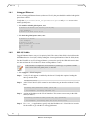
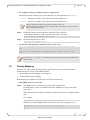
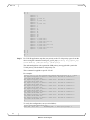
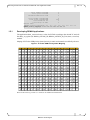
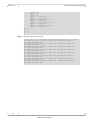
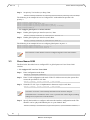
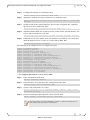
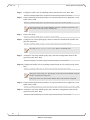
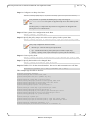
Running RoCE Over L2 Network Enabled with PFC Application Guide 3 Various Switch Configuration 3.1 Mellanox SwitchX® Based Systems Rev. 1.5 The flow below describes how to configure PFC or global pause on Mellanox systems based MLNX-OS® (refer to http://www.mellanox.com/page/ethernet_switch_overview). To configure PFC on SwitchX based systems: Step 1: Enable PFC globally. Run: switch (config) # dcb priority-flow-control enable Step 2: Enable specific priority on the switch (all ports). Run: switch (config) # dcb priority-flow-control priority <level> enable Step 3: Enable specific PFC on specific interface. Run: switch (config interface ethernet 1/1) # dcb priority-flow-control mode on force The following is an example for how to configure PFC enabled on port 1/1 for priority 3: switch switch switch switch (config) (config) (config) (config) # dcb priority-flow-control enable # dcb priority-flow-control priority 3 enable # interface ethernet 1/1 dcb priority-flow-control mode on force # To configure global pause on SwitchX based systems: Step 1: Enable global pause per interface (receive). Run: switch (config interface ethernet 1/1) # flowcontrol receive on Step 2: Enable global pause per interface (send). Run: switch (config interface ethernet 1/1) # flowcontrol send on The following is an example for how to configure global pause on port 1/1: switch switch switch switch (config) # interface ethernet 1/1 (config interface ethernet 1/1) # flowcontrol receive on (config interface ethernet 1/1) # flowcontrol send on (config interface ethernet 1/1) # PFC and Flow Control features cannot be configured together on the same interface. Refer to the Ethernet Quality of Service (QoS) section of the MLNX-OS User Manual for more information. 3.2 Arista Switches (EoS) The flow below describes how to configure PFC or global pause on Arista switches via EoS. To configure PFC on Arista switches: Step 1: Set DCBX mode. Run: switch (config-if-Et10) # dcbx mode ieee Step 2: Enable PFC on specific interface. Run: switch (config-if-Et10) # priority-flow-control mode on 21 Mellanox Technologies