1
Mightex
Version 1.1
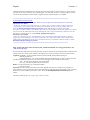
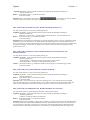
The Title, I use “Mightex V1.0.0” as example
Start (and Stop) Frame
Grab button
The “Show Video Window” button, click it show the
Video window.
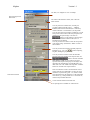
User may select the resolution here, currently, the
provided resolution includes 32x32, …, 640x480,
800x600,1024x768 and 1280x1024( for 1.3M series),
And the selectable “1:2 Decimation”( 2x skip) mode.
User may also select the resolution of rendering, it can be
always fit the video window, OR always keep the same
resolution as the capture image. User must use
button to set the settings to camera engine.
(Note that for minimum resolution 32x32, the 1:2
Decimation is not allowed)
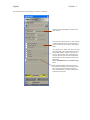
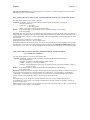
User may use these two slider to select the start position
of the capture image. (ROI feature) While it’s NOT in
full resolution.
User may use these three slider to manually adjust the
is used for adjusting
RGB gains ( 0x – 16x). The
all gains ( RGB gains) proportionally.
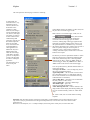
User may use these controls to select the maximum
exposure time range and the current exposure time, the
button is used for Automatic
White Balance (AWB) set, user needs to set proper
exposure time and put a white paper as the object, click
this button will automatically set the RGB gains to get
ideal white color. The “Enable Auto Exposure” checkbox
allows user to enable auto exposure feature.
Start Position of ROI
These two buttons are used to save/load all the current
settings to/from a user defined file, user may set proper
parameters (exposure time, gains…etc.) under a certain
environment and save the parameters to a file named this
environment, e.g. “Sunny Outside.set” or “In Room.set”,
And user may load them back later.
Current selected resolution and frame rate.
The opening device’s Module No. and Serial No.