1
Operation
5.5
Depth-of-Field and Focus Tracking
Using the settings and accessories described in chapter
4.2, the UDM uses the LDD-FP or the WRC-2 with LDD-FP
software option as a display for the actual Depth-of-Field.
As the LDD-FP provides the complete UDM information,
the UDM Display Unit may be disconnected after
parameters have been set.
Indicators on the LDD-FP show the following:
An active UDM (or CTM), the measured distance and
actual Depth-of-Field. Depth-of-Field is shown graphically
as a bar graph and is also displayed as numeric value.
In a cabled configuration the Focus Tracking function can
be activated by pressing and holding the blue tracking
button on the left side of the WHA-3.
Using the wireless setup, press and hold the BRIGHT - UP
button on the LDD-FP.
As long the button is kept pressed, the focus motor will
follow the measured distance.
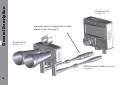
Typical LDD-FP image, indicating
- UDM (CTM) active
- measured distance
green dart and numeric value
- Depth-of-Field
bar-graph and numeric value
13