1
Feedback module with 8 occupancy detectors
Programming:
The available addresses for programming devices range from 1 to 128. Usually the first 64
addresses are for the accessory devices, ie turnouts and signals. The addresses that are normally
used for feedback are usually from 65 to 128. So initially the feedback module that accompanies this
manual is programmed to address 65.
Remember that in order to program the module has to be connected to the command station to get
digital signal in terminals J and K.
Once the cable change, to change addresses starts with the button sequence. Held down until the
red LED lights up and goes into "programming" mode.
In the command station in accessory mode enter and move the number of the accessory you want
as address. Then the command station sends change information that is received by the module,
which ends the "programming" mode and saves this new number. Once the number is entered in the
module, the LED turns off and begins normal operation.
If the feedback module is properly programmed, in the command station you can see the feedback
status (To do so, consult your command station manual). Check the different inputs by current
consumption between GND and the input section number (either by activating the consumption
detector, reed, or even a resistor of 10K). Once a contact is done, is displayed the feedback
occupancy information. If there is no change there, then it is not programmed well and has to repeat
the programming process from the beginning.
Connecting to track sections:
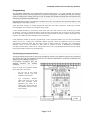
The figure below shows how to connect the feedback module. The different sections are monitoring
the current through the feedback module for the detector dedicated to consumer, bypassing the
digital current to different sections. It
is therefore important that the
different sections are suitably
insulated.
Keep in mind two important details
when make the connection:
-
Do not mix in the same
module current from two
amplifiers or boosters.
-
The occupancy detector
works with only one of the
rails (K), therefore when
operating the same in a
return loop must check the
compatibility with the return
loop module.
Page 3 of 4