1
2. Phone Functions
2.1 Use Your Phone
4. End a call
Press Call Key to enter Phone functions. Please
insert a SIM card before using these functions.
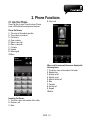
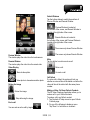
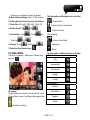
Phone Dial Screen
1. The name of the network provider
2. The number you entered
3. Call History
4. Clear numbers
5. Make a voice call
6. Make a video call
7. Contacts
8. Keypad
9. Hide keypad
10.Menu
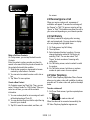
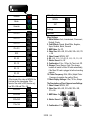
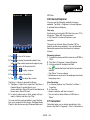
When a call is answered, the screen displays the
following items:
1. The photo, name, and number of the caller.
2. Elapsed time
3. Speaker on/off
4. Mute/Un-mute
5. Hold/Un-hold a call
6. Note
7. Contacts
8. End the call
9. Keypad
10.Menu
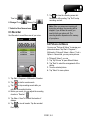
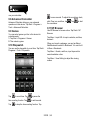
Incoming Call Screen
1. The photo, name, and number of the caller.
2. Receive a call
3. Mute
S1200│2-1