1
1. 2 Mifare reader activation
The Mifare readers are assigned the same way as the fingerprint readers. The only difference is that the
serial number of the Mifare reader is not read out automatically. Save it manually in the ‘serial number’
box. The serial number can be found on the backside of the Mifare reader. To activate the reader select
‘initialise’ subsequently.
2. Door assignment
Log in as configurator.
1.
2.
3.
4.
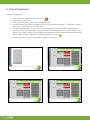
Select the first free door (1) in the access main menu
Select IO configuration (2).
Tap the title bar and save the designation of the door (3)
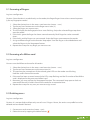
Define the card reader as ‘connected’ (4). Select the installed reader (5) and the desired LED
scheme (see page 14).
5. Now assign the switching output to the door (6). Depending on manufacturer and model the
door opener may be controlled differently. It can be distinguished between open, keep open,
pulse open and pulse close. The ‘impulse duration’ (7) can be saved on the 2nd level (Parameter).
3
1
2
IO configuration Front door
Main menu Access
7
6
4
Assignment card reader
5
Definition pulse time
9