1
Main Menu
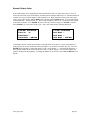
The MAIN MENU displays the options the user can access in the program. Press the Prg button to get to the
MAIN MENU and then use the UP and DOWN arrow buttons to scroll through the menu. The ENTER
button allows displaying of the sub-menu that the greater than sign (>) is located beside. The MAIN MENU
contains ON/OFF CONTROL, STATUS, SYSTEM VARIABLES, FAULT REVIEW, and SECURITY.
On/Off Control Screen
Upon power up, the initial screen will go through a 12 second delay before giving control to the user. The
ON/OFF CONTROL screen will be the next screen. It allows the user to command the chiller on or off. The
display will read ‘CHILLER OFF, PUSH ENTER TO START’. Pushing the ENTER button, will display a
message of ’30 SECONDS TO START!’ and will change to ‘CHILLER ON, PUSH ENTER TO STOP’.
After the 30 second delay, the first compressor will turn on, if needed, and the display will change to the
status screen.
The last line of the screen also can show critical system faults such as WAITING FOR CHW FLOW,
REMOTE SRART/STOP, and POWER PHASE MONITOR.
System Variables
Once power is connected to the master controller, the SYSTEM VARIABLES can be accessed. These
variables determine how the chiller system will run and are assigned default values. For most installations,
these values will provide optimum performance. However, special operating conditions may require different
settings.
Use the UP or DOWN arrow buttons to locate the SYSTEM VARIABLES in the MAIN MENU. The greater
than sign (>) is the cursor indicator. Press the ENTER button to enter the SYSTEM VARIABLES MENU.
Chiller Setup, Customer Resets, Temp Readings, Time and Date, BAS Interface, and Factory Setup are
located in the SYSTEM VARIABLES MENU. Press the ENTER button again to enter one of the sub-menus.
To change the value of a variable, press the ENTER button. A blinking block cursor will appear in that
system variables’ value field indicating that the program is in edit mode. Use the UP or DOWN arrow
buttons to change the value of the variable. To save the new setting, press the ENTER button, pressing the
Esc button will not save the change. The cursor will move back to the upper left corner of the screen
indicating that the program is no longer in edit mode. An asterisk (*) next to the variables indicates that the
SYSTEM VARIABLES are locked and cannot be adjusted. For assistance on unlocking the SYSTEM
VARIABLES, see SECURITY on page 15.
Chiller Setup (System Variables)
The following is a list of SYSTEM VARIABLES for the mechanical cooling modules:
1. UPPER SETPOINT: The designed entering chilled water temperature (ECHW – System sensor) at full
load. The temperature drop across this chiller is based on flow rate. If the design temperature drop (∆T)
is 10°F across the chiller, then the UPPER SETPOINT should be 10°F above the LOWER SETPOINT.
2. LOWER SETPOINT: The desired leaving chilled water temperature (LCHW – System sensor).
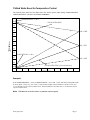
3. VSP SETPOINT: A percentage used to determine the no load chill water temperature. Leaving the
VSP at 0% would keep the control setpoint at the value of the LOWER SETPOINT. Raising the VSP
would incorporate a chilled water reset scheme allowing the control setpoint to change depending on the
ECHW Temperature. As the ECHW Temperature approaches the no load point the control setpoint will
shift accordingly until it equals the no load point. See Graph on page 7 for explanation.
PC02_UM_C00
Page 4