1
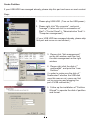
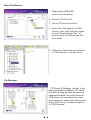
File Backup
1. File Backup.
2. File Restore.
Step
------------------------------------------------------------------------------------------------------------------1. Please plug the USB HDD into the
computer, and turn on the power.
2. Execute PCClone EX.
3. Click“File backup”.
4. Select folders / drives from the fix
device.
5. Set one of USB devices for backup.
(Please refer to “Setup”, and then set
some options for the first time using.)
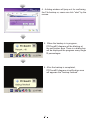
6. Select “Backup” and press
“OK” to start.
14