1
1. User guide
Thank you for purchasing SyncBraille. For the correct use of
SyncBraille, please read this user manual carefully.
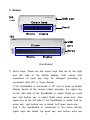
1) ‘SyncBraille’ is brand name of HIMS Braille display devices,
where B20N is a device with 20 cells and B32N is a device
with 32 cells.
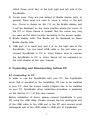
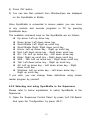
2) For using the SyncBraille, you have to connect this unit to
Voice Sense or PC. But for connecting SyncBraille to PC,
screen reader program must be installed earlier in your PC.
3) There is no cap for USB port of SyncBraille. So please be
careful not to insert dust or moisture in the USB port.
4) Do not use the SyncBraille in the humid place like as
bathroom or shower room.
5) Do not put anything that is heavy on the SyncBraille.
6) Do not reorganize, disassemble and repair the SyncBraille.
These acts will damage the SyncBraille and it cannot be an
exception of warranty service.
2. SyncBraille in the Package
You can find below things when you open the new package.
1) SyncBraille
2) User manual
3) USB cable
4) Driver installation CD
5) Carrying case
1