1
EasyInput – User Installation Manual
EasyInput user installation description
PRODUCT ID
EASYINPUT
(Capital letters, max 9 characters):
Product name
EasyInput – Easy Communication Excel - SAP
EasyInput allows SAP and MS Excel integration via remote SAP transaction/ function module calls
based on scripts defined in MS Excel. EasyInput can be used to create, change or read master data or
transaction data. The typical example of EasyInput use would be data migration.
EasyInput user installation/re-installation steps
Prerequisites: Excel 2007/2010/2013, SAP GUI 7.30 (SP7 or higher) or 7.40, Microsoft operating
system Vista or later.
Prerequisites for the trial version: Internet connection in order to request the temporary license key.
EasyInput installation on user’s workstation is quite easy:
a) Unpack the installation package if provided as compressed (zip) file
Important: Please unpack it to possibly short named folder e.g. C:\TEMP,
as with very deep folder structure the limit on the command line length can be exceeded.
b) Form the subfolder User\UserInstallation\ run ONE of the programs:
Setup.vbs – International (English) version
Setup_DE.vbs – German language version
Setup_PL.vbs – Polish language version
* One need administrator rights to fully install the program on a workstation. After running
the setup.vbs, the user will be asked to confirm administrator rights (press YES) or log in as
administrator. Without these authorizations the installation will not execute correctly
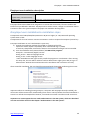
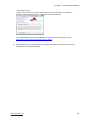
After successful installation, the user should be presented with the window confirming the success:
Important: When re-installing (running setup on a computer with EasyInput already installed), the
old version will be removed first automatically (from version 2.20 on) before the actual installation is
started. To refresh the example files however, one needs to uninstall it and then install once more.
Important: To use EasyInput the user needs authorizations in the SAP system, which are described
in at the end of this manual in the chapter “Authorizations in the SAP system”.
http://easyinput.net
2/7



![[U4.81.12] Opérateur INTE_MAIL_3D](http://vs1.manualzilla.com/store/data/006360284_1-917f4164f1cafb65372c9c035f1a70f5-150x150.png)