1
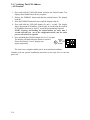
3.8 Programming the Product ID
- OSF/1 V1.3 (or Higher)
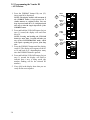
1. Press the FORMAT button fifty two (52)
times (until 61 is displayed)
NOTE: The display number will increment if
the FORMAT button is kept pressed (in a
similar manner to a digital watch). You can
keep it pressed until 50 or 51 is displayed, and
then step to 61 with single depressions of the
FORMAT button.
2. Press and hold the UNLOAD button for just
one (1) second, the display will read from
00 to 16
NOTE: Pressing and holding the UNLOAD
button for more than 2 seconds will take you
out of the CONFIGURATION mode, which
will require repeating the process from Step
One
3. Press the FORMAT button until the display
reads 16, 17, 18 or 19. The display will
sequence from 01 to 17 and back to 01 (or
on drives that support compression from 01
to 20) depending on how many times the
FORMAT button is pressed.
Select 16 for products without loader.
Select 17 for products with loader.
Select 18 for products that support
compression.
Select 19 for products with loader and
compression
4. Press and hold the UNLOAD button for just
one (1) second, the display will flash to
indicate that a save is being made (the
number flashing will be the selected ID
number)
5. Zeros (00) in the display show that you are
ready for the next sequence
PRESS
52 TIMES
1
UNLOAD
FORMAT
PRESS &
HOLD FOR
UNLOAD
2
ONE SECOND
PRESS X
3
TIMES
PRESS X
OR
TIMES
PRESS X
OR
OR
FORMAT
ONLY
TIMES
UNLOAD
FORMAT
UNLOAD
FORMAT
UNLOAD
FORMAT
PRESS X
UNLOAD
TIMES
FORMAT
PRESS &
HOLD FOR
UNLOAD
4
ONE SECOND
FORMAT
ONLY
XX
UNLOAD
5
FORMAT
XX = Number Entered
3.11