1
Bhaskar Joshi et al. / International Journal on Computer Science and Engineering (IJCSE)
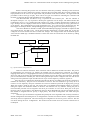
There can be 2 types of connection.
a. Check for connection possibility.
b. Connect.
The first option just checks for connection. It will run few instructions to find out the connection
possibility. Intuitively we can notice that checking the connection will take less time when compare to
connecting the pins. Since connecting will change some constraint values which takes more time. Whereas
checking the connection option will just check for equality. It is called as unification. For example let t1 and t2
be two constraints . t1=t2 can be true or false. If it is true it runs through a set of instructions and if it is false
then it runs through some other set of instructions. Most of the code of solver runs with the principal of
unification.
Now the procedural program that is written in prolog takes the query has input and runs through the
procedure and finds out the solution in no time and gives the output to the user. The user can then proceed with
further connections recursively [5].
II. Working of Solver The solver is designed using Constraint Programming System [5][6]. The constraint programming system
is designed using Prolog. Prolog is a constraint logic programming (CLP) which is used for constraint solving
mechanisms [7]. Here the problems are allocation of resources, scheduling and giving priorities. These problems
can be solved using constraint logic programming.
Prolog is a procedural language. It takes final decision based on some constraints. Constraint logic
programming reduces the development effort. It is easy to design and modify. And an important point to note is,
using prolog we cannot store anything. The program written using prolog is just like an algorithm. As we know
an algorithm cannot store anything. If given an input to the algorithm it comes out with outputs.
Firstly we define the constraints which will have pairs of objects and values. Objects can be a String,
Integer or another object. These objects will also have values. The value will be stored in solver database.
During the runtime the value might be changed. When the user selects the peripheral pin, the system gives him
a set of microcontroller pins. The user can connect to any of the pins from the set. But one pin of peripheral can
be connected to only one pin of the set prompted to the user. The user selecting multiple pins of microcontroller
for one pin of peripheral will be invalid and the tool will not allow becoming invalid. This is done to maintain
the consistency of the system.
The constraints will also have default values. If the user doesn’t wish to
configure some pins then the tool automatically configures the pins with the best possible available
configuration value. The best possible configuration value shall be decided on run time.
A query is picked up from the user. The query consists of five parameters.
1. Microcontroller pin number
2. Microcontroller signal name
3. Peripheral signal name
4. Peripheral pin number
5. Type of connection. conn([port,3,pad,0],pad,[ccu6,0,cc,0],cc,Option).
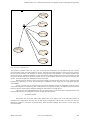
III. Use Case Model
Use case is the factor which always comes into picture before designing the system. It says how in the
world the system is contributing. Fig.2 shows the use case of the system. To start with the user selects the
microcontroller among the myriad of the microcontrollers. After the selection, the graphical tool shows a user
friendly controls which consists of a microcontroller picture and the driver pictures which closely relates to the
real world components. We do this so that the user is close to the hardware virtually. The features are added
with Eclipse Modelling Framework (EMF) which has a rich set of graphics as their package [7]. The drivers are
ISSN : 0975-3397
Vol. 4 No. 05 May 2012
888