1
Contents
9.1.2
9.1.3
Connecting the PC to the RS-232 Port
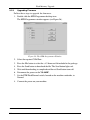
Upgrading Firmware
28
29
9.2
Ethernet Flash Memory Upgrade
33
9.2.1
9.2.2
9.2.3
Downloading from the Internet
Connecting the PC to the RS-232 Port
Upgrading Firmware
33
33
34
10
11
11.1
11.2
12
Technical Specifications
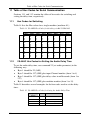
Table of Hex Codes for Serial Communication
Hex Codes for Switching
VS-44HC Hex Codes for Setting the Audio Delay Time
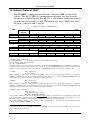
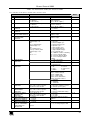
Kramer Protocol 2000
35
36
36
36
38
Figures
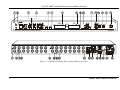
Figure 1: VS-44HC 4x4 Home Entertainment Matrix Switcher
Figure 2: VS-44HC Underside View
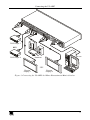
Figure 3: Connecting the VS-44HC 4x4 Home Entertainment Matrix Switcher
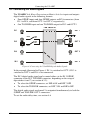
Figure 4: Connecting the VS-44HC Digital Audio Signals
Figure 5: Dipswitch Settings
Figure 6: Connecting a PC without using a Null-modem Adapter
Figure 7: Cascading Individual Units in a Control Configuration via RS-485
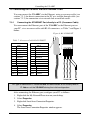
Figure 8: RJ-45 PINOUT
Figure 9: Local Area Connection Properties Window
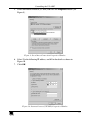
Figure 10: Internet Protocol (TCP/IP) Properties Window
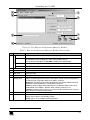
Figure 11: The Ethernet Configuration Manager Window
Figure 12: The Virtual Serial Port Manager Window
Figure 13: The Virtual Serial Port Properties Window
Figure 14: The Virtual Serial Port Properties Window (COM 3 and COM 4)
Figure 15: The Port Window – Selecting a Virtual Serial Port
Figure 16: The Port Window – Selecting a Remote Connection
Figure 17: Storing and Recalling using the Input / Output Buttons
Figure 18: Splash Screen
Figure 19: Atmel – Flip Window
Figure 20: Device Selection Window
Figure 21: Device Selection window
Figure 22: Loading the Hex
Figure 23: RS-232 Window
Figure 24: Atmel – Flip Window (Connected)
Figure 25: Atmel – Flip Window (Operation Completed)
Figure 26: The KFR-Programmer Window
ii
4
6
9
10
11
13
15
16
17
17
19
20
20
21
21
21
25
29
29
30
30
31
31
32
32
34
KRAMER: SIMPLE CREATIVE TECHNOLOGY