1
USER MANUAL
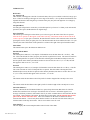
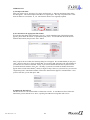
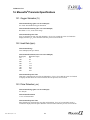
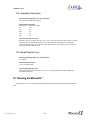
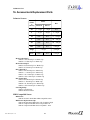
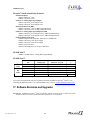
data. The first table is to be used for data collected using software versions Rev 5.0 and greater. The next
two tables are to be used for data collected using software versions prior to Rev 5.0. The second table
provides expressions that allow data subject to the Unstable Pulse Error Codes 1 and 5 to be accepted,
while the third table provides expressions that allow data subject to the Unstable Pulse Error Codes 1 and
5 to be rejected.
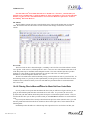
To filter the data for each parameter, type the text of the given formula from the middle column of
one of the following tables into the associated cell in the right column of that particular table. Note that
there are no filters for the Elapsed Time and File Marker parameters.
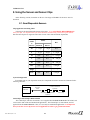
Parameter
Elapsed Time
File Marker
Oxygen Saturation
Heart Rate
Pulse Distention
Breath Distention
Breath Rate
Error Code
Excel Column
A
B
C
D
E
F
G
H
Rev 5.0 and Later
Parameter
Filter Function
Oxygen Saturation
Heart Rate
Pulse Distention
Breath Distention
Breath Rate
=IF(OR(H4=0,H4=2,H4=3),C4,””)
=IF(OR(H4=0,H4=3,H4=4,H4=7),D4,””)
=IF(OR(H4=0,H4=3,H4=4,H4=7),E4,””)
=IF(OR(H4=0,H4=4),F4,””)
=IF(OR(H4=0,H4=4),G4,””)
Formula Cell
Location
I4
J4
K4
L4
M4
Pre-Rev 5.0 – Accept Unstable Pulse Error Codes 1 and 5
Parameter
Filter Function
Oxygen Saturation
Heart Rate
Pulse Distention
Breath Distention
Breath Rate
=IF(OR(H4=0,H4=1,H4=2,H4=3),C4,””)
=IF(OR(H4=0,H4=1,H4=3,H4=4,H4=5,H4=7),D4,””)
=IF(OR(H4=0,H4=1,H4=3,H4=4,H4=5,H4=7),E4,””)
=IF(OR(H4=0,H4=1,H4=4,H4=5),F4,””)
=IF(OR(H4=0,H4=1,H4=4,H4=5),G4,””)
Formula Cell
Location
I4
J4
K4
L4
M4
Pre-Rev 5.0 – Reject Unstable Pulse Error Codes 1 and 5
Parameter
Filter Function
Oxygen Saturation
Heart Rate
Pulse Distention
Breath Distention
Breath Rate
=IF(OR(H4=0,H4=1,H4=2,H4=3),C4,””)
=IF(OR(H4=0,H4=3,H4=4,H4=7),D4,””)
=IF(OR(H4=0,H4=3,H4=4,H4=7),E4,””)
=IF(OR(H4=0,H4=4),F4,””)
=IF(OR(H4=0,H4=4),G4,””)
Formula Cell
Location
I4
J4
K4
L4
M4
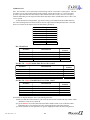
Instructions for Implementing the Error Code Filtering Formulae:
1] Make sure that the numerical data in your Excel file start in Row 4 and that the last column of data
(titled Error Code) are in Column H.
2] Type the EXACT text of the Filter Function from the middle column of one of the three tables
immediately above, into the Formula Cell Location listed to the right of that formula.
3] After the formulas for each parameter are typed in, highlight all of the formulas along that row
P/N 100017, Rev. 5.3.1
48