1
CAM Cube
Hardware Setup
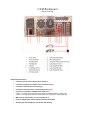
Quick Setup Instructions:
•
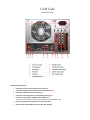
Connect the power cord to the AC power socket (1)
•
Connect the keyboard and mouse to the correct ports (2) (3)
•
Connect the ethernet cable if necessary (6)
•
Connect the monitor(s) to the corresponding port(s) (8) (9)
•
Connect the camera(s) to the BNC Camera Inputs (11)
Camera 1 is located in the lower left camera inputs are ordered bottom to top.
•
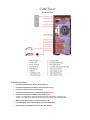
Press the power button located on the front of the cube
•
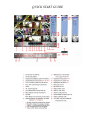
All camera(s) should display on the monitor after booting