1
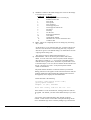
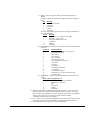
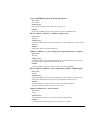
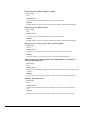
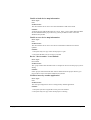
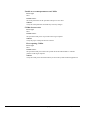
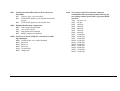
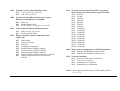
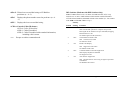
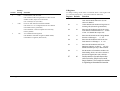
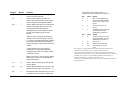
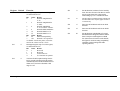
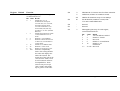
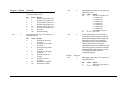
Yn Selects power-on/reset default configuration. Y0 Default is profile 0 setting in NVRAM Y1 Default is profile 1 setting in NVRAM &Cn Controls Carrier Detect (CD) signal. &C0 CD override &C1 Normal CD operations Z Resets modem. Z0 Resets modem to NVRAM profile selected by Y command or dip 7. Z1 Resets modem to NVRAM profile 0 Z2 Resets modem to NVRAM profile 1 Z3 Resets modem to factory default profile 0 (&F0) Z4 Resets modem to factory default profile 1 (&F1) Z5 Resets modem to factory default profile 2 (&F2) &Dn Controls Data Terminal Ready (DTR) operations. &D0 DTR override &D1 DTR toggle causes online Command mode &D2 Normal DTR operations &D3 Resets on receipt of DTR &$ Displays a list of ampersand (&) commands. &A Enables/disables additional result code subsets (see Xn). &A0 ARQ result codes disabled &A1 ARQ result codes enabled &A2 V.32 modulation indicator added &A3 Protocol indicators addedLAPM/MNP/NONE (error control) and V42bis/MNP5 (data compression) &Bn Manages modem’s serial port rate. &B0 Variable, follows connection rate &B1 Fixed serial port rate &B2 Fixed in ARQ mode, variable in non-ARQ mode A-4 • Appendix A: AT Command Set &Fn Loads a read-only (non-programmable) factory configuration. &F0 Generic template &F1 Hardware flow control template &F2 Software flow control template &Gn Sets Guard Tone. &G0 No guard tone, U.S. and Canada &G1 550 Hz guard tone, some European countries, requires B0 setting. &G2 1800 Hz guard tone, U.K., requires B0 setting. &Hn Sets Transmit Data (TD) flow control (see also &Rn). &H0 Flow control disabled &H1 Hardware flow control, Clear to Send (CTS) &H2 Software flow control, XON/XOFF &H3 Hardware and software flow control Users Guide