1
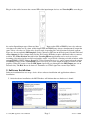
Plug in video cables between the external HD video input/output devices and VoverlayHD, according to
, Input socket SDI or HDMI is in use by software
the socket Input/Output types illustrated here:
selection to be either one at a time, while Output SDI and HDMI ports always simultaneously output the
same Video + Overlay (or Video only, Overlay only, depending on Card Operation Selection) content.
There are also an optional SDI Output 2 (Same Content as SDI Out on the back panel) Socket JD10 and
a Key Output (Overlay Output Only) Socket JD12 on the PCB that require additional cables to connect
to them. The Video Preview function of the VoverlayHD.exe application can be used to view the
incoming video mixed with overlaid text/graphics on PC screen inside a floating resizable window, while
external HDMI / SDI TV, Bluray Recorders, Video Capture Devices etc. can be connected to the output
SDI/HDMI sockets of the VoverlayHD card to receive its live video output including overlaid text and
graphics. When PC power is lost the SDI Input signal will pass through to the SDI Output port via an
internal relay. The Ref. In can be from a Y luminance or CVBS signal for external Sync Mode.
5. Software Installation
Software installation has two steps: device driver software installation and application software
installation.
5.1 After hardware installation, the MS Windows will inform that new hardware is found:
VoverlayHD Application User Manual
Page 3
Version 1.0.0.0